





How This Online Shoe Retailer Transformed Itself by Reducing its Workload by Two Hours Per Day

4384
Of your peers have already read this article.
4:15 Minutes
The most insightful time you'll spend today!
By offering customers a choice of 30,000 shoe styles at reasonable prices with a straightforward returns policy, Footway has become one of the largest online shoe retailers in Europe. Founded in 2011 and based in Kista, Sweden, the company has grown to become a market leader and four years ago acquired the Heppo and Brandos brands.
In 2017, Footway expanded from the Nordic market to seven other European countries: Poland, Holland, the UK, France, Germany, Austria, and Switzerland.
To build the business, Footway has had to prove to its customers that buying shoes online is quick and easy. That means, at the backend, processing returns and queries efficiently to provide a seamless consumer experience. However, as the company’s IT infrastructure grew organically, its data storage procedures were not clearly systematized, which made it difficult to implement the efficient, time-saving processes that enable Footway to provide its excellent customer service.
The company needed to move its team onto a system that would resolve this issue, and make compliance to ever-changing data regulations easier. Implementing G Suite was the answer.
“One of our strategic objectives is to automate processes and increase efficiency in our organization,” says Louise Liljedahl, HR Manager and Co-founder at Footway. “We want to work more efficiently every day. One of our main goals with the G Suite project was to get everyone working in the same platform with good structure.”
Systematizing data storage
In order for a relatively small team to run a big retail operation, good organization and process automation are key. Before working with Google Cloud, Footway’s communications and data storage processes were not systematized, making it difficult to work effectively. “Our internal IT had many different places to save files, and, for example, no structure for where to save pictures or graphic elements or where to archive agreements,” explains Louise. “Another trigger for change was the GDPR. To be compliant, we needed to see who has access to what information, and looked for good audit systems to control those permissions”. To do that, Footway implemented G Suite.
With support from implementation partner Avalon Solutions, the migration of the company’s calendar, contacts, and email data using CloudMigrator was swift and seamless. “The transformation process was very lean and quick,” says Louise. “We had a small test group of six people working with G Suite for two weeks to see how to move over to Google Sheets from Excel, for example. Everyone was very enthusiastic.”
To systematize its storage and make day-to-day working easier, Footway moved its document and images to Google Drive. This means Footway can control access both internally and externally. “Google Drive helps us keep everything in the right place. And it is definitely an easier way to share things when it comes to working with external partners, as we know exactly who we’re sharing documents and information with.”
Increasing automation
Following the move to G Suite, Footway automated communications with influencers and bloggers using Gmail and Google Forms. This saves time and means more bloggers can be contacted.
“We send automatic emails through G Suite to different influencers to set up cooperative agreements and partnerships,” says Louise. “Using Gmail and Forms has helped us to go from having contact with 4 bloggers a day, to 200 a day. The person responsible saves two hours a day from his or her workload with this new process.”
Achieving stable growth
Thanks to G Suite, Footway’s data is now organized in a way that is easily accessible and highly secure. “It’s much easier to find company and client information because it’s structured,” says Louise. “That saves a lot of time when searching for something.” The ways people can collaborate have also been transformed, as Footway made the switch to using Google Chromebook, encouraging more flexible working and spontaneous collaboration. “Before, people would take notes on paper and come back to their computer to write everything down. Now they use their Chromebooks instead and have more small, spontaneous meetings.”
Now, Footway plans to extend the use of Chromebooks and to use the functions G Suite offers to further automate the company’s daily processes and grow the business. “People tend to be fearful of change, but this one has been very positive for the whole organization,” says Louise. “We’re excited about how G Suite can help us as a company to grow in a stable way. We can automate processes and use Google products to work more efficiently.”
Nubian Skin Beats Spikes in Customer Interest with G Suite

4211
Of your peers have already read this article.
2:30 Minutes
The most insightful time you'll spend today!
“Nude” comes in all shapes, sizes and colors. But for Ade Hassan, finding undergarments to match her skin tone took more effort than necessary. Born in the U.K. to Nigerian parents, Hassan searched unsuccessfully for underwear and swimwear that matched her skin—a problem that continued to frustrate her through college and into her professional life.
“My nude isn’t the nude I see in shops,” Hassan says.
Like many other black entrepreneurs, she created her own solution. Hassan founded Nubian Skin, a company that sells lingerie, hosiery, and swimwear for women of color.
With shades like “cafe au lait” and “berry,” Nubian Skin products reflect diverse skin tones and are sold in shops located in the U.K., Nigeria and the U.S., as well as online. Beyoncé and her dancers even asked Nubian Skin to outfit them for their 2017 “Formation” tour.
Since nearly the beginning, Hassan has used G Suite to keep her business humming.
From managing meetings with retailers and manufacturers, to coordinating publicity efforts with fashion press, to keeping track of retail invoices, G Suite has helped Hassan scale her business as quickly as people have demanded her products.
“There are so many pitfalls and so many things that are hard about business,” Hassan says. “It’s really amazing to have something like G Suite that is easy and intuitive.”
Nubian Skin’s fashion fame arrived seemingly overnight. When Hassan posted the company’s first campaign images, its Instagram followers jumped from 50 people to more than 20,000 in just a few weeks.
“People called asking, ‘Can we have the contact for the press department?,” says Hassan. “But at the time, it was just me.” To easily handle media requests, she set up a press@nubianskin.com email address through the G Suite Admin console. And because she had used Gmail for several months before launching the company, using the business version of Gmail came naturally.
“Having that nubianskin.com address gave the business an air of professionalism, which we wouldn’t have had otherwise,” Hassan says. “Usually you need a whole IT department to set up new emails and passwords, but the Admin console removes the hassle of that process.”
Because Nubian Skin employees aren’t always in the showroom together, they need to be able to access business documents—like model photos and customer invoices—from anywhere.
To help, Hassan securely stores business documents in Google Drive (which can be accessed on mobile, too) and works collaboratively with her finance team to process orders using Google Sheets.
“Everyone has access to the spreadsheet so we can fill in what we need at any given point,” says Hassan. “This way, nothing slips through the cracks.”
And when she needs to connect with colleagues quickly or face-to-face, she uses Hangouts Chat or Hangouts Meet. Chat makes it so employees are only a message away, and Meet helps her connect with people as if they’re in person at the office.
Five years after launching Nubian Skin, Hassan is a recognized entrepreneur who’s influenced other retailers to create more inclusive designs.
“Even if you’re small, you want people to see you as a professional business,” Hassan says. “If you’re still growing, you need the building blocks to get you where you want to be. I can’t imagine working without G Suite.”
Active Assist Expands Globally: Unleashing Cloud Optimization Insights Worldwide

1285
Of your peers have already read this article.
3:30 Minutes
The most insightful time you'll spend today!
Active Assist provides insights and recommendations to help Google Cloud customers proactively optimize their cloud environments for cost, security, performance, and sustainability. If you’re like most customers, you’ve likely encountered these insights and recommendations in the console — either in the Recommendations Hub or embedded on a resource page, like IAM or the VM list pages. (Note that for the rest of this post, we’ll use the word “recommendations” to mean “insights and recommendations.”)
We heard from customers who love recommendations that it should be easier to discover and work with these valuable suggestions across an entire organization, so last year we launched the Recommendations BigQuery export feature to Preview. This allows you to automatically export the recommendations to a BigQuery dataset, which you can then investigate with tools like DataStudio or Looker, and integrate with your company’s existing monitoring solutions and workflows.
Many of you have told us how powerful this feature is, so we’ve been working hard on improvements to make it even more useful. We’re happy to announce that BQ Export 1.0 is now in GA, and that BQ Export 2.0 is in Preview, with new support for Billing Account-level recommendations and cost optimization recommendations that include discount information. This post will cover what’s new with Active Assist BQ Export, as well as a couple other new features of Active Assist.
New features to Active Assist BigQuery Export
Before we dive into the details, if you’re new to Recommendations BQ Export check out our handy getting started guide. It covers the permissions you’ll need and how to set up the export, including instructions for using a service account. It also includes some sample queries and instructions for interacting with the data using Google Sheets. You may also want to check out our prior blog post showing how to optimize your cloud spend with BigQuery and Looker.
Now, on to what’s new!
1. Non-project scoped recommendations
You can now see non-project scoped recommendations, such as billing account, organization, and folder-level recommendations in your export to BigQuery. This ensures that in your export, you are able to see the full portfolio of recommendations that are available to you.
2. Custom contract Pricing
If you have any applicable custom contract pricing for your company, your cost-related recommendations now take those into account (based on your historical costs) in the cost saving calculation when you export them to BigQuery. This will ensure that you have the most accurate cost savings data we have for you and your organization to help you make the best judgment and prioritization when choosing to adopt recommendations. However, you must have the correct permissions first in order to see the custom contract pricing. If the user executing the export to BigQuery does not have the correct permissions, you may continue to see list pricing in your estimated savings. Also, note that the console UI and the Recommender API already have this support.
3. Export now available globally
Customers outside of the US can now set up an export of recommendations to a BigQuery dataset.
Improvements to Active Assist discoverability and usability
1. Global Recommender Viewer role: You can now add the global Recommender Viewer role, which gives you view access to all insights and recommendations available to you, simplifying permission management for new recommenders. Newly launched recommendations will also automatically be added as they become generally available.
2. Dismiss recommendations via Recommender API: You can now directly dismiss recommendations via our API, allowing you to focus on the recommendations you care about and work more efficiently.
3. Shareable links: Another feature that quietly launched recently is the availability of shareable URLs that link to recommendation details in the console. You can access these links in the UI from the upper right of the details panel of any recommendation.
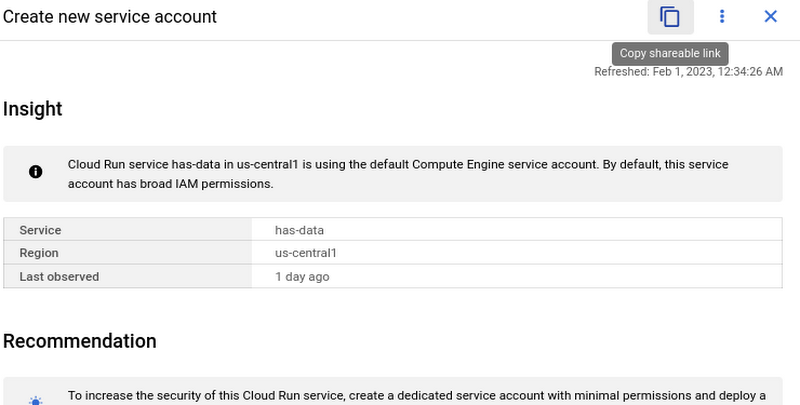
However, these links become even more powerful when combined with Recommendations BigQuery Export. The URLs all have a standard format. This means that within the BigQuery export tables you can easily calculate a new column containing these links using an expression like:
“https://console.cloud.google.com/home/recommendations/view-link/” +
name +
“?project=” +
cloud_entity_id
This example is for project level recommendations (where cloud_entity_type = PROJECT_NUMBER).
For cloud_entity_type = FOLDER, use:
“https://console.cloud.google.com/home/recommendations/view-link/” +
name +
“?folder=” +
cloud_entity_id
For cloud_entity_type = ORGANIZATION, use
“https://console.cloud.google.com/home/recommendations/view-link/” +
name +
“?organizationId=” +
cloud_entity_id
These links can then be embedded in your reports and dashboards, or used by other BigQuery clients.
As a reminder, if you’re interested in setting up reports or dashboards using Recommendations BigQuery Export, take a look at this previous blog post for some great ideas, or you can reference our getting started guide. If you have any feedback, please feel free to reach out to active-assist-feedback@google.com.
Stay on Top of Your Cloud Monitoring with Google’s Mobile App

1533
Of your peers have already read this article.
3:30 Minutes
The most insightful time you'll spend today!
We are pleased to announce the availability of Google Cloud Monitoring uptime checks in the Google Cloud mobile app.
The uptime check capability offered by Cloud Monitoring is a simple yet powerful observability tool to monitor an application’s availability and performance on URLs provided by customers. The primary purpose of an uptime check is to track resource availability on an on-going basis. It’s essentially a pulse check for a system and is often the first to detect impending issues. Using uptime checks can proactively detect availability and latency issues with an application and reduce the time and severity your users are impacted by an outage. Uptime check can validate if the response code from your application is as expected, and also the latency of your service from different regions. Uptime checks can further inform your SLAs and SLOs, and track your service’s health over time. SREs at Google use uptime checks as an important part of their daily routine.
Given the critical role served by uptime checks, we heard your feedback on having the ability to track these checks in the Google Cloud mobile app. With this launch SRE’s, operators or administrators can do exactly that, in addition to easily accessing their cloud resources (App Engine, Compute, Databases, Storage), managing permissions using IAM, viewing logs, incidents, errors, and billing.
To access uptime checks, simply tap the “Operations” tab in the Google Cloud mobile app on your iOS or Android device.
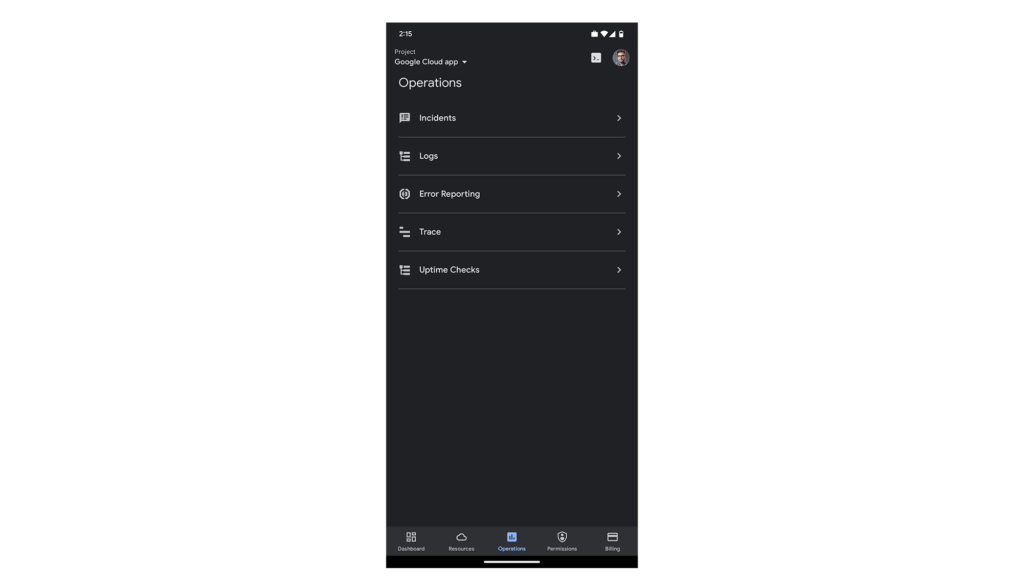
After navigating to “Uptime Checks”, you will see a list of all the services you have previously added using the Create public uptime check documentation.
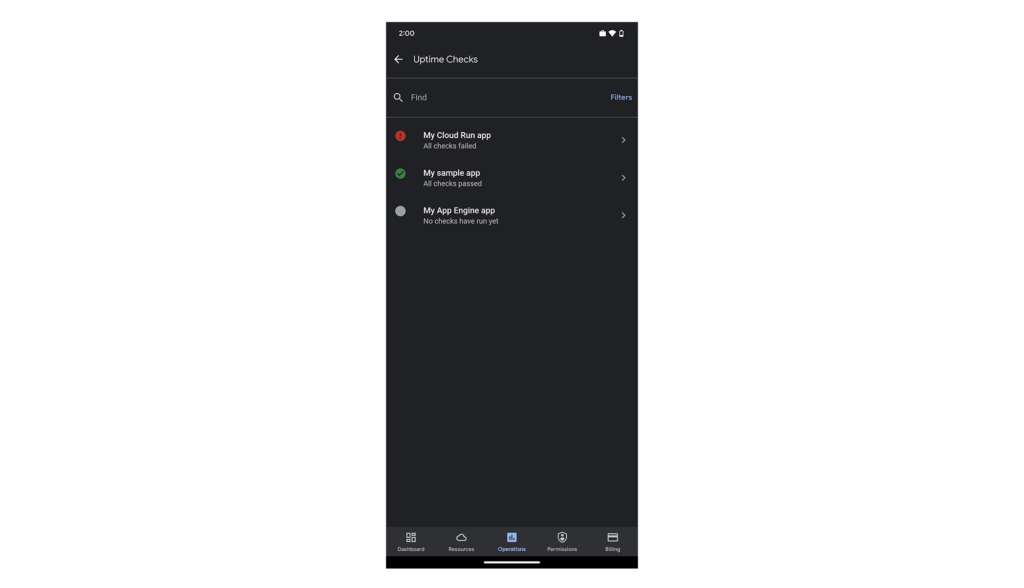
The list is sorted by status, so all failing checks are at the top. You can easily filter by status using the “Filters” option in the top-right corner of the screen.
Tapping any of the uptime checks will take you to the “details”-screen.
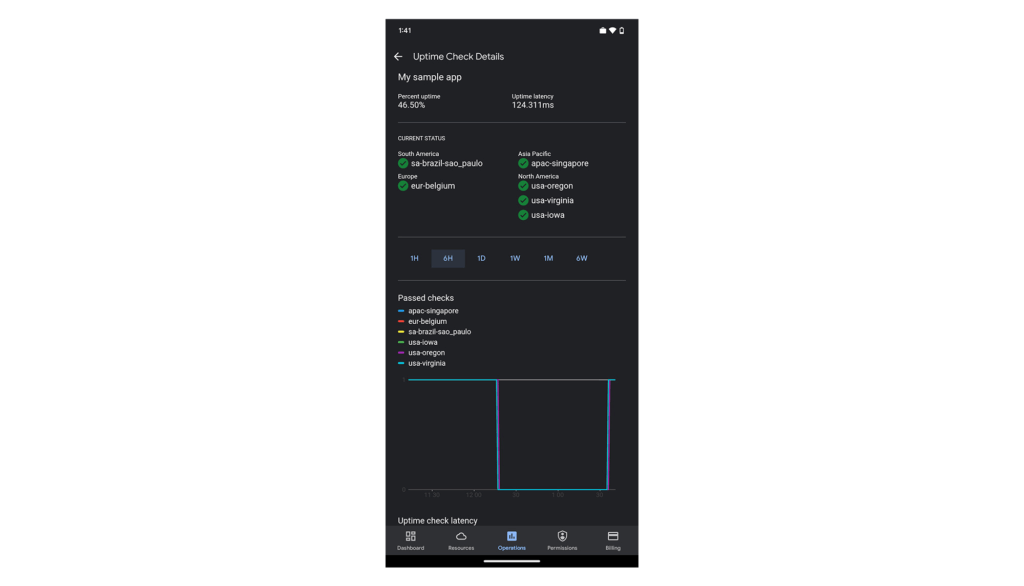
Here you’ll see your application’s uptime, latency, status per region (if you’re monitoring your application from more than one cloud region) and graphs to give you a sneak preview. The “passed check”-graph is showing how many checks passed in the last hour up to 6 weeks. You can easily change the interval using the scale above the graphs.
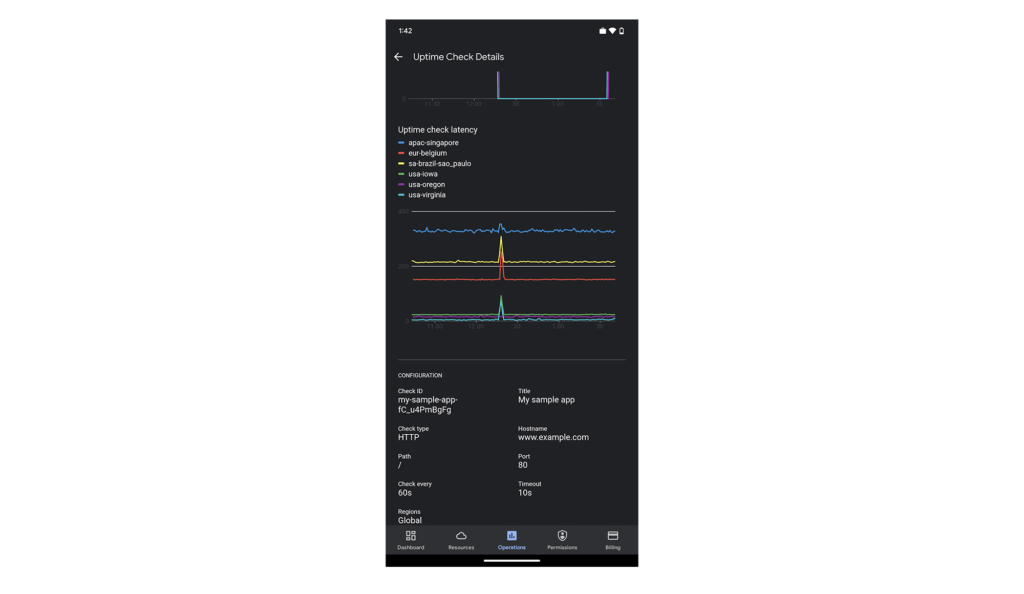
Scroll down the page to see more data. At the bottom of the screen, we’ve included some configuration details for this uptime check, so you can check the above data against this specific setting.
We hope you find this new uptime check feature useful in your daily work. To create new uptime checks, start here: Create public uptime check.
We’re working hard to make the Google Cloud app your companion for monitoring and managing your Google Cloud resources on the go.
For pricing information on uptime checks, please see the Cloud Monitoring pricing summary.
This new feature is available for you to use today. If you have any feedback, we would love to hear from you — just click the “Send feedback” button in the app. And if you don’t have the app – go ahead and download the app today from Google Play or the Apple App Store.
15 Companies–from Korean Air to Salesforce–Share How G-Suite and Google Meet Help Them Battle COVID-19

5049
Of your peers have already read this article.
4:30 Minutes
The most insightful time you'll spend today!
More than a decade ago we introduced secure, easy-to-use business collaboration and productivity apps (now known as G Suite), and we envisioned a new way of working in the cloud. And although we always knew the value of cloud-based collaboration, it is more important than ever at a time like this.
Over the past several weeks, we’ve seen Google Meet—G Suite’s video conferencing solution—help millions of people stay connected, whether it’s colleagues working at home, companies livestreaming to global employees, doctors caring for patients, banks providing loans, retailers and restaurants helping the elderly place orders for home delivery or curbside pickup, social services conducting welfare checks, governments serving citizens, or schools staying in session.
In the first week of April Earlier this week, we surpassed a new milestone, with more than 2 million new users connecting on Google Meet every day, and they’re spending over 2 billion minutes together—that’s more than 3,800 years of secure meetings in a single day. We’re humbled by the huge responsibility that comes with this growth, and we’re determined to continue doing our part to help.
Here’s a little more on what that means.
Meet, and all of G Suite, runs on Google’s secure, resilient global infrastructure, which helps us reliably manage our capacity to keep our services up and running. With Meet, organizations around the world can take advantage of the same secure-by-design infrastructure, built-in protection, and global network that Google uses to secure your information and safeguard your privacy. You can learn more in our Google Meet security blog post.
Last month, we made advanced Google Meet video-conferencing capabilities available at no cost to all G Suite and G Suite for Education customers. We’ve now extended that availability to September 30, 2020 to ensure businesses, organizations, institutions, and educators continue to be supported during this time.
Earlier this year, G Suite also hit another important milestone, surpassing six million paying businesses and organizations. We’re acutely aware of our responsibility to these teams as they support their own constituents, patients, students, and customers during this pandemic. Here are a few stories they’ve shared.
Cambridge Health Alliance, a health system with 140,000 patients in Cambridge, Somerville, and Boston’s Metro North region, has relied on G Suite to support its staff and caregivers. “We didn’t realize how integral G Suite had become to our daily work until dealing with a pandemic where consistent communication with our CHA staff was of utmost importance,” said James LaPlante, Sr. Director, Technology and Biomedical Services. “With one click, staff have been able to connect from their Gmail, Calendar, or from Meet-enabled conference rooms across three hospitals, 15 health centers, or from home.”
In the UK, Hackney Council is using G Suite, Meet and Chromebooks to keep its team of 4,000 staff connected and to make sure that essential services can still be delivered for its citizens.
In Peru, the Judiciary branch is using Meet to continue operating during the nation-wide quarantine. Through video conferences they are carrying out both internal meetings and also hearings. By doing this, attorneys, lawyers and judiciary clerks don’t have to physically attend court, keeping the virus from spreading, while maintaining the administration of justice in the country.
Korean Air has transformed its internal business system with G Suite since July 2019, creating a positive company culture. Employees communicate effectively with G Suite in a variety of ways, including chat, voice, and video, which reduces decision-making time. Korean Air recently opened a ‘Google G Suite Meeting Room’ within the company to further enhance its cloud-native communication capabilities and accelerate mobile-based collaboration.
German manufacturing company KAESER Compressors adopted G Suite in 2018, which allowed them to transition 4,000 employees to working from home smoothly, with minimal disruption. They are using G Suite to connect with customers and job applicants.
When their news anchor voluntarily self-quarantined after suspecting he had been in contact with a person with COVID-19 during a convention, Milenio Televisión, a Mexican television cable news channel, had to figure out how to keep their show on the air. They chose Meet for its security, and high quality image and sound. Milenio Televisión is now broadcasting multiple shows through Meet and has been using the tool to have video conferences with correspondents in other countries.
To help its staff cope with the impact of COVID-19, Italian bank Credem (Credito Emiliano S.p.A.) relied on G Suite, in particular Drive, Docs, and Meet, to seamlessly adapt to a collaborative work-from-home environment. It’s also helping them maintain business continuity, relying on Meet to continue to meet one-on-one with customers.
In the Philippines, the Department of ICT (DICT) is responsible for the planning and development of information and communications technology. As a result of COVID-19, the department has been continuously seeking ways to improve its programs and services to help quarantined workers and citizens, including use of GovMail, which is built on G Suite, Google Chat, and Google Meet. “The migration to cloud-based GovMail which started last year has proven to be particularly useful for remote government operations in this time. Coordination between government agencies is more organized, resulting in faster responses benefitting their constituents,” said Emmanuel Rey Caintic, DICT Assistant Secretary for Digital Philippines.
Kärcher, a German company known for its wide range of cleaning products, had initially planned to roll out G Suite to its workforce by 2021. In response to the pandemic, Kärcher rapidly accelerated their rollout, deploying G Suite to its entire 14,000 workforce in only five days. As of the end of March, Kärcher’s number of weekly active Meet and Chat users has grown by 20X.
Salesforce’s CRM solution brings companies and customers together, and they turned to G Suite to bring their own teams together. “With Salesforce employees working from home given COVID-19, innovative solutions like Meet are even more critical for effective virtual collaboration,” said Andy White, VP, Platform Engineering Salesforce. “Even with 2x our daily video calls—50,000 every workday—Google Cloud’s scale and support keep our teams reliably and seamlessly connected.”
The team at Shopify, a leading global commerce company, is relying on Meet to help them keep their workforce connected. “Even with the demand surges seen around the world, recently we had a 20 person meeting livestream to 4,000 people and there were no issues,” said Garth Pyper, Director of Technical Infrastructure. “Google Meet is our primary means of video conferencing across 5,000 people at Shopify, and we are grateful for the security, reliability, and flexibility it provides.”
With the global move to a fully remote workforce during COVID-19, software company Xero has embraced G Suite to help them make a smooth transition. “Google Meet is vital in keeping our teams socially connected, and Docs, Gmail and the full G Suite family of apps has the team’s productivity and collaboration working as if we were in the office. The reliability and performance of G Suite has allowed the IT team to focus on other challenges we face with a remote workforce.”
In Singapore, NTUC Fairprice Co-Operative, the largest supermarket chain of the island nation, has experienced a surge of 400%+ increase in capacity needs as customers urgently prepare for COVID-19 with in store and online purchases of all the necessities. With the help of G Suite, NTUC was able to handle this increased demand even as they transitioned the vast majority of their workforce to remote work.
Schnucks, a family-owned supermarket retailer with 100 stores in Missouri, Illinois, Indiana, Iowa and Wisconsin, was able to think outside the box to keep their business running and employees safe and connected. “We are running our Helpdesk 24/7 on Google Meet so that both our corporate and in-store employees can join in and get questions answered quickly. Our transportation department is able to practice social distancing by using a Google Meet ‘hotline’ as the WFH dispatch platform.”
Meet had long been the standard collaboration tool for TELUS International, which provides customer experience solutions for global brands. “The Meet platform has helped us maintain and foster our caring culture as we transitioned from an on-site workforce to a work from home model,” said Michael Ringman, Chief Information Officer. “Whether through real-time collaboration, live meetings or a little stress relief with some virtual happy hours, our team’s ability to reliably connect ‘face-to-face’ through Google Meet has been integral to keeping us engaged despite the distance between us.”
These are just a few of the many stories we’ve heard. We’ll continue to support all our users to stay connected in the cloud. Read more on how Google Cloud is supporting businesses and communities here.
4899
Of your peers have already watched this video.
9:37 Minutes
The most insightful time you'll spend today!
L’Oréal: Managing Big-data Complexity with Google Cloud
L’Oreal is a global company with a presence in 150 countries worldwide. Between managing all of its brands and requirements for different countries, L’Oreal looks to data to make insightful business decisions. How does L’Oreal unify its data across all its systems and databases? How does L’Oreal make the data accessible to thousands of employees? In this video, Antoine Castex, Enterprise Architect at L’Oreal, discusses with Martin Omander how L’Oreal built a serverless, multi-cloud warehouse based on Google Cloud.
Chapters:
0:00 – Intro
0:23 – Why does L’Oreal need a new data warehouse?
0:51 – Who is the L’Oreal group?
1:35 – Which systems does L’Oreal use?
2:14 – How does L’Oreal manage complexity?
3:59 – What is ELT?
4:57 – Who are L’Oreal’s data consumers?
5:41 – How L’Oreal built the data warehouse
8:51 – L’Oreal’s future plans
9:10 – Wrap up
Google Cloud Workflows → https://goo.gle/3q20M1V
Cloud Run → https://goo.gle/3CSWbXG
Eventarc → https://goo.gle/3B7qhFy
BigQuery → https://goo.gle/3KHgyJ3
Looker → https://goo.gle/3Rx4Ind
Checkout more episodes of Serverless Expeditions → https://goo.gle/ServerlessExpeditions
Subscribe to Google Cloud Tech → https://goo.gle/GoogleCloudTech
More Relevant Stories for Your Company

How G Suite helps businesses evolve to more flexible and distributed work models
There are many inspiring stories of businesses reacting swiftly to the global pandemic. Some companies have enabled their teams to re-imagine not only how they communicate and collaborate with each other remotely, but also how they continue to serve their own customers and support the communities they belong to. From
Now on Mobile: Manage Your Google Cloud Support Cases Anywhere, Anytime
We’re excited to announce that Google Cloud Support is now available as Public Preview* in the Google Cloud mobile app. View and manage Google Cloud Support cases We understand how important it is to be able to access and collaborate on Cloud Support cases. As such, we’ve made it easy for you to

Customer Voices: How Firms from Across Industries Leverage Google Cloud
From powering everyday operations and accelerating application innovation, to providing tools for specific business needs and executing on big ideas, to advancing the security of technology solutions, companies from across industries have leveraged Google Cloud for business benefits. Companies from across industries have turned to Google Cloud for transforming their

From operations to planning, G Suite customers scale data insights with Connected Sheets
We recently announced the general availability of Connected Sheets, which brings you the power and scale of a BigQuery data warehouse in the familiar context of Google Sheets. With Connected Sheets, you can analyze billions of rows and petabytes of data in Sheets without specialized knowledge of computer languages like SQL.
