





5037
Of your peers have already watched this video.
21:00 Minutes
The most insightful time you'll spend today!
Uber’s Story of Scaling Their App with Millions of Concurrent Requests
Uber has millions of concurrent customers who use the platform to book rides and place food delivery orders, generating billions of database transactions per day. In just a click of a button, Uber captures users’ intent which bases their fulfillment model to meet the customers’ demand, and match it to active providers that address their demand with supply.
Uber’s fulfillment platform capability is the lifeline powering every line of business and also allows rapid scaling of new verticals. Hundreds of microservices at Uber depend on this fulfillment platform as a source of truth for all their active booking, delivery or order session. The events generated by this platform are used by hundreds of offline data sets to power business decisions. Additionally over hundreds of developers at Uber extend the platform with APIs, events and codes to build 120+ unique fulfillment flows!
Watch the video to learn about Uber’s decision to move from on-prem to Google Cloud’s Cloud Spanner while still taking live orders at scale and meeting customers’ expectations.
Two Ways to Deploy SAP HANA System on Google Cloud

7875
Of your peers have already read this article.
4:00 Minutes
The most insightful time you'll spend today!
Many of the world’s leading companies run on SAP—and deploying it on Google Cloud extends the benefits of SAP even further. Migrating your current SAP S/4HANA deployment to Google Cloud—whether it resides on your company’s on-premises servers or another cloud service—provides your organization with a flexible virtualized architecture that lets you scale your environment to match your workloads, so you pay only for the compute and storage capacity you need at any given moment. Google Cloud includes built-in features, such as Compute Engine live migration and automatic restart, that minimize downtime for infrastructure maintenance. And it allows you to integrate your SAP data with multiple data sources and process it using Google Cloud technology such as BigQuery to drive data analytics.
SAP server-side architecture consists of two layers: the SAP HANA database, and the Netweaver application layer. In this blog post, we’ll look at the options and steps for moving the database layer to Google Cloud as a lift and shift or rehost, a straightforward approach that entails moving your current SAP environment unchanged onto Google Cloud.
Deploying an SAP HANA system on Google Cloud
Google Cloud offers SAP-certified virtual machines (VMs) optimized for SAP products, including SAP HANA and SAP HANA Enterprise Cloud, as well as dedicated servers for SAP HANA for environments greater than 12TB. (For a complete list of VM and hardware options, visit the Certified and Supported SAP HANA Hardware Directory.)
Before proceeding with a rehost migration to Google Cloud, your current (source) environment and Google Cloud (target) environments should meet these specifications:
Prerequisites:
- The configuration of the Google Cloud environment (i.e., VM resources, SSD storage capacity) should be identical to that of the source environment. If the underlying hardware is different, however, you must use Option 2 for your migration, detailed below.
- Both environments should be running the same operating system (SUSE or RHEL Linux).
- The HANA version, instance number, and system ID (SID) should be identical.
- Schema names must remain the same.
- Establishing the network connection between the on-premises environment and Google Cloud will be required in this phase to support rehost of the SAP application.you can use Cloud VPN or Dedicated Interconnect. Learn more about Dedicated Interconnect and Cloud VPN.
Note: Depending on your internet connection and bandwidth requirements, we recommend using a Dedicated Interconnect over Cloud VPN for production environments.
We offer a number of automated processes to accelerate your cloud journey. To deploy the SAP HANA system on Google Cloud, you can use the Google Cloud Deployment manager or Terraform and Ansible scripts available on GitHub with configuration file templates to define your installation. For more details, see the Google Cloud SAP HANA Planning Guide.
Note: To deploy SAP HANA on Google Cloud machine types that are certified by SAP for production, please review the Certification for SAP HANA on Google Cloud page.
Moving an SAP HANA Database to Google Cloud
There are two different options you can use to rehost your SAP HANA database to Google Cloud, and each has pros and cons that you should consider when deciding on your approach.
Option 1: Asynchronous replication uses SAP’s built-in replication tool to provide continuous data replication from the source system (also known as the primary system) to the destination or secondary system—in this case residing on Google Cloud. It’s best for mission-critical applications for which minimum downtime is a high priority, and for large databases. In addition, the high level of automation means that the process requires less manual intervention. Here’s where you can learn more on HANA Asynchronous Replication.
Option 2: Backup and restore relies on SAP’s backup utility to create an image of the database that is then transferred to Google Cloud, where it is restored in the new environment. Downtime for this method varies by database size, so large databases may require more downtime via this method vs. asynchronous replication. It also involves more manual tasks. However, it requires fewer resources to perform, making it an attractive option for less urgent use cases. Here’s where you can learn more on SAP HANA database Backup and restore.

How to migrate the SAP HANA database to Google Cloud using Asynchronous Replication

- Create and configure Dedicated Interconnect or Cloud VPN between the current environment and Google Cloud.
- Set up SAP HANA asynchronous replication. You can configure system replication using SAP HANA Cockpit, SAP HANA Studio, or hdbnsutil. See Setting Up SAP HANA System Replication in the SAP HANA Administration Guide.
- Be sure to use the same instance number and HANA SID in the template as the primary instance.
- Configure the Google Cloud instance as the secondary node for using HANA Asynchronous replication.
- Perform data validation once full data replication is completed to the SAP HANA database in Google Cloud. To learn more: HANA System Replication overview.
- Perform an SAP HANA takeover on your standby database. This switches your active system from the current primary system onto the secondary system on Google Cloud. Once the takeover command runs, the system on Google Cloud becomes the new primary system.To learn more: HANA Takeover.
How to migrate the SAP HANA database to Google Cloud using Backup and Restore

- Create a full backup of your SAP HANA database in your current environment.
- Create a new storage bucket in your Google Cloud environment. Visit Creating Storage Buckets in the Google Cloud Storage documentation.
- Download and install gsutil onto the source environment and run it to upload the HANA backup to the Google Cloud storage bucket. To install gsutil utility on any computer or server, visit Install gsutil in the Google Cloud Storage documentation.
Note: You can run parallel multi thread/multi processing in gsutil to copy large files more quickly. - Recover the HANA database on Google Cloud using SAP’s RECOVER DATABASE statement. See RECOVER DATABASE Statement (Backup and Recovery) in the SAP HANA SQL Reference Guide for SAP HANA Platform.
Note: BackInt agent is an integrated SAP interface tool used for HANA database on Google Cloud.Backint agent for SAP HANA can be used to store and retrieve backups directly from Google Cloud Storage. It is supported and certified by SAP on Google Cloud. To learn more: SAP HANA Backint Agent on Google Cloud.
In summary, we recommend using Asynchronous Replication (Option 1) for mission-critical applications that require the lowest downtime window. For all other applications, we recommend Backup and Restore (Option 2), as this approach requires fewer resources. It’s also a great way to implement the backup and restore functionality on Google Cloud.
A rehost migration is the most straightforward path to getting your SAP on HANA system up and running on Google Cloud. And the sooner you migrate, the sooner you can take advantage of the many benefits Google Cloud brings to your SAP solution. For more information on the different migration options please review: SAP on Google Cloud: Migration strategies.
Learn more about deploying SAP on Google Cloud. Technical resources can be found here.
Turning the Tide: How PrestaShop Regained Trust in Data

4265
Of your peers have already read this article.
3:30 Minutes
The most insightful time you'll spend today!
Since 2007, PrestaShop has helped companies unlock the power of e-commerce through its open-source platform. Over 300,000 merchants worldwide use the PrestaShop platform to grow their business and serve online shoppers.
“Our open-source strategy to ecommerce enablement sets us apart,” says Rémi Paulin, Ph.D., Data Architect at PrestaShop. “Customization is becoming more crucial to retailers, and our open-source platform allows companies to continually evolve their sites and services to stand out from competitors.”
As PrestaShop grew, it wished to derive more value from its data, but the company ran into issues caused by a legacy, siloed architecture that negatively impacted data consistency and accessibility.
Let’s look at how PrestaShop works with Google Cloud and partners Fivetran and Hightouch to gain more control over data, enable a beyond-BI data strategy, and increase employee engagement from less than 10% to more than 40%.
Improving trust in data
Core systems at PrestaShop, including SQL and NoSQL databases, and SaaS Applications, were siloed; each presenting its own data, often captured from different sources such as support tickets, marketing engagement, purchase activity, and product usage. This setup made data overall inconsistent as no single system would contain a source of truth, resulting in many inefficiencies, poor collaboration across teams, and a reluctance to use data to support key decisions.
“Not long ago, less than 10% of the company regularly relied on data, so we were missing opportunities to make more data-driven decisions,” says Paulin. “Data was underutilized, and people were rapidly losing trust in data.”
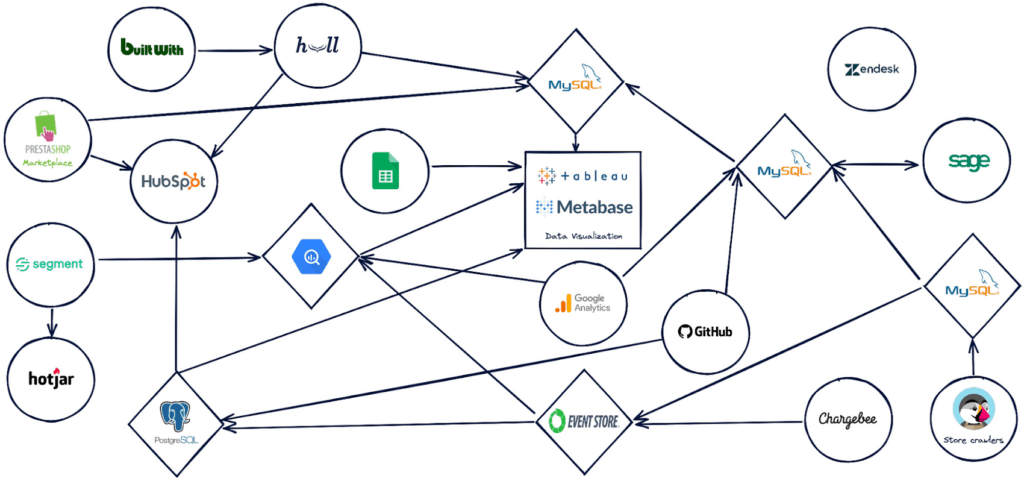
PrestaShop set out to design a new architecture to address past challenges, such as lack of data consistency, and improve data accessibility.
“Google Cloud, along with Hightouch and Fivetran, allowed us to build a modern stack to solve these challenges and support our beyond-BI data strategy.”
Building a modern data stack
The first step was to build a robust data ingestion pipeline. After considering several vendors, PrestaShop chose to work with Fivetran to extract data from SaaS applications, including Zendesk, HubSpot, and GitHub, to load into BigQuery. They also use Datastream to stream Change Data Capture (CDC) data from transactional databases into BigQuery in real-time.
“Fivetran and Datastream are no-ops, efficient and highly reliable, and relieve our Data Engineers of management tasks. This brings us a high degree of confidence to build the rest of the stack atop these services,” says Paulin.
PrestaShop relies on several Google Cloud solutions, including Dataflow, and a managed Spark service by Ascend.io, for data transformation. It also uses Looker for its semantic modeling capacities and as a self-serve data platform.
As the company continued on its journey to transform how it manages and benefits from data, it engaged Hightouch to enable data accessibility through activation. Sitting on top of Looker, Hightouch unlocks all data models for operational intelligence. For example, in just a few days, the team built a customer knowledge model combining data from multiple sources and used Hightouch to sync data from the semantic layer to Zendesk via Reverse ETL. This allowed the care team to make more data-informed decisions, speeding up the time to resolve support tickets submitted through Zendesk by 33%.
“Hightouch feels like a natural extension of Looker and reinforces the position of the semantic data model as the single source of truth,” says Paulin. “It powers a variety of Data Activation use cases, supporting our beyond-BI strategy by providing teams with access to data when and where they need it to improve everyday operations. This has a big impact on the company, bolstering employee trust in available data.”
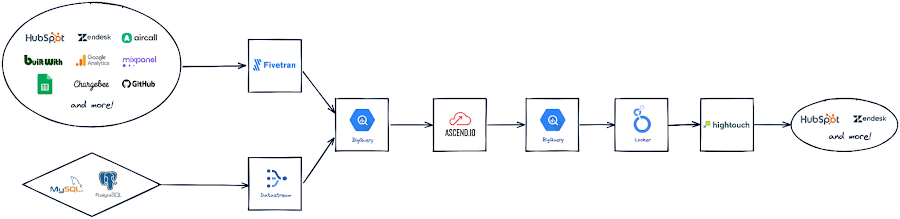
Becoming data-driven
In less than six months, PrestaShop managed to get the entire data stack up and running, build over 30 data models and engage over 120 employees with a small team of only two Data Engineers.
“Data is now accessible to every stakeholder within the company, regardless of their technical abilities,” says Paulin.
PrestaShop has already seen much progress in its shift to a more data-driven company and is excited to roll out more self-service intelligence capabilities in the future.
“Google Cloud drives home a culture of simplicity around our data stack, which is essential for us, especially given the small size of our engineering team,” says Paulin. “Fivetran and Hightouch share this culture of simplicity. Together, they offer strong foundations to support our data needs.”
Dashboards, which the company had always had an appetite for, are seamlessly created today. Before moving to Looker, a full-fledged dashboard would take an average of six weeks to develop. Now, it takes less than two days – and a simple dashboard can be created autonomously by business users in as little as 15 minutes.
Furthermore, data usage goes beyond dashboards. Thanks to Looker’s self-service exploration capabilities, many stakeholders can now glean insights surrounding product issues and business opportunities. Thanks to Hightouch, teams can activate their data to make better and smarter operational decisions.
“This is a big leap forward and one of many to come as we continue to add new models, activate our data, and onboard more users,” says Paulin. “Given our global reach and unique approach to e-commerce enablement, we know this is just the start of the great things we can accomplish with Google Cloud, Fivetran, and Hightouch.”
Check out Fivetran on Google Cloud Marketplace, or sign up for a free Hightouch workspace to learn more about what partners can do for your business.
Spot Slow MySQL Queries Fast with Stackdriver Monitoring

4031
Of your peers have already read this article.
4:30 Minutes
The most insightful time you'll spend today!
When you’re serving customers online, speed is essential for a good experience. As the amount of data in a database grows, queries that used to be fast can slow down.
For example, if a query has to scan every row because a table is missing an index, response times that were acceptable with a thousand rows can turn into multiple seconds of waiting once you have a million rows.
If this query is executed every time a user loads your web page, their browsing experience will slow to a crawl, causing user frustration. Slow queries can also impact automated jobs, causing them to time out before completion.
If there are too many of these slow queries executing at once, the database can even run out of connections, causing all new queries, slow or fast, to fail.
The popular open-source databases MySQL and Google Cloud Platform‘s fully managed version, Cloud SQL for MySQL, include a feature to log slow queries, letting you find the cause, then optimize for better performance.
However, developers and database administrators typically only access this slow query log reactively, after users have seen the effects and escalated the performance degradation.
With Stackdriver Logging and Monitoring, you can stay ahead of the curve for database performance with automatic alerts when query latency goes over the threshold, and a monitoring dashboard that lets you quickly pinpoint the specific queries causing the slowdown.
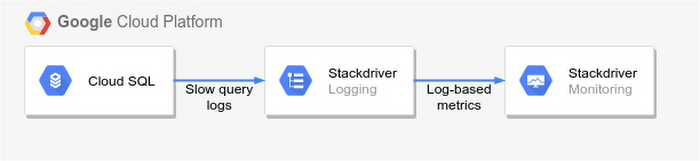
To get started, import MySQL’s slow query log into Stackdriver Logging.
Once the logs are in Stackdriver, it’s straightforward to set up logs-based metrics that can both count the number of slow queries over time, which is useful for setting up appropriate alerts, and also provide breakdowns by slow SQL statement, allowing speedy troubleshooting.
What’s more, this approach works equally well for managed databases in Cloud SQL for MySQL and for self-managed MySQL databases hosted on Compute Engine.
For a step-by-step tutorial to set up slow query monitoring, check out Monitoring slow queries in MySQL with Stackdriver. For more ideas about what else you can accomplish with Stackdriver Logging, check out Design patterns for exporting Stackdriver Logging.
Unifying Data and AI: Bringing Unstructured Data Analytics to BigQuery

4175
Of your peers have already read this article.
2:30 Minutes
The most insightful time you'll spend today!
Over one third of organizations believe that data analytics and machine learning have the most potential to significantly alter the way they run business over the next 3 to 5 years. However, only 26% of organizations are data driven. One of the biggest reasons for this gap is that a major portion of the data generated today is unstructured, which includes images, documents, and videos. It is estimated to cover roughly up to 80% of all data, which has so far remained untapped by organizations.
One of the goals of Google’s data cloud is to help customers realize value from data of all types and formats. Earlier this year, we announced BigLake, which unifies data lakes and warehouses under a single management framework, enabling you to analyze, search, secure, govern and share unstructured data using BigQuery.
At Next ‘22, we announced the preview of object tables, a new table type in BigQuery that provides a structured record interface for unstructured data stored in Google Cloud Storage. This enables you to directly run analytics and machine learning on images, audio, documents and other file types using existing frameworks like SQL and remote functions natively in BigQuery itself. Object tables also extend our best practices of securing, sharing and governing structured data to unstructured, without needing to learn or deploy new tools.
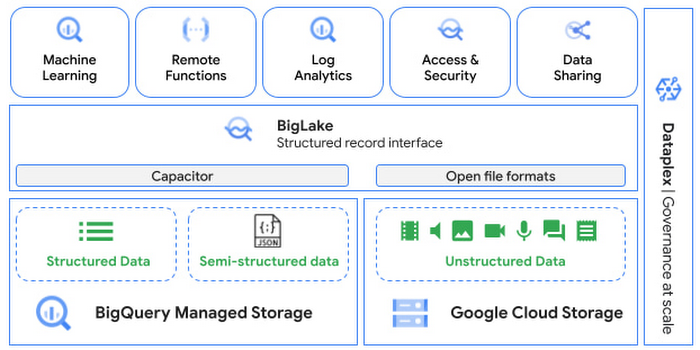
Directly process unstructured data using BigQuery ML
Object tables contain metadata such as URI (Uniform Resource Identifier), content type, and size that can be queried just like other BigQuery tables. You can then derive inferences using machine learning models on unstructured data with BigQuery ML. As part of preview, you can import open source TensorFlow Hub image models, or your own custom models to annotate the images. Very soon, we plan to enable this for audio, video, text and many other formats, and pre-trained models to enable out-of-the box analysis. Check out this video to learn more and watch a demo.
Create an object table
CREATE EXTERNAL TABLE my_dataset.object_table
WITH CONNECTION us.my_connection
OPTIONS(uris=["gs://mybucket/images/*.jpg"],
object_metadata="SIMPLE", metadata_cache_mode="AUTOMATIC");
# Generate inferences with BQML
SELECT * FROM ML.PREDICT(
MODEL my_dataset.vision_model,
(SELECT ML.DECODE_IMAGE(data) AS img FROM my_dataset.object_table)
);By analyzing unstructured data natively in BigQuery, businesses can
- Eliminate manual effort as pre-processing steps such as tuning image sizes to model requirements are automated
- Leverage the simple and familiar SQL interface to quickly gain insights
- Save costs by utilizing existing BigQuery slots without needing to provision new forms of compute
Adswerve is a leading Google Marketing, Analytics and Cloud partner on a mission to humanize data. Twiddy & Co. is Adswerve’s client – a vacation rental company in North Carolina. By combining structured and unstructured data, Twiddy and Adswerve used BigQuery ML to analyze images of rental listings and predict the click-through rate, enabling data-driven photo editorial decisions.
“Twiddy now has the capability to use advanced image analysis to stay competitive in an ever changing landscape of vacation rental providers – and can do this using their in-house SQL skills.” said Pat Grady, Technology Evangelist, Adswerve
Process unstructured data using remote functions
Customers today use remote functions (UDFs) to process structured data for languages and libraries that are not supported in BigQuery. We are extending this capability to process unstructured data using object tables.
Object tables provide signed URLs to allow remote UDFs running on Cloud Functions or Cloud Run to process the object table content. This is particularly useful for running Google’s pre-trained AI models, including Vision AI, Speech-to-Text, Document AI, open source libraries such as Apache Tika, or deploying your own custom models where performance SLAs are important.
Here’s an example of an object table being created over PDF files that are parsed using an open source library running as a remote UDF.
SELECT uri, extract_title(samples.parse_tika(signed_url)) AS title<br>FROM EXTERNAL_OBJECT_TRANSFORM(TABLE pdf_files_object_table,<br>["SIGNED_URL"]);
Extending more BigQuery capabilities to unstructured data
Business intelligence – The results of analyzing unstructured data either directly in BigQuery ML or via UDFs can be combined with your structured data to build unified reports using Looker Studio (at no charge), Looker or any of your preferred BI solutions. This allows you to gain more comprehensive business insights. For example, online retailers can analyze product return rates by correlating them with the images of defective products. Similarly, digital advertisers can correlate ad performance with various attributes of ad creatives to make more informed decisions.
BigQuery search index – Customers are increasingly using the search functionality of BigQuery to power search use cases. These capabilities now extend to unstructured data analytics as well. Whether you use BigQueryML to produce inference on images or use remote UDFs with Doc AI to produce document extraction, the results can now be search indexed and used to support search access patterns.
Here’s an example of search index on data that is parsed from PDF files:
CREATE SEARCH INDEX my_index ON pdf_text_extract(ALL COLUMNS);
SELECT * FROM pdf_text_extract WHERE SEARCH(pdf_text, "Google");Security and governance – We are extending BigQuery’s row-level security capabilities to help you secure objects in Google Cloud Storage. By securing specific rows in an object table, you can restrict the ability of end users to retrieve the signed URLs of corresponding URIs present in the table. This is a shared responsibility security model, for which administrators need to ensure that end users don’t have direct access to Google Cloud Storage, and use signed URLs from object tables as the only access mechanism.
Here’s an example of a policy for PII images that are secured to be first processed through a blur pipeline:
CREATE ROW ACCESS POLICY pii_data ON object_table_images
GRANT TO ("group:admin@example.com")
FILTER USING (ARRAY_LENGTH(metadata)=1 AND
metadata[OFFSET(0)].name="face_detected")
Soon, Dataplex will support object tables, allowing you to automatically create object tables in BigQuery and manage and govern unstructured data at scale.
Data sharing – You can now use Analytics Hub to share unstructured data with partners, customers and suppliers while not compromising on security and governance. Subscribers can consume the rows of object tables that are shared with them, and use signed URLs for unstructured data objects.
Getting Started
Submit this form to try these new capabilities that unlock the power of your unstructured data in BigQuery. Watch this demo to learn more about these new capabilities.
Special thanks to engineering leaders Amir Hormati, Justin Levandoski and Yuri Volobuev for contributing to this post.
Why Data Cloud Matters for Business Transformation

3798
Of your peers have already read this article.
2:00 Minutes
The most insightful time you'll spend today!
I’m so excited to be part of Google Cloud. Data has been a longstanding part of my career and it is at the heart of business transformation. Many companies have mastered the ability to collect data and have mechanisms in place to draw on some of it to solve business problems. But most data collected piles up and is never put to a useful purpose. Accessing it and mining it for helpful insights is practically impossible at many companies. It’s always stuck in hard to reach places, fragmented across departments and unavailable when you need it the most.
Our mission at Google Cloud is to accelerate your ability to digitally transform your business with data. Solving data challenges is in our DNA, and over the last two decades we’ve been in a unique position to help our customers get the most out of data to drive real business value.
Google products are used and loved by billions of people across the globe. These products bring together the complex web of disconnected, disparate, and rapidly changing data that makes up the internet. When you get an answer in milliseconds from google.com via a simple search bar, you know we have this down to a science. Google Cloud brings this expertise in data and software together for businesses of all sizes so that you can gain advantage from your data. We call this the data cloud.
Enter the data cloud
A data cloud offers a comprehensive and proven approach to cloud and embraces the full data lifecycle, from the systems that run your business, where data is born, to analytics that support decision making, to AI and machine learning (ML) that predict and automate the future. A data cloud allows you a way to securely unify data across your entire organization, so you can break down silos, increase agility, innovate faster, get value from your data, and support business transformation. This is the heart of the data cloud.
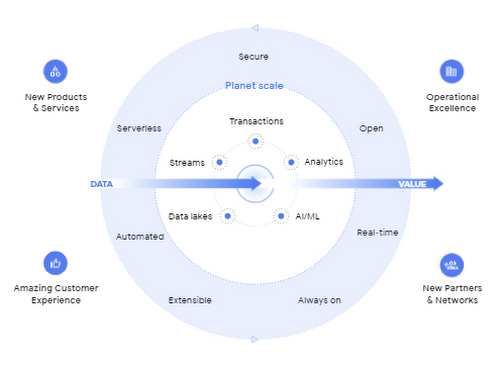
Why a data cloud is essential
Building a data cloud using Google Cloud’s technologies helps organizations accelerate business transformation by giving everyone access to the right information at the right time so that they can act more intelligently based on it.
Since I’ve joined Google, I’ve been not only inspired by the work that the team has done to build products with a user-first mindset, but our customers have been an inspiration to each of us in what’s possible.
- The Home Depot built a data cloud using Google Cloud technologies to help keep 50,000+ items stocked at over 2,000 locations. They’re making their 400,000+ associates smarter by giving them visibility into the things each customer needs, like item location within a local store. By leveraging BigQuery, their query performance dropped from hours and days to seconds and minutes. The Home Depot also uses Cloud SQL, Spanner, and Bigtable for their operational use cases and AI to help locate goods using their mobile apps for in-store navigation.
- Major League Baseball (MLB) is reimagining the fan experience with their data cloud. To build engagement with today’s fans, drive engagement with future generations, and lay the groundwork for future innovation, MLB consolidated its infrastructure and migrated to Google Cloud’s Anthos, Google Kubernetes Engine, Cloud SQL, and BigQuery. MLB tracks every moment of every game for an audience on seven continents with Cloud SQL, this valuable data to drive deeper engagement with fans.
- Vodafone is using their data cloud to offer their customers new, personalized products and services across multiple markets. By identifying more than 700 use cases to deliver new products and services, Vodafone can support fact-based decision-making, reduce costs, remove duplication of data sources, and simplify operations. With Google Cloud, Vodafone’s operating companies in multiple countries can access improved data analytics, intelligence, and machine-learning capabilities.
Here are four reasons why customers trust Google Cloud to build their data cloud strategy:
First, Google delivers insights at planet scale
Customers often gravitate to Google Cloud for our specific data tools that were built for Google’s internal data needs and are unmatched for speed, scale, security, and capability for any size organization. BigQuery is the leading solution for analytics and allows you to run analytics at scale with a 99.99% SLA and up to 34% lower TCO than cloud data warehouse alternatives. Spanner provides unlimited scale, global consistency across regions, and high availability up to 99.999%, at a TCO that is 78% lower compared to on-prem databases and 37% lower than other cloud options. Firestore continues to see rapid adoption with over 2M databases created to power mobile, web, and IoT applications across customer environments. And finally Looker, an API for all your data, offers a single shared place for people and apps to interact with it, no matter the cloud environment.
Second, Google’s AI helps your business be more intelligent
Google was built on pioneering AI research and the principle of making the world’s information useful to people and businesses everywhere. AI powers some of Google’s most popular products, such as Search, Maps, Ads, and YouTube. We have leveraged this expertise to deliver a new, unified AI platform that gives every data scientist, data analyst, and ML engineer access to the same AI toolkit Google uses. Automated machine learning, accelerated experimentation and custom training, and more deployed models than any other platform enable your entire data team to drive business outcomes at any scale.
Third, Google is the open data platform
Google Cloud’s open platform gives customers maximum flexibility for managing transactional, analytical, and AI-based applications. Customers can choose from a wide range of transactional, processing, and analytics engines, open source tools, open APIs, and ML services to eliminate lock-in. This includes choice of deployment across multi-cloud and hybrid environments and easy interoperability with existing partner solutions and investments. With BigQuery Omni, organizations can choose to deploy their data warehousing solution to work natively with AWS or with Azure (coming soon). Looker supports 50+ distinct SQL dialects across multiple clouds and our database services like Cloud SQL, one of the fastest growing services at Google Cloud, offers familiar open source MySQL and PostgreSQL standard connection drivers, so you can work with your preferred tools and stay up-to-date with the latest community enhancements. In addition, Google offers an unrivaled developer community across the fields of AI, machine learning, mobile, application development, microservices, and access to third party solutions and open source systems.
Fourth, Google offers a trusted platform for your data needs
Customers can take advantage of the same secure-by-design infrastructure, built-in data protection, and global network that Google uses to ensure compliance, redundancy, and reliability. All of Google’s data is encrypted in transit and at rest, by default. Google offers industry-leading reliability across regions so you’re always up and running. Spanner offers a 99.999% SLA and BigQuery offers a 99.99% SLA. For BI and embedded analytics, Looker supports data governance via a semantic layer that organizes your data and stores your business logic centrally, delivering consistent and trusted KPIs. And finally, our multi-layered security approach across hardware, services, user identity, storage, internet communication and operations provides peace of mind that your data is protected.
Learn more at Data Cloud Summit
We are committed to helping you build a data cloud that gives you deep insights into your business and process automation. Join me as I welcome Anders Gustafsson, CEO of Zebra and
Gil Perez, CIO of Deutsche Bank at the Data Cloud Summit on May 26, 2021 to learn and share new ways to use data for good. I can’t wait to hear what you accomplish.
More Relevant Stories for Your Company

Soundtrack Your Brand: Delivering Sound That Stands Out From the Crowd with BigQuery
Editor’s note: Soundtrack Your Brand is an award-winning streaming service with the world’s largest licensed music catalog built just for businesses, backed by Spotify. Today, we hear how BigQuery has been a foundational component in helping them transform big data into music. Soundtrack Your Brand is a music company at


How Apna is using data and AI to drive the gig economy in India
In this episode, Theo speaks to Ronak Shah, Head of Data at apna.co. As one of the largest gig economies in the world, India is seeing rising numbers among younger people joining the ecosystem. Driven by digital adoption and new ways of working, Apna saw an opportunity to help bridge

Insurer Uses Google Cloud AI to Battle Slow Growth: It Improves Sales by 5% in 8 Weeks
For a business to succeed in the long term, it needs to learn not just to adapt to inevitable change, but to harness it. South Africa-based PPS has been an insurance company since 1941 and today is the biggest mutual insurance provider in the country. As a mutual company, PPS is owned

AirAsia Turns to Google Cloud to refine Pricing, Increase Revenue, and Improve Customer Experience
AirAsia needed a platform incorporating products that could capture, process, analyze, and report on data, while delivering value for money and meeting its speed and availability requirements. The airline also wanted to minimise infrastructure management and system administration demands on its technology team members. The airline conducted a proof of
