





3430
Of your peers have already watched this video.
38:26 Minutes
The most insightful time you'll spend today!
The Secret to Accelerated ML Model Training
As an infrastructure or a data science professional, it’s more critical than ever to keep abreast of the changes taking place to the infrastructure powering machine learning.
If we take a step back, we will realize that there’s been a tremendous amount of progress in machine learning in the last few years, resulting in multiple benefits including higher accuracy in speech and image recognition, for instance. This progress is in part due to the advances in the systems to train models.
One of these advances comes in the type of processors being leveraged to power ML. There’s been an evolution—from CPUs to GPUs to TPUs—each of which bring additional computational power.
Google Cloud TPUs allow data scientists to train their models at lightning speed on Google Cloud’s latest ML hardware.
In this video, you will see how to use your raw data to create different ML applications. More importantly, Zak Stone, Product Manager For TensorFlow and Cloud TPUs, Google Brain, will show you how to accelerate ML model training on TPUs using Google Cloud’s optimized, TensorFlow image classification code. Each step will be explained in detail.
Enhancing SAP Build Process Automation with Google Document AI and Google Workspace

4139
Of your peers have already read this article.
4:00 Minutes
The most insightful time you'll spend today!
SAP Build Process Automation is designed to optimize business processes and boost efficiency. The platform helps both business users and developers alike digitize core workflows and incorporate artificial intelligence (AI) into time consuming and error-prone manual tasks.
All digital paths can benefit from automation. The pandemic, supply chain shortages, and other disruptive events have upped the pressure on businesses and their workers to perform in more efficient and flexible ways.
Google Cloud and SAP have responded by providing an integrated toolbox that can fundamentally change the way businesses operate — all while creating value for their customers.
With a focus on taking process automation to an even more advanced level and removing inefficiencies from workflows, SAP has introduced integrations with Google Cloud Document AI, and Google Workspace for SAP Build Process Automation customers. This integration can reduce or eliminate many repetitive and error-prone tasks, so that companies can help save money, operate more productively, and scale more easily.
AI unleashes innovation
Continuous advances in digital systems and advanced technology introduce new opportunities to rethink workflows. SAP recognizes the role that AI-powered automation can play in transforming workflows, and that the benefits of doing so extend beyond basic time savings and cost cutting. By plugging Google Cloud Document AI into the application, SAP Build Process Automation’s low-code, no-code platform enables SAP to help its customers in lines of business and IT integrate multiple applications while democratizing access to governed machine learning technology.
Machine learning and process automation can drive efficiency with SAP S/4HANA
Customers using SAP S/4HANA can build workflow improvements into all major core processes, such as order entry, invoice creation, asset posting, and many others, helping them to be faster and more efficient in the process. Google Cloud Document AI extracts key elements — including addresses, article numbers, price, quantity, and more — within emails, PDFs, handwritten notes, and other formats.
Integrated automation can drive results for invoice and purchase order processing
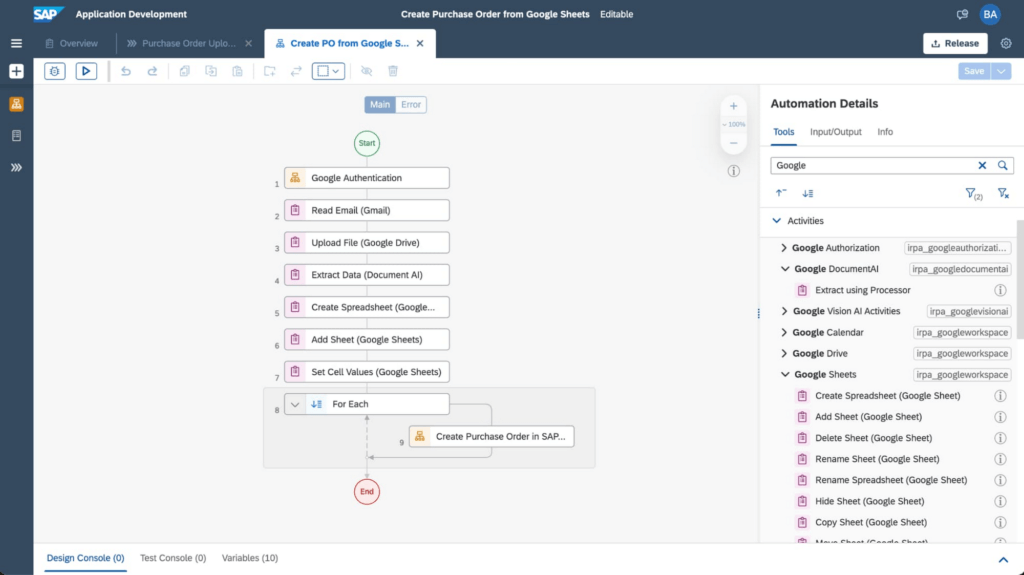
An example of the improvements these integrations have made to SAP Build Process Automation is the use of AI, productivity tools, and automation for processing purchase orders. In the past, workers had to manually select relevant orders in their Gmail accounts and extract key data from large PDF files, including the order date, supplier details, article numbers, quantity, unit price, and the total amount. Then, workers would have to enter all of the individual line items one by one into the SAP S/4HANA system.
Today, through SAP’s integrated automation platform, customers can automatically extract and organize data by Google Workspace (Google Sheets, Google Drive, and Gmail) and Document AI. This works by extracting data contained in Gmail attachments, downloading it into Google Drive and extracting fields using Document AI’s pretrained models. The tool then enters the consolidated order information from Google Sheets into SAP S/4HANA. For example, the Canton of Zurich in Switzerland experienced a significant reduction of workload to process compensation forms once the organization implemented this automation. Furthermore, implementing the automation can avoid audit and compliance issues, and improve data quality.
The screenshot below shows how a workflow operates within the SAP Build Process Automation software.
Sales, procurement, finance, and other functions are also able to handle more strategic work that delivers greater value to customers with these SAP and Google Cloud integrations. They’ve also boosted both security and regulatory compliance for customers, including those in the financial services space.
For example, the Google Cloud Document AI technology can process thousands of supply chain invoices, validates and systematically approves them. And, over time, the machine learning and AI components improve the analysis process and ensure that data processed with SAP Build Process Automation is adhering to a company’s best practices and essential regulatory requirements.
SAP and Google Cloud put automation to work
Achieving the most accurate, efficient business processes is possible with an automation framework that embeds collaboration and productivity applications while giving lines of business and IT users access to machine learning technology. SAP Build Process Automation combined with Google Cloud Document AI, and Google Workspace has proven to be a catalyst in driving innovation and business transformation for customers across multiple industries, leading to an average of 22% to 30% faster time to market, and significant financial gains, including up to 20% accounts payable savings potential. An example of these improvements includes those experienced by TasNetworks, which had a 25% reduction in back-office processing efforts after implementing these technologies.
To learn more about how Google Cloud and SAP are building solutions for accelerating business value, visit cloud.google.com/solutions/sap. You can find more information about SAP Build Process Automation at sap.com/build-automation.
To start your transformation journey today, choose the SAP Business Technology Platform region that’s best for you. We’re also happy to announce that Google Cloud offers the first and only option to run BTP in the cloud in India — learn more here: Google Cloud’s newest SAP Business Technology Platform Region.

3459
Of your peers have already downloaded this article
4:45 Minutes
The most insightful time you'll spend today!
Since 1994, IDOM, Japan’s leading buyer and retailer of used cars, has enjoyed success in the auto industry with a simple yet traditional business model: buy pre-owned vehicles directly from car owners and auction them to third-party dealers, or sell them to other consumers at retail stores.
In an increasingly frugal economy, Japanese consumers are buying fewer new cars. Most young urban workers take public transport, a cheap alternative for getting from point A to point B. Additionally, people who do own cars are keeping them longer: the average period of ownership is 7.5 to 10 years.
Although Japanese consumers are buying fewer new cars, used car sales are steadily on the uptick. Pre-owned car sales in Japan rose by 1.7% in 2015—the first big spike in three years. IDOM dominates this industry with about 40% market share, and it wanted to continue to take advantage of this growing market trend.
To do so, IDOM reinvented its marketing strategy, using Google’s machine-learning technology to make full use of its available customer data. The brand’s main goal was to attract more prospective car sellers to its physical stores because (1) that’s where they could close trade-in deals and (2) sourcing used cars efficiently is integral to the success of its business model.
Secondly, rather than measure marketing success solely on clicks, views, brand awareness, or favorability, IDOM relied on data to determine which advertising techniques—including phone calls and customized ads to prospective sellers—turned a real profit.
After successfully identifying and targeting existing car owners with a high chance of selling their car, it was only natural for IDOM to leverage this approach to identify and target potential customers with a higher chance of buying a car—key for the other side of its business as well. Thus, IDOM also showed customized ads to potential car buyers and prioritized follow-up phone calls to high-value potential car buyers.
Find out how IDOM increased the number of sellers and buyers visiting its stores by a whopping 25% and grew gross profits by 300% in a key market segment. Download now!
Google Cloud’s Firebase Realtime Database and BigQuery AllowsCastbox to Ramp Up Customer Experience

8145
Of your peers have already read this article.
3:30 Minutes
The most insightful time you'll spend today!
Demand for spoken audio content such as podcasts remains robust despite the proliferation of video services and other entertainment options for consumers. Shibin Li, Co-founder of Castbox, credits growth of the global podcast platform to the following: speed and availability, market-leading features, the proliferation of smart devices to deliver audio content, and activities — such as driving and working around the house — that make consuming video difficult.
Founded in 2016 and headquartered in Beijing, China, Castbox enables users to locate, access, and create spoken audio content. Available on iOS and Android, Castbox supports 50 million podcasts, on-demand radio programs, and audiobooks in 70 languages from 175 countries. The platform hosts about 2 million users per day and is the largest podcast platform on Android.
Castbox includes a range of features that build on its core service to provide a high-quality user experience. These features include curated podcast recommendations and in-audio search.
A combination of services
At its inception, Castbox relied on a combination of a multinational cloud services, as well as Google Cloud Platform (GCP) services, including the Google BigQuery analytics data warehouse and Cloud APIs to provide programmatic interfaces with Google Cloud services, and a range of services from the Google mobile development platform Firebase.
However, as Castbox matured and its user base expanded, the business increased its reliance on Google Cloud Platform and Firebase.
“We needed to access stable cloud services as we could not tolerate long periods of downtime that would compromise the user experience,” says Li. “Furthermore, we had to support up to 50,000 concurrent connections, and potentially more in future, without disruption.”
“Based on our analysis of the data in Google BigQuery, we can determine what type of content users are listening to, how long they like to listen to it, and when they like to listen to it. This allows us to recommend similar podcasts to each user based on the preferences he or she expressed, encouraging activity on and return visits to our platform.”
—Shibin Li, Co-Founder, Castbox
Competitive differentiation
Castbox also found machine learning-powered Google Cloud Platform APIs could help deliver features, such as in-audio search, that differentiate the podcast platform from its competitors. In addition, Firebase SDKs and Firebase A/B Testing would enable Castbox to create and analyze new applications, as well as make adjustments based on user feedback. Firebase Realtime Database would allow the business to support tens of thousands of concurrent user connections.
The diligence of the Google Cloud team in advising Li and her team about forthcoming products and services also swayed Castbox towards Google technologies. The business gained the opportunity with Google to join several programs that offered early access to Google innovations.
Signature in-audio search service
Castbox now uses Google Cloud Platform services in the Tokyo, Japan, and U.S. East regions. Cloud Speech-to-Text API plays a key role in delivering Castbox’s signature in-audio search service. This service enables users to search transcriptions of audio content on the platform for words or phrases. The search results incorporate the title of the podcast and the search term in context (for example, within the sentence or sentence excerpt in which it appears). Each use of the word or phrase is time-stamped so it can easily be found. The API enables Castbox developers to apply neural network algorithms to achieve audio-to-text conversion accuracy rates of greater than 96%, while search queries typically experience latency of just 50 milliseconds.
In addition, the latency of comparison data, converting audio to text, is only about 250 milliseconds, contributing to the processing of about 12 minutes worth of audio to text in just 10 minutes. “We can process about 20 hours of audio files in one day,” Li says. “This enables us to transcribe and index all the new episodes of a podcast in that period.”
50,000 concurrent connections
With Firebase Realtime Database, Castbox now supports up to 50,000 concurrent connections to its platform with an average latency per connection of just 10 milliseconds. “Firebase Realtime Database also allows us to continue operating in offline mode, which is extremely helpful if we experience any network disruptions,” Li explains. “When we come back online again, any data is simply synchronized with the database.”
Google BigQuery and the analytics capabilities of Firebase SDKs also enable Castbox to monitor and analyze user behaviors. “Based on our analysis of the data in Google BigQuery, we can determine what type of content users are listening to, how long they like to listen to it, and when they like to listen to it,” Li explains. “This allows us to recommend similar podcasts to each user based on the preferences he or she expressed, encouraging activity on and return visits to our platform.”
“Given our queries may span up to 40 days of data, we may be analyzing up to 1,200 GB at one time. We have no problem doing this with Google BigQuery.”
—Shibin Li, Co-Founder, Castbox
Castbox also uses its analyses of Google BigQuery data to amend banners and summaries on its platform to encourage users to listen to additional content. Furthermore, the service is prepared to make surprise recommendations of content to users based on the preferences and reactions of users with similar tastes.
“We analyze a pool of data growing at up to 30 GB per day,” Li explains. “Given our queries may span up to 40 days of data, we may be analyzing up to 1,200 GB at one time. We have no problem doing this with Google BigQuery.” These analyses also support Castbox’s decision to start creating original content, such as finance and economic news, for its platform.
Checking weekly changes
Castbox does not rely only on analyzing user data to deliver a high-quality experience. The business aggregates user feedback from emails and Google Play reviews to make weekly changes to its platform. It then uses Firebase A/B Testing to check whether these changes are met with a positive user response.
“We are extremely pleased with Google Cloud Platform and Firebase. We have been able to differentiate ourselves from our competitors and provide an attractive option for users at a time when content and entertainment options are exploding. We have a great opportunity with Google to continue to improve the value of our offering to users and build engagement and loyalty.”
—Shibin Li, Co-Founder, Castbox
Castbox’s positive experiences with Google Cloud Platform are encouraging the business to grow its use of the product. “We are trying to move some more services to Google Cloud Platform because it is very stable and scalable,” Li says. The business is keen to explore the capabilities of Cloud Pub/Sub to provide low latency messaging between applications, Cloud Spanner to deliver a distributed relational database service, and Cloud Dataflow to transform and enrich data in stream and batch modes.
“We are extremely pleased with Google Cloud Platform and Firebase,” Li concludes. “We have been able to differentiate ourselves from our competitors and provide an attractive option for users at a time when content and entertainment options are exploding. We have a great opportunity with Google to continue to improve the value of our offering to users and build engagement and loyalty.”
Conversational AI drives better customer experiences

3365
Of your peers have already read this article.
3:30 Minutes
The most insightful time you'll spend today!
Conversational AI is opening up a new world of possibilities in areas like customer experience, user engagement, and access to content.
In Cloud AI, we’ve taken Google’s groundbreaking machine learning models in speech and natural language processing and applied them to the contact center space, radically improving the customer experience while also driving down operational costs. It’s shifting the focus of contact centers from the backroom, out of sight (and mind) to the boardroom and the strategic heart of the business.
Our solution, called Contact Center AI (CCAI), is an accelerator of digital transformation as organizations all over the world figure out how to support their customers during these challenging times. One customer that’s redefined the possibilities of AI-powered conversation using CCAI, is Verizon.
Whether through voice calls or chat, Verizon customers will no longer need to go through menu prompts or option trees; they simply say or type their question, and CCAI’s natural-language recognition feature finds the best way to assist them. No stilted speech or robot-like commands.
“These customer service enhancements, powered by the Verizon collaboration with Google Cloud, offer a faster and more personalized digital experience for our customers while empowering our customer support agents to provide a higher level of service,” said Shankar Arumugavelu, SVP & CIO at Verizon.
CCAI is also driving cost savings without cutting corners on customer service. In the past, to improve customer satisfaction (CSAT), you had to hire more agents, increasing operating costs. Conversely, if you reduced the number of agents, your CSAT scores went down. Contact Center AI (CCAI) lets you have both.
CCAI does this by expediting customer requests using virtual agents, assisting live agents, and providing insights on customer interactions to drive improvements back into the system. The result is a better experience for your customers—they get answers faster—and you get lower operating costs. It allows human agents to focus on higher value tasks in their customer interactions.
New products and features add richer customer experience
We are continuing to invest in CCAI and today we are excited to announce the following new capabilities:
Dialogflow CX is the latest version of Dialogflow, a development suite used by over a million developers for building natural, rich conversational experiences into mobile and web applications, smart devices, bots, interactive voice response systems, popular messaging platforms and more. This new version of Dialogflow is optimized for large contact centers that deal with complex (multi-turn) conversations and it is truly omnichannel – you build it once and deploy it everywhere – in your contact centers and digital channels. Dialogflow CX features a new visual builder to create, build and manage virtual agents. It’s available now, in beta.
Lukasz Rewerenda
Dialogflow CX brings conversation state management to a whole new level
Principal Solutions Architect, Randstad (Netherlands)
Agent Assist for Chat is a new module for Agent Assist that provides agents with continuous support over “chat” in addition to voice calls, by identifying intent and providing real-time, step-by-step assistance. Agent Assist enables agents to be more agile and efficient and spend more time on difficult conversations, giving both the customer and the agent a better experience. It transcribes calls in real time, identifies customer intent, provides real-time, step by step assistance (recommended articles, workflows, etc.), and automates call dispositions.
For customers in regulated industries, Agent Assist can remove the risk of agents providing inaccurate information (which can happen due to high agent turnover and limited training). Agent Assist can also surface the latest discount information, deals and special offers, which can be hard for agents to keep track of as this information changes frequently.
Custom Voice, available in beta, is a new capability for CCAI and our Text-to-Speech API that lets you create a unique voice to represent your brand across all your customer touchpoints, instead of using a common voice shared with other organizations. By taking advantage of the custom Text-to-Speech model created with Custom Voice, you can define and choose the voice profile that suits your business and adjust to changes without scheduling studio time with voice actors to record new phrases.
At Google Cloud, we are committed to ensuring that our products and features are in alignment with our AI Principles. If you are interested in Custom Voice, there is a review process to ensure that your use case is aligned with our AI principles. Learn more about Custom Voice and how to sign up here.
Bring Google’s groundbreaking speech models on-prem
For many customers, an all-in approach to public cloud is not an option, which is why we’re extending our AI capabilities to run on-prem. Last week we announced Speech-to-Text On-Prem, the first of our hybrid AI offerings, now generally available. Speech-to-Text On-Prem gives you full control over speech data and since it runs in your own data center, it’s easy to comply with your data residency and compliance requirements. At the same time, Speech-to-Text On-Prem uses state-of-the-art speech models from Google researchers that are more accurate, smaller, and require less computing resources to run than existing solutions.
Take a look at how businesses saved costs and improved customer experience with CCAI in the new commissioned study conducted by Forrester Consulting: “New Technology: The Projected Total Economic Impact™ Of Google Cloud Contact Center AI.” To learn more about CCAI and conversational AI, see how our customers are using the solution and check out these sessions at Next OnAir:
Unifying Data and AI: Bringing Unstructured Data Analytics to BigQuery

4169
Of your peers have already read this article.
2:30 Minutes
The most insightful time you'll spend today!
Over one third of organizations believe that data analytics and machine learning have the most potential to significantly alter the way they run business over the next 3 to 5 years. However, only 26% of organizations are data driven. One of the biggest reasons for this gap is that a major portion of the data generated today is unstructured, which includes images, documents, and videos. It is estimated to cover roughly up to 80% of all data, which has so far remained untapped by organizations.
One of the goals of Google’s data cloud is to help customers realize value from data of all types and formats. Earlier this year, we announced BigLake, which unifies data lakes and warehouses under a single management framework, enabling you to analyze, search, secure, govern and share unstructured data using BigQuery.
At Next ‘22, we announced the preview of object tables, a new table type in BigQuery that provides a structured record interface for unstructured data stored in Google Cloud Storage. This enables you to directly run analytics and machine learning on images, audio, documents and other file types using existing frameworks like SQL and remote functions natively in BigQuery itself. Object tables also extend our best practices of securing, sharing and governing structured data to unstructured, without needing to learn or deploy new tools.
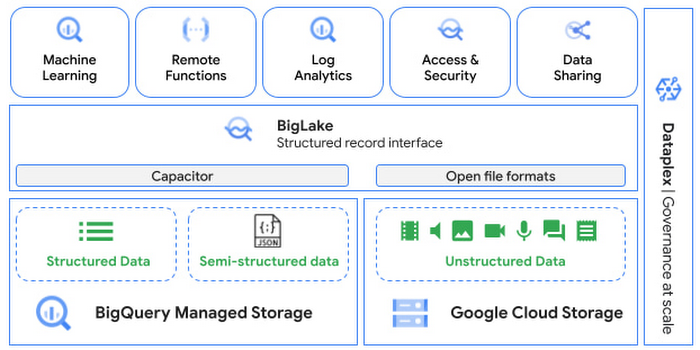
Directly process unstructured data using BigQuery ML
Object tables contain metadata such as URI (Uniform Resource Identifier), content type, and size that can be queried just like other BigQuery tables. You can then derive inferences using machine learning models on unstructured data with BigQuery ML. As part of preview, you can import open source TensorFlow Hub image models, or your own custom models to annotate the images. Very soon, we plan to enable this for audio, video, text and many other formats, and pre-trained models to enable out-of-the box analysis. Check out this video to learn more and watch a demo.
Create an object table
CREATE EXTERNAL TABLE my_dataset.object_table
WITH CONNECTION us.my_connection
OPTIONS(uris=["gs://mybucket/images/*.jpg"],
object_metadata="SIMPLE", metadata_cache_mode="AUTOMATIC");
# Generate inferences with BQML
SELECT * FROM ML.PREDICT(
MODEL my_dataset.vision_model,
(SELECT ML.DECODE_IMAGE(data) AS img FROM my_dataset.object_table)
);By analyzing unstructured data natively in BigQuery, businesses can
- Eliminate manual effort as pre-processing steps such as tuning image sizes to model requirements are automated
- Leverage the simple and familiar SQL interface to quickly gain insights
- Save costs by utilizing existing BigQuery slots without needing to provision new forms of compute
Adswerve is a leading Google Marketing, Analytics and Cloud partner on a mission to humanize data. Twiddy & Co. is Adswerve’s client – a vacation rental company in North Carolina. By combining structured and unstructured data, Twiddy and Adswerve used BigQuery ML to analyze images of rental listings and predict the click-through rate, enabling data-driven photo editorial decisions.
“Twiddy now has the capability to use advanced image analysis to stay competitive in an ever changing landscape of vacation rental providers – and can do this using their in-house SQL skills.” said Pat Grady, Technology Evangelist, Adswerve
Process unstructured data using remote functions
Customers today use remote functions (UDFs) to process structured data for languages and libraries that are not supported in BigQuery. We are extending this capability to process unstructured data using object tables.
Object tables provide signed URLs to allow remote UDFs running on Cloud Functions or Cloud Run to process the object table content. This is particularly useful for running Google’s pre-trained AI models, including Vision AI, Speech-to-Text, Document AI, open source libraries such as Apache Tika, or deploying your own custom models where performance SLAs are important.
Here’s an example of an object table being created over PDF files that are parsed using an open source library running as a remote UDF.
SELECT uri, extract_title(samples.parse_tika(signed_url)) AS title<br>FROM EXTERNAL_OBJECT_TRANSFORM(TABLE pdf_files_object_table,<br>["SIGNED_URL"]);
Extending more BigQuery capabilities to unstructured data
Business intelligence – The results of analyzing unstructured data either directly in BigQuery ML or via UDFs can be combined with your structured data to build unified reports using Looker Studio (at no charge), Looker or any of your preferred BI solutions. This allows you to gain more comprehensive business insights. For example, online retailers can analyze product return rates by correlating them with the images of defective products. Similarly, digital advertisers can correlate ad performance with various attributes of ad creatives to make more informed decisions.
BigQuery search index – Customers are increasingly using the search functionality of BigQuery to power search use cases. These capabilities now extend to unstructured data analytics as well. Whether you use BigQueryML to produce inference on images or use remote UDFs with Doc AI to produce document extraction, the results can now be search indexed and used to support search access patterns.
Here’s an example of search index on data that is parsed from PDF files:
CREATE SEARCH INDEX my_index ON pdf_text_extract(ALL COLUMNS);
SELECT * FROM pdf_text_extract WHERE SEARCH(pdf_text, "Google");Security and governance – We are extending BigQuery’s row-level security capabilities to help you secure objects in Google Cloud Storage. By securing specific rows in an object table, you can restrict the ability of end users to retrieve the signed URLs of corresponding URIs present in the table. This is a shared responsibility security model, for which administrators need to ensure that end users don’t have direct access to Google Cloud Storage, and use signed URLs from object tables as the only access mechanism.
Here’s an example of a policy for PII images that are secured to be first processed through a blur pipeline:
CREATE ROW ACCESS POLICY pii_data ON object_table_images
GRANT TO ("group:admin@example.com")
FILTER USING (ARRAY_LENGTH(metadata)=1 AND
metadata[OFFSET(0)].name="face_detected")
Soon, Dataplex will support object tables, allowing you to automatically create object tables in BigQuery and manage and govern unstructured data at scale.
Data sharing – You can now use Analytics Hub to share unstructured data with partners, customers and suppliers while not compromising on security and governance. Subscribers can consume the rows of object tables that are shared with them, and use signed URLs for unstructured data objects.
Getting Started
Submit this form to try these new capabilities that unlock the power of your unstructured data in BigQuery. Watch this demo to learn more about these new capabilities.
Special thanks to engineering leaders Amir Hormati, Justin Levandoski and Yuri Volobuev for contributing to this post.
More Relevant Stories for Your Company

Contact Center AI & Automation Anywhere Help Virtual Agents Deliver Next Level CX
With the advent of the pandemic, contact center traffic has increased by as much as 300%, taxing center capabilities. To help handle the surge, and keep up with heightened customer demands, many customer experience providers have deployed automation in the form of virtual agents that serve as the first—and, sometimes the

Google Research: Themes from 2021 and Beyond
Posted by Jeff Dean, Senior Fellow and SVP of Google Research, on behalf of the entire Google Research community Over the last several decades, I've witnessed a lot of change in the fields of machine learning (ML) and computer science. Early approaches, which often fell short, eventually gave rise to

How to Enhance Incremental Pipeline Performance while Ingesting Data into BigQuery
When you build a data warehouse, the important question is how to ingest data from the source system to the data warehouse. If the table is small you can fully reload a table on a regular basis, however, if the table is large a common technique is to perform incremental

ML Workflow Made Simple: How to Automate ML Experiment Tracking with Vertex AI Experiments Autologging
Practical machine learning (ML) is a trial and error process. ML practitioners compare different performance metrics by running ML experiments till you find the best model with a given set of parameters. Because of the experimental nature of ML, there are many reasons for tracking ML experiments and making them
