





Contact Center AI & Automation Anywhere Help Virtual Agents Deliver Next Level CX

3038
Of your peers have already read this article.
2:30 Minutes
The most insightful time you'll spend today!
With the advent of the pandemic, contact center traffic has increased by as much as 300%, taxing center capabilities. To help handle the surge, and keep up with heightened customer demands, many customer experience providers have deployed automation in the form of virtual agents that serve as the first—and, sometimes the last—line of customer support. How effective these virtual agents are in delivering timely, complete customer service depends in large part on the contact center’s infrastructure and the power of the automation solution.
Customer support providers can now start to reimagine customer experience with Conversational AI and take advantage of the Google Cloud-Automation Anywhere partnership to modernize their operations.
Bringing together the Google Cloud Contact Center AI (CCAI) solution and the Automation Anywhere cloud-native Automation 360 platform, the partnership helps contact centers remain competitive by improving their performance metrics and customer satisfaction to exceed the continuously growing expectations.
Information here, there, anywhere—with limited access
Over the years, many contact centers have accumulated a multitude of systems, often creating a disconnected infrastructure. As a result, both human and virtual agents alike are challenged to keep up with growing customers’ expectations for timely, accurate, and complete service. Without up-to-date software and infrastructure, human agents have to perform a “swivel-chair” maneuver, logging in to the different systems, sifting through records, copying the needed information, and deciding what the next action should be. This approach is not conducive to achieving lower average handle times (or AHT), reduced processing errors, or increased customer satisfaction.
In such a siloed environment, virtual agents may not connect to all the relevant data systems and applications. That also limits what they can do to support human agents. Typically, a virtual agent can handle basic customer requests, such as providing banking customers with their account balances. For more complex requests, such as applying for a line of credit, a virtual agent still must transfer customers to human agents, and the swivel-chair maneuver begins.
Enter the RPA-assisted AI-powered virtual agent
The combination of Google Cloud Contact Center AI and Automation Anywhere’s Automation 360 RPA platform can help contact centers get the maximum benefit from utilizing virtual agents, enriching customer engagements. Further, by integrating automation, opening up APIs, and creating new processes for virtual agents, customer experience teams can help streamline operations by enabling users to quickly access the information they require. This helps minimize the need for the “swivel-chair” maneuver.
Automation 360 makes it possible for the CCAI virtual agents to access all systems and applications in both legacy and modern infrastructure, helping resolve every case quickly and easily. Not only can the virtual agents respond faster with answers, but they can complete more complex end-to-end requests. With RPA, customers are reporting 66% improved efficiency of contact center operations while exceeding their AHT reduction goals.
This video illustrates how such automation can dramatically reduce the processing time of a customer service request, and you can read more about the details of contact center automation, as well.
Additionally, a comprehensive development platform, the Google Cloud CCAI Dialogflow, powers virtual agents—chatbots and voicebots—with Conversational AI to deliver lifelike customer experiences anytime a customer reaches out to a brand. CCAI Agent Assist helps human agents with turn-by-turn guidance, ready-to-deliver answers, and ready-to-send responses. CCAI Insights identifies key metrics such as call drivers and customer sentiment for workflow optimization.
Living up to their potential
TELUS International, a leading digital customer experience provider and long-time partner of both Google Cloud and Automation Anywhere, has been leveraging virtual agents to enhance the employee and customer experience.
“We are very proud of the enormous value that we can provide our clients through combining our expertise in customer experience and digital transformation alongside the innovative solutions of our technology partners,” Jim Radzicki, CTO of TELUS International, explains. “For instance, through leveraging Google Cloud Contact Center AI and Automation Anywhere’s RPA integration, we are able to expand the capabilities of virtual agents to process a wider variety of customer requests while allowing our team members to focus on the most critical conversations and creating a meaningful connection with every customer.”
With CCAI and Automation 360, virtual agents can help contact centers deliver 24/7, comprehensive, accurate service, all of which helps eliminate wait times—even with heavy traffic. And this is just the start.
With deeper integration planned between Automation 360 and CCAI, RPA can augment CCAI Agent Assist’s abilities to help human agents by bringing untapped case-sensitive information to their fingertips. Furthermore, Automation 360 Bot Insight can complement CCAI Insights’ as well as TELUS International’s Intelligent Insights, a tool-agnostic platform to monitor and manage RPA solutions and bots, with backend data access metrics.
At Google Cloud and Automation Anywhere, we’ll continue developing our contact center solution to extend automation capabilities for better customer service and greater customer satisfaction. Instead of constantly swiveling, agents can once again be at the center of the call center action, taking their work—and the experience of their customers—to the next level.
Experts’ Guideline for Personalizing Platforms with the Right Recommendation System on Google Cloud

5008
Of your peers have already read this article.
5:00 Minutes
The most insightful time you'll spend today!
Over the past two decades, consumers have become accustomed to receiving personalized recommendations in all facets of their online life. Whether that be recommended products while shopping on Amazon, a curated list of apps in the Google Play store, or relevant videos to watch next on YouTube. In fact, in a Verge article “How YouTube perfected the feed: Google Brain gave YouTube new life,” the Google Brain team reveals how their recommendation engine has impacted the platform with “more than 70 percent of the time people spend watching videos on the site being driven by YouTube’s algorithmic recommendations” thereby increasing time spent on the platform by 20X in three years.
It’s become clear that personalized recommendations are no longer a differentiator for an organization but rather something consumers have come to expect in their day-to-day experiences online. So what should you do if you are behind the curve and want to get started or simply want to improve upon what you already have? While there are all sorts of techniques, from content-based systems to deep learning methods, our goal in this recommender-focused blog series is to demystify three available approaches to building recommendation systems on Google Cloud: Matrix Factorization in BigQuery Machine Learning (BQML), Recommendations AI, and deep retrieval techniques available via the Two-Tower built-in algorithm.
One of these approaches can be used to meet you where you are in your personalization journey, no matter if you are just starting or if you are well into it. This first blog post will introduce our three approaches and when to use them.
What is Matrix Factorization and how does it work?
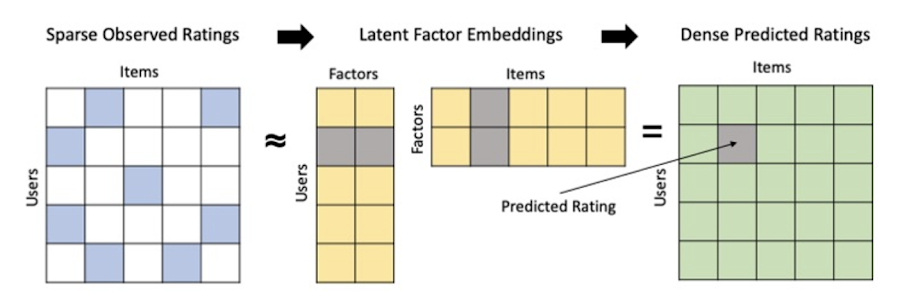
Collaborative filtering is a foundational model for building a recommendation system as the input dataset is simple and the embeddings are learned for you. How does Matrix factorization fit into the mix you might be wondering? Matrix factorization is simply the model that applies collaborative filtering. BQML enables users to create and execute a matrix factorization model by using standard SQL directly in the data warehouse.
Collaborative filtering begins by creating an interaction matrix. The interaction matrix represents users as a row and items as columns in your dataset. This interaction matrix often is sparse in nature as not all users will have interacted with many items in your catalog. This is where embeddings come into play. Generating embeddings for users and items not only allows you to collapse many sparse features into a lower dimensional space but they also allow you to derive a similarity measure so that similar users/items fall nearby in the embedding space. These similarity measures are key as collaborative filtering uses similarities between users and items to make the end recommendations. The underlying assumption being that similar users will like similar items whether that be movies or handbags.
What’s required to get started?
To train a matrix factorization model you need a table that includes three input columns: user(s), item(s), and an implicit or explicit feedback variable (e.g., ratings is an example of explicit feedback). With the base input dataset in place, you can then easily run your model in BigQuery after specifying several hyperparameters in your CREATE MODEL SQL statement. Hyperparameters are available to specify the number of embeddings, the feedback type, the amount of L2 regularization applied and so on.
Why use this approach and who is it a good fit for?
As mentioned earlier, Matrix Factorization in BQML is a great way for those new to recommendation systems to get started. Matrix factorization has many benefits:
- Little ML Expertise: Leveraging SQL to build the model lowers the level of ML expertise needed
- Few Input Features: Data inputs are straightforward, requiring a simple interaction matrix
- Additional Insight: Collaborative filtering is adept at discovering new interests or products for users
While Matrix Factorization is a great tool for deriving recommendations it does come with additional considerations and potential drawbacks depending upon the use case.
- Not Amenable to Large Feature Sets: The input table can only contain two feature columns (e.g., user(s), item(s)). If there is a need to include additional features such as contextual signals, Matrix factorization may not be the right method for you.
- New Items: If an item is not available in the training data, the system can’t create an embedding for it and will have difficulty recommending similar items. While there are some workarounds available to address this cold-start issue, if your item catalog often includes new items, Matrix factorization may not be a good fit.
- Input Data Limitations: While the input matrix is expected to be sparse, training examples without feedback can cause problems. Filtering for items and users that have at least a handful of feedback (e.g., ratings) examples can improve the model. More information on limitations can be found here.
In summary, for users with a simplified dataset looking to iterate quickly and develop a baseline recommendation system, Matrix Factorization is a great approach to begin your personalization AI journey.
What is Recommendations AI and how does it work?
Recommendations AI is a fully managed service which helps organizations deploy scalable recommendation systems that use state-of-the-art deep learning techniques, including cutting-edge architectures such as two-tower encoders, to serve personalized and contextually relevant recommendations throughout the customer journey.
Deep learning models are able to improve the context and relevance of recommendations in part because they can easily address the previously mentioned limitations of Matrix Factorization. They incorporate a wide set of user and item features, and by definition they emphasize learning successive layers of increasingly meaningful representations from these features. This flexibility and expressivity allows them to capture complex relationships like short-lived fashion trends and niche user behaviors. However, this increased relevance comes at a cost, as deep learning recommenders can be difficult to train and expensive to serve at scale.
Recommendations AI helps organizations take advantage of serving these deep learning models and handles the MLOps required to serve these models globally with low latency. Models are automatically retrained daily and tuned quarterly to capture changes in customer behavior, product assortment, pricing, and promotions. Newly trained models follow a resilient CI/CD routine which validates they are fit to serve and promotes them to production without service interruption. The models achieve low serving latency by using a scalable approximate nearest neighbors (ANN) service for efficient item retrieval at inference time. And, to maintain consistency between online and offline tasks, a scalable feature store is used, preventing common production challenges such as data leakage and training-serving skew.
What’s required to get started?
To get started with Recommendations AI we first need to ingest product and user data into the API:
- Import product catalog: For large product catalog updates, ingest catalog items in bulk using the catalogItems.import method. Frequent catalog updates can be schedule with Google Merchant Center or BigQuery
- Record user events: User events track actions such as clicking on a product, adding items to cart, or even purchasing an item. These events need to be ingested in real time to reflect the latest user behavior and then joined to items imported in the product catalog
- Import historical user events: The models need sufficient training data before they can provide accurate predictions. The recommended user event data requirements are different across model types (learn more here)
Once the data requirements are met, we are able to create one or multiple models to serve recommendations:
- Determine your recommendation types and placements: The location of the recommendation panel and the objective for that panel impact model training and tuning. Review the available recommendations types, optimization objectives, and other model tuning options to determine the best options for your business objectives.
- Create model(s): Initial model training and tuning can take 2-5 days depending on the number of user events and size of the product catalog
- Create serving configurations and preview recommendations: After the model is activated, create serving configurations and preview the recommendations to ensure your setup is functioning as expected before serving to production traffic
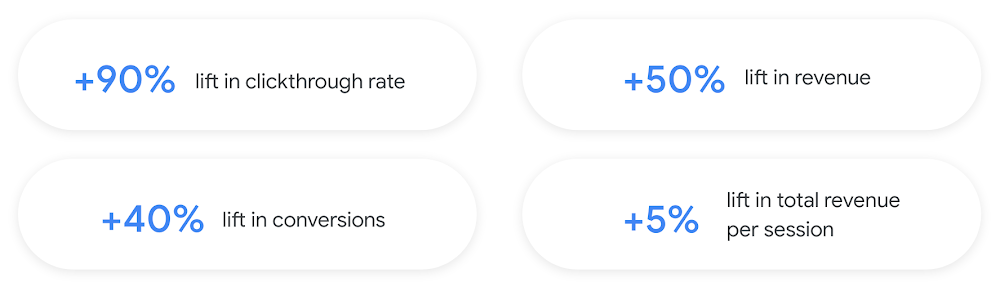
Once models are ready to serve, consider setting up A/B experiments to understand how newly trained models impact your customer experience before serving them to 100% of your traffic. In the Recommendations AI console, see the Monitoring & Analytics page for summary and placement-specific metrics (e.g., recommender-engaged revenue, click-through-rate, conversion rate, and more).
Why use this approach and who is it a good fit for?
Recommendations AI is a great way to engage customers and grow your online presence through personalization. It’s used by teams who lack technical experience with production recommendation systems, as well as customers who have this technical depth but want to allocate their team’s effort towards other priorities and challenges. No matter your team’s technical experience or bandwidth, you can expect several benefits with Recommendations AI:
- Fully managed service: no need to preprocess data, train or hypertune machine learning models, load balance or manually provision you infrastructure – this is all taken care of for you. The recommendation API also provides a user-friendly console to monitor performance over time.
- State-of-the-art AI: take advantage of the same modeling techniques used to serve recommendations across Google Ads, Google Search, and YouTube. These models excel in scenarios with long-tail products and cold-starts users and items
- Deliver at any touchpoint: serve high-quality recommendations to both first-time users and loyal customers anywhere in their journey via web, mobile, email, and more
- Deliver globally: serve recommendations in any language anywhere in the world at low-latency with a fully automated global serving infrastructure
- Your data, your models: Your data and models are yours. They’ll never be used for any other Google product nor shown to any other Google customer
For users looking to leverage state of the art AI to fuel their recommendation systems but need an existing solution to get up and running more quickly, Recommendations AI is the right solution for you.
What are Two Tower encoders and how do they work?
As a reminder, in recommendation system design, our objective is to surface the most relevant set of items for a given user or set of users. The items are usually referred to as the candidate(s) where we might include information about the items such as the title or description of the item, other metadata about the item like language, number of views, or even clicks on the item over time. User(s) are often represented in the form of a query to a recommendation system where we might provide details about the user such as the location of the user, preferred languages, and what they have searched for in the past.
Let’s start with a common example. Imagine that you are creating a movie recommendation system. The input candidates for such a system would be thousands of movies and the query set can consist of millions of viewers. The goal of the retrieval stage is to select a smaller subset of movies(candidates) for each user and then score and rank order them before presenting the final recommended list to the query/user.
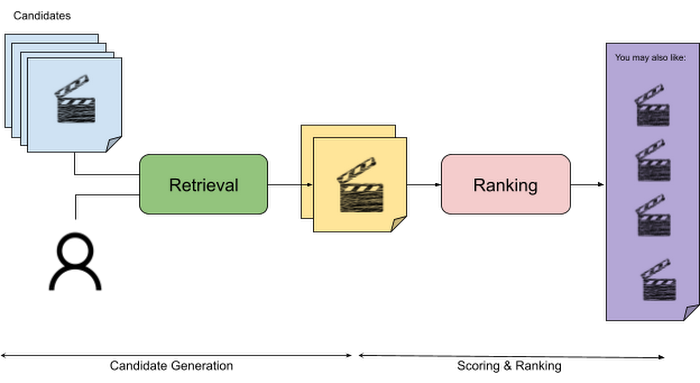
The retrieval stage is able to refine our list of candidates by encoding both the candidate and the query data so they share the same embedding space. A good embedding space will place candidates which are similar to one another closer together and dissimilar items/queries farther apart in the embedding space.
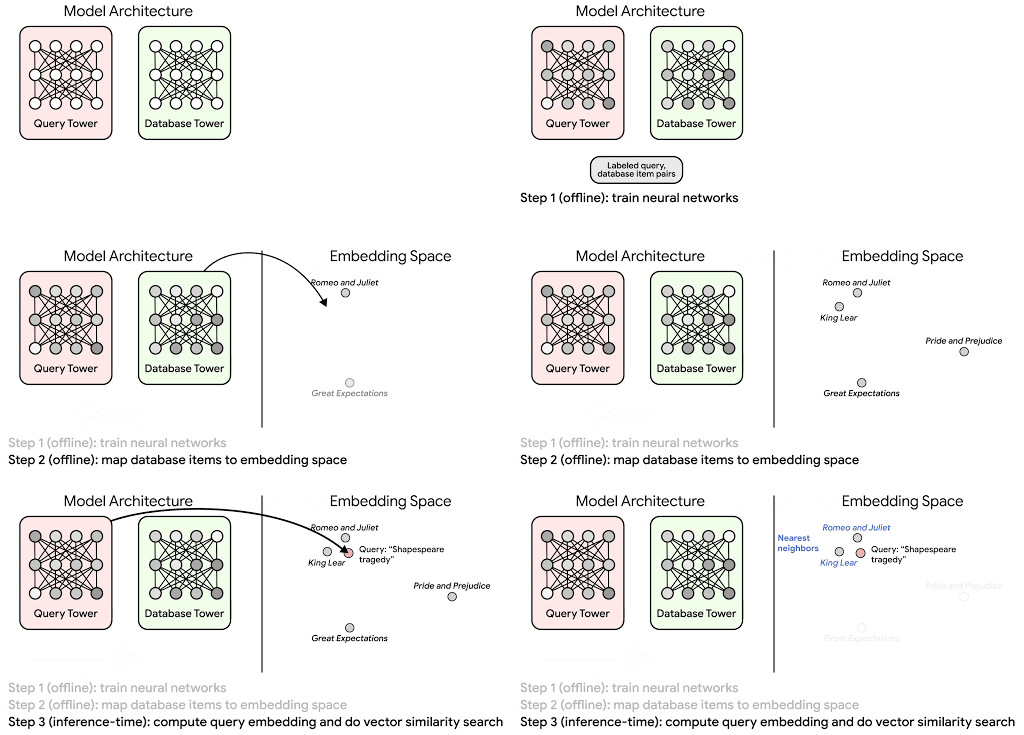
Once we have a database of query and candidate embeddings we can then use an approximate nearest neighbor search method to then generate a list of final “like” candidates, i.e. find a certain number of nearest neighbors for a given query/user and surface final recommendations.
What’s required to get started?
At the most basic level, in order to train a two-tower model you need the following inputs:
- Training Data: Training data is created by combining your query/user data with data about the candidates/items. The data must include matched pairs, cases where both user and item information is available. Data in the training set can include many formats from text, numeric data, or even images.
- Input Schema: The input schema describes the schema of the combined training data along with any specific feature configurations.
Several services within Vertex AI have come available that complement the existing Two-Tower built-in algorithm and can be leveraged in your execution:
- Nearest Neighbor (ANN) Service: Vertex AI Matching Engine and ScANN provide a high-scale and low-latency Approximate Nearest Neighbor (ANN) service so you can more easily identify similar embeddings.
- Hyperparameter Tuning Service: A hyperparameter tuning service such as Vizier can help you identify the optimal hyperparameters such as the number of hidden layers, the size of the hidden layers, and the learning rate in fewer trials.
- Hardware Accelerators: Specialized hardware, such as GPUs or TPUs, can be valuable in your recommendation system to help accelerate experiments and improve the speed of training cycles.
Why use this approach and who is it a good fit for?
The Two-Tower built-in algorithm can be considered the “custom sports car” of recommendation systems and comes with several benefits:
- Greater Control: While Recommendations AI uses the two-tower architecture as one of the available architectures it doesn’t provide granular control or visibility into model training, example generation, and model validation details. In comparison, the Two-Tower built in algorithm provides a more customizable approach as you are training a model directly in a notebook environment.
- More Feature Options: The Two Tower approach can handle additional contextual signals ranging from text to images.
- Cold Start Cases: Leveraging a rich set of features not only enhances performance but also allows the candidate generation to work for new users or new candidates.
While the Two-Tower built in algorithm is an excellent and best-in class solution for deriving recommendations, it does come with additional considerations and potential drawbacks depending upon the use case.
- Technical ML Expertise Required: Two tower encoders are not a “plug and play” solution like the other approaches mentioned above. In order to effectively leverage this approach, appropriate coding and ML expertise is required.
- Speed to Insight: Building out a custom solution via two-tower encoders may require additional time as the solution is not pre-built for the user.
For users looking for greater control, increased flexibility, and have the technical chops to easily work within a managed notebook environment – the two-tower built in algorithm is the right solution for them.
What’s next?
In this article, we explored three common methods for building recommendation systems on Google Cloud Platform. As you can see thus far, there are alot of considerations to take into account before choosing a final approach. In an effort to help you align more quickly we have distilled the decision criteria down to a few simple steps (see below for more details).
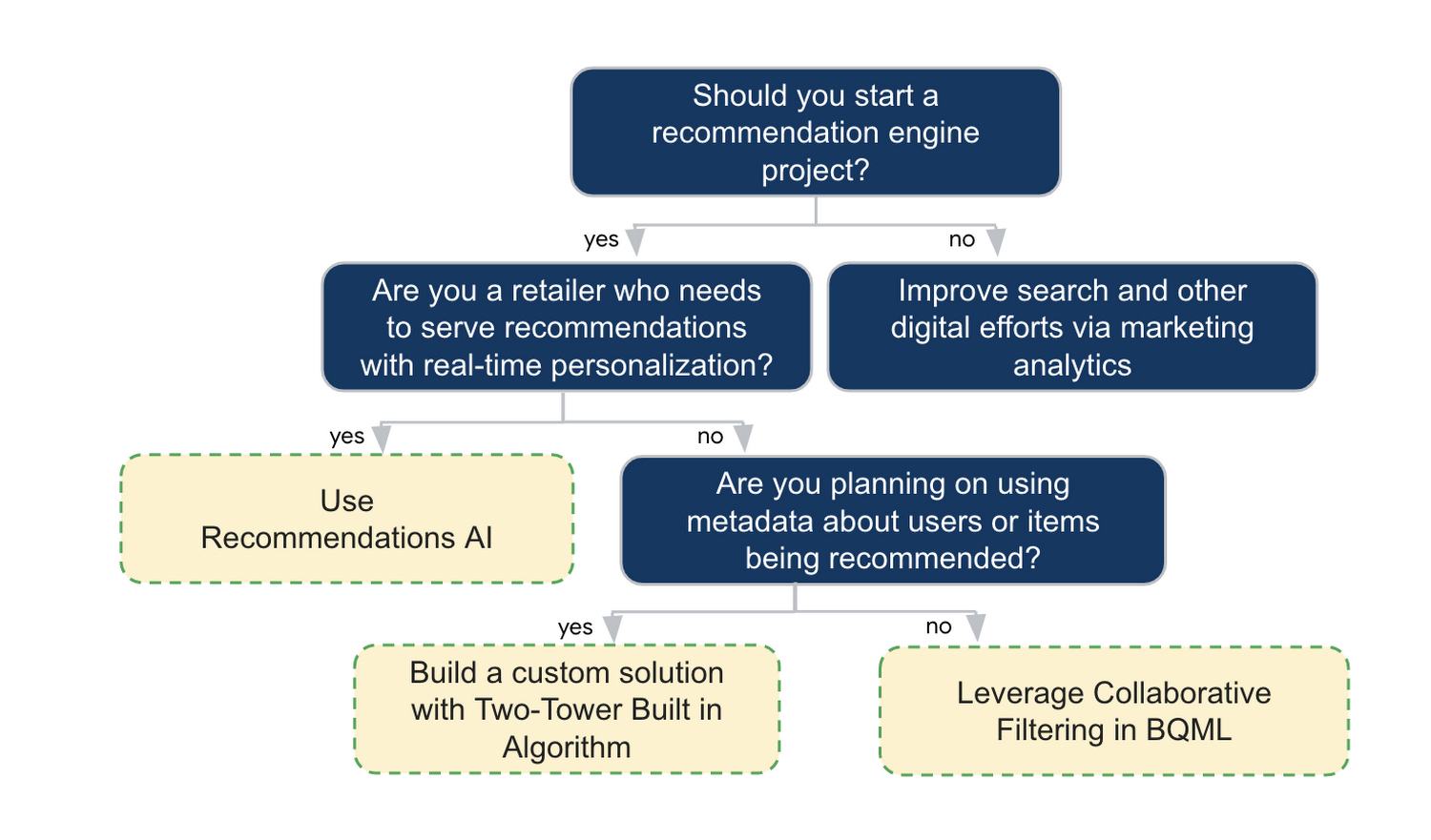
In the next installments of this series, we will dive more deeply into each method, explore how hardware accelerators can play a key role in recommendation system design, and discuss how recommendation systems may be leveraged in key verticals. Stay tuned for future posts in our recommendation systems series. Thank you for reading! Have a question or want to chat? Find authors here – R.E. [Twitter | LinkedIn], Jordan [LinkedIn], and Vaibhav [LinkedIn].
Acknowledgements
Special thanks to Pallav Mehta, Henry Tappen,Abhinav Khushraj, and Nicholas Edelman for helping to review this post.
References
You Can Now ‘Listen’ to Over 50 Tech Blogs on Google Cloud Reader

4882
Of your peers have already read this article.
1:30 Minutes
The most insightful time you'll spend today!
🎧 Prefer to listen? Check out this episode on the Google Cloud Reader podcast
If you’re anything like me, you love reading, but also appreciate that sometimes your eyes need to be doing other things; whether it’s finding your exit off the highway, or keeping your puppy from destroying the couch.
And sometimes the thought of sitting down to read something just feels like it’s going to take valuable multi-tasking time away from my day. I know, I know, multitasking can be frowned upon, but it’s the way I live a good chunk of my life, and it’s working out so far. And while I’m not alone in my multitasking, I’m also not alone in my desire for a non-visual way to get this content, or any content.
*Google Cloud Reader enters the chat*
Google Cloud Reader is a podcast that lets you listen to the Google Cloud Blog posts that aren’t as dependent on visuals. This means they’re articles that are, or are adapted to be, less focused on graphs, or code samples, and instead describe the meaning behind those visual aids.
It’s an easy, audible way to absorb content around all things new in Cloud, while still being able to make sure Ruthie doesn’t eat my work from home equipment.

So by now you’re probably thinking “OK, so you started a podcast during the pandemic, even though you definitely seemed like the type to start making sourdough”—and you’re right. My 53 plants agree with you. But rest assured, one can listen to an episode of this podcast *while* creating a macramé plant hanger, or waiting for bread to rise—multitasking, am I right?
We’re a little over 50 episodes/macrame plant hangers in, so you should check it out (Ruth and I would appreciate it).
Some of my personal favorites
- Beginners Guide to Painless Machine Learning – Learn how to get started with Google Cloud AI tools
- Introducing GKE Autopilot: A Revolution in Managed Kubernetes – Learn more about GKE Autopilot, a revolutionary mode of operations for managed Kubernetes that lets you focus on your software, while GKE Autopilot manages the infrastructure.
- Cook up your own ML recipes with AI Platform – Learn about Mars Wrigley’s new ML-inspired recipe experiment on Google Cloud and how you can get started with your own.
- Recovering Global Wildlife Populations using ML – Review Google’s Wildlife Insight’s ML project and help users create an image classification model for motion-sensor cameras (called camera traps) used to help protect wildlife in an non-invasive way by collecting and tagging species via pictures.
Let me know your favorite episodes, and what other articles you’d like to hear on Twitter @jbrojbrojbro!
No matter why you prefer an audio format, we’ve got you covered; Google Cloud Reader, where we read the tech blog for you, and to you.
Get all the Google Cloud Reader on your favorite podcast platform, including Google Podcasts, Apple Podcasts, and Spotify.

7690
Of your peers have already downloaded this article
4:30 Minutes
The most insightful time you'll spend today!
AI has the power to revolutionize every industry—from retail to agriculture, and education to healthcare. Yet many businesses still haven’t begun to adopt AI.
There are a number of factors, including the need for specialized talent and hardware, the right types and quantities of data for training and refining machine learning models, and of course, the broader complexities of introducing a new way of working inside an organization.
But above all, AI can be challenging to apply to very specific business needs.
Google wants to change that, which is why it’s introducing a number of AI solutions aimed at making it easier for businesses to use AI to address many of these specific use cases.
Google’s AI solutions fall into two categories. The first is a set of pre-packaged AI solutions that can be easily integrated into existing workflows. To make these solutions as easy to implement as possible, Google works with popular, trusted enterprise partners who have deep-domain expertise in these workflows.
The majority of Google’s pre-packaged solutions will be delivered through these partners, although it will be offering some
The second category of AI solutions is comprised of reference architectures that businesses can use to create highly-custom AI tools. These require more development work than Google’s pre-packaged
Additionally, businesses can build on these architectures and deploy them to market more quickly, helping your business take advantage of AI, faster.
Learn more about all Google’s AI solutions. Download the whitepaper now!

New Technology: The Projected Total Economic Impact™ Of Google Cloud Contact Center AI
DOWNLOAD RESEARCH REPORTS3372
Of your peers have already downloaded this article
15:30 Minutes
The most insightful time you'll spend today!
According to Forrester Research, customers expect easy and effective customer service that builds positive emotional connections every time they interact with a brand or organization. Additionally, 40% of surveyed business leaders say that improving their organization’s customer experience (CX) is a high priority, ahead of initiatives like improving products and differentiation and reducing costs.
While this is a huge opportunity, improving CX in contact centers presents a significant challenge to organizations because most legacy interactive voice response (IVR) systems were never designed with CX in mind, and they are often left unchanged for years at a time except for the addition of more options when a new product or service is launched.
Providing great CX is a top priority for most organizations, but because contact centers typically operate 24/7, decision makers are hesitant to make significant changes or upgrades out of fear of breaking their already overtaxed systems. This paradox has left many organizations to rely on outdated or bloated IVR systems far too long. And with constantly rising customer expectations around service and support, these organizations are falling further and further behind competitors that are investing in next-generation solutions.
Google Cloud Contact Center Artificial Intelligence (CCAI) provides a cloud-based platform that leverages Google Cloud’s artificial intelligence (AI) and machine learning (ML) capabilities, including natural language processing and speech capabilities to augment, support, and assist contact center agents, and to deploy voice bots and chatbots that can naturally converse with customers to understand their intent and help resolve their calls with minimal intervention from an agent.
CCAI also has the ability to tie into an organization’s back-end data to enable bots to perform higher-value tasks, identify and authenticate customers, and augment agent desktops to provide relevant information and turn-by-turn guidance through different scenarios.
Google commissioned Forrester Consulting to conduct a New Technology: Projected Total Economic Impact™ (New Tech TEI) study and examine the projected return on investment (PROI) enterprises may realize by deploying CCAI.
Read the report and find out:
- Why businesses say their traditional contact center tools introduced challenges
- How Google’s Contact Center AI overcomes these challenges
- What effect the switch had to their financial and productivity investments
MLOps Framework: Helping You Choose the Right Capabilities to Manage ML Projects
2895
Of your peers have already read this article.
3:00 Minutes
The most insightful time you'll spend today!
Establishing a mature MLOps practice to build and operationalize ML systems can take years to get right. We recently published our MLOps framework to help organizations come up to speed faster in this important domain.
As you start your MLOps journey, you might not need to implement all of these processes and capabilities. Some will have a higher priority than others, depending on the type of workload and business value that they create for you, balanced against the cost of building or buying processes or capabilities.
To help ML practitioners translate the framework into actionable steps, this blog post highlights some of the factors that influence where to begin, based on our experience in working with customers.
The following table shows the recommended capabilities (indicated by check marks) based on the characteristics of your use case, but remember that each use case is unique and might have exceptions. (For definitions of the capabilities, see the MLOps framework.)
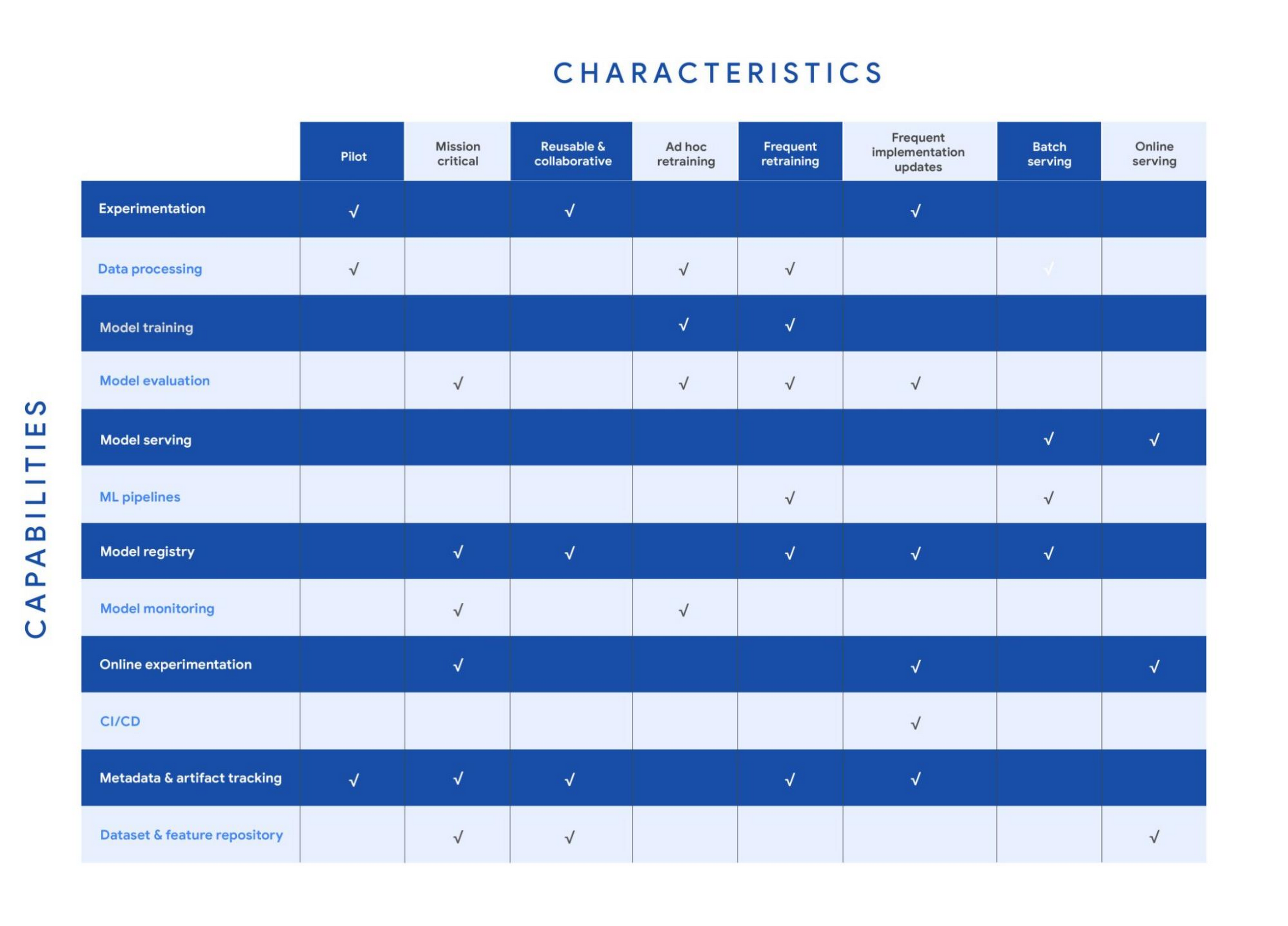
Your use case might have multiple characteristics. For example, consider a recommender system that’s retrained frequently and that serves batch predictions. In that case, you need the data processing, model training, model evaluation, ML pipelines, model registry, and metadata and artifact tracking capabilities for frequent retraining. You also need a model serving capability for batch serving.
In the following sections, we provide details about each of the characteristics and the capabilities that we recommend for them.
Pilot
Example: A research project for experimenting with a new natural language model for sentiment analysis.
For testing a proof of concept, your focus is typically on data preparation, feature engineering, model prototyping, and validation. You perform these tasks using the experimentation and data processing capabilities. Data scientists want to set up experiments quickly and easily and track and compare them. Therefore, you need the ML metadata and artifact tracking capability in order to debug, to provide traceability and lineage, to share and track experimentation configurations, and to manage ML artifacts. For large-scale pilots, you might also require dedicated model training and evaluation capabilities.
Mission-critical
Example: An equities trading model where model performance degradation in production can put millions of dollars at stake.
In a mission-critical use case, failure with the training process or production model has a significant negative impact on the business (a legal, ethical, reputational, or financial risk). The model evaluation capability is important to identify bias and fairness, as well as to provide explainability of the model. Additionally, monitoring is essential to assess the quality of the model during training and to assess how it performs in production. Online experimentation lets you test newly trained models against the one in production using a controlled environment before you replace the deployed model. Such use cases also need a robust model governance process to store, evaluate, check, release, and report on models and to protect against risks. You can enable model governance by using the model registry and metadata and artifact tracking capabilities. Additionally, datasets and feature repositories provide you with high-quality data assets that are consistent and versioned.
Reusable and collaborative
Example: Customer Analytic Record (CAR) features that are used across various propensity modeling use cases.
Reusable and collaborative assets allow your organization to share, discover, and reuse AI data, source code, and artifacts. A feature store helps you standardize the processes of registering, storing, and accessing features for training and serving ML models. Once features are curated and stored, they can be discovered and reused by multiple data science teams. Having a feature store helps you avoid reengineering features that already exist, and saves time on experimentation. You can also use tools to unify data annotation and categorization. Finally, by using ML metadata and artifacts tracking, you help provide consistency, testability, security and repeatability of the ML workflows.
Ad hoc retraining
Example: An object detection model to detect various car parts, which needs to be retrained only when new parts are introduced.
In ad hoc retraining, models are fairly static and you do not retrain them except when the model performance degrades. In these cases, you need data processing, model training, and model evaluation capabilities to train the models. Additionally, because your models are not updated for long periods, you need model monitoring. Model monitoring detects data skews, including schema anomalies, as well as data and concept drifts and shifts. Monitoring also lets you continuously evaluate your model performance, and it alerts you when performance decreases or when data issues are detected.
Frequent retraining
Example: A fraud detection model that’s trained daily in order to capture recent fraud patterns.
Use cases for frequent retraining are ones where model performance relies on changes in the training data. The retraining might be based on time intervals (for example, daily or weekly), or it could be triggered based on events like when new training data becomes available. For this scenario, you need ML pipelines to connect multiple steps like data extraction, preprocessing, and model training. You also need the model evaluation capability to ensure that the accuracy of the newly trained model meets your business requirements. As the number of models you train grows, both a model registry and metadata and artifact tracking help you keep track of the training jobs and model versions.
Frequent implementation updates
Example: A promotion model with frequent changes to the architecture to maximize conversion rate.
Frequent implementation updates involve changes to the training process itself. That might mean switching to a different ML framework, such as changing the model architecture (for example, LSTM to Attention) or adding a data transformation step in your training pipeline. Such changes in the foundation of your ML workflow require controls to ensure that the new code is functional and that the new model matches or outperforms the previous one. Additionally, the CI/CD process accelerates the time from ML experimentation to production, as well as reducing the possibility for human error. Because the changes are significant, online experimentation is necessary to ensure that the new release is performing as expected. You also need other capabilities such as experimentation, model evaluation, model registry, and metadata and artifact tracking to help you operationalize and track your implementation updates.
Batch serving
Example: A model that serves weekly recommendations to a user who has just signed up for a video-streaming service.
For batch predictions, there is no need to score in real time. You precompute the scores and you store them for later consumption, so latency is less of a concern than in online serving. However, because you process a large amount of data at a time, throughput is important. Often batch serving is a step in a larger ETL workflow that extracts, pre-processes, scores, and stores data. Therefore, you need the data processing capability and ML pipelines for orchestration. In addition, a model registry can provide your batch serving process with the latest validated model to use for scoring.
Online serving
Example: A RESTful microservice that uses a model to translate text between multiple languages.
Online inference requires tooling and systems in order to meet latency requirements. The system often needs to retrieve features, to perform inference, and then to return the results according to your serving configurations. A feature repository lets you retrieve features in near real time, and model serving allows you to easily deploy models as an endpoint. Additionally, online experiments help you test new models with a small sample of the serving traffic before you roll the model out to production (for example, by performing A/B testing).
Get started with MLOps using Vertex AI
We recently announced Vertex AI, our unified machine learning platform that helps you implement MLOps to efficiently build and manage ML projects throughout the development lifecycle. You can get started using the following resources:
- MLOps: Continuous delivery and automation pipelines in machine learning
- Getting started with Vertex AI
- Best practices for implementing machine learning on Google Cloud
Acknowledgements: I’d like to thank all the subject matter experts who contributed, including Alessio Bagnaresi, Alexander Del Toro, Alexander Shires, Erin Kiernan, Erwin Huizenga, Hamsa Buvaraghan, Jo Maitland, Ivan Nardini, Michael Menzel, Nate Keating, Nathan Faggian, Nitin Aggarwal, Olivia Burgess, Satish Iyer, Tuba Islam, and Turan Bulmus. A special thanks to the team that helped create this, Donna Schut, Khalid Salama, and Lara Suzuki, and Mike Pope for his ongoing support.
More Relevant Stories for Your Company




How Marketers Can Turn Information into Action with Machine Learning
The biggest challenge marketers face with machine learning is, "how to get starter"? Instead of getting overwhelmed, they should focus on the applied machine learning by using the algorithms that are already built. Cassie Kozyrkov, the chief decision scientist with Google Cloud, says that marketers who are overwhelmed by everything

Google’s Intelligent Products Essentials Assist Manufacturers in Product Development Journey
Expectations for both consumer and commercial products have changed. Consumers want products that evolve with their needs, adapt to their preferences, and stay up-to-date over time. Manufacturers, in turn, need to create products that provide engaging customer experiences not only to better compete in the marketplace, but also to provide

How to Build a BI Dashboard With Google Data Studio and BigQuery
For as long as business intelligence (BI) has been around, visualization tools have played an important role in helping analysts and decision-makers quickly get insights from data. In our current era of big data analytics, that premise still holds. To provide an integrated platform for building BI dashboards on top

Special Identity Parsers in Document AI eases Customer Verification and KYC Processes
If you’ve opened an account at a bank, applied for a government benefit, or provided a proof of age document on an ecommerce website, chances are you’ve had to share a physical or digital copy of a Driver’s License or a passport as proof of your identity. For businesses or
