





4300
Of your peers have already watched this video.
1:43 Minutes
The most insightful time you'll spend today!
The Amazing Tech Behind This Animal Rescue Center Helps Save Costs and Rescue More Animals
The Royal Society for the Prevention of Cruelty to Animals (RSPCA) is the UK’s largest animal welfare charity. Each year, it finds new homes for more than 50,000 animals in need.
Streamlining the charity’s IT systems is the job of Billie Laidlaw, Assistant Director IT Resources. “Every pound we save with our solutions helps to rescue, rehabilitate and re-home animals across England and Wales,” says Billie.
Google Apps for Work was introduced to replace the legacy email system, and the move has saved the charity hundreds of thousands of pounds and introduced more effective ways of working. With Apps for Work on Android phones and Chromebooks, RSPCA inspectors can use Drive and Gmail on the go to connect, check documentation, share information, and request temporary shelter for rescued animals.
With Slides and Chromebox, rescue centre managers can quickly and easily create promotional screens to display in their reception areas showcasing animals that need new owners. And the slides can be pushed simultaneously to RSPCA charity shop screens to help ensure the best chance of finding the animals loving new homes.
“Every time a supporter puts a pound in one of our collection tins, they want it to be spent wisely,” says Billie. “By streamlining our services with Google Apps for Work, we make sure that more of that money serves the animals who need it.”
Watch this video to find out the tech that helps RSPCA make a difference.

How Machine Learning in G Suite Helps Employees of Dalmia Bharat Discover the Next Big Idea
DOWNLOAD CASE STUDY5532
Of your peers have already downloaded this article
5:30 Minutes
The most insightful time you'll spend today!
Creating expense reports, Email management, formatting documents: Your time is caught in the quicksand of formatting, tracking, analysis or other mundane tasks. These are just some of the time-sinks that can affect your—and your employees’—productivity at work. At Google Cloud, this is referred to as “overhead”—time spent working on tasks that do not directly relate to creative output—and it happens a lot.
According to a Google Cloud study, the average worker spends only about 5 percent of his or her time actually coming up with the next big idea.
That’s where machine learning can help.
Machine learning algorithms observe examples and make predictions based on data. In G Suite—Google Cloud’s collaboration and productivity platform—machine learning models make your workday more efficient by taking over menial tasks, like scheduling meetings, or by predicting information you might need and surfacing it for you.
“Smart Reply, (in Gmail) for example, uses machine learning to generate three natural language responses to an email. So if you find yourself on the road or pressed for time and in need of a quick way to clear your inbox, let Smart Reply do it for you,” says Sunil Tewari, Head of Technology and Business Services, Dalmia Bharat.
5344
Of your peers have already watched this video.
26:00 Minutes
The most insightful time you'll spend today!
On-Demand Webinar: 3 Ways Collaboration Transforms How Your Company Works
A majority of your employees and teams spend 38% of their time unsuccessfully searching and recreating content, according to IDC.
They also spend 20% of their time looking for information, according to McKinsey. That’s 58% of time lost in unproductive tasks that could have been spent coming up with the next big innovative idea that actually impacts business.
Now you know why there are no new ideas, no new innovations, no room for business to grow. Savvy organizations like Nielsen, Whirlpool, and Colgate-Palmolive have had enough of that and are embracing the cloud to collaborate in real-time and transform how their companies work.
The only way to achieve business growth and beat competition is to invest less time in unproductive tasks—like looking for information—and more time innovating with intelligent systems that provide your teams with information they need without even having to look for it: The ability to search smart, find fast, collaborate in real-time, and build new ideas quickly. Embracing Artificial Intelligence enabled-cloud collaboration platforms is one way to get there.
In this webinar, Allen Yang, Product Manager, Google Cloud, talks about how big corporations are turning to the power of the cloud to enable real-time collaboration, faster decision making, smarter and more productive employees and teams, and embracing a new way of working.
How Barilla Created a Social Media Style App to Improve Efficiency

5640
Of your peers have already read this article.
3:30 Minutes
The most insightful time you'll spend today!
Google Cloud Results
- Replaced conflicting, time-consuming paper logs with a near real-time, transparent app
- Scaled rapidly and easily to accommodate new teams thanks to Google App Engine
- Enables photographic and video communication to replace confusing text
- New factory solution rolled out in just 15 days
In 1877, Pietro Barilla set up a small bakery to make pasta and baked goods for the people of Parma, Italy. Today, Barilla applies its 140 years of baking knowledge on a global scale, with six major manufacturing sites in Italy and an international network employing over 8,000 people. As the world’s leading producer of pasta, Barilla knows that when it comes to making quality food, great communication is key. That’s why the company plans to become a completely digital, looking to technology to improve the way it works.
Teams at the Barilla factory in Cremona work along a production line more than one-kilometer long, staffed by three shifts of workers a day. When one shift handed over to the next or requested machine maintenance teams, they used paper notebooks and unofficial instant messaging to communicate. That meant there was no authoritative, real-time record of events, communication was messy, oversight was poor, and teams had to hold daily morning meetings to synchronise notes.
Barilla worked with the Google Cloud Partner Injenia to create a solution, beginning with a consultative process on the factory floor.
“We had the idea to to start from the bottom and work up,” says Cristiano Boscato at Injenia. “Barilla’s top staff were brilliant about letting us do it. Eight of us from Injenia spent months on the factory lines with Barilla workers, collecting ideas on Google Docs, making presentations with Slides and collecting feedback with Forms. The CollaborAction app we created is the result of an amazing partnership.”
Co-designing a team social network
“Everything at the Cremona plant was managed offline, with paper,” explains Alessandra Ardrizzoia, Digital Engagement Senior Manager at Barilla. “Workers on the line would track events in notebooks, the shift leader would have another notebook, and the leader of the maintenance team would have yet another notebook. Everybody wrote their own text description of events, so there would be mismatches in the information going around.”
To resolve this, teams would meet at 8:30am every day to reconstruct a consistent narrative. In addition, machine maintenance workers were already using instant messaging to communicate with the line. Barilla and Injenia looked for a solution that could deliver a searchable, single version of events, with the ease of use of a mobile messaging application.
After consulting factory workers for ideas, Injenia created CollaborAction, a custom-built app that brought G Suite collaboration tools together on an Google App Engine platform, using Google Cloud SQL to index files. Google+, Google Drive and Hangouts were not only highly available and easy-to-use, they also “helped with fast adoption, with interfaces that workers could already relate to.” Meanwhile Google App Engine enabled the Injenia team to deliver updates and new versions at speed, as part of a feedback process with workers who offered suggestions through a link to Forms embedded in the app.
Google+ provides an intuitive social media dashboard that workers felt comfortable with. Now teams use company tablets placed at intervals along the line to log in, report issues to other teams, photograph problems, schedule maintenance, give status updates through Hangouts chat, and have visibility on the whole process as it takes place.
“Everyone in the Cremona plant was really happy with the new social collaboration process. Because they were involved in designing the solution, they felt involved and really engaged with the process,” says Alessandra. “And now that everyone is aligned with CollaborAction, all the work in the plant is more effective. They are more agile and can use their time in more added-value activities.”
Optimization and a national roll-out
Created in Cremona, now CollaborAction connects over 1,000 users in six of Barilla’s factories in Italy. “The pilot at Cremona took one month, and adoption has been easier and faster in every plant we’ve taken it to,” says Cristiano. “We have another five or six plants more, and it takes no more than 15 days to introduce. That’s incredible.”
Because CollaborAction is a mobile app built on Google App Engine, scaling to meet new demand has been simple. Now maintenance teams use the app on smartphones, line workers use it on tablets, and shift leaders use it on laptops, so the entire team is aligned in close to real-time on a single version of events. And now teams communicate with video and photographs as well as text, there’s less room for confusion, as Alessandra explains. “It’s no problem understanding what’s happening in a video or picture, compared to a message that just says ‘something is going wrong.’ On a production line, where one part leads into the next, that speed makes a difference, and means we don’t have to throw as much food away when something breaks down.”
“Now we’re collecting feedback from all of the plants using CollaborAction and using it to create a standardised solution that we can apply across all of our plants,” says Alessandra. “We’re side-by-side with the workers in that sense, trying to address their needs with new features. It’s a way to make the workers feel like part of the solution, and that the app represents their needs and their voice.”
Solving a universal problem
By the end of 2018, Barilla and Injenia aim to have deployed CollaborAction to 2,700 employees at 18 factories worldwide. Barilla has already collected more than 50,000 posts with the app, including around 20,000 photographs and videos, and is now considering ways to apply Cloud Machine Learning Engine to create a maintenance chatbot or direct IoT connection with machinery.
“CollaborAction hasn’t just made our maintenance processes faster and more efficient, its also exponentially increased the knowledge and understanding employees have about their work,” says Alessandra. “It’s improving team spirit, too, such as when employees use CollaborAction to arrange to play soccer. It’s become the main communication tool for the entire plant.”
All About Cloud Run, its Scalability and Management Features

7385
Of your peers have already read this article.
3:00 Minutes
The most insightful time you'll spend today!
Mindful Containers is a fictitious company that is creating containerized microservice applications. They need a fully managed compute environment for deploying and scaling serverless containerized microservices. So, they are considering Cloud Run.
They are excited about Cloud Run because it abstracts away the cluster configuration, monitoring, and management so they can focus on building the features for their apps. Cloud Run is a fully-managed compute environment for deploying and scaling serverless containerized microservices.

What is Cloud Run?
Cloud Run is a fully-managed compute environment for deploying and scaling serverless HTTP containers without worrying about provisioning machines, configuring clusters, or autoscaling.
- No vendor lock-in – Because Cloud Run takes standard OCI containers and implements the standard Knative Serving API, you can easily port over your applications to on-premises or any other cloud environment.
- Fast autoscaling – Microservices deployed in Cloud Run scale automatically based on the number of incoming requests, without you having to configure or manage a full-fledged Kubernetes cluster. Cloud Run scales to zero— that is, uses no resources—if there are no requests.
- Split traffic – Cloud Run enables you to split traffic between multiple revisions, so you can perform gradual rollouts such as canary deployments or blue/green deployments.
- Custom domains – You can set up custom domain mapping in Cloud Run and it will provision a TLS certificate for your domain.
- Automatic redundancy – Cloud Run offers automatic redundancy so you don’t have to worry about creating multiple instances for high availability
How to use Cloud Run
With Cloud Run, you write your code in your favorite language and/or use a binary library of your choice. Then push it to Cloud Build to create a container build. With a single command—“gcloud run deploy”—you go from a container image to a fully managed web application that runs on a domain with a TLS certificate and auto-scales with requests.
How does Cloud Run work?
Cloud Run service can be invoked in the following ways:
HTTPS: You can send HTTPS requests to trigger a Cloud Run-hosted service. Note that all Cloud Run services have a stable HTTPS URL. Some use cases include:
- Custom RESTful web API
- Private microservice
- HTTP middleware or reverse proxy for your web applications
- Prepackaged web application
gRPC: You can use gRPC to connect Cloud Run services with other services—for example, to provide simple, high-performance communication between internal microservices. gRPC is a good option when you:
- Want to communicate between internal microservices
- Support high data loads (gRPC uses protocol buffers, which are up to seven times faster than REST calls)
- Need only a simple service definition you don’t want to write a full client library
- Use streaming gRPCs in your gRPC server to build more responsive applications and APIs
WebSockets: WebSockets applications are supported on Cloud Run with no additional configuration required. Potential use cases include any application that requires a streaming service, such as a chat application.
Trigger from Pub/Sub: You can use Pub/Sub to push messages to the endpoint of your Cloud Run service, where the messages are subsequently delivered to containers as HTTP requests. Possible use cases include:
- Transforming data after receiving an event upon a file upload to a Cloud Storage bucket
- Processing your Google Cloud operations suite logs with Cloud Run by exporting them to Pub/Sub
- Publishing and processing your own custom events from your Cloud Run services
Running services on a schedule: You can use Cloud Scheduler to securely trigger a Cloud Run service on a schedule. This is similar to using cron jobs. Possible use cases include:
- Performing backups on a regular basis
- Performing recurrent administration tasks, such as regenerating a sitemap or deleting old data, content, configurations, synchronizations, or revisions
- Generating bills or other documents
Executing asynchronous tasks: You can use Cloud Tasks to securely enqueue a task to be asynchronously processed by a Cloud Run service. Typical use cases include:
- Handling requests through unexpected production incidents
- Smoothing traffic spikes by delaying work that is not user-facing
- Reducing user response time by delegating slow background operations, such as database updates or batch processing, to be handled by another service,
- Limiting the call rate to backend services like databases and third-party APIs
Events from Eventrac: You can trigger Cloud Run with events from more than 60 Google Cloud sources. For example:
- Use a Cloud Storage event (via Cloud Audit Logs) to trigger a data processing pipeline
- Use a BigQuery event (via Cloud Audit Logs) to initiate downstream processing in Cloud Run each time a job is completed
How is Cloud Run different from Cloud Functions?
Cloud Run and Cloud Functions are both fully managed services that run on Google Cloud’s serverless infrastructure, auto-scale, and handle HTTP requests or events. They do, however, have some important differences:
- Cloud Functions lets you deploy snippets of code (functions) written in a limited set of programming languages, while Cloud Run lets you deploy container images using the programming language of your choice.
- Cloud Run also supports the use of any tool or system library from your application; Cloud Functions does not let you use custom executables.
- Cloud Run offers a longer request timeout duration of up to 60 minutes, while with Cloud Functions the requests timeout can be set as high as 9 mins.
- Cloud Functions only sends one request at a time to each function instance, while by default Cloud Run is configured to send multiple concurrent requests on each container instance. This is helpful to improve latency and reduce costs if you’re expecting large volumes.
Pricing
Cloud Run comes with a generous free tier and is pay per use, which means you only pay while a request is being handled on your container instance. If it is idle with no traffic, then you don’t pay anything.
Conclusion
After learning about the ease of set up, scalability, and management capabilities of Cloud Run the Mindful Containers team is using it to deploy stateless microservices. If you are interested in learning more, check out the documentation.https://www.youtube.com/embed/oR4btKLRdn4?enablejsapi=1&
For more #GCPSketchnote, follow the GitHub repo. For similar cloud content follow me on Twitter @pvergadia and keep an eye out on thecloudgirl.dev
Tau VMs Joins Google Cloud to Offer Cost-effective Performance of Scale-out Workloads
5611
Of your peers have already read this article.
2:00 Minutes
The most insightful time you'll spend today!
Scale-out workloads demand the best combination of performance and price to bring down the cost of delivering applications, all while providing an excellent user experience. We are excited to announce a new virtual machine (VM) family, Tau VMs, coming to Google Cloud. Tau VMs extend Compute Engine’s VM offerings with a new option optimized for cost-effective performance of scale-out workloads.
T2D, the first instance type in the Tau VM family, is based on 3rd Gen AMD EPYCTM processors and leapfrogs the VMs for scale-out workloads of any leading public cloud provider available today, both in terms of performance and workload total cost of ownership (TCO). The x86 compatibility provided by these AMD EPYC processor-based VMs gives you market-leading performance improvements and cost savings, without having to port your applications to a new processor architecture.
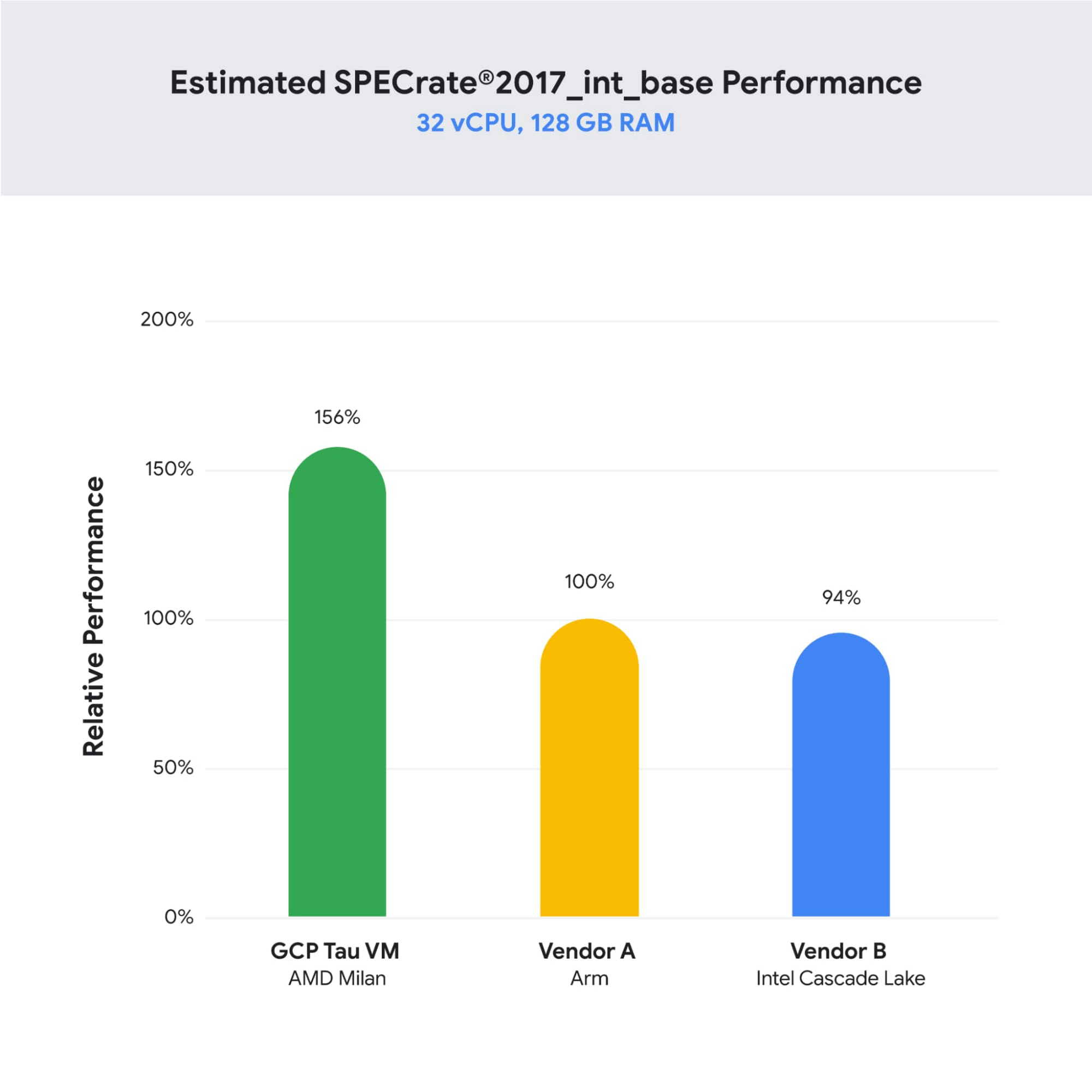
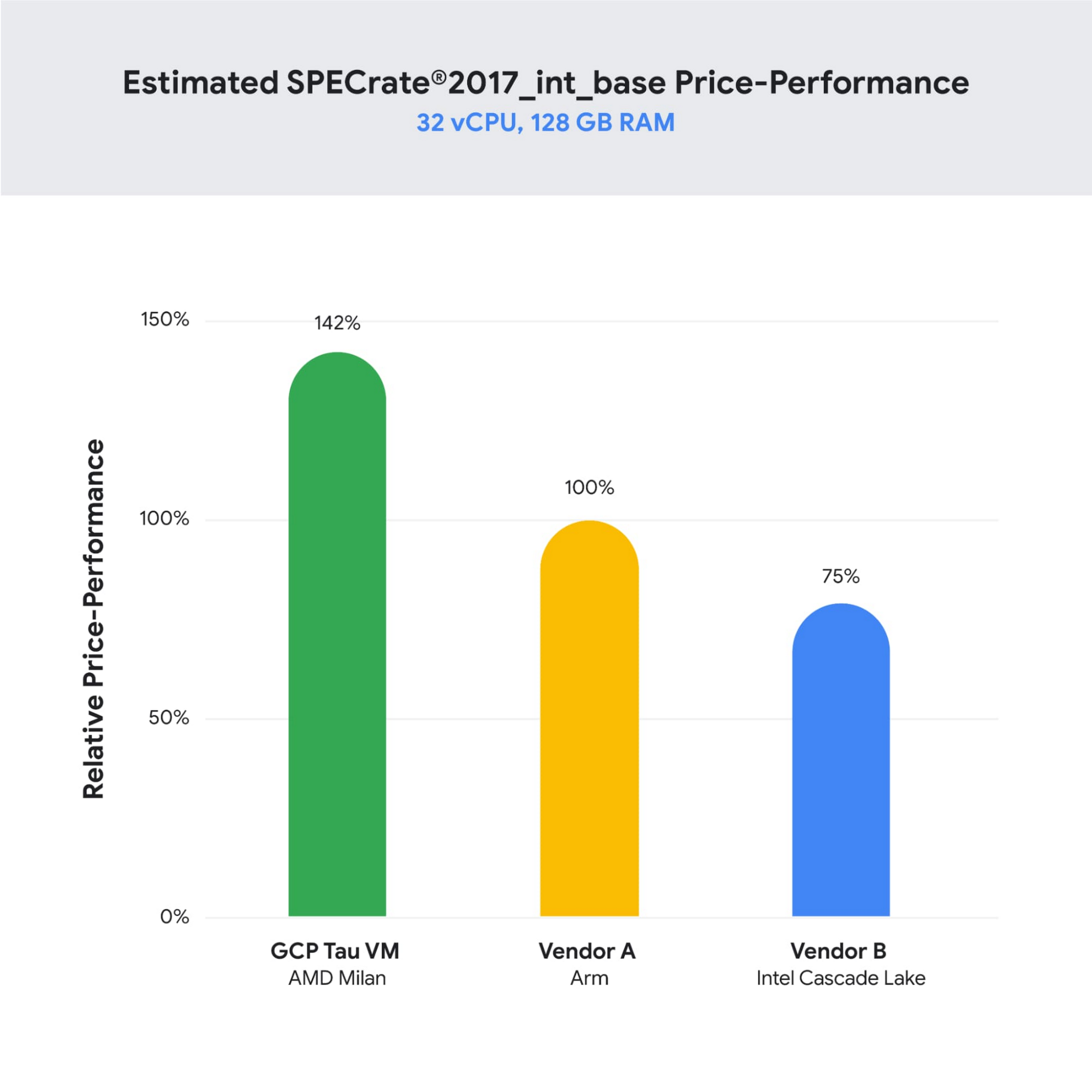
As illustrated below, Tau VMs offer 56% higher absolute performance and 42% higher price-performance (est. SPECrate2017_int_base) compared to general-purpose VMs from any of the leading public cloud vendors.
SPECrate is a trademark of the Standard Performance Evaluation Corporation. More information available at www.spec.org
What our customers and partners are saying
Snap
“At Snap, it is critical for our business to continue improving our scale-out compute infrastructure for key Snapchat capabilities like AR, Lenses, Spotlight and Maps,” said Cody Powell, Senior Engineering Manager, Snap Inc. “We were impressed when we tested Google Cloud’s new Tau VMs with Google Kubernetes Engine. While it’s early days, we believe we can gain double digits in infrastructure performance improvements for key workloads—enabling us to do more with less and invest even more in new features for our amazing Snapchat community.”
Twitter
“High performance at the right price point is a critical consideration as we work to serve the global public conversation,” said Nick Tornow, Platform Lead, Twitter. “We are excited by initial tests that show potential for double digit performance improvement. We are collaborating with Google Cloud to more deeply evaluate benefits on price and performance for specific compute workloads that we can realize through use of the new Tau VM family.”
DoiT
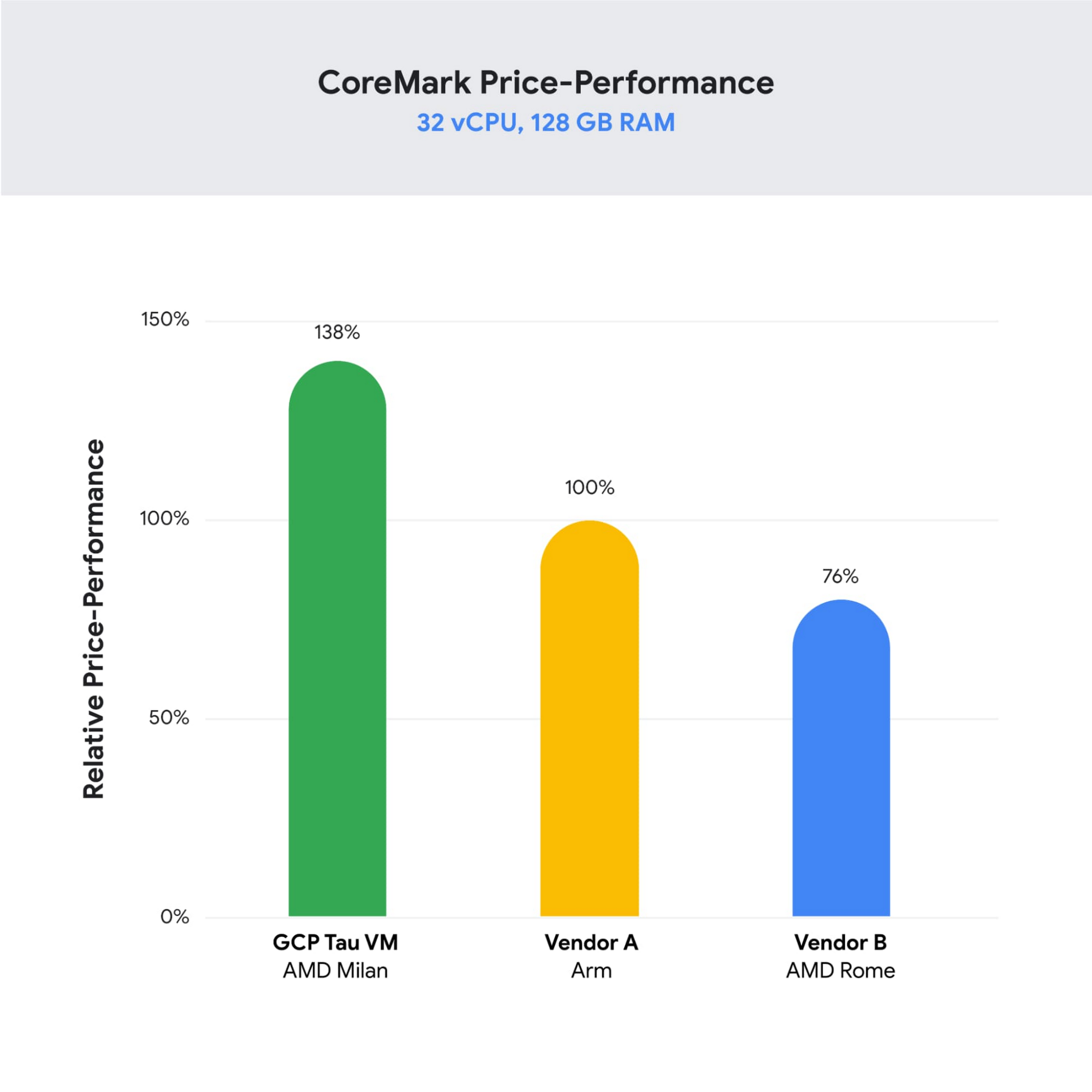
“DoiT partners with leading cloud vendors who are focused on growth and cost optimization,” said Yoav Toussia-Cohen, CEO, DoiT International. “In our preliminary testing of Google’s new Tau VMs with the Coremark benchmark, we were thrilled to see the incredible performance at 50% better than a comparable ARM-based offering from another leading public cloud. With Tau VMs, Google Cloud has set a new bar for price-performance, making the cloud even more accessible to digital-native companies. We are excited to bring Google’s Tau VMs to our joint customers.”
Designed for demanding scale-out workloads
Tau VMs bring the benefit of Google’s long-standing experience engineering platforms for scale-out workloads to our customers. They come in multiple predefined VM shapes, with up to 60vCPUs per VM, and 4GB of memory per vCPU. They offer up to 32 Gbps networking bandwidth and a wide range of network attached storage options, making Tau VMs ideal for scale-out workloads including web servers, containerized microservices, data-logging processing, media transcoding, and large-scale Java applications.
Google Kubernetes Engine support
Google Kubernetes Engine (GKE) is the de facto standard for organizations looking for advanced container orchestration, delivering the highest levels of reliability, security, and scalability. GKE supports Tau VMs on day 1, helping you optimize price-performance for your containerized workloads. You can add Tau VMs to your GKE clusters by specifying the T2D machine type in your GKE node-pools.
Pricing
Tau VMs will be priced to support significant TCO and price-performance improvements for your cloud applications. A 32vCPU VM with 128GB RAM will be priced at $1.3520 per hour for on-demand usage in us-central1.
Coming soon to a Google Cloud region near you
If you are interested in trying out T2D VMs when they become available in Q3 2021 please sign-up here.
More Relevant Stories for Your Company

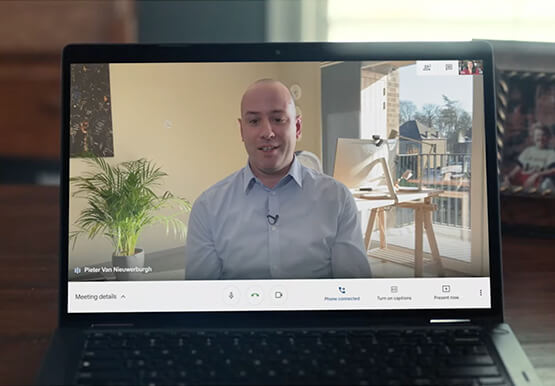


Teamwork from anywhere: G Suite’s vision for content collaboration
So the world has changed. We all know that the COVID-19 pandemic has fundamentally shifted where we work, when we work, and how we work. And during this time period, there has been a dramatic increase in the number of people working from home. It went from just 13% before



Video: How Did GANT Get Products to Market in Just Three Months?
It was in 1949 that a Ukranian immigrant Berl Gantmacher launched--what was going to be an iconic shirt-making company--GANT in Connecticut, America. Since then, the company has reinvented shirts every single day. Headquartered in Stockholm, Sweden, GANT operates in 70 countries. In 2017, GANT wanted to launch a flagship store
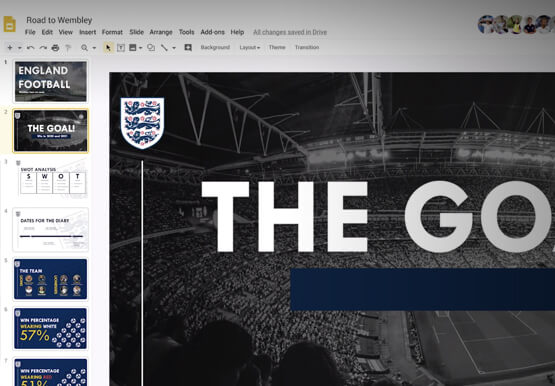
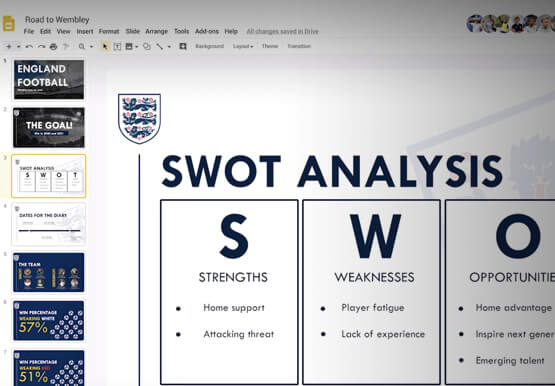
How the UK’s Football Association Turns to Tech to Ensure its 29 Teams Deliver World-Class Performance
The FA is an iconic British institution responsible for overseeing all aspects of football in the UK, from the grassroots club level across the country to the national teams who play at Wembley. However, even icons like The FA must evolve to stay at the top of their game and

The New Google Workspace Essentials: Bring Modern Collaboration to Work!
More than 3 billion users stay in touch, share ideas, and get more done together in Google Workspace, across apps like Meet, Chat, Drive, Docs, Sheets, Slides, and more. And starting today, we’re rolling out a new version designed to help people bring the apps they know and love to
