





The New Google Workspace Essentials: Bring Modern Collaboration to Work!

3725
Of your peers have already read this article.
1:30 Minutes
The most insightful time you'll spend today!
More than 3 billion users stay in touch, share ideas, and get more done together in Google Workspace, across apps like Meet, Chat, Drive, Docs, Sheets, Slides, and more. And starting today, we’re rolling out a new version designed to help people bring the apps they know and love to use in their personal lives to their work life. The new Google Workspace Essentials Starter Edition is a no-cost solution for business users looking to enhance teamwork and unlock innovation with secure-by-design collaboration. With Essentials Starter, we’re making it easy for employees to choose their own productivity tools and bring modern collaboration to work.
Work easily and securely within your current environment
As the world of work continues to evolve in unprecedented ways, secure collaboration—at speed, at scale, across platforms, on multiple devices—has never been more important. Essentials Starter helps employees and their teams break down silos and work together in new ways, even if their organization still relies on legacy productivity tools that weren’t built for the hybrid era of work. There’s no need for a new email address, file conversions, new plug-ins, or desktop software. All of the tools in Essentials Starter will work quickly and easily within your existing environment. And because we designed Google Workspace to operate on our industry-leading cloud foundation, Essentials Starter provides encrypted and secure access to files, helping keep users safe and their information private.
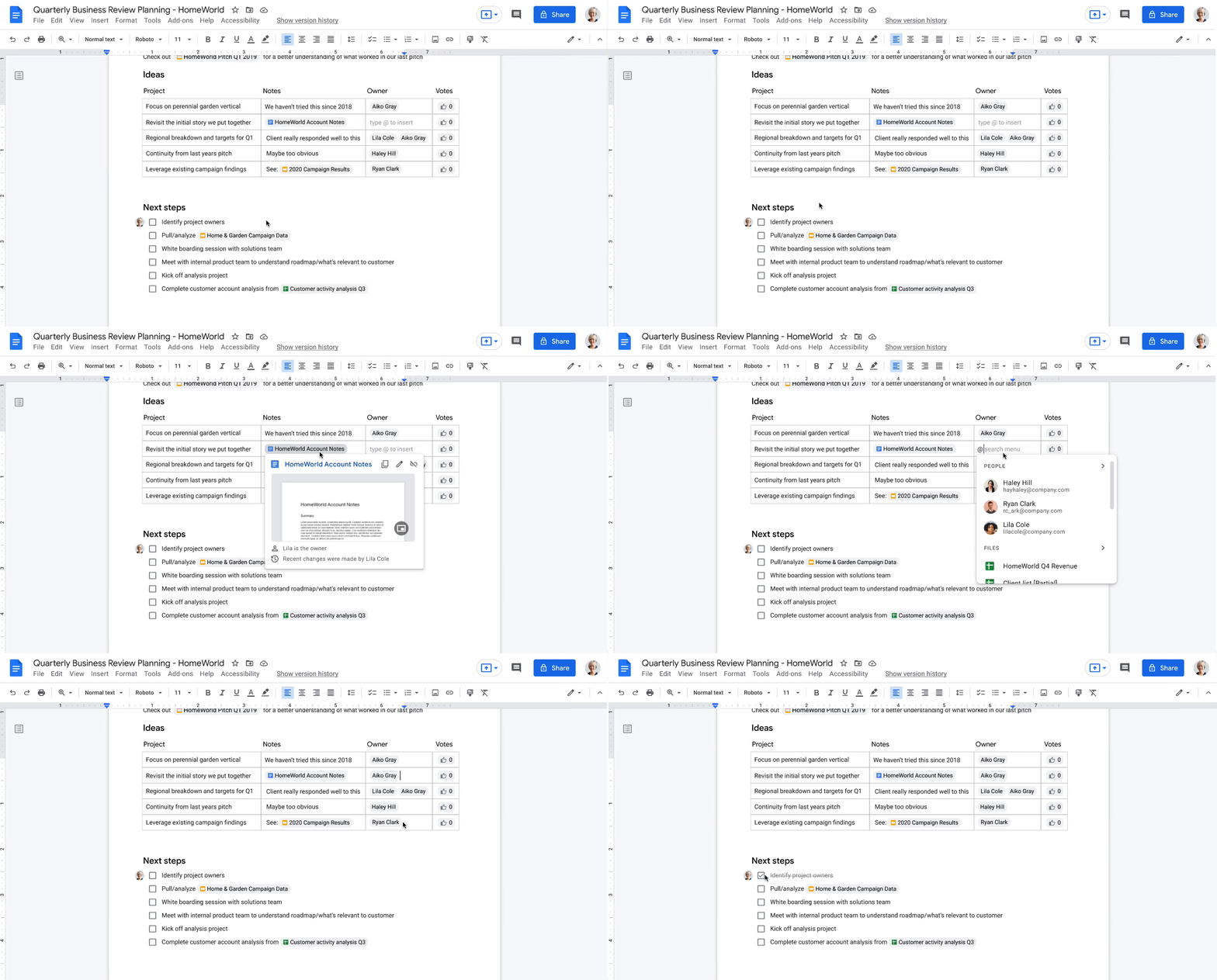
How Essentials Starter works
- Sign up with your work email for a no-cost Essentials Starter account. No credit card required and there’s no limited trial period.
- Invite teammates to collaborate using Google Docs, Slides, Sheets, Chat, Drive, and Meet.
- Unlock innovation with new ways of working with immersive, virtual meetings, and by storing, sharing, and collaborating on 100+ file types, including Microsoft Office, without the need for file conversions.
Collapse the boundaries between people, places, and timezones
In our recently commissioned hybrid work global survey with Economist Impact, when workers were asked what was most important to realize the benefits of hybrid work, their number one choice was “new technologies that allow for time and location flexibility.”*
Google Workspace was born in the cloud and designed for maximum flexibility; to be used from the location and device of your choice. Google Workspace brings chat, files, meetings, and your favorite apps into an intelligent hub so you—and your team—can connect, create, and collaborate from your PCs, tablets, and smartphones, across locations and time zones.

Modern collaboration capabilities
Using the cloud-first approach of Google Workspace, teams can:
- Experience modern collaboration without the burden of version control or email attachments. Brainstorm, build presentations, and glean insights from data using Google Sheets, Slides, and Docs.
- Host secure video meetings to bring everyone together in one place. Conduct one-to-one video meetings (unlimited) and immersive team meetings (3-100 people; up to 60 minutes in duration each).
- Real-time messaging with Google Chat. Share quick updates, files, and high-fives across the team with Google Chat, from one-to-one messages to larger group conversations.
- A dedicated place for team collaboration in Spaces. Spaces are tightly integrated with Google Workspace tools like Chat, Drive, Docs, Sheets, Slides, and Meet, providing a better way for people to engage in topic-based discussions, share knowledge and ideas, move projects forward, and build communities and team culture.
- Access work content securely from your devices. With 15 GB of storage in Google Drive, you can store, share, and access work content from your mobile device, tablet, or computer, and Drive for desktop can enable you to sync files and folders to your PC or Mac. Your Drive storage limits remain separate across your personal and Google Workspace Essentials Starter user accounts.
- Work with existing tools without file conversions. Store, share, or co-edit 100+ file types, including Microsoft Office documents and PDFs without the need for file conversions.
- Easily manage your team of collaborators. Add and remove team members effortlessly using a simple dashboard.

Over the past two years, organizations around the world have relied on Google Workspace to reimagine how work happens and enable modern collaboration across their teams to unlock innovation. During a time of enormous uncertainty, our customers have launched game-changing products, reached new audiences, accelerated lifesaving research, and digitally transformed their own customer experiences. Along the way, they’ve used Google Workspace to empower their employees—across homes, offices, and on the frontlines—to connect, create, and collaborate in powerful new ways. And starting today, with Essentials Starter, employees can make the switch from legacy productivity tools and experience the difference with Google Workspace.
* Economist Impact survey commissioned by Google in October 2021. The most popular answer when workers were asked about the most important condition needed to achieve the long-term success of hybrid work models was based on 42% of 1,244 respondents.

4203
Of your peers have already downloaded this article
6.06 Minutes
The most insightful time you'll spend today!
Nearly 20 years after its debut, the Customer Relationship Management (CRM) software company, Salesforce, “dominates the market,” as Bloomberg puts it, with 19.6 percent market share in 2017, according to International Data Corporation. The company as also recently named number 1 in Fortune’s 2018 list of 100 Best Companies to Work For.
In the fast-changing, highly competitive industry that it helped establish, how does Salesforce maintain its position as a business, philanthropic, and workplace leader?
In part, the company’s success is a result of streamlined collaboration, both internally and externally, supported by real-time, easy communication between teams and partners.
As the company grew and expanded its network of offices and partners, it found that its on-premises email system and communication and collaboration tools couldn’t keep pace. That’s why it turned to G Suite.
“With all the stakeholders who need to review and comment, getting marketing materials out the door used to take weeks. With Google Docs, we can create, approve, and deliver assets in as little as 24 hours,” says Leandro Perez, Senior Director of Product Marketing, Salesforce.
If You Run Your Country’s Largest Retail Franchise, How Do You Pull Together, in Sync?

6305
Of your peers have already read this article.
9:30 Minutes
The most insightful time you'll spend today!
In 1984, Mario Maio set up a small business manufacturing electrical transformers in his Johannesburg garage. Over the next two decades, the ACDC Dynamics company he created came to dominate manufacturing, import, and distribution in South Africa’s electrical goods sector. Then, in 2007, Mario’s son, Ricardo Maio, founded a retail arm to the business, ACDC Express. Today ACDC Express is South Africa’s largest electrical retail franchise, with 29 franchise stores across the country. Eight of those franchises joined in 2017 alone, and ACDC Express is experiencing quarter-on-quarter growth of 28% per year.
Rapid expansion increases the demands on the ACDC Express central administration, which provides each franchise with IT support and a full suite of marketing, operational, and bookkeeping functions. So when email server downtime became a frequent problem, Ricardo and his team chose G Suite to transform the way the franchise worked.
“We lost revenue when our email servers went down. When I researched Google’s SLA of 99.9% uptime and experimented with G Suite on my private Gmail account, I could see the difference this technology could create.”
Ricardo Maio, CEO, ACDC Express
“On consecutive occasions, our entire email server went down,” says Ricardo Maio, CEO at ACDC Express. “It would take more than one or two days to bring it back up. We had already highlighted software cost overhead as a potential thing to reduce, so when that happened several times within a short period, we knew it was time to make a change.”
Building a better franchise
Franchise businesses undergoing rapid expansion must respond quickly to the demands of new stores. At ACDC Express, 33 staff run the national franchise, delivering core services and support to 29 franchises across the country. Key tasks, such as updating the operations manual, were hampered by a reliance on paper forms and mail services, while email servers experienced repeat failures, which compromised communication. By implementing new, cloud-based productivity tools, ACDC Express looked to cut down on slow and expensive practises, and deliver an agile, reliable online communications platform.
To do that, ACDC Express migrated its franchise to G Suite with Opennetworks. “We lost revenue when our email servers went down,” says Ricardo. “When I researched Google’s SLA of 99.9% uptime and experimented with G Suite on my private Gmail account, I could see the difference this technology could create.”
Since moving to Gmail, ACDC Express reports that the problem of email server downtime “is no longer existent for us,” while with Google Drive, versioning problems have been resolved. Using surveys on Google Forms, ACDC Express quickly and easily collects data from stores and customers—whether they are in stores or on the road—and populates Google Sheets with the information.
“Our operations manual is a binding document, and it’s a living document that gets regularly updated. In the past, we would struggle to track which franchise had which version. With Google Drive, we can be sure that everyone is looking at the right one.”
Ricardo Maio, CEO, ACDC Express
With Google Data Studio, the managing team then consolidates that data on dashboards, creating snapshots of performance, complete with averages and simple comparisons, which make it easy to spot issues and outliers in need of attention. Individual businesses that do require help are then contacted over Google Hangouts Meet to assess what they need, part of a culture of sharing expertise, which Ricardo sees as key to the franchise mode.
“As a franchise, sharing knowledge is as important as maintaining control,” he says. “If there’s a new procedure or system that worked in one store, we can immediately update our manuals and documentation so that everyone has access to it. That’s been fantastic.”
“Our operations manual is a binding document, and it’s a living document, which gets regularly updated,” says Ricardo. “In the past, we would struggle to track which franchise had which version, and every time we had to make a change we would print out a version and send it to stores through an unreliable postal service. With Google Drive, we can be sure that everyone is looking at the right one.”
Remote training, rapid migration
Rolling out new IT tools across a franchise is often expensive, demanding extensive travel and numerous training sessions, which often repeat the same material. Instead, ACDC Express set up training on Google Hangouts that staff could drop into at their convenience, creating a cost-effective training schedule, which meant individual stores could plan their own learning process.
“When we moved to G Suite, we did it all at once, with every employee changing at the same time. We took a band-aid approach, switching to the new tools as rapidly as possible. After six months of training, there have been no reported problems with G Suite at all.”
Ricardo Maio, CEO, ACDC Express
“The whole benefit of franchising is that you can learn from your peers,” says Ricardo. “When we moved to G Suite, we did it all at once, with every employee changing at the same time. We took a band-aid approach, switching to the new tools as rapidly as possible. After six months of training, there have been no reported problems with G Suite at all.”
More mobile, more reliable
Today, ACDC Express operates 240 Google accounts, and information from the franchises’ marketing systems, research, operations, and accounting is fed back automatically to Google Sheets and Google Dashboard at the headquarters in Edenvale, Gauteng. By Ricardo’s estimation, the administrative team is now so effective with G Suite tools, it can achieve twice as much as it could without them.
Now, ACDC Express is looking to use Google Chromebooks in a new web-based point-of-sale system, and considering moving its ERP onto Google Cloud Platform for greater stability, in another project with Opennetworks.
“We’ve developed an in-house point of sale system that’s web-based and can use a functional touchscreen,” adds Ricardo. “We’re looking at rolling that out with Google Chromebooks. We really like how straightforward and simple the Google Chrome devices are, and because we’ve taken a lot of infrastructure into the cloud, we no longer actually need physical machines on our counters. We can work anywhere. That’s something that applies from our head office right down to our smallest franchise store.”
Google Maps Platform Helps BungkusIT Fulfil its Promise of Deliveries in One Hour!

5520
Of your peers have already read this article.
2:00 Minutes
The most insightful time you'll spend today!
Editor’s note: Today’s post is written by Hatim M, Chief Commercial Officer at BungkusIT. The on-demand delivery service delivers packages within the hour for one million customers across Malaysia and uses Google Maps Platform to create a seamless end-to-end delivery experience for its customers.
Imagine it’s the end of a long day at work, and you’re heading home for dinner as you look forward to a restful evening. Then just as you arrive at the doorstep, your phone buzzes with a message from a family member, asking if you could grab a carton of milk from the supermarket.
With moments like these in mind, we founded BungkusIT to alleviate the stress of everyday chores and give people a break from having to run seemingly mundane errands that can often be time-consuming. With so much to do and so few hours in a day, we want to make life simpler by providing our customers with an on-demand delivery service.

As a social enterprise, our mission is to create jobs and increase earning potential for BungkusIT roadies (those who run deliveries), while also increasing online visibility for local small and medium enterprises through an e-commerce platform. As such, we don’t charge merchants a fee for being featured on our app.
Our roadies help connect users with products and services that they need. Whether it’s picking up the keys you forgot, or buying a birthday cake for a loved one, our on-demand roadies can help accomplish your task quickly and efficiently. In fact, we’ve helped many seniors—a large and often underserved population—to run errands and provide last mile support.
Providing reliable service, 24/7
From the day we launched, our promise has always been to complete every task given to us within one hour. Google Maps Platform empowers us to fulfil this promise. We understand the importance of selecting a reliable mapping service from the get-go. After exploring different map products, we made the decision to go with Google Maps Platform due to its detailed and accurate location mapping system. With the support of our partner Searce, we’ve been able to quickly integrate all the relevant products on our platform and optimize our API calls.
On a day-to-day basis, our roadies rely on the Places API to navigate their journeys. It pinpoints the exact location set by customers so that our roadies can be sure they arrive at the correct destination. With so many small roads and alleys in Malaysia, it can be challenging to find the exact place based on an address. Dropping a pin on a specific location removes any confusion.
Because we price our services based on distance, it’s business critical to determine the exact distance of a location and the most efficient route to reach it. By automating that process with the Distance Matrix API, we can guarantee that customers don’t get overcharged, while making sure that we’re adequately compensated for our services.
Improving the user experience
At the end of the day, we want to make people’s lives easier. That’s why having an app that is intuitive is key. More than that, we want customers to be able to create a request as quickly as possible. By automatically completing the location a customer is typing after they’ve keyed in the first few characters, Place Autocomplete does that job for us.

As a fairly young company, we’ve got a long way to go. I believe that we’ll continue evolving alongside Google Maps Platform and exploring the new features it has to offer. We’re already talking to global brands to expand our services and I’m confident that with Google Maps Platform as our maps partner, we will go a long way.
For more information on Google Maps Platform, visit our website.
Active Assist Expands Globally: Unleashing Cloud Optimization Insights Worldwide

1287
Of your peers have already read this article.
3:30 Minutes
The most insightful time you'll spend today!
Active Assist provides insights and recommendations to help Google Cloud customers proactively optimize their cloud environments for cost, security, performance, and sustainability. If you’re like most customers, you’ve likely encountered these insights and recommendations in the console — either in the Recommendations Hub or embedded on a resource page, like IAM or the VM list pages. (Note that for the rest of this post, we’ll use the word “recommendations” to mean “insights and recommendations.”)
We heard from customers who love recommendations that it should be easier to discover and work with these valuable suggestions across an entire organization, so last year we launched the Recommendations BigQuery export feature to Preview. This allows you to automatically export the recommendations to a BigQuery dataset, which you can then investigate with tools like DataStudio or Looker, and integrate with your company’s existing monitoring solutions and workflows.
Many of you have told us how powerful this feature is, so we’ve been working hard on improvements to make it even more useful. We’re happy to announce that BQ Export 1.0 is now in GA, and that BQ Export 2.0 is in Preview, with new support for Billing Account-level recommendations and cost optimization recommendations that include discount information. This post will cover what’s new with Active Assist BQ Export, as well as a couple other new features of Active Assist.
New features to Active Assist BigQuery Export
Before we dive into the details, if you’re new to Recommendations BQ Export check out our handy getting started guide. It covers the permissions you’ll need and how to set up the export, including instructions for using a service account. It also includes some sample queries and instructions for interacting with the data using Google Sheets. You may also want to check out our prior blog post showing how to optimize your cloud spend with BigQuery and Looker.
Now, on to what’s new!
1. Non-project scoped recommendations
You can now see non-project scoped recommendations, such as billing account, organization, and folder-level recommendations in your export to BigQuery. This ensures that in your export, you are able to see the full portfolio of recommendations that are available to you.
2. Custom contract Pricing
If you have any applicable custom contract pricing for your company, your cost-related recommendations now take those into account (based on your historical costs) in the cost saving calculation when you export them to BigQuery. This will ensure that you have the most accurate cost savings data we have for you and your organization to help you make the best judgment and prioritization when choosing to adopt recommendations. However, you must have the correct permissions first in order to see the custom contract pricing. If the user executing the export to BigQuery does not have the correct permissions, you may continue to see list pricing in your estimated savings. Also, note that the console UI and the Recommender API already have this support.
3. Export now available globally
Customers outside of the US can now set up an export of recommendations to a BigQuery dataset.
Improvements to Active Assist discoverability and usability
1. Global Recommender Viewer role: You can now add the global Recommender Viewer role, which gives you view access to all insights and recommendations available to you, simplifying permission management for new recommenders. Newly launched recommendations will also automatically be added as they become generally available.
2. Dismiss recommendations via Recommender API: You can now directly dismiss recommendations via our API, allowing you to focus on the recommendations you care about and work more efficiently.
3. Shareable links: Another feature that quietly launched recently is the availability of shareable URLs that link to recommendation details in the console. You can access these links in the UI from the upper right of the details panel of any recommendation.
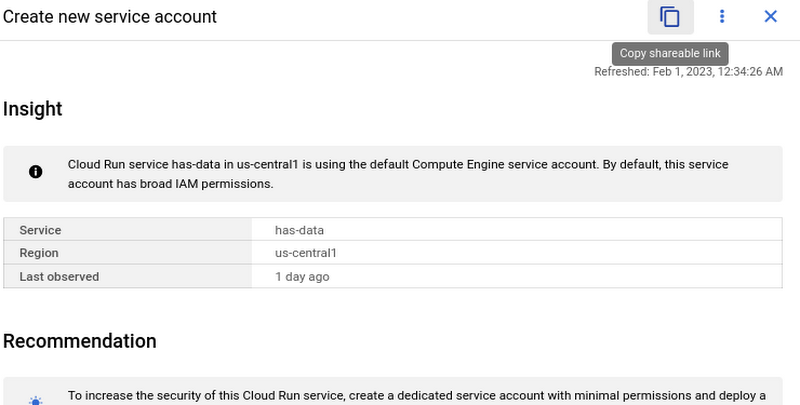
However, these links become even more powerful when combined with Recommendations BigQuery Export. The URLs all have a standard format. This means that within the BigQuery export tables you can easily calculate a new column containing these links using an expression like:
“https://console.cloud.google.com/home/recommendations/view-link/” +
name +
“?project=” +
cloud_entity_id
This example is for project level recommendations (where cloud_entity_type = PROJECT_NUMBER).
For cloud_entity_type = FOLDER, use:
“https://console.cloud.google.com/home/recommendations/view-link/” +
name +
“?folder=” +
cloud_entity_id
For cloud_entity_type = ORGANIZATION, use
“https://console.cloud.google.com/home/recommendations/view-link/” +
name +
“?organizationId=” +
cloud_entity_id
These links can then be embedded in your reports and dashboards, or used by other BigQuery clients.
As a reminder, if you’re interested in setting up reports or dashboards using Recommendations BigQuery Export, take a look at this previous blog post for some great ideas, or you can reference our getting started guide. If you have any feedback, please feel free to reach out to active-assist-feedback@google.com.
Nubian Skin Beats Spikes in Customer Interest with G Suite

4212
Of your peers have already read this article.
2:30 Minutes
The most insightful time you'll spend today!
“Nude” comes in all shapes, sizes and colors. But for Ade Hassan, finding undergarments to match her skin tone took more effort than necessary. Born in the U.K. to Nigerian parents, Hassan searched unsuccessfully for underwear and swimwear that matched her skin—a problem that continued to frustrate her through college and into her professional life.
“My nude isn’t the nude I see in shops,” Hassan says.
Like many other black entrepreneurs, she created her own solution. Hassan founded Nubian Skin, a company that sells lingerie, hosiery, and swimwear for women of color.
With shades like “cafe au lait” and “berry,” Nubian Skin products reflect diverse skin tones and are sold in shops located in the U.K., Nigeria and the U.S., as well as online. Beyoncé and her dancers even asked Nubian Skin to outfit them for their 2017 “Formation” tour.
Since nearly the beginning, Hassan has used G Suite to keep her business humming.
From managing meetings with retailers and manufacturers, to coordinating publicity efforts with fashion press, to keeping track of retail invoices, G Suite has helped Hassan scale her business as quickly as people have demanded her products.
“There are so many pitfalls and so many things that are hard about business,” Hassan says. “It’s really amazing to have something like G Suite that is easy and intuitive.”
Nubian Skin’s fashion fame arrived seemingly overnight. When Hassan posted the company’s first campaign images, its Instagram followers jumped from 50 people to more than 20,000 in just a few weeks.
“People called asking, ‘Can we have the contact for the press department?,” says Hassan. “But at the time, it was just me.” To easily handle media requests, she set up a press@nubianskin.com email address through the G Suite Admin console. And because she had used Gmail for several months before launching the company, using the business version of Gmail came naturally.
“Having that nubianskin.com address gave the business an air of professionalism, which we wouldn’t have had otherwise,” Hassan says. “Usually you need a whole IT department to set up new emails and passwords, but the Admin console removes the hassle of that process.”
Because Nubian Skin employees aren’t always in the showroom together, they need to be able to access business documents—like model photos and customer invoices—from anywhere.
To help, Hassan securely stores business documents in Google Drive (which can be accessed on mobile, too) and works collaboratively with her finance team to process orders using Google Sheets.
“Everyone has access to the spreadsheet so we can fill in what we need at any given point,” says Hassan. “This way, nothing slips through the cracks.”
And when she needs to connect with colleagues quickly or face-to-face, she uses Hangouts Chat or Hangouts Meet. Chat makes it so employees are only a message away, and Meet helps her connect with people as if they’re in person at the office.
Five years after launching Nubian Skin, Hassan is a recognized entrepreneur who’s influenced other retailers to create more inclusive designs.
“Even if you’re small, you want people to see you as a professional business,” Hassan says. “If you’re still growing, you need the building blocks to get you where you want to be. I can’t imagine working without G Suite.”
More Relevant Stories for Your Company

Google Cloud’s Journey about Building DEI into Business
Diversity, equity, and inclusion (DEI) are more than buzzwords, they are critical components of workplace culture that have real, tangible impacts on your entire organization. Well-executed and robust DEI initiatives ensure that every single employee feels welcomed and valued when they are at work. And that’s not all—done right, DEI

Learn to Easily Administer Multi-cluster Kubernetes Environs: Part 4 KRM Series
This is part 4 in a multi-part series about the Kubernetes Resource Model. See parts 1, 2, and 3 to learn more. Kubernetes clusters can scale. Open-source Kubernetes supports up to 5,000 Nodes, and GKE supports up to 15,000 Nodes. But scaling out a single cluster can only get you so far: if your cluster’s control plane

The Tech Behind Goibibo’s Amazing Collaboration Tool That Employees Love
Founded in 2007 and entering the travel market in 2009, Goibibo has grown to support 21 million users, 98% of whom are based in India. “We specialise in domestic Indian bookings and outbound bookings for Indian residents looking to travel to other countries,” explains Vikalp Sahni, Co-Founder and Chief Technology

Eight Steps to Align Hybrid Work with Diversity, Equity and Inclusion (DEI) Principles
Many executives across the globe are feeling the effects of a recent pivot to hybrid work models. This massive transition represents a significant departure from existing office culture. As business leaders look to operationalize their flexible work model infrastructure, they’re also evaluating what it takes to attract and retain employees
