





4405
Of your peers have already watched this video.
31:30 Minutes
The most insightful time you'll spend today!
Smart analytics: Deep dive on roadmap
Data across organizations is growing and that organizations need a very strong analytics platform to leverage this data create insights and make real-time decisions on top of this data.
That’s driving the advent of three large trends. First is the convergence of data lakes and data warehouses, that’s enable organizations to maximize the value of their data.
Second, is the growing phenomena of real-time decision-making which is forcing enterprises to think of how they can support the needs of batch processing and streaming data.
Finally, there is the rise of artificial intelligence and machine learning, which allows enterprises to leverage their data and create competitive differentiation.
With this background, Sudhir Hasbe, Director of Product Management, Data Analytics, Google Cloud, walks us through Google Cloud’s smart analytics offerings—and what’s new.
He takes us on a tour through the technical value of Google Cloud’s smart analytics platform end-to-end. He provides a comprehensive overview and demos what’s new and what’s next in Google Cloud’s smart analytics portfolio across products like BigQuery, Dataflow, Dataproc, Data Fusion, PubSub, Data Catalog, Dataprep, and Looker.
4563
Of your peers have already watched this video.
32:30 Minutes
The most insightful time you'll spend today!
Technical deep dive on Looker: The enterprise BI solution for Google Cloud
Thousands of users accessing petabytes of data on a daily basis: This is a challenging proposition for enterprises, without a doubt.
But Looker makes it possible. Beyond just accessing data though, Looker’s platform transforms your company’s relationship with data.
Go under the hood of Looker, with Olivia Morgan, Enterprise CE, Looker, to see how LookML empowers developers to take advantage of powerful data warehouses like BigQuery and ultimately enhance the workflows of end users.
She also takes a deep dive into LookML’s ability to use Google Cloud Functions and Search API to enhance dashboards, leverage BQML within Looker’s modeling layer to give users access to forecasts, tie in BigQuery’s public datasets to add richness to analysis, and show off LookML’s ability to handle nested tables for faster performance on transaction analysis all through a complete end to end demo.
6698
Of your peers have already downloaded this article
4:30 Minutes
The most insightful time you'll spend today!
Unlocking the Power of Data and Creativity with
the Cloud: The WPP Story
How Eventrac and Workflows Integration Helps Implement Hybrid Architecture in Google Cloud

6527
Of your peers have already read this article.
3:00 Minutes
The most insightful time you'll spend today!
I previously talked about Eventarc for choreographed (event-driven) Cloud Run services and introduced Workflows for orchestrated services.
Eventarc and Workflows are very useful in strictly choreographed or orchestrated architectures. However, you sometimes need a hybrid architecture that combines choreography and orchestration.
For example, imagine a use case where a message to a Pub/Sub topic triggers an automated infrastructure workflow or where a file upload to a Cloud Storage bucket triggers an image processing workflow. In these use cases, the trigger is an event but the actual work is done as an orchestrated workflow.
How do you implement these hybrid architectures in Google Cloud? The answer lies in Eventarc and Workflows integration.
Eventarc triggers
To recap, an Eventarc trigger enables you to read events from Google Cloud sources via Audit Logs and custom sources via Pub/Sub and direct them to Cloud Run services:

One limitation of Eventarc is that it currently only supports Cloud Run as targets. This will change in the future with more supported event targets. It’d be nice to have a future Eventarc trigger to route events from different sources to Workflows directly.
In absence of such a Workflows enabled trigger today, you need to do a little bit of work to connect Eventarc to Workflows. Specifically, you need to use a Cloud Run service as a proxy in the middle to execute the workflow.
Let’s take a look at a couple of concrete examples.
Eventarc Pub/Sub + Workflows integration
In the first example, imagine you want a Pub/Sub message to trigger a workflow.
Define and deploy a workflow
First, define a workflow that you want to execute. Here’s a sample workflows.yaml that simply decodes and logs the Pub/Sub message body:
main:params: [args]steps:- init:assign:- headers: ${args.headers}- body: ${args.body}...- pubSubMessageStep:call: sys.logargs:text: ${"Decoded Pub/Sub message data is " + text.decode(base64.decode(args.body.message.data))}severity: INFODeploy the workflow with a single command:gcloud workflows deploy ${WORKFLOW_NAME} --source=workflow.yaml --location=${REGION}
Deploy a Cloud Run service to execute the workflow
Next, you need a Cloud Run service to execute this workflow. Workflows has an execution API and client libraries that you can use for your favorite language. Here’s an example of the execution code from a Node app.js file. It simply passes the received HTTP request headers and body to the workflow and executes it:
const execResponse = await client.createExecution({parent: client.workflowPath(GOOGLE_CLOUD_PROJECT, WORKFLOW_REGION, WORKFLOW_NAME),execution: {argument: JSON.stringify({headers: req.headers, body: req.body})}});
Deploy the Cloud Run service with the Workflows name and region passed as environment variables:
gcloud run deploy ${SERVICE_NAME} \--image gcr.io/${PROJECT_ID}/${SERVICE_NAME} \--region=${REGION} \--allow-unauthenticated \--update-env-vars GOOGLE_CLOUD_PROJECT=${PROJECT_ID},WORKFLOW_REGION=${REGION},WORKFLOW_NAME=${WORKFLOW_NAME}
Connect a Pub/Sub topic to the Cloud Run service
With Cloud Run and Workflows connected, the next step is to connect a Pub/Sub topic to the Cloud Run service by creating an Eventarc Pub/Sub trigger:
gcloud eventarc triggers create ${SERVICE_NAME} \--destination-run-service=${SERVICE_NAME} \--destination-run-region=${REGION} \--location=${REGION} \--event-filters="type=google.cloud.pubsub.topic.v1.messagePublished"
This creates a Pub/Sub topic under the covers that you can access with:
export TOPIC_ID=$(basename $(gcloud eventarc triggers describe ${SERVICE_NAME} --format='value(transport.pubsub.topic)'))
Trigger the workflow
Now that all the wiring is done, you can trigger the workflow by simply sending a Pub/Sub message to the topic created by Eventarc:
gcloud pubsub topics publish ${TOPIC_ID} --message="Hello there"
In a few seconds, you should see the message in Workflows logs, confirming that the Pub/Sub message triggered the execution of the workflow:

Eventarc Audit Log-Storage + Workflows integration
In the second example, imagine you want a file creation event in a Cloud Storage bucket to trigger a workflow. The steps are similar to the Pub/Sub example with a few differences.
Define and deploy a workflow
As an example, you can use this workflow.yaml that logs the bucket and file names:
main:params: [args]steps:...- log:call: sys.logargs:text: ${"Workflows received event from bucket " + bucket + " for file " + file}severity: INFO
Deploy a Cloud Run service to execute the workflow
In the Cloud Run service, you read the CloudEvent from Eventarc and extract the bucket and file name in app.js using the CloudEvent SDK and the Google Event library:
const cloudEvent = HTTP.toEvent({ headers: req.headers, body: req.body });//"protoPayload" : {"resourceName":"projects/_/buckets/events-atamel-images-input/objects/atamel.jpg}";const logEntryData = toLogEntryData(cloudEvent.data);const tokens = logEntryData.protoPayload.resourceName.split('/');const bucket = tokens[3]
Executing the workflow is similar to the Pub/Sub example, except you don’t pass in the whole HTTP request but rather just the bucket and file name to the workflow:
const execResponse = await client.createExecution({parent: client.workflowPath(GOOGLE_CLOUD_PROJECT, WORKFLOW_REGION, WORKFLOW_NAME),execution: {argument: JSON.stringify({bucket: bucket, file: file})}});
Connect Cloud Storage events to the Cloud Run service
To connect Cloud Storage events to the Cloud Run service, create an Eventarc Audit Logs trigger with the service and method names for Cloud Storage:
gcloud eventarc triggers create ${SERVICE_NAME} \--destination-run-service=${SERVICE_NAME} \--destination-run-region=${REGION} \--location=${REGION} \--event-filters="type=google.cloud.audit.log.v1.written" \--event-filters="serviceName=storage.googleapis.com" \--event-filters="methodName=storage.objects.create" \--service-account=${PROJECT_NUMBER}-compute@developer.gserviceaccount.com
Trigger the workflow
Finally, you can trigger the workflow by creating and uploading a file to the bucket:
echo "Hello World" > random.txtgsutil cp random.txt gs://${BUCKET}/random.txt
In a few seconds, you should see the workflow log the bucket and object name.
Conclusion
In this blog post, I showed you how to trigger a workflow with two different event types from Eventarc. It’s certainly possible to do the opposite, namely, trigger a Cloud Run service via Eventarc with a Pub/Sub message (see connector_publish_pubsub.workflows.yaml) from Workflows or a file upload to a bucket from Workflows.
All the code mentioned in this blog post is in eventarc-workflows-integration. Feel free to reach out to me on Twitter @meteatamel for any questions or feedback.
What Swiggy and You Can Learn From This Company’s Use of ML to Engage Customers

9632
Of your peers have already read this article.
1:45 Minutes
The most insightful time you'll spend today!
The app economy has enabled a huge range of unique business models to flourish. One such model is online food ordering and delivery services, in which apps leverage geo-location data to aggregate local food choices and offer personalized options to consumers.
A leading company in this space is Just Eat. Launched in the UK in 2001 with a vision of ‘serving the world’s greatest menu. Brilliantly.’ The company has capitalized on the popularity of online food delivery and grown its presence across 12 markets.
Just Eat acts as an intermediary between take-out food outlets and hungry customers, giving local restaurants access to a broader base of potential diners, while providing consumers with an easy and secure way to order and pay for food from their favourite restaurants.
Today the company helps 27 million customers find food from more than 112,000 restaurants—everything from homemade Italian pasta, to Chinese noodle bowls, to fish-and-chips.
Data is the fuel of Just Eat’s rapid growth, but it wasn’t always looked at that way. In its early days, Just Eat struggled with the deluge of information and faced fragmentation across its systems. In fact, the company realized its legacy data vendor wasn’t capable of ingesting 90 percent of the data produced by its food platform. This was incredibly frustrating for Just Eat’s analysts and data scientists, who had to waste time cleaning up sources instead of leveraging the data to create a better user experience.
Just Eat turned to Google Cloud, and now uses machine learning (ML) to power sophisticated consumer recommendations on both its app and website. It also makes heavy use of features offered by Google Cloud Platform, including BigQuery for running analytics on its customer data set and Cloud Pub/Sub for messaging app users with relevant offers in real-time.
Having all of Just Eat’s data in one platform has translated into real value for its customers. With Google Cloud tools, Just Eat has created its own proprietary Customer Ontology framework, which today contains 5.5 billion features that better understand consumers’ behavior and food habits, and provides insights into previous visits.
Just Eat recently created an “Adventurous Index” to map its customers according to their ordering habits, enabling them to tailor their marketing and user experiences. For example, mid-adventurous customers are shown a choice of restaurants that serve their most ordered cuisine, while adventurous customers can choose from restaurants that serve a wider variety. This not only has prompted consumers to be more adventurous with their choices, but also has led to more business at a more diverse set of restaurants.
Matt Cresswell, Director of Customer Platforms at Just Eat said that Google Cloud has become integral to its product delivery: “Consumer food choice is a hugely nuanced topic. We know that individuals have their own unique journeys when they use Just Eat. We’ve sought to create a truly one-to-one relationship with every customer. The changes we’ve made to the platform mean they can access the dishes they enjoy at the touch of a fingertip, and find inspiration to discover new dishes they’ll love. We’re grateful to Google Cloud for helping us support our customers on their culinary explorations.”
Key Highlights on Data Analytics to Smooth Your Organization’s Data Journey

4852
Of your peers have already read this article.
2:00 Minutes
The most insightful time you'll spend today!
As the Olympics kicked off in Tokyo at the end of July, we found ourselves reflecting on the beauty of diverse countries and cultures coming together to celebrate greatness and sportsmanship. For this month’s blog, we’d like to highlight some key data and analytics performances that should help inspire you to reach new heights in your data journey.
Let’s review the highlights!
BigQuery ML Anomaly Detection: A perfect 10 for augmented analytics
Identifying anomalous behavior at scale is a critical component of any analytics strategy. Whether you want to work with a single frame of data or a time series progression, BigQuery ML allows you to bring the power of machine learning to your data warehouse.
In this blog released at the beginning of last month, our team walked through both non-time series and time-series approaches to anomaly detection in BigQuery ML:
- Non-time series anomaly detection
- Autoencoder model (now in Public Preview)
- K-means model (already in GA)
- Time-series anomaly detection
- ARIMA_PLUS time series model (already in GA)
These approaches make it easy for your team to quickly experiment with data stored in BigQuery to identify what works best for your particular anomaly detection needs. Once a model has been identified as the right fit, you can easily port that model into the Vertex AI platform for real-time analysis or schedule it in BigQuery for continued batch processing.
App Analytics: Winning the team event
Google provides a broad ecosystem of technologies and services aimed at solving modern day challenges. Some of the best solutions come when those technologies are combined with our data analytics offerings to surface additional insights and provide new opportunities.
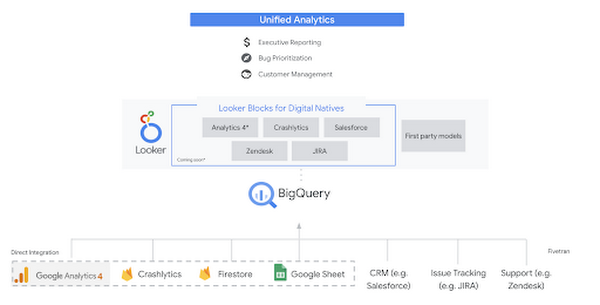
Firebase has deep adoption in the app development community and provides the technology backbone for many organization’s app strategy. This month we launched a design pattern that shows Firebase customers how to use Crashlytics data, CRM, issue tracking, and support data in BigQuery and Looker to identify opportunities to improve app quality and enhance customer experiences.
Crux on BigQuery: Taking gold in the all-around data competition
Crux Informatics provides data services to many large companies to help their customers make smarter business decisions. While they were already operating on a modern stack and not on the hunt for a modern data warehouse, BigQuery became an enticing option due to performance and a more optimal pricing model. Crux also found advantages with lower-cost ingestion and processing engines like Dataflow that allow for streaming analytics.… when it came to building a centralized large-scale data cloud, we needed to invest in a solution that would not only suit our current data storage needs but also enable us to tackle what’s coming, supporting a massive ecosystem of data delivery and operations for thousands of companies.
Mark Etherington
Chief Technology Office, Crux Informatics
Technology is a team sport, and Crux found our support team responsive and ready to help. This decision to more deeply adopt Google Cloud’s data analytics offerings provides Crux with the flexibility to manage a constantly evolving data ecosystem and stay competitive.
You can read more about Crux’s decision to adopt BigQuery in this blog.
Google Trends: A classic emerges a champion
Following up on the launch of our Google Trends dataset in June, we delivered some examples of how to use that data to augment your decision making.
As a quick recap of that dataset, Google Cloud, and in particular BigQuery, provide access to the top 25 trending terms by Nielsen’s Designated Market Area® (DMA) with a weekly granularity. These trending terms are based on search patterns and have historically only been available on the Google Trends website.https://www.youtube.com/embed/9FJAXMF0ASc?enablejsapi=1&
The Google Trends design pattern addresses some common business needs, such as identifying what’s trending geographically near your stores and how to match trending terms to products to identify potential campaigns.
Dataflow GPU: More power than ever for those streaming sprints
Dataflow is our fully-managed data processing platform that supports both batch and streaming workloads. The ability of Dataflow to scale and easily manage unbounded data has made it the streaming solution of choice for large workloads with high-speed needs in Google Cloud.
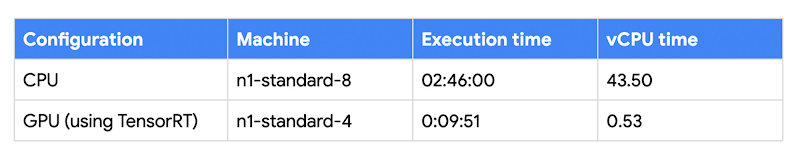
But what if we could take that speed and provide even more processing power for advanced use cases? Our team, in partnership with NVIDIA, did just that by adding GPU support to Dataflow. This allows our customers to easily accelerate compute-intensive processing like image analysis and predictive forecasting with amazing increases in efficiency and speed.
Take a look at the times below:
Data Fusion: A play-by-play for data integration’s winning performance
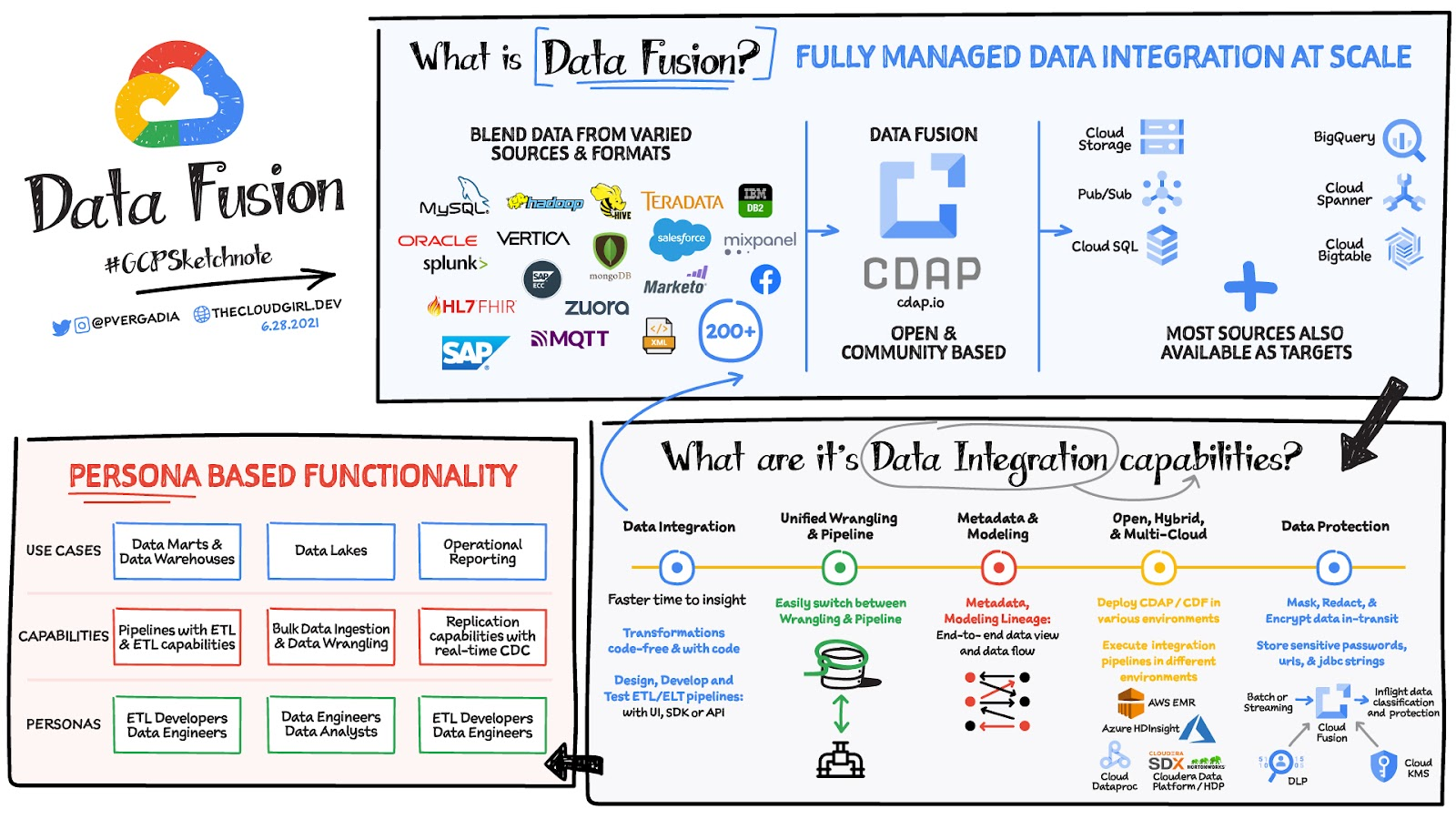
Data Fusion provides Google Cloud customers with a single place to perform all kinds of data integration activities. Whether it’s ETL, ELT, or simply integrating with a cloud application, Data Fusion provides a clean UI and streamlined experience with deep integrations to other Google Cloud data systems. Check out our team’s review of this tool and the capabilities it can bring to your organization.
More Relevant Stories for Your Company

How One Company Uses AI and Data Analysis to Boost Revenue
AI, deep learning, and image recognition is transforming the shopping experience. These technologies enable consumers to use product images or screenshots rather than text to search for similar products. This improves the customer experience and enables retailers with online and offline outlets to provide a genuine omnichannel experience. The lack of

Mid-Sized B2B Firm Achieves the Business Trifecta with a Single Strategy
Thirteen years’ experience in e-commerce has given Teddy Chan, Chief Executive Officer and Chief Technology Officer, AfterShip, a deep understanding of the challenges of shipping and tracking packages to customers worldwide. “The key problem many merchants face is customers asking ‘where is my order?’ and ‘when I will get the package?’”




L’Oréal: Managing Big-data Complexity with Google Cloud
L’Oreal is a global company with a presence in 150 countries worldwide. Between managing all of its brands and requirements for different countries, L’Oreal looks to data to make insightful business decisions. How does L’Oreal unify its data across all its systems and databases? How does L’Oreal make the data



Swarovski’s Journey towards Online and Offline Conversion with Predictive Analytics
Luxury brand and leader in crystals and glass production, Swarovski has charmed customers with its exquisite collections for over 125 years. To understand their customers better and map their online behaviors, Swarovski had to overcome prediction hurdles as majority of the purchases are not frequent or habitual. They are mostly
