





8412
Of your peers have already watched this video.
21:00 Minutes
The most insightful time you'll spend today!
Journey to Transformation and Modernization with Google’s Distributed Cloud
Google Cloud has been leading the way of helping businesses make most from their cloud investments to drive digital transformation through modern application platforms that cater to today’s customer needs. Watch the video from the Next ’21 to explore three areas where companies are supported by Google Cloud throughout their cloud evolution journey–cloud migration and modernization, extension of services and engineering practices to hybrid and multicloud environments, and delivery of high performance with planet scale distributed infrastructure. Also, learn how Google Cloud is equipped for more complex and unique use cases, from datacenter to the edge. Hear the strategies and customer stories that can help your business modernize people, processes, and applications to fully leverage Google’s distributed cloud!
Eight Steps to Align Hybrid Work with Diversity, Equity and Inclusion (DEI) Principles

3797
Of your peers have already read this article.
2:00 Minutes
The most insightful time you'll spend today!
Many executives across the globe are feeling the effects of a recent pivot to hybrid work models. This massive transition represents a significant departure from existing office culture. As business leaders look to operationalize their flexible work model infrastructure, they’re also evaluating what it takes to attract and retain employees in this new landscape. Instead of seeing these as separate initiatives, business leaders have a unique opportunity to collectively overhaul corporate culture, focusing on hybrid work and diversity, equity, and inclusion (DEI) strategies in tandem.
Combining DEI and hybrid work strategies provides a more inclusive culture
Focusing on diversity, equity, and inclusion doesn’t mean business leaders are offering an underrepresented individual a specific role or platform because they fit a certain demographic category. Lack of job quality criteria leads to animosity and cultural inequality. Here, diversity means creating a meritocracy with equal pay and equal opportunity for all.
Organizations that thoughtfully combine DEI and hybrid work strategies will produce cultures that improve employee experience and business agility. Integrated DEI and hybrid workplace support better business outcomes by:
Increasing the total available talent pool. A business must cast a wide net for candidates by expanding how and where it searches. Adding a flexible work schedule policy expands potential talent by allowing parents, caregivers, and others to select the hours that work best for their family obligations. Remote work also holds a higher priority in job seekers’ desires. For example, a FlexJobs survey revealed that 24% of workers say the ability to work from home is so important to them that they are willing to take a 10-20% pay cut to work remotely, and 21% would give up some vacation time.
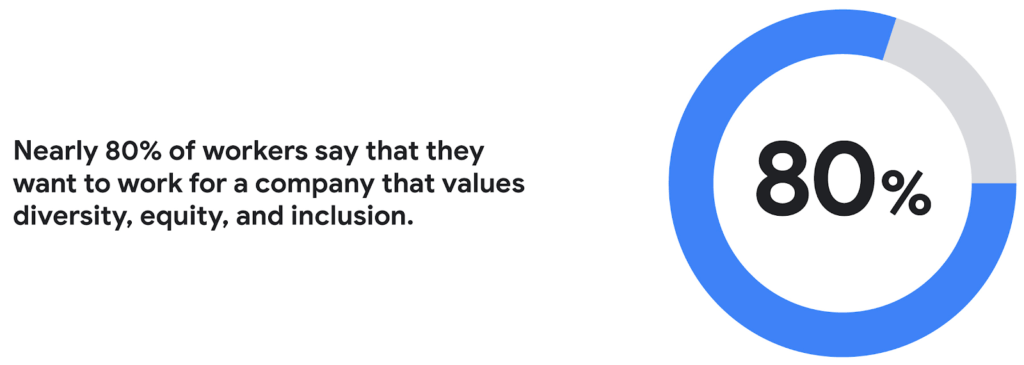
Creating a more inclusive culture. Job seekers want to work for companies that prioritize DEI. According to a recent CNBC and SurveyMonkey Workforce survey, nearly 80% of workers say that they want to work for a company that values diversity, equity, and inclusion. A DEI-centric work culture allows job seekers to feel like there’s a place for them.
Fostering innovation and profitability with broader perspectives. In general, diversity and inclusion promotes the expression of ideas from people with different backgrounds, leading to breakthroughs in creativity, innovation, and attracting new customers. Workplace DEI programs create an employee base that closely mirrors a customer base. A diverse team is less likely to miss potential market opportunities if representative of a broad range of ethnicity, race, age, assigned sex, and socioeconomic backgrounds. A 2020 McKinsey analysis found that companies in the top quartile for ethnic and cultural diversity on executive teams were 36% more likely to have above-average profitability than companies in the fourth quartile.
Hybrid work should not derail DEI efforts
While there are numerous benefits to integrating DEI and hybrid work strategies, it would be naive to think it won’t bring challenges. Businesses run the risk of creating new inequities and exacerbating existing ones as they move to hybrid models. One potential issue lies in which employees can work remotely. An HBR article shared how pre-Covid less than 30% of all workers could work from home; only 16% of Latinx workers and 19% of Black workers had remote flexibility, compared to 37% of Asian workers and 30% of white workers.
Even for employees who can work remotely, it’s essential to eliminate “proximity bias.” A study by SHRM found that 67% of surveyed supervisors admitted to considering remote workers more easily replaceable than onsite workers at their organization. Additionally, 72% said they would prefer all of their teams to be working in the office.
A successful hybrid environment strikes a balance between flexibility and inclusivity where individuals feel valued, and everyone has equal opportunities for advancement. In another study, researchers concluded that remote workers and office workers were promoted at the same rate, but found that remote workers’ salaries grew more slowly. Leading companies recognize that physically being at the office full-time isn’t necessary to produce great results.
8 steps to creating a diverse hybrid work culture
As DEI becomes a new business imperative, organizations must work to minimize unconscious bias, creating market-based salaries for all workers, and introducing educational programs that support talent development. Here are some concrete steps you can take to get started.
- Educate current and future leaders on DEI and hybrid work issues. As you build hybrid work strategies, it’s crucial to discover and understand unconscious biases. According to Deloitte, companies need a holistic DEI learning strategy, including unconscious bias training and developing the conditions for long-term behavior changes.
- Embrace tools that support DEI and hybrid workplaces. Organizations can leverage technology and AI-enabled HR software to support their efforts. Collaboration tools provide everyone with a voice regardless of where they are (for example, using Spaces for team chats in Google Workspace so that everyone has access to the same information). Video call features such as transcriptions and translation can help the hearing-and-vision-impaired and employees who speak different languages. It’s also possible to purchase recruiting solutions with AI technology to reduce the chance of bias or discrimination when reviewing candidates.
- Strengthen culture by marrying DEI with meritocracy. There should also be explicit guidelines to ensure the systems and processes for hiring and promoting individuals are both transparent and equitable. One method for accomplishing this goal is to define detailed job requirements and metrics per role to understand what skills are associated with specific functions. It’s also essential to ensure you’ve designed these processes in a way that screens out bias. Leading companies will deploy analytics tools to evaluate the systems’ fairness and track if the systems are progressing against diversity targets.
- Create upskilling programs to train employees. Many organizations struggle to find talent with the right skill sets. One solution to this problem is to invest in educating existing employees. Companies must develop diverse talent at every level to create a pipeline of candidates that progresses into senior management. Similar to the way companies offered management training programs to college graduates, organizations should design programs that provide skills enhancement for entry and mid-level employees. Almost every job will require a certain level of technical skill—organizations must upskill existing talent.
- Restructure compensation before employees leave. It’s easier to retain an employee than to onboard and train a new hire. According to the Atlanta Federal Reserve Bank’s wage growth tracker, wages for people who have switched jobs have outpaced those who’ve stayed at one employer since 2011. One way to retain talent is to right-size salaries to a competitive market rate.
- Remember that money isn’t everything. While individuals may switch jobs for money, they often stay in a position for the culture. Creating a leading employee experience helps organizations keep talent. Work from home programs, flexible work schedules, and advanced programs such as childcare benefits help build the foundation. But increasingly, individuals are looking for a sense of belonging. According to research from McKinsey, employees who feel included are three times more likely to report being excited about working for their organization and committed to its success. Another McKinsey report focusing on attrition shows that employees primarily leave companies because they don’t feel valued or don’t have a sense of belonging.
- Don’t forget to commit the resources. Most organizations built their cultures before DEI and hybrid work were requirements. These companies must invest in new work tools and educational programs, and create new hiring and talent management practices. A business can make a more significant impact with fewer resources by ensuring purchases and processes support flexible and inclusive work cultures.
- Make sure actions are backed up with DEI transparency measurements. The pressure to support DEI could lead to situations where activities are celebrated over results. While it’s not easy to be vulnerable and transparent about where the problems exist, employers should take stock of where they are today. They should present this authentically, create goals for the future, and design a measurable action plan to track its progress. With so many variables and unknowns, it’s crucial for talent leaders to track the way that hybrid work and DEI efforts advance.
Diversity should be part of your efforts because it’s the culture you want to create. However, ignoring diversity efforts can also come with ramifications. For example, Goldman Sachs announced in 2021 that the firm would only underwrite IPOs in the United States and Europe for companies with at least two diverse board members. Meanwhile, the U.S. Securities and Exchange Commission adopted new rules this summer that require Nasdaq-listed companies to have at least two diverse directors – including one woman and at least one member of an underrepresented community.
In order for the benefits of diversity to emerge in the workplace, companies need to enact cultural and behavioral change. As stated in the ICSM report, “Never become too comfortable with your efforts, as there is always room for improvement with diversity at your organization, whether you see it or not.” It’s clear that what organizations have done to attract talent in the past isn’t resonating the same way today. A diverse workforce delivers better ideas and stronger communities, building deeper relationships with customers along the way. Moving forward, it’s expected that a company’s investment in a diverse, inclusive, and hybrid work culture will set it apart from its competition, leading to increased business agility and better financial outcomes.
Chrome OS’s Hybrid Work Model Powers Google’s Return to Work Strategy

7489
Of your peers have already read this article.
1:30 Minutes
The most insightful time you'll spend today!
The pandemic continues to deeply affect our lives around the globe. In some places, new cases are surging and returning to work is the last thing on people’s minds. In other areas, conditions are improving and companies are starting to think about transitioning their workforce back to the office.
Exactly when and how to do this remains complex and varies by country, industry, and company. What’s certain is that hybrid work will become an essential part of the business world moving forward. And finding solutions that bridge the gap between “in-person” and “somewhere else” are crucial.
At Google, we’ve been focused on what the hybrid transformation means for us. To prepare for hybrid work, using modern solutions is a key enabler.
Chrome OS: Supporting Google’s return to office strategy
At Google, we’ll move to a hybrid work week where most Googlers spend approximately three days in the office and two days wherever they work best. It’s no surprise that as the modern, secure, cloud-first platform, Chrome OS is playing a key role in our transition to a hybrid work model. Because Chrome OS devices can easily be shared, more flexible working models and spaces are now possible. And with user profiles stored in the cloud and collaboration solutions like Google Workspace, employees can log in to any Chrome OS device, access what they need and pick up where they left off.
Here are just a few ways we are using Chrome OS and its tools to support the return to the office:
- In select office locations, Googlers can reserve desks through an internal booking tool set up with a high-performance Chromebox, keyboard, mouse, and monitor. Employees can log in to the Chromebox which syncs their cloud profile, and start working with the same environment they have on all their Chrome OS devices.
- We’re announcing new docking stations that are designed for Chrome OS devices and allow employees to bring in their Chromebook from home, connect to the dock with one USB-C cable, and use a monitor, keyboard, and mouse for a full desktop experience.
- Every Chrome OS device enables a zero-trust security working model with BeyondCorp Enterprise providing our workforce with simple and secure access to applications while providing additional security controls for IT.
- We’ve deployed the new Chrome OS Readiness Tool to our extended workforce to identify employees that are able to switch to Chrome OS. This allows us to expand the latest security, deployment, and manageability benefits to more of the workforce.
Additional ways Chrome OS is helping organizations with return to office
We aren’t the only ones supporting our return to office and hybrid work strategy with Chrome OS. We’ve heard more ways our customers are using Chrome OS to make the transition as smooth as possible. These include:
- Streamlining deployment and management of Chrome OS devices using zero-touch enrollment which allows devices to automatically enroll into a corporate domain without IT configuration.
Grab & Go Chromebooks being used for frontline and hybrid information workers, allowing employees to grab a Chromebook from a cart and get to work right away. - Parallels Desktop for Chrome OS being deployed to allow employees to access Windows or legacy apps locally on their Chrome OS devices.
- Existing Windows and Mac devices being modernized and repurposed to run a Chrome OS experience using CloudReady. (Google is currently offering a CloudReady promotion. Learn more here.)
While the Chrome OS team has been working towards making remote working as seamless as possible for IT, we’ve also made advancements in supporting traditional technology that’s required in the office.
- In October, we announced Chrome Enterprise Recommended: a collection of identity, printing, productivity, communications, and virtualization solutions that are verified to run great on Chrome OS.
- With the increased usage of video conferencing on Chrome OS devices, we’ve made improvements to Google Meet and Zoom performance including camera and video improvements to reduce any unnecessary processing and features that intelligently adapt to your device, your network, and what you are working on.
- For improved access to Windows and legacy apps, VMware Horizon introduced multi-monitor support and USB redirection and Citrix Workspace released a tech preview with webcam enhancements and Microsoft Teams optimizations.
- We integrated with the Okta Workflows platform, so IT administrators can include Chrome OS in it’s access logic and deploy quickly without code. Recently, we’ve added the ability to require users to reauthenticate on their Chrome OS device once Okta has detected that the user has changed their password. Try out this new capability by signing up for our Trusted Tester program.
- We’ve increased our support for direct IP printing with additional printer models since the beginning of 2020. In addition, we have made improvements to management features, including support for multiple print servers and launched policy APIs to provide a better IT admin experience.
Join us for a digital event with Modern Computing Alliance and its newest member HP
Last year we announced the launch of the Modern Computing Alliance—a collaboration of industry leaders including Box, Chrome Enterprise, Citrix, Dell, Google Workspace, Imprivata, Intel, Okta, RingCentral, Slack, VMware, and Zoom aim to create the pioneering solutions that businesses need. We are thrilled to introduce HP, who brings their innovative hardware and enterprise hardware expertise to the Modern Computing Alliance and has been working closely with the alliance to ensure true silicon-to-cloud innovation.
As an alliance, we’ve been deeply engaged in the hybrid work shift. We invite you to join us for a digital event where we discuss questions about returning to work. Like how product design can encourage participation and collaboration regardless of where employees are, important security issues to keep in mind, and what factors businesses should consider to support a safe, working environment.
Home. Heading back. Hybrid.
Hear from the experts on hybrid work and return to office.
Date: May 20th, 2021
Register here.
If you are ready to try Chrome OS today, it’s easy to get started. You can contact us to get connected to a partner, sign up for a free 30-day trial of Chrome Enterprise Upgrade to start managing Chrome OS devices, or deploy the Chrome OS Readiness Tool to identify employees that are ready to switch to Chrome OS.POSTED IN:
New ways Google Workspace works with tools you already use

4043
Of your peers have already read this article.
6:30 Minutes
The most insightful time you'll spend today!
Looking back on 2020, it’s clear that the ways we work have rapidly transformed—from the rise of remote work and increasingly digitized processes, to balancing time across work and personal responsibilities. But one thing hasn’t changed—businesses still rely on a staggering number of applications to get work done. Working from home and the associated pressures on productivity have only emphasized the need for fewer tools that do more, are easy to use from anywhere, and seamlessly integrate with other software.
Google Workspace helps you get more done—with communication and collaboration tools known and loved by billions of users, thoughtfully connected together. And while billions of users choose our apps, we recognize that they also need to effectively collaborate with partners, customers, and even teammates that might use other tools. In particular, we know that many people work with a mix of Google Workspace and Microsoft applications—for example, while migrating to Google Workspace or collaborating with external vendors or clients. That’s why we make it easy for you to use Google Workspace with Microsoft Office and Office 365, helping you collaborate productively from any device with anyone, regardless of what tools you use.
Save time with helpful intelligence and faster workflows in Google Workspace
Creating and collaborating on content is at the heart of getting work done. When working with content received from customers, partners, or teammates, employees shouldn’t lose time converting files or working in unfamiliar tools.
With Google Drive, you can store and share over 100 different file types and formats, including Microsoft Word, Excel, and PowerPoint files, as well as PDFs, images, and videos. And by using intelligent features like Priority and Quick Access in Drive, you can find files nearly 50% faster.
With Office editing, users can also easily edit Microsoft Office files in Google Docs, Sheets, and Slides without converting them, with the added benefit of layering on Google Workspace’s enhanced collaborative and assistive features. From assigning action items via comment, to writing faster with Smart Compose, to accelerating data entry with Sheets Smart Fill, Office editing brings Google Workspace functionality to your Office files. And we recently extended Office editing to the Docs, Sheets, and Slides mobile apps as well, so you can easily work on Office files on the go.
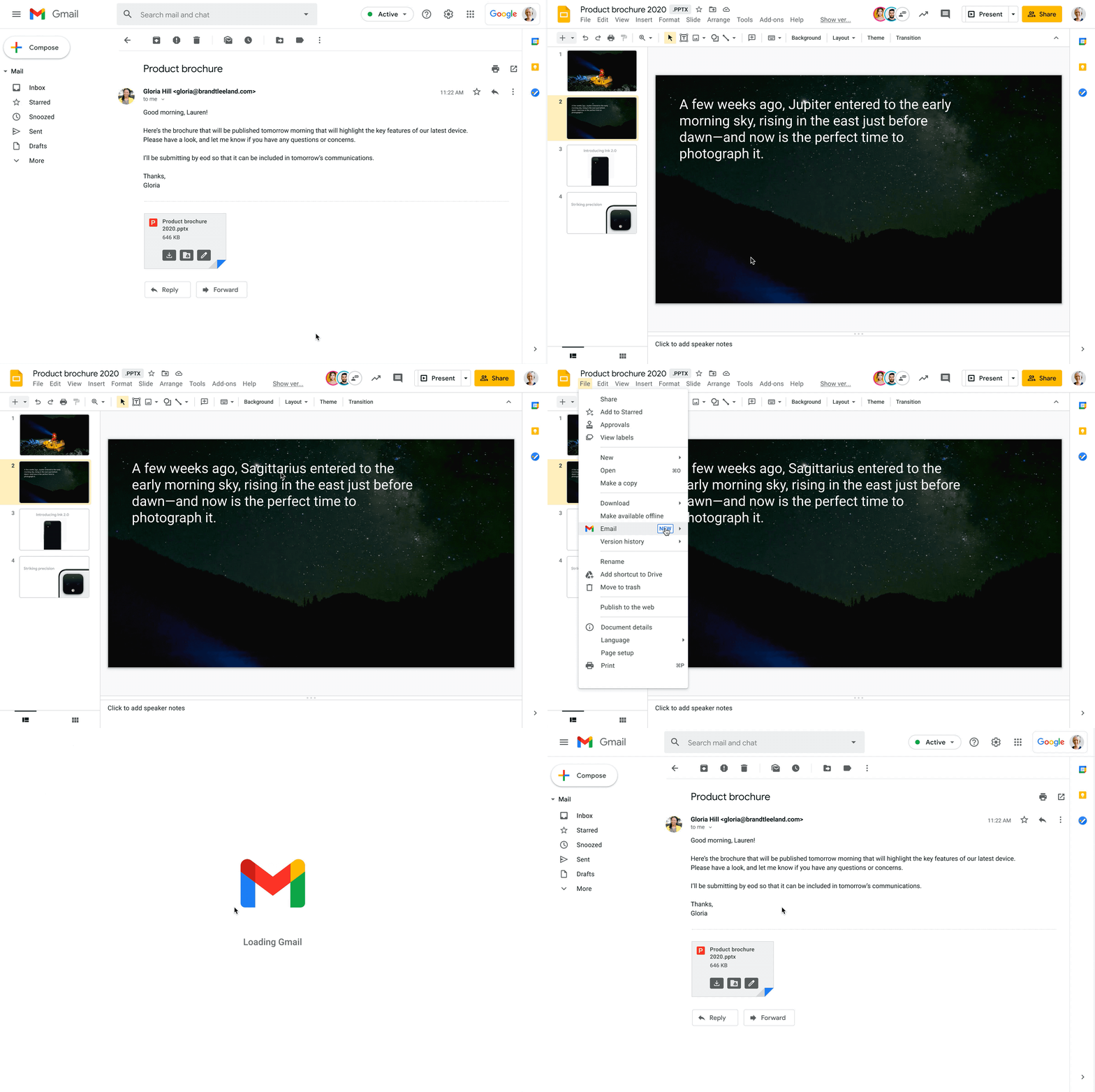
Starting today, you can also open Office files for editing directly from a Gmail attachment, further simplifying your workflows. For example, when you receive a Word document as an email attachment, you can open it and start editing in Docs with a single click while still preserving the Word file format. Then you can respond to the original email thread and include the updated file, right from Docs—saving you time by eliminating steps like downloading the file to edit, or searching for the relevant email to reattach it to.
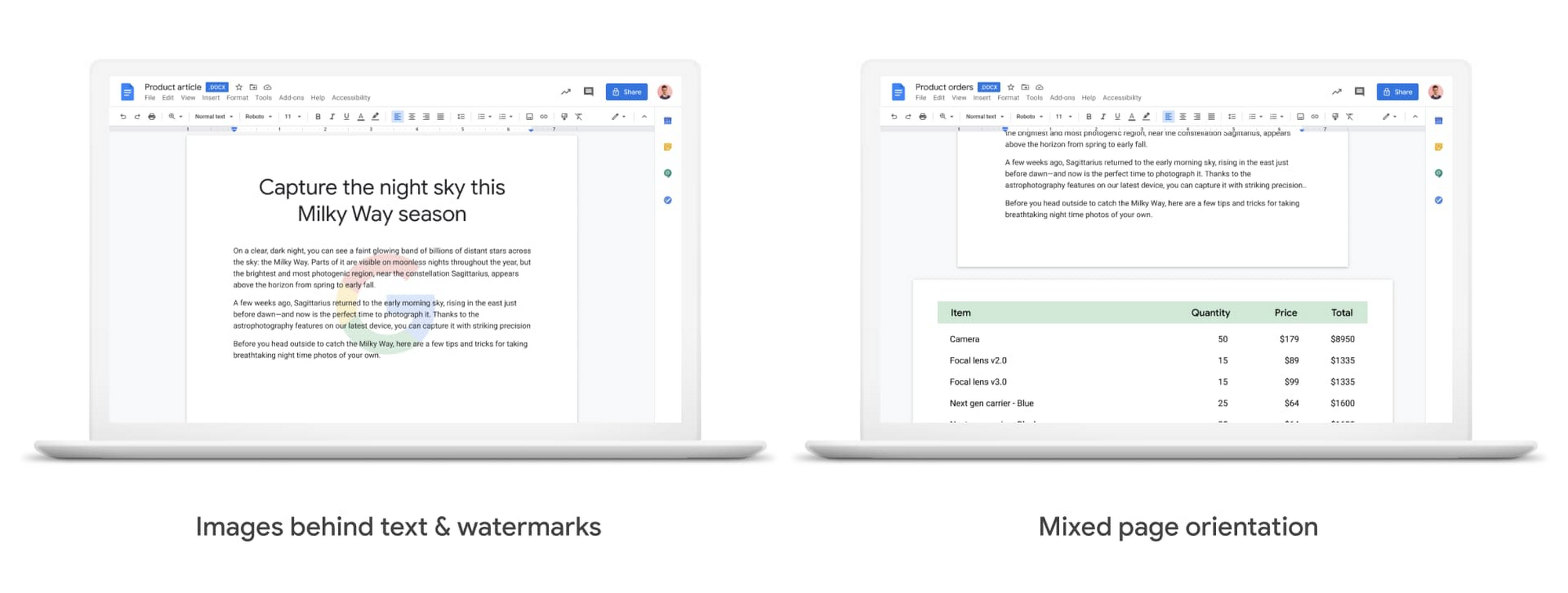
We also know it’s important that your Office files look consistent when opened in Docs, Sheets, and Slides, so we continue to support additional formatting options used in Office files. Today, we’re announcing mixed page orientation support in Docs, so you can create Docs or edit Word files with mixed landscape and portrait pages. And next year, we’ll add support for inserting images behind text and watermarks, to give you further flexibility.
Finally, when it comes to spreadsheets, we know that many organizations maintain both Excel and Sheets, especially when relying heavily on macros that have been built over time to automate processes. In Sheets, it’s easy for anyone to record macros, without having to write any code. And to make it easier for teams to transition from Excel to Sheets or support co-existence of these tools, we have also launched a new Macro Conversion add-on that helps users migrate macros from Excel to Sheets. This way, teams can save time through automation, without having to start from scratch.https://www.youtube.com/embed/CUKAUFoa86M
Stay connected with others, wherever you are
Business growth is fueled by people connecting and generating ideas together, whether they are working from the same office or dispersed around the globe. Google Workspace makes it easy to schedule time and meet with others, helping you maintain a connection with your collaborators and accomplish more together, from any device, anywhere.
To make and maintain these connections, people need an easy way to schedule time with others, regardless of which calendaring system they are using. Some organizations run mixed calendaring environments, for example, during a migration to Google Workspace or merger, where one company is not on Google Workspace. To help in such scenarios, the Google Calendar Interop tool makes it easy for people to schedule and book resources regardless of which system they’re on. With Calendar Interop, teams across systems can see each other’s free/busy status, event details, and book shared resources, so that they don’t need an endless exchange of chats or emails to land on a time that works for both parties.
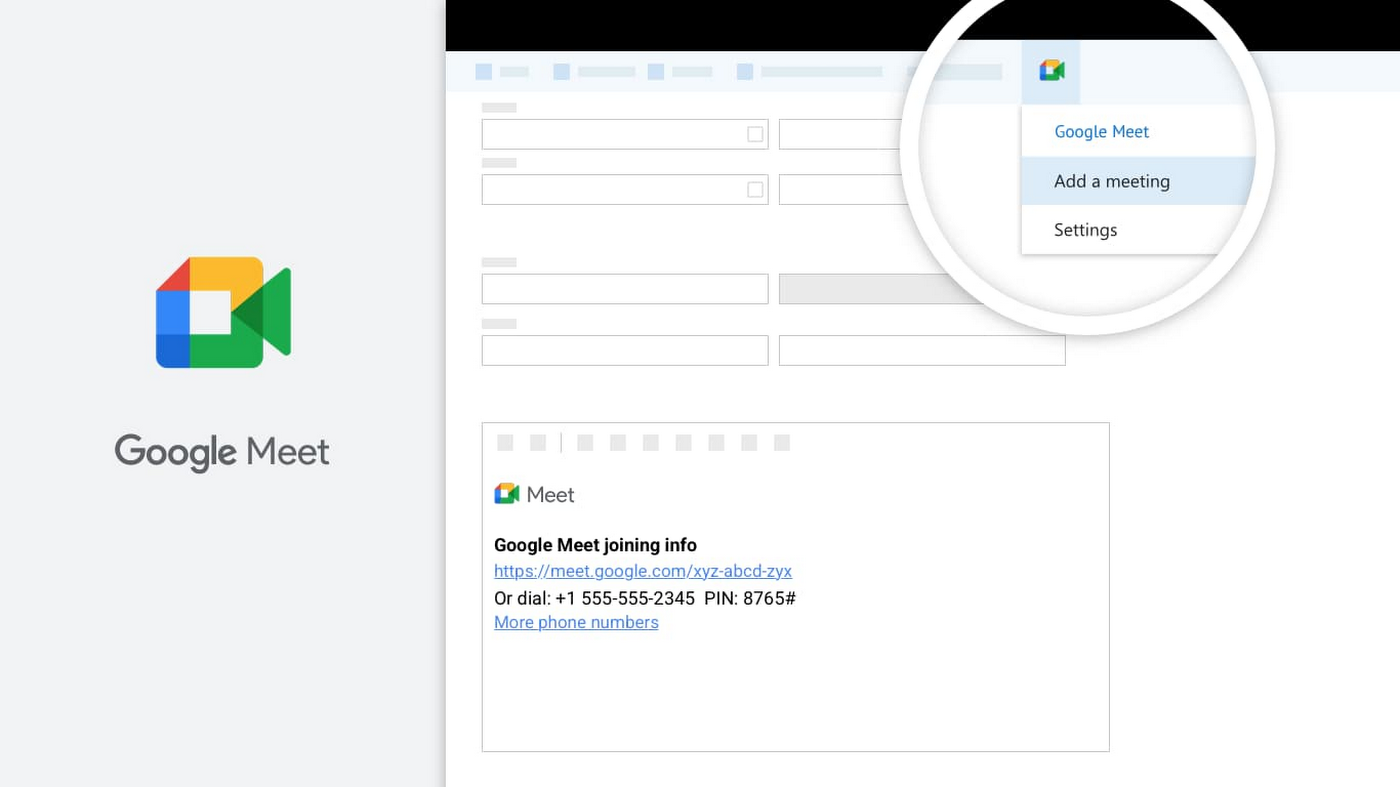
Google Meet is another powerful tool for keeping employees connected, wherever they are. With Meet, it’s easy for teams to connect via secure, enterprise-grade video conferencing from any device—laptop, mobile, or even dial-in via phone. Google Workspace customers can invite anyone to join a Meet call, including people using Outlook who don’t have a Google Account. Or if using Outlook to schedule events, users can easily add Meet video conferencing details using the Google Meet add-in for Microsoft Outlook. With a simple tap of the meeting link in your email or calendar, you can easily connect face-to-face with your collaborators, helping maintain that human connection that drives work forward.
Be productive from anywhere with custom solutions
Often, certain tasks and processes require employees to develop custom applications to manage them. Understanding how to code can be a huge barrier for employees faced with this challenge, but Google Cloud’s AppSheet enables anyone to build applications without having to write code. AppSheet is available to all Google Workspace users and has a number of tight integrations that make it easy to build custom apps on top of Google Workspace apps, like Google Sheets.
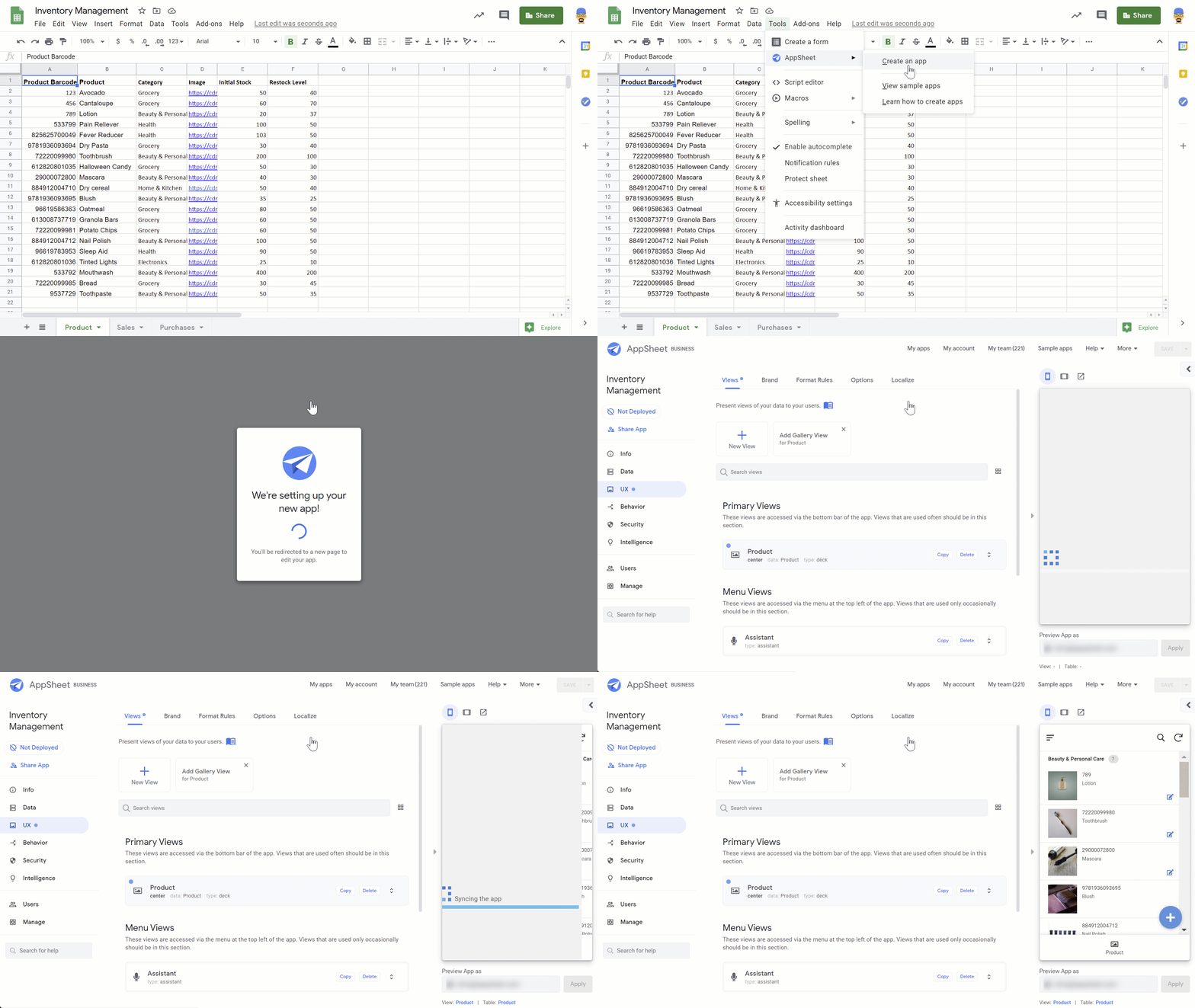
AppSheet is designed to work on any device and can connect to your data and spreadsheets, wherever they live. While AppSheet and Google Workspace are tightly integrated, AppSheet also easily connects to O365 data sources such as Excel spreadsheets stored in OneDrive or SharePoint. AppSheet creates a bridge between environments—custom apps and automations can connect to Google Workspace and Microsoft Office apps simultaneously, so that teams and processes split between environments can be managed more seamlessly. Plus, with AppSheet, even Microsoft users can easily incorporate Google’s leading AI and machine learning capabilities, like optical character recognition and sentiment analysis, into their apps.
Flexibility is important when it comes to effective collaboration, and we’ll continue to invest in the many ways Google Workspace can work seamlessly with the rest of the tools you use—helping you accomplish more, faster. Visit our learning center for more info on topics like working with Office files in our apps, or check out these helpful switching guides if your organization is currently transitioning from Microsoft Office to Google Workspace.
What Are India’s Biggest Companies Doing on Google Cloud?
9292
Of your peers have already read this article.
6:30 Minutes
The most insightful time you'll spend today!
In the last year, there’s been an upward trend in cloud adoption in India. In fact, NASSCOM finds that cloud spending in India is estimated to grow at 30% per annum to cross the US$7 billion mark by 2022.
At Google, in our conversations with customers, discussions have evolved beyond cost savings and efficiencies. While those are still very relevant reasons for adopting cloud technologies, Indian enterprises are looking to Google Cloud to help them drive digital transformation, identify new revenue generating business models, reach previously untapped consumer markets, and build customer loyalty through greater insight and personalization.
Here are some companies and their stories.
Tata Steel: Mining data and maximizing its power
Tata Steel is a great example of an established enterprise from a traditional industry that is modernizing and embracing cloud computing. With an ambition to be a leader in manufacturing in India and a digital-first organization by 2022, Tata Steel believes smart analytics is key to enhancing operational efficiency and gaining business advantage.
To organize data from siloed systems across the organization and make it easily accessible to all employees, Tata Steel is using Cloud Search and plans to scale it to more than one million documents and 28 disparate enterprise content sources including enterprise resource planning (ERP) and SharePoint. In fact, Tata Steel is one of the first Indian enterprises to harness the power of Cloud Search to meet some of the most aggressive ingestion demands, with indexing durations reduced from weeks to seconds.
They are also leveraging Google Cloud Platform (GCP) services like Google Cloud Storage and BigQuery to build their data lake and enterprise data warehouse so they can take advantage of advanced analytics and machine learning. Managed services such as AI Platform further enable Tata Steel to manage end-to-end AI/ML workflows within the GCP console. This complements their existing on-premise reporting and analytics tools, and brings data management to the forefront of everything they do—from forecasting market demand to predictive equipment maintenance.
“Digital is not just a goal, it’s become a way of life. We are digitizing everything from the deployment of factory vehicles to improving material throughput to marketing and sales. As a result, we have petabytes of structured and unstructured data that is not only waiting to be mined, but that we can generate intelligence from to create opportunities across our multiple lines of business using GCP,” said Sarajit Jha, Chief Business Transformation & Digital Solutions at Tata Steel.
Helping L&T Financial Services reach customers in rural communities
In rural communities, quick access to financial services can make a tremendous difference to livelihoods. L&T Financial Services provides farm-equipment finance, micro loans and two-wheeler finance to consumers across rural India backed by a strong digital and analytics platform. Their digital-loan approval app, which runs on GCP, makes it significantly faster and easier for people to apply for financial assistance to purchase important things such as farming equipment and two-wheelers. It also helps rural women entrepreneurs get quicker access to funds for their businesses through micro loans.
L&T Financial found G Suite to be a far better collaborative tool to help staff work together efficiently. Employees can interact with each other in real time using Hangouts Meet, and the task of information sharing is more seamless and secure through Drive. BigQuery also helps L&T Financial Services generate behavior scorecards to track credit quality of its micro-loan customers.
“Cloud is the technology that enables us to achieve scale and reach. Today there are countless data points available about rural consumers which enable us to personalize our products to serve them better. With access to faster compute power, we can also on-board consumers more efficiently. Our rural businesses have clocked a disbursement CAGR of 60% over the past three years.” said Sunil Prabhune, Chief Executive-Rural Finance, and Group Head-Digital, IT and Analytics, L&T Financial Services.
Creating conversational connections for Digitate’s customers
Digitate, a venture of TCS (Tata Consultancy Services), has integrated Dialogflow into its flagship brand ignio, an award-winning artificial intelligence platform for driving IT operations, workload operations and ERP operations for diverse enterprises. This integration is the next step in ignio’s product development journey, and will enable users to chat or talk with ignio to detect issues, triage problems, resolve them and even predict system behavior.
“ignio combines its unique self-healing AIOps capabilities for enterprise IT and business operations with Dialogflow’s AI/ML-based, easy to use, natural and rich conversational capabilities to create an unparalleled, intuitive and feature-rich experience for our customers,” says Akhilesh Tripathi, Head of Digitate.
Indian enterprises going G Suite
The base of Indian enterprises that are making the switch to G Suite to streamline their productivity and collaboration also continues to grow. Sharechat, BookMyShow, Hero MotorCorp, DB Corp and Royal Enfield are now able to move faster within their organizations, using intelligent, cloud-based apps to transform the way they work.
A hybrid and multi-cloud future in India
IDC predicts that by 2023, 55% of India 500 organizations will have a multi-cloud management strategy that includes integrated tools across public and private clouds. (IDC FutureScape: Worldwide Cloud 2019 Predictions — India Implications (# AP43922319). We look forward to sharing more success stories of Indian enterprises that have taken the next step in their digital transformation journey.
How Randstad Creates Assessment Reports in Five Minutes with G Suite
4338
Of your peers have already read this article.
7:34 Minutes
The most insightful time you'll spend today!
For over five decades, Randstad has matched businesses worldwide with millions of temporary and permanent workers, creating long-lasting, successful working relationships. Today, the company operates a vast multinational recruitment network, with 35,000 employees applying HR expertise in markets from Norway to Malaysia, and more than 37 countries in-between.
To give staff a more mobile, low-maintenance alternative to their previous communications solution, Randstad offered G Suite to its staff in 2012, giving them the option to switch. All of Randstad’s workforce made that choice, assisted by a Randstad “Transformation Kit” containing everything a team needs for a successful migration. Now Randstad’s global community of G Suite users are looking to unleash the full potential of the platform, moving beyond Gmail and Calendar to engineer major efficiencies across the organization.
“Technology gives us more time to be in contact with people,” says Senne Beckers, Senior Accounts Specialist at Randstad. “It means we can give more attention to the people we outsource, our colleagues, and our customers. Our administrative ability is what makes Randstad successful, and G Suite makes all our processes more efficient.”
Sharing tips worldwide to make the most of G Suite tools
“In Sheets, I can create a pivot table and then I can drop Sheets visualizations directly into Slides for presentations. In the past, we would need visual designers to do that, but now I can do it in a matter of minutes.”
– Frank van der Bijl, Business Analyst IT, Randstad
Using Google+, Randstad workers share their ideas for applying G Suite to their work. “We share tips and tricks with each other from all over the world,” says Frank van der Bijl, Business Analyst IT at Randstad. “There’s always someone you can learn from or educate, and that’s an innovation in and of itself. In the past, when we wanted to share information like this, we would contact the internal communications team for them to put something on the company intranet. Now we go straight to Google+ and post it directly.” Randstad calls this project “Google to the Max”, and the boost in collaboration and efficiency helps its staff around the globe be more productive.
Those tips range from saving time by using Calendar to book meeting rooms and check colleague availability, to minimizing unnecessary travel by replacing meetings with Google Hangouts Meet. As an HR company, Randstad handles, optimizes, and edits thousands of résumés every day. By using Google Forms to collect data for résumés and Google Docs to edit them, Randstad teams streamline that core process. “Rather than send résumés back and forth with corrections and suggestions, we work on them all together, directly in Docs,” says Frank. “It’s a collaboration, like how we centralize information in Google Sheets to give everyone on a team a single, up-to-the-minute overview on customers and candidates, maximizing the chances of a successful match.”
Many of the innovations tackle processes that used to create bottlenecks by requiring specialist knowledge. “In Sheets, I can create a pivot table,” says Frank, “then I can drop Sheets visualizations directly into Google Slides for presentations. In the past, we would need visual designers to do that, but now I can do it in a matter of minutes.”
Streamlining annual assessments with Forms and Sheets
“We have more than 1,000 people working for a global airline through Randstad, and because G Suite is so open, the airline, like other clients, uses Google tools to send us information.”
– Senne Beckers, Senior Accounts Specialist, Randstad
In addition to improving internal processes, the innovations directly benefit Randstad clients, as Senne explains: “We have more than 1,000 people working for a global airline through Randstad, and because G Suite is so open, the airline, like other clients, uses Google tools to send us information, even though they work with a different communication platform.”
That flexibility allows Senne and her team to apply G Suite technology to problems outside of Randstad. “We used to have a very old-fashioned way of collecting annual assessments on each of the people we have with the airline,” says Senne. “We would email a document to an airline shift leader, who had to go to his or her computer to receive it, print it, fill out the document, scan it, save it, and then email it back. At one point, the workload was so high that we had to stop taking feedback altogether.”
To simplify the process, Senne implemented Forms, as a fast, mobile way for shift leaders to send their assessments. “With Forms, shift leaders can be inside a plane or out on the runway, and when they want to comment on an employee they can give us instant feedback that goes directly into our system,” explains Senne. Back at the Randstad office, HR then pulls all the data they need directly from Sheets, without having to reference the CRM, chase clients, or search emails.
As a result, it now takes five minutes to create an annual assessment, instead of one hour. Because there are 1,000 employees, a task that took 1,000 hours a year, or 140 working days, can be finished in two and a half weeks.
“Because Sheets translates information directly into graphs as it arrives, we can track the situation at a glance,” says Senne. “Streamlining the creation of annual assessments with Forms doesn’t just make the process more efficient, it also means we can spend more time properly discussing feedback with employees. That’s good for them and great for the airline’s management, which now wants to roll out this approach to more business units.”
Bringing teams together with Google Keep
“Everyone has their own approach, and we’re all sharing our experiences through Google+ and helping colleagues. Every day we find a new feature, which helps us be more efficient, and all we need to implement it is an internet connection.”
– Frank van der Bijl, Business Analyst IT, Randstad
As HR specialists, Randstad employees know that solving individual work issues is only part of the story. For teams to work effectively, solutions need to be brought together in a single place, where they can feed into each other. To make that happen, staff across Randstad use Google Keep to communicate.
“Keep really helps me to structure workflows and share my ideas directly with my team,” says Senne. “I have a lot of ideas all of the time, and Keep means I can make them known to the people I work with, at the same moment as I jot them down during a meeting. It brings Docs, Forms, and Sheets together in one place where we can arrange things intuitively and set priorities. With our to-do lists visible on that central hub, we can all check in on each other and track progress in a transparent way.”
For Senne, that functionality couples neatly with Google Cloud Search. “As a senior account specialist, it’s my responsibility to know what is happening in our teams, and Google Cloud Search helps me keep all of the information at my fingertips, ready for me to share. It’s the home screen on my Chrome browser.”
Recognizing that this agile, fast-paced way of working may be unfamiliar to new employees, Frank uses Google Keep to introduce people to the G Suite tools. “When people are new to a company, they’re sometimes nervous about asking for advice, such as how to ask for a day off,” says Frank. “To help them, I’ve created a four-step checklist of ‘Things you should do when you join Randstad’, which directs them to the information they need to on-board. With Keep I can see where they are in the process and follow up with them if I think they might need help.”
Embracing the interconnected environment
In each of the 39 countries where Randstad is active, operations are moving at their own pace towards greater G Suite integration. And though each is at a different stage in the process, the direction of travel is clear.
“Across the company, the next step will be Chromebooks, so that we fully embrace the interconnected app environment,” says Frank. “Some countries have already fully switched to Chromebooks, and some are migrating all of their data to the cloud. Everyone has their own approach, and we’re all sharing our experiences through Google+ and helping colleagues. Every day we find a new feature, which helps us be more efficient, and all we need to implement it is an internet connection.”
More Relevant Stories for Your Company
Google Cloud Partnership Helps Lowe’s SRE Team Achieve 20X More Releases Per Month
Editor’s note: Today we hear from the Lowe’s SRE team. They share about how they have been able to increase the number of releases they can support by adopting Google’s Site Reliability Engineering (SRE) framework and leveraging their partnership with Google Cloud. At Lowe’s, we’ve made significant progress in our multiyear technology transformation.

Gmail’s BIMI Increases Confidence about Security and Delivers Immersive Email Experiences
Creating a secure-by-default experience based on robust defenses has always been a core design principle for Gmail. That’s why we’ve established a strong baseline of security in Gmail, with built-in protections to help automatically filter out potentially malicious messages. While these defenses help keep Gmail users safe, email functions as




How Manish Malhotra Created Masterpieces on G Suite for the World’s Biggest Names
From Hillary Clinton’s golden outfit at Isha Ambani’s wedding to scores of Indian movies, Manish Malhotra has been a household name for over two decades. It was in 1990 that Malhotra first designed outfits for an Indian movie and since then he has won several awards in the Best Costume

How We Proved Everyone Wrong and Scaled Our Sports Apparel Company Across Continents
There were several reasons why Suddora and CustomOnIt shouldn’t have been successes. My friend Adam and I were working in a Michigan video store and knew next to nothing about running a business. We started with an idea to sell sweatbands, like the ones I used to wear in my
