





Gmail’s BIMI Increases Confidence about Security and Delivers Immersive Email Experiences

5462
Of your peers have already read this article.
3:00 Minutes
The most insightful time you'll spend today!
Creating a secure-by-default experience based on robust defenses has always been a core design principle for Gmail. That’s why we’ve established a strong baseline of security in Gmail, with built-in protections to help automatically filter out potentially malicious messages. While these defenses help keep Gmail users safe, email functions as part of a large, complex, interconnected ecosystem that we continually invest in and work to protect. After first announcing Gmail’s Brand Indicators for Message Identification (BIMI) pilot last year, today we’re announcing that over the coming weeks we’re rolling out Gmail’s general support of BIMI, an industry standard that aims to drive adoption of strong sender authentication for the entire email ecosystem. BIMI provides email recipients and email security systems increased confidence in the source of emails, and enables senders to provide their audience with a more immersive experience.


“Bank of America has a wide range of security measures in place to support our customers, and we constantly evolve our program to deliver best in class protection. Part of this effort is our partnership with Google on BIMI, which provides an easy way to validate if correspondence is from us.” — Bank of America
BIMI enables organizations that authenticate their emails using Domain-based Message Authentication, Reporting, and Conformance (DMARC)—a standard for providing strong sender authentication that allows security systems to perform better filtering, separating legitimate messages from potentially spoofed ones—to validate ownership of their logos and securely transmit them to Google. BIMI is designed to be easy: for organizations with DMARC in place, validated logos display on authenticated emails from their domains and subdomains.
Here’s how it works: Organizations who authenticate their emails using Sender Policy Framework (SPF) or Domain Keys Identified Mail (DKIM) and deploy DMARC can provide their validated trademarked logos to Google via a Verified Mark Certificate (VMC). BIMI leverages Mark Verifying Authorities, like Certification Authorities, to verify logo ownership and provide proof of verification in a VMC. Once these authenticated emails pass our other anti-abuse checks, Gmail will start displaying the logo in the existing avatar slot.
“Gmail’s support of BIMI is a win for email authentication, brand trust, and consumers alike. BIMI gives organizations the opportunity to provide their customers with a more immersive email experience, strengthening email sender authentication across the entire email ecosystem.” — Seth Blank, Chair of the AuthIndicators Working Group
This is just the start for BIMI. The standard expects to expand support across logo types and validators. For logo validation, BIMI is starting by supporting the validation of trademarked logos, since they are a common target of impersonation. Today, Entrust and DigiCert support BIMI as Certification Authorities, and in the future the BIMI working group expects this list of supporting validation authorities to expand further. To learn more about BIMI and see the latest news, visit the working group’s website.
To take advantage of BIMI, ensure that your organization has adopted DMARC, and that you have validated your logo with a VMC. For Gmail users, no action is required. We’re proud to be one of the leading members in both establishing and supporting the BIMI standard and will continue to support efforts that contribute to security for the entire email ecosystem.
3893
Of your peers have already watched this video.
26:56 Minutes
The most insightful time you'll spend today!
What’s new and next in Android Enterprise
Many of you know Android as a consumer platform that has provided mobile data access on smartphones and tablets to over 2 and 1/2 billion people across the world. But we see Android as an enterprise operating system that spans a variety of form factors and use cases. We work with manufacturers across the globe, who create Android devices compliant with services, like Google Play.
And that means, whether you’re trying to enable employees with smartphones, frontline workers with rugged devices, create digital kiosks for customers to interact with, or build point solutions, like point of sale systems or signage, there’s an Android device that fits your need.
And as an organization, when you know how to build Android apps on one form factor, you can tailor these applications to be redeployed onto another because Android represents a common platform, irrespective of the hardware that you choose.
Learn how Android is tackling the biggest issues facing mobility strategies today, from balancing security and privacy to providing user experience and productivity innovation at scale.
6 ways Google Workspace helps IT admins safely use BYOD

4191
Of your peers have already read this article.
6:30 Minutes
The most insightful time you'll spend today!
Many organizations, including Google, have moved quickly to embrace working from home. With this widespread remote work, it’s never been more important for IT admins to be certain that every device in their organization is secure, even when that device isn’t company-owned.
We pioneered zero-trust security through our BeyondCorp strategy and leverage it to offer advanced security for G Suite* users to protect secure access for all devices. Admins can enforce these controls across G Suite and other corporate applications and data, ensuring consistent security and user experience across your organization.
Today, we’re laying out six key controls that IT admins can use within G Suite to help keep their organizations safe when using the bring your own device approach (BYOD). You can also review our detailed security checklist here, and learn more from our course on Managing G Suite here.
Secure mobile and desktop devices with endpoint management

BYOD devices can differ widely across an organization, with a range of OS versions, hardware modes, patch versions, and more, so it’s impossible to rely on a one-size-fits-all approach to device management. With Google endpoint management, IT admins can easily support a variety of mobile and desktop devices by enforcing measures like minimum software versions and blocking jailbroken or rooted devices, in many cases without requiring full device rights for employee privacy.
When it comes to managing mobile devices, G Suite offers basic and advanced mobile device management:
- With basic mobile device management, BYOD devices are secured with baseline security features with no end user friction. Admins can enforce a passcode, get a device inventory, wipe Google accounts remotely, and even remotely install applications on Android devices.
- With advanced mobile device management, admins can apply more policy controls over BYOD devices, and Android users can keep their personal data private and separate from their work data with Android Work Profiles. You can also allow and manage work apps on iOS and Android devices.
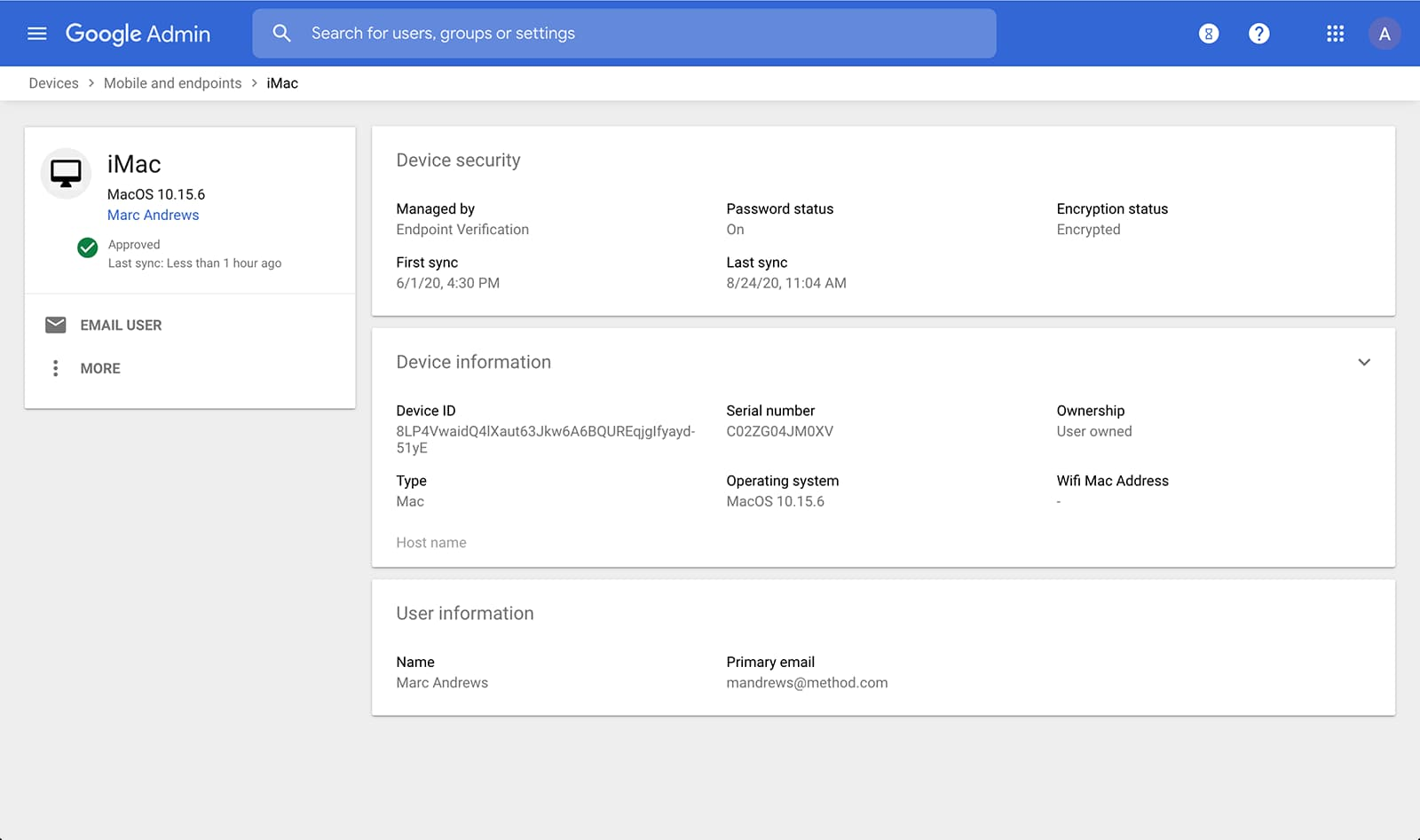
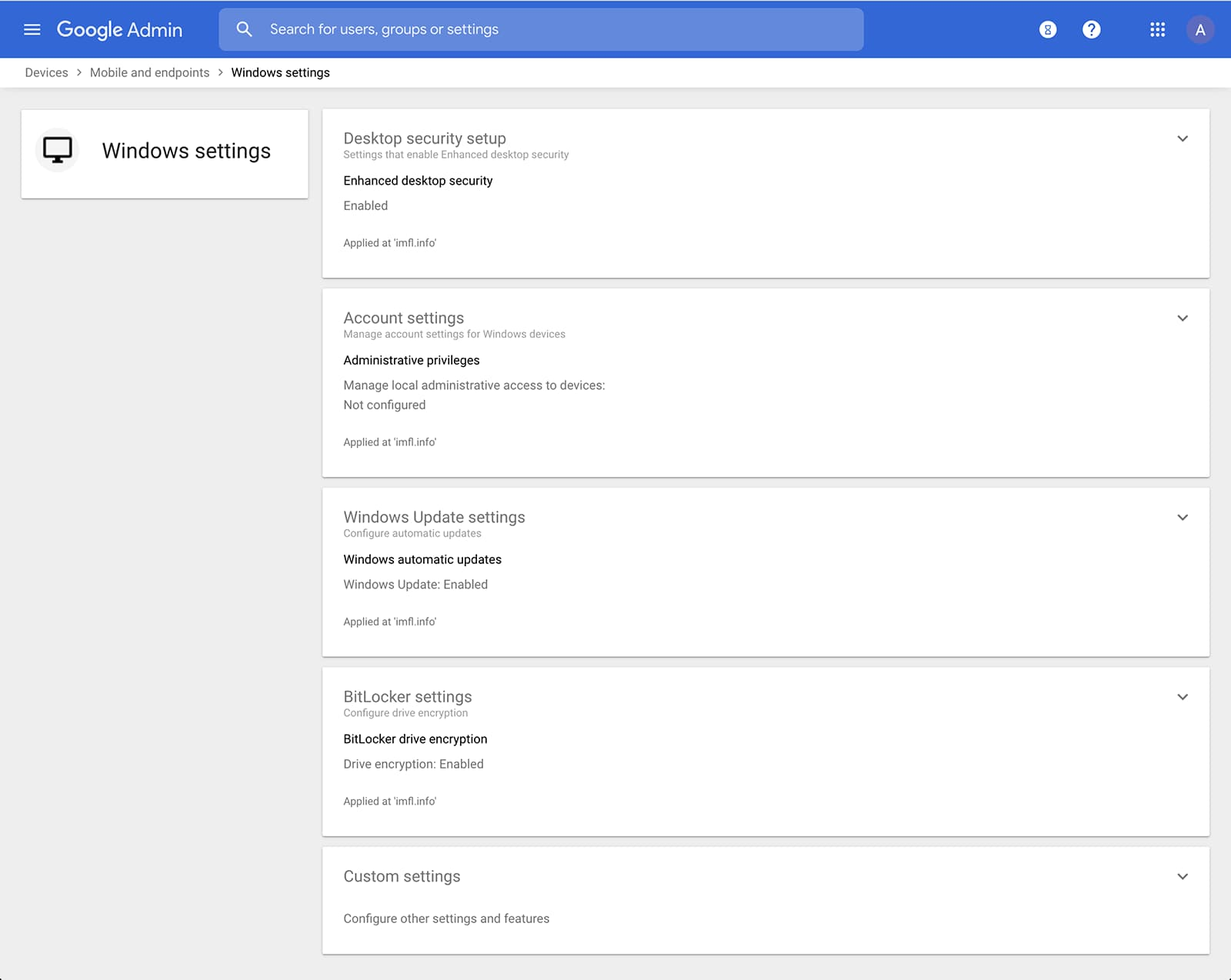
Admins can also manage and secure desktop devices with fundamental device management and enhanced desktop security for Windows. With fundamental device management, when a user logs into G Suite through any browser on a Windows, Mac, Chrome, or Linux device, that device will be automatically enrolled with endpoint management. This provides a base level of security to every desktop device that accesses G Suite data. With enhanced desktop security for Windows, admins can easily manage and secure Windows 10 devices through the admin console.
Enable secure connections without a corporate VPN using context-aware access
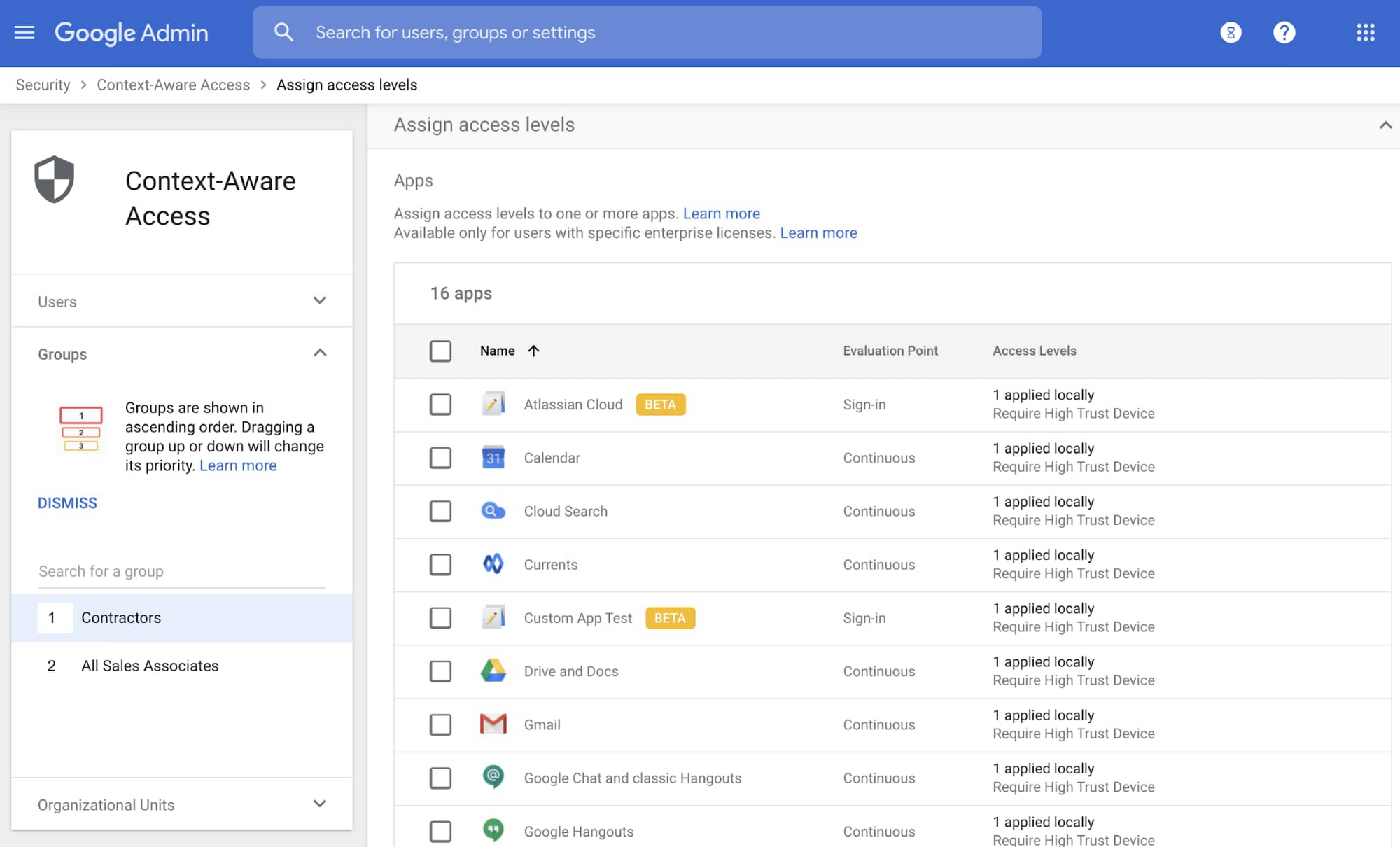
Context-aware access offers protection from unwanted access to G Suite services without the need for a VPN, and allows admins to set up different access levels based on a user’s identity and the context of the request, taking into account factors such as the country, device security status, and IP address of the request. For example, you can require BYOD devices accessing G Suite to meet encryption and password requirements, or restrict contractors from accessing G Suite from company managed Chromebooks.
Control data access with app access control
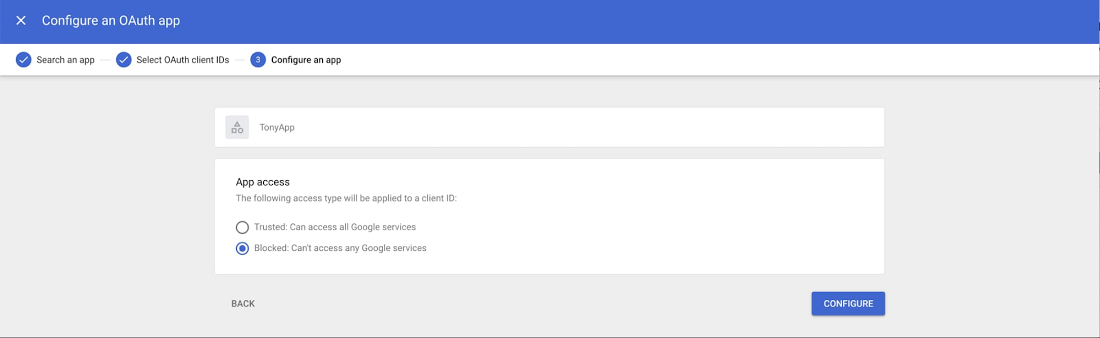
It’s important to protect all devices in your organization—corporate or BYOD—from malicious apps trying to gain access to corporate data. Using app access control, admins can take steps to prevent these apps from tricking users into mistakenly granting access to corporate data. With this feature, admins can choose which third-party apps are allowed to access users’ G Suite data by explicitly trusting, limiting, or blocking access for apps.
Enforce 2-Step Verification
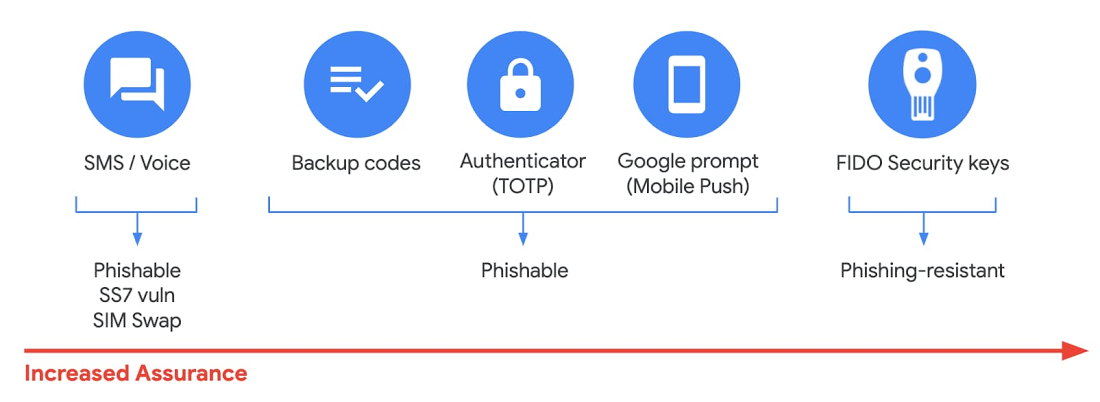
With 2-Step Verification, admins can reduce the risk of unauthorized access by asking users for additional proof of identity when signing in. And you can now use the Advanced Protection Program—our strongest protection for users at risk of targeted attacks. With the Advanced Protection Program for the enterprise, we’ll enforce a specific set of policies for enrolled users including security key enforcement, blocking access to untrusted apps and enhanced scanning for email threats
If you choose not to use security keys for any reason, you have multiple other options to enforce 2-Step Verification on BYOD devices. For Android and iOS, you can use Google prompt, Google Authenticator, text message, or phone call options for a second verification step.
Prevent data loss and leakage with data loss prevention
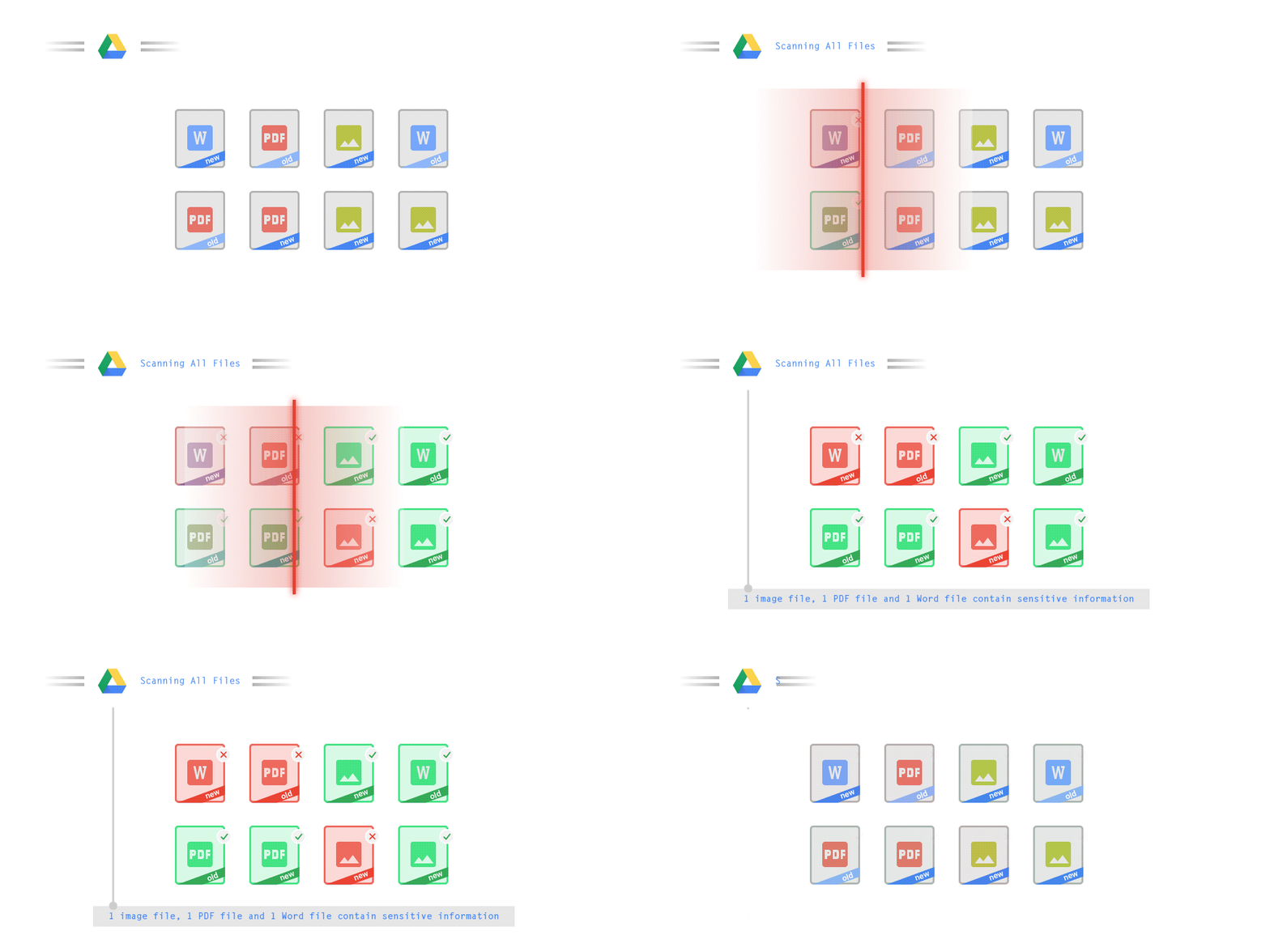
We know that as an admin, one of your highest priorities is to keep internal information safe and secure. That’s why we developed data loss prevention (DLP) policies to help protect sensitive information in Drive, Docs, Sheets, Slides, and Gmail from loss, misuse, or being accessed by unauthorized users. With G Suite DLP, admins can choose which types of data are sensitive and exactly how to protect them. Our controls enable easy detection of a wide variety of common info types, and administrators can supplement this with custom content detectors to meet their organization’s needs. You can also classify files in Drive automatically using DLP rules (beta) to categorize your data by sensitivity levels. DLP works on all the devices in your organization, including BYOD ones, since the protection is at the data and application level.
In addition to DLP, you can use DXP for iOS devices to restrict the copy/pasting of G Suite data to other accounts, personal or otherwise. DXP for iOS can also restrict users’ ability to drag and drop files from specific apps within their G Suite account. Similarly, you can use Google endpoint management to configure Android devices to prevent data sharing between personal and work profiles.
Make retention and eDiscovery possible on all your devices with Vault

To support your organization’s retention and eDiscovery needs, Vault enables corporate data that’s stored in G Suite and accessed by BYOD devices to be available for all your information governance needs. No matter the owner of the device, your organization’s data stored in Gmail, Drive, Chat, Groups, Voice, and Meet are accessible to Vault.
Using the zero-trust security model, the G Suite features above work together to keep your data protected and organization secure across all devices, whether they’re corporate-owned or BYOD.
(*Google Workspace was previously G Suite)
A Breakdown of Cloud-based Data Ingestion Practices

8831
Of your peers have already read this article.
3:00 Minutes
The most insightful time you'll spend today!
Businesses around the globe are realizing the benefits of replacing legacy data silos with cloud-based enterprise data warehouses, including easier collaboration across business units and access to insights within their data that were previously unseen. However, bringing data from numerous disparate data sources into a single data warehouse requires you to develop pipelines that ingest data from these various sources into your enterprise data warehouse. Historically, this has meant that data engineering teams across the organization procure and implement various tools to do so. But this adds significant complexity to managing and maintaining all these pipelines and makes it much harder to effectively scale these efforts across the organization. Developing enterprise-grade, cloud-native pipelines to bring data into your data warehouse can alleviate many of these challenges. But, if done incorrectly, these pipelines can present new challenges that your teams will have to spend their time and energy addressing.
Developing cloud-based data ingestion pipelines that replicate data from various sources into your cloud data warehouse can be a massive undertaking that requires significant investment of staffing resources. Such a large project can seem overwhelming and it can be difficult to identify where to begin planning such a project. We have defined the following principles for data pipeline planning to begin the process. These principles are intended to help you answer key business questions about your effort and begin to build data pipelines that address your business and technical needs. Each section below details a principle of data pipelines and certain factors your teams should consider as they begin developing their pipelines.
Principle 1: Clarify your objectives
The first principle to consider for pipeline development is clarify your objectives. This can be broadly defined as taking a holistic approach to pipeline development that encompasses requirements from several perspectives: technical teams, regulatory or policy requirements, desired outcomes, business goals, key timelines, available teams and their skill sets, and downstream data users. Clarifying your objectives clearly identifies and defines requirements from each key stakeholder at the beginning of the process and continually checks development against these requirements to ensure the pipelines built will meet these requirements.This is done by first clearly defining the desired end state for each project in a way that addresses a demonstrated business need of downstream data users. Remember that data pipelines are almost always the means to accomplish your end state, rather than the end state itself. An example of an effectively defined end-state is “enabling teams to gain a better understanding of our customers by providing access to our CRM data within our cloud data warehouse” rather than “move data from our CRM to our cloud data warehouse”. This may seem like a merely semantic difference, but framing the problem in terms of business needs helps your teams make technical decisions that will best meet these needs.
After clearly defining the business problem you are trying to solve, you should facilitate requirement gathering from each stakeholder and use these requirements to guide the technical development and implementation of your ingestion pipelines. We recommend gathering stakeholders from each team, including downstream data users, prior to development to gather requirements for the technical implementation of the data pipeline. These will include critical timelines, uptime requirements, data update frequency, data transformation, DevOps needs, and security, policy, or regulatory requirements by which a data pipeline must meet.
Principle 2: Build your team
The second principle to consider for pipeline development is build your team. This means ensuring you have the right people with the right skills available in the right places to develop, deploy, and maintain your data pipelines. After you have gathered your pipeline requirements, you can begin to develop a summary architecture that will be used to build and deploy your data pipelines. This will help you identify the human talent you will need to successfully build, deploy, and manage these data pipelines and identify any potential shortfalls that would require additional support from either third-party partners or new team members.
Not only do you need to ensure you have the right people and skill sets available in aggregate, but these individuals need to be effectively structured to empower them to maximize their abilities. This means developing team structures that are optimized for each team’s responsibilities and their ability to support adjacent teams as needed.
This also means developing processes that prevent blockers to technical development whenever possible, such as ensuring that teams have all of the appropriate permissions they need to move data from the original source to your cloud data warehouse without violating the concept of least privilege. Developers need access to the original data source (depending on your requirements and architecture) in addition to the destination data warehouse. Examples of this are ensuring that developers have access to develop and/or connect to a Salesforce Connected App or read access to specific Search Ads 360 data fields.
Principle 3: Minimize time to value
The third principle to consider for pipeline development is minimize time to value. This means considering the long-term maintenance burden of a data pipeline prior to developing and deploying it in addition to being able to deploy a minimum viable pipeline as quickly as possible. Generally speaking, we recommend the following approach to building data pipelines to minimize their maintenance burden: Write as little code as possible. Functionally, this can be implemented by:
1. Leveraging interface-based data ingestion products whenever possible. These products minimize the amount of code that requires ongoing maintenance and empower users who aren’t software developers to build data pipelines. They can also reduce development time for data pipelines, allowing them to be deployed and updated more quickly.
- Products like Google Data Transfer Service and Fivetran allow for managed data ingestion pipelines by any user to centralize data from SaaS applications, databases, file systems, and other tooling. With little to no code required, these managed services enable you to connect your data warehouse to your sources quickly and easily.
- For workloads managed by ETL developers and data engineers, tools like Google Cloud’s Data Fusion provide an easy-to-use visual interface for designing, managing and monitoring advanced pipelines with complex transformations.
2. Whenever interface-based products or data connectors are insufficient, use pre-existing code templates. Examples of this include templates available for Dataflow that allow users to define variables and run pipelines for common data ingestion use cases, and the Public Datasets pipeline architecture that our Datasets team uses for onboarding.
3. If neither of these options are sufficient, utilize managed services to deploy code for your pipelines. Managed services, such as Dataflow or Dataproc, eliminate the operational overhead of managing pipeline configuration by automatically scaling pipeline instances within predefined parameters.
Principle 4: Increase data trust and transparency
The fourth principle to consider for pipeline development is increase data trust and transparency. For the purposes of this document, we define this as the process of overseeing and managing data pipelines across all tools. Numerous data ingestion pipelines that each leverage different tools or are not developed under a coordinated management plan can result in “tech sprawl”, which significantly increases the management overhead of data ingestion pipelines as the quantity of data pipelines increases. This becomes especially cumbersome if you are subject to service-level agreements, or legal, regulatory, or policy requirements for overseeing data pipelines. Preventing tech sprawl is, by far, the best strategy for dealing with it by developing streamlined pipeline management processes that automate reporting. Although this can theoretically be achieved by building all of your data pipelines using a single cloud-based product, we do not recommend doing so because it prevents you from taking advantage of features and cost optimizations that come with choosing the best product for your use case.
A monitoring service such as Google Cloud Monitoring Service or Splunk that automates metrics, events, and metadata collection from various products, including those hosted in on-premise and hybrid computing environments, can help you centralize reporting and monitoring of your data pipelines. A metadata management tool such as Google Cloud’s Data Catalog or Informatica’s Enterprise Data Catalog can help you better communicate the nuances of your data so users better understand which data resources are best fit for a given use case. This significantly reduces your pipeline’s governance burden by eliminating manual reporting processes that often result in inaccuracies or lagging updates.
Principle 5: Manage costs
The fifth principle to consider for pipeline development is manage costs. This encompasses both the cost of cloud resources and the staffing costs necessary to design, develop, deploy, and maintain your cloud resources. We believe that your goal should not necessarily be to minimize cost, but rather maximizing the value of your investment. This means maximizing the impact of every dollar spent by minimizing waste in cloud resource utilization and human time. There are several factors to consider when it comes to managing costs:
- Use the right tool for the job – Different data ingestion pipelines will have different requirements for latency, uptime, transformations, etc. Similarly, different data pipeline tools have different strengths and weaknesses. Choosing the right tool for each data pipeline can help your pipelines operate significantly more efficiently. This can reduce your overall cost, free up staffing time to focus on the most impactful projects, and make your pipelines much more efficient.
- Standardize resource labeling – Implement and utilize a consistent labeling schema across all tools and platforms to have the most comprehensive view of your organization’s spending. One example is requiring all resources to be labeled by the cost center or team at time of creation. Consistent labeling allows you to monitor your spend across different teams and calculate the overall value of your cloud spending.
- Implement cost controls – If available, leverage cost controls to prevent errors that result in unexpectedly large bills.
- Capture cloud spend – Capture your spend on all cloud resource utilization for internal analysis using a cloud data warehouse and a data visualization tool. Without it, you won’t understand the context of changes in cloud spend and how they correlate with changes in business.
- Make cost management everyone’s job – Managing costs should be part of the responsibilities of everyone who can create or utilize cloud resources. To do this well, we recommend making cloud spend reporting more transparent internally and/or implementing chargebacks to internal cost centers based on utilization.
Long-term, the increased granularity in cost reporting available within Google Cloud can help you better measure your key performance indicators. You can shift from cost-based reporting (i.e. – “We spent $X on BigQuery storage last month”) to value-based reporting (i.e. – “It costs $X to serve customers who bring in $Y revenue”).
To learn more about managing costs, check out Google Cloud’s “Understanding the principles of cost optimization” white paper.
Principle 6: Leverage continually improving services
The sixth principle is leverage continually improving services. Cloud services are consistently improving their performance and stability, even if some of these improvements are not obvious to users. These improvements can help your pipelines run faster, cheaper, and more consistently over time. You can take advantage of the benefits of these improvements by:
- Automating both your pipelines and pipeline management: Not only should data pipelines be automated, but almost all aspects of managing your pipelines can also be automated. This includes pipeline/data lineage tracking, monitoring, cost management, scheduling, access management and more. This helps reduce long-term operational costs of each data pipeline that can significantly alter your value proposition and prevent any manual configurations from negating the benefits of later product improvements.
- Minimizing pipeline complexity whenever possible: While ingestion pipelines are relatively easy to develop using UI-based or managed services, they also require continued maintenance as long as they are in use. The most easily maintained data ingestion pipelines are typically the ones that minimize complexity and leverage automatic optimization capabilities. Any transformation in a data ingestion pipeline is a manual optimization of the pipeline that may struggle to adapt or scale as the underlying services improve. You can minimize the need for such transformations by building ELT (extract, load, transform) pipelines rather than ETL (extract, transform, load) pipelines. This pushes transformations down to the data warehouse that is use a specifically optimized query engine to transform your data rather than manually configured pipelines.
Next steps
If you’re looking for more information about developing your cloud-based data platform, check out our Build a modern, unified analytics data platform whitepaper. You can also visit our data integration site to learn more and find ways to get started with your data integration journey.
Once you’re ready to begin building your data ingestion pipelines, learn more about how Cloud Data Fusion and Fivetran can help you make sure your pipelines address these principles.
5137
Of your peers have already watched this video.
18:00 Minutes
The most insightful time you'll spend today!
Trusted Collaboration for Hybrid Workplace with Google Workspace
Hybrid workspace need high levels of security, data privacy, and trust for seamless collaboration across workforce. As we navigate to the new normal, your enterprise can learn about the security and privacy specific innovations Google Workspace utilizes to help customers realize powerful, trusted, cloud-native collaboration.
Celebrating Google Cloud and State of Wyoming’s Decade of Partnership!

4046
Of your peers have already read this article.
2:00 Minutes
The most insightful time you'll spend today!
When Wyoming became the first state to transition all its employees to Google Workspace ten years ago, everyone expected a million dollars in cost savings. What started as a move to save money and ease communication has turned into much more. While the cost savings continues to be significant, state efficiency skyrocketed, allowing employees to spend more time working directly with the community.
This year, we’re celebrating 10 of the most important lessons learned over ten years in our Wyoming-Google partnership.
1. Collaborative tools breed a collaborative culture. Wyoming was prepared when the COVID-19 pandemic hit, forcing our workers to transition to at-home environments. Employees across the state were already using Google Workspace collaboration and productivity tools, which made the switch easy. We also had already set a precedent by hosting a key budget meeting over Google Meet from outside the country. Using Google Meet in such a high visibility meeting showed state employees that every level of government could benefit from digital collaboration. This culture was made possible by Google Workspace tools.
2. Digital tools can connect the community with essential services. That same collaborative spirit helped our government employees better connect with our community throughout the pandemic, delivering key information for food assistance, as an example. One in five children in Wyoming suffer from food insecurity. Google Workspace allows programs like the Wyoming Hunger Initiative to run smoothly, as everything from scheduling and planning events, to tracking and research, is handled with Google Workspace. The data gathered and stored in Google Cloud is protected and helps to bring meals to the kids who need them most.
3. Easy-to-use apps make transitions simpler. Google Workspace apps have been a breeze to learn from day one. They are designed to be intuitive and state employees are able to get the hang of the software simply by trying it themselves. We also developed a training series for new users to further ease the transition. Training is offered every six weeks so users can take the training when they are onboarded or at any time they need a refresher.As I started my career with the State of Wyoming, Wyoming began its journey as the first state to go Google – forever changing how and where we work. This was especially evident as we worked through our emergency telework at the height of the pandemic. Whether meeting with stakeholders around the capitol complex, across the state or teleworking from home, Google ensures our teams are always connected and collaborating.
-Tim Sheehan
Interim CIO & Information Services Administrator, Dept. of Enterprise Technology Services
4. Invest in students, invest in the future. How do you enable students to retain access to their work and emails as they transition from elementary to middle and high school? Wyoming developed “Wyo for Life ,” which established a state email domain across all our school districts. Students get an email address with unlimited data that they can keep forever. This makes the transition for students seamless, and their digital portfolio is theirs for life.
5. Switching to Google Cloud saved millions on technology costs. The cost savings from moving to Google have taken many forms over the years. Google Cloud’s migration tools made it easy to move various systems to a single centralized platform, consolidating IT resources—and saving money—across the state. In the past 10 years, the cost of Google Workspace within the Department of Transportation has increased by only 7%, a third of the inflation rate over the same period. Our state also switched from a $1.5 million legacy video conferencing system to Google Chromeboxes in 2015—at a fraction of the cost. When combined with the savings over each year, the switch has saved taxpayers a compelling amount of money. This allows our state to keep innovating and adapting without putting pressure on taxpayers.
6. Security is both simpler and stronger. In the last decade, Wyoming has become the state with one of the best security records in the country. We have consistently ranked in the top five most secure states, year after year, with the help of Google Cloud. Other states have found it difficult to keep constituent data secure, and major breaches have left communities across the country floundering. By partnering with Google, we have ensured constituent data is constantly secure.
7. Flexibility is crucial for governments that want to grow. Focusing on flexibility, the State of Wyoming has been able to look at the needs of our employees and community and change the way we apply technology to our constituent services with Google Workspace. As those needs have changed, we have been able to shift our focus and better serve constituents without having to spend time rebuilding internal systems.
8. Working together has led to stronger, more cost-effective solutions over time. Our state has access to Google Cloud experts, and that relationship has allowed real flexibility. For example, Google Meet and its predecessor Google Hangouts, weren’t available at the beginning of our partnership. When it became clear that those tools could serve the Department of Corrections, we worked with Google Cloud to ensure the tool was added to our Google Workspace portfolio.
9. Workspace apps are always improving. Google Cloud is constantly evolving, upgrading, and improving their products to serve their users better. The hundreds of product updates they’ve put out over the years have benefited us as a long-term customer, and Google Workspace for Government ensures the complex problem of running an efficient public office has real solutions.
10. Community is key, even outside of Wyoming. The State of Wyoming is part of a larger community of public sector workers using Google called Public Sector Connect. All public sector employees can connect with others, join discussions, and get inspired by how Google tools are changing government and education. All community members hold positions in government or education, and new ideas are being shared every day. This community is at the forefront of public sector innovation. We meet with Google engineers and suggest solutions, feature set requests, and learn from others about problem-solving, innovation and implementation. This is the space that has been lacking in the public sector for years and if you are in the public sector, please join!
Using Google has allowed the State of Wyoming government to focus on our future roadmap. Over the last 10 years, instead of retrofitting our ideas into legacy technology or developing applications as we go, Google Workspace and Google Cloud contained all of the tools to achieve our milestones seamlessly. Google Workspace contains all of the applications our end users need for working remotely, in-person, or hybrid. The harmony between Google Workspace and Google Cloud opens new opportunities for our government, to include data analytics, big queries, and the use of artificial intelligence. Our enterprise processes have modernized thanks to the innovative solutions and support by Google.
Now 10 years later, we are proud of the partnership we have built with Google Cloud and are looking forward to the next 10 years using Google to support our community.
More Relevant Stories for Your Company


Introducing G Suite Essentials: The simplest way for teams to securely work together from anywhere
With millions of employees forced to work from home, it has become clear that the existing tools many have in place were not cutting it. The Google Cloud team stepped in and accelerated production timelines to launch a new offering. G Suite Essentials is Google's integrated set of tools designed

Google Workspace and Miro Together Bring Immersive Team Collaboration Experience
While many of us are navigating the shift to hybrid work, every team’s experience is unique. Distributed work is taking many different forms—from the fully remote to a specific mix of in-person and in-office—but there are potential gaps across all the places that people work. Google Workspace helps teams bridge



Tech Helps This In-Home Healthcare Service Focus on Making Lives Better and Save Costs by 23%
Buurtzorg is an in-home healthcare organization based in the Netherlands, with more than 15,000 nurses working in small community teams across Europe. Working in small teams of empowered, highly qualified professionals, Buurtzorg provides nurse-led community care across the Netherlands. But as the number of clients grew, it was getting difficult for nurses

Learn to Easily Administer Multi-cluster Kubernetes Environs: Part 4 KRM Series
This is part 4 in a multi-part series about the Kubernetes Resource Model. See parts 1, 2, and 3 to learn more. Kubernetes clusters can scale. Open-source Kubernetes supports up to 5,000 Nodes, and GKE supports up to 15,000 Nodes. But scaling out a single cluster can only get you so far: if your cluster’s control plane
