





4190
Of your peers have already watched this video.
2:00 Minutes
The most insightful time you'll spend today!
How Intuit Solved a Long-standing Dilemma: Frictionless, But Secure, Collaboration
If there’s one thing that the folks at Intuit hold dear, it’s the ability to stay agile.
“Intuit is a 35-year-old start-up. We’re about 9,000 people in eight countries around the world,” is how Atticus Tysen, SVP and CIO, Intuit, describes the company.
Founded in 1983, Intuit is a financial software company that creates financial, accounting, and tax software for small businesses, accountants, and individuals, with revenues of $6 billion. It’s products include TurboTax, QuickBooks, ProConnect, and Mint, among others.
A few years ago, different groups, in different parts of the world, used different tools. “We had a lot of siloed solutions and people worked locally and then emailed attachments and documents,” says Brynna Donn, Director, Collaboration and Productivity at Intuit.
What Intuit needed was a way for teams to work together and collaborate without friction—yet securely. Box for G-Suite did that for them.
“Box for G-Suite has allowed us to enable our global workforce to pick the right tools for collaboration but also have all the information in one place. It makes everything easy to find, govern and manage,” says Tysen.
Find out how Intuit benefitted from Box for G-Suite. Watch this two-minute case study.
Two Ways to Deploy SAP HANA System on Google Cloud

7883
Of your peers have already read this article.
4:00 Minutes
The most insightful time you'll spend today!
Many of the world’s leading companies run on SAP—and deploying it on Google Cloud extends the benefits of SAP even further. Migrating your current SAP S/4HANA deployment to Google Cloud—whether it resides on your company’s on-premises servers or another cloud service—provides your organization with a flexible virtualized architecture that lets you scale your environment to match your workloads, so you pay only for the compute and storage capacity you need at any given moment. Google Cloud includes built-in features, such as Compute Engine live migration and automatic restart, that minimize downtime for infrastructure maintenance. And it allows you to integrate your SAP data with multiple data sources and process it using Google Cloud technology such as BigQuery to drive data analytics.
SAP server-side architecture consists of two layers: the SAP HANA database, and the Netweaver application layer. In this blog post, we’ll look at the options and steps for moving the database layer to Google Cloud as a lift and shift or rehost, a straightforward approach that entails moving your current SAP environment unchanged onto Google Cloud.
Deploying an SAP HANA system on Google Cloud
Google Cloud offers SAP-certified virtual machines (VMs) optimized for SAP products, including SAP HANA and SAP HANA Enterprise Cloud, as well as dedicated servers for SAP HANA for environments greater than 12TB. (For a complete list of VM and hardware options, visit the Certified and Supported SAP HANA Hardware Directory.)
Before proceeding with a rehost migration to Google Cloud, your current (source) environment and Google Cloud (target) environments should meet these specifications:
Prerequisites:
- The configuration of the Google Cloud environment (i.e., VM resources, SSD storage capacity) should be identical to that of the source environment. If the underlying hardware is different, however, you must use Option 2 for your migration, detailed below.
- Both environments should be running the same operating system (SUSE or RHEL Linux).
- The HANA version, instance number, and system ID (SID) should be identical.
- Schema names must remain the same.
- Establishing the network connection between the on-premises environment and Google Cloud will be required in this phase to support rehost of the SAP application.you can use Cloud VPN or Dedicated Interconnect. Learn more about Dedicated Interconnect and Cloud VPN.
Note: Depending on your internet connection and bandwidth requirements, we recommend using a Dedicated Interconnect over Cloud VPN for production environments.
We offer a number of automated processes to accelerate your cloud journey. To deploy the SAP HANA system on Google Cloud, you can use the Google Cloud Deployment manager or Terraform and Ansible scripts available on GitHub with configuration file templates to define your installation. For more details, see the Google Cloud SAP HANA Planning Guide.
Note: To deploy SAP HANA on Google Cloud machine types that are certified by SAP for production, please review the Certification for SAP HANA on Google Cloud page.
Moving an SAP HANA Database to Google Cloud
There are two different options you can use to rehost your SAP HANA database to Google Cloud, and each has pros and cons that you should consider when deciding on your approach.
Option 1: Asynchronous replication uses SAP’s built-in replication tool to provide continuous data replication from the source system (also known as the primary system) to the destination or secondary system—in this case residing on Google Cloud. It’s best for mission-critical applications for which minimum downtime is a high priority, and for large databases. In addition, the high level of automation means that the process requires less manual intervention. Here’s where you can learn more on HANA Asynchronous Replication.
Option 2: Backup and restore relies on SAP’s backup utility to create an image of the database that is then transferred to Google Cloud, where it is restored in the new environment. Downtime for this method varies by database size, so large databases may require more downtime via this method vs. asynchronous replication. It also involves more manual tasks. However, it requires fewer resources to perform, making it an attractive option for less urgent use cases. Here’s where you can learn more on SAP HANA database Backup and restore.

How to migrate the SAP HANA database to Google Cloud using Asynchronous Replication

- Create and configure Dedicated Interconnect or Cloud VPN between the current environment and Google Cloud.
- Set up SAP HANA asynchronous replication. You can configure system replication using SAP HANA Cockpit, SAP HANA Studio, or hdbnsutil. See Setting Up SAP HANA System Replication in the SAP HANA Administration Guide.
- Be sure to use the same instance number and HANA SID in the template as the primary instance.
- Configure the Google Cloud instance as the secondary node for using HANA Asynchronous replication.
- Perform data validation once full data replication is completed to the SAP HANA database in Google Cloud. To learn more: HANA System Replication overview.
- Perform an SAP HANA takeover on your standby database. This switches your active system from the current primary system onto the secondary system on Google Cloud. Once the takeover command runs, the system on Google Cloud becomes the new primary system.To learn more: HANA Takeover.
How to migrate the SAP HANA database to Google Cloud using Backup and Restore

- Create a full backup of your SAP HANA database in your current environment.
- Create a new storage bucket in your Google Cloud environment. Visit Creating Storage Buckets in the Google Cloud Storage documentation.
- Download and install gsutil onto the source environment and run it to upload the HANA backup to the Google Cloud storage bucket. To install gsutil utility on any computer or server, visit Install gsutil in the Google Cloud Storage documentation.
Note: You can run parallel multi thread/multi processing in gsutil to copy large files more quickly. - Recover the HANA database on Google Cloud using SAP’s RECOVER DATABASE statement. See RECOVER DATABASE Statement (Backup and Recovery) in the SAP HANA SQL Reference Guide for SAP HANA Platform.
Note: BackInt agent is an integrated SAP interface tool used for HANA database on Google Cloud.Backint agent for SAP HANA can be used to store and retrieve backups directly from Google Cloud Storage. It is supported and certified by SAP on Google Cloud. To learn more: SAP HANA Backint Agent on Google Cloud.
In summary, we recommend using Asynchronous Replication (Option 1) for mission-critical applications that require the lowest downtime window. For all other applications, we recommend Backup and Restore (Option 2), as this approach requires fewer resources. It’s also a great way to implement the backup and restore functionality on Google Cloud.
A rehost migration is the most straightforward path to getting your SAP on HANA system up and running on Google Cloud. And the sooner you migrate, the sooner you can take advantage of the many benefits Google Cloud brings to your SAP solution. For more information on the different migration options please review: SAP on Google Cloud: Migration strategies.
Learn more about deploying SAP on Google Cloud. Technical resources can be found here.
6428
Of your peers have already watched this video.
1:40 Minutes
The most insightful time you'll spend today!
How Haydenshapes Expanded its Business to 70 Countries With Real-Time Collaboration
Hayden Cox was only 15 years old when he broke his surfboard. And he was only 15 years old when he decided to make one.
That’s how Haydenshapes, Cox’s surfboard manufacturing company, took form. That was five years ago. Today, the company has manufacturing units in Los Angeles, Sydney, and Thailand and is selling surfboards in 70 countries around the world.
One of the major enablers that ensured Haydenshapes expanded its reach across continents—in just five years—is collaboration. For any company wanting to spread its wings and expand quickly to reach more customers, real-time collaboration is imperative.
That’s why Haydenshapes turned to Google Cloud’s G Suite to ensure its teams in Los Angeles, Sydney, and Thailand are working together towards the same goal in real-time. Its marketing, sales, and other business teams collaborated on Google Docs, Slides and Sheets to help the business grow across the world.
This, in turn, ensured that Cox could dedicate a significant amount of time in coming up with the next big idea and getting more products out to market quickly and cost-effectively.
Streamlining Your Experience: Enhanced Search and Navigation in Google Cloud Console
1369
Of your peers have already read this article.
4:30 Minutes
The most insightful time you'll spend today!
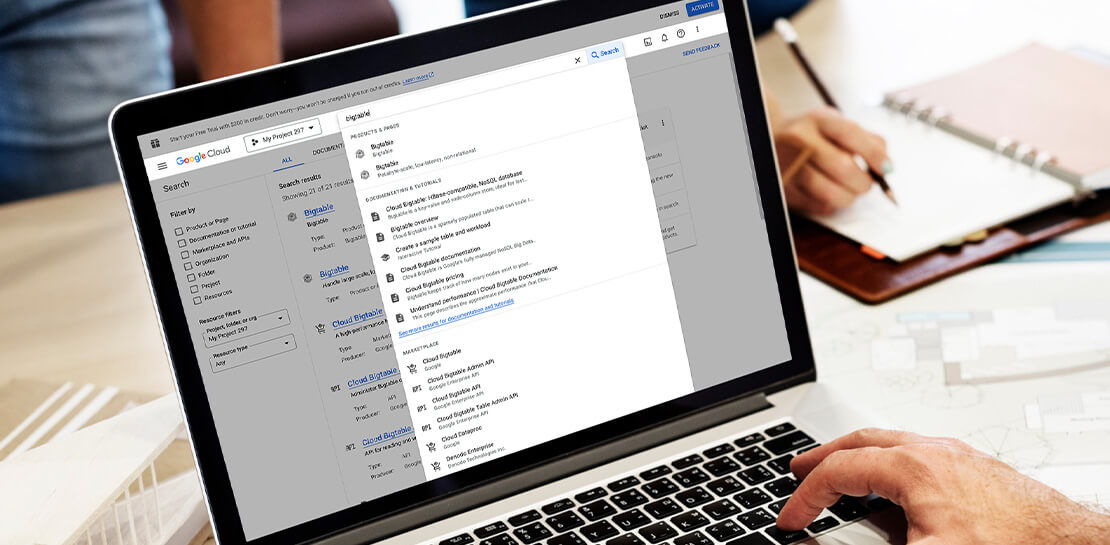
The Google Cloud console is a powerful platform that lets users manage their cloud projects end-to-end with an intuitive web-based UI. With over 120 Google Cloud products across thousands of pages, it can be challenging to navigate through the console quickly, and many users don’t like to use the command line interface. To help, Google Cloud console team recently made several improvements to our search and navigation features, making it easier to find what you need, when you need it.
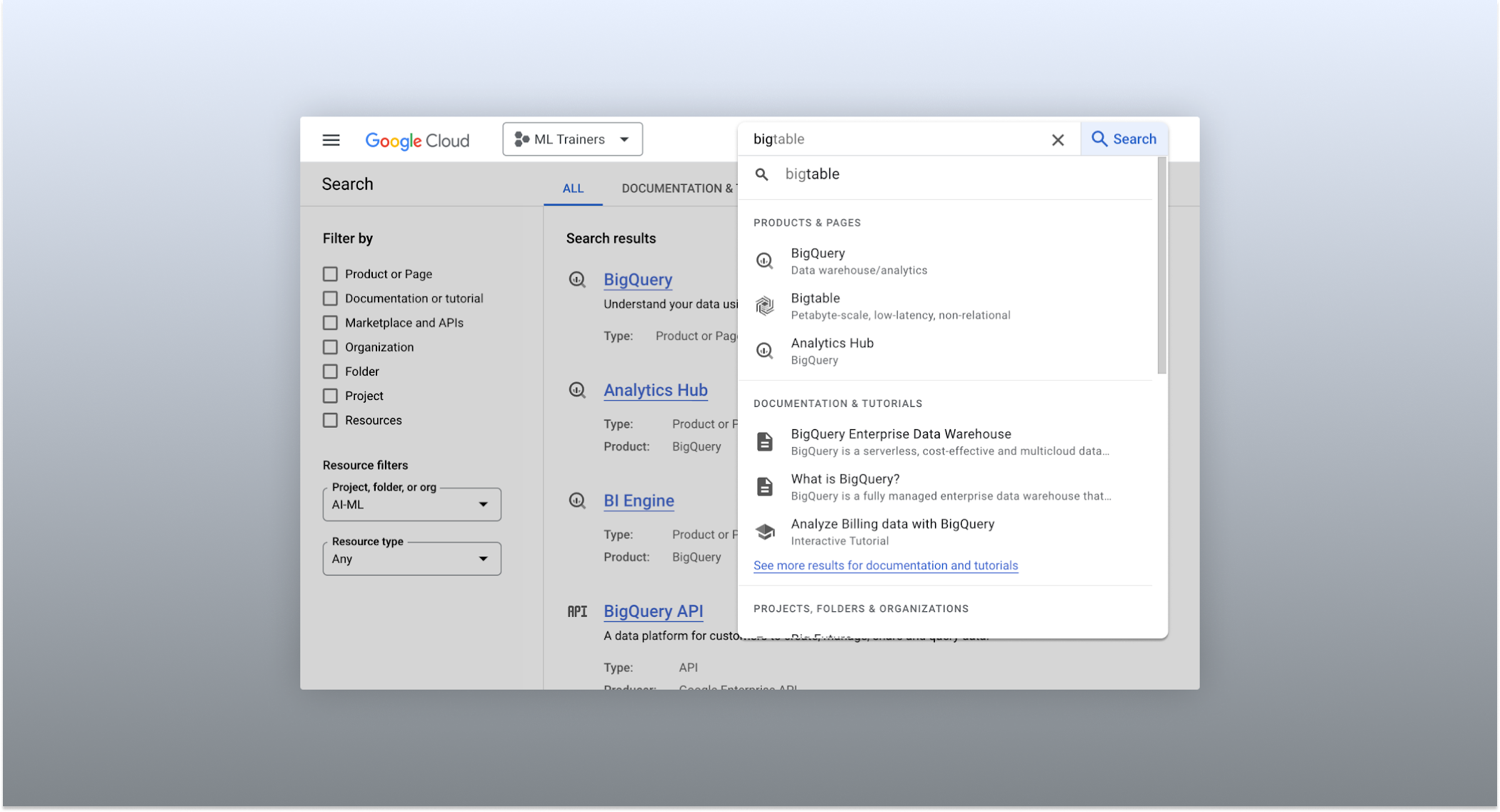
The Cloud console’s search dropdown and result page
Expanded resource-type search
One of the most significant improvements to the console’s search feature is the increased resource-type coverage. You can now find instances of nearly all of the over 120 products that Google Cloud offers directly from the search bar, rather than by manually clicking to the details section nested within specific product pages. This wider coverage saves you time compared to browsing through the different product categories to find what you’re looking for. This improvement also allows the console experience team to continuously add new resource types as we develop new features and capabilities in our various product offerings.
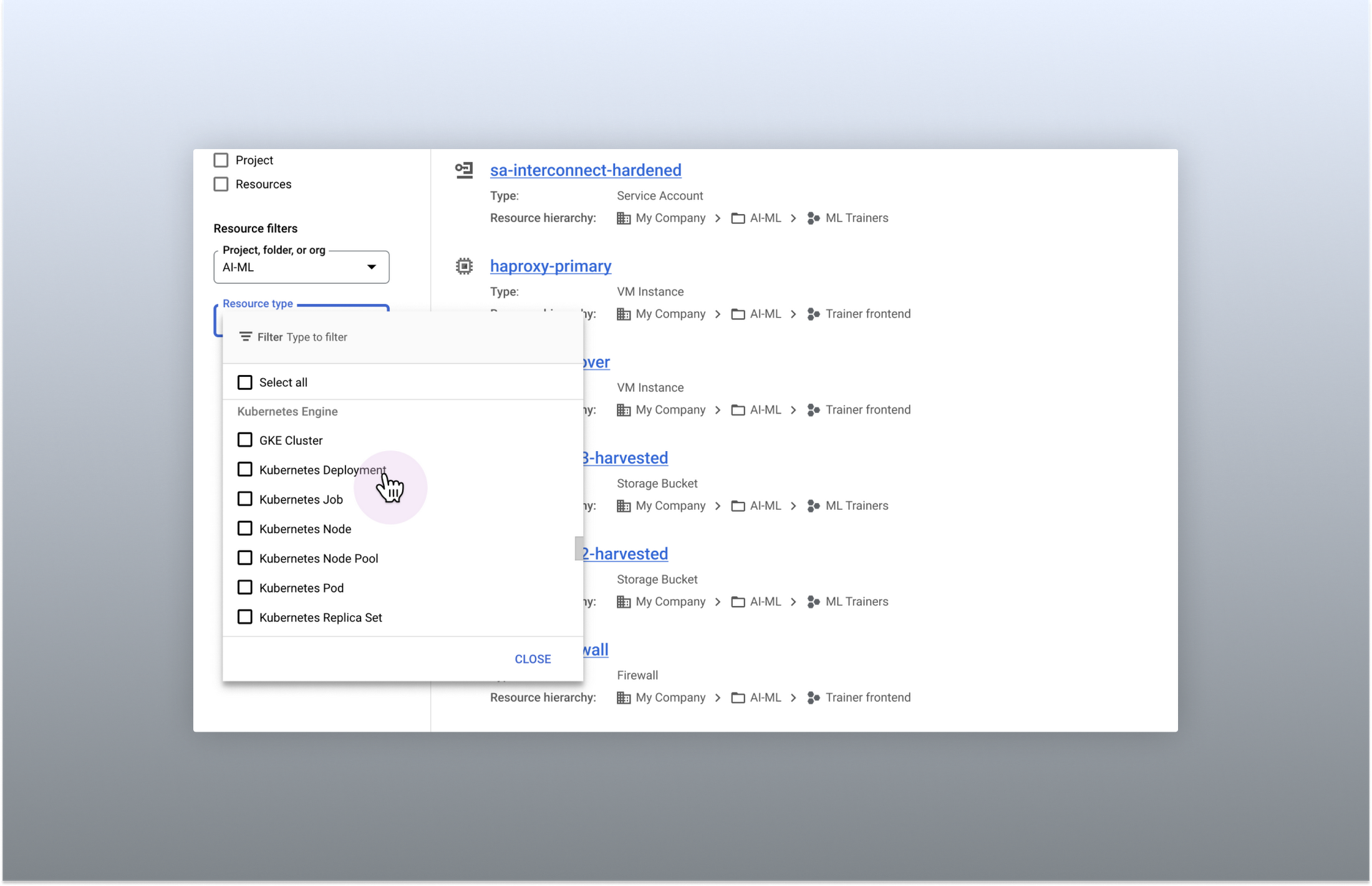
Search for more than 90 types of resources using Google Cloud console
Improved documentation search
We also improved the coverage and accuracy of the search experience for documentation, making it easier to find specific pages or interactive tutorials. Developers looking to get started with something they’re unfamiliar with may want to undertake tutorials in the context of their own working environment. Even experienced developers just looking for a quick answer to their question may not want to leave the console, so we expect these improvements can help users of all experience levels.
We’ve heard from you that finding the right documentation from within the console can be tricky, and so we hope this change can save you from needing to switch over to web search to be confident that they’ll find what you’re looking for.
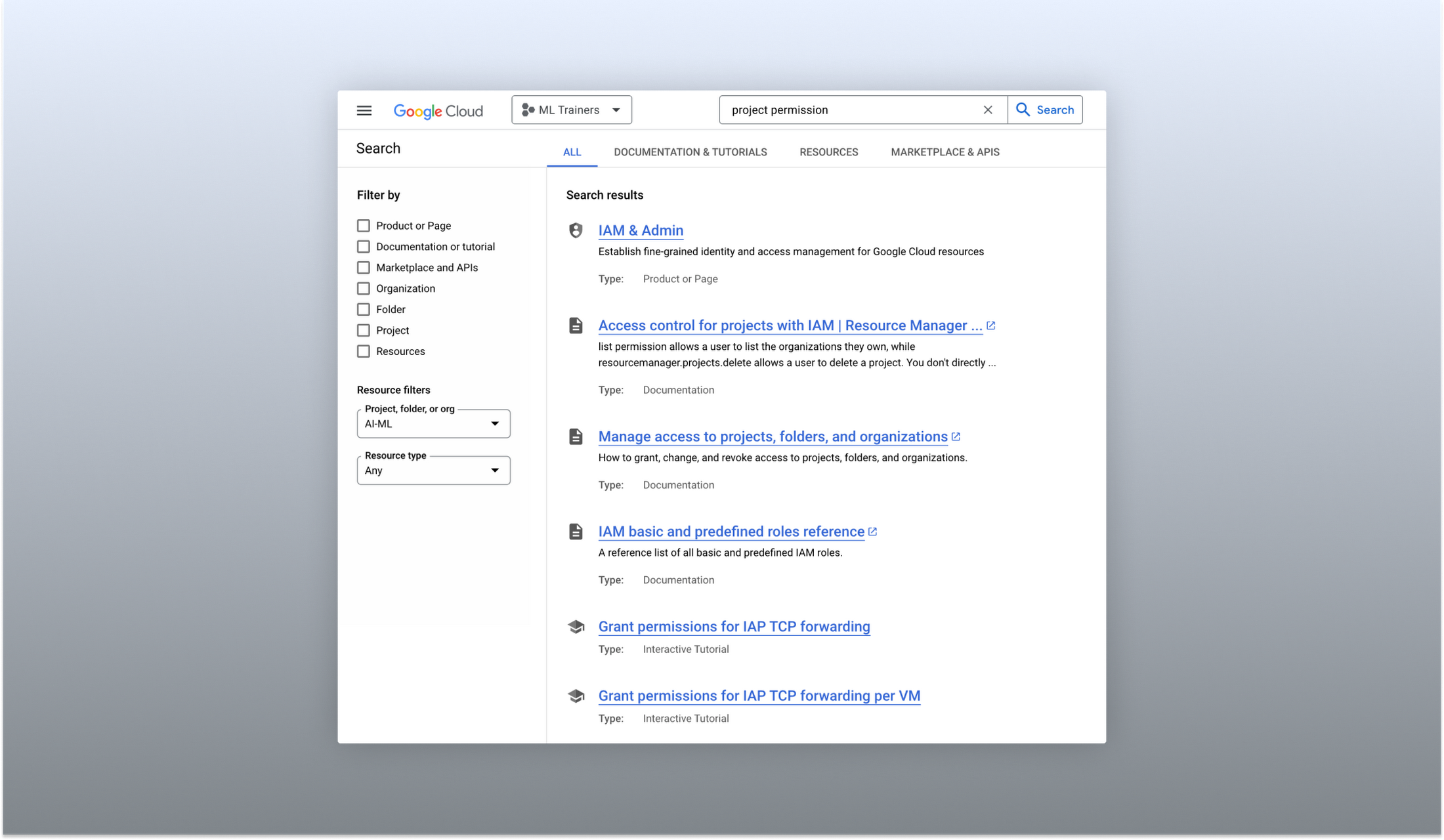
Cloud documentation and tutorials are available for search in the console
A refreshed search results page
To make browsing search results easier, we also overhauled our search results page by dividing results into tabs, similar to Google web search. This means that you can refine your search by diving into one of those categories individually. In addition to maintaining an “all results” tab, there are tabs for:
- Documentation and tutorials
- Resource instances, and
- Marketplace and APIs
Each tab also has a better filtering experience that’s unique to that search result category. For instance, the Resources tab lets you filter by metadata like the last time a resource was interacted with, while the Documentation tab allows you to search for interactive tutorials only. If you can’t find what you’re looking for in the autocomplete dropdown, try the search results page. It can provide additional results or context to help you find exactly what you’re looking for.
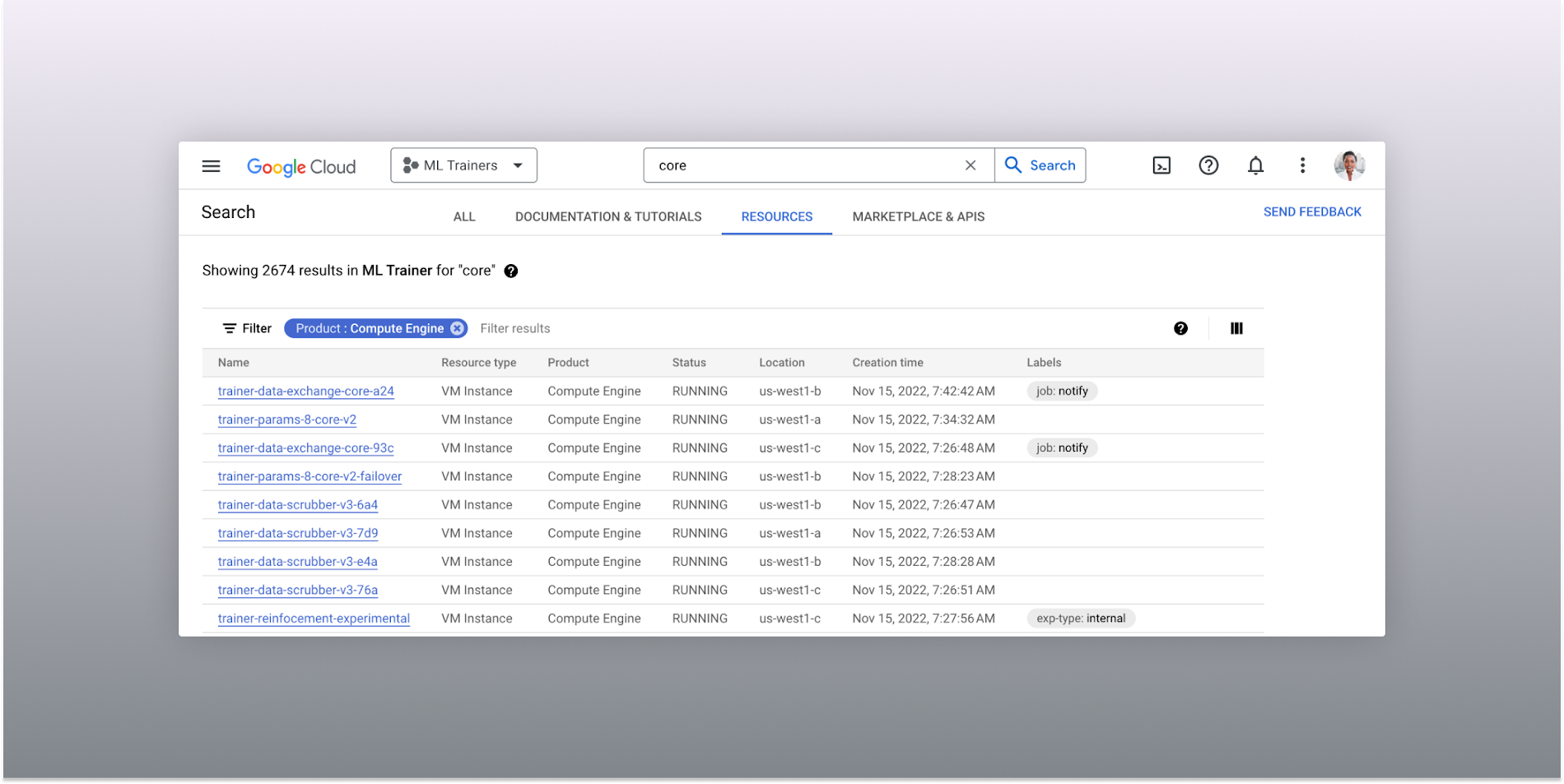
The Resources tab lists results in a denser, metadata-rich format with filtering available
Accurate industry-wide synonyms
Google Cloud console search now interprets industry-wide synonyms accurately — if you’re coming from AWS or Azure and know the name of a product in that ecosystem, searching for it will return the Google Cloud equivalent. A full list of synonyms can be found here.
General usability improvements
We also shipped several smaller quality-of-life improvements related to search, including:
- Improvements to accessibility, including better color contrast and zoom behaviors
- Faster latency targets and shorter load times for results
- A search keyboard shortcut — just type “/” to begin searching without using your mouse
- The ability to search for an API resource by its key
We also updated the look and feel of our platform bar to a cleaner, more modern experience that’s more in line with the branding across other Google Cloud interfaces.
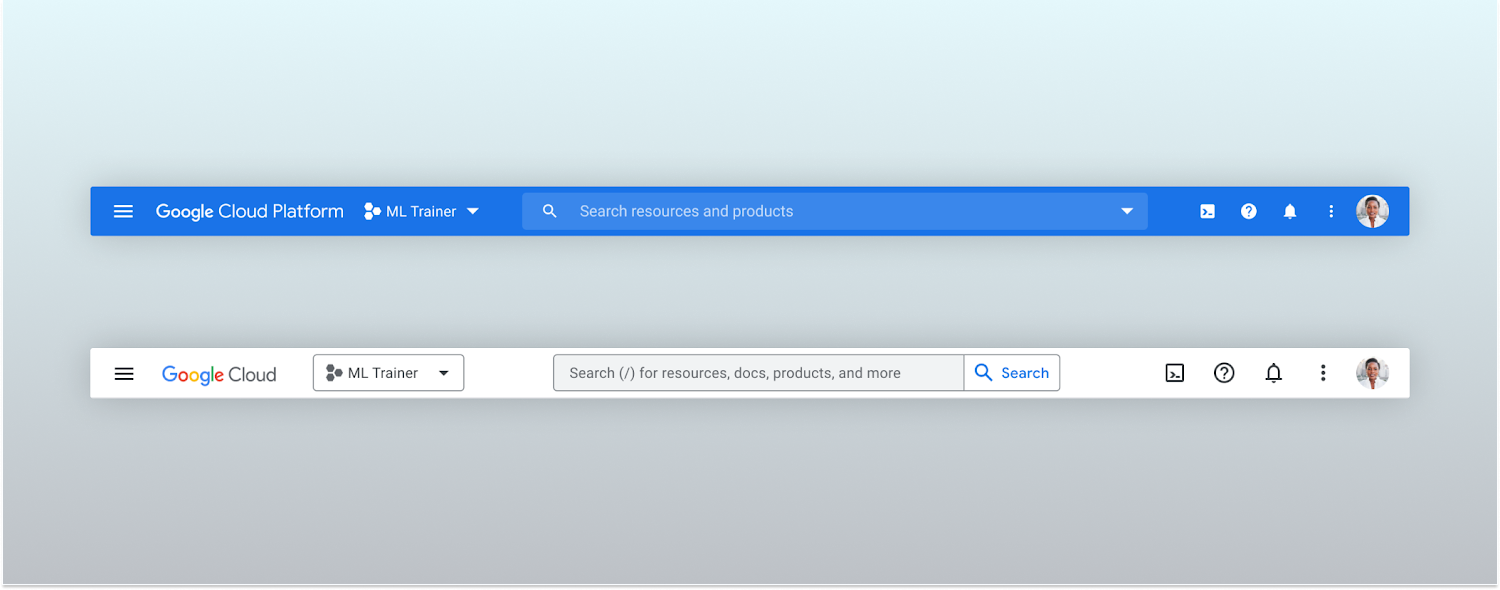
Google Cloud console’s old platform bar (top) and the updated version (bottom)
A customizable navigation menu
Finally, we made usability improvements to the left-hand navigation menu by allowing you to pin specific products. Products can be pinned from the left nav menu or our brand new All Product Page. This is a shift away from the default ordering of products that attempted a “one size fits all” approach to navigation. This customization feature lets you tailor the console to your specific needs and work more efficiently.
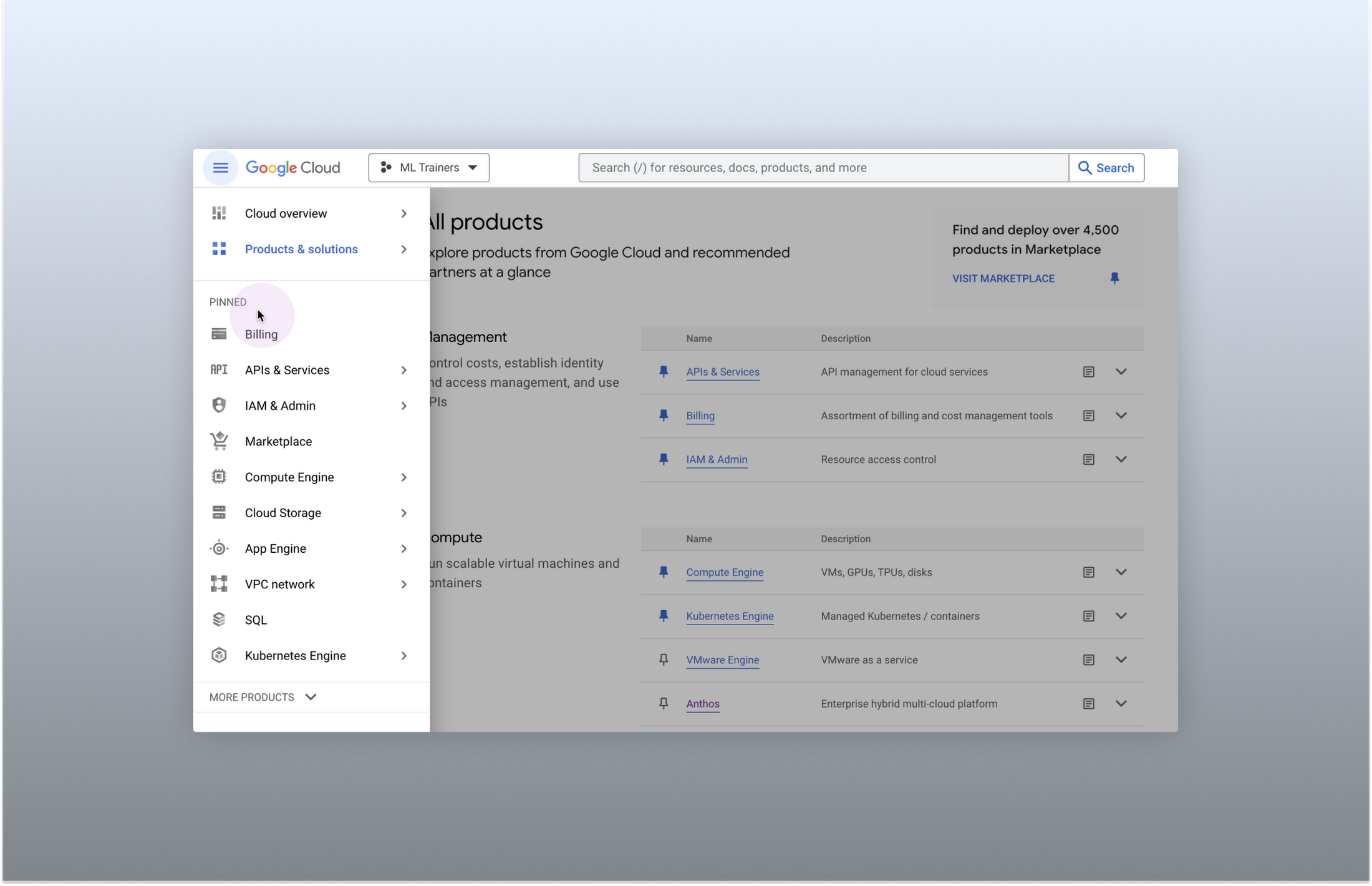
Products can be pinned to the left nav menu for easy access
Final thoughts
The Google Cloud console’s navigation and search features have come a long way. With these recent improvements, you can find what you need quickly and efficiently, making it easier to manage your cloud resources. From expanded resource-type search to improved documentation search and refined search results, the console is more user-friendly than ever before.
Precarious to Precision: How Dainik Bhaskar Corp Transitioned Its Business in a Time of Great Change

5096
Of your peers have already read this article.
4:00 Minutes
The most insightful time you'll spend today!
About DB Corp
DB Corp is India’s largest newspaper publisher delivering 62 editions in four languages and selling about 6 million copies per day. The business also has an extensive online and mobile presence.

Headquartered in Bhopal, India, and listed on the Bombay Stock Exchange, DB Corp is India’s largest newspaper group. DB Corp publishes 62 editions in four languages and sells about 6 million newspaper copies per day. Beyond newspapers, DB Corp operates 29 radio stations, 13 portals and two mobile apps.
Like the media industry in general, DB Corp is having to adapt to readers’ increasing preference for accessing news content online – particularly on mobile devices.
However, online advertising is yet to fill the gap left by the leakage of advertising revenues from print. Further disruption occurred when the Indian Government’s implemented a demonetization program in November 2016 that prompted a sharp surge in e-commerce transactions and online banking.
Facing a tsunami of change, DB Corp is developing and executing new strategies to engage consumers and build revenues.
These plans include evolving from an IT-supported business to an IT-enabled company, and finally to an IT-led business that complements its newspapers with online news and updates throughout the day.
DB Corp is building e-commerce properties that leverage its print brands and is moving to increase advertising across its mobile services.
Furthermore, the business is looking to capture information about readers and customers to tailor its publications and services more closely to their needs.
Expertise in Managing Large Data Volumes Behind GCP Selection
However, DB Corp’s on-premises infrastructure and traditional applications could not deliver the flexibility and agility needed to support the transition to real-time news delivery.
In late 2015, DB Corp started evaluating public and private cloud services, including cloud-based application suites and platform-as-a-service offerings. This process led the business to deploy G-Suite and start working with Google Cloud Platform (GCP).
“We selected GCP due to Google’s experience in delivering cloud services, and because nobody else manages data volumes of the magnitude that they do,” says R D Bhatnagar, Chief Technology Officer, DB Corp.
“We were also impressed by the fact GCP had a local team with the skills and expertise to educate us about how best to use its products.”
DB Corp is migrating its websites and key applications to GCP. The business is also upgrading its network to remove bandwidth restrictions that could impede the value provided by GCP services.
The scale and scope of DB Corp’s G Suite and GCP projects has required the business to engage four partners and access technical expertise and support from Google itself. Technical and business experts from the platform as a service provider are providing monthly updates and training sessions with various groups within the organisation, including user communities and the board of directors.
The Google projects at DB Corp are driving a sharp increase in the speed, agility and performance of the business.
“As a senior leader within the organisation, I see the key benefits of GCP and other technologies being lower cost; greater efficiency; and improved business continuity,” says Bhatnagar.
“For example, the current data center team can be redeployed to other initiatives as the technical experts at GCP will be undertaking most of the management and maintenance tasks.”
DB Corp is already making business and financial performance data available in real time from a single source, enabling business teams to make sound, consistent decisions about digital strategies and other key activities. These teams may also address issues or problems before they compromise the quality of content and services provided to consumers.
Deploying Chrome for Meetings across various offices has enabled teams to communicate and collaborate effectively in real time, breaking down geographic barriers, ensuring each member is on the same page and ensuring the business transformation proceeds smoothly.
Sales teams are using Google Forms and Google Sheets to centralize and control tasks such as sales forecasting, reducing the time required to complete reports and updates from up to a week to two hours.
Furthermore, various teams are using calendars to improve organization and productivity. For example, editorial teams are using calendars to track Indian holidays and festivals and deliver relevant content to readers.
Reporters are also using Google Cloud Speech API and Google Cloud Translation API services to capture and document interviews and source material for articles at accuracy rates of 95 percent for Hindi alone.
Why settle for the status quo?

3963
Of your peers have already read this article.
2:30 Minutes
The most insightful time you'll spend today!
Virtual meetings, remote collaboration, flexible hours: it’s becoming clear that these new ways of working are here to stay.
Business leaders, since the onset of COVID-19, have seen workplace transformation go from an almost theoretical long-term goal to an urgent priority. Employers and employees want more flexible ways of working, and delivering on this requires the right technology.
But flexibility isn’t the only thing that employees want. Remote working has significantly increased the demands we’re getting from many directions—in both our professional and our personal lives. Employees feel overloaded with too much information and too many tasks across too many different tools. Instead of learning another tool, we need the tools we already use to be even more helpful, and work together, in an integrated, intuitive way.
Today’s teams need to re-imagine not only how they communicate and collaborate with each other remotely, but also how they continue to serve their own customers and support the communities they belong to. From doctors consulting with patients, to financial institutions providing critical advice to customers, to teachers delivering distant learning, to car dealerships creating virtual showrooms—it’s clear that these new ways of working are here to stay.
The future of work is here. COVID-19 has accelerated a shift in how organizations like yours get work done. Take this 2-minute assessment below to see where you’re at on the journey to the future of work, and get a free guide to help you take the next step.
More Relevant Stories for Your Company

Google Cloud’s Virtual Appointment Scheduling Tool (VAST) Helps State of Arizona Recover from Unemployment Situation
When the world was forced to go primarily online, state governments also faced the reality of needing to provide community services without the health risk of meeting in person. Old systems that relied on interpersonal contact could not keep up. An unprecedented number of displaced workers swamped every unemployment system.

How Google is Showing the Way to the Differently-abled: A Blind Program Manager’s Account
What does “accessibility” mean to businesses? It’s not just about making sure that your office or retail space is accessible to workers and customers who have mobility challenges, it’s also about making sure that your apps, digital tools and content are also more accessible to everyone. Our product teams work

How Google Maps Platform Boosts Domino’s Operations and Fast Growing Franchise across Indonesia
Editor’s note: Today’s blog post is from Mayank Singh, Chief Digital Officer and VP Marketing and IT at pizza delivery group Domino's Indonesia. He explains how Google Maps Platform is enabling their business to optimize their operations and supporting the franchise's ambitious expansion strategy in one of the world's most

The Incredible Story of How Hero MotoCorp Moved 6,000 Users to the Cloud in 45 Days
Assembling thousands of parts into one motorbike or scooter every 17 seconds is a complex task requiring accuracy and precision. For Hero MotoCorp — an India-headquartered manufacturer of two-wheeler vehicles — workforce collaboration, security, and mobility complement these processes and provide the cornerstone of the organization's global operations. Based in New Delhi,
