





5174
Of your peers have already watched this video.
14:00 Minutes
The most insightful time you'll spend today!
How Google Workspace Helps Manage, Govern and Protect Sensitive Data
The shift towards a hybrid work style and trends accelerated by the pandemic has resulted in data deluge. With companies and individuals sharing increasingly large volumes of information and collaborating with internal and external stakeholders, the need for innovations for higher security also escalates. View this video to learn how Google Workspace approaches security across content lifecycle from client-side encryption updates, data loss prevention, Google Vault, data regions, labels, and more!
Jeni’s Splendid Ice Creams

3990
Of your peers have already read this article.
2:30 Minutes
The most insightful time you'll spend today!
At Jeni’s Splendid Ice Creams, Jeni and her staff are all passionate about ice cream and sharing that passion with the world by creating ice creams that you can fall madly in love with. To do this every day, requires incredible teamwork and collaboration, and Google Workspace is helping support the cause from tracking inventory to managing quality control.
Jeni’s Splendid Ice Creams began small but had big dreams. Jeni Britton Bauer opened her first ice cream shop in Grandview Heights, Ohio in 2002, and turned to Google Workspace to help her manage everything from ingredients to employee scheduling. Today, Jeni has grown the business to 10 stores throughout Ohio and Tennessee and has a booming online shipping business, and she depends on Google Workspace to help her manage it all.
Google Docs helps Jeni’s Splendid Ice Creams employees share information from the kitchen with the planning teams on the ground at each location. And it gives her access to real-time information to ensure they have the ice cream, packaging, and manpower to handle spikes in online orders. Stores are also able to give feedback about each home-made batch of ice cream through a Google Docs form. So if there aren’t enough pecans in the Whiskey Pecan Ice Cream, Jeni’s team can add more in the next batch. Jeni even wrote her best-selling cookbook using Google Docs.
*Google Workspace was formerly known as G Suite
In sync for better efficiency: Effective collaboration strategies for distributed workforces

3191
Of your peers have already read this article.
2:30 Minutes
The most insightful time you'll spend today!
Workplace collaboration continues to evolve as hybrid work expands its footprint. While both “same-time” and “staggered-time” (or asynchronous) collaboration modes each have their place in the hybrid work environment, organizations and teams sometimes overuse one mode over another. That’s probably because in-person meetings or collaborating in real time have been the default for many organizations, leading to a “same-time” bias, even as new tools make working across time zones and locations seamless. Ultimately, the key for making collaboration scalable and to support employee wellbeing is choosing the right method and tool for the task at hand. With that in mind, here are some ways to get the most out of same-time and staggered-time collaboration in your organization.
Making same-time collaboration more valuable
Historically, many organizations have valued same-time interactions for the fast, direct exchange of information and feedback. They also bring teams together and build human connections. While all these outcomes are powerful and important, same-time collaboration also has some drawbacks — especially in a hybrid environment.
First, same-time interactions can be difficult to arrange. Coordinating schedules requires advanced planning, especially when employees are distributed across time zones or working outside of traditional business hours. Second, back-to-back scheduling can contribute to meeting fatigue. In our recently commissioned global hybrid work survey with Economist Impact, 72% of respondents acknowledged that virtual meetings improve inclusion and participation. At the same time, 68% said there are too many virtual meetings in general, suggesting that even though employees value same-time collaboration, they want it in moderation.

To address these challenges, organizations should consider the collaboration scenarios in which same-time interactions can make the greatest impact. It’s particularly useful when consensus or immediate action is needed, as in briefings, decision-making, and crisis management.
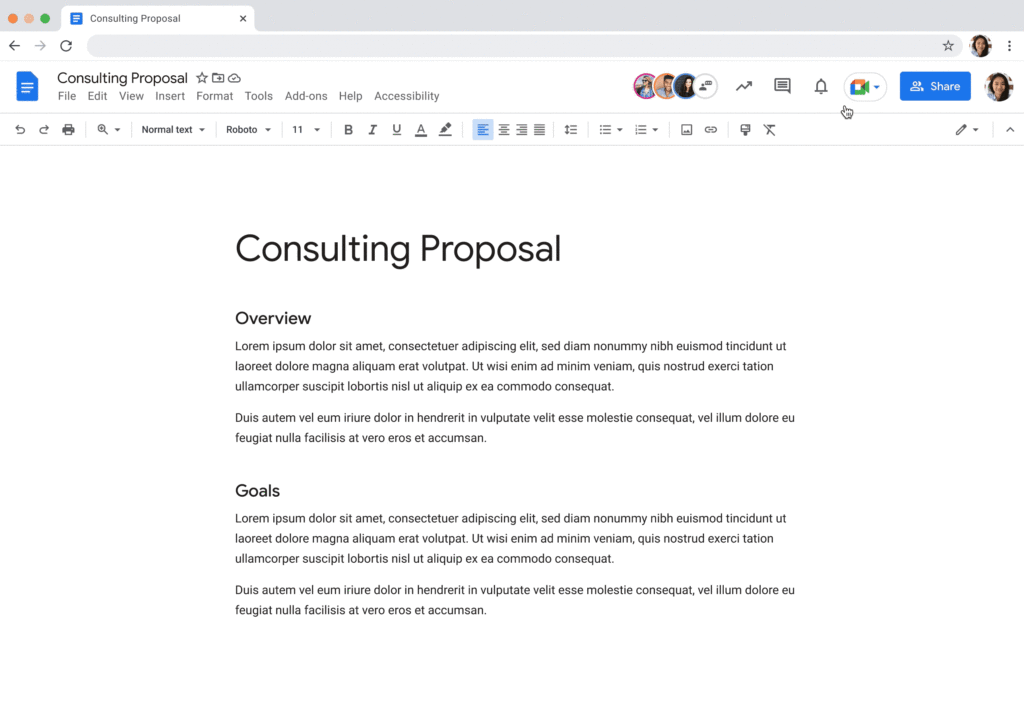
For effective same-time collaboration in a hybrid environment, your employees need tools that help them coordinate real-time interactions and minimize time spent switching apps and context. With Google Workspace, teams can create and access a shared agenda or Google Doc inside a Google Calendar invite, helping align expectations and goals before, during, and after scheduled same-time work sessions. And, the more integrated your collaboration tools are, the easier it is for employees to get right to work when inspiration strikes or a quick decision is needed. For example, team members can initiate spontaneous work sessions by starting a Google Meet directly from Docs, Sheets, or Slides.
Additionally, consider how you can bring real-world collaboration activities into virtual environments to enhance same-time collaboration for distributed teams. For instance, digital whiteboard tools, like Jamboard and Miro in Google Meet, allow people to brainstorm, ideate, and problem-solve in real time from anywhere. Interactive solutions like these empower employees to work together in new ways.
Expanding what’s possible with staggered-time collaboration
Widespread adoption of hybrid work has prompted organizations to turn more frequently to staggered-time collaboration — where team members are free to share and respond to information in their own time. A key benefit of staggered collaboration is improving the experience and wellbeing of employees — specifically, by promoting participation across the team and support for flexible work habits. Allowing team members to engage when they’re most productive, or when it doesn’t interfere with their scheduled focus time, supports their wellbeing. It can also help employees feel heard, valued, and empowered. Staggered-time collaboration can also give team members who may feel uncomfortable or vulnerable speaking up in real time, or who just need time to think about their feedback, a more inviting way to share their perspectives.
Staggered-time collaboration can enhance a range of collaboration scenarios, including assigning tasks and action items, knowledge- and resource-sharing, brainstorming, and giving feedback. To make these interactions successful, employees need secure, intuitive tools that give them the information they need to do their jobs from anywhere, at any time. For example, in Spaces, team members can initiate and take part in group chat threads devoted to project- and topic-based discussions, as well as access files and tasks, to stay in the loop whenever they’re able to participate. For people working on a task or project at varied times, creating a dynamic, single source of truth makes all the difference.
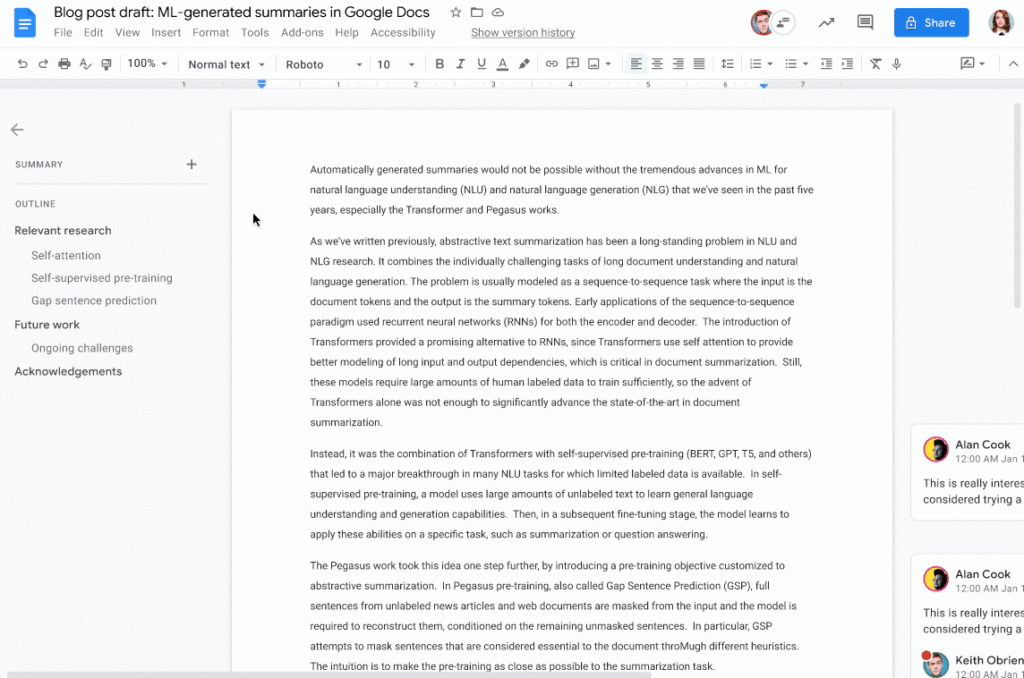
When collaborating on shared documents, a feature like smart canvas enables teammates to assign tasks, build checklists, and share files using @-mentions for easy information access. Meanwhile, automated, built-in summaries in Docs help the team get up to speed without losing focus. Features like these help everyone stay on the same page (literally), even if they’re contributing to a project at different times.
Flexibility and collaboration are not mutually exclusive
Helping people know which tasks call for real-time collaboration and which tasks are better done on their own time is critical for sustaining productivity and wellbeing in a hybrid work world. Employees who are empowered to work in ways that complement their needs, preferences, and schedules typically reward their organization for that flexibility. As Holger Reisinger, Paul Sephton, and Dane Fetterer wrote for the Harvard Business Review, “When leaders give employees the freedom to choose where and when they work, it signals they trust them to do the job they were hired to do. The data shows that that trust is then paid back…at a very high rate, building a tight-knit culture of inclusivity and belonging.”
When you create team norms around same-time and staggered-time collaboration, you can help your employees stay productive and connected — to each other and the broader organization. And by giving them tools that support seamless, secure collaboration experiences from anywhere, the impact on productivity, employee wellbeing, and morale can be transformational.
Google Cloud’s Suite of DevOps Speeds Up ForgeRock’s Development

5701
Of your peers have already read this article.
3:00 Minutes
The most insightful time you'll spend today!
Editor’s note: Today we hear from ForgeRock, a multinational identity and access management software company with more than 1,100 enterprise customers, including a major public broadcaster. In total, customers use the ForgeRock Identity Platform to authenticate and log in over 45 million users daily, helping them manage identity, governance, and access management across all platforms, including on-premises and multicloud environments.
Operating at that kind of scale isn’t easy. In this blog post, ForgeRock Engineering Director, Warren Strange discusses the three things that help make their developers efficient and productive, and the Google Cloud tools they use along the way.
At ForgeRock, we’ve been an early adopter of Kubernetes, viewing it as a strategic platform. Running on Kubernetes allows us to drive multicloud support across Google Kubernetes Engine (GKE), Amazon (EKS), and Azure (AKS). So no matter which cloud our customers are running on, we are able to seamlessly integrate our products into customers’ environments.
Making it easier for ForgeRock’s developers and operators to build, deploy and manage applications has been crucial in our ability to continually provide high quality solutions for our customers. We’re always looking for tools to improve productivity and keep our developers focused on coding instead of configuration. Google Cloud’s suite of DevOps tools have streamlined three specific practices to help keep our developers productive:
1. Make developers productive within IDEs
Developer productivity is core to the success of any organization, including ForgeRock. Since developers spend most of their time within their IDE of choice, our goal at ForgeRock has been to make it easier for our developers to write Kubernetes applications within the IDEs they know and love. Cloud Code helps us precisely with that: it makes the process of building, deploying, scaling, and managing Kubernetes infrastructure and applications a breeze.
In particular, working with the Kubernetes YAML syntax and schema takes time, and a lot of trial and error to master. Thanks to YAML authoring support within Cloud Code, we can easily avoid the complicated and time consuming task of writing YAML files at ForgeRock. With YAML authoring support, developers save time on every bug. Cloud Code’s inline snippets, completions, and schema validation, a.k.a. “linting,” further streamline working with YAML files.
The benefits of Cloud Code extend to local development as well. Iterating locally on Kubernetes applications often requires multiple manual steps, including building container images, updating Kubernetes manifests, and redeploying applications. Doing these steps over and over again can be a chore. Cloud Code supports Skaffold under the hood, which tracks changes as they come and automatically rebuilds and redeploys—reducing repetitive development tasks.
Finally, developing for Kubernetes usually involves jumping between the IDE, documentation, samples etc. Cloud Code reduces this context switching with Kubernetes code samples. With samples, we can get new developers up and running quickly. They spend less time learning about configuration and management of the application—and spend more time on writing and evolving the code.
2. Drive end-to-end automation
To further improve developer productivity, we’ve focused on end-to-end automation: from writing code within IDEs, to automatically triggering CI/CD pipelines and running the code in production. In particular, Tekton, Cloud Build, Container Registry, and GKE have been critical to Forgerock as we streamline the flow of code, feedback and remediation through the build and deployment processes. The process looks something like this:
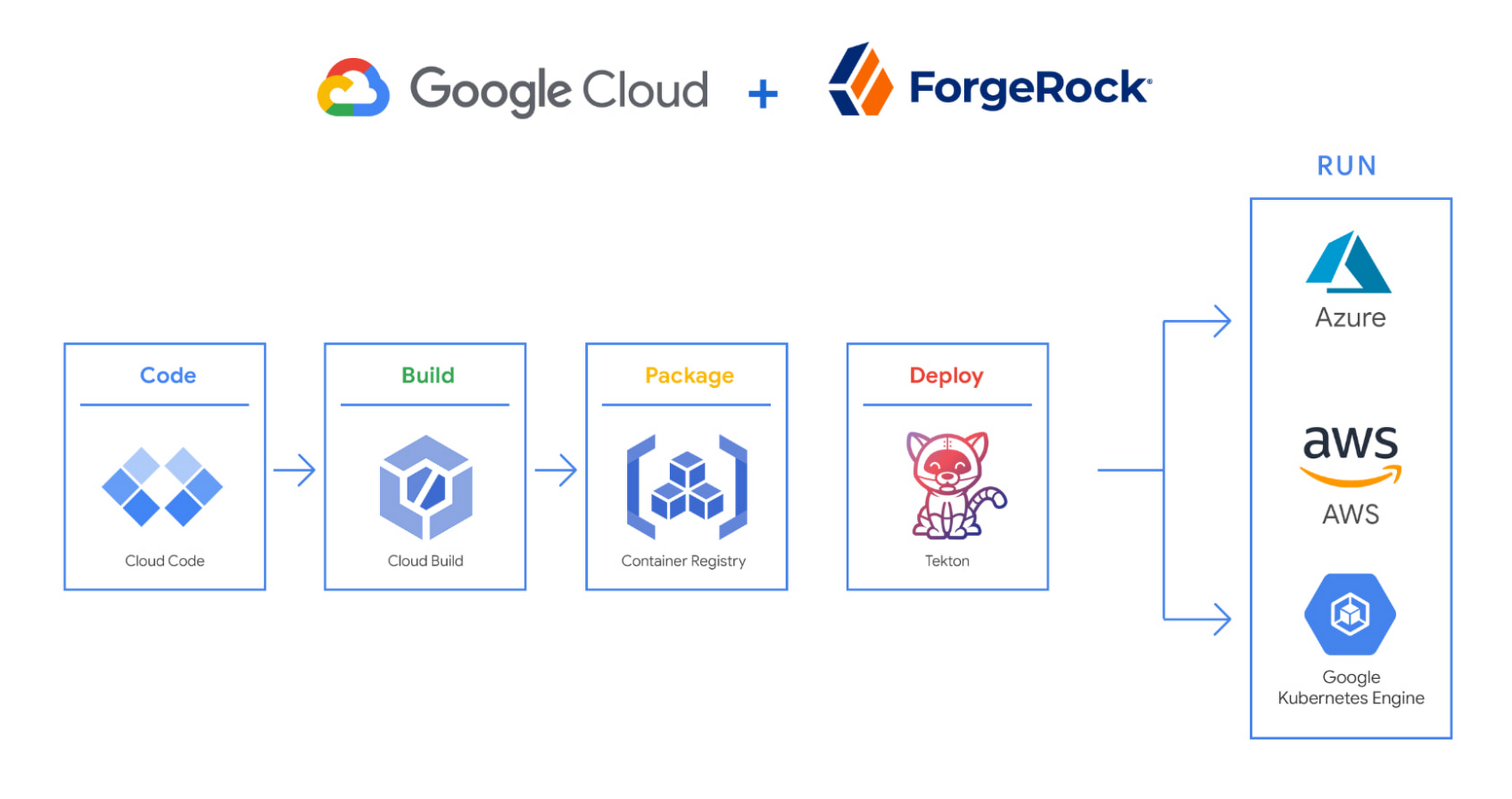
We begin by developing Kubernetes manifests and dockerfiles using Cloud Code. Then we use Skaffold to build containers locally, while Cloud Build helps with continuous integration (CI). The Cloud Build GitHub app allows us to automate builds and tests as part of our GitHub workflow. Cloud Build is differentiated from other continuous integration tools since it is fully serverless. It scales up and scales down in response to load, with no need for us to pre-provision servers or pay in advance for additional capacity. We pay for the exact resources we use.
Once the image is built by Cloud Build, it is stored, managed, and secured in Google’s Container Registry. Just like Cloud Build, Container Registry is serverless, so we only pay for what we use. Additionally, since Container Registry comes with automatic vulnerability scanning, every time we upload a new image to Container Registry, we can also scan it for vulnerabilities.
Next, a Tekton pipeline is triggered, which deploys the docker images stored in Container Registry and Kubernetes manifests to a running GKE cluster. Along with Cloud Build, Tekton is a critical part of our CI/CD process at ForgeRock. Most importantly, since Tekton comes with standardized Kubernetes-native primitives, we can create continuous delivery workflows very quickly.
After deployment, Tekton triggers a functional test suite to ensure that the applications we deploy perform as expected. The test results are posted to our team Slack channel so all developers have instant access and insights about each cluster. From there, we are able to provide our customers with their finished product request.
3. Leverage multicloud patterns and practices
The industry has seen a shift towards multicloud. Organizations have adopted multicloud strategies to minimize vendor lock-in, take advantage of best-in-class solutions, improve cost-efficiencies, and increase flexibility through choice.
At ForgeRock, we’re big proponents of multicloud. Part of that comes from the fact that our identity and access management product works across Google Cloud, AWS, and Azure. Developing products using open-source technologies such as Kubernetes has been particularly helpful in driving this interoperability.
Tekton has been another critical project that has allowed us to prevent vendor lock-in. Thanks to Tekton, our continuous delivery pipelines can deploy across any Kubernetes cluster. Most importantly, since Tekton pipelines run on Kubernetes, these pipelines can be decoupled from the runtime. Like Tekton and Kubernetes, both Cloud Build and Container Registry are based on open technologies. Community-contributed builders and official builder images allow us to connect to a variety of tools as a part of the build process. And finally, with support for open technologies like Google Cloud buildpacks within Cloud Build, we can build containers without even knowing Docker.
Making it easier for developers and operators to build, deploy and manage applications is critical for the success of any organization. Driving developer productivity within IDEs, leveraging end-to-end automation, and support for multi-cloud patterns and practices are just some of the ways we are trying to achieve this at ForgeRock. To learn more about ForgeRock, and to deploy the ForgeRock Identity Platform into your Kubernetes cluster, check out our open-source ForgeOps repository on GitHub.
Google Cloud VMware Engine Achieves HIPAA Compliance
6978
Of your peers have already read this article.
1:30 Minutes
The most insightful time you'll spend today!
We are excited to announce that as of April 1, 2021, Google Cloud VMware Engine is covered under the Google Cloud Business Associate Agreement (BAA), meaning it has achieved HIPAA compliance. Healthcare organizations can now migrate and run their HIPAA-compliant VMware workloads in a fully compatible VMware Cloud Verified stack running natively in Google Cloud with Google Cloud VMware Engine, without changes or re-architecture to tools, processes, or applications.
Healthcare organizations increasingly use cloud platforms to personalize patient care, analyze large datasets more effectively, enhance research and development collaboration, and share medical knowledge. Leveraging cloud platforms can also help healthcare organizations increase the privacy and security of information systems, including protected health information (PHI), and, as a result, better comply with applicable laws and regulations while reducing the burden of compliance. For PHI, the Health Insurance Portability and Accountability Act of 1996 (HIPAA) set standards in the United States to protect individually identifiable health information. HIPAA applies to health plans, most healthcare providers, and healthcare clearinghouses that manage PHI electronically, and to persons or entities that perform certain functions on their behalf.
With Google Cloud, organizations can leverage solutions that enable secure, continuous patient care and data-driven clinical and operational decisions with ease, while being empowered with collaboration and productivity tools. Further, Google Cloud Platform supports HIPAA compliance. We offer HIPAA-regulated customers the same products at the same pricing that is available to all customers, unlike many other cloud providers.
For healthcare organizations that leverage VMware on-premises, having a consistent, cloud-integrated platform that provides seamless access to native cloud services unlocks the opportunity to extend, migrate, and modernize healthcare IT infrastructure and applications in a fast, low-risk manner at their own pace. This is especially important for mission-critical healthcare provider workloads, where having a low-risk way to adopt the cloud is important. Google Cloud VMware Engine offers that solution. By achieving coverage under Google Cloud’s BAA, Google Cloud VMware Engine enables healthcare organizations to realize the benefits of cloud computing and stay on track with their HIPAA compliance efforts without additional complexity. This is very relevant in hybrid scenarios, where customers would like to leverage other native cloud services such as analytics and big data processing, without having to enter into multiple BAAs.
Google Cloud VMware Engine offers dedicated, isolated software-defined datacenter environments with fully redundant and dedicated 100 Gbps networking that are suitable for healthcare organizations to run applications storing and processing PHI data. Customers have the ability to encrypt their virtual storage area network (vSAN) using an external key management server. Healthcare customers can run their workloads in a native VMware environment—vSphere, vCenter, vSAN, NSX-T, and HCX—while benefiting from Google Cloud’s highly performant infrastructure to meet the needs of their workloads. Customers can connect their VMware applications to native Google Cloud services such as BigQuery and artificial intelligence (AI) to derive new insights from existing data and quickly make informed decisions.
Protecting against and mitigating the impact of ransomware attacks is top-of-mind for Healthcare organizations. This requires building a cyber resilience program and back-up strategy to prepare for how users can restore core systems or assets affected by a security (in this case, ransomware) incident. This is a critical function for supporting recovery timelines and lessening the impact of a cyber event so organizations can get back to operating their business. Google Cloud VMware Engine in combination with Google Cloud first party solutions such as Actifio Go, or partner solutions such as NetApp CVO can provide an efficient way to recover incremental point-in-time backups along with on-demand provisioning of new compute to recover both data and infrastructure from Ransomware attacks quickly and efficiently.
Healthcare customers can also use Google Cloud VMware Engine as a disaster recovery (DR) target for their on-premises VMware workloads. Healthcare organizations also need a business continuity plan for their mission critical applications. When a disaster occurs, hospitals need their data protected so they can quickly get back to treating patients. It is a HIPAA requirement that healthcare organizations must be able to recover from a natural disaster. Google Cloud VMware Engine offers a like-for-like cost-effective DR target for these customers. The DR environment can be operated without new training using the same tools as their on-premises deployment. Google Cloud VMware Engine is currently available in 12 regions across the globe including three regions in the US, which means our regional and multi-national customers can take advantage of this service for geographic diversification as well.
If you are interested in understanding more and taking advantage of Google Cloud VMware Engine, contact your Google sales team now.
For details, see HIPAA compliance on Google Cloud Platform.
Messages by Google: Unveiling New Features for AT&T Android Users

3842
Of your peers have already read this article.
1:30 Minutes
The most insightful time you'll spend today!
Today, we’re announcing that we’re working with AT&T to establish Messages by Google as the default messaging application for all AT&T customers in the United States using Android phones. The collaboration aims to help accelerate the industry toward global Rich Communication Services (RCS) coverage and interoperability to offer a consistent, secure, and enhanced messaging experience for all Android users around the world.
“Many AT&T customers have enjoyed the advantages of RCS for years when texting with friends and family,” said David Christopher, executive vice president and general manager – AT&T Mobility. “We look forward to working closely with Google to extend these benefits to even more of our customers as they enjoy richer conversations with others around the world.”
Working together, AT&T and Google will continue the momentum to upgrade SMS with enhanced messaging features offered in Messages, which includes the support of chat features based on the open RCS standard. With Messages as the default messaging application, all AT&T customers using Android devices will get enhanced features so they can:
- Share full-resolution pictures from a recent event or vacation
- Send a higher-quality video of that soccer goal and the celebration that followed
- Know when someone is replying to a text
- Send and receive messages over Wi-Fi or data
- Participate in group chats where it’s easy to add someone else to the conversation, or let someone leave, without starting a brand new thread
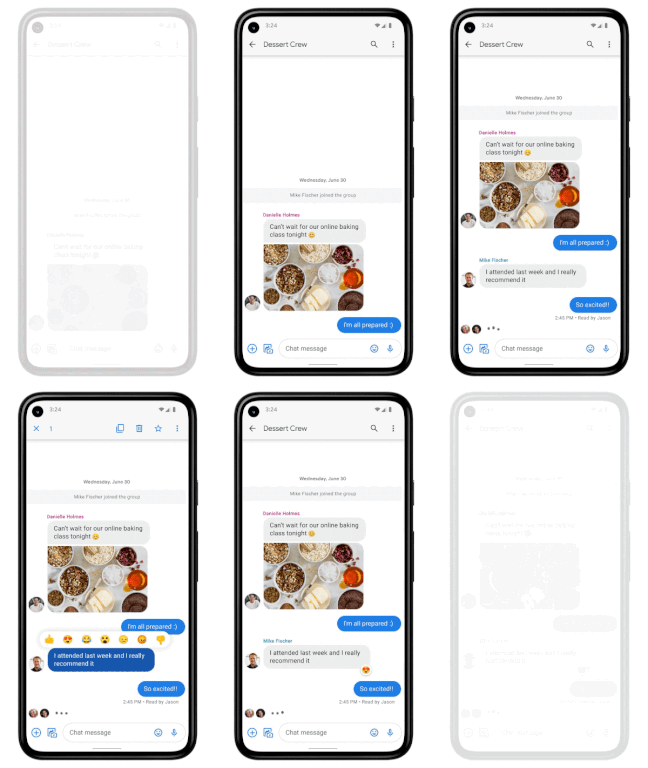
In addition to these features, we’re also rolling out end-to-end encryption for one-on-one RCS conversations between people using Messages and people who have chat features enabled.
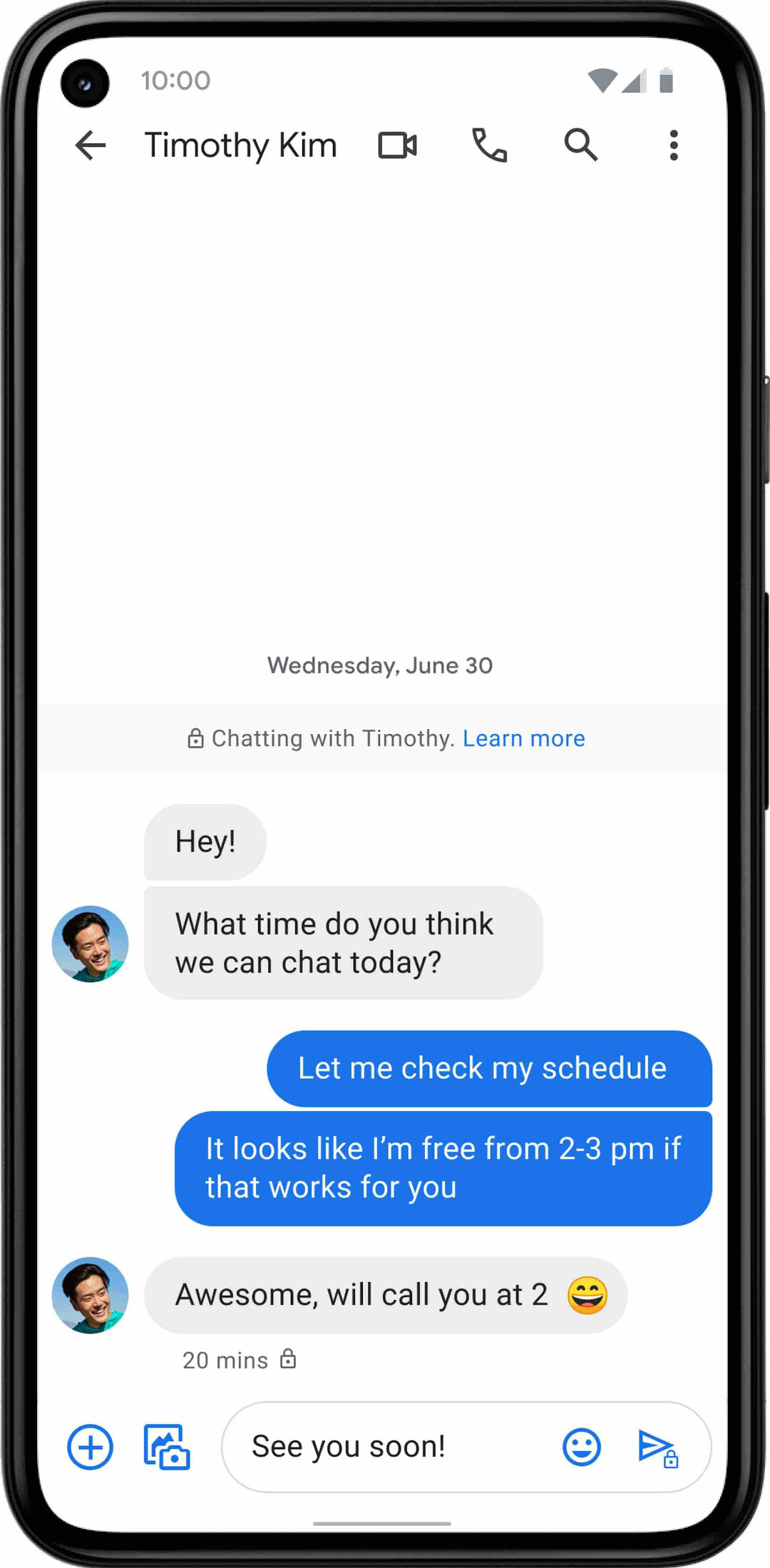
For years, we’ve been working with the mobile industry and device makers to bring enhanced and secure messaging to everyone on Android. Today’s announcement—that AT&T customers using Android devices will soon be able to enjoy these features by default—is a major step forward.
More Relevant Stories for Your Company

Google Workspace: All in One Place for Everyone to Get Things Done!
Since the launch of Gmail in 2004, and Google Docs two years later, we’ve been building flexible, helpful and innovative solutions that allow people to connect, create and collaborate securely — from anywhere on the planet and on any device. When we debuted Google Workspace last October, we not only introduced

How MobileOne Expanded its Stores by 340% in Just Three Years
The mobile industry is extremely fast-paced. New smartphones arrive at rapid speed. Smartphone OS updates regularly add new features and capabilities. And by the end of 2018, 5G wireless, the game-changing successor to 4G, will begin to be available in some markets. With more than 125 T-Mobile premium retail stores
Tau VMs Joins Google Cloud to Offer Cost-effective Performance of Scale-out Workloads
Scale-out workloads demand the best combination of performance and price to bring down the cost of delivering applications, all while providing an excellent user experience. We are excited to announce a new virtual machine (VM) family, Tau VMs, coming to Google Cloud. Tau VMs extend Compute Engine’s VM offerings with a new option



How a Furniture Retailer Found a Cool Way to Innovate Every Day and Beat Competition
MADE.COM is a London-based company that designs and retails homewares and furniture online, and across a network of experiential showrooms in Europe. Founded by serial entrepreneur Ning Li and Brent Hoberman, with Julien Callède and Chloe Macintosh in 2010, the company works with independent designers to create world-class furniture for
