





Tau VMs Joins Google Cloud to Offer Cost-effective Performance of Scale-out Workloads
5603
Of your peers have already read this article.
2:00 Minutes
The most insightful time you'll spend today!
Scale-out workloads demand the best combination of performance and price to bring down the cost of delivering applications, all while providing an excellent user experience. We are excited to announce a new virtual machine (VM) family, Tau VMs, coming to Google Cloud. Tau VMs extend Compute Engine’s VM offerings with a new option optimized for cost-effective performance of scale-out workloads.
T2D, the first instance type in the Tau VM family, is based on 3rd Gen AMD EPYCTM processors and leapfrogs the VMs for scale-out workloads of any leading public cloud provider available today, both in terms of performance and workload total cost of ownership (TCO). The x86 compatibility provided by these AMD EPYC processor-based VMs gives you market-leading performance improvements and cost savings, without having to port your applications to a new processor architecture.
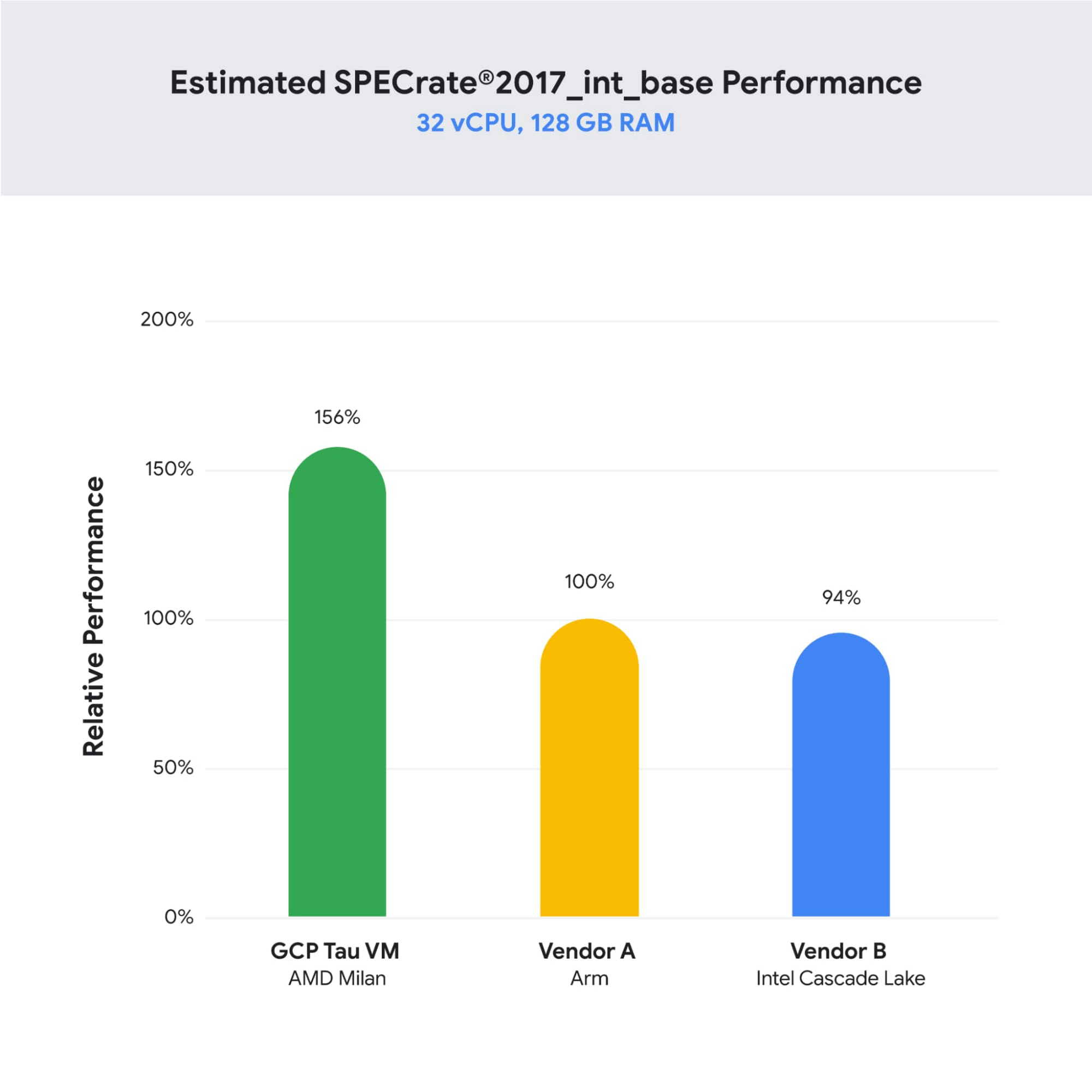
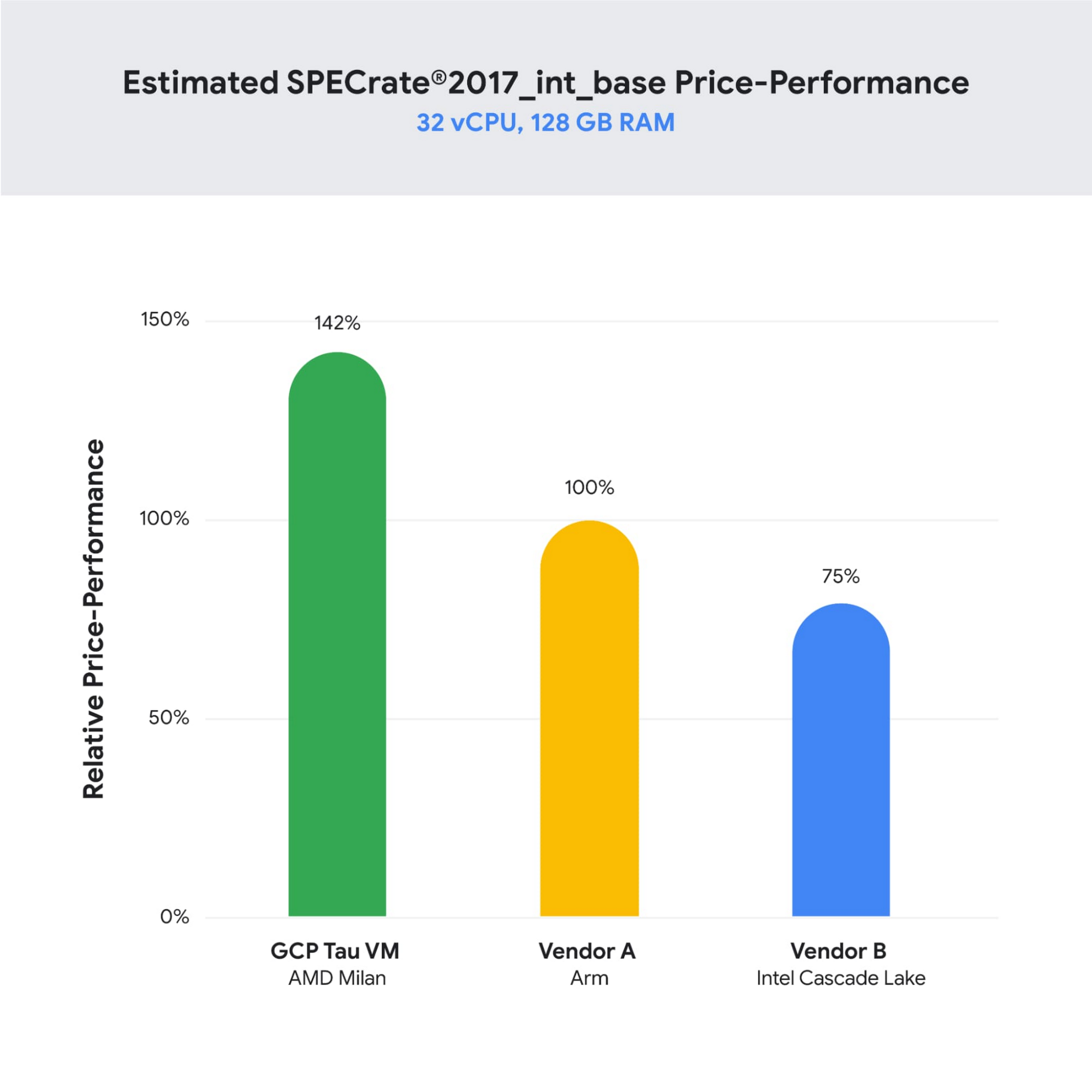
As illustrated below, Tau VMs offer 56% higher absolute performance and 42% higher price-performance (est. SPECrate2017_int_base) compared to general-purpose VMs from any of the leading public cloud vendors.
SPECrate is a trademark of the Standard Performance Evaluation Corporation. More information available at www.spec.org
What our customers and partners are saying
Snap
“At Snap, it is critical for our business to continue improving our scale-out compute infrastructure for key Snapchat capabilities like AR, Lenses, Spotlight and Maps,” said Cody Powell, Senior Engineering Manager, Snap Inc. “We were impressed when we tested Google Cloud’s new Tau VMs with Google Kubernetes Engine. While it’s early days, we believe we can gain double digits in infrastructure performance improvements for key workloads—enabling us to do more with less and invest even more in new features for our amazing Snapchat community.”
Twitter
“High performance at the right price point is a critical consideration as we work to serve the global public conversation,” said Nick Tornow, Platform Lead, Twitter. “We are excited by initial tests that show potential for double digit performance improvement. We are collaborating with Google Cloud to more deeply evaluate benefits on price and performance for specific compute workloads that we can realize through use of the new Tau VM family.”
DoiT
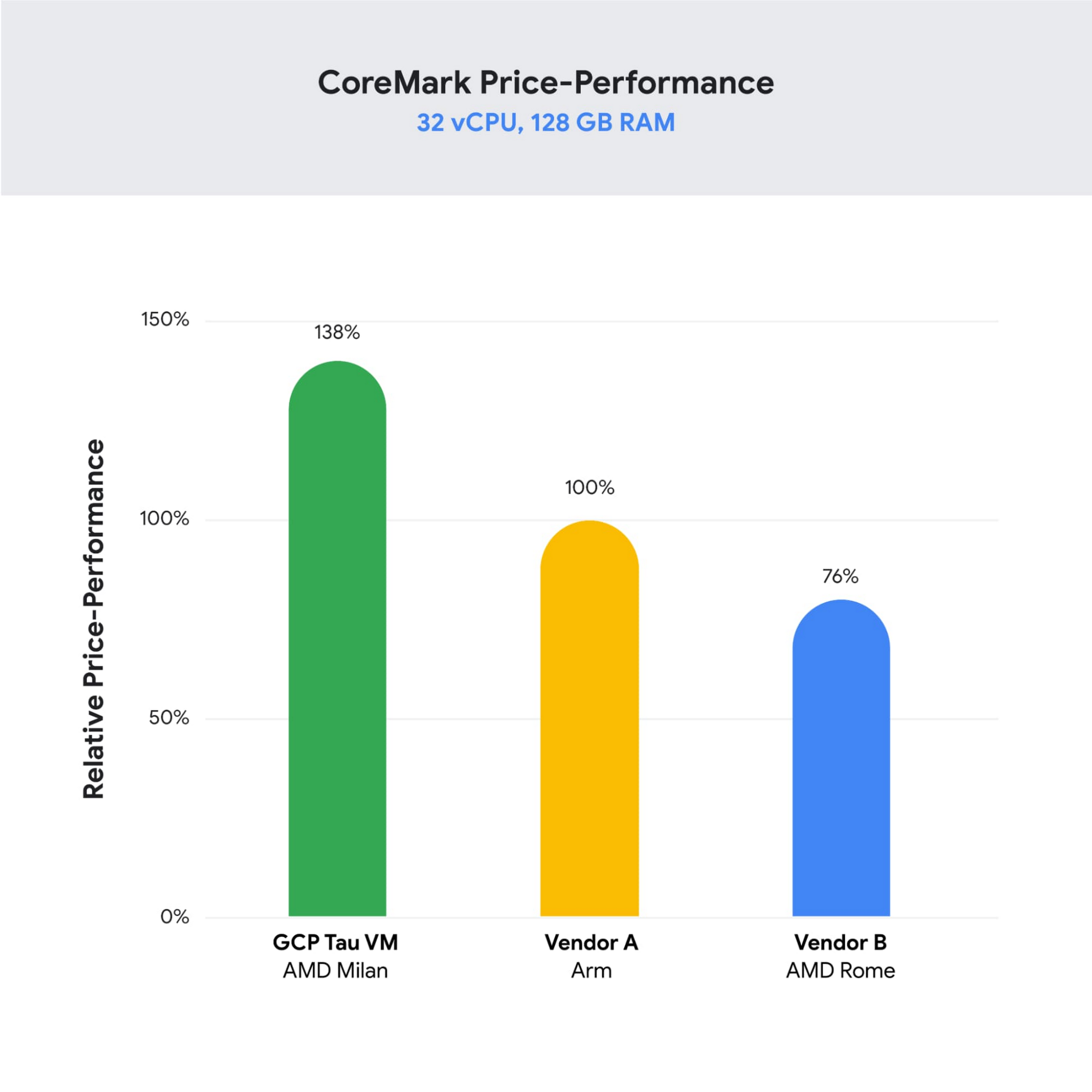
“DoiT partners with leading cloud vendors who are focused on growth and cost optimization,” said Yoav Toussia-Cohen, CEO, DoiT International. “In our preliminary testing of Google’s new Tau VMs with the Coremark benchmark, we were thrilled to see the incredible performance at 50% better than a comparable ARM-based offering from another leading public cloud. With Tau VMs, Google Cloud has set a new bar for price-performance, making the cloud even more accessible to digital-native companies. We are excited to bring Google’s Tau VMs to our joint customers.”
Designed for demanding scale-out workloads
Tau VMs bring the benefit of Google’s long-standing experience engineering platforms for scale-out workloads to our customers. They come in multiple predefined VM shapes, with up to 60vCPUs per VM, and 4GB of memory per vCPU. They offer up to 32 Gbps networking bandwidth and a wide range of network attached storage options, making Tau VMs ideal for scale-out workloads including web servers, containerized microservices, data-logging processing, media transcoding, and large-scale Java applications.
Google Kubernetes Engine support
Google Kubernetes Engine (GKE) is the de facto standard for organizations looking for advanced container orchestration, delivering the highest levels of reliability, security, and scalability. GKE supports Tau VMs on day 1, helping you optimize price-performance for your containerized workloads. You can add Tau VMs to your GKE clusters by specifying the T2D machine type in your GKE node-pools.
Pricing
Tau VMs will be priced to support significant TCO and price-performance improvements for your cloud applications. A 32vCPU VM with 128GB RAM will be priced at $1.3520 per hour for on-demand usage in us-central1.
Coming soon to a Google Cloud region near you
If you are interested in trying out T2D VMs when they become available in Q3 2021 please sign-up here.
Gmail Turns 18, Has 3 Billion Users! A Product Lead Breaks Down How Gmail Stays Interesting

3801
Of your peers have already read this article.
1:30 Minutes
The most insightful time you'll spend today!
This April, Gmail will be 18 years old. That’s a big milestone, given that email as a medium just turned 50.
Launched in 2004—with its 1 GB free storage, conversation based grouping, and enhanced search capabilities—Gmail quickly became one of the most popular email services in the world.
What started off as Paul Buchheit’s side project is now part of Google Workspace, a solution that’s used by over 3 billion users.
Yet despite this growth and Gmail’s long history, the product continues to find new ways to delight its users with great experiences, new features, and constant innovation.
How does the product team do it?
To help us unpack this question, I interviewed Matthew Izatt, Product Lead for Gmail.
Matthew has been building and growing Gmail for the last 10+ years. He started off in mobile where he built the Android and iOS apps for Gmail, and eventually he became the lead product owner for all of Gmail’s front end. He also led the development of the new Gmail in 2018, which was a complex rebuild of the technical architecture and visual design, along with the addition of multiple enterprise focused features. Since then, he has been leading Google’s charge on redefining how we work as the product lead for the Workspace Platform and Partnerships efforts with a team of over 100.
What follows is an edited version of our interview.
Mustafa Kapadia: Matt, thank you for joining us. Now, before we jump into how your team does its magic, can you please share with me some of the challenges you face when you build a new feature or experience on Gmail?
Matthew Izatt: Thanks Mustafa. And I think this is a great place to start.
One of the biggest challenges is that Google Workspace is used by over 3 billion users, and while that is great, there are many different ways of using our product. It’s not like a doorbell, where there is only one way of using it. With Gmail, it’s like an infinite Swiss army knife, where everyone has their own favorite way of using the product.
Second, Gmail is a critical product for many of our users. Yes, it’s fun to use, but people use it to get important work done—sending job proposals, emailing with their kids’ teachers, or booking medical appointments. This is why we have to be careful about what we experiment with and what we roll out. We can’t just throw things out there and see what works. We have to do our homework.
Third, we have to constantly innovate and think outside the box. Email is an old product, but it continues to evolve. Every day we have new startups reinventing email and challenging the big players. If we are to remain a market leader, we literally have to rethink the product every few years. Which is why creating the new Gmail was so much fun.
Mustafa: I don’t envy you. This is not an easy product to build. Going back to something you touched on: Given these hurdles, how do you build these great experiences? Is there an example that you can share with us?
Matt: A specific example I always like to share is the story of how we came up with the right display density on our thread list. The thread list is your inbox; it’s the list of all the messages that you have. The display density is how that information is presented to you.
In Gmail you can choose to have fewer messages with a lot of information about each message. Or you can choose to see a larger number of messages with much less information about each message.
It really comes down to your preferences. And it’s one of the reasons why so many users like using Gmail. In fact, being able to set inbox display preferences is actually one of the top 10 most used settings within Gmail.
Mustafa: So you were really trying to give users choice on how they would like their information presented?
Matt: Exactly. Now, we could have added 100 different levers so that every user could customize their email feed to an infinite degree. While that is possible from a coding perspective, it’s not practical for three reasons.
First, infinite choice sounds good on paper, but in reality, too many options creates a confusing user experience. Second, development would take many months—maybe even a year. And third, it would be a long-term maintenance nightmare.
Mustafa: So how did you go about doing it? Share with me the inner workings of Gmail in Google Workspace. How is the sausage made?
Matt: Well, it came down to four key steps, working closely with our amazing UX Research team.
First came the primary research to find out if building this experience was worth doing. After all, what is the point of building it if no one wants it? For this we actually sat down with real users inside and outside of Google to understand their needs.
Second, we brainstormed 100 potential solutions and narrowed them down to 8 options. Then we mocked up each of the 8 options to see how they looked.

While it would have been easy to just pick the option we liked the most and build it, we wanted to create what our users want, not what we like the most. So we took those options and surveyed the users from step 1 again. We specifically asked them to rank their preferences across three dimensions: Love It, Hate It, or Meh!
Based on the user responses, we realized that 3 configurations would meet the needs of most users. These were the three options we developed and deployed to Google Workplace.
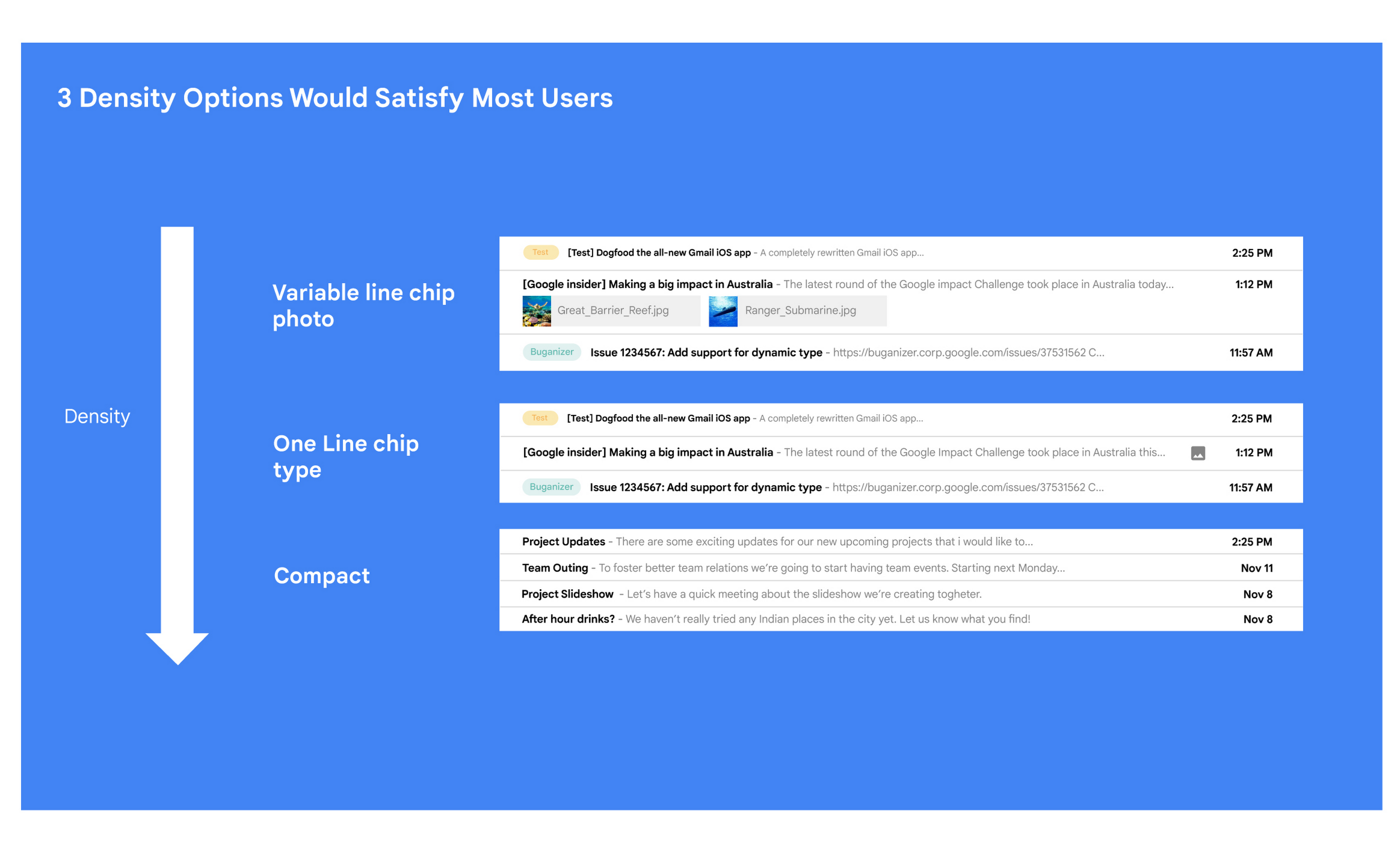
Mustafa: I love how you used data to guide your decision of what to build. This really is Google’s secret sauce—first-hand data collected from users.
Matt: Absolutely. Without their feedback, we would have never been able to narrow down to the 3 options that would satisfy most of our users.
Mustafa: Talking about risks: Getting user feedback and validating before you build is one way to de-risk your product, but you even de-risked your product launch strategy, correct?
Matt: Yes. Sometimes we launch features individually. Sometimes we launch them as a group. In this particular case, we had a lot of moving parts. We had a complete UI redesign, 10 or 12 new features, and architecture changes.
So to de-risk this, we put in place—I kid you not—a 26-stage launch process. We started off with the technical architecture changes—stuff that the user would not notice—to make sure that it was working. And we did it in small increments.
Then we rolled out a few features at a time, launching it first to our early access program—where users have opted in to receive updates. We measured their reaction and satisfaction first, and then moved on to the next group.
At every stage, we kept our blast radius small and put in these checks and balances where we could launch, measure reaction, and then reassess our strategy. And that worked out pretty well for us for this massive launch.
Mustafa: Agreed! Thank you for taking the time to talk to me. And good luck with building the next version of Gmail.
Matt: Thanks for having me.
Making Hybrid Work Human: Google Workspace and Economist Impact Survey

5465
Of your peers have already read this article.
2:30 Minutes
The most insightful time you'll spend today!
Google Workspace recently commissioned Economist Impact to complete a global survey (October 2021)* on the state of hybrid work, including its challenges and opportunities. We already knew that the pandemic had fundamentally changed the world of work, but the survey emphasizes the scale, reach, and longevity of those changes..
Over 75% of respondents believe that hybrid/flexible work will be a standard practice within their organizations in the coming three years. Given that 70% of respondents said they never worked remotely before the pandemic, it’s clear that hybrid has become the dominant model for work and that it’s here to stay.
But it’s also clear, as we’ll see below, that hybrid has some serious gaps that need to be addressed if it’s going to be sustainable and successful in the long term.
Defining hybrid work
As part of our work on the hybrid work survey and a broader project with The Economist Group, we interviewed a group of experts across research, consulting, business, and the advocacy world to arrive at a definition of hybrid work that captures all ways work is changing.
As Brian Kropp, one of the interviewees and vice president at Gartner, puts it: “Hybrid work is not just about different locations, but also different timings and different schedules.”
Harriet Molyneaux, managing director at HSM Advisory, a future-of-work research and advisory group, adds to this notion by describing the time-location work spectrum: “At one end of the spectrum is everyone in the office, nine till five, so both restricted time and location. And then at the other end of the spectrum is anywhere around the world at any time. So no restricted time or location. A hybrid is anything that sits in the middle of that.”
I agree with Brian and Harriet’s views. Flexibility in both location and hours is a core part of our working definition of hybrid work: a spectrum of flexible work arrangements in which an employee’s work location and/or hours are not strictly standardized.
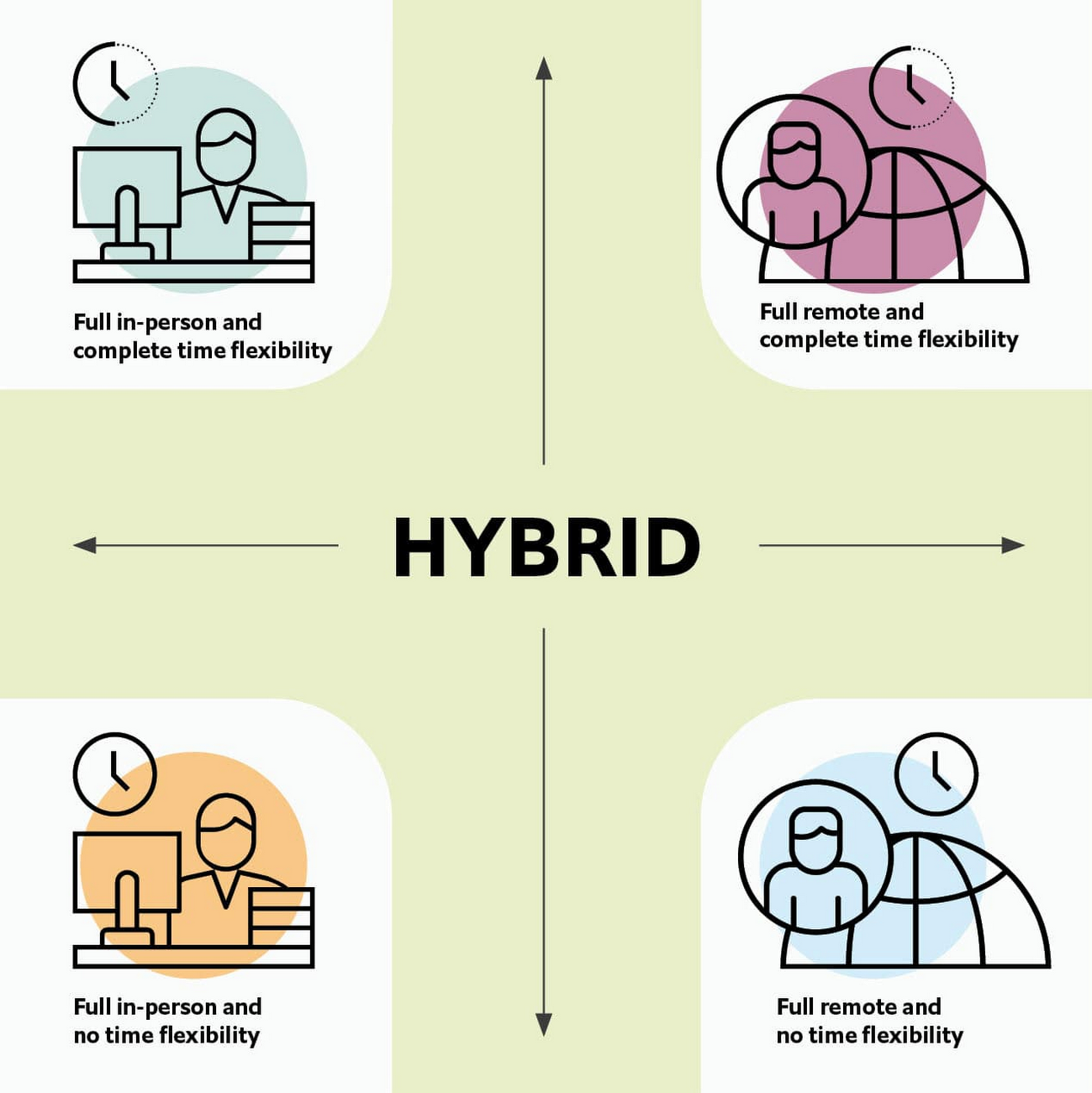
Given this definition and framework, how is hybrid work faring and what lies ahead?
Individual wellbeing is coming at the cost of organizational connection
Early on in the pandemic, productivity remained steady or even increased for many organizations. But it came at a cost, with levels of burnout spiking as employees juggled caregiving, homeschooling, and other demands in their personal lives with work responsibilities.
Based on the survey data, wellbeing has made an upward shift, no doubt aided by things like students returning to schools in many regions and fewer demands being made of working parents. The majority of respondents said that hybrid work, based on their own experiences, can have a positive impact on the physical, mental, financial, and social wellbeing of employees.
But it appears that individual wellbeing is coming at the cost of organizational connection. The majority of respondents said they feel disconnected from their organization and co-workers (57%), that limited networking opportunities negatively impact career growth (62%), and that limited social interactions with co-workers has had a negative impact on their mental health (54%).
To be sustainable, hybrid work models must address this sense of disconnection in real and tangible ways. And it won’t happen just by increasing the number of virtual meetings. Although 72% of people say that virtual meetings improve inclusion and participation, 68% also say there are too many virtual meetings to begin with. We need new ways for people to connect spontaneously.
Hybrid workers are often using tools built for a bygone desktop era
When asked about the most important conditions needed to achieve the long-term success of hybrid work models, the number one choice globally was “new technologies that allow for time and location flexibility.”
Naturally, it was gratifying to see this, since Google Workspace is built on a cloud-based platform that empowers collaboration from anywhere, on any device, but the survey answer also highlights how much organizations have had to scramble to meet the demands of the pandemic. Some had to take legacy, office-centric systems and make them work for a distributed workforce overnight, often leveraging less-than-ideal technologies like VPNs that introduce digital friction.
As a result, top technology concerns of respondents include:
- unreliable internet access (if only all our WiFi connections were hybrid-ready!)
- reliance on slow or outdated tools
- accessing and maintaining files in multiple places
- relying on too many applications in order to get work done
Hybrid work, it seems to me, doesn’t need more applications and collaboration surfaces. It needs deeper, more meaningful connections in the tools and surfaces we already have.
As organizations assess their tech stacks, they should consider whether they can shape the behaviors they want from hybrid employees (e.g., real-time collaboration, ease of information sharing) with the tools they have in place. Or are the limits of the technology determining hybrid employee behavior?
The management and culture gap
In the same way that tools have often been built for a shared physical workspace, organizational culture seems to lag behind the hybrid moment. The majority of respondents said that a lack of face-to-face supervision creates a sense of distrust among managers and employees, and that they feel stressed by increased monitoring associated with flexible work. And more than 62% said that limited networking opportunities with senior employees and co-workers has a negative impact on career growth.
Strikingly, more than 70% of respondents indicated that the culture of trust between managers and employees needed improvement. Training and management best practices (60% of people want more of both) might help fill some of the gaps, but a manager can’t build trust with their hybrid teams by going through a training program.
The role of manager must itself evolve to meet the demands of a hybrid model. How can we empower managers to be the bridge between the “office of one” and the “office of many”? And as I discussed previously on Forbes, driving towards impact rather than output is a more sustainable metric for team engagement and productivity. It also dispenses with monitoring as a core part of a manager’s role, freeing them up to be a coach-and-connector.
How Google Workspace can help bridge the hybrid work gaps
No one has all the answers for how to make hybrid work successful, and I suspect we will see iterations of the model into 2022 and beyond as organizations—including Google—experiment with the right mix of location, culture, processes, and tools.
On the technology front, Google Workspace is uniquely positioned to bridge many of the emerging hybrid work gaps. Over the last year, we’ve delivered a set of innovations that are designed to deepen collaboration experiences while strengthening social connections within and across teams.
For example, we launched smart canvas to bring new collaboration capabilities to the places where people are already working together, helping to keep them connected, rather than having them switch tabs or open new apps. And we delivered Spaces as a central place for collaboration, where teams can share ideas, work on documents together, and manage tasks from a single place. Because all their work is preserved for future reference, team members can easily jump in and contribute at a time that works best for them, seeing a full history of the conversations, context, and content along the way. Spaces helps people maintain individual wellbeing while preserving the health of a group project.
In Google Meet, we’ve introduced real-time captions in multiple languages (in preview now), the ability for people to customize their video tiles, including being able to turn off their own to help with meeting fatigue, and we’ve implemented automatic light adjustments and noise cancellation. These changes help ensure that everyone can be seen and heard.
Meanwhile, features like hand-raise, Q&A, and polls have helped make meetings more inclusive and companion mode (in preview) can bring these to life in hybrid settings, to help ensure that there’s one cohesive conversation between the people in the office and their colleagues working somewhere else. We view companion mode as a bridge between the office and “somewhere else.”
On the personal wellbeing front, we launched Focus Time, which lets people block out their calendars for uninterrupted focus work, and Time Insights in Google Calendar, where employees can look at how they’re spending their time and adjust as needed.
As hybrid work continues to evolve, Google Workspace is committed to supporting wellbeing and seamless collaboration with tools that can remove digital friction and help people maintain connections—to each other and the organizations they work for.
*Survey details: The survey, completed in October 2021, polled a total of 1,244 employees and managers in four regions (North America, Europe, APAC, and Latin America), from more than 15 industries, in every age group, and from both small and large organizations. The focus was on knowledge workers, though it’s important to note that some of those people have been working on the frontlines; 20% of respondents indicated they haven’t worked remotely at all during the pandemic. This includes people in hospitality, retail, transportation and logistics, and healthcare.
The Future of Cloud Computing: Choose Your Own Services and Payment Options

2095
Of your peers have already read this article.
1:30 Minutes
The most insightful time you'll spend today!
As the saying goes, “it’s hard to make predictions, especially about the future.” Some organizations find it challenging to predict what cloud resources they’ll need in months or years ahead. Every organization is on its own unique cloud journey. To help, we’re developing new ways for customers to consume and pay for Google Cloud services. We’re doing this by removing barriers to entry, aligning cost to consumption and providing contractual and product flexibility. Read on to learn how we’re rolling out several new go-to-market programs across these key areas to help our customers purchase and consume Google Cloud services more easily.
Removing barriers to entry with Google Cloud Flex Agreements
Many customers choose multi-year commitments because they provide better line-of-sight into IT spend and budgeting. However, these commitments can create difficulty for those who don’t have clear visibility into their future cloud consumption needs. That’s why today we’re launching Flex Agreements, which enable customers to migrate their workloads to the cloud with no up-front commitments. As part of this new licensing option, Google Cloud customers still get access to unique incentives, such as monthly spend discounts1, committed use discounts, cloud credits, and access to professional services, based on monthly spend and workloads migrated to Google Cloud.
Flex Agreements are just one example of how we are removing barriers to help customers start using Google Cloud. In 2022, we launched the Innovators Plus annual subscription, which gives developers a curated toolkit to accelerate their expertise, including access to live and on-demand training through Google Cloud Skills Boost, Google Cloud credits, and more.
We also recently expanded trials for Google Cloud products. For example, the new Spanner free trial instance is good for 90 days, allowing developers to create Google Standard SQL or PostgreSQL databases, explore Spanner capabilities, and prototype applications—with no commitment or contract needed.
Contractual and feature flexibility
Contractual flexibility has always been one of our core principles. Committed Use Discounts (CUDs), for example, provide discounted prices in exchange for a commitment to use a minimum level of resources for a specified term. Last year, we introduced Flexible CUD, spend-based commitments that offer predictable and simple flat-rate discounts that apply across multiple virtual machine families and regions.
In addition to contractual flexibility, our customers also need the flexibility to choose features and functionality based on their stages of cloud adoption and the complexity of their business requirements. Therefore, over the next few quarters, we will launch new product pricing editions—Standard, Enterprise, and Enterprise Plus—in parts of our cloud portfolio. This new commercial packaging model will help give customers more choice and flexibility to optimize their cloud spend.
For customers running workloads such as those in regulated industries like banking and public sector, the higher-end Enterprise Plus tier will offer compute, storage, networking and analytics services with high availability, multi-region support, regional failover and disaster recovery, advanced security, and a broad range of regulatory compliance support. The Enterprise pricing tier will include a broad range of features designed for customers with workloads that demand a high level of scalability, flexibility, and reliability. The Standard pricing tier will offer cost-efficient and easy-to-use managed services that include all essential capabilities such as autoscaling to meet the core workload requirements of customers.
Align costs to consumption with autoscaling
At Google Cloud, a core requirement for the products we build is providing customers industry-leading capabilities to automatically scale (autoscale) services up and down to match capacity with real-time demand. Autoscaling improves uptime, reduces infrastructure costs, and removes the operational burden of managing resources.
Many Google Cloud products include autoscaling capabilities to help customers manage unplanned variations in demand. For example, Dataflow vertical and horizontal autoscaling, in combination with granular adaptive resource configuration (aka “right-fitting”), has resulted in up to 50% saving in infrastructure costs for streaming by automatically choosing the right number of instances required to run the jobs and dynamically re-allocating more or fewer instances during the runtime of jobs. Bigtable also provides native autoscaling capabilities, and Spanner’s autoscale is an open source tool that works across regional and multi-regional Spanner deployments.
Similarly, we added multiple features such as Cluster Autoscaler, Horizontal Pod Autoscaling, Vertical Pod Autoscaling, and Node Auto-Provisioning to GKE for elasticity and cost efficiency.
For L.L.Bean, the ability to quickly scale capacity to meet changing usage patterns (e.g., during the holidays), as well as to rapidly perform load tests to test capacity, are “night and day” with Google Cloud compared to L.L.Bean’s legacy on-premises IT system.
“We won’t have to pay for peak capacity to have it available during peak shopping times. We just scale capacity up or down as needed.” — Randy Dyer, Enterprise Architect, L.L.Bean
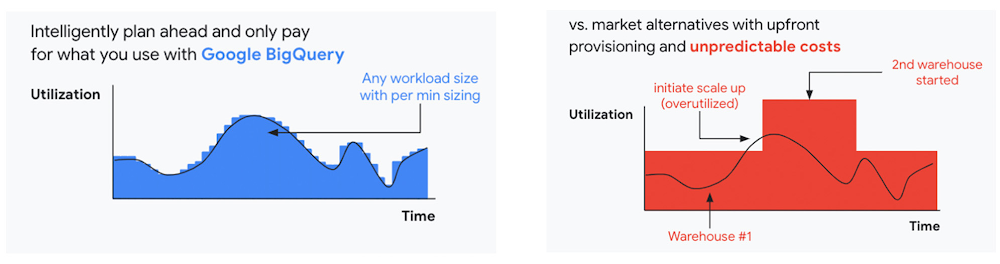
We are now taking these capabilities to the next level by enabling autoscaling in BigQuery at a more granular level so you never pay more than what you use. This allows you to provision additional capacity in smaller increments, so you never overprovision and overpay for underutilized capacity. BigQuery customers can now try the new BigQuery autoscaler (currently in public preview) in their Google Cloud console.
A commitment to flexibility and choice
At Google Cloud, we remain deeply committed to the success of our customers and partners, and we are uniquely positioned to help organizations transform their business. By providing you with more flexibility and choice in how to purchase our products, we are empowering you to be more efficient and resilient.
Join Google Data Cloud & AI Summit to hear the latest announcements around innovations in Google Data Cloud for databases, data analytics, business intelligence, and AI. Gain expert insights, new solutions, and strategies that can help you transform customer experiences with modern apps, boost revenue, and reduce costs.
1. Not available for customers buying through Partner Advantage.
New Google Research Innovators tackle wide range of challenges

950
Of your peers have already read this article.
2:30 Minutes
The most insightful time you'll spend today!
Now in its third year, the Google Cloud Research Innovators program has invited 37 new participants to work with each other and Google experts to accelerate their most promising projects. The program offers select researchers expanded technical and networking support from Google professionals, access to Google’s latest cloud technologies, and additional Google Cloud research credits. By collaborating across fields, sharing resources, and disseminating knowledge, Research Innovators aim to drive new discoveries and solve problems faster.
This year’s cohort includes researchers in a wide range of fields at North American institutions. They meet once a month with mentors and participate in research conferences and special training days. Here are a few of the Research Innovators solving real-world problems with Google Cloud:
- Elisa Chen at the University of Chicago uses Vertex AI Vision to develop a model that recognizes faces in illustrations in order to examine race, age, and gender representations in award-winning children’s books in the U.S.
- Swapneel Mehta at New York University uses Google Cloud’s machine learning and data processing tools to analyze disinformation online.
- Christopher Weber at the University of Arizona uses BigQuery and Data Studio to analyze voter registration data and visualize political behavior.
- Guangming Zheng at the University of Maryland develops algorithms to identify cyanobacteria in freshwater lakes through satellite imagery, which can help assess threats to human health and ecosystems.
Previous Research Innovators have already generated scientific breakthroughs and had broad social impact: Tapio Schneider developed a ClimateMachine to simulate cloud cover, Richard Fernandes designed an app to monitor Canada’s leaf canopy, and Christoph Gorgulla accelerated drug discovery for COVID-19 treatments. Some of these innovators are now mentoring this year’s cohort to further advance the program’s goals and pass along its benefits.
If you’re a researcher interested in exploring the benefits of the cloud for your projects, apply here for access to the Google Cloud research credits program in eligible countries. To engage with the latest challenges and solutions in research and technology, sign up for NEXT, Google’s global exhibition of inspiration, innovation, and education in San Francisco August 29-31.
How Google is Showing the Way to the Differently-abled: A Blind Program Manager’s Account

4243
Of your peers have already read this article.
3:30 Minutes
The most insightful time you'll spend today!
What does “accessibility” mean to businesses? It’s not just about making sure that your office or retail space is accessible to workers and customers who have mobility challenges, it’s also about making sure that your apps, digital tools and content are also more accessible to everyone.
Our product teams work every day to ensure that tools like G Suite have built-in accessibility features. As a Program Manager, I help create those features and use many of them myself, as I’m blind. I would like to give an overview of product accessibility features that have been available for some time, as well as some new ones.
Listen to content with help from screen readers.
A screen reader is a helpful tool for people who are blind or have low vision. It provides methods to interact and control applications and also converts content on screen into spoken text. With a screen reader and keyboard shortcuts, you can read, edit, and comment on files. Getting started is easy: In Google Docs, Slides, or Sheets, go to the Tools menu, and in “Accessibility settings,” check the “Turn on screen reader support” box. Learn how to turn on screen reader support in Docs.
G Suite supports several screen readers, including ChromeVox, Google’s own screen reader. ChromeVox is automatically built into Chrome devices, like Chromebooks. You just have to enable it. There are many other screen readers you can use with G Suite too; this support guide explains which screen readers work best with which web browsers.
Another way to listen to content is with Select-to-speak, a feature that reads content aloud to you using text-to speech (TTS) to verbalize highlighted content. To try it out, highlight text and activate the select-to-speak button. An example of a select-to-speak tool is the one built into ChromeOS.
See a summary of changes to your documents.
To make it easier for people to keep track of collaborators’ contributions in Google Docs (without having to actively watch every single change), we recently added a feature called Live Edits. Helpful if you use a screen reader or magnification, Live Edits periodically summarizes changes made to a document by collaborators within the sidebar. Learn how to comment and collaborate in Docs using a screen reader.
And for people who are sensitive to visual crowding, we also introduced eight different Lexend font families that have varied widths and spacing to accommodate different reading speeds. Read more details about these font options.
Use voice typing to “write” by speaking.
Voice typing is a powerful productivity tool for everyone, including those who do not use a keyboard. It’s especially useful for people with low vision or with motor disabilities that may prevent them from using keyboards, mice or trackpads. When you speak into the computer’s microphone, voice typing uses artificial intelligence (AI) to convert your voice into text. In Docs, you can even use voice commands to select and edit text—for example, bolding words or cutting and pasting text.
More Relevant Stories for Your Company

AI-powered Business Messages for Timely, Engaging and Helpful Conversations with Customers
Over the last two years, we’ve seen a significant uptick in the number of people using messaging to connect with businesses. Whether it was checking hours of operation, verifying what was in stock, or scheduling a pick-up, the pandemic caused a significant shift in consumer behavior. 45% of users are

Beyond Traditional Learning: AI-based Online Learning Platform and Google Cloud Solutions Push Learners to Get Ahead
The combination of a vital need for IT experts among businesses and a digital skills gap is making lifelong learning increasingly critical. Beyond professional development, learning new skills offers additional rewards from building peer connections to boosting your creativity. That’s why in 2020 Krishna Deepak Nallamilli and I launched KIMO.ai to reimagine how people

Business Messages drives 85% CSAT scores for Levi Strauss
Founded in 1853, clothing company Levi Strauss & Co. gained fame for their Levi’s® denim jeans. Over 150 years later, Levi’s is a globally-recognized brand that sells jeans and other apparel in more than 3,100 retail stores across 110 countries. The summary During the COVID-19 pandemic, Levi’s saw that their

Active Assist Expands Globally: Unleashing Cloud Optimization Insights Worldwide
Active Assist provides insights and recommendations to help Google Cloud customers proactively optimize their cloud environments for cost, security, performance, and sustainability. If you’re like most customers, you’ve likely encountered these insights and recommendations in the console — either in the Recommendations Hub or embedded on a resource page, like IAM or
