





Messages by Google: Unveiling New Features for AT&T Android Users

3837
Of your peers have already read this article.
1:30 Minutes
The most insightful time you'll spend today!
Today, we’re announcing that we’re working with AT&T to establish Messages by Google as the default messaging application for all AT&T customers in the United States using Android phones. The collaboration aims to help accelerate the industry toward global Rich Communication Services (RCS) coverage and interoperability to offer a consistent, secure, and enhanced messaging experience for all Android users around the world.
“Many AT&T customers have enjoyed the advantages of RCS for years when texting with friends and family,” said David Christopher, executive vice president and general manager – AT&T Mobility. “We look forward to working closely with Google to extend these benefits to even more of our customers as they enjoy richer conversations with others around the world.”
Working together, AT&T and Google will continue the momentum to upgrade SMS with enhanced messaging features offered in Messages, which includes the support of chat features based on the open RCS standard. With Messages as the default messaging application, all AT&T customers using Android devices will get enhanced features so they can:
- Share full-resolution pictures from a recent event or vacation
- Send a higher-quality video of that soccer goal and the celebration that followed
- Know when someone is replying to a text
- Send and receive messages over Wi-Fi or data
- Participate in group chats where it’s easy to add someone else to the conversation, or let someone leave, without starting a brand new thread
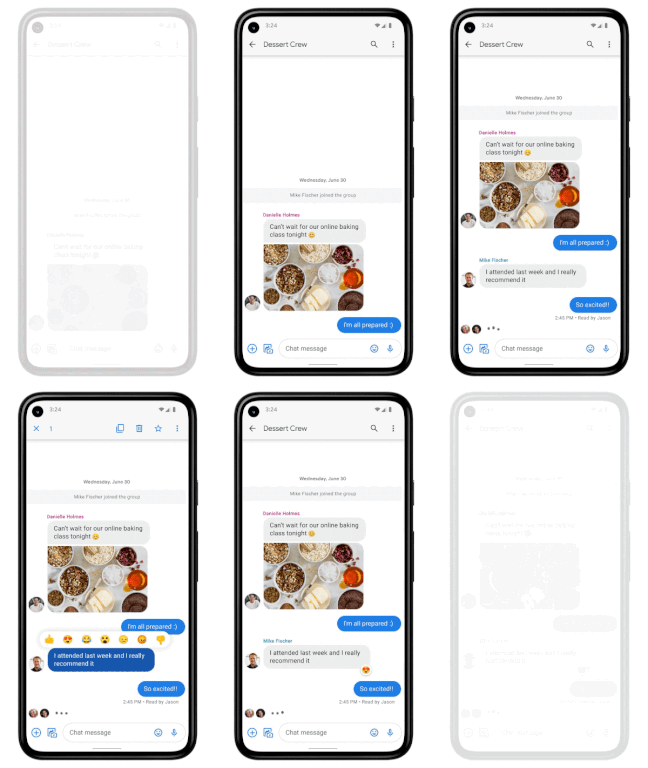
In addition to these features, we’re also rolling out end-to-end encryption for one-on-one RCS conversations between people using Messages and people who have chat features enabled.
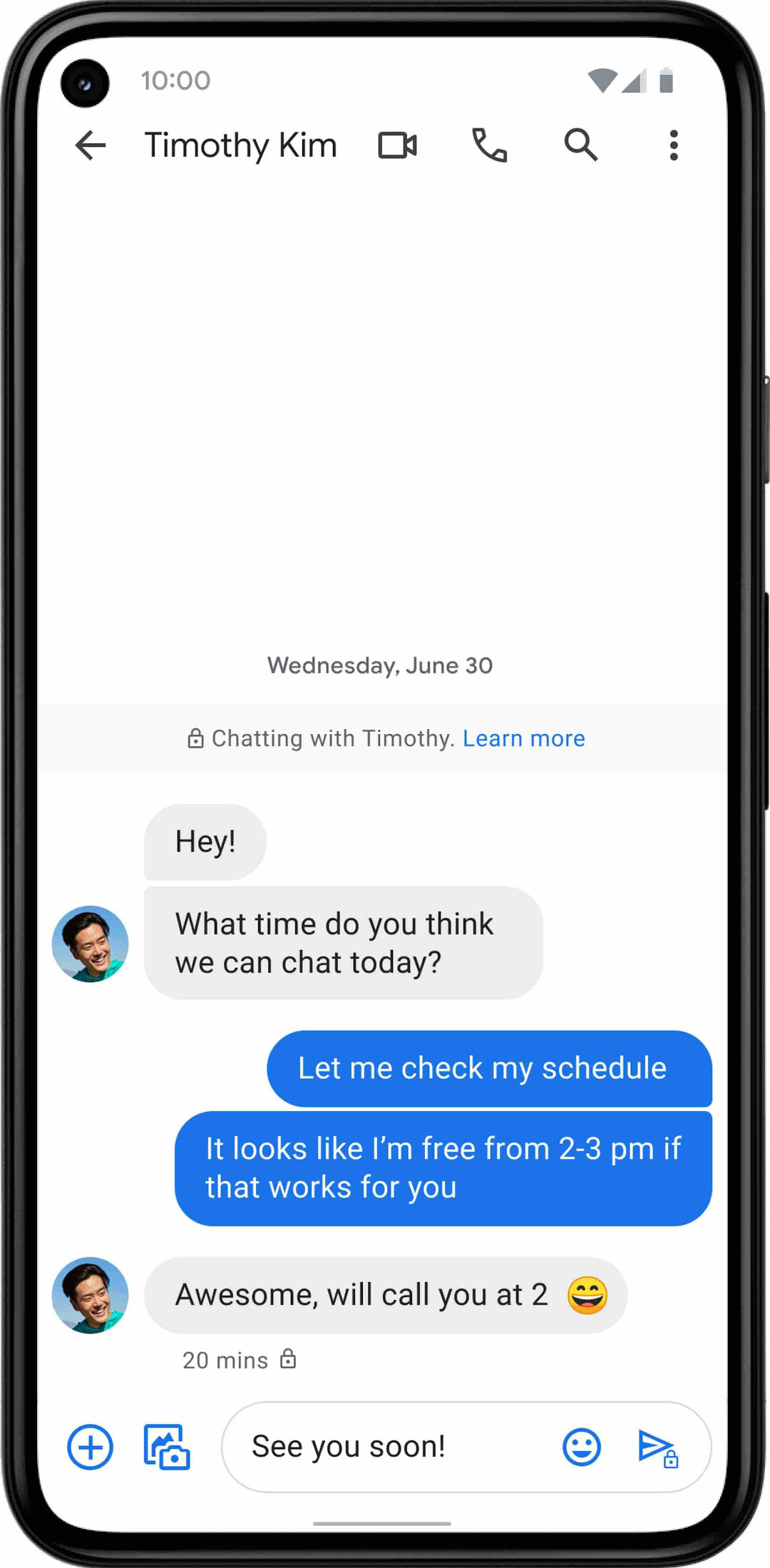
For years, we’ve been working with the mobile industry and device makers to bring enhanced and secure messaging to everyone on Android. Today’s announcement—that AT&T customers using Android devices will soon be able to enjoy these features by default—is a major step forward.
How Google Meet Keeps Your Video Conferences Secure

6812
Of your peers have already read this article.
4:30 Minutes
The most insightful time you'll spend today!
All over the world, businesses, schools and users depend on G Suite to help them stay connected and get work done. Google designs, builds, and operates our products on a secure foundation, aimed at thwarting attacks and providing the protections needed to keep you safe. G Suite and Google Meet are no exception.
Google Meet’s security controls are turned on by default, so that in most cases, organizations and users won’t have to do a thing to ensure the right protections are in place. Here, we’ll summarize the key capabilities of Google Meet that help protect you.
Proactive protections to combat abuse and block hijacking attempts
Google Meet employs an array of counter-abuse protections to keep your meetings safe. These include anti-hijacking measures for both web meetings and dial-ins.
Google Meet makes it difficult to programatically brute force meeting IDs (this is when a malicious individual attempts to guess the ID of a meeting and make an unauthorized attempt to join it) by using codes that are 10 characters long, with 25 characters in the set. We limit the ability of external participants to join a meeting more than 15 minutes in advance, reducing the window in which a brute force attack can even be attempted. External participants cannot join meetings unless they’re on the calendar invite or have been invited by in-domain participants. Otherwise, they must request to join the meeting, and their request must be accepted by a member of the host organization.
In addition, we’re rolling out several features to help schools keep meetings safe and improve the remote learning experiences for teachers and students, including:
- Only meeting creators and calendar owners can mute or remove other participants. This ensures that instructors can’t be removed or muted by student participants.
- Only meeting creators and calendar owners can approve requests to join made by external participants. This means that students can’t allow external participants to join via video, and that external participants can’t join before the instructor.
- Meeting participants can’t rejoin nicknamed meetings once the final participant has left. This means if the instructor is the last person to leave a nicknamed meeting, students can’t join later without the instructor present.

Secure deployment and access controls for admins and end-users
To limit the attack surface and eliminate the need to push out frequent security patches, Google Meet works entirely in your browser. This means we do not require or ask for any plugins or software to be installed if you use Chrome, Firefox, Safari, or Microsoft Edge. On mobile, we recommend that you install the Google Meet app.
To help ensure that only authorized users administer and access Meet services, we support multiple 2-Step Verification options for accounts that are secure and convenient. These include hardware and phone-based security keys and Google prompt. Additionally, Google Meet users can enroll their account in our Advanced Protection Program (APP), which provides our strongest protections available against phishing and account hijacking and is specifically designed for the highest-risk accounts.
For G Suite Enterprise and G Suite for Education customers, we offer Access Transparency, which logs any Google access to Google Meet recordings stored in Drive, along with the reason for the access (support team actions that you might have requested, for example). Customers can also use data regions functionality to store select/covered data of Google Meet recordings in specific regions (i.e. US or Europe).
Secure, compliant, and reliable meeting infrastructure
In Google Meet, all data is encrypted in transit by default between the client and Google for video meetings on a web browser, on the Android and iOS apps, and in meeting rooms with Google meeting room hardware. Meet adheres to IETF security standards for Datagram Transport Layer Security (DTLS) and Secure Real-time Transport Protocol (SRTP). For every person and for every meeting, Meet generates a unique encryption key, which only lives as long as the meeting, is never stored to disk, and is transmitted in an encrypted and secured RPC (remote procedure call) during the meeting setup.
Security is an integral part of all our operations at Google. Our team of full-time security and privacy professionals supports our software engineering and operations to ensure that security is always a part of how we build and run our services. All of our Google Cloud and G Suite customers benefit from these capabilities, including:
- Secure-by-design infrastructure: Google Meet benefits from Google Cloud’s defense-in-depth approach to security, which utilizes the built-in protections and global-private network that Google uses to secure your information and safeguard your privacy.
- Compliance certifications: Our Google Cloud products, including Google Meet, regularly undergo independent verification of their security, privacy, and compliance controls, including validation against standards such as SOC, ISO/IEC 27001/17/18, HITRUST, and FedRAMP. We support your compliance requirements around regulations such as GDPR and HIPAA, as well as COPPA and FERPA for education.
- Incident management: We have a rigorous process for managing data and security incidents that specifies actions, escalations, mitigation, resolution, and notification of any potential incidents impacting customer data.
- Reliability: Google’s network is engineered to accommodate peak demand and handle future growth. Our network is resilient and engineered to accommodate the increased activity we’ve seen on Google Meet.
- Transparency: At Google Cloud, we’re clear about our commitments regarding customer data: we process customer data according to your instructions; we never use customer data for advertising purposes; and we publish the locations of our Google data centers, which are highly available, resilient, and secure.
During COVID-19 and beyond, we will continue to protect Google Meet users and their data, and keep innovating with new features to make our tools helpful, secure, and safe.
6588
Of your peers have already watched this video.
8:00 Minutes
The most insightful time you'll spend today!
Hospitals Can Offer Interconnected Patient Experiences Using Google’s Natural Language Services
Machine Learning (ML) in healthcare helps extract data from conversations, medical records, forms, research reports, insurance claims and other documents across the care value-chain to help care providers have a holistic view of their patients to draw insights for diagnoses and treatments. With Natural Language Processing(NLP), healthcare organizations can program computers and systems to process and analyse large volumes of human communication in form of spoken texts, written documentation and utterances. Watch the video to learn how the healthcare community can leverage Google’s NLP services to process structured and unstructured data to offer interconnected experiences for patients.

How One of the World’s Largest Insurers Improved Sales Performance with Better Collaboration
DOWNLOAD CASE STUDY4557
Of your peers have already downloaded this article
5:00 Minutes
The most insightful time you'll spend today!
When Generali Hungary, one of Hungary’s leading insurance agencies and one of the world’s largest insurance companies, was looking for a way to provide the company’s more than 1,800 employees and 2,200 self-employed agents with a tool to communicate efficiently, it turned to Google.
For insurance companies whose agents are scattered across territories and frequently on the road, having robust and collaborative systems in place, with access to forms, calendars, and documents anytime, anywhere, is crucial.
“Our aim with this project is to digitize sales processes and improve our internal communication. The unit manager has the opportunity to have continuous online contact with his agents as well as Generali’s employees,” says László Kriston, Sales Digital Transformation Team leader, Generali Hungary.
Insurance companies sell their products through sales channels such as brokers and tied agents, who are the point of contact with their clients. Generali Hungary had issues with its previous mail system, namely performance, administration, and calendar sharing. The Sales Digital Transformation Team looked for a way to improve performance and make communication more efficient for both agents and managers.
How G Suite helps businesses evolve to more flexible and distributed work models

4150
Of your peers have already read this article.
4:30 Minutes
The most insightful time you'll spend today!
There are many inspiring stories of businesses reacting swiftly to the global pandemic. Some companies have enabled their teams to re-imagine not only how they communicate and collaborate with each other remotely, but also how they continue to serve their own customers and support the communities they belong to. From doctors consulting with patients, to financial institutions providing critical advice to customers, to teachers delivering distance learning, to car dealerships creating virtual showrooms with G Suite—it’s clear that these new ways of working are here to stay.
Here are some of the inspirational stories.
Keeping teams connected and productive
Activision Blizzard King (ABK), a leading interactive entertainment company, is going all in with G Suite*. Working with SADA, a Google Cloud Premier Partner, Activision Blizzard was looking for an innovative and scalable solution to transform the way their teams work together. As their developers around the world build the next generation of innovation in gaming, they rely on the power of collaboration in G Suite to create, connect, and share with each other. G Suite helps them successfully meet critical deadlines for game launches and updates.
“The safety of our teams is paramount during these disruptive times, and our workforce is already widely distributed across multiple locations internationally. G Suite has brought our teams together as we continue to collaborate while we’re apart,” says Jacques Erasmus, Chief Information Officer, Activision Blizzard.
PwC, a global professional services organization, enabled over 275,000 people to work from home in response to COVID-19. G Suite enables PwC to not only collaborate and stay connected with each other, but to continue to serve their clients in a timely and efficient manner. As a global organization with most of its people around the world needing to work from home, PwC reached nearly 10 million hours of video conferencing in Google Meet in a single month.
“G Suite allows us to stay connected—it’s the single place where we can collaborate, discuss, and share work, in the current situation,” says Hilda Clune, Technology and Transformation Leader at PwC. “G Suite provides enough resilience and security, and the ability to scale at the speed we need to.” Learn about how PwC works remotely with G Suite:https://www.youtube.com/embed/rlgyiRoBGhk
Kärcher, a global manufacturer of cleaning equipment, accelerated its plans to move its 14,000 workers to G Suite in response to COVID-19. They accomplished the transition in only five days, enabling employees to collaborate effectively without being physically present in a Kärcher office. G Suite plays a critical role as Kaercher resumes business globally in the post-COVID phase, user adoption of various G Suite apps continues to grow, and management is using tools like Jamboards and Google Meet hardware to help them collaborate better and stay connected with their teams.
“With G Suite, Kaercher has transformed its global collaboration, allowing for faster business decisions during the COVID-19 crisis,” says Dr. Daniel Heubach, Chief Information Officer of Kaercher.
To face the current health crisis, De’Longhi, an appliance manufacturer based in Italy, created a local and international taskforce to ensure all their employees have everything they need to work from home safely and effectively. G Suite is playing a critical role in helping them achieve this goal. The De’Longhi taskforce uses Google Sheets to help them collect up-to-date information from each of their regions, and connect with local teams via Google Meet to better understand the unique circumstances and challenges they’re facing. As teams began to work from home with G Suite, De’Longhi has seen a 500% increase in Meet usage and a 200% growth in the number of shared files in Google Drive.
Helping to provide communities with critical services
St. Louis-based Schnucks evolved from a neighborhood grocery chain to essential workers—virtually overnight. They supported both corporate and frontline workers in stores with an information hotline and created a virtual dispatch center for their transportation team, all through Google Meet. See how Schnucks was able to keep providing groceries to the communities it serves:https://www.youtube.com/embed/uTuOGwotfGk
As Boston was one of the first areas to be hit by COVID, patients at Cambridge Health Alliance’s (CHA) Department of Psychiatry had to manage a whole new set of challenges, including anxiety about the pandemic and new financial insecurity. Thanks to Google Meet, CHA was able to continue serving these patients in a timely manner. Outpatient Psychiatry was an early adopter of video visits, which are more appropriate for behavioral health care than phone consultations. Between March and June 2020, CHA was able to maintain 90% of its expected patient visit volume in Psychiatry, a huge win for patients, families, and the communities CHA serves.
Southern Cross Care (SA, NT & VIC) Inc has begun using Google Meet to help residents across their 17 Residential Aged Care homes stay connected to their loved ones, despite lockdown measures associated with COVID-19. Residents can now also see their doctor virtually via Google Meet, keeping them safe from any potential exposure to the virus while still experiencing a high level of care through these virtual consultations.
Enabling business services for customers, no matter where they are
Italian bank Credem (Credito Emiliano S.p.A), relies on G Suite to help their staff adapt to a collaborative work-from-home environment leveraging tools like Google Meet, Drive and Docs. G Suite enables their teams across its banking and insurance businesses to collaborate and stay connected while working remotely. Credem has also created a “virtual branch” by moving its customer support to video conferencing using Google Meet. This enables customers to continue to get access to critical financial services, remotely and safely.
KIA Motors, a multinational automotive manufacturer, is using G Suite to provide “virtual viewings” for its customers, enabling them to continue to engage in an immersive and engaging car-buying experience. With Google Meet, KIA’s sellers can interact with customers, provide them with a virtual demonstration of a car, and answer any questions that come up.
“Live Stream Showroom demonstrates our continued commitment to tailor the car-buying journey to the demands of our customers with virtual viewings,” says JT Hong, Head of Global Channel & Service department at Kia Motors. “By launching this new platform testing in the Middle East & Africa region, we aim to stay ahead of the curve in digital sales and marketing in this time of transition.”
These are just a few recent examples of how G Suite helps customers not only adapt to the current situation but also reimagine how to get things done. We’ve been working hard to make G Suite a better home for your work by providing an integrated workspace that brings together the core elements of work—like chat, email, voice, video, and tasks—and making them better together. Our goal is to help teams to stay productive and connected, no matter where they’re working from, and enable businesses to serve their customers safely and more efficiently.
(*G Suite is now Google Workspace)
3972
Of your peers have already watched this video.
22:21 Minutes
The most insightful time you'll spend today!
Boosting Chrome OS adoption with effective change management
Can you remember the last time you asked a child to do something how did you convince them to do what you wanted? How many times did they ask you why probably more than once, right? So we know change is hard when we ask someone to make a change we’re asking a lot from them. Very often with IT projects we expect people to change, we don’t really think through the implications of this.
The purpose of this video is to guide you to migrate to Chromebooks and help you understand the reason why. When putting together your change management plan there’s a much larger chance of your project being able to deliver on its business objectives.
Introducing new technology into your organization is an exciting step. However, change management and workforce adoption of the new technology can be challenging. Get insights from Google’s Chrome Enterprise expert on change management strategies and best practices for increasing Chromebook adoption in your organization.
More Relevant Stories for Your Company
Transitioning to Hybrid Environment with Chrome Browser
It’s been quite a year. In general, and for work. Just the other day, I read a new study from Pew Research that shows 71% of people are currently working from home, and 50% of employees say they want to continue working from home at least three days a week. That’s more

How Buffalo Tours CEO Found a Way to Increase Bookings by Over 1 Percent
Buffalo Tours serves tons of passengers each month, helping them with various aspects of their travel. These involve tour booking requests from passengers, request processing and information checking. Prior to the Google implementation, Buffalo Tour’s email exchange was supported by another email server. Employees lamented the frequent loss of emails

Chrome OS Helped Ocwen Achieve Remote Workplace in Just 2 Weeks during the 2020 Pandemic
Editor’s note: Today’s post is by Parveen Chander Aery, CIO, and Rishi Gupta, Head of Global IT Infrastructure, of Ocwen, a provider of residential and commercial mortgage loan services. The U.S.-based company adopted Chrome OS devices to help global contact center teams work productively together. We’re used to deployments of new

Safeguarding time and attention with Google Workspace and Gmail
As the pandemic forced millions of people to work from home, many of us found ourselves spending more time in video meetings and in our inboxes as a way to bridge the distance from our colleagues. When the workplace became the living room or the makeshift home office, and as
