





5239
Of your peers have already watched this video.
17:00 Minutes
The most insightful time you'll spend today!
AppSheet: Reduce Shadow IT and Accelerate Development of Enterprise-grade Apps
Google Cloud findings suggest that nearly 40 percent of organizations’ investments are consumed by shadow IT and can be a detractor to the adoption of cutting-edge tools and solutions. Also, about 51 percent of the surveyed executives are of the opinion that the inability to adapt to digital transformation trends and practices are at the risk of going out of business in the next 3-4 years. However, enterprises need not be blindsided by the mounting expenses involved with the implementation and optimization of solutions and tools meant for empowering employees. AppSheet, Google Cloud’s no-code application development and automation platform is at the helm of empowering organizations to custom build apps for employees without relying on third-party services.
Watch the video from the Google Workspace sessions of Next ’21 to hear experts’ insights on AppSheet to effectively govern workforce and ward off security threats to helps employees build enterprise-grade applications!
8368
Of your peers have already watched this video.
3:00 Minutes
The most insightful time you'll spend today!
Colgate-Palmolive: The Story of a Large Company Transforming Itself in 6 Months
What started as a small soap and candle company in 1806 in New York, has today transformed into a household name: Colgate-Palmolive. Over 200 years hence, the company has diversified into oral care, personal care, home care, and pet nutrition businesses and sells its products in over 200 countries across the world.
In order to stay competitive and quicken decision-making and time-to-market, the company knew it needed to find a better way to collaborate and communicate with teams spread across geographies—in real-time. It needed a cloud-based productivity suite.
Its employees wanted the ability to store files in a single location, conduct face-to-face video meetings, and minimize time spent logging into different tools.
The company decided to switch to G Suite, Google Cloud’s collaboration and productivity tool that brings together the power of Gmail, Docs, Drive, and Calendar—and more—all in one place.
“Some have said that moving to G Suite was unusual for a large enterprise company, but it worked well for Colgate,” says Mitch Cohen, Senior Manager Collaboration Services, Colgate-Palmolive. “As someone once said: Don’t skate to where the puck is, skate to where it’s going.”
You can too.
4800
Of your peers have already watched this video.
50:00 Minutes
The most insightful time you'll spend today!
How G Suite Makes it Easy to Work with Microsoft Office and Exchange
A silent transformation is taking shape in organizations today. Employees are looking for new ways to discover new ideas, and work together anytime, anywhere to ensure businesses are always on.
Without IT’s help that’s not possible. And to make this possible IT teams are working over-time to ensure seamless collaboration by integrating disparate systems. But what happens when IT teams have to marry Microsoft tools with Google?
With G Suite, IT managers don’t have to bother. G Suite interoperates with Microsoft tools. Its multiple features create a more seamless experience between G Suite and Office—including support for user and resource availability lookups between Google Calendar and Microsoft Exchange, as well as the ability to seamlessly collaborate on Microsoft Office documents in real time.
This interoperability ensures that these two tools are designed to work together. There are three pillars that are necessary for interoperability. One, data needs to move from on-premise to the cloud. Two, ensure internal co-existence where some users use Microsoft tools, while others run on G Suite. This interoperability is important to ensure both sets of users can work together irrespective of the tools they are using.
And three, collaborating with external parties that use Microsoft tools—external co-existence—is also
How This Online Shoe Retailer Transformed Itself by Reducing its Workload by Two Hours Per Day

4393
Of your peers have already read this article.
4:15 Minutes
The most insightful time you'll spend today!
By offering customers a choice of 30,000 shoe styles at reasonable prices with a straightforward returns policy, Footway has become one of the largest online shoe retailers in Europe. Founded in 2011 and based in Kista, Sweden, the company has grown to become a market leader and four years ago acquired the Heppo and Brandos brands.
In 2017, Footway expanded from the Nordic market to seven other European countries: Poland, Holland, the UK, France, Germany, Austria, and Switzerland.
To build the business, Footway has had to prove to its customers that buying shoes online is quick and easy. That means, at the backend, processing returns and queries efficiently to provide a seamless consumer experience. However, as the company’s IT infrastructure grew organically, its data storage procedures were not clearly systematized, which made it difficult to implement the efficient, time-saving processes that enable Footway to provide its excellent customer service.
The company needed to move its team onto a system that would resolve this issue, and make compliance to ever-changing data regulations easier. Implementing G Suite was the answer.
“One of our strategic objectives is to automate processes and increase efficiency in our organization,” says Louise Liljedahl, HR Manager and Co-founder at Footway. “We want to work more efficiently every day. One of our main goals with the G Suite project was to get everyone working in the same platform with good structure.”
Systematizing data storage
In order for a relatively small team to run a big retail operation, good organization and process automation are key. Before working with Google Cloud, Footway’s communications and data storage processes were not systematized, making it difficult to work effectively. “Our internal IT had many different places to save files, and, for example, no structure for where to save pictures or graphic elements or where to archive agreements,” explains Louise. “Another trigger for change was the GDPR. To be compliant, we needed to see who has access to what information, and looked for good audit systems to control those permissions”. To do that, Footway implemented G Suite.
With support from implementation partner Avalon Solutions, the migration of the company’s calendar, contacts, and email data using CloudMigrator was swift and seamless. “The transformation process was very lean and quick,” says Louise. “We had a small test group of six people working with G Suite for two weeks to see how to move over to Google Sheets from Excel, for example. Everyone was very enthusiastic.”
To systematize its storage and make day-to-day working easier, Footway moved its document and images to Google Drive. This means Footway can control access both internally and externally. “Google Drive helps us keep everything in the right place. And it is definitely an easier way to share things when it comes to working with external partners, as we know exactly who we’re sharing documents and information with.”
Increasing automation
Following the move to G Suite, Footway automated communications with influencers and bloggers using Gmail and Google Forms. This saves time and means more bloggers can be contacted.
“We send automatic emails through G Suite to different influencers to set up cooperative agreements and partnerships,” says Louise. “Using Gmail and Forms has helped us to go from having contact with 4 bloggers a day, to 200 a day. The person responsible saves two hours a day from his or her workload with this new process.”
Achieving stable growth
Thanks to G Suite, Footway’s data is now organized in a way that is easily accessible and highly secure. “It’s much easier to find company and client information because it’s structured,” says Louise. “That saves a lot of time when searching for something.” The ways people can collaborate have also been transformed, as Footway made the switch to using Google Chromebook, encouraging more flexible working and spontaneous collaboration. “Before, people would take notes on paper and come back to their computer to write everything down. Now they use their Chromebooks instead and have more small, spontaneous meetings.”
Now, Footway plans to extend the use of Chromebooks and to use the functions G Suite offers to further automate the company’s daily processes and grow the business. “People tend to be fearful of change, but this one has been very positive for the whole organization,” says Louise. “We’re excited about how G Suite can help us as a company to grow in a stable way. We can automate processes and use Google products to work more efficiently.”
100 Stores. 5 States. How Schnucks Pulled Off a Mammoth Collaboration Feat

4410
Of your peers have already read this article.
4:30 Minutes
The most insightful time you'll spend today!
As a family supermarket chain since 1939, Schnuck Markets Inc. depends on driving efficiency and volume sales to achieve its mission, identifying customer service and community partnerships among its key differentiators.
In order to commit its maximum resources for success, Schnucks continues to focus on streamlining operations and achieving greater efficiency. Management and administrative staff throughout the company’s 100 stores in five states need to be able to collaborate effortlessly while enjoying an accurate, centralized information exchange platform. These efficiencies have the potential to impact productivity, customer service, and employee engagement.
Fast-tracking data sharing
Before adopting G Suite, Schnucks found collaborative workflows to be a challenge. Managers from different stores, often in different states, had to provide data that could be compiled and shared. Collaborative documents on traditional platforms faced challenges at Schnucks, where limits of simultaneous users would result in user lockouts. Schnucks managers often exchanged many different versions of the same documents and spreadsheets. However, reconciling all those versions was time-consuming and limited real-time collaboration.
“When we share a Google sheet and request data, 200 people can add their responses immediately at the same time from any device. They don’t walk away and forget and need a reminder. The result is near-effortless compliance,” says Kim Anderson, Director of Procurement and Replenishment at Schnucks.
Schnucks has been successful using the entire range of G Suite tools, with Drive, Docs, Slides, Sheets, and Forms contributing to enhanced collaboration. Google Keep is a popular productivity tool for meeting notes and tasks and creating reminders. Schnucks also uses Hangouts Meet and Hangouts Chat to reduce time and costs spent in face-to-face meetings, and Calendar as the central source for scheduling company events and meetings.
The partnership between Schnucks and Agosto helped with a successful G Suite deployment for the retailer. Agosto helped coordinate the logistics of the move and tackled the G Suite migration with a three-part strategy: IT staffers would move to Google first before employee “Google Guide” experts came in who could help answer teammate G Suite questions.
“Agosto’s deployment plan helped our G Suite deployment run smoothly,” says Dave Steck, Schnucks Vice President of Development and IT Infrastructure. “Their thorough planning helped mitigate the inevitable disruption a change of this size would make.”
Enhanced security and reliability
Previously, Schnucks relied on email to exchange information and any outages added even more lag time to its operations. With Gmail and the entire G Suite, Schnucks now experiences virtually no downtime, allowing for effective communication with enhanced levels of reliability and security.
“We were able to take advantage of the security benefits of G Suite right away,” says Joey Smith, Vice President and Chief Information Security Officer at Schnucks. “Our administrators are able to quickly configure, test, and manage our G Suite security settings to fit the security needs of our business while maintaining compliance with all regulatory obligations.”
On top of the CapEx and OpEx savings with Google providing infrastructure for its office productivity software, Schnucks has gained increased security and high availability, as well as robust disaster recovery. These features are included in G Suite, without any need for IT intervention.
“G Suite automatically encrypts our data with a unique encryption key for each piece and distributes it across multiple data centers for performance, security, and reliability,” says Joey. “This saves us a significant amount of time and money while achieving top notch security.”
Another way Schnucks benefits from Google security is the availability of data loss protection (DLP) features native to Gmail. With DLP, Schnucks can automatically audit outgoing emails for Personal Identifiable Information (PII), Protected Health Information (PHI), and other information the store requires.
“DLP is very powerful because it provides detailed visibility,” says Joey. “We can isolate emails, analyze patterns of false positives, and follow up with education or enhanced restrictions to increase security.”
Spam reduction
An unexpected advantage of adopting G Suite was an instantaneous reduction in spam emails. That’s more administrative time saved for employees. In fact, Gmail native spam prevention is so effective that Schnucks was able to replace its third-party spam filter with a simpler technology that costs 80% less.
Savings on hardware and software
Converting to G Suite saves Schnucks the operational costs of an infrastructure for office and communications solutions, but its web interface also provides substantial savings on application maintenance, anti-virus software, and hardware.
With G Suite files and applications residing in the cloud, the need for employees to use heavyweight installable applications is increasingly rare. As laptops age, Schnucks is replacing them with Chromebooks, saving approximately $1,250 per computer. Because Chromebooks don’t require additional anti-virus software or many other endpoint security measures, the need for software licenses and other security and maintenance costs are simultaneously reduced.
Schnucks also finds that Chromebooks instantly increase productivity. “What’s great about the Chromebook is the productivity savings we get from the speed and ease of use and management,” says Dave Steck, Vice President of Development and IT Infrastructure at Schnucks. “You’re not waiting for applications to start up. As a result, Chromebooks are the only laptops we need for the majority of our teammates.”
Aligning the company across sites
More than just providing a common set of office tools, intuitive collaboration in G Suite enables the grocery chain to provide consistent messaging and a central information hub across all store locations. With posters, presentations, and communications, Schnucks worked hard to help ensure that the entire company understood the value of the tools. The Operations and IT teams rolled out the changeover in three phases, using Google Guides to show the benefits of adoption and then rolling out to larger groups over time.
“Adopting G Suite as a collaborative platform helped us to integrate individual store activities and increase operational efficiency,” says Dave.
Investing in the future
Employees who were already familiar with G Suite because they used it in school or in their personal lives have found the move eases communications company-wide, and Schnucks believes that the move will also help attract prospective employees who already use G Suite.
“Knowing that more and more prospective employees are already familiar with G Suite is a big win for us,” says Joey. “To them, it helps demonstrate our commitment to innovation.”
6 ways Google Workspace helps IT admins safely use BYOD

4197
Of your peers have already read this article.
6:30 Minutes
The most insightful time you'll spend today!
Many organizations, including Google, have moved quickly to embrace working from home. With this widespread remote work, it’s never been more important for IT admins to be certain that every device in their organization is secure, even when that device isn’t company-owned.
We pioneered zero-trust security through our BeyondCorp strategy and leverage it to offer advanced security for G Suite* users to protect secure access for all devices. Admins can enforce these controls across G Suite and other corporate applications and data, ensuring consistent security and user experience across your organization.
Today, we’re laying out six key controls that IT admins can use within G Suite to help keep their organizations safe when using the bring your own device approach (BYOD). You can also review our detailed security checklist here, and learn more from our course on Managing G Suite here.
Secure mobile and desktop devices with endpoint management

BYOD devices can differ widely across an organization, with a range of OS versions, hardware modes, patch versions, and more, so it’s impossible to rely on a one-size-fits-all approach to device management. With Google endpoint management, IT admins can easily support a variety of mobile and desktop devices by enforcing measures like minimum software versions and blocking jailbroken or rooted devices, in many cases without requiring full device rights for employee privacy.
When it comes to managing mobile devices, G Suite offers basic and advanced mobile device management:
- With basic mobile device management, BYOD devices are secured with baseline security features with no end user friction. Admins can enforce a passcode, get a device inventory, wipe Google accounts remotely, and even remotely install applications on Android devices.
- With advanced mobile device management, admins can apply more policy controls over BYOD devices, and Android users can keep their personal data private and separate from their work data with Android Work Profiles. You can also allow and manage work apps on iOS and Android devices.
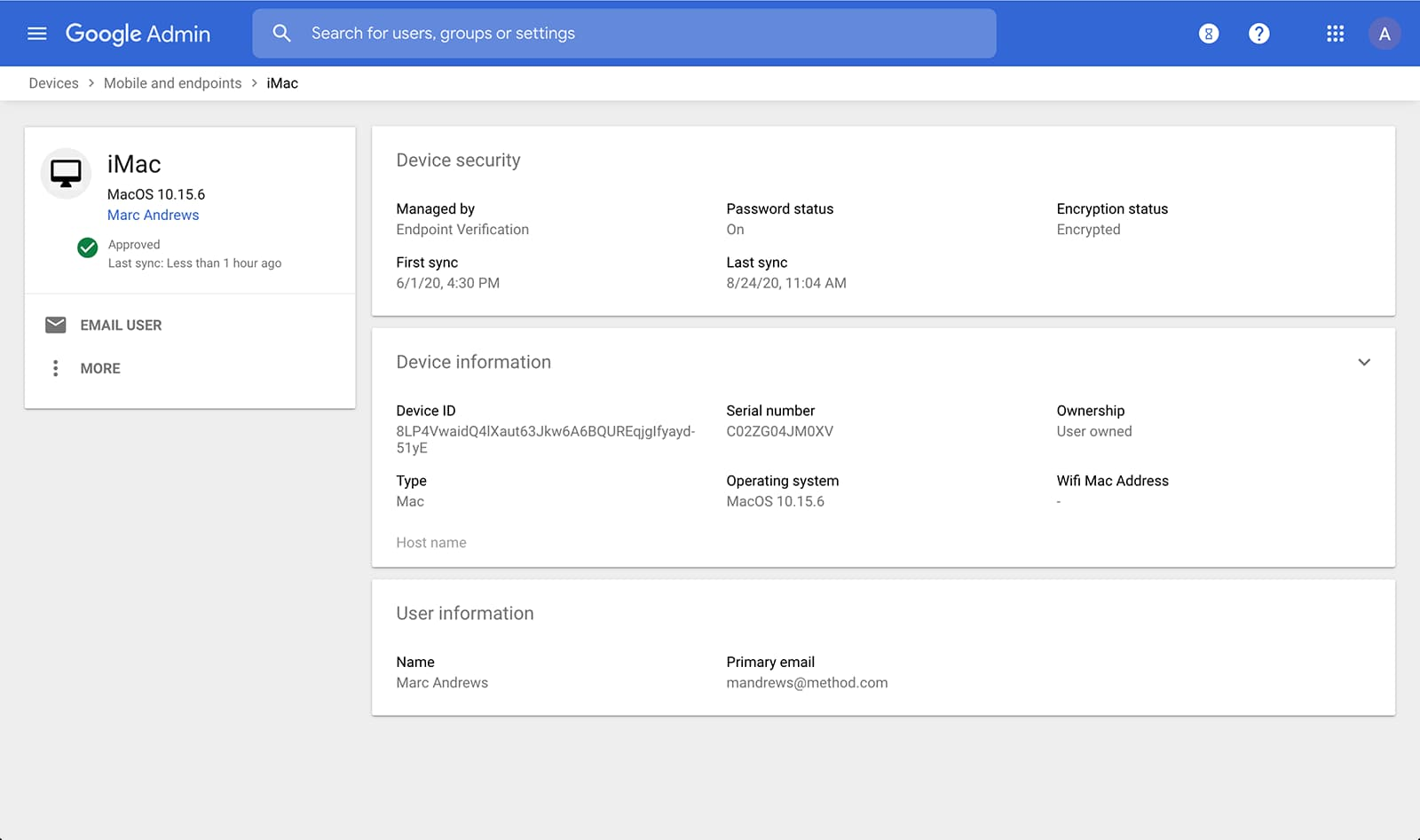
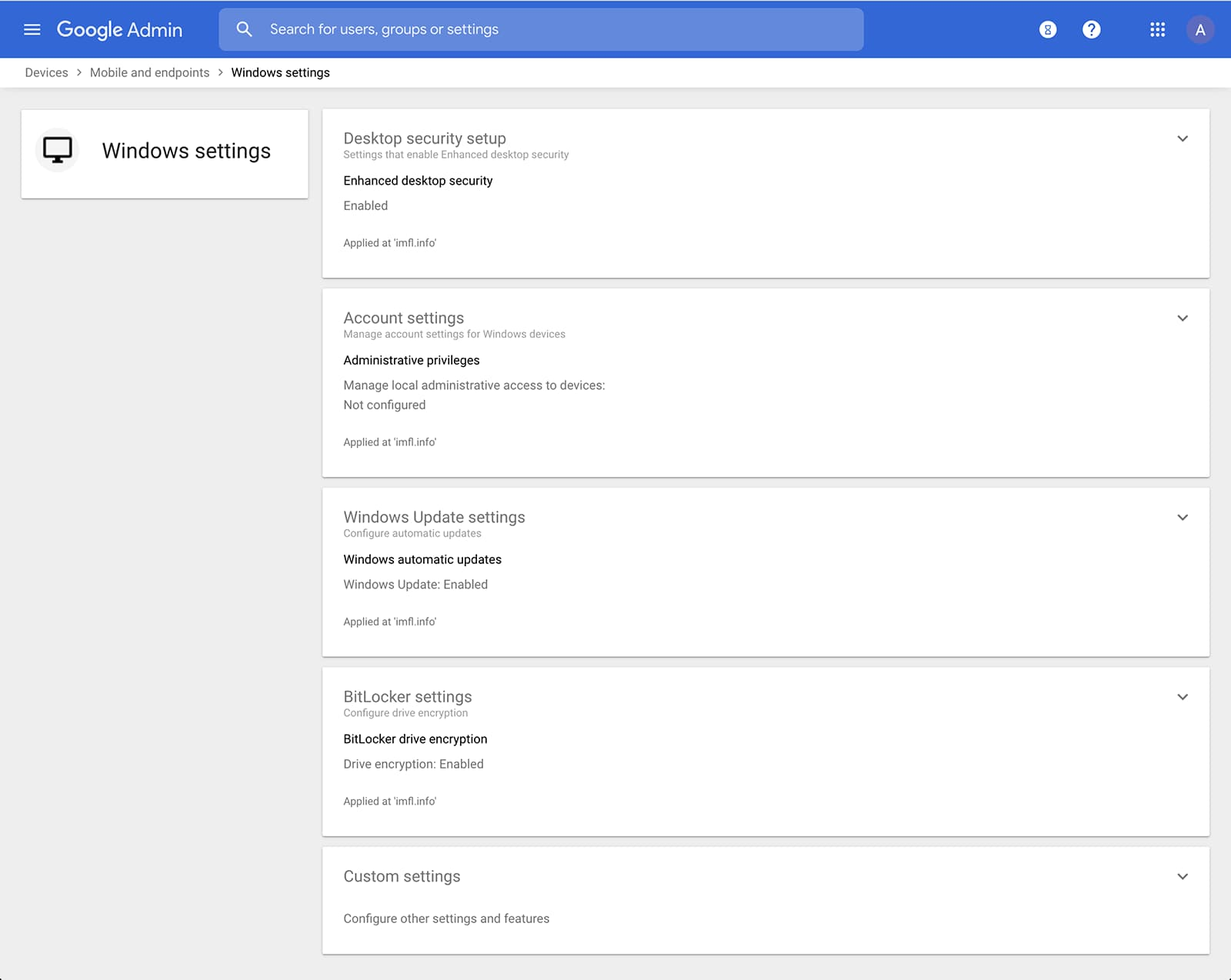
Admins can also manage and secure desktop devices with fundamental device management and enhanced desktop security for Windows. With fundamental device management, when a user logs into G Suite through any browser on a Windows, Mac, Chrome, or Linux device, that device will be automatically enrolled with endpoint management. This provides a base level of security to every desktop device that accesses G Suite data. With enhanced desktop security for Windows, admins can easily manage and secure Windows 10 devices through the admin console.
Enable secure connections without a corporate VPN using context-aware access
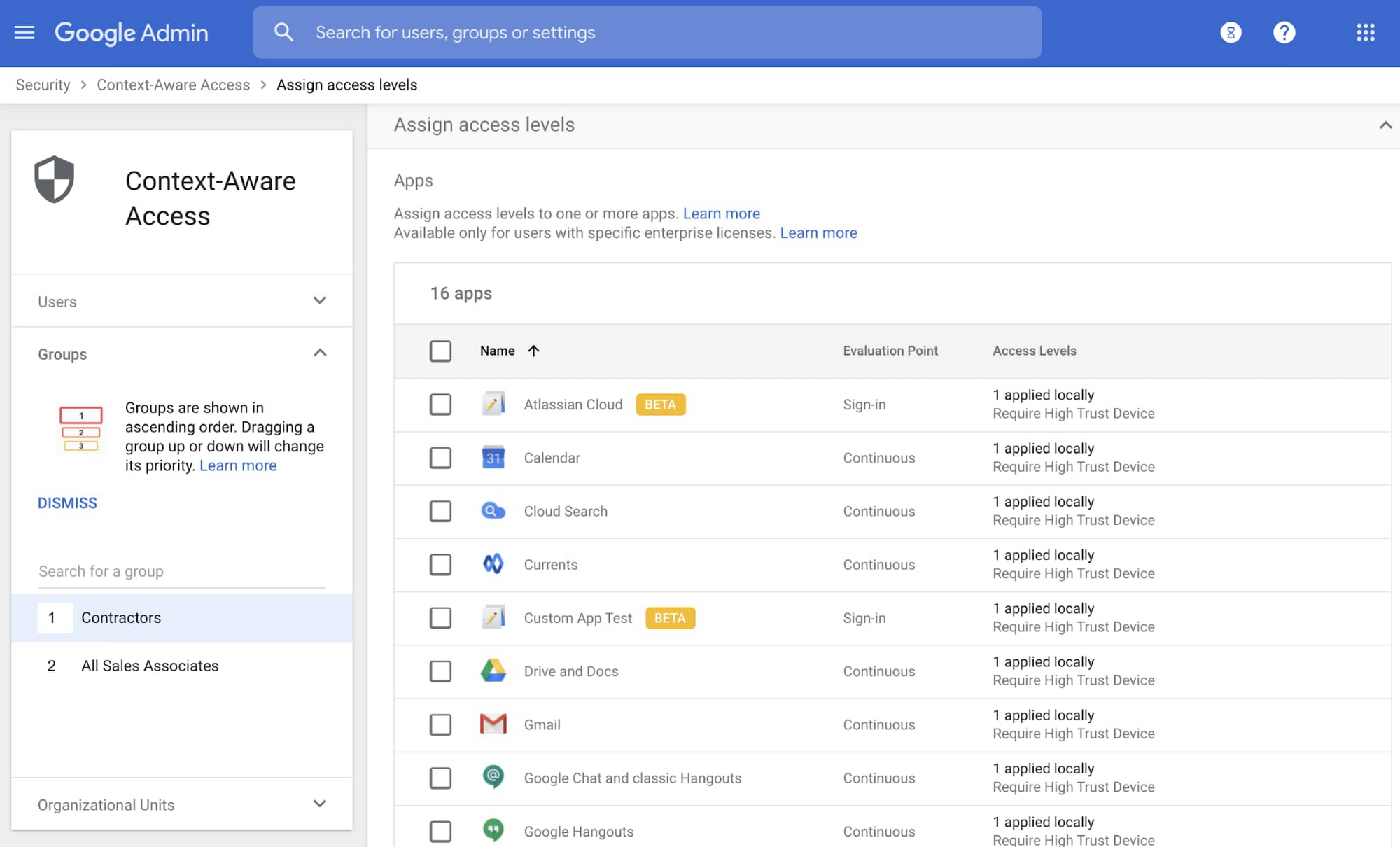
Context-aware access offers protection from unwanted access to G Suite services without the need for a VPN, and allows admins to set up different access levels based on a user’s identity and the context of the request, taking into account factors such as the country, device security status, and IP address of the request. For example, you can require BYOD devices accessing G Suite to meet encryption and password requirements, or restrict contractors from accessing G Suite from company managed Chromebooks.
Control data access with app access control
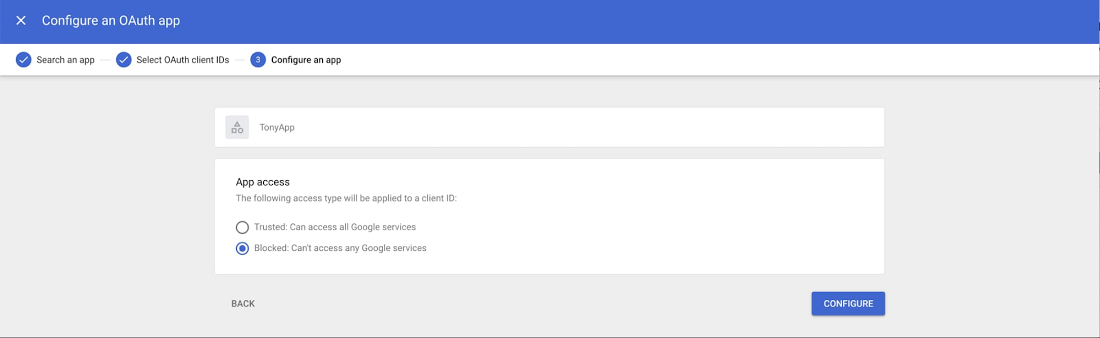
It’s important to protect all devices in your organization—corporate or BYOD—from malicious apps trying to gain access to corporate data. Using app access control, admins can take steps to prevent these apps from tricking users into mistakenly granting access to corporate data. With this feature, admins can choose which third-party apps are allowed to access users’ G Suite data by explicitly trusting, limiting, or blocking access for apps.
Enforce 2-Step Verification
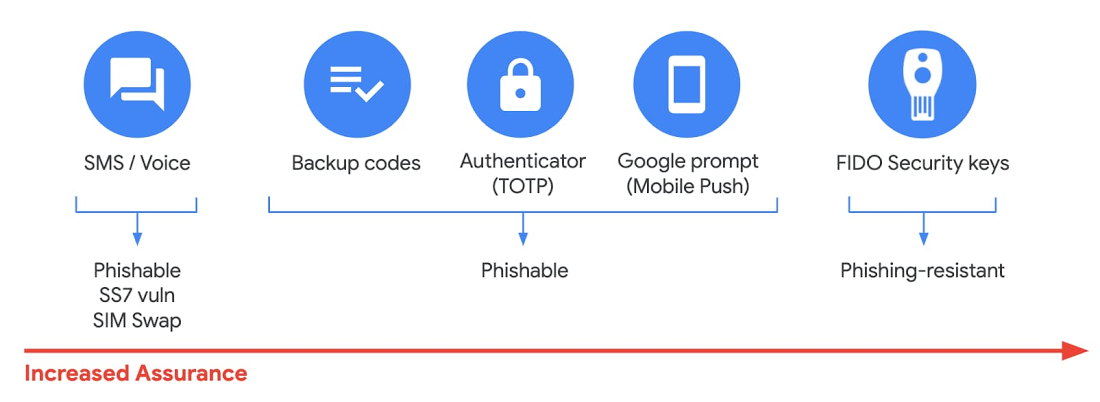
With 2-Step Verification, admins can reduce the risk of unauthorized access by asking users for additional proof of identity when signing in. And you can now use the Advanced Protection Program—our strongest protection for users at risk of targeted attacks. With the Advanced Protection Program for the enterprise, we’ll enforce a specific set of policies for enrolled users including security key enforcement, blocking access to untrusted apps and enhanced scanning for email threats
If you choose not to use security keys for any reason, you have multiple other options to enforce 2-Step Verification on BYOD devices. For Android and iOS, you can use Google prompt, Google Authenticator, text message, or phone call options for a second verification step.
Prevent data loss and leakage with data loss prevention
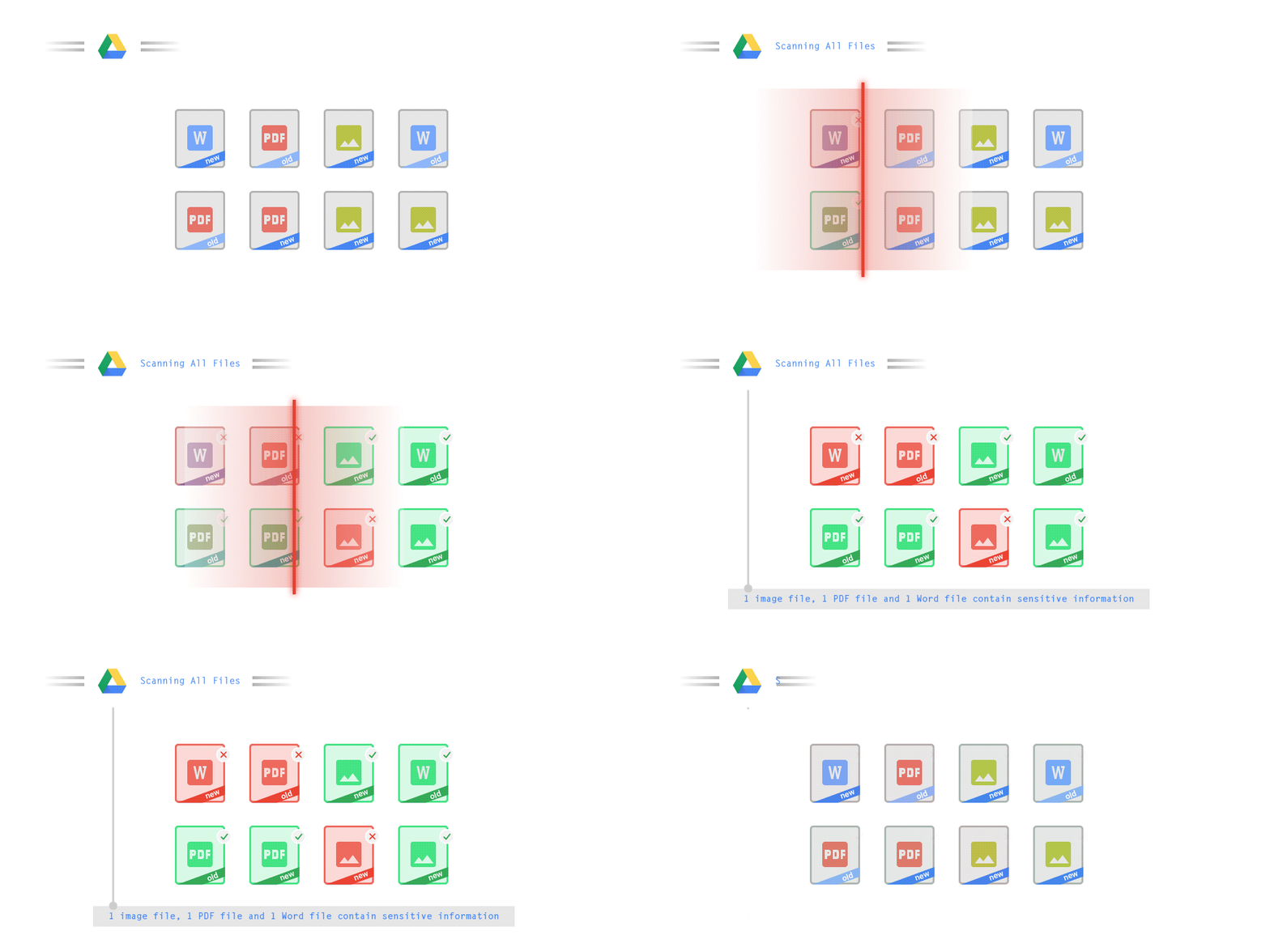
We know that as an admin, one of your highest priorities is to keep internal information safe and secure. That’s why we developed data loss prevention (DLP) policies to help protect sensitive information in Drive, Docs, Sheets, Slides, and Gmail from loss, misuse, or being accessed by unauthorized users. With G Suite DLP, admins can choose which types of data are sensitive and exactly how to protect them. Our controls enable easy detection of a wide variety of common info types, and administrators can supplement this with custom content detectors to meet their organization’s needs. You can also classify files in Drive automatically using DLP rules (beta) to categorize your data by sensitivity levels. DLP works on all the devices in your organization, including BYOD ones, since the protection is at the data and application level.
In addition to DLP, you can use DXP for iOS devices to restrict the copy/pasting of G Suite data to other accounts, personal or otherwise. DXP for iOS can also restrict users’ ability to drag and drop files from specific apps within their G Suite account. Similarly, you can use Google endpoint management to configure Android devices to prevent data sharing between personal and work profiles.
Make retention and eDiscovery possible on all your devices with Vault

To support your organization’s retention and eDiscovery needs, Vault enables corporate data that’s stored in G Suite and accessed by BYOD devices to be available for all your information governance needs. No matter the owner of the device, your organization’s data stored in Gmail, Drive, Chat, Groups, Voice, and Meet are accessible to Vault.
Using the zero-trust security model, the G Suite features above work together to keep your data protected and organization secure across all devices, whether they’re corporate-owned or BYOD.
(*Google Workspace was previously G Suite)
More Relevant Stories for Your Company

Stay on Top of Your Cloud Monitoring with Google’s Mobile App
We are pleased to announce the availability of Google Cloud Monitoring uptime checks in the Google Cloud mobile app. The uptime check capability offered by Cloud Monitoring is a simple yet powerful observability tool to monitor an application's availability and performance on URLs provided by customers. The primary purpose of an uptime check is to

Google AppSheet Leads the Low-code Development Platform Market for Business Developers: Forrester
We’re excited to share the news that leading global research and advisory firm Forrester Research has named Google AppSheet a Leader in the recently released report The Forrester Wave™: Low-code Platforms for Business Developers, Q4 2021. It’s our treasured community of business developers—those closest to the challenges that line-of-business apps can

Bigbasket: Delivering Groceries Across 25 Cities in India
When Bigbasket was founded in December 2011, it guaranteed to deliver goods within a one-hour delivery slot of its customers' choosing or it would refund them 10 percent of their orders. The company also introduced an express service, delivering groceries within 90 minutes of an order being placed. Bigbasket needed
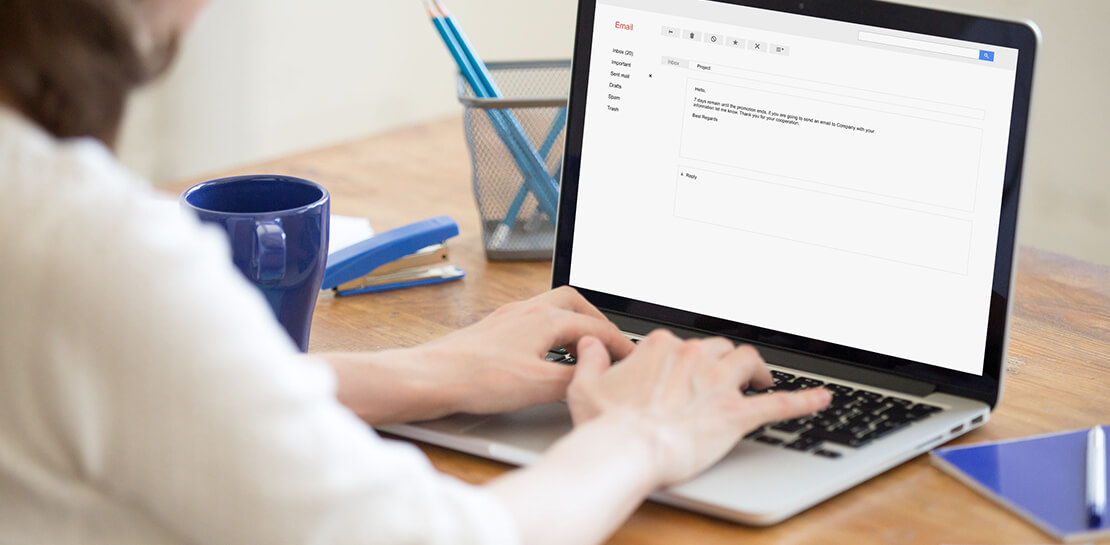
Safeguarding time and attention with Google Workspace and Gmail
As the pandemic forced millions of people to work from home, many of us found ourselves spending more time in video meetings and in our inboxes as a way to bridge the distance from our colleagues. When the workplace became the living room or the makeshift home office, and as
