





4895
Of your peers have already watched this video.
4:00 Minutes
The most insightful time you'll spend today!
Application Development with Kpt
Learn how to create and customize configuration packages with Kpt to build applications and adhere to configuration-as-data philosophy.
3277
Of your peers have already watched this video.
4:43 Minutes
The most insightful time you'll spend today!
Beaconing Malware: How CISOs Can Catch it With Threat Analytics in Just a Few Clicks
Are you checking your network for beacon activity? If you aren’t you are risking your business’ reputation and customer data.
Beaconing is the practice of sending short and regular communications from an infected host to an attacker-controlled Command and Control server, compromising internal information.
These threats often go undetected but with Google’s Backstory you can store and continuously analyze petabytes of security telemetry. It ingests a large amount of telemetry data in just a few clicks, normalizes it, indexes it, correlates it with known threats, and makes it available for analysis.
This unmatched speed combined with UI responsiveness translates incident investigations and threat exploration into tasks that analysts can complete in seconds instead of hours.
Watch this four-minute video to find out how to focus on investigations to fight Malware Beaconing.
All About Cloud Run, its Scalability and Management Features

7395
Of your peers have already read this article.
3:00 Minutes
The most insightful time you'll spend today!
Mindful Containers is a fictitious company that is creating containerized microservice applications. They need a fully managed compute environment for deploying and scaling serverless containerized microservices. So, they are considering Cloud Run.
They are excited about Cloud Run because it abstracts away the cluster configuration, monitoring, and management so they can focus on building the features for their apps. Cloud Run is a fully-managed compute environment for deploying and scaling serverless containerized microservices.

What is Cloud Run?
Cloud Run is a fully-managed compute environment for deploying and scaling serverless HTTP containers without worrying about provisioning machines, configuring clusters, or autoscaling.
- No vendor lock-in – Because Cloud Run takes standard OCI containers and implements the standard Knative Serving API, you can easily port over your applications to on-premises or any other cloud environment.
- Fast autoscaling – Microservices deployed in Cloud Run scale automatically based on the number of incoming requests, without you having to configure or manage a full-fledged Kubernetes cluster. Cloud Run scales to zero— that is, uses no resources—if there are no requests.
- Split traffic – Cloud Run enables you to split traffic between multiple revisions, so you can perform gradual rollouts such as canary deployments or blue/green deployments.
- Custom domains – You can set up custom domain mapping in Cloud Run and it will provision a TLS certificate for your domain.
- Automatic redundancy – Cloud Run offers automatic redundancy so you don’t have to worry about creating multiple instances for high availability
How to use Cloud Run
With Cloud Run, you write your code in your favorite language and/or use a binary library of your choice. Then push it to Cloud Build to create a container build. With a single command—“gcloud run deploy”—you go from a container image to a fully managed web application that runs on a domain with a TLS certificate and auto-scales with requests.
How does Cloud Run work?
Cloud Run service can be invoked in the following ways:
HTTPS: You can send HTTPS requests to trigger a Cloud Run-hosted service. Note that all Cloud Run services have a stable HTTPS URL. Some use cases include:
- Custom RESTful web API
- Private microservice
- HTTP middleware or reverse proxy for your web applications
- Prepackaged web application
gRPC: You can use gRPC to connect Cloud Run services with other services—for example, to provide simple, high-performance communication between internal microservices. gRPC is a good option when you:
- Want to communicate between internal microservices
- Support high data loads (gRPC uses protocol buffers, which are up to seven times faster than REST calls)
- Need only a simple service definition you don’t want to write a full client library
- Use streaming gRPCs in your gRPC server to build more responsive applications and APIs
WebSockets: WebSockets applications are supported on Cloud Run with no additional configuration required. Potential use cases include any application that requires a streaming service, such as a chat application.
Trigger from Pub/Sub: You can use Pub/Sub to push messages to the endpoint of your Cloud Run service, where the messages are subsequently delivered to containers as HTTP requests. Possible use cases include:
- Transforming data after receiving an event upon a file upload to a Cloud Storage bucket
- Processing your Google Cloud operations suite logs with Cloud Run by exporting them to Pub/Sub
- Publishing and processing your own custom events from your Cloud Run services
Running services on a schedule: You can use Cloud Scheduler to securely trigger a Cloud Run service on a schedule. This is similar to using cron jobs. Possible use cases include:
- Performing backups on a regular basis
- Performing recurrent administration tasks, such as regenerating a sitemap or deleting old data, content, configurations, synchronizations, or revisions
- Generating bills or other documents
Executing asynchronous tasks: You can use Cloud Tasks to securely enqueue a task to be asynchronously processed by a Cloud Run service. Typical use cases include:
- Handling requests through unexpected production incidents
- Smoothing traffic spikes by delaying work that is not user-facing
- Reducing user response time by delegating slow background operations, such as database updates or batch processing, to be handled by another service,
- Limiting the call rate to backend services like databases and third-party APIs
Events from Eventrac: You can trigger Cloud Run with events from more than 60 Google Cloud sources. For example:
- Use a Cloud Storage event (via Cloud Audit Logs) to trigger a data processing pipeline
- Use a BigQuery event (via Cloud Audit Logs) to initiate downstream processing in Cloud Run each time a job is completed
How is Cloud Run different from Cloud Functions?
Cloud Run and Cloud Functions are both fully managed services that run on Google Cloud’s serverless infrastructure, auto-scale, and handle HTTP requests or events. They do, however, have some important differences:
- Cloud Functions lets you deploy snippets of code (functions) written in a limited set of programming languages, while Cloud Run lets you deploy container images using the programming language of your choice.
- Cloud Run also supports the use of any tool or system library from your application; Cloud Functions does not let you use custom executables.
- Cloud Run offers a longer request timeout duration of up to 60 minutes, while with Cloud Functions the requests timeout can be set as high as 9 mins.
- Cloud Functions only sends one request at a time to each function instance, while by default Cloud Run is configured to send multiple concurrent requests on each container instance. This is helpful to improve latency and reduce costs if you’re expecting large volumes.
Pricing
Cloud Run comes with a generous free tier and is pay per use, which means you only pay while a request is being handled on your container instance. If it is idle with no traffic, then you don’t pay anything.
Conclusion
After learning about the ease of set up, scalability, and management capabilities of Cloud Run the Mindful Containers team is using it to deploy stateless microservices. If you are interested in learning more, check out the documentation.https://www.youtube.com/embed/oR4btKLRdn4?enablejsapi=1&
For more #GCPSketchnote, follow the GitHub repo. For similar cloud content follow me on Twitter @pvergadia and keep an eye out on thecloudgirl.dev
Google Workspace to Extend Digital Sovereignity for EU Organizations in Later Part of 2022
4802
Of your peers have already read this article.
2:00 Minutes
The most insightful time you'll spend today!
European organizations are moving their operations and data to the cloud in increasing numbers to enable collaboration, drive business value, and transition to hybrid work. However, the cloud solutions that underpin these powerful capabilities must meet an organization’s critical requirements for security, privacy, and digital sovereignty. We often hear from European Union policymakers and business leaders that ensuring the sovereignty of their cloud data, through regionalization and additional controls over administrative access, is crucial in this evolving landscape.
Today, we’re announcing Sovereign Controls for Google Workspace, which will provide digital sovereignty capabilities for organizations, both in the public and private sector, to control, limit, and monitor transfers of data to and from the EU starting at the end of 2022, with additional capabilities delivered throughout 2023. This commitment builds on our existing Client-side encryption, Data regions, and Access Controls capabilities.
Offering enhanced customer controls, including Client-side encryption
Encryption is an important technical control that limits a cloud provider’s access to customer data. Google Workspace already uses the latest cryptographic standards to encrypt all data at rest and in transit between our facilities. The European Data Protection Board recommendations include encryption as part of the supplementary measures to protect data. Google Workspace is leading the way on such measures with our Client-side encryption feature that allows customers to continue benefiting from the powerful innovations of Google Cloud while retaining complete confidentiality and control over their data.
Google Workspace’s unique approach to client-side encryption provides our customers with authoritative privacy control over their data through encryption keys that they can hold on site, within a nation’s borders, or within any other boundary they define. Google never has access to the keys or key holders, which means the data is indecipherable to us and we have no technical ability to access it. We deliver this level of encryption without the need for legacy desktop clients, while maintaining the same high-quality experience for your users such as online co-authoring.
Organizations can choose to use Client-side encryption pervasively across all their users, or create rules that apply to specific users, organizational units, or shared drives. Client-side encryption is now generally available for Google Drive, Docs, Sheets, and Slides, with plans to extend the functionality to Gmail, Google Calendar, and Meet by the end of 2022.
Expanding data location controls
Data regions already allow our customers to control the storage location of their covered data at-rest. We will enhance this capability by the end of 2023 through expanded coverage of data storage and processing in-region along with an in-country copy.
As employees and organizations adopt new ways of working in a hybrid world, they need secure access to data to drive key business outcomes. But this trend, combined with complex technical architectures, presents significant challenges to retaining control over where data resides.
Our cloud-native architecture means that Google Workspace functions fully within a browser, without requiring caches or installed software on employee devices. We adopt a zero-trust approach, with built-in security that provides controls to geo-fence devices and users through Context Aware Access. Moreover, admins can set sharing boundaries and define rules that govern user communication.
In short, we empower admins with critical capabilities that can give them granular control over the flow of their data without hindering the modern collaboration capabilities that form the foundation of Google Workspace. We are enabling organizations to strike the right balance between data location and collaboration across teams, partners, and customers.
Control and transparency for administrative access
When moving to a cloud-based service, organizations need greater visibility and control over all forms of administrative access to their systems, including who has access, the nature and circumstances of that access, and the ability to specify that only certain personnel—in designated countries or regions—have access. These capabilities are core to our approach for meeting evolving digital sovereignty standards.
Building on this approach, we will implement a series of new Access Controls by the end of 2023 that will enable customers to:
- Restrict and/or approve Google support access through Access Approvals.
- Limit customer support to EU-based support staff through Access Management.
- Ensure round-the-clock support from Google Engineering staff, when needed, with remote-in virtual desktop infrastructure .
- Generate comprehensive log reports on data access and actions through Access Transparency, which is already available in GA.
Sovereign Controls for Google Workspace will deliver digital sovereignty through a comprehensive set of capabilities for organizations working in and across EU regions. In parallel, Google Cloud will continue to provide customers with legal mechanisms for international data transfer, which will include making the protections offered by the new EU data transfer framework available once it is implemented.
We remain committed to equipping our customers in Europe and across the globe with powerful technical solutions that help them adapt to, and stay on top of, a rapidly evolving regulatory landscape. We’ve designed and built Google Workspace to operate on a secure foundation, providing capabilities to keep our users safe, their data secure, and their information private. Digital sovereignty is core to our ongoing mission in Europe and elsewhere, and a guiding principle that customers can rely on now and into the future.
Manage IAM permissions with the Google Cloud mobile app

1212
Of your peers have already read this article.
2:00 Minutes
The most insightful time you'll spend today!
What’s new with Permissions Management on the Cloud Mobile App
Identity and Access Management (IAM) is the foundation of a strong cloud security posture, ensuring that the right access and permissions for cloud resources are granted across your organization. The Google Cloud mobile app gives cloud administrators the ability to quickly and easily manage their organization’s cloud identities and access from the mobile platform of their choice.
Permissions management is one of the top user-requested features for the Cloud mobile app based on feedback we’ve received. The Permissions tab is used by more than half of our mobile users every month, highlighting the importance of easily managing permissions on-the-go.
We are excited to announce the availability of enhanced permissions management on the Google Cloud mobile app. This new capability enables you to easily view, assign and search for all the roles in your organization.
Manage permissions easily on-the-go
The Cloud mobile app has expanded beyond supporting the three basic roles of Owner, Editor, and Reader, to supporting all the roles in your organization. Administrators are not only able to see all the roles but also assign these roles across their organization:
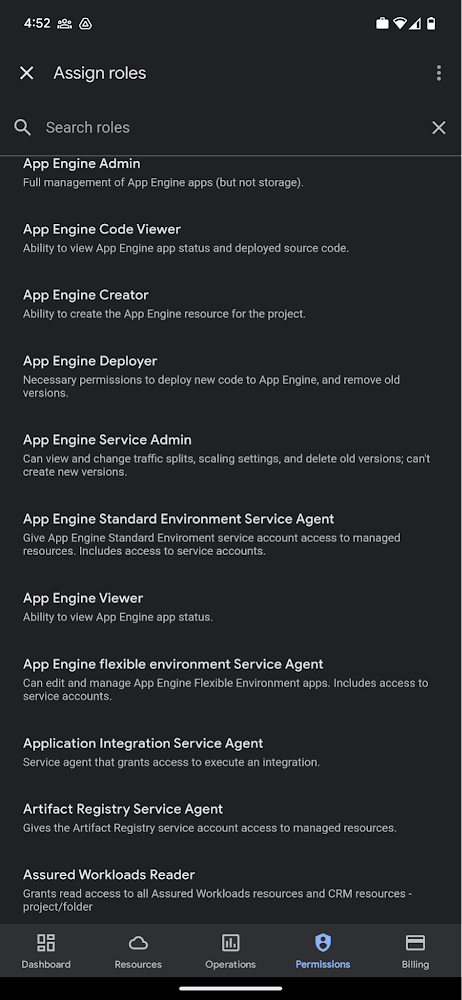
Administrators can also easily view a list of users, and click into each to see all the roles assigned to each user. On top of that, you can easily leverage the search capability to check if a role is assigned and modify its assignment. You can even assign multiple roles at the same time for easy editing. The app will show you a summary of changes before you will proceed.
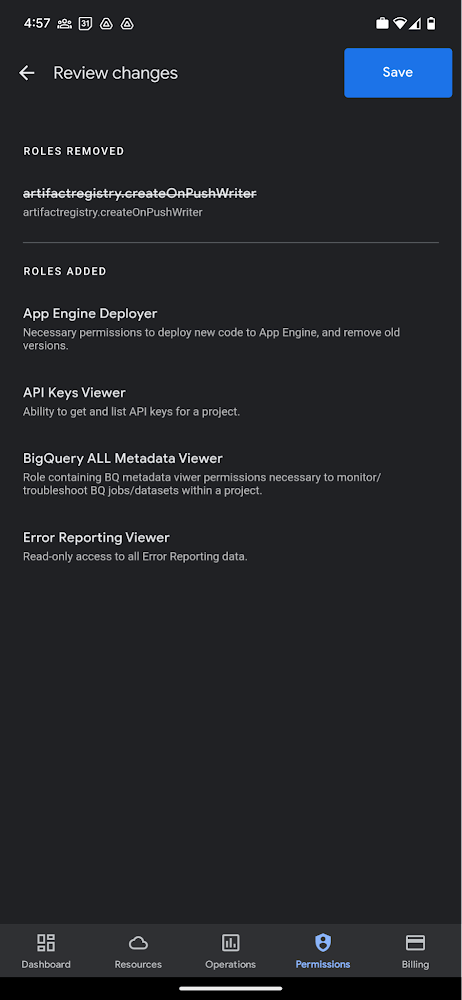
The layout is optimized for mobile, with the categories of information organized for easy viewing. Currently assigned roles are always displayed on the top of the screen so they are easily accessible. Basic roles appear below, followed by all other roles grouped by Google Cloud products.
Get started on the Google Cloud app today
To summarize we’ve enhanced permissions management on the Google Cloud mobile app with:
- Smoother navigation
- Support for all the roles in your organization
- Easy search for assigned roles
- Ability to review changes before applying
Give enhanced permission management a try and explore the possibilities by downloading the app today from Google Play or the Apple App Store. If you have any feedback, we would love to hear from you – simply click on the “send feedback” button in the app to share your experience.
Enhanced Risk Management: Google Cloud & CyberGRX’s Innovative Collaboration

1130
Of your peers have already read this article.
3:30 Minutes
The most insightful time you'll spend today!
Risk managers know there is one assessment type that’s foundational for every risk management program: the vendor risk assessment. Understanding the risk posture of your vendors and third parties, including your cloud providers, is an important part of an effective risk management program. While collecting and analyzing information can often be time-consuming for risk managers, Google Cloud collaborates with third-party risk management (TPRM) providers to make the process easier.
These TPRM organizations provide independent due diligence services and platforms to help automate vendor risk management based on their inspection of security, privacy, business continuity, and operational resiliency controls, aligned with industry standards and regulation compliance. The ultimate goal is to help our customers scale and accelerate their assessments of Google Cloud.
We enable trusted TPRM providers, like CyberGRX, to examine the CyberGRX controls (such as privacy, operational, and management) and operations. Based on their observations, CyberGRX provides a validated cyber risk assessment of Google Cloud’s security posture. Like assessments performed by individual customers, the CyberGRX assessment of Google Cloud details our adherence to industry standards and the security protocols built into our infrastructure.
Using a standardized approach like this, CyberGRX can quickly provide access to a security assessment of Google Cloud. CyberGRX’s validation process focuses on measuring the accuracy of a third party, such as Google Cloud’s assessment answers. CyberGRX analysts and partners evaluate evidence provided by Google Cloud to confirm we have implemented certain critical controls as indicated by their assessment. The assessment of Google Cloud is available to organizations via the CyberGRX website.
How Google Cloud stacks up
CyberGRX’s assessment covers more than 200 controls, and integrates Google Cloud’s responses with analytics, threat intelligence, and risk models. Additionally, CyberGRX’s Framework Mapper provides further functionality by mapping the cyber risk assessment of Google Cloud to more than 20 commonly used industry frameworks and standards. This enables our customers to view the cyber risk assessment of Google Cloud against customers’ specific, local compliance regime requirements including the MITRE ATT&CK framework.
CyberGRX’s Framework Mapper has broad standards and requirements coverage, including:
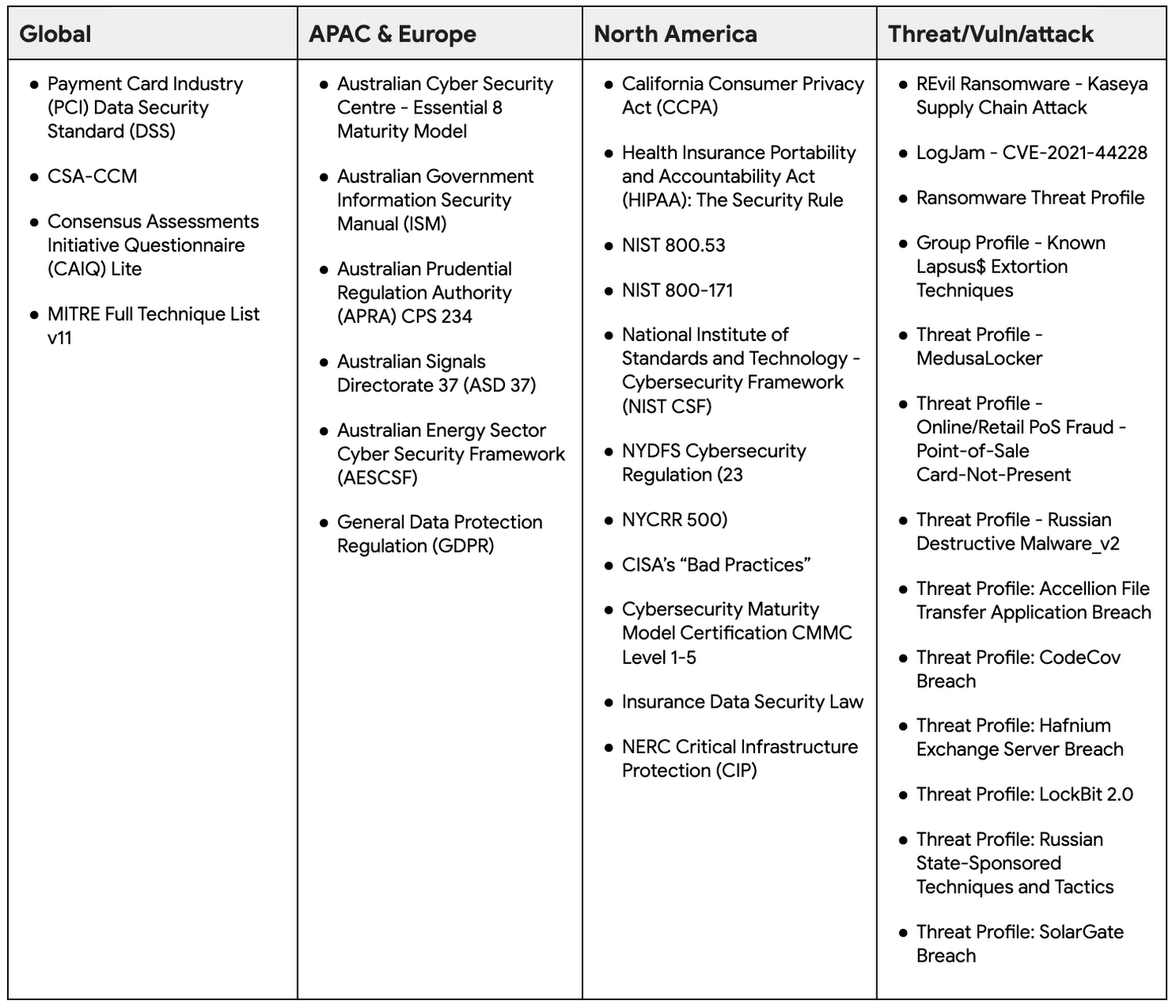
The CyberGRX mapping technology enables customers to see a mapping that is based on their specific needs, aggregated into a single assessment. This saves customers time and effort by eliminating the need for customers to create and repeatedly perform customized assessments of Google Cloud. Customers can now map the cyber risk assessment of Google Cloud to the frameworks they’re accustomed to using.
Integrating the MITRE ATT&CK™ framework
MITRE ATT&CK is a strongly-supported knowledge base that helps model security adversarial behavior, tactics, and techniques which currently includes 13 tactics and 192 techniques.
In June 2022, Google Cloud announced our support and investment in a research partnership with MITRE Engenuity Center for Threat-Informed Defense, which included facilitating the mapping of the MITRE ATT&CK framework to Google Cloud security capabilities.
CyberGRX also recognizes the value of the MITRE ATT&CK framework and maps their foundational assessment to the MITRE ATT&CK framework. This allows organizations to review their security controls and gain visibility into gaps in their defenses. Security leaders can rapidly and easily identify critical problems for remediation.
There are multiple benefits to using the MITRE ATT&CK framework when accessing Google Cloud’s risk assessment through CyberGRX, including:
- Uncovering previously unreported gaps by leveraging MITRE techniques to create kill chains or use cases.
- Integrating results into internal risk and threat management programs that already align with MITRE ATT&CK.
- Increasing credibility and defensibility to CyberGRX risk findings to support third-party decisions and relationships due to connection to MITRE-based analytics.
Take advantage of the Google Cloud and CyberGRX collaboration
CyberGRX’s independent security assessment of Google Cloud is available to Google Cloud customers, and is an easy way for organizations to scale and accelerate their cloud assessments. CyberGRX provides a comprehensive and objective view of Google Cloud’s security posture based on a number of local compliance regime requirements and the MITRE ATT&CK framework. CyberGRX’s centralized assessment supports our customers’ annual vendor risk management processes and reduces the review time.
More Relevant Stories for Your Company

Improving Your Security Posture: Integrating Cloud DLP with Security Command Center
Our Cloud Data Loss Prevention (Cloud DLP) discovery service can monitor and profile your data warehouse to bring awareness of where sensitive data is stored and processed. Profiling is also useful for confirming that data is not being stored and processed where you don’t want it. But how can you

Next-Level Ecommerce Engagement: Transforming User Identities with GCIP
One of the fundamental questions that retailers constantly ask themselves is how well they know their customers and how they can build deeper relationships. Knowing who their customers are can have a direct impact on improving customer engagement, which can lead to increased conversion rates, customer loyalty, lifetime value, and

5 ways a SOAR solution improves SOC analyst onboarding
Editor's note: This blog was originally published by Siemplify on Feb. 19, 2021. The number of unfilled cybersecurity jobs stretches into the millions, and a critical part of the problem is the length of time it takes to backfill a position. Industry group ISACA has found that the average cybersecurity
Center for Internet Security’s Latest Benchmark for Securing Chrome
As the way people work continues to evolve, keeping security policies in place that protect organizations but give workers the ability to get things done is more important than ever. IT and security teams must aim to stay a step ahead of web-based security threats that come their organization’s way.
