





5 ways a SOAR solution improves SOC analyst onboarding

3029
Of your peers have already read this article.
2:30 Minutes
The most insightful time you'll spend today!
Editor’s note: This blog was originally published by Siemplify on Feb. 19, 2021.
The number of unfilled cybersecurity jobs stretches into the millions, and a critical part of the problem is the length of time it takes to backfill a position.
Industry group ISACA has found that the average cybersecurity position lies vacant for up to six months. Some positions, like security analyst, are difficult to find suitable candidates for thanks to workplace challenges such as lack of management support and burnout.
As the old phrase goes, time is money. So when organizations are fortunate enough to fill a position with the appropriate talent, they want to be able to make up for lost time as quickly as possible. This is especially true for roles in the security operations center, a setting notorious for needing staff to field never-ending alerts generated by an often-disparate collection of security tools.
Training new analysts can be a daunting task. They need time to get acquainted with the SOC’s technology stack and processes. Without documentation, they often ask senior analysts for guidance. This can create distractions and consume time.
A reliance on community knowledge—undocumented, not widely-known information within an organization—creates inconsistency within the SOC that contributes to longer ramp-up times for new analysts. Undocumented processes, combined with security tools that don’t talk to each other, typically mean a SOC will need to spend nearly 100 hours—the equivalent of 2 1/2 weeks—getting a single new analyst up to speed.
Enter automation. Throughout an analyst’s career in the SOC, a security orchestration, automation, and response (SOAR) solution can be their best friend, helping expedite routine tasks and liberating them to perform more exciting work. But the technology can also allow even the most junior analysts to have an auspicious onboarding experience—hitting the ground running on day one, acclimated to their new environment, and feeling comfortable about and confident in their future.
Here are five ways a SOAR solution can, among many other activities, aid in analyst onboarding
1) The SOAR solution deploys automated playbooks
The average SOC receives large numbers of alerts per day, and many will be false positives. That amounts to a lot of dead-ends for analysts to chase and leaves little time to investigate legitimate anomalous network activity. The sheer volume of alerts has even prompted some analysts to turn off high-alert features on detection tools, potentially causing teams to miss something important.
SOAR helps analysts hurdle these roadblocks by allowing teams to create custom, automated playbooks, workflows that equalize resources and knowledge across the SOC, and help maintain consistency in the face of new hires and staff turnover. And if analysts should need to create or edit any of the steps in these playbooks, the optimal SOAR solution will enable them to do this without knowledge of specific coding or query languages, acumen that a novice analyst may lack.
2) The SOAR solution groups related alerts
As multiple alerts from different security tools are generated, some SOAR solutions allow you to automatically consolidate and group these alerts into one cohesive interface. This is what is known as taking a threat-centric approach to investigations, with the SOAR looking for contextual relationships in the alerts and, if identified, grouping these alerts into a single case. Having the ability to work more manageable and focused cases right off the bat will help ensure a smoother transition for new analysts.
3) The SOAR solution pieces together the security stack
https://www.siemplify.co/getstartedFrom next-generation firewalls to SIEM to endpoint detection and response, the security stack in any given organization can be vast and complex. No incoming analyst has reasonable time to familiarize themselves with every tool living within the stack—or to manually tap into these different tools to obtain the appropriate context to apply to alerts. A SOAR solution alleviates this challenge by delivering context-rich data that can be analyzed in one central platform, eliminating the need for multiple consoles for alert triage, investigation and remediation. Plus, with a SOAR solution, there is no need for the SOC to directly touch a detection tool that another group may manage.
4) The SOAR solution streamlines collaboration to enable easy escalation and information sharing
Often the SOC is not capable of responding to every threat, meaning other departments, such as networking, critical ops, or change management need to be involved. In addition, executive personnel are likely interested in security trends happening within the organization. Because not every group communicates in the same way—or consumes information in the same way—breakdowns can occur, and frustrations can mount, especially for a new analyst. A SOAR solution can even the playing field by automatically generating instructions, updates, or reports from the SOC to other teams, and vice versa. SOAR is also a useful solution for collaborating within the SOC team as well, especially in the age of remote and hybrid work.
5) The SOAR solution prevents analysts from quickly burning out.
There is a reason why the SOC has obtained the dubious acronym of “sleeping on chair.” Life in this environment can be a tedious, mental grind, prompting certain inhabitants to literally fall asleep from boredom.
SOAR solutions can counter this tedium in two notable ways. They can prevent analysts from having to stare at a multitude of monitors while working long shifts. They can also free analysts to work on more strategic and thought-provoking assignments, which can help improve the company’s overall security posture—and ensure a new entrant to the SOC doesn’t lose steam immediately.
To learn more about SOAR from Siemplify, now part of Google Cloud SecOps suite, including how to download the free community edition, visit siemplify.co/GetStarted.
Google Products Helps HMH’s Healthcare Staff Work from Anywhere Efficiently and Securely!

10184
Of your peers have already read this article.
3:00 Minutes
The most insightful time you'll spend today!
Hackensack Meridian Health (HMH) executive Mark Eimer explains how an ambitiously-timed rollout of a comprehensive suite of Google products helped the entire organization—from doctors to IT staff—achieve better security, cultivate a more equitable work environment, and ultimately, improve patient outcomes.
How does a recently merged, 17-hospital healthcare system fast-track a platform migration and hardware rollout securely and in a way that improves work for everyone, regardless of location or role? These are the questions that kept me up at night in early 2020, when the pandemic demanded a “big bang”—something our legacy laptops and operating systems couldn’t handle.
We began our work with Google in 2020 with the adoption of Chrome as our default browser. As we migrated platforms, keeping patient data safe was of the utmost importance to us, along with providing every staff member with the tools they needed to work virtually. Our staff often experienced issues accessing our web-based applications using Internet Explorer or Edge Browser, a problem that went away when we switched to Chrome. Chrome’s versatile compatibility also made it easier for my team to migrate all of our web-based operations, and Chrome’s security and manageability were key components to making this switch a huge win for the organization.
The success of this migration led us to extend our Google partnership to patient care applications—where Google’s expertise in AI and ML helps scale the use of diagnostics tools and improve other aspects of the patient journey.

Achieving security at every step
Like so many other healthcare organizations, we’ve been concerned about ransomware attacks. This is part of why we moved to Google Workspace and distributed over 3,000 Chrome OS devices in kiosk mode in March of 2020, when many of us went remote due to the pandemic. We were very concerned about team members accessing corporate applications through home devices that were running EOL operating systems (WIN7), as well as a general lack of antivirus and encryption measures.
We were protected by the fact that Google’s software and hardware both had built-in security features that we needed to stave off sophisticated attackers. For example, Chrome OS automatically updates to the latest security update and encrypts data living outside the cloud on the hardware. These features protected us from security-related disruptions, letting us securely move a huge library of file shares and emails across thousands of accounts to Google Chrome OS in just four months.
A year later, in March 2021, we migrated the enterprise over to Google Workspace and saw an immediate reduction in spam by 30% from the inherent built-in AI/ML. This meant staff were less likely to receive (and click through) phishing attempts. My team could connect, create, and collaborate easily and securely—even as more of us were working from home and needed to access sensitive data remotely.
Leveling the playing field
As an organization, we were surprised by how many team members didn’t have personal computers at home. We quickly decided that if we needed team members to work from home, the health network would have to supply hardware. Chromebooks’ lower price tag compared to PCs—on top of their built-in security controls—allowed us to purchase, deploy, and support that initial distribution of 3,000 Chromebooks to team members in less than three weeks, providing devices to every eligible remote employee instead of just a select few. This was vital to reaching our equitable technology goal as part of our diversity and inclusion initiative: everybody has the same tools to do good work.
When all employees have what they need to do their jobs well, we get better patient outcomes. Before we began this cloud adoption journey, patient and staff experiences were different within the hospitals and outside of them.
Now it’s the same wherever our staff is, and we’ve seen efficiency and accessibility benefits extend to the patient side. For example, we built a web-based contact center that supports 80 locations that use Workspace and Chrome OS devices. Since customer service, admin, and providers are all on the same system, it has become a one-stop shop for patients.
Furthermore, through the Grow with Google program, we were able to provide another benefit to employees that drove our equity goals. Google trained 50 non-IT staff members—from environmental services, food and nutrition, and other non-tech areas who were interested in making a career change to IT—on the Google products we were using. They may not have thought about switching to a career in IT before the Grow with Google program came to our organization, but through this partnership, they now have that opportunity.
A strategic, long-term partner
With any large-scale rollout, the work doesn’t end once laptops are in employee hands. Google has shown their commitment to long-term collaboration as they continuously optimize their products for the unique needs of healthcare providers and go the extra mile in tailoring tools to our staff’s workflows.
For example, on the Chrome OS side, the Google team has helped our registration desks and document centers with device integration for hardware like credit card readers and e-signature pads. They’ve also helped us meet security and privacy requirements mandated by state and federal governments around HIPAA, Medicaid, and Medicare reimbursements. Over this next year, we’ll look at a feature roadmap with Google Cloud to deliver further enhancements, iterating on the product itself to meet our needs for the present and the future.

Delivering the future of healthcare
The benefits we’ve seen around security and usability—and the ability to provide all staff with equal access to Google’s technology—are why we’re expanding our partnership with Google to both the administrative and clinical sides of HMH. In addition to further Google rollouts with corporate, next year we’re distributing Chromebooks to all 350 of our ambulatory clinics.
We’re also working with the Google professional services team to create a custom AI model that analyzes 3D mammogram images. This AI model will enable two providers to read mammograms—which adheres to international best practices but is currently rare in the US—without requiring additional time. Conducting double readings of mammograms will yield better health outcomes for our patients, such as a lower patient recall rate and an increased accuracy in detecting breast cancer.
We’re currently building the model using a variety of Google Cloud products, including Cloud Healthcare API. Once complete, this model is expected to be trained, deployed, and maintained in Google’s Vertex AI, allowing our providers to be more productive as they make clinical decisions with AI support. As the model is proven over time, we plan to make the predictive services accessible to other healthcare organizations.
With Google, we’re able to achieve a unified architecture for storing data as well as training and deploying AI models, which enable our staff to work more efficiently and securely from anywhere. While I may not be able to predict the future as accurately as AI can, I foresee our continued partnership with Google as a key part of HMH’s improved provider and patient outcomes.
Announcing reCAPTCHA Enterprise’s Mobile SDK to Help Protect iOS, Android apps

4196
Of your peers have already read this article.
2:30 Minutes
The most insightful time you'll spend today!
reCAPTCHA Enterprise is Google’s online fraud detection service that leverages more than a decade of experience defending the internet. reCAPTCHA Enterprise can be used to prevent fraud and attacks perpetrated by scripts, bot software, and humans. When installed inside a mobile app at the point of action, such as login, purchase, or account creation, reCAPTCHA Enterprise can block fake users and bots while allowing legitimate users to proceed.
To provide more complete coverage for native mobile iOS and Android applications, we’re announcing the general availability of the reCAPTCHA Enterprise Mobile SDK. Designed with digital-first and mobile-first organizations in mind, the new Mobile SDK fully integrates reCAPTCHA Enterprise’s frictionless experience on end-users’ mobile devices.
Why should I use the Mobile SDK?
Unlike most web applications, iOS and Android apps run on physical devices that can provide a wealth of device telemetry to help identify fraud and bot activity. By combining both device and network signals, the new mobile SDK can better protect native mobile applications from bot attacks while unlocking the full potential of reCAPTCHA Enterprise. It provides:
- Frictionless customer experience — no picking fire hydrants from a grid
- Easy integration to your native mobile app with support for popular frameworks like Cocoa Pods and Swift Package Manager
- A regularly-updated device threat model to help stay ahead of attack evolution
Protecting against fraud across all your channels
Customers will be able to leverage the new mobile SDK to implement native iOS and Android protection against the OWASP Top 10 automated attacks common on the internet, which include fraudulent account creation, financial hijacking, and credential stuffing. This is particularly important for mobile workforces and end users who use a mobile app to access products and services. Since mobile traffic surpasses web traffic in many industries, it’s even more important to implement a comprehensive mobile app protection strategy to protect against the most prevalent attacks.
Integrating the new Mobile SDK
If you’re interested in learning more about how to integrate the new Mobile SDK, check out the documentation for iOS and Android. Mobile and Web integrations leverage the same easy to understand pricing for Assessments, found here.
2022’s First Cloud CISO Perspectives: Recap of the Megatrends, Releases and News

9331
Of your peers have already read this article.
3:00 Minutes
The most insightful time you'll spend today!
I’m excited to share our first Cloud CISO Perspectives post of 2022. It’s already shaping up to be an eventful year for our industry and we’re only in month one. There’s a lot to recap in this post, including the U.S. government’s recent efforts to address critical security issues, like open source software security and zero trust architectures. We’ve also released new resources from our Google Cybersecurity Action Team like the Cloud Security Megatrends and the Boards of Directors whitepaper on cloud risk governance.
Cloud Security Megatrends
We’re often asked if the cloud is more secure than on-prem (and why) so we shared our answer in a recent blog post. At Google Cloud, security by design is our priority. We’ve long adopted zero-trust principles for our baseline security architectures and built a global network that relies on defense in depth layers to protect against configuration errors and attacks. But security is always evolving and that is why we also take advantage of the following megatrends:
- Economy of scale: Decreasing the marginal cost of security raises the baseline level of security.
- Shared fate: A flywheel of increasing trust drives more transition to the cloud, which compels even higher security and even more skin-in-the-game from the cloud provider.
- Healthy competition: The race by deep-pocketed cloud providers to create and implement leading security technologies is the tip of the spear of innovation.
- Cloud as the digital immune system: Every security update the cloud gives the customer is informed by some threat, vulnerability, or new attack technique often identified by someone else’s experience. Enterprise IT leaders use this accelerating feedback loop to get better protection.
- Software-defined infrastructure: Cloud is software defined, so it can be dynamically configured without customers having to manage hardware placement or cope with administrative toil. From a security standpoint, that means specifying security policies as code, and continuously monitoring their effectiveness.
- Increasing deployment velocity: Because of cloud’s vast scale, providers have had to automate software deployments and updates, usually with automated continuous integration/continuous deployment (CI/CD) systems. That same automation delivers security enhancements, resulting in more frequent security updates.
- Simplicity: Cloud becomes an abstraction-generating machine for identifying, creating and deploying simpler default modes of operating securely and autonomically.
- Sovereignty meets sustainability: The cloud’s global scale and ability to operate in localized and distributed ways creates three pillars of sovereignty. This global scale can also be leveraged to improve energy efficiency.
If you’re an IT decision maker, pay attention to these megatrends that will continue to drive and reinforce cloud security and will outpace the security of on-prem infrastructure well into the future.
U.S. Federal government cybersecurity momentum
- Open source software security: Earlier this month, Google participated in the White House Summit on open source software security. The meeting came at a critical time for the industry following December’s Log4j vulnerabilities and was both a recognition of the challenge and an important first step towards addressing it. The open source software ecosystem is not homogenous, despite the fact that the industry often thinks of or treats it this way. Some of it, like Linux, is highly curated, while other critical software is supported through diffuse communities including technology companies and other stakeholders. There is also a long tail of many other critical projects driven by a dedicated community of maintainers around the world, including Googlers. In light of this reality, we welcomed the chance to share our recommendations to advance the future of open source software security. Some work we’ve done includes founding the Open Source Security Foundation, which has been instrumental already in making security improvements. We’ve also helped drive a number of key security initiatives within the open source community including security scorecards, the SLSA framework to improve the security and integrity of open source packages, and Secure Open Source Rewards to financially incentivize improvements to critical open source security projects.
- OMB’s Federal zero trust strategy: The publication of the Office of Management and Budget’s zero trust architecture strategy marks an important step for the U.S. federal government’s efforts to modernize under Executive Order 14028. Google Cloud supports this approach, which recognizes the immense security benefits offered by modern computing architectures. For the past decade, Google has successfully applied zero trust principles through our BeyondCorp and BeyondProd frameworks for providing end-user access and securing our cloud workloads. And we’ve brought these best practices from our own journey to global governments and businesses of any size through solutions like BeyondCorp Enterprise and capabilities like Binary Authorization and Anthos Service Mesh, which are embedded in Anthos, our managed application platform. For Federal agencies embarking on this zero trust journey, the Google Cybersecurity Action Team will offer our expertise by conducting Zero Trust Foundations strategy workshops, which can help organizations in the public and private sectors develop actionable and achievable strategies and plans for zero trust implementation.
Google Cybersecurity Action Team Highlights
Here are the latest updates, products, services and resources across our security teams this month:
Security
- Democratizing security operations: We recently announced that Siemplify, a leading security orchestration, automation and response (SOAR) provider, is joining Google Cloud to help companies better manage their threat response. Providing a proven SOAR capability with Chronicle’s approach to security analytics is an important step forward in our vision to advance invisible security and democratize security operations for every organization.
- Security by design: The Highmark Health security team is using “secure-by-design” techniques to address the security, privacy, and compliance aspects of its Living Health solution with Google Cloud’s Professional Services Organization (PSO). Google has long advocated for and followed security by design principles, which is why we’re continuously building enhanced security, controls, resiliency and more into our cloud products and services.
- Secure collaboration for hybrid work environments: The Google Workspace team shared its recommendations for businesses as they prepare for the future of work, where the hybrid/flexible work model is becoming standard practice and a new approach to security is essential.
- Anthos Policy Controller CIS Benchmark enforcement: A big part of our shared fate philosophy is to build secure products and not just security products. A recent example of this in action is embedding CIS benchmark policy conformance in the Anthos Policy Controller. We believe the more we embed approaches like this into our products, the more application and infrastructure teams can intrinsically embed security at the start and reduce toil for the security team.
- DevOps for technology-driven organizations and startups: A key success factor for many security programs is the partnership and integration with development teams, and there are some great resources and lessons in our DORA research.
- Security by design with Chrome OS: ABN AMRO’s Asia-Pacific region team recently shared how they are using Chrome OS and CloudReady to work securely in the cloud, reduce total cost of ownership, and add flexibility for employees. This is a great example of secure by design principles in the use of Chromium.
Risk & Compliance
- Boards of Directors summary guide to cloud risk governance: The latest whitepaper from the Google Cybersecurity Action Team outlines how boards of directors can prioritize safe, secure, and compliant adoption processes for cloud technologies within their organizations.
- TruSight Risk Assessment of Google Cloud: TruSight recently released a comprehensive
risk assessment report on Google Cloud. Our Enterprise Trust team collaborated on this robust assessment of Google Cloud services to validate the design and implementation of controls. TruSight’s risk assessment of our security controls will help customers accelerate and complete their risk management due diligence. - Data governance: Check out this new blog series on data governance where our teams explain the role of data governance, its importance, and the necessary processes to run an effective data governance program. Implementing data governance will help maximize value derived from business data, build user trust, and ensure compliance with required security measures.
Controls and Products
- Encrypting Data Fusion: To help meet the security, privacy and compliance requirements of customers in regulated industries like finance or public sector, we announced the general availability of Customer Managed Encryption Keys (CMEK) integration for Cloud Data Fusion, which enables encryption of both user data and metadata at rest with a key that customers can control through our Cloud Key Management Service (KMS).
Don’t forget to sign-up for our newsletter if you’d like to have our Cloud CISO Perspectives post delivered every month to your inbox. We’ll be back next month with more updates and security-related news.
Securing apps using Anthos Service Mesh

3977
Of your peers have already read this article.
1:30 Minutes
The most insightful time you'll spend today!
Hi there! I’m David Challoner from Access Site Reliability Engineering (SRE), here with Anthony Bushong from Developer Relations to talk about how Corp Eng is adopting Anthos Service Mesh internally at Google.
Corp Eng is Google’s take on “Enterprise IT”. A big part of the Corp Eng mission is running the first and third party software that powers internal business processes – from legal and finance to floor planning and even the app hosting our cafe menus – all with the same security or production standards as any of Google’s first party applications.
Googlers need to access these applications, which sometimes then need to access other applications or other Google Cloud services. This traffic can cross different trust boundaries which can trigger different policies.
Access SRE runs the systems that mediate this access, and we implemented Anthos Service Mesh as part of our solution to secure the way Googlers access these applications.
But why?
You can probably tell, but the applications Corp Eng is responsible for have disparate requirements. This often means that certain applications are tied to disparate infrastructure due to legal, business or technical reasons – which can be challenging when those infrastructures work and operate differently.
Enter Anthos. Google Cloud built Anthos to provide a consistent platform interface unifying the experience of working with apps on these varying underlying infrastructures, with the Kubernetes API at its foundation.
So when searching for the right tool to build a common authorization framework to mediate access to CorpEng services, we turned to Anthos – specifically Anthos Service Mesh, powered by the open-source project, Istio. Whether these services were deployed in Google Cloud, in Corp Eng data centers, or at the edge onsite at actual Google campuses, Anthos Service Mesh delivered a consistent means for us to program secure connectivity.
To frame the impact ASM had on our organization, it’s helpful to introduce the roles of the folks who manage and use it:
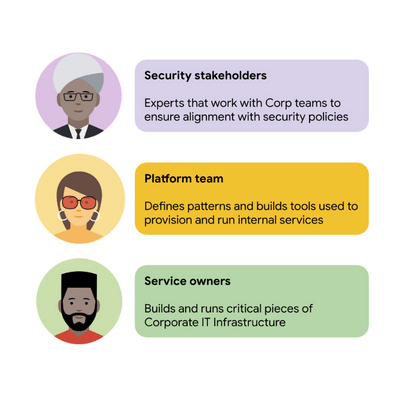
For security stakeholders, ASM provides an extensible policy enforcement point running next to each application capable of provisioning a certificate based on the identity of the workload and enforcing mandatory fine-grained application-aware access controls.
For platform operators, ASM is delivered as a managed product, which reduces operational overhead by providing out-of-the-box release channels, maintenance windows, and a published Service Level Objective(SLO).
For service owners, ASM enables the decoupling of their applications from networking concerns, while also providing features like rate limiting, load shedding, request tracing, monitoring, and more. Features like these were typically only available for applications that ran on Borg, Google’s first-party cluster manager that ultimately inspired the creation of Kubernetes.
In sum, we were able to secure access to a plethora of different services with minimal operational overhead, all while providing service owners granular traffic control.
Let’s see what this looks like in practice!
The architecture
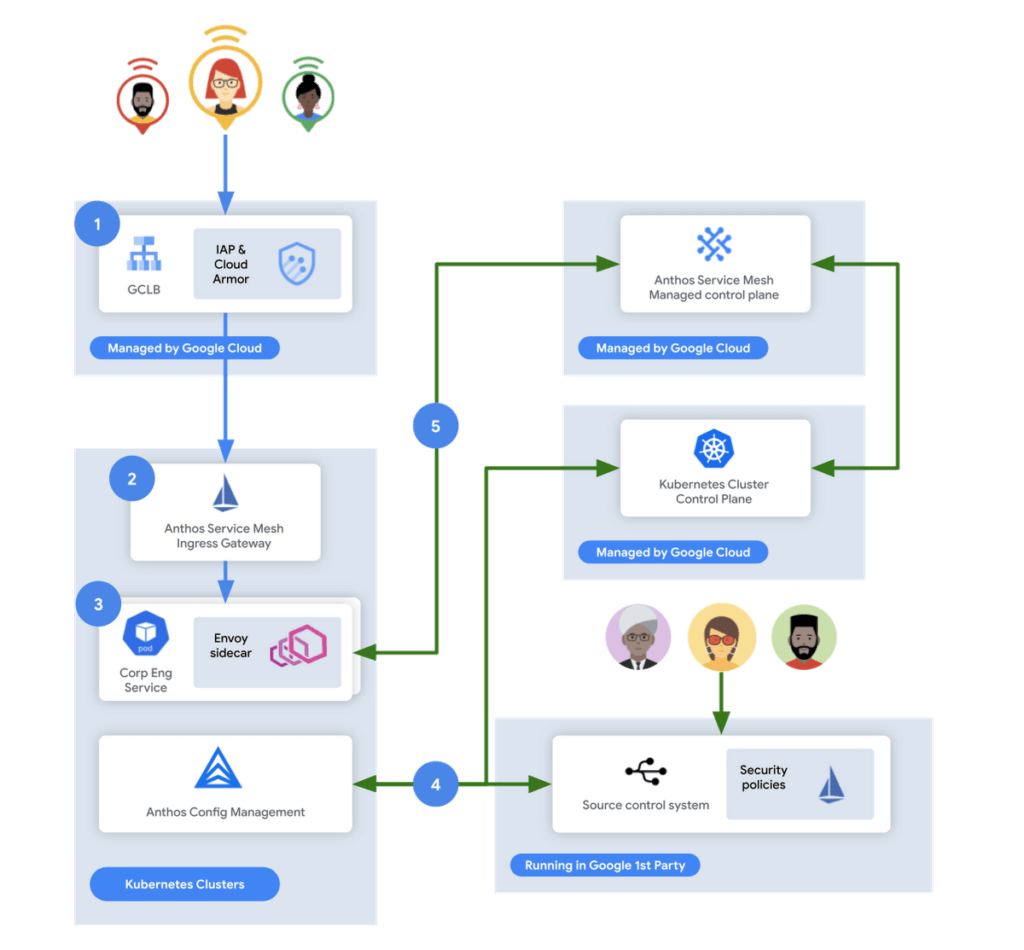
In this flow, user access first reaches the Google Cloud Global Load Balancer [1], configured with Identity Aware Proxy (IAP) and Cloud Armor. IAP is the publicly available implementation of Google’s internal philosophy of BeyondCorp, providing an authentication layer that works from untrusted networks without the need for a VPN.
Once a user is authenticated, their request then flows to the Ingress Gateway provided by Anthos Service Mesh [2]. This provides additional checks that traffic flows to services only when the request has come through IAP, while also enforcing mutual TLS (mTLS) between the Anthos Service Mesh Gateway to the Corp services owned by various teams.
Finally, additional policies are enforced by the sidecar running in every single service Pod [3]. Policies are pulled from source control using Anthos Config Management[4], and are propagated to all sidecars by the managed control plane provided by Anthos Service Mesh[5].
Managing the mesh
If you’re not familiar with how Istio works, it follows the pattern of a control plane and a data plane. We talked a little bit about the data plane – it is made up of the sidecar containers running alongside all of our service Pods. The control plane, however, is what’s responsible for updating these sidecars with the policies we want to enforce:
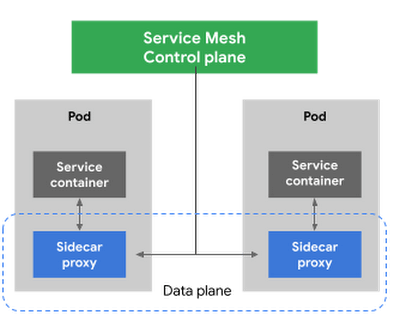
Figure 3 – High-level architecture for Istio
Thus, it is critical for us to ensure that the control plane is healthy. This is where Anthos Service Mesh gives our platform owners a huge advantage with its support for a fully-managed control plane. To provision cloud resources, like many other companies, our organization uses Terraform, the popular open-source infrastructure as code project. This gave us a declarative and familiar means for provisioning the Anthos Service Mesh control plane.
First, you enable the managed control plane feature for GKE by creating the google_gke_hub_feature resource below using Terraform.
resource "google_gke_hub_feature" "feature_asm" {
name = "servicemesh"
location = "global"
provider = google-beta
}
Keep in mind that at publication time, this is only available via the google-bet provider in Terraform.
Once created, we then provision a ControlPlaneRevision custom resource in a GKE cluster to spin up a managed control plane for ASM in that cluster:
apiVersion: mesh.cloud.google.com/v1alpha1
kind: ControlPlaneRevision
metadata:

name: asm-managed

namespace: istio-system
spec:

type: managed_service

channel: regular
Using this custom resource, we are able to set the release channel for the ASM managed control plane. This allows for our platform team to define the pace of upgrades in accordance with our team’s needs.
In addition to managing the control plane, ASM also provides management functionality around the data plane to ensure each sidecar Envoy is kept up to date with the latest security updates and is compatible with the control plane – one less thing for service operators to worry about. It does this using Kubernetes Mutating Admission Webhooks and Namespace labels to modify our Pod workload definitions to inject the appropriate sidecar proxy version.
Syncing mandatory access policies
With the core Anthos Service Mesh components in place, our security practitioners can define consistent, mandatory security policies for every single GKE cluster, using Istio APIs.
For example, one policy is enforcing strict mTLS between Pods using automatically provisioned workload identity certificates. Earlier, we talked about how this is enforced between the Istio Gateway; that same policy enforces mTLS between all Pods in our cluster.

Another policy we implement is denying all egress traffic by default, requiring service teams to explicitly declare their outbound dependencies. The following is an example of using an Istio Service Entry to allow granular access to a specific external service – in this case, Google. This helps prevent unintended access to external services.
apiVersion: networking.istio.io/v1alpha3

kind: ServiceEntry
metadata:

name: google
spec:

hosts:
  - www.google.com

ports:
  - number: 443

name: https

protocol: HTTPS

resolution: DNS

location: MESH_EXTERNAL
EOF
These policies are automatically synced to all service mesh namespaces in each cluster using Anthos Config Management. By using our internal source control system as a source of truth, Anthos Config Management can sync and reconcile policies across all of our GKE clusters, ensuring that these policies are in place for every single one of our services. You can find more details about our implementation of Anthos Config Management here.
With this in place, our team plans on eventually migrating away from security automation that operates solely based on explicit IP, port and protocol policies.
Integration with Identity-aware Proxy
The publicly available version of the BeyondCorp proxy used by CorpEng is called Identity-aware Proxy (IAP), which offers an integration with Anthos Service Mesh. IAP allows you to authenticate users trying to access your services and apply Context-Aware-Access policies. This integration comes with two main benefits:
- Ensuring that user traffic to services in the service mesh only come through Identity-aware Proxy
- Enforcing Context-aware access (CAA) trust levels for devices, defined by multiple device signals we collect
Identity-aware Proxy allows us to capture this information in a Request Context Token (RCToken), which is a JSON Web Token (JWT) created by Identity-aware Proxy that can be verified by ASM. IAP inserts this JWT into the Ingress-Authorization header. Using Istio Authorization Policies similar to the following policy, any requests without this JWT are denied:
apiVersion: security.istio.io/v1beta1
kind: AuthorizationPolicy
metadata:
name: iap-gateway-require-jwt
namespace: istio-system
spec:
selector:
matchLabels:
app: istio-iap-ingressgateway
action: DENY
rules:
- from:
- source:
notRequestPrincipals: ["*"]
Here is an example policy that requires a fullyTrustedDevice access level – this might be a device in your organization that is known to be corporate-owned, fully-updated, and running an IT-approved configuration :
apiVersion: security.istio.io/v1beta1
kind: AuthorizationPolicy
metadata:
  name: require-fully-trusted-device
  namespace: fooService
spec:
  selector:
    matchLabels:
      app: fooService
  action: ALLOW
  rules:
  - from:
    - source:
       requestPrincipals: ["*"]
    when:
    - key: request.auth.claims[google.access_levels]
      values: ["accessPolicies/$orgId/accessLevels/fullyTrustedDevice"]
This allows our security team to not only secure service to service communications, or outbound calls from services, but also specifically require incoming requests come from trusted devices and authenticated users using a trusted device.
Enabling service teams
As an SRE, one of our priorities is ensuring Service-level indicators (SLIs), SLOs, and Service-level agreements (SLAs) exist for services. Anthos Service Mesh helps us empower service owners to do this for their services, as it exposes horizontal request metrics like latency and availability to all services in the mesh.
Before Anthos Service Mesh, each application had to export these separately (if at all). With ASM service owners can easily define their Service’s SLOs in the cloud console or via terraform using these horizontally exported metrics. This then allows us to integrate SLOs into our higher-level service definitions so we can enable SLO monitoring and alerting by default. You can see the SRE book for more details on SLOs and Error budgets.
The takeaway
ASM is a powerful tool that enterprises can use to modernize their IT infrastructure. It provides:
- A shared environment-agnostic enforcement point to manage security policy
- A unified way to provision identities, describe application dependencies
This also enables previously unheard of operational capabilities such as distributed tracing or incremental canary rollouts – which were difficult to find in the typical enterprise application landscape.
Because it can be incrementally adopted and composed with existing authorization systems to close gaps – barriers to adoption are low and we recommend you start evaluating it today!
Secrets Management Risk Analysis: Mitigating Threats with Secret Manager

911
Of your peers have already read this article.
2:30 Minutes
The most insightful time you'll spend today!
Can you keep a secret? Many people struggle to keep secrets. So do organizations. An organization’s digital credentials — its passwords, API keys, tokens, and encryption keys baked into its software code — are its vital secrets, used to authenticate access to protected resources and services.
The security of these secrets represent one of the biggest risks that enterprises must manage when securing application infrastructure and environments. Fortunately, we have an important tool to help our customers better manage their secrets: Google Cloud Secret Manager.
Secret Manager is a secure and efficient tool to centrally store, access, manage, and audit your organization’s secrets. As we noted in our April 2023 Threat Horizons Report, insufficient management of credentials and keys is now one of the top security issues facing cloud customers today. In particular, we have observed service account keys being used for everything from insider threats to cross-cloud breaches to intellectual property espionage.
Along with the increasing popularity of DevOps, secrets are used throughout development. In some cases, secrets are coded as plaintext into configuration files or directly into functions, where they can end up exposed in code repositories. If compromised, secrets can be used to gain unauthorized privileged access to enterprise data, infiltrate critical systems, and launch attacks.
Secret Manager can help organizations better manage their secrets even as concerns over potential security breaches grow. Organizations must consider the following four points during their secrets management risk analysis:
- Secrets sprawl: As organizations move more workloads to the cloud, the number of secrets they need to manage increases exponentially. This can lead to secrets sprawl, where secrets are stored in a variety of different locations, making it difficult to track and manage them.
- Human error: Humans are fallible, and this is especially true when it comes to managing secrets. Mistakes, such as accidentally sharing a secret with the wrong person or the misconfiguration of a secret management tool, can have serious consequences.
- Compliance violations: Organizations that handle sensitive data are subject to a variety of compliance regulations, including PCI-DSS, SOC 2, HIPAA, and GDPR. Without proper management, secrets could lead to potential compliance violations.
- Downtime: If secrets are not properly managed or rotated, it could lead to downtime for applications and services that rely on them.
Secret Manager can enable IT teams to keep track of secrets by providing a centralized place to store and manage them. You can access secrets directly from the Secret Manager console, or use the Secret Manager API or SDKs. Secret Manager is also designed to scale with your application. You can store as many secrets as you need without performance issues, and its API-first design lets you extend and integrate into other existing systems.
Secret Manager integrations in Google Cloud
In many cases, developers save secret configuration details as plaintext in code for ease of use. There are two main risks associated with this approach:
- Anyone with access to secrets can see and copy them. There is no way to enforce any auditing or access controls practices here.
- It becomes difficult to move code between dev, test, and production environments.
Cloud-centered integrations supported by Secret Manager with other Google Cloud services in the software supply chain make it easier and safer to store and access sensitive information.
The tool is about the secret information being made securely available in build or runtime.
Secret Manager integrations also can play a role in securing sensitive information in the software supply chain:
1. Integration with CI/CD systems used to build and deploy your software
Cloud Code integration can help developers build more secure applications by preventing hard-coding of sensitive configuration data such as passwords, credentials, and tokens in the codebase. It replaces them with secrets which can be programmatically fetched as required. You can create, access, and modify secrets directly from within your favorite IDE without having to navigate away from it. Integration is available for VS Code, IntelliJ, and Cloud Shell Editor.
Cloud Functions integration lets you access and expose secrets as environment variables or as a volume via the filesystem.
Cloud Build: To handle sensitive data in builds, you can store them in Secret Manager and then configure the build steps to access the information directly. In the build steps, you can associate the value of a secret to an environment and you can access this value via an environment variable from scripts or processes. Two common uses for fetching sensitive dependencies during build time are:
- Storing Docker authentication credentials for pull/push of images to Docker hub.
- Creating GitHub pull requests in response to builds.
2. Integration with runtime engines
Cloud Run: Native integration makes it easy to mount secrets in cloud run services. Using this integration, secrets can be made available to containers either as volume mounts or as env variables. Sensitive dependencies can be stored in environment variables, by referencing a secret name stored in Secret Manager instead of storing it as a plain text environment variable. This secret access operation can be done directly from the Cloud Run console without changing a single line of source code.
If code reads secrets from a file instead of an env variable, the “mounted as volume” option can be used to make secrets look like files to the env vars. During service deployment, the service account used to run the containers are checked to see if they have the required permissions or not, preventing any unwanted access.
Kubernetes and GKE: The CSI driver–provider solution is an open-source work that provides integration with K8s. The driver lets customers centrally store their secrets in Google Secret Manager and consume them in a kubernetes native manner, as files mounted in K8s pods. The solution also comes with additional syncing capabilities. This method of consuming secrets also allows users to take advantage of SM’s capabilities like versioning, managed rotation, default/CMEK encryption and cloud-focused integrations with other Google Cloud services. Work is currently ongoing to provide official support to the driver solution as a GKE component.
Is Secret Manager right for my organization?
Developers carry a big responsibility to protect the sensitive data they are entrusted to work with, and keep secrets out of their code. However, organizations also have a responsibility to provide the tools and solutions needed to help their teams deliver on these expectations. Secret Manager makes it straightforward for developers to store and manage secrets while improving security.
To learn more about Secret Manager, please review these resources:
Read the previous Best Kept Security Secrets blogs here:
More Relevant Stories for Your Company

Google’s BeyondCorp to Accelerate U.S. Govt’s Zero Trust Journey
In May, the White House issued an Executive Order aiming to improve the nation’s cybersecurity defenses and requiring US Federal agencies to develop plans to implement Zero Trust architectures in alignment with National Institute of Standards and Technology National Institute of Standards and Technology (NIST) guidance. This Executive Order also calls on agencies

Encryption in Transit: The Next Level in Cloud Security
Security is often a deciding factor when choosing a public cloud provider. At Google Cloud, security is of the utmost importance and the security strategy encompass authentication, integrity, and encryption, for both data at rest and in transit. Hence, Google Cloud encrypts and authenticates all data in transit at one




Why Enterprises Should Choose Google Cloud for their SAP Workloads
Change is a constant for SAP customers. Now more than ever, SAP customers need solutions that provide them business agility, rock solid availability and security and true economic value. Learn how Google Cloud can guide your SAP journey to the cloud with simple and no cost migrations, powerful infrastructure and

One Goal for Google: Get PQC Ready
The National Institute of Standards and Technology (NIST) on Tuesday announced the completion of the third round of the Post-Quantum Cryptography (PQC) standardization process, and we are pleased to share that a submission (SPHINCS+) with Google’s involvement was selected for standardization. Two submissions (Classic McEliece, BIKE) are being considered for the
