






3701
Of your peers have already downloaded this article
8:45 Minutes
The most insightful time you'll spend today!
3533
Of your peers have already watched this video.
1:30 Minutes
The most insightful time you'll spend today!
Building a Software Delivery Platform with Anthos
Understand the architecture of a GitOps based CI/CD pipeline. In a CI/CD pipeline, there are three different personas — developers, operators, and security engineers.
This demo includes common developer, operator, and security engineer tasks to show how the patterns can improve your company’s software delivery performance.
Speeding Up Digital Transformation with Industry Solutions

2661
Of your peers have already read this article.
2:30 Minutes
The most insightful time you'll spend today!
Most large enterprises started with their own data centers and developed in-house solutions to meet their specific business needs, regulations, and industry specifications. These solutions were based on traditional applications from legacy vendors like Oracle and Microsoft — or even mainframes — and from key technology providers like SAP and VMware. During the last decade, organizations started their digital transformation journey by migrating their IT infrastructure, applications, and data to the cloud to reduce operating costs and gain efficiencies as their needs scaled.
The next step in the journey was to take advantage of cloud-based data analytics, services and scalability to drive business growth and revenue. Rather than offer generic “industry clouds” which require multi-year IT deployments and significant customization, Google Cloud has responded to customer needs by developing production-ready industry solutions that address specific use cases with repeatability across organizations.
These industry solutions are grounded in Google Cloud’s differentiated capabilities, including AI, ML, and data analytics. With these, you can dramatically reduce implementation time and realize value from the cloud more quickly with deep insights into your customers and more efficient interactions with your suppliers and partners.
Here are some highlights from the That Digital Show Podcast where Umesh Vemuri, VP of Global Strategic Customers and Industries at Google Cloud, discusses his industry strategy.
Why Google Cloud solutions?
“We are uniquely positioned to help enterprises with solutions based on our deep understanding of customer needs that are supported by our technologies. There are three examples that come to mind.
The first is our understanding of the consumer from the standpoint of running an ecommerce platform. We have the solutions to run digital platforms at a very large scale, including the engineering practices we bring to support organizations during important high traffic events like Black Friday and Cyber Monday.
The second example deals with media and entertainment as a whole. We operate the world’s largest streaming service and support the largest digital platforms currently out there. That means that whatever problems our media customers are experiencing, there’s a good chance we’ve already seen them and know how to deal with them.
Finally, there is our experience with AI and big data. Our leadership in deploying our AI and big data healthcare technologies has given us the experience to solve complex problems — such as techniques to support evidence-based selection, drug therapy, and molecular profiling.”
B to B to C
“Google is a B to B organization, I always like to add that we are also B to B to C, because the concern the consumer ultimately has is their experiences and the journey that they’re on. Connecting the dots between the business and the consumer experience is really critical and a real big differentiator in how we could better serve our customers.
For example, take Ford Motors. Really think about the challenges they have — traditional problems around manufacturing, core I. T. modernization and information, and how to remove costs. But then when you really think about the core of the business, how do you actually make this incredible experience for drivers of Ford vehicles? What do you want to do from an infotainment perspective? What do you want to do in speech-to-text conversion?
And suddenly your business is really a direct-to-consumer experience. Ultimately, all the infrastructure and technology is designed to provide the consumer — who’s ultimately buying that vehicle — with an amazing experience that will maintain their loyalty.
From this example, we can see this kind of linkage in every industry: from retail and e-commerce, media, and direct streaming to healthcare with direct telehealth.”
Solutions that transform the consumer experience
“The consumer’s expectations are constantly shifting and we have to be able to provide the technologies, the structure, and the solutions to our customers to be able to meet those changing expectations at that consumer level.
So first, we want to be very clear on the industry segments that we’re going to focus on and what we believe our clear differentiation will be. So we’ve focussed on ten industries including: retail, financial services, manufacturing, telecommunications, media and entertainment, healthcare and life sciences, education, government, supply chain and logistics and gaming.
Second, we really have to be very prescriptive about the solution pillars in the areas where our customers tell us we have challenges. We want to build solutions that solve not only today’s issues, but the problems of the future.
And third, in those pillars, we have to be very clear on what are the specific use cases that we think have high value for our customers. Then make these available as a catalog of actual products and production-ready solutions that we and our partners in the ecosystem provide.”
Google Cloud industry solutions focus on our top ten industries where we can provide differentiated value to organizations. Whether it’s discovery in retail, AI-enabled call centers, or automotive tools for connected cars, we are delivering production-ready solutions that are ready to implement with minimum customization.
Ten Videos to Help You Get Started with Anthos

3456
Of your peers have already read this article.
2:00 Minutes
The most insightful time you'll spend today!
Do you need to develop, run and secure applications across your hybrid and multicloud environments? Look no further than Anthos, our managed application platform that extends Google Cloud services and engineering practices to your environments so you can modernize apps faster and establish operational consistency across them.
To help you get started, we created the Anthos 101 video learning series. It’s a great starting point for understanding the basics of Anthos—and you can watch the whole series in less than an hour.
Let’s dive in.
1. What is Anthos?
Discover what Anthos is and how it helps enterprises manage their applications. You’ll learn about the different tools Anthos offers—like the ability to create environs and platform administrators—to help you modernize and manage your application infrastructure.
https://youtube.com/watch?v=Qtwt7QcW4J8%3Fenablejsapi%3D1%26
2. How to get started with Anthos on Google Cloud
Ready to get started with Anthos? In this lesson, you’ll create your own Anthos deployment. You’ll learn about the different tools on the Anthos dashboard—like the Service Mesh card and Cluster Status cards—plus how to deploy and alter Google Kubernetes Engine (GKE) clusters and Anthos Service mesh via Google Compute Engine.
https://youtube.com/watch?v=ghFiaz7juoA%3Fenablejsapi%3D1%26
3. How to modernize and run Windows apps in Anthos
Running a Windows application that’s in need of modernization? In this lesson, you’ll discover how you can create and deploy a Windows-based application on Anthos, allowing you to modernize existing workloads and manage your application seamlessly. You’ll even learn to do this without requiring access to source code, re-writing, or re-architecting your existing application.
https://youtube.com/watch?v=w6tzIjZhTIk%3Fenablejsapi%3D1%26
4. How to build modern CI/CD with Anthos
Continuous integration? Continuous delivery? These are two things that developers need to think about with container adoption for hybrid or multicloud environments. Learn how Anthos helps you increase your development velocity without compromising the security of your application.
https://youtube.com/watch?v=ayRz5NmM6pI%3Fenablejsapi%3D1%26
5. How to adopt a multi-cluster strategy for your applications in Anthos
There are a number of use cases that might require a multi-cluster strategy, such as maintaining multiple clusters on the cloud and in your own data center. In this lesson, learn the different tools that Anthos offers—such as GKE, Anthos Config Management, and Anthos Service Mesh—to help deploy and manage multiple clusters.
https://youtube.com/watch?v=ZhF-rTXq-Us%3Fenablejsapi%3D1%26
6. How to improve observability using golden signals in Anthos
Observability is important in application development, but without the right tools monitoring your services can be time consuming. In this episode, learn more how Anthos Service Mesh can help you monitor and manage the four Golden Signals—latency, traffic, errors, and saturation—for your application.
https://youtube.com/watch?v=EDcy3KwV22o%3Fenablejsapi%3D1%26
7. How to modernize legacy Java apps with Anthos
Looking to modernize legacy Java applications? In this lesson, you’ll learn the three categories of Java applications and their unique paths for modernization via Anthos. This can help you reduce your dependency on high-cost proprietary software, decrease operational overhead, and increase software delivery speed.
https://youtube.com/watch?v=hQWcx9iyF7E%3Fenablejsapi%3D1%26
8. How to apply a zero trust model for your deployments using Anthos
It’s time to rethink traditional security models when it comes to network observability and consistency for IAM permissions. In this lesson, learn how you can adopt a zero trust posture with Anthos. This allows you to better secure your network, detect underlying network compromises, and ensure workloads are secure before deployment.
https://youtube.com/watch?v=_qG2vazlozY%3Fenablejsapi%3D1%26
9. How to go beyond business continuity with Anthos
Sometimes a business continuity plan that only covers traditional backup and disaster recovery methods simply isn’t enough. In this lesson, learn how Anthos helps resolve issues like data redundancy, scaling without code changes, implementing measurable SLOs, and much more. You’ll also discover how Anthos can help you manage your application beyond the confines of traditional backup and disaster recovery approaches.
https://youtube.com/watch?v=kUxqdjbgcXs%3Fenablejsapi%3D1%26
10. How to simplify identity with Anthos
Managing identities across hybrid and multicloud environments can be troublesome and hard to keep track of. Luckily, Anthos is capable of simplifying identity management for users and workloads. In this lesson, you’ll learn how Anthos can extend and enable existing capabilities, while allowing you to manage IAM permissions across multiple Anthos and GKE environments.
https://youtube.com/watch?v=6P-4ZEwZqZQ%3Fenablejsapi%3D1%26
11. How to optimize costs with Anthos
Learn how you can optimize costs with Anthos through greater observability, improving existing operations, and many other practices.
https://youtube.com/watch?v=8mGICSTRoYw%3Fenablejsapi%3D1%26
Keep learning
This is just a starting point for learning about Anthos. To deepen your knowledge, check out our free on-demand training: Getting started with Anthos. Or, you can download our Anthos Under the Hood ebook, or get hands-on right now with the Anthos sandbox.
5 Best Practices for Cloud Cost Optimization

5803
Of your peers have already read this article.
3:30 Minutes
The most insightful time you'll spend today!
When customers migrate to Google Cloud Platform (GCP), their first step is often to adopt Compute Engine, which makes it easy to procure and set up virtual machines (VMs) in the cloud that provide large amounts of computing power. Launched in 2012, Compute Engine offers multiple machine types, many innovative features, and is available in 20 regions and 61 zones!
Compute Engine’s predefined and custom machine types make it easy to choose VMs closest to your on-premises infrastructure, accelerating the workload migration process cost effectively. Cloud allows you the pricing advantage of ‘pay as you go’ and also provides significant savings as you use more compute with Sustained Use Discounts.
As Technical Account Managers, we work with large enterprise customers to analyze their monthly spend and recommend optimization opportunities. In this blog, we will share the top recommendations that we’ve developed based on our collective experience working with GCP customers.
Getting ready to save
Before you get started, be sure to familiarize yourself with the VM instance pricing page—required reading for anyone who needs to understand the Compute Engine billing model and resource-based pricing. In addition to those topics, you’ll also find information about the various Compute Engine machine types, committed use discounts and how to view your usage, among other things.
Another important step to gain visibility into your Compute Engine cost is using Billing reports in the Google Cloud Console and customizing your views based on filtering and grouping by projects, labels and more. From there you can export Compute Engine usage details to BigQuery for more granular analysis. This allows you to query the datastore to understand your project’s vCPU usage trends and how many vCPUs can be reclaimed. If you have defined thresholds for the number of cores per project, usage trends can help you spot anomalies and take proactive actions. These actions could be rightsizing the VMs or reclaiming idle VMs.
Now, with these things under your belt, let’s go over the five ways you can optimize your Compute Engine resources that we believe will give you the most immediate benefit.
1. Apply Compute Engine rightsizing recommendations
Compute Engine’s rightsizing recommendations feature provides machine type recommendations that are generated automatically based on system metrics gathered by Stackdriver Monitoring over the past eight days. Use these recommendations to resize your instance’s machine type to more efficiently use the instance’s resources. It also recommends custom machine types when appropropriate. Compute Engine makes viewing, resizing and other actions easier right from the Cloud Console as shown below.
Recently, we expanded Compute Engine rightsizing capabilities from just individual instances to managed instance groups as well. Check out the documentation for more details.

For more precise recommendations, you can install the Stackdriver Monitoring agent which collects additional disk, CPU, network, and process metrics from your VM instances to better estimate your resource requirements. You can also leverage the Recommender API for managing recommendations at scale.
2. Purchase Commitments
Our customers have diverse workloads running on Google Cloud with differing availability requirements. Many customers follow a 70/30 rule when it comes to managing their VM fleet—they have constant year-round usage of ~70%, and a seasonal burst of ~30% during holidays or special events.
If this sounds like you, you are probably provisioning resources for peak capacity. However, after migrating to Google Cloud, you can baseline your usage and take advantage of deeper discounts for Compute workloads. Committed Use Discounts are ideal if you have a predictable steady-state workload as you can purchase a one or three year commitment in exchange for a substantial discount on your VM usage.
We recently released a Committed Use Discount analysis report in the Cloud Console that helps you understand and analyze the effectiveness of the commitments you’ve purchased. In addition to this, large enterprise customers can work with their Technical Account Managers who can help manage their commitment purchases and work proactively with them to increase Committed Use Discount coverage and utilization to maximize their savings.
3. Automate cost optimizations
The best way to make sure that your team is always following cost-optimization best practices is to automate them, reducing manual intervention.
Automation is greatly simplified using a label—a key-value pair applied to various Google Cloud services. For example, you could label instances that only developers use during business hours with “env: development.” You could then use Cloud Scheduler to schedule a serverless Cloud Function to shut them down over the weekend or after business hours and then restart them when needed. Here is an architecture diagram and code samples that you can use to do this yourself.
Using Cloud Functions to automate the cleanup of other Compute Engine resources can also save you a lot of time and money. For example, customers often forget about unattached (orphaned) persistent disk, or unused IP addresses. These accrue costs, even if they are not attached to a virtual machine instance. VMs with the “deletion rule” option set to “keep disk” retain persistent disks even after the VM is deleted. That’s great if you need to save the data on that disk for a later time, but those orphaned persistent disks can add up quickly and are often forgotten! There is a Google Cloud Solutions article that describes the architecture and sample code for using Cloud Functions, Cloud Scheduler, and Stackdriver to automatically look for these orphaned disks, take a snapshot of them, and remove them. This solution can be used as a blueprint for other cost automations such as cleaning up unused IP addresses, or stopping idle VMs.
4. Use preemptible VMs
If you have workloads that are fault tolerant, like HPC, big data, media transcoding, CI/CD pipelines or stateless web applications, using preemptible VMs to batch-process them can provide massive cost savings. In fact, customer Descartes Labs reduced their analysis costs by more than 70% by using preemptible VMs to process satellite imagery and help businesses and governments predict global food supplies.
Preemptible VMs are short lived— they can only run a maximum of 24 hours, and they may be shut down before the 24 hour mark as well. A 30-second preemption notice is sent to the instance when a VM needs to be reclaimed, and you can use a shutdown script to clean up in that 30-second period. Be sure to fully review the full list of stipulations when considering preemptible VMs for your workload. All machine types are available as preemptible VMs, and you can launch one simply by adding “-preemptible” to the gcloud command line or selecting the option from the Cloud Console.
Using preemptible VMs in your architecture is a great way to scale compute at a discounted rate, but you need to be sure that the workload can handle the potential interruptions if the VM needs to be reclaimed. One way to handle this is to ensure your application is checkpointing as it processes data, i.e., that it’s writing to storage outside the VM itself, like Google Cloud Storage or a database. As an example, we have sample code for using a shutdown script to write a checkpoint file into a Cloud Storage bucket. For web applications behind a load balancer, consider using the 30-second preemption notice to drain connections to that VM so the traffic can be shifted to another VM. Some customers also choose to automate the shutdown of preemptible VMs on a rolling basis before the 24-hour period is over, to avoid having multiple VMs shut down at the same time if they were launched together.
5. Try autoscaling
Another great way to save on costs is to run only as much capacity as you need, when you need it. As we mentioned earlier, typically around 70% of capacity is needed for steady-state usage, but when you need extra capacity, it’s critical to have it available. In an on-prem environment, you need to purchase that extra capacity ahead of time. In the cloud, you can leverage autoscaling to automatically flex to increased capacity only when you need it.
Compute Engine managed instance groups are what give you this autoscaling capability in Google Cloud. You can scale up gracefully to handle an increase in traffic, and then automatically scale down again when the need for instances is lowered (downscaling). You can scale based on CPU utilization, HTTP load balancing capacity, or Stackdriver Monitoring metrics. This gives you the flexibility to scale based on what matters most to your application.
High costs do not compute
As we’ve shown above, there are many ways to optimize your Compute Engine costs. Monitoring your environment and understanding your usage patterns is key to understanding the best options to start with, taking the time to model your baseline costs up front. Then, there are a wide variety of strategies to implement depending on your workload and current operating model.
For more on cost management, check out our cost management video playlist. And for more tips and tricks on saving money on other GCP services, check out our blog posts on Cloud Storage, Networking and BigQuery cost optimization strategies. We have additional blog posts coming soon, so stay tuned!
Google Launches Open Saves To Power Gaming Platforms Scale to User Demands

5498
Of your peers have already read this article.
1:30 Minutes
The most insightful time you'll spend today!
Many of today’s games are rich, immersive worlds that engage the audience in ways that make a gamer a part of a continuing storyline. To create these persistent experiences, numerous storage technologies are required to ensure game data can scale to the standards of gamers’ demands. Not only do game developers need to store different types of data—such as saves, inventory, patches, replays, and more—but they also must keep the storage system high-performing, available, scalable, and cost-effective.
Enter Open Saves, a brand-new, purpose-built single interface for multiple storage back ends that’s powered by Google Cloud and developed in partnership with 2K. Now, development teams can store game data without having to make the technical decisions on which storage solution to use, whether that’s Cloud Storage, Memorystore, or Firestore.
“Open Saves demonstrates our commitment to partnering with top developers on gaming solutions that require a combination of deep industry expertise and Google scale,” said Joe Garfola, Vice President of IT and Security at 2K. “We look forward to continued collaboration with Google Cloud.”
Game development teams can save game data against Open Saves without having to worry about the optimal back-end storage solution, while operations teams can focus on needed scalability and storage options. Here’s how it looks in practice:
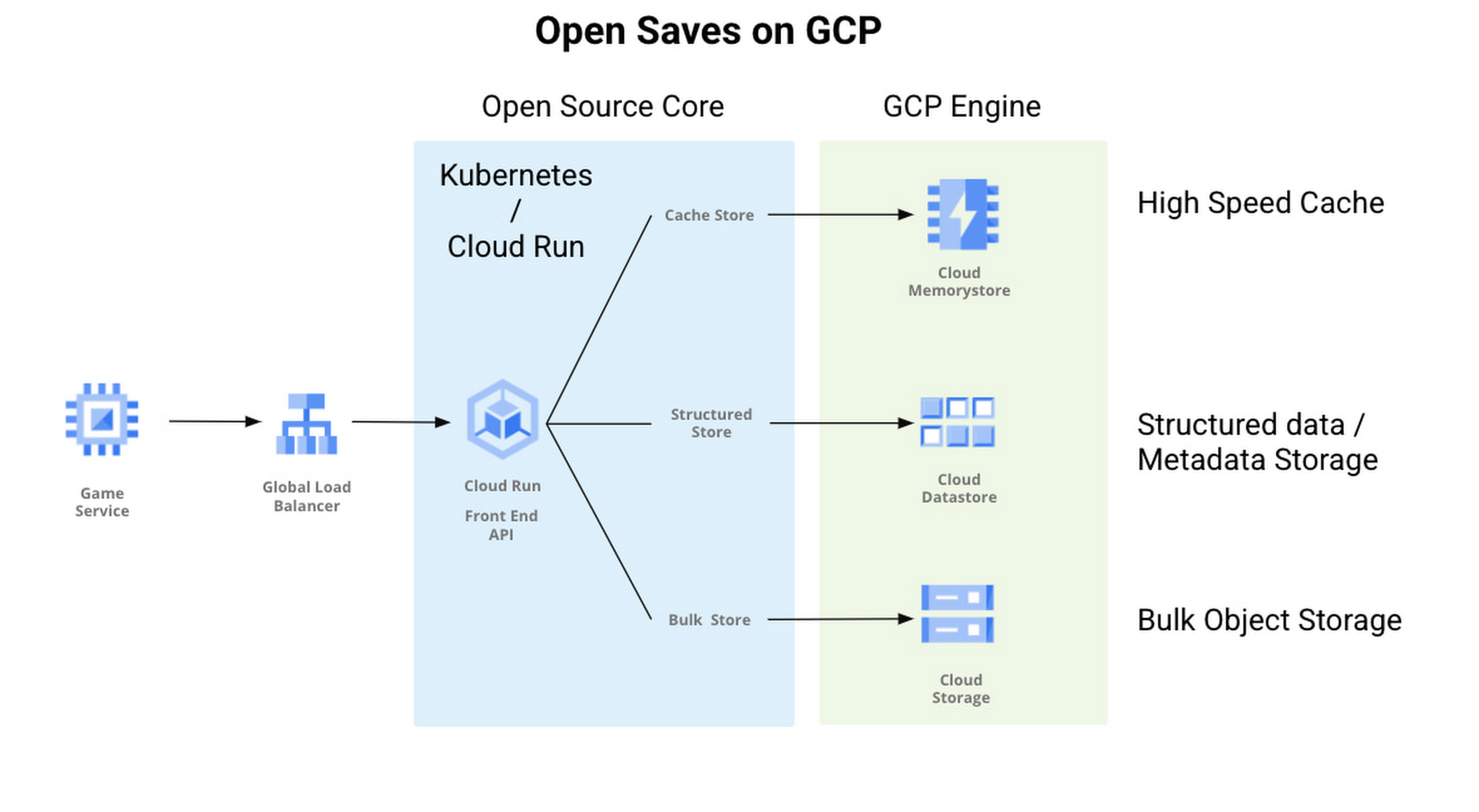
With Open Saves, game developers can run a cloud-native game storage system that is:
- Simple: Open Saves provides a unified, well-defined gRPC endpoint for all operations for metadata, structured, and unstructured objects.
- Fast: With a built-in caching system, Open Saves optimizes data placements based on access frequency and data size, all to achieve both low latency for smaller binary objects and high throughput for big objects.
- Scalable: The Open Saves API server can run on either Google Kubernetes Engine or Cloud Run. Both platforms can scale out to handle hundreds of thousands of requests per second. Open Saves also stores data in Firestore and Cloud Storage, and can handle hundreds of gigabytes of data and up to millions of requests per second.
Open Saves is designed with extensibility in mind, and can be integrated into any game—whether mobile or console, multiplayer or single player—running on any infrastructure, from on-prem to cloud or a hybrid. The server is written in Go, but you can use many programming languages and connect from client or server since the API is defined in gRPC.
Writing to and reading from Open Saves is as simple as the following code:
// To writerecord := &pb.Record{Key: uuid.New().String(),Tags: []string{"tag1", "tag2"},OwnerId: "owner",}createReq := &pb.CreateRecordRequest{StoreKey: storeKey,Record: record,}_, err := client.CreateRecord(ctx, createReq)if err != nil {t.Fatalf("CreateRecord failed: %v", err)}// To readgetReq := &pb.GetRecordRequest{StoreKey: storeKey, Key: recordKey}response, err := client.GetRecord(ctx, getReq)if err != nil {t.Errorf("GetRecord failed: %v", err)}
We are actively developing Open Saves in partnership with 2K Games, and would love for you to come join us on GitHub. There are a few ways to get involved:
- Install and deploy your Open Saves service
- Check out the API reference
- Read the development guide and start contributing
- Join the open-saves-discuss mailing list
More Relevant Stories for Your Company

Transform ‘Dark Data’ from Documents with Document AI, Cloud Functions and Workflows
At enterprises across industries, documents are at the center of core business processes. Documents store a treasure trove of valuable information whether it's a company's invoices, HR documents, tax forms and much more. However, the unstructured nature of documents make them difficult to work with as a data source. We

6 Common Errors to Sidestep in RESTful API Design
Imagine ordering a “ready-to-assemble” table online, only to find that the delivery package did not include the assembly instructions. You know what the end product looks like, but have little to no clue how to start assembling the individual pieces to get there. A poorly designed API tends to create

Google Cloud Celebrates Journey of 3 Inspiring Founders for the Asian Pacific American Heritage Month
May is Asian Pacific American Heritage Month —a time for us to come together to celebrate and remember the important people and history of Asian and Pacific Island heritage. This feature highlights three AAPI founders from the Google For Startups community. Read on to learn how these three founders built

Google Maps Platform Helps BungkusIT Fulfil its Promise of Deliveries in One Hour!
Editor’s note: Today's post is written by Hatim M, Chief Commercial Officer at BungkusIT. The on-demand delivery service delivers packages within the hour for one million customers across Malaysia and uses Google Maps Platform to create a seamless end-to-end delivery experience for its customers. Imagine it's the end of a
