





6 Common Errors to Sidestep in RESTful API Design

3198
Of your peers have already read this article.
2:30 Minutes
The most insightful time you'll spend today!
Imagine ordering a “ready-to-assemble” table online, only to find that the delivery package did not include the assembly instructions. You know what the end product looks like, but have little to no clue how to start assembling the individual pieces to get there. A poorly designed API tends to create a similar experience for a consumer developer. Well designed APIs make it easy for consumer developers to find, explore, access, and use them. In some cases, good quality APIs even spark new ideas and open up new use cases for consumer developers.
There are methods to improve API design — like following RESTful practices. But time and again we are seeing customers unknowingly program minor inconveniences into their APIs. To help you avoid these pitfalls, here are six of the most common mistakes we have seen developers make while creating the API — and guidance on how to get it right.
#1 Thinking inside-out vs outside-in
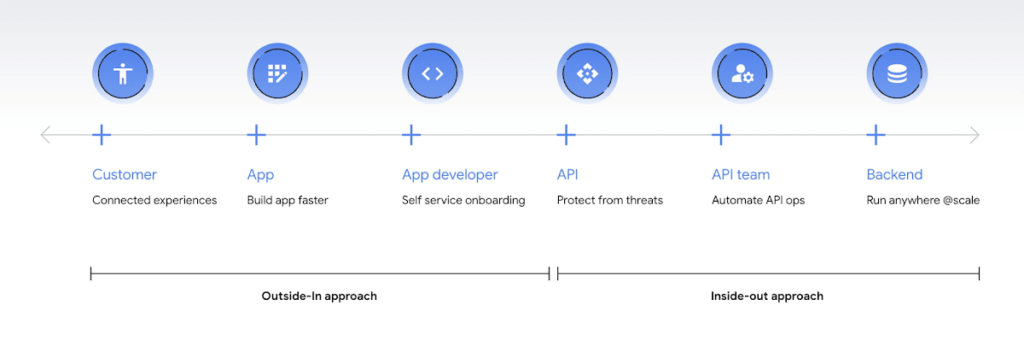
Being everything for everybody often means that nothing you do is the best it could be, and that is just as true for APIs. When customers turn to APIs, they are looking for specific solutions to make their work easier and more productive. If there is an API that better works to their needs, they will choose that one over yours. This is why it’s so important to know what your customers need to do their work better, and then building to fill those needs. In other words, start thinking Outside-in as opposed to Inside-Out. Specifically,
- Inside-out refers to designing APIs around internal systems or services you would like to expose.
- Outside-in refers to designing APIs around customer experiences you want to create. Read more about the Outside-in perspective in the API product mindset.
The first step to this is learning from your customers — be it internal consumer developers or external customers — and their use cases. Ask them about the apps they are building, their pain points, and what would help streamline or simplify their development. Write down their most significant use cases and create a sample API response that only gives them the exact data they need for each case. As you test this, look for overlap between payloads and adapt your designs to genericize them across common or similar use cases.
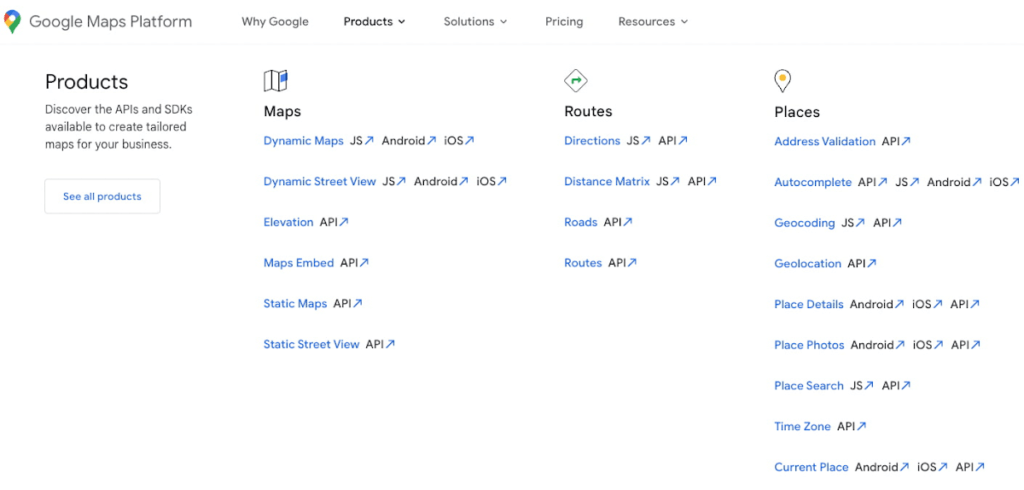
If you can’t connect with your customers — because you don’t have direct access, they don’t have time, or they just don’t know what they want — the best approach is to imagine what you would build with your APIs. Think big and think creatively. While you don’t want to design your APIs for vaporware, thinking about the big picture can make it easier to build non-breaking changes in the future. For example the image below showcases APIs offered by Google Maps. Even without diving into the documentation, looking at the names like “Autocomplete” or “Address Validation” clearly outlines the purposes and potential fit for a customer’s use case.
#2 Making your APIs too complex for users
Customers turn to APIs to bypass complicated programming challenges so they can get to the part they know how to do well. If they feel like using your API means learning a whole new system or language, then it isn’t fitting their needs and they will likely look for something else. It’s up to your team to make an API that is strong and smart enough to do what your customer wants, but also simple enough to hide how complicated the tasks your API solves for really are. For example if you know your customers are using your APIs to present information about recently open restaurants and highly rated pizzeria to their consumers, providing them with a simple API call as below would be of great help:
GET /restaurants?location=Austin&category=Pizzeria&open=true&sort=-priority,created_atTo see if your API design is simple enough, pretend you are building the whole system from scratch — or if you have a trusted customer who is willing to help, ask them to test it and report their results. If you can complete the workflow without having to stop to figure something out, then you’re good to go. On the other hand, if you catch rough edges caused by trying to code around system complexity issues, then keep trying to refactor. The API will be ready when you can say that nothing is confusing and that it either meets your customers’ needs or can easily be updated as needs change.
#3 Creating “chatty” APIs with too many calls
Multiple network calls slow down the process and creates higher connection overhead — which means higher operational costs. This is why it’s so important to minimize the number of API calls.
The key to this is outside-in design: simplify. Look for ways to reduce the number of API calls a customer must make in their application’s workflow. If your customers are building mobile applications, for example, they often need to minimize their network traffic to reduce battery drain, and requiring a couple calls instead of a dozen can make a big difference.
Rather than deciding between building distinct, data-driven microservices and streamlining API usage, consider offering both: fine-grained APIs for specific data types, and “experience APIs” (APIs that are designed to power user experiences. Here is a further theoretical discussion on Experience APIs) around common or customer-specific user interfaces. These experience APIs compose multiple smaller domains into a single endpoint; making it much simpler for your customers — especially those building user interfaces — to render their screens easily and quickly.
Another option here is to use something like GraphQL to allow for this type of customizability. Generally you should avoid building a unique endpoint for every possible screen, but common screens like home pages and user account information can make a world of difference to your API consumers.
#4 Not allowing for flexibility
Even if you’ve followed all of the steps above, you may find that there are edge cases that do not fit under your beautifully designed payloads. Maybe your customer needs more data in a single page of results than usual, or the payload has way more data than their app requires. You can’t create a one-size-fits-all solution, but you also don’t want a reputation for building APIs that are limiting. Here are 3 simple options to make your endpoints more flexible.
Filter out response properties: You can either use query parameters for sorting and pagination, or use GraphQL which provides these types of details natively. By giving customers the option to request only the properties they need, it guarantees that they won’t have to sort through tons of unnecessary data to get what they need. For example, if some of your customers only need the title, author, and bestseller ranking, give them the ability to retrieve only that data with a query string parameter.
GET /books?fields=title,author,ranking- Ability to sort with pagination. Generally, you don’t want to guarantee the order of objects in an API response because minor changes in logic or peculiarities in your data source might change the sort order at some point. In some cases, however, your customers may want to sort by a particular field. Giving them that option, combined with a pagination option, will give them a highly efficient API when they only want the top few results. For example Spotify API utilizes a simple offset and limit parameter set to allow pagination. A sample endpoint as shown in the documentation would look like this
$ curl https://api.spotify.com/v1/artists/1vCWHaC5f2uS3yhpwWbIA6/albums?album_type=SINGLE&offset=20&limit=10- Use mature compositions like GraphQL: Since customer data needs can differ, giving them on-the-fly composites lets them build to the combinations of data they need, rather than being restricted to a single data type or a pre-set combination of data fields. Using GraphQL can even bypass the need to build experience APIs, but when this isn’t an option, you can use query string parameter options like “expand” to create these more complex queries. Here is a sample response that demonstrates a collection of company resources with embedded properties included
"data": [
{
"CompanyUid": "27e9cf71-fca4",
"name": "ABCCo",
"status": "Active",
"_embedded": {
"organization": {
"CompanyUid": "27e9cf71-fca4",
"name": "ABCCo",
"type": "Company",
"taxId": "0123",
"city": "Portland",
"notes": ""
}
}
}
]
#5 Making design unreadable to humans
“K”eep “I”t “S”imply “S”tupid when you are designing your API. While APIs are meant for computer-to-computer interaction, the first client of an API is always a human, and the API contract is the first piece of documentation. Developers are more apt to study your payload design before they dig into your docs. Observation studies suggest that developers spend more than 51% of their time in editor and client as compared to ~18% on reference.
For example, if you skim through the payload below it takes some time to understand because instead of property names it includes an “id”. Even the property name “data” does not suggest anything meaningful aside from just being an artifact of the JSON design. A few extra bytes in the payload can save a lot of early confusion and accelerate adoption of your API. Notice how user-ids appearing on the left of the colon (in the position where other examples of JSON ideally have property names) creates confusion in reading the payload.
"{id-a}":
{ "data":
[
{
"AirportCode": "LAX",
"AirportName": "Los Angeles",
"From": "LAX",
"To": "Austin",
"departure": "2014-07-15T15:11:25+0000",
"arrival": "2014-07-15T16:31:25+0000"
}
… // More data
]
},
We think that JSON like this is more difficult to learn. If you want to eliminate any ambiguity in the words you choose to describe the data, keep the payload simple and if any of those labels could be interpreted in more than one way, adjust them to be more clear. Here is a sample response from Airlines endpoint of aviationstack API. Notice how the property names clearly explain the expected result while maintaining a simple JSON structure.
"data": [
{
"airline_name": "American Airlines",
"iata_code": "AA",
"iata_prefix_accounting": "1",
"icao_code": "AAL",
"callsign": "AMERICAN",
"type": "scheduled",
"status": "active",
"fleet_size": "963",
"fleet_average_age": "10.9",
"date_founded": "1934",
"hub_code": "DFW",
"country_name": "United States",
"country_iso2": "US"
},
[…]
]
#6 Know when you can break the RESTful rules
Being true to the RESTful basics — such as using the correct HTTP verbs, status codes, and stateless resource-based interfaces — can make your customers’ lives easier because they don’t need to learn an all new lexicon, but remember that the goal is just to help them get their job done. If you put RESTful design first over user experience, then it doesn’t really serve its purpose.
Your goal should be helping your customers be successful with your data, as quickly and easily as possible. Occasionally, that may mean breaking some “rules” of REST to offer simpler and more elegant interfaces. Just be consistent in your design choices across all of your APIs, and be very clear in your documentation about anything that might be peculiar or nonstandard.
Conclusion
Beyond these common pitfalls, we have also created a comprehensive guide packaging up our rich experience designing and managing APIs at incredible scale with Google Cloud’s API management product, Apigee.
Apigee — Google Cloud’s native API management platform — helps you build, manage, and secure APIs — for any use case, scale or environment. Get started with Apigee today or check out our documentation for additional information.
Google Products Helps HMH’s Healthcare Staff Work from Anywhere Efficiently and Securely!

10199
Of your peers have already read this article.
3:00 Minutes
The most insightful time you'll spend today!
Hackensack Meridian Health (HMH) executive Mark Eimer explains how an ambitiously-timed rollout of a comprehensive suite of Google products helped the entire organization—from doctors to IT staff—achieve better security, cultivate a more equitable work environment, and ultimately, improve patient outcomes.
How does a recently merged, 17-hospital healthcare system fast-track a platform migration and hardware rollout securely and in a way that improves work for everyone, regardless of location or role? These are the questions that kept me up at night in early 2020, when the pandemic demanded a “big bang”—something our legacy laptops and operating systems couldn’t handle.
We began our work with Google in 2020 with the adoption of Chrome as our default browser. As we migrated platforms, keeping patient data safe was of the utmost importance to us, along with providing every staff member with the tools they needed to work virtually. Our staff often experienced issues accessing our web-based applications using Internet Explorer or Edge Browser, a problem that went away when we switched to Chrome. Chrome’s versatile compatibility also made it easier for my team to migrate all of our web-based operations, and Chrome’s security and manageability were key components to making this switch a huge win for the organization.
The success of this migration led us to extend our Google partnership to patient care applications—where Google’s expertise in AI and ML helps scale the use of diagnostics tools and improve other aspects of the patient journey.

Achieving security at every step
Like so many other healthcare organizations, we’ve been concerned about ransomware attacks. This is part of why we moved to Google Workspace and distributed over 3,000 Chrome OS devices in kiosk mode in March of 2020, when many of us went remote due to the pandemic. We were very concerned about team members accessing corporate applications through home devices that were running EOL operating systems (WIN7), as well as a general lack of antivirus and encryption measures.
We were protected by the fact that Google’s software and hardware both had built-in security features that we needed to stave off sophisticated attackers. For example, Chrome OS automatically updates to the latest security update and encrypts data living outside the cloud on the hardware. These features protected us from security-related disruptions, letting us securely move a huge library of file shares and emails across thousands of accounts to Google Chrome OS in just four months.
A year later, in March 2021, we migrated the enterprise over to Google Workspace and saw an immediate reduction in spam by 30% from the inherent built-in AI/ML. This meant staff were less likely to receive (and click through) phishing attempts. My team could connect, create, and collaborate easily and securely—even as more of us were working from home and needed to access sensitive data remotely.
Leveling the playing field
As an organization, we were surprised by how many team members didn’t have personal computers at home. We quickly decided that if we needed team members to work from home, the health network would have to supply hardware. Chromebooks’ lower price tag compared to PCs—on top of their built-in security controls—allowed us to purchase, deploy, and support that initial distribution of 3,000 Chromebooks to team members in less than three weeks, providing devices to every eligible remote employee instead of just a select few. This was vital to reaching our equitable technology goal as part of our diversity and inclusion initiative: everybody has the same tools to do good work.
When all employees have what they need to do their jobs well, we get better patient outcomes. Before we began this cloud adoption journey, patient and staff experiences were different within the hospitals and outside of them.
Now it’s the same wherever our staff is, and we’ve seen efficiency and accessibility benefits extend to the patient side. For example, we built a web-based contact center that supports 80 locations that use Workspace and Chrome OS devices. Since customer service, admin, and providers are all on the same system, it has become a one-stop shop for patients.
Furthermore, through the Grow with Google program, we were able to provide another benefit to employees that drove our equity goals. Google trained 50 non-IT staff members—from environmental services, food and nutrition, and other non-tech areas who were interested in making a career change to IT—on the Google products we were using. They may not have thought about switching to a career in IT before the Grow with Google program came to our organization, but through this partnership, they now have that opportunity.
A strategic, long-term partner
With any large-scale rollout, the work doesn’t end once laptops are in employee hands. Google has shown their commitment to long-term collaboration as they continuously optimize their products for the unique needs of healthcare providers and go the extra mile in tailoring tools to our staff’s workflows.
For example, on the Chrome OS side, the Google team has helped our registration desks and document centers with device integration for hardware like credit card readers and e-signature pads. They’ve also helped us meet security and privacy requirements mandated by state and federal governments around HIPAA, Medicaid, and Medicare reimbursements. Over this next year, we’ll look at a feature roadmap with Google Cloud to deliver further enhancements, iterating on the product itself to meet our needs for the present and the future.

Delivering the future of healthcare
The benefits we’ve seen around security and usability—and the ability to provide all staff with equal access to Google’s technology—are why we’re expanding our partnership with Google to both the administrative and clinical sides of HMH. In addition to further Google rollouts with corporate, next year we’re distributing Chromebooks to all 350 of our ambulatory clinics.
We’re also working with the Google professional services team to create a custom AI model that analyzes 3D mammogram images. This AI model will enable two providers to read mammograms—which adheres to international best practices but is currently rare in the US—without requiring additional time. Conducting double readings of mammograms will yield better health outcomes for our patients, such as a lower patient recall rate and an increased accuracy in detecting breast cancer.
We’re currently building the model using a variety of Google Cloud products, including Cloud Healthcare API. Once complete, this model is expected to be trained, deployed, and maintained in Google’s Vertex AI, allowing our providers to be more productive as they make clinical decisions with AI support. As the model is proven over time, we plan to make the predictive services accessible to other healthcare organizations.
With Google, we’re able to achieve a unified architecture for storing data as well as training and deploying AI models, which enable our staff to work more efficiently and securely from anywhere. While I may not be able to predict the future as accurately as AI can, I foresee our continued partnership with Google as a key part of HMH’s improved provider and patient outcomes.
4397
Of your peers have already watched this video.
32:00 Minutes
The most insightful time you'll spend today!
On-Demand Webinar: How APIs Help Walgreens Merge Physical and Digital Retail
APIs are how modern businesses rapidly expand into new contexts—making it possible for companies like Walgreens to transform from brick-and-mortar businesses into omnichannel organizations that serve customers in innovative ways.
Headquartered in Deerfield, Illinois, Walgreens is the second-largest pharmacy store chain in the United States. It specializes in filling prescriptions, health and wellness products, health information, and photo services. The company has more than 8,000 stores and operates in 50 states, the District of Columbia, Puerto Rico, and the US Virgin Islands.
Walgreens has built a thriving API program that lets software developers plug into its retail and pharmacy business. As a result, the company now fills one prescription per second via mobile devices.
More than 100 photography apps offer Walgreens photo printing and same-day pickup at 8,000+ locations. Perhaps best of all, Walgreens has found that users who use its mobile app spend more than those who don’t.
Watch Erin Neus-Cheong from Walgreens and Alicia Paterson from Google Cloud explore why treating APIs as products—not projects—can help companies tap into the value of APIs as business accelerators and open up new channels of opportunity.
A Road to Possibilities: Google Maps Platform Website

7253
Of your peers have already read this article.
2:00 Minutes
The most insightful time you'll spend today!
For more than 15 years, developers have used Google Maps Platform to deliver location-based experiences to their end users and used location intelligence to optimize their businesses. Along this journey, we’ve made a variety of changes to better support our community as needs have changed and new industries and technologies have emerged. We started rolling out a new website experience, at https://mapsplatform.google.com, to help you better understand the products and solutions best suited to address your objectives. Plus, now you can directly connect to the developer documentation for each product to get started quickly, and you can visualize usage and associated costs to have a better idea of what to expect before getting started.
Getting to your solution faster
Maps, Routes, Places are building blocks that let you develop implementations for any use case. Building for specific use cases, however, typically requires using a combination of APIs and SDKs. To help you quickly understand what’s possible and what you need to build for your use case, you can now visit the solutions tab to select from a list of popular use cases or industries. Once you’ve selected a use case or industry, you’re taken to a page where you can explore relevant products, read helpful blog posts, see how other customers have deployed for similar use cases, and more.

Direct access to developer documentation
Did you know there are more than a thousand pages of developer documentation created to help you get started, unblock you when you’re stuck, and share best practices? Now when you explore a product or solution from the Google Maps Platform website, you can easily navigate back and forth between our website and documentation. Just tap on JS, iOS, Android or API under the product name to get to the documentation you need.

Budgeting for your project
To help you calculate pricing for your project, we’ve introduced a new pricing calculator. Once you find the product and API or SDK you plan to use, pull the slider to reflect your estimated number of monthly requests. This will automatically update the “monthly cost” column for each product and API or SDK you plan to use. If your estimated monthly requests exceed the slider limit, contact our sales team to learn about volume discounts that start at 20% off.

We hope our new website makes it easier to discover our products and solutions, estimate your budget, and start building with our documentation so you can deliver helpful experiences to your users and optimize your business.
For more information on Google Maps Platform, visit https://mapsplatform.google.com.
NCR’s Emerald Leverages Google Cloud to Help Grocers Boost Operational Agility

8238
Of your peers have already read this article.
3:00 Minutes
The most insightful time you'll spend today!
In recent years, the grocery industry has had to shift to facilitate a wider variety of checkout journeys for customers. This has meant ensuring a richer transaction mix, including mobile shopping, online shopping, in-store checkout, cashierless checkout or any combination thereof like buy online, pickup in store (BOPIS).
What’s more, in the past year and a half alone grocers have had to enable consumers new ways to shop for essentials. This has included needing to rapidly integrate or build on-demand delivery apps, offer curbside pickup with near-instant fulfillment as well as support touchless and cashless checkout experiences. Searches on Google Maps for retailers in the US with curbside pickup options have increased by 9000% since March 2020, and we believe these trends from 2020 will continue to define the future of grocery shopping.
The future of grocery will require agility and openness
Firstly, the need to rapidly adapt to changing consumer habits will be the new normal. Grocers will increasingly look to digitally transform legacy retail systems and modernize point of sale (POS) platforms to deliver and scale omnichannel experiences as quickly as possible. This necessitates a more agile and open architectural approach to technology – one built on microservices and leverages APIs so that new applications and experiences can be built, integrated and delivered faster.
Automation and data-driven retailing will be table stakes
In order for retailers to blend what they’re offering in the store with digital experiences more efficiently, they will also need to automate more. For example, with automation and business intelligence, grocers can take labor that might have been tied up with tender operations and checkout and redistribute those resources to restocking shelves, curbside pick-up or improving customer experiences.
Automation and access to real-time in-store inventory & supply chain data can also help grocers avoid the supply chain challenges seen in the early days of COVID-19. Grocers will need to find ways to leverage automation to ingest, organize, and analyze data from physical store networks, digital channels, distribution centers to better forecast demand and manage future fluctuations.
How NCR and Google Cloud are helping grocers adapt to disruption with operational agility
Helping grocers improve operational agility to address changing consumer shopping habits and to thrive during times of disruption is something that NCR and Google Cloud have teamed up to do. NCR has over 135 years of experience in retail, having invented the cash register and are continuing to help grocers innovate. NCR Emerald builds upon the company’s leadership in POS software and has turned it into a unified platform that helps grocers operate the entire store from front to back. The solution supports cashier-led checkout, self-checkout, integrated payments, merchandising, and enables regional managers and corporate employees access to the analytics and tools needed to optimize loyalty programs and promotions.

NCR has invested in a comprehensive, agile, and API-led retail architecture that lets grocers continually innovate and design new experiences as customers and the industry evolve. By running Emerald on Google Cloud, NCR can offer the solution on a subscription basis, helping grocers lower upfront capital expenditures and ensuring scalability. What’s more, NCR can tap into Google Cloud’s strength in data, analytics, and openness to deliver three key imperatives. Let’s take a look at each of these below.
Run the way grocers need to while leveraging Google Cloud as a single source of logic
Traditionally the POS system lived in the store. If disaster strikes, people still need access to food and essentials so the grocery store still needs to operate. It hardly gets more mission-critical than that. NCR Emerald is built on microservices, leveraging Kubernetes for front-of-house compute, and VMs (See graphic 1 below). This makes it easy to support lightweight clients accessible by store employees via any range of mobile devices, computer terminals, self-service kiosks, peripheral devices like receipt printers as well as legacy applications.
What’s unique is that because Emerald runs on Google Cloud, it supports all those in-store and digital touchpoints mentioned above, but also allows grocers to run lean. Emerald leverages Google Cloud as a single source of truth and operates a lot of what it does out of logic. Every sales transaction coming from every channel, including e-commerce, can be logged via NCR’s Hosted Service and centralized in BigQuery and Bigtable as a transaction data master. This enables the grocer to manage any transactional use case very consistently, whether it e supporting customers who want to purchase in one store and return in another, offering digital receipts or the ability to exchange online purchases in store. Emerald on Google Cloud can help retailers extend capabilities through the power of the cloud but not need to live exclusively in the cloud. In other words, the solution allows grocers the ability to run the way they need to.

Enable data-driven and real-time decision making for grocers
Store managers, regional managers, category managers, and others all require different cuts of the data to do their jobs effectively. However, data silos persist and how data is formatted and arranged can still remain pretty static. Therefore allowing users with different roles the ability to view and analyze that data quickly and in different ways continues to be a challenge.
As mentioned above, Emerald leverages Google Cloud data management solutions as the central repository for transactional, behavioral, and merchandising data. Every transaction from every store and every channel can be stored via NCR Hosted Service on BigQuery and Bigtable. NCR Analytics then harnesses the advanced analytical and data visualization capabilities of Looker to help grocers get a consolidated view of their business across all channels and then allow employees to slice and dice the data they way they need to. NCR Analytics also leverages the power of Google Cloud AI and machine learning to add another level of intelligence to the retailer’s data. For example, store managers can visualize how well they’re using their real estate and see how productive lanes 1-3 are compared with 7-10 or compare self-service versus manned lanes. By mapping to the retailer’s own catalog, they can also break down category-level performance and trends.

NCR Analytics takes advantage of Google Cloud’s data pipeline to reduce processing time, with scaling and resource management provided out of the box. By letting the cloud store and process the data, NCR is providing the ability for retailers to analyze their data in near real-time across all platforms – a real game changer in the grocery business.
Open APIs let grocers continually enrich the retail experience
Finally, Emerald is built on an API-first architecture managed through Apigee. It uses the power of Apigee as an open API platform to expose how Emerald can work with other NCR applications like loyalty and promotions, and third party applications like mobile ordering and order delivery to enrich the grocery experience for employees and customers. Every API that Emerald uses is available on Apigee, allowing them to share code samples and giving developers the ability to run scripts. This approach can allow retailers the ability to innovate in a fraction of the time and cost, speeding up 3rd party integrations up front and as businesses grow.
Take, for example, Northgate Market, a chain of 40 stores in California, that were able to transform its digital operations and enable experiences that set it apart from competitors – quickly and simply with Emerald. It took less than 6 months to go from contract to live deployment in the first store. Since then, Northgate Market has been able to extend their intelligence by leveraging the power of Looker and NCR Analytics.
Learn more about how NCR has been able to leverage an open, cloud-enabled architecture to help customers innovate across the retail, hospitality, and banking industries on the webinar “Role of APIs in Digital Transformation”. You can also learn more about how Northgate uses e-commerce to transform customer experience and gain consumer insights.
Pizza Hut India: Increasing Customer Coverage and Delivering Pizzas on Time

4971
Of your peers have already read this article.
3:30 Minutes
The most insightful time you'll spend today!
A subsidiary of United States-headquartered corporation Yum! Brands, Pizza Hut prides itself on serving more pizzas than any other pizza business. Founded in 1958, Pizza Hut operates 18,000 restaurants in over 100 countries. In the Indian subcontinent, Pizza Hut and franchise partners Devyani International and Sapphire Foods India operate more than 500 pizza restaurants, including 430 in India itself.
Yum! Brands aims to increase the number of Pizza Hut restaurants in India to 700 by 2022 and has nominated the country as one of the keys to its future growth. The business also operates the KFC and Taco Bell brands in India.
“Globally we are the number one pizza chain in the world based on store count and we aim to be the single biggest pizza brand in India,” says Prashant Gaur, Chief Brand and Customer Officer, Pizza Hut India Subcontinent.
Google Cloud Results
- Maximizes customer coverage and helps ensure riders deliver pizzas to customers within required timeframes
- Onboards new stores to delivery in half a day, rather than the one month required previously
- Meets tech-savvy customer demands to interact across new social media messaging channels
- Launch of live tracking delivers superior customer experience, driving positive word of mouth and repeat business
Pizza Hut launched initially in the country in the late 1990s as a dine-in restaurant brand. However, with changing customer needs, Pizza Hut soon included delivery and takeaway to provide customers with the best tasting pizzas whenever and wherever they wanted them. “Pizza is always at the center of the experience, whether through delivery, dine-in, or takeaway,” says Gaur. “Convenience is key in allowing people to access our products.”
Manual processes
While the business had long shifted into a model that featured delivery and takeaway options, it still used some manual processes. For example, some restaurants used manual listings of customer addresses to manage delivery, which ended up excluding some customers and compromising the brand. In other cases it could take the business up to a week to create a trade zone – a delivery zone assigned to a restaurant – for each new outlet, delaying the commencement of delivery services and costing the business money.
In addition, Pizza Hut India identified an opportunity to more closely track whether pizzas were being delivered within targeted timeframes.
“In some cases, we were using a manual, self-reporting mechanism that provided information about the number of orders that reached consumers less than 30 minutes after an order was placed,” explains Ashish Agarwal, Director, Technology and eCommerce, Pizza Hut India Subcontinent. “We wanted to objectively track and verify delivery times.”
Manual order tracking and execution also limited the number of orders that could be processed effectively during demand peaks. Further, customers could not monitor the status of their pizza orders, including estimated time of arrival.
“Millennial consumers expect products and services to be available when and where they want them. Our focus is to retain the heritage of the brand, which is the dine-in environment, legendary service, and great assets in terms of our stores, while responding to this demand,” adds Gaur.
Pizza Hut India also needed improved analytics in order to identify where the best returns could be achieved by opening new restaurants; how to improve the customer experience; and operate more efficiently.
The business decided to implement a transformation program underpinned by two imperatives: the need to deliver operational efficiencies and scale faster by accelerating the opening of new stores, and the need to give consumers the option of connecting with the brand using the most convenient channel.
A ground-breaking initiative
Pizza Hut India evaluated potential technology partners that could help deliver the program and decided to partner with digital consulting services company MediaAgility, and use Google Maps Platform and Google Cloud Platform services.
“Our journey with MediaAgility and Google incorporated two key initiatives that had a specific impact on our brand and consumers,” says Gaur. “The first of these initiatives was the launch of a feature that enabled consumers and our business to track delivery riders in real time.”
This initiative was ground-breaking for a business that had, until recent years, focused on establishing itself as a restaurant brand. However, with delivery an increasingly important part of its revenue mix, Pizza Hut India decided to build customer engagement through the channel. “By allowing customers to track delivery riders in real time, we could improve engagement – but more importantly give them control,” says Gaur.
During the evaluation, MediaAgility demonstrated Google Maps Platform to Pizza Hut India. “We loved Google Maps Platform as its accuracy and value was proven by consumers using Google Maps for their day-to-day needs,” says Agarwal.
Pizza Hut India conducted brainstorming sessions with MediaAgility and its franchise partners to develop its strategy and complete the implementation. The business then completed several proofs of concept to determine how best to deploy and adapt the technology to some operational processes. “We submitted some data points to our franchise partners and our Pizza Hut brand operations team, and they determined which option to adopt,” says Agarwal.
Google Maps Platform powers delivery
MediaAgility, Pizza Hut India, and the franchise partners then completed a three-month implementation that included onboarding all existing restaurants and new restaurants to the delivery platform based on Google Maps Platform and on Google Cloud Platform.
Pizza Hut India now uses Distance Matrix API through Google Maps Platform to provide travel time and distance based on recommended routes between origins and destinations. This service helps provide delivery riders’ estimated time of arrival to customers.
Directions Service calculates directions by communicating with the Google Maps API Directions Service, which receives direction requests and returns efficient paths based on travel time and factors such as distance and number of turns. This service provides a view of the delivery rider’s position relative to the customer’s location.
Through the Nearest Roads service included in Roads API, Pizza Hut India obtains individual road segments for given GPS coordinates, while Snap to Roads provides the best-fit road geometry for given GPS coordinates.
The business employs Maps Javascript API to customize maps with dedicated content and imagery for websites and mobile devices – showing a map view to store managers and customers – and uses Maps SDK for Android to add maps based on Google Maps to its applications.
Google Cloud Platform runs the delivery platform
Pizza Hut India is running its delivery platform on a Google Cloud Platform architecture that comprises App Engine to run its web applications; virtual machine instances provided through Compute Engine; Cloud Datastore to run a NoSQL document database; Firebase to develop and run its mobile applications; Cloud Storage to store data; and a BigQuery analytics data warehouse.
Realizing goals
With Google Maps Platform and Google Cloud Platform, Pizza Hut India and its franchise partners are realizing the goals of the transformation program.
Rather than take up to seven days to manually map trade zones for stores, Pizza Hut India uses Google Maps Platform to create and update them as required. “After we started working with MediaAgility and Google, we digitized those maps and created trade zones – zones within which Pizza Hut India restaurants will deliver – based on estimated travel times during the busiest time of the week,” says Gaur. “This minimizes the risk of late deliveries.
“The other benefit was reduced time to activate new stores,” he adds. “If you are launching 100 stores per year, this becomes a big, big task. Now we can bring new stores into the market much more quickly.”
With MediaAgility and Google Maps Platform, the business can also help ensure newly built establishments – such as blocks of flats – are captured within trade zones, allowing stores to deliver to residents.
Delivery accounts for increased transactions
Pizza Hut India now automatically allocate orders to delivery riders using a rider tracking application on their mobile phones. When a rider starts his or her journey, Google Maps Platform enables point-by-point tracking by consumers and store managers. The Pizza Hut India delivery operations team monitors delivery performance through a real-time dashboard.
Pizza Hut India is meeting customer expectations of live, map-based streaming of delivery status on their devices – enhancing customer experience and loyalty, and adding accountability to the process. The business is reaping the rewards of its investment, with delivery now a large slice of its overall offering. “We have taken significant strides in the past three to four years to change our customers’ online ordering experience, and the last-mile delivery experience to the customers’ homes,” says Gaur.
Launching delivery tracking has also had a dramatic impact on Pizza Hut India’s internal key performance indicators. “The proportion of calls to our call center that are following up on an order, as opposed to placing an order, has fallen dramatically,” says Gaur.
Advanced analytics
Further, Pizza Hut India is running advanced analysis of data in the BigQuery data warehouse, enabling the business to determine which restaurants are doing well, which deliveries may be delayed, and what locations are most promising to open a new store. These insights enable the business to boost productivity, expand effectively, and operate more efficiently.
The business can now onboard new stores to delivery in half a day, rather than the month required previously. “The process enabled by Google Cloud and MediaAgility is also delivering significant operational cost savings as well as helping us open and grow new stores quickly,” says Agarwal.
“MediaAgility acted as our development partner across the project, helping us deploy everything from zones to rider tracking,” he says. “It’s been with us from the strategy discussion through the implementation and stabilization phases.”
Chatbot in development
MediaAgility has also helped Pizza Hut India create a chatbot using the Dialogflow development suite for creating conversational interfaces. “This project is about giving millennials and other customers one more channel to reach out and connect to the brand,” explains Agarwal.
Pizza Hut India is now ideally placed to continue growing and position itself as a brand of choice for tech-savvy consumers. “We’re extremely pleased with the contribution of all the parties involved in this project and look forward to continue transforming our business to meet the demands of the digital age,” says Agarwal.
While Gaur acknowledges it is difficult to predict change over the next two to five years, he believes delivery is likely to become more prominent in Pizza Hut India’s combination of offerings. “When we began our online journey in 2016, we predicted delivery would be about 25 percent of the mix by 2020,” he says. “With Google and MediaAgility, I think it will keep growing.”
More Relevant Stories for Your Company

How Smart Parking Transformed into a Data-Intelligent Business
Google Cloud Results Reduced smart parking/smart city IoT installation and operational support effort by more than halfEnabled development of a Smart Cloud IoT platform in just four monthsDemocratised data access and use across the organisationBuilt core infrastructure in under 4 months Smart Parking’s core product is a sensor-based system called

A French News Company’s Web Modernization Journey with Cloud Run
Editor's note: Today's post documents the solution to a problem of how to scale website infrastructure as it moves from on-prem to the cloud. It is the result of collaboration between technical teams of Les Echos Le Parisien Annonces (a division of Groupe Les Echos, subsidiary company of LVMH) and


Microservices in the Cloud with Kubernetes and Istio
Are you building or interested in building microservices? They are a powerful method to build a scalable and agile backend, but managing these services can feel daunting: building, deploying, service discovery, load balancing, routing, tracing, auth, graceful failures, rate limits, and more. The most suited solution for you is Istio.

How APIs Help National Bank of Pakistan Modernize the Banking Experience
NBP, Pakistan’s largest government-owned bank, serves private and commercial customers and also acts as the government treasury bank. This means that it handles all government transactions—including disbursements and cash collection. In the past, every government transaction had to be handled physically through the NBP branch network. But in a populous
