






3348
Of your peers have already downloaded this article
5:30 Minutes
The most insightful time you'll spend today!
3219
Of your peers have already watched this video.
2:00 Minutes
The most insightful time you'll spend today!
Simplified Document Processing with AppSheet Automation
Move over legacy, time-consuming systems and processes to update data from documents and invoices into disparate data systems. AppSheet integrates no-code development with Google Cloud’s state-of-the-art Document AI to automate the data extraction and validation from invoices, documents, receipts, etc.
You can end all ‘guesstimates’ and rely on the accuracy of the intelligent document processing feature, and set custom triggers for automation events or the way data is displayed from its unstructured source. Watch the video to understand how your business can save time and resources with automation and seamlessly manage high-volume, unstructured data.
A CIO’s Guide to the Cloud: Hybrid and Human Solutions to Avoid Trade-offs

3857
Of your peers have already read this article.
2:30 Minutes
The most insightful time you'll spend today!
What do CIOs and CTOs deliver for the company? If you said “technology,” that’s just the beginning. According to their research, McKinsey found that 85% of CIOs and CTOs interviewed in the spring of 2019 said they were essential for at least two of the three most common CEO priorities—revenue acceleration, improved agility and time to market, and cost reduction.
IT modernization – including migrating to the cloud – is key to business growth and agility. Yet, according to a recent McKinsey study, 80% of CIOs report that regardless of their level of cloud migration, they still haven’t reached their projected agility and business benefits. Sometimes, this is because of issues like training and skills gaps in the IT workforce. Surprisingly often though, the barrier to reaching the goals is based on trade-offs that CIOs themselves feel they must make to strike a balance between the perfect and the possible.
But what if you could have it all without the trade-offs? As Will Grannis, Managing Director of the CTO Office at Google, and Arul Elumalai, Partner at McKinsey & Company discussed in our recent digital conference, many of the compromises CIOs make can be avoided with new technology, modern architectures and by encouraging a transformation mindset across the business. In interviews, CIOs explained how they’ve leveraged the best of the cloud without compromising on security, agility, and flexibility. Here’s how these leaders avoid three of the top perceived trade-offs—both with technology and by transforming their operating model.
Trade-off #1: Developer agility vs. control and governance
Moving to the cloud offers new opportunities for speed, but 69% of organizations indicate that stringent security guidelines and code review processes can slow developers significantly. One CISO of a multinational company mentioned that cloud development was so fast that they had to institute manual checks on their developers’ code. So much for agility.
To overcome this trade-off and maintain both speed and security, some respondents found success in DevOps, hiring security-experienced talent and introducing automation for security and quality. Building in security into the CI/CD pipeline and increasing automation don’t just eliminate the tradeoff, they result in higher quality and faster innovation.
At Google Cloud, we’ve also observed that customers with strong DevOps practices have increased speed-to-market and product/service quality. From our own journey, we’ve learned seven critical lessons essential to adopting a DevOps model, ranging from taking up small projects and embracing open source to building an overall DevOps culture.
Trade-off #2: Single-vendor benefits vs. freedom from lock-in
CIOs perceive benefits to using the fewest number of clouds, specifically avoiding introducing multiple systems that require their teams to develop and maintain multiple skillsets. Unfortunately, 83% of the CIOs interviewed said that while they would prefer fewer clouds, the potential financial and technical lock-in drives them to multiple providers.
Successful CIOs said that they can avoid lock-in pitfalls not just with contractual guardrails and executive and board education, but with evolving hybrid cloud technologies that provide additional choices. Hybrid cloud platforms based on containers can further mitigate the risk of using a single cloud vendor. The key to successful hybrid architectures is the infrastructure abstraction and portability that containers create for them, enabling disparate environments to work together.
This notion has been at the heart of our strategy at Google Cloud with Anthos, which provides an abstraction layer and an application modernization platform for hybrid and multi-cloud environments. Enterprises can use Anthos to modernize how they develop, secure, and operate hybrid-cloud environments and enable consistency across cloud environments.
Trade-off #3: Best-of-breed tools vs. standardization and familiarity
Optimizing tool chains for different environments can improve productivity, but many CIOs believe that this means reduced functionality and tools. While 77% of CIOs said they had to standardize to the lowest common denominator, some have found a better solution. Rather than giving up the languages, libraries, and frameworks that their teams prefer, effective leaders said that they found success by investing in training programs to upscale talent and adopting new open and vendor-agnostic solutions. Architectures that are based on open-source components have been the keys that helped remove this tradeoff, and eliminate the notion of a lowest common denominator.
This is why we have built Anthos on open-source components like Kubernetes, Istio and Knative. Anthos gives your business the choice you need. With the ability to create code that works in most environments using the tools, languages, and systems you prefer, you can do more without major changes to how you work.
Regardless of your current cloud adoption level, check out “Unlock business acceleration in a hybrid cloud world” to discover more about McKinsey’s findings, including how CIOs drive agility, methods to make trade-offs unnecessary, and how to prepare your team for the cloud. Then, stay tuned for subsequent posts that take a closer look at how hybrid solutions and strategies can help CIOs drive a transformation mindset across the business—without compromising on security, agility, and flexibility.
Can Your Company Use Video AI? You’d Be Surprised at the Answer

5726
Of your peers have already read this article.
4:30 Minutes
The most insightful time you'll spend today!
Video AI is a powerful way to enable content discovery and engaging video experiences.
Here, try it out right now!
Google Cloud’s easy-to-access video AI solutions can accomplish a bunch of things. Here are a few:
Precise video analysis: Video Intelligence API automatically recognizes more than 20,000 objects, places, and actions in stored and streaming video. It also distinguishes scene changes and extracts rich metadata at the video, shot, or frame level. Use in combination with AutoML Video Intelligence to create your own custom entity labels to categorize content. Imagine being able to categorise hundreds of videos of customer interactions quickly to improve service training!
Recommended content: Build a content recommendation engine with labels generated by Video Intelligence API and a user’s viewing history and preferences. This will simplify content discovery for your users and guide them to the most relevant content that they want.
Simplify media management: Find value in vast archives by making media easily searchable and discoverable. Easily search your video catalog the same way you search text documents. Extract metadata that can be used to index, organize, and search your video content, as well as control and filter content for what’s most relevant.Imagine being able to locate insight in hundreds of enterprise videos to improve productivity and customer experience!
Easily create intelligent video apps: Gain insights from video in near real time using the Video Intelligence Streaming Video APIs, and trigger events based on objects detected. Build engaging customer experiences with highlight reels, recommendations, interactive videos, and more. Marketers, imagine being able to trigger a customer workflow, in real time, based on a live customer interactions.
Automate expensive workflows: Reduce time and costs associated with transcribing videos and generating closed captions, as well as flagging and filtering inappropriate content.
Content moderation: Identify when inappropriate content is being shown in a given video. You can instantly conduct content moderation across petabytes of data and more quickly and efficiently filter your content or user-generated content.
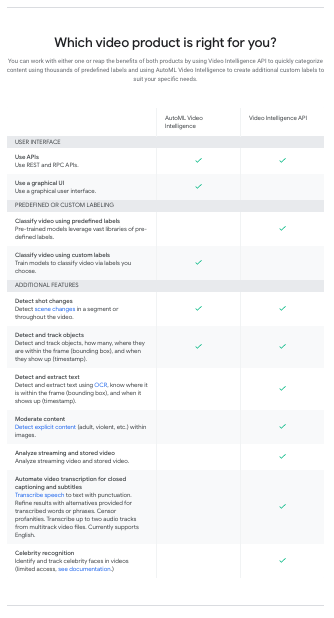
What can your organisation do with video AI?
BigQuery Omni: Your Solution for Multi-Cloud Geospatial Analytics

1487
Of your peers have already read this article.
6:30 Minutes
The most insightful time you'll spend today!
As we become increasingly reliant on technology to make decisions, geospatial data is becoming more critical than ever. It is a powerful resource that can be used to solve a variety of problems, from tracking the movement of goods, identifying interest areas and potential areas of disaster.
Geospatial data incorporates data with a geographic component, such as latitude and longitude coordinates, addresses, postal codes, or place names, and can be obtained from a variety of sources, including satellites, sensors, and surveys, making it an incredibly powerful tool with a broad range of applications.
One of the key features of BigQuery, Google Cloud’s serverless enterprise data warehouse, is its ability to analyze geospatial data. However, oftentimes geospatial data sits in a variety of public clouds, not just Google Cloud. To access it effectively, you need a multi-cloud analytics solution that lets you capitalize on the distinct capabilities of each cloud platform, while extracting insights and value from data sitting across multiple cloud platforms.
BigQuery Omni is a multi-cloud analytics solution that enables the analysis of data stored across public cloud environments, including Google Cloud, Amazon Web Services (AWS) and Microsoft Azure, without the need to transfer the data. With BigQuery Omni, users can employ the same SQL queries and tools used to analyze data in Google Cloud to analyze data in other clouds, making it easier to gain insights from all data, regardless of the storage location. For businesses using multiple clouds, BigQuery Omni is an excellent tool to unify analytics and optimize the value of data.
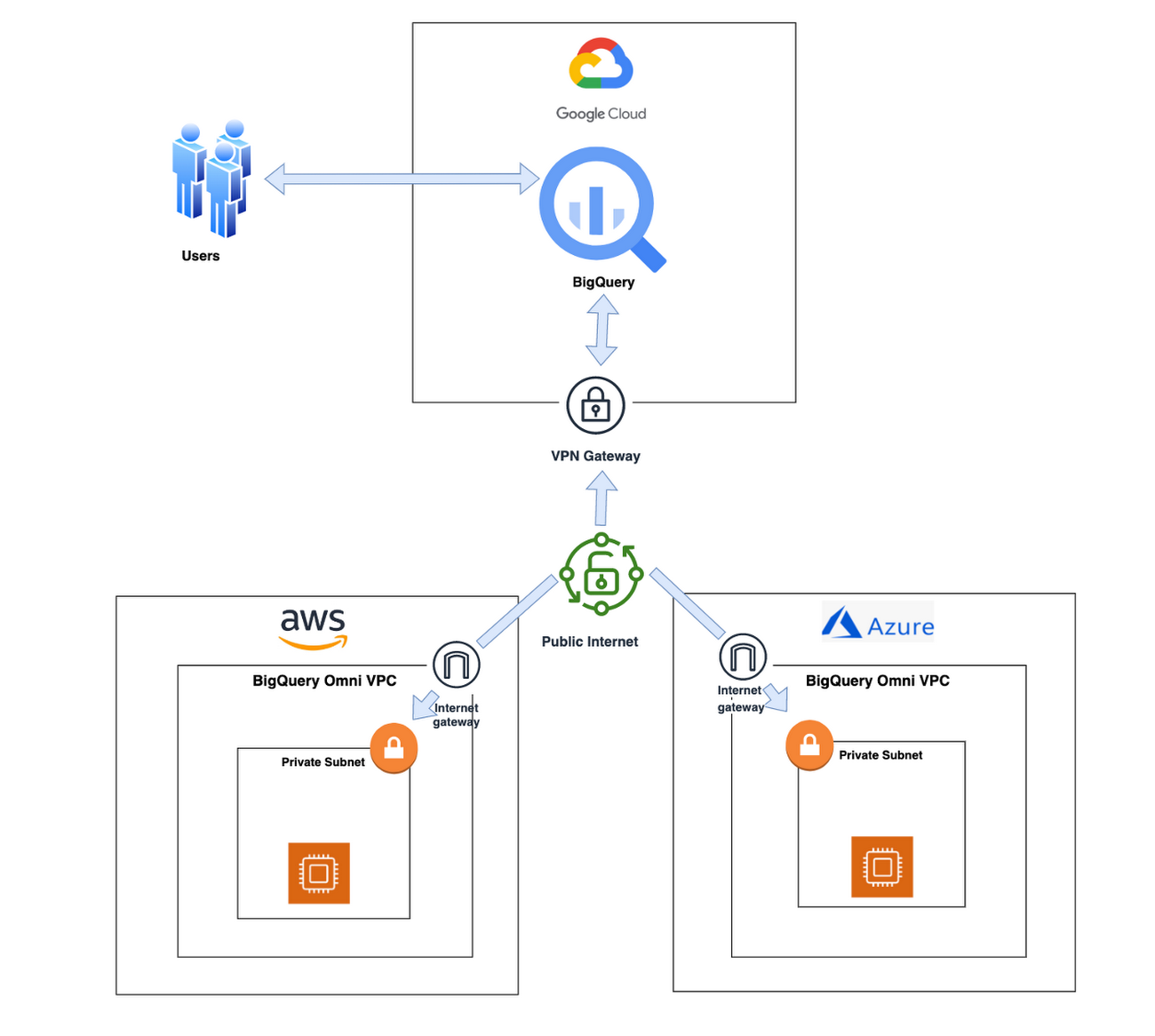
With BigQuery Omni, organizations can analyze location-based information or geographic components, such as latitude and longitude coordinates, addresses, postal codes, or place names without even copying their data to Google Cloud. For example, you could use BigQuery Omni to analyze data from a fleet of delivery vehicles to track their location and identify potential problems.
BigQuery Omni and geospatial data analysis
If you are working with geospatial data, BigQuery Omni is a powerful tool that can help you to get insights from your data. It is scalable, reliable, and secure, making it a great option for unifying your analytics and getting the most out of your data.
Here are a few examples of ways organizations might use BigQuery Omni for geospatial data:
- A transportation company could use BigQuery Omni to analyze data from GPS sensors in its vehicles to track the movement of its fleet and identify potential problems.
- A retail company could use BigQuery Omni to analyze data from its point-of-sale systems to track customer behavior and identify trends.
- A government agency could use BigQuery Omni to analyze data from its weather sensors to track the movement of storms and identify areas at risk of flooding.
BigQuery Omni and geospatial data can be used together to gain insights into a variety of business problems. Specifically, some of the advantages of using BigQuery Omni and geospatial data include:
- Access to quality geospatial data: BigQuery supports loading of newline-delimited GeoJSON files and provides built-in support for loading and querying geospatial data. Data from public data sources like BigQuery public datasets, the Earth Engine catalog, and the United States Geological Survey (USGS) can be easily integrated into your BigQuery environment. Earth Engine has an integrated data catalog with a comprehensive collection of analysis-ready datasets, including satellite imagery and climate data. This data can be combined with proprietary data sources such as SAP, Oracle, Esri ArcGIS Server, Carto, and QGIS.
- Loading and preprocessing of geospatial data: BigQuery has built-in support for loading and querying geospatial data types, and you can use partner solutions such as FME Spatial ETL to load data.
- Working with different geospatial data types and formats: BigQuery supports a variety of file types and formats including WKT, WKB, CSV and GeoJSON.
- Coordinate reference systems: BigQuery’s geography data type is globally consistent. That means that your data is registered to the WGS84 reference system and your analyses can span a city block or multiple continents.
Overall, geospatial analytics with BigQuery Omni provides a wide range of technical capabilities for processing and analyzing geospatial data, making it a powerful tool for businesses that need to work with location-based data.
Analyzing geospatial data with BigQuery Omni
Imagine a retailer who has a large chain of department stores with locations all over the country. They are looking to expand their business and want to identify areas with high sales potential. They want a way to get a better understanding of their sales volume within specific geographic boundaries. To achieve this goal, the retailer turns to the GIS (Geographic Information System) functions built into BigQuery. Here are the steps what the retailer takes to analyze this dataset:
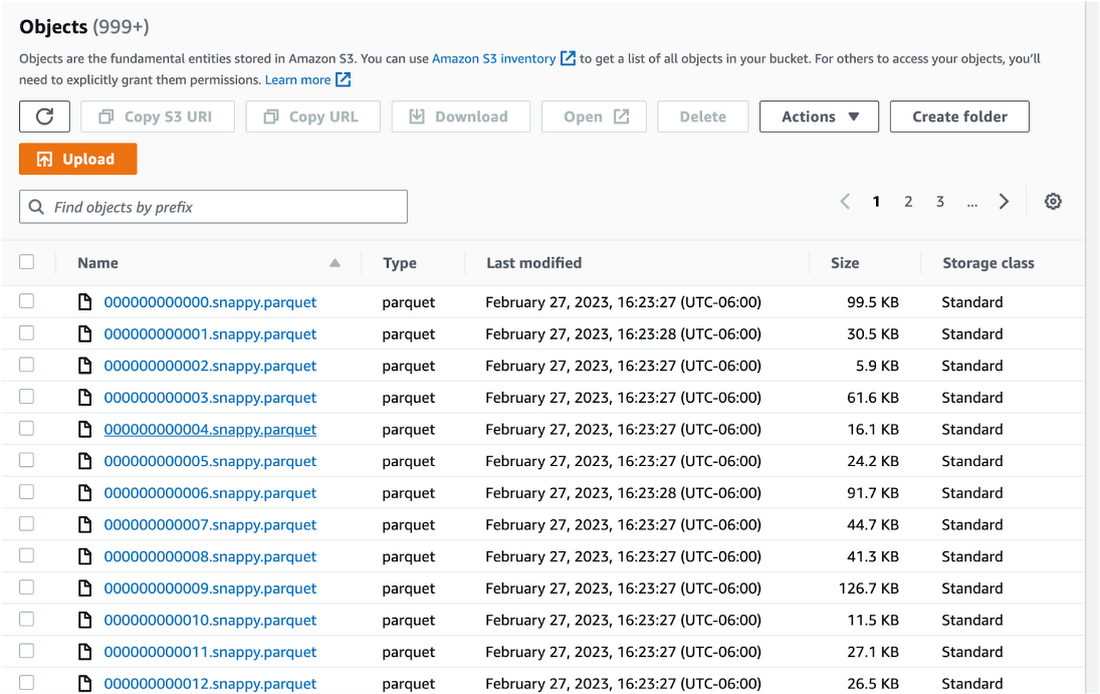
Step 1 : An initial orders dataset on AWS S3 contains 5.54 million rows, and with separate locations (300 rows) and zipcode (33144 rows) metadata files on AWS S3.
Orders Parquet files:
Location and Zipcode files:

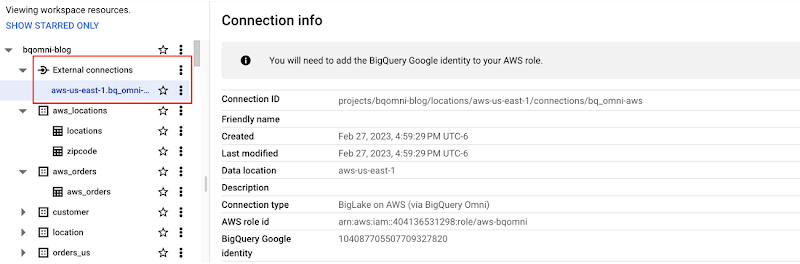
Step 2 : The retailer uses BigQuery Omni to establish a connection between the data stored in AWS and BigQuery, enabling them to access the S3 datasets externally.
External Connection for AWS
External Table for orders
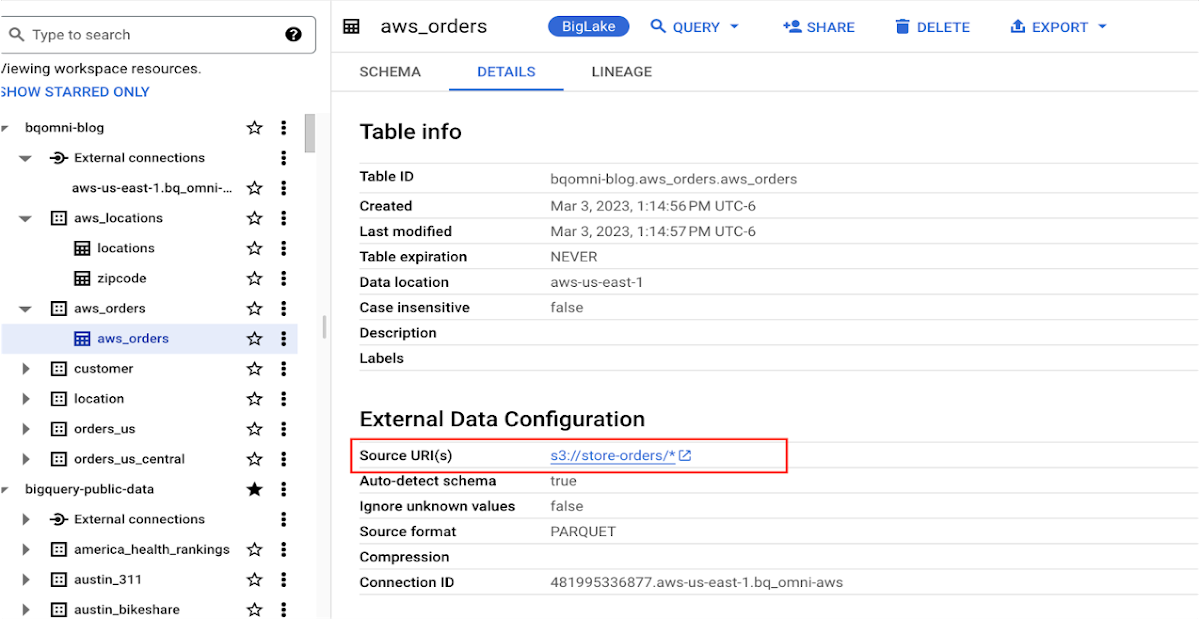
External Table for locations
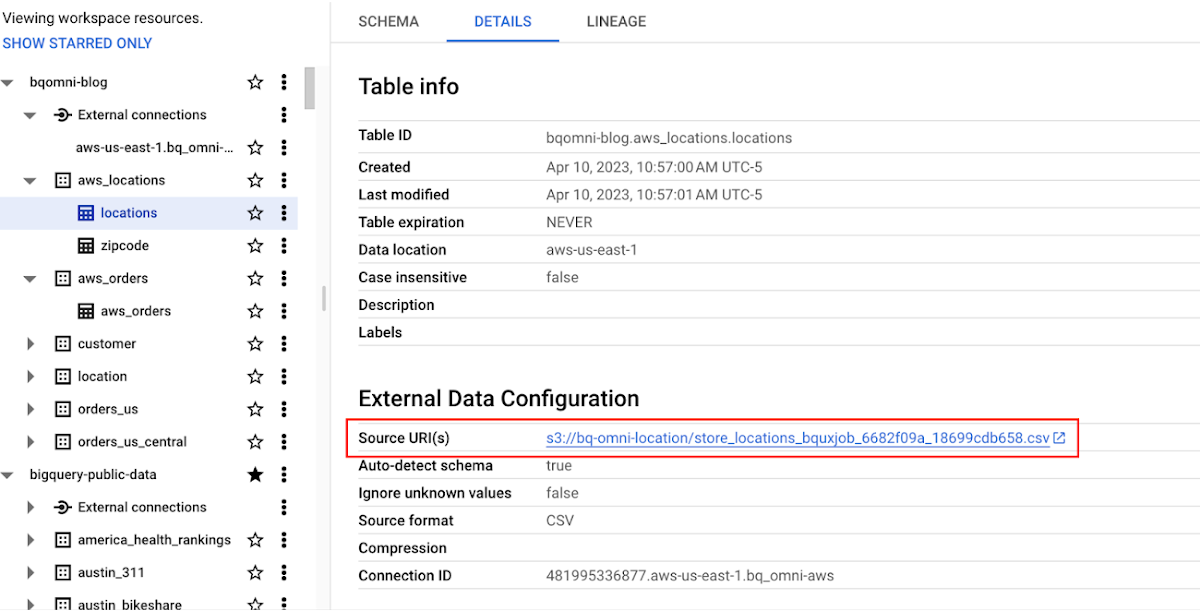
External Table for zipcode
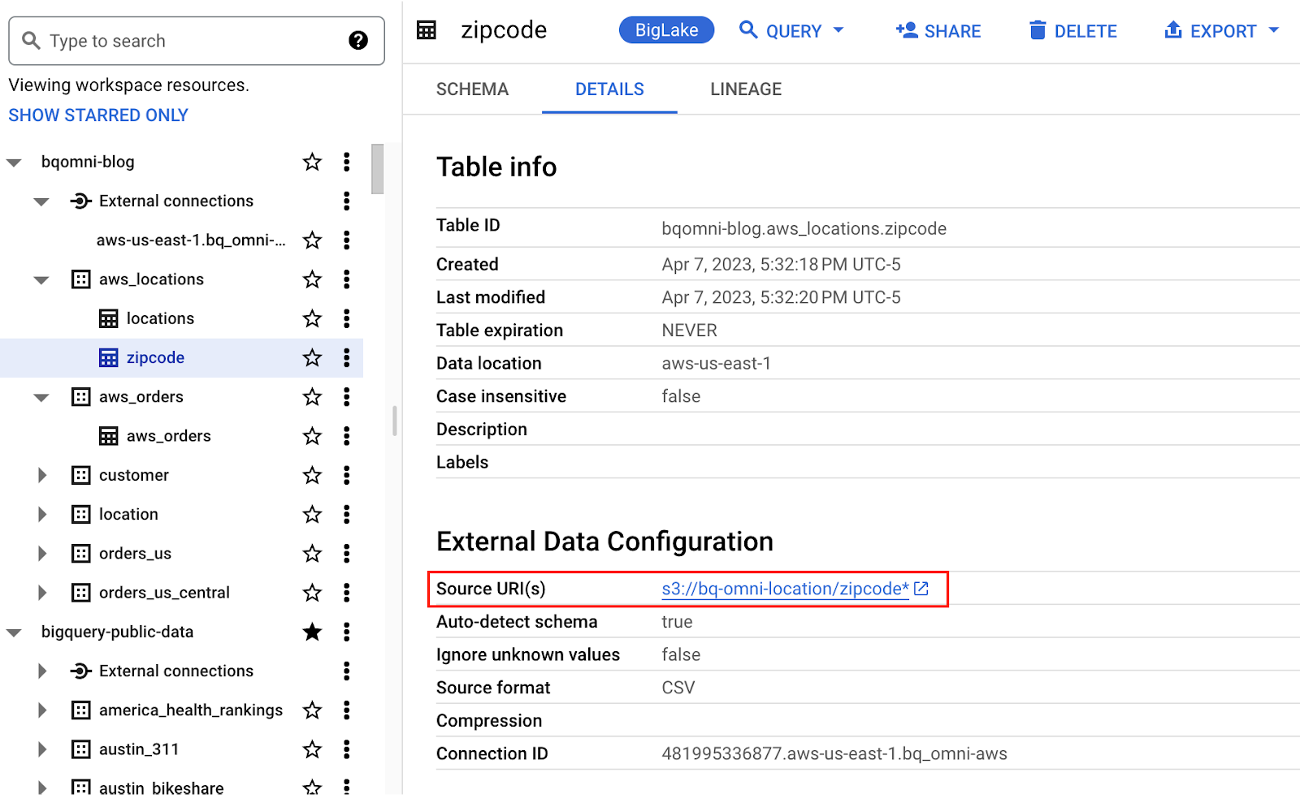
Step 3 : They combine the orders and locations datasets using BigQuery Omni, and remotely aggregate the data on AWS. Joining this dataset with geospatial datasets helps them derive geospatial coordinates.
The final aggregated dataset is reduced to 23 rows. Subsequently, they bring back the result dataset, which contains just 23 rows. This helps them reduce the extraction of millions of rows to just 23 rows for their geospatial analytics.
Select sales.store_city store_city,
sales.number_of_sales_last_10_mins number_of_sales_last_10_mins,
sales.store_zip store_zip,
 ST_GeogPoint(zip_lat_lng.longitude ,
   zip_lat_lng.latitude  ) geo
FROM (
 SELECT
   FORMAT_DATETIME("%X",
     CURRENT_DATETIME("America/Los_Angeles")) current_time,
   MAX(DATETIME(time_of_sale,
       "America/Los_Angeles")) time_of_last_sale,
   COUNT(1) number_of_sales_last_10_mins,
   locations.city store_city,
   locations.zip store_zip
 FROM
   `bqomni-blog.aws_locations.orders_small`  sales
 JOIN
   `bqomni-blog.aws_locations.locations` locations
 ON
   sales.store_id = locations.id
 GROUP BY
   locations.city,
   locations.zip ) sales
JOIN
   `bqomni-blog.aws_locations.zipcode` zip_lat_lng
ON
 cast(sales.store_zip as INT) = cast(zip_lat_lng.zipcode as INT)
 WHERE ST_WITHIN( ST_GeogPoint(zip_lat_lng.longitude , zip_lat_lng.latitude  ) ,ST_GeogFromText(zip_lat_lng.zipcode_geom ) )
 AND zip_lat_lng.state_name  = "New York"
 ORDER BY number_of_sales_last_10_mins
Aggregated Sales data by region
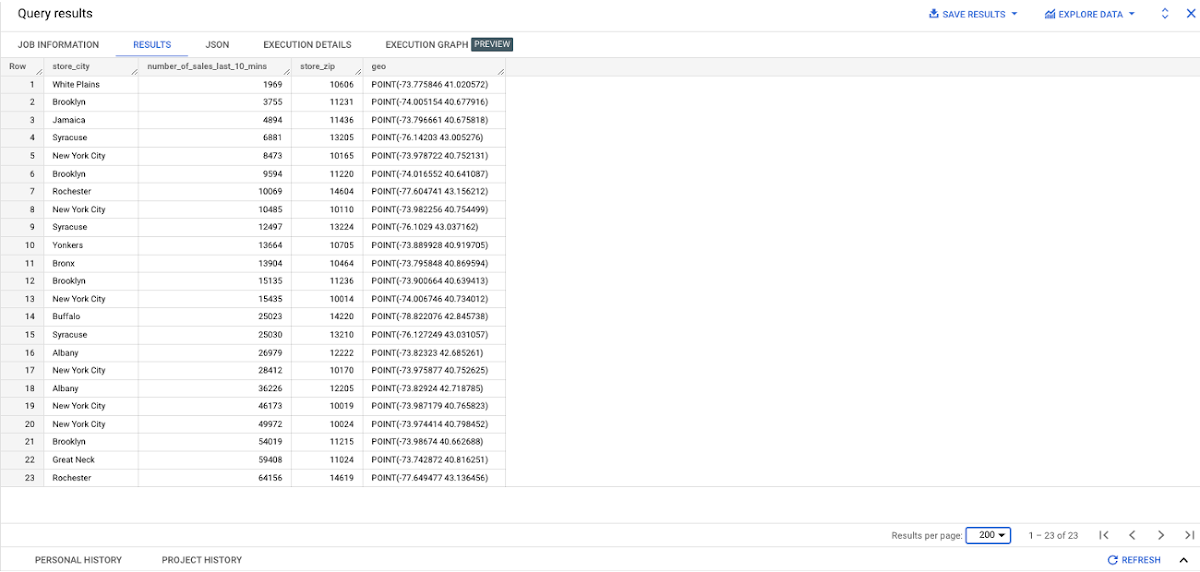
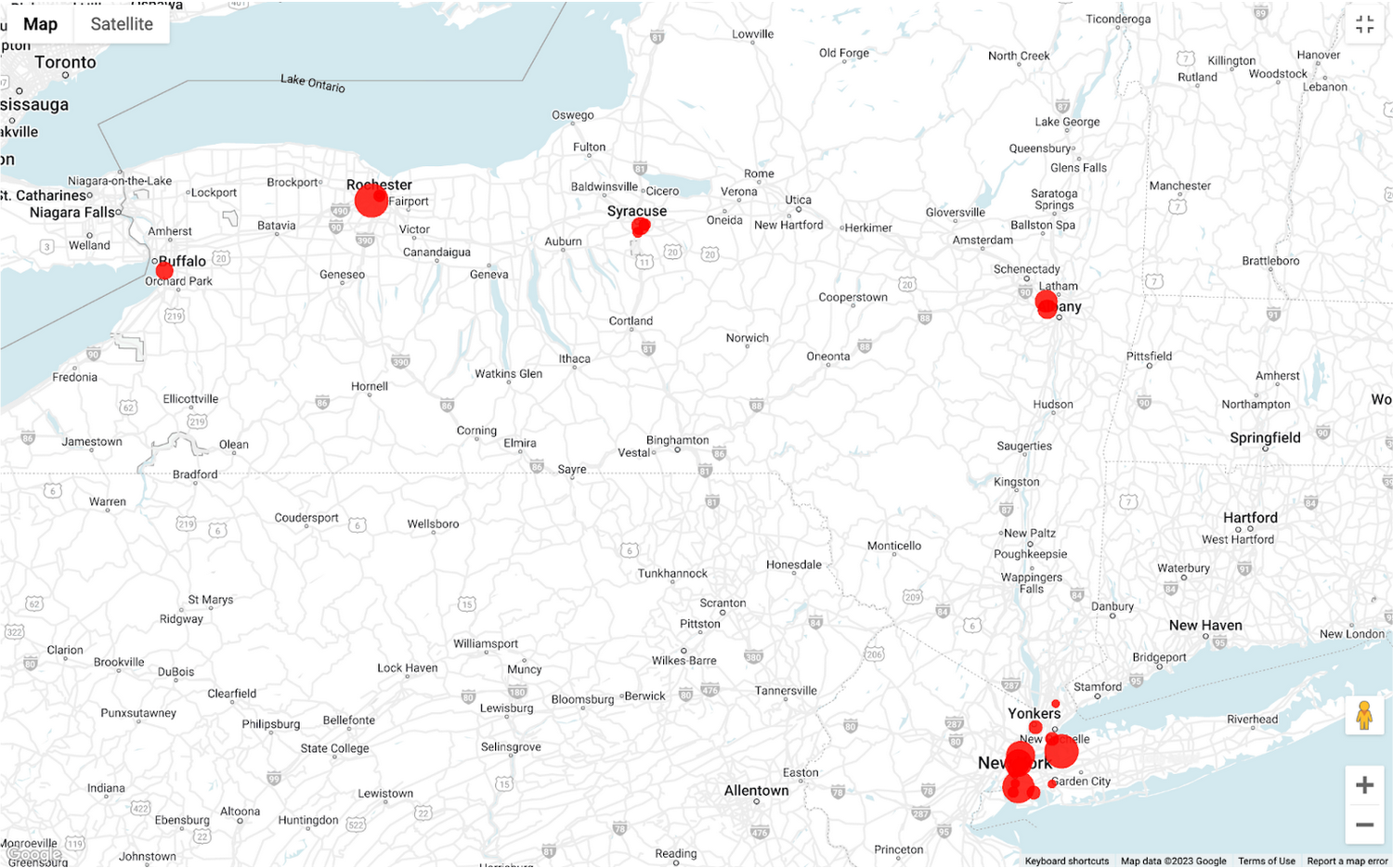
To build richer views of their sales volume data, the retailer uses BigQuery GeoViz integration, a powerful tool that allows for visualizing geographic data on maps.BigQuery Geo Viz is a web tool for visualization of geospatial data in BigQuery using Google Maps APIs. You can run a SQL query and display the results on an interactive map
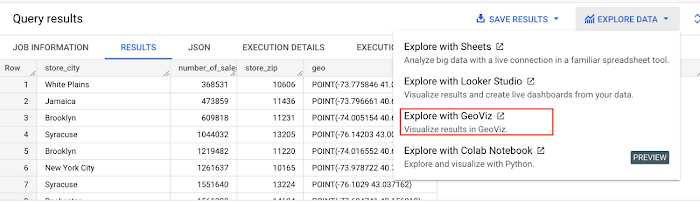
BigQuery Geo view for sales data analysis
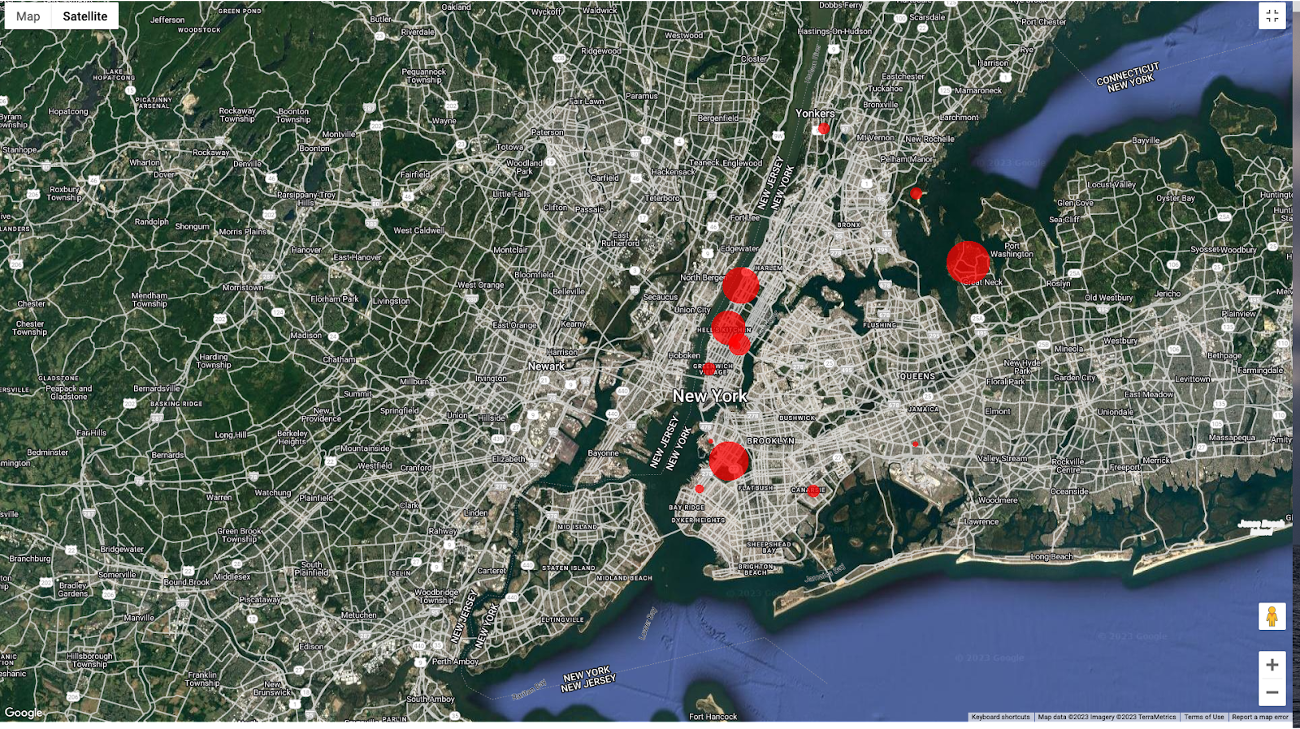
With the geo-tagged data in place, the retailer can now see regional sales volume, sales density, distribution by department by time, and distribution within department, all powered through BigQuery.
Satellite view
Benefits of using BigQuery Omni
Beyond geospatial analysis, BigQuery Omni offers a number of benefits, including:
Reduced costs: BigQuery Omni’s ability to eliminate data transfers between clouds can help organizations reduce costs and simplify data management, making it a valuable tool for multi-cloud analytics. Also, the ability to access and analyze data across multiple clouds can reduce the need for data replication and synchronization, which can further simplify the ETL process and improve data consistency.
Unified governance: BigQuery Omni uses the same security controls as BigQuery, which include features such as encryption, access controls, and audit logs, to help protect data from unauthorized access.
Single pane for analytics: BigQuery Omni provides a single interface for querying data across all three clouds, which can simplify the process of analyzing data and reduce the need for organizations to use multiple analytics tools.
Flexibility: Analyze data stored in any of the supported cloud storage services, giving organizations the flexibility to work with the data they have regardless of where it’s located.
BigQuery Omni is a valuable tool for geospatial analysis because it allows you to analyze data from multiple sources without having to move the data. This can save you time and money, and it can also help you to get more accurate insights from your data.If you are looking for a way to improve the accuracy, efficiency, and decision-making of your business, using BigQuery Omni to analyze geospatial data can be a powerful tool.
References
- Omni-introduction
- Omni-benefits
- Omni-aws-create-connection
- Omni-azure-create-connection
- BigQuery Omni Retail Demo on Looker
- Omni-pricing
- Working with Geospatial Data
- Geospatial Analytics – Intro
Learn more about how BigQuery Omni can help your organization.

3719
Of your peers have already downloaded this article
5:30 Minutes
The most insightful time you'll spend today!
Business needs for digital solutions have intensified the urgency for rapid application development and deployment. At the same time, widespread adoption of cloud computing has revolutionized the IT environment used by both enterprises and consumers.
In addition, the acceleration of digital transformation has increased the availability of developer tools and deployment environments. Besides, the vibrancy of the DevOps movement and the multiplicity of development tools and infrastructures mean that developers enjoy greater decision-making authority in the development of digital solutions.
As a result, developers not only confront the challenge of shipping software faster but also encounter competing challenges to ensure software quality and the appropriate mitigation of risks associated with rapid development and deployment.
Hence, to move quickly and with confidence, developers must use tools that automate the full software development life cycle and work across platforms and operating systems.
Developers need to adopt FaaS, a cloud platform that allows developers to develop, deploy, and manage event-driven applications without the responsibility of managing the infrastructure on which the applications run.
More Relevant Stories for Your Company

Arab Bank Accelerates its App Development and Testing Using Apigee and Anthos
Founded in 1930 and headquartered in Jordan, Arab Bank is one of the oldest banks in the Middle East. Operating out of 28 countries, we’ve earned our customers’ trust with a prudent approach to operations and respect for the cultures and customs in the region. With a few exceptions where cloud providers




Building a Powerful Digital Payments Solution
See how the Payeezy business platform, which enables merchants to establish and grow their eCommerce business, was set up and how it works. The platform enables the exposure of First Data services, processes, and data to partners. The Payeezy API provides all the tools partners need to set up payments

How to Pick a Database that is Suitable for Your Application
Picking the right database for your application is not easy. The choice depends heavily on your use case—transactional processing, analytical processing, in-memory database, and so on—but it also depends on other factors. This post covers the different database options available within Google Cloud across relational (SQL) and non-relational (NoSQL) databases

How APIs Helped PWC Open New Revenue Streams Using Existing Data
PwC, one of the “Big Four” accounting firms, is well-known for professional services structured around auditing, insurance, tax, legal, and traditional management consulting. In Australia, the PwC Innovation and Ventures group has taken the global lead in building new, technology-based, turnkey lines of business outside of PwC’s traditional service areas.
