





Why settle for the status quo?

3968
Of your peers have already read this article.
2:30 Minutes
The most insightful time you'll spend today!
Virtual meetings, remote collaboration, flexible hours: it’s becoming clear that these new ways of working are here to stay.
Business leaders, since the onset of COVID-19, have seen workplace transformation go from an almost theoretical long-term goal to an urgent priority. Employers and employees want more flexible ways of working, and delivering on this requires the right technology.
But flexibility isn’t the only thing that employees want. Remote working has significantly increased the demands we’re getting from many directions—in both our professional and our personal lives. Employees feel overloaded with too much information and too many tasks across too many different tools. Instead of learning another tool, we need the tools we already use to be even more helpful, and work together, in an integrated, intuitive way.
Today’s teams need to re-imagine not only how they communicate and collaborate with each other remotely, but also how they continue to serve their own customers and support the communities they belong to. From doctors consulting with patients, to financial institutions providing critical advice to customers, to teachers delivering distant learning, to car dealerships creating virtual showrooms—it’s clear that these new ways of working are here to stay.
The future of work is here. COVID-19 has accelerated a shift in how organizations like yours get work done. Take this 2-minute assessment below to see where you’re at on the journey to the future of work, and get a free guide to help you take the next step.
How Japan’s Vaccine Locator Platform Became A One-stop Shop for COVID-19 and Vaccination-related Information

3904
Of your peers have already read this article.
4:00 Minutes
The most insightful time you'll spend today!
Editor’s Note: David Moore, Founder and CEO of Navagis, shares his story of teaming up with the Google Maps Platform team to help people across Japan get vaccinated amid COVID-19 pandemic.
The roots of Navagis go back to Hurricane Katrina, when I led an Army Corps of Engineers team that deployed 3D mapping technologies with Google Earth to respond to critical needs on the U.S. Gulf Coast. As a Google Cloud Premier Partner we work across various industries and organizational types to solve location intelligence challenges with our software solutions.
The experience taught me how powerful mapping insights can be in protecting lives when disaster strikes. The COVID-19 crisis brought a brand new human challenge to the world and like other countries, Japan found itself struggling to vaccinate its 125 million people, while trying to communicate about where (and under what circumstances) people could get their vaccines.
Our end goal was to build a reliable, enriched, real-time dataset on Japan’s vaccination centers. Living in Japan, seeing some confusion and anxiety, I felt great urgency when I accepted the mission on behalf of our team.
From the very beginning we faced many challenges. Japan was experiencing unique difficulties in building an accurate real-time vaccine locator. First, we noticed the fragmentation of address information across thousands of local governments, from Hokkaido in the north to subtropical Okinawa in the south. Second, Japan’s Ministry of Health, Labor and Welfare had launched a website of nationwide vaccination sites, which they were constantly updating data sources. We noticed the location information was prone to inconsistencies due to its dispersion at the local level, and different conventions among prefectures on writing addresses. In order to ensure the integrity of a massive amount of decentralized data, mostly in Japanese, we required on-the-ground presence and experience.
In addition, we needed to go beyond simply mapping the location of vaccination centers. Each one needed to be a one-stop shop for all information regarding vaccination, including opening hours, safety precautions, and qualifications for getting the COVID-19 vaccine.
Round-the-clock teamwork builds a helpful, informative mapping solution
People might think of mapping as all about AI, advanced satellites, and cloud computing power. Of course, these are essential. What is less known is the massive amount of human toil and dedication that goes into making vaccine location information available especially for an urgent health mission for a country as large and complex as Japan.
Realizing our task was urgent, we worked with the Google Maps Platform team across time zones and over weekends to make this happen fast. In some cases a vaccine center was at a place where one would not normally expect to get a vaccine—like a pop-up location at a convention center. So we matched vaccine center addresses from the government website against Google Maps Platform’s Places data.
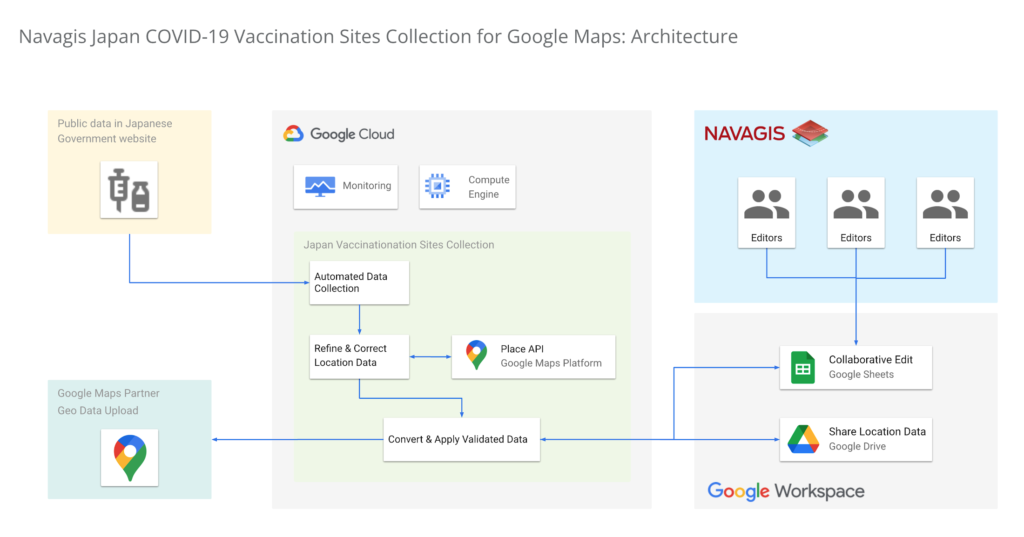
In under two weeks, we had identified, matched and marked tens of thousands of locations as vaccination centers around the country. Moreover, the power of the Geolocation API and Places API enabled us to provide richer details for many of the centers.

One of the unique aspects of this project was being able to surface our work across multiple channels to accomplish a single goal. We were able to work with Google to ensure the vaccine centers appeared on the consumer user-facing Google Maps apps and website, with information to help citizens learn where and how to get their vaccine. Our team was in hourly contact with requests such as “this center is mission-critical, can we get it mapped?” They were able to quickly get the site listed and visible on the map for end-users. This was a big human mobilization.
Powerful mapping APIs for pinpointed vaccine location information
We couldn’t have accomplished the massive task of validating 35,000 vaccination sites in such a short period of time without Google’s mapping APIs. The Maps Geocoding API and Places API enabled us to take location data from the government website, and quickly verify whether the location existed, or not, with up-to-date places intelligence.
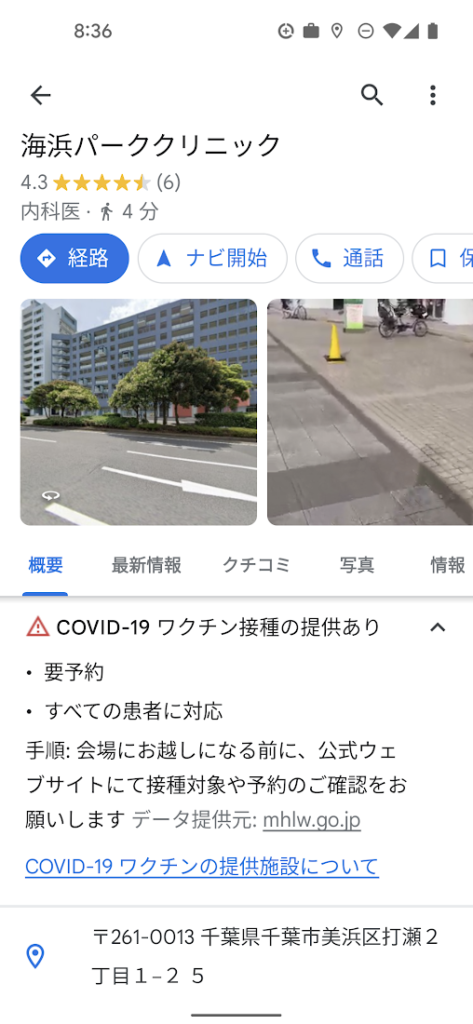
The Places API served a critical role in two ways: breadth of information (covering Japan’s entire territory), and depth of information (complex insight into each place, such as landmarks and phone numbers).
The ability to take the addresses provided by the government of vaccination sites, run them through the Places API, and assess the address quality helped enormously. Google Street View, meanwhile, provided a further level of validation, enabling us to visually identify the specific locations where errors remained, and manually identifying clinics and hospitals before identifying their precise latitude and longitude within cities in Japan.
Looking beyond COVID-19
Japan went from being a laggard in global vaccination rates before the summer of 2021 to one of the leaders, with nearly 80% of the population fully vaccinated. And, daily confirmed cases had been as low as 100 nationwide prior to Omicron emerging globally.
The prospect of putting to bed our adventure with the Japan Vaccine Locator couldn’t bring us more joy.
Except perhaps, the prospect of helping people rediscover the joy of a return to normalcy—in partnership with Google Maps Platform.
For more information on Google Maps Platform, visit our website.
Customer Stories: Ocado

4049
Of your peers have already read this article.
2:30 Minutes
The most insightful time you'll spend today!
Ocado is the world’s largest online-only grocery store. But Ocado isn’t your typical corner grocery store. For one thing, there’s no corner as we’re an online-only grocery retailer reaching British households, and now with a fast-growing non-food business alongside. Our customers shop online using our award-winning webshop or mobile apps and then their orders are picked and packed in one of our huge automated warehouses, the largest of their kind in the world; hours later, our vans deliver to their kitchens in one-hour delivery slots.
Google Workspace allows us to do things our way, wherever and whenever we want. Our staff use Gmail, Google Calendar and Google Drive to stay on top of their day to day work, and Google+ is helping our teams stay in touch, share information and build local communities. Ultimately, all of these tools help to make sure our customers get the groceries they order, on time and in the best possible condition.
But we didn’t stop there. We looked at other ways we could use Google’s technology to help us run our business and started using Google App Engine for building internal applications. For example, we used App Engine to create a new version of our “Where’s My Order” application, which our customers will soon be using to find out where their orders are within our production cycle. Once their order is on the road, the integration with Google Maps allows them to see exactly where their delivery van is. So we’re taking what used to be a chore, grocery shopping, and making it a simple experience that you can do from the convenience of your own home, or wherever you may be.
Our most recent project was on Google Compute Engine. Within our warehouses there are certain tasks that are repetitive and arduous for humans to do, like picking heavy six packs of bottled water into customer orders. So our robotics team is developing solutions that use robots to automate these sorts of tasks and thus release staff for other more important work. But these robots need sophisticated 3D vision systems to enable them to see what they are doing. These are very computationally intensive applications and by providing the instantly flexible and scalable computing power to crunch all those numbers, Compute Engine provided the perfect solution. And, we are already using the cloud to store and process some of the huge volumes of data that our business spits out every minute.
But with an eye to future growth and international expansion, we have plans to use Compute Engine and Cloud Storage to move other parts of our production systems to the cloud. So walk into an Ocado warehouse in the future and you might run into a robot if you’re not careful. Like I said, we’re not your typical corner grocery store.
*Google Workspace was formerly known as G Suite
Google Cloud’s Suite of DevOps Speeds Up ForgeRock’s Development

5689
Of your peers have already read this article.
3:00 Minutes
The most insightful time you'll spend today!
Editor’s note: Today we hear from ForgeRock, a multinational identity and access management software company with more than 1,100 enterprise customers, including a major public broadcaster. In total, customers use the ForgeRock Identity Platform to authenticate and log in over 45 million users daily, helping them manage identity, governance, and access management across all platforms, including on-premises and multicloud environments.
Operating at that kind of scale isn’t easy. In this blog post, ForgeRock Engineering Director, Warren Strange discusses the three things that help make their developers efficient and productive, and the Google Cloud tools they use along the way.
At ForgeRock, we’ve been an early adopter of Kubernetes, viewing it as a strategic platform. Running on Kubernetes allows us to drive multicloud support across Google Kubernetes Engine (GKE), Amazon (EKS), and Azure (AKS). So no matter which cloud our customers are running on, we are able to seamlessly integrate our products into customers’ environments.
Making it easier for ForgeRock’s developers and operators to build, deploy and manage applications has been crucial in our ability to continually provide high quality solutions for our customers. We’re always looking for tools to improve productivity and keep our developers focused on coding instead of configuration. Google Cloud’s suite of DevOps tools have streamlined three specific practices to help keep our developers productive:
1. Make developers productive within IDEs
Developer productivity is core to the success of any organization, including ForgeRock. Since developers spend most of their time within their IDE of choice, our goal at ForgeRock has been to make it easier for our developers to write Kubernetes applications within the IDEs they know and love. Cloud Code helps us precisely with that: it makes the process of building, deploying, scaling, and managing Kubernetes infrastructure and applications a breeze.
In particular, working with the Kubernetes YAML syntax and schema takes time, and a lot of trial and error to master. Thanks to YAML authoring support within Cloud Code, we can easily avoid the complicated and time consuming task of writing YAML files at ForgeRock. With YAML authoring support, developers save time on every bug. Cloud Code’s inline snippets, completions, and schema validation, a.k.a. “linting,” further streamline working with YAML files.
The benefits of Cloud Code extend to local development as well. Iterating locally on Kubernetes applications often requires multiple manual steps, including building container images, updating Kubernetes manifests, and redeploying applications. Doing these steps over and over again can be a chore. Cloud Code supports Skaffold under the hood, which tracks changes as they come and automatically rebuilds and redeploys—reducing repetitive development tasks.
Finally, developing for Kubernetes usually involves jumping between the IDE, documentation, samples etc. Cloud Code reduces this context switching with Kubernetes code samples. With samples, we can get new developers up and running quickly. They spend less time learning about configuration and management of the application—and spend more time on writing and evolving the code.
2. Drive end-to-end automation
To further improve developer productivity, we’ve focused on end-to-end automation: from writing code within IDEs, to automatically triggering CI/CD pipelines and running the code in production. In particular, Tekton, Cloud Build, Container Registry, and GKE have been critical to Forgerock as we streamline the flow of code, feedback and remediation through the build and deployment processes. The process looks something like this:
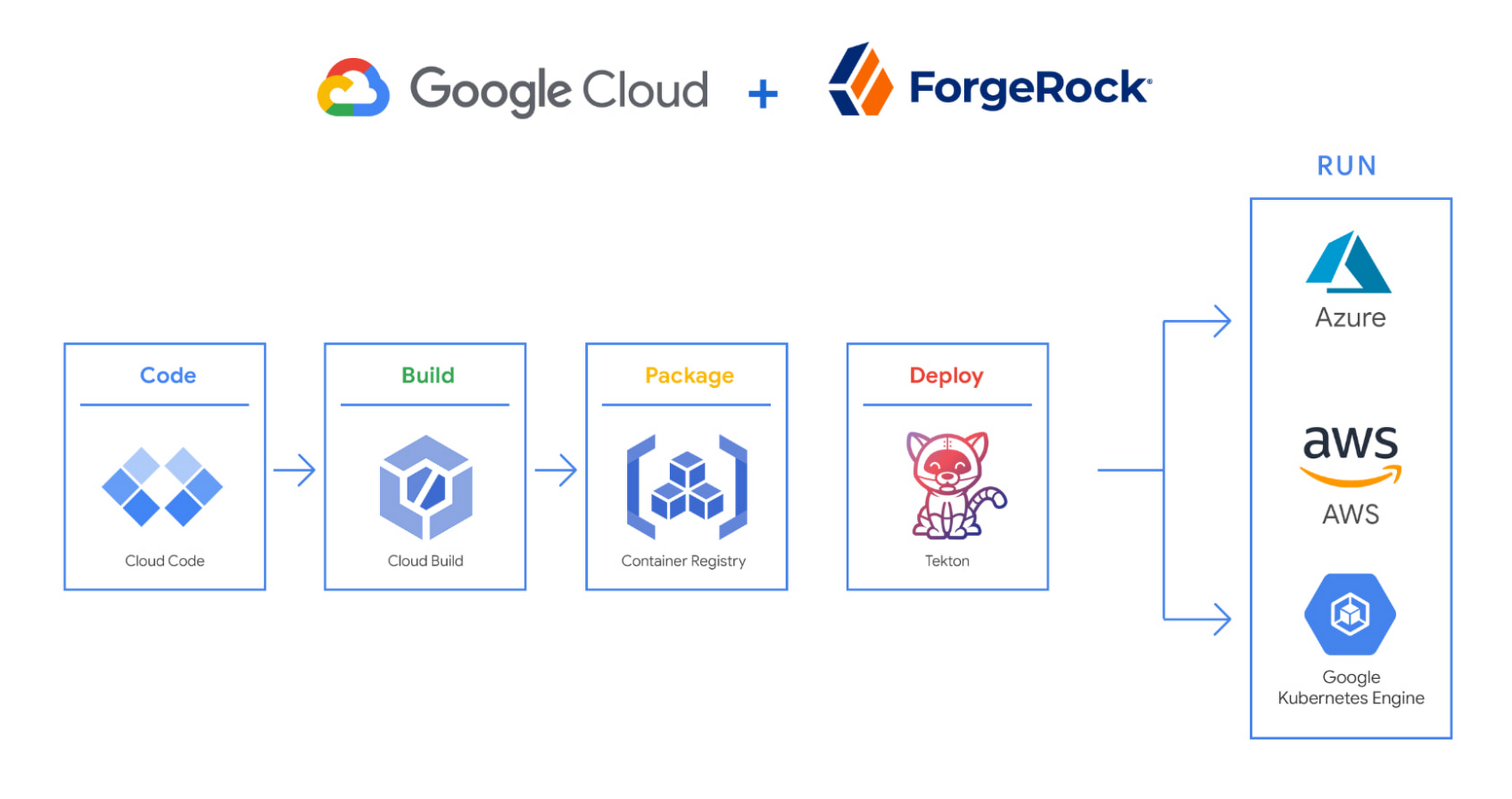
We begin by developing Kubernetes manifests and dockerfiles using Cloud Code. Then we use Skaffold to build containers locally, while Cloud Build helps with continuous integration (CI). The Cloud Build GitHub app allows us to automate builds and tests as part of our GitHub workflow. Cloud Build is differentiated from other continuous integration tools since it is fully serverless. It scales up and scales down in response to load, with no need for us to pre-provision servers or pay in advance for additional capacity. We pay for the exact resources we use.
Once the image is built by Cloud Build, it is stored, managed, and secured in Google’s Container Registry. Just like Cloud Build, Container Registry is serverless, so we only pay for what we use. Additionally, since Container Registry comes with automatic vulnerability scanning, every time we upload a new image to Container Registry, we can also scan it for vulnerabilities.
Next, a Tekton pipeline is triggered, which deploys the docker images stored in Container Registry and Kubernetes manifests to a running GKE cluster. Along with Cloud Build, Tekton is a critical part of our CI/CD process at ForgeRock. Most importantly, since Tekton comes with standardized Kubernetes-native primitives, we can create continuous delivery workflows very quickly.
After deployment, Tekton triggers a functional test suite to ensure that the applications we deploy perform as expected. The test results are posted to our team Slack channel so all developers have instant access and insights about each cluster. From there, we are able to provide our customers with their finished product request.
3. Leverage multicloud patterns and practices
The industry has seen a shift towards multicloud. Organizations have adopted multicloud strategies to minimize vendor lock-in, take advantage of best-in-class solutions, improve cost-efficiencies, and increase flexibility through choice.
At ForgeRock, we’re big proponents of multicloud. Part of that comes from the fact that our identity and access management product works across Google Cloud, AWS, and Azure. Developing products using open-source technologies such as Kubernetes has been particularly helpful in driving this interoperability.
Tekton has been another critical project that has allowed us to prevent vendor lock-in. Thanks to Tekton, our continuous delivery pipelines can deploy across any Kubernetes cluster. Most importantly, since Tekton pipelines run on Kubernetes, these pipelines can be decoupled from the runtime. Like Tekton and Kubernetes, both Cloud Build and Container Registry are based on open technologies. Community-contributed builders and official builder images allow us to connect to a variety of tools as a part of the build process. And finally, with support for open technologies like Google Cloud buildpacks within Cloud Build, we can build containers without even knowing Docker.
Making it easier for developers and operators to build, deploy and manage applications is critical for the success of any organization. Driving developer productivity within IDEs, leveraging end-to-end automation, and support for multi-cloud patterns and practices are just some of the ways we are trying to achieve this at ForgeRock. To learn more about ForgeRock, and to deploy the ForgeRock Identity Platform into your Kubernetes cluster, check out our open-source ForgeOps repository on GitHub.
Safeguarding time and attention with Google Workspace and Gmail

3995
Of your peers have already read this article.
3:30 Minutes
The most insightful time you'll spend today!
As the pandemic forced millions of people to work from home, many of us found ourselves spending more time in video meetings and in our inboxes as a way to bridge the distance from our colleagues. When the workplace became the living room or the makeshift home office, and as professional and personal responsibilities sometimes collided, we had to find new ways to manage time and attention and to sustain human connection.
When it comes to work emails during the pandemic, we were sending more of them, to more recipients, and we often sent them outside of normal business hours. A study conducted by the Organizational Behavior Unit of Harvard Business School assessed email statistics eight weeks before the start of the pandemic-related lockdowns and eight weeks after. The study concluded that after lockdowns, employees sent 5.2% more emails a day, emails had 2.9% more recipients, and about 8.3% more emails were sent after business hours.
Many of the latest Google Workspace features are designed to help people save time, find focus, and manage tasks more efficiently, whether it’s with smarter emails, writing suggestions, Google Assistant, segmentable working hours, or predictive search. These features combine to save the equivalent of a full working month every year, per person, so that you can spend more time on what matters instead of managing tools.
With that in mind, let’s take a deeper look at how Gmail can help you better manage time and attention.
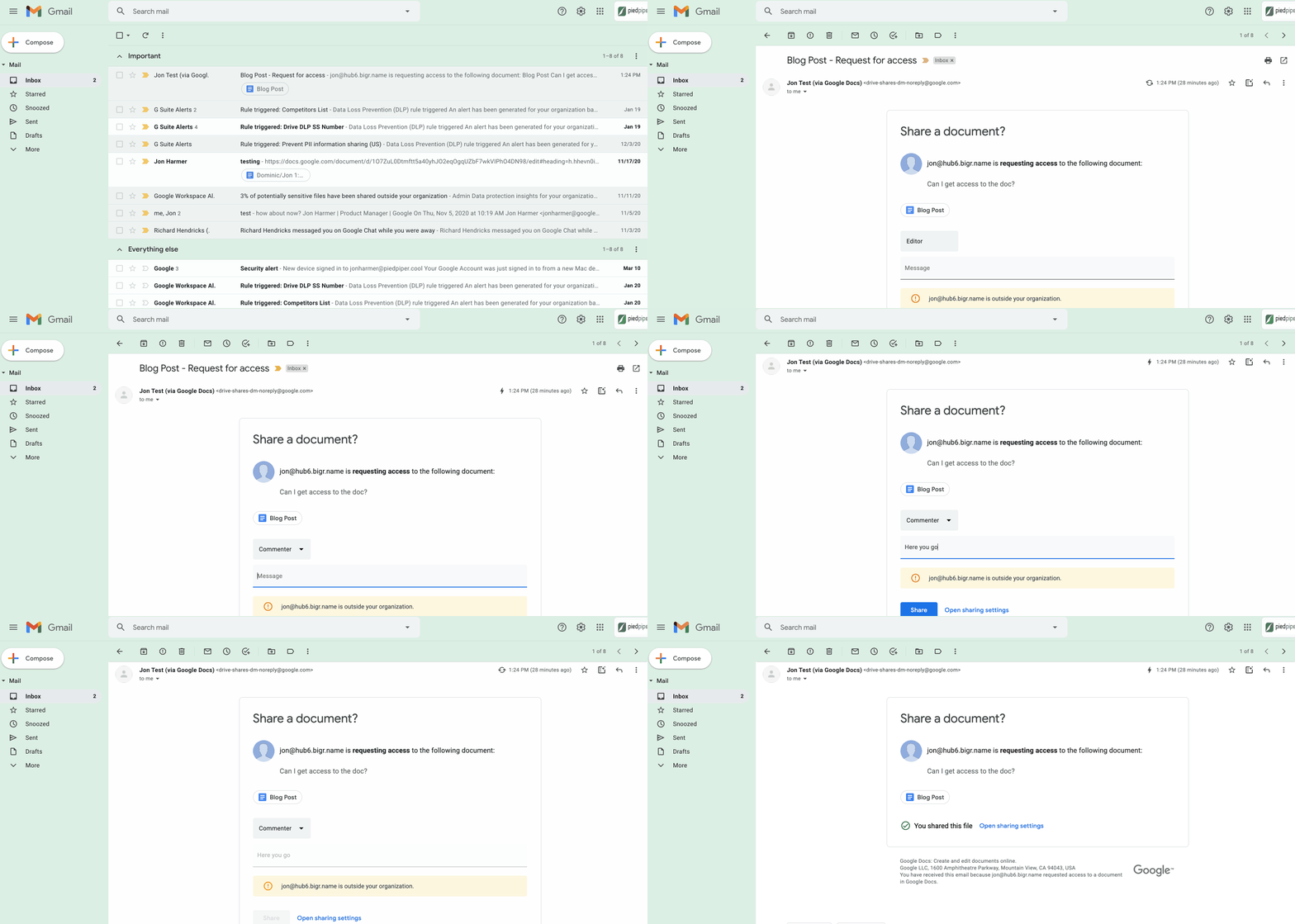
1. Use dynamic email to help recipients complete tasks directly inside an email message. With the new dynamic email support in Gmail, you can easily send and receive emails that enable the reader to take action directly from within the message. This removes the burden of opening multiple documents and tabs. Email recipients can grant access to Drive files, respond to or resolve comments in Docs, Slides, or Sheets, and RSVP to events—all without leaving the message. Learn more.
2. Stay productive, even when you’re offline. Gmail Offline lets you read, reply, delete, and search your Gmail messages when you’re not connected to the internet. Once you set it up, an outbox will appear in the left panel. When a connection later becomes available, Gmail will automatically send the messages from your outbox, and download any new messages to your inbox. This is great for those working on the frontlines who need to stay productive and informed, even when they’re offline.
3. Get organized and prioritize your work with Tasks in Gmail. This feature allows you to easily convert emails into tasks with just one click. You can create due dates that will automatically appear in your calendar, and check tasks off as you complete them. Baked directly into the side panel, you can create, view and manage your task lists without leaving Gmail.
4. Spend time innovating, not writing emails. Gmail’s template functionality lets you create standardized email messages that can be edited and sent out to different recipients in a matter of seconds. If this feature sounds appealing, check out Smart Reply and Smart Compose to learn more ways to write and reply to emails faster.
5. Get search results faster in Gmail. Search chips help you find what you’re looking for in Gmail faster, without needing to sort through irrelevant results or use search operators (e.g., from: marketing@company.com). For example, you can search a colleague’s name and further narrow your results by selecting search chips like attachment type (Doc, Sheet, PDF, etc.) or a specific timeframe. You can even exclude specific keywords and calendar invites from your results. You can also use search chips to search your Google Chat history, directly from within Gmail. To use search chips, all you need to do is type in a Gmail search, click on the search filter chips below the search box and Gmail will take care of the rest.

6. Tune out the irrelevant with the Gmail mute feature. Because we’ve all found ourselves trapped in unnecessary email threads, we created the Gmail Mute feature. With two clicks, you can mute email threads that aren’t relevant or that you no longer wish to follow. All future responses to that thread will now be automatically muted so you can focus your attention elsewhere. If you decide to rejoin the conversation, you can unmute the email thread just as easily.
Tips to Get Most of Google Workspace and Make Hybrid Work Efficient and Effective!

3742
Of your peers have already read this article.
1:30 Minutes
The most insightful time you'll spend today!
In response to the pandemic, an overwhelming 92% of the U.S. workforce is now interested in working in a hybrid or fully remote capacity1. All employers, including government leaders, are now critically focused on finding the right tools and techniques to foster engagement, improve productivity, and strengthen relationships – in-person and virtually – or risk losing and/or retaining top talent.
Creating a positive work environment starts with having the right technology that can provide a variety of meeting tools to make work easier and more productive from any location. Google Workspace enables agency leaders to support their workforce with capabilities to address a variety of needs, from virtual training and learning, to mobilizing emergency response and critical service delivery. Below we’ve highlighted some of our top tips for getting the most out of Google Workspace to make hybrid work more efficient and effective.
Capture meeting agendas in a Google Doc
Create more effective, engaging meetings by attaching an agenda doc to your Google Calendar event and invite your attendees in to comment and review ahead of time. Google Docs, Google Slides, and Google Sheets allow collaborators to leave color-coded comments that can be incorporated into a live video meeting or a face-to-face roundtable meeting.
Engage attendees with interactive features in Google Meet
We’ve added new features to make meetings more interactive and inclusive throughout 2022. New in-meeting reactions, livestream Q&A and polls, and streaming meetings directly to YouTube, and client-side encryption are all coming to Google Meet soon. We’re incorporating Meet directly into Docs, Sheets, and Slides to make it easier to coordinate on projects.
Knowing how to include everyone into a meeting, even while some folks are remote and some are in the office, will be critical to bringing cohesion to the work experience. Government leaders can foster a culture that helps workers be more productive, satisfied, and perhaps even happier with their work lives.
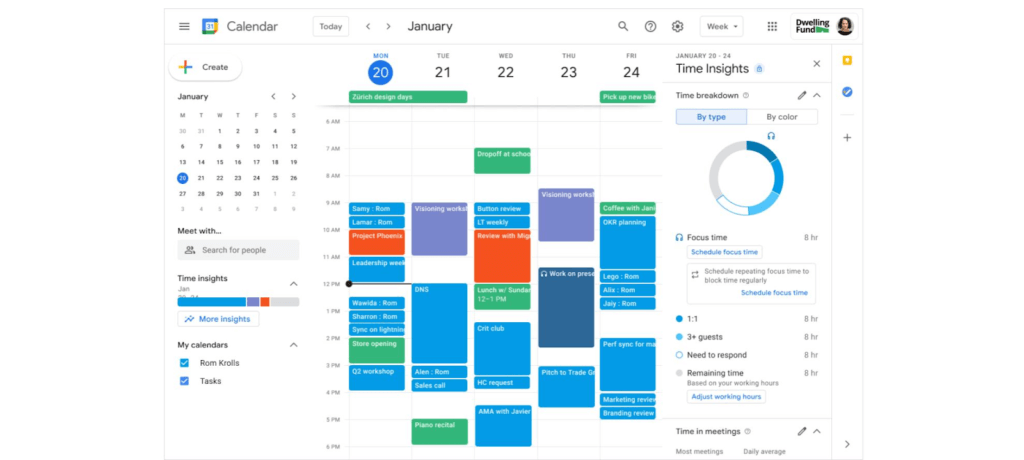
Add focus time to your calendar and see how time is spent
Google Workspace has also introduced product features to promote wellness. This includes focus time on Google Calendar, out of office and do not disturb statuses on Google Chat, or even backgrounds and noise cancellation on Google Meet that allow individuals to separate their home from work. Allowing employees to set boundaries or notify others of working times can help combat work fatigue. Time Insights in Calendar provide individuals with personalized analytics to see how time is spent across meetings and collaborators throughout a week. A secure cloud environment further brings these tools together to create systems of collaboration.
Creating positive outcomes with a culture focused on integrated work environments
The shift to hybrid work has already started leading to more meaningful engagements among all employees. Video calls have connected the new, tech savvy generation of workers with more experienced workers. In a Fedscoop Radio podcast on embracing hybrid-work strategies and tools, Gary Dannoff, Global Google Workspace Strategic Alliance Leader, noted that multigenerational teams with a 25-year age gap between team members are 75% more likely to have positive outcomes than teams with a smaller age span or none. As we return to the office, let’s engage with and support this new culture of cross-cultural, cross-generational, and cross-geographic collaborative environments created by the challenges we all adapted to during the pandemic.
Google Workspace supports a shift toward future-ready workplace cultures while providing the empathy and confidence needed for returning employees. Danoff also explains that to create a “future-proof” culture, you need to shift your mindset towards building a workplace that is future-ready. Using modern technology to foster collaboration in an evolving work environment helps organizations transform how work is done.
Collaborative technology facilitates productivity and constituent engagement
Agencies around the country are embracing the new era of hybrid work. The State of Arizona migrated 36,000 employees to Google Workspace with little disruption to the way people did their jobs. Now, Arizona is planning to expand their platform to support even more departments that require highly regulated data.
To help constituents get back to work, states like Rhode Island and Wisconsin have created Virtual Career Centers that leverage Google Cloud solutions, which includes Google Workspace, where constituents can schedule meetings and video conferences with career coaches, develop and collaborate on resumes using cloud-based document storage, communicate directly with job recruiters, attend virtual job fairs, and apply to open positions.
For more ideas on how to bring a collaborative, innovative culture into the workplace, catch up on content from the Google Workspace Summit.
1 Source: https://www.pwc.com/us/en/library/covid-19/us-remote-work-survey.html#content-free-1-0f39
More Relevant Stories for Your Company

Arab Bank Accelerates its App Development and Testing Using Apigee and Anthos
Founded in 1930 and headquartered in Jordan, Arab Bank is one of the oldest banks in the Middle East. Operating out of 28 countries, we’ve earned our customers’ trust with a prudent approach to operations and respect for the cultures and customs in the region. With a few exceptions where cloud providers

How a Former Refugee is Using Tech to Transform the Lives of Women in Afghanistan
Born in Iran as a refugee during the Soviet invasion of Afghanistan, I understand the challenges many people face there to get access to formal education. I was one of eight children in a progressive, yet financially limited, family. We left everything behind in Herat to move to a new

How the Telegraph is Reimagining Media with Google Cloud
Whether they’re reading the newspaper on the way to work, or catching up on the latest headlines on their smartphones, readers expect up-to-the-minute news wherever and whenever makes the most sense for them. As a result, media companies are increasingly looking for ways to improve, expand, and simplify their offerings,
What Are India’s Biggest Companies Doing on Google Cloud?
In the last year, there’s been an upward trend in cloud adoption in India. In fact, NASSCOM finds that cloud spending in India is estimated to grow at 30% per annum to cross the US$7 billion mark by 2022. At Google, in our conversations with customers, discussions have evolved beyond cost savings
