





What You Need to Know About Compute Engines

6544
Of your peers have already read this article.
1:30 Minutes
The most insightful time you'll spend today!
Compute Engine is a customizable compute service that lets you create and run virtual machines on Google’s infrastructure. You can create a Virtual Machine (VM) that fits your needs. Predefined machine types are pre-built and ready-to-go configurations of VMs with specific amounts of vCPU and memory to start running apps quickly. With Custom Machine Types, you can create virtual machines with the optimal amount of CPU and memory for your workloads. This allows you to tailor your infrastructure to your workload. If requirements change, using the stop/start feature you can move your workload to a smaller or larger Custom Machine Type instance, or to a predefined configuration.
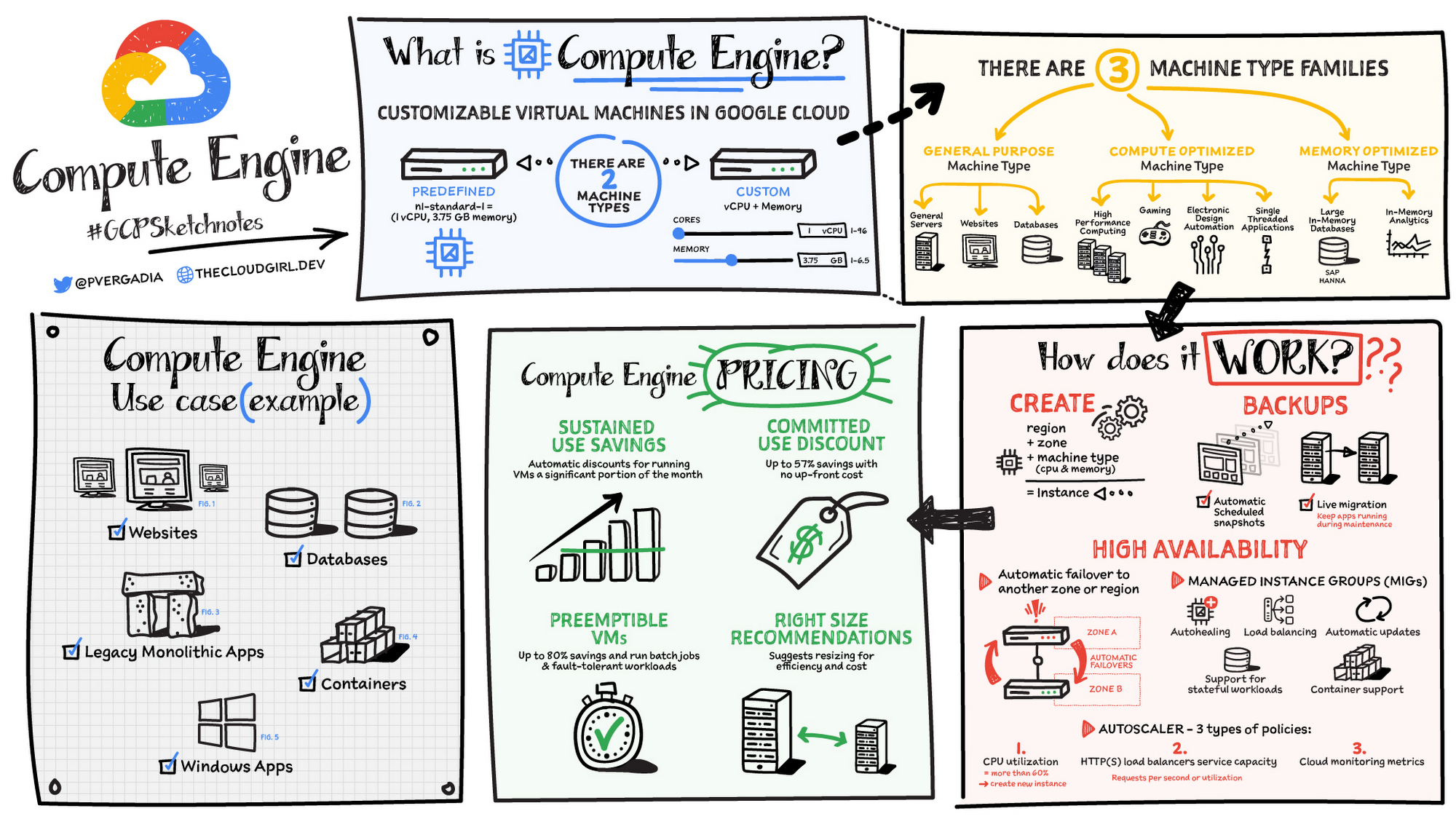
Machine types
In Compute Engine, machine types are grouped and curated by families for different workloads. You can choose from general-purpose, memory-optimized, compute-optimized and accelerator-optimized families.
- General-purpose machines are used for Day-to-day computing at a lower cost and for balanced price/performance across a wide range of VM shapes. The use cases that best fit here are web serving, app serving, back office applications, databases, cache, media-streaming, microservices, virtual desktops, development environments.
- Memory-Optimized machine are recommended for ultra high-memory workloads such as in-memory analytics and large in-memory databases such as SAP HANA
- Compute-Optimized machines are recommended for ultra high performance workloads such as High Performance Computing (HPC), Electronic Design Automation (EDA), gaming, video transcoding, single-threaded applications.
- Accelerator-Optimized machines are optimized for high performance computing workloads such as Machine learning (ML), Massive parallelized computations and High Performance Computing (HPC)
How does it work?
You can create a VM instance using a boot disk image, a boot disk snapshot, or a container image. The image can be a public operating system (OS) image or a custom one. Depending on where your users are you can define the zone you want the virtual machine to be created in. By default all traffic from the internet is blocked by the firewall and you can enable the HTTP(s) traffic if needed.
Use snapshot schedules (hourly, daily, or weekly) as a best practice to back up your Compute Engine workloads. Compute Engine offers live migration by default to keep your virtual machine instances running even when software or hardware update occurs. Your running instances are migrated to another host in the same zone instead of requiring your VMs to be rebooted.
Availability
For High Availability (HA) Compute Engine offers automatic failover to other regions or zones in event of a failure. Managed instance groups (MIGs) help keep the instances running by automatically replicating instances from a predefined image. They also provide application based autohealing health checks. If an application is not responding on a VM, the auto healer automatically recreates that VM for you. Regional MIGs let you spread app load across multiple zones. This replication protects against zonal failures. MIGs work with load balancing services to distribute traffic across all of the instances in the group.
Compute Engine offers autoscaling to automatically add or remove VM instances from a managed instance group based on increases or decreases in load. Autoscaling lets your apps gracefully handle increases in traffic, and it reduces cost when the need for resources is lower. You define the autoscaling policy for automatic scaling based on the measured load, CPU utilization, requests per second or other metrics.
Active Assist’s new feature, predictive autoscaling, helps improve response times for your applications–When you enable predictive autoscaling, Compute Engine forecasts future load based on your Managed Instance Group’s (MIG) history and scales it out in advance of predicted load, so that new instances are ready to serve when the load arrives. Without predictive autoscaling, an autoscaler can only scale a group reactively, based on observed changes in load in real time. With predictive autoscaling enabled, the autoscaler works with real-time data as well as with historical data to cover both the current and forecasted load. That makes predictive autoscaling ideal for those apps with long initialization times and whose workloads vary predictably with daily or weekly cycles. For more information, see How predictive autoscaling works or check if predictive autoscaling is suitable for your workload, and to learn more about other intelligent features, check out Active Assist.
Pricing
You pay for what you use. But you can save cost by taking advantage of some discounts! Sustained use saving are automatic discounts applied for running instances for a significant portion of the month. If you know your usage upfront, you can take advantage of committed use discounts which can lead up to significant savings without any upfront cost. And by using short lived preemptive instances you can save up to 80%, they are great for batch jobs and fault tolerant workloads. You can also optimize resource utilization with automatic recommendations. For example if you are using a bigger instance for a workload that can run on a smaller instance you can save costs applying these recommendations.
Security
Compute Engine provides you default hardware security. Using Identity and Access Management (IAM) you just have to ensure that proper permissions are given to control access to your VM resources. All the other basic security principles apply, if the resources are not related and don’t require network communication amongst themselves, consider hosting them on different VPC networks. By default, users in a project can create persistent disks or copy images using any of the public images or any images that project members can access through IAM roles. You may want to restrict your project members so that they can create boot disks only from images that contain approved software that meet your policy or security requirements. You can define an organization policy that only allows Compute Engine VMs to be created from approved images. This can be done by using the Trusted Images Policy to enforce images that can be used in your organization.
By default all VM families are Shielded VMs. Shielded VMs are virtual machine instances that are hardened with a set of easily configurable security features to ensure that when your VM boots, it’s running a verified bootloader and kernel — is the default for everyone using Compute Engine, at no additional charge. For more details on Shielded VMs refer to the documentation here.
For additional security, you also have the option to use Confidential VM to encrypt your data in use, while it’s being processed in Compute Engine. For more details on Confidential VM refer to the documentation here.
Use cases
There are many use cases Compute Engine can serve in addition to running websites and databases. You can also migrate your existing systems onto Google Cloud, with Migrate for Compute Engine, enabling you to run stateful workloads in the cloud within minutes rather than days or weeks. Windows, Oracle or VMware applications have solution sets enabling a smooth transition to Google Cloud. To run windows applications either bring your own license leveraging Sole-tenant nodes or using the included licenced images.
Conclusion
Whatever your application use case may be, from legacy enterprise applications to digital native applications, Compute Engine’s families will fit it. For a more in-depth look into Compute Engine check out the documentation.
For more #GCPSketchnote, follow the GitHub repo. For similar cloud content follow me on Twitter @pvergadia and keep an eye out on thecloudgirl.dev
How Google Cloud Helps Educational Institutions Ward off the Risk of Data Breaches

2946
Of your peers have already read this article.
2:00 Minutes
The most insightful time you'll spend today!
In the US alone, 24.5 million school records have been leaked across 1,327 data breaches since 2005. And when +1.3 billion students moved to remote learning, the pandemic became an accelerant for cyber attacks with the number of attacks in education spiking 30% YoY during July and August 2020. In our experience working with education customers, we’ve seen three areas impacted by cyber attacks:
- Financial: Institutions experience financial loss from operational disruption and demands from cyber criminals who stole data. For example, The University of California, San Francisco confirmed it paid a ransom of $1.14 million to the criminals behind a cyber attack on its School of Medicine. To protect sensitive student data, the federal government released a statement encouraging all postsecondary institutions to implement NIST 800-171 controls, a policy designed to protect sensitive student data.
- Operational:Cyber attacks can prevent students, faculty and staff from accessing systems that are necessary to continue teaching, learning, and research initiatives, bringing operations to a halt. Hartford Public Schools in Connecticut postponed its first day of classes following a ransomware attack that shut down the district’s system.
- Reputational: Institutions who have financial or student data breaches can suffer from lower enrollment rates and a loss of grant funding. A study conducted by the Ponemon Institute pointed out that higher education institutions are judged largely on their reputation. A single data breach can significantly impact the reputation of the institution, in addition to substantial financial implications.
How is Google Cloud helping educational institutions put security in place before a data breach happens?
Google Cloud’s security model model, global infrastructure, and unique capability to innovate is helping academic institutions keep their organizations secure and in compliance. For example, Brown University leverages Google Workspace for Education to protect information sharing among faculty, students, and staff, while reducing IT maintenance costs.
Google Workspace helps establish each user’s identity in Google Cloud and this feature has become a core component of Google’s Zero Trust security model, implemented through BeyondCorp. By shifting access controls from the network perimeter to individual users, BeyondCorp enables secure work from virtually any location without the need for a traditional VPN.
Most academic institutions look to minimize their risk in a shared responsibility model when running infrastructure-as-a-service or platform-as-a-service workloads. Google Cloud has partnered with industry-leading security consortia like RHEDCloud to understand the specific needs of educational and academic research institutions, and follow applicable regulations and grant requirements. We have co-developed solutions with partners, like Burwood Group, to meet those needs and help our customers automate secure and compliant environments for their researchers, students and staff. Burwood Group has partnered with 27 top-tier research universities (R-1) to deploy security solutions. Here are a few of the products we’ve seen the most interest in:
- Blueprint scripts uses Google Cloud built-in services to automate the provisioning and management of enterprise applications and research environments to be in compliance with HIPAA, FedRAMP, CUI, NIST 800-53, NIST CSF, and GDPR regulations.
- Security Command Center manages assets in your organization, uncovers vulnerabilities and threats, and reviews your organization’s compliance. The solution generates security alerts and audit events from logs that integrate with existing enterprise systems like Security Information and Event Management (SIEMs), Endpoint Detection & Response (EDR’s) and Security, Orchestration, Automation, & Response (SOAR) tools.
- Chronicle, Google Cloud’s next generation SIEM platform, is changing the game. It is a cloud-native platform designed to ingest your organization’s logs for a flat rate, abandoning the tiered model most SIEM providers offer. It can sift through petabytes of data in seconds and is useful for organizations that are both cost and security conscious.
- VirusTotal Premium provides access to the world’s largest corpus of threat data to protect your organization proactively. The VT API can easily integrate into your commonly used SIEM, EDR and SOAR tools, alerting you to threats that would otherwise go unnoticed.
- reCAPTCHA, helps defend against common attack patterns such as scraping or credential stuffing in web applications.
- Cloud Armor defends against distributed denial-of-service (DDoS) attacks.
For research workloads, these tools provide controls for data ingestion, the export of research data, and, sharing permissions and auditability, allowing researchers to collaborate with other institutions. These tools also automate the provisioning of environments to provide secure execution of Jupyter notebooks and other applications commonly used in research, like Matlab, SAS and Python/R environments.
A customized approach that aligns with education-specific needs
Google Cloud has partnered with academic institutions and research groups to understand their specific needs, and co-develop solutions that help customers govern, control, and audit security and compliance for all types of workloads in a shared responsibility framework. These solutions integrate with most common enterprise and security systems and permit customization to accommodate specific needs around security or data sharing (e.g grant requirements).
To learn more, watch our latest on-demand webinar, Cloud Security Best Practices for Higher Education, hosted by Google Cloud and our partners, Burwood Group and Carahsoft.
How to Detect and Eliminate New Cloud Security Threats: Tips for Your Security Teams

4054
Of your peers have already read this article.
4:30 Minutes
The most insightful time you'll spend today!
Why do we keep talking about security all the time? Why hasn’t anyone just gone and fixed it?
You’ve probably heard these questions, whether from your leadership, or a board member or just from friends. Then you labor at explaining why security in the cloud is so complex and challenging, the constant arms race, and eventually, their eyes glaze over. But you’re right: It is complex, and it can be hard.
As a security leader today, you likely spend a lot of your time focused on getting information: what’s going on, what new vulnerability just surfaced, what threats are present in your environment, and how to remediate them. And you probably already have a few dozen tools in place to measure, analyze, collect, and search through your data.
Right now, with your set of existing tools, you hopefully have a good sense of your on-prem systems and your overall attack surface. But across all those datasets, you’re juggling incongruous access patterns, stale data, and cluttered information coming from disparate tools—it’s not organized by topic, risk, or project. So unifying and rectifying the data sources, to really give you a full picture, just doesn’t happen.
Then you add cloud systems to the mix, and it’s a whole ‘nother ball of wax. We wanted to detail a few security features we’ve developed—most recently Event Threat Detection, available today in beta—and highlight some information that can help you reduce the complexity of your organization’s security, and improve your security posture.
Gain visibility and control, and prevent threats
With Cloud Security Command Center (Cloud SCC), Google brings a flexible platform to give you wide visibility and rapid response capabilities. Beyond just risk and vulnerability management, Cloud SCC focuses on active defense, showing you threats that have been detected and the path to greater holistic security in your cloud resources.
It integrates with existing partner security solutions you already use and Google Cloud security tools. And its API is accessible to you and your vendors, so any additional data is easy to integrate.
The model above is a centralized dashboard for threat prevention, detection, and response, with views of your current state that you can change based on your needs. For example, you can focus on assets to get a comprehensive list of every firewall, network, disk, bucket, and so on in your organization.
You can also orient your view based on findings (results) of what’s wrong in your Google Cloud Platform (GCP) environment. We recently launched the Vulnerabilities dashboard to show findings from Security Health Analytics. It’s an integrated security product that helps you identify misconfigurations and compliance violations in your GCP resources and take action.
Reduce threat exposure with Event Threat Detection
Reducing your exposure to threats goes hand-in-hand with being able to respond quickly to those threats that are present in your environment. Today, we’re excited to announce the beta of Event Threat Detection, a security product that integrates into Cloud SCC, and was inspired by how Google protects itself. We wanted to extend our scale and threat intelligence to help you protect your environment and improve your security posture.
Event Threat Detection helps you detect threats in your logs and send high-risk threats to your SIEM (Security Information and Event Management system) for further investigation. It also can help you save time and money by focusing your attention on the most worrisome cloud-based threats.
Due to the growth in cloud computing, we’ve seen an increase in the number of customers running VPC Flow logs, Cloud DNS logs, Cloud Audit logs, and syslog delivered via the fluentd agent on GCP. Event Threat Detection uses Google’s threat intelligence to surface threats present in these logs, including anomalous IAM grants, malware, cryptomining, outgoing DDoS, and brute-force SSH.
When Event Threat Detection finds a threat in your logs, it shows up as a finding on the Cloud SCC dashboard. If you need to further analyze any of these threats, you can send them to your SIEM, saving time and money because Event Threat Detection has already determined the high-risk logs you need to investigate further.
Event Threat Detection integrates with Cloud Functions to make it easier for you to export findings to your SIEM of choice. You can also use Cloud Functions to automate responses and changes to Event Threat Detection findings. See the video below for more information.
Respond to threats
Once threats have been detected, the final step is, obviously, responding to them. To help speed up your response game, you can set up automated actions for when threats are detected. When Cloud SCC detects an anomaly, or an active threat, you can have it change a VM configuration, perhaps cutting the VM off from other parts of your network.
You can also change firewall rules automatically. Using these events to trigger Cloud Functions, you can set up any response you like, fully automated. At the same time, you can send incident metrics and data to Stackdriver or your own SIEM to make sure your incident response team has everything they need.
Together, these features give you the power to structure and organize the data you gather, which is key to making cloud security work for large, mature organizations. Cloud SCC lets you create tags for items to assist with incident response or project-based inquiry, and to aid in custom dashboard creation. The constant goal: give you the information you need quickly, so you can take the necessary action.
Cloud SCC details
Now that you have a high-level view of how Cloud SCC and Event Threat Detection can help your organization become more secure, here are some other resources highlighting Google security features that integrate into Cloud Security Command Center, how they work, and how they can help you improve your security posture:
- Find and fix misconfigurations in your Google Cloud resources with Security Health Analytics
- Stop data exfiltration with Cloud Data Loss Prevention
- Detect and remediate security anomalies with Cloud Anomaly Detection
- Catch web app vulnerabilities before they hit production with Cloud Web Security Scanner
These blogs feature step-by-step instructions with screenshots, and each has a companion video. Check them out, and let us know if there are any other issues and solutions you’d like us to detail.
Register to Watch July’s Security Summit
2915
Of your peers have already read this article.
1:30 Minutes
The most insightful time you'll spend today!
Together we can solve for the future of cloud security. Join us to learn how you can stay ahead of the next generation of threats with Google Cloud – whether you need to keep your organization secure in the cloud, on-premises, or in a hybrid environment. Get fresh insights from industry leaders and engage in interactive sessions that can help you solve your most critical security challenges.
Our digital event has ended, but you can still explore our sessions on demand.
The Security Summit is part of our digital Google Cloud Summit series. Check out the other events in the series to explore Google Cloud technology applications in various industries and dive into our latest digital innovations.Original air date:20 July 2021 21:30 Register to watch on demand.
Google Cloud’s Accountability and Transparency Adheres to EU’s Stringent Compliance Policies

3263
Of your peers have already read this article.
1:30 Minutes
The most insightful time you'll spend today!
Google Cloud’s industry-leading controls, contractual commitments, and accountability tools have helped organizations across Europe meet stringent data protection regulatory requirements for years. This commitment to supporting the compliance efforts of European companies has earned us the trust of businesses like retailers, manufacturers and financial services providers.
As part of our continued efforts to uphold that trust, Google Cloud was one of the first cloud providers to support and adopt the EU GDPR Cloud Code of Conduct (CoC). The CoC is a mechanism for cloud providers to demonstrate how they offer sufficient guarantees to implement appropriate technical and organizational measures as data processors under the GDPR.
Today the Belgian Data Protection Authority, based on a positive opinion by the European Data Protection Board (EDPB), approved the CoC, a product of years of constructive collaboration between the cloud computing community, the European Commission, and European data protection authorities. We are proud to say that Google Cloud Platform and Google Workspace already adhere to these provisions. This is the first European code approved under the GDPR; it is excellent news for the industry to have a new transparency and accountability tool that helps promote trust in the cloud.
In addition to the CoC, Google Cloud has already been certified against internationally-recognized privacy standards such as ISO/IEC 27001, ISO/IEC 27017, ISO/IEC 27018 and ISO/IEC 27701. These certifications provide independent validation of our ongoing dedication to world-class security and privacy.
This initiative reaffirms Google Cloud’s commitment to help our customers navigate their compliance journey when using our services. To learn more about how Google Cloud can help organizations with their compliance efforts, visit our Cloud Compliance resource center.
IT Team Figures Out Easiest Way to Build Data Pipelines and Create ML Models

14098
Of your peers have already read this article.
5:15 Minutes
The most insightful time you'll spend today!
Building a strong brand in today’s hyper-competitive business environment takes vision. It also requires a flexible, easily managed approach to digital asset management (DAM), so marketing professionals and other stakeholders can easily share, store, track, and manipulate assets to build the brand.
Many of today’s leading companies, including JetBlue, Slack, TripAdvisor, Lyft, and HealthONE, rely on Brandfolder to deliver consistent, organized, and efficient brand experiences. Brandfolder provides an easy-to-use platform that can scale across an entire company with little end-user training, empowering customers to distribute digital assets wherever they are needed. Customers also gain much greater insight into how those assets are used, and how to use them more effectively in marketing campaigns and brand messaging.
“Google Cloud made it easy to build an ML platform to quickly iterate through different brand intelligence use cases and release data-driven product features into the Brandfolder platform.”
—Ajay Rajasekharan, Head of Data Science, Brandfolder
Brandfolder is constantly advancing its development efforts to introduce new data-driven features without complicating the user experience. Big data, artificial intelligence (AI), and machine learning (ML) are key to meeting customers’ unique business needs, and essential for Brandfolder to compete in the fast-moving DAM industry. To enhance these capabilities, Brandfolder sought a public cloud provider that could help it scale its data pipeline cost effectively while providing access to advanced AI technologies.
After graduating from the Techstars startup accelerator program in 2013, Brandfolder tried two other cloud providers before standardizing on Google Cloud Platform (GCP).
“We saw a difference with Google Cloud from the very beginning because the interactions felt like a strategic relationship,” says Jim Hanifen, Head of Product at Brandfolder. “Google gave us startup credits and a lot of face-to-face support, which we hadn’t experienced with other cloud providers. We decided to move our entire infrastructure to Google Cloud Platform.”
Building an ML platform for brand intelligence
After performing an initial lift-and-shift migration of virtual machines (VMs) onto Compute Engine, Brandfolder built an ML platform using GCP managed services to seamlessly deliver its data products. The platform leverages Cloud SQL, Cloud Storage as the data lake, Cloud Dataproc for cloud-native Apache Spark computing clusters, Cloud Composer as the batch job scheduler, Cloud Pub/Sub as the backbone data pipeline, Container Registry to store Docker images, and Google Kubernetes Engine (GKE) as the application orchestrator. Cloud Dataflow brings data into the data lake and into BigQuery for analysis.
“Google Cloud made it easy to build an ML platform to quickly iterate through different brand intelligence use cases and release data-driven product features into the Brandfolder platform,” says Ajay Rajasekharan, Head of Data Science at Brandfolder, who describes the architecture in a detailed blog. “We simply ingest raw application and event data on one end and output an ML service on the other.”
“Moving to Google Cloud Platform allows us to complete more sophisticated data analysis and ML models much faster, and at a much lower cost. We can create brand-specific ML models 12x faster and get them into production quickly to address our customers’ unique business needs.”
—Brett Nekolny, Head of Engineering, Brandfolder
For many general use cases, Brandfolder does not need to build custom ML models, and instead relies on pre-trained API models from GCP. For example, it uses Vision API and Video Intelligence API to auto-tag creative assets on import to enable fast, intuitive searches across images and videos. When more product- and brand-specific modeling is required to address unique customer use cases, Brandfolder builds and trains custom ML models using its GCP pipeline or Cloud AutoML, a suite of products built on Google transfer learning and neural architecture search technology. For example, if a Brandfolder customer makes different types of grills, Brandfolder can use AutoML Vision to train a model to recognize the different grills.
“Moving to Google Cloud Platform allows us to complete more sophisticated data analysis and ML models much faster, and at a much lower cost,” explains Brett Nekolny, Head of Engineering at Brandfolder. “We can create brand-specific ML models 12x faster and get them into production quickly to address our customers’ unique business needs.”
Industry-leading security and performance
Google Cloud’s security model helps Brandfolder give existing and prospective customers peace of mind that their data will be protected. Cloud Identity & Access Management (Cloud IAM) provides enterprise-grade access control, while Cloud Identity-Aware Proxy (Cloud IAP) enables remote users to work more securely without the hassles of a VPN client. GCP also isolates cloud resources into projects, making it easy to assign permissions and keep data and VMs organized and segregated.
“With Google Cloud, everything begins and ends with security, which makes things very easy for us,” says Jim. “If we’re under a security review, we can submit a Google security white paper. If a potential customer has security concerns, we tell them we are hosted on GCP, and those concerns go away.”
To give customers even better application performance for accessing their brand assets, Brandfolder uses Cloud Memorystore, an in-memory data store service for Redis, to cache data and provide sub-millisecond data access for production applications.
“It was much easier for us to use Cloud Memorystore versus running Redis on our compute instances,” says Brett. “The high availability, replication across zones, and automatic failover with no data loss are big for us.”
Global private network interconnects between Google Cloud and the Fastly content delivery network (CDN) dramatically reduce latency, allowing Brandfolder’s customers to deliver and update even very large creative assets quickly around the world.
“What’s beautiful about the relationship between Google and Fastly is that if one of our customers uploads a new version of an asset, we can propagate that out to Fastly, and the new version will automatically show up in all the places where it’s referenced,” says Brett.
“The ability to quickly solve problems with AI has a substantial impact on our revenue, and that’s more apparent every quarter. Few of our competitors are doing product- or brand-specific modeling because it takes a lot of time and resources. We overcame those hurdles with Google Cloud.”
—Jim Hanifen, Head of Product, Brandfolder
Improving employee and customer productivity
Brandfolder also uses Google solutions for real-time collaboration and productivity, using G Suite to connect employees with intuitive, cloud-based apps. Teams use Gmail, Calendar, Docs, Drive, Sheets, Slides, and Hangouts Meet every day to move the business forward. Many of Brandfolder’s customers are also G Suite users, and Brandfolder offers a plug-in that allows them to view their creative assets inside of Docs and pull images in as needed. Customers can also log into Brandfolder with their G Suite credentials, making the solution even easier to use.
“We’ve been using G Suite since the beginning, and it’s helped us collaborate efficiently to build a successful, growing company,” says Jim. “Our teams expect to have that kind of close collaboration, and everyone here enjoys the G Suite experience.”
Driving 99 percent annual business growth
With automated tagging and other innovative AI-based features, Brandfolder is helping customers locate and distribute assets faster. As a result, Brandfolder is building customer loyalty and increasing sales, growing its business by 99 percent year-over-year. Since moving to GCP, Brandfolder has been able to scale its analytics and data pipeline 50x without a corresponding increase in costs and has not had to expand its development team.
“The ability to quickly solve problems with AI has a substantial impact on our revenue, and that’s more apparent every quarter,” says Jim. “Few of our competitors are doing product- or brand-specific modeling because it takes a lot of time and resources. We overcame those hurdles with Google Cloud.”
More Relevant Stories for Your Company

Introducing IAM Deny: Harden Your Security Posture at Scale the Easy Way
At Google Cloud, we’re focused on making it easy for organizations to build solutions quickly and securely. Identity and Access Management (IAM) is the core security control for establishing who has access to which cloud resources and making sure access permissions are aligned to your company’s business and security policies.

Connected Data is the Lifeblood of Today’s Retailers: IDC’s 2022 Research
For a look ahead at the trends that will animate the retail industry this year, let’s take a look back at the 2022 National Retail Federation (NRF) "Big Show" in NYC. Attendees at January’s event were treated to tangible examples of how retail challenges are being solved today, including new

Google’s ASO to Help U.S. Public Sector Achieve M-21-31 and EO 14028
As sophisticated cyberattack campaigns increasingly target the U.S. public and private sectors during the COVID era, the White House and federal agencies have taken steps to protect critical infrastructure and remote-work infrastructure. These include Executive Order 14028 and the Office of Management and Budget’s Memorandum M-21-31, which recommend adopting Zero

Predicting Cyber Attacks: Security Command Center Introduces Attack Path Simulation
To help secure increasingly complex and dynamic cloud environments, many security teams are turning to attack path analysis tools. These tools can enable them to better prioritize security findings and discover pathways that adversaries can exploit to access and compromise cloud assets such as virtual machines, databases, and storage buckets.
