





Predicting Cyber Attacks: Security Command Center Introduces Attack Path Simulation

1155
Of your peers have already read this article.
3:30 Minutes
The most insightful time you'll spend today!
To help secure increasingly complex and dynamic cloud environments, many security teams are turning to attack path analysis tools. These tools can enable them to better prioritize security findings and discover pathways that adversaries can exploit to access and compromise cloud assets such as virtual machines, databases, and storage buckets.
Other attack path tools rely on static, point-in-time snapshots of an organization’s cloud footprint, which often contain sensitive data about their environment, how it is configured, and where the most sensitive data resides.
At Google Cloud, we are taking a different approach. We are excited to announce today at the Google Cloud Security Summit that we are adding attack path simulation to Security Command Center, our built-in security and risk management solution for Google Cloud. This new risk management capability automatically analyzes a customer’s Google Cloud environment to pinpoint where and, importantly, how vulnerable resources may be attacked, so security teams can stay one step ahead of adversaries.
We expect attack path simulation capabilities to be available in Security Command Center Premium later this summer.
Unlike some third-party security products, Security Command Center continuously scans an organization’s cloud environment gathering near real-time data about cloud resources and security vulnerabilities. Our attack path simulation engine uses this information to automatically generate and render high-risk attack paths, without the hands-on toil of having to repeatedly run manual queries.
A different approach to attack path analysis
Other attack path analysis tools involve significant operational toil. The static, point-in-time snapshots that these tools generate have to be sent to an external provider, which can add risk. Then security teams have to follow up with complex queries before they can identify likely attack paths.
Google Cloud’s advanced attack simulation engine leverages our first-party, agentless visibility of Google Cloud assets, the relationships between assets, and the current state of defenses. Attack path simulation is fully automated with no need to manually run queries. Simulations run in the Google Cloud environment, and do not send snapshots outside your environment, avoiding exposure of sensitive information.
See what attackers can see
Effective attack path analysis should mimic how a real-world attacker can reach and compromise high value resources. This is why Security Command Center simulates how attackers try many different ways to infiltrate a cloud environment. SCC then generates attack path graphs to give defenders insight into how adversaries could exploit a single security weakness or various combinations of security vulnerabilities to access valuable assets. SCC also provides detailed information on how to remediate issues and shore up defenses based on its findings
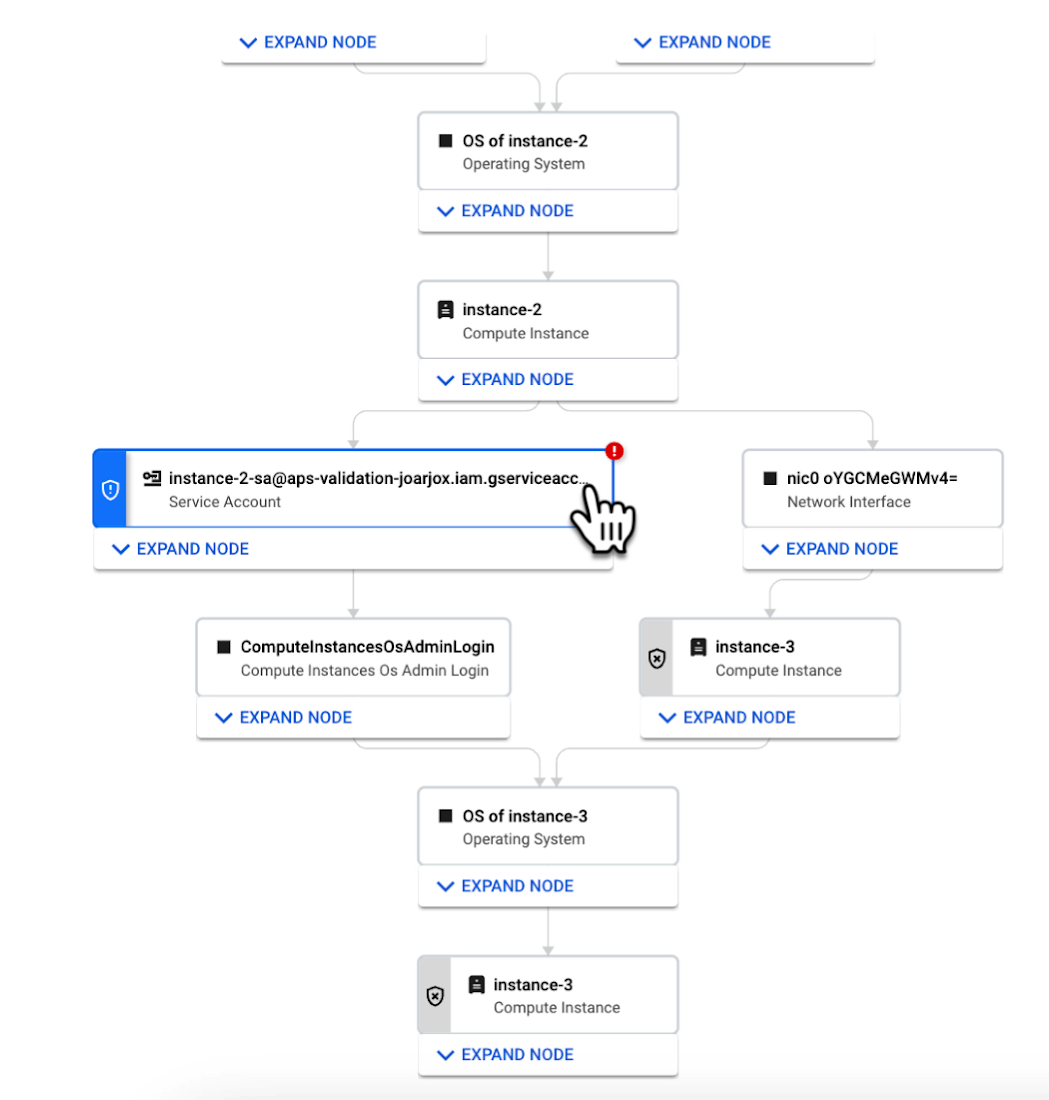
We are delivering combined attack path simulation and analysis as a managed service. There are no agents to install or manage. Results automatically reflect changes in your organization’s Google Cloud environment. Because our attack path simulations are conducted on models of an organization’s cloud resources, there is no performance or operational impact to the live production environment.
Better security prioritization
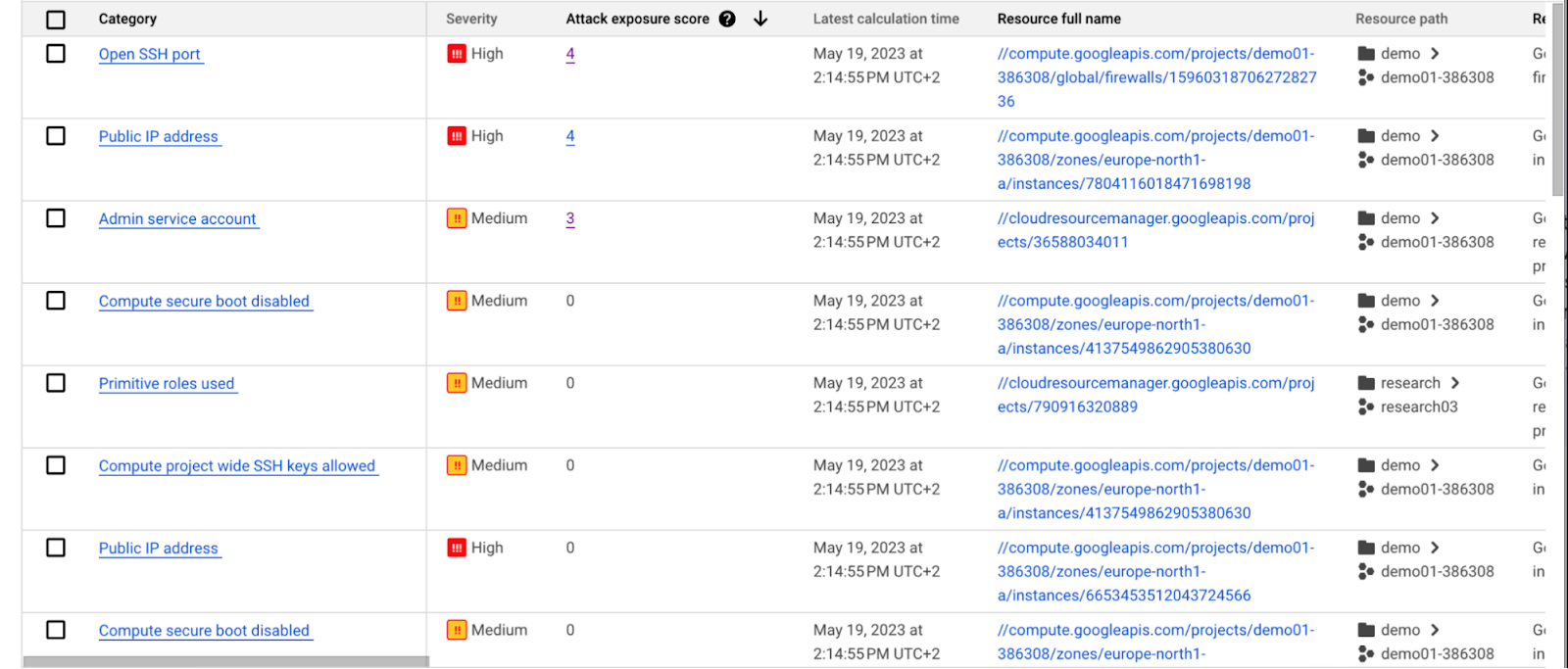
Security Command Center automatically computes an attack exposure score for misconfigurations and vulnerabilities that expose valuable resources to attackers. The score is a measure of cyber risk. It takes into account how exposed valued resources are, and the paths of least resistance for attackers to reach those resources.
Security teams can use these scores to prioritize remediation efforts and improve their overall risk posture.
How attack path analysis has already reduced risk for customers
Dozens of customers have already used our attack path capabilities in private Preview to improve their security posture and reduce their operational risk.
Security Command Center alerted one customer to a finding with a high attack exposure score. The finding was related to a service account whose keys were not being rotated. After reviewing the attack paths related to this finding, the cloud security manager discovered that even though the service account was named “test,” it provided access to storage buckets outside of the test environment.
If an attacker had been able to steal the credentials for this test account, they could have easily accessed production data. The security manager removed administrator privileges on the account. The attack path simulation enhanced their understanding of the severity of the finding, and helped convince them to make it a high-priority fix.
Another customer using attack path simulation needed to assess which security findings created the greatest risk. Two findings related to the same service account with high exposure scores rose to the top of the list. The attack paths revealed that the service account had access to more than 500 storage buckets. If an attacker were to gain access to this account they would be able to read, write, or delete data across any of those buckets, many of which contained sensitive business data and confidential customer information.
Using Security Command Center’s attack path results, the security team remediated the risk by limiting permissions to the storage buckets needed for that specific role.
Next steps
Attack path simulation capabilities are planned for availability later this summer. We expect forthcoming enhancements to use Security AI Workbench to translate complex attack graphs to human-readable explanations of attack exposure, including impacted assets and recommended mitigations.
You can learn more about Nordnet Bank’s experience using attack path simulation at our Security Summit session. To get started with Security Command Center today, please go to the Google Cloud console.
Create and Protect Admin Accounts

4849
Of your peers have already read this article.
1:30 Minutes
The most insightful time you'll spend today!
Setting up your new cloud infrastructure is scary. Extra scary when you realize that someone (is it gonna be you?) gets to have phenomenal cosmic power over the whole thing.
Yes, I’m talking about the admin account, and today we’ll dig into why they are important, dangerous and different.
When the team at pistach.io got their nuts-as-a-service business growing fruitfully, they knew they needed to think carefully about admin accounts. These people would have tremendous control over their use of Google Cloud, and they could potentially cause very big problems if any were compromised. Definitely resources that require a protective shell.

Early in pistach.io’s development, an employee named Walter Nutt wanted to play a prank by changing his co-worker’s profile photo from an almond to a peanut (pretty devious, since a peanut is actually a legume). He didn’t have access to his friend’s computer, but he did have access to the company’s Cloud Storage bucket. While searching for the profile photo in question, Wally inadvertently deleted the entire contents of the bucket!
As he searched for ways to restore its contents, Wally modified access to two other pistach.io buckets. The company was ground to a halt for a week while teams worked to crack through the permissions issues.
Time to rethink permissions a bit, so this couldn’t spoil their buttery smooth operations in the future.
Following the resource manager guide, the team made a super admin email address that wasn’t tied to a particular individual or Workspace account, and secured it with strong multi-factor authentication. This would be their backup in case an admin account were to be compromised, so they could recover and repair.
The team already uses Google Workspace, so they have an organization set up already. That creation process established initial super administrators, allowing them to create and modify all other resources inside the organization. As they looked toward using Google Cloud, the super administrators could:
- Give the admin role to people, for Cloud
- Act as a point of contact for account recovery
- Modify or delete the organization if needed
Making admin users for the organization allows other people to then flesh out the resources and policies for pistach.io, before they go nuts and give everyone all the permissions. While that would speed things up, it would make it easy for an attacker to crack through the security shell because any account compromise could give ousize access. Yikes!

Instead, the IT leads specified certain people to act as organization admins, and then gave them permissions to:
- Define Identity and Access Management policies
- Structure the Resource Hierarchy
- Delegate control of specific Cloud elements to others on the team
Once those organization admins were set up, they could give management and oversight of Compute, Storage, Networking and other resource types to the relevant leads, making sure each person had just the right amount of permission for the role they needed to perform. The organization admins don’t have permissions themselves to make these resources. They just delegate.
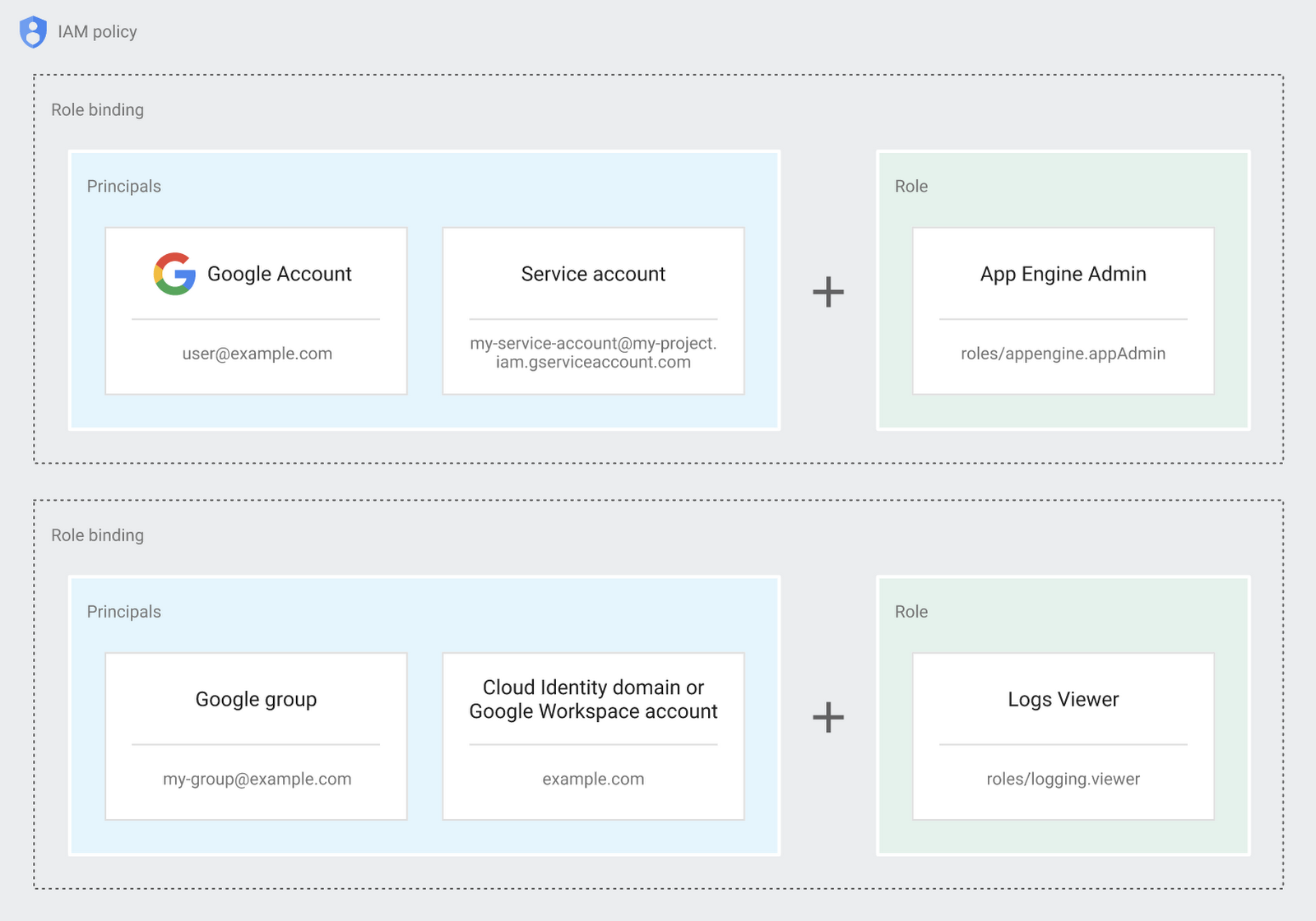
Now each person can accomplish the job they’re responsible for, but doesn’t have overly permissive access. Delegating like this keeps the entire organization safer, and limits the blast radius if someone does manage to break in.
You can go through these steps yourself with this tutorial.
By default the creation of an organization resource for the domain gives everyone the ability to create projects and billing accounts. Once they set up their Organization Admin at pistach.io they decided to remove some of these wide permissions and, in a nutshell, bring everything down to a much finer control. So people could get permissions for a folder or a project, but not the entire organization!
Remember to take care of your admin roles, as they have the power, and responsibility, to cause serious harm if not used safely. Be safe with your Identity and Access Management. And keep your data yours!
Next time we join you we’ll take a crack at creating and provisioning an app to run inside the policies and resource management frameworks created today.
3095
Of your peers have already watched this video.
23:30 Minutes
The most insightful time you'll spend today!
Three Lesser-Known Ways to Protect Your Customers and Business From Phishing and Fraud
Your users are critical to your business, and you need security controls to keep them — and your business — safe. Built from years of Google Cloud technology and experience, these security features focus on keeping users safe on the web.
You can reduce online fraud (chargebacks, hijackings, and abuse) with reCAPTCHA Enterprise, help protect your customers from phishing sites with Phishing Protection, and detect malicious links with the Web Risk API.
Fight Fraud: Fraudulent web activities cost enterprises billions of dollars each year. Security teams need to keep the bad actors out of their websites and ensure that their customers can always get in. reCAPTCHA has been defending millions of sites for almost a decade, and the reCAPTCHA Enterprise service builds on this technology with capabilities designed specifically for enterprise security concerns.
Combat Phishing: The majority of cyber attacks begin with phishing emails and websites. Attackers use many tricks, including by leveraging enterprise brand assets, such as company names and logos, to develop phishing websites that appear authentic and lure internet users to enter valuable information such as user names and passwords. Phishing Protection helps prevent users from accessing phishing sites by identifying various signals associated with malicious content.
Watch the video to find out how the third method and what impact it can create on your organization.
Center for Internet Security’s Latest Benchmark for Securing Chrome

5379
Of your peers have already read this article.
1:30 Minutes
The most insightful time you'll spend today!
As the way people work continues to evolve, keeping security policies in place that protect organizations but give workers the ability to get things done is more important than ever. IT and security teams must aim to stay a step ahead of web-based security threats that come their organization’s way. To help, the Center for Internet Security (CIS) team has released the latest CIS Benchmark 2.1 for Google Chrome. This Benchmark offers independent recommendations on which Chrome policies to configure to help support organizations’ security and compliance needs. Thanks to Chrome being built with security at its core, in many cases, Chrome default settings are aligned with CIS recommendations.
Chrome is secure by default, but we also pride ourselves on providing customizations for enterprises to allow Chrome to better fit the needs of their business. And with hundreds of policies available through Chrome Browser Cloud Management and Group Policy Objects (Note: The CIS Benchmark is also available as a GPO), organizations can do just that.
Throughout the CIS guide you’ll notice that there are different designations for configuration profiles. Any labeled Level 1, are considered to be a good baseline for an organization. Level 2 profiles are recommended for deployments that require the highest level of security, but note that these settings could have a trade off on user productivity. We recommend looking at each setting and determining if it’s a good fit for your business.
The benchmark is made up of five sections:
- Enforced Defaults — Notes policies that are configured by default when you install Chrome. Enforcing these settings at an enterprise level can prevent these settings from being changed by business users to less secure options.
- Attack Surface Reduction — Details how to disable web features that may not be necessary in your enterprise environment and could reduce your overall attack surface.
- Privacy — Surfaces settings that improve user privacy.
- Data Loss Prevention — Contains settings that can help prevent data loss and protect your organization’s data. (Note: These recommendations cover additional capabilities that can be added to Chrome through BeyondCorp Enterprise).
- Forensics (Post Incident) — Shares recommendations on policies that give insights into post incident forensics and analysis.
Organizations can use these benchmarks to optimize the best way to secure Chrome in their environment. Download the CIS Benchmark here and check out our team’s configuration guide for additional recommendations on how to configure Chrome.
Note: This benchmark was created using a consensus review process composed of subject matter experts. Consensus participants provide perspective from a diverse set of backgrounds such as consulting, software development, audit and compliance, security research, operations, government, and legal. While these recommendations come from a trusted source, it’s important for each organization to weigh which policies make the most sense for their business.
The SolarWinds Attack: A Case Study in Supply Chain Threats

2586
Of your peers have already read this article.
2:30 Minutes
The most insightful time you'll spend today!
Our quarterly Security Talks series brings together experts from Google Cloud Security teams and the industry to share information on our latest security products, innovations and best practices. Below is an introduction to Mandiant’s Security Talks presentation on Dec. 7, Mandiant Tales from the Front Lines: Activate Cyber Defenses Against Supply Chain Compromise.
The discovery in December 2020 of the SolarWinds supply chain compromise, a global computer intrusion campaign, caused organizations and security leaders to completely reassess their Cyber Threat Profiles, risk assessments, and defensive postures. It was a rare, watershed event that savvy security leaders and IT decision makers have been using to improve how security teams protect systems, networks, and data across industries and sectors, especially critical infrastructure. Two years later, we’re looking back at the security incident, what we’ve learned, and how it continues to drive change across security teams and organizations.
The SolarWinds compromise leveraged access to the software maker’s Orion business software in order to distribute a malicious update containing malware. Mandiant has since attributed this operation to APT29, a Russia-based espionage group assessed to be sponsored by the Russian Foreign Intelligence Service (SVR). This operation afforded APT29 with unparalleled access to an estimated 18,000 global organizations for follow-on targeting based on the attacker’s discretion and collection priorities.
While the security industry has yet to see anything that rivals the scale and scope of the SolarWinds compromise since it was discovered, a recent Google Cloud research report on software supply chain security found that there’s been a sharp increase in software supply chain attacks across nearly every sector.
Mandiant analysis identified supply chain compromise as the second-most prevalent initial infection vector in 2021. When the initial infection vector was identified, supply chain compromise accounted for 17% of intrusions in 2021 compared to less than 1% of intrusions in 2020. Further, 86% of supply chain compromise intrusions in 2021 were related to the SolarWinds breach.
Since 2020, Mandiant has also observed an increase in financially-motivated threat actors targeting the software supply chain. These actors compromised popular software packages and even mobile applications in order to deploy ransomware, cryptocurrency miners, and banking trojans. In one case, malicious code was inserted into a popular package, prompting the U.S. Cybersecurity and Infrastructure Agency (CISA) to issue an alert about the compromise.
Mitigation recommendations
The discovery of the SolarWinds incident resulted in increased global attention around supply chain compromise threats. Government authorities and technology organizations have responded with several initiatives, legislation, and studies seeking to reduce software supply chain and software dependency risk. Although these initiatives may make it more difficult for threat actors to conduct these operations, organizations should also take steps to mitigate supply chain threats.
Mandiant suggests that organizations contemplate applying multiple layers of security policies, plans, and solutions to maximize opportunities to provide early threat detection and prevent an anomaly or compromise stemming from the supply chain. This guidance is aligned with best practices Google Cloud has recommended for organizations to improve their software supply chain security.
Mandiant has also provided the following additional recommendations for organizations to consider more generally:
- Establish a vendor vetting process to evaluate vendor security practices before deploying hardware or software.
- Create a change control process and board for all enterprise hardware and software changes, which could include a centralized IT or IT security managed process for downloading, testing, and pushing updates to users.
- Use an advanced endpoint security solution, such as an endpoint detection and response (EDR), to detect malicious behavior when a tainted software package is downloaded and executed.
- Ensure proper logging and monitoring is in place between the software, hardware, and the internet.
- Implement the software and hardware using network segmentation with minimal access to the internet.
- Enact employee training programs and policies to encourage security best practices, including security audits of code in development.
Next steps
You can watch the Google Cloud Security Talks presentation on SolarWinds and the current state of supply chain threats here. You can learn more about Google Cloud’s solutions to help improve software supply chain security here, or for more general inquiries, please contact us or reach out to your sales representative to learn how we can assist.
Introducing New Capabilities for Secure Transformations

2743
Of your peers have already read this article.
2:30 Minutes
The most insightful time you'll spend today!
Organizations large and small are realizing that digital transformation and the changing threat landscape require a grounds up effort to transform security. At Google Cloud, we continue to invest in our vision of invisible security where advanced capabilities are engineered into our platforms, operations are simplified, and stronger security outcomes can be achieved.
We made five major security announcements at Google Cloud Next:
- Introducing Chronicle Security Operations, to help detect, investigate, and respond to cyberthreats with the speed, scale, and intelligence of Google
- Introducing Confidential Space, to help unlock the value of secure data collaboration
- Advancing digital sovereignty on Europe’s terms, to address growing demand for cloud solutions with high levels of control, transparency, and sovereignty
- Introducing Software Delivery Shield, to help improve software supply chain security
- New and expanded Google Cloud partnerships with leaders across the security ecosystem
Today at Next ‘22, we’re introducing additional new security products, partnerships, and solutions across security analytics, anti-fraud measures, device security, Zero Trust, and open source software security to help our customers around the world address their most pressing security challenges.
Our Assured Open Source Software service, which we announced earlier this year, is now available in Preview. Assured OSS enables enterprise and public sector users of open source software to easily incorporate the same trusted OSS packages that Google uses into their own developer workflows. You can sign up for the Preview of Assured OSS here.
Security teams must continually measure and manage risk in their cloud environments. Earlier this year we acquired Foreseeti, a startup focused on attack simulation and risk quantification. We’re excited to announce that the integration of Foreseeti’s groundbreaking technology, which can help teams understand their exposure and prioritize contextualized vulnerability findings, will be coming to Security Command Center in Preview in Q4. Security Command Center will use Forseeti’s advanced attack path simulations to help you apply targeted remediations before attackers can take advantage of high-risk vulnerabilities.
To help organizations better manage risks in their online channels, reCAPTCHA Enterprise and Signifyd will partner to bring to market a joint anti-fraud and abuse solution. This solution will combine the behavioral analysis capabilities of reCAPTCHA Enterprise with the anti-fraud capabilities of Signifyd to help enterprises reduce abuse, account takeovers, and payment fraud.
We continue to invest in new initiatives with our BeyondCorp Alliance partners. Palo Alto Networks customers can now pair Prisma Access with BeyondCorp Enterprise Essentials to help secure private and SaaS app access while mitigating internet threats across managed and unmanaged devices with a secure enterprise browsing experience.
We now package best practices and implementation experience for our customers in Zero Trust Advisory solutions. Our Cybersecurity Action Team and select partners can help guide you through the Zero Trust journey with exploratory workshops, architecture reviews, customized recommendations, and implementation support.
Google Cloud Armor, which was instrumental in stopping the largest Layer 7 DDoS attack to date, was named a Strong Performer in The Forrester Wave™: Web Application Firewalls, Q3 2022. This is our debut in the WAF Wave, and it’s encouraging to see the recognition for the product in this market segment.
Google Workspace has received several security updates and advances. They bring data loss prevention (DLP) to Google Chat to help prevent sensitive information leaks, new Trust rules for Google Drive for more granular control of internal and external sharing, and Client-side encryption (CSE) in Gmail and Google Calendar to help address a broad range of data sovereignty and compliance requirements. You can learn more in our Workspace blog.
Learn more at Google Cloud Next
Our growing team at Google Cloud Security remains focused on delivering solutions that can make governments and enterprises safer with Google, in our trusted cloud and through products that bring our security capabilities to on-premises environments and other clouds. Learn more about these announcements and capabilities by attending the Security sessions at Google Cloud Next all this week and on-demand soon after.
More Relevant Stories for Your Company



Redefining the approach to mobile security
When it comes to mobile security, everyone assumes open means unsecure. There are three terms that people often confuse: vulnerability, malware, and exploit. A vulnerability is really nothing more than a software flaw that is potentially exposed, where there is a possibility of it being attacked. It doesn't mean it

Highmark & Google’s Secure-by-design Technique to Bring the Living Health Solution to Life
In an industry as highly regulated as healthcare, building a single secure and compliant application that tracks patient care and appointments at a clinic requires a great deal of planning from development and security teams. So, imagine what it would be like to build a solution that includes almost everything

Launches and Stories on Google Cloud Security from Q1: Fresh off the Boat!
The security world keeps changing, with new tools and new threats in the ever-evolving arms race that is cybersecurity. To keep you up to speed on all that Google Cloud is doing to help safeguard your data and your applications, welcome to the first installment of the Security Roundup. In

Improving Your Security Posture: Integrating Cloud DLP with Security Command Center
Our Cloud Data Loss Prevention (Cloud DLP) discovery service can monitor and profile your data warehouse to bring awareness of where sensitive data is stored and processed. Profiling is also useful for confirming that data is not being stored and processed where you don’t want it. But how can you
