





What You Need to Know About Compute Engines

6535
Of your peers have already read this article.
1:30 Minutes
The most insightful time you'll spend today!
Compute Engine is a customizable compute service that lets you create and run virtual machines on Google’s infrastructure. You can create a Virtual Machine (VM) that fits your needs. Predefined machine types are pre-built and ready-to-go configurations of VMs with specific amounts of vCPU and memory to start running apps quickly. With Custom Machine Types, you can create virtual machines with the optimal amount of CPU and memory for your workloads. This allows you to tailor your infrastructure to your workload. If requirements change, using the stop/start feature you can move your workload to a smaller or larger Custom Machine Type instance, or to a predefined configuration.
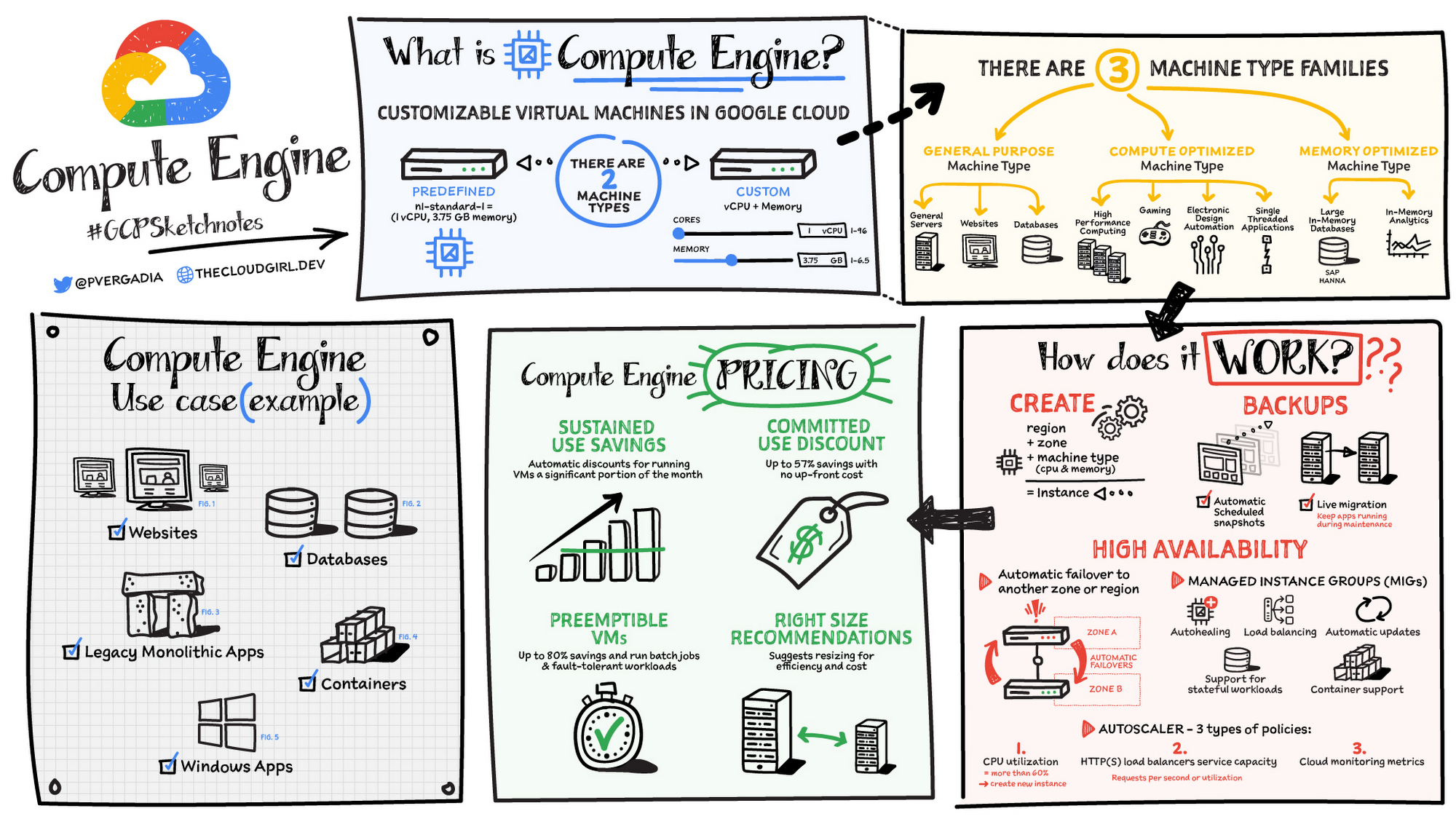
Machine types
In Compute Engine, machine types are grouped and curated by families for different workloads. You can choose from general-purpose, memory-optimized, compute-optimized and accelerator-optimized families.
- General-purpose machines are used for Day-to-day computing at a lower cost and for balanced price/performance across a wide range of VM shapes. The use cases that best fit here are web serving, app serving, back office applications, databases, cache, media-streaming, microservices, virtual desktops, development environments.
- Memory-Optimized machine are recommended for ultra high-memory workloads such as in-memory analytics and large in-memory databases such as SAP HANA
- Compute-Optimized machines are recommended for ultra high performance workloads such as High Performance Computing (HPC), Electronic Design Automation (EDA), gaming, video transcoding, single-threaded applications.
- Accelerator-Optimized machines are optimized for high performance computing workloads such as Machine learning (ML), Massive parallelized computations and High Performance Computing (HPC)
How does it work?
You can create a VM instance using a boot disk image, a boot disk snapshot, or a container image. The image can be a public operating system (OS) image or a custom one. Depending on where your users are you can define the zone you want the virtual machine to be created in. By default all traffic from the internet is blocked by the firewall and you can enable the HTTP(s) traffic if needed.
Use snapshot schedules (hourly, daily, or weekly) as a best practice to back up your Compute Engine workloads. Compute Engine offers live migration by default to keep your virtual machine instances running even when software or hardware update occurs. Your running instances are migrated to another host in the same zone instead of requiring your VMs to be rebooted.
Availability
For High Availability (HA) Compute Engine offers automatic failover to other regions or zones in event of a failure. Managed instance groups (MIGs) help keep the instances running by automatically replicating instances from a predefined image. They also provide application based autohealing health checks. If an application is not responding on a VM, the auto healer automatically recreates that VM for you. Regional MIGs let you spread app load across multiple zones. This replication protects against zonal failures. MIGs work with load balancing services to distribute traffic across all of the instances in the group.
Compute Engine offers autoscaling to automatically add or remove VM instances from a managed instance group based on increases or decreases in load. Autoscaling lets your apps gracefully handle increases in traffic, and it reduces cost when the need for resources is lower. You define the autoscaling policy for automatic scaling based on the measured load, CPU utilization, requests per second or other metrics.
Active Assist’s new feature, predictive autoscaling, helps improve response times for your applications–When you enable predictive autoscaling, Compute Engine forecasts future load based on your Managed Instance Group’s (MIG) history and scales it out in advance of predicted load, so that new instances are ready to serve when the load arrives. Without predictive autoscaling, an autoscaler can only scale a group reactively, based on observed changes in load in real time. With predictive autoscaling enabled, the autoscaler works with real-time data as well as with historical data to cover both the current and forecasted load. That makes predictive autoscaling ideal for those apps with long initialization times and whose workloads vary predictably with daily or weekly cycles. For more information, see How predictive autoscaling works or check if predictive autoscaling is suitable for your workload, and to learn more about other intelligent features, check out Active Assist.
Pricing
You pay for what you use. But you can save cost by taking advantage of some discounts! Sustained use saving are automatic discounts applied for running instances for a significant portion of the month. If you know your usage upfront, you can take advantage of committed use discounts which can lead up to significant savings without any upfront cost. And by using short lived preemptive instances you can save up to 80%, they are great for batch jobs and fault tolerant workloads. You can also optimize resource utilization with automatic recommendations. For example if you are using a bigger instance for a workload that can run on a smaller instance you can save costs applying these recommendations.
Security
Compute Engine provides you default hardware security. Using Identity and Access Management (IAM) you just have to ensure that proper permissions are given to control access to your VM resources. All the other basic security principles apply, if the resources are not related and don’t require network communication amongst themselves, consider hosting them on different VPC networks. By default, users in a project can create persistent disks or copy images using any of the public images or any images that project members can access through IAM roles. You may want to restrict your project members so that they can create boot disks only from images that contain approved software that meet your policy or security requirements. You can define an organization policy that only allows Compute Engine VMs to be created from approved images. This can be done by using the Trusted Images Policy to enforce images that can be used in your organization.
By default all VM families are Shielded VMs. Shielded VMs are virtual machine instances that are hardened with a set of easily configurable security features to ensure that when your VM boots, it’s running a verified bootloader and kernel — is the default for everyone using Compute Engine, at no additional charge. For more details on Shielded VMs refer to the documentation here.
For additional security, you also have the option to use Confidential VM to encrypt your data in use, while it’s being processed in Compute Engine. For more details on Confidential VM refer to the documentation here.
Use cases
There are many use cases Compute Engine can serve in addition to running websites and databases. You can also migrate your existing systems onto Google Cloud, with Migrate for Compute Engine, enabling you to run stateful workloads in the cloud within minutes rather than days or weeks. Windows, Oracle or VMware applications have solution sets enabling a smooth transition to Google Cloud. To run windows applications either bring your own license leveraging Sole-tenant nodes or using the included licenced images.
Conclusion
Whatever your application use case may be, from legacy enterprise applications to digital native applications, Compute Engine’s families will fit it. For a more in-depth look into Compute Engine check out the documentation.
For more #GCPSketchnote, follow the GitHub repo. For similar cloud content follow me on Twitter @pvergadia and keep an eye out on thecloudgirl.dev
Quick Migration, Zero Outages and Cost Savings: Rossi Residencial’s SAP to Google Cloud Journey!

3789
Of your peers have already read this article.
2:30 Minutes
The most insightful time you'll spend today!
After three migrations to different cloud providers, the company managed to migrate with no system outages for the first time, supported by partner Sky.One.
Results
- Migrated four SAP environments and four servers in just one month with no system outages
- Zero unavailability periods since migrating
- Less time spent worrying about operational issues increases the focus on business
50% savings on monthly cloud costs
Rossi Residencial, one of Brazil’s largest construction companies and real-estate developers, with around 150 employees, hundreds of business and engineering partners, and nationwide service, has used SAP solutions for financial management since 1999. Taxes, accessory obligations, accounting requirements, and other processes are managed through the system in an integrated and automated manner, which provides the business with crucial support.
Over the past few years, the company has begun to promote independent, sustainable business units to focus on strategic locations and products. This prompted its technology team to adapt as well, and they saw the cloud as an opportunity to add flexibility to SAP’s management.
“If I need to open a new branch or break ground on a project, the entire system core is already in the cloud and I don’t have to worry about local infrastructure,” explains Eduardo Araújo, Rossi’s IT Manager. “It also means our operational costs are significantly reduced.”
A few years ago, the company started working with the ECC component in the EHP 8 version, using modules such as FI (financial accounting), CO (controlling), MM (materials management) and TRM (treasury and risk management). But the dollar’s high exchange rate in 2020 increased costs with their then provider too much. The team was also not satisfied with the provider’s service, leading it to look for a new provider and a partner to support migration.
An essential requirement the new provider had to offer was high availability and scalability. Potential partners had to perform migration in a short time window (as the contract with the other service was about to expire) and be familiar with the previous provider to ensure the operation’s success. After spending some time searching, the company chose Google Cloud and Sky.One for the project.
“Out of the cloud options we researched, Google Cloud offered us the best financial conditions and a solution that truly catered to us. And out of the many partners we contacted, Sky.One offered the best work planning and service.”—Eduardo Araújo, IT Manager, Rossi Residencial
First migration with no system outages
The tight migration deadline meant the company would not have the time to install every app in Google Cloud from scratch, so Rossi asked the Sky.One team to mirror its entire previous architecture, that is, migrate the virtual machines from the company’s four SAP environments and four servers from other apps directly to Google Cloud.
After mapping the source structure in detail along with Rossi, the partner was able to complete migration planning in a month. “If you map before migrating and thus understand the customer’s environment well, you are able to prepare the destination so it has every integration and its respective access,” says Ricardo Nunes, Solution Expert at Sky.One.
The tool chosen to move the environments was Migrate for Compute Engine (previously known as Velostrata), which streamlines, facilitates and reduces risks for app migration to Google Cloud. Sky.One selected an expert in this solution to conduct the process, which was also supported by Google Cloud experts to make any needed adjustments.
The process took just a month to complete. The environments were successfully migrated with zero impact on operations, an unprecedented feat for the company. Now SAP environments run in a new infrastructure consisting of Compute Engine, a service for creating and running VMs, and Cloud Storage for data storage.
“This is the first time, after three previous migrations to private and public clouds, that our users have not felt any impact and we didn’t have system outages. It was a six-hands project that worked very well.”—Eduardo Araújo, IT Manager, Rossi Residencial
Flexibility to deal with every business need
Since the migration, Rossi has not suffered system outages or handled related user requests and incidents. Performance has remained high even after the team resized the VMs. The flexibility to add or subtract resources based on the company’s demands proved crucial. “Rossi operates in a segment with elasticity. In any given year, we can have two/three projects or ten. That’s why it’s important to have that resource in the cloud,” says Araújo.
Since the company does not operate 24/7, another benefit from migrating was the ability to schedule when to switch on and off servers, bringing cost savings. Furthermore, billing in reais at a fixed exchange rate with dollars led to a 50% cost reduction versus the previous provider.
The ease of integration between Google Cloud and SAP’s tools pleasantly surprised the team. “We were worried about potential incompatibilities, and we didn’t know if we would be able to work like before. Today we can work even better than before,” says the IT manager. According to Sky.One, the fine adaptation between the solutions becomes noticeable right after migration.
“Google Cloud’s solutions support all SAP migration steps, but after migrating we noticed that daily operations had become even more tightly integrated.”—Ricardo Nunes, Solution Expert, Sky.One
The cloud’s stability and security have streamlined the IT team’s daily routine. They no longer have to go to the company outside business hours to perform updates or repairs. Currently, employees can work remotely with peace of mind and maintain business continuity throughout Brazil.
With more time to focus on business needs instead of operational issues, the team is contemplating the addition of new Google Cloud tools. Rossi’s next challenge is to bolster its business operations and customer service even further using data analytics and AI solutions, making the most of its broad database.
Transforming Canadian Healthcare and Medical Research with Google Cloud

916
Of your peers have already read this article.
2:30 Minutes
The most insightful time you'll spend today!
Is Cloud an option for Canadian Healthcare healthcare and medical research organizations?
Yes, Canadian healthcare and medical research organizations are moving to the cloud. The cloud market is expected to grow in Canada significantly through 2027.
There are several reasons why Canadian healthcare and medical research organizations are moving to the cloud.
- Reduce costs by eliminating the need to invest in and maintain on-premises infrastructure.
- Enable the healthcare research community to drive their research more expediently to clinical outcomes
- Improve patient satisfaction by making it easier for patients to access their health information and communicate with their providers.
- Improve the quality of care by providing access to patient data and records from anywhere in the country.
Overall, the transition to the cloud is a positive development for Canadian healthcare and medical research organizations.
Canadian healthcare providers face many challenges before they can move to the cloud, such as addressing security and privacy concerns, data sovereignty issues, and ensuring interoperability. To help them overcome these challenges, it is important to provide Healthcare Data Custodians, Infrastructure Architects, and Research Leads with clear guidance on how the cloud can align with Canadian Healthcare Regulations. This will allow them to have a practical understanding of what is required to enhance their cloud journey and facilitate a smoother transition to the cloud.
iSecurity and MD+A Health are actively assisting Canadian healthcare and medical research organizations in comprehending the risks and exploring pathways to embrace the cloud. Through extensive research and analysis, iSecurity and MD+A Health have evaluated Google Cloud as a suitable platform for healthcare. Their diligent efforts have resulted in the production of comprehensive documents that detail their findings via a Threat Risk Assessment (TRA) and a Privacy Impact Report (PIA).
Why a Threat Risk Assessment?
A threat risk assessment is a process of identifying and evaluating threats to an organization and then determining the likelihood and impact of those threats. The goal of a threat risk assessment is to identify the most serious threats and develop mitigation strategies to reduce the likelihood and impact of those threats.
A threat risk assessment typically involves the following steps:
- Identify threats: The first step is to identify all potential threats to the organization. This can be done by brainstorming, interviewing experts, or reviewing historical data.
- Evaluate threats: Once the threats have been identified, they need to be evaluated in terms of their likelihood and impact. The likelihood of a threat is the probability that it will occur, while the impact of a threat is the severity of the consequences if it does occur.
- Prioritize threats: The threats need to be prioritized based on their likelihood and impact. The most serious threats should be addressed first.
- Develop mitigation strategies: Once the threats have been prioritized, mitigation strategies need to be developed to reduce the likelihood and impact of those threats. Mitigation strategies can include things like implementing security controls, training employees, and developing contingency plans.
- Implement mitigation strategies: The mitigation strategies need to be implemented and tested to ensure that they are effective.
- Monitor and review: The threat risk assessment should be monitored and reviewed regularly to ensure that it is still effective.
Why a Privacy Impact Assessment?
A Privacy Impact Assessment (PIA) is a process that organizations use to identify and assess the privacy risks associated with a new or changed information technology (IT) system or project. The goal of a PIA is to help organizations protect the privacy of individuals whose personal information is collected, used, or disclosed by the IT system or project.
PIAs typically include the following steps:
- Identifying the purpose of the IT system or project and the types of personal information that will be collected, used, or disclosed.
- Identifying the privacy risks associated with the IT system or project.
- Assessing the likelihood and severity of the risks.
- Developing and implementing controls to mitigate the risks.
- Monitoring the effectiveness of the controls.
PIAs are an important tool for organizations to help them follow privacy laws and regulations. They can also help organizations build trust with their patients, employees and the research community by demonstrating their commitment to protecting privacy.
The benefits of conducting a PIA:
- Helps organizations identify and assess privacy risks
- Helps organizations develop and implement controls to mitigate privacy risks
- Helps organizations comply with privacy laws and regulations
- Helps organizations build trust with customers and employees
Why Google Cloud?
Google Cloud is committed to providing Canadian healthcare organisations with an environment to expand both their clinical and research environments. Google Cloud has invested significant resources into building out a cloud environment based on best practices coming from Google’s experience running some of the world’s largest platforms.
Some highlights include:
- Built-in security features that help protect your data and applications from unauthorized access, use, disclosure, disruption, modification, or destruction.
- A comprehensive security management platform that helps you assess, prioritize, and address security risks across your organization.
- A team of security experts who can help you design, implement, and manage your security solutions.
- A wide range of security training and resources to help you learn about and stay up-to-date on the latest security threats and best practices.
How Lowe’s SRE Team Decreases Mean-time-to-recovery (MTTR)

3369
Of your peers have already read this article.
1:30 Minutes
The most insightful time you'll spend today!
Editor’s Note: In a previous blog, we discussed how home improvement retailer Lowe’s was able to increase the number of releases it supports by adopting Google’s Site Reliability Engineering (SRE) framework on Google Cloud. Lowe’s went from one release every two weeks to 20+ releases daily, helping meet its customer needs faster and more effectively. Today, the Lowe’s SRE team shares how they used SRE principles to decrease their mean-time-to-recovery (MTTR) by over 80 percent.
The stakes of managing Lowes.com have never been higher, and that means spotting, troubleshooting and recovering from incidents as quickly as possible, so that customers can continue to do business on our site.
To do that, it’s crucial to have solid incident engineering practices in place. Resolving an incident means mitigating the impact and/or restoring the service to its previous condition. The average time it takes to do this is called mean time to recovery (MTTR). Tracking this metric helps us stay on top of the overall reliability of our systems at Lowe’s, while simultaneously improving the speed with which we recover. Our goal is to keep the MTTR metric as low as possible, so that failures don’t negatively impact our business. Here are the four areas we addressed to drive holistic improvement in our MTTR.
Lowe’s incident reporting process
To reduce MTTR, we created a seamless incident reporting process following SRE principles. Our incident reporting process is a workflow that starts at the time an incident occurs, and ends with an SRE captain who closes the action items after a postmortem report. With this approach, we are able to limit the number of critical incidents. The reporting process involves three core components: monitoring, alerting, and blameless postmortems.
Monitoring and alerting
Having proper monitoring and alerting in place is crucial when it comes to incident management. Monitoring and alerting tools let you detect issues as soon as they occur, and notify the right person in the shortest possible time to take action. From a measurement standpoint, we track this as our mean time to acknowledge (MTTA). This is the average time it takes from when an alert is triggered, to when work on the issue begins.
At the time of an incident, our monitoring and alerting tools notify the on-call SRE first responder via PagerDuty in the form of a phone call, text message and email. Our SRE software engineering team has done a lot of automation to enable various Service Level Indicator (SLI) alerts and Service Level Agreement (SLA) notifications. The on-call SRE then initiates a triage call with our service/domain stakeholders to resolve the incident. As a result, we reduced our MTTA from 30 minutes in 2019, to one minute – a 97 percent decrease.
Blameless postmortems: learning from incidents
A postmortem is a written record of an incident, its impact, the actions taken to resolve it, the root cause and the follow-up actions to prevent the incident from recurring (see example here). A blameless postmortem builds on that and is a core part of an SRE culture, and our culture at Lowe’s. We ensure that individuals are not singled out, and the outcome for all postmortems are directed toward learnings and process improvement.
For us, the postmortem process is the biggest part of our incident workflow. When an SRE creates a new postmortem report, the first step is to conduct a postmortem session with domain stakeholders to review the report. The postmortem then goes into the review stage and gets reviewed by more stakeholders in our weekly postmortem meeting. In the final stage of this process, the SRE captain will close the report once everyone in the weekly meeting agrees that the report is complete.
To conduct a successful postmortem, it is critical to keep the focus on identifying gaps and issues with the system and operations processes, rather than an individual, and generate concrete actions to address the problems we’ve identified. To ensure this, we follow a couple of best practices:
- We start by gathering the facts from the person who identified the problem, and each SLI owner has to identify a gap or the next SLI upstream owner who created the impact for them.
- Every SLI owner is provided full opportunity to present their case, and identifying the issue is done as a community exercise.
- Once action items and process changes are identified, an owner is nominated to complete the actions, or they will volunteer.
- For easy reference, we publish and store postmortems in our incident knowledge base. This process helps SREs continuously improve as future incidents arise.
Continuous Improvement
Encouraging a culture of honest, transparent and direct feedback that you need for blameless postmortems is often an iterative process that needs sponsorship from executives, empowering incident captains to lead the entirety of the discussion and outcomes. Running successful postmortems, and completing action items from them, needs to be recognized and accounted for in SRE performance objective assessment. As shared in Google’s SRE book, the best practice is to ensure that writing effective postmortems is a rewarded and celebrated practice, with leadership’s acknowledgement and participation. This is possibly the hardest part to accomplish in an effective postmortem during a cultural transformation unless you have full buy-in from leadership.
However, it’s all well worth it. This process is a key part of how we were able to improve our MTTR over time—from two hours in 2019 to just 17 minutes!
Our SRE incident reporting process has also transformed how our company solves issues. By streamlining this workflow from alerting, to solving an issue, to blameless postmortems, we have reduced our MTTR by 82 percent and our MTTA by 97 percent. Most importantly, our team is learning from every incident and becoming better engineers as a result. Visit the SRE Google Cloud website to learn more about implementing SRE best practices in the cloud.
Acknowledgement
Special thanks to Rahul Mohan Kola Kandy, Vivek Balivada, and the Digital SRE team at Lowe’s for contributing to this blog post.
Innovation in the Clouds: Sky’s Blue-Sky Approach to FinOps

2916
Of your peers have already read this article.
2:30 Minutes
The most insightful time you'll spend today!
Google Cloud’s partnership with Sky Group, one of Europe’s largest media and entertainment companies, dates back more than four years to when Sky first became a Google Cloud customer moving diagnostic data from millions of its Sky Q TV boxes to its Google Cloud data platform.
In June 2019, a few years into their cloud adoption journey, Sky was faced with a challenge they had anticipated from the start. Their recent bill across all major cloud providers had been increasing rapidly, reaching their planned yearly budget after only six months. Sky wasn’t sure if they’d undershot their forecasts, if they were overspending, or both.
“In the beginning, we were given a brief to investigate internal cloud spend with the aim of finding out where we could make savings, but in reality we didn’t know what we would expect to find,” said Nathan King, a cloud architect in the Cloud Enablement Center and now Head of Cloud Financial Management (FinOps) at Sky since the start of 2020.
Nathan assembled a small team who started to explore Google Cloud spend using the Cloud Billing tool. At first, they drilled into their biggest Google Cloud cost categories and discovered some immediate cost optimizations with BigQuery, Compute Engine and Cloud Storage. Over the course of the next six months, through careful analysis, they managed to find over $1.5m in immediate savings, exceeding expectations.
Yet they soon realized this was just the tip of the iceberg—it was clear there were millions of pounds more savings to be made, but actually achieving them at scale would require careful planning. “We formed a FinOps function to target these savings, but with 600 to 700 projects for Google Cloud alone, spanning four Google Cloud organizations, it would have been a manual process and difficult for teams to digest our recommendations,” Nathan said.
After attending a Google-led FinOps workshop and shaping their FinOps strategy, Nathan’s team focused on iterating through the FinOps lifecycle phases of Inform, Optimize, Operate and generating savings over time. Here’s how they did it:
Inform: Make Information Visible
The first step was focused on developing a clear vision for cost allocation and recharge, which required partnering closely with the finance, procurement and tax teams (particularly for international and affiliates) to understand the supporting business logic and processes. With a lot of hard work, the team managed to break down barriers to implement and embed new processes into broader business functions like finance.
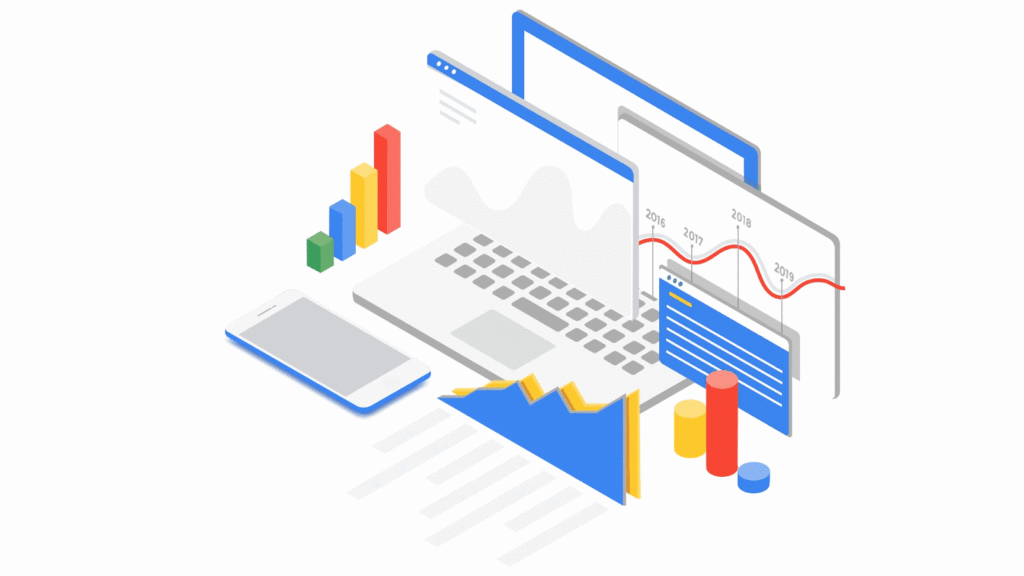
WIth the recharge model in place, the team ran a number of pilots to find the right FinOps tooling to meet their needs. They ran a number of pilots, including using Data Studio and visualizing BigQuery exports. Given their ambitions to scale across the enterprise globally, the team chose Google Cloud’s Looker to realize their vision, building intuitive dashboards to visualize spend and recommendations across all cloud providers. “We wanted one view across all clouds, where customers can dynamically see cloud spend and intelligent optimization recommendations in just one place,” Nathan said.
After less than three weeks of development, the Looker dashboards were ready to go and have been a game changer ever since. “The moment our leadership and different departments started seeing the Looker dashboards, the value we were adding as a FinOps team became immediately clear,” Nathan said.
There are different report pages for each stakeholder group, each custom developed and automated using Looker and BigQuery. The BigQuery Optimization page, for example, provides insights on Slots consumed across the organization, down to granular query data like the cost of each query, how it was written, who submitted it and number of slots utilized. The dashboards also highlight potential areas of optimization, like BigQuery datasets without retention policies set or where data isn’t partitioned.
A recent breakthrough has been building pages for business teams, showing the related cloud spend contributing to a business unit of value, such as the cost per live stream or per subscriber in Sky’s case. Although this is an inherently difficult metric to capture, the opportunity has been made possible with the FinOps team’s progress and is starting to drive business investment decisions.
Optimize: Drive Cloud Efficiency
The second stage of the FinOps lifecycle focuses on delivering optimizations. As Sky’s FinOps dashboards were operationalized and highlighted savings opportunities, they enabled users to generate more than $3 million in Google Cloud savings alone in 2020 and over $800,000 in other cloud providers.
The team began with focusing on the top four products by spend: BigQuery, Compute Engine, Cloud Dataflow and Cloud Storage. Working with their Google account team and studying Google whitepapers and blog posts like Cloud cost optimization: principles for lasting success, they developed their own best practice guidance and embedded recommendations into the dashboards.
Creating their own recommenders and leveraging Google Cloud’s recommenders, the team discovered a plethora of cost optimization opportunities. “Key examples were overly expensive queries, storage buckets set without retention policies, and VMs without autoscaling enabled,” Nathan said. Teams were then empowered to make their own savings, like the NowTV business unit that had been forecast to overspend for the year until they received their dashboard with thousands of optimization recommendations. After just three weeks, the team had implemented more than 90% of recommendations and brought their spend under budget for the year, saving more than 50%.
The FinOps team still searches for new recommendations every day and have been collaborating with Google product managers to take their insights to the next level. “We’ve loved partnering with Google product managers, who encourage us to give feedback on new features before they go to market. We’ve also shared some of our in-house recommenders to influence the features being developed by Google, including the Idle VM and Idle Persistent Disk Recommenders as part of Active Assist,” Nathan said.
Operate: Embed FinOps & Drive Self-Sufficiency
Now that teams could visualize their cloud spend and make real-time decisions based on cost optimization recommendations, the FinOps team has begun working on embedding processes, leveraging machine learning, and improving efficiency in their own ways of working.
Looker’s extensive capabilities continue to play a role in this. “Before we started using Looker, our most popular report was an electricity bill showing customers’ detailed monthly cloud spend, previous month comparisons and forecasts for months ahead,” Nathan said. “This report took days, sometimes weeks to run. With Looker, we’ve automated the entire process and brought that time down to just minutes.”
More teams are embedding the dashboards into their own processes, like finance, which now uses the interactive dashboards in meetings instead of static report snapshots, or in-house Google Cloud architects, who use the recommendations to optimize their cloud spend before deploying any technology.
As the FinOps team continues to operate like a product function, designing with CX/UX in mind and iteratively releasing new features like anomaly reporting, budget alerts, and forecasting based on machine learning, it’s becoming clear that Cloud Financial Management is a key capability and mindset that can impact wide-reaching parts of the business at scale.
Elevating Sky’s FinOps journey to the next level
Indeed, as more business teams collaborate with the FinOps function, the opportunities are growing. “The FinOps team has changed the way we view and manage cloud spend, enabling us to partner with finance and show digestible reports to the CFO. We’re now looking further to broaden our range of insights, like elevating our dashboards to understand how using Google Cloud is supporting Sky’s Net carbon zero ambitions by incorporating Google’s data center sustainability metrics,” says Vince Marco, Architecture Manager at Sky.
So, after being unsure of drivers for their increasing cloud spend in 2019, 18 months later Sky is far more confident about its investment decisions. The team knows that every dollar spent is being used optimally and driving maximum value for its investment.
If you’re an enterprise using cloud, but want to better manage cloud costs, consider setting up a FinOps capability and creating a FinOps mindset. Looker can help you get started by providing reporting and insights into cloud expenditures to identify initial savings. As you learn more and scale, empower teams to make their own savings utilizing built-in actionality for monitoring and customizing for business billing activity nuances and department-specific chargebacks. Reimagine how cloud finances can be managed and optimized as Sky is doing.
To learn more about Looker’s Cloud Cost Management Block visit Looker Marketplace.
Intel-Google Collaboration Brings Edge Computing on Factory Floors: Hannover Messe 2022

3230
Of your peers have already read this article.
1:30 Minutes
The most insightful time you'll spend today!
The typical smart factory is said to produce around 5 petabytes of data per week. That’s equivalent to 5 million gigabytes, or roughly 20,000 smartphones.
Managing such vast amounts of data in one facility, let alone a global organization, would be challenging enough. Doing so on the factory floor, in near-real-time, to drive insights, enhancements, and particularly safety, is a big dream for leading manufacturers. And for many, it’s becoming a reality, thanks to the possibilities unlocked with edge computing.
Edge computing brings computation, connectivity, and data closer to where the information is generated, enabling better data control, faster insights, and actions. Taking advantage of edge computing requires the hardware and software to collect, process, and analyze data locally to enable better decisions and improve operations.
At Hannover Messe 2022, Intel and Google Cloud will demonstrate a new technology implementation that combines the latest generation of Intel processors with Google Cloud’s data and AI expertise to optimize production operations from edge to cloud. This proof-of-concept project is powered by the Edge Insights for Industrial platform (EII), an industry-specific platform from Intel; and a pair of Google Cloud solutions: Anthos, Google Cloud’s managed applications platform, and the newly-launched Manufacturing Data Engine.
Edge computing exploits the untapped gold mine of data sitting on-site and is expected to grow rapidly. The Linux Foundation’s “2021 State of the Edge” predicts that by 2025, edge-related devices will produce roughly 90 zettabytes of data. Edge computing can help provide greater data privacy and security, and can accomodate the reduced bandwidth needs between local storage and the cloud.
Imagine a world in which the power of big data and AI-driven data analytics is available at the point where the data is gathered to inform, make, and implement decisions in near real-time.
This could be anywhere on the factory floor, from a welding station to a painting operation or more. Data would be collected by monitoring robotic welders, for example, and analyzed by industrial PCs (IPCs) located at the factory edge. These edge IPCs would detect when the welders are starting to go off spec, predicting increased defect rates even before they appear, and adding preventive maintenance to correct the errors without any direct intervention. Real time, predictive analytics using AI could substantially prevent defects before they happen. Or the same IPCs could use digital cameras for visual inspection to monitor and identify defects in real-time, allowing them to be addressed quickly.
Edge computing has powerful potential applications in assisting with data gathering, processing, storage and analysis in many manufacturing sectors, including automotive, semiconductor and electronics manufacturing, and consumer packaged goods. Whether modeling and analysis is done and stored locally or in the cloud, or is predictive, simultaneous, or lagged, technology providers are aligning to meet these needs. This is the new world of edge computing.
The joint Intel and Google Cloud proof of concept aims to extend the Google Cloud capabilities and solutions to the edge. Intel’s full breadth of industrial solutions, hardware and software, are coming together in this edge-ready solution, encompassing Google Cloud industry-leading tools. The concept shortens the time to insights, streamlining data analytics and AI at the edge.
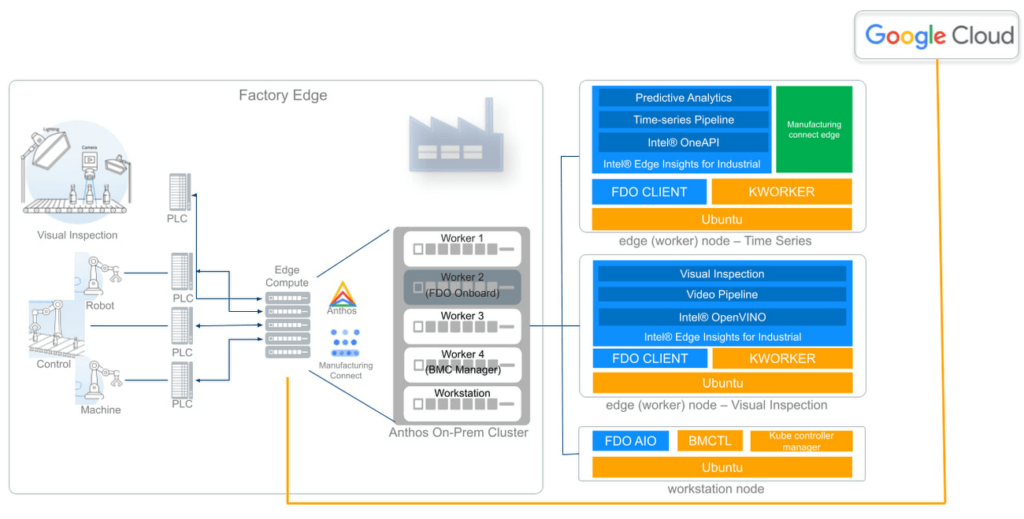
The Intel-Google Cloud proof of concept demonstrates how manufacturers can gather and analyze data from over 250 factory devices using Manufacturing Connect from Google Cloud, providing a powerful platform to run data ingestion and AI analytics at the edge.
In this demonstration in Hannover, Intel and Google Cloud show how manufacturers can capture time-series data from robotic welders to inspect welding quality and show how predictive analytics can benefit the factory operators. In addition, the video and image data is captured from a factory camera to show how visual inspection can highlight anomalies on plastic chips with model scoring. The demo also features zero-touch device onboarding using FIDO Device Onboard (FDO) to illustrate the ease with which additional computers could be added to the existing Anthos cluster.
By combining Google Cloud’s expertise in data, AI/ML and Intel’s Edge Insight’s for Industrial platform that was optimized to run on Google Anthos, manufacturers can run and manage their containerized applications at the edge, in on-premise data center, or in public clouds using an efficient and secure connection to the Manufacturing Data Engine from Google Cloud. It forges a complete edge-to-cloud solution.
Simplified device onboarding is available using Fido Device Onboard (FDO)—an open IoT protocol that brings fast, secure, and scalable zero-touch onboarding of new IoT devices to the edge. FDO allows factories to easily deploy automation and intelligence in their environment without introducing complexity into their OT infrastructure.
The Intel-Google Cloud implementation can analyze that data using localized Intel or third-party AI and machine learning algorithms. Applications can be layered on the Intel hardware and Anthos ecosystem, allowing customized data monitoring and ingestion, data management and storage, modeling, and analytics. This joint PoC facilitates and support improved decision making and operations, whether automated or triggered by the engineers on the front lines.
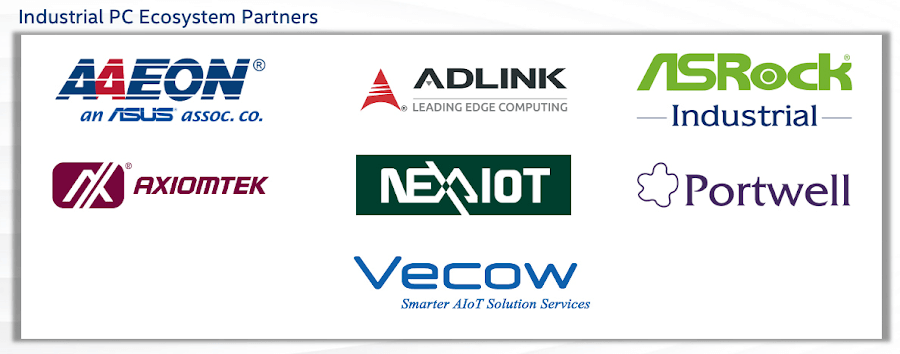
Intel collaborates with a vibrant ecosystem of leading hardware partners to develop solutions for the industrial market by using the latest generation of Intel processors. These processors can run data intensive workloads at the edge with ease.
Putting data and AI directly into the hands of manufacturing engineers can improve quality inspection loops, customer satisfaction, and ultimately the bottom line.
The new manufacturing solutions will be demonstrated in person for the first time at Hannover Messe 2022, May 30–June 2, 2022. Visit us at Stand E68, Hall 004, or schedule a meeting for an onsite demonstration with our experts.
More Relevant Stories for Your Company

Cloud IoT Core Helps Businesses Leverage their IoT Data to Build a Competitive Edge
The ability to gain real-time insights from IoT data can redefine competitiveness for businesses. Intelligence allows connected devices and assets to interact efficiently with applications and with human beings in an intuitive and non-disruptive way. After your IoT project is up and running, many devices will be producing lots of

Revolutionizing Cloud Computing: Introducing G2 VMs with NVIDIA L4 GPUs
Organizations across industries are looking to AI to turn troves of data into intelligence, powered by the latest advances in generative AI. Yet for many organizations, there is a barrier to adopting the latest models because they can be costly to train or serve. A new class of cloud GPUs

An Expert’s Opinion on What Early-stage Startups Must Know
As lead for analytics and AI solutions at Google Cloud, my team works with startups building on Google Cloud. This puts us in the fortunate position to learn from founders and engineers about how early-stage startups’ investments can either constrain them or position them for success, even at the seed

HSBC Looks to Google Cloud to Transform Banking
HSBC, a global bank that is a central part of global commerce with a presence in 67 countries, serving 38 million customers ranging from individuals to small businesses to corporations and governments, and having over $2.5 trillion assets in its balance sheet, had a vision of being a cloud first
