





What Users and System Designers Must Learn from Google’s Best Practices for Password Management

5283
Of your peers have already read this article.
3:00 Minutes
The most insightful time you'll spend today!
Updated for 2021: This post includes updated best practices including the latest from Google’s Best Practices for Password Management whitepapers for both users and system designers.
Account management, authentication and password management can be tricky. Often, account management is a dark corner that isn’t a top priority for developers or product managers. The resulting experience often falls short of what some of your users would expect for data security and user experience.
Fortunately, Google Cloud brings several tools to help you make good decisions around the creation, secure handling and authentication of user accounts (in this context, anyone who identifies themselves to your system—customers or internal users). Whether you’re responsible for a website hosted in Google Kubernetes Engine, an API on Apigee, an app using Firebase, or other service with authenticated users, this post lays out the best practices to follow to ensure you have a safe, scalable, usable account authentication system.
1. Hash those passwords
My most important rule for account management is to safely store sensitive user information, including their password. You must treat this data as sacred and handle it appropriately.
Do not store plaintext passwords under any circumstances. Your service should instead store a cryptographically strong hash of the password that cannot be reversed—created with Argon2id, or Scrypt. The hash should be salted with a value unique to that specific login credential. Do not use deprecated hashing technologies such as MD5, SHA1 and under no circumstances should you use reversible encryption or try to invent your own hashing algorithm. Use a pepper that is not stored in the database to further protect the data in case of a breach. Consider the advantages of iteratively re-hashing the password multiple times.
Design your system assuming it will be compromised eventually. Ask yourself “If my database were exfiltrated today, would my users’ safety and security be in peril on my service or other services they use?” As well as “What can we do to mitigate the potential for damage in the event of a leak?”
Another point: If you could possibly produce a user’s password in plaintext at any time outside of immediately after them providing it to you, there’s a problem with your implementation.
If your system requires detection of near-duplicate passwords, such as changing “Password” to “pAssword1”, save the hashes of common variants you wish to ban with all letters normalized and converted to lowercase. This can be done when a password is created or upon successful login for pre-existing accounts. When the user creates a new password, generate the same type of variants and compare the hashes to those from the previous passwords. Use the same level of hashing security as with the actual password.
2. Allow for third-party identity providers if possible
Third-party identity providers enable you to rely on a trusted external service to authenticate a user’s identity. Google, Facebook, and Twitter are commonly used providers.
You can implement external identity providers alongside your existing internal authentication system using a platform such as Identity Platform. There are a number of benefits that come with Identity Platform, including simpler administration, a smaller attack surface, and a multi-platform SDK. We’ll touch on more benefits throughout this list.
3. Separate the concept of user identity and user account
Your users are not an email address. They’re not a phone number. They’re not even a unique username. Any of these authentication factors should be mutable without changing the content or personally identifiable information (PII) in the account. Your users are the multi-dimensional culmination of their unique, personalized data and experience within your service, not the sum of their credentials. A well-designed user management system has low coupling and high cohesion between different parts of a user’s profile.
Keeping the concepts of user account and credentials separate will greatly simplify the process of implementing third-party identity providers, allowing users to change their username, and linking multiple identities to a single user account. In practical terms, it may be helpful to have an abstract internal global identifier for every user and associate their profile and one or more sets of authentication datavia that ID as opposed to piling it all in a single record.
4. Allow multiple identities to link to a single user account
A user who authenticates to your service using their username and password one week might choose Google Sign-In the next without understanding that this could create a duplicate account. Similarly, a user may have very good reason to link multiple email addresses to your service. If you’ve properly separated user identity and authentication, it will be a simple process to link several authentication methods to a single user.
Your backend will need to account for the possibility that a user gets part or all the way through the signup process before they realize they’re using a new third-party identity not linked to their existing account in your system. This is most simply achieved by asking the user to provide a common identifying detail, such as email address, phone, or username. If that data matches an existing user in your system, require them to also authenticate with a known identity provider and link the new ID to their existing account.
5. Don’t block long or complex passwords
NIST publishes guidelines on password complexity and strength. Since you are (or will be very soon) using a strong cryptographic hash for password storage, a lot of problems are solved for you. Hashes will always produce a fixed-length output no matter the input length, so your users should be able to use passwords as long as they like. If you must cap password length, do so based on the limits of your infrastructure; often this is a matter of memory usage (memory used per login operation * potential concurrent logins per machine), or more likely—the maximum POST size allowable by your servers. We’re talking numbers from hundreds of KB to over 1MB. Seriously. Your application should already be hardened to prevent abuse from large inputs. This doesn’t create new opportunities for abuse if you employ controls to prevent credential stuffing and hash the input as soon as possible to free up memory.
Your hashed passwords will likely already consist of a small set of ASCII characters. If not, you can easily convert a binary hash to Base64. With that in mind, you should allow your users to use literally any characters they wish in their password. If someone wants a password made of Klingon, Emoji, and ASCII art with whitespace on both ends, you should have no technical reason to deny them. Just make sure to perform Unicode normalization to ensure cross-platform compatibility. See our system designers whitepaper (PDF) for more information on Unicode and supported characters in passwords.
Any user attempting to use an extreme password is probably following password best practices (PDF) including using a password manager, which allows the entry of complex passwords even on limited mobile device keyboards. If a user can input the string in the first place (i.e., the HTML specification for password input disallows line feed and carriage return), the password should be acceptable.
6. Don’t impose unreasonable rules for usernames
It’s not unreasonable for a site or service to require usernames longer than two or three characters, block hidden characters, and prevent whitespace at the beginning and end of a username. However, some sites go overboard with requirements such as a minimum length of eight characters or by blocking any characters outside of 7-bit ASCII letters and numbers.
A site with tight restrictions on usernames may offer some shortcuts to developers, but it does so at the expense of users and extreme cases will deter some users.
There are some cases where the best approach is to assign usernames. If that’s the case for your service, ensure the assigned username is user-friendly insofar as they need to recall and communicate it. Alphanumeric generated IDs should avoid visually ambiguous symbols such as “Il1O0.” You’re also advised to perform a dictionary scan on any randomly generated string to ensure there are no unintended messages embedded in the username. These same guidelines apply to auto-generated passwords.
7. Validate the user’s identity
If you ask a user for contact information, you should validate that contact as soon as possible. Send a validation code or link to the email address or phone number. Otherwise, users may make a typo in their contact info and then spend considerable time using your service only to find there is no account matching their info the next time they attempt login. These accounts are often orphaned and unrecoverable without manual intervention. Worse still, the contact info may belong to someone else, handing full control of the account to a third party.
8. Allow users to change their username
It’s surprisingly common in legacy systems or any platform that provides email accounts not to allow users to change their username. There are very good reasons not to automatically release usernames for reuse, but long-term users of your system will eventually come up with significant reasons to use a different username and they likely won’t want to create a new account.
You can honor your users’ desire to change their usernames by allowing aliases and letting your users choose the primary alias. You can apply any business rules you need on top of this functionality. Some orgs might limit the number of username changes per year or prevent a user from displaying or being contacted via anything but their primary username. Email address providers are advised to never re-issue email addresses, but they could alias an old email address to a new one. A progressive email address provider might even allow users to bring their own domain name and have any address they wish.
If you are working with a legacy architecture, this best practice can be very difficult to meet. Even companies like Google have technical hurdles that make this more difficult than it would seem. When designing new systems, make every effort to separate the concept of user identity and user account and allow multiple identities to link to a single user account and this will be a much smaller problem. Whether you are working on existing or greenfield code, choose the right rules for your organization with an emphasis on allowing your users to grow and change over time.
9. Let your users delete their accounts
A surprising number of services have no self-service means for a user to delete their account and associated PII. Depending on the nature of your service, this may or may not include public content they created such as posts and uploads. There are a number of good reasons for a user to close an account permanently and delete all their PII . These concerns need to be balanced against your user experience, security, and compliance needs. Many if not most systems operate under some sort of regulatory control (such as PCI or GDPR), which provides specific guidelines on data retention for at least some user data. A common solution to avoid compliance concerns and limit data breach potential is to let users schedule their account for automatic future deletion.
In some circumstances, you may be legally required to comply with a user’s request to delete their PII in a timely manner. You also greatly increase your exposure in the event of a data breach where the data from “closed” accounts is leaked.
10. Make a conscious decision on session length
An often overlooked aspect of security and authentication is session length. Google puts a lot of effort into ensuring users are who they say they are and will double-check based on certain events or behaviors. Users can take steps to increase their security even further.
Your service may have good reason to keep a session open indefinitely for non-critical analytics purposes, but there should be thresholds after which you ask for password, 2nd factor, or other user verification.
Consider how long a user should be able to be inactive before re-authenticating. Verify user identity in all active sessions if someone performs a password reset. Prompt for authentication or 2nd factor if a user changes core aspects of their profile or when they’re performing a sensitive action. Re-authenticate if the user’s location changes significantly in a short period of time. Consider whether it makes sense to disallow logging in from more than one device or location at a time.
When your service does expire a user session or requires re-authentication, prompt the user in real time or provide a mechanism to preserve any activity they have not saved since they were last authenticated. It’s very frustrating for a user to take a long time to fill out a form, only to find all their input has been lost and they must log in again.
11. Use 2-Step Verification
Consider the practical impact on a user of having their account stolen when choosing 2-Step Verification (also known as two-factor authentication, MFA, or 2FA) methods. Time-based one-time passwords (TOTP), email verification codes, or “magic links” are consumer-friendly and relatively secure. SMS 2FA auth has been deprecated by NIST due to multiple weaknesses, but it may be the most secure option your users will accept for what they consider a trivial service.
Offer the most secure 2FA auth you reasonably can. Hardware 2FA such as the Titan Security Key are ideal if feasible for your application. Even if a TOTP library is unavailable for your application, email verification or 2FA provided by third-party identity providers is a simple means to boost your security without great expense or effort. Just remember that your user accounts are only as secure as the weakest 2FA or account recovery method.
12. Make user IDs case-insensitive
Your users don’t care and may not even remember the exact case of their username. Usernames should be fully case-insensitive. It’s trivial to store usernames and email addresses in all lowercase and transform any input to lowercase before comparing. Make sure to specify a locale or employ Unicode normalization on any transformations.
Smartphones represent an ever-increasing percentage of user devices. Most of them offer autocorrect and automatic capitalization of plain-text fields. Preventing this behavior at the UI level might not be desirable or completely effective, and your service should be robust enough to handle an email address or username that was unintentionally auto-capitalized.
13. Build a secure auth system
If you’re using a service like Identity Platform, a lot of security concerns are handled for you automatically. However, your service will always need to be engineered properly to prevent abuse. Core considerations include implementing a password reset instead of password retrieval, detailed account activity logging, rate-limiting login attempts to prevent credential stuffing, locking out accounts after too many unsuccessful login attempts, and requiring two-factor authentication for unrecognized devices or accounts that have been idle for extended periods. There are many more aspects to a secure authentication system, so please see the further reading section below for links to more information.
Further reading
There are a number of excellent resources available to guide you through the process of developing, updating, or migrating your account and authentication management system. I recommend the following as a starting place:
- Our Modern Password Security for System Designers whitepaper (PDF)
- The related Modern password security for users whitepaper (PDF)
- NIST 800-063B covers Authentication and Lifecycle Management
- OWASP continually updates their Password Storage Cheat Sheet
- OWASP goes into even more detail with the Authentication Cheat Sheet
- Google Cloud Identity Platform is a multi-protocol customer identity and access management solution, with robust authentication features
- Google’s Firebase Authentication site has a rich library of guides, reference materials and sample code
5169
Of your peers have already watched this video.
14:00 Minutes
The most insightful time you'll spend today!
How Google Workspace Helps Manage, Govern and Protect Sensitive Data
The shift towards a hybrid work style and trends accelerated by the pandemic has resulted in data deluge. With companies and individuals sharing increasingly large volumes of information and collaborating with internal and external stakeholders, the need for innovations for higher security also escalates. View this video to learn how Google Workspace approaches security across content lifecycle from client-side encryption updates, data loss prevention, Google Vault, data regions, labels, and more!
2925
Of your peers have already watched this video.
15:00 Minutes
The most insightful time you'll spend today!
What Makes Google Cloud the Go-to Platform to Build Next-gen Security Services
Join the discussion by the panel of security experts and IT leaders from renowned organizations to examine the role of Google Cloud for security companies in building next-generation security services. Watch the video from the security session of Google Cloud Next ’21 to deep dive into Google Cloud’s security and partnership models to explore the security-related aspects of building robust, security based SaaS products.
Conversations on Government Security with Dmitri Alperovitch, CrowdStrike’s Founder and Former CTO

4837
Of your peers have already read this article.
2:00 Minutes
The most insightful time you'll spend today!
As I was preparing for my fireside chat with Dmitri Alperovitch, Founder and Former CTO of CrowdStrike and Executive Chairman of the Silverado Policy Accelerator, for the Google Cloud Government Security Summit taking place on Tuesday, July 20th, I was reflecting about recent developments in cybersecurity, Zero Trust best practices – including aspects of Google’s journey – and the benefits that this approach to cybersecurity brings to the public sector.
As Dmitri and I discussed what we wanted to share during our session at the Government Security Summit, I quickly realized how pertinent the information was to our public sector audience. For that reason, ahead of Tuesday’s event, I wanted to give you a glimpse of what is to come in our fireside chat. Read below for an exclusive preview of what we plan to discuss. If you are planning to attend on Tuesday, we encourage you to ask questions through our interactive chat function and sign up for 1:1 time with our Ask the Expert program.
Check out my chat with Dmitri below…
Heather: What do you see as the most significant changes in both the attack surface and cybercriminal tactics in recent years? And why do these changes present unprecedented challenges for public sector?
Dmitri: In terms of the threat landscape, the more things change, the more they stay the same. The adversaries haven’t changed that much. It’s actually striking. Not all threats are emanating from governments or state actors – either directly or by providing safe harbor to criminals – but a large portion are. That has not changed. The volume and scale of attacks have grown, however, and become massive. And now, the greatest challenge is that everyone is a target. Before, only top-end institutions and government organizations were facing nation state threats. That has changed either through targeted attacks or accidental ones, such as WannaCry. The question now is “How do we protect the most vulnerable and extend much-needed protection to smaller organizations that do not have deep security expertise or resources?”
Heather: Earlier this year, the Biden Administration released its Cybersecurity Executive Order (EO). What do you see as the most important takeaways and potential impact of the EO?
Dmitri: The Cybersecurity EO is set to have a significant impact. The biggest change is a shift in strategy. For many decades, we all had the mentality that we have to keep attackers out of the network. That is great in theory, but we all know that it is a virtual impossibility with a network of any significant size. Adversaries will find a way in. And, we used to think it was game over once they were in the network.
Then about 10 years ago, we began to see a change. Google led the way with its BeyondCorp strategy as did Lockheed Martin with its sentinel Kill Chain framework. Now, when an adversary penetrates a network, it’s not the end of the game, but the beginning. That is the case if the organization is prepared with a network architecture built around Zero Trust principles. The adversary now has to move laterally, steal credentials, and elevate privileges to get to the resources they want. A Zero Trust architecture can slow them down and give organizations time to detect and eject adversaries from the network. The EO recognizes the power of this approach and has made Zero Trust its fundamental tenet.
Heather: Federal agencies have spent the last 60 days looking at Zero Trust and developing their plans. What do you hope to see? What is critical to accelerating implementation?
Dmitri: The EO establishes a very ambitious timeline, and the US government is not known to move rapidly due to a number of restrictions and considerations. That said, the EO recognizes the idea that logging has to be at the center of modern architecture. Agencies need full visibility into what is going on at endpoints and across the network, have to hunt continuously across networks for adversaries, and must work to rapidly eject them. That is at the core of the EO, and it is a great shift. The private sector should be watching and learning as well.
Heather: What pitfalls should the Federal government look out for in moving forward to implement the EO?
Dmitri: One of the main challenges is the limited authority of the President. Congress is the only branch with the power to change the laws. While the establishment of the Cybersecurity and Infrastructure Security Agency (CISA) a few years ago allows for hunting across agency networks, CISA still has limited authority. It cannot manage the cybersecurity of more than 120 civilian agencies.
Some agencies are performing well when it comes to security, but we have to recognize that this is not the norm. Not all agencies have the capacity to recruit the best cybersecurity talent, but their needs may be just as great. We need to centralize capabilities and leverage the cloud, like Google, to provide all agencies with the best cyber talent and resources.
Join us at the Google Cloud Government Security Summit to hear the rest of our conversation. The event is complimentary. Register today to reserve your spot on July 20th. If you have any questions about the event, please reach out to us at cloudsummitsupport@google.com.
Investing for Future: Why Shifting Security Left Helps Your Bottom Line

4486
Of your peers have already read this article.
3:30 Minutes
The most insightful time you'll spend today!
The concept of “shifting left” has been widely promoted in the software development lifecycle. The concept is that introducing security earlier, or leftwards, in the development process will lead to fewer software-related security defects later, or rightwards, in production.
Shifting cloud security left can help identify potential misconfigurations earlier in the development cycle, which if unresolved can lead to security defects. Catching those misconfigurations early can improve the security posture of production deployments.
Why shifting security left matters
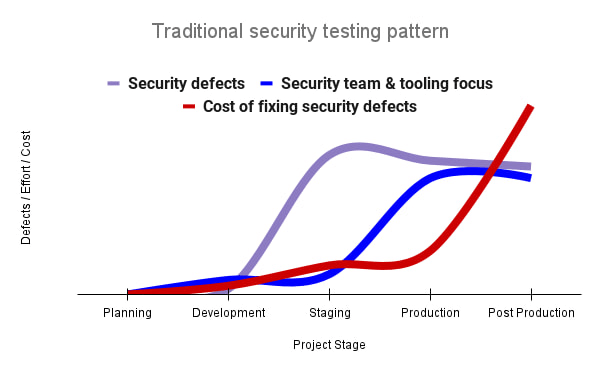
Google’s DevOps Research and Assessment (DORA) highlights the importance of integrating security into DevOps in the 2016 State of DevOps Report. The report discussed the placement of security testing in the software development lifecycle. The survey found that most security testing and tool usage happened after the development of a release, rather than continuously throughout the development lifecycle. This led to increased costs and friction because remediating problems found in testing may involve big architectural changes and additional integration testing, as shown in Figure 1. For example, security defects in production can lead to GDPR violations, which can carry fines up to 4% of global annual revenue.
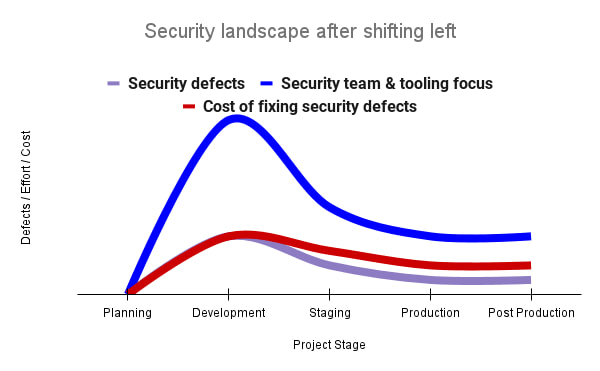
By inserting security testing into the development phase, we can identify security defects earlier and perform the appropriate remediation sooner. This results in fewer defects post-production and reduces remediation efforts and architectural changes. Figure 2 shows us that integrating security earlier in the SDLC results in overall decreases in security defects and associated remediation costs.
The 2021 State of DevOps Report expands the work of the 2016 report and advocates for integrating automated testing throughout the software development lifecycle. Automated testing is useful for continuously testing development code without the need for additional skills or intervention by the developer. Developers can continue to iterate quickly while other stakeholders can be confident that common defects are being identified and remediated.
From code to cloud
The DORA findings with regard to code security can also be applied to cloud infrastructure security. As more organizations deploy their workloads to the cloud, it’s important to test the security and configurations of cloud infrastructure. Misconfigurations in cloud resources can lead toward security incidents that could lead to data theft. Examples of such misconfigurations include overly permissive firewall rules, public IP addresses for VMs, or excessive Identity and Access Management (IAM) permissions on service accounts and storage buckets.
We can and should leverage different Google Cloud services to identify these misconfigurations early in the development process and prevent such errors from emerging in production to reduce the costs of future remediation, potential legal fines, and compromised customer trust.
The key tools in our toolshed are Security Command Center and Cloud Build. Security Command Center provides visibility into misconfigurations, vulnerabilities, and threats within a Google Cloud organization. This information is critical when protecting your cloud infrastructure (such as virtual machines, containers, web applications) against threats, or identifying potential gaps from compliance frameworks (such as CIS Benchmarks, PCI-DSS, NIST 800-53, or ISO 27001.
Security Command Center further supports shifting security left by allowing visibility of security findings at the cloud project level for individual developers, while still allowing global visibility for Security Operations. Cloud Build provides for the creation of cloud-native CI/CD pipelines. You can insert custom health checks into a pipeline to evaluate certain conditions (such as security metrics) and fail the pipeline when irregularities are detected. We will now explore two use cases that take advantage of these tools.
Security Health Checker
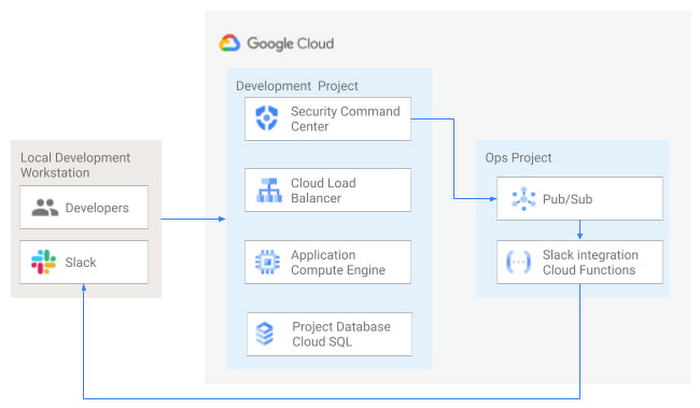
Security Health Checker continuously monitors the security health of a Google Cloud project and promptly notifies project members of security findings. Figure 3 shows developers interacting with a Google Cloud environment with network, compute, and database components. Security Command Center is configured to monitor the health of the project.
When Security Command Center identifies findings, it sends them to a Cloud Pub/Sub topic. A Cloud Function then takes the findings published to that topic and sends them to a Slack channel monitored by infrastructure developers. Just like a spell checker providing quick feedback on misspellings, Security Health Checker provides prompt feedback on security misconfigurations in a Google Cloud project that could lead to deployment failures or post-production compromises. No additional effort is required on the part of developers.
Security Pipeline Checker
In addition to using Security Command Center for timely notification of security concerns during the development process, we can also integrate security checks into the CI/CD pipeline by using Security Command Center along with Cloud Build as shown in Figure 4.
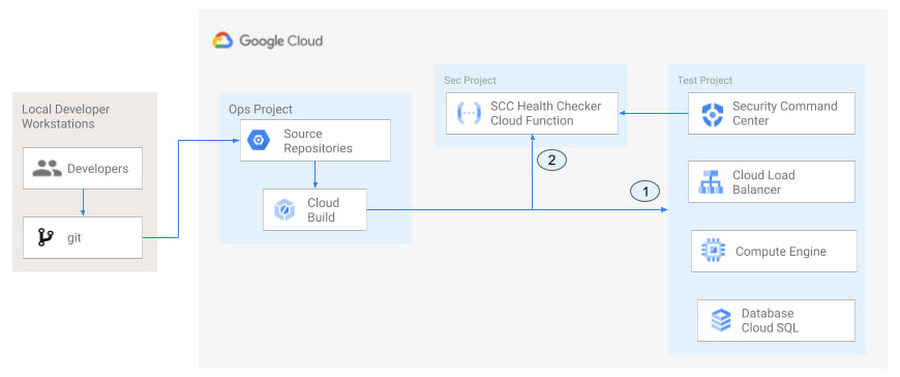
The pipeline begins with a developer checking code into a git repository. This repository is mirrored to Cloud Source Repositories. A build trigger will begin the build process. The build pipeline will include a short waiting period of a few minutes to give Security Command Center a chance to identify security vulnerabilities. A brief delay may appear undesirable at first, but the analysis that takes place during that interval can result in the reduction of security defects post-production.
At the end of the waiting period, a Cloud Function serving as a Security Health Checker will evaluate the findings from Security Command Center (Connector 1 in Figure 4). If the validator determines that unacceptable security findings exist, the validator will inject a failure indication into the pipeline to terminate the build process (Connector 2 in Figure 4). Developers have visibility into the failure triggers and remediate them before successfully deploying code to production. This is in contrast to the findings in the 2016 State of DevOps Report wherein organizations that didn’t integrate security into their DevOps processes spent 50% more time remediating security issues than those who “shifted left” on security.
Closing thoughts
DORA’s 2016 State of DevOps report called out the need for “shifting left” with security, introducing security earlier in the development process to identify security vulnerabilities early to reduce mitigation efforts post-production. The report also advocated for automated testing throughout the software development lifecycle.
We looked at two ways of achieving these objectives in Google Cloud. The Security Health Checker provides feedback to developers using Security Command Center and Slack to notify developers of security findings as they pursue their development activities. The Security Pipeline Checker uses Security Command Center as part of a Cloud Build pipeline to terminate a build pipeline if vulnerabilities are identified during the build process. To implement the Security Heath Checker and the Security Pipeline Checker, check out the GitHub repository. We hope these examples will help you to “shift left” using Google Cloud services. Happy coding!
This article was co-authored with Jason Bisson, Bakh Inamov, Jeff Levne, Lanre Ogunmola, Luis Urena, and Holly Willey, Security & Compliance Specialists at Google Cloud.
The SolarWinds Attack: A Case Study in Supply Chain Threats

2595
Of your peers have already read this article.
2:30 Minutes
The most insightful time you'll spend today!
Our quarterly Security Talks series brings together experts from Google Cloud Security teams and the industry to share information on our latest security products, innovations and best practices. Below is an introduction to Mandiant’s Security Talks presentation on Dec. 7, Mandiant Tales from the Front Lines: Activate Cyber Defenses Against Supply Chain Compromise.
The discovery in December 2020 of the SolarWinds supply chain compromise, a global computer intrusion campaign, caused organizations and security leaders to completely reassess their Cyber Threat Profiles, risk assessments, and defensive postures. It was a rare, watershed event that savvy security leaders and IT decision makers have been using to improve how security teams protect systems, networks, and data across industries and sectors, especially critical infrastructure. Two years later, we’re looking back at the security incident, what we’ve learned, and how it continues to drive change across security teams and organizations.
The SolarWinds compromise leveraged access to the software maker’s Orion business software in order to distribute a malicious update containing malware. Mandiant has since attributed this operation to APT29, a Russia-based espionage group assessed to be sponsored by the Russian Foreign Intelligence Service (SVR). This operation afforded APT29 with unparalleled access to an estimated 18,000 global organizations for follow-on targeting based on the attacker’s discretion and collection priorities.
While the security industry has yet to see anything that rivals the scale and scope of the SolarWinds compromise since it was discovered, a recent Google Cloud research report on software supply chain security found that there’s been a sharp increase in software supply chain attacks across nearly every sector.
Mandiant analysis identified supply chain compromise as the second-most prevalent initial infection vector in 2021. When the initial infection vector was identified, supply chain compromise accounted for 17% of intrusions in 2021 compared to less than 1% of intrusions in 2020. Further, 86% of supply chain compromise intrusions in 2021 were related to the SolarWinds breach.
Since 2020, Mandiant has also observed an increase in financially-motivated threat actors targeting the software supply chain. These actors compromised popular software packages and even mobile applications in order to deploy ransomware, cryptocurrency miners, and banking trojans. In one case, malicious code was inserted into a popular package, prompting the U.S. Cybersecurity and Infrastructure Agency (CISA) to issue an alert about the compromise.
Mitigation recommendations
The discovery of the SolarWinds incident resulted in increased global attention around supply chain compromise threats. Government authorities and technology organizations have responded with several initiatives, legislation, and studies seeking to reduce software supply chain and software dependency risk. Although these initiatives may make it more difficult for threat actors to conduct these operations, organizations should also take steps to mitigate supply chain threats.
Mandiant suggests that organizations contemplate applying multiple layers of security policies, plans, and solutions to maximize opportunities to provide early threat detection and prevent an anomaly or compromise stemming from the supply chain. This guidance is aligned with best practices Google Cloud has recommended for organizations to improve their software supply chain security.
Mandiant has also provided the following additional recommendations for organizations to consider more generally:
- Establish a vendor vetting process to evaluate vendor security practices before deploying hardware or software.
- Create a change control process and board for all enterprise hardware and software changes, which could include a centralized IT or IT security managed process for downloading, testing, and pushing updates to users.
- Use an advanced endpoint security solution, such as an endpoint detection and response (EDR), to detect malicious behavior when a tainted software package is downloaded and executed.
- Ensure proper logging and monitoring is in place between the software, hardware, and the internet.
- Implement the software and hardware using network segmentation with minimal access to the internet.
- Enact employee training programs and policies to encourage security best practices, including security audits of code in development.
Next steps
You can watch the Google Cloud Security Talks presentation on SolarWinds and the current state of supply chain threats here. You can learn more about Google Cloud’s solutions to help improve software supply chain security here, or for more general inquiries, please contact us or reach out to your sales representative to learn how we can assist.
More Relevant Stories for Your Company

Google Cloud & Health-ISAC’s EMEA Collaborate to Boost Healthcare Security
Last July, Google Cloud launched our ambassador partnership with the Health Information Sharing and Analysis Center (Health-ISAC) and committed to working with industry leaders to better protect our healthcare ecosystem. Securing healthcare technology and data is a global challenge, and to meet it security professionals need to have better channels for sharing information and

Stop Cribbing About Shadow IT and Start Taking Charge Now
Employees use tools at their disposal to get work done, but if these tools (often legacy) hamper collaboration or are inflexible, they’ll turn to less secure options for the sake of convenience. According to Gartner, a third of successful attacks experienced by enterprises will come from Shadow IT usage by 2020.

Google Launches Smart Canvas to Stir-up Collaboration in Google Workspace
After more than a year of remote collaboration, many people are showing signs of digital fatigue. Throughout the pandemic, millions of employees bridged the physical distances with their colleagues by making themselves more available, joining a deluge of virtual meetings, and leaning into a dizzying array of tools and applications.

How Firewall Insights can Simplify Corporate Firewall Rules
Corporate firewalls typically include a massive number of rules, which accumulate over time as new workloads are added. When rules stack up piecemeal like this, misconfigurations occur that, at best, create headaches for security administrators, and at worst, create vulnerabilities that lead to security breaches. To address this, we have
