





Google Launches Smart Canvas to Stir-up Collaboration in Google Workspace

5446
Of your peers have already read this article.
2:00 Minutes
The most insightful time you'll spend today!
After more than a year of remote collaboration, many people are showing signs of digital fatigue. Throughout the pandemic, millions of employees bridged the physical distances with their colleagues by making themselves more available, joining a deluge of virtual meetings, and leaning into a dizzying array of tools and applications. As part of our mission to build the future of work, we’re addressing these challenges in Google Workspace.
As we announced today at I/O, we’re launching smart canvas—a new product experience that delivers the next evolution of collaboration for Google Workspace. Between now and the end of the year, we’re rolling out innovations that make it easier for people to stay connected, focus their time and attention, and transform their ideas into impact.
Specifically, we’re enhancing the apps that hundreds of millions of people use every day—like Docs, Sheets, and Slides—to make them even more flexible, interactive, and intelligent. With smart canvas, we’re bringing the content and connections that transform collaboration into a richer, better experience in Google Workspace.
When we launched Google Docs and Sheets 15 years ago, these apps introduced the world to a new way of working. They enabled anytime, anywhere teamwork—a stark contrast to the legacy tools that were designed for an era of individual work on office desktops. For over a decade now, we’ve been pushing documents away from being just digital pieces of paper and toward collaborative, linked content inspired by the web. Smart canvas is our next big step.https://www.youtube.com/embed/SDBbFETGiA4?enablejsapi=1&
Making collaboration more flexible and helpful
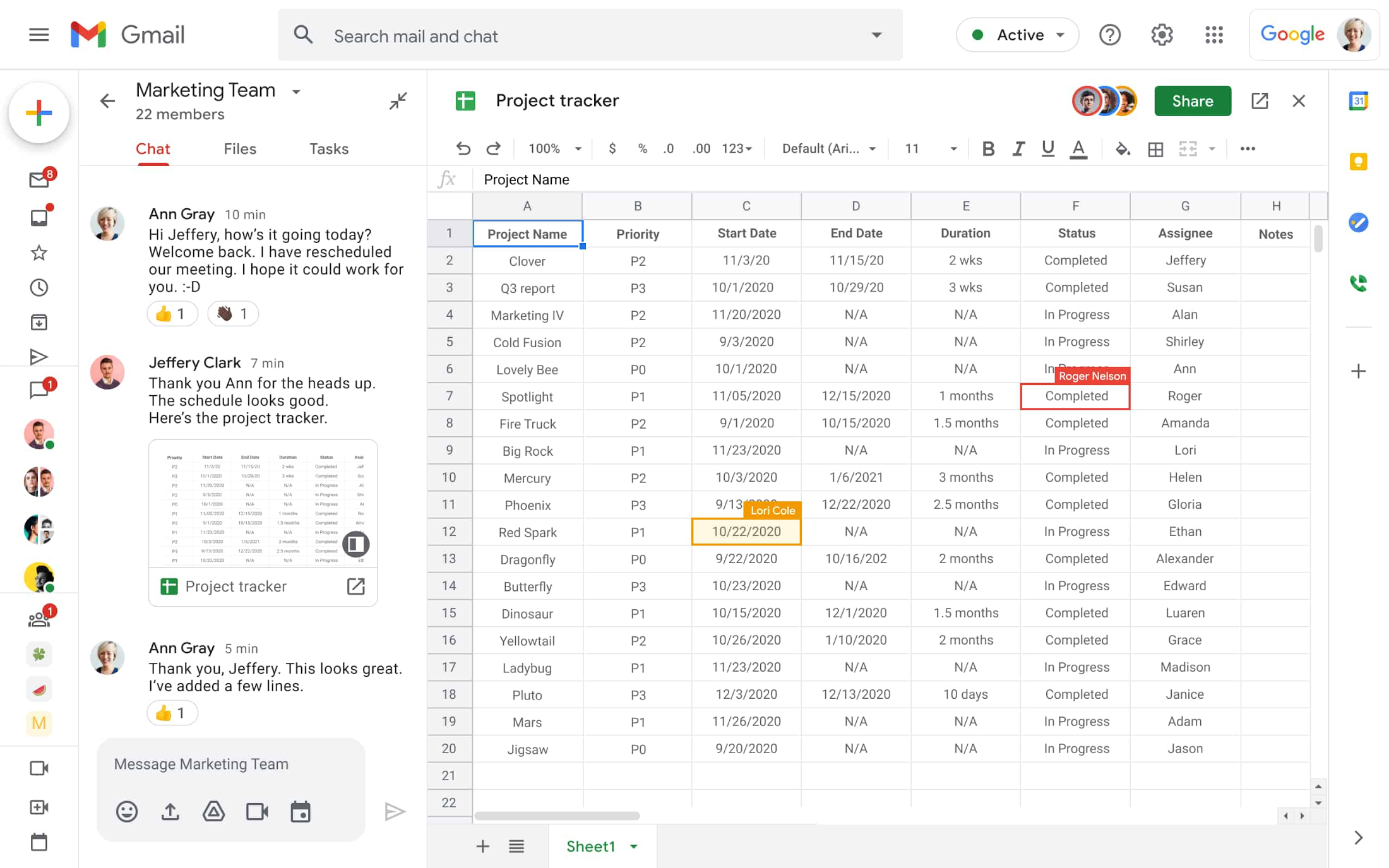
The evolving hybrid work model gives new urgency to existing collaboration challenges. How do teams stay focused and connected as they work together, regardless of where people are located? With smart canvas, we’re building deeper connections across Google Workspace to transform collaboration anywhere it happens.
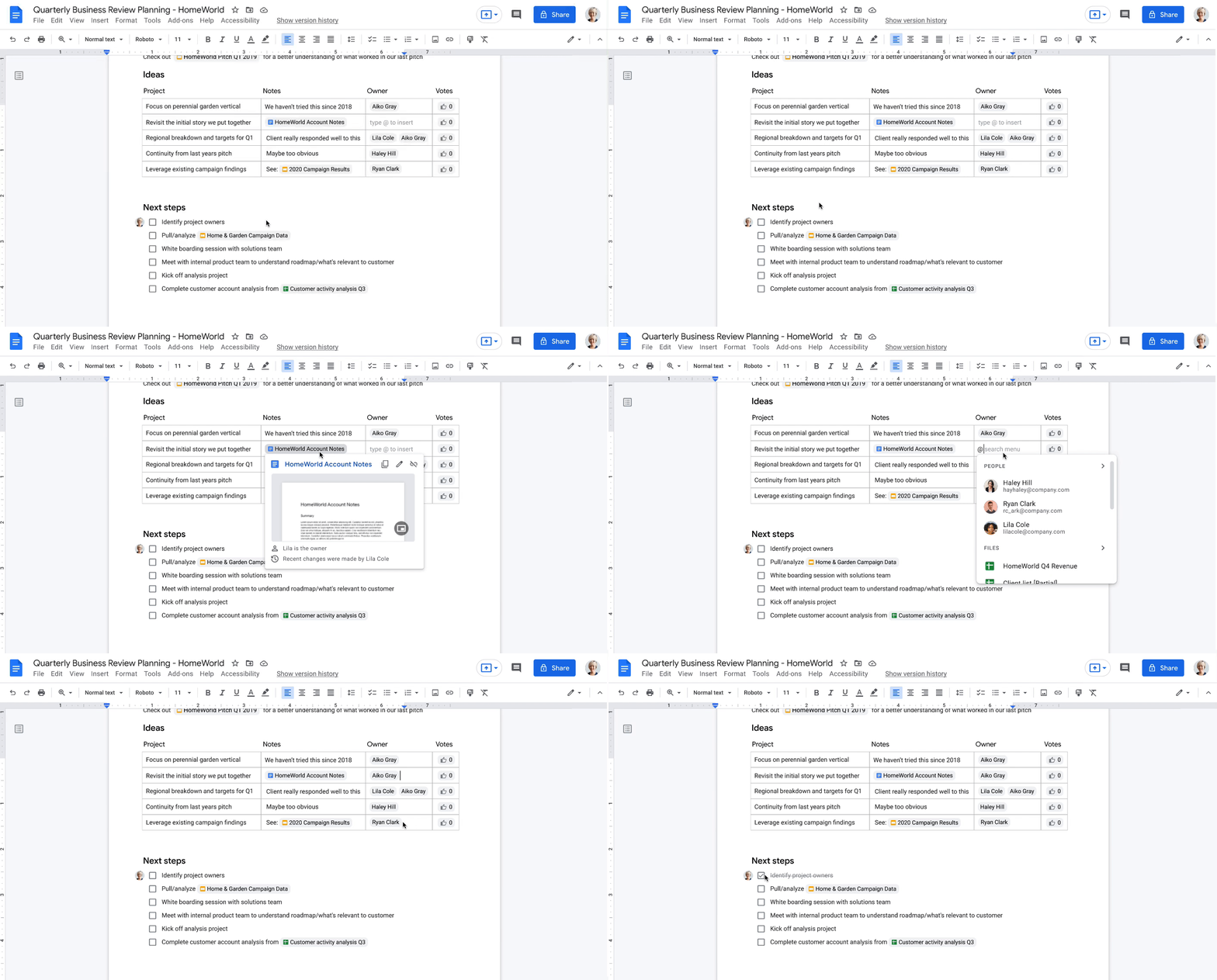
For example, we’re taking something that people already use every day—@-mentions—to open up new, powerful collaboration capabilities. New interactive building blocks—smart chips, templates, and checklists—will connect people, content, and events into one seamless experience.
Already available, when you @ mention a person in a document, a smart chip shows you additional information like the person’s location, job title, and contact information. And starting today, we’re introducing new smart chips in Docs for recommended files and meetings. To insert smart chips into your work, simply type “@” to see a list of recommended people, files, and meetings. From web or mobile, your collaborators can then quickly skim associated meetings and people or preview linked documents, all without changing tabs or contexts. Smart chips will come to Sheets in the coming months.
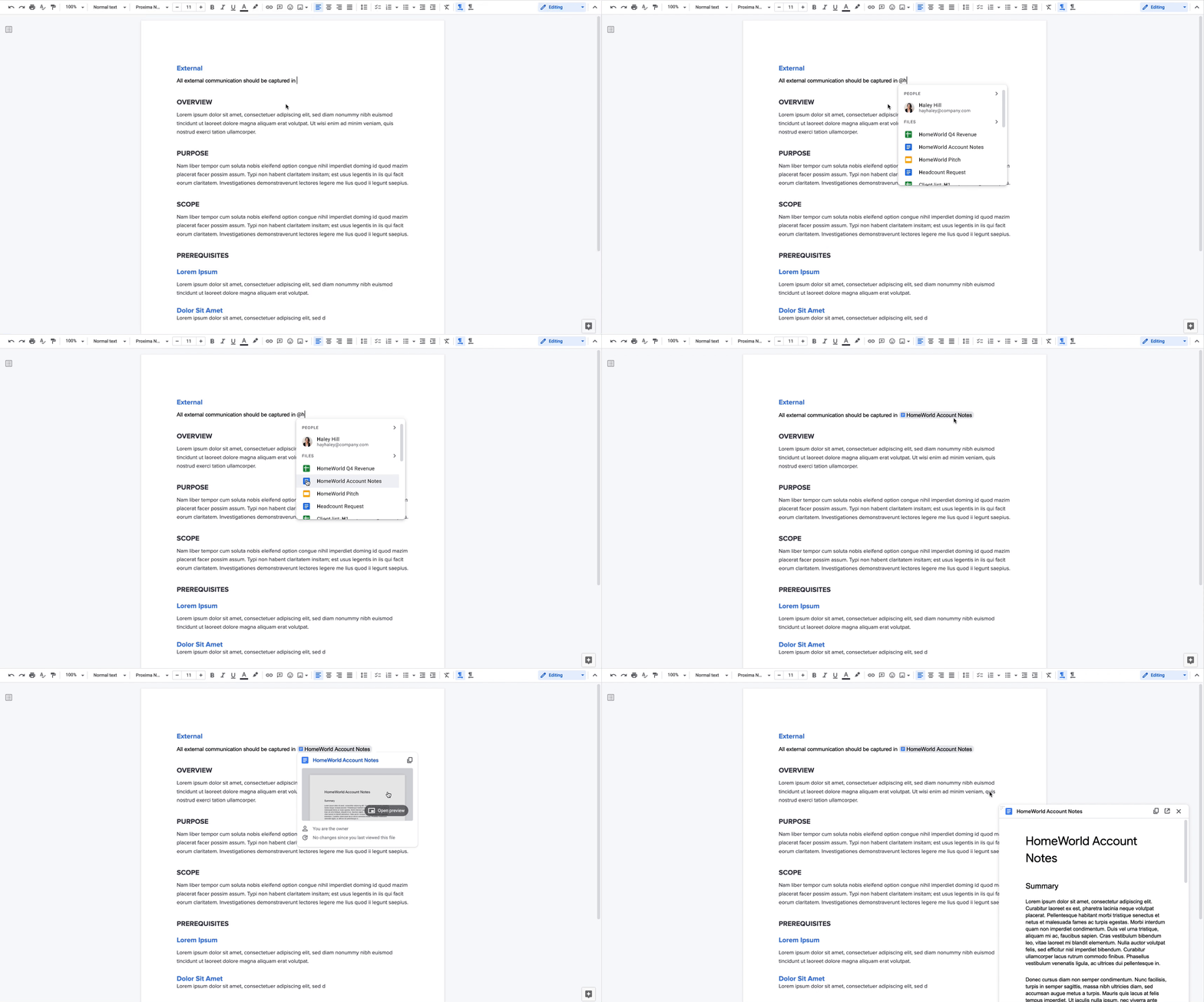
Additionally, we’re making it easier to drive projects forward by streamlining common team workflows. Starting today in Docs, checklists are available on web and mobile, and you’ll soon be able to assign checklist action items to other people. These action items will show up in Google Tasks, making it easier for everyone to manage a project’s To Do list.
We’re also introducing table templates in Docs. Topic-voting tables will allow you to easily gather team feedback while project-tracker tables will help you capture milestones and statuses on the fly. And a new document template for capturing meeting notes will automatically import any relevant information from a Calendar meeting invite, including smart chips for attendees and attached files.
With our new pageless format in Docs, you’ll be able to remove the boundaries of a page to create a surface that expands to whatever device or screen you’re using, making it easier to work with wide tables, large images, or detailed feedback in comments. And if you want to print or convert to PDF, you’ll be able to easily switch back to a paginated view.
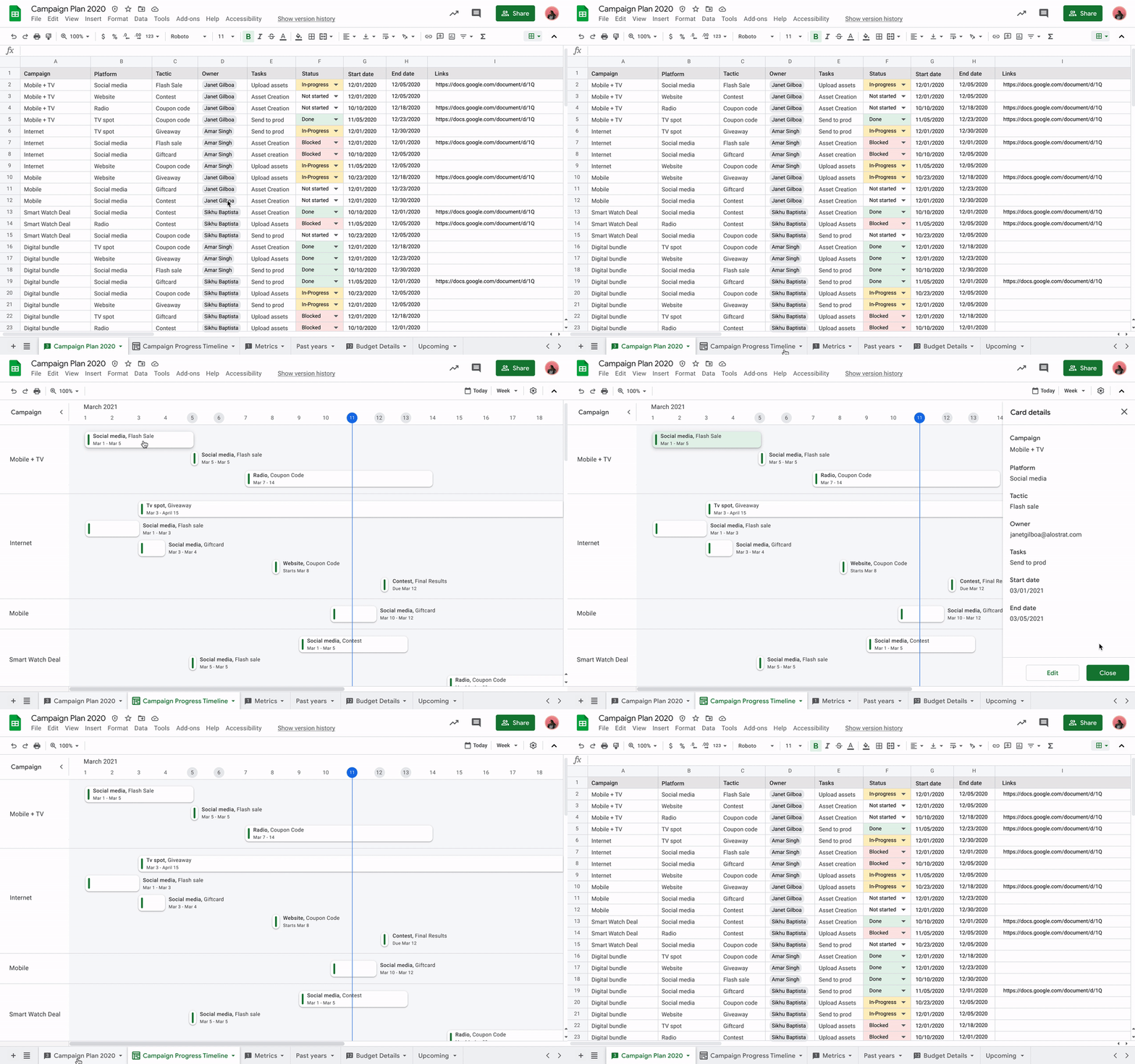
Meanwhile, you’ll be able to toggle between new views in Sheets to better manage and interact with your data. Our first launch will be a timeline view that makes tracking tasks easier and faster. This flexible view allows you to organize your data by owner, category, campaign, or whichever attribute fits best. Using a dynamic, interactive timeline strengthens your ability to manage things like marketing campaigns, project milestones, schedules, and cross-team collaborations.
Fostering human connection—wherever people work
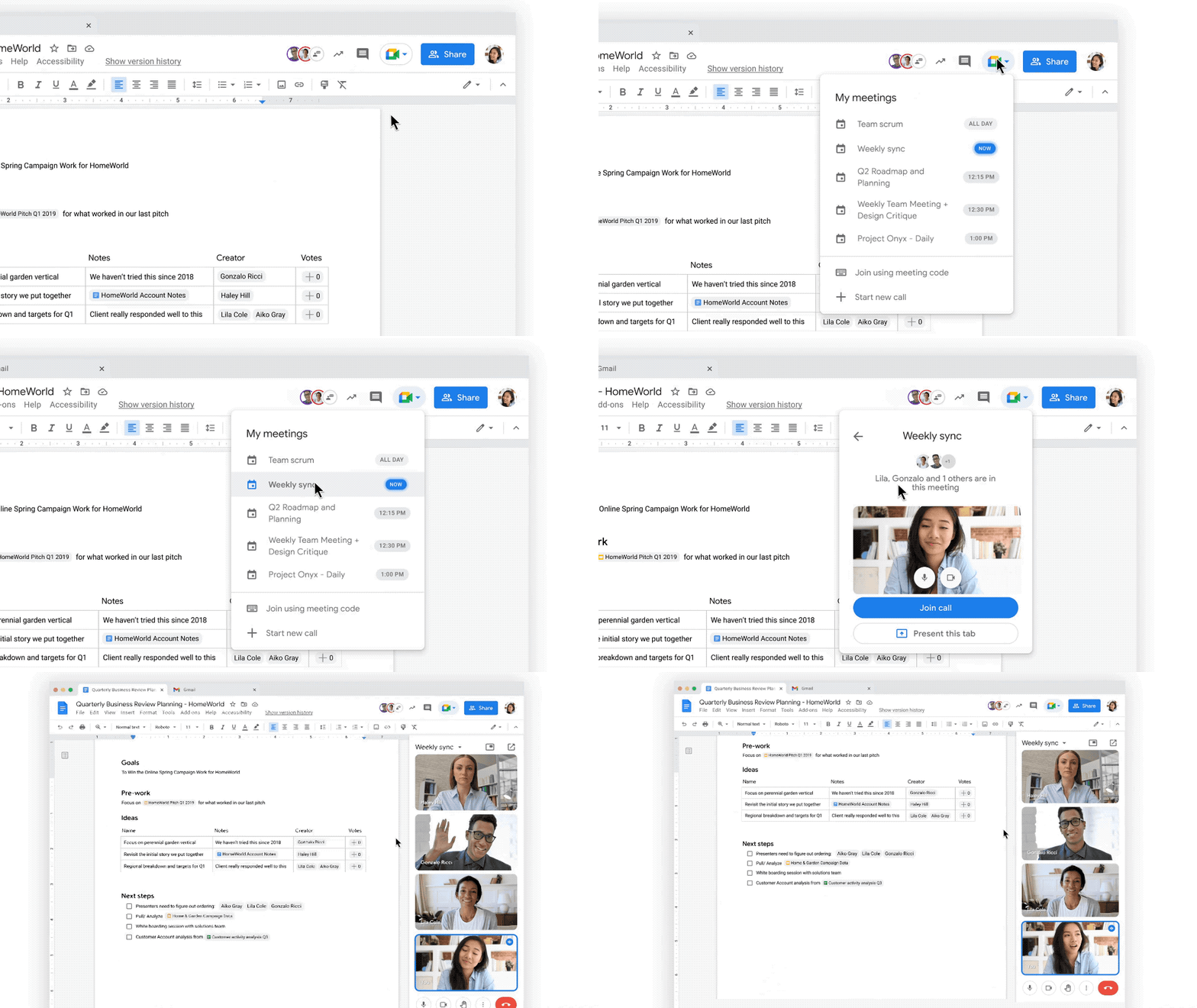
With smart canvas and innovations in Google Meet, we’re making it easy to bring the voices and faces of your team directly into the collaboration experience, to help people share ideas and solve problems together from anywhere. As part of that, we’re building tighter integrations between our communication and collaboration tools so you can pull content into conversations and conversations into content.
Starting today, we’re rolling out the ability to present your content to a Google Meet call on the web directly from the Doc, Sheet, or Slide where you’re already working with your team. Jumping between collaborating in a document and a live conversation without skipping a beat helps the project—and the team—stay focused. And in the fall, we’re bringing Meet directly to Docs, Sheets, and Slides on the web, so people can actually see and hear each other while they’re collaborating.
Live captions and translations in Google Meet will also play a crucial role in keeping people connected as they work together in distributed teams. We currently offer live captions in five languages, with more on the way. And we’re introducing live translations of captions later this year, starting with English-language live captions translated into Spanish, Portuguese, French, or German, with many more languages to follow.
With recent enhancements to Google Meet, we’re also giving people more control and flexibility over the meeting experience, including more space to see people and content, plus the ability to pin and unpin content and video feeds. And to help with meeting fatigue, you can now turn off your self-feed entirely.
Because we know that collaboration is fluid and fast-moving, we’re making it easier for teams to give feedback on the fly and to move seamlessly between conversations and building content together. Teams can now jump from a discussion in Google Chat directly to building content together. Creating and editing Sheets and Docs from Google Chat rooms is already live in our web experience, and we’ll enable it for Slides in the coming weeks. And to gauge the team’s reactions along the way, we’re introducing emoji reactions in Docs in the next few months.
Working smarter and safer
Google Workspace is already infused with powerful intelligence that enables people to make the best use of their time and attention. Whether it’s with the two billion grammar suggestions we surface in Docs every month, or the intelligent file suggestions in Drive’s Priority and Quick Access features that cut file finding time by 50%.
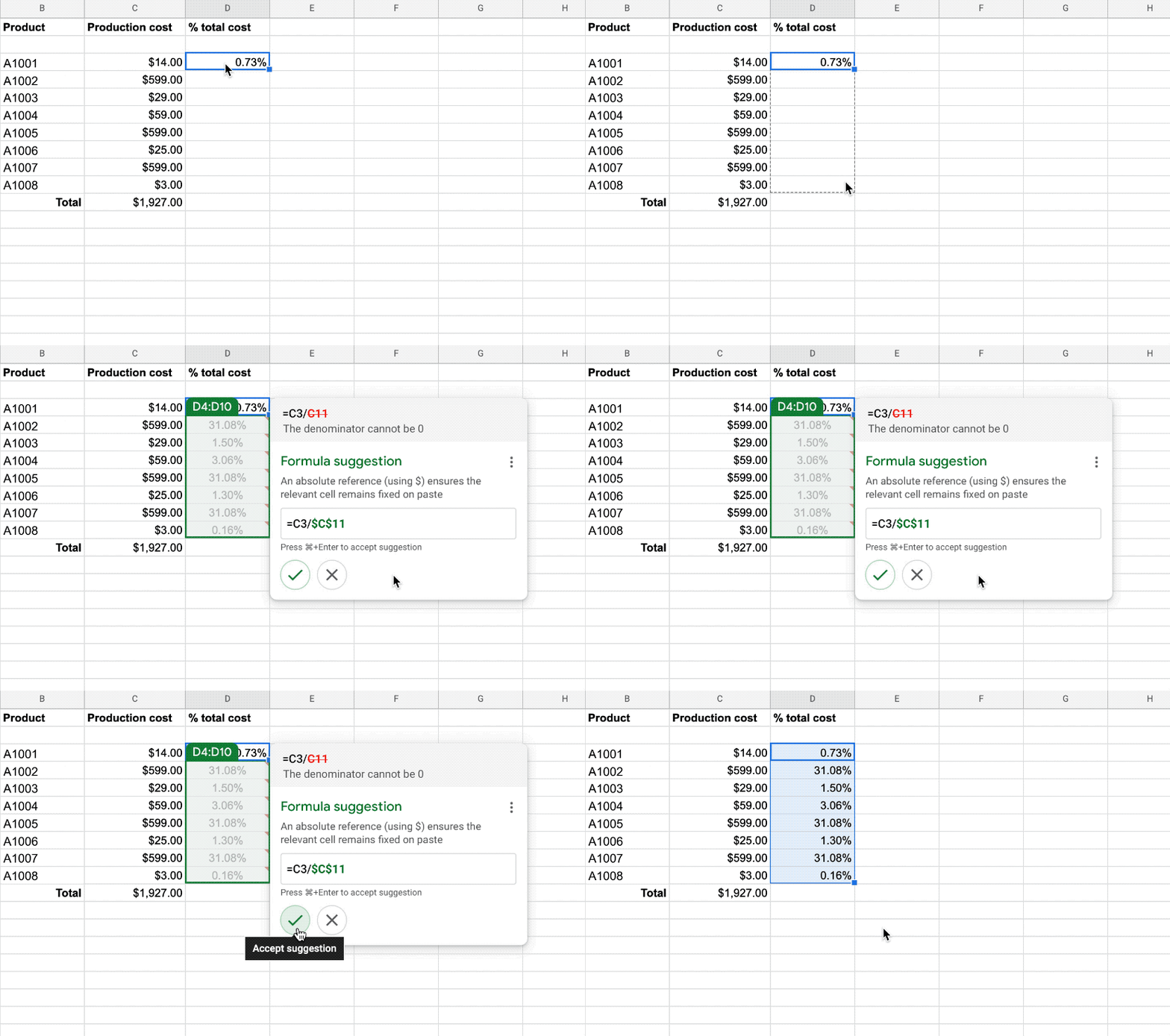
To help everyone work smarter, in the next few months we’re introducing additional assisted writing features in Docs on the web. This includes warnings about offensive words and language, as well as other stylistic suggestions that can speed up editing and help make your writing more impactful. We’re also adding more assisted analysis functionality in our Sheets web experience, with formula suggestions that make it easier for everyone, not just analysts, to derive insights from data. Sheets intelligence helps you build and troubleshoot formulas, making data analysis faster and reducing errors.
As smart canvas evolves, we’re making it easy for businesses to connect the apps and tools they rely on to Google Workspace. This builds on our history of supporting a variety of add-on features that take the friction out of collaboration—from adding e-signatures directly in Google Workspace with DocuSign to the Salesforce connector that integrates with Sheets. To help people work even smarter, we recently announced that AppSheet Automation is generally available, so that you can automate time-consuming tasks—like approving invoices and onboarding new hires—without having to write a single line of code.
Looking ahead, we’re planning to build additional APIs so you can bring the information and actions you need from third-party tools directly into smart canvas elements like smart chips, checklists, and table templates.
And because trust is at the center of all collaboration within Google Workspace, today we’re also launching advanced capabilities that help protect users against security threats and abuse as they work together.
Transforming how people work to deliver real-world innovation
While there’s no one way to collaborate, we know from our customers that transforming how people work results in real-world innovation.
Google Workspace fuels a new way of working together. It lets our teams around the world—whether they’re in the office, at home, or in the grocery store aisle—work more flexibly and translate their ideas into new ways of delighting customers.
—Thibaud Cainne, Global Head of Tech Infra and Digital Workplace, Carrefour
Transformation happens at all levels, and often in every tool. We were able to get 17,000 of our people to make the shift from Excel to Google Sheets in just six months by demonstrating how we could optimize, automate, and connect spreadsheets and their data. That kind of collaboration leads to real-world innovation for our clients.
—Monica Andrea Diaz Pinzon, Chief of Digital Transformation (Special Projects), Banco Davivienda
We built a digital hub on Google Workspace to transform the way we connect with employees and partners across multiple locations and organizations. It allowed us to spin up major research projects in days instead of months, including delivery of major COVID-19 vaccine studies.
—Justin Riordan-Jones, Head of System and Information (Research), Department of Health & Social Care, National Institute for Health Research (UK)
As smart canvas drives the next era of collaboration in Google Workspace, we remain committed to providing a solution that’s flexible, helpful, and that fuels innovation for organizations in every industry. On the frontlines, in corporate offices, and across the countless workspaces in between, Google Workspace will continue to transform how work gets done.
DueDil Chooses Apigee to Leverage APIs for Customers’ Risk Monitoring with Better Insights

4829
Of your peers have already read this article.
1:30 Minutes
The most insightful time you'll spend today!
As their name reflects, DueDil provides due diligence services ranging from customer-specific risk evaluations and selections to customer onboarding and real-time risk monitoring for leading financial services, high-growth tech and insurance companies. Founded in 2009, the company helps more than 3,000 enterprise users from over 400 clients to not only understand with whom they’re doing business, but to do so with increased efficiency and in compliance with regulatory requirements.
Due diligence services have evolved in recent years, both because of new regulations and new technologies supplanting legacy systems and processes, many of which relied until recently on pen-and-paper workflows or exhaustive spreadsheet work. DueDil knew this technology transformation represented an opportunity to replace manual processes with automation–but it also recognized a second opportunity: to not merely process data but also activate it by connecting information in disparate IT systems and generating data-driven insights delivered at scale.
To capitalize on this opportunity, the company built its Business Information Graph, or B.I.G., a platform that maps approximately 300 million connections among companies. B.I.G. ingests billions of data points, and is refreshed multiple times per day, to surface unique insights about business’s relationships, such as fraud risks. The results that B.I.G. drives often speak for themselves: some DueDil customers onboard partners up to 80% faster, perform risk verification up to 18 times faster, and reduce time spent on manual portfolio checks by up to 80%.
What powers all of this transformation? Application Programming Interfaces (APIs).
“From a go-to-market standpoint, our product is an API,” said Denis Dorval, DueDil COO, in a recent webcast, explaining that customers can directly tap B.I.G.’s resources for themselves, and build atop them for their own needs, via DueDil’s API.
Choosing an API management platform to deliver fast, secure, and scalable APIs
To execute on their vision of connecting B2B ecosystems for better insights and efficiency, DueDil looked for a cloud provider that could fulfill several specific criteria. They needed robust management for the APIs with which their internal developers leverage different systems for new use cases and process automations, as well as for the productized API they offer to customers. They needed sophisticated analytics and abundant processing power to crunch through billions of data points. And, they needed enterprise-grade security, scalability, and agility to underpin it all. Last but not least, the company prioritized a smooth transition; DueDil did not want the user experience to suffer as it switched providers.
“The stability of Google Cloud’s Apigee API management platform and the strength of its services stood out”, said DueDil’s Engineering Manager, Robert Cicero.
“Apigee is a resilient and agile platform, fulfilling our need to build APIs quickly, safely, and at scale,” he remarked, noting that he appreciated that many of Apigee’s API security defense tools and policies work out-of-the-box. For instance, Apigee’s JSON threat detection policies, custom policies, and authentication and authorization processes can be deployed instantly and add minimal latency, meaning DueDil can stop security threats before they enter its network while still avoiding the risk of service lags.
Today, DueDil has five internal services that facilitate business due diligence, all exposed via Apigee. They also use Apigee’s monetization feature to drive API consumption. This said, because DueDil’s go-to-market strategy is fast-paced and client-oriented, they most often use Apigee to rapidly prototype APIs for their clients, so they can understand what a specific API would look like and how it would behave. This allows DueDil, its partners, and its customers to spend more time delivering value from insights rather than getting bogged down in building backend systems.
Moreover, Apigee made it simpler to also connect to other Google Cloud services, such as BigQuery, Google Data Studio, and Google Cloud Storage. Apigee acts as a central nervous system among systems, giving DueDil not only the ability to connect systems and automate processes but also insight and visibility into how its B.I.G. services are being used by partners and customers.
Plus, added Cicero, “the migration to Apigee was seamless, with arguably our biggest win being that no one knew that we had switched API management providers to Apigee.”
Leveraging APIs to provide self-service while enforcing security and governance policies
Moving forward, DueDil plans to leverage Apigee to give staff members and clients more privileges, visibility, and opportunity to create and edit apps in a self-service manner, without needing to rely on an IT department or endure long approvals processes. Harnessing APIs to open up B.I.G. and other capabilities to more teams across the company will also allow DueDil to move faster and include more people in the innovation process. Leveraging Apigee API management capabilities, DueDil also intends to dive deeper and experiment with other Google Cloud products and services, including Cloud Function, Cloud Pub/Sub, and more.
“At the end of the day, every company goes about due diligence a little differently. The only way that we at DueDil are able to provide something that is configurable and dynamic to diverse businesses is if we use platforms that can adapt, too,” said Cicero. “Apigee gives us the agility required to create and deliver for a wide variety of businesses.”
Google Cloud, today, works across banking, capitalmarkets, insurance, and payments worldwide to solve their most challenging problems. Click here to learn more about how Google Cloud Apigee API management can help you design, secure, analyze, and scale APIs anywhere with visibility and control. To try Apigee API management for free, click here.
5 Compelling Ways to Practice the Principle of Least Privilege for Security Leaders

3552
Of your peers have already read this article.
4:30 Minutes
The most insightful time you'll spend today!
When it comes to security, managing access is a foundational capability—whether you’re talking about a physical space or your cloud infrastructure. If you were securing an office, you wouldn’t give every employee a master key that can open the front door, the mailbox, and the safe. Likewise, when you’re securing your cloud infrastructure, you should limit employees’ access based on their role and what they require to do their job.
This concept is known as the principle of least privilege, which NIST’s Computer Security Resource Center defines as: “A security principle that restricts the access privileges of authorized personnel… to the minimum necessary to perform their jobs.” In practice, this means assigning credentials and privileges only as needed to both users and services, and removing any permissions that are no longer necessary.
Keeping the principle of least privilege in mind, here are five practical tips to minimize the surface area of exposed resources on Google Cloud Platform (GCP) and defend against some common attacks.
Avoid excessive use of broad primitive roles
Primitive roles like Owner and Editor grant wide-ranging access to all project resources. To tighten access security, consider using more specific predefined roles in Cloud Identity and Access Management (IAM), or defining custom roles that are better suited to your organization. For example, if you have a Cloud SQL database, instead of granting the project-wide Editor role to everybody, you could grant the cloudsql.editor role to users who create new databases, cloudsql.client to those who only need to connect to existing databases, and limit cloudsql.admin to database administrators.
Our policy design page has some sample structures and policies for different types of organizations, including startups, large enterprises, and education and training customers.
Assign roles to groups, not individuals
If you assign an IAM role directly to an individual, they retain the rights granted by that role even if they change roles, move around your organization, or no longer require them. A safer and more maintainable option is to place users into logical groups. For example, to manage databases, you could create db-editors, db-viewers, and db-admins groups, and let users inherit roles from these groups:
Groups can be created within the Admin Console for any G Suite domain, or federated from an external tool like Active Directory. By using groups for ownership, you can also avoid “orphaned” projects and resources—where a project or resource has a single owner who leaves the organization.
You can assign roles at the organization, folder, project, or resource level. This lets larger organizations easily manage roles for, say, a specific developer team or the entire accounting department. Be aware, however, that a child resource cannot limit roles granted by a parent: a user’s project-level cloudsql.viewer role, for example, will override any resource-level restrictions on any database in the same project.
Reduce the risks of default service account behavior
Service accounts are a special type of account intended for apps that need to access data. If the app’s own private credentials are compromised, however, the attacker then has all the access granted to the app by the service account’s roles.
The Compute Engine default service account, which has the editor role, is enabled for all instances created in a project unless you specify otherwise.
Creating a custom service account to use for creating instances and limiting its roles to the minimum necessary significantly reduces risk. For example, many apps using Cloud SQL only need the cloudsql.client role that lets them connect to an existing database.
An alternative approach is to grant the instance service account minimal privileges and create dedicated service accounts for your apps. This gives you more fine-grained control over each app’s privileges, although you will need to carefully manage the service account credentials.
Reduce risk and control access to your project by using networking features
To enable inter-resource communication, new GCP projects initially have a default network connecting all resources in that project. This is convenient for development, but in this default configuration, if an attacker gains unauthorized access to one resource, they may be able to reach others as well.
To limit this risk, don’t use the default network in production and explicitly specify accepted source IP ranges, ports, and protocols in network firewalls. You should also separate sensitive apps into individual virtual private clouds (VPCs), and if inter-app connectivity is required, use a Shared VPC. In each VPC, use different subnets for public facing services (e.g., web servers and bastion hosts) and private backend services. Allocate public IPs only to instances in the public subnet and add firewall rules with network tags to control which services can communicate with each other. Finally, grant permission to create or modify firewalls and routes only to those directly responsible for the network.
The Secure Instances and Apps with Custom Networks codelab walks you through setting up the public/private subnet configuration above. The Policy design for customers article we mentioned earlier also contains sample network designs for common use cases. For guidance on the tradeoffs of single, multiple, and shared VPCs, see Best practices and reference architectures for VPC design.
Consider using managed platforms and services
If you deploy and manage your own applications, you are responsible for security configuration, including the maintenance of accounts and permissions. You can limit your responsibilities by hosting your apps on managed platforms like Cloud Run, App Engine, or Cloud Functions, or by using fully managed services for databases and processing frameworks like Cloud SQL for MySQL and Postgres, Cloud Dataproc for Hadoop and Spark, and Cloud Memorystore for Redis.
A final note
Security is a priority in all aspects of Google Cloud, but cloud security is a shared responsibility, and ultimately you are responsible for making the right configuration and product choices for your organization to protect your data on GCP. These tips are a great starting point to help reduce your attack surface and help you make more informed risk decisions.
Strategic Consulting, Training & Implementation Guidelines with Public Sector PSO Helps Governments Stay Compliant

4696
Of your peers have already read this article.
3:00 Minutes
The most insightful time you'll spend today!
Did you know that by 2025, enterprise IT spending on public cloud computing will overtake traditional IT spending? In fact, 51% of IT spend in application software, infrastructure software, business process services, and system infrastructure will transition to the public cloud, compared to 41% in 20221.. As enterprises continue to rapidly shift to the cloud, government agencies must prioritize and accelerate security and compliance implementation.
In May 2021, the White House issued an Executive Order requiring US Federal agencies to accelerate cloud adoption, embrace security best practices, develop plans to implement Zero Trust architectures, and map implementation frameworks to FedRAMP. The Administration’s focus on secure cloud adoption marks a critical shift to prioritizing cybersecurity at scale. Google Cloud’s Public Sector Professional Services Organization (PSO) has committed to helping customers meet security and compliance requirements in the cloud through specialized consulting engagements.
Accelerating Authority to Operate (ATO)
The Federal Risk and Authorization Management Program (FedRAMP) was established in 2011 as a government-wide program that promotes the adoption of secure cloud services across the federal government. FedRAMP provides a standardized approach to security and risk assessment for cloud technologies and federal agencies. US Federal agencies are required to utilize and implement FedRAMP cloud service offerings as part of the “Cloud First” federal cloud computing strategy.
While Google Cloud provides a FedRAMP-authorized cloud services platform and a robust catalog of FedRAMP-approved products and services (92 services and counting), customers are still tasked with achieving Agency ATO for the products and services they use, and Google Cloud provides many resources to assist customers with this journey. Google Cloud’s FedRAMP package can be accessed by completing the FedRAMP Package Access Request Form and submitting it to info@fedramp.gov. Additionally, customers can use Google’s NIST 800-53 ATO Accelerator as a starting point for documenting control implementation. Finally, Google Cloud’s Public Sector PSO offers the following strategic consulting engagements to help customers streamline the Agency ATO process.
- Cloud Discover: FedRAMP is a six-week interactive workshop to support customers that are just getting started with the ATO process on Google Cloud. Customers are educated on FedRAMP fundamentals, Google’s security and compliance posture, and how to approach ATO on Google Cloud. Through deep-dive interviews and design sessions, PSO helps customers craft an actionable ATO plan, assess FedRAMP readiness, and develop a conceptual ATO boundary. This engagement helps organizations establish a clear understanding and roadmap for FedRAMP ATO on Google Cloud.
- FedRAMP Security Review is a ten to twelve week engagement that aids customers in FedRAMP operational readiness. PSO consultants perform detailed FedRAMP architecture reviews to identify potential gaps in NIST 800-53 security control implementation and Google Cloud secure architecture best practices. Findings from the security reviews are shared with the customer along with configuration guidance and recommendations. This engagement helps organizations prepare for the third-party or independent security assessment that is required for FedRAMP ATO.
- Cloud Deploy: FedRAMP is a multi-month engagement designed to help customers document the details of their FedRAMP System Security Plan (SSP) and corresponding NIST 800-53 security controls, in preparation for Agency ATO on Google Cloud at FedRAMP Low, Moderate, or High. PSO collaborates with customers to develop a detailed technical infrastructure design document and security control matrix capturing evidence of the FedRAMP system architecture, security control implementation, data flows and system components. PSO can also partner with a third-party assessment organization (3PAO) or an independent assessor (IA) to support customer efforts for FedRAMP security assessment. This engagement helps customer system owners prepare for Agency ATO assessment and package submission.
Developing a Zero Trust Strategy
In addition to providing FedRAMP enablement, Public Sector PSO has partnered with the Google Cloud Chief Information Security Officer (CISO) team to assist organizations with developing a zero trust architecture and strategy.
Zero Trust Foundations is a seven-week engagement co-delivered by Google Cloud’s CISO and PSO teams. CISO and PSO educate customers on zero trust fundamentals, Google’s journey to zero trust through BeyondCorp, and defense in depth best practices. The CISO team walks customers through a Zero Trust Assessment (ZTA) to understand the organization’s current security posture and maturity. Insights from the ZTA enable the CISO team to work with the customer to identify an ideal first-mover workload for zero trust adoption. Following the CISO ZTA, PSO facilitates a deep-dive Zero Trust Workshop (ZTW), collaborating with key customer stakeholders to develop a NIST 800-207 aligned, cloud-agnostic zero trust architecture for the identified first-mover workload. The zero trust architecture is part of a comprehensive zero trust strategy deliverable that is based on focus areas called out in the Office of Management and Budget (OMB) Federal Zero Trust Strategy released January 2022.
Scaling Secure Cloud Adoption with PSO
Public Sector PSO enables customer success by sharing our technical expertise, providing cloud strategy, implementation guidance, training and enablement using our proven methodology. As enterprise IT, operations, and organizational models continue to evolve, our goal is to help government agencies accelerate their security and compliance journeys in the cloud. To learn more about the work we are doing with the federal government, visit cloud.google.com/solutions/federal-government.
Three Reasons Why Enterprises Must Think Next-gen Serverless

4908
Of your peers have already read this article.
2:00 Minutes
The most insightful time you'll spend today!
As we reflect on the past year, Heraclitus’ phrase “The only constant in life is change” has never rang more true. With the pandemic, companies had to shift operations, launch new products and adapt to extreme demand patterns, sometimes within a matter of weeks.
To respond to customer needs faster and more efficiently, many companies turned to serverless technology, designing applications with real-time signals and intelligence built in. From apps and sites for healthcare appointments and vaccinations, public-sector employment benefits, contact tracing, retail logistics, curbside delivery, hotel and travel booking—you name it, companies built it with serverless.
Redefining serverless
The world changed, the market changed, our lives changed and we here at Google Cloud also changed, introducing new products to meet our customers’ needs and grow with them.
Serverless technology, in particular, has changed a lot since it was first introduced. Google first launched serverless compute in 2008 with the launch of App Engine, helping customers scale their applications faster and seamlessly. We then added the ability to run Functions as a Service with Cloud Functions, giving customers a simple developer experience with integrated telemetry and observability. In parallel, we also introduced innovations to the container market with Kubernetes. Pretty soon, customers started asking us if we could combine the awesome serverless attributes of auto-scaling and developer experience with the flexibility of containers.
Enter Cloud Run, the next generation of serverless. Serverless is now no longer just about event-driven programming or microservices. It’s also about running complex workloads at scale while still preserving a delightful developer experience. In fact, serverless with Cloud Run is about having a true developer platform with the flexibility to run any language, any library, any binary.
There are three capabilities that make Cloud Run the next-generation of serverless, and not the same ‘serverless’ you find elsewhere:
- A great developer-centric experience
- Versatility: expanding to a broader set of containerized apps
- Built-in DevOps and security
Let’s take a look at the attributes in greater depth.
A great developer experience
Being developer-centric comes from having fully-managed self-operating infrastructure and a great developer experience. We want everyone to be able to develop smart applications and for that we have to make it easy. We also want to be sure we are bringing your technical talent closer to where you generate your business value.
To make things easy, last year we introduced buildpacks, which creates container images directly from source code. No need to learn Docker or containers. Although there are containers underneath, they’re transparent to the developer.
To simplify things further, we also introduced a single “gcloud run deploy” command to build and deploy code to Cloud Run. These types of features are some of the reasons why 98% of Cloud Run users deploy an application on their first try in less than 5 minutes.
In fact, in the past year alone, we added over 25 new features and services to our serverless stack, making development of complex apps easier. One of our main launches was Workflows, which lets you combine Cloud Run with any Google Cloud product or any HTTP-based API service. As a developer, this is very useful when automating complex processes, or integrating GCP’s analytic services across a variety of systems.
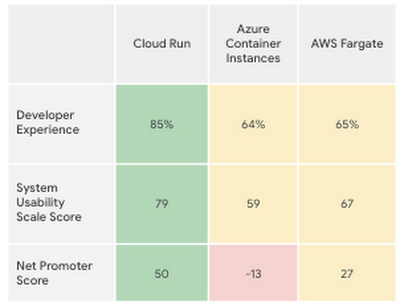
Taken together, all these new features make the Cloud Run developer experience far easier than its competitors’, according to a recent report by User Research International.
Versatility
Next-generation serverless is also about versatility. It supports a wider variety of applications and caters to enterprise requirements. Functions and web apps of course, but also heavyweight applications, and in the fullness of time, also brownfield and third-party containerized apps. This versatility is enabled by the container primitive, which removes restrictions on languages, run times, and hardware.
Being able to run a greater variety of apps on our serverless stack means you can optimize for predictable usage. Today, we announced new spend-based committed use discounts for Cloud Run. Enterprises with stable, steady-state, and predictable usage can now purchase committed use contracts directly in the billing UI. There are no upfront payments, so these discounts are a perfect way to reduce your spend by as much as 17%. RELATED ARTICLEMaximize your Cloud Run investments with new committed use discountsCommitted use discounts in Cloud Run enable predictable costs—and a substantial discount!
Another way we provide versatility is with support for WebSockets and gRPC in Cloud Run. With these new additions, you get the benefits of serverless infrastructure to build responsive, high-performance applications. We also added the use of min instances with Cloud Run. This feature allows you to cut cold-start times and run latency-sensitive applications on Cloud Run! At the same time, you can still scale to zero, or keep a minimum amount of compute available, for example when running brownfield Java applications.
Built-in DevOps
Serverless doesn’t just make it faster for developers to set up their apps—it also helps once the application is up and running, taking a big management load off of operations teams. Notably, serverless systems take care of “scaling” an application up or down. That means that if your application suddenly starts fielding a lot of traffic, the serverless platform automatically spins up more resources to handle the load. No more dreaded timeouts, wheels or hourglasses—or work for your operations team. Likewise, as soon as demand goes down, the platform takes care of decommissioning resources, i.e., scaling down, so that you’re not paying for resources that you no longer need. Want to run your service globally with low latency, without an operations team, and zero stranded costs? Cloud Run takes care of global load balancing and autoscaling to zero for you in every Google Cloud region.
Further, features like support for gradual rollouts and rollbacks allow developers to experiment and test ideas quickly, as well as sophisticated traffic management in Cloud Run. Likewise, Cloud Run provides access to distributed tracing with no setup or configuration, allowing developers to find performance bottlenecks in production.
Next up: serverless security
As part of DevOps best practices, we build in security for your serverless applications at every layer: deployment time, runtime and networking. For example, built-in vulnerability scanning ensures you only deploy artifacts you trust.
Today, we are announcing Cloud Run support for Google Secret Manager and customer-managed encryption keys (CMEK), making it easy to protect data at rest and store sensitive data. We’re also integrating Cloud Run with Binary Authorization, which lets you enforce specific policies to make sure only verified images make it to production. And finally, we added a new integration with Identity-Aware Proxy, support for VPC-SC, and egress controls that you can use to enforce a security perimeter, limiting both who can access specific services and what resources can be accessed when these services run in production. You can read more about these security enhancements here. RELATED ARTICLE4 new features to secure your Cloud Run servicesWe’re improving the security of your Cloud Run environment with things like support for Secret Manager and Binary Authorization.
In summary, the next generation of serverless combines the best of serverless with containers to run a broad spectrum of apps, with no language, networking or regional restrictions. The next generation of serverless will help developers build the modern applications of tomorrow—applications that adapt easily to change, scale as needed, respond to the needs of their customers faster and more efficiently, all while giving developers the best developer experience. Learn more by attending The Power of Serverless, a two-hour virtual event where we’ll lay out our vision for serverless compute, and where serverless subject matter experts will present on in-depth serverless development topics. Hope to see you there!
Want to learn even more about serverless and cloud-native application development? Check out the upcoming Modern App Dev & Delivery workshop, and our Ask the Experts roundtable.
Launches and Stories on Google Cloud Security from Q1: Fresh off the Boat!

2967
Of your peers have already read this article.
4:00 Minutes
The most insightful time you'll spend today!
The security world keeps changing, with new tools and new threats in the ever-evolving arms race that is cybersecurity. To keep you up to speed on all that Google Cloud is doing to help safeguard your data and your applications, welcome to the first installment of the Security Roundup. In this regular series, I’ll be sharing a selection of news and guidance to help ensure you have the resources you need for your hectic, high-stakes harm-preventing job.
Applying the principle of least privilege to GKE clusters
Access to your GKE clusters – just like any other resource – should be based on the principle of least privilege. Use groups, individual roles, and Identity and Access Management tools to limit who can do what with your Kubernetes clusters in Google Cloud. These principles can help you control who uses which elements of the Kubernetes API as well as how they access your clusters. More details are in Anthony Bushong’s video.
Ensuring CI/CD pipeline security
To make sure only trusted code artifacts enter your continuous integration and deployment pipeline, you can take advantage of Binary Authorization on Google Cloud, and then only permit signed builds to go through. Learn more in Martin Omander’s video interview and walkthrough with XIaowen Lin.
Protecting against denial of service and flooding attacks
Once your applications are on the web, they become potential targets for attack. You can use Cloud Armor to protect against many types of traffic attacks, including distributed denial-of-service (DDoS), and HTTP POST flood attacks. After learning the normal traffic patterns of your apps, Cloud Armor monitors for anomalies and then generates alerts or intervenes on your behalf to block malicious traffic. Learn more with Arman Rye in this video.
Defending against cyberattacks with Palo Alto Networks
If you use Palo Alto Networks products for endpoint protection or network monitoring, now you can integrate the signals from those systems into Google Cloud security tools. You can ingest device health conclusions from Palo Alto Networks Cortex XDR to boost your visibility into those endpoints’ state and improve your trust decisions. BeyondCorp Enterprise users can incorporate Cortex XDR metadata into access policies, leveraging additional posture information to add another level of trusted device information and operate with more confidence. Check out the details in this interview with Mason Yan at Palo Alto Networks.
Dealing with Apache Log4j 2 vulnerability(ies)
Attackers who exploit the Apache Log4j 2 vulnerability can execute arbitrary code on a vulnerable server. Read this post by the Google Cybersecurity Action Team for more details on log4j vulnerabilities (CVE-2021-44228 and CVE-2021-45046) and how you can find out if you’re affected. It includes advice for how to use Google Cloud products like Binary Authorization rules and Security Command Center to keep your cloud deployments safe.
Good luck out there, and remember: Keep your data yours!
More Relevant Stories for Your Company

Confidential Computing: Google Cloud Security, Project Zero and AMD Come Together to Secure Sensitive Workloads
At Google Cloud, we believe that the protection of our customers’ sensitive data is paramount, and encryption is a powerful mechanism to help achieve this goal. For years, we have supported encryption in transit when our customers ingest their data to bring it to the cloud. We’ve also long supported
Google Cloud’s Invisible Security Vision: Key Highlights
Yesterday we held our final Google Cloud Security Talks event of 2021. Our event focused on zero trust and covered everything from Google’s history with BeyondCorp to our strategic thinking when it comes to applying zero trust principles to production environments. We shared product updates across the portfolio and talked about how

reCAPTCHA & Cloud Armor: Helping Organizations Adopt Bot Management Strategies
Unwelcome web traffic from bots has proliferated, becoming a significant contributor to business and operational risk. The motivations of bot controllers range from disruption of business through DDoS attacks to fraud such as credential stuffing, denial of inventory, scraping, and fraudulent card use. Google is well positioned to help detect

Data Security Excellence: Google Takes the Lead in Forrester’s Wave Report
To help organizations confidently move their sensitive data to the cloud, Google Cloud works diligently to earn and maintain customer trust. Our Trusted Cloud is committed to giving you a secure foundation that you can verify and independently control. Discovery and protection of sensitive data are integral parts of Google
