





Want to Code for the Cloud? Get Started with the Native App Development Track

6764
Of your peers have already read this article.
2:00 Minutes
The most insightful time you'll spend today!
Earlier this year, we launched the Google Cloud skills challenge, which provides 30 days of free access to training to build your cloud knowledge and an opportunity to earn skill badges that showcase your Google Cloud competencies. Today, we’re adding a Native App Development track to the skills challenge, joining the Getting Started, Data Analytics, Kubernetes, Machine Learning (ML) and Artificial Intelligence (AI) tracks.
The Native App Development track is designed for cloud developers who want to learn to build serverless web apps and Google Assistant applications on Google Cloud using Cloud Run and Firebase. Specifically, you’ll have an opportunity to earn three skill badges in the Native App Dev track: Serverless Firebase Development, Serverless Cloud Run Development, and Build Interactive Apps with Google Assistant. To earn a skill badge, you complete a series of hands-on labs and take a final assessment challenge lab to test your skills.
Here’s an overview of each badge.
Serverless Firebase Development
To earn this skill badge, you’ll learn how to build serverless web apps, import data into a serverless database, and build Google Assistant applications using Firebase, Google’s backend-as-service platform for creating mobile and web applications.
Serverless Cloud Run Development
For this badge, you’ll discover how to use Cloud Run, a fully managed serverless platform, to connect and leverage data stored in Cloud Storage. You’ll learn how to use Cloud Run to build a resilient, asynchronous system with Pub/Sub, build a REST API gateway as well as build and expose services.
Build Interactive Apps with Google Assistant
To earn the final skills badge, you’ll build Google Assistant applications by creating a project in the Actions console, integrating Dialogflow, testing your action in the Actions simulator, and adding Cloud Translation API to your assistant application.
Ready to jump into the skills challenge? Sign up here.
You can also check out this quick video below to learn how to join the skills challenge.

4023
Of your peers have already downloaded this article
4:20 Minutes
The most insightful time you'll spend today!
Modern web APIs allow businesses to build compelling experiences that generate, consume, and combine digital assets. They’ve become the foundation upon which digital business is built.
But the path to success can be unclear, rough, and challenging. The game has changed, after all, and this requires tossing out many of the rules by which you run your business.
You’re not alone. Other businesses have struggled down the path toward increased competitiveness, agility, and opportunity—and we, at Google Cloud, are privileged to partner with hundreds of customers across myriad industries as they gear up to go digital.
We’ve seen the successful decisions and strategies that have enabled companies to adapt to new digital realities. But we’ve also seen businesses make decisions that slowed, stymied, or, in some cases, reversed progress toward becoming an agile digital business.
There’s no one path to travel. There are many ways to make your business digital, but there are also many pitfalls. This is the survival guide to help navigate a smarter digital journey.
There’s one bit of advice we can offer above all else: GET STARTED. If you don’t take steps to adapt to the new competitive landscape and to your customers’ expectations, the very survival of your business is at risk.
Download the E-book to know more about the best and worst practices of how a business leads, measures, invests in, and executes an API initiative.

Google is the Top Provider for Continuous Integration Tools, According to Forrester
DOWNLOAD WHITEPAPER3606
Of your peers have already downloaded this article
12:30 Minutes
The most insightful time you'll spend today!
Google’s continuous integration (CI) and continuous delivery (CD) platform, Cloud Build, emerges as a Leader for Continuous Integration.
“Google Cloud Build comes out swinging, going toe to toe with other cloud giants. Google Cloud Build is relatively new when compared to the other public cloud CI offerings, they had a lot to prove, and they did so.”
— Forrester Wave: Continuous Integration Tools
Forrester Wave on Continuous Integration identifies most significant continuous integration (CI) tool providers and shows how each vendor measures up on 27 criteria. Download the full report to see what makes Cloud Build a Leader in Continuous Integration.

In the report, you will learn:
- Where the market stands and where it’s going
- Why Google has the strongest score for security and compliance within CI/CD
- How Cloud Build ranks amongst the other vendors on performance and scalability
- How Cloud Build’s enterprise strategy and vision are superior to other vendors
Enhancing Romi’s Conversations: The Role of BigQuery and LLMs

905
Of your peers have already read this article.
3:30 Minutes
The most insightful time you'll spend today!
MIXI, Inc. (MIXI) is a social networking organization that provides a diverse range of services for friends and family to enjoy together, such as the social-media platform mixi, a mobile game called Monster Strike, and a family photo and video sharing service known as FamilyAlbum. One of our current projects is Romi, a social robot launched in April 2021 that uses Speech-to-Text by Google Cloud as its speech recognition engine.
Since the late 2010s, the social robot market has been booming, with some models becoming increasingly affordable for consumers, from robotic tutors that promote social and cognitive development for children, to companion robots for elderly care. But with Romi, there is a marked difference in the quality of dialogue that makes Romi distinct from most social robots.
The biggest feature of Romi is that the AI developed internally by MIXI can generate natural exchange of communication. The size of a hand-held device, Romi can be placed anywhere in a room and has a screen to demonstrate different facial expressions. It responds to conversation within context. Until now, AI has been used to interpret the intentions behind user speech, but Romi is an AI-powered robot that takes it a step further, generating spoken conversations. After all, Romi was created to offer heartwarming communication to those who are looking for it. This form of speech recognition did not exist before Romi was released. We hope users will enjoy conversing with it, including the occasional unexpected response.

The speech recognition part was one of the most critical aspects of Romi. Most of the infrastructure that makes up Romi uses a main public cloud, which was used for other services then. As for speech recognition, we decided to try out the Speech-to-Text tool by Google Cloud, which was praised for its overwhelmingly high accuracy, and the prototype’s results were very positive. Even though we tried other companies’ services before making the final decision, our conclusion about Speech-to-Text remains the same.
The accuracy and responsiveness of Speech-to-Text made the tool an effective one for a social robot like Romi. Google Cloud also provided a sense of security with its high reliability that has been demonstrated in enabling Romi’s workloads, and will be able to support continuous development of Romi’s services for the long run.
With the rapid development of speech recognition technology, MIXI decided to re-examine the speech recognition engine for Romi in June 2022, about a year after its release. We eventually decided to continue its use of Speech-to-Text. We reviewed about 10 companies’ Japanese-compatible speech recognition engines, and found that Speech-to-Text offered the best results. In addition, Speech-to-Text has several speech recognition transcription models, but we found that the latest short model, which specializes in short utterances, is more suitable for Romi than the default model.
The cost-savings that Speech-to-Text delivers is also impressive. The billing unit was changed from 15 seconds increments rounded up, to one second in November, and huge cost reductions could be expected with Romi. This is important to us because Romi does not have trigger phrases, such as “OK Google,” so as to achieve more natural conversations. As a result, it can recognize and process more speech as compared to other social robots. While this results in a more user-friendly experience, it also requires greater workloads and can incur a higher cost compared to most speech recognition engines. But with the updated billing system that Speech-to-Text delivers, we are able to continue refining Romi’s speech recognition accuracy while keeping costs low.
Improving data analysis with BigQuery
Google Cloud was only used for speech recognition initially, but as Romi’s range of service expanded, more aspects of Romi were hosted on Google Cloud. Among these features, the machine learning platform for AI was moved to Google Cloud at an early stage. To be able to make use of a cloud platform at an affordable cost makes Google Cloud very appealing. Premium Support and technical account management helped us with our cost considerations.
Furthermore, MIXI started migrating the data analysis platform for Romi to BigQuery last year. BigQuery was chosen because it excels at bringing together and analyzing big data in various formats, as in-depth data analysis becomes necessary to improve Romi’s services. What also makes BigQuery an attractive choice was the ability to introduce structured query language (SQL) to BigQuery, a language that the development team from MIXI is familiar with.
In particular, we are grateful for the use of software like Looker. It takes a lot of work, even for engineers, to write complex queries, but with Looker, even non-engineers can intuitively perform fairly complex analysis. About half a year ago, we held regular briefings mainly for employees interested in data analysis, and now they voluntarily conduct analysis, conduct discussions based on the results, and create new projects and ideas. This has become a regular workflow for us.
Currently, what is popular in AI-based communication is the emergence of large-scale language models (LLMs) that learn from huge amounts of data, and generate natural responses on a different level than before.
To improve the conversational experience with Romi, we have been looking into relevant LLM technologies for a while now. It is important to be able to use high performance GPUs as inexpensively as possible in order to run PoC at high speed. We will continue to focus on Google Cloud services, including Compute Engine and VertexAI.
A Year of Connecting Brand and Consumers with Google’s Business Messages

6195
Of your peers have already read this article.
3:00 Minutes
The most insightful time you'll spend today!
Last June, in the early months of the pandemic, we expanded Business Messages to support all kinds of businesses, from pharmacies and grocery stores to airlines and luxury brands. Then, in December, we announced the ability for small businesses to use the Google Maps app to message with their customers. We knew people would find messaging directly with businesses from Google Search and Maps helpful, but we didn’t know just how valuable it would turn out to be.
Consumers are increasingly eager to use messaging to connect with brands, and businesses across all industries are now building innovative messaging experiences to address that growing need. The demand from consumers is reflected in recent data:
- 45% of users have spent more time on messaging services because of the pandemic
- 85% of consumers would like to message brands directly, up from 65% in 2019
Being able to message a business directly has never been more important. For me personally, there’s nothing more fulfilling than using technology to help people in the moments that matter. After the release of initial COVID-19 vaccines in late 2020, online searches for vaccines reached an all-time high. To help people searching for vaccine eligibility, availability, and appointment booking, Albertsons Companies’ banner pharmacies—like Albertsons, Safeway, and Vons—made this information easily accessible through Google Search and Maps via the “chat” button. This gave people the information they needed, when they needed it.
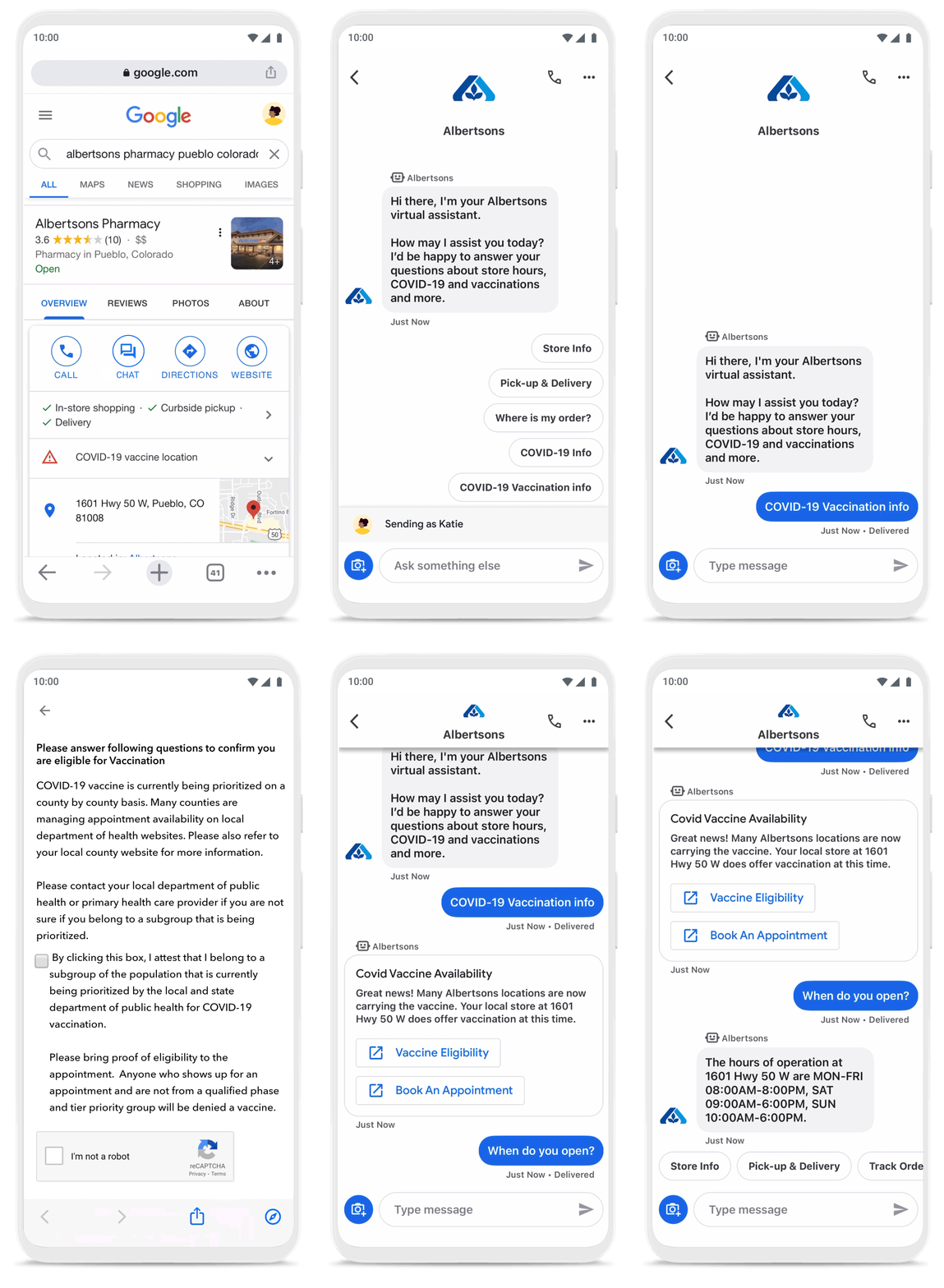
To be more helpful in moments like these, over the last year, we’ve made Business Messages available globally, in more than 70 languages, and we’ve seen more than 30,000 brands and 200 partners come on board. Major brands like Carrefour, Walmart, and Woolworths have invested in Business Messages to help serve their consumers in new and meaningful ways.
Expanding the conversation between consumers and brands
The retail sector has undergone a transformation since the start of the pandemic. As a result, we know it is critical for digital services to integrate with physical stores. We were able to do just that with Google’s Business Messages, which has been instrumental in helping better serve our customers across 1200+ stores in Europe.
Thomas Rudelle
Global Digital Marketing Director, Carrefour
There were major shifts in consumer behavior during the pandemic, from the way people found and purchased products to the ways they interacted with businesses. Not only did we see higher demand for direct contact with brands, but retail searches also surged. At the end of 2020, retail searches grew at a rate that was more than three times higher than the same period in 2019 (based on Google internal data).
As Business Messages has become more widespread, brands are able to boost both responsiveness and customer satisfaction using the service. Levi’s, for example, surpassed 85% customer satisfaction scores using Business Messages and they discovered that the service drove 30x more store-related questions than web chat.
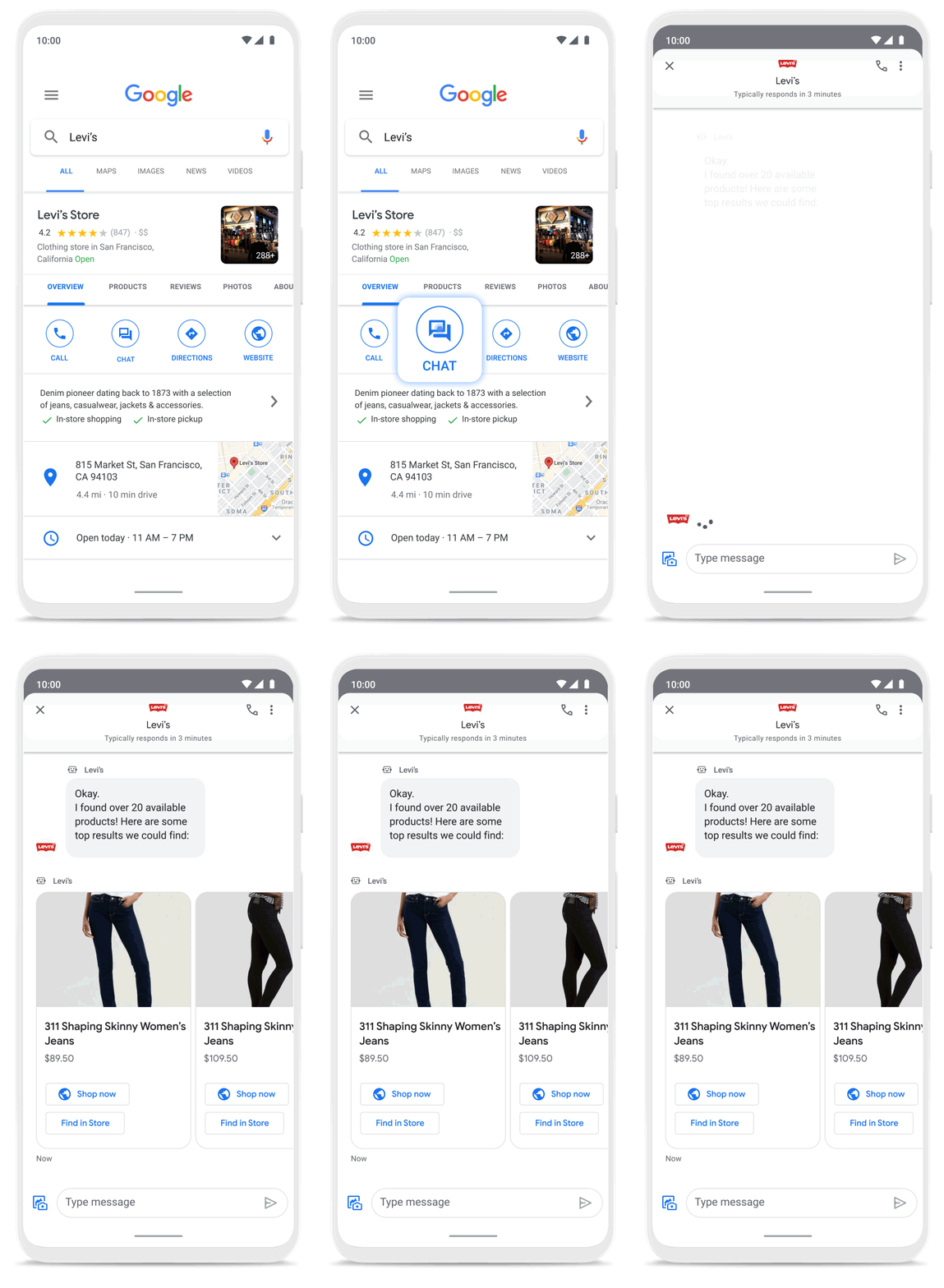
Many brands have also digitized what were traditionally in-store experiences, especially in high-consideration categories like jewelry. For example, Signet brought its virtual jewelry consultant to Business Messages, offering customers advice and answering queries in a way that’s convenient but still feels personal.We started using Google’s Business Messages pretty early on, and continue to transform and improve our experience. The ability to let customers know whether a product is in stock, and its precise location, is critical to offering a connected and frictionless shopper experience. Of course it also helps reduce the workload on our store and customer hub teams.
Nick Eshkenazi
Chief Digital Technology Officer, Woolworths
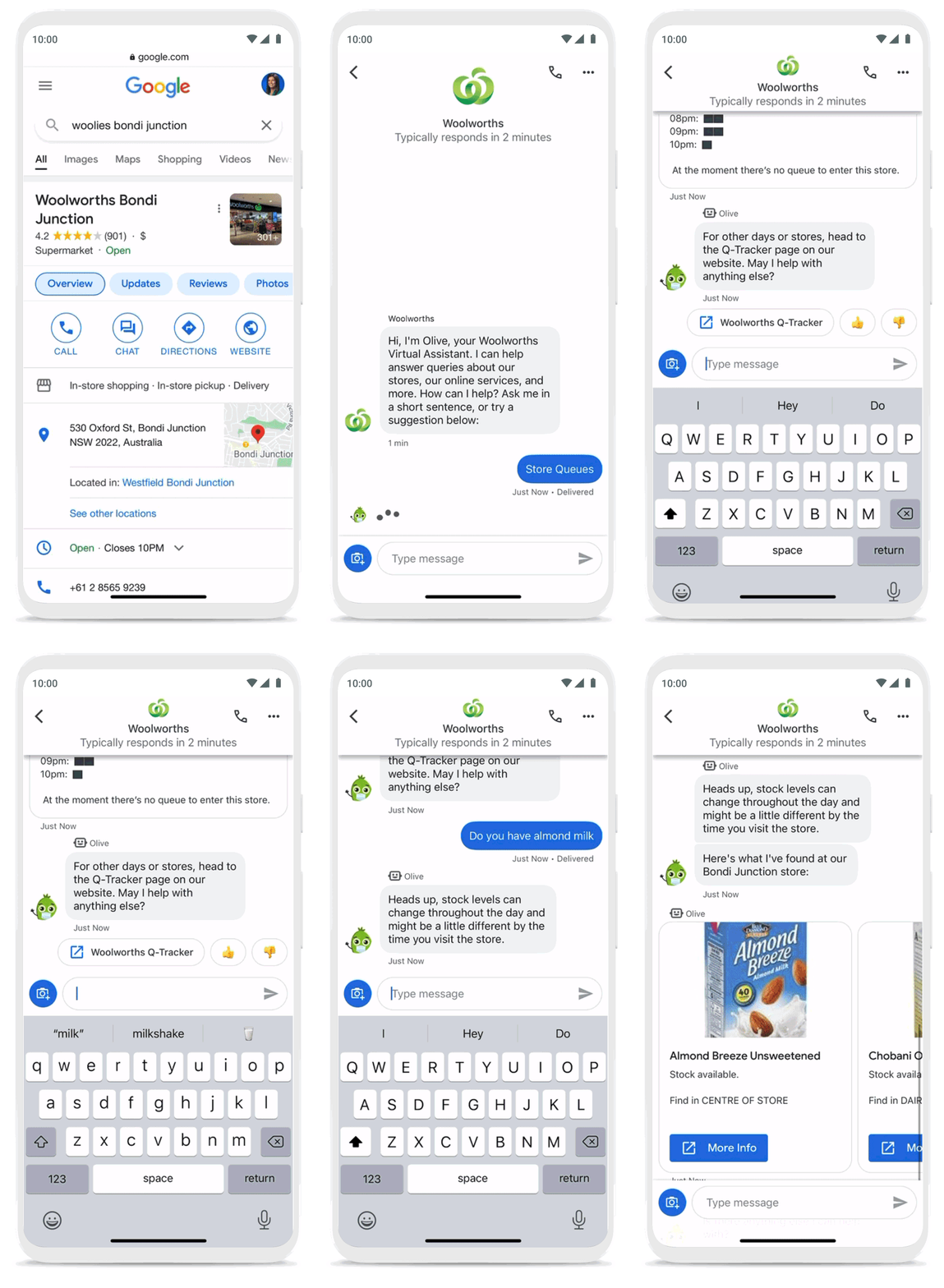
As a working mother, these sorts of innovations have made a direct impact in my own life. I find it very helpful to be able to ask—and get real-time answers to—everyday questions using Business Messages, ranging from store hours and product availability to order status and how to make returns. One of my favorite features is the ability to know, in real time, what store wait times are like, and the exact location of the product I’m looking for, saving me precious time when I visit the store.
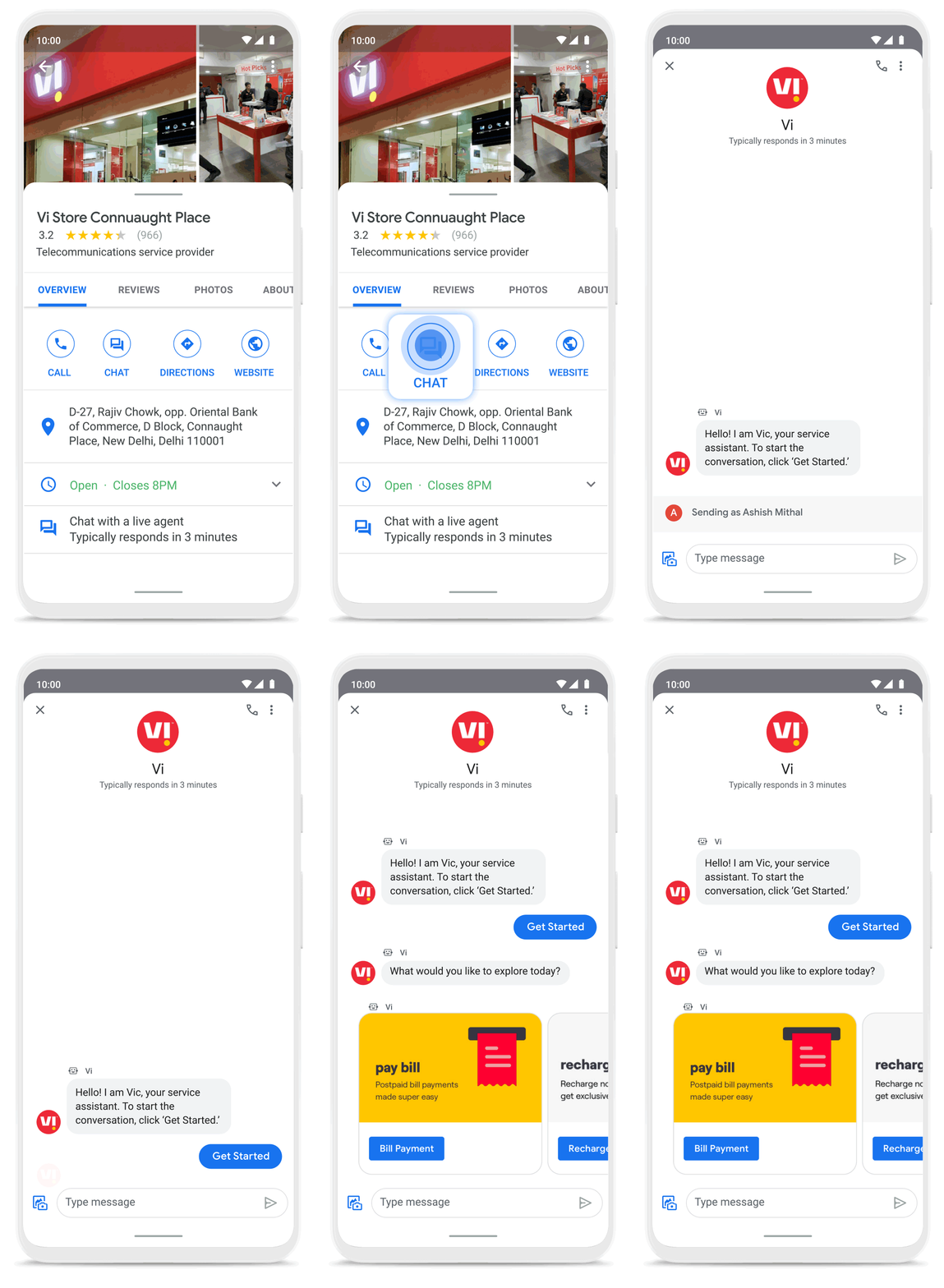
Business Messages helps people do more with their time in other ways as well. Earlier this year I’d been meaning to change my insurance plan, but kept pushing it off because I didn’t want to get on a phone call. I can now message Geico to update my policy through the agent pretty effortlessly. Similarly, in India, Vi customers can use 24×7 real-time customer service to chat with their AI powered virtual assistant VIC, integrated with Google’s Business Messages, to check billing information, activate packs, add recharges and payments, check balances, and much more—and it all happens seamlessly.
Building a full suite of messaging products
We’re investing in building a full suite of messaging products that enable seamless conversational commerce to drive business results. As Business Messages continues to support brands in establishing their messaging presence on Google, we’re also experimenting with other ways to help them increase their reach and engagement on Search and Display. To accelerate on the digital front, we recently integrated AdLingo, a project built within Area 120, Google’s in-house incubator. This will enable brands to easily transform ads into AI powered, personalized conversations at scale.
For more information on how you can activate Business Messages, please reach us via the contact form on the Business Messages website. Merchants can also read and respond to messages via Google My Business or on the Google Maps app.
Unlocking Efficient API Management with Apigee and CI/CD Pipelines

929
Of your peers have already read this article.
3:30 Minutes
The most insightful time you'll spend today!
In modern software development, automating delivery using Continuous Integration and Continuous Deployment (CI/CD) pipelines draws parallels to automotive assembly lines that doubled the production while cutting down costs by 65%. According to a recent report from Postman, over 51% of respondents indicated that their organizations devote more than half of their development efforts to APIs. APIs are a big part of development, so let’s explore why you should integrate them into your CI/CD pipelines. We will also share best practices and tools for integrating Apigee within your organization’s CI/CD processes.
4 reasons to automate your API delivery with CI/CD pipelines
Apigee is a feature-rich API management platform that provides developers with the necessary tools to build, secure, manage, and publish APIs. But what if you want to automate the process of deploying your APIs to Apigee? That’s where CI/CD comes in. By incorporating Apigee into your CI/CD pipeline, you can automate API deployment, promote consistency across environments, and monitor API performance in real-time. Four of these benefits include:
- Cut time to market by and respond faster to customer demands by automating API deployments.
- Catch defects earlier and improve API security by automating the process of testing and securing APIs.
- Slash costs by saving on staffing, tools, and infrastructure required to deploy and manage APIs.
- Improve visibility and compliance by tracking and auditing API usage.
Key tools and useful tips to effectively automate API delivery and management
Integrating API delivery into CI/CD pipelines using products like Cloud Build streamlines the development process. For example, a developer building an application on Google Cloud can deliver APIs side by side with other workloads in tools such as Cloud Run, Google Kubernetes Engine (GKE), Cloud Functions, and App Engine.
Operational automation can include a list of seemingly endless aspects of the development process. But at a high-level, the key components of an effective CI/CD pipeline for API management include:
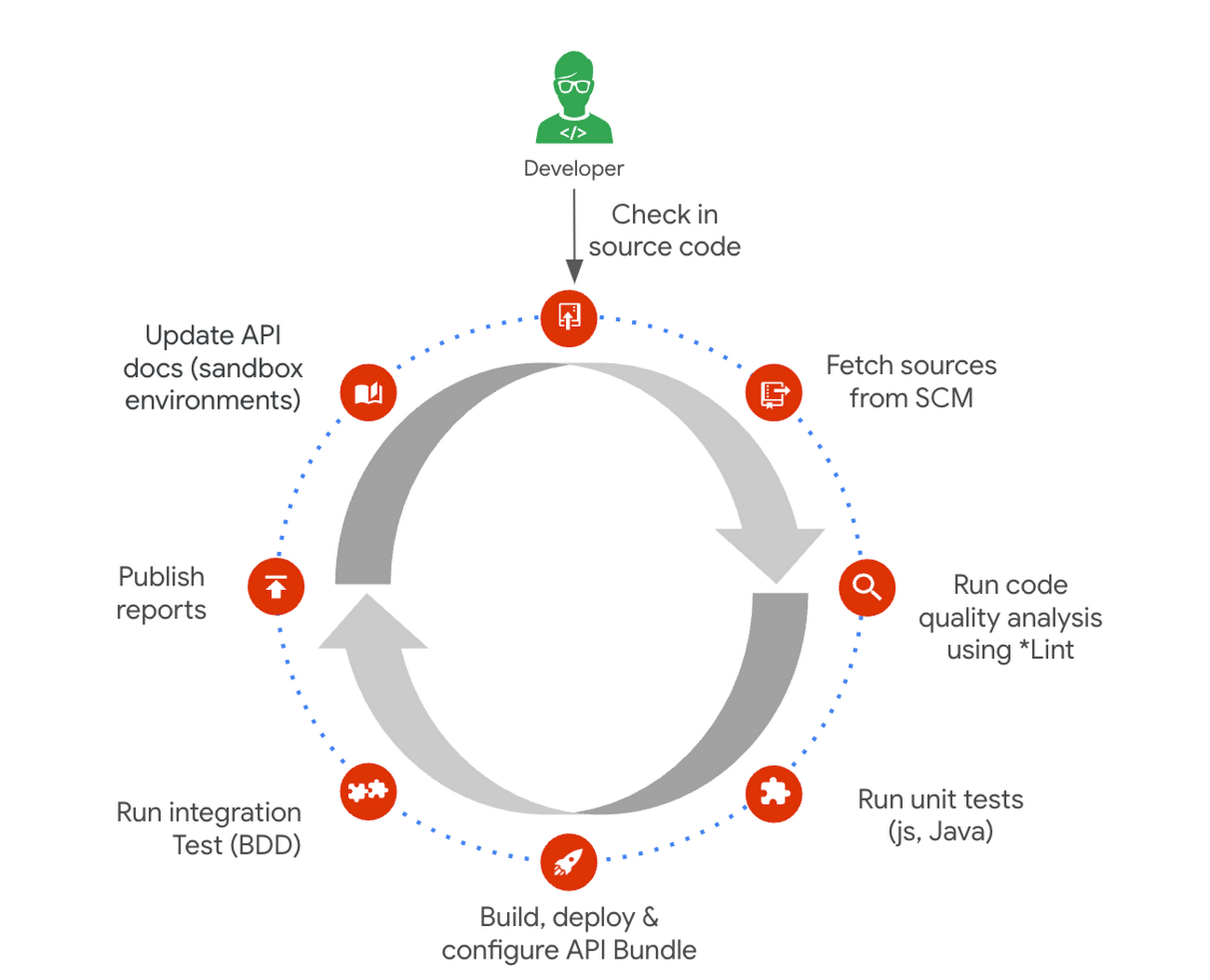
1. Building and testing API proxies
- If you are new to Apigee, utilize the comprehensive visual tools in the console to build and deploy API proxies using a convenient drag and drop interface. You can elevate their API proxy development by leveraging the VS Code extension and Apigee Emulator. This local setup enables you to use auto-complete features along with local proxy deployment, testing, and seamless code commit to trigger the pipeline for further deployment across Apigee environments.
- Useful tip: Maximize the utility of Apigee, use the Debug tool to inspect every detail of an API transaction. Lastly, remember to export your proxy from the Apigee console and commit it to your source repository. With these best practices in hand, you’re all set to make the most of your Apigee journey.
2. Store and version your API code:
- Ensure robust source code management – foundation of every CI/CD pipeline – to easily track, and manage changes. Use Cloud Source Repositories, a fully managed Git repository for seamless integration with other GCP development (or) leverage common tools like GitHub, GitLab, BitBucket and many more depending on your organization’s approach
- Useful tip: Employing the right branching strategy helps reduce complexity and keeps delivery lean. Check out this community post for different branching strategies and choose the right one for your use case. Ensure frequent commits and merges to your source code to keep your codebase healthy and up-to-date. Regular code reviews also help refine your code and create quality checkpoints.
3. Ensure code quality with static code analysis:
- Regular static code analysis can help you to improve the quality of your code by detecting potential errors and security vulnerabilities. It can also help you to promote code standardization by ensuring that your code follows a consistent style. For static code analysis you can use apigeelint (for analyzing Apigee bundles), JSHint and ESLint (for JavaScript analysis), Checkstyle and PMD (for Java analysis), or SonarQube (for multi-language support)
- Useful tip: Integrate the tool with your code editor so that you can see the results of the analysis as you write code. Define quality gates/thresholds and run the tool as part of your build pipeline. Mark the build as failed if it does not meet the thresholds.
4. Ensure code resilience with unit testing and Code coverage:
- Unit tests focus on individual units of code, such as methods or classes. They help to ensure that each unit of code works as expected. Code coverage measures the percentage of code that is covered by unit tests. A high code coverage percentage indicates that more of your code is being tested, which can help to reduce the risk of errors. You can use these tools for unit testing and code coverage: Mocha and Chai (for JavaScript), JUnit (for Java), Cobertura and Istanbul (nyc) (for code coverage)
- Useful tip: Write unit tests for all of your code. This includes both new code and existing code. Run unit tests during the build process. This will help to ensure that your code is always passing unit tests before it is deployed. Set coverage thresholds and mark the build as failed if it does not meet the thresholds. This will help to ensure that your code is sufficiently covered by unit tests.
5. Configure, Package and Deploy your code:
- Creating a successful API deployment is like constructing a sturdy building. You need a strong blueprint (your Apigee code) that has been carefully planned, packaged into a deployable format (a zip file), and then implemented (imported into Apigee and deployed to an Apigee environment). During the packaging phase, the blueprint is detailed with metadata and manifest, similar to labeling and preparing architectural plans for construction. Moreover, all your Apigee configurations, except sensitive info, can be integrated into your blueprint, ready to be brought to life with the right tools. In terms of tooling, you can choose from a variety of open-source options that are built on Apigee APIs. Some of the commonly utilized ones are Apigee Deploy Maven plugin, apigee cli, apigee-sackmesser, and custom scripts using the Apigee APIs.
- Useful tip: Use an artifact system to store these bundles. This will make it easy to manage and track your bundles. Maintain all the necessary configurations like Target server, Key Value Map, etc as part of the source code repo. This will make it easier to deploy your code to different environments. Use the pipeline and the source code to promote the proxies from lower environments to production. This will help you to ensure that your code is always up-to-date in production.
6. Verify the changes with Functional or integration testing:
- Consider integration testing as a rigorous dress rehearsal for your API’s debut performance. It’s your chance to verify if your API plays its part flawlessly under various scenarios, including when it has to share the stage with third-party systems. To ensure the API is working as expected, you have some powerful tools at your disposal such as Apickli (based on cucumber.js), Postman, and JUnit
- Useful tip: Manage these tests as part of the source code and run different test suites based on the environment deploying to. This will make it easy to track and manage your tests. Run these tests right after the deployment and mark the build as failed if it does not meet the threshold. This will help you to identify and fix any issues that may have been introduced during the deployment. Create rollout plans when the functional tests fail by rolling out to the previous working/stable version. This will help you to minimize the impact of any issues that may have been introduced during the deployment.
Additionally, here are some optional trail markers you can consider on your journey to perfecting your pipeline:
- Testing Your API’s Endurance: Running performance tests ensures your API can withstand the long haul.
- Clear and Accessible Documentation: Keep your developer portal up-to-date with the latest API documentation. Tools like the Apigee Smartdocs Maven plugin can make this a breeze, particularly with the Drupal developer portal.
Here is a typical pipeline example with a comprehensive reference implementation we see with most of our customers. It triggers when the developer commits the code to the repo. The pipeline can be executed by any CI/CD platform like Cloud Build.
Get started today
Why wait? Kickstart your Apigee journey today directly from the console or evaluate it for free. Leverage our Accelerators to jumpstart your development using examples or advanced technical guidance. Should you have any questions or need support along the way, our Apigee Community is teeming with experts ready to lend a hand.
More Relevant Stories for Your Company

New to Cloud Functions? Here’s What You Need to Learn
Cloud Functions is a fully managed event-driven serverless function-as-a-service (FaaS). It is a small piece of code that runs in response to an event. Because it is fully managed, developers can just write the code and deploy it without worrying about managing the servers or scaling up/down with traffic spikes.




Guide: How to Accelerate App Development with Google Cloud
Cloud-native, Kubernetes, Serverless have been the hottest and most widely discussed topics given the velocity and agility benefits. Learn more about how you can leverage these modern app development practices to ship software faster, while reducing costs and improving security and compliance. Learn how Google Cloud lets you modernize existing

6 Common Errors to Sidestep in RESTful API Design
Imagine ordering a “ready-to-assemble” table online, only to find that the delivery package did not include the assembly instructions. You know what the end product looks like, but have little to no clue how to start assembling the individual pieces to get there. A poorly designed API tends to create
A Guide to Anthos Hybrid Environment Reference Architecture
To help improve your security posture, improve the reliability of your applications, and reduce configuration drift in your environment, we're excited to announce a new Anthos reference architecture. Written in collaboration across our product, engineering, support, and field teams, this new reference architecture helps you plan, deploy, and configure the required
