





New to Cloud Functions? Here’s What You Need to Learn

3279
Of your peers have already read this article.
1:00 Minutes
The most insightful time you'll spend today!
Cloud Functions is a fully managed event-driven serverless function-as-a-service (FaaS). It is a small piece of code that runs in response to an event. Because it is fully managed, developers can just write the code and deploy it without worrying about managing the servers or scaling up/down with traffic spikes. It is also fully integrated with Cloud Operations for observability and diagnosis. Cloud Functions is based on an open source FaaS framework which makes it easy to migrate and debug locally.
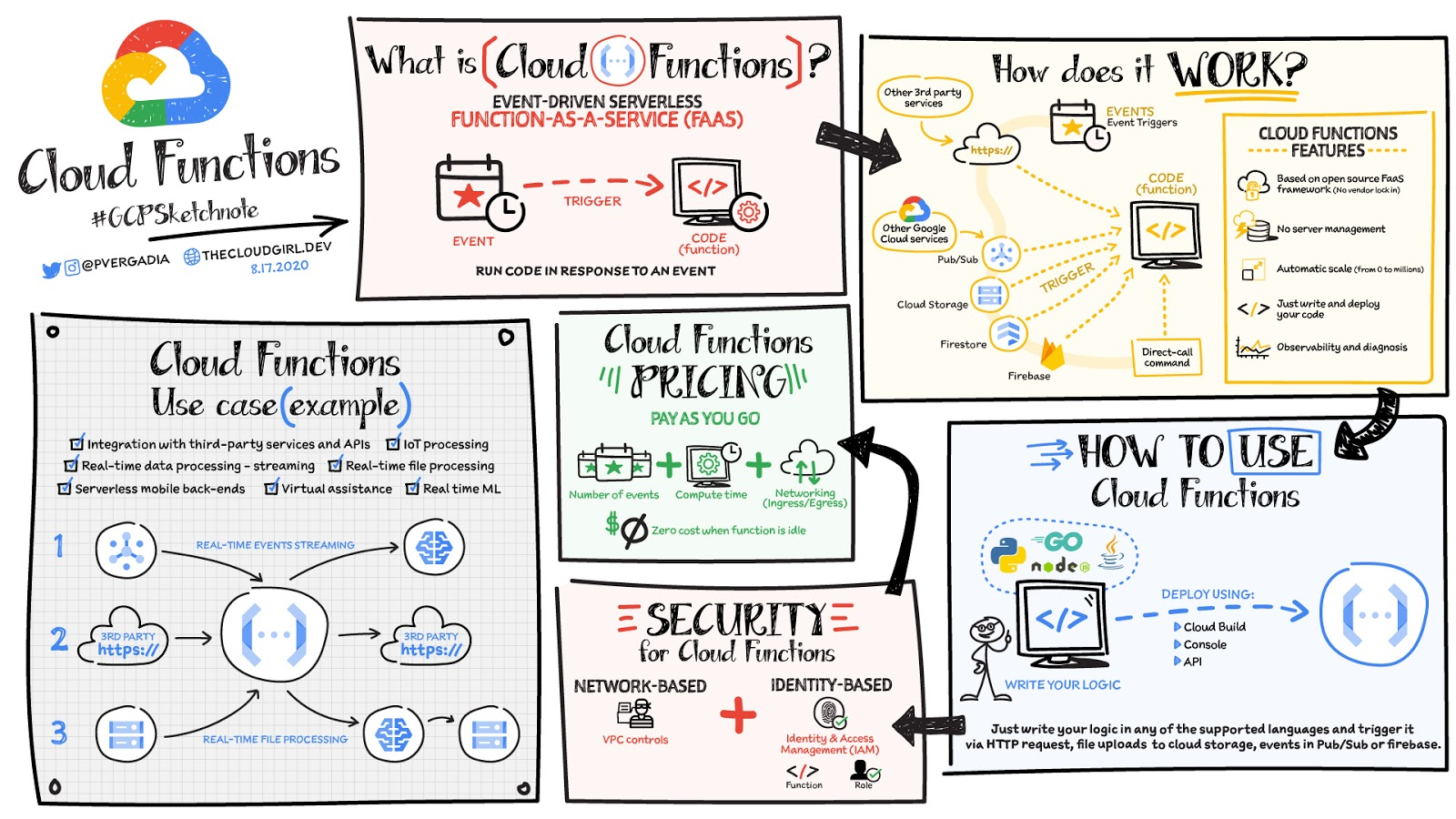
To use Cloud Functions, just write the logic in any of the supported languages (Go, Python, Java, Node.js, PHP, Ruby, .NET), deploy it using the console, API or Cloud SDK and then trigger it via HTTP(s) request from any service, for example: file uploads to Cloud Storage, events in Pub/Sub or Firebase, or even direct call via Command Line Interface CLI.
There is a generous free tier and the pricing is based on number of events, compute time, memory and ingress/egress requests and costs nothing if the function is idle. For security, using Identity and Access Management IAM you can define which services or personnel can access the function and using the VPC controls you can define network based access.
Cloud Functions use cases
Some Cloud Functions use cases include:
- Integration with third-party services and APIs
- Asynchronous workloads like lightweight ETL
- Lightweight APIs and webhooks
- IoT processing and update of the sensors/devices in the field
- Real-time file processing for use cases such as media transcoding or resizing as soon as the file is uploaded in Google Cloud Storage.
- Real-time ML solutions for use cases such as media translation or image recognition for files uploaded in GCS.
- Backend for chat applications and mobile apps.
Firebase Functions and Cloud Functions, are they different?
If you are a Firebase developer, you’d probably use Firebase Functions. Those are created from the Firebase dashboard / website. Both Cloud Functions and Firebase Functions can do the same things, they just have slightly different signatures and slightly different ways of deploying. Firebase Functions have a local emulator, which Cloud Functions uses the Functions Framework.
For a more in-depth look into Cloud Functions check out the documentation. Once you’ve got your Function up and running, check out some tips and tricks.https://www.youtube.com/embed/LTMChfWBHb0?enablejsapi=1&
For more #GCPSketchnote, follow the GitHub repo. For similar cloud content follow me on Twitter @pvergadia and keep an eye out on thecloudgirl.dev

6362
Of your peers have already downloaded this article
3:30 Minutes
The most insightful time you'll spend today!
Application programming interfaces, or APIs, are the way software talks to other software so by definition, they’re a technology that connects systems.
Many enterprise leaders think of them primarily in these terms. For example, 57 percent of respondents to Google’s Enterprise Digital Maturity Assessment Tool, Apigee Compass, characterize APIs as systems integration technology.
But APIs are much more. They’re interfaces that enable developers to repeatedly leverage data, functions, and applications to build new products and services. They’re how a business expresses itself via software, and they enable that business to rapidly expand into new contexts or adapt to meet changing user needs and preferences.
Take ridesharing apps. They exist partly because they can leverage existing capabilities made available via others’ APIs. When people order a car, a ridesharing app leverages services such as Google Maps APIs for navigation. In turn, those ridesharing companies express their businesses as APIs. This lets developers build ridesharing into new experiences, such as allowing an end user to order a ride via a voice assistant. When the user pays for a ride with a given digital payments platform, an API enables that transaction too.
Download the E-book and learn quick tricks on you can leverage APIs to delight your customers.
Master AI Prompt Engineering with 6 Proven Tips

1050
Of your peers have already read this article.
2:30 Minutes
The most insightful time you'll spend today!
As AI-powered tools become increasingly prevalent, prompt engineering is becoming a skill that developers need to master. Large language models (LLMs) and other generative foundation models require contextual, specific, and tailored natural language instructions to generate the desired output. This means that developers need to write prompts that are clear, concise, and informative.
In this blog, we will explore six best practices that will make you a more efficient prompt engineer. By following our advice, you can begin creating more personalized, accurate, and contextually aware applications. So let’s get started!
Tip #1: Know the model’s strengths and weaknesses
As AI models evolve and become more complex, it is essential for developers to comprehend their capabilities and limitations. Understanding these strengths and weaknesses can help you, as a developer, avoid making mistakes and create safer, more reliable applications.
For example, an AI model that is trained to recognize images of blueberries may not be able to recognize images of strawberries. Why? Because the model was only trained on a dataset of blueberry images. If a developer uses this model to build an application that is supposed to recognize both blueberries and strawberries, the application would likely make mistakes, leading to an ineffective outcome, and poor user experience.
It’s important to note that AI models have the ability to be biased. This is due to AI models being trained on data that is collected from the real world, and so it can reflect the inequitable power dynamics inherently rooted in our social hierarchy. If the data that is used to train an AI model is biased, then the model will also be biased. This can lead to problems if the model is used to make decisions that affect people by reinforcing societal biases. Addressing these biases is important to ensure that data is fair, promoting equality, and ensuring the responsibility of AI technology. Prompt engineers should be aware of training limitations or biases so they can craft prompts more effectively and understand what kind of prompting is even possible for a given model.

Tip #2: Be as specific as possible
AI models have the ability to comprehend a variety of prompts. For instance Google’s PaLM 2 can understand natural language prompts, multilingual text, and even programming codes like Python and JavaScript. Although AI models can be very knowledgeable, they are still imperfect, and have the ability to misinterpret prompts that are not specific enough. In order for AI models to navigate ambiguity, it is important to tailor your prompts specifically to your desired outcome.
Let’s say you would like your AI model to generate a recipe for 50 vegan blueberry muffins. If you prompt the model with “what is a recipe for blueberry muffins?”, the model does not know that you need to make 50 muffins. It is thus unlikely to list the larger volume of ingredients you’ll need or include tips to help you more efficiently bake such a large number of muffins. The model can only go off the context that is provided. A more effective prompt would be “I am hosting 50 guests. Generate a recipe for 50 blueberry muffins.” The model is more likely to generate a response that is relevant to your request and meets your specific requirements.
Tip #3: Utilize contextual prompts
Utilize contextual information in your prompts to help the model gain an in-depth understanding of your requests. Contextual prompts can include the specific task you want the model to perform, a replica of the output you’re looking for, or a persona to emulate, from a marketer or engineer to a high school teacher. Defining a tone and perspective for an AI model gives it a blueprint of the tone, style, and focused expertise you’re looking for to improve the quality, relevance, and effectiveness of your output.
In the case of the blueberry muffins, it is important to prompt the model using the context of the situation. The model might need more context than generating a recipe for 50 people. If it needs to be aware that the recipe must be vegan friendly, you might prompt the model by asking it to answer by emulating a skilled vegan chef.
By providing contextual prompts, you can help ensure that your AI interactions are as seamless and efficient as possible. The model will be able to more quickly understand your request and it will be able to generate more accurate and relevant responses.
Tip #4: Provide AI models with examples
When creating prompts for AI models, it is helpful to provide examples. This is because prompts act as instructions for the model, and examples can help the model to understand what you are asking for. Providing a prompt with an example looks something like this: “here are several recipes I like – create a new recipe based on the ones I provided.” The model can now understand the your ability and needs in order to make this pastry,
Tip #5: Experiment with prompts and personas
The way you construct your prompt impacts the model’s output. By creatively exploring different requests, you will soon have an understanding of how the model weighs its answers, and what happens when you interfuse your domain knowledge, expertise, and lived experience with the power of a multi-billion parameter large language model.
Try experimenting with different keywords, sentence structures, and prompt lengths to discover the perfect formula. Allow yourself to step into the shoes of various personas, from work personas such as “product engineer” or “customer service representatives,” to parental figures or celebrities such as your grandmother, a celebrity chef, and explore everything from cooking to coding!
By crafting unique, and innovative, requests replete with your expertise and experience, you can learn which prompts provide you with your ideal output. Further refining your prompts, known as ‘tuning,’ allows the model to have a greater understanding and framework for your next output.
Tip #6: Try chain-of-thought prompting
Chain of thought prompting is a technique for improving the reasoning capabilities of large language models (LLMs). It works by breaking down a complex problem into smaller steps, and then prompting the LLM to provide intermediate reasoning for each step. This helps the LLM to understand the problem more deeply, and to generate more accurate and informative answers. This will help you to understand the answer better and to make sure that the LLM is actually understanding the problem.
Conclusion
Prompt engineering is a skill that all workers, across industries and organizations, will need as AI-powered tools are becoming more prevalent. Remember to incorporate these five essential tips the next time you communicate with an AI model, so you can generate the accurate outputs that you desire. AI will forever continue to develop, constantly refining itself as we use it, so I encourage you to remember that learning, for mind and machine, is a never ending journey. Happy Prompting!

4058
Of your peers have already downloaded this article
4:30 Minutes
The most insightful time you'll spend today!
Customer and developer expectations are increasingly driving enterprise IT to employ new approaches to serving the needs of a diverse mix of users and experiences.
That’s where application programming interfaces (APIs) come into play. They are the foundation which digital business is built, allowing app developers to create apps that can serve the needs of a specific segment of users.
APIs are not new in many industries, but with the explosion of apps and experiences required in the digital world, and new customer-centric IT organizations, companies across industries need better solutions than ever to manage their APIs and API-driven businesses. API management enables you to create, manage, secure, analyze, and scale APIs.
An API management solution needs to include at least the following capabilities:
- Developer portal to attract and engage application developers, enabling them to discover, explore, purchase (or profit from), and test APIs and register to access and use the APIs
- API gateway to secure and mediate the traffic between clients and backends, and between a company’s APIs and the developers, customers, partners, and employees who use the APIs.
- API lifecycle management to manage the process of designing, developing, publishing, deploying, and versioning APIs.
More sophisticated API management provides additional capabilities including:
- An analytics engine that provides insights for business owners, operational administrators, and application developers enabling them to manage all aspects of a company’s APIs and API programs
- API monetization to enable API providers to package, price, and publish their APIs so that partners and developers can purchase access or take part in revenue sharing.
- It is typical for API management capabilities to be delivered in the cloud as a SaaS (Software as a Service) solution or on premises in a private cloud, or sometimes using a hybrid approach.
Download the full guide to understand how APIs can help your business become more user-centric.
How Mailjet Sends 1.5 billion Emails a Month with Google Cloud

5750
Of your peers have already read this article.
3:30 Minutes
The most insightful time you'll spend today!
Mailjet allows companies to create, send, and track millions of emails to their customers and prospects around the world each month. The company’s offerings range from routing these emails to tailor-made tools that allow clients to design and send marketing campaigns with messages related to sales, user clubs, coupons and discounts, and promotions, as well as transactional emails such as purchase confirmations, shipping confirmations, e-tickets, or password resets.
“All of our services are accessible through programming interfaces. We use the same APIs for ourselves and for our customers. This is part of our unique selling point, which is to make life easier for developers and marketers,” explains François Fanuel, IT Operations Manager at Mailjet.
Google Cloud Results
- Provides development, testing, and distribution infrastructure for Mailjet
- Smoothly absorbs up to 20X normal computing power
- Offers technical and economic flexibility on a pay-per-use basis, depending on the computing power consumed
The company scrupulously monitors its service quality to help ensure that emails sent on behalf of its customers don’t trigger spam filters, and that they obtain the best possible open and click rates.
From hosting to the cloud
In its early years, Mailjet used hosted servers. This model had several disadvantages. It was impossible to instantly activate or deactivate computing power; the company could not be charged for actual, to-the-minute usage; and it lacked the flexibility to add disk space or scale servers in real time.
At the beginning of 2016, Mailjet decided to switch to the public cloud in order to improve technical and economic flexibility. “This two-year evolution required us to review our developments. If we use a virtual machine even for just one hour, our computer code must be able to support it in order to preserve the consistency and integrity of the data and processes,” says Fanuel.
“We needed a way to port our IP addresses to Google Compute Engine. In less than a month, the feature had been developed by Google engineers. This reactivity really impressed us and was definitely a deciding factor.”
—François Fanuel, IT Operations Manager, Mailjet
Mailjet and Google were already partners. The marketing and transactional email specialist is one of only three providers in the world, and the only one in Europe, accredited by Google to send bulk emails through Google Cloud Platform. The choice—based on three main factors—was obvious.
Financial and technical considerations
Factor 1: the right price proportionality. “We are able to activate Google Compute Engine virtual machines on demand, without needing to reserve these instances. While the machine remains active, a sliding-scale price is applied, which is particularly attractive to us,” explains Fanuel.
Factor 2: the quality and level of technical communication. Mailjet has direct access to Google Cloud Platform engineers when required. The company has its own IP addressing infrastructure, which is the foundation of its service quality. “We needed a way to port our IP addresses to Google Compute Engine. In less than a month, the feature had been developed by Google engineers. This reactivity really impressed us and was definitely a deciding factor.” Since then, via specific tunnels, Mailjet IP addresses have been ported directly into Google Compute Engine.
Factor 3: conformity to international data regulations. Mailjet is the only email service provider to be ISO 27001 certified and GDPR-ready, enabling the company to offer its clients the highest level of data security and privacy. Google Cloud Platform is also ISO 27001 certified, which was an important factor for Mailjet.
Power through minimalism
In mid-2016, Mailjet replaced its 30 or so email sending servers installed at a hosting company with smaller Google Compute Engine virtual machines, using the automatic load-balancing function. “Using smaller virtual machines—but more of them—optimized our computing power.” This precision mechanism accompanied an increase in activity for the company, with the number of emails sent doubling every year. As for the company’s some 300 TB of data, this is stored in Google Cloud Storage.
The flexibility and power of Google Cloud Platform helps ensure that Mailjet can adapt to peaks in activity that can reach up to 20 times the normal flow—our customers usually send their messages at the same times and during the same peak periods. “Previously, we had to reserve a lot of computing power with our hosting company, equivalent to 150 servers. Moving to an on-demand infrastructure means we can avoid paying a disproportionate fixed annual cost.”
Google Cloud Platform also provides Mailjet with the infrastructure needed to process events centrally, which facilitates technical support. A new analytics dashboard in the making will provide customers access to their campaigns’ key metrics in real time—a circulation report, open rates, and click-through rates, as well as invalid email addresses— regardless of the volume of emails at stake.
From distribution to development
Following routing operations, the development environment is currently being ported to Google Cloud Platform, and will eventually represent 100 virtual servers. “The addition of any new code is iteratively tested in Google Cloud Platform. We benefit from machines that are custom made for our needs, from machines with one core and 3 gigabytes of memory, up to machines with 64 cores.”
Mailjet uses the Google Cloud Interconnect virtual private network to tailor sending flows by geographical location. “For customers who only use our routing service, we will soon have worldwide load balancers. This will help ensure their API requests are received and their emails are sent to Europe and America from one single IP point, thus avoiding transatlantic latency issues.”
Mailjet also uses the Google Identity Aware Proxy authentication tool. All its employees around the world benefit from unique, more secure access, whether they use Google Sites intranets, or the development, or production environment. “Google Cloud Platform delivers on all the promises of a public cloud: service customization, real-time computing power adjustment during periods of high and low demand, and instant activation of computing resources. For us, it’s the best possible ratio between price, performance, availability, and quality,” concludes Fanuel.
4173
Of your peers have already watched this video.
1:30 Minutes
The most insightful time you'll spend today!
Video: How Pitney Bowes Leveraged Apigee to Create New Revenue Streams
Headquartered in Stamford, Connecticut, Pitney Bowes helps businesses navigate the complex world of commerce. They enable organizations to send parcels and packages across the globe. Pitney Bowes serves 90 percent of Fortune 500 companies, has 90 plus years of innovation, supports 1.5 million small businesses and has 15,000 employees globally.
The company leveraged the Apigee platform and was able to create a self-service model for both its internal and external customers. The monetization capability of Apigee empowered the organization to create new revenue streams.
“The monetization capability of Apigee has helped us create new revenue streams and business models for Pitney Bowes. Now we have tens and millions of dollars in revenue that we never had in 2016,” says Roger Pilc, Chief Innovation Officer, Pitney Bowes.
Watch the full video to get more insights on how Apigee helped Pitney Bowes boost its business.
More Relevant Stories for Your Company

Picsart’s Apigee-powered Pivot: From B2C to B2B, Bringing Graphic Design Capabilities to Businesses
With 150 million users and counting, Picsart was originally founded as a photo and video editing app we use to enhance our everyday life before uploading them to various social media platforms. As its user numbers continue growing, the company began exploring options for incorporating its easy-to-use editing tools into

WebGL-powered Features to Build Next-generation Mapping Experience
At Google I/O 2021, we announced the beta release of Tilt and Rotation, and Webgl Overlay View, which give you a fundamentally new way to build mapping experiences. You may be familiar with the existing Overlay View feature of the Maps JavaScript API that lets you render in a transparent layer that sits on top

SoFi Stadium Personalizes Fan Experiences with Game-changing App Built on Google Cloud and Deloitte
Editor’s note: Engineers from SoFi Stadium, Google Cloud, and Deloitte built a fan-ready Personal Concierge app that uses advanced analytics to tailor game-day experiences for every visitor. SoFi's 10-year partnership with Google Cloud not only pumps up the fans. Advanced analytics also enable stadium employees to securely store, analyze, and action

Kaluza & Google Cloud: Committed to Powering Up 73 Million EVs by 2040
Electric vehicles already account for one in seven car sales globally, and with new gas and diesel cars being phased out across the world, global sales are forecast to reach 73 million units in 2040. But with power grids becoming increasingly dependent on variable energy sources such as wind and solar, rising demand from electric vehicles
