





Want to Code for the Cloud? Get Started with the Native App Development Track

6749
Of your peers have already read this article.
2:00 Minutes
The most insightful time you'll spend today!
Earlier this year, we launched the Google Cloud skills challenge, which provides 30 days of free access to training to build your cloud knowledge and an opportunity to earn skill badges that showcase your Google Cloud competencies. Today, we’re adding a Native App Development track to the skills challenge, joining the Getting Started, Data Analytics, Kubernetes, Machine Learning (ML) and Artificial Intelligence (AI) tracks.
The Native App Development track is designed for cloud developers who want to learn to build serverless web apps and Google Assistant applications on Google Cloud using Cloud Run and Firebase. Specifically, you’ll have an opportunity to earn three skill badges in the Native App Dev track: Serverless Firebase Development, Serverless Cloud Run Development, and Build Interactive Apps with Google Assistant. To earn a skill badge, you complete a series of hands-on labs and take a final assessment challenge lab to test your skills.
Here’s an overview of each badge.
Serverless Firebase Development
To earn this skill badge, you’ll learn how to build serverless web apps, import data into a serverless database, and build Google Assistant applications using Firebase, Google’s backend-as-service platform for creating mobile and web applications.
Serverless Cloud Run Development
For this badge, you’ll discover how to use Cloud Run, a fully managed serverless platform, to connect and leverage data stored in Cloud Storage. You’ll learn how to use Cloud Run to build a resilient, asynchronous system with Pub/Sub, build a REST API gateway as well as build and expose services.
Build Interactive Apps with Google Assistant
To earn the final skills badge, you’ll build Google Assistant applications by creating a project in the Actions console, integrating Dialogflow, testing your action in the Actions simulator, and adding Cloud Translation API to your assistant application.
Ready to jump into the skills challenge? Sign up here.
You can also check out this quick video below to learn how to join the skills challenge.
YoungCapital CIO: Why I Moved to Google Cloud and G Suite to Grow Our Business

7310
Of your peers have already read this article.
4:30 Minutes
The most insightful time you'll spend today!
When your business is rapidly adding new employees, expanding to new countries, and always focused on staying ahead of the competition, you have to take a hard look at the tools that are slowing you down—and swap them out for better ones that can keep pace with the company. We’re expanding YoungCapital in Germany, which means more offices, more people, and more technology to make the business run smoothly.
As we scale, Google Cloud tools like Chromebooks and G Suite help us grow our business efficiently. They free us up from sluggish, time-intensive technology that’s hard to maintain and repair, and give us the freedom to work together in faster, smarter ways.
Free from hours of device setup. Some months, there are as many as 40 new employees starting at YoungCapital—and as we continue to expand that number will continue to rise, especially now that we’ve opened three new offices in Germany. With our old Windows desktops, setting up new computers could take up to an hour per employee (which can add up to about 40 hours a month for IT). Today, using Chrome Enterprise tools, it takes about five minutes to get an Acer Spin or Pixelbook ready to hand off to a new hire—saving us more than three months per year of device setup time.
Free from VPNs. Our previous Windows machines required a complicated virtual private network (VPN) for accessing corporate files outside of the office. Using a VPN was complicated for our employees because the software wasn’t intuitive; if an employee had trouble signing into the VPN while at home or traveling, they could not log in and work as quickly as they needed to. With Chromebooks, all you need is an online connection to sign into G Suite to access files and work from anywhere.
From our perspective, Chromebooks are resistant to threats like ransomware and phishing attacks, giving us confidence that our data can stay secure. With Chrome Enterprise Upgrade, our IT admins can strengthen security even further: for example, by enabling advanced security features that help block vulnerabilities, locking down lost or stolen devices right away, and setting device security policies in the cloud so devices everywhere are safer.
Free from infrastructure. We used to have to invest in servers, and then add more time and money to keep them running. Now we don’t have to run the business on infrastructure or hire people to maintain it—we can just use Google’s cloud. NextNovate is helping us make the most of Google Cloud Platform, like integrating some of our proprietary applications with G Suite and building our own add-ons. For example, we created a button for Gmail that connects to our job candidate database; when candidates email us, we can click on the button and see their profiles and work experience.
Free from multiple passwords and logins. Chrome Browser and G Suite with single sign-provider SAML are the portal to all the productivity apps our employees need. Once people log in to G Suite, they don’t have to remember a bunch of other user names and passwords. The IT team loves it too, because we don’t have to spend hours zeroing out passwords and creating new ones.
Free to manage cross-country devices easily in the cloud. Our four-person IT support team, which keeps our systems humming, hasn’t grown, even though we’ve doubled the number of employees. When we were on Windows devices, we fielded roughly 1,800 IT support requests every month. Now we get about 1,300 requests a month, from a much bigger employee base. This translates to nearly 30% fewer requests for our lean support team, which reduces their workload significantly even though we have roughly 20% more employees—all made possible with Chrome Enterprise.
Being free of slow, high-maintenance technology doesn’t just make the IT department happy—people are actually changing how they work. They no longer send files to each other by email or struggle to keep track of versions; they store everything in Google Drive and work together in Google Docs on a single document at the same time. And instead of traveling to other offices, connecting with each other in video conferences on Hangouts Meet has become a completely natural way to do business.
With Chromebooks and G Suite, we’re ready for anything: more new markets, more employees, and more-flexible ways to work together and shake up the staffing industry.
3634
Of your peers have already watched this video.
1:30 Minutes
The most insightful time you'll spend today!
How McKesson Gains Insights by Running SAP on Google Cloud
McKesson, a 185-yeal old, $200 billion, Fortune 6 pharmaceuticals and health information technology company, with over 80,000 employees migrated their SAP solution to Google Cloud for advanced healthcare analytics.
With changing consumer expectations, the company needed to change its architecture to be able to better serve its customers. And the old on-premise infrastructure was hindering the company from being able to meet those expectations.
Watch this video as Andrew Zitney, SVP and CTO at McKesson, explains how SAP on GCP helps the 180-year old company modernize and meet the changing expectations.
Five Ways Cloud Computing Helps Companies Optimize Operations and Lower IT Costs

4807
Of your peers have already read this article.
1:30 Minutes
The most insightful time you'll spend today!
There is no one way to recover. The past year has seen unprecedented challenges for business across the world, with social distancing and quarantine measures forcing many organizations to quickly adapt to remote working. A new report from BCG Platinion, titled “Finding a New Normal in the Cloud”, points out that while companies have done well to survive so far, the overall business environment is still a tough one with contracted economies and lowered revenues. CIOs have to find the right balance between technological innovation and lowering their cash burn rate.
The report identifies five key ways in which companies can use cloud computing to optimize their operations and reduce overall IT costs by as much as 10%.
1. Go beyond VPN
The BCG Platinion report states that companies need “rapid, efficient, highly scalable, and device agnostic solutions”. Traditionally, when employees had to work offsite, companies provided them with VPNs. But the sheer scale of the COVID-19 pandemic has shown these solutions to be expensive, slow, inconvenient, and hard to manage when entire workforces are working remotely.
Instead, BCG Platinion emphasizes the need for cloud-based solutions such as BeyondCorp Enterprise for more secure, more effective, lower cost remote access at scale. BeyondCorp Enterprise offers customers a zero trust platform for simple and secure access with continuous end-to-end protection that can be used on any device at any time. Deliveroo, a global food delivery company headquartered in the UK, uses BeyondCorp Enterprise to bring the zero trust model to its distributed workforce.
“Having secure access to applications and associated data is critical for our business,” says Vaughn Washington, VP of Engineering at Deliveroo. “With BeyondCorp Enterprise, we manage security at the app level, which removes the need for traditional VPNs and associated risks.”1
With a low cost cloud subscription model, BeyondCorp Enterprise eliminates the need for hardware, operating, and maintenance costs that come with VPN solutions and can also enable organizations to offer protection to the extended workforce at a fraction of the cost. BCG Platinion estimates that solutions like BeyondCorp Enterprise can save companies as much as 50% versus the cost of a traditional VPN.
2. Use SaaS to keep productivity up
With so much of the workforce fragmented due to social distancing measures, the need for seamless, efficient collaboration is greater than ever. According to BCG Platinion, a fully functional Software-as-a-Service productivity solution such as Google Workspace helps to “alleviate the traditional costs and burdens around availability, backup, and maintenance of on-premise collaboration infrastructure.” BCG Platinion analysts estimate that adopting a SaaS solution can lower computing costs for end users by up to 35%.
But working in the cloud does more than lower costs. The BCG Platinion report cites a 2020 study from Forrester that found adopting Google Workspace boosted revenue growth by 1.5%, reduced the need for on-demand tech support by 20%, and cut the risk of data breaches by more than 95%. Over the last year, companies of all sizes have looked on the conditions of the pandemic as an opportunity to change the way they work.
“Airbus has spent the past year thinking about what it actually means to return to work and we’re looking to support greater flexibility with Google Workspace in a leading role,” says Andrew Plunkett, Airbus Vice President Digital Workplace. “In 2020, we held 5.6M Google Meet sessions and we now have more than 70,000 shared Drives where people collaborate. Google Workspace has changed the way people work at Airbus and that will continue as the solution empowers the hybrid work reality.”2
3. Reduce IT overhead and management costs with cloud-first devices
Working in the cloud can be made even more effective with devices specifically designed for the cloud, says the BCG Platinion report. “Cloud-native devices such as Google’s Chromebooks and Chromeboxes are cost-effective, easy to deploy, simple to use, and highly secure,” says BCG Platinion. Additionally, with “thin client” devices, companies can save on hardware costs compared with traditional laptops and desktops.The report suggests that a thin client approach can produce savings of up to 25% in end-user technology and support.
Organizations and businesses of all sizes have found that Chrome OS and devices have greatly enhanced their capacity to work together in even the most challenging circumstances. Chrome OS provides employees with a modern experience and devices that stay fast, have built-in security, deploy quickly, and reduce the total cost of ownership. “Chromebooks are simple-to-use and cost-effective devices that do everything that our staff need them to do, which is mainly accessing Google Workspace online,” says Henry Lewis, Head of Platform for the London Borough of Hackney. “As soon as the Grab and Go Chromebooks were available, they were well used every day.”3
4. Lift and shift for easier transitions
While migrating to the cloud is a priority for many organizations to succeed, it does not have to happen all at once and in the same way. A total cloud migration can be a huge undertaking, involving redesigns of architecture and refactoring of applications. For many organizations, this process can take several months, even years.
But in times like these, CIOs need to make decisions quickly and reduce cash burn as much as possible. When resources are stretched and time is tight, BCG Platinion recommends a “lift-and-shift” approach for minimal disruption. With Google Compute Engine, for example, organizations can simply rehost their existing workloads on virtual machines without transformation. BCG Platinion reports that moving non-critical workloads to the cloud with lift-and-shift approaches can reduce IT spend by as much as 4% in just three months. Additionally, a quick, effective migration paves the way for more advanced IT infrastructure changes, creating effects that ripple long into the future.
5. Make data work for you with the cloud
Data is central to any industry and making the most out of it is more important now than ever before. With business as usual upended by the pandemic, organizations have turned to data for urgent tasks like demand forecasting or predicting supply-chain disruptions. A McKinsey report from last year points out that while many organisations had already started to engage with analytics and AI technologies, their progress was dramatically accelerated by the urgency of the pandemic: “Analytics capabilities that once might have taken these organizations months or years to build came to life in a matter of weeks.”
With the right setup a company can use data to drive efficiencies, respond quickly to its customers and open new markets. But big wins require huge amounts of information and powerful analytics, which means that effective data handling can be very difficult and expensive to do with on-premises architecture.
Moving to a cloud-based infrastructure minimizes infrastructure costs while opening up cutting edge techniques like machine learning for greater insight. The BCG Platinion report found that using a cloud-based data platform was not only cheaper and more efficient for businesses, but could result in a 70% increase in “effectiveness” which it defined as increased sales, lower costs of procured goods, and reduced inventory holding costs. “Moving to cloud provides competitive advantage as you scale innovation, accelerating the creation of new services to keep ahead of the competition,” explains Norbert Faure, Managing Director, Platinion Western Europe at Boston Consulting Group (BCG).
The key mission of any data platform is to make sure that the right people have access to the right information at the right time. Google Cloud helps to unify data across the entire business, increase agility, and innovate faster with a range of products. BigQuery runs complex analytics at infinite scale while helping organizations save up to 34% on the total cost of ownership compared with alternative cloud-based data warehouse solutions.4 Cloud Spanner provides a fully managed relational database that operates at 99.999% availability. Meanwhile, with Vertex AI, businesses can access the same groundbreaking machine learning tools that Google uses itself for unprecedented insight on a unified AI platform. “The whole Google Cloud suite of products accelerates the process of getting established and up and running, so we can perform the ‘bread-and-butter’ work of data science,” says David Herberich, VP, Head of Data at fintech startup Branch.5
Minimize costs today, innovate for tomorrow
As the world recovers from the pandemic, continued success depends on staying nimble and adaptive, argues the BCG Platinion report. Cloud computing can make companies more resilient by helping them to keep costs low, reducing overall IT spend by as much as 10% overall according to BCG Platinion. “For CIOs, cloud migrations can offer important near-term savings and benefits, while also reinvigorating progress toward the long-term goal of digital transformation.“
To learn more, read the full report from BCG Platinion.
1. BeyondCorp Enterprise: Introducing a safer era of computing
2. Building the future of work with Google Workspace
3. Hackney Council: Empowering 4,000 staff to keep serving their community from home
4. The Economic Advantages of Google BigQuery versus Alternative Cloud-based EDW Solutions
5. Fintech startup, Branch makes data analytics easy with BigQuery
6369
Of your peers have already watched this video.
1:30 Minutes
The most insightful time you'll spend today!
How Bloomberg uses Google Translate to Share Breaking News with the World
Bloomberg uses Google Translate to instantly share news with customers in more than 170 countries. Financial markets can move within seconds of a story breaking, so speed matters. With Google’s automated translation Bloomberg can quickly disseminate breaking financial news to customers around the world in 40 different languages.
Unlocking Economic Potential: Cloud FinOps

3259
Of your peers have already read this article.
4:00 Minutes
The most insightful time you'll spend today!
Built for a CapEx world, most organizations’ finance systems aren’t set up to take advantage of cloud’s dynamic, OpEx-driven consumption patterns.

GETTY
It may not be a household name yet, but chances are you’ve crossed paths with OpenX today. OpenX, a leader in programmatic advertising, operates one of the world’s largest ad exchanges, serving over 250 billion ad requests per day, connecting more than 30,000 brands and reaching nearly one billion consumers. To make it happen, in 2019, OpenX migrated entirely out of its data centers and became the first major ad-exchange platform to move completely to the cloud.
The OpenX CTO, Paul Ryan, knew that this cloud transformation initiative had the potential to increase costs faster than its revenues. To be successful, he needed his engineering, finance, and business teams to forge a new “cost-aware” culture, complete with effective cost visibility and controls. In other words, he needed Cloud FinOps — an operational framework and cultural shift that brings technology, finance, and business together to drive financial accountability and realize business benefits through cloud transformation.
Ryan laid out a cloud migration roadmap that included cost governance and controls around project ownership, established cost responsibility with engineering teams to accurately forecast cloud consumption, and challenged developers to lower per-unit costs — while at the same time improving performance, scalability, speed and global reach.
It worked! In just 9 months, OpenX reduced their per-unit cost by over 60%. The framework allowed OpenX to launch new regions in a matter of days, reduce their time to market for new features by over 50%, and complete their migration in record time — seven months! “We are now able to stop worrying about legacy infrastructure and focus more on our growth categories,” said Ryan. “Our tech stack is getting smarter and more sophisticated by the day, and we have the flexibility to scale our infrastructure in real-time as the business scales and evolves.”
Unblocking Cloud’s Potential
Cloud holds the key to a successful digital transformation. In fact, McKinsey forecasts that by 2030, the Fortune 500 alone may realize over $1 trillion of EBITDA value drivers associated with public cloud enablement. But unlike OpenX, many companies struggle to achieve near-term value objectives from their cloud investments. Surveys reflect that more than 30% of cloud spend in 2021 was wasted or inefficient, while upwards of 80% of CIOs have yet to achieve the business benefits of migrating to the cloud.
Traditional IT finance processes are ill-suited for cloud infrastructure: Traditional planning and budgeting processes are challenged to address dynamic consumption patterns and complex migrations. Centralized IT budgets using traditional allocations fail to provide the necessary visibility into sources of cost overruns. CapEx-focused cost controls have little ability to manage largely OpEx-driven spend. Trend-based forecasting often inaccurately predicts cloud costs. And developer teams lack access to cost-aware architecture patterns to deploy the applications more efficiently.
Enter Cloud FinOps
At Google we’ve worked with many companies, like OpenX, to help organizations realize the transformational benefits of the cloud by cultivating a culture of transparency and embedding agile processes to manage costs. We’ve distilled these learnings into a Cloud FinOps operational framework that gives organizations the financial governance and accountability they need to grow their business sustainably.
GOOGLE CLOUD
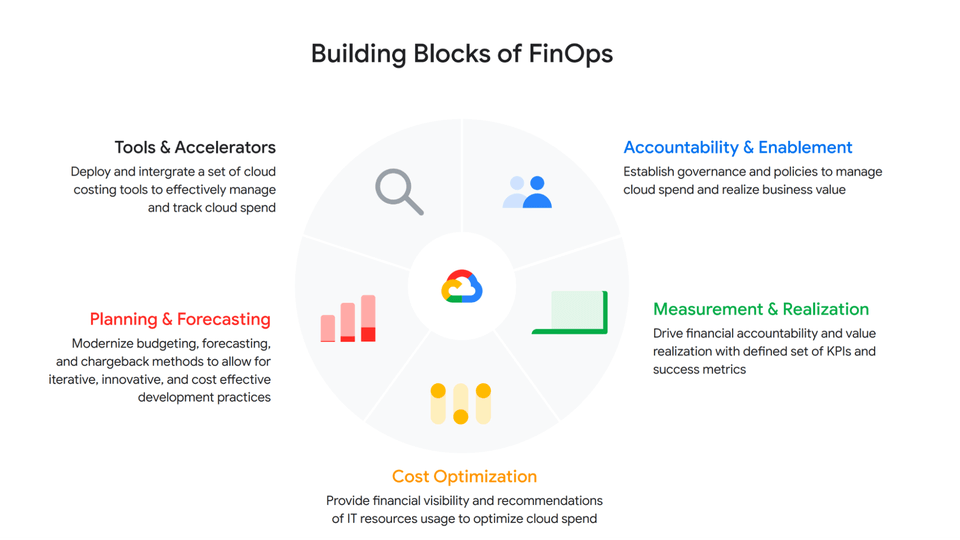
At a high level, a Cloud FinOps approach depends on five key areas:
- Accountability and Enablement
Accountability and enablement aim at instilling a cost-conscious culture across the organization. Oftentimes, this means standing up a cross-functional and dedicated team with members from technology, finance and engineering to establish cloud financial best practices and governance. In various organizations, we’ve seen this through an extension of a Cloud Center of Excellence, a Cloud Business Office or simply a Cloud FinOps team. Enablement focuses on empowering IT, finance and business leaders through training to help them better understand the economics of cloud services and the strategies to efficiently deploy and manage them. Cloud financial training guides teams on how to design cost-effective cloud environments, for example, embracing ”cloud-native” design principles such as auto-scaling/elasticity and Infrastructure as a Code.
- Measurement and Business Value Realization
Effective measurements not only create awareness and enable agile processes, but also support a culture that celebrates success and rewards teams for achieving business objectives. As such, measurement in the service of business value realization is about developing a comprehensive set of long-term benefits and cost KPIs to quantify the total net value of the return on digital transformation. Organizations often start with cost-related KPIs and eventually evolve those KPIs into business value metrics that are mapped to targeted business outcomes.
- Cloud Cost Optimization
Cloud cost optimization is an iterative and continuous process that provides a consistent methodology to manage cloud consumption cost-effectively. There are three key areas of optimization:
Resource optimization – Model cost-effective cloud usage based on utilization and consumption patterns.
Pricing optimization – Manage cloud spend through a continuous analysis of various pricing models. In a Google Cloud context, that might mean Committed Use Discounts, BigQuery flat rate reservations, etc.
Architecture optimization – Build applications with a cost-aware architecture by leveraging newer generation compute instances (like Tau VMs, which offer an industry-leading 42% better price-performance versus comparable offerings), or using managed services and serverless technology to offload operational overhead.
For example, video hosting, sharing and services platform provider Vimeo built transcoding pipelines by using Google Cloud Spot VMs to optimize their infrastructure spend. To do so, they created fault-tolerant workloads that could withstand preemptions, and in exchange, got up to a 91% discount compared to using regular on-demand instances.
- Planning and Forecasting
In the cloud, accurately forecasting your finances requires rethinking of traditional approaches to depreciation and trend-based forecasting of maintenance and licensing costs. One way to improve the accuracy of your dynamic cloud needs is to use workload-specific forecasting models that leverage a combination of trend-based models for steady-state workloads, driver-based models for scaling applications, as well as monthly variance analysis. In other words, you can define cloud budgets and forecasts by monitoring cloud consumption trends, allocating cloud cost pools with a proper tagging strategy that’s mapped to a chart of accounts in a general ledger, and conducting a cost-benefit analysis based on cloud infrastructure, implementation, and support costs.
- Tools and Accelerators
Without the proper tools and processes in place, understanding and managing cloud costs can be complex — and this especially true as organizations scale their business in the cloud. By deploying proper cloud cost management tools and accelerators such as Looker Cloud Cost Management and automation scripts to set guardrails and enforce cost control policies, organizations can effectively manage and track cloud spend with access to near-real-time billing and cost data to make better informed business decisions.
The key objectives of Google Cloud Cost Management tools are to make it as simple as possible for organizations to get visibility into their current and forecasted costs with built-in reporting and customizable dashboards; help drive greater accountability for cloud spending across the organization by providing flexible ways to organize cloud resources and allocate costs; provide strong financial governance controls to reduce the risk of overspending; and offer intelligent recommendations for optimizing cloud costs and usage.
Start Saving with Cloud
Businesses are continuously seeking to better operate and manage their cloud environments and the need is ever increasing to transparently manage cloud spend, optimize costs, and obtain their desired business agility. By enhancing your Cloud FinOps capabilities and adopting principles of continuous cost optimization, you too can accelerate the business value of cloud computing.
Special thanks to Bruce Warner, Daniel Petibone, Nihar Jhawar and FinOps Foundation community for their contributions and sharing their domain expertise to this important Cloud FinOps topic.
More Relevant Stories for Your Company

Google Cloud and Univision Partnership to Up the Ante in UX for Spanish-speaking Audience
The past year has given everyone lots to think about—about our priorities as people and as businesses. As the world retreated behind closed doors, we saw how shared interests and experiences can bring us together. As the world grappled with a common enemy, we witnessed just how differently individuals, communities

Quick Migration, Zero Outages and Cost Savings: Rossi Residencial’s SAP to Google Cloud Journey!
After three migrations to different cloud providers, the company managed to migrate with no system outages for the first time, supported by partner Sky.One. Results Migrated four SAP environments and four servers in just one month with no system outagesZero unavailability periods since migratingLess time spent worrying about operational issues




Modeling and Comparing Cloud Solutions, Costs, and Strategy
Sole-tenant nodes? VMaaS and CloudSimple? N1 vs N2 vs E2 instances? BYO Microsoft or Linux licenses? Understand how the choices available with Google Cloud can maximize your savings while expanding your migration scenarios. Watch this webinar and learn how to assess your on-premises private cloud and compare your per-VM costs

Google Cloud: Lowering Migration Risks for Indian Firms
A common perception is that migrating existing workloads to the public cloud—especially those with a lot of data—is complex, time consuming, and risky. But with the right planning, organizations can rapidly establish the right practices to accelerate migrations, lower risk, and succeed in the cloud.
