





Usha Martin Consolidates and Modernizes with Google

5271
Of your peers have already read this article.
4:30 Minutes
The most insightful time you'll spend today!
About Usha Martin
Founded more than 50 years ago and headquartered in Kolkata, India, Usha Martin is a leading steel and wire rope manufacturer. The company’s products are used in sectors such as oil and gas, aerial haulage, and general engineering.

Usha Martin operates several wire and rope manufacturing plants in India, Thailand, the United Arab Emirates, and the United Kingdom. In 1974, Usha Martin established an integrated alloy steel plant in Jamshedpur, India.
The business operates a range of joint ventures internationally, including a partnership with Joh Pengg AG of Austria to produce oil-tempered wire for the automotive industry and a venture with TESAC of Japan to manufacture and sell specialized wire rope.
Usha Martin’s ICT strategy had traditionally been highly localized, with independent IT infrastructures in all the manufacturing plants and businesses globally. These infrastructures were not integrated, leading to extensive duplication of effort and activities across the business.
In 2016, Usha Martin corporate started a project to integrate ICT across the business and establish centralized financial and technology controls.
“We established a program to integrate our communications infrastructure, security policies, and software licenses and implement a centralized enterprise resource planning system across our business,” says Jayanta Bhowmik, SVP-IT and CIO, Usha Martin. This program is being initiated primarily in Usha Martin’s Indian businesses before being extended to international markets.
In parallel with these initiatives, Usha Martin decided to consolidate the disparate email infrastructures and systems used by its corporate team, plants, and business units.
“We faced security threats and control problems managing and interconnecting all our very different email systems,” Bhowmik says.
“For example, we experienced on average about three to four ransomware attacks every year. We decided there was no alternative but to deploy a centralized email system.”
Usha Martin weighed its options and went so far as to purchase a license to run a single email system on its in-house infrastructure. However, the challenges of migrating a 4,000-strong workforce from up to seven existing email systems to an in-house platform proved difficult to overcome.
“We would have had to plan for server infrastructure, backups, security, and disaster recovery and execute smoothly, which would have been a time-consuming, expensive exercise,” Bhowmik says. “We estimated an in-house deployment would take seven to eight months to complete.”
“We looked at cloud-based services and Google presented a unique opportunity for us to consolidate our email without having to plan for our own infrastructure and worry about project planning, architectures, and deployment,” Bhowmik says.
“We also considered another service, but realized Google also gave us the opportunity to move our personal productivity applications to G Suite.”
A competitive evaluation regarding hosting and disaster recovery confirmed Usha Martin’s positive impressions. Google technology and processes in these areas outstripped the capabilities of the company’s own data centers.
“Google came up with a migration timeline and process that met our needs, with an expert partner to ease the transition,” Bhowmik says. “This was extremely important as the change represented a paradigm shift for a business that is very traditional and conservative.”
The Google partner worked closely with the internal Usha Martin team to complete phase one of the migration to the senior executive team. The partner also undertook training and worked with the IT team to hold meetings at various plants and locations to explain the changes. In addition, the partner conducted a skills transfer exercise to enable Usha Martin team members to complete the remaining phases of the project.
The business migrated the 1,500 team members in its Indian operations, as well as those in its Austrian joint venture, to the new platform.
“Using Google gives us wonderful alternatives to traditional systems,” Bhowmik says. “For example, using Google Hangouts Meet for video calls means we can reduce the number of video conferences that occupy large rooms and help ensure there are enough time-slots to meet demand.”
Improved Security of Information and Systems
One of the key differences between Usha Martin’s existing email systems and Gmail is the improvement in security and online safety.
“We had an anti-spam engine but, despite this, our employees received a lot of spam emails and messages carrying ransomware viruses,” Bhowmik says.
“With G Suite, we don’t receive these messages anymore and we minimize the risk of our network being compromised by malicious infections that could prevent us from accessing our files.”
Using G Suite has reduced team members’ use of USB drives to share large files that would otherwise be blocked due to email attachment limits.
“In addition, people are reducing the practice of printing documents for meetings. One person in each meeting can now steer and control documents, reducing duplication and the possibility of errors.”
“Document sharing is now happening much more in the cloud rather than through external media, improving control and security,” Bhowmik says.
Manage Calendars More Effectively
G Suite now enables Usha Martin team members to manage their calendars more effectively and share documents with multiple people without having to aggregate feedback or manage version control.
“Thanks to G Suite, our people are coming into a world of collaboration and modernization,” Bhowmik says.
3863
Of your peers have already watched this video.
1:06 Minutes
The most insightful time you'll spend today!
PwC uses Connected Sheets to scale data insights
It’s important for teams across the business to understand customer adoption of products and services, whether it’s the product team tracking usage of a newly released feature or the support team trying to anticipate incoming service requests. Similarly, IT teams need to analyze the adoption of an organization’s internal applications and systems, so they know what tools employees are using and how they are being used. But product adoption datasets are often too large for traditional spreadsheets to handle, and new data is continuously being added.
Connected Sheets can provide teams access to large, powerful, and up-to-date usage datasets, in the familiar Sheets interface. PwC, a global professional services organization, uses Connected Sheets as part of its efforts to make technology and data more accessible across its workforce. One way PwC uses Connected Sheets is to monitor and analyze the internal adoption of tools like G Suite.
Says Peter Van Nieuwerburgh, Global Change Manager at PwC, “If you look at our own adoption dashboarding, it’s more than three terabytes of data—good luck putting that in any spreadsheet. With Connected Sheets, we’re not really pulling the data into the spreadsheet, rather it lives in the database where it belongs. The ability to so easily analyze and visualize the data is really powerful.”
Connected Sheets helps to scale data-driven decision-making at your organization, by making powerful data easily accessible across your sales, finance, product, and IT teams.
Tau VMs Joins Google Cloud to Offer Cost-effective Performance of Scale-out Workloads

5632
Of your peers have already read this article.
2:00 Minutes
The most insightful time you'll spend today!
Scale-out workloads demand the best combination of performance and price to bring down the cost of delivering applications, all while providing an excellent user experience. We are excited to announce a new virtual machine (VM) family, Tau VMs, coming to Google Cloud. Tau VMs extend Compute Engine’s VM offerings with a new option optimized for cost-effective performance of scale-out workloads.
T2D, the first instance type in the Tau VM family, is based on 3rd Gen AMD EPYCTM processors and leapfrogs the VMs for scale-out workloads of any leading public cloud provider available today, both in terms of performance and workload total cost of ownership (TCO). The x86 compatibility provided by these AMD EPYC processor-based VMs gives you market-leading performance improvements and cost savings, without having to port your applications to a new processor architecture.
As illustrated below, Tau VMs offer 56% higher absolute performance and 42% higher price-performance (est. SPECrate2017_int_base) compared to general-purpose VMs from any of the leading public cloud vendors.
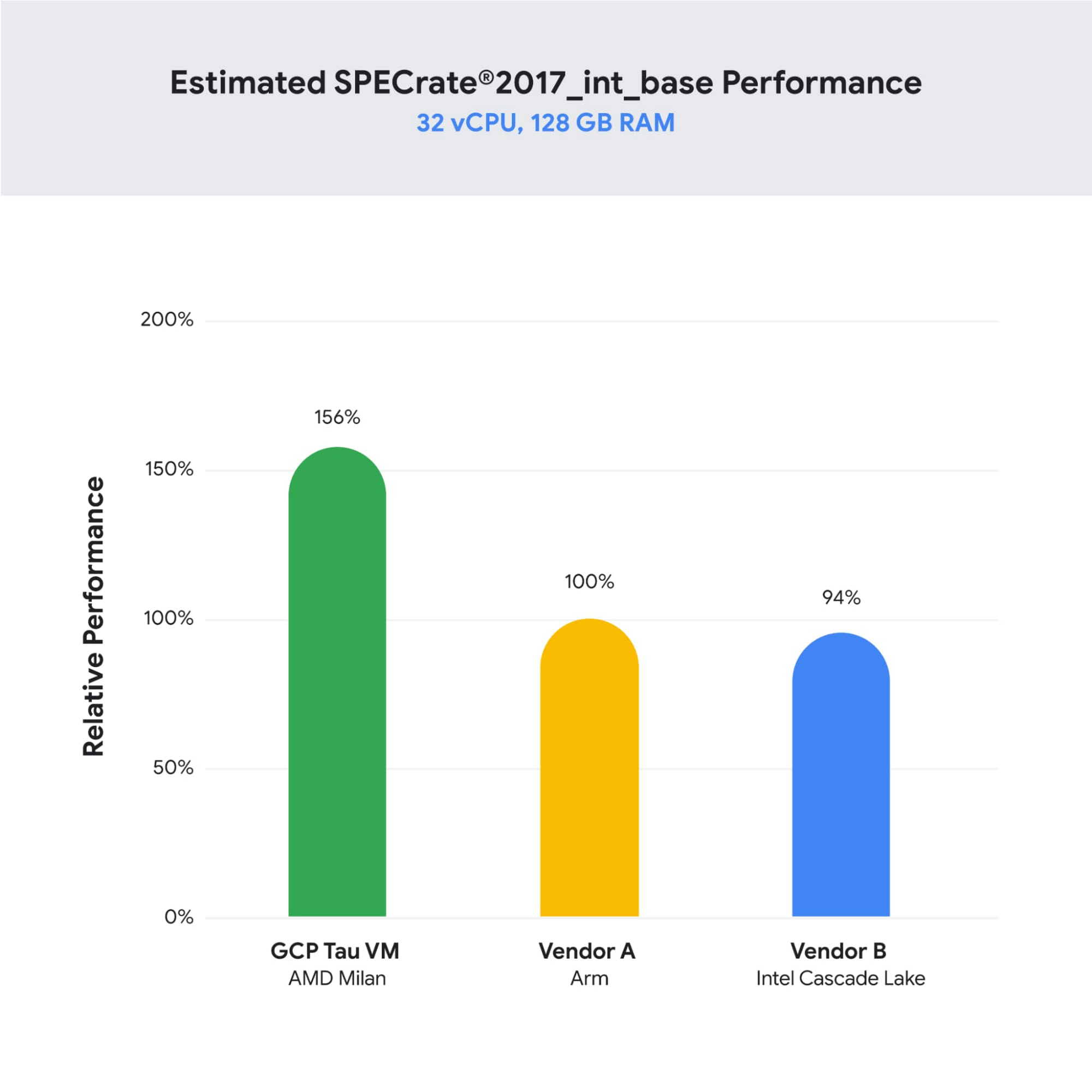
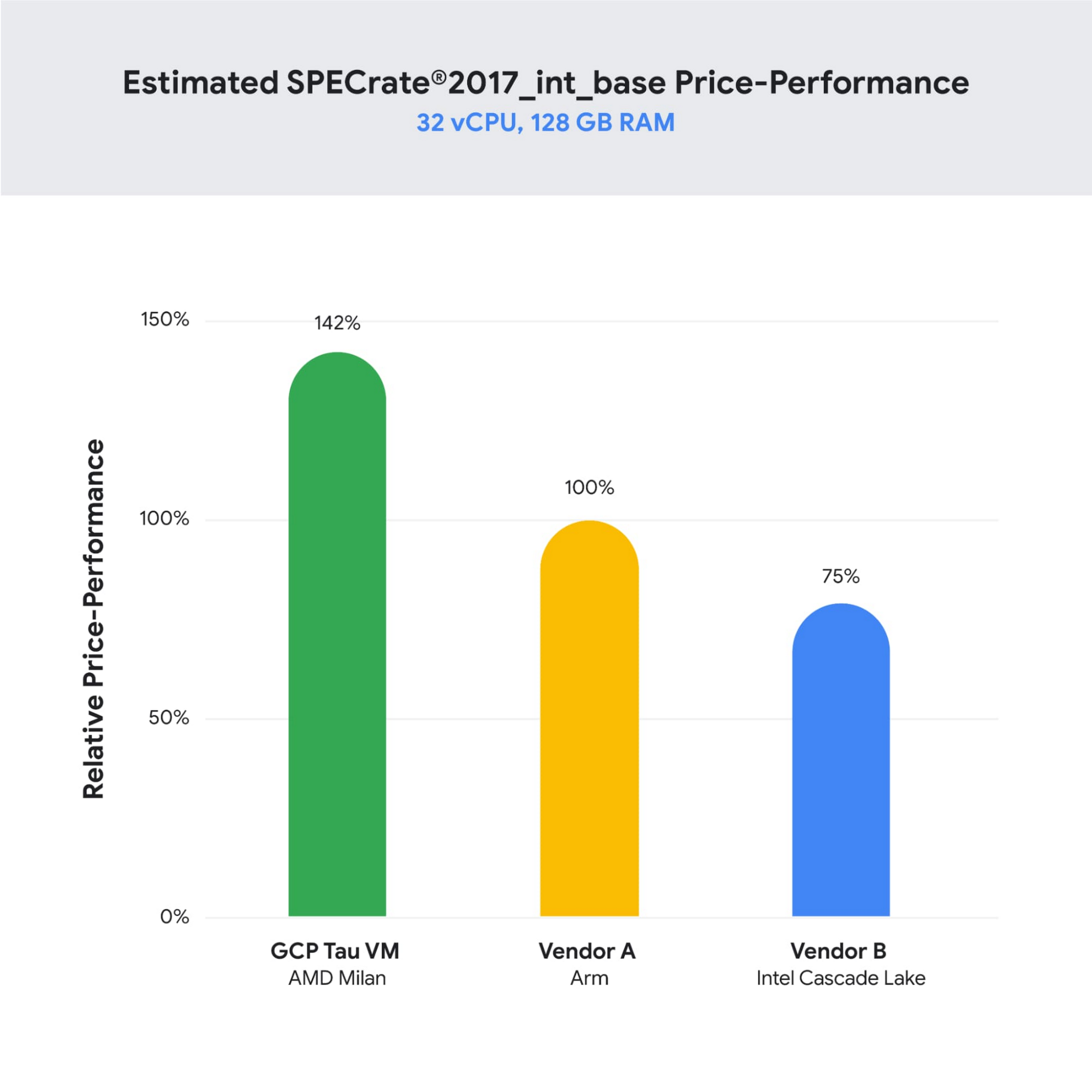
SPECrate is a trademark of the Standard Performance Evaluation Corporation. More information available at www.spec.org
What our customers and partners are saying
Snap
“At Snap, it is critical for our business to continue improving our scale-out compute infrastructure for key Snapchat capabilities like AR, Lenses, Spotlight and Maps,” said Cody Powell, Senior Engineering Manager, Snap Inc. “We were impressed when we tested Google Cloud’s new Tau VMs with Google Kubernetes Engine. While it’s early days, we believe we can gain double digits in infrastructure performance improvements for key workloads—enabling us to do more with less and invest even more in new features for our amazing Snapchat community.”
Twitter
“High performance at the right price point is a critical consideration as we work to serve the global public conversation,” said Nick Tornow, Platform Lead, Twitter. “We are excited by initial tests that show potential for double digit performance improvement. We are collaborating with Google Cloud to more deeply evaluate benefits on price and performance for specific compute workloads that we can realize through use of the new Tau VM family.”
DoiT
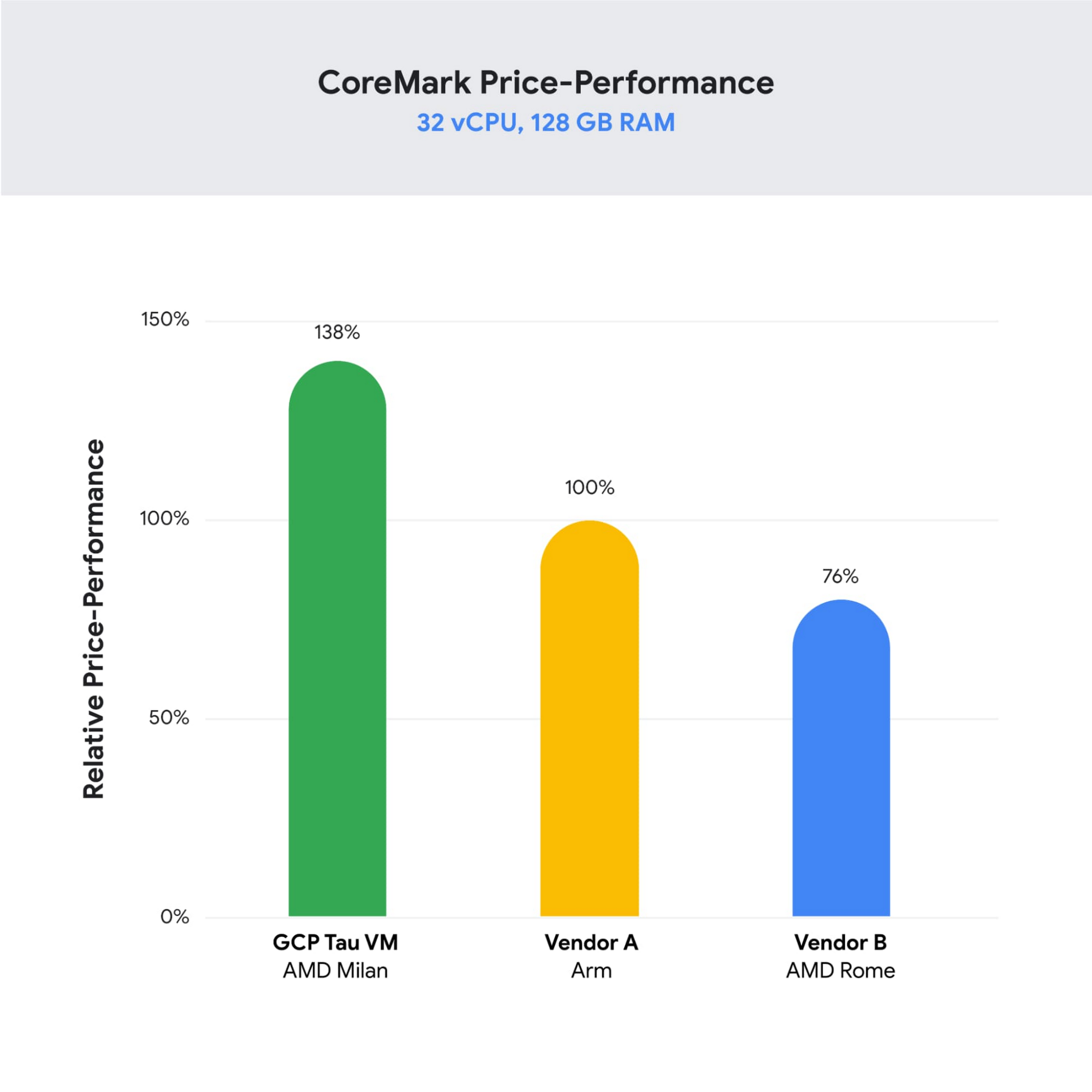
“DoiT partners with leading cloud vendors who are focused on growth and cost optimization,” said Yoav Toussia-Cohen, CEO, DoiT International. “In our preliminary testing of Google’s new Tau VMs with the Coremark benchmark, we were thrilled to see the incredible performance at 50% better than a comparable ARM-based offering from another leading public cloud. With Tau VMs, Google Cloud has set a new bar for price-performance, making the cloud even more accessible to digital-native companies. We are excited to bring Google’s Tau VMs to our joint customers.”
Designed for demanding scale-out workloads
Tau VMs bring the benefit of Google’s long-standing experience engineering platforms for scale-out workloads to our customers. They come in multiple predefined VM shapes, with up to 60vCPUs per VM, and 4GB of memory per vCPU. They offer up to 32 Gbps networking bandwidth and a wide range of network attached storage options, making Tau VMs ideal for scale-out workloads including web servers, containerized microservices, data-logging processing, media transcoding, and large-scale Java applications.
Google Kubernetes Engine support
Google Kubernetes Engine (GKE) is the de facto standard for organizations looking for advanced container orchestration, delivering the highest levels of reliability, security, and scalability. GKE supports Tau VMs on day 1, helping you optimize price-performance for your containerized workloads. You can add Tau VMs to your GKE clusters by specifying the T2D machine type in your GKE node-pools.
Pricing
Tau VMs will be priced to support significant TCO and price-performance improvements for your cloud applications. A 32vCPU VM with 128GB RAM will be priced at $1.3520 per hour for on-demand usage in us-central1.
Coming soon to a Google Cloud region near you
If you are interested in trying out T2D VMs when they become available in Q3 2021 please sign-up here.
3900
Of your peers have already watched this video.
23:30 Minutes
The most insightful time you'll spend today!
How PwC Migrated 275,000+ Users to Google Workspace
PwC, a 150-year-old professional services firm, has deployed and measured the impact of G Suite on its network of firms in 158 countries to help change its culture and make digital mastery a competitive advantage.
In 2015, PwC embarked on a journey of cultural change by deploying G Suite* to drive collaboration, productivity, and innovation to better serve its clients. In late 2019, PwC concluded the implementation across 300,000+ G Suite licenses, 275,000+ users, ~670 OUs, and 150+ territories. It’s a transition that came in handy during the COVID-19 outbreak.
“We’re able to share files, suddenly, with even clients who don’t have G Suite. It was such a huge leap, real excitement in our network and real excitement with our clients. Even our clients notice, they said, boy, you guys are just continuing to work kind of as normal,” says Adrienne Schutte, the Global Change Director at PwC.
In this video, PwC will talk about the challenges on this five-year journey, lessons learned, and key change management strategies. Additionally, they will discuss how they are measuring the impact G Suite has made on their business from a behavioral standpoint, leading to business benefits.
*G Suite is now Google Workspace
4199
Of your peers have already watched this video.
2:00 Minutes
The most insightful time you'll spend today!
How Intuit Solved a Long-standing Dilemma: Frictionless, But Secure, Collaboration
If there’s one thing that the folks at Intuit hold dear, it’s the ability to stay agile.
“Intuit is a 35-year-old start-up. We’re about 9,000 people in eight countries around the world,” is how Atticus Tysen, SVP and CIO, Intuit, describes the company.
Founded in 1983, Intuit is a financial software company that creates financial, accounting, and tax software for small businesses, accountants, and individuals, with revenues of $6 billion. It’s products include TurboTax, QuickBooks, ProConnect, and Mint, among others.
A few years ago, different groups, in different parts of the world, used different tools. “We had a lot of siloed solutions and people worked locally and then emailed attachments and documents,” says Brynna Donn, Director, Collaboration and Productivity at Intuit.
What Intuit needed was a way for teams to work together and collaborate without friction—yet securely. Box for G-Suite did that for them.
“Box for G-Suite has allowed us to enable our global workforce to pick the right tools for collaboration but also have all the information in one place. It makes everything easy to find, govern and manage,” says Tysen.
Find out how Intuit benefitted from Box for G-Suite. Watch this two-minute case study.
Learn to Easily Administer Multi-cluster Kubernetes Environs: Part 4 KRM Series

5588
Of your peers have already read this article.
4:00 Minutes
The most insightful time you'll spend today!
This is part 4 in a multi-part series about the Kubernetes Resource Model. See parts 1, 2, and 3 to learn more.
Kubernetes clusters can scale. Open-source Kubernetes supports up to 5,000 Nodes, and GKE supports up to 15,000 Nodes. But scaling out a single cluster can only get you so far: if your cluster’s control plane goes down, your entire platform goes down; if the Cloud region running your cluster has a service interruption, so does your app.
Many organizations choose, instead, to operate multiple Kubernetes clusters. Besides availability, there are lots of reasons to consider multi-cluster, such as allocating a cluster to each development team, splitting workloads between cloud and on-prem, or providing burst capability for traffic spikes.
But operating a multi-cluster platform comes with its own challenges. How to consistently administer many clusters at once? How to keep the clusters secure? How to deploy and monitor applications running across multiple clusters? How to seamlessly fail over from one region to another?
This post introduces a few tools that can help platform teams more easily administer a multi-cluster Kubernetes environment.
The platform base layer, with Config Sync
In the last post, we explored how thoughtful platform abstractions can help reduce toil for app developers- including for a multi-cluster environment, where automation such as CI/CD handles all interactions with the staging and production clusters. But equally important is the platform base layer, the Kubernetes resources and configuration that are shared across services. Your platform base layer might consist of Namespaces, role-based access control, and shared workloads like Prometheus.
Platform abstractions depend on the existence of these base-layer resources. And so does the security and stability of your platform as a whole. It’s important that these resources not only get deployed, but also stay put. CI/CD is great for deploying resources, but what about making sure resources stay deployed? What if a Kubernetes Namespace gets deleted? Or a Prometheus StatefulSet is modified?
Kubernetes’ job is to ensure that the cluster’s actual state matches the desired state. But sometimes, the “desired” state isn’t desired at all – it’s a developer who mistakenly modified a resource, or a bad actor that’s gained access into the system. For this reason, a platform base layer needs more than a one-and-done CI/CD pipeline. A tool called Config Sync can help with this.
Config Sync is a Google Cloud product that can sync Kubernetes resources from a Git repository to one or more GKE or Anthos clusters. Unlike CI/CD tools like Cloud Build, Config Sync watches your clusters constantly, making sure that the intended resource state in the cluster always matches what’s in Git. Config Sync is designed primarily for base-layer resources like namespaces and RBAC. In this way, Config Sync is complementary to, not a replacement for, CI/CD.
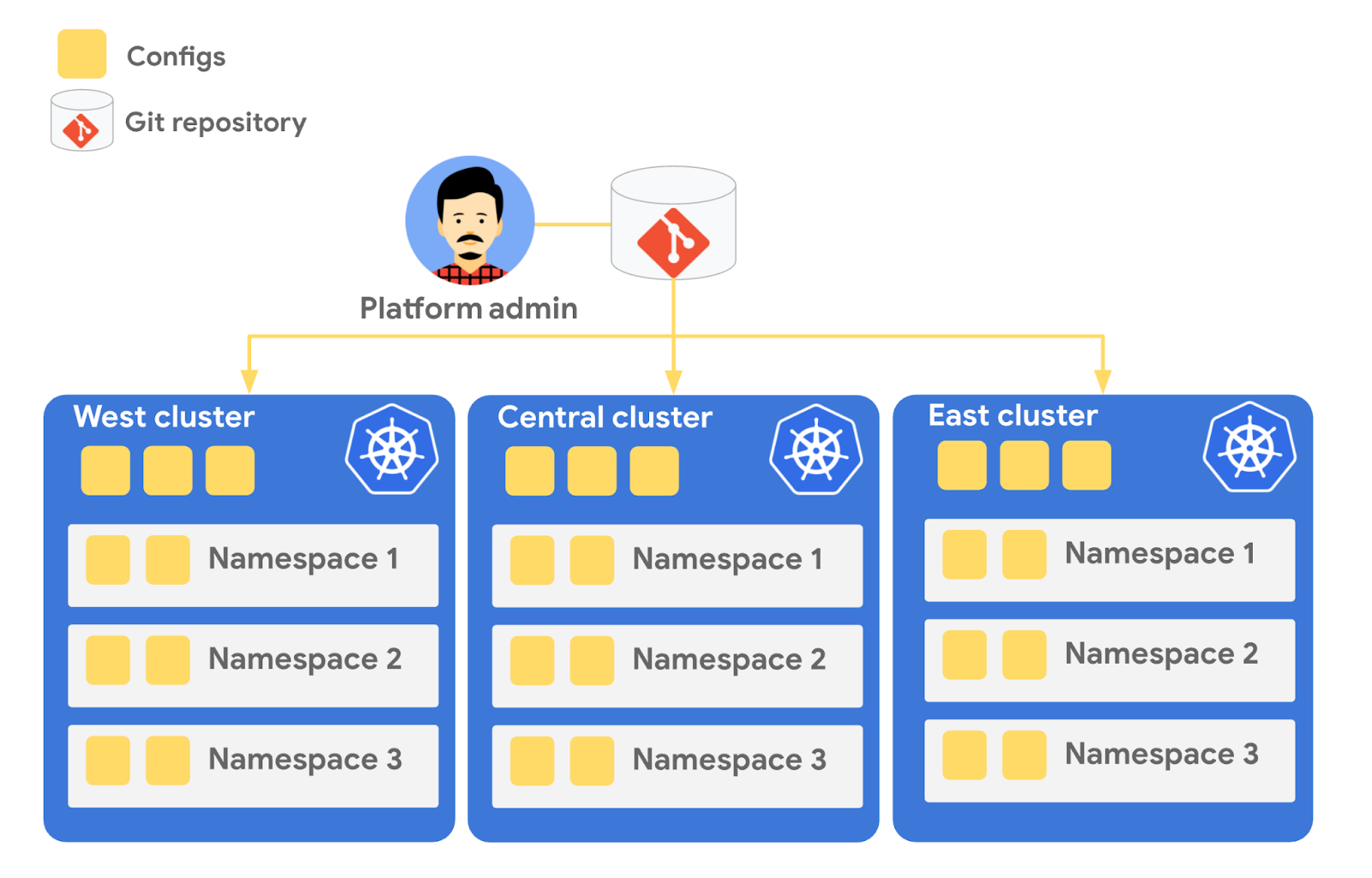
Config Sync runs in a Pod inside your Kubernetes cluster, watching your Git config repo for changes, and also watching the cluster itself for any divergence from your desired state in Git. If any configuration drift is detected from what’s stored in Git, Config Sync will update the API Server accordingly.
You can point multiple Config Sync deployments at the same Git repo, allowing you to manage the base-layer platform resources for multiple clusters using the same source of truth. And by using Git as the landing zone for config, you can benefit from some of the GitOps principles we discussed in part 2, including the ability to audit and roll back configuration changes.
Let’s walk through an example of how to manage base-layer resources with Config Sync.
The Cymbal Bank platform consists of four GKE clusters: admin, dev, staging, and prod. We can install Config Sync on all four clusters using the gcloud tool or the Google Cloud Console, pointing all four clusters at a single Git repository, called cymbalbank-policy. Note that this repo is separate from the application source and config repos, and is managed by the platform team. From the Console, we can see that all four clusters are synced to the same commit of the cymbalbank-policy repo.
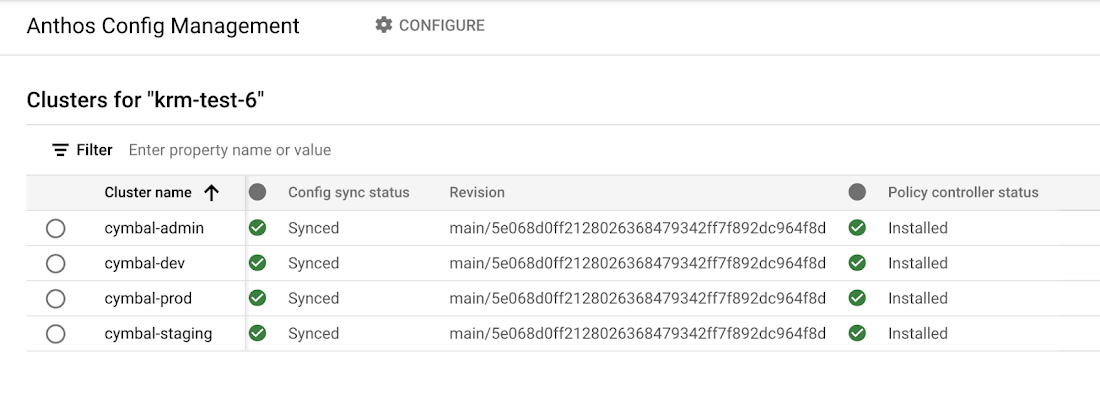
Now, let’s say that the Cymbal Bank platform team wants to limit the amount of CPU and memory resources each application team can request for their service. Kubernetes ResourceQuotas help impose these limits, and prevent unexpected Pod evictions.
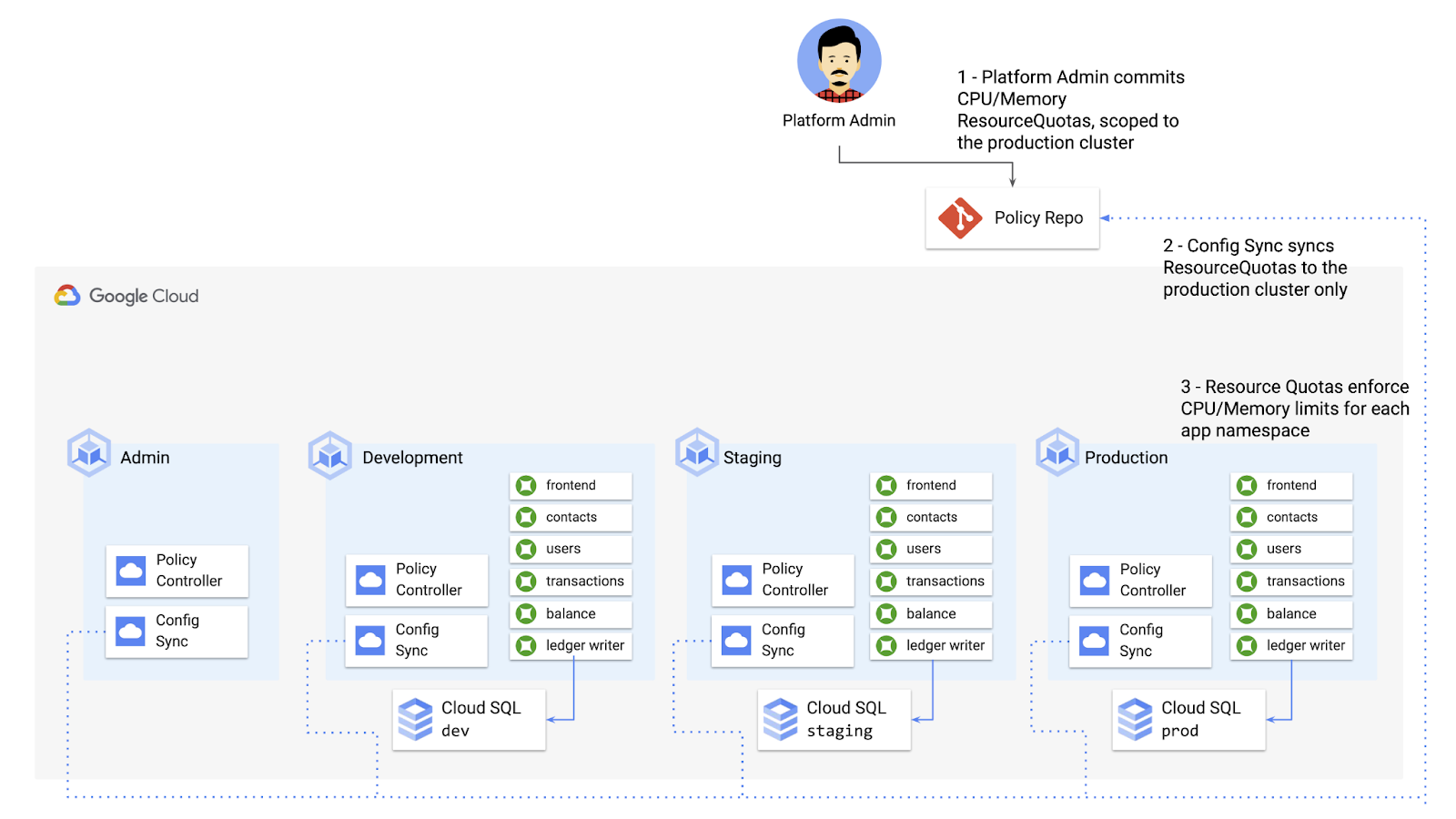
The platform team can define a set of ResourceQuotas for each application namespace. They can also scope the resources to only be applied to a subset of clusters – for instance, to the production cluster only. (If no cluster name selector is specified, Config Sync will deploy the resource to all clusters by default.)
apiVersion: v1kind: ResourceQuotametadata:name: production-quotanamespace: frontendannotations:configsync.gke.io/cluster-name-selector: cymbal-prodspec:hard:cpu: 700mmemory: 512Mi
From here, the platform team can commit the resources to the cymbalbank-policy repo, and Config Sync, always watching the policy repo, will deploy the resources to the production cluster:
NAMESPACE NAME AGE REQUEST LIMITbalancereader production-quota 6m56s cpu: 300m/700m, memory: 612Mi/512Mi
If a developer tries to delete one of the ResourceQuotas, Config Sync will block the request, helping to ensure that these base-layer resources stay put.
error: You must be logged in to the server (admission webhook "v1.admission-webhook.configsync.gke.io" denied the request: requester is not authorized to delete managed resources)
In this way, Config Sync can help platform teams ensure the stability of that platform base-layer, as well as ensure resource consistency across multiple clusters at once. This, in turn, can help organizations mitigate the complexity of adding new clusters to their environment.
Enforce policies on Kubernetes resources
Config Sync is a powerful tool on its own, and can work with any Kubernetes resource that your cluster recognizes. This includes Custom Resource Definitions (CRDs) installed with add-ons like Anthos Service Mesh.
But Config Sync, by default, doesn’t have an idea of “good or bad” Kubernetes resources. It will deploy whatever resources land in Git, even resources that might pose a security risk to your organization. Security is an essential feature of any developer platform, and when it comes to Kubernetes, it’s important to think about security from the initial software design stages, and set up your clusters with security best-practices in mind.
But it’s just as important to think about security at deploy-time. Who and what can access your clusters? What kinds of Kubernetes resources – and fields within those resources- are allowed? These decisions will depend on lots of factors, including the kinds of data your application deals with, and any industry-specific regulations.
One common security use case for KRM is the need to monitor incoming Kubernetes resources, whether they’re coming in through kubectl, CI/CD, or Config Sync. But if you have multiple clusters, your Kubernetes environment has multiple API Servers, and therefore multiple entry points.
A Google tool called Policy Controller can help automate resource monitoring across multiple clusters. Policy Controller is a Kubernetes admission controller that can accept or reject incoming resources based on custom policies you define. Policy Controller is based on the OpenPolicyAgent Gatekeeper project, and it allows you to define policies, or “Constraints,” as KRM. This means you can deploy them using Config Sync, via Git. Once deployed, Policy Controller uses your Constraints as a set of rules to evaluate all incoming KRM, rejecting resources that fall out of compliance.
Let’s walk through an example. Say that the Cymbal Bank security team wants to ensure that no code in development is accessible to the public. Kubernetes Services of type LoadBalancer expose public IP addresses by default, so the platform team wants to define a PolicyController constraint that blocks Services of that type on the development GKE cluster.
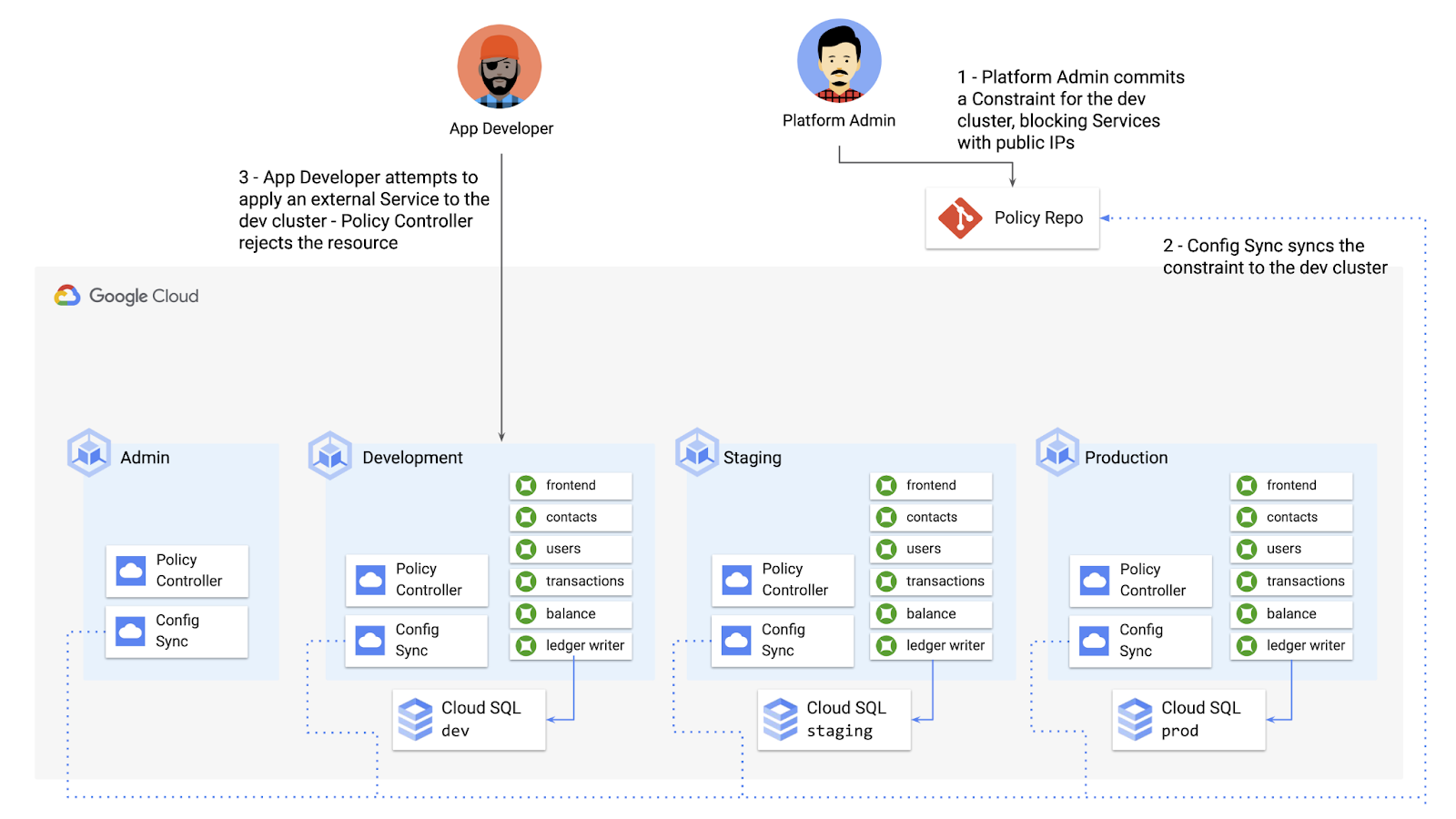
To do this, the platform team can define a Policy Controller Constraint as KRM. This Constraint uses a Constraint Template, provided through the pre-installed Constraint Template library. The ConstraintTemplate defines the logic of the policy itself, and the Constraint makes the template concrete, populating any variables needed to execute the policy logic. Here, we’re also adding a Config Sync cluster name annotation, to scope this resource to apply only to the development cluster.
apiVersion: constraints.gatekeeper.sh/v1beta1kind: K8sNoExternalServicesmetadata:name: dev-no-ext-servicesannotations:configsync.gke.io/cluster-name-selector: cymbal-devspec:internalCIDRs: []
The platform team can then commit the resource to the cymbalbank-policy repo, and Config Sync will deploy the resource to the development cluster.
From here, if an app developer tries to create an externally-accessible Kubernetes Service, Policy Controller will block the resource from being created.
for: "constraint-ext-services/contacts-svc-lb.yaml": admission webhook "validation.gatekeeper.sh" denied the request: [denied by dev-no-ext-services] Creating services of type `LoadBalancer` without Internal annotation is not allowed
The platform team can define as many of these Constraints as they want, each defining a separate policy.
Writing custom policies
The Policy Controller Constraint Template library provides a lot of functionality, from blocking privileged containers, to requiring certain resource labels, to preventing app teams from deploying into certain namespaces. But if you want to enforce custom logic on your organization’s KRM, you can do so by writing a custom Constraint Template.
Constraint Templates are written in a query language called Rego. Rego was designed for policy rule evaluation, and it can introspect Kubernetes resource fields to make a conclusion as to whether the resource is allowed or not.
For instance, let’s say that the platform team wants to limit the number of containers allowed inside a single application Pod. Too many containers per Pod can cause outage risks— when one container crashes, the entire Pod crashes.
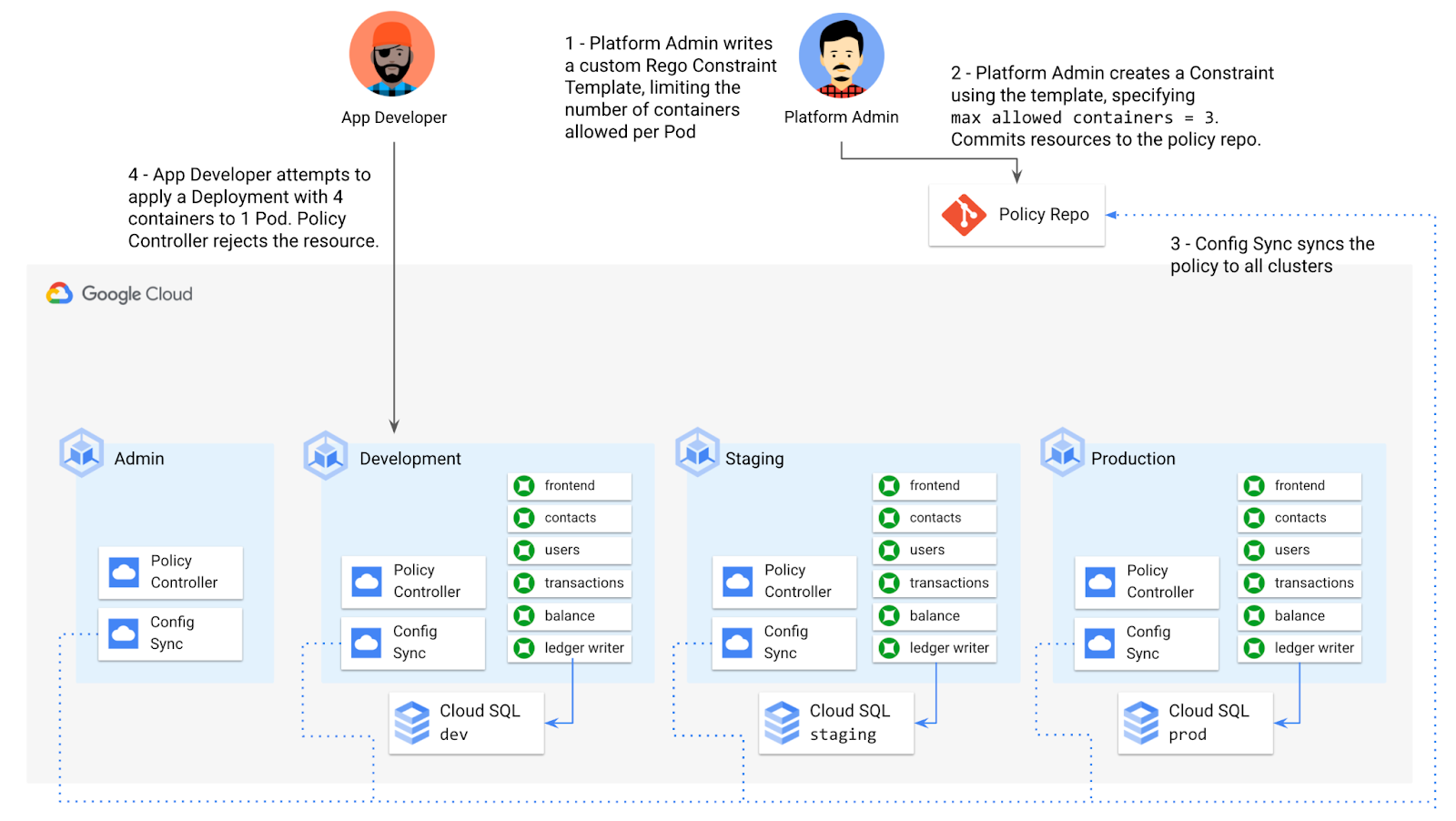
To enforce this policy, the platform team can define a Constraint Template, using the Rego language, that looks inside a resource to ensure that the number of containers per Pod is within the allowed limit:
apiVersion: templates.gatekeeper.sh/v1beta1kind: ConstraintTemplatemetadata:name: k8slimitcontainersperpodspec:crd:spec:names:kind: K8sLimitContainersPerPodvalidation:openAPIV3Schema:properties:allowedNumContainers:type: integertargets:- target: admission.k8s.gatekeeper.shrego: |package k8slimitcontainersperpodnumTemplateContainers := count(input.review.object.spec.template.spec.containers)numRunningContainers := count(input.review.object.spec.containers)containerLimit := input.parameters.allowedNumContainerstemplate_containers_over_limit = true {numTemplateContainers > containerLimit}running_containers_over_limit = true {numRunningContainers > containerLimit}violation[{"msg": msg}] {template_containers_over_limitmsg := sprintf("Number of containers in template (%v) exceeds the allowed limit (%v)", [numTemplateContainers, containerLimit])}violation[{"msg": msg}] {running_containers_over_limitmsg := sprintf("Number of running containers (%v) exceeds the allowed limit (%v)", [numRunningContainers, containerLimit])}Then, the platform team can define a concrete Constraint, using this Constraint Template, to set the number of allowed containers per Pod to 3:apiVersion: constraints.gatekeeper.sh/v1beta1kind: K8sLimitContainersPerPodmetadata:name: limit-three-containersspec:parameters:allowedNumContainers: 3
Finally, the platform team can push these resources to the cymbalbank-policy repo, and Config Sync will deploy the policy to all four clusters. If a developer tries to define a Kubernetes Deployment containing more containers per pod than what’s allowed, the resource will be blocked at deploy time:
Error from server ([limit-three-containers] Number of containers in template (4) exceeds the allowed limit (3)): error when creating "constraint-limit-containers/test-workload.yaml": admission webhook "validation.gatekeeper.sh" denied the request: [limit-three-containers] Number of containers in template (4) exceeds the allowed limit (3)
Custom Constraint Templates can give platform teams lots of flexibility in the types of policies they define and enforce in a Kubernetes environment.
Integrating policy checks into CI/CD
As we explored earlier, Config Sync and CI/CD are complementary tools. Config Sync works great for base-layer platform resources and policies, whereas CI/CD works well for application tests and deployment.
But one pitfall of having two separate KRM deployment mechanisms is that app developers may not know that their resources are out of policy until they try to deploy them into production. This is especially true if some policies are scoped only to production, as we saw with the ResourceQuota example. Ideally, the platform team has a way to empower developers and code reviewers to know ahead of time whether new or modified resources are still in compliance. We can enable this use case by integrating policy checks into the existing Cymbal Bank CI/CD.
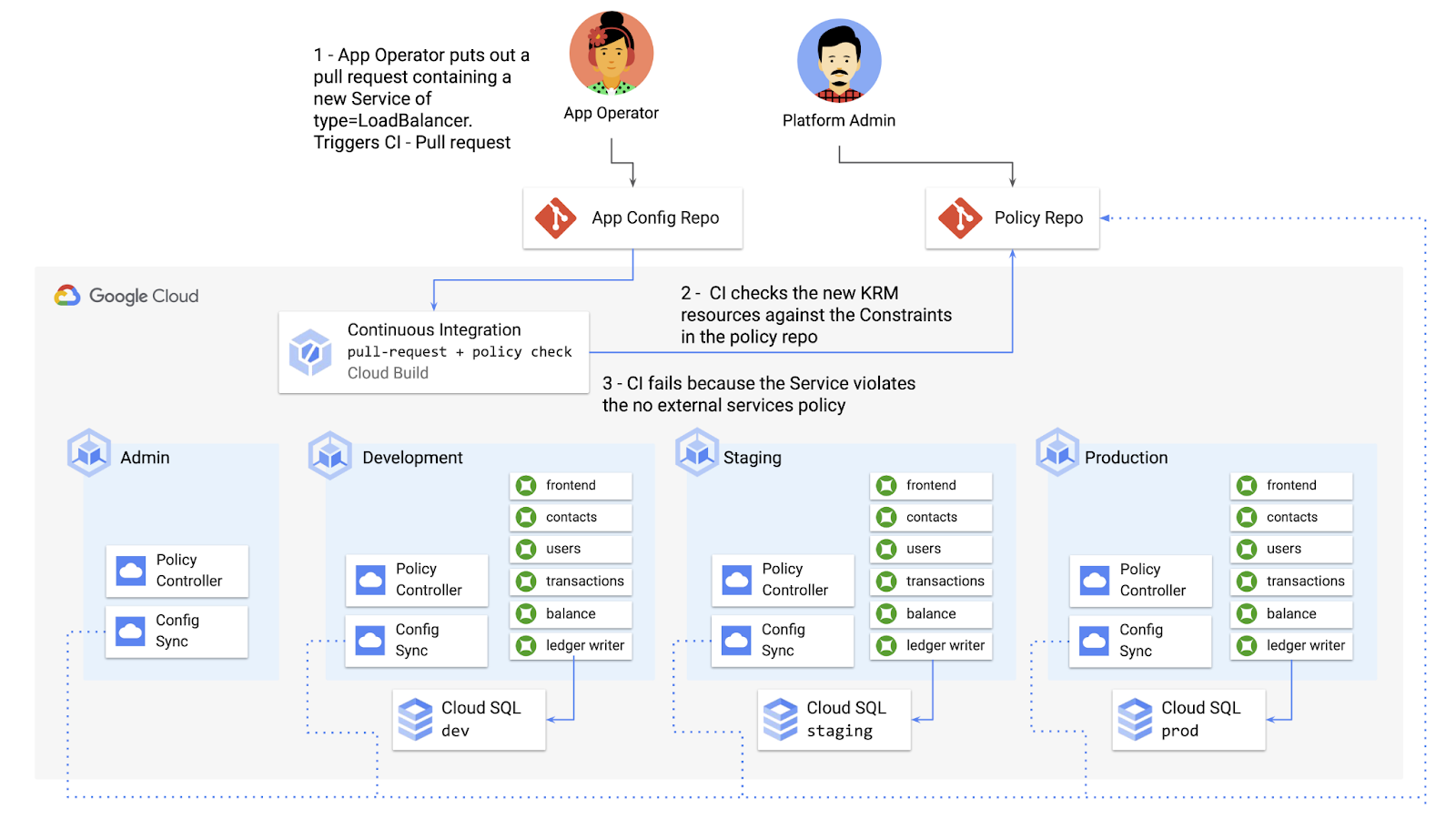
Policy Controller operates, by default, as a Kubernetes Admission Controller running inside the cluster. But Policy Controller also provides a “standalone” mode, running inside a container, that can be used outside of a cluster, such as from inside a Cloud Build pipeline.
In the example below, Cloud Build executes Policy Controller checks by getting the cymbalbank-app-config manifests, cloning the cymbalbank-policy resources, and using the “policy-controller-validate” container image to evaluate the app manifests against the policies.
steps:- id: 'Render prod manifests'name: 'gcr.io/google.com/cloudsdktool/cloud-sdk'entrypoint: '/bin/sh'args: ['-c', 'mkdir hydrated-manifests && kubectl kustomize overlays/prod > hydrated-manifests/prod.yaml']- id: 'Clone cymbalbank-policy repo'name: 'gcr.io/kpt-dev/kpt'entrypoint: '/bin/sh'args: ['-c', 'kpt pkg get https://github.com/$$GITHUB_USERNAME/cymbalbank-policy.git@main constraints&& kpt fn source constraints/ hydrated-manifests/ > hydrated-manifests/kpt-manifests.yaml']secretEnv: ['GITHUB_USERNAME']- id: 'Validate prod manifests against policies'name: 'gcr.io/config-management-release/policy-controller-validate'args: ['--input', 'hydrated-manifests/kpt-manifests.yaml']availableSecrets:secretManager:- versionName: projects/${PROJECT_ID}/secrets/github-username/versions/1env: 'GITHUB_USERNAME'timeout: '1200s' #timeout - 20 minutes
From here, an app developer or operator can know if their resources violate org-wide policies, by looking at the Cloud Build output for their Pull Request:
Status: Downloaded newer image for gcr.io/config-management-release/policy-controller-validate:latestError: Found 1 violations:[1] Number of containers in template (4) exceeds the allowed limit (3)
By integrating policy checks into CI/CD, app development teams can understand whether their resources are in compliance, and platform teams add an additional layer of policy checks to the platform.
Overall, Config Sync and Policy Controller can provide a powerful toolchain for standardizing base-layer config across a multi-cluster environment. Check out the Part 4 demo to try out each of these examples.
And stay tuned for Part 5, where we’ll learn how to use KRM to manage cloud-hosted resources.
More Relevant Stories for Your Company

Discovery’s Massive Workspace Migration Fuels Innovation and Collaboration
In the past two decades, Discovery has moved from a purely cable business based in the U.S. to a global media and entertainment powerhouse. Like many other businesses in the industry, we’ve had to adjust to the unique shifts in people’s behaviors and preferences, almost all of which result from

Ways to Manage Extensions on Windows and Mac If You Haven’t Moved to Chrome Browser Cloud Management
Many enterprises are looking to better manage extensions on their corporate devices. Extensions themselves are a great tool for productivity and customization of Chrome. However, some extensions can have the potential for far reaching rights to sites your users visit and devices they browse from, giving IT the desire to



No user left behind: Empowering collaboration with security
Your employees need to work from home to keep your business running. The traditional network-based on-premise approach to security is broken when your end-users are accessing core apps in the cloud from anywhere on any device.Our primary goal is to ensure that security does not get in the way of

A set of new capabilities to build a differentiated data platform: BigLake, now generally available
Data continues to grow in volume and is increasingly distributed across lakes, warehouses, clouds, and file formats. As more users demand more use cases, the traditional approach to build data movement infrastructure is proving difficult to scale. Unlocking the full potential of data requires breaking down these silos, and is
