





Unlocking the Power of Computer Vision: Vision AI Made Easy with Spring Boot and Java

1196
Of your peers have already read this article.
1:30 Minutes
The most insightful time you'll spend today!
In today’s era of data-driven applications, leveraging advanced machine learning and artificial intelligence services like computer vision has become increasingly important. One such service is the Vision API, which provides powerful image analysis capabilities. In this blog, we will explore how to create a Computer Vision application using Spring Boot and Java, enabling you to unlock the potential of image recognition and analysis in your projects. The application UI will accept as input, public URLs of images that contain written or printed text, extract the text, detect the language and if it is one of the supported languages, it will generate the English translation of that text.
Spring Boot and Google Cloud
Spring Boot is a powerful open-source framework for creating Spring-based applications. It simplifies development by providing auto-configuration, starter dependencies, and embedded servers. It also offers production-ready features like metrics and health checks. With Spring Boot, you can focus on writing code and deploying efficient applications without worrying about complex configuration or dependencies. Apart from the well-known features that make it an ideal choice for enterprise apps, a new exciting development is the official support for Native Image Builder using GraalVM, enabling the creation of native standalone executables without the need for a Java Runtime and are leaner and offer a super fast startup experience. Try Spring Native on Google Cloud.
The Spring Cloud GCP library makes it easy for Spring Boot applications to use Google Cloud services. It provides Spring Boot APIs for over a dozen Google Cloud services. This means you can take advantage of the benefits of Google Cloud services without having to learn separate Google Cloud client libraries. It is very easy to migrate or create a new Spring Boot application in Google Cloud. With just one command, you can bootstrap your production-ready Spring Boot project structure and start making code changes for your requirement. Refer to the documentation for a full list of features.
Prerequisites
Before diving into the development process, make sure you have the following prerequisites in place:
- A Google Cloud account with a project created and billing enabled
- Vision API, Translation, Cloud Run, and Artifact Registry APIs enabled
- Cloud Shell activated
- Cloud Storage API enabled with a bucket created and images with text or handwriting in local supported languages uploaded (or you can use the sample image links provided in this blog)
Refer to the documentation for steps on how to enable Google Cloud APIs.
Bootstrapping a Spring Boot project
To get started, create a new Spring Boot project using your preferred IDE or Spring Initializr. Include the necessary dependencies, such as Spring Web, Spring Cloud GCP, and Vision AI, in your project’s configuration. Alternatively, you can use Spring Initializr from Cloud Shell using the below steps to bootstrap your Spring Boot application easily:
1. Open a Cloud Shell terminal and make sure it is pointing to the correct project and that you are authorized (if not you can use the command below to set the right project):
gcloud config set project <PROJECT_ID>
2. Run the following command to create your Spring Boot project:
curl https://start.spring.io/starter.tgz -d packaging=jar -d dependencies=cloud-gcp,web,lombok -d baseDir=spring-vision -d type=maven-project -d bootVersion=3.0.1.RELEASE | tar -xzvf -spring-vision is the name of your project, change it per your requirement.
bootVersion is the version of Spring Boot, make sure to update it if required at the time of your implementation.
type is the version of project build tool type, you can change it to gradle if preferred.
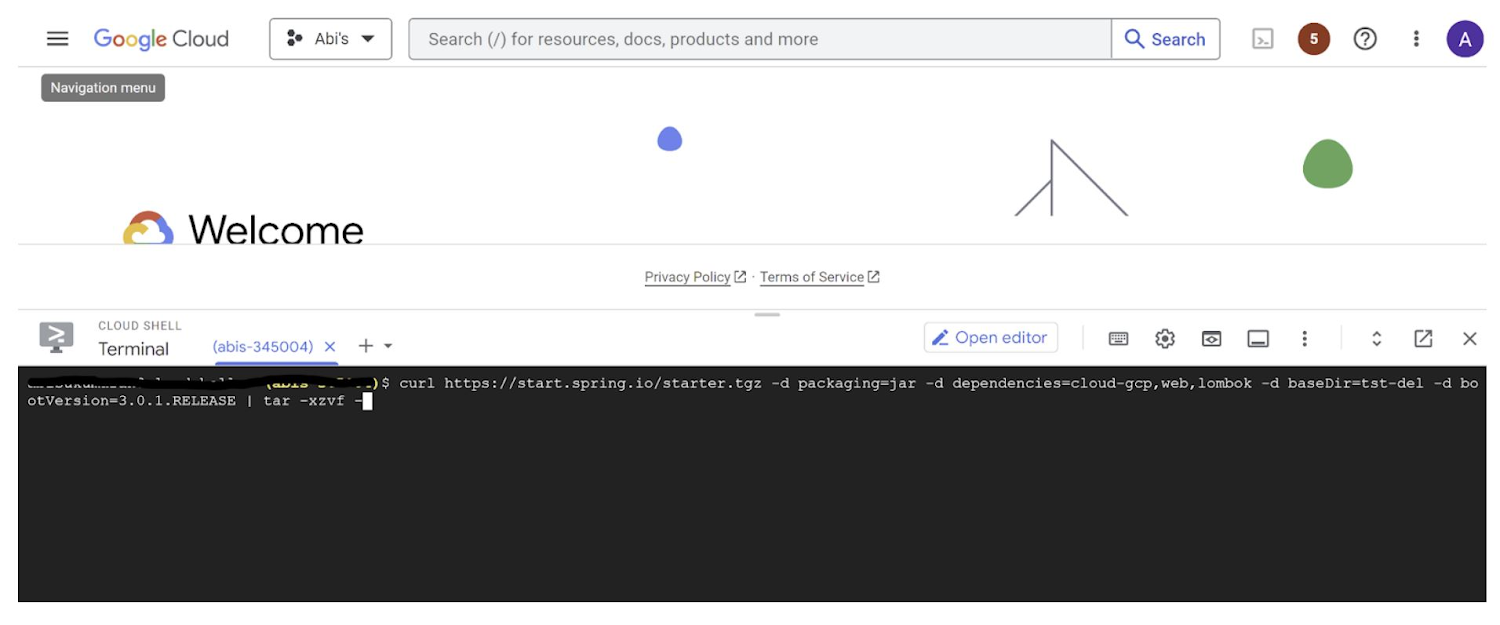
This creates a project structure under “spring-vision” as below:
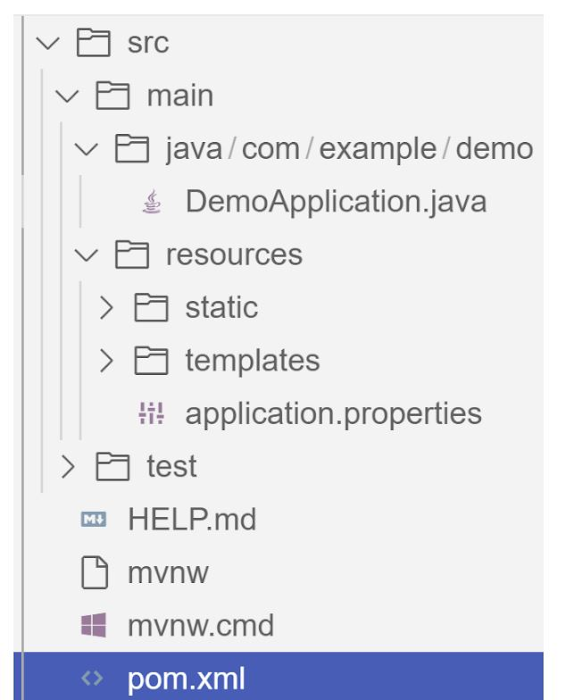
pom.xml contains all the dependencies for the project (dependencies you configured using this command are already added in your pom.xml).src/main/java/com/example/demo has the source classes .java files.resources contain the images, XML, text files and the static content the project uses that are maintained independently.application.properties enable you to maintain the admin features to define profile specific properties of the application.
Configuring the Vision API
Once you have the Vision API enabled, you have the option to configure the API credentials in your application. You can optionally use Application Default Credentials for setting up authentication. In this demo implementation however I have not implemented the use of credentials.
Implementing the vision and translation services
Create a service class that interacts with the Vision API. Inject the necessary dependencies and use the Vision API client to send image analysis requests. You can implement methods to perform tasks like image labeling, face detection, recognition, and more, based on your application’s requirements. In this demo, we will use handwriting extraction and translation methods. For this make sure you include the following dependencies in pom.xml
<dependency>
      <groupId>org.springframework.cloud</groupId>
      <artifactId>spring-cloud-gcp-starter-vision</artifactId>
</dependency>
<dependency>
<groupId>com.google.cloud</groupId>
<artifactId>google-cloud-translate</artifactId>
</dependency>Clone / Replace the following files from the repo and add them to the respective folders / path in the project structure:
Application.java(/src/main/java/com/example/demo)TranslateText.java(/src/main/java/com/example/demo)VisionController.java(/src/main/java/com/example/demo)index.html(/src/main/resources/static)result.html(/src/main/resources/templates)pom.xml
The method extractTextFromImage in the service org.springframework.cloud.gcp.vision.CloudVisionTemplate lets you extract text from your image input. The method getTranslatedText from the service com.google.cloud.translate.v3 lets you pass the extracted text from your image and get the translated text in the desired target language as response (if the source is in one of the supported languages list).
Building the REST API
Design and implement the REST endpoints that will expose the Vision API functionalities. Create controllers that handle incoming requests and utilize the Vision API service to process the images and return the analysis results.
In this demo, our VisionController class implements the endpoint, handles the incoming request, invokes the Vision API and Cloud Translation services and returns the result to the view layer. Implementation of the GET method for the REST endpoint is as follows:
@GetMapping("/extractText")
  public String extractText(String imageUrl) throws IOException {
    String textFromImage =
   this.cloudVisionTemplate.extractTextFromImage(this.resourceLoader.getResource(imageUrl));


    TranslateText translateText = new TranslateText();
    String result = translateText.translateText(textFromImage);
    return "Text from image translated: " + result;
  }
The TranslateText class in the above implementation has the method that invokes the Cloud Translation service:
String targetLanguage = "en";
 TranslateTextRequest request =
         TranslateTextRequest.newBuilder()
             .setParent(parent.toString())
             .setMimeType("text/plain")
             .setTargetLanguageCode(targetLanguage)
             .addContents(text)
             .build();
     TranslateTextResponse response = client.translateText(request);
     // Display the translation for each input text provided
     for (Translation translation : response.getTranslationsList()) {
       res = res + " ::: " + translation.getTranslatedText();
        System.out.printf("Translated text : %s\n", res);
     }
With the VisionController class, we have the GET method for the REST implemented.
Integrating Thymeleaf for frontend development
When building an application with Spring Boot, one popular choice for frontend development is to leverage the power of Thymeleaf. Thymeleaf is a server-side Java template engine that allows you to seamlessly integrate dynamic content into your HTML pages. Thymeleaf provides a smooth development experience by allowing you to create HTML templates with embedded server-side expressions. These expressions can be used to dynamically render data from your Spring Boot backend, making it easier to display the results of image analysis performed by the Vision API service.
To get started, ensure that you have the necessary dependencies for Thymeleaf in your Spring Boot project. You can include the Thymeleaf Starter dependency in your pom.xml:
<dependency>
<groupId>org.springframework.boot</groupId>
<artifactId>spring-boot-starter-thymeleaf</artifactId>
</dependency>
In your controller method, retrieve the analysis result from the Vision API service and add it to the model. The model represents the data that will be used by Thymeleaf to render the HTML template. Once the model is populated, return the name of the Thymeleaf template that you want to render. Thymeleaf will take care of processing the template, substituting the server-side expressions with the actual data, and generating the final HTML that will be sent to the client’s browser. Example:
return new ModelAndView("result", <<YOUR RESULT>>);In the case of the extractText method in VisionController, we have returned the result as a String to and not added to the model. But we have invoked the GET method extractText method on the index.html on page submit.
<form action="/extractText">

        Web URL of image to analyze:

        <input type="text"

               name="imageUrl"

               value=""

        <input type="submit" value="Read and Translate" />

</form>
With Thymeleaf, you can create a seamless user experience, where users can upload images, trigger Vision API analyses, and view the results in real-time. Unlock the full potential of your Vision AI application by harnessing the power of Thymeleaf for frontend development.
Deploying your Spring Boot application with Cloud Run
Write unit tests for your service and controller classes to ensure proper functionality under the /src/test/java/com/example folder. Once you’re confident in its stability, package it into a deployable artifact, such as a JAR file, and deploy it to Cloud Run, a serverless compute platform on Google Cloud. In this step, we will focus on deploying your containerized Spring Boot application using Cloud Run.
a. Package your application by executing the following steps from Cloud Shell(make sure the terminal is prompting at the project root folder)
Build:
./mvnw package
Once the build is successful, run locally to test:
./mvnw spring-boot:run
b. Containerize your Spring Boot Application with Jib:
Instead of manually creating a Dockerfile and building the container image, you can use the Jib utility to simplify the containerization process. Jib is a plugin that integrates directly with your build tool (such as Maven or Gradle) and allows you to build optimized container images without writing a Dockerfile. Before proceeding, you need to enable the Artifact Registry API (Use of Artifact Registry is encouraged over container registry). Then Run Jib to build a Docker image and publish to the Registry:
$ ./mvnw com.google.cloud.tools:jib-maven-plugin:3.1.1:build -Dimage=gcr.io/$GOOGLE_CLOUD_PROJECT/vision-jib
Note: In this experiment, we did not configure the Jib Maven plugin in pom.xml, but for advanced usage, it is possible to add it in pom.xml with more configuration options
c. Deploy the container (that we pushed to Artifact Registry in the previous step) to Cloud Run. This is again a one-command step:
gcloud run deploy vision-app --image gcr.io/$GOOGLE_CLOUD_PROJECT/vision-jib --platform managed --region us-central1 --allow-unauthenticated --update-env-vars
You can alternatively do this from the UI as well. Navigate to the Google Cloud Console and locate the Cloud Run service. Click on “Create Service” and follow the on-screen instructions. Specify the container image you previously pushed to the registry, configure the desired deployment settings (such as CPU allocation and autoscaling), and choose the appropriate region for deployment. You can set environment variables specific to your application. These variables can include authentication credentials (API keys etc.), database connection strings, or any other configuration needed for your Vision AI application to function correctly. When the deployment is completed successfully, you should get an endpoint to your application.
For our demo, the endpoint Cloud Run created for us is: https://vision-app-********-uc.a.run.app
Playing with your Vision AI app
For demo purposes, you can use the image URL below for your app to read and translate:
https://storage.googleapis.com/img_public_test/tamilwriting1.jfif
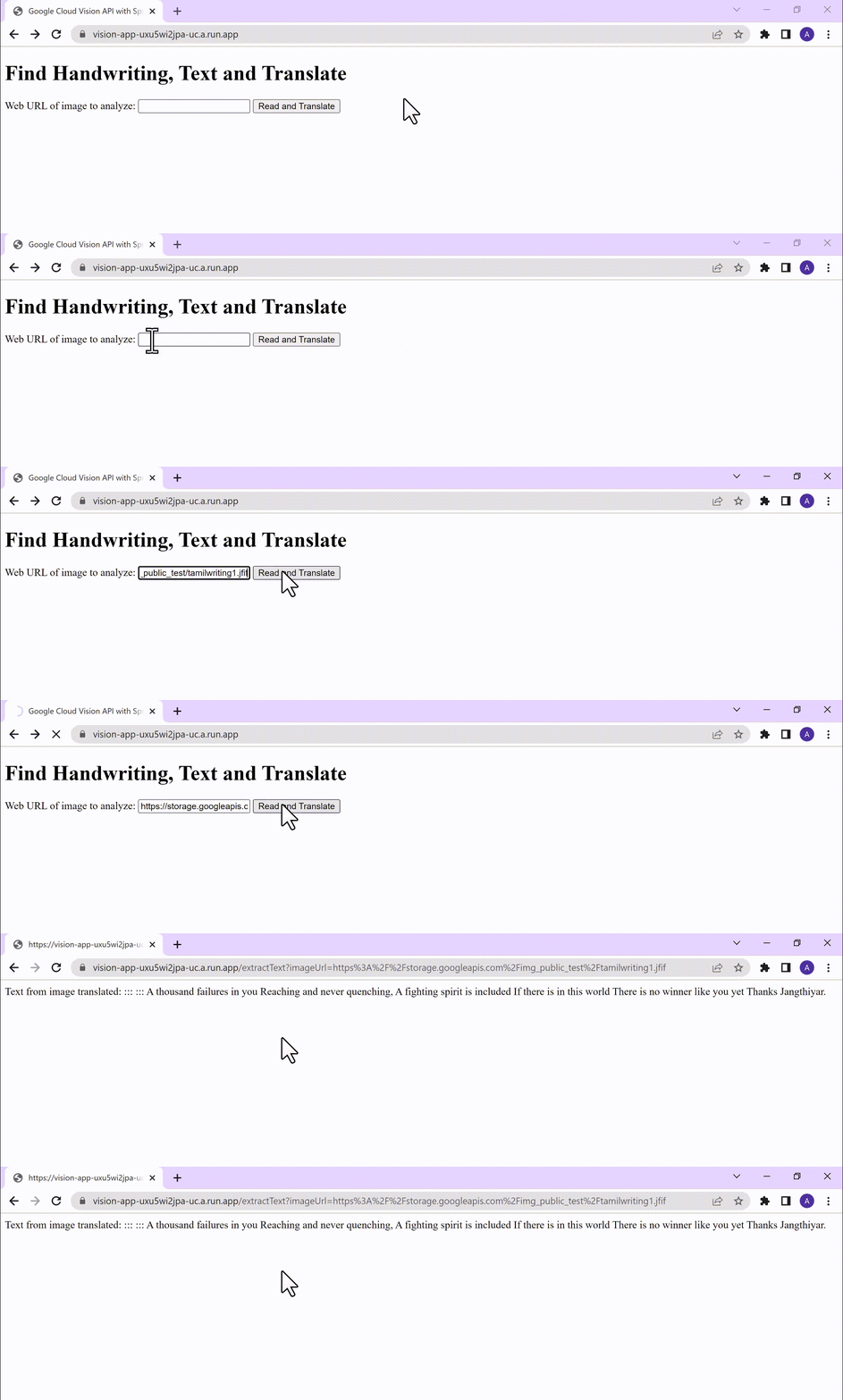
Conclusion
Congratulations! You have successfully created a Vision AI application using Spring Boot and Java. With the power of Vision AI, your application can now perform sophisticated image analysis, including labeling, face detection, and more. The integration of Spring Boot provides a solid foundation for building scalable and robust Google Cloud Native applications. Continue exploring the vast capabilities of Vision AI, Cloud Run, Cloud Translation and more to enhance your application with additional features and functionalities. To learn more, check out the Vision API, Cloud Translation, and GCP Spring docs. Try out the same experiment with the Spring Native option!! Also as a sneak-peak to Gen-AI world, checkout how this API shows up in Model Garden.
How Connected-Stories Uses BigQuery and AI/ML to Craft Personalized Ad Experiences

4020
Of your peers have already read this article.
4:00 Minutes
The most insightful time you'll spend today!
Editor’s note: The post is part of a series highlighting our awesome partners, and their solutions, that are Built with BigQuery
In the field of producing engaging video content such as ads, many marketers ignore the power of data to improve their creative efforts to meet the consumers’ need for personalized messages. The demand for creative tech to efficiently personalize is real as marketers need personalized video Ads to reach their audience with the right message at the right time. Data, Insights and Technology are the main ingredients to deliver this value while ensuring security and privacy requirements are met. The Connected-Stories team partnered with Google Cloud to build a platform for Ad personalization. Google Data Cloud and BigQuery are at the forefront to assimilate data, leverage ML models, create personalized ads, and capitalize on real-time intelligence as the core features of the Connected-Stories NEXT platform.
Connected-Stories NEXT is an end-to-end creative management platform to develop, serve, and optimize interactive video and display ads that scale across any channel. The platform ingests first-party data to create custom ML models, measure numerous third-party data points to help brands develop unique customer journeys and create videos that their data signals can drive. An intelligent feedback loop passes real-time data back, enabling brands to make data-driven and actionable video ads that take the brand’s campaigns to the next level.
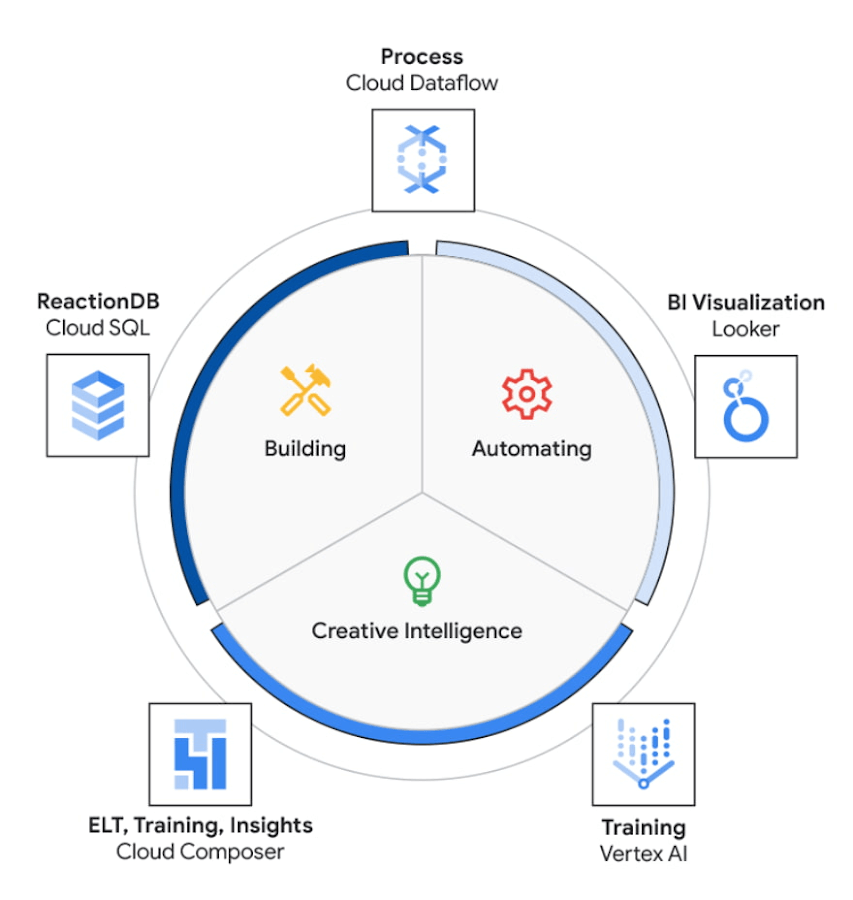
The core use case of the NEXT platform revolves around collecting user’s interaction data and optimizing for precision and speed to create an actionable Ad experience that is personalized for each user. The platform processes complex data points to create interactive data visualizations that allow for accurate analysis. The platform uses Vertex AI to access managed tools, workflows, and infrastructure to build, deploy, and scale ML models that have improved the accuracy to identify segments for further analysis.
The platform ingests 200M data events with peaks and valleys of activity. These events are processed to generate dashboards that enable users to visualize metrics based on filters in real-time. These dashboards have high performance requirements in terms of a responsive user interface under constantly changing data dimensions.
Google Cloud’s serverless stack coupled with limitless data cloud infrastructure has been the core to the NEXT platform’s data-driven innovation. The growing volume of data ingested, streamed and processed were scaled uniformly across the compute, storage and analytical layers of solution. A lean development team at Connected-Stories were able to focus all-in on the solution, while the serverless stack scaled, lowered attack service in terms of security and optimized the cost footprint through pay-as-you-go features.
BigQuery has been the backbone to support the vast amounts of data spreading over multiple geos resulting in workloads running at petabyte scale. BigQuery’s fully managed serverless architecture, real-time streaming, built-in machine learning and rich business intelligence capabilities distinguishes itself from a cloud data warehouse. It is the foundation needed to approach data and serve users in an unlimited number of ways. For an application with zero tolerance for failure, given its fully managed nature, BigQuery handles replication, recovery, data distributed optimization and management.
The platform’s requirements include the need for low maintenance, constantly ingesting and refreshing data and smart-tuning of aggregated data. These capabilities can be implemented by BigQuery’s materialized views feature. Materialized views are useful for precomputed views that regularly cache query results for better performance. These views possess the innate feature to read only the delta change from base tables and calculate the up-to-date aggregations. Materialized views impart faster outputs and consume fewer resources while reducing the cost footprint.
Some key considerations in using Google cloud and focusing on the Serverless stack include: quick onboarding to development, prototyping in short sprints and ease of preparing data in a rapidly changing environment. Typical considerations around low code / no code include data transformation, aggregation and reduced deployment time. These considerations are fulfilled through using serverless capabilities within Google Cloud such as PubSub, Cloud Storage, Cloud Run, Cloud Composer, Dataflow and BigQuery as described in the Architecture diagram below. The use of each of these components and services are described below.
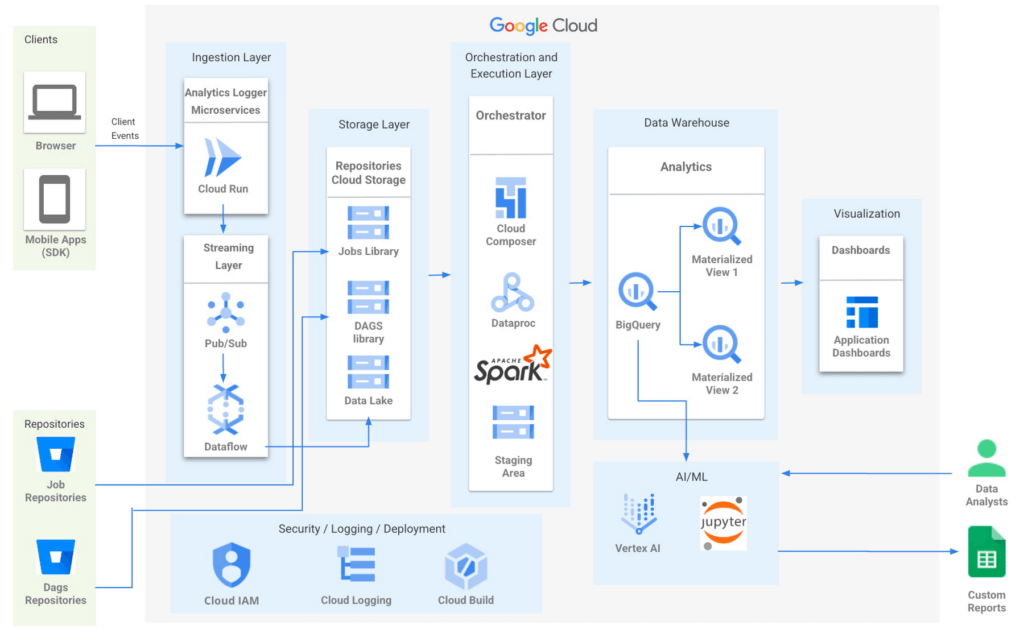
- Input/Ingest: At a high-level, microservices hosted in Cloud Run collect and aggregate incoming Ads events.
- Enrichment: The output of this stage is a Pub-Sub message enriched with more attributes based on a pre-configured campaign.
- Store: a Cloud Dataflow streaming job to create text files in Cloud Storage buckets.
- Trigger: Cloud Composer triggers the spark jobs based on text files to process and group them to produce desired output as one record per impression, a logical group of events.
- Deploy: Cloud Build is then used to automate all deployments.
Thus far, all Google cloud managed services work together to ingest, store and trigger the orchestration, all of which are scalable based on configurations including autoscaling capabilities.
- Visualization: A visualization tool reads data from BigQuery to compute pre-aggregations required for each dashboard.
- Data Model Evolution considerations: Though the solution served the purpose of creating pre-aggregations, as the data model evolved by adding a column or creating a new table, it led to recreating pre-aggregations and querying the data again. Alternatively, creating aggregate tables as an extra output of current ETLs seemed like a viable option. However, this would increase the cost and complexity of jobs. A similar situation to reprocess or update aggregated tables would occur as data is updated.
Precomputed views of data that is periodically cached are critical to reach the audience with the right message at the right time.
- Performance: In order to increase the performance of the platform, we need to have regularly precomputed views of the data, cached .
- Materialized Views: Consumers of these views needed faster response times, to consume fewer resources and output only the changes in comparison to a base table. BigQuery Materialized views were used to solve this very requirement. Materialized views have been highly leveraged to optimize the design resulting in lesser maintenance and access to fresh data with high performance with a relatively low technical investment in creating and maintaining SQL code.
- Dashboards: Application dashboards pointing to the Materialized views are highly performant and provide a view into fresh data.
- Custom Reports with Vertex AI Notebooks: Vertex AI notebooks directly read data from BigQuery to produce custom reports for a subset of customers. Vertex AI has been hugely beneficial to data analysts, where an environment with pre-installed libraries simplifies the readiness to use. Vertex AI Workbench notebooks are used to share these reports within the team allowing them to work always on the cloud without having the need to download data at any time. Besides, it increases the velocity to develop and test ML models faster.
The NEXT platform has yielded benefits such as customers having the ability to create unique consumer journeys powered by AI / ML personalization triggers, using first-party data and business intelligence tools to capitalize on real-time creative intelligence, which is a dashboard to measure campaign performance for cross-functional teams to analyze the impact of Ad content experience at a granular level. All of these while ensuring controlled access to data to enrich data without moving across clouds. The NEXT platform can keep up with increased demands for agility, scalability and reliability through the underlying usage of Google Cloud.
Partnering with Google, in the context of the Google Built with BigQuery program has surfaced the differentiated value in areas of creating interactive personalized Ads by using real-time data. In addition, by sharing this data across organizations as assets, ML models have fueled higher levels of innovation. Connected-Stories plan to deepen the penetration into the entire spectrum of services offered in the AI/ML area to enhance core functionality and provide newer capabilities to the platform.
Click here to learn more about Connected-Stories NEXT Platform capabilities.
The Built with BigQuery Advantage for ISVs
Through Built with BigQuery, launched in April ‘22 as part of Google Data Cloud Summit, Google is helping tech companies like Connected-Stories co-innovate in building applications that leverage Google’s data cloud with simplified access to technology, helpful and dedicated engineering support, and joint go-to-market programs. Participating companies can:
- Get started fast with a Google-funded, pre-configured sandbox.
- Accelerate product design and architecture through access to designated technical experts from the ISV Center of Excellence who can share insights from key use cases, architectural patterns, and best practices encountered in the field.
- Amplify success with joint marketing programs to drive awareness, generate demand, and increase adoption.
The Google Data Cloud spectrum of products and specifically BigQuery give ISVs the advantage of a powerful, highly scalable data warehouse that’s integrated with Google Cloud’s open, secure, sustainable platform. And with a huge and expanding partner ecosystem and support for multi-cloud, open source tools and APIs, Google provides technology companies the portability and extensibility they need to avoid data lock-in and exercise choice.
We thank the Google Cloud and Connected-Stories team members who co-authored the blog: Connected-Stories: Luna Catini, Marketing Director, Google: Sujit Khasnis, Cloud Partner Engineering
2994
Of your peers have already watched this video.
17:30 Minutes
The most insightful time you'll spend today!
Signal Generation in the Investment Management Industry
Machine learning is seeing a lot of use cases in the financial sector. One of them is leverage AI to sift signal from noise and create insights or predictions that can give financial planners an edge.
In this video, David Li, Head of Advanced Analytics, BlackRock and Colman Madden, Customer Engineer, Google Cloud, present on how BlackRock leverages NLP on Google Cloud to search for signals in the investment management industry.
“We analyze large volumes of textual news via NLP to classify text into sentiment scores as well as other metrics such as news volume and emotions in these articles,” says David Li.
He also discusses some of the challenges they faced, and the solutions they found, and why they selected Google Cloud to run this project.

5208
Of your peers have already downloaded this article
2:30 Minutes
The most insightful time you'll spend today!
For as long as business intelligence (BI) has been around, visualization tools have played an important role in helping analysts and decision-makers quickly get insights from data.
In our current era of big data analytics, that premise still holds. To provide an integrated platform for building BI dashboards on top of big data, GCP offers the combination of Google BigQuery, a cloud-native data warehouse that helps you analyze petabytes of data quickly, and Google Data Studio, a free tool that helps you quickly create beautiful reports.
First, imagine that you work for an online retailer that bases important decisions on customer interaction data in the form of large amounts (multiple TBs) of usage logs stored as date-partitioned tables in a BigQuery dataset called usage. To get business value out of that data as quickly as possible, you want to build a dashboard for analysts that will provide visualizations of trends and patterns in your data.
The good news is that a connector is available that lets you query data stored in BigQuery directly from Data Studio.
Learn how to build a BI dashboard with Data Studio as the front end, and powered by BigQuery on the back end (with some help from Google App Engine for added efficiency). Download this how-to now.
Google Cloud’s Med-PaLM 2: Pioneering Ethical AI Solutions for the Medical Domain

917
Of your peers have already read this article.
3:30 Minutes
The most insightful time you'll spend today!
Healthcare breakthroughs change the world and bring hope to humanity through scientific rigor, human insight, and compassion. We believe AI can contribute to this, with thoughtful collaboration between researchers, healthcare organizations and the broader ecosystem.
Today, we’re sharing exciting progress on these initiatives, with the announcement of limited access to Google’s medical large language model, or LLM, called Med-PaLM 2. It will be available in coming weeks to a select group of Google Cloud customers for limited testing, to explore use cases and share feedback as we investigate safe, responsible, and meaningful ways to use this technology.
Med-PaLM 2 harnesses the power of Google’s LLMs, aligned to the medical domain to more accurately and safely answer medical questions. As a result, Med-PaLM 2 was the first LLM to perform at an “expert” test-taker level performance on the MedQA dataset of US Medical Licensing Examination (USMLE)-style questions, reaching 85%+ accuracy, and it was the first AI system to reach a passing score on the MedMCQA dataset comprising Indian AIIMS and NEET medical examination questions, scoring 72.3%.
Industry-tailored LLMs like Med-PaLM 2 are part of a burgeoning family of generative AI technologies that have the potential to significantly enhance healthcare experiences. We’re looking forward to working with our customers to understand how Med-PaLM 2 might be used to facilitate rich, informative discussions, answer complex medical questions, and find insights in complicated and unstructured medical texts. They might also explore its utility to help draft short- and long-form responses and summarize documentation and insights from internal data sets and bodies of scientific knowledge.
Innovating responsibly with AI
Since last year, we’ve been researching and evaluating Med-PaLM and Med-PaLM 2, assessing it against multiple criteria — including scientific consensus, medical reasoning, knowledge recall, bias, and likelihood of possible harm — which were evaluated by clinicians and non-clinicians from a range of backgrounds and countries.
Med-PaLM 2’s impressive performance on medical exam-style questions is a promising development, but we need to learn how this can be harnessed to benefit healthcare workers, researchers, administrators, and patients. In building Med-PaLM 2, we’ve been focused on safety, equity, and evaluations of unfair bias. Our limited access for select Google Cloud customers will be an important step in furthering these efforts, bringing in additional expertise across the healthcare and life sciences ecosystem.
What’s more, when Google Cloud brings new AI advances to our products, our commitment is two-fold: to not only deliver transformative capabilities, but also ensure our technologies include proper protections for our organizations, their users, and society. To this end, our AI Principles, established in 2017, form a living constitution that guides our approach to building advanced technologies, conducting research, and drafting our product development policies.
From AI to generative AI
Google’s deep history in AI informs our work in generative AI technologies, which can find complex relationships in large sets of training data, then generalize from what they learn to create new data. Breakthroughs such as the Transformer have enabled LLMs and other large models to scale to billions of parameters, letting generative AI move beyond the limited pattern-spotting of earlier AIs and into the creation of novel expressions of content, from speech to scientific modeling.
Google Cloud is committed to bringing to market products that are informed by our research efforts across Alphabet. In 2022, we introduced a deep integration between Google Cloud and Alphabet’s AI research organizations, which allows Vertex AI to run DeepMind’s groundbreaking protein structure prediction system, AlphaFold.
Much more is on the way. In one sense, generative AI is revolutionary. In another, it’s the familiar technology story of more and better computing creating new industries, from desktop publishing to the internet, social networks, mobile apps, and now, generative AI.
Building on AI leadership
Additionally, today we’re announcing a new AI-enabled Claims Acceleration Suite, designed to streamline processes for health insurance prior authorization and claims processing. The Claims Acceleration Suite helps both providers of insurance plans and healthcare to create operational efficiencies and reduce administrative burdens and costs by converting unstructured data into structured data that help experts make faster decisions and improve access to timely patient care.
On the clinical side, last year we announced Medical Imaging Suite, an AI-assisted diagnosis technology being used by Hologic to improve cervical cancer diagnoses and Hackensack Meridian Health to predict metastasis in patients with prostate cancer. Elsewhere, Mayo Clinic and Google have collaborated on an AI algorithm to improve the care of head and neck cancers, and Google Health recently partnered with iCAD to improve breast cancer screening with AI.
From these examples and more, it’s clear that the healthcare industry has moved from testing AI to deploying it to improve workflows, solve business problems, and speed healing. With this in mind, we expect rapid interest in and uptake of generative AI technologies. Healthcare organizations are eager to learn about generative AI and how they can use it to make a real difference.
Looking ahead
The power of AI has reinforced Google Cloud’s commitment to privacy, security, and transparency. Our platforms are designed to be flexible, including data and model lineage capabilities, integrated security and identity management services, support for third-party models, choice and transparency on models and costs, integrated billing and entitlement support, and support across many languages.
While we’ll have some innovations like Med-PaLM 2 that are tuned for healthcare, we also have products that are relevant across industries. Last month, we announced several generative AI capabilities coming to Google Cloud, including Generative AI support in Vertex AI and Generative AI App Builder, which are already being tested by a number of customers. Developers and businesses already use Vertex AI to build and deploy machine learning models and AI applications at scale, and we recently added Generative AI support in Vertex AI. This gives customers foundation models they can fine-tune with their own data, and the ability to deploy applications with this powerful new technology. We also launched Generative AI App Builder to help organizations build their own AI-powered chat interfaces and digital assistants in minutes or hours by connecting conversational AI flows with out-of-the-box search experiences and foundation models.
As AI proves its value, it’s likely there will be increased focus on high-quality data collection and curation in healthcare and life sciences. Improving the flow and unification of data across health care systems, referred to as data interoperability, is one of the most important building blocks to leveraging AI, and it helps organizations run more effectively, improve patient care, and helps people live healthier lives. We expect to continue our investments in technology, infrastructure, and data governance.
We’re committed to realizing the potential of this technology in healthcare. By working with a handful of trusted healthcare organizations early on, we’ll learn more about what can be achieved, and how this technology can safely advance. For all of us, the prospects are inspiring, humbling, and exciting.
If you’re interested in exploring generative AI on Cloud, you can sign-up for our Trusted Tester program or reach out to your Google Cloud sales representative.
Costa Mesa Sanitary District Demonstrates How Public Utilities Can Leverage ML for Management and Upkeep of Manholes

3086
Of your peers have already read this article.
2:00 Minutes
The most insightful time you'll spend today!
Local governments are embracing more modern and scalable ways to support their communities. In an effort to save both time and money, Costa Mesa Sanitary District (“CMSD”) used machine learning to automate and streamline manhole maintenance. Manhole maintenance is an essential part of the upkeep of cities. Manholes provide critical access points for underground public utilities, allowing inspection, maintenance, and system upgrades. But failure to upkeep manholes can cause a multitude of problems, from road hazards to sewer blockages, and can make it difficult for workers to access underground public utilities, which can lead to other safety issues. Manhole maintenance is an essential part of Costa Mesa Sanitary District maintenance, but this process requires the work of an outside consultant and costs the CMSD over $100,000.
ML to the rescue
CMSD, in collaboration with SpringML and Google Cloud, developed a project to streamline manhole maintenance by leveraging the power of machine learning (ML) to detect sewer manholes and rate their conditions. This solution saves CMSD $40,000 every year, freeing up funds for other public service projects.
Every quarter, one member of the CMSD drives a car outfitted with a GoPro camera. This car travels through the entire District area, which includes the city of Costa Mesa and small portions of Newport Beach, CA, which is about 218 street miles, and records the roads to detect approximately 5,000 manholes. At the end of the recording day, CMSD members transfer images and videos from the GoPro SD card into a local server. Then these files are automatically ingested into Google Cloud Storage for processing. From here, the machine learning algorithms detect which manholes need repair.
Google Cloud products are used throughout this project. Once the images and videos are in Google Cloud Storage, a workflow with Cloud Scheduler spins up the VM every night to detect if there are new videos on Cloud Storage. If there are, this triggers cloud machine learning, which reviews the numerous images and videos, rates each manhole, and determines if any require maintenance.
Machine learning to detect and grade manholes
SpringML applied a very systematic approach to detecting and grading the manholes. First, image processing ensures that the region of interest is only the section of the road in front of the vehicle to avoid any privacy concerns. Then SpringML applied a 5-step process using machine learning to detect and grade the manholes.
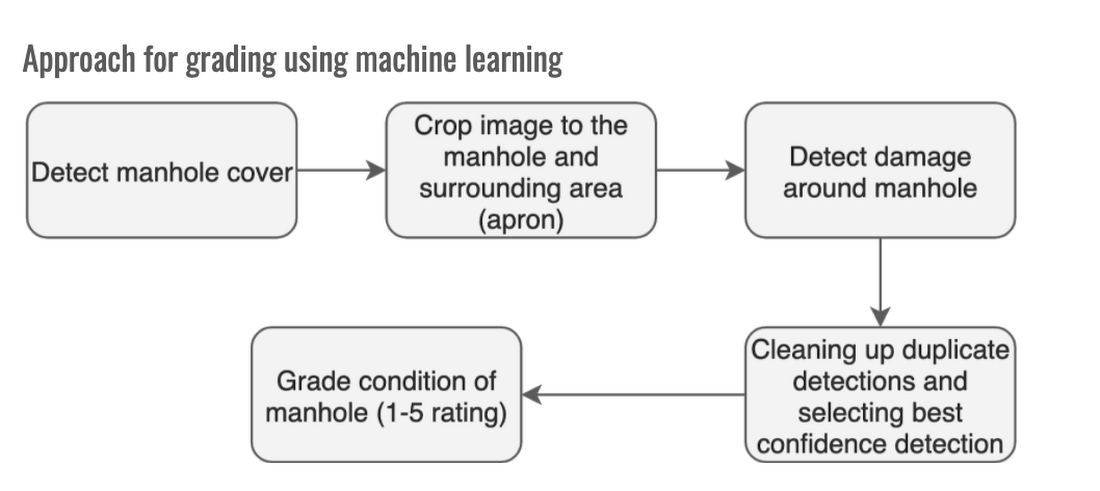
- SpringML developed two separate custom TensorFlow-based Mask R-CNN models. Mask-R-CNN is a deep neural network that is used for image segmentation tasks, which means it can separate different objects in an image or a video.
The first Mask-R-CNN model was created to accurately detect if an image showed a manhole cover. This was a critical step because sewer manhole covers look similar to water main covers. To make the model accurate, it was important that there be no false positives. SpringML used around 50 images of sewer manholes and other images to train and validate that the algorithm could successfully detect sewer manhole covers. - Once a manhole is accurately detected, the surrounding area is masked using image processing to focus on the manhole and then the cropped images are sent to the second model which is used to detect damage in the area around the manhole, called the apron. To reduce the processing time, the second model only does the inference if a manhole cover is detected.
- The second Mask-R-CNN model uses CMSD Guidelines to decide what types of damage contributed to the rating system. For training purposes, SpringML uses a TensorFlow-Keras inside a Virtual Machine on Google Cloud. The initial model was trained and the Keras weights were saved on Google Cloud Storage. This helped create a versioned system of the models as the model gets refined over time.
- Then, duplicated detections are cleaned up to have a unique detection for each manhole cover.
- Finally, Manholes are graded from a 1-5 rating, with 5 representing high damage and 1 representing low damage.
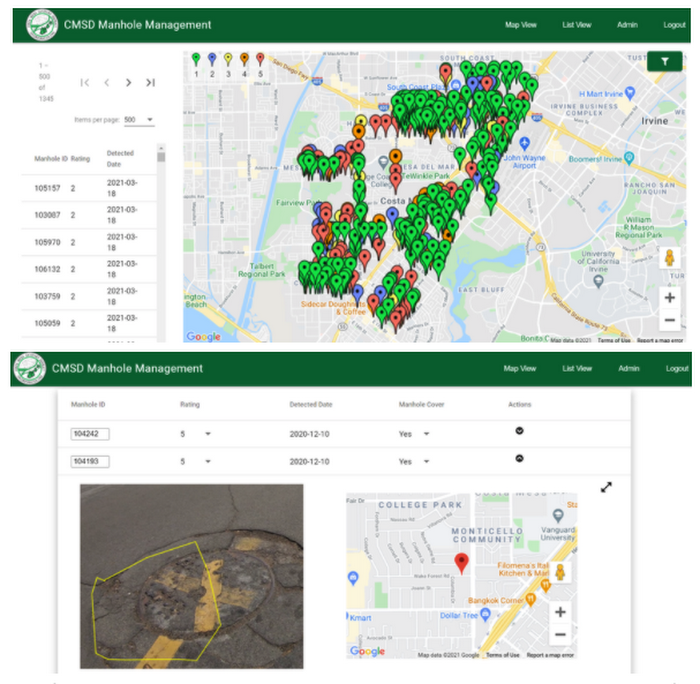
Once cloud machine learning has analyzed the new videos and images, the final scores are stored in BigQuery. Results are then served to members of CMSD via a simple web application where they can see which manholes need to be maintained. Two staff members review the ML results and determine priorities for repairs. One of the most interesting features of this project is that the model gets continually retrained based on feedback submitted in the web application. For example, if the model inaccurately detects a manhole, a member of CMSD can mark that in the web application and their feedback is immediately used to refine the model.
This solution shows how leveraging machine learning can streamline a necessary local government project and save money and labor while being highly scalable! Not only does this system streamline the manhole maintenance process, but it also allows for more frequent review of manhole conditions and provides a historical view of how the District’s manholes change over time.
Want to learn more about Google Cloud machine learning? Check out this tutorial to learn TensorFlow and Keras and check out more machine learning tools in our AI Platform.
More Relevant Stories for Your Company

How Constellation Brands’ Direct-to-Customer Tech Delivers Economic Impact across Business Portfolio
Editor’s note: Today we’re hearing from Ryan Mason, Director, Head of DTC Growth & Strategy, at alcoholic beverage firm, Constellation Brands on the company’s shift to Direct-to-Consumer (DTC) sales and how Google Cloud’s powerful technology stack helped with this transformation. It’s no secret that consumer businesses have been up-ended in

How Real Companies Are Innovating with AI Today—and the Benefits They’re Seeing
What do you get when you mix Target, women’s swim wear, and AI? “Joy!” says Mike McNamara, CIO and CDO, Target. McNamara is just one of the many stories of real businesses conquering old challenges, and new disruptive industry challenges, with artificial intelligence. McNamara, Nick Rockwell, CTO, The New York

Google Cloud CCAI’s Support for the Public Sector Soars during the Pandemic
Scaling Virtual Support in the Pandemic Era: The AI Connection Since the early days of the pandemic, we’ve partnered with government organizations and academic institutions to serve communities at scale with Contact Center Artificial Intelligence (CCAI). I sat down with Bill MacKenzie, IT liaison for the Upper Grand School District


Pytorch at Scale on Cloud TPUs
Cloud TPU Pods are machine learning supercomputers that enable enterprises to train large machine learning models at a scale otherwise difficult or sometimes impossible. They deliver business value through solving many machine learning problems including image search, neural architecture search and large-scale language models both for Google and Google Cloud
