





Unifying Data and AI: Bringing Unstructured Data Analytics to BigQuery

4191
Of your peers have already read this article.
2:30 Minutes
The most insightful time you'll spend today!
Over one third of organizations believe that data analytics and machine learning have the most potential to significantly alter the way they run business over the next 3 to 5 years. However, only 26% of organizations are data driven. One of the biggest reasons for this gap is that a major portion of the data generated today is unstructured, which includes images, documents, and videos. It is estimated to cover roughly up to 80% of all data, which has so far remained untapped by organizations.
One of the goals of Google’s data cloud is to help customers realize value from data of all types and formats. Earlier this year, we announced BigLake, which unifies data lakes and warehouses under a single management framework, enabling you to analyze, search, secure, govern and share unstructured data using BigQuery.
At Next ‘22, we announced the preview of object tables, a new table type in BigQuery that provides a structured record interface for unstructured data stored in Google Cloud Storage. This enables you to directly run analytics and machine learning on images, audio, documents and other file types using existing frameworks like SQL and remote functions natively in BigQuery itself. Object tables also extend our best practices of securing, sharing and governing structured data to unstructured, without needing to learn or deploy new tools.
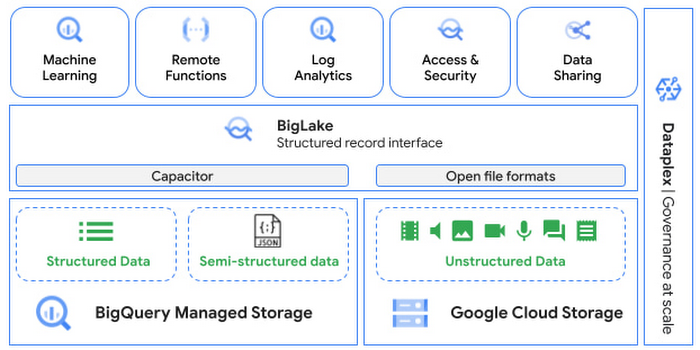
Directly process unstructured data using BigQuery ML
Object tables contain metadata such as URI (Uniform Resource Identifier), content type, and size that can be queried just like other BigQuery tables. You can then derive inferences using machine learning models on unstructured data with BigQuery ML. As part of preview, you can import open source TensorFlow Hub image models, or your own custom models to annotate the images. Very soon, we plan to enable this for audio, video, text and many other formats, and pre-trained models to enable out-of-the box analysis. Check out this video to learn more and watch a demo.
Create an object table
CREATE EXTERNAL TABLE my_dataset.object_table
WITH CONNECTION us.my_connection
OPTIONS(uris=["gs://mybucket/images/*.jpg"],
object_metadata="SIMPLE", metadata_cache_mode="AUTOMATIC");
# Generate inferences with BQML
SELECT * FROM ML.PREDICT(
MODEL my_dataset.vision_model,
(SELECT ML.DECODE_IMAGE(data) AS img FROM my_dataset.object_table)
);By analyzing unstructured data natively in BigQuery, businesses can
- Eliminate manual effort as pre-processing steps such as tuning image sizes to model requirements are automated
- Leverage the simple and familiar SQL interface to quickly gain insights
- Save costs by utilizing existing BigQuery slots without needing to provision new forms of compute
Adswerve is a leading Google Marketing, Analytics and Cloud partner on a mission to humanize data. Twiddy & Co. is Adswerve’s client – a vacation rental company in North Carolina. By combining structured and unstructured data, Twiddy and Adswerve used BigQuery ML to analyze images of rental listings and predict the click-through rate, enabling data-driven photo editorial decisions.
“Twiddy now has the capability to use advanced image analysis to stay competitive in an ever changing landscape of vacation rental providers – and can do this using their in-house SQL skills.” said Pat Grady, Technology Evangelist, Adswerve
Process unstructured data using remote functions
Customers today use remote functions (UDFs) to process structured data for languages and libraries that are not supported in BigQuery. We are extending this capability to process unstructured data using object tables.
Object tables provide signed URLs to allow remote UDFs running on Cloud Functions or Cloud Run to process the object table content. This is particularly useful for running Google’s pre-trained AI models, including Vision AI, Speech-to-Text, Document AI, open source libraries such as Apache Tika, or deploying your own custom models where performance SLAs are important.
Here’s an example of an object table being created over PDF files that are parsed using an open source library running as a remote UDF.
SELECT uri, extract_title(samples.parse_tika(signed_url)) AS title<br>FROM EXTERNAL_OBJECT_TRANSFORM(TABLE pdf_files_object_table,<br>["SIGNED_URL"]);
Extending more BigQuery capabilities to unstructured data
Business intelligence – The results of analyzing unstructured data either directly in BigQuery ML or via UDFs can be combined with your structured data to build unified reports using Looker Studio (at no charge), Looker or any of your preferred BI solutions. This allows you to gain more comprehensive business insights. For example, online retailers can analyze product return rates by correlating them with the images of defective products. Similarly, digital advertisers can correlate ad performance with various attributes of ad creatives to make more informed decisions.
BigQuery search index – Customers are increasingly using the search functionality of BigQuery to power search use cases. These capabilities now extend to unstructured data analytics as well. Whether you use BigQueryML to produce inference on images or use remote UDFs with Doc AI to produce document extraction, the results can now be search indexed and used to support search access patterns.
Here’s an example of search index on data that is parsed from PDF files:
CREATE SEARCH INDEX my_index ON pdf_text_extract(ALL COLUMNS);
SELECT * FROM pdf_text_extract WHERE SEARCH(pdf_text, "Google");Security and governance – We are extending BigQuery’s row-level security capabilities to help you secure objects in Google Cloud Storage. By securing specific rows in an object table, you can restrict the ability of end users to retrieve the signed URLs of corresponding URIs present in the table. This is a shared responsibility security model, for which administrators need to ensure that end users don’t have direct access to Google Cloud Storage, and use signed URLs from object tables as the only access mechanism.
Here’s an example of a policy for PII images that are secured to be first processed through a blur pipeline:
CREATE ROW ACCESS POLICY pii_data ON object_table_images
GRANT TO ("group:admin@example.com")
FILTER USING (ARRAY_LENGTH(metadata)=1 AND
metadata[OFFSET(0)].name="face_detected")
Soon, Dataplex will support object tables, allowing you to automatically create object tables in BigQuery and manage and govern unstructured data at scale.
Data sharing – You can now use Analytics Hub to share unstructured data with partners, customers and suppliers while not compromising on security and governance. Subscribers can consume the rows of object tables that are shared with them, and use signed URLs for unstructured data objects.
Getting Started
Submit this form to try these new capabilities that unlock the power of your unstructured data in BigQuery. Watch this demo to learn more about these new capabilities.
Special thanks to engineering leaders Amir Hormati, Justin Levandoski and Yuri Volobuev for contributing to this post.
Can Your Company Use Video AI? You’d Be Surprised at the Answer

5746
Of your peers have already read this article.
4:30 Minutes
The most insightful time you'll spend today!
Video AI is a powerful way to enable content discovery and engaging video experiences.
Here, try it out right now!
Google Cloud’s easy-to-access video AI solutions can accomplish a bunch of things. Here are a few:
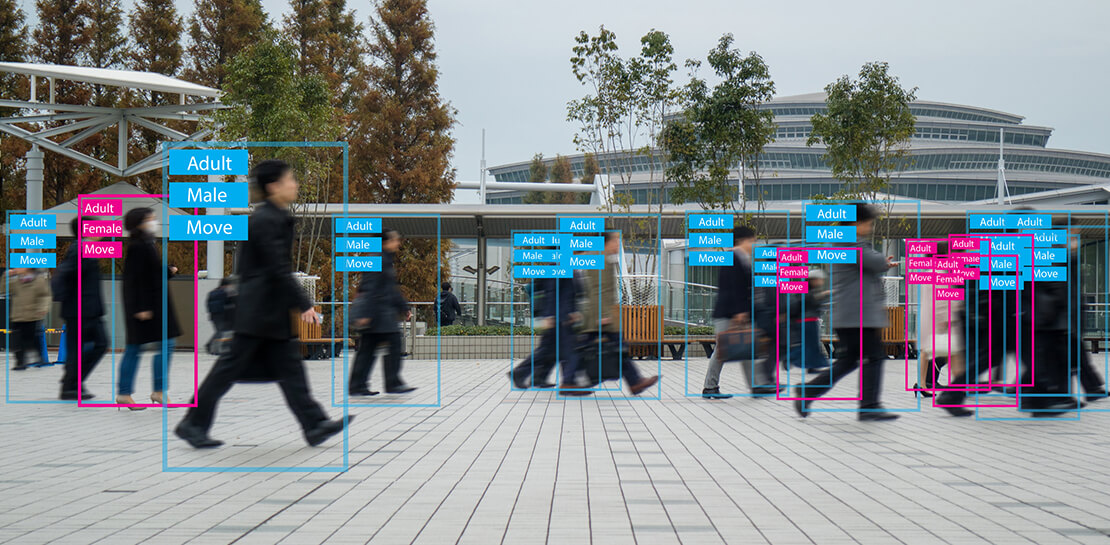
Precise video analysis: Video Intelligence API automatically recognizes more than 20,000 objects, places, and actions in stored and streaming video. It also distinguishes scene changes and extracts rich metadata at the video, shot, or frame level. Use in combination with AutoML Video Intelligence to create your own custom entity labels to categorize content. Imagine being able to categorise hundreds of videos of customer interactions quickly to improve service training!
Recommended content: Build a content recommendation engine with labels generated by Video Intelligence API and a user’s viewing history and preferences. This will simplify content discovery for your users and guide them to the most relevant content that they want.
Simplify media management: Find value in vast archives by making media easily searchable and discoverable. Easily search your video catalog the same way you search text documents. Extract metadata that can be used to index, organize, and search your video content, as well as control and filter content for what’s most relevant.Imagine being able to locate insight in hundreds of enterprise videos to improve productivity and customer experience!
Easily create intelligent video apps: Gain insights from video in near real time using the Video Intelligence Streaming Video APIs, and trigger events based on objects detected. Build engaging customer experiences with highlight reels, recommendations, interactive videos, and more. Marketers, imagine being able to trigger a customer workflow, in real time, based on a live customer interactions.
Automate expensive workflows: Reduce time and costs associated with transcribing videos and generating closed captions, as well as flagging and filtering inappropriate content.
Content moderation: Identify when inappropriate content is being shown in a given video. You can instantly conduct content moderation across petabytes of data and more quickly and efficiently filter your content or user-generated content.
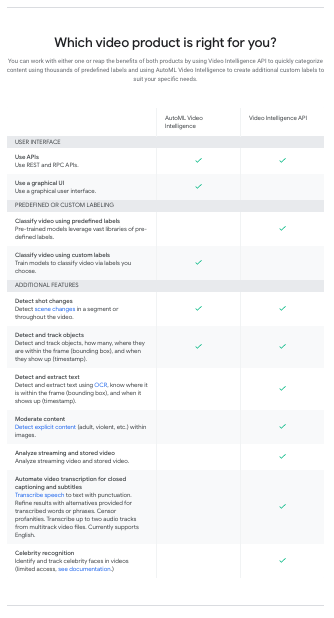
What can your organisation do with video AI?
Trend 2: Google Research on Machine Learning Themes for 2022 and Beyond!
2886
Of your peers have already read this article.
6:00 Minutes
The most insightful time you'll spend today!
Trend 2: Continued Efficiency Improvements for ML
Improvements in efficiency — arising from advances in computer hardware design as well as ML algorithms and meta-learning research — are driving greater capabilities in ML models. Many aspects of the ML pipeline, from the hardware on which a model is trained and executed to individual components of the ML architecture, can be optimized for efficiency while maintaining or improving on state-of-the-art performance overall. Each of these different threads can improve efficiency by a significant multiplicative factor, and taken together, can reduce computational costs, including CO2 equivalent emissions (CO2e), by orders of magnitude compared to just a few years ago. This greater efficiency has enabled a number of critical advances that will continue to dramatically improve the efficiency of machine learning, enabling larger, higher quality ML models to be developed cost effectively and further democratizing access. I’m very excited about these directions of research!
Continued Improvements in ML Accelerator Performance
Each generation of ML accelerator improves on previous generations, enabling faster performance per chip, and often increasing the scale of the overall systems. Last year, we announced our TPUv4 systems, the fourth generation of Google’s Tensor Processing Unit, which demonstrated a 2.7x improvement over comparable TPUv3 results in the MLPerf benchmarks. Each TPUv4 chip has ~2x the peak performance per chip versus the TPUv3 chip, and the scale of each TPUv4 pod is 4096 chips (4x that of TPUv3 pods), yielding a performance of approximately 1.1 exaflops per pod (versus ~100 petaflops per TPUv3 pod). Having pods with larger numbers of chips that are connected together with high speed networks improves efficiency for larger models.
ML capabilities on mobile devices are also increasing significantly. The Pixel 6 phone features a brand new Google Tensor processor that integrates a powerful ML accelerator to better support important on-device features.
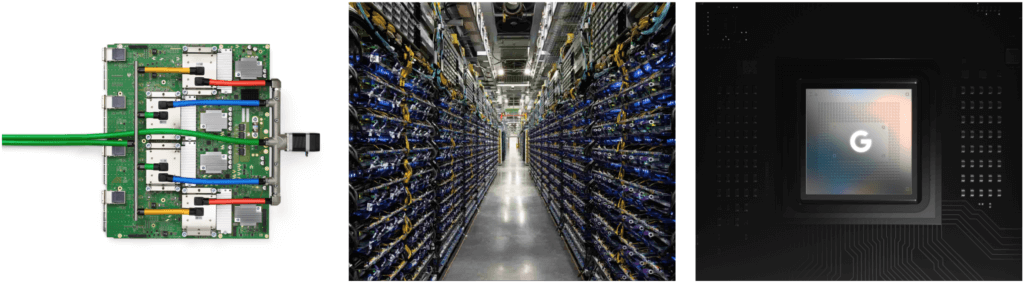
Our use of ML to accelerate the design of computer chips of all kinds (more on this below) is also paying dividends, particularly to produce better ML accelerators.
Continued Improvements in ML Compilation and Optimization of ML Workloads
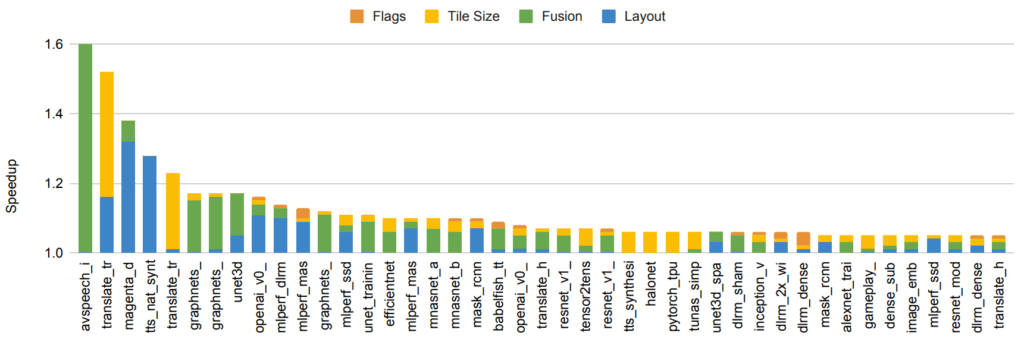
Even when the hardware is unchanged, improvements in compilers and other optimizations in system software for machine learning accelerators can lead to significant improvements in efficiency. For example, “A Flexible Approach to Autotuning Multi-pass Machine Learning Compilers” shows how to use machine learning to perform auto-tuning of compilation settings to get across-the-board performance improvements of 5-15% (and sometimes as much as 2.4x improvement) for a suite of ML programs on the same underlying hardware. GSPMD describes an automatic parallelization system based on the XLA compiler that is capable of scaling most deep learning network architectures beyond the memory capacity of an accelerator and has been applied to many large models, such as GShard-M4, LaMDA, BigSSL, ViT, MetNet-2, and GLaM, leading to state-of-the-art results across several domains.
Human-Creativity–Driven Discovery of More Efficient Model Architectures
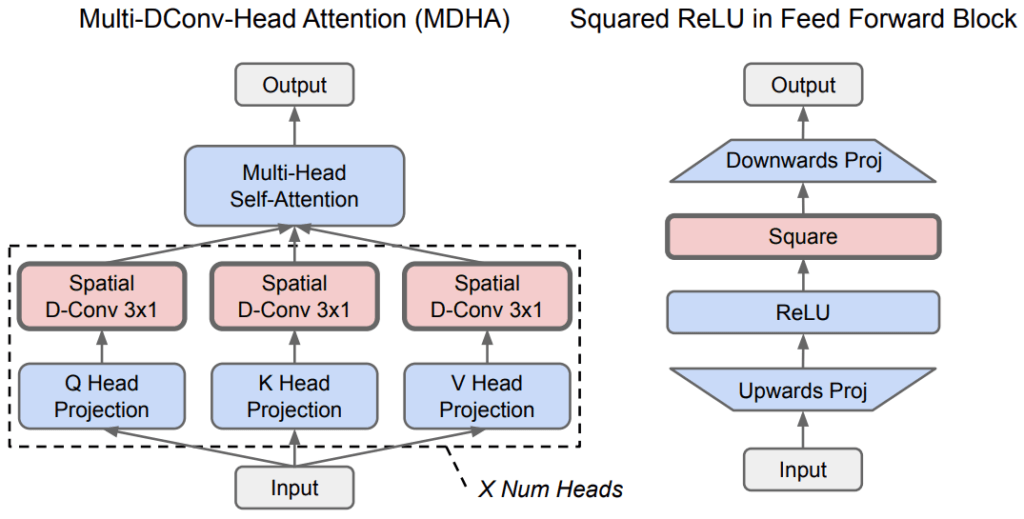
Continued improvements in model architectures give substantial reductions in the amount of computation needed to achieve a given level of accuracy for many problems. For example, the Transformer architecture, which we developed in 2017, was able to improve the state of the art on several NLP and translation benchmarks while simultaneously using 10x to 100x less computation to achieve these results than a variety of other prevalent methods, such as LSTMs and other recurrent architectures. Similarly, the Vision Transformer was able to show improved state-of-the-art results on a number of different image classification tasks despite using 4x to 10x less computation than convolutional neural networks.
Machine-Driven Discovery of More Efficient Model Architectures
Neural architecture search (NAS) can automatically discover new ML architectures that are more efficient for a given problem domain. A primary advantage of NAS is that it can greatly reduce the effort needed for algorithm development, because NAS requires only a one-time effort per search space and problem domain combination. In addition, while the initial effort to perform NAS can be computationally expensive, the resulting models can greatly reduce computation in downstream research and production settings, resulting in greatly reduced resource requirements overall. For example, the one-time search to discover the Evolved Transformer generated only 3.2 tons of CO2e (much less than the 284t CO2e reported elsewhere; see Appendix C and D in this joint Google/UC Berkeley preprint), but yielded a model for use by anyone in the NLP community that is 15-20% more efficient than the plain Transformer model. A more recent use of NAS discovered an even more efficient architecture called Primer (that has also been open-sourced), which reduces training costs by 4x compared to a plain Transformer model. In this way, the discovery costs of NAS searches are often recouped from the use of the more-efficient model architectures that are discovered, even if they are applied to only a handful of downstream uses (and many NAS results are reused thousands of times).
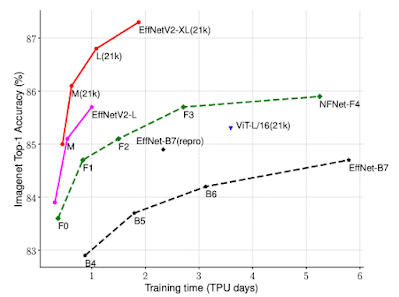
NAS has also been used to discover more efficient models in the vision domain. The EfficientNetV2 model architecture is the result of a neural architecture search that jointly optimizes for model accuracy, model size, and training speed. On the ImageNet benchmark, EfficientNetV2 improves training speed by 5–11x while substantially reducing model size over previous state-of-the-art models. The CoAtNet model architecture was created with an architecture search that uses ideas from the Vision Transformer and convolutional networks to create a hybrid model architecture that trains 4x faster than the Vision Transformer and achieves a new ImageNet state of the art.
The broad use of search to help improve ML model architectures and algorithms, including the use of reinforcement learning and evolutionary techniques, has inspired other researchers to apply this approach to different domains. To aid others in creating their own model searches, we have open-sourced Model Search, a platform that enables others to explore model search for their domains of interest. In addition to model architectures, automated search can also be used to find new, more efficient reinforcement learning algorithms, building on the earlier AutoML-Zero work that demonstrated this approach for automating supervised learning algorithm discovery.
Use of Sparsity
Sparsity, where a model has a very large capacity, but only some parts of the model are activated for a given task, example or token, is another important algorithmic advance that can greatly improve efficiency. In 2017, we introduced the sparsely-gated mixture-of-experts layer, which demonstrated better results on a variety of translation benchmarks while using 10x less computation than previous state-of-the-art dense LSTM models. More recently, Switch Transformers, which pair a mixture-of-experts–style architecture with the Transformer model architecture, demonstrated a 7x speedup in training time and efficiency over the dense T5-Base Transformer model. The GLaM model showed that transformers and mixture-of-expert–style layers can be combined to produce a model that exceeds the accuracy of the GPT-3 model on average across 29 benchmarks using 3x less energy for training and 2x less computation for inference. The notion of sparsity can also be applied to reduce the cost of the attention mechanism in the core Transformer architecture.
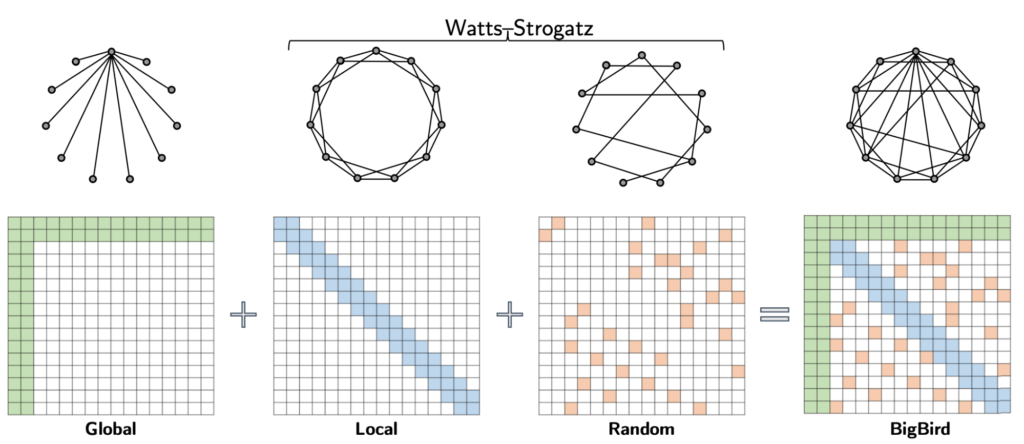
The use of sparsity in models is clearly an approach with very high potential payoff in terms of computational efficiency, and we are only scratching the surface in terms of research ideas to be tried in this direction.
Each of these approaches for improved efficiency can be combined together so that equivalent-accuracy language models trained today in efficient data centers are ~100 times more energy efficient and produce ~650 times less CO2e emissions, compared to a baseline Transformer model trained using P100 GPUs in an average U.S. datacenter using an average U.S. energy mix. And this doesn’t even account for Google’s carbon-neutral, 100% renewable energy offsets. We’ll have a more detailed blog post analyzing the carbon emissions trends of NLP models soon.
Reasons to Leverage Vertex AI Custom Training Service

2953
Of your peers have already read this article.
6:00 Minutes
The most insightful time you'll spend today!
At one point or another, many of us have used a local computing environment for machine learning (ML). That may have been a notebook computer or a desktop with a GPU. For some problems, a local environment is more than enough. Plus, there’s a lot of flexibility. Install Python, install JupyterLab, and go!
What often happens next is that model training just takes too long. Add a new layer, change some parameters, and wait nine hours to see if the accuracy improved? No thanks. By moving to a Cloud computing environment, a wide variety of powerful machine types are available. That same code might run orders of magnitude faster in the Cloud.
Customers can use Deep Learning VM images (DLVMs) that ensure that ML frameworks, drivers, accelerators, and hardware are all working smoothly together with no extra configuration. Notebook instances are also available that are based on DLVMs, and enable easy access to JupyterLab.
Benefits of using the Vertex AI custom training service
Using VMs in the cloud can make a huge difference in productivity for ML teams. There are some great reasons to go one step further, and leverage our new Vertex AI custom training service. Instead of training your model directly within your notebook instance, you can submit a training job from your notebook.
The training job will automatically provision computing resources, and de-provision those resources when the job is complete. There is no worrying about leaving a high-performance virtual machine configuration running.
The training service can help to modularize your architecture. As we’ll discuss further in this post, you can put your training code into a container to operate as a portable unit. The training code can have parameters passed into it, such as input data location and hyperparameters, to adapt to different scenarios without redeployment. Also, the training code can export the trained model file, enabling working with other AI services in a decoupled manner.
The training service also supports reproducibility. Each training job is tracked with inputs, outputs, and the container image used. Log messages are available in Cloud Logging, and jobs can be monitored while running.
The training service also supports distributed training, which means that you can train models across multiple nodes in parallel. That translates into faster training times than would be possible within a single VM instance.
Example Notebook
In this blog post, we are going to explain how to use the custom training service, using code snippets from a Vertex AI example. The notebook we’re going to use covers the end-to-end process of custom training and online prediction. The notebook is part of the ai-platform-samples repo, which has many useful examples of how to use Vertex AI.
Custom model training concepts
The custom model training service provides pre-built container images supporting popular frameworks such as TensorFlow, PyTorch, scikit-learn, and XGBoost. Using these containers, you can simply provide your training code and the appropriate container image to a training job.
You are also able to provide a custom container image. A custom container image can be a good choice if you’re using a language other than Python, or are using an ML framework that is not supported by a pre-built container image. In this blog post, we’ll use a pre-built TensorFlow 2 image with GPU support.
There are multiple ways to manage custom training jobs: via the Console, gcloud CLI, REST API, and Node.js / Python SDKs. After jobs are created, their current status can be queried, and the logs can be streamed.
The training service also supports hyperparameter tuning to find optimal parameters for training your model. A hyperparameter tuning job is similar to a custom training job, in that a training image is provided to the job interface. The training service will run multiple trials, or training jobs with different sets of hyperparameters, to find what results in the best model. You will need to specify the hyperparameters to test; the range of values to explore for those hyperparameters; and details about the number of trials.
Both custom training and hyperparameter tuning jobs can be wrapped into a training pipeline. A training pipeline will execute the job, and can also perform an optional step to upload the model to Vertex AI after training.
How to package your code for a training job
In general, it’s a good practice to develop your model training code that is self-contained when especially executing them inside containers. This means the training codebase would operate in a standalone manner when executed.
Below is a template of such a self-contained, heavily-commented Python script that you can follow for your own projects too.
# Imports go hereimport tensorflow_datasets as tfdsimport tensorflow as tf…# Define the hyperparameters and constants like epochs, batch size, number of GPUs, etcparser = argparse.ArgumentParser()parser.add_argument('--lr', dest='lr',default=0.01, type=float,help='Learning rate.')parser.add_argument('--epochs', dest='epochs',default=10, type=int,help='Number of epochs.')...args = parser.parse_args()...# Prepare data loadersdef make_datasets_unbatched():# Scaling CIFAR10 data from (0, 255] to (0., 1.]def scale(image, label):image = tf.cast(image, tf.float32)image /= 255.0return image, labeldatasets, info = tfds.load(name='cifar10',with_info=True,as_supervised=True)return datasets['train'].map(scale).cache().shuffle(BUFFER_SIZE).repeat()# Build our model, compile, and train itmodel = [define your model]model.compile(loss=..., optimizer=..., metrics=...)model.fit(...)# Serialize our modelmodel.save(MODEL_DIR)
Note that the MODEL_DIR needs to be a location inside a Google Cloud Storage (GCS) bucket. This is because the training service can only communicate with that and not with our local system. Here is a sample location inside a GCS Bucket to save a model: gs://caip-training/cifar10-model where caip-training is the name of the GCS bucket.
Although we are not using any custom modules in the above code listing, one can easily incorporate them as we would normally inside a Python script. Refer to this document if you want to know more. Next up, we will review how to configure the training infrastructure, including the type and number of GPUs to use, and submit a training script to run inside the infrastructure.
How to submit a training job, including configuring which machines to use
To train a deep learning model efficiently on large datasets, we need hardware accelerators that are suited to run matrix multiplication in a highly parallelized manner. Distributed training is also common when it comes to training a large model on a large dataset. For this example, we will be using a single Tesla K80 GPU. Vertex AI supports a range of different GPUs (find out more here).
Here is how we initialize our training job with the Vertex AI SDK:
job = aiplatform.CustomTrainingJob(display_name=JOB_NAME,script_path="task.py",container_uri=TRAIN_IMAGE,requirements=["tensorflow_datasets==1.3.0"],model_serving_container_image_uri=DEPLOY_IMAGE,)
(aiplatform is aliased as from google.cloud import aiplatform)
Let’s review the arguments:
display_namerefers to a unique identifier to the training job used for easily locating it.script_pathrefers to the path of the training script to run. This is the script we discussed in the section above.container_urirefers to the URI of the container that will be used to run our training script. For this, we have several options to choose from. For this example, we will usegcr.io/cloud-aiplatform/training/tf-gpu.2-1:latest. We will use this same container for deployment as well but with a slightly changed container URI. You can find the containers available for model training here and the containers available for deployment purposes can be found here.requirementslet us specify any external packages that might be required to run the training script.model_serving_container_image_urispecifies the container URI that would be used during deployment.
Note: Using separate containers for distinct purposes like training and deployment is often a good practice, since it isolates the relevant dependencies for each purpose.
We are now all set up to submit a custom training job:
model = job.run(model_display_name=MODEL_DISPLAY_NAME,args=CMDARGS,replica_count=1,machine_type=TRAIN_COMPUTE,accelerator_type=TRAIN_GPU.name,accelerator_count=TRAIN_NGPU)
Here, we have:model_display_name that provides a unique name to identify our trained model. This comes in handy later down the pipeline when we would deploy it using the prediction service. args are our command-line arguments typically used to specify things like hyperparameter values.replica_count denotes the number of worker replicas to be used during training. machine_type specifies the type of base machine to be used during training. accelerator_type denotes the type of accelerator to be used during training. If we are interested in using a Tesla K80, then TRAIN_GPU should be specified as aip.AcceleratorType.NVIDIA_TESLA_K80. (aip is aliased as from google.cloud.aiplatform import gapic as aip.)accelerator_count specifies the number of accelerators to use. For a single host multi-GPU configuration, we would set the replica_count to 1 and then specify the accelerator_count as per our choice depending on the resource available under the corresponding compute zone.
Note that model here is a google.cloud.aiplatform.models.Model object. It is returned by the training service after the job is completed.
With this setup, we can actually start a custom training job that we can monitor. After we submit the above training pipeline, we should see some initial logs resembling this:
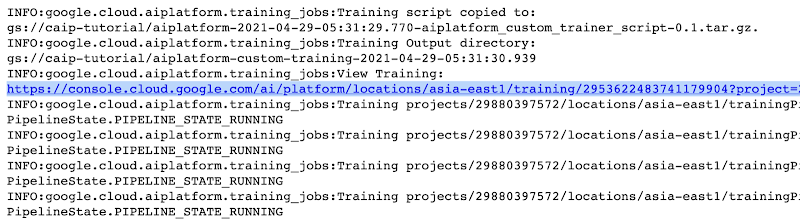
The link highlighted in Figure 2 will redirect to the dashboard of the training pipeline which looks like so:
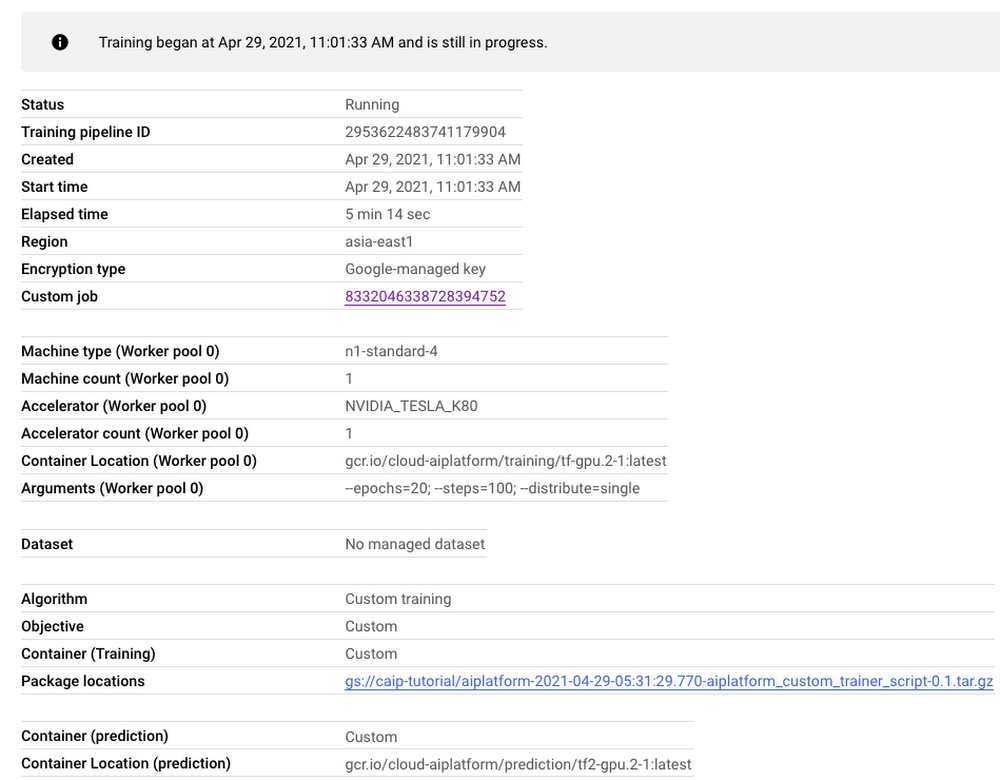
As seen in Figure 3, the dashboard provides a comprehensive summary of all the necessary artifacts related to our training pipeline. Monitoring your model training is also very important especially to catch any early training bugs. To view the training logs, we need to click the link beside the “Custom job” tab (refer to Figure 3). There also we are presented with roughly similar information as shown in Figure 3 but this time it includes the logs as well:
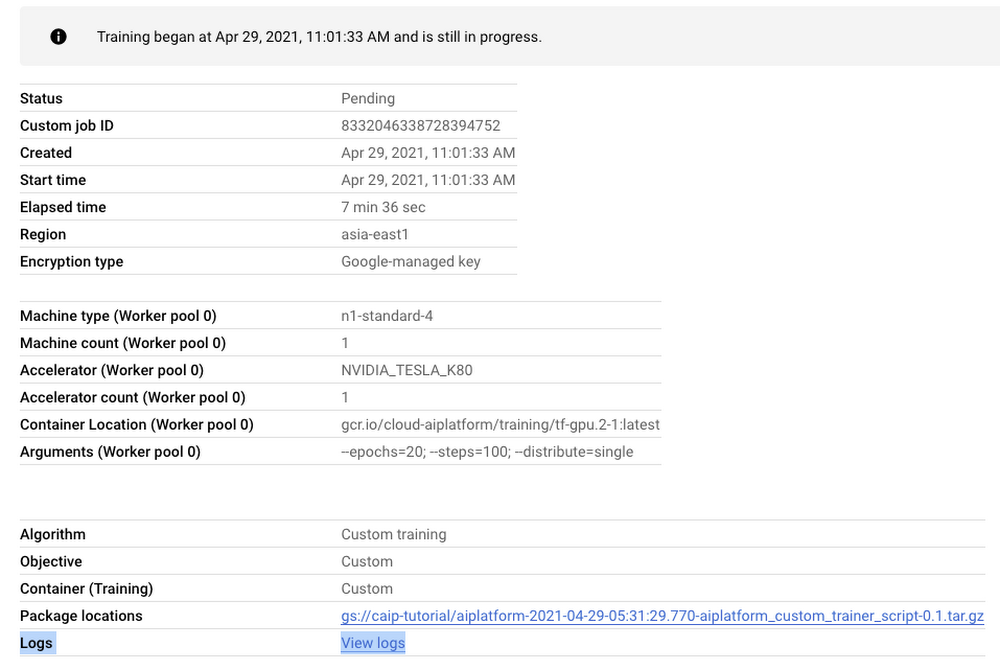
Note: Once we submit the custom training job, a training pipeline is first created to provision the training. Then inside the pipeline, the actual training job is started. This is why we see two very similar dashboards above but they have different purposes. Let’s check out the logs (which is maintained using Cloud Logging automatically):
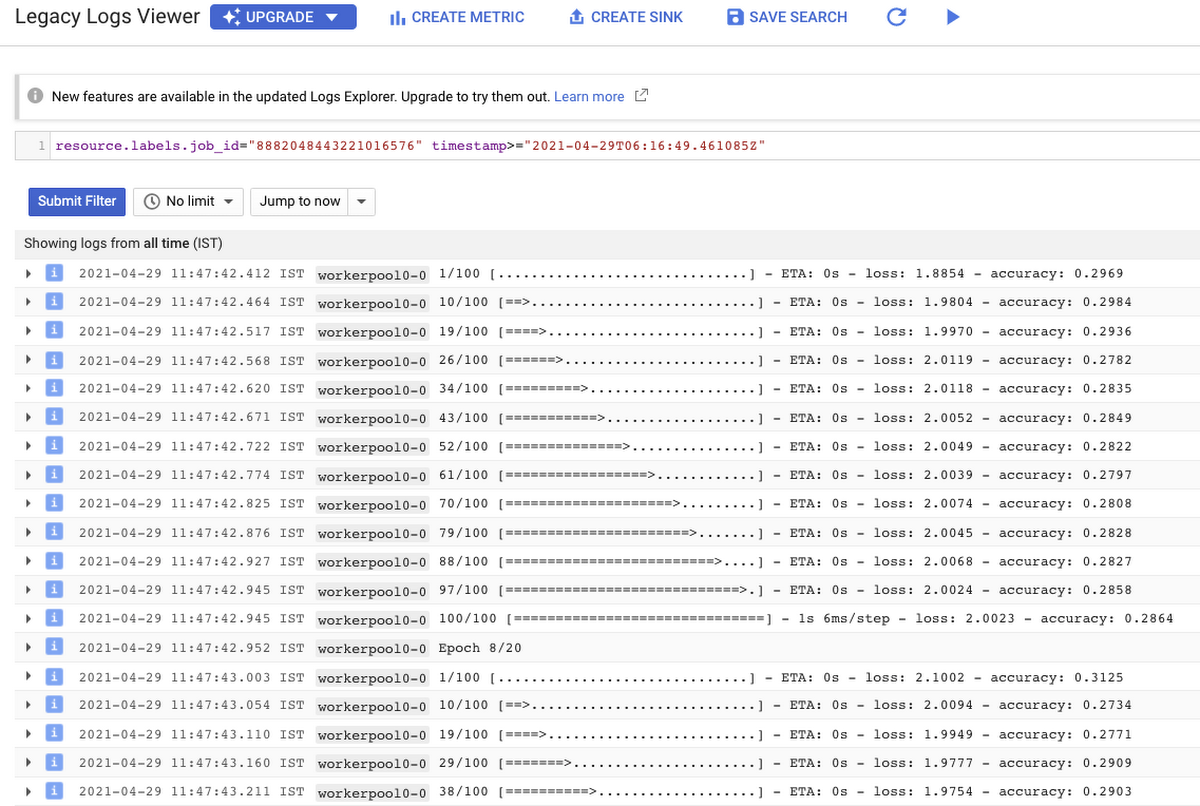
With Cloud Logging, it is also possible to set alerts on the basis of different criteria. For example, alerting the users when the training job fails or completes so that some immediate action could be taken. You can refer to this post for more details.
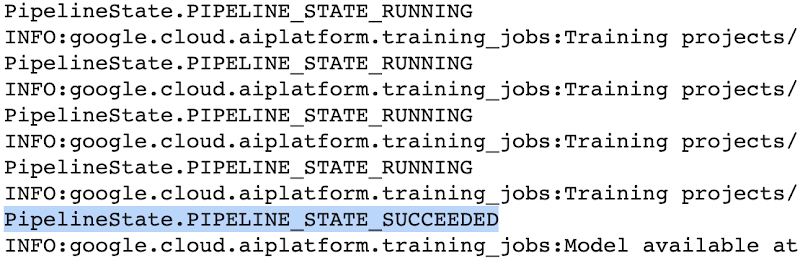
After the training pipeline is completed, on your end, you will notice the success status:
Accessing the trained model
Recall that we had to serialize our model inside a GCS Bucket in order to make it compatible with the training service. So, after the model is trained, we can access it from that location. We can even directly load it using the following line of code:
model = tf.keras.models.load_model('gs://[your-bucket-name]/[model-name]')
Note that we are referring to the TensorFlow model that resulted from training. The training service also maintains a similar “model” namespace to help us manage these models. Recall that the training service returns a google.cloud.aiplatform.models.Model object as mentioned earlier. It comes with a deploy() method that allows us to deploy our model programmatically within minutes with several different options. Check out this link if you are interested in deploying your models using this option.
Vertex AI also provides a dashboard for all the models that have been trained successfully and it can be accessed with this link. It resembles this:
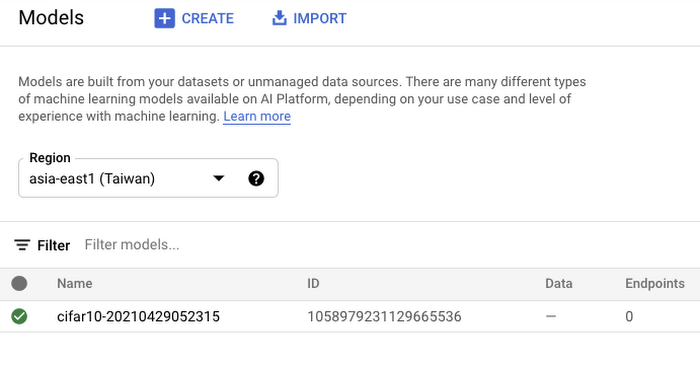
If we click the model as listed in Figure 7, we should be able to directly deploy from the interface:
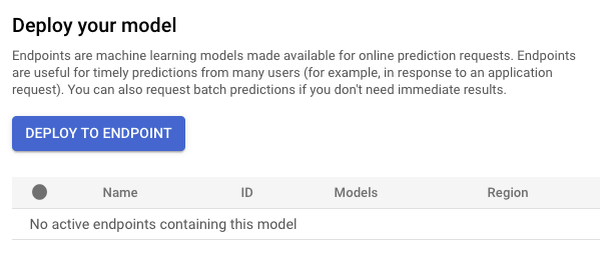
In this post, we will not be covering deployment, but you are encouraged to try it out yourself. After the model is deployed to an endpoint, you will be able to use it to make online predictions.
Wrapping Up
In this blog post, we discussed the benefits of using the Vertex AI custom training service, including better reproducibility and management of experiments. We also walked through the steps to convert your Jupyter Notebook codebase to a standard containerized codebase, which will be useful not only for the training service, but for other container-based environments. The example notebook provides a great starting point to understand each step, and to use as a template for your own projects.
Gen App Builder: Create Next-Level AI Search & Conversational Experiences

1274
Of your peers have already read this article.
3:00 Minutes
The most insightful time you'll spend today!
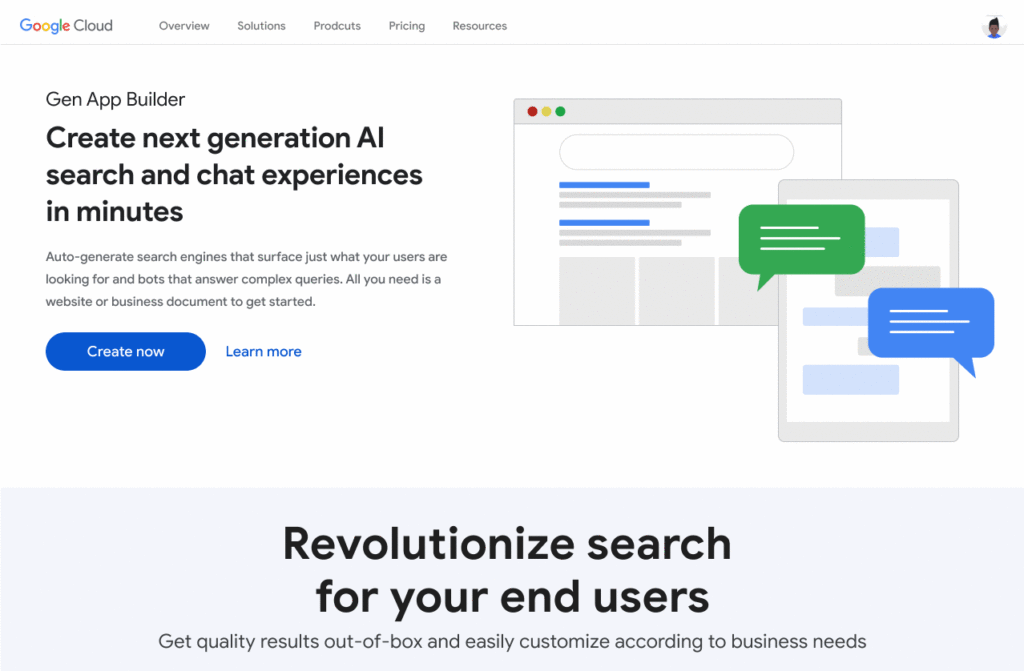
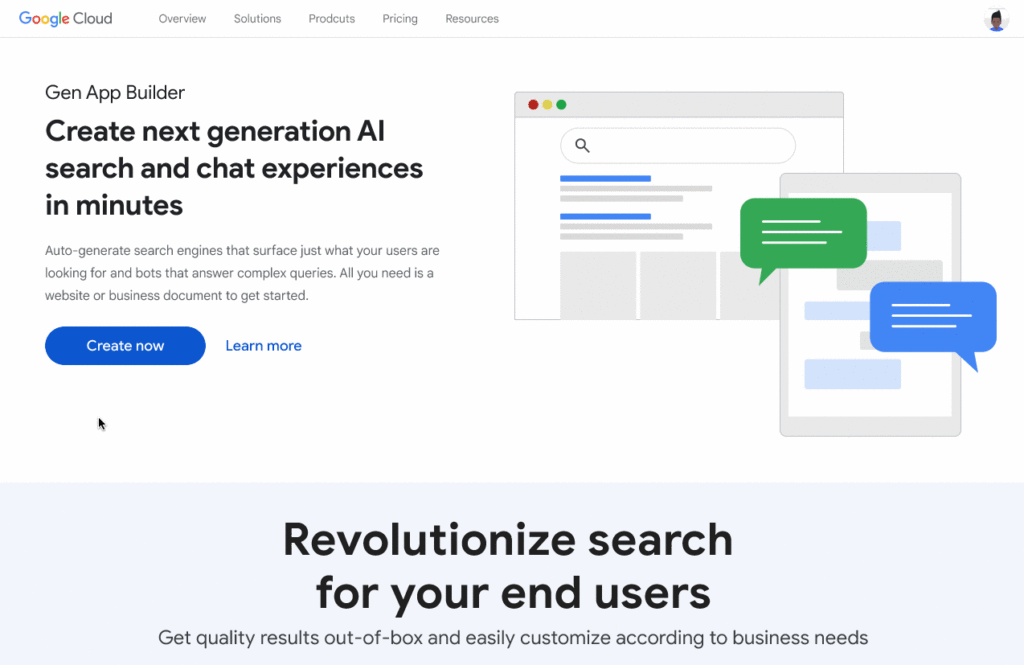
If you’ve been exploring recently-launched consumer generative AI tools like Bard and thinking about how to build similar experiences for your business, Generative AI App Builder, or Gen App Builder for short, is here to get you started.
Gen App Builder is part of Google Cloud’s recently announced generative AI offerings and lets developers, even those with limited machine learning skills, quickly and easily tap into the power of Google’s foundation models, search expertise, and conversational AI technologies to create enterprise-grade generative AI applications.
“Google Cloud’s leading AI technology enables STARZ customers to discover more relevant content, increasing engagement with, and the likelihood of completing the content served to them,” says Robin Chacko, EVP Direct-to-Consumer, STARZ. “We’re excited about how generative AI-powered search will help users find the most relevant content even easier and faster.”
Gen App Builder is exciting because unlike most existing generative AI offerings for developers, it offers an orchestration layer that abstracts the complexity of combining various enterprise systems with generative AI tools to create a smooth, helpful user experience. Gen App Builder provides step-by-step orchestration of search and conversational applications with pre-built workflows for common tasks like onboarding, data ingestion, and customization, making it easy for developers to set up and deploy their apps. With Gen App Builder developers can:
- Build in minutes or hours. With access to Google’s no-code conversational and search tools powered by foundation models, organizations can get started with a few clicks and quickly build high-quality experiences that can be integrated into their applications and websites.
- Combine the power of foundation models with information retrieval to find relevant, personalized information. Enterprises can build apps that understand user intent via natural language, and surface the right information with associated citations and attributions from a company’s public and private data. They can also fully control what data their applications access and the content or topics they want to address.
- Build multimodal apps that can respond with text, images, and other media. Gen App Builder supports not just text, but also other modalities such as images and videos. It allows developers to build apps using a combination of text and images as inputs to find information across documents, photos, and video content, enabling richer customer interactions.
- Combine natural conversations with structured flows. Developers can granularly blend the output of foundation models with controls to ground answers in enterprise content, and step-by-step conversation orchestration to guide customers to the right answers.
- Provide the ability to transact and connect to third party apps and services. Gen App Builder makes it simple to create digital assistants and bots that not only serve content, but also connect to purchasing and provisioning systems to enable transactions from the conversational UI, and escalate customer conversations to a human agent when the context demands.
A new generation of conversational AI experiences and assistants
Consumers of enterprise applications expect to interact with technology in a seamless, conversational way to quickly find the information they need and act on it. Gen App Builder can help reinvent these customer and employee experiences by ingesting large, complex datasets that are specific to your company–from websites, documents, and transactional systems like billing and inventory, to emails, chat conversations, and more. These AI-powered apps can synthesize information across all of these sources to provide specific, actionable responses, using only the data you have provided.
Some of the most popular uses are in customer service, where generative apps can contribute to increasing revenue, customer satisfaction, and customer loyalty. For example, if a retail customer reaches out to modify an order, a virtual agent can help them change it to another product. The customer doesn’t even need to provide the new product name—they can just upload an image and let the agent guide them through the rest. Watch this demo to see how a retail chatbot can use multimodal capabilities to help a consumer navigate various options on the website, including giving the customer ideas on how to use the product and even helping them complete the purchase with the ability to transact within the conversational UI. This scenario could apply to multiple industries and use cases, ranging from consumer goods and public services, to finance and internal corporate systems like intranets.
Combining the power of Google-quality search with foundation models
Finding the right information from data across the organization is a critical requirement within any enterprise. Yet it can be challenging to build high-quality enterprise search experiences with existing tools. Current systems struggle to understand user intent, are difficult to implement and customize, and don’t provide a high-quality user experience.
One of the most exciting features of Gen App Builder is the ability to combine the power of Google-quality search with generative AI to help enterprises find the most relevant and personalized information when they need it. With Gen App Builder, enterprises can build conversational search experiences across their public and private data in minutes or hours with no coding experience.
Enabling multimodal search across text, images and video within the enterprise is a key aspect of the search experiences in Gen App Builder. In addition to providing high-quality search results, Gen App Builder can conveniently summarize the results and provide corresponding citations in a natural, human-like fashion. Gen App Builder also automatically extracts key information from the data and enables personalized results for users. Watch this demo to see how these capabilities can come together to transform the search experience for employees at a financial services firm. The ability to integrate Google-quality search within the enterprise’s applications means they can enjoy a new level of data utilization, drive increased process efficiencies, and provide delightful experiences to their employees and customers.
“Customers have been shopping at Macy’s for generations. Being able to deliver 360° personalization and contextual recommendations will help ensure that Macy’s is still providing future generations of shoppers with a seamless, exceptional experience,” said Bennett Fox-Glassman, Senior Vice-President, Customer Journey, Macy’s. “We’ve already realized an increase in revenue per visit and conversion rates had great success using Google Cloud’s AI technology and are looking forward to exploring how these latest announcements bring together Natural Language Processing and Generative AI capabilities to deliver next-gen search and conversational experiences for our customers.”
The ability to intuitively interact with complex data across a variety of sources allows organizations to better serve their customers and deliver more relevant offerings. Combined with conversational and fulfillment abilities, the potential for improving customer engagement and employee productivity is immense. We’re excited to see how developers and enterprises use a mix of these capabilities to power new experiences and revenue opportunities.
If you’re interested in a closer look at the Gen App Builder, tune into this session at the Data Cloud & AI Summit. Take a step forward to getting hands-on and join the waitlist for our trusted tester program. And finally, bookmark our generative AI landing page to keep abreast of the latest news, updates and possibilities from this exciting new world of Gen Apps.
How Google Cloud’s PSO Supports Customers’ Migration Goals

5049
Of your peers have already read this article.
2:00 Minutes
The most insightful time you'll spend today!
Google Cloud’s Professional Services Organization (PSO) engages with customers to ensure effective and efficient operations in the cloud, from the time they begin considering how cloud can help them overcome their operational, business or technical challenges, to the time they’re looking to optimize their cloud workloads.
We know that all parts of the cloud journey are important and can be complex. In this blog post, we want to focus specifically on the migration process and how PSO engages in a myriad of activities to ensure a successful migration.
As a team of trusted technical advisors, PSO will approach migrations in three phases:
- Pre-Migration Planning
- Cutover Activities
- Post-Migration Operations
While this post will not cover in detail all of the steps required for a migration, it will focus on how PSO engages in specific activities to meet customer objectives, manage risk, and deliver value. We will discuss the assets, processes and tools that we leverage to ensure success.
Pre-Migration Planning
Assess Scope
Before the migration happens, you will need to understand and clarify the future state that you’re working towards. From a logistical perspective, PSO will be helping you with capacity planning to ensure sufficient resources are available for your envisioned future state.
While migration into the cloud does allow you to eliminate many of the considerations for the physical, logistical, and financial concerns of traditional data centers and co-locations, it does not remove the need for active management of quotas, preparation for large migrations, and forecasting. PSO will help you forecast your needs in advance and work with the capacity team to adjust quotas, manage resources, and ensure availability.
Once the future state has been determined, PSO will also work with the product teams to determine any gaps in functionality. PSO captures feature requests across Google Cloud services and makes sure they are understood, logged, tracked, and prioritized appropriately with the relevant product teams. From there, they work closely with the customer to determine any interim workarounds that can be leveraged while waiting for the feature to land, as well as providing updates on the upcoming roadmap.
Develop Migration Approach and Tooling
Within Google Cloud, we have a library of assets and tools we use to assist in the migration process. We have seen these assets help us successfully complete migrations for other customers efficiently and effectively.
Based on the scoping requirements and tooling available to assist in the migration, PSO will help recommend a migration approach. We understand that enterprises have specific needs; differing levels of complexity and scale; regulatory, operational, or organization challenges that will need to be factored into the migration. PSO will help customers think through the different migration options and how all of the considerations will play out.
PSO will work with the customer team to determine the best migration approach for moving servers from on-prem to Google Cloud. PSO will walk customers through different migration approaches, such as refactoring, lift-shift, or new installs. From there, the customer can determine the best fit for their migration. PSO will provide guidance on best practices and use cases from other customers with similar use cases.
Google offers a variety of cloud native tools that can assist with asset discovery, the migration itself, and post-migration optimization. PSO, as one example, will help work with project managers to determine the best tooling that accommodates the customer’s requirements for migrating servers. PSO will also engage Google product team to ensure the customer fully understands the capabilities of each tool and the best fit for the use case. Google understands from a tooling perspective, one size does not fit all, thus PSO will work with the customer on determining the best migration approach and tooling for different requirements.
Cutover Activities
Once all of the planning activities have been completed, PSO will assist in making sure the cutover is successful.
During and leading up to critical customer events, PSO can provide proactive event management services which deliver increased support and readiness for key workloads. Beyond having a solid architecture and infrastructure on the platform, support for this infrastructure is essential and TAMs will help ensure that there are additional resources to support and unblock the customer where challenges arise.
As part of event management activities, PSO liaises with the Google Cloud Support Organization to ensure quick remediation and high resilience for situations where challenges arise. A war room is usually created to facilitate quick communication about the critical activities and roadblocks that arise. These war rooms can give customers a direct line to the support and engineering teams that will triage and resolve their issues.
Post-Migration Activities
Once cutover is complete, PSO will continue to provide support in areas such incident management, capacity planning, continuous operational support, and optimization to ensure the customer is successful from start to finish.
PSO will serve as the liaison between the customer and Google engineers. If support cases need to be escalated, PSO will ensure the appropriate parties are involved and work to get the case resolved in a timely manner. Through operational rigor, PSO will work with the customer in determining if certain Google Cloud services will be beneficial to the customer objectives. If services will add value to the customer, PSO will help enable the services so it aligns with the customer’s goal and current cloud architecture. In cases where there are missing gaps in services, PSO will proactively work with the customer and Google engineering teams to close the gaps by enabling additional functionality in the services.
PSO will continue to work with the engineering teams to consistently review and provide recommendations on the customer’s cloud architecture in ensuring the most optimal and cost efficient design along with adhering to Google’s best practices guidelines.
Aside from migrations, PSO is also responsible for providing continuous training of Google Cloud to customers. To ensure consistent development of Google Cloud, PSO will work with the customer to jointly develop a learning roadmap to ensure the customer has the necessary skills to succeed in delivering successful projects in Google Cloud.
Conclusion
Google PSO will be actively engaged throughout the customer’s cloud journey to ensure the necessary guidance, methodology, and tools are presented to the customer. PSO will engage in a series of activities from pre-migration planning to post migration in key areas such as capacity planning to ensure sufficient resources are allocated for future workloads to providing support on technical cases for troubleshooting. PSO will serve as a long-term trusted advisor who will be the voice of the customer and provide the reliability and stability of the customer’s Google Cloud environment.
Click here if you’d like to engage with our PSO team on your migration. Or, you can also get started with a free discovery and assessment of your current IT landscape.
More Relevant Stories for Your Company

Google is a Leader in the 2019 Gartner Magic Quadrant for Data Management Solutions for Analytics
As organizations continue to produce vast quantities of data, they increasingly need platforms that allow them to analyze, store, and extract meaningful insights from that data. And research from analyst firms like Gartner offer an important way for organizations to evaluate and compare cloud data warehouse providers. Earlier this year,

Datashare for Financial Services: Securing the Publishers and Consumers’ Access to Market Data
Access to the cloud has advanced the distribution and consumption of financial information on a global scale. In parallel, the global financial data landscape has been transformed by an influx of alternative data sources, including social media, meteorological data, satellite imagery, and other data. Exchanges and market data providers now

How Generative AI is Reshaping the Telecom Sector
Communication service providers (CSPs) are at an inflection point. From stagnating revenues, to network strain in meeting the demands of 5G, to challenges in delivering innovative customer experiences, there’s enormous pressure on the telecommunications industry to transform. Over the past few years, CSPs around the globe have turned to artificial

New Visual Interface for Google Cloud’s Speech-to-Text API Makes API Easy to Use !
At Google Cloud, we’re committed to making artificial intelligence (AI) accessible to everyone and easier to harness for new use cases. That’s why we’re excited to announce the general availability of our intuitive, new visual user interface for Google Cloud’s Speech-to-Text (STT) API, right in Google Cloud Console, which makes the API
