





Transform Your Customer Experience with Latest Database Innovations

2986
Of your peers have already read this article.
2:30 Minutes
The most insightful time you'll spend today!
We’re all accustomed to Google magic in our daily lives. When we need information like the time a store closes, the best route to a destination, help cooking a favorite recipe — we just ask Google. Google is known for providing useful information everywhere, wherever you are.
But for business, it isn’t so easy to get answers to important questions. In a recent study by HBR, only 30% of respondents report having a well-articulated data strategy and, at most, 24% of respondents said they thought their organization was data-driven. If you asked, most of these executives would probably tell you they’re drowning in data, so how come they’re struggling to be data-driven?
Data’s journey begins in operational databases, where the data is born as users and systems interact with applications. Operational databases are the backbone of applications and are essential ingredients for building innovative customer experiences. At Google Cloud, we have been focused on building a unified and open platform that provides you the easiest and fastest way to innovate with data. Google’s data cloud enables data teams to manage each stage of the data lifecycle from operational transactions in databases to analytical applications across data warehouses, lakes, data marts, and to rich data-driven experiences.
For example, Merpay, a mobile payment service in Japan, wanted to build its experience on a database that delivered on requirements around availability, scalability and performance. By using Cloud Spanner, Merpay was able to reduce overhead costs and ultimately devote engineering resources to developing new tools and solutions for their customers.
If you’re looking to bring the same kinds of transformation to your organization, let’s dive into the latest database announcements and how they can help you do that:
Tap into transformative database capabilities
Google’s data cloud allows organizations to build transformative applications quickly with our one-of-a-kind databases such as Cloud Spanner, Google Cloud’s fully managed relational database with global scale, strong consistency, and industry leading 99.999% availability. Leading businesses across industries such as Sabre, Vimeo, Uber, ShareChat, Niantic, and Macy‘s use Spanner to power their mission-critical applications and delight customers. Recent innovations in Spanner such as granular instance sizing and PostgreSQL interface lower the barrier to entry for Spanner, thus making it accessible for any developer and for any application, big or small.
In that effort, we are excited to announce Spanner free trial instances to give developers an easy way to explore Spanner at no cost. The new free trial for Spanner provides a zero-cost, hands–on experience to try out Spanner and comes with guided tutorials and a sample database. The Spanner free trial provides a Spanner instance with 10GB storage for 90 days. Customers can upgrade to a paid instance anytime during the 90-day period to continue exploring Spanner and unlock the full capabilities of Spanner, such as unlimited scaling and multi-region deployments. To learn more about the new free trial, you can read this blog and watch this short video. Start your free trial today in the Google Cloud console.
We’re also excited to announce the preview of fine-grained access control for Spanner that lets you authorize access to Spanner data at the table and column level. Spanner already provides access control with Identity and Access Management (IAM) which enables a simple and consistent access control interface for all Google Cloud services. With fine-grained access control, it’s now easier than ever to protect your transactional data in Spanner and ensure appropriate security controls are in place when granting access to data. Learn more about fine-grained access control in this blog.
Generate exponential value from data with a unified data cloud
Google’s common infrastructure for data management has many advantages. Thanks to our highly durable distributed file systems, disaggregated compute and storage at every layer, and high-performance Google-owned global networking, we’re able to provide best-in-class, tightly integrated operational and analytical data services with superior availability and scale at the best price- performance and operational efficiency.
In that effort, today we’re excited to announce Datastream for BigQuery, now in preview. Developed in close partnership with the BigQuery team, Datastream for BigQuery delivers a unique, truly seamless and easy-to-use experience that enables real-time insights in BigQuery with just a few steps.
Datastream efficiently replicates updates directly from source systems into BigQuery tables in real-time by using BigQuery’s newly developed Change Data Capture (CDC) and Storage Write API’s UPSERT functionality. You no longer have to waste valuable resources building and managing complex data pipelines, self-managing staging tables, tricky DML merge logic, or manual conversion from database-specific data types into BigQuery data types. Just configure your source database, connection type, and destination in BigQuery and you’re all set.
Klook, a Hong Kong-based travel company, is one industry-leading enterprise using Datastream for BigQuery to help drive better business decisions. “Prior to adopting Datastream, we had a team of data engineers dedicated to the task of ingesting data into BigQuery, and we spent a lot of time and effort making sure that the data was accurate,” said Stacy Zhu, senior manager for data at Klook. “With Datastream, our data analysts can have accurate data readily available to them in BigQuery with a simple click. We enjoy Datastream’s ease of use and its performance helps us achieve large scale ELT data processing.”
Achievers, an award-winning employee engagement software and platform, recently adopted Datastream, as well. “Achievers had been heavily using Google Cloud VMs (GCE), and Google Kubernetes Engine (GKE)” says Daljeet Saini, lead data architect at Achievers. “With the help of Datastream, Achievers will be streaming data into BigQuery and enabling our analysts and data scientists to start using BigQuery for smart analytics, helping us take the data warehouse to the next level.”
To make it easier to stream database changes to BigQuery and other destinations, Datastream is also adding support for PostgreSQL databases as a source, also in preview. Datastream sources now include MySQL, PostgreSQL, AlloyDB for PostgreSQL, and Oracle databases, which can be hosted on premises, on Google Cloud services such as Cloud SQL or Bare Metal Solution for Oracle, or anywhere else on any cloud.
Key use cases for Datastream include real-time analytics, database replication via continuous change data capture, and enablement of event-driven application architectures. In real-world terms, real-time insights can help a call center provide better service by measuring call wait times continuously, rather than retrospectively at the end of the week or month. And retailers or logistics companies that do inventory management based on real-time data can become far less wasteful than if it were based on periodic reports.
Accelerate your modernization journey to the cloud
In recent years, application developers and IT decision makers have increasingly adopted open-source databases to ensure application portability and extensibility and prevent lock-in. They’re no longer willing to tolerate the opaque costs or the overpriced and restrictive licensing of legacy database vendors.
In particular, PostgreSQL has become the emerging standard for cloud-based enterprise applications. Many organizations are choosing to standardize on PostgreSQL to reduce the learning curve for their teams and avoid the lock-in from the previous generation of databases. Google’s data cloud offers several PostgreSQL database options including AlloyDB for PostgreSQL, a PostgreSQL-compatible database that provides a powerful option for migrating, modernizing, or building commercial-grade workloads
To help developers and data engineers modernize and migrate their applications and databases to the cloud, we’re pleased to announce, in preview, that our Database Migration Service (DMS) now supports PostgreSQL migrations to AlloyDB. DMS makes the journey from PostgreSQL to AlloyDB easier and faster, with a serverless migration you can set up in just a few clicks. Together with Oracle to PostgreSQL data and schema migration support, also in preview, DMS gives you a way to modernize legacy databases and adopt a modern, open technology platform. Learn more about PostgreSQL to AlloyDB migration with DMS in this blog.
Among organizations adopting PostgreSQL is SenseData. A platform created to improve the relationship between companies and customers, SenseData is a market leader in Latin America in the field of Customer Success.
“At Sensedata, we’ve built our customer success platform on PostgreSQL, and are looking to increase our platform performance and scale for the next phase of our growth,” said Paulo Souza, co-founder and CTO of SenseData. “We have a mixed database workload, requiring both fast transactional performance and powerful analytical processing capabilities, and our initial testing of AlloyDB for PostgreSQL has given impressive results, with more than a 350% performance improvement in our initial workload, without any application changes. We’re looking forward to using Database Migration Service for an easy migration of multiple terabytes of data to AlloyDB.”
CURA Grupo is one of Brazil’s largest medical diagnostics conglomerates with over 1,600 employees, 500 qualified physicians, and 6 million examinations conducted every year. With more than 30,000 examinations performed every day, storing the database on premises was becoming increasingly unfeasible. CURA Grupo used Database Migration Service to migrate to Google Cloud, along with synchronization between their on-prem server’s database and the cloud. The result was an easy transition with just around 20 minutes of downtime.
To learn more about these exciting innovations and more, join us at Next 22 happening on October 11-13. You will also hear from customers such as PLAID, Major League Baseball, DaVita, CERC, Credit Karma, Box, and Forbes who are all innovating faster with Google Cloud databases.
The Query Execution Graph: Your Key to Better BigQuery Analytics

3096
Of your peers have already read this article.
2:30 Minutes
The most insightful time you'll spend today!
BigQuery offers strong query performance, but it is also a complex distributed system with many internal and external factors that can affect query speed. When your queries are running slower than expected or are slower than prior runs, understanding what happened can be a challenge.
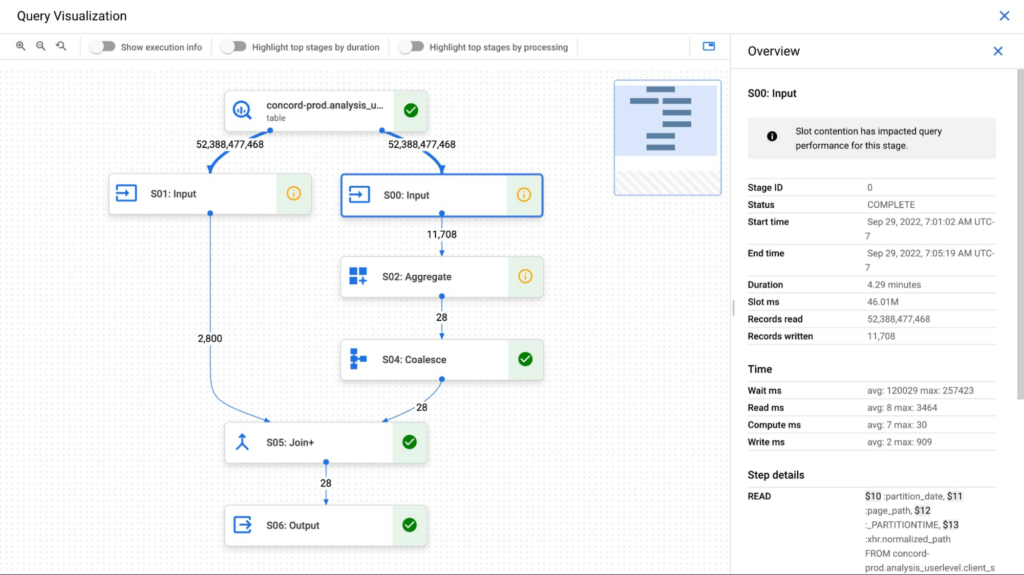
The query execution graph provides an intuitive interface for inspecting query execution details. By using it, you can review the query plan information in graphical format for any query, whether running or completed.
You can also use the query execution graph to get performance insights for queries. Performance insights provide best-effort suggestions to help you improve query performance. Since query performance is multi-faceted, performance insights might only provide a partial picture of the overall query performance.
Execution graph
When BigQuery executes a query job, it converts the declarative SQL statement into a graph of execution, broken up into a series of query stages, which themselves are composed of more granular sets of execution steps. The query execution graph provides a visual representation of the execution stages and shows the corresponding metrics. Not all stages are made equal. Some are more expensive and time consuming than others. The execution graph provides toggles for highlighting critical stages, which makes it easier to spot the potential performance bottlenecks in the query.
Query performance insights
In addition to the detailed execution graph BigQuery also provides specific insights on possible factors that might be slowing query performance.
Slot contention
When you run a query, BigQuery attempts to break up the work needed by your query into tasks. A task is a single slice of data that is input into and output from a stage. A single slot picks up a task and executes that slice of data for the stage. Ideally, BigQuery slots execute tasks in parallel to achieve high performance. Slot contention occurs when your query has many tasks ready for slots to start executing, but BigQuery can’t get enough available slots to execute them.
Insufficient shuffle quota
Before running your query, BigQuery breaks up your query’s logic into stages. BigQuery slots execute the tasks for each stage. When a slot completes the execution of a stage’s tasks, it stores the intermediate results in shuffle. Subsequent stages in your query read data from shuffle to continue your query’s execution. Insufficient shuffle quota occurs when you have more data that needs to get written to shuffle than you have shuffle capacity.
Data input scale change
Getting this performance insight indicates that your query is reading at least 50% more data for a given input table than the last time you ran the query and hence experiencing query slowness. You can use table change history to see if the size of any of the tables used in the query has recently increased.
What’s next?
We continue to work on improving the visualization of the graph. We are working on adding additional metrics to each step and adding more performance insights that will make query diagnosis significantly easier. We are just getting started.
Three New Features in Cloud SQL for SQL Server Extends its Functionality

3398
Of your peers have already read this article.
4:00 Minutes
The most insightful time you'll spend today!
As a product with a long history in the database ecosystem, SQL Server offers numerous native capabilities that help provide scalability and security to its users. However, it can be time consuming and complex to take advantage of these features. Google Cloud SQL for SQL Server saves your team time by eliminating much of the unnecessary toil (OS patching, version upgrades, replica setup etc.) while still allowing you to leverage the functionality you’re used to. Three new features for Cloud SQL for SQL Server take its functionality even further.
A few months ago, we announced Active Directory (AD) integration had entered preview; now, it is generally available. Equally exciting, we are releasing Cross-Region Replicas (based on SQL Server’s Always On Availability Groups) in preview. Finally, you can try out this great new functionality in our managed database service with the latest release of SQL Server 2019, which is now generally available.
Simple and Secure Windows Authentication with Active Directory
As one of the most requested and critical security capabilities for Cloud SQL for SQL Server, we are pleased to now provide Windows Authentication via Managed Service for Microsoft Active Directory as generally available. Customers should feel confident onboarding their business critical production workloads to the managed service while still maintaining the authentication best practices they rely on today. While identities can be created and managed directly within the managed AD service, many customers choose to establish a trust relationship with their existing on-prem AD footprint to leverage existing identity objects.
What is Cross-Region Replica for SQL Server?
Bringing parity in the Cloud SQL portfolio alongside MySQL and PostgreSQL, Cross-region replica makes it easy to create a fully managed read replica in a different region than that of the primary instance. You can create a replica in any Google Cloud region. The difference for SQL Server is the Availability Group based architecture that paves the way for the service to continue to offer more core compatibility with the SQL Server features our customers depend on. Cloud SQL greatly simplifies the traditional process of provisioning Availability Groups and streamlines it into a few-step workflow.

Using read replicas will allow you to horizontally scale your read workloads. For example, you can configure a reporting dashboard to work against a read replica, and because it’s only reading, it will not affect the primary instance. You can also promote replicas to be Cloud SQL instances and that could help you reduce your recovery point objective (RPO) and recovery time objective (RTO). It can help you with the RPO because the data is constantly replicated and the replica is probably more up to date than your latest backup. It can help you with RTO because promoting the replica, especially in an automated way, is a relatively short process. To get started, check out the documentation for Cross-Region Replica
What’s new in SQL Server 2019?
Providing the most current major and minor versions is a key aspect of maintaining compatibility and security for your database workload. Cloud SQL provides an easy provisioning experience that will now allow you to select from four editions of SQL Server 2019 similar to our current SQL Server 2017 options of Enterprise, Standard, Web, and Express. A few key considerations as you are evaluating the new version should be:
- Compatibility level – A newly created database on a Cloud SQL for SQL Server 2019 Databases instance has a compatibility level of 150 by default.
- Accelerated Database Recovery – Allows instances to reduce the availability impact of restarts and shutdowns.
- TempDB changes – While we recently provided you more control to manage your tempdb files, 2019 also brings optimization to improve performance as well.
- Intelligent query processing – SQL Server 2019 provides direct improvements to the query engine itself which may improve overall query processing and performance.
- Many other performance improvements – capabilities such as verbose truncation warnings, resumable index build, and others. Learn more about supported features here.
To get started, check out documentation for SQL Server 2019.
In conclusion
These three features have been the most common requests from our enterprise customers. Finally, you can bring your own Active Directory domain for SQL Server authentication and authorization, use the latest features from SQL Server 2019 and scale your read workloads as well as leveraging the cross regional replicas for faster disaster-recovery.
To get started, check out the documentation for Cross-Region Replica, Active Directory, and SQL Server 2019. All are available with any new instance created via the console or API, simply follow the instructions in the documentation.
How to Enhance Incremental Pipeline Performance while Ingesting Data into BigQuery

6337
Of your peers have already read this article.
3:00 Minutes
The most insightful time you'll spend today!
When you build a data warehouse, the important question is how to ingest data from the source system to the data warehouse. If the table is small you can fully reload a table on a regular basis, however, if the table is large a common technique is to perform incremental table updates. This post demonstrates how you can enhance incremental pipeline performance when you ingest data into BigQuery.
Setting up a standard incremental data ingestion pipeline
We will use the below example to illustrate a common ingestion pipeline that incrementally updates a data warehouse table. Let’s say that you ingest data into BigQuery from a large and frequently updated table in the source system, and you have Staging and Reporting areas (datasets) in BigQuery.

The Reporting area in BigQuery stores the most recent, full data that has been ingested from the source system tables. Usually you create the base table as a full snapshot of the source system table. In our running example, we use BigQuery public data as the source system and create reporting.base_table as shown below. In our example each row is identified by a unique key which consists of two columns: block_hash and log_index.
CREATE TABLE reporting.base_table --156 GB processedPARTITION BY TIMESTAMP_TRUNC(block_timestamp, DAY) ASSELECT log_index, data, topics, block_timestamp, block_hashFROM bigquery-public-data.crypto_ethereum.logsWHERE block_timestamp BETWEEN TIMESTAMP '2020-01-01' AND TIMESTAMP '2020-11-30';
In data warehouses it is common to partition a large base table by a datetime column that has a business meaning. For example, it may be a transaction timestamp, or datetime when some business event happened, etc. The idea is that data analysts who use the data warehouse usually need to analyze only some range of dates and rarely need the full data. In our example, we partition the base table by block_timestamp which comes from the source system.
After ingesting the initial snapshot you need to capture changes that happen in the source system table and update the reporting base table accordingly. This is when the Staging area comes into the picture. The staging table will contain captured data changes that you will merge into the base table. Let’s say that in our source system on a regular basis we have a set of new rows and also some updated records. In our example we mock the staging data as follows: first, we create new data, than we mock the updated records:
CREATE TABLE staging.load_delta AS --5 GB processedSELECT log_index, data, topics, block_timestamp, block_hashFROM bigquery-public-data.crypto_ethereum.logsWHERE block_timestamp BETWEEN TIMESTAMP '2020-12-01' AND TIMESTAMP '2020-12-07';INSERT INTO staging.load_delta --2 GB processedSELECT log_index, CONCAT(data, RAND()), topics, block_timestamp, block_hashFROM bigquery-public-data.crypto_ethereum.logs TABLESAMPLE SYSTEM (5 PERCENT)WHERE block_timestamp BETWEEN TIMESTAMP '2020-10-01' AND TIMESTAMP '2020-11-30';
Next, the pipeline merges the staging data into the base table. It joins two tables by unique key and than updates the changed value or inserts a new row
MERGE INTO reporting.base_table T --161 GB processedUSING staging.load_delta SON T.block_hash = S.block_hashAND T.log_index = S.log_indexWHEN MATCHED THEN UPDATE SETT.data = S.dataWHEN NOT MATCHED THEN INSERT (log_index, data, topics, block_timestamp, block_hash)VALUES (log_index, data, topics, block_timestamp, block_hash);
It is often the case that the staging table contains keys from various partitions but the number of those partitions are relatively small. It holds, for instance, because in the source system the recently added data may get changed due to some initial errors or ongoing processes but older records are rarely updated. However, when the above MERGE gets executed, BigQuery scans all partitions in the base table and processes 161 GB of data. You might add additional join condition on block_timestamp:
MERGE INTO reporting.base_table T --161 GB processedUSING staging.load_delta SON T.block_hash = S.block_hashAND T.log_index = S.log_indexAND T.block_timestamp = S.block_timestampWHEN MATCHED THEN UPDATE SETT.data = S.dataWHEN NOT MATCHED THEN INSERT (log_index, data, topics, block_timestamp, block_hash)VALUES (log_index, data, topics, block_timestamp, block_hash);
But BigQuery would still scan all partitions in the base table because condition T.block_timestamp = S.block_timestamp is a dynamic predicate and BigQuery doesn’t automatically push such predicates down from one table to another in MERGE.
Can you improve the MERGE efficiency by making it scan less data? The answer is Yes.
As described in the MERGE documentation, pruning conditions may be located in a subquery filter, a merge_condition filter, or a search_condition filter. In this post we show how you can leverage the first two. The main idea is to turn a dynamic predicate into a static predicate.
Steps to enhance your ingestion pipeline
The initial step is to compute the range of partitions that will be updated during the MERGE and store it in a variable. As was mentioned above, in data ingestion pipelines, staging tables are usually small so the cost of the computation is relatively low.
DECLARE src_range STRUCT<date_min TIMESTAMP, date_max TIMESTAMP> --115 MB processedDEFAULT(SELECT STRUCT(MIN(block_timestamp) AS date_min,MAX(block_timestamp) AS date_max) FROM staging.load_delta);
Based on your existing ETL/ELT pipeline, you can add the above code as-is to your pipeline or you can compute date_min, data_max as part of some already existing transformation step. Alternatively, date_min, data_max can be computed on the Source System side while capturing the next ingestion data batch.
After computing date_min, date_max you pass those values to the MERGE statement as static predicates. There are several ways to enhance the MERGE and prune partitions in the base table based on precomputed date_min, data_max.
If your initial MERGE statement uses a subquery, you can incorporate a new filter into it:
BEGINDECLARE src_range STRUCT<date_min TIMESTAMP, date_max TIMESTAMP> --115 MB processedDEFAULT(SELECT STRUCT(MIN(block_timestamp) AS date_min,MAX(block_timestamp) AS date_max) FROM staging.load_delta);MERGE INTO reporting.base_table T --41 GB processedUSING (SELECT *FROM staging.load_deltaWHERE block_timestamp BETWEEN src_range.date_min AND src_range.date_max) SON T.block_hash = S.block_hashAND T.log_index = S.log_indexAND T.block_timestamp = S.block_timestampWHEN MATCHED THEN UPDATE SETT.data = S.dataWHEN NOT MATCHED THEN INSERT (log_index, data, topics, block_timestamp, block_hash)VALUES (log_index, data, topics, block_timestamp, block_hash);END;
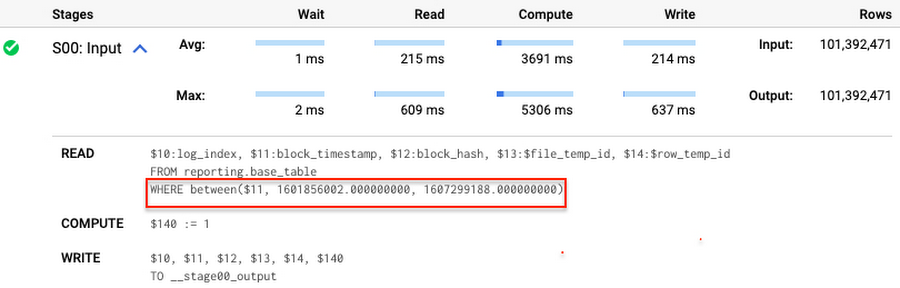
Note that you add the static filter to the staging table and keep T.block_timestamp = S.block_timestamp to convey to BigQuery that it can push that filter to the base table. This MERGE processes 41 GB of data in contrast to the initial 161 GB. You can see in the query plan that BigQuery pushes the partition filter from the staging table to the base table:
This type of optimization, when a pruning condition is pushed from a subquery to a large partitioned or clustered table, is not unique for MERGE. It also works for other types of queries. For instance:
SELECT * -- 41 GB processedFROM reporting.base_table TINNER JOIN staging.load_delta SON T.block_hash = S.block_hashAND T.log_index = S.log_indexAND T.block_timestamp = S.block_timestampWHERE S.block_timestamp BETWEEN TIMESTAMP '2020-10-05' AND TIMESTAMP '2020-12-07'
And you can check the query plan to verify that BigQuery pushed down the partition filter from one table to another.
Moreover, for SELECT statements, BigQuery can automatically infer a filter predicate on a join column and push it down from one table to another if your query meets the following criteria:
- The target table must be clustered or partitioned.
- The result size of the other table, i.e. after applying all filters, must qualify for broadcast join. Namly, the result set must be relatively small, less than ~100MB.
In our running example, reporting.base_table is partitioned by block_timestamp. If you define a selective filter on staging.load_delta and join two tables, you can see an inferred filter on the join key pushed to the target table
SELECT *FROM reporting.base_table TINNER JOIN staging.load_delta SON T.block_timestamp = S.block_timestampWHERE S.block_hash = '0x0c1caa16b34d94843aabfebc0d5a961db358135988f7498a6fdc450ad55f0870'
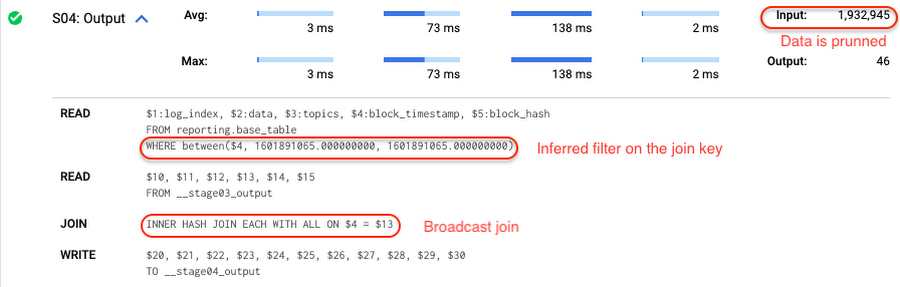
There is no requirement to join tables by partitioning or clustering key to kick off this type of optimization. However, in this case the pruning effect on the target table would be less significant.
But let us get back to the pipeline optimizations. Another way to enhance MERGE is to modify the merge_condition filter by adding static predicate on the base table:
BEGINDECLARE src_range STRUCT<date_min TIMESTAMP, date_max TIMESTAMP> --115 MB processedDEFAULT(SELECT STRUCT(MIN(block_timestamp) AS date_min,MAX(block_timestamp) AS date_max) FROM staging.load_delta);MERGE INTO reporting.base_table T --41 GB processedUSING staging.load_delta SON T.block_hash = S.block_hashAND T.log_index = S.log_indexAND T.block_timestamp BETWEEN src_range.date_min AND src_range.date_maxWHEN MATCHED THEN UPDATE SETT.data = S.dataWHEN NOT MATCHED THEN INSERT (log_index, data, topics, block_timestamp, block_hash)VALUES (log_index, data, topics, block_timestamp, block_hash);END;
To summarize, here are the steps that you can perform to enhance incremental ingestion pipelines in BigQuery. First you compute the range of updated partitions based on the small staging table. Next, you tweak the MERGE statement a bit to let BigQuery know to prune data in the base table.
All the enhanced MERGE statements scanned 41 GB of data, and setting up the src_range variable took 115 MB. Compare it with the initial 161 GB scan. Moreover, given that computing src_range may be incorporated into some existing transformation in your ETL/ELT, it results in a good performance improvement which you can leverage in your pipelines.
In this post we described how to enhance data ingestion pipelines by turning dynamic filter predicates into static predicates and letting BiQuery prune data for us. You can find more tips on BigQuery DML tuning here.
Special thanks to Daniel De Leo, who helped with examples and provided valuable feedback on this content.
UKG Ready: Meeting the Needs of Complex Machine Learning Models and Distributed Data Sets

3986
Of your peers have already read this article.
2:30 Minutes
The most insightful time you'll spend today!
Business Problem
UKG Ready primarily operates in the Small and Medium Business (SMB) space, so inherently many customers are forced to operate and make key business decisions with less Workforce Management (WFM) / Human Capital Management (HCM) data. In addition to volume, SMB lacks the variety of data needed to create a dynamic and agile organization. This puts SMB at a major disadvantage compared to larger segments.
Project Goals
People Insights module is committed to surfacing insights to customers in the context of their day-to-day duties and aid in decision making. With the SMB customer data limitations mentioned above, the goal of this project was to create a global dataset that augments individual customer data to bring light to less obvious, yet important information.
Challenges
UKG Ready is a highly configurable application that gives customers the opportunity to build solutions on a platform that meets their specific business needs. High configurability gives high flexibility to customers in their usage of the software. However, it becomes nearly impossible to create a global dataset for machine learning and data insights. UKG Ready manages just under 4 million of the US workforce and some 30,000+ customers. Despite the large employee dataset size, machine learning models that are specific to customers are starved for data because the individual customers have a relatively small employee population. Does that mean we cannot support our SMB customers’ decision making with ML?
Result
Partnering with Google, we were able to develop an approach that allowed us to standardize various domain entities (pay categories, time off codes, job titles, etc.) so that we could build a global dataset to augment SMB customer data. Using machine learning we were able to build a common vocabulary across our customer base. This common vocabulary encapsulates the nuances of how our customers manage their business and yet is generalized and standardized such that the data can be aggregated over the variety of customer configurations. This allows us to serve up practical insights to customers through various use cases. Our partnership allowed us to leverage Google Cloud Services to meet the needs of our complex machine learning models, distributed data sets and CI/CD processes.
How
UKG Ready decided to partner with Google for an end-to-end solution for the analytics offering. This allowed us to focus on our core business logic without having to worry about the platform, environment configurations, performance and scalability of the entire solution. We make use of various Google Cloud services such as Cloud Triggers, Cloud Storage, Cloud Functions, Cloud Composer, Cloud Dataflow, Big Query, Vertex AI, Cloud Pub/Sub… to host our analytics solution. Jenkins manages the entire CI/CD pipelines and cloud environments are configured and deployed using Terraform.
The standardization of business entities problem was solved in three distinct steps:
Step 1: Collecting aggregated data
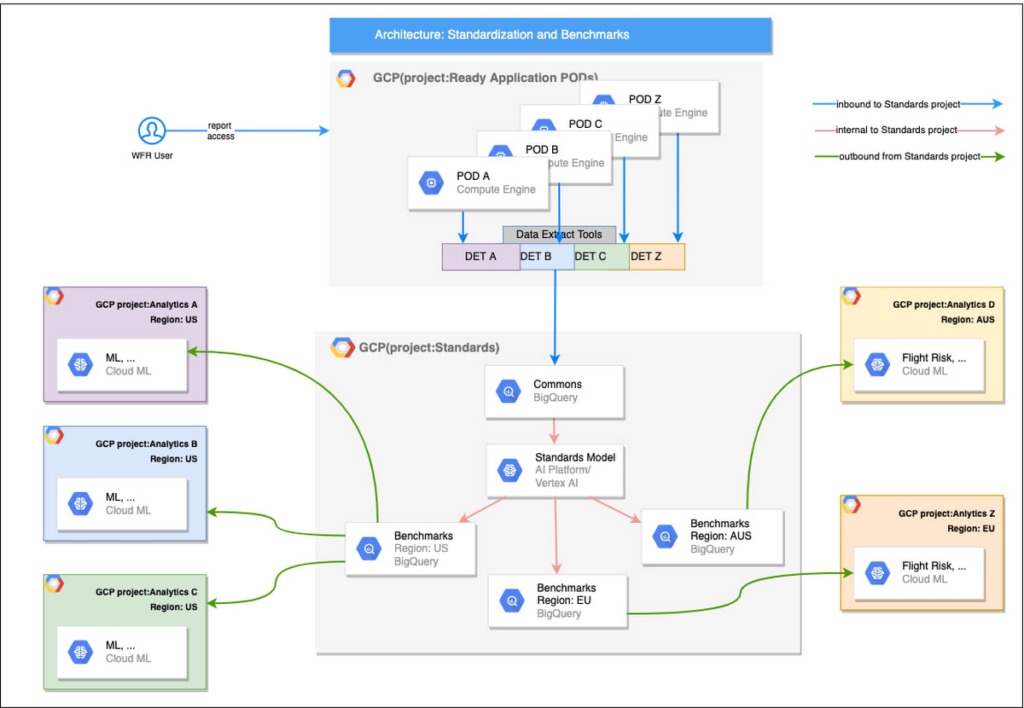
We needed an approach to collect aggregated data from our highly distributed, sharded, multi-tenant data sources. We developed a custom solution that allows us to extract data aggregated at source for PII and GDPR considerations and transfer to Google Cloud Storage in the fastest manner possible. Data is then transformed and stored in Big Query. Services used: GCS, Cloud Functions, DataFlow, Cloud Composer and Big Query. All processes are orchestrated using Cloud Composer and detailed logging is available in Cloud Logging (Stackdriver).
Step 2: Applying NLP (Natural Language Processing)
Once we had the variety of customer configurations or the business entities available, we then applied NLP algorithms to categorize and standardize these in buckets. This approach assumes that customers use natural language for configurations like job titles, pay codes etc.
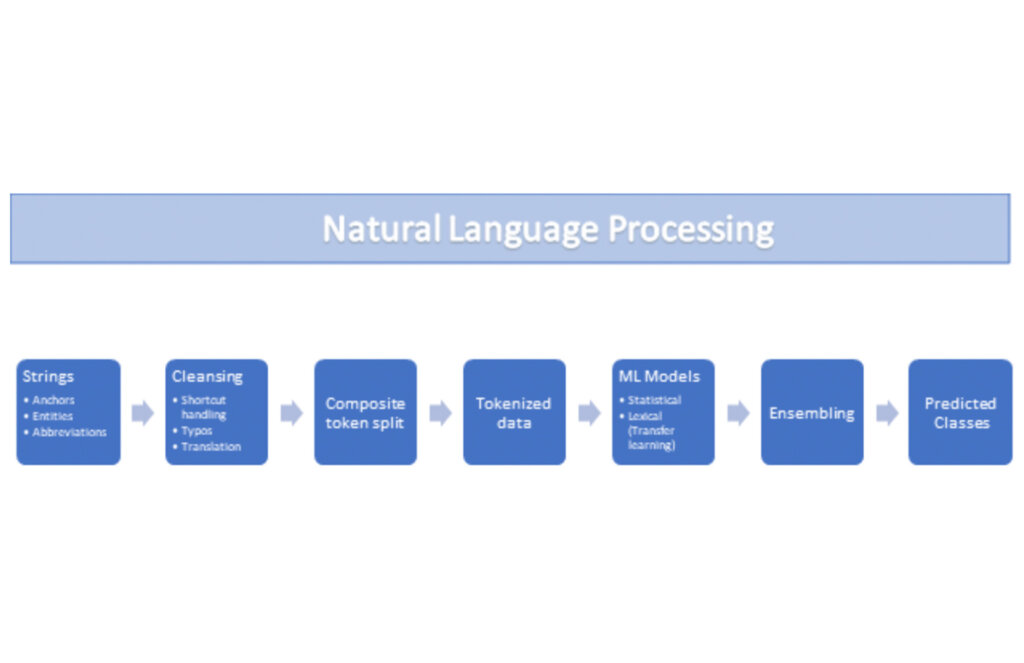
String Preparation
The input data for string preparation process is an entity string or several strings, that describe one entity object (like name-description pair or code-name pair). The output represents set of tokens that may be used to run a classification/clustering model. The process of string preparation tokenizes strings, replaces shortcuts, handles abbreviations, translates tokens, handles grammatical errors and mistypes
ML Models
Statistical
The idea of the model is to use defined target classes (clusters) and assign several tokens (anchors) to each of them an entity that has any of those tokens would be “attracted” to appropriate class. All other tokens are weighted according to frequencies of usage of theses tokens in the entities with anchor tokens:
Using anchor tokens, we are building kind-of Word2Vec - dimensionality of vector is equal to number of target classes. The higher the specific dimension (cluster) value, the higher the probability of entity to be included in appropriate cluster. Final prediction for entity tokens list for specific class is sum of weights of all the tokens included. Predicted cluster is a cluster that has maximal prediction score.
Lexical Model
We managed to generate reasonable amount of labeled data during statistical model implementation and testing. That opens a possibility to build “classical” NLP model that uses labeled data to train classification neural network using pretrained layers to produce token embeddings or even string embeddings. We started experimentation with pre-trained models like GloVe and got good results with single words and bi-grams but started getting issues in handling of n-grams. Our Google account team came to our rescue and recommended some white papers that helped formulate our strategy. We now use Tensorflow nnlm-en-dim128 model to produce string embeddings – it was trained on 200B records English Google News corpus and produces for each input string 128-dimensional vector. After that we use several Dense and Dropout layers to build a classification model.
Ensembling
To perform ensembling all the model results for each class are cast to probabilities using softmax transformation with scale normalization. Final predicted probability is maximal average score of both models among all the classes scores – appropriate class is predicted class.
The machine learning models are deployed on Vertex AI and are used in batch predictions. Model performance is captured at every prediction boundary and monitored for quality in production.
Step 3: Making available common vocabulary
Having the standardized vocabulary, we then needed a mechanism to have the results be available in UKG Ready reports and customer specific models like Flight Risk and Fatigue. For this we again used Google Services for orchestration, data transformation and data storage.
Once the modeling is complete, we made the customer specific models leveraging the above architecture be available in Reports. We utilized our proven existing technology choices in GCP for orchestration, data transformation and data storage
Results
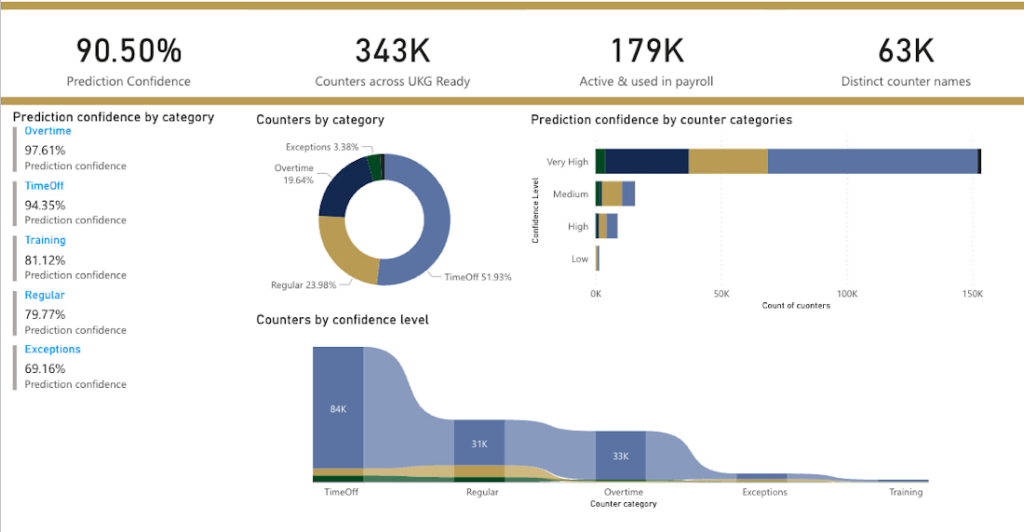
We are able to build a common vocabulary of our customers’ business entities with good confidence. And be an expert advisor to our SMB customers in their decision-making using machine learning. With the advice of our Google account team and using Google services we can add value to our product in a relatively short amount of time. And we are not done! We continue to use this platform for new use cases, complex business problems and innovative machine learning solutions.
Sample result:
Special thanks to Kanchana Patlolla , AI Specialist, Google for the collaboration in bringing this to light
Incorporating Custom Holidays into Your Time-Series Models with BigQuery ML

1126
Of your peers have already read this article.
4:30 Minutes
The most insightful time you'll spend today!
About three years ago, JCB, one of the biggest Japanese payment companies, launched a project to develop new high-value services with agility. We set up a policy of starting small from scratch without using the existing system, which we call the concept of “Dejima”, where we focused on improving various aspects such as team structure, risk management, and application and platform development process.
Until now, large Japanese enterprises have built decision-making systems focused on eliminating unnecessary business processes and efficiently increasing quarterly profits. As a result, we are seeing more organizational structures that make it difficult to take on new challenges or experiments with trial and error. We wanted to breathe a new life into this situation, and that is how the concept of Dejima came up. In the Edo period, Japan closed its national border to other countries under its national isolation policy. At the time, Dejima was the only area where special rules were applied and allowed people from different cultures to come and go, and trade. This special rule generated the culture of inclusion and led to Dejima’s prosperity. Like Dejima, we believe that creating an organization that is independent from other business practices can be effective in enabling digital transformation for the organization.
We have been able to make this transformation with the direct help of the Google Cloud and its products such as Google Kubernetes Engine (GKE), Cloud Spanner and Anthos Service Mesh, applying domain-driven design and microservice architecture. We named this the “JCB Digital Enablement Platform (JDEP),” which now hosts multiple business critical production services.
A key benefit of GKE is that the team can easily add resources and release them when they are finished, allowing them to be flexible to accommodate busy periods and off-seasons. Meanwhile, Anthos Service Mesh helps us manage complex environments easily. With containerization and managed services, we are prepared for the future for when more services go into production, as it would be easy to maintain and provide version upgrade support. At the same time, Cloud Spanner ensures that we maintain a 99.99% availability at all times.
Our initial motivation for introducing SRE practices was to break proverbial walls between business, development and operations, which was a success. Now we are focused on ensuring its reliability and maintaining customer satisfaction with our SRE practices.
To ensure the success of SRE practices that we implemented, there were a few categories we needed to address, from defining the organizational culture and practices to ensuring the policies attached to the new models created were practical enough to be implemented on the ground level. This is so that the Dejima concept remains sustainable for the long run.
Instilling a culture of measurement
Here, “appropriate” reliability is the key. According to the conventional way of thinking at JCB, “service failure must not occur” and “SLA should be maintained as high as possible.” We started by discussing what was the “appropriate reliability” that our customers really needed, but it was not as easy as we thought because the level of reliability for user satisfaction differed from application to application.
Eventually, the business, development and operations teams formulated specific SLIs and SLOs together, something we would never have been able to do if we discussed separately. This is because the business is required to compromise on lower service levels, since our reliability standard used to be too high. The collaboration of development and operations teams is necessary to understand how our system works upon our users’ interactions.
After Google Cloud helped us run a series of workshops where all teams participated, we saw change within the organization. The business team started evangelizing SRE to other members in the business department, and the development and operations teams started collaborating autonomously. We felt like we were working at Google speed, accomplishing so much in a short amount of time.
Understanding SRE as an entire company is necessary to progress. We are now working on creating internal training materials to spread the SRE concept throughout the company.
Eliminating ambiguity
With the cooperation of Google Cloud, we have created a Team Charter that defines the team’s mission, values and engagement models. We also created policy documents that include Incident Response Policy, Postmortem Policy, On-call Policy, Toil Policy and Error Budget Policy, to eliminate ambiguity in day-to-day operations.
For example, when an incident occurs, we can identify exactly the level of importance, the roles that are assigned to each person, and in what order they need to follow. When to do a postmortem, who owns it? What to do if the error budget is exhausted? How do other teams reach out to SRE when they have problems? The written policy documents will dramatically improve efficiency and motivate teams to adopt a culture of learning from failures.
The format for such policies are written in Google’s SRE book, but when we adopt it, it needs to take into account the circumstances specific to our company. Simply copying an existing policy won’t work, which is why it’s important to formulate a policy that fits the situation each team is in.
Reformalizing teams
Based on these policies, JCB’s SRE team has two sub-teams. One is called Sheriff which works as the platform SRE, and provides infrastructure services for the application team. The other is called the Diplomat which works as the embedded SRE, and participates in the application team to lead productionisation. There is also a team called Architecture that is separate from the SRE teams whose role is to consult SRE on system design and review architecture.
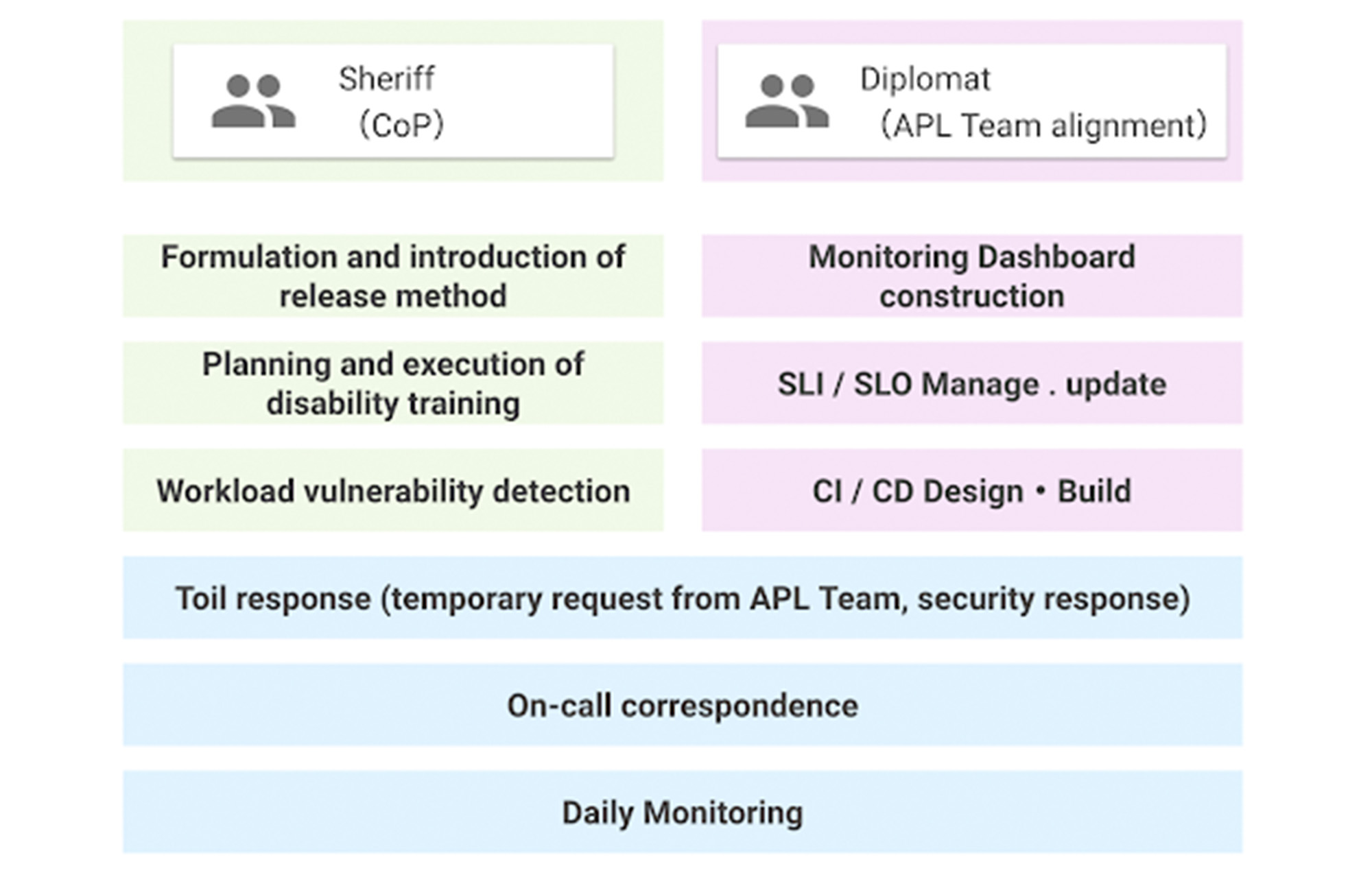
The SRE team was a single role when it was first launched, but now has two sub-teams. This is because as the number of application teams increases, the number of support tasks for the teams also increases, which can result in a shortage of resources to work on overall improvement. Securing people who are not interrupted from day-to-day support tasks and focusing on the main task improves efficiency.
Whereas both sub-teams share the on-call duty, some engineers are not allowed to do it by contract as they are not allowed to get paged. For those who cannot participate in on-call duties, we created what’s called a Toil Shift, which allows them to focus on resolving tickets in our backlogs instead.
This works well so far, but we will keep evolving as our business grows.
More Relevant Stories for Your Company

Maximizing Storage Efficiency: A Guide to Reducing Point-in-Time Recovery Impact
Point-In-Time Recovery (PITR) is a critical capability for enterprise applications. It allows database administrators to recover from accidental data deletion by restoring their production databases to a time before the incident. Cloud SQL for PostgreSQL launched support for PITR in July 2020, allowing you to recover from disasters like data

How Do You Cut Costs and Improve Staff Productivity, and Business Visibility? Ascend Money Has an Answer
Hundreds of millions of residents of South East Asia have only limited access to banking and finance services. However, help is at hand. One of South East Asia's largest fintech businesses, Ascend Money is using digital technologies to realize its mission of enabling as many people as possible to access

Boost Database Performance with AlloyDB Index Advisor: The Ultimate Optimization Tool
Intro One of the time consuming tasks for DBAs is to maximize query performance. To optimize slow-running queries, they often have to do detailed analysis, understand optimizer plans, and go through a lot of trial and error before getting to the best set of indexes that help with improved query

Google Cloud Next 21 for Data Analytics Unplugged
October 23rd (this past Saturday!) was my 4th Googlevarsery and we are wrapping an incredible Google Next 2021! When I started in 2017, we had a dream of making BigQuery Intelligent Data Warehouse that would power every organization’s data driven digital transformation. This year at Next, It was amazing to
