





This Diagnostic Company is Revolutionising Healthcare Delivery with AI
5418
Of your peers have already read this article.
5:30 Minutes
The most insightful time you'll spend today!
Dr. Elliot Smith cannot be accused of lacking ambition. A high achiever with a Ph.D. in Electrical Engineering and a specialist in magnetic resonance imaging (MRI) systems, Smith aims to deliver top quality healthcare to anyone in the world — regardless of their location or wealth.
Dr. Smith has already made strides on this journey with his Brisbane, Queensland-headquartered business, Maxwell MRI. “I saw there was a big gap in the market around automating the diagnosis of health conditions,” he says. “Existing processes were typically manual and involved a lot of people.”
Artificial intelligence (AI) and machine learning can remove a key obstacle to scaling out medicine and improve the efficiency and accuracy of diagnosing conditions, the healthcare entrepreneur believes.
“Our grand vision is to build an AI doctor that anyone can receive affordable support from and connect to in order to obtain results,” explains Dr. Smith.
Maxwell MRI presently enables clinicians to submit anonymised MRI scans to a machine learning enabled AI platform to help diagnose prostate cancer. The service is sold to clinicians who can then charge a per-session fee to clients. As well as obtaining results for individual cases, the MRI scans and associated information is used to ‘train’ the platform to deliver accurate diagnoses faster and in a more affordable way than existing systems do.
Dr. Smith and his team started by running a number of functions and processes on a single server with graphics processing units (GPUs) and sizable hard disk capacity. However, this infrastructure could not scale to support the planned growth of the business. Each case Maxwell MRI processes involves about 200MB of data in MRI scans alone. Once supplementary data, blood test result, pathology results and genetic information is included, this load can reach more than 1GB of data per patient.
The business aimed to process 150,000 cases by the end of 2018. This required a service that could deliver massive scale in data storage and compute, and could easily be accessed from any location. “We wanted to move from three GPUs to 30 GPUs without having to buy more servers or other associated equipment, so the cloud was the natural next step,” says Dr. Smith.
Maxwell MRI evaluated Google Cloud Platform (GCP) and determined that the managed services component of GCP would remove the burden of infrastructure deployment and administration. In addition, Google Cloud Machine Learning Engine would enable the business to scale to as many GPUs as needed to meet demand.
Maxwell MRI started with some small experiments to determine that GCP met all its requirements and completed its migration to the platform in February 2017. “We really started to scale up the data we had and consequently our computing requirements at that time,” Dr. Smith says.
The Maxwell MRI platform features an upload service that enables clinicians to upload imaging and associated data. This service triggers several different upload pipelines that clean and standardise data. They then write imaging data to Google Cloud Storage, and more structured data to a combination of Google Cloud Datastore and Google Cloud Spanner.
The platform then converts the information into records that can be used to ‘train’ new machine learning configurations or run evaluations through existing machine learning pipelines.
“The tasks we perform including segmenting various anatomical regions for analysis and sending those results back into Google Cloud Storage,” says Dr. Smith. “This then commences that repeated process of running Google Cloud Dataflow pipelines and machine learning algorithms, and presenting those outcomes back to the clinicians.”
Existing Literature Validated
The data processed and analysed to date has, Dr Smith says, enabled Maxwell MRI to help validate existing literature that indicates clinicians lack confidence in existing early-stage testing procedures for prostate cancer. This prompts them to move quickly to the biopsy stage to assure themselves their diagnosis is valid. “New technologies have a lot of potential to rectify this situation and guide treatment to be more accurate, specific and cost-effective,” he says.
Results Delivered in 10-15 Minutes
More specifically, using GCP has enabled Maxwell MRI to guarantee to clinicians that results will be delivered within minutes. “Clinicians are used to getting results back in two days to a week,” says Dr. Smith. “We’re saying that with our platform running on GCP we’ll deliver you results in 10 to 15 minutes, regardless of the number of patients coming in.”
Running on GCP has enabled the business to accelerate its development cycles, test new ideas easily on a subset of data, test in parallel and deliver new services considerably faster than in another environment. In addition, the flexible GCP charging model aligned with the ability to scale compute capabilities quickly and easily has enabled the fledgling business to control its costs.
Google technologies are poised to play an integral role in the business’s future. “With Google available, it doesn’t make sense for us to use our own infrastructure,” Dr. Smith says. “Our expertise in AI, machine learning and clinical engagement complements cloud platform specialties of infrastructure, managed services and ease of use. We see a bright future ahead in helping to transform healthcare globally.”
Quick Recap on Google Cloud: Latest News, Launches, Updates, Events and More

12938
Of your peers have already read this article.
2:00 Minutes
The most insightful time you'll spend today!
Want to know the latest from Google Cloud? Find it here in one handy location. Check back regularly for our newest updates, announcements, resources, events, learning opportunities, and more.
Tip: Not sure where to find what you’re looking for on the Google Cloud blog? Start here: Google Cloud blog 101: Full list of topics, links, and resources.
Week of May 24-May 28 2021
- Google Cloud for financial services: driving your transformation cloud journey–As we welcome the industry to our Financial Services Summit, we’re sharing more on how Google Cloud accelerates a financial organization’s digital transformation through app and infrastructure modernization, data democratization, people connections, and trusted transactions. Read more or watch the summit on demand.
- Introducing Datashare solution for financial services–We announced the general availability of Datashare for financial services, a new Google Cloud solution that brings together the entire capital markets ecosystem—data publishers and data consumers—to exchange market data securely and easily. Read more.
- Announcing Datastream in Preview–Datastream, a serverless change data capture (CDC) and replication service, allows enterprises to synchronize data across heterogeneous databases, storage systems, and applications reliably and with minimal latency to support real-time analytics, database replication, and event-driven architectures. Read more.
- Introducing Dataplex: An intelligent data fabric for analytics at scale–Dataplex provides a way to centrally manage, monitor, and govern your data across data lakes, data warehouses and data marts, and make this data securely accessible to a variety of analytics and data science tools. Read more.
- Announcing Dataflow Prime–Available in Preview in Q3 2021, Dataflow Prime is a new platform based on a serverless, no-ops, auto-tuning architecture built to bring unparalleled resource utilization and radical operational simplicity to big data processing. Dataflow Prime builds on Dataflow and brings new user benefits with innovations in resource utilization and distributed diagnostics. The new capabilities in Dataflow significantly reduce the time spent on infrastructure sizing and tuning tasks, as well as time spent diagnosing data freshness problems. Read more.
- Secure and scalable sharing for data and analytics with Analytics Hub–With Analytics Hub, available in Preview in Q3, organizations get a rich data ecosystem by publishing and subscribing to analytics-ready datasets; control and monitoring over how their data is being used; a self-service way to access valuable and trusted data assets; and an easy way to monetize their data assets without the overhead of building and managing the infrastructure. Read more.
- Cloud Spanner trims entry cost by 90%–Coming soon to Preview, granular instance sizing in Spanner lets organizations run workloads at as low as 1/10th the cost of regular instances, equating to approximately $65/month. Read more.
- Cloud Bigtable lifts SLA and adds new security features for regulated industries–Bigtable instances with a multi-cluster routing policy across 3 or more regions are now covered by a 99.999% monthly uptime percentage under the new SLA. In addition, new Data Access audit logs can help determine whether sensitive customer information has been accessed in the event of a security incident, and if so, when, and by whom. Read more.
- Build a no-code journaling app–In honor of Mental Health Awareness Month, Google Cloud’s no-code application development platform, AppSheet, demonstrates how you can build a journaling app complete with titles, time stamps, mood entries, and more. Learn how with this blog and video here.
- New features in Security Command Center—On May 24th, Security Command Center Premium launched the general availability of granular access controls at project- and folder-level and Center for Internet Security (CIS) 1.1 benchmarks for Google Cloud Platform Foundation. These new capabilities enable organizations to improve their security posture and efficiently manage risk for their Google Cloud environment. Learn more.
- Simplified API operations with AI–Google Cloud’s API management platform Apigee applies Google’s industry leading ML and AI to your API metadata. Understand how it works with anomaly detection here.
- This week: Data Cloud and Financial Services Summits–Our Google Cloud Summit series begins this week with the Data Cloud Summit on Wednesday May 26 (Global). At this half-day event, you’ll learn how leading companies like PayPal, Workday, Equifax, and many others are driving competitive differentiation using Google Cloud technologies to build their data clouds and transform data into value that drives innovation. The following day, Thursday May 27 (Global & EMEA) at the Financial Services Summit, discover how Google Cloud is helping financial institutions such as PayPal, Global Payments, HSBC, Credit Suisse, AXA Switzerland and more unlock new possibilities and accelerate business through innovation. Read more and explore the entire summit series.
- Announcing the Google for Games Developer Summit 2021 on July 12th-13th–With a surge of new gamers and an increase in time spent playing games in the last year, it’s more important than ever for game developers to delight and engage players. To help developers with this opportunity, the games teams at Google are back to announce the return of the Google for Games Developer Summit 2021 on July 12th-13th. Hear from experts across Google about new game solutions they’re building to make it easier for you to continue creating great games, connecting with players and scaling your business. Registration is free and open to all game developers. Register for the free online event at g.co/gamedevsummit to get more details in the coming weeks. We can’t wait to share our latest innovations with the developer community. Learn more.
Apollo24|7 partnered with Google Cloud to build the Clinical Decision Support System (CDSS) together

2745
Of your peers have already read this article.
4:30 Minutes
The most insightful time you'll spend today!
Clinical Decision Support System (CDSS) is an important technology for the healthcare industry that analyzes data to help healthcare professionals make decisions related to patient care. The market size for the global clinical decision support system appears poised for expansion, with one study predicting a compound annual growth rate (CAGR) of 10.4%, from 2022 to 2030, to $10.7 billion.
For any health organization that wants to build a CDSS system, one key block is to locate and extract the medical entities that are present in the clinical notes, medical journals, discharge summaries, etc. Along with entity extraction, the other key components of the CDSS system are capturing the temporal relationships, subjects, and certainty assessments.
At Google Cloud, we know how critical it is for the healthcare industry to build CDSS systems, so we worked with Apollo 24|7, the largest multi-channel digital healthcare platform in India, to build the key blocks of their CDSS solution.
We helped them to parse the discharge summaries and prescriptions to extract the medical entities. These entities can then be used to build a recommendation engine that would help doctors with the “Next Best Action” recommendation for medicines, lab tests, etc.
Let’s take a sneak peek at Apollo 24|7’s entity extraction solutions, and the various Google AI technologies that were tested to form the technology stack.
Datasets Used
To perform our experiments on entity extraction, we used two types of datasets.
- i2b2 Dataset – i2b2 is an open-source clinical data warehousing and analytics research platform that provides annotated deidentified patient discharge summaries made available to the community for research purposes. This dataset was primarily used for training and validation of the models.
- Apollo 24|7’s Dataset – De-identified doctor’s notes from Apollo24|7 were used for testing. Doctors annotated them to label the entities and offset values.
Experimentation and choosing the right approach — Four models put to test
For entity extraction, both Google Cloud products and open-source approaches were explored. Below are the details:
- Healthcare Natural Language API: This is a no-code approach that provides machine learning solutions for deriving insights from medical text. Using this, we parsed unstructured medical text and then generated a structured data representation of the medical knowledge entities stored in the data for downstream analysis and automation. The process includes:
- Extract information about medical concepts like diseases, medications, medical devices, procedures, and their clinically relevant attributes;
- Map medical concepts to standard medical vocabularies such as RxNorm, ICD-10, MeSH, and SNOMED CT (US users only);
- Derive medical insights from text and integrate them with data analytics products in Google Cloud.
The advantage of using this approach is that it not only extracts a wide range of entity types like MED_DOSE, MED_DURATION, LAB_UNIT, LAB_VALUE, etc, but also captures functional features such as temporal relationships, subjects, and certainty assessments, along with the confidence scores. Since it is available on Google Cloud, this offers long-term product support. It is also the only fully-managed NLP service among all the approaches tested and hence, it requires the least effort to implement and manage.
But one thing to keep in mind is that since the Healthcare NL API offers natural language models that are pre-trained, it currently cannot be used for custom entity extraction models trained using custom annotated medical text or to extract custom entities. This has to be done via AutoML Entity Extraction for Healthcare, another Google Cloud service for custom model development. Custom model development is important for adapting the pre-trained models to new languages or region-specific natural language processing, such as medical terms whose use may be more prevalent in India than in other regions
- Vertex AutoML Entity Extraction for Healthcare: This is a low-code approach that’s already available on Google Cloud. We used AutoML Entity Extraction to build and deploy custom machine learning models that analyzed documents, categorized them, and identified entities within them. This custom machine learning model was trained on the annotated dataset provided by the Apollo 24|7 team.
The advantage of AutoML Entity Extraction is that it gives the option to train on a new dataset. However, one of the prerequisites to keep in mind is that it needs a little pre-processing to capture the input data in the required JSONL format. Since this is an AutoML model just for Entity Extraction, it does not extract relationships, certainty assessments, etc.
- BERT-based Models on Vertex AI: Vertex AI is Google Cloud’s fully managed unified AI platform to build, deploy, and scale ML models faster, with pre-trained and custom tooling. We experimented with multiple custom approaches based on pre-trained BERT-based models, which have shown state-of-the-art performance in many natural language tasks. To gain better contextual understanding of medical terms and procedures, these BERT-based approaches are explicitly trained on medical domain data. Our experiments were based on BioClinical BERT, BioLink BERT, Blue BERT trained on Pubmed dataset, and Blue BERT trained on Pubmed + MIMIC datasets.
The major advantage of these BERT-based models is that they can be finetuned on any Entity Recognition task with minimal efforts.
However, since this is a custom approach, it requires some technical expertise. Additionally, it does not extract relationships, certainty assessments, etc. This is one of the main limitations of using BERT-based models.
- ScispaCy on Vertex AI: We used Vertex AI to perform experiments based on ScispaCy, which is a Python package containing spaCy models for processing biomedical, scientific or clinical text.
Along with Entity Extraction, Scispacy on Vertex AI provides additional components like Abbreviation Detector, Entity Linking, etc. However, when compared to other models, it was less precise, with too many junk phrases, like “Admission Date,” captured as entities.
“Exploring multiple approaches and understanding the pros/cons of each approach helped us to decide the one that would fit our business requirements.” according to Abdussamad M, Engineering Lead at Apollo 24|7.
Evaluation Strategy
In order to match the parsed entity with the test data labels, we used extensive matching logic that comprised of the below four methods:
- Exact Match – Exact match captures entities where the model output and the entities in the test dataset match. Here, the offset values of the entities have also been considered. For example, the entity “gastrointestinal infection” that is present as-is in both the model output and the test label will be considered an “Exact Match.”
- Match-Score Logic – We used a scoring logic for matching the entities. For each word in the test data labels, every word in the model output is matched along with the offset. A score is calculated between the entities and based on the threshold, it is considered as a match.
- Partial Match – In this matching logic, entities like “hypertension” and “hypertensive” are matched based on the Fuzzy logic.
- UMLS Abbreviation Lookup – We also observed that the medical text had some abbreviations, like AP meaning abdominal pain. These were first expanded by doing a lookup on the respective UMLS (Unified Medical Language System) tables and then passed to the individual entity extraction models.
Performance Metrics
We used precision and recall metrics to compare the outcomes of different models/experiments.
Precision (also called positive predictive value) is the fraction of relevant instances among the retrieved instances, while recall (also known as sensitivity) is the fraction of relevant instances that were retrieved.
The below example shows how to calculate these metrics for a given sample.
Example sample: “Krish has fever, headache and feels uncomfortable”
Expected Entities: [“fever”, “headache”]
Model Output: [“fever”, “feels”, “uncomfortable”]
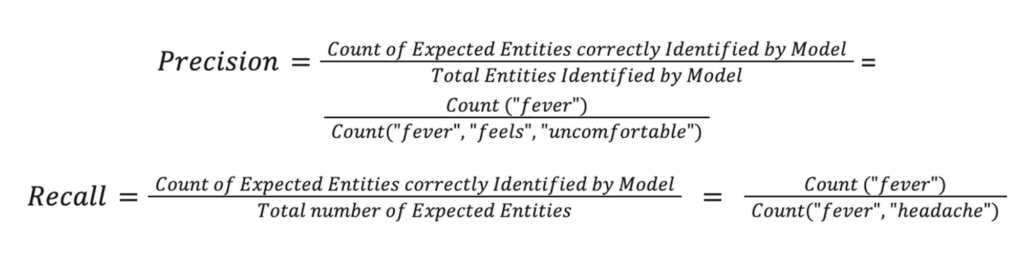
Thus,

Experimentation Results
The following table captures the results of the above experiments on Apollo24|7’s internal datasets.
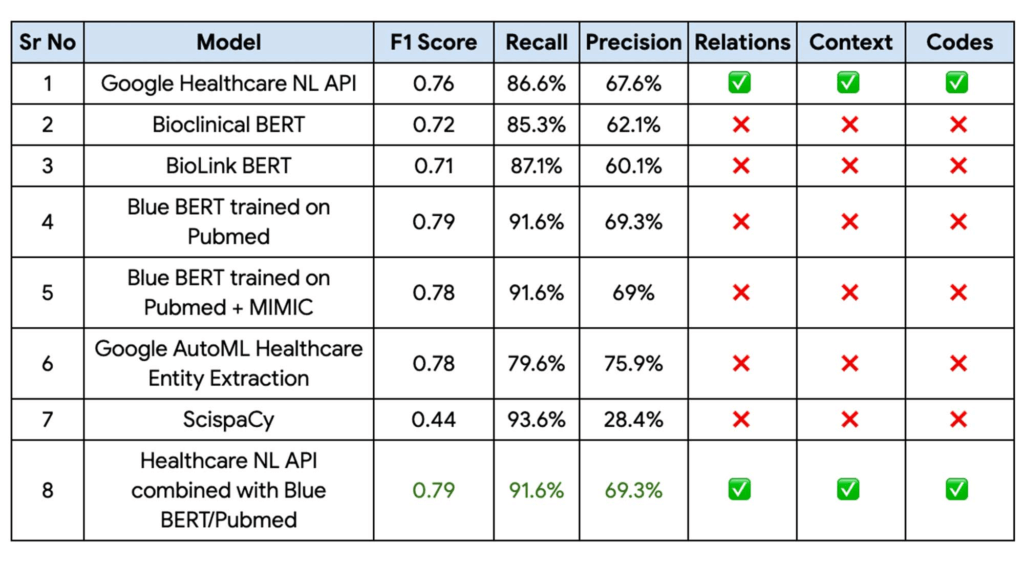
Finally, the Blue BERT model trained on the Pubmed dataset had the best performance metrics with a 81% improvement on Apollo 24|7’s baseline mode with the Healthcare Natural Language API providing the context, relationships, and codes. This performance could be further improved by implementing an ensemble of these two models.
“With the Blue BERT model giving the best performance for entity extraction on Vertex AI and the Healthcare NL API being able to extract the relationships, certainty assessments etc, we finally decided to go with an ensemble of these 2 approaches,“ Abdussamad added.
Fast track end-to-end deployment with Google Cloud AI Services (AIS)
Google AIS (Professional Services Organization) helped Apollo24|7 to build the key blocks of the CDSS system.
The partnership between Google Cloud and Apollo 24|7 is just one of the latest examples of how we’re providing AI-powered solutions to solve complex problems to help organizations drive the desired outcomes. To learn more about Google Cloud’s AI services, visit our AI & ML Products page, and to learn more about Google Cloud solutions for health care, explore our Google Cloud Healthcare Data Engine page.
Acknowledgements
We’d like to give special thanks to Nitin Aggarwal, Gopala Dhar and Kartik Chaudhary for their support and guidance throughout the project. We are also thankful to Manisha Yadav, Santosh Gadgei and Vasantha Kumar for implementing the GCP infrastructure. We are grateful to the Apollo team (Chaitanya Bharadwaj, Abdussamad GM, Lavish M, Dinesh Singamsetty, Anmol Singh and Prithwiraj) and our partner team from HCL/Wipro (Durga Tulluru and Praful Turanur) who partnered with us in delivering this successful project. Special thanks to the Cloud Healthcare NLP API team (Donny Cheung, Amirhossein Simjour, and Kalyan Pamarthy).
Google Cloud’s No-Cost Skill Badge: Up Your Generative AI Game

1193
Of your peers have already read this article.
1:30 Minutes
The most insightful time you'll spend today!
Generative AI is a rapidly expanding technology with a wide range of potential applications. Google Cloud Learning is thrilled to offer a new, no-cost Generative AI Fundamentals skill badge. This skill badge is designed for anyone eager to learn about the power of generative AI. No technical skills or prior knowledge required!
For those new to digital credentials, Google Cloud skill badges are digital credentials issued by Google Cloud in recognition of your knowledge of Google Cloud products and services. Individuals can earn skill badges on Google Cloud Skills Boost, and can share their skill badge to their social media profile and resume.
Watch the short videos in the generative AI courses and complete the final quiz to earn the Generative AI Fundamentals skill badge pictured below. In as little as 120 minutes, you will learn the basics of how generative AI works, how Google Cloud AI technology can be used by businesses and individuals, and how the principles of responsible AI lead to ethical decisions about the use of generative AI.
By earning the skill badge, you will demonstrate your understanding of foundational concepts in generative AI.
The topics covered in the courses include:
1. Introduction to Generative AI
- Explain how generative AI works
- Describe generative AI model types
- Describe generative AI applications
2. Introduction to Large Language Models
- Define large language models (LLMs)
- Describe LLM use cases
- Explain prompt tuning
- Describe Google’s generative AI development tools
3. Introduction to Responsible AI
- Identify the need for a responsible AI practice within an organization
- Recognize that decisions made at all stages of a project make an impact in Responsible AI
- Recognize that organizations can design an AI infrastructure to fit their own business needs and values
Earn the skill badge and show off your generative AI knowledge today! And for more content to help you stay up to date with generative AI, check out “The Prompt” and our generative AI primer for executives on Transform with Google Cloud.

5503
Of your peers have already downloaded this article
10:30 Minutes
The most insightful time you'll spend today!
Modernizing your data warehouse is one way to keep up with evolving business requirements and harness new technology. For many companies, cloud data warehousing offers a fast, flexible, and cost-effective alternative to traditional on-premises solutions.
In a report sponsored by Google Cloud, TDWI examines the rise of cloud-based data warehouses and identifies associated opportunities, benefits, and best practices.
Featuring strategic advice from Google experts, it answers questions such as:
- What’s driving businesses to consider the cloud for their data warehousing strategy?
- What are the advantages of a cloud-native data warehouse?
- How can you coordinate data warehouse modernization with other modernization projects?
- What’s the first step in migrating your data warehouse to the cloud?
- How will cloud data warehousing affect your business’s security posture?
Download the complete report to learn more about cloud data warehousing and how it can help your business transform with the times — and prepare for the future.
How Recommendation AI Helps Retailers Optimize Click-through and Conversion Rates

7083
Of your peers have already read this article.
3:00 Minutes
The most insightful time you'll spend today!
Time to go outside again, I guess. I’ll need a sun hat. Sunscreen. Maybe some new sandals? What else?
With the Recommendations AI service, I might be reminded to grab a reusable water bottle and a swimsuit. Or some after-sun aloe lotion. Good thing, cause I’ll need it.

Recommendations AI is a solution that uses machine learning to bring product recommendations to their shoppers across any catalog or client list. This service is part of our full suite of Retail solutions. When you integrate with the Retail API, you get the benefit of Google’s Product Discovery. Integrating once to reap the benefits over and over. Recommendations is the starting point, and you can easily extend into Retail Search and Vision Product Search in the upcoming future.
The Recommendations solution is fully managed, global-scale and powered by deep learning, so you can focus on a great shopping experience and let someone else worry about the infrastructure.
Compared to baseline recommendation systems used by customers, Recommendations AI showed double digit uplift in conversion and clickthrough rates in A/B experiments controlled by the customers. You can optimize for click-through, conversion or session revenue, and fine tune the models to make sure you omit out-of-stock items or duplicates, for example.

So how does it work, and how do you get started? Read on, and we’ll walk you through the pipeline, starting with the data you already have to placement in your online store.
Formula: Data -> Model -> Placement
You start with your catalog, the list of all the things (postcards, movies, pie recipes) that you want to show your customers. Then you ingest your PII-redacted user events -this is the historic event data like home page views, add to cart events and more along with real time user events. This user event is joined with the product catalog and items that allows us to construct the sequence of shoppers’ activity, thus being able to predict what the shopper has a high propensity to purchase next. The user events can come from both online activity across devices or offline store purchases
The recommendation model will return a list of products, which are the recommendations. The brains of the operation, if you will. This model is trained using all the data that you ingest, using the latest neural network models and techniques that Google has built expertise over the years in flagship products like Youtube and News, that allows us to uncover shopper intent, so it can best predict the right recommendations to show to the right people.
Every model outputs a list of product identifiers, but where do they go? They go into placements, the spots, panels, carousels on your customer’s journey interacting with your brand that you’ve set aside to highlight recommendations. A model can send recommendations to one or more placements, but each placement only receives information from one recommendation model. Your pages will then need to render the products with the right images, text or other metadata, using the product ID that is returned by the model.
What do recommendations look like?
Let’s start by browsing our postcard-selling website, where I’ve been buying some vintage California postcards already. The recommendations algorithm has caught on to my interest, showing me other potential cards to purchase based on my history:

Put your data to work
To get started we need to bring your data into the recommendation model, so it can understand your customers, your inventory, and your sales patterns.
The model takes in the product catalog you use, and metadata about those products to better understand nuances in assortment, pricing and variables like size and style. You might already have this data stored in BigQuery or Merchant Center, and hence we provide easy integrations that you can leverage to get started even faster.
As for the user events, don’t worry if you already have systems in place to capture web and mobile activity. We make it easy to bring in your real time event logs by providing seamless integrations with Google Tag Manager, Javascript pixel, or even historic events from Cloud Storage, BigQuery or using inline API or JSON, so you can immediately train the models on this imported data. All this allows you to kickstart integrating with Recommendations AI in a matter of days.
The models then construct a sequence of activities that the user went through and joins with the products that the user engaged with. Once your data is ready to go, it takes a few days to train the model. Next onto making the data work for you.
Quickly customize your model
Setting up your own recommendations project in the console gives you the ability to choose what sort of model to train (based on what recommendations you want to generate) and your objective. Are you optimizing for click-through rate–more people click on the recommendation links or products–or for conversion rate–more people choose or buy what was suggested or revenue ?
Different models can be optimized for different optimization goals.; the GCP console explains what each one can do and how you can choose to optimize it.

Let’s unpack some of this terminology real quick.
We’ve got three model types:
- Recommended for you – Means we think these are items you’ll want to buy, based on your history; this is usually used on a home page to showcase items.
- Others you may like – Means if you’re browsing the page of a water bottle, we will recommend alternative brands of water bottles that you may like as well as a backpack, based on your engagement history.
- Frequently bought together – Means that when anyone buys sunscreen, we notice that they often also buy aloe lotion, so we will surface those items when someone adds any one of them to their cart.
And then we have three business objectives that the models optimize for:
- Click-through rate – How frequently did somebody click on a recommended item?
- Conversion rate– How frequently did somebody add a recommended item to their cart?
- Revenue per session – How much money did the recommendations generate for you?
Deliver anywhere along the journey
Now that you’re all set up in the Retail AI console, you can test out the recommendations in the console, even before you deploy to production.

You can integrate Recommendations into your frontend by calling the Predict APIt. The placements of recommendations will report data back into the dashboard and you can analyze and measure success for future iterations.
On top of that you can use the recommendations for other parts of your customer’s journey. Email promotions, storefront kiosks, display ads or follow-up notifications can include recommendations based on past activity and cart contents. The model gives you useful product recommendations for a wide variety of touchpoints and steps in the purchasing process.
More best practices, and guides, are available inside our documentation.
How to get started
Training your own models can be tedious, time-consuming, and expensive. On top of that it requires deeper data science expertise to set up. Let us do it instead!
You can see how IKEA Retail uses Recommendations AI in this recent talk and blog from the Google Cloud Retail Summit..
To get started today you’ll need to make a Cloud project and enable the Retail API, which then allows you to access all the recommendation tools in one menu. Bring in your catalog and purchasing data, define a placement or two, and you can start putting recommendations on your site in a matter of days.
More Relevant Stories for Your Company



Signal Generation in the Investment Management Industry
Machine learning is seeing a lot of use cases in the financial sector. One of them is leverage AI to sift signal from noise and create insights or predictions that can give financial planners an edge. In this video, David Li, Head of Advanced Analytics, BlackRock and Colman Madden, Customer

Vodafone Leverages Google Cloud to Aid COVID-19 Frontline with Anonymized Insights on Population Mobility
Editor’s note: When Europe’s largest mobile communications company, Vodafone, was asked by the European Commission to help understand population movement across the European Union and the UK to help fight COVID-19, it was able to provide anonymized mobile network-based insights to answer the call. Here’s how Vodafone, with the support



Breakthrough Insights Across the Life Sciences Value Chain
New science and patient centricity require increasing reliance on data and deeper insights. Accenture’s life sciences customers have been demanding answers to this need, and want a solution with an open platform. Enter INTIENT, Accenture’s life sciences platform that is powered by Google Cloud. INTIENT generates insights throughout the life



The 5-Min Demo: How to Develop, Train and Deploy Training Models on Kubernetes
Machine learning has taken businesses by storm. A growing number of organizations, both large and small, and spread across a swathe of industries, are figuring out how to quickly adopt ML. But in the midst of that accelerated push, infrastructure and data science teams have to come to terms with
