





The Power of Personalization: Ocado Retail’s Strategy to Boost Revenue and Lower Churn

1712
Of your peers have already read this article.
3:30 Minutes
The most insightful time you'll spend today!
Retailers are becoming more skilled at making individual customers feel heard and valued. This is a necessity given the fact that 66% of respondents to a McKinsey survey stated that they expect email marketing messages to be tailored to their needs. While marketing personalization expertise is growing, it’s still difficult to manage, especially at scale.
Ocado Retail, one of the world’s largest dedicated online grocery retailers, delivering to over 645,000 customers in the U.K., has made personalization integral to its success.
Let’s look at how Ocado retail worked with Google Cloud and partner Cognizant to develop a new data platform to power its personalization efforts from the ground up.
Unifying data for more holistic, powerful personalization
To achieve its goals of personalization at scale, Ocado Retail needed a central data warehouse that could turn all forms of merchandising, advertising, business, and customer intelligence data into actionable insights. It wanted a means to accelerate customer segment identification, as well as the ideation and launch of relevant campaigns.
“We standardized on Google Cloud, including BigQuery, as the foundation for our data platform because we knew it was the right solution for now and the future,” says Kieren Johnson, Head of IT at Ocado Retail. “We have an incredibly lean team and we needed a partner with exceptional expertise to help build an ambitious enterprise data warehouse to provide powerful insights. Cognizant was also the clear choice to help us get there.”
Cognizant worked closely with Ocado Retail to make sure its expertise in Google Cloud and other technologies aligned with Ocado Retail’s vision to drive more advanced personalization at higher scales using machine learning. The partner helped build the foundation on BigQuery, and then incorporated other Google Cloud tools such as Cloud Run, Vertex AI, and Vertex AI Natural Language to provide no-ops, all-code warehousing, and analytics capabilities.
Cognizant also took advantage of the Google Cloud Partner Success Services (PSS) program to ensure best practices were being followed throughout the project. PSS provided advisory services that guided Cognizant through the highly complex process of building the new data warehouse for Ocado Retail on Google Cloud.
Building the enterprise data platform in this way allows Ocado Retail to leverage the full power of cloud-based analytics while maintaining a lean team. It also allows the company to greatly scale up its personalization efforts.
Making customers feel valued at every touch
The work Ocado Retail has done with Google Cloud and Cognizant has positioned it to make its growing customer base feel valued, understood, and supported in every interaction. Before launching the project with Cognizant and Google Cloud, Ocado Retail was only able to run a couple of campaigns per week and knew it lacked optimal insight into each campaign’s efficacy.
“We now run 10 times the number of campaigns we used to with the help of the data platform Cognizant built on Google Cloud,” says Kieren. “We run multiple campaigns every day for different customer segments, and all of that increased activity is entirely driven by data insights. The positive impacts on our marketing and customer service performance have been clear. We’re now working to expand what we do.”
Ocado Retail has enjoyed solid growth since the new data platform went live, including a 13% rise in active customers during fiscal year 2022, and has also seen a reduction in churn. It attributed these improvements to being better able to tailor products and communications to specific customer preferences.
Throughout the project, Cognizant supported data clean up while maximizing the scalable, flexible, and future-proofed data analytics infrastructure offered by Google Cloud.
Increasing data-driven actions
Ocado Retail plans to provide more data-driven insights to its commercial suppliers through a product called Beet Insights. So far, Beet Insights offers suppliers with intelligence about how their products are performing on the shelves. The result has been improving the role data plays throughout the supply chain, from production to purchase and beyond.
“By putting real-time insights about costs, marketing spend, and supply-funded activities into the hands of our commercial team and buyers, we are better positioned to improve our profits,” says Kieren. “At the same time, building data analytics into every part of our business will allow us to build on our personalization efforts.”
From the project’s inception, Ocado Retail ensured that the platform would be scalable and dynamic. Now, it is working to feed more data sources and streams into the warehouse to accelerate time to insights. Ocado Retail believes this next step in the evolution of the platform will unlock even more opportunities to initiate high-impact programs that transform personalization and every customer interaction.
Learn more about what Google Cloud and partners like Cognizant can do for your customer intelligence and personalization.
Unlocking the Power of Computer Vision: Vision AI Made Easy with Spring Boot and Java

1190
Of your peers have already read this article.
1:30 Minutes
The most insightful time you'll spend today!
In today’s era of data-driven applications, leveraging advanced machine learning and artificial intelligence services like computer vision has become increasingly important. One such service is the Vision API, which provides powerful image analysis capabilities. In this blog, we will explore how to create a Computer Vision application using Spring Boot and Java, enabling you to unlock the potential of image recognition and analysis in your projects. The application UI will accept as input, public URLs of images that contain written or printed text, extract the text, detect the language and if it is one of the supported languages, it will generate the English translation of that text.
Spring Boot and Google Cloud
Spring Boot is a powerful open-source framework for creating Spring-based applications. It simplifies development by providing auto-configuration, starter dependencies, and embedded servers. It also offers production-ready features like metrics and health checks. With Spring Boot, you can focus on writing code and deploying efficient applications without worrying about complex configuration or dependencies. Apart from the well-known features that make it an ideal choice for enterprise apps, a new exciting development is the official support for Native Image Builder using GraalVM, enabling the creation of native standalone executables without the need for a Java Runtime and are leaner and offer a super fast startup experience. Try Spring Native on Google Cloud.
The Spring Cloud GCP library makes it easy for Spring Boot applications to use Google Cloud services. It provides Spring Boot APIs for over a dozen Google Cloud services. This means you can take advantage of the benefits of Google Cloud services without having to learn separate Google Cloud client libraries. It is very easy to migrate or create a new Spring Boot application in Google Cloud. With just one command, you can bootstrap your production-ready Spring Boot project structure and start making code changes for your requirement. Refer to the documentation for a full list of features.
Prerequisites
Before diving into the development process, make sure you have the following prerequisites in place:
- A Google Cloud account with a project created and billing enabled
- Vision API, Translation, Cloud Run, and Artifact Registry APIs enabled
- Cloud Shell activated
- Cloud Storage API enabled with a bucket created and images with text or handwriting in local supported languages uploaded (or you can use the sample image links provided in this blog)
Refer to the documentation for steps on how to enable Google Cloud APIs.
Bootstrapping a Spring Boot project
To get started, create a new Spring Boot project using your preferred IDE or Spring Initializr. Include the necessary dependencies, such as Spring Web, Spring Cloud GCP, and Vision AI, in your project’s configuration. Alternatively, you can use Spring Initializr from Cloud Shell using the below steps to bootstrap your Spring Boot application easily:
1. Open a Cloud Shell terminal and make sure it is pointing to the correct project and that you are authorized (if not you can use the command below to set the right project):
gcloud config set project <PROJECT_ID>
2. Run the following command to create your Spring Boot project:
curl https://start.spring.io/starter.tgz -d packaging=jar -d dependencies=cloud-gcp,web,lombok -d baseDir=spring-vision -d type=maven-project -d bootVersion=3.0.1.RELEASE | tar -xzvf -spring-vision is the name of your project, change it per your requirement.
bootVersion is the version of Spring Boot, make sure to update it if required at the time of your implementation.
type is the version of project build tool type, you can change it to gradle if preferred.
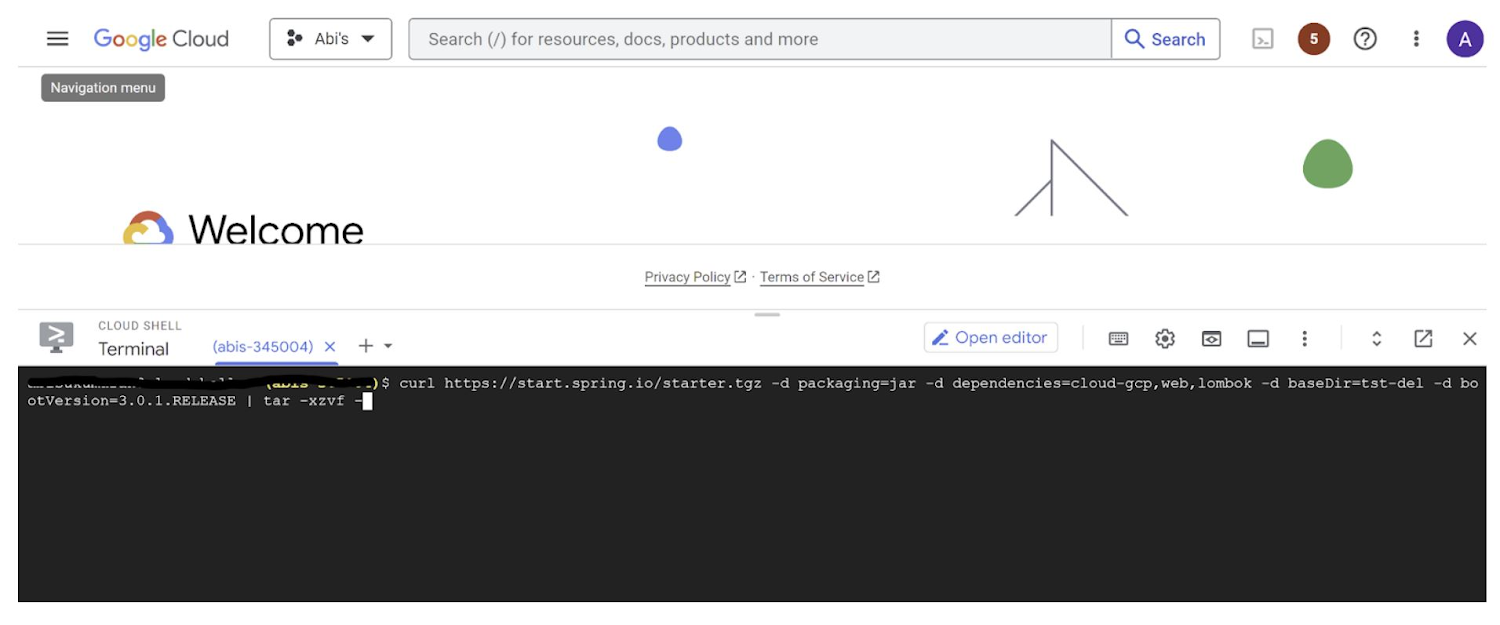
This creates a project structure under “spring-vision” as below:
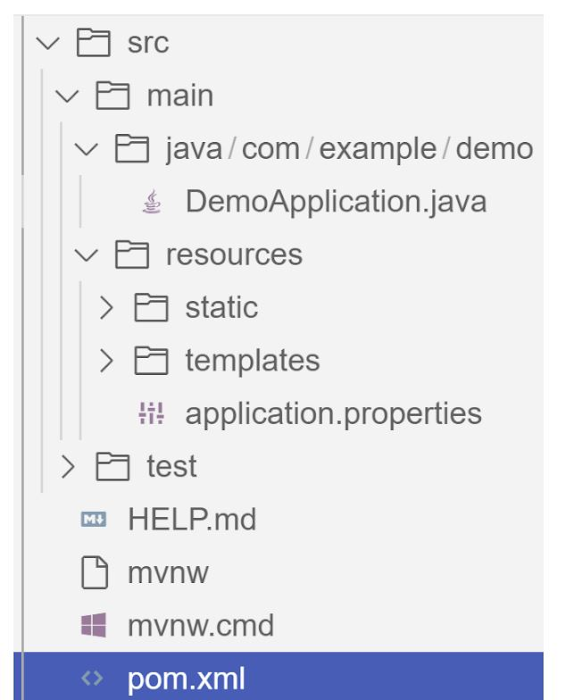
pom.xml contains all the dependencies for the project (dependencies you configured using this command are already added in your pom.xml).src/main/java/com/example/demo has the source classes .java files.resources contain the images, XML, text files and the static content the project uses that are maintained independently.application.properties enable you to maintain the admin features to define profile specific properties of the application.
Configuring the Vision API
Once you have the Vision API enabled, you have the option to configure the API credentials in your application. You can optionally use Application Default Credentials for setting up authentication. In this demo implementation however I have not implemented the use of credentials.
Implementing the vision and translation services
Create a service class that interacts with the Vision API. Inject the necessary dependencies and use the Vision API client to send image analysis requests. You can implement methods to perform tasks like image labeling, face detection, recognition, and more, based on your application’s requirements. In this demo, we will use handwriting extraction and translation methods. For this make sure you include the following dependencies in pom.xml
<dependency>
      <groupId>org.springframework.cloud</groupId>
      <artifactId>spring-cloud-gcp-starter-vision</artifactId>
</dependency>
<dependency>
<groupId>com.google.cloud</groupId>
<artifactId>google-cloud-translate</artifactId>
</dependency>Clone / Replace the following files from the repo and add them to the respective folders / path in the project structure:
Application.java(/src/main/java/com/example/demo)TranslateText.java(/src/main/java/com/example/demo)VisionController.java(/src/main/java/com/example/demo)index.html(/src/main/resources/static)result.html(/src/main/resources/templates)pom.xml
The method extractTextFromImage in the service org.springframework.cloud.gcp.vision.CloudVisionTemplate lets you extract text from your image input. The method getTranslatedText from the service com.google.cloud.translate.v3 lets you pass the extracted text from your image and get the translated text in the desired target language as response (if the source is in one of the supported languages list).
Building the REST API
Design and implement the REST endpoints that will expose the Vision API functionalities. Create controllers that handle incoming requests and utilize the Vision API service to process the images and return the analysis results.
In this demo, our VisionController class implements the endpoint, handles the incoming request, invokes the Vision API and Cloud Translation services and returns the result to the view layer. Implementation of the GET method for the REST endpoint is as follows:
@GetMapping("/extractText")
  public String extractText(String imageUrl) throws IOException {
    String textFromImage =
   this.cloudVisionTemplate.extractTextFromImage(this.resourceLoader.getResource(imageUrl));


    TranslateText translateText = new TranslateText();
    String result = translateText.translateText(textFromImage);
    return "Text from image translated: " + result;
  }
The TranslateText class in the above implementation has the method that invokes the Cloud Translation service:
String targetLanguage = "en";
 TranslateTextRequest request =
         TranslateTextRequest.newBuilder()
             .setParent(parent.toString())
             .setMimeType("text/plain")
             .setTargetLanguageCode(targetLanguage)
             .addContents(text)
             .build();
     TranslateTextResponse response = client.translateText(request);
     // Display the translation for each input text provided
     for (Translation translation : response.getTranslationsList()) {
       res = res + " ::: " + translation.getTranslatedText();
        System.out.printf("Translated text : %s\n", res);
     }
With the VisionController class, we have the GET method for the REST implemented.
Integrating Thymeleaf for frontend development
When building an application with Spring Boot, one popular choice for frontend development is to leverage the power of Thymeleaf. Thymeleaf is a server-side Java template engine that allows you to seamlessly integrate dynamic content into your HTML pages. Thymeleaf provides a smooth development experience by allowing you to create HTML templates with embedded server-side expressions. These expressions can be used to dynamically render data from your Spring Boot backend, making it easier to display the results of image analysis performed by the Vision API service.
To get started, ensure that you have the necessary dependencies for Thymeleaf in your Spring Boot project. You can include the Thymeleaf Starter dependency in your pom.xml:
<dependency>
<groupId>org.springframework.boot</groupId>
<artifactId>spring-boot-starter-thymeleaf</artifactId>
</dependency>
In your controller method, retrieve the analysis result from the Vision API service and add it to the model. The model represents the data that will be used by Thymeleaf to render the HTML template. Once the model is populated, return the name of the Thymeleaf template that you want to render. Thymeleaf will take care of processing the template, substituting the server-side expressions with the actual data, and generating the final HTML that will be sent to the client’s browser. Example:
return new ModelAndView("result", <<YOUR RESULT>>);In the case of the extractText method in VisionController, we have returned the result as a String to and not added to the model. But we have invoked the GET method extractText method on the index.html on page submit.
<form action="/extractText">

        Web URL of image to analyze:

        <input type="text"

               name="imageUrl"

               value=""

        <input type="submit" value="Read and Translate" />

</form>
With Thymeleaf, you can create a seamless user experience, where users can upload images, trigger Vision API analyses, and view the results in real-time. Unlock the full potential of your Vision AI application by harnessing the power of Thymeleaf for frontend development.
Deploying your Spring Boot application with Cloud Run
Write unit tests for your service and controller classes to ensure proper functionality under the /src/test/java/com/example folder. Once you’re confident in its stability, package it into a deployable artifact, such as a JAR file, and deploy it to Cloud Run, a serverless compute platform on Google Cloud. In this step, we will focus on deploying your containerized Spring Boot application using Cloud Run.
a. Package your application by executing the following steps from Cloud Shell(make sure the terminal is prompting at the project root folder)
Build:
./mvnw package
Once the build is successful, run locally to test:
./mvnw spring-boot:run
b. Containerize your Spring Boot Application with Jib:
Instead of manually creating a Dockerfile and building the container image, you can use the Jib utility to simplify the containerization process. Jib is a plugin that integrates directly with your build tool (such as Maven or Gradle) and allows you to build optimized container images without writing a Dockerfile. Before proceeding, you need to enable the Artifact Registry API (Use of Artifact Registry is encouraged over container registry). Then Run Jib to build a Docker image and publish to the Registry:
$ ./mvnw com.google.cloud.tools:jib-maven-plugin:3.1.1:build -Dimage=gcr.io/$GOOGLE_CLOUD_PROJECT/vision-jib
Note: In this experiment, we did not configure the Jib Maven plugin in pom.xml, but for advanced usage, it is possible to add it in pom.xml with more configuration options
c. Deploy the container (that we pushed to Artifact Registry in the previous step) to Cloud Run. This is again a one-command step:
gcloud run deploy vision-app --image gcr.io/$GOOGLE_CLOUD_PROJECT/vision-jib --platform managed --region us-central1 --allow-unauthenticated --update-env-vars
You can alternatively do this from the UI as well. Navigate to the Google Cloud Console and locate the Cloud Run service. Click on “Create Service” and follow the on-screen instructions. Specify the container image you previously pushed to the registry, configure the desired deployment settings (such as CPU allocation and autoscaling), and choose the appropriate region for deployment. You can set environment variables specific to your application. These variables can include authentication credentials (API keys etc.), database connection strings, or any other configuration needed for your Vision AI application to function correctly. When the deployment is completed successfully, you should get an endpoint to your application.
For our demo, the endpoint Cloud Run created for us is: https://vision-app-********-uc.a.run.app
Playing with your Vision AI app
For demo purposes, you can use the image URL below for your app to read and translate:
https://storage.googleapis.com/img_public_test/tamilwriting1.jfif
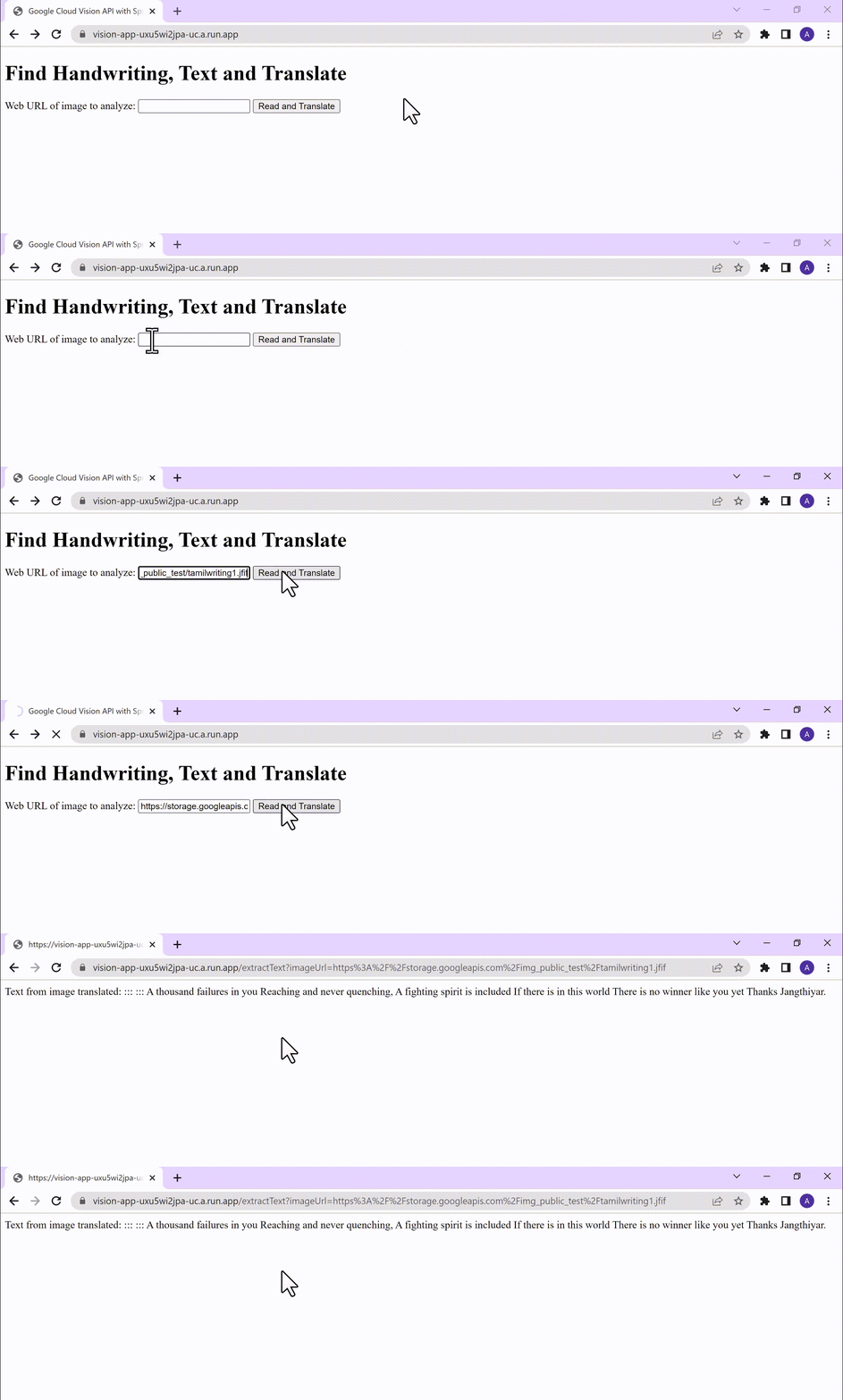
Conclusion
Congratulations! You have successfully created a Vision AI application using Spring Boot and Java. With the power of Vision AI, your application can now perform sophisticated image analysis, including labeling, face detection, and more. The integration of Spring Boot provides a solid foundation for building scalable and robust Google Cloud Native applications. Continue exploring the vast capabilities of Vision AI, Cloud Run, Cloud Translation and more to enhance your application with additional features and functionalities. To learn more, check out the Vision API, Cloud Translation, and GCP Spring docs. Try out the same experiment with the Spring Native option!! Also as a sneak-peak to Gen-AI world, checkout how this API shows up in Model Garden.
Next-Level Search: Discover the Game-Changing Capabilities of Enterprise Search on Gen App Builder

1183
Of your peers have already read this article.
4:30 Minutes
The most insightful time you'll spend today!
In our conversations with customers, few generative AI use cases have driven as much enthusiasm as generative search. Leaders at enterprises know the limits of traditional enterprise search, with queries producing a list of links based on pattern matching, and significant manual investigation required to find the more relevant answers. In generative AI, these leaders see an opportunity to leverage their data more effectively and deeply, including applying it to conversational apps that can answer complex questions, produce accurate summaries that synthesize many sources, and help people get the information they need, faster.
Enterprise Search on Generative AI App Builder (Gen App Builder) lets organizations create custom chatbots and semantic search applications in as little as a few minutes, with minimal coding needed to get started and enterprise-grade management and security built in. Customers can combine their internal data with the power of Google’s search technologies and generative foundation models, delivering relevant, personalized search experiences for enterprise applications or consumer-facing websites.
To date, most approaches to combining generative AI and search technology have been inadequate for the scale and reliability needed for enterprise use. For example, building search by breaking long documents into chunks and feeding each segment into an AI assistant typically isn’t scalable and doesn’t effectively provide insights across multiple sources. Likewise, many solutions are limited in the data types they can handle, prone to errors, and susceptible to data leakage. Bespoke, do-it-yourself approaches are generally no easier, with production-grade solutions often requiring complex tasks like integrating embeddings data with foundation models and significant use case data testing. Even when organizations make these efforts, the resulting solutions still tend to lack feature completeness and reliability, with significant investments of time and resources required to achieve high-quality results.
These challenges demonstrate that to effectively implement generative search, organizations typically need more than access to powerful foundation models. They also likely need the ability to ground model outputs in specific data, so that outputs are more relevant and less likely to include mistakes or “hallucinations.” They generally need safeguards that protect their data, how it is accessed, and how it is used. And they generally need the process to be high-performant and scalable out of the box, making the functionality easy to use even if the organization lacks data science and machine learning expertise.
Let’s look at how Enterprise Search on Gen App Builder helps customers bypass these scale and reliability challenges, so they can start leveraging generative search quickly.
The intersection of generative AI and enterprise data
Enterprise Search on Gen App Builder lets developers create search engines that help ground outputs in specific data sources for accuracy and relevance, can handle multimodal data such as images, and include controls over how answer summaries are generated. Multi-turn conversations are supported so that users can ask follow up questions as they peruse outputs, and customers have control over their data—including the ability to support HIPAA compliance for healthcare use cases. All of this is available as a fully managed service, so developers can focus on building rather than cloud complexity.
Gen App Builder’s out-of-box capabilities can remove the need for data chunking, generating embeddings, or managing indexes, hiding complexity behind a straightforward interface that lets developers build apps in minutes with little or no coding and no prior machine learning experience. With the ability to ingest large volumes of documents and support for both unstructured and structured data, apps built with Gen App Builder help customers solve the long-standing headache of finding relevant information across the organization, turning tasks that used to take hours into quick searches or conversational explorations with an app.
These capabilities are underpinned by both Google’s foundation models and a variety of Google Search technologies, including:
- Semantic search, which helps deliver more relevant results than traditional keyword-based search techniques by using natural language processing and machine learning techniques to infer relationships within the content and intent from the user’s query input.
- Google’s understanding of how users search for information.
- Google’s expertise in understanding relevance, which considers factors such as content popularity and user personalization of content when determining the order in which search results are displayed.
For more advanced use cases, Gen App Builder can be easily integrated with Vertex AI for in-depth foundation model tuning, enabling flexible input and output search formats.
As always with our AI products, Gen App Builder has been evaluated for alignment with our AI Principles, which is reflected by the product’s many safeguards against bias, toxic content, and unhelpful outputs. Whether for prototypes built in minutes or apps with many custom components, Enterprise Search on Gen App Builder offers a robust suite of user-friendly tools for customers across industries and levels of expertise.
How customers are innovating with Enterprise Search
After gaining access to Enterprise Search on Gen App Builder via our trusted tester program, a number of customers are already leveraging the product for novel use cases.
Priceline is harnessing Gen App Builder and Vertex AI for a range of projects, including internal search engines for employees and a new chatbot to assist customers as they make travel plans. Slated to be available across both desktop and mobile experiences, Priceline’s chatbot will help customers find the right information faster via always-on, personalized experiences, including answering nuanced questions like, “What are the best 4-star hotel options in midtown Manhattan within walking distance to Central Park?” and “Can you help me extend my hotel reservation for an additional night?”
“Priceline is charting a course to transform the novelty of generative AI into lasting value for our customers and our business. We believe it’s not just about having the latest technology; it’s also about practically targeting innovation to the right challenges and opportunities,” said Marty Brodbeck, Chief Technology Officer, Priceline. “With Google Cloud as our AI innovation partner, we’re doubling down on our commitment to delivering the fastest, most seamless and informative booking experience for our customers, from personalized planning and travel inspiration to customer service.”
Vodafone is experimenting with Enterprise Search and foundation models on Gen App Builder to build a tool that can rapidly and securely query documents, search, and understand specific commercial terms and conditions. Vodafone Voice and Roaming Services has over 10,000 contracts with other telecommunications companies worldwide, in a variety of formats such as PDFs, images, and complex tables. Searching this document repository is often a time consuming process for employees.
“Every day we introduce and manage new services like 5G to a roaming footprint comprising more than 700 operators in 210 countries to ensure both Vodafone and our partners’ business customers, holidaymakers, and Internet of Things devices stay connected when abroad. With Enterprise Search on Gen App Builder, we are building an intelligent assistant to securely and quickly search contracts.” said Sherif Bakir, CEO of Vodafone Voice and Roaming Services. “With generative AI, we’re accelerating otherwise protracted processes, increasing productivity and operational efficiency.”
Software startup Trender.ai, which creates customer monitoring and intelligence solutions for B2B relationships, is using Gen App Builder to build a product that can synthesize information from social media, public sources, and CRM data so that users can form more productive, personal relationships with prospects and customers.
“With Enterprise Search on Gen App Builder, we have been able to do things in the last month that we had projected to take 12-18 months on our prior roadmap,” said Betsy Bilhorn, co-founder at Trender.ai. “We had expected it would take at least 12 months to build and train models from an individual’s public social, web, and other data, and to then be able to ask questions like ‘What things are most important to this person?’ or ‘When and how is the best way to make an introduction to this prospect that they’ll respond to?’ Last year, we thought getting to this vision was a bit of a moonshot for a startup our size — but now we were able to achieve this in under a month.”
Stop searching for solutions — start discovering insights
We’re excited to see how customers use Enterprise Search on Gen App Builder to leverage data in powerful ways, discover new insights, and create useful, personal, and efficient experiences.
Today, we’re pleased to help our customers accomplish these goals, with the general availability of Enterprise Search on Gen App Builder for customers on the allowlist (i.e., approved for access). Please contact your Google Cloud sales team for access and pricing details. We are also launching two new features within Enterprise Search on Gen App Builder that are available today in our preview offering: multi-turn search, which supports asking follow-up questions, and content recommendations to find semantically relevant content. Access to the preview offering is available via Google Cloud’s trusted tester program. Read more about Enterprise Search on Gen App Builder and sign up for access on our webpage.
We’re also bringing generative AI features of Enterprise Search to our existing solutions like Contact Center AI and Document AI. As an example, starting this month, customers can preview generative AI-powered search in Document AI Warehouse. To keep up with our latest generative AI news, don’t miss The Prompt or our generative AI primer for executives on Transform with Google Cloud.
Smooth AI Adoption for Companies involves Three Principled Phases!

4082
Of your peers have already read this article.
4:00 Minutes
The most insightful time you'll spend today!
Business leaders see much in Artificial Intelligence, including new ways to save money, serve customers, and figure out what to build. What’s often tougher is deciding how to engage. That’s understandable, since getting into AI often raises questions about costs, data integrity, project length, and similar issues of planning and execution.
For CIOs concerned with the deployment and use of IT at their companies, these are critical issues. Here is one way to think about this complexity, by breaking it down into three different areas; Early Automation, Learning and working, and System Views.
First, a bit of good news and myth dispelling for readers who think AI is some far off promise, still in the labs and not safe for work. The reality is that AI is very much here, and almost everyone in your workplace is using it every day. People work with AI when they use Google Search, Photos, the autocomplete feature in Docs, live translation in Pixel phones, and many other areas. It is in the products of many other companies too.
“IDC reports that the market for AI software, hardware and services is expected to break the $500 billion mark in 2023.”
Additionally, it’s increasingly clear that AI can be adapted as a virtuous process, not just a one-off purchase (though there is much to recommend that.) During a recent Alphabet earnings call, CEO Sundar Pichai noted that “investments in AI will be key” to its near-term strategy, with new techniques that make it faster and easier to train and build AI for a number of uses. Additionally, the company is offering AI-driven “insights, new tools, and automation” to its advertising clients. The striking thing in this was the way that developing AI in one area could lead to growth in many others.
So, how does an IT leader foster a growth process like this for their stakeholders? By leading people through the well-established stages of Awareness, Learning, and Extension. Here’s what I mean.
Awareness: Early Automation
Consumer-facing AI is particularly strong in communications functions like voice recognition, translation, and writing tips. It’s similar in business uses: One of the most effective early instances of AI in the workplace has been Contact Center AI (CCAI), which manages basic customer communications, automatically answering common questions and prioritizing calls that require human assistance. It is doing what automation has always done best, automating the rote stuff and leaving the higher-value imaginative activity to people. It has been used by governments, retailers, telecommunications companies, and others, in a wide variety of use cases.
These and similar language-centric products, like DocAI for extracting information from things like invoices, receipts, or AI that extracts information from business contracts, have a number of benefits. For one, the investment is relatively easy to control, unlike with a research project leading to a formal launch. The payoff is also clearer. In the case of contact centers, in particular, the automation relieves stress, wins loyalty and slows disaffection in a high-turnover area. In both cases, successful results build allies in the business, who can testify to the earlier benefits when it’s time to take on something more complex.
Perhaps best of all, creating interest in basic AI services for business, right now, means people become engaged in learning more, since they see the early benefits and wonder what else might be done.
Learning: The Human Factor
The Natural Language Processing (NLP) that goes into these ready made, “out of the box” AI products can, not surprisingly, be used on much more sophisticated levels. Twitter, for example, processes 400 billion different events in real time, and its staff queries this trove using advanced NLP, answering questions and improving customer experiences.
There is clearly an enormous gap between Call Center AI and processing Twitter’s 400 billion events per day, but it’s not noticed enough how quickly that gap is closing. Look at how many products, partners, and training resources have emerged in the past few years. The gap makes sense, insofar as both the means of AI (like large data sets, good algorithms, and sufficient computing) and the value of AI, are new.
Increasingly, as AI is incorporated into standard enterprise tools like spreadsheets and analytic tools, easier to use AI becomes a skill within reach for many (even as the advanced end becomes more complex, meaning this ease of use process will continue for some time.)
It’s so new that AI skills demand isn’t met by conventional education means, creating lots of good opportunities for both nonstandard skills training, and in-house learning in the workforce. Companies offering AI skills training could well gain a competitive advantage and retain staff better.
Extension: Building System Views
When a new technology lands and gains in popularity, people seek to find new uses for it, or build connections among its different uses. Networked computing is one example, but think also of the way cars were soon followed by trucks and fire engines, or the way the data services on wireless phones soon morphed into the App Economy. If something is useful, people look for ways to grow it.
How will AI grow? My colleague Dominik Wee recently wrote about ways that AI will soon change supply chains, change product design, and improve sustainability. Most interestingly, he talked about how customers in manufacturing were realizing savings and gaining insights when once separate quality control data was combined with system wide views of the quality process.
There are several reasons to think AI will promote many such system views. For one thing, successful AI promotes the collection of data from more places, at greater frequency, since that leads to insight (and the cost of data collection is dropping.) Additionally, AI is good at spotting patterns and interactions that are not currently known. As well, AI is used in prediction and scenario planning, which leads to better understanding of how large-scale systems interact.
This comes at a time when we have more ways of seeing the world, from satellites, sensors, social media, and much more. We have more awareness of interactions, and a demand to understand them, in everything from the supply chain crisis, to human rights and sourcing regulations, or in the business realities of partnering, and serving customers in all sorts of ways, online and in the physical world.
Whether by coincidence or design, the Age of AI is also an age when organizations see themselves more accurately with a rich web of connections, with their choices and actions having more resonance than ever. That awareness is both a competitive tool, and a call to greater responsibility, potentially affording more customer loyalty and a more satisfied workforce for those who get it right.
That transformation won’t happen everywhere overnight, but it seems to be happening at all sorts of companies. And the trend for AI to assist, to be studied and grown, and to provide a richer understanding of the world, is happening every time someone touches this technology, at whatever level they need.
Marks & Spencer Aims to Bring a Third of business Online and Google Contact Center AI is Key to its Success

5782
Of your peers have already read this article.
6:20 Minutes
The most insightful time you'll spend today!
“Hello, Marks & Spencer. How may we help you?”
As one of the biggest and best-loved retail brands in the UK, Marks & Spencer (M&S) is known for the personalized service it provides to its 30 million loyal customers. For 135 years and in 57 countries around the world, M&S has worked to meet and exceed customer expectations for quality and service. Since the advent of the telephone, this has meant cheerfully servicing customers who call in to M&S branches or into their contact centers, no matter what their request might be.
“Retail is in a state of flux and M&S is transforming to better serve our customers so that we can compete and win. Automating calls into our stores with Google voice recognition gives us every opportunity to get things right for our customers and keep them coming back again and again.”
—Akash Parmar, Enterprise Architect (Digital Customer Engagement), Marks & Spencer
The company now has a goal of bringing one third of its business online by 2022. In order to engage more customers online, it has opened a new voice channel hosted on Google Cloud.
The company previously had switchboards in 13 different stores across the UK and Ireland (UKI), handling up to nine million calls a year. But as its retail offering evolved across multiple channels, it was becoming increasingly difficult to quickly and effectively answer customer service requests using an outdated switchboard model.
Customers might call in to order an outfit they had seen in a store, to inquire about returning a dress they bought online, or to recover a lost umbrella in a food hall. Each of these different requests required a different routing response from staff, and if the company didn’t act soon, it knew that the cost of managing the increase in call volume would lead to a significant cost impact. M&S decided it was time to make a technological leap forward to meet customers’ expectations in the new, omnichannel retail environment.
“Retail is in a state of flux and M&S is transforming to better serve our customers so that we can compete and win,” says Akash Parmar, Enterprise Architect for Digital Customer Engagement at M&S. “Automating calls into our stores with Google voice recognition gives us every opportunity to get things right for our customers and keep them coming back again and again.”
Boosting opportunities for customer engagement with voice recognition
M&S customers were used to dealing with their local store for anything they needed. But as stores were completely separate from the online business, customers weren’t able to purchase something they’d seen online by calling stores because the store staff didn’t have access to platforms needed to place an online order securely. For a company that places a very high importance on customer experience, this was unacceptable.
Akash Parmar, Enterprise Architect for Customer Engagement, was set a the goal by Chris McGrath, M&S Programme Manager, to ensure that the right channel and the right level of assistance was available to customers at any point before, during, or after purchase. Akash set himself the challenge of building a platform that could adapt to all of these channels and scale very quickly.
“We didn’t have the resources to build a speech recognition platform. DVELP removed that obstacle. It understood what we wanted to achieve and how Google Voice APIs and Twilio could get us there. Whatever we want, DVELP builds it for us. DVELP always presents options, never problems.”
—Akash Parmar
In 2018, Akash reached out to Google Cloud partner DVELP, one of the UK’s leading experts on the Twilio programmable contact center platform and Google speech recognition technology. DVELP recommended a Google Cloud-based natural language speech recognition platform that leverages the audio stream intent detection functionality in the Contact Center AI solution, Dialogflow, as the heart of an inbound-call-handling strategy. This strategy was designed to improve routing accuracy, give customers more self-service options, and increase analyst visibility into customer journeys.
“We didn’t have the resources to build a speech recognition platform. DVELP removed that obstacle,” says Akash. “They understood what we wanted to achieve and how Google Cloud Voice APIs and Twilio could get us there. Whatever we want, DVELP builds it for us. DVELP always presents options, never problems.”
Using Google speech recognition to improve customer experience
M&S wanted to use natural language to enable customers to speak and state what help they required rather than choose from a list of options. This would help them answer the millions of calls coming in and figure out what customers needed quickly.
In order to do that, DVELP needed to consider how best to address tying customer intent to actions, while maintaining flexibility. DVELP recommended the unconventional choice of not referencing intent in the application layer, but mapping the available actions to the information required to perform them. These actions were then used to build a “declarative dictionary” for the customer service team.
By focusing on actions rather than intents, the solution enables the customer services team to configure actions to intents in virtually any combination of key-value pairs. Leveraging the fact that Dialogflow can detect and respond to customer intents in real time, M&S has already reached 92% accuracy in translating customer declarations to actionable intents.
“With Google Cloud speech recognition and Contact Center AI solutions such as Dialogflow, there’s no information that we can’t make sense of. No matter where you call from, who you are, your age, your gender: you speak, and we understand.”
—Akash Parmar
Akash recalls that once customers became comfortable with the prompt, “in a few words, how may we help you?” they started providing simple, concise responses, and the customer learning curve quickly leveled out. At that point, Google Cloud speech recognition and Dialogflow took over. “The technology worked perfectly and the result was like magic,” says Akash.
“With Google Cloud speech recognition and Contact Center AI solutions such as Dialogflow, there’s no information that we can’t make sense of,” he says. “No matter where you call from, who you are, your age, your gender: you speak, and we understand.”
Enabling self-service contact center improvements with Dialogflow
It was important to M&S that contact center employees be self-sufficient in updating the platform to reflect changes in demand. They needed to be able to easily react to a spike in inquiries about a special offer, for example, without relying on the engineering team. At the same time, neither Akash nor the DVELP team wanted the staff to have to learn error-prone JSON inside contexts, or write responses in order to get necessary information from customers.
DVELP’s creative solution was to fill out the “Action and parameters” section of every intent. This is usually reserved for collecting information from customer declarations, but was also easily adapted to implementing custom key-value pairs. This is particularly helpful in making sure that the contact center is ready to handle new promotions as they arise. As sales and special events are communicated to the contact center from the head office, staff can program specific vocabulary directly into Dialogflow, thanks to Contact Center AI, ensuring that the M&S system is immediately ready to handle related customer calls.
Rolling out the platform to the UK and Ireland
In just a few months after going live, calls are being efficiently routed to the contact center and its existing customer service platform. At the contact center, staff can quickly and easily respond to customer requests, place orders, and process returns. Thanks to the natural language capabilities of Google Cloud, a simple customer request like “order the red children’s dress in the Bath high street window in size six” not only gets correctly routed, but provides data points for future personalized interactions.
Being able to accurately recognize customer intent 92% of the time after less than four months since deployment is an important milestone for M&S. With a concurrent 89% voice-to-text accuracy rate for Dialogflow transcriptions, M&S has rolled out the successful speech recognition platform to all of its stores in UK and Ireland and customer service contact centers.
Akash is so pleased with the performance of the new Google Cloud platform that he’s focusing on what new functionality he can add next to improve customer experience even more.
“We’re working on collecting product codes from customers using natural language so we can give them stock availability details,” he shares. “We also want to use Google Cloud to enable a more conversational experience when customers are searching for help or FAQs on our website. At the same time, we’re looking at Contact Center AI and Dialogflow to provide a virtual assistant experience for our webchat journey. Thanks to our new voice solution, we can clearly understand the key issues that our customers face on a day-to-day basis; the aim now is to start solving these issues through self-service and automation.”
Companies Can Speed-up AI Developments with NVIDIA’s One Stop Catalog for AI Software

3131
Of your peers have already read this article.
2:00 Minutes
The most insightful time you'll spend today!
NVIDIA GPU-powered instances on Google Cloud provide an optimal platform for organizations to develop their AI applications on the latest hardware and software stack, then seamlessly deploy those applications at scale in production.
Simplifying Workflows to Speedup AI Developments
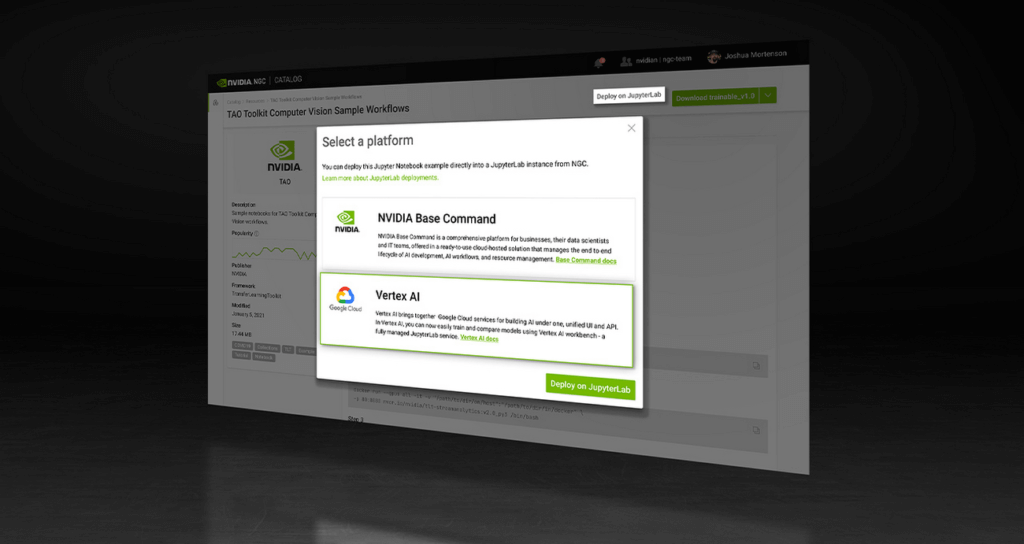
NVIDIA recently announced the One Click Deploy feature on the NVIDIA NGC catalog, the hub for GPU-optimized AI software. Developed in collaboration with Google Cloud, this feature simplifies the deployment of AI software, to a single click from the NGC catalog.
This allows data scientists to deploy frameworks, software development kits and Jupyter Notebooks directly to Google Cloud’s Vertex AI Workbench, a new managed Jupyter Notebook service on top of Vertex AI, Google’s service for machine learning operations.
Under the hood, this feature launches the JupyterLab instance on Google Cloud Vertex AI Workbench with optimal instance configuration, preloads the software dependencies, and downloads the NGC notebook in one go.
NGC Catalog – One Stop for AI Software
NVIDIA is expanding the rich trove of NVIDIA AI software in the catalog to ensure AI practitioners have everything they need to get started — from frameworks to models.
All of the AI models in the catalog come with credentials. They’re like resumes that show the model’s skills, the dataset that trained it, how to use the model and how it’s expected to perform.
These model credentials provide transparency, which gives developers the confidence in picking the right model for their use case.
The NGC catalog also hosts Jupyter Notebooks tailored for the most popular AI/ML applications. Examples include:
Computer Vision – A collection of models for detecting human actions, gestures and more.
Automatic Speech Recognition – An end-to-end workflow for text-to-speech training.
Recommendation – A collection of example notebooks to help build end-to-end recommendation services.
Serve Robotics uses Vertex AI and the simple easy-to-use interface that the NGC One Click Deploy delivers.
“NGC catalog allows our ML research engineers to launch environments for experiments on Vertex AI with a single click. This saves us the efforts on ML infra setup and lets researchers focus on the ML problem in the computer vision and robotics space more efficiently.”—Kaiwen Yuan, Director of ML/Head of Perceptions & Predictions at Serve Robotics
Accelerate ML Deployments
Explore hundreds of Jupyter notebook examples for speech, computer vision and recommenders and, if you’re just getting started with AI, browse NVIDIA’s collection of Jupyter notebook examples and run it using the One Click Deploy feature on Google Cloud Vertex AI.
More Relevant Stories for Your Company


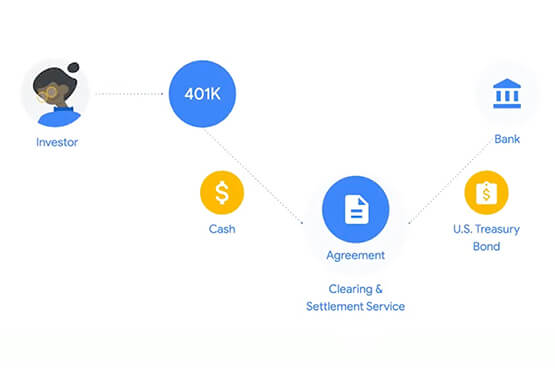

Predicting Treasury Settlement Failures with ML
BNY Mellon’s Government Securities Services (GSS) business is the sole provider of treasury settlement services in the United States of America. Given its unique market position, GSS is exploring how to help clients improve their forecasting of $70+ billion in daily settlement fails leveraging Google Cloud. Sarthak Pattanaik, Chief Information



Swarovski’s Journey towards Online and Offline Conversion with Predictive Analytics
Luxury brand and leader in crystals and glass production, Swarovski has charmed customers with its exquisite collections for over 125 years. To understand their customers better and map their online behaviors, Swarovski had to overcome prediction hurdles as majority of the purchases are not frequent or habitual. They are mostly

Google Migration and BigQuery Brings PedidosYa Closer towards its Goal of Becoming Data-driven
Editor’s note: PedidosYa is the market leader for online food ordering in Latin America, serving 15 markets and over 400 cities. It’s also one of the largest brands within the German multinational company Delivery Hero SE. With over 20 million app downloads, PedidosYa provides the best online delivery experience through

Everything a Marketer Needs to Know About Machine Learning
As consumer expectations grow for more personalized, relevant, and assistive experiences, machine learning is becoming an invaluable tool to help meet those demands. It’s helping marketers create smarter customer segmentations, deliver more relevant creative campaigns, and measure performance more effectively. In fact, 85% of executives believe AI will allow their
