





Business Messages drives 85% CSAT scores for Levi Strauss

4275
Of your peers have already read this article.
3:30 Minutes
The most insightful time you'll spend today!
Founded in 1853, clothing company Levi Strauss & Co. gained fame for their Levi’s® denim jeans. Over 150 years later, Levi’s is a globally-recognized brand that sells jeans and other apparel in more than 3,100 retail stores across 110 countries.
The summary
During the COVID-19 pandemic, Levi’s saw that their shoppers were investing more time in pre-purchase research. They realized that being able to provide customers with information around the clock in an easily accessible way could greatly improve interest, engagement, and eventually purchase behavior. In June 2020, Levi’s partnered with customer experience automation provider Linc Global to integrate Google’s Business Messages into Levi’s customer experience (CX) strategy and cross-channel chat experiences. Business Messages soon brought in customer satisfaction (CSAT) scores of over 85 percent, and drove 30x more store-related questions than Levi’s onsite web chat. In addition, most Business Messages conversations occurred outside store hours, allowing Levi’s to respond to inquiries more quickly.
The challenge
Levi’s knows customers want to drive these interactions on their own terms and timelines— and on their own preferred communications channel. With store hours often impacted by the pandemic, the company needed 24/7 service to answer the 30% increase in off-hours shoppers. Google’s Business Messages allowed customers to connect with Levi’s without visiting the website, going to a store or making a phone call. Anisa Kumar, VP Global DTC says, “Rolling out CX automation on web chat provided a new way for customers to find answers to their pre purchase and other questions that regularly resulted in a call to customer service. Launching with Google’s Business Messages was the logical next step in providing our customers with a best-in-class customer experience.”
The approach
Levi’s worked with Linc Global, a CX automation platform, to set up Google’s Business Messages on Google Maps for five, then 50, stores, before expanding to more than 200 stores. “Customers can message us through Google Maps even after stores are closed. They can search for products and see product information and availability at their local store, plus get details about hours and COVID-19 related updates to make shopping easier,” said Kumar. The company then added Business Messages on Google Search for a rich messaging experience that synchronized with their regular webchat channel. “Consumers can have their entire messaging experience be on Google—and then visit our website or a physical store to complete a purchase recommended to them in Business Messages,” says Rico Arrastia, VP Product & Experience at Levi Strauss & Co.
The results
Two months after launching Google’s Business Messages, Levi’s CSAT scores for the channel surpassed 85%. And four months after launch, Levi’s found that this new channel drove 30x more store-related questions than web chat.
Additionally, Levi’s noted that 31% of Business Messages conversations were product-related, indicating that shoppers preferred targeted engagement to unstructured browsing. For Levi’s, Business Messages helps cross-sell or suggest products to customers based on an individual’s past purchases, personal information, and behaviors.
Levi’s is now a big proponent of Business Messages as a way to meaningfully engage with customers and stand out from other brands. Arrastia shares, “Business Messages not only creates a stronger customer experience but also enables us to do a much better job at ‘hearing’ shoppers.”
Iroquois Healthcare Association Leverages Chrome OS to Keep Staff, Patients and Families Remotely Connected

3964
Of your peers have already read this article.
3:00 Minutes
The most insightful time you'll spend today!
Editor’s note: Today’s post is by Eileen Murphy, Senior Director of Special Projects, and Andrew Nault, Director of Business Development, both from Iroquois Healthcare Association Workforce Investment Organization (IHA WIO). The health association represents 44 hospitals in 32 counties in New York State, providing advocacy, cost-saving initiatives, and business solutions. IHA WIO has provided its participating long-term care organizations with more than 5,000 Chromebooks to support 80 organizations in several ways, including training staff, connecting nursing home residents to their families, and helping administrative staff work safely from home.
Since early 2020, clinicians and staff at IHA WIO participant organizations have had to adapt to constant change—everything from implementing pandemic safety protocols to helping nursing-home residents stay in touch with families. We’re proud of the wonderful work they’ve done and continue to do.
During the pandemic, our use of Chrome OS and Chrome devices was expanded and changed to meet the needs of organizations dealing with an unprecedented event. Chrome devices were used to not only train staff but to enable remote work, as well as to connect residents to their friends and families during long periods of isolation. In the morning, a Chromebook could be in a managed guest session mode, helping a grandmother virtually attend her grandkids’ birthday party; at lunch, a nursing assistant could log in to her latest continuing education classes on that same Chromebook.
That evening, the Chrome OS devices could be found at check-in desks, helping visitors fill out a COVID-19 survey. All it took to change a device’s purpose were a few clicks in the Google Admin console, all of which could be done remotely.
Chrome OS for training
Most of our 5,000 Chrome OS devices came from a New York State grant to provide continued education training for long-term care organizations and its employees. We wanted to offer online classes, which meant we’d have to give people the technology to access that training. Our partner, CDW, recommended Chrome OS for us because it’s an operating system built for the cloud. In addition, devices running Chrome OS are easy to use, easily shared, and cost-effective.
Best of all, Chromebook Enterprise came with all the enterprise capabilities of Chrome OS unlocked. This allowed us to use the Google Admin console to manage our entire Chromebook Enterprise fleet remotely. We were able to set up one high-level organizational unit across IHA, with almost 80 organizational units for facilities and groups.
To support training, Lenovo helped us create a five-minute video that we added to our HealthStream learning platform so staff could learn the basics of using Chromebooks. This video was created because we didn’t realize there were people who have never touched a laptop before. The video and Chrome OS ease of use made it possible to get the folks who needed the most help up to speed quickly.
Chrome OS for connecting residents to loved ones
Once the pandemic began and people could no longer visit nursing home residents, the staff for one of our facilities asked about using a training Chromebook for video calls between residents and families. We loved this idea as it was still in line with our mission: to enable the workforce to provide higher-quality care.
With the Admin console, the process was easy. We changed the managed guest session to auto load, and changed what is populated on startup. With help from healthcare staff, residents were able to choose from several video apps including Google Meet, Zoom, and Facebook.
Chrome OS for remote workers
When office and administrative staff had to work remotely, Chromebooks again came to the rescue. Since staff could access all their work applications via Citrix—like Outlook, office phone systems, and other public documents—we placed the remote-work laptops in managed guest session mode and loaded the Citrix app at startup. All the employees had to do was connect to Wi-Fi and log into Citrix, and they were ready to work.
With our training program still running and virtual remote ability on the rise, we realized we would need more Chromebooks. CDW informed us that Chrome OS device supply was running low, but they located 1,000 Chromebooks for us and sent them to our home office in Clifton Park, New York.
Normally, the job of configuring and shipping 1,000 laptops would strike fear into the hearts of the IT team. Not this time: With zero-touch enrollment, all of the Chromebooks were enrolled in our high-level organizational unit before the boxes arrived at our Clifton Park office. We created a list of Chromebook serial numbers for each IHA location getting a shipment, then packed up the boxes. We never had to open a Chromebook box, or even turn the devices on before preparing them for use by employees.
Chrome OS for telehealth and clinic kiosks
There were more Chromebook transformations to come. In the interest of keeping residents and medical professionals safe, we enabled Chromebooks for non-urgent telehealth sessions. Doctors and nurses could see and talk to nursing home residents, using the same video conferencing apps that residents used to talk to loved ones. In these cases, we had PointClickCare, our electronic medical records app, loaded at startup on doctors’ Chromebooks.
We even turned a few Chromebooks into guest kiosks at IHA member hospitals that have walk-in clinics. If the clinics required visitors to fill out a COVID-19 screening form, the Chromebook, in kiosk mode, was stationed at the front desk. Once visitors submitted the form, a new blank form appeared, ready for the next visitor without any data stored on the device.
Chrome OS for whatever’s needed next
What’s amazing is that we could help people in all these different ways in just a few minutes—without visiting a nursing home, getting someone to ship laptops back to us, or loading software. Chromebooks are so versatile that sometimes they’re used in various modes several times a day. One user can log in, while another user can use managed guest sessions to login as a guest user. No matter what changes come to our healthcare association in the future, we’ll be ready.
3964
Of your peers have already watched this video.
22:21 Minutes
The most insightful time you'll spend today!
Boosting Chrome OS adoption with effective change management
Can you remember the last time you asked a child to do something how did you convince them to do what you wanted? How many times did they ask you why probably more than once, right? So we know change is hard when we ask someone to make a change we’re asking a lot from them. Very often with IT projects we expect people to change, we don’t really think through the implications of this.
The purpose of this video is to guide you to migrate to Chromebooks and help you understand the reason why. When putting together your change management plan there’s a much larger chance of your project being able to deliver on its business objectives.
Introducing new technology into your organization is an exciting step. However, change management and workforce adoption of the new technology can be challenging. Get insights from Google’s Chrome Enterprise expert on change management strategies and best practices for increasing Chromebook adoption in your organization.
Now on Mobile: Manage Your Google Cloud Support Cases Anywhere, Anytime
934
Of your peers have already read this article.
2:30 Minutes
The most insightful time you'll spend today!
We’re excited to announce that Google Cloud Support is now available as Public Preview* in the Google Cloud mobile app.
View and manage Google Cloud Support cases
We understand how important it is to be able to access and collaborate on Cloud Support cases. As such, we’ve made it easy for you to manage your cases via the mobile app. There is no need to log in to the mobile browser, search for a proper website, and navigate to the place where you need to be. Your Cloud Support cases are now available at your fingertips.
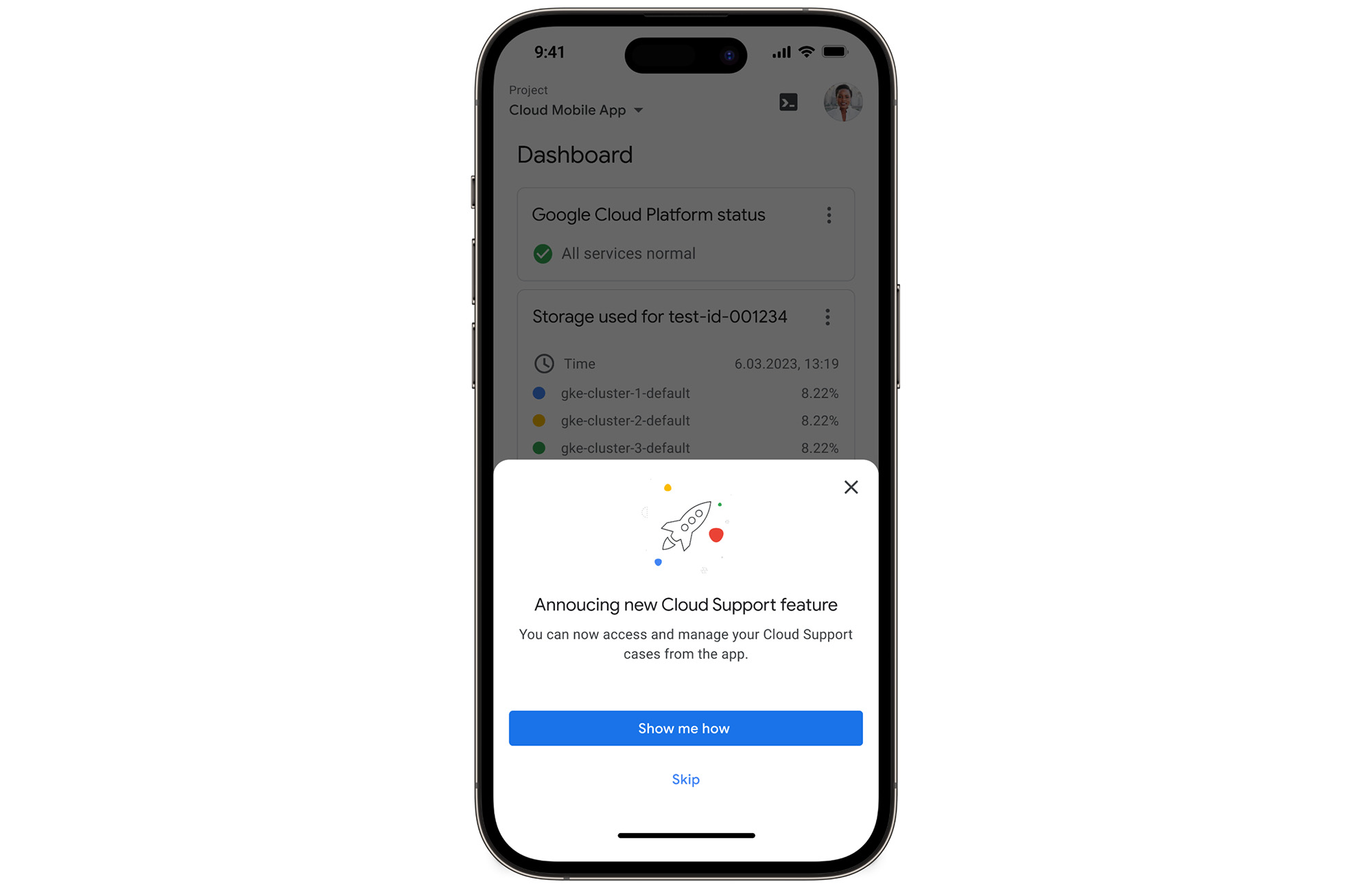
In the Google Cloud mobile app, simply navigate to “Cloud Support (preview)” from any screen by touching your profile picture.
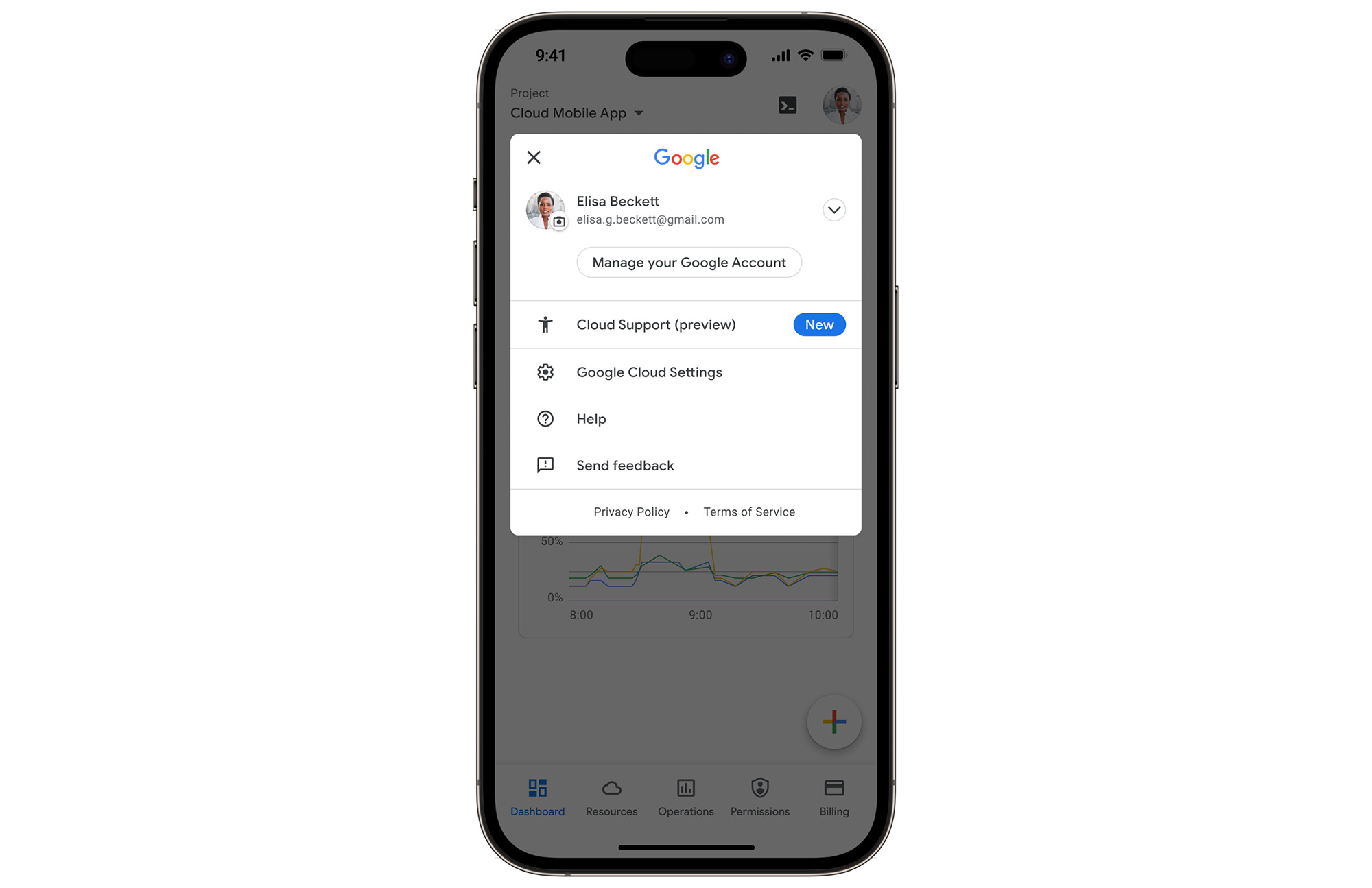
With just one touch you can see the list of all your support cases and easily dive into their important details.
Create Google Cloud Support cases and take action
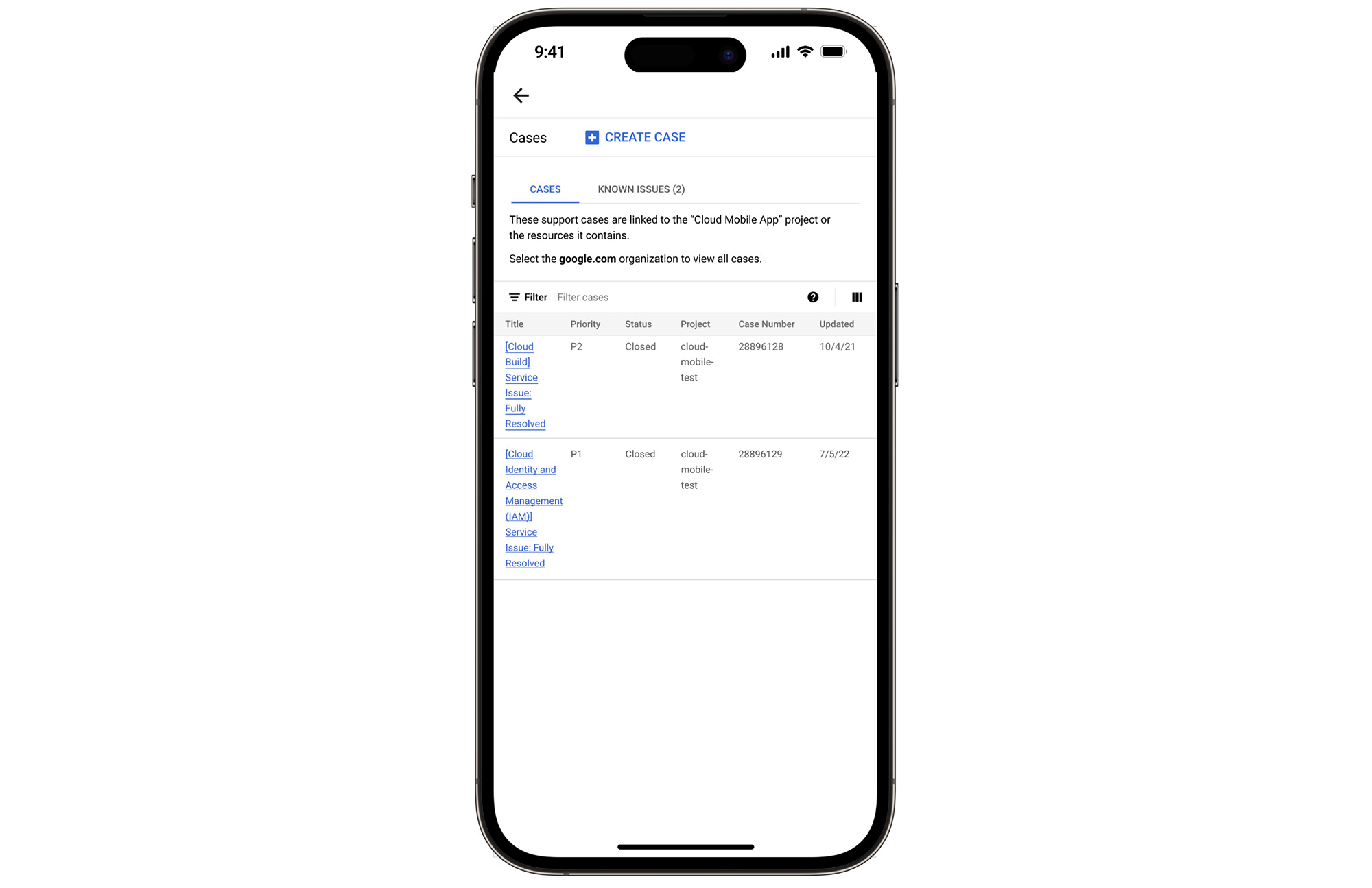
Not only can you easily view and manage your existing Cloud Support cases, you can also create new ones on the fly with the Google Cloud mobile app.
Seamlessly browse case comments to see the full history of the support case, and respond to the case with new comments.
Download the Google Cloud app today
The Google Cloud app is a powerful tool for managing your Google Cloud environment on the go, and it just got better. To summarize, we’ve added Cloud Support cases to our mobile app, which lets you:
- Read existing conversations with the Google Cloud Support Team
- Respond to Google Cloud Support cases
- Create new Google Cloud Support cases
These new features are available for you to use today in Public Preview. Download the Google Cloud mobile app from Google Play or the Apple App Store to try it out. Check out the Google Cloud app documentation to learn more about what you can do on-the-go. If you have any feedback, we would love to hear from you — simply click on the “send feedback” button in the app to share your experience.
*Preview – This product or feature is covered by the Pre-GA Offerings Terms of the Google Cloud Terms of Service. Pre-GA products and features might have limited support, and changes to pre-GA products and features might not be compatible with other pre-GA versions. For more information, see the launch stage descriptions.
Google Cloud’s Suite of DevOps Speeds Up ForgeRock’s Development

5682
Of your peers have already read this article.
3:00 Minutes
The most insightful time you'll spend today!
Editor’s note: Today we hear from ForgeRock, a multinational identity and access management software company with more than 1,100 enterprise customers, including a major public broadcaster. In total, customers use the ForgeRock Identity Platform to authenticate and log in over 45 million users daily, helping them manage identity, governance, and access management across all platforms, including on-premises and multicloud environments.
Operating at that kind of scale isn’t easy. In this blog post, ForgeRock Engineering Director, Warren Strange discusses the three things that help make their developers efficient and productive, and the Google Cloud tools they use along the way.
At ForgeRock, we’ve been an early adopter of Kubernetes, viewing it as a strategic platform. Running on Kubernetes allows us to drive multicloud support across Google Kubernetes Engine (GKE), Amazon (EKS), and Azure (AKS). So no matter which cloud our customers are running on, we are able to seamlessly integrate our products into customers’ environments.
Making it easier for ForgeRock’s developers and operators to build, deploy and manage applications has been crucial in our ability to continually provide high quality solutions for our customers. We’re always looking for tools to improve productivity and keep our developers focused on coding instead of configuration. Google Cloud’s suite of DevOps tools have streamlined three specific practices to help keep our developers productive:
1. Make developers productive within IDEs
Developer productivity is core to the success of any organization, including ForgeRock. Since developers spend most of their time within their IDE of choice, our goal at ForgeRock has been to make it easier for our developers to write Kubernetes applications within the IDEs they know and love. Cloud Code helps us precisely with that: it makes the process of building, deploying, scaling, and managing Kubernetes infrastructure and applications a breeze.
In particular, working with the Kubernetes YAML syntax and schema takes time, and a lot of trial and error to master. Thanks to YAML authoring support within Cloud Code, we can easily avoid the complicated and time consuming task of writing YAML files at ForgeRock. With YAML authoring support, developers save time on every bug. Cloud Code’s inline snippets, completions, and schema validation, a.k.a. “linting,” further streamline working with YAML files.
The benefits of Cloud Code extend to local development as well. Iterating locally on Kubernetes applications often requires multiple manual steps, including building container images, updating Kubernetes manifests, and redeploying applications. Doing these steps over and over again can be a chore. Cloud Code supports Skaffold under the hood, which tracks changes as they come and automatically rebuilds and redeploys—reducing repetitive development tasks.
Finally, developing for Kubernetes usually involves jumping between the IDE, documentation, samples etc. Cloud Code reduces this context switching with Kubernetes code samples. With samples, we can get new developers up and running quickly. They spend less time learning about configuration and management of the application—and spend more time on writing and evolving the code.
2. Drive end-to-end automation
To further improve developer productivity, we’ve focused on end-to-end automation: from writing code within IDEs, to automatically triggering CI/CD pipelines and running the code in production. In particular, Tekton, Cloud Build, Container Registry, and GKE have been critical to Forgerock as we streamline the flow of code, feedback and remediation through the build and deployment processes. The process looks something like this:
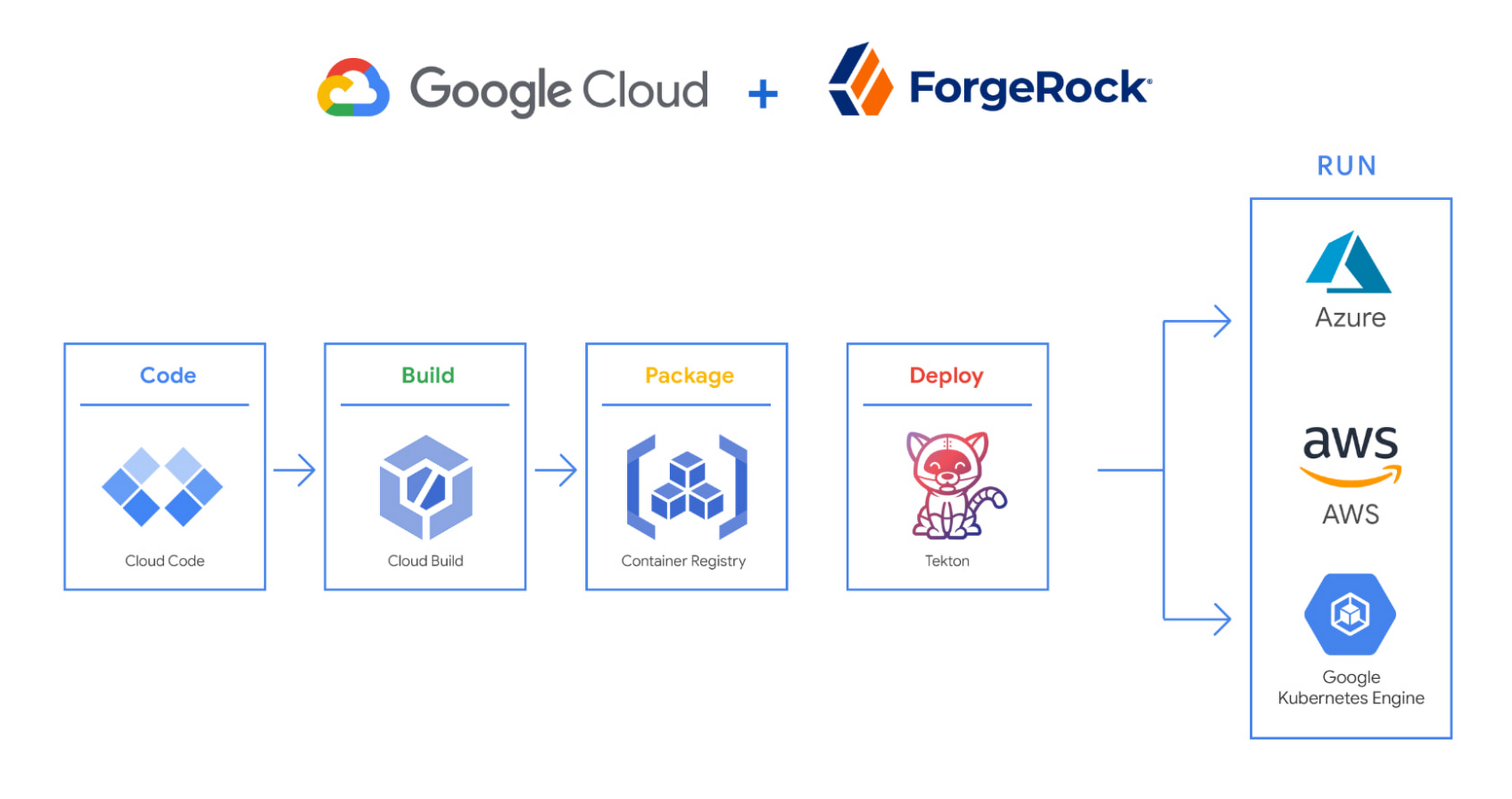
We begin by developing Kubernetes manifests and dockerfiles using Cloud Code. Then we use Skaffold to build containers locally, while Cloud Build helps with continuous integration (CI). The Cloud Build GitHub app allows us to automate builds and tests as part of our GitHub workflow. Cloud Build is differentiated from other continuous integration tools since it is fully serverless. It scales up and scales down in response to load, with no need for us to pre-provision servers or pay in advance for additional capacity. We pay for the exact resources we use.
Once the image is built by Cloud Build, it is stored, managed, and secured in Google’s Container Registry. Just like Cloud Build, Container Registry is serverless, so we only pay for what we use. Additionally, since Container Registry comes with automatic vulnerability scanning, every time we upload a new image to Container Registry, we can also scan it for vulnerabilities.
Next, a Tekton pipeline is triggered, which deploys the docker images stored in Container Registry and Kubernetes manifests to a running GKE cluster. Along with Cloud Build, Tekton is a critical part of our CI/CD process at ForgeRock. Most importantly, since Tekton comes with standardized Kubernetes-native primitives, we can create continuous delivery workflows very quickly.
After deployment, Tekton triggers a functional test suite to ensure that the applications we deploy perform as expected. The test results are posted to our team Slack channel so all developers have instant access and insights about each cluster. From there, we are able to provide our customers with their finished product request.
3. Leverage multicloud patterns and practices
The industry has seen a shift towards multicloud. Organizations have adopted multicloud strategies to minimize vendor lock-in, take advantage of best-in-class solutions, improve cost-efficiencies, and increase flexibility through choice.
At ForgeRock, we’re big proponents of multicloud. Part of that comes from the fact that our identity and access management product works across Google Cloud, AWS, and Azure. Developing products using open-source technologies such as Kubernetes has been particularly helpful in driving this interoperability.
Tekton has been another critical project that has allowed us to prevent vendor lock-in. Thanks to Tekton, our continuous delivery pipelines can deploy across any Kubernetes cluster. Most importantly, since Tekton pipelines run on Kubernetes, these pipelines can be decoupled from the runtime. Like Tekton and Kubernetes, both Cloud Build and Container Registry are based on open technologies. Community-contributed builders and official builder images allow us to connect to a variety of tools as a part of the build process. And finally, with support for open technologies like Google Cloud buildpacks within Cloud Build, we can build containers without even knowing Docker.
Making it easier for developers and operators to build, deploy and manage applications is critical for the success of any organization. Driving developer productivity within IDEs, leveraging end-to-end automation, and support for multi-cloud patterns and practices are just some of the ways we are trying to achieve this at ForgeRock. To learn more about ForgeRock, and to deploy the ForgeRock Identity Platform into your Kubernetes cluster, check out our open-source ForgeOps repository on GitHub.
If You Run Your Country’s Largest Retail Franchise, How Do You Pull Together, in Sync?

6295
Of your peers have already read this article.
9:30 Minutes
The most insightful time you'll spend today!
In 1984, Mario Maio set up a small business manufacturing electrical transformers in his Johannesburg garage. Over the next two decades, the ACDC Dynamics company he created came to dominate manufacturing, import, and distribution in South Africa’s electrical goods sector. Then, in 2007, Mario’s son, Ricardo Maio, founded a retail arm to the business, ACDC Express. Today ACDC Express is South Africa’s largest electrical retail franchise, with 29 franchise stores across the country. Eight of those franchises joined in 2017 alone, and ACDC Express is experiencing quarter-on-quarter growth of 28% per year.
Rapid expansion increases the demands on the ACDC Express central administration, which provides each franchise with IT support and a full suite of marketing, operational, and bookkeeping functions. So when email server downtime became a frequent problem, Ricardo and his team chose G Suite to transform the way the franchise worked.
“We lost revenue when our email servers went down. When I researched Google’s SLA of 99.9% uptime and experimented with G Suite on my private Gmail account, I could see the difference this technology could create.”
Ricardo Maio, CEO, ACDC Express
“On consecutive occasions, our entire email server went down,” says Ricardo Maio, CEO at ACDC Express. “It would take more than one or two days to bring it back up. We had already highlighted software cost overhead as a potential thing to reduce, so when that happened several times within a short period, we knew it was time to make a change.”
Building a better franchise
Franchise businesses undergoing rapid expansion must respond quickly to the demands of new stores. At ACDC Express, 33 staff run the national franchise, delivering core services and support to 29 franchises across the country. Key tasks, such as updating the operations manual, were hampered by a reliance on paper forms and mail services, while email servers experienced repeat failures, which compromised communication. By implementing new, cloud-based productivity tools, ACDC Express looked to cut down on slow and expensive practises, and deliver an agile, reliable online communications platform.
To do that, ACDC Express migrated its franchise to G Suite with Opennetworks. “We lost revenue when our email servers went down,” says Ricardo. “When I researched Google’s SLA of 99.9% uptime and experimented with G Suite on my private Gmail account, I could see the difference this technology could create.”
Since moving to Gmail, ACDC Express reports that the problem of email server downtime “is no longer existent for us,” while with Google Drive, versioning problems have been resolved. Using surveys on Google Forms, ACDC Express quickly and easily collects data from stores and customers—whether they are in stores or on the road—and populates Google Sheets with the information.
“Our operations manual is a binding document, and it’s a living document that gets regularly updated. In the past, we would struggle to track which franchise had which version. With Google Drive, we can be sure that everyone is looking at the right one.”
Ricardo Maio, CEO, ACDC Express
With Google Data Studio, the managing team then consolidates that data on dashboards, creating snapshots of performance, complete with averages and simple comparisons, which make it easy to spot issues and outliers in need of attention. Individual businesses that do require help are then contacted over Google Hangouts Meet to assess what they need, part of a culture of sharing expertise, which Ricardo sees as key to the franchise mode.
“As a franchise, sharing knowledge is as important as maintaining control,” he says. “If there’s a new procedure or system that worked in one store, we can immediately update our manuals and documentation so that everyone has access to it. That’s been fantastic.”
“Our operations manual is a binding document, and it’s a living document, which gets regularly updated,” says Ricardo. “In the past, we would struggle to track which franchise had which version, and every time we had to make a change we would print out a version and send it to stores through an unreliable postal service. With Google Drive, we can be sure that everyone is looking at the right one.”
Remote training, rapid migration
Rolling out new IT tools across a franchise is often expensive, demanding extensive travel and numerous training sessions, which often repeat the same material. Instead, ACDC Express set up training on Google Hangouts that staff could drop into at their convenience, creating a cost-effective training schedule, which meant individual stores could plan their own learning process.
“When we moved to G Suite, we did it all at once, with every employee changing at the same time. We took a band-aid approach, switching to the new tools as rapidly as possible. After six months of training, there have been no reported problems with G Suite at all.”
Ricardo Maio, CEO, ACDC Express
“The whole benefit of franchising is that you can learn from your peers,” says Ricardo. “When we moved to G Suite, we did it all at once, with every employee changing at the same time. We took a band-aid approach, switching to the new tools as rapidly as possible. After six months of training, there have been no reported problems with G Suite at all.”
More mobile, more reliable
Today, ACDC Express operates 240 Google accounts, and information from the franchises’ marketing systems, research, operations, and accounting is fed back automatically to Google Sheets and Google Dashboard at the headquarters in Edenvale, Gauteng. By Ricardo’s estimation, the administrative team is now so effective with G Suite tools, it can achieve twice as much as it could without them.
Now, ACDC Express is looking to use Google Chromebooks in a new web-based point-of-sale system, and considering moving its ERP onto Google Cloud Platform for greater stability, in another project with Opennetworks.
“We’ve developed an in-house point of sale system that’s web-based and can use a functional touchscreen,” adds Ricardo. “We’re looking at rolling that out with Google Chromebooks. We really like how straightforward and simple the Google Chrome devices are, and because we’ve taken a lot of infrastructure into the cloud, we no longer actually need physical machines on our counters. We can work anywhere. That’s something that applies from our head office right down to our smallest franchise store.”
More Relevant Stories for Your Company

Google Workspace’s Single Connected Experience Makes Workplaces Hybrid-ready
Our collective understanding of work—where it takes place and how it gets done—has been transformed over the last year. As companies and organizations across the globe reimagine work, new challenges and opportunities are emerging. How do people working “somewhere else” stay connected and part of the same conversations as those

From operations to planning, G Suite customers scale data insights with Connected Sheets
We recently announced the general availability of Connected Sheets, which brings you the power and scale of a BigQuery data warehouse in the familiar context of Google Sheets. With Connected Sheets, you can analyze billions of rows and petabytes of data in Sheets without specialized knowledge of computer languages like SQL.




Video: How Did GANT Get Products to Market in Just Three Months?
It was in 1949 that a Ukranian immigrant Berl Gantmacher launched--what was going to be an iconic shirt-making company--GANT in Connecticut, America. Since then, the company has reinvented shirts every single day. Headquartered in Stockholm, Sweden, GANT operates in 70 countries. In 2017, GANT wanted to launch a flagship store



FFF Enterprises See 80% Improvements in Speed at Lower Cost by Moving SAP Data to Google Cloud
FFF Enterprises, a pharmaceutical distributor of lifesaving biopharma products, vaccines and plasma products deployed SAP on Google Cloud to leverage its ability to scale server demands, reduce costs and improve speed and performance. Learn how the migration helps FFF empower healthcare to care!
