





Taking Maps Further: New Website Experience for Product Discovery, Budgeting and Access to Dev Documentation

6646
Of your peers have already read this article.
1:30 Minutes
The most insightful time you'll spend today!
For more than 15 years, developers have used Google Maps Platform to deliver location-based experiences to their end users and used location intelligence to optimize their businesses. Along this journey, we’ve made a variety of changes to better support our community as needs have changed and new industries and technologies have emerged. We started rolling out a new website experience, at https://mapsplatform.google.com, to help you better understand the products and solutions best suited to address your objectives. Plus, now you can directly connect to the developer documentation for each product to get started quickly, and you can visualize usage and associated costs to have a better idea of what to expect before getting started.
Getting to your solution faster
Maps, Routes, Places are building blocks that let you develop implementations for any use case. Building for specific use cases, however, typically requires using a combination of APIs and SDKs. To help you quickly understand what’s possible and what you need to build for your use case, you can now visit the solutions tab to select from a list of popular use cases or industries. Once you’ve selected a use case or industry, you’re taken to a page where you can explore relevant products, read helpful blog posts, see how other customers have deployed for similar use cases, and more.

Direct access to developer documentation
Did you know there are more than a thousand pages of developer documentation created to help you get started, unblock you when you’re stuck, and share best practices? Now when you explore a product or solution from the Google Maps Platform website, you can easily navigate back and forth between our website and documentation. Just tap on JS, iOS, Android or API under the product name to get to the documentation you need.

Budgeting for your project
To help you calculate pricing for your project, we’ve introduced a new pricing calculator. Once you find the product and API or SDK you plan to use, pull the slider to reflect your estimated number of monthly requests. This will automatically update the “monthly cost” column for each product and API or SDK you plan to use. If your estimated monthly requests exceed the slider limit, contact our sales team to learn about volume discounts that start at 20% off.

We hope our new website makes it easier to discover our products and solutions, estimate your budget, and start building with our documentation so you can deliver helpful experiences to your users and optimize your business.
For more information on Google Maps Platform, visit https://mapsplatform.google.com.
Conversations on Government Security with Dmitri Alperovitch, CrowdStrike’s Founder and Former CTO

4841
Of your peers have already read this article.
2:00 Minutes
The most insightful time you'll spend today!
As I was preparing for my fireside chat with Dmitri Alperovitch, Founder and Former CTO of CrowdStrike and Executive Chairman of the Silverado Policy Accelerator, for the Google Cloud Government Security Summit taking place on Tuesday, July 20th, I was reflecting about recent developments in cybersecurity, Zero Trust best practices – including aspects of Google’s journey – and the benefits that this approach to cybersecurity brings to the public sector.
As Dmitri and I discussed what we wanted to share during our session at the Government Security Summit, I quickly realized how pertinent the information was to our public sector audience. For that reason, ahead of Tuesday’s event, I wanted to give you a glimpse of what is to come in our fireside chat. Read below for an exclusive preview of what we plan to discuss. If you are planning to attend on Tuesday, we encourage you to ask questions through our interactive chat function and sign up for 1:1 time with our Ask the Expert program.
Check out my chat with Dmitri below…
Heather: What do you see as the most significant changes in both the attack surface and cybercriminal tactics in recent years? And why do these changes present unprecedented challenges for public sector?
Dmitri: In terms of the threat landscape, the more things change, the more they stay the same. The adversaries haven’t changed that much. It’s actually striking. Not all threats are emanating from governments or state actors – either directly or by providing safe harbor to criminals – but a large portion are. That has not changed. The volume and scale of attacks have grown, however, and become massive. And now, the greatest challenge is that everyone is a target. Before, only top-end institutions and government organizations were facing nation state threats. That has changed either through targeted attacks or accidental ones, such as WannaCry. The question now is “How do we protect the most vulnerable and extend much-needed protection to smaller organizations that do not have deep security expertise or resources?”
Heather: Earlier this year, the Biden Administration released its Cybersecurity Executive Order (EO). What do you see as the most important takeaways and potential impact of the EO?
Dmitri: The Cybersecurity EO is set to have a significant impact. The biggest change is a shift in strategy. For many decades, we all had the mentality that we have to keep attackers out of the network. That is great in theory, but we all know that it is a virtual impossibility with a network of any significant size. Adversaries will find a way in. And, we used to think it was game over once they were in the network.
Then about 10 years ago, we began to see a change. Google led the way with its BeyondCorp strategy as did Lockheed Martin with its sentinel Kill Chain framework. Now, when an adversary penetrates a network, it’s not the end of the game, but the beginning. That is the case if the organization is prepared with a network architecture built around Zero Trust principles. The adversary now has to move laterally, steal credentials, and elevate privileges to get to the resources they want. A Zero Trust architecture can slow them down and give organizations time to detect and eject adversaries from the network. The EO recognizes the power of this approach and has made Zero Trust its fundamental tenet.
Heather: Federal agencies have spent the last 60 days looking at Zero Trust and developing their plans. What do you hope to see? What is critical to accelerating implementation?
Dmitri: The EO establishes a very ambitious timeline, and the US government is not known to move rapidly due to a number of restrictions and considerations. That said, the EO recognizes the idea that logging has to be at the center of modern architecture. Agencies need full visibility into what is going on at endpoints and across the network, have to hunt continuously across networks for adversaries, and must work to rapidly eject them. That is at the core of the EO, and it is a great shift. The private sector should be watching and learning as well.
Heather: What pitfalls should the Federal government look out for in moving forward to implement the EO?
Dmitri: One of the main challenges is the limited authority of the President. Congress is the only branch with the power to change the laws. While the establishment of the Cybersecurity and Infrastructure Security Agency (CISA) a few years ago allows for hunting across agency networks, CISA still has limited authority. It cannot manage the cybersecurity of more than 120 civilian agencies.
Some agencies are performing well when it comes to security, but we have to recognize that this is not the norm. Not all agencies have the capacity to recruit the best cybersecurity talent, but their needs may be just as great. We need to centralize capabilities and leverage the cloud, like Google, to provide all agencies with the best cyber talent and resources.
Join us at the Google Cloud Government Security Summit to hear the rest of our conversation. The event is complimentary. Register today to reserve your spot on July 20th. If you have any questions about the event, please reach out to us at cloudsummitsupport@google.com.
How Firewall Insights can Simplify Corporate Firewall Rules

3122
Of your peers have already read this article.
3:30 Minutes
The most insightful time you'll spend today!
Corporate firewalls typically include a massive number of rules, which accumulate over time as new workloads are added. When rules stack up piecemeal like this, misconfigurations occur that, at best, create headaches for security administrators, and at worst, create vulnerabilities that lead to security breaches.
To address this, we have introduced the Firewall Insights module in our Network Intelligence Center, which provides a single console for managing Google Cloud network visibility, monitoring and troubleshooting.
What are Firewall insights?
Historically, there hasn’t been an easy way to deal with the accumulation of complicated firewall rules. That was until we created Firewall Insights, which provides metrics reports and insight reports. These two reports contain information about firewall usage and the impact of various firewall rules on your VPC network. Even better, these insights and metrics are integrated into your Google Cloud Console for the VPC firewall and are also available via APIs.
You can use metrics reports to verify that firewall rules are being used appropriately and as intended. This report can uncover leftover rules from the past that are not actively used, review that the firewall rules allow or deny what is intended, perform live debugging of connections dropped, and leverage Cloud Monitoring to discover malicious attempts to access your network.
You can use insight reports to identify firewall misconfigurations, detect security attacks, and optimize and tighten your security rules.
Let’s take a look at how these reports work.
Metrics Report, a deeper dive
Metrics insights analyzes your VPC firewalls usage by tracking metrics such as firewall hit counts and last used. Let’s check this out with an example:
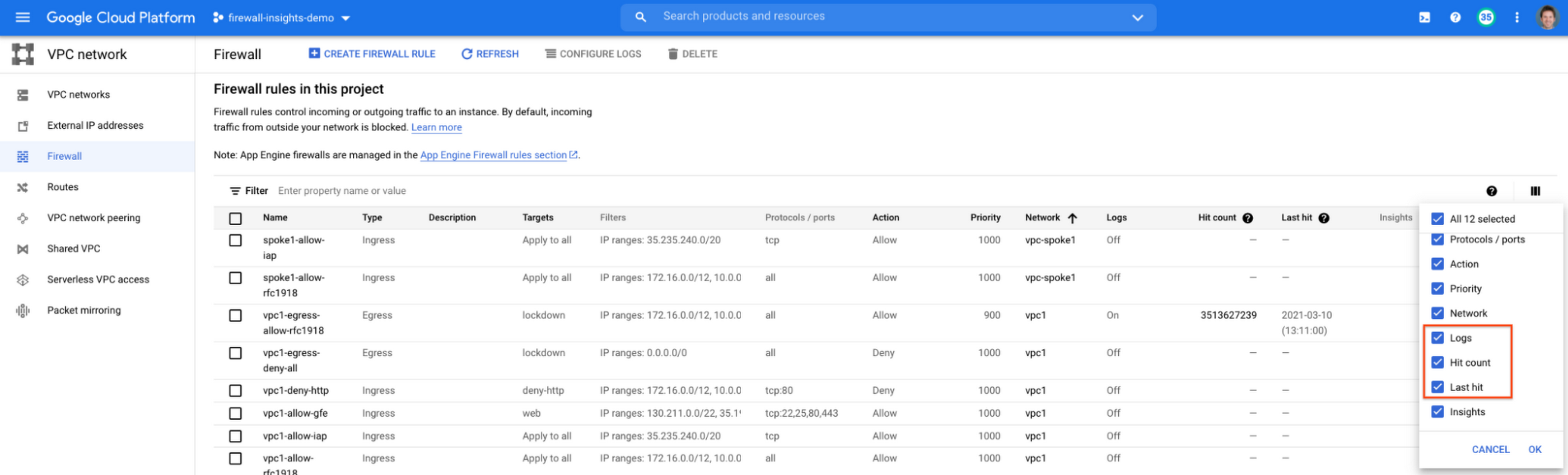
When you navigate to your VPC network and click on Firewall, ensure that you have selected Logs, Hit count and also Last hit in the column display options:
After this is enabled, now you should be able to see your VPC firewall rules with the hit count and last hit metrics. In the image below you can see that if logs are not enabled for rules, hit count and last hit metrics will not be collected. If logs are enabled, these details are collected, and shown in the VPC firewalls console.
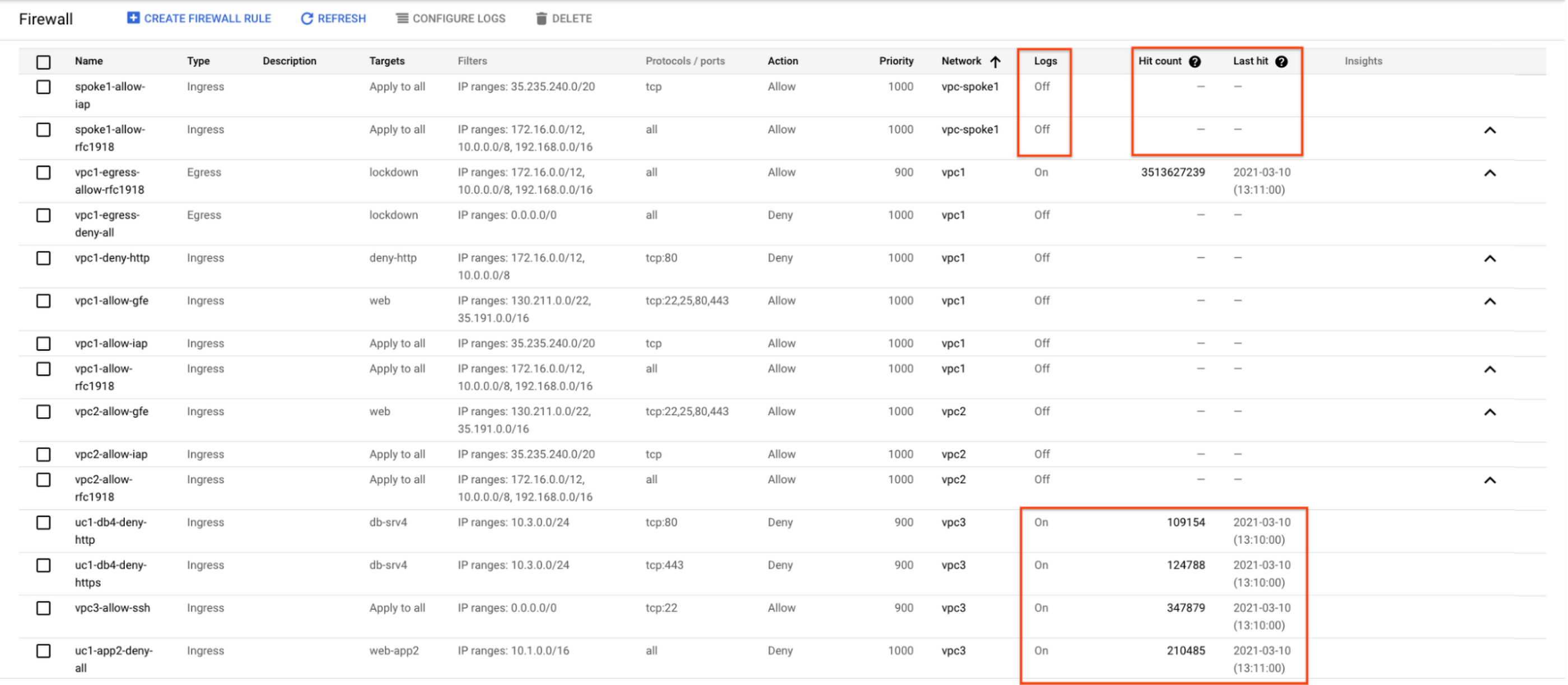
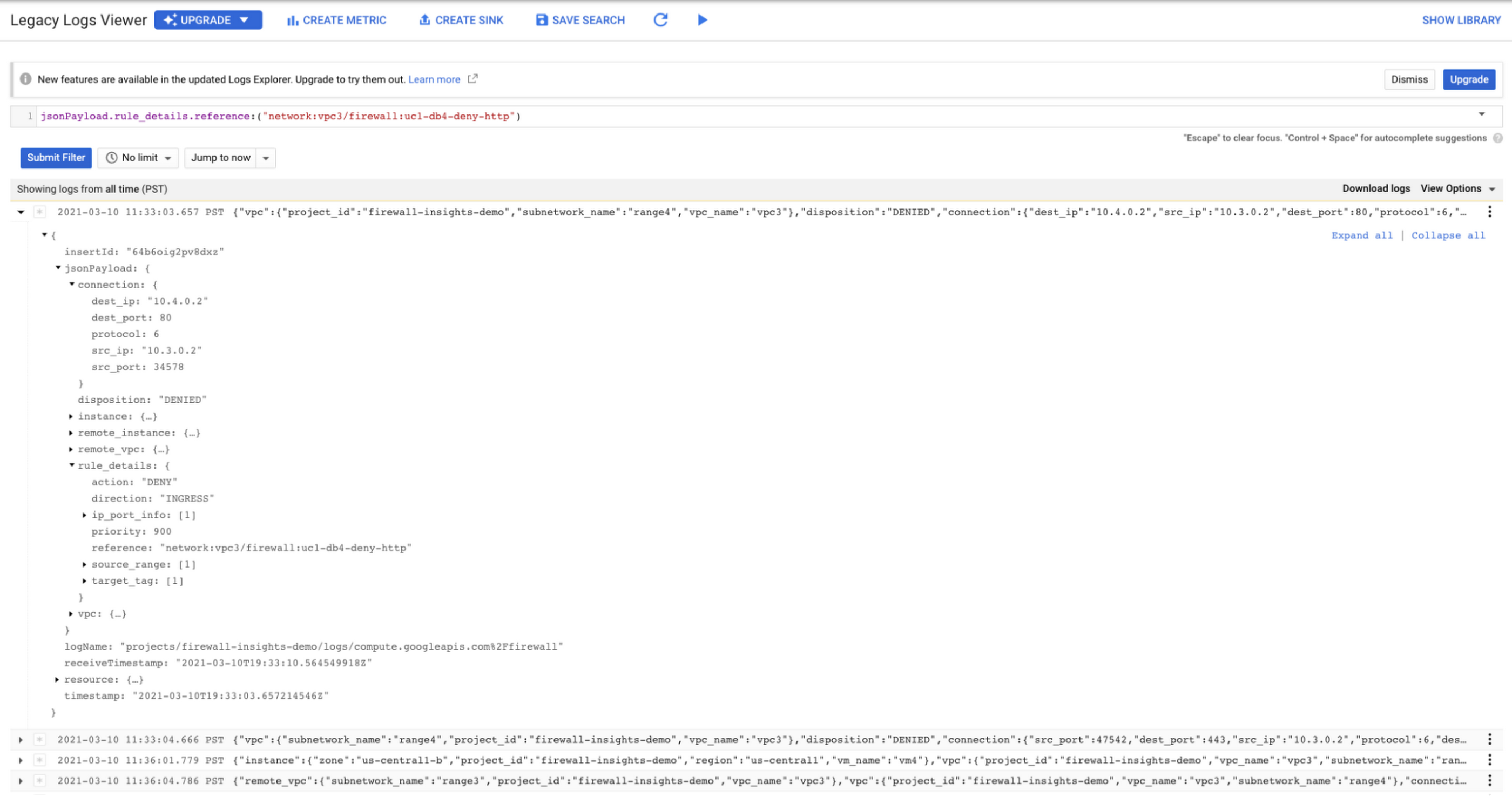
As you can see in Figure 1.2, each firewall rule which has logging enabled will show hit counts, so based on the example above, the rule “uc1-db4-deny-http” has been hit 109,154 times, the last time being 2021-03-10 (13:10:00). If you want to dive even deeper, you can click on the hit count and this will bring you to the logs viewer page where you can expand these logs and analyze all the details:
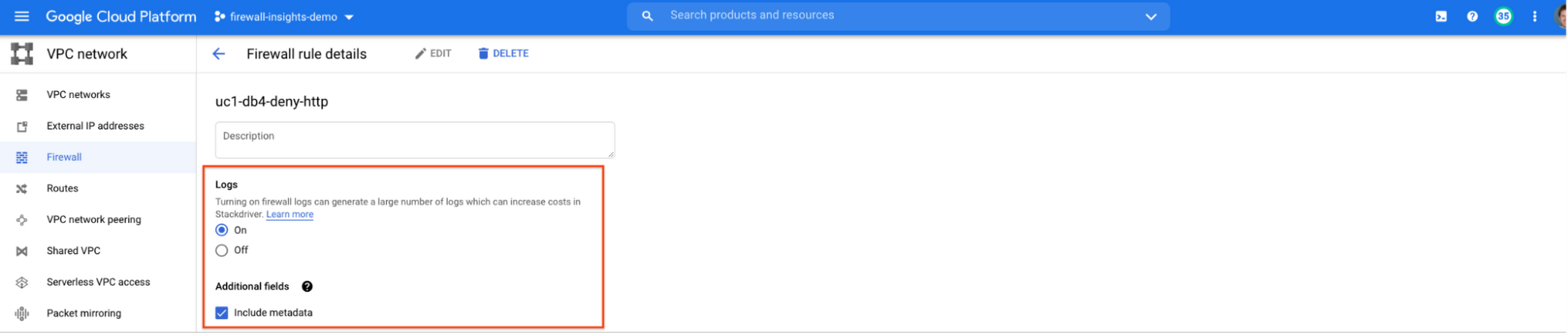
In order to enable logs for a particular firewall rule, you can edit it and turn logs on. By default, metadata is added in firewall logs. If you want to reduce the log size, you can do so by excluding these additional fields. Excluding these metadata fields will not impact the functionality of Firewall Insights.
From the “Firewall” page, you can also multi-select a group of firewall rules and turn on all logs at once.
Firewall rule usage metrics are accurate only for the period of time during which Firewall Rules Logging is enabled.
Insights Report, a deeper dive
Insights Report provides an intelligent analysis of the configuration of your firewalls. A report can contain one or more insights.
We will see examples now about the different insight reports which include:
- Shadowed firewall rules
- Allow rules with no hit in the last six weeks
- Deny rules with hits in the last 24 hours
By definition, a shadowed rule is a VPC firewall rule that is completely overshadowed by one or more firewall rules with higher or equal priority. We call that shadowing rules. Let’s see an example on how to find shadowed rules:Let’s say that you try to use ping between two VMs but it fails. Let’s take a look at the firewall rules applied to the VM:
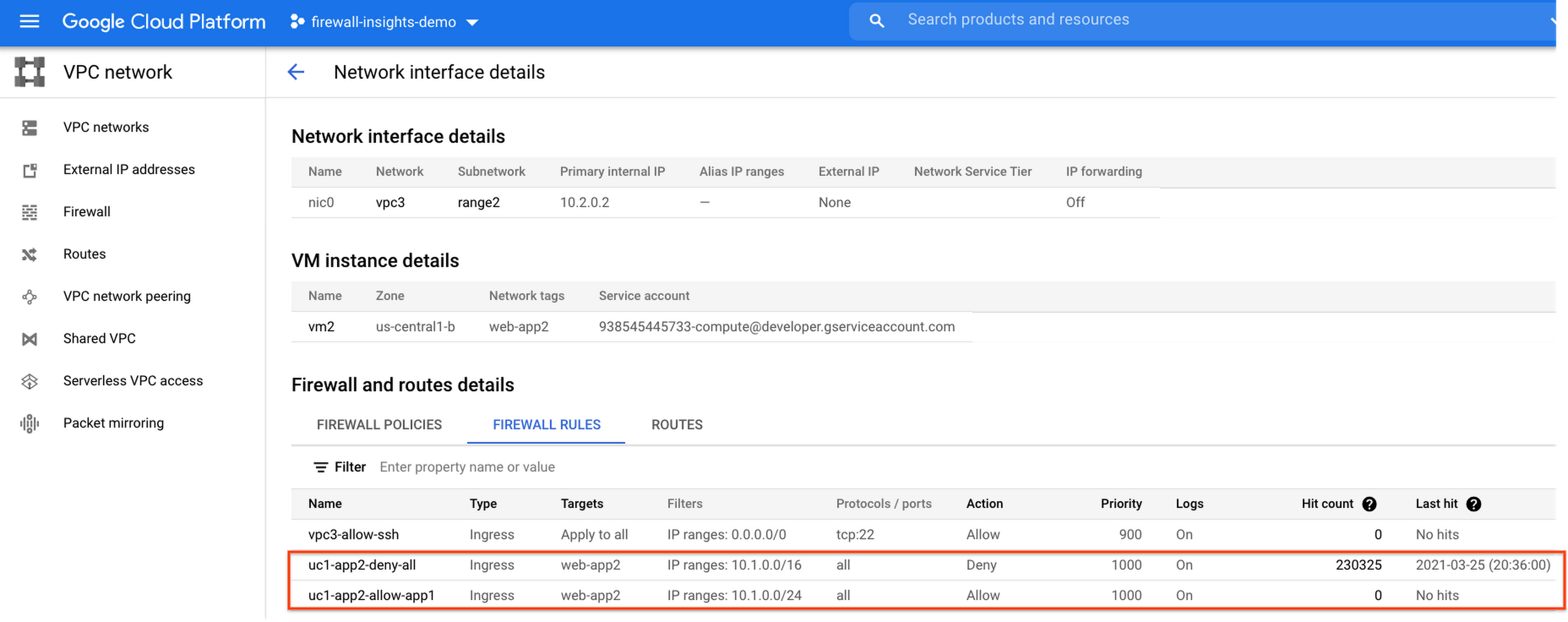
If we look closely, we can see that there are two rules with the same target tag, and those are almost identical except their source IP range. The IP range of the deny rule “uc1-app2-deny-all” includes the IP range of the rule allow “uc1-app2-allow-app1”. Therefore, we can see that “uc1-app2-allow-app1” is shadowed by “uc1-app2-deny-all”, and the ping between these VMs failed due to that.
To avoid such incidents in the future, Firewall Insights provides you with a convenient list of rules overshadowed by other firewall rules.
To see shadowed rules, you can click on the column selector, and add “Insights” to the firewall and route details:

Once this is applied, you will be able to see shadowed rules here:

Alternatively, you can navigate to Network Intelligence > Firewall Insights, where we will see the shadowed rule report:
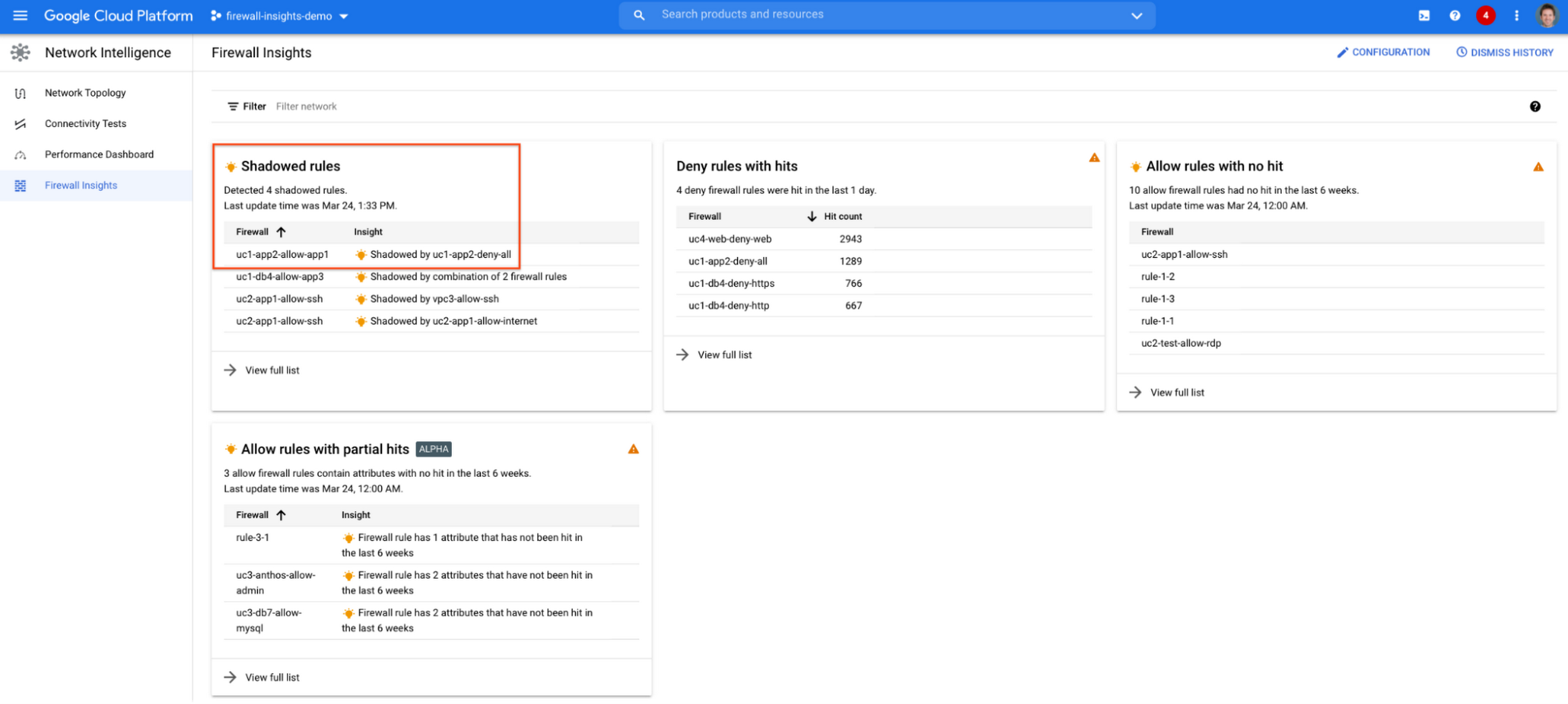
If we click on the insight we will get more details:

Going back to the firewall insights card (Figure 1.8), we can also identify that “uc1-db4-allow-app3” is shadowed by a combination of two rules and if we clicked on the insight this would provide all the details.
From the Firewall Insights dashboard, let’s move on to “allow rules with no hit”, where we can see firewall rules that have not logged any hits in the past six weeks. Such rules could be as a result of a misconfiguration, or leftover rules from past deployments. Tighten your security boundaries by identifying and removing such rules. If we go back to Network Intelligence > Firewall Insights, we can see allow rules with no hit:

We can drill down to view the full list of rules with no hit. We can see, for instance, one of the rules, the bottom one “uc2-app1-allow-internet”, might be a leftover rule to allow internet access from a past deployment, which means it has little likelihood of being hit in the future. So you may want to consider removing it from the rule set:

Click on the firewall rule to review all the details, and take a look at the prediction, which is made based on the hit pattern that we saw for similar rules in the same organization:

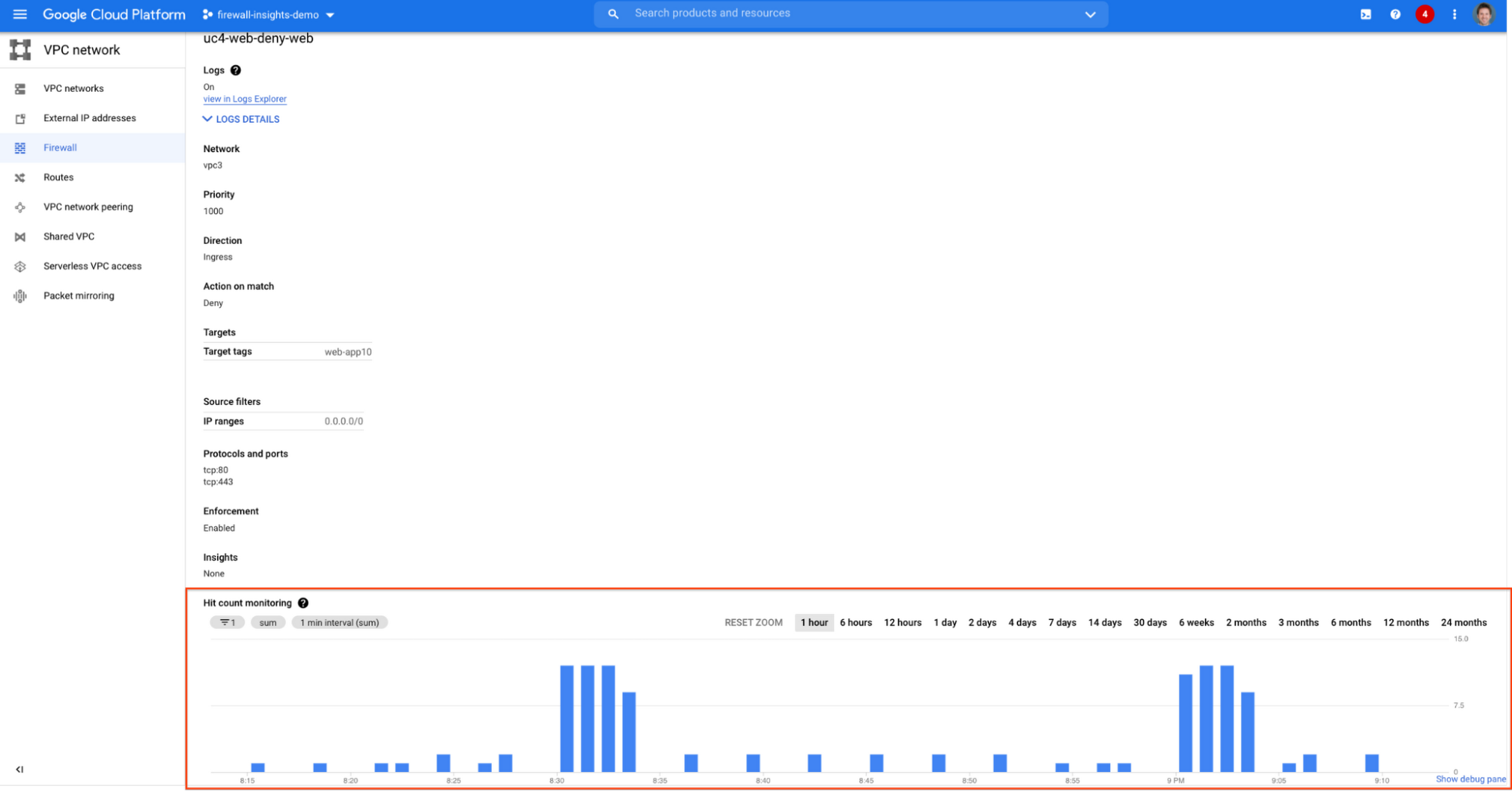
Let’s go back to the Firewall Insights dashboard and move on to the last category, “deny rules with hits in the last 24 hours”, which help you capture the traffic blocked by deny rules. These traffic types could indicate external attacks into your VPC network, or compromised VM instances attempting to send traffic out of your network. Let’s examine future hit prediction on a firewall rule. Navigate to Network Intelligence > Firewall Insights and take a look at the deny rules with hits card:

If your click on the “uc4-web-deny-web” rule, you can see the hit count monitoring, and if you click on the hit number we can dive deeper in the logs:

These tips should help you effectively leverage Firewall Insights to gain better control over a massive firewall rule set. Automate shadowed rule detection, quickly troubleshoot misconfigured rules, effortlessly pinpoint the overgranting rules hidden in the rule set, and identify the failed attempts to break into your network that were rejected by your firewall rules.
To learn more about Firewall Insights, please refer to our documentation. Additionally, to see how we’re advancing intelligent automation in network security, check our recent blog post.
What’s in Line for Google Cloud’s Europe Customers in Regards to the E.U.-U.S. Data Transfer Framework

2957
Of your peers have already read this article.
4:00 Minutes
The most insightful time you'll spend today!
Last week, the European Commission and U.S. Government agreed on a new E.U.-U.S. data transfer framework. Earlier today, Google shared that it welcomes these efforts by the U.S. government to enhance privacy protections for E.U. data and facilitate trusted transatlantic data flows. For our Google Cloud customers, we intend to make the protections offered by this new framework available once it is implemented.
Last year, we reaffirmed our commitment to E.U. businesses after the European Data Protection Board (EDPB) issued its Recommendations on Supplementary Measures, following Europe’s top court ruling invalidating the E.U.-U.S. Privacy Shield Framework and upholding the E.U. Standard Contractual Clauses (SCCs).
Since then, we’ve continued to help our customers meet stringent data protection requirements by offering industry-leading technical controls, contractual commitments, and risk assessment resources. We’ve also continued our advocacy to create more legal certainty around transatlantic data flows.
Today, we would like to provide an update to our customers on this work.
A customer-controlled cloud
Google Cloud1 continues to be a leading provider of technical and security controls to help meet customers’ data protection requirements, as well as their increasing data sovereignty expectations.
We are committed to building our Cloud on Europe’s terms, including by offering customer-managed encryption and data localization for a growing list of key products and collaborating with local partners to provide the highest levels of sovereignty, all while enabling the next wave of growth and transformation for Europe’s businesses and organizations.
Google Cloud Platform
We recently announced the general availability of Assured Workloads for the E.U. This product helps Google Cloud Platform (GCP) customers protect their data by allowing them to:
- Store their data in their choice of E.U. Google Cloud region(s)
- Ensure that only E.U. persons – located in the E.U. – have access to the data and provide customer support
- Deploy cryptographic control for data access, including customer-managed encryption keys
Cloud External Key Manager (EKM) enables customers to encrypt data in a variety of services with keys that are stored and managed in a third-party key management system deployed outside of Google’s infrastructure. Google Cloud continues to be the only cloud provider to enable customers to store and manage encryption keys for cloud-resident data outside the provider’s infrastructure with customer’s control over decryption based on specific justifications, including government access requests.
Key Access Justifications greatly advances the control that GCP customers have over their data by giving customers a justification every time their externally hosted keys have to be used to decrypt data. Signed Access Approval (SAA) adds a layer of extra assurance that requires explicit customer consent for any administrative access to customer data or configurations.
Google Cloud’s Confidential Computing portfolio is a breakthrough technology that allows customers to encrypt their most sensitive data in the cloud while in-use. Ubiquitous Data Encryption further extends data protection by providing cryptographic protection for this data at-rest, in-transit, and in-use. The keys used to encrypt customer data outside of GCP using Cloud EKM are securely shared with applications operating within Confidential environments.
Google Workspace
Our Google Workspace (including Workspace for Education) customers can choose to store their covered data in Europe. Additionally, with Client-Side Encryption, we offer customers direct control of encryption keys and the identity service they choose to access those keys. With Client-Side Encryption, customer data is indecipherable to Google, while users can continue to take advantage of Google’s native web-based collaboration, access content on mobile devices, and share encrypted files externally. Client-Side Encryption is currently available in Public Beta for Google Drive, Docs, Sheets, and Slides, and we plan to extend it to Gmail, Calendar and Meet. Additionally, customers can also benefit by choosing third party solutions that offer similar encryption capabilities with select Google Workspace services.
Legal Basis for International Data Transfers
We updated our data processing terms for GCP and Google Workspace and Cloud Identity to reflect various modules of the new E.U. Standard Contractual Clauses (SCCs) approved by the European Commission on June 4, 2021, as well as separate U.K. SCCs.
Google Cloud plans to adopt the new E.U.-U.S. data transfer framework and offer it as a transfer solution to our cloud customers, as further detailed in our data processing terms.
Advocacy and Additional Helpful Resources
We have adopted the Trusted Cloud Principles with industry peers to demonstrate our commitments to protect the rights of our Google Cloud customers. We will continue to support the ongoing work of the Organisation for Economic Co-operation and Development on government access to data and the negotiation of CLOUD Act Agreements — including between the U.S. and E.U. — as vehicles for surveillance reform.
We will continue to publish additional materials on our Cloud Privacy Resource Center, such as our whitepaper on safeguards for international data transfers with Google Cloud.
Millions of organizations with users in Europe rely on our cloud services to run their businesses every day, and we remain steadfastly committed to helping them meet their regulatory requirements by maintaining a diverse set of compliance tools.
Google Cloud: Google Workspace (including Google Workspace for Education) and Google Cloud Platform (GCP)
Ensuring Ironclad Security: Our Validation Process for the Confidential Space

2585
Of your peers have already read this article.
2:30 Minutes
The most insightful time you'll spend today!
We’re pleased to announce that Confidential Space, our new solution that allows you to control access to your sensitive data and securely collaborate in ways not previously possible, is now available in public Preview. First announced at Google Cloud Next, Confidential Space can offer many benefits to securely manage data from financial institutions, healthcare and pharmaceutical companies, and Web3 assets. Today, we will explore some security properties of the Confidential Space system that makes these solutions possible.
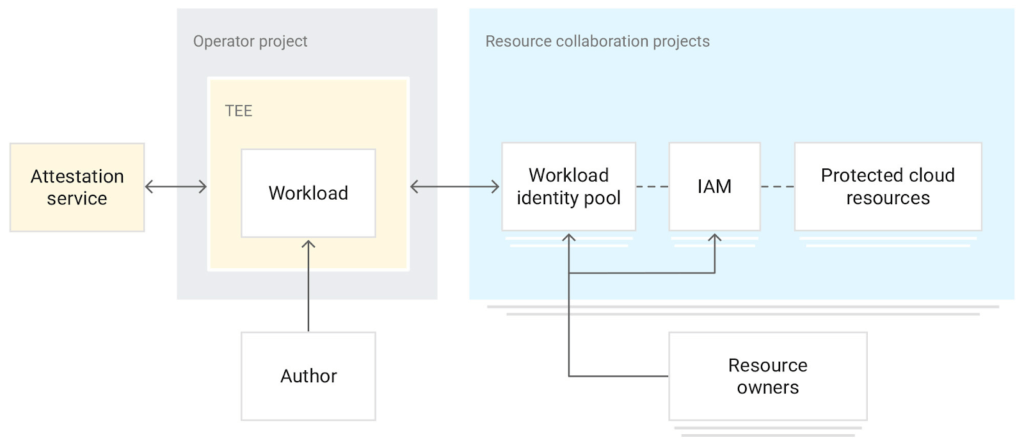
Confidential Space uses a trusted execution environment (TEE), which allows data contributors to have control over how their data is used and which workloads are authorized to act on the data. An attestation process and hardened operating system image helps to protect the workload and the data that the workload processes from an untrusted operator.
The Confidential Space system has three core components:
- The workload is a containerized image with a hardened OS that runs in a cloud-based TEE. You can use Confidential Computing as the TEE that offers hardware isolation and remote attestation capabilities.
- The attestation service, which is an OpenID Connect (OIDC) token provider. This service verifies the attestation quotes for TEE and releases authentication tokens. The tokens contain identification attributes for the workload.
- A managed cloud protected resource, such as a Cloud Key Management Service key or Cloud Storage bucket. The resource is protected by an allow policy that grants access to authorized federated identity tokens.
The system can help ensure that access to protected resources is granted only to authorized workloads. Confidential Space also can help protect the workload from inspection and tampering, before and after attestation.
In our published Confidential Space Security Overview research paper, we explore several potential attack vectors against a Confidential Space system and how it can mitigate those threats. Notably, the research notes how Confidential Space can protect against malicious workload operators and administrators, and malicious outside adversaries, who are attempting to create rogue workload attestations.
Through these protections, Confidential Space establishes confidence that only the agreed upon workloads will be able to access sensitive data. The research also highlights some of the extensive security reviews and tests executed to identify potential weak points in the system, including domain expert reviews, meticulous security audits, and functional and fuzz testing.
We asked the NCC Group for an independent security assessment of Confidential Space to analyze its architecture and implementation. NCC Group leveraged their experience reviewing other Google Cloud products to dig deep into Confidential Space.
The NCC Group’s extensive review, which included penetration testing and automated security scanning, found zero security vulnerabilities. In their report, the architecture review highlights how the security properties are achieved through the coordination of measured boot with vTPM attestation, reduced attack surface with constricted administrator controls and access, workload measurement and enforced launch policy, and resource protection policy based on attested workload runtime properties.
The combination of these attributes creates powerful security properties, gating release of data on runtime measurements of the actual workload code and environment instead of just user and service account credentials. Confidential Space provides a platform that includes:
- A dependable workload attestation, including workload code measurement, arguments and environment, and operating environment claims
- A fully-managed attestation verification service that validates expected environmental attestation claims
- A policy engine allowing for arbitrarily complex (or extremely simple) policy to be created around those claims
- A mechanism to attach those policies to Google Cloud resources
Together, the platform provides a mechanism where one can ensure that their data is only ever released into trusted workloads that will not abuse that data.
Take a look at our documentation and codelab and take it for a spin. We hope that Confidential Space can inspire organizations to solve their use cases around multi-party collaboration with sensitive data; please contact your Google Cloud sales representative if you have any questions.
5172
Of your peers have already watched this video.
14:00 Minutes
The most insightful time you'll spend today!
How Google Workspace Helps Manage, Govern and Protect Sensitive Data
The shift towards a hybrid work style and trends accelerated by the pandemic has resulted in data deluge. With companies and individuals sharing increasingly large volumes of information and collaborating with internal and external stakeholders, the need for innovations for higher security also escalates. View this video to learn how Google Workspace approaches security across content lifecycle from client-side encryption updates, data loss prevention, Google Vault, data regions, labels, and more!
More Relevant Stories for Your Company

5 ways a SOAR solution improves SOC analyst onboarding
Editor's note: This blog was originally published by Siemplify on Feb. 19, 2021. The number of unfilled cybersecurity jobs stretches into the millions, and a critical part of the problem is the length of time it takes to backfill a position. Industry group ISACA has found that the average cybersecurity

Protect Corporate Apps with BeyondCorp Enterprise
As part of our efforts to democratize Zero Trust, Google Cloud has designed our BeyondCorp Enterprise solution to be an extensible platform where customers can choose to integrate signals from other technology vendors and incorporate these into their Zero Trust access policies. Following our integrations announcements earlier this year, we

Confidential GKE Nodes: Now Available on Compute Optimized C2D VMs
Today, we are happy to announce that Confidential GKE Nodes are available on compute optimized C2D VMs. Many companies have adopted Google Kubernetes Engine (GKE) as a key component in their application infrastructure. In some cases, the advantages of using containers and Kubernetes can surpass those of traditional architectures, but
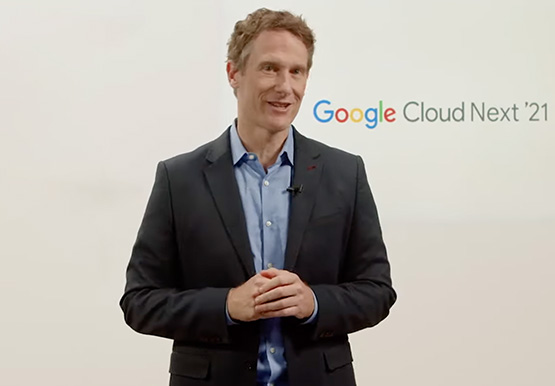



Journey to Transformation and Modernization with Google’s Distributed Cloud
Google Cloud has been leading the way of helping businesses make most from their cloud investments to drive digital transformation through modern application platforms that cater to today's customer needs. Watch the video from the Next '21 to explore three areas where companies are supported by Google Cloud throughout their
