





Streamlining Your Experience: Enhanced Search and Navigation in Google Cloud Console
1375
Of your peers have already read this article.
4:30 Minutes
The most insightful time you'll spend today!
The Google Cloud console is a powerful platform that lets users manage their cloud projects end-to-end with an intuitive web-based UI. With over 120 Google Cloud products across thousands of pages, it can be challenging to navigate through the console quickly, and many users don’t like to use the command line interface. To help, Google Cloud console team recently made several improvements to our search and navigation features, making it easier to find what you need, when you need it.
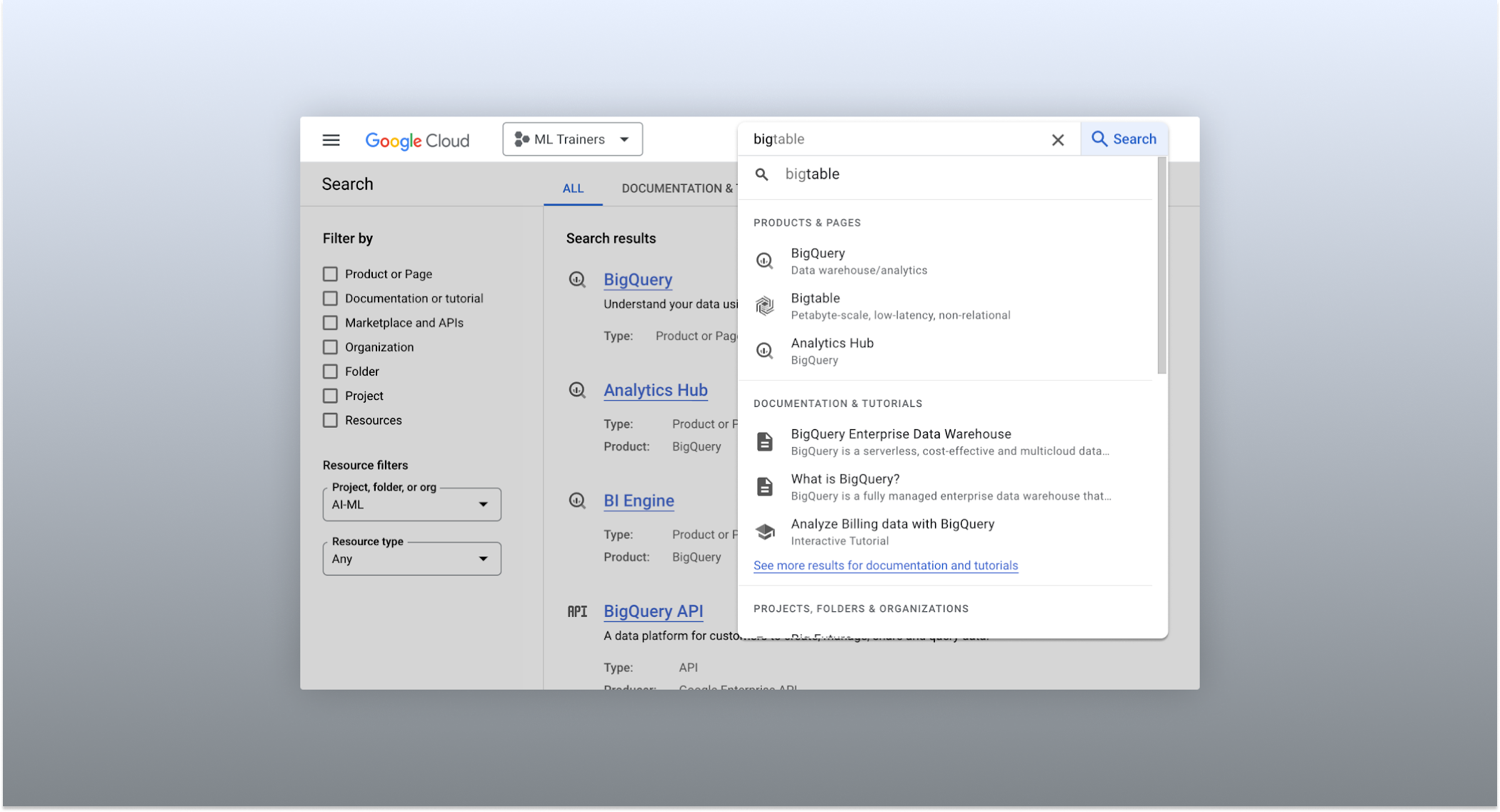
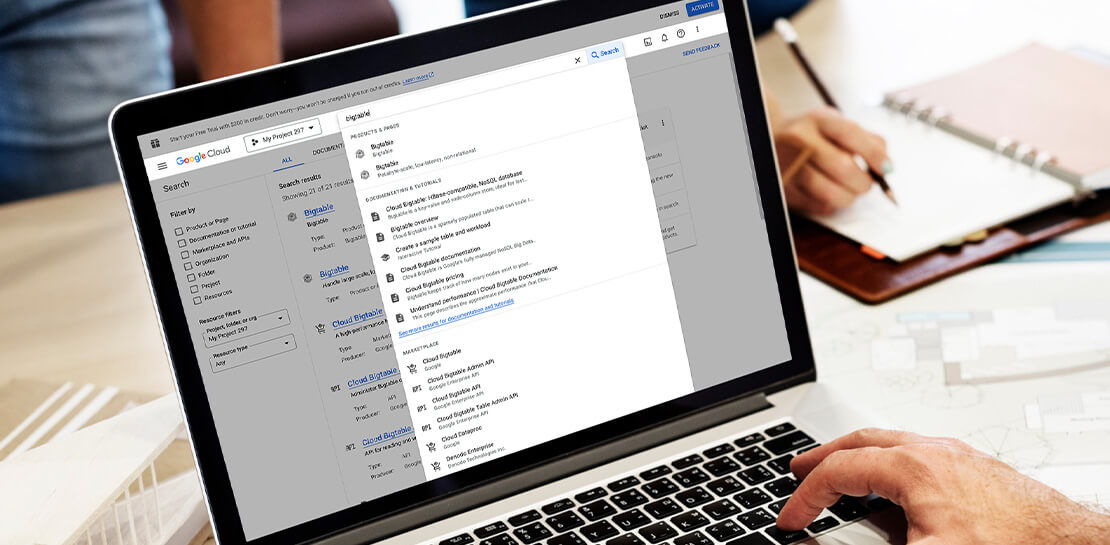
The Cloud console’s search dropdown and result page
Expanded resource-type search
One of the most significant improvements to the console’s search feature is the increased resource-type coverage. You can now find instances of nearly all of the over 120 products that Google Cloud offers directly from the search bar, rather than by manually clicking to the details section nested within specific product pages. This wider coverage saves you time compared to browsing through the different product categories to find what you’re looking for. This improvement also allows the console experience team to continuously add new resource types as we develop new features and capabilities in our various product offerings.
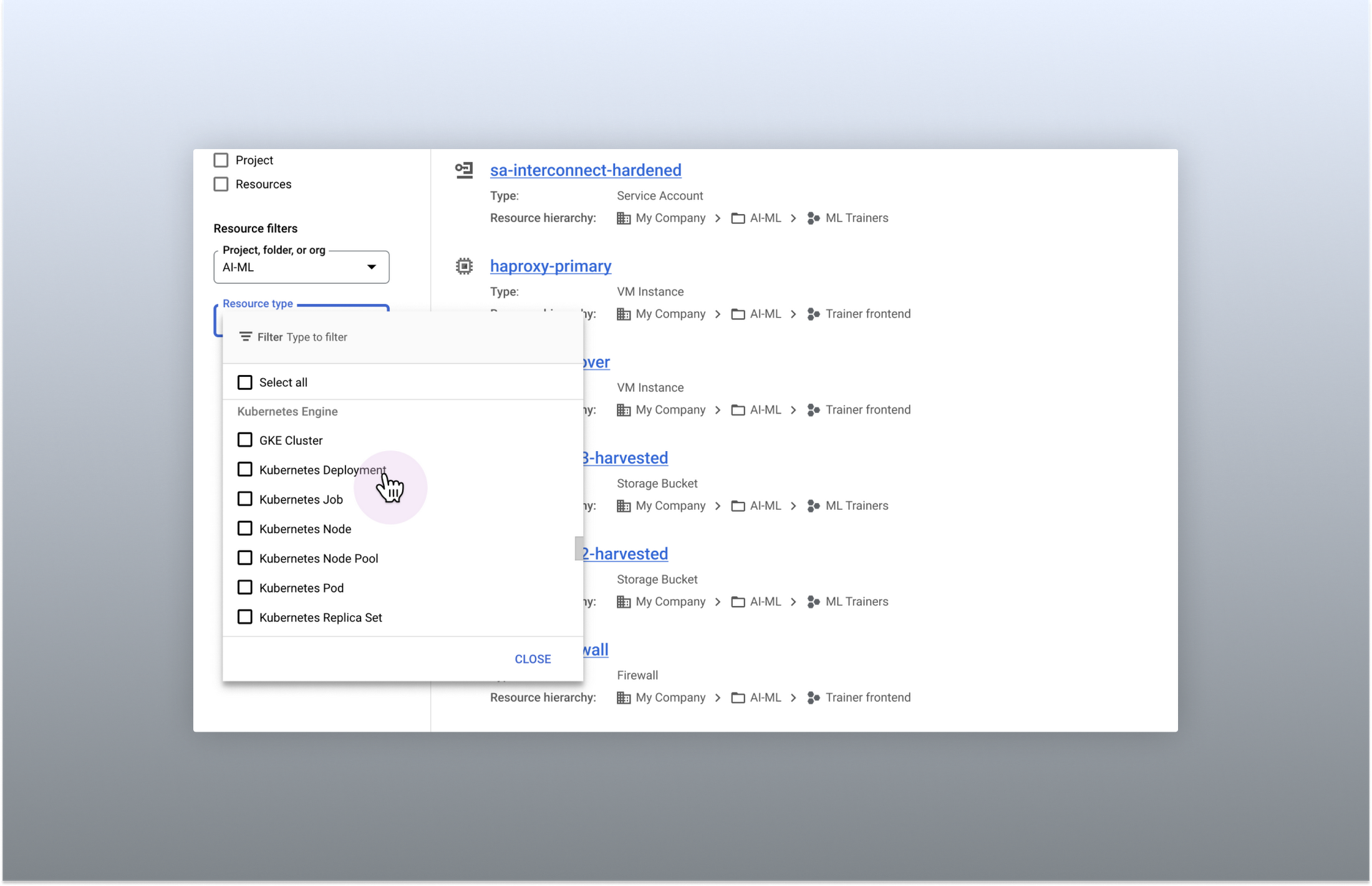
Search for more than 90 types of resources using Google Cloud console
Improved documentation search
We also improved the coverage and accuracy of the search experience for documentation, making it easier to find specific pages or interactive tutorials. Developers looking to get started with something they’re unfamiliar with may want to undertake tutorials in the context of their own working environment. Even experienced developers just looking for a quick answer to their question may not want to leave the console, so we expect these improvements can help users of all experience levels.
We’ve heard from you that finding the right documentation from within the console can be tricky, and so we hope this change can save you from needing to switch over to web search to be confident that they’ll find what you’re looking for.
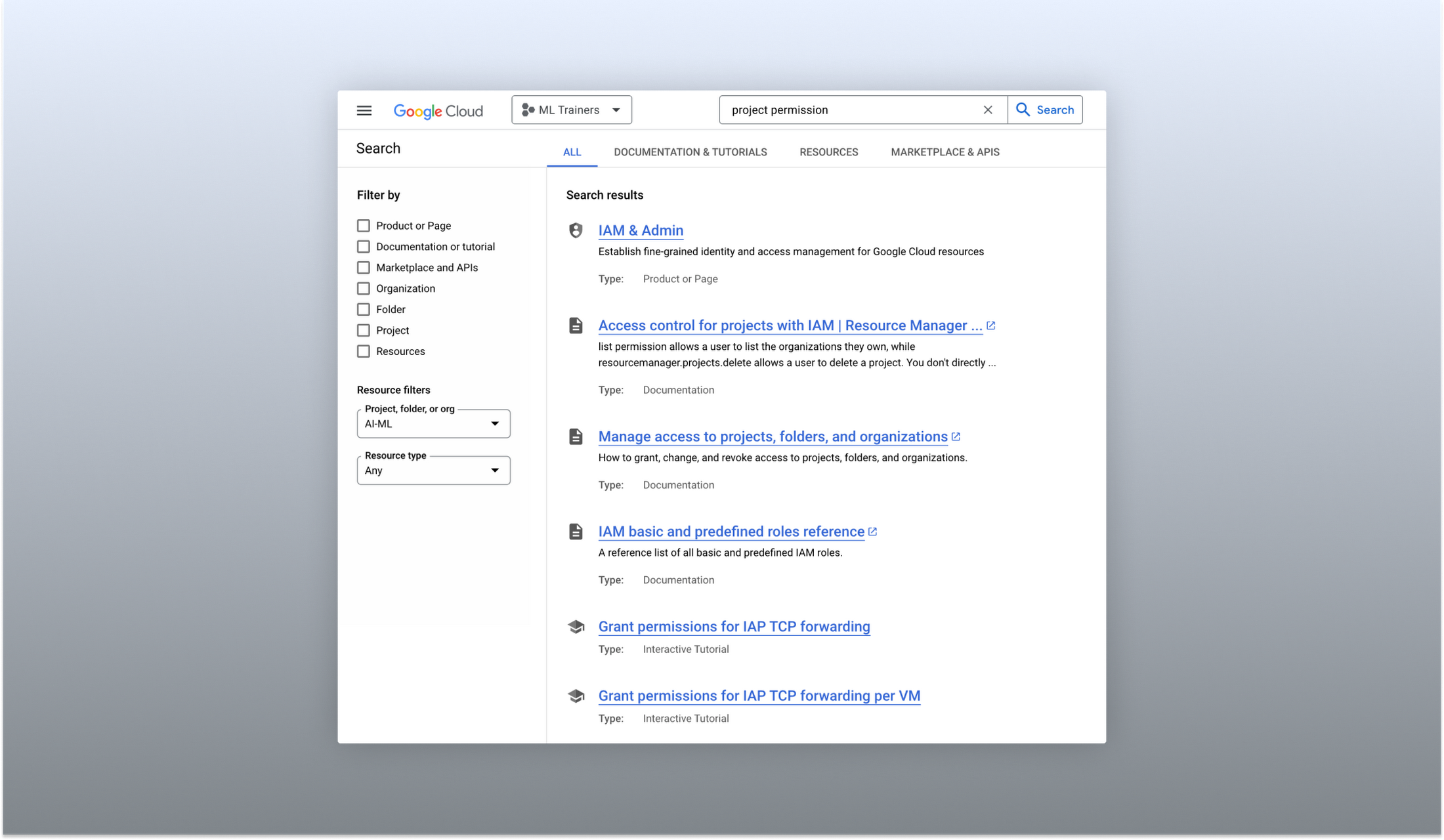
Cloud documentation and tutorials are available for search in the console
A refreshed search results page
To make browsing search results easier, we also overhauled our search results page by dividing results into tabs, similar to Google web search. This means that you can refine your search by diving into one of those categories individually. In addition to maintaining an “all results” tab, there are tabs for:
- Documentation and tutorials
- Resource instances, and
- Marketplace and APIs
Each tab also has a better filtering experience that’s unique to that search result category. For instance, the Resources tab lets you filter by metadata like the last time a resource was interacted with, while the Documentation tab allows you to search for interactive tutorials only. If you can’t find what you’re looking for in the autocomplete dropdown, try the search results page. It can provide additional results or context to help you find exactly what you’re looking for.
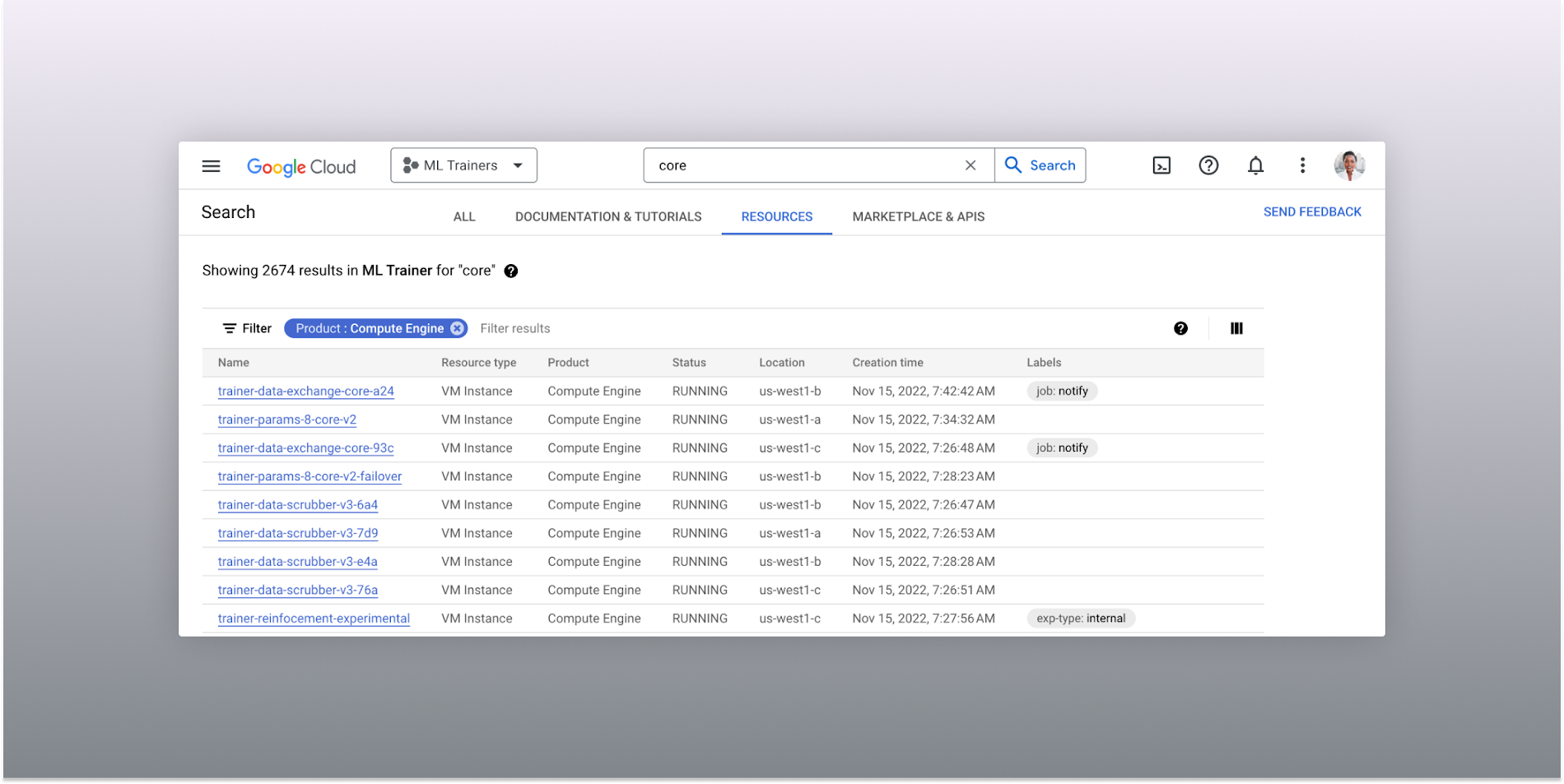
The Resources tab lists results in a denser, metadata-rich format with filtering available
Accurate industry-wide synonyms
Google Cloud console search now interprets industry-wide synonyms accurately — if you’re coming from AWS or Azure and know the name of a product in that ecosystem, searching for it will return the Google Cloud equivalent. A full list of synonyms can be found here.
General usability improvements
We also shipped several smaller quality-of-life improvements related to search, including:
- Improvements to accessibility, including better color contrast and zoom behaviors
- Faster latency targets and shorter load times for results
- A search keyboard shortcut — just type “/” to begin searching without using your mouse
- The ability to search for an API resource by its key
We also updated the look and feel of our platform bar to a cleaner, more modern experience that’s more in line with the branding across other Google Cloud interfaces.
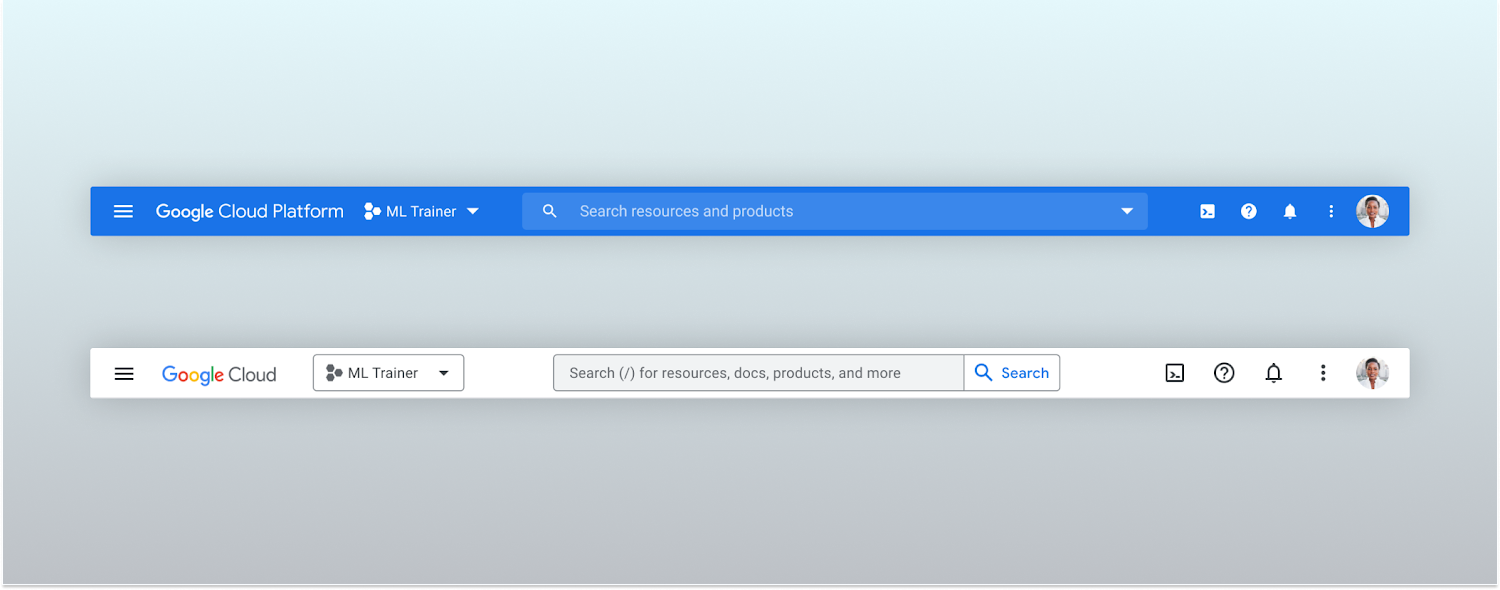
Google Cloud console’s old platform bar (top) and the updated version (bottom)
A customizable navigation menu
Finally, we made usability improvements to the left-hand navigation menu by allowing you to pin specific products. Products can be pinned from the left nav menu or our brand new All Product Page. This is a shift away from the default ordering of products that attempted a “one size fits all” approach to navigation. This customization feature lets you tailor the console to your specific needs and work more efficiently.
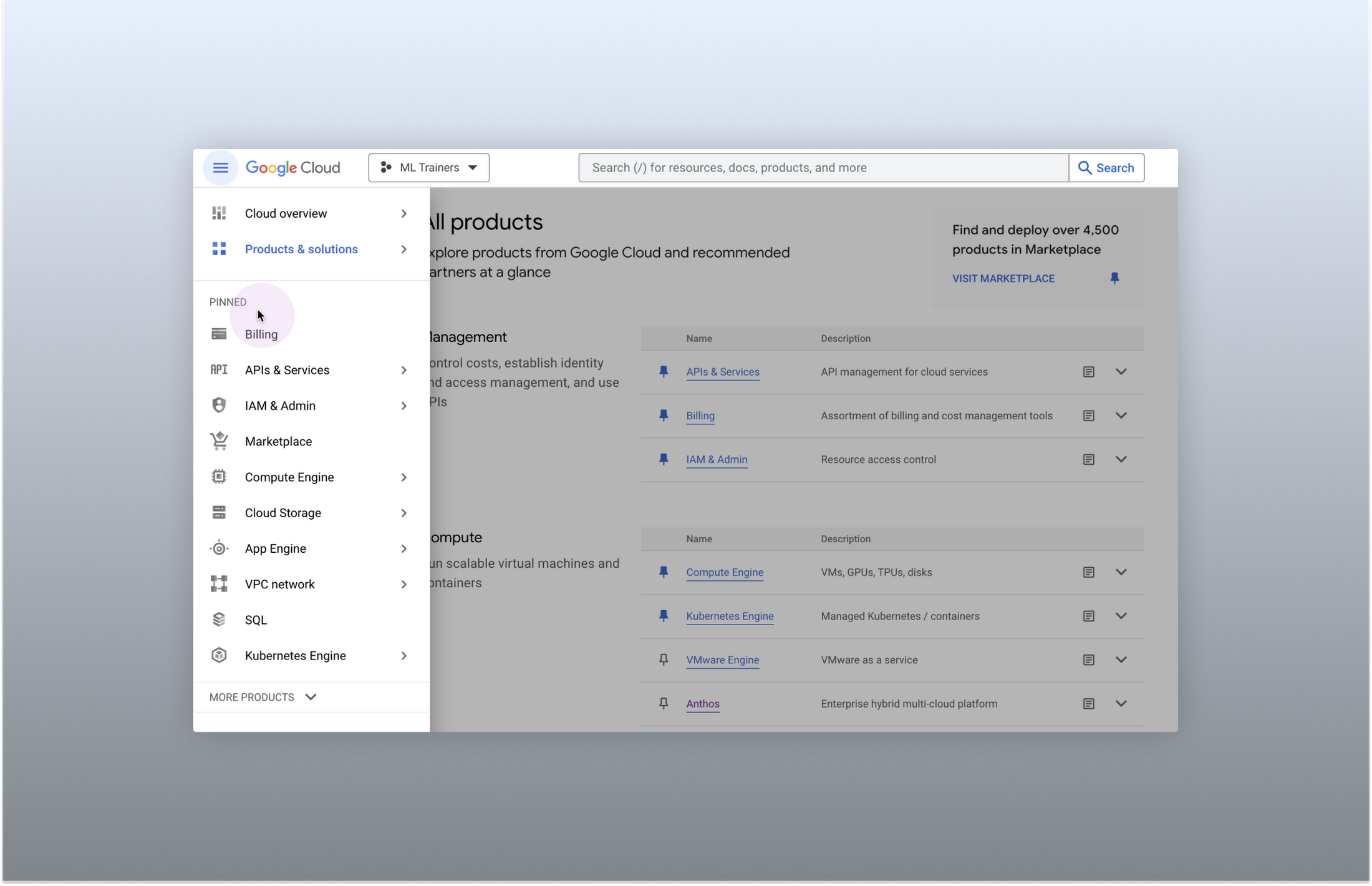
Products can be pinned to the left nav menu for easy access
Final thoughts
The Google Cloud console’s navigation and search features have come a long way. With these recent improvements, you can find what you need quickly and efficiently, making it easier to manage your cloud resources. From expanded resource-type search to improved documentation search and refined search results, the console is more user-friendly than ever before.
BHI: Embracing Google Workspace and AppSheet to transform the workplace

4264
Of your peers have already read this article.
4:30 Minutes
The most insightful time you'll spend today!
In the last two decades, BHI, once a small construction company in Vernal, Utah, has expanded its operations to dozens of industries in over 25 states. But while the company grew, its technology trailed behind. File sharing and emails both ran off a single server. Editing a document was a grueling undertaking that required an employee to VPN in, patiently download the file, edit it, then upload it again—all from a job site with a limited internet connection. Acknowledging the need for better technology, BHI adopted Google Workspace and AppSheet and transformed its business to be more innovative, productive, and profitable.
Rebuilding collaboration and productivity
BHI first looked to replace its archaic email and file-sharing systems. They found that Google Workspace—as a proven and popular collaboration solution for remote teams and a familiar, preferred platform that most employees use in their personal lives—was the clear choice. BHI migrated its 500 employees to Google Workspace in less than a week. Productivity immediately soared, since employees could collaborate more easily with Google Workspace’s products and access them from any device, from anywhere—even at the construction sites.
For instance, the contract writing process drastically improved with Google Workspace. Version control had always been a struggle—as employees circulated a draft contract from one computer to the next, versions became unruly and randomized, untracked changes popped up, and files went missing. With Google Workspace, the pre-construction, legal, and finance teams can all edit and track changes of a contract from wherever they work. Version control has become a thing of the past, as everyone is always working on the latest version.
By adopting Google Workspace, BHI decentralized its operations and began collaborating in real time across over 150 job sites. Management and IT gained new insights into challenges that they may never have uncovered nor confronted without a cloud-based productivity tool. The IT team also saw an opportunity to overhaul the methods of their deskless workforce, which accounts for 90% of the company. This deskless majority needed to connect directly to the data that influenced, impacted, and comprised their work. They also required more streamlined processes. AppSheet provided the answer to the workforce’s needs, enabling IT to create applications that simplified key tasks so mobile workers could get their jobs done faster and better.
For example, one BHI client required extensive inspections multiple times a day. Before using AppSheet, a BHI inspector would perform the inspection, return to a computer, record the results from paper to a spreadsheet, copy and paste them into a formatted report in a Google Docs, convert the Doc to a PDF, and email the final inspection report to the customer. This manual process took two hours to complete. Now, using AppSheet, the inspector inputs the results on their mobile device while performing the inspection. As soon as the device connects to the internet, it automatically updates the database with the inspector’s inputs, adds the inspection results to a preformatted report built-in Google Docs, and emails the final report as a PDF to the customer. With AppSheet, BHI shortened this inspection process from two hours to six minutes, saving over $50,000 a month in labor. “With Google Workspace and AppSheet, BHI has turned into a digital company with real-time data allowing for real-time decisions, collaboration, and transparency in a decentralized environment,” says
Johnny Hacking, Director of IT.
An easier software choice for faster results
BHI also found that building apps with AppSheet is much easier than using other solutions, such as developing with low- or full-code tools or purchasing third-party products. Because AppSheet is a true no-code platform, anyone can learn to build and maintain apps. Since adopting AppSheet, the BHI IT team has become so proficient with the platform that they have eliminated the company’s previous backlog of software needs. Now, when a new site opens up, IT proactively works with the site managers to understand its unique requirements in order to build a custom app. Start to finish, scoping, and building this site-specific app typically takes less than a week—compared to months with traditional development platforms.
IT team members aren’t the only BHI employees building apps. As Hacking explains, “We have people that aren’t in IT, and when they have an idea we say hey, log into AppSheet, build it out, and then we’ll help out with some final touches on it.”
Empowering employees outside of IT to build AppSheet apps has benefited teams across the company. For example, one team on a solar farm construction project needed to perform inspections of an array of specialized technical equipment with which IT was not familiar. In this case, the solar team, being the subject matter experts, simply built the app according to their specifications. All IT had to do was jump in at the end to help finalize the app—the final product was completely customized to the solar team’s very specific needs. This highlights the benefits of no-code development: on-the-ground experts build and prototype job-specific apps and IT puts the finishing touches on the functionality, all while keeping guardrails in place.
Using Google Workspace and AppSheet also simplifies BHI’s reliance on third-party software. “Our company divisions are so diverse that they each require different software,” says Hacking. “Plus, if we buy a third-party software, we still have to customize it by getting other software, because they don’t play well together. By replacing this software with AppSheet apps, we save a lot of money. And it’s easy to integrate those apps because on the back end, they’re all connected to Google Sheets.”
For the few third-party software products that BHI hasn’t been able to replace, they’ve used Apps Scripts to import the software’s data into Google Sheets, so that their data all lives on one platform. Overall, BHI has been able to free up 10% of its total IT spend by replacing third-party software with Google Workspace and AppSheet apps.
Company culture transformed by technology
“Because we’ve used Google Workspace and AppSheet and it’s been so successful, people are very willing to use them,” Hacking says. “And for a construction company to gain so much trust in these platforms in such a short period of time—that’s huge. Now we’re at the point where employees are asking, ‘What else can we do?’”
Adopting Google Workspace and AppSheet has not only made BHI more productive, but also transformed the company culture. Employees feel empowered to be more innovative and are constantly seeking ways to improve. Simplifying employees’ work has led to a direct boost in morale.
The role of IT has also transformed. As Hacking explains, “In just three years of using these technologies, IT has gone from being support overhead to being proactively brought to the table to take part in the business strategy.” Increased IT visibility and culpability has helped solve business problems and led to increased profitability.
BHI continues to find new ways to leverage Google Workspace and AppSheet to improve business. In response to COVID, they created a timesheet app that allows employees to clock in without touching a device. Most meetings are now held virtually using Google Meet. Fleet maintenance and repairs are all managed with apps. And, of course, the company has better data and insights than ever. As Hacking puts it, “We’re continuing to stay on the cusp of innovation because of Google Workspace and AppSheet.”
Fortune 500 Electronics Manufacturer Makes Collaboration a Competitive Advantage…and Saves $2 Million A Year
4654
Of your peers have already read this article.
4:30 Minutes
The most insightful time you'll spend today!
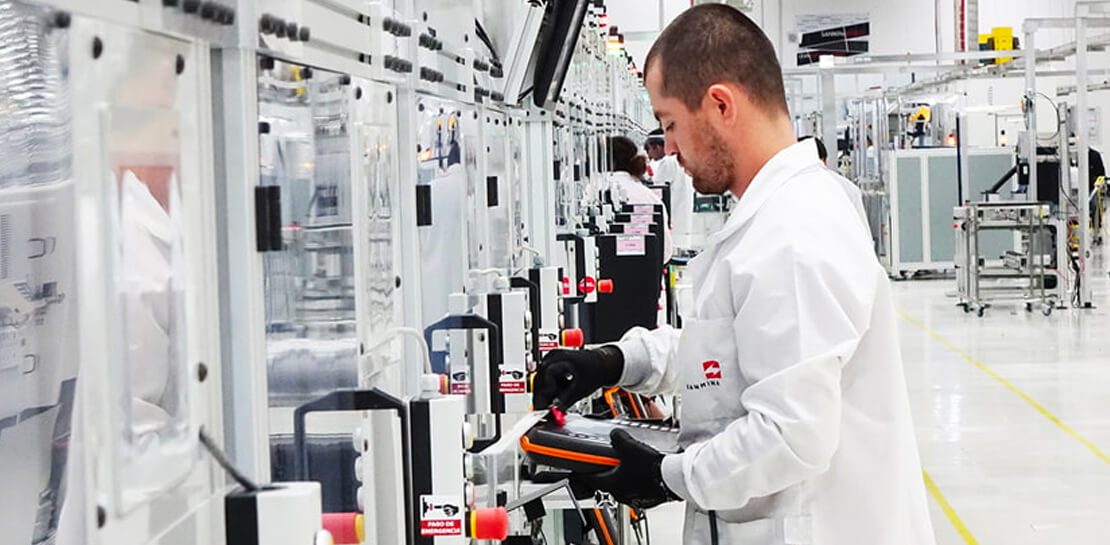
When electronics manufacturer Sanmina adopted G Suite several years ago, its goals were clear: reduce licensing costs, simplify management—particularly of its messaging tools—and cut hardware expenditures.
Fast forward several years and the Fortune 500 company has achieved those goals and more. By moving to Gmail, Sanmina reduced more than 110 email servers by over 90%, freed up its IT support function from basic administration to focus on more valuable tasks, and saved $2 million a year on total cost of ownership (including over $1.5 million a year on IT licensing).
A long-term plan: cloud collaboration
For Sanmina CIO Manesh Patel, the impressive returns are part of a bigger plan. From the beginning, Manesh recognized the potential of moving to the cloud to facilitate collaboration across Sanmina’s global operations. With more than 45,000 employees across 26 countries delivering different elements of a global value chain from design to delivery, the benefits of improving collaboration were clear. It could open up innovation by drawing on ideas from different locations and teams and enhance quality control throughout the manufacturing process.
As the first step towards this compelling vision, Manesh focused on rolling out Gmail and Calendar. Both applications were already familiar to many employees and offered a straightforward route to embrace cloud services. With cost savings quickly following, colleagues across Sanmina could see clear benefits from the shift to the cloud.
At the same time, Sanmina made the full suite of tools available and allowed adoption to occur organically across the organization.
Driving adoption
As interest in cloud computing grew, G Suite provided an ideal platform for employees to explore new ways of working together—with some parts of the business swift to develop effective uses for the collaborative tools. Building on the work of these leaders, Manesh has promoted adoption of the suite on several fronts over the past 18 months. Manufacturing, Quality, Engineering, and Supply Chain are a few examples of early adopters that benefit from the improved collaboration in G Suite.
The company also looked to build greater awareness of new G Suite features and functions. It engaged with Google partner Maven Wave. “Maven Wave has been a terrific and responsive partner,” he says. “They’re open and adapted their approach to our needs, while bringing a core competency on G Suite.” Maven Wave brought the experience of working with other global companies on similar initiatives, and an effective change management methodology that was tailored to fit Sanmina’s culture.
“Hangouts Meet fundamentally changes how people interact; you can put a face to a name and really engage with your team. It’s as close as you can get to meeting in person.”
– Manesh Patel, CIO, Sanmina
The messaging tools were not being used to full effect either. When Gmail was first introduced, training was optional; some of the teams were therefore not familiar with features such as attaching documents from Google Drive or archiving content. To help ensure the whole business was using Gmail to its full potential, there has been strong internal promotion of Google’s easy-to-use, online G Suite Training tools. “It’s very easy to consume and very effective,” says Manesh.
Embracing collaboration
Today, Sanmina employees rely daily on several G Suite tools, including Docs, Sheets, Slides, and most recently Hangouts Meet.
“More and more of our employees use Hangouts Meet. Our employees often work as part of teams that are dispersed around the world, so they don’t have the chance to actually meet their colleagues,” Manesh explains. “Hangouts Meet fundamentally changes how people interact; you can put a face to a name and really engage with your team. It’s as close as you can get to meeting in person.”
Manesh acknowledges that this is not simply a result of technological change, but a cultural shift as people grow more comfortable with video calls in their personal lives. Hangouts Meet brings that same ease of use to professional settings—and even well-traveled executives are adopting Hangouts Meet, appreciating its versatility across multiple platforms.
To encourage further use, the IT team has committed to equipping at least one room in every Sanmina facility around the world with Hangouts Meet hardware. “We definitely expect to save time and reduce travel costs with Hangouts Meet,” Manesh confirms. “But the bigger benefit for us is definitely the way it brings people together.”
Collaborating across teams and communities
With that goal in mind, Manesh has also promoted several other collaboration tools—in particular Hangouts Chat, Reveal, and Team Drives.
“More and more of our communications take place via Chat, whether in a team environment or one-to-one setting,” he says. “It’s the asynchronous tool that works alongside Hangouts Meet, for synchronous collaboration.”
Similarly, the use of Reveal—a corporate video sharing platform developed by Maven Wave and Google—is growing. “We’ve just started using Reveal to distribute regular video messages from the CEO to our employees and we also expect it to be a big part of our internal communications,” Manesh says. These videos help keep Sanmina employees aligned with company goals and increase a sense of connectedness across the global organization.
Sharing files between dispersed teams
The move to increase use of Team Drives, meanwhile, is one of Manesh’s priorities. “In every one of our factories worldwide, we have a shared drive on a shared server. We’re in the process of moving those to Team Drives, which will provide a big benefit in terms of infrastructure and in terms of how we work.”
“G Suite enables us to collaborate efficiently and create complex process documents that help us adhere to strict quality control requirements.”
– Manesh Patel, CIO, Sanmina
Manesh and his team have spent a lot of time and effort improving capacity, redundancy, and failover capabilities in preparation for the change. Team Drives should reduce storage requirements and remove challenges and costs tied to back-up and maintenance.
More importantly, the use of Team Drives will mean that files can be shared across multiple sites to further improve collaboration across teams.
Bringing collaboration to the factory floor
The power of G Suite is evident across the organization—from its corporate offices to its factories worldwide. “We’ve had employees creating a Google Sheet, sharing it with five team members, and then displaying it on a big screen on the manufacturing floor so everyone can see the project status,” he explains.
Another key process that is being transformed is quality reporting. The quality team has identified that moving large quantities of required documentation from legacy technologies to G Suite can assist with transparency and version control, routing, and approvals. “G Suite enables us to collaborate efficiently and create complex process documents that help us adhere to strict quality control requirements,” Manesh says.
“We need to empower employees to get the information they need, when they need it, on any device. G Suite makes that happen.”
– Manesh Patel, CIO, Sanmina
Gaining a competitive edge
Sanmina continues to achieve solid year-over-year returns on its investment in G Suite, and those returns will grow with increased adoption. “G Suite really is at the heart of our efforts to get people to work in ways that are more efficient and effective,” Manesh says.
For a company with a rich history of innovation and service, the expanded use of G Suite is another way that Sanmina stands out from competitors. “We need employees to be empowered to get the information they need, when they need it, and on any device. G Suite makes that happen.”
4305
Of your peers have already watched this video.
1:43 Minutes
The most insightful time you'll spend today!
The Amazing Tech Behind This Animal Rescue Center Helps Save Costs and Rescue More Animals
The Royal Society for the Prevention of Cruelty to Animals (RSPCA) is the UK’s largest animal welfare charity. Each year, it finds new homes for more than 50,000 animals in need.
Streamlining the charity’s IT systems is the job of Billie Laidlaw, Assistant Director IT Resources. “Every pound we save with our solutions helps to rescue, rehabilitate and re-home animals across England and Wales,” says Billie.
Google Apps for Work was introduced to replace the legacy email system, and the move has saved the charity hundreds of thousands of pounds and introduced more effective ways of working. With Apps for Work on Android phones and Chromebooks, RSPCA inspectors can use Drive and Gmail on the go to connect, check documentation, share information, and request temporary shelter for rescued animals.
With Slides and Chromebox, rescue centre managers can quickly and easily create promotional screens to display in their reception areas showcasing animals that need new owners. And the slides can be pushed simultaneously to RSPCA charity shop screens to help ensure the best chance of finding the animals loving new homes.
“Every time a supporter puts a pound in one of our collection tins, they want it to be spent wisely,” says Billie. “By streamlining our services with Google Apps for Work, we make sure that more of that money serves the animals who need it.”
Watch this video to find out the tech that helps RSPCA make a difference.
Google Launches Smart Canvas to Stir-up Collaboration in Google Workspace

5456
Of your peers have already read this article.
2:00 Minutes
The most insightful time you'll spend today!
After more than a year of remote collaboration, many people are showing signs of digital fatigue. Throughout the pandemic, millions of employees bridged the physical distances with their colleagues by making themselves more available, joining a deluge of virtual meetings, and leaning into a dizzying array of tools and applications. As part of our mission to build the future of work, we’re addressing these challenges in Google Workspace.
As we announced today at I/O, we’re launching smart canvas—a new product experience that delivers the next evolution of collaboration for Google Workspace. Between now and the end of the year, we’re rolling out innovations that make it easier for people to stay connected, focus their time and attention, and transform their ideas into impact.
Specifically, we’re enhancing the apps that hundreds of millions of people use every day—like Docs, Sheets, and Slides—to make them even more flexible, interactive, and intelligent. With smart canvas, we’re bringing the content and connections that transform collaboration into a richer, better experience in Google Workspace.
When we launched Google Docs and Sheets 15 years ago, these apps introduced the world to a new way of working. They enabled anytime, anywhere teamwork—a stark contrast to the legacy tools that were designed for an era of individual work on office desktops. For over a decade now, we’ve been pushing documents away from being just digital pieces of paper and toward collaborative, linked content inspired by the web. Smart canvas is our next big step.https://www.youtube.com/embed/SDBbFETGiA4?enablejsapi=1&
Making collaboration more flexible and helpful
The evolving hybrid work model gives new urgency to existing collaboration challenges. How do teams stay focused and connected as they work together, regardless of where people are located? With smart canvas, we’re building deeper connections across Google Workspace to transform collaboration anywhere it happens.
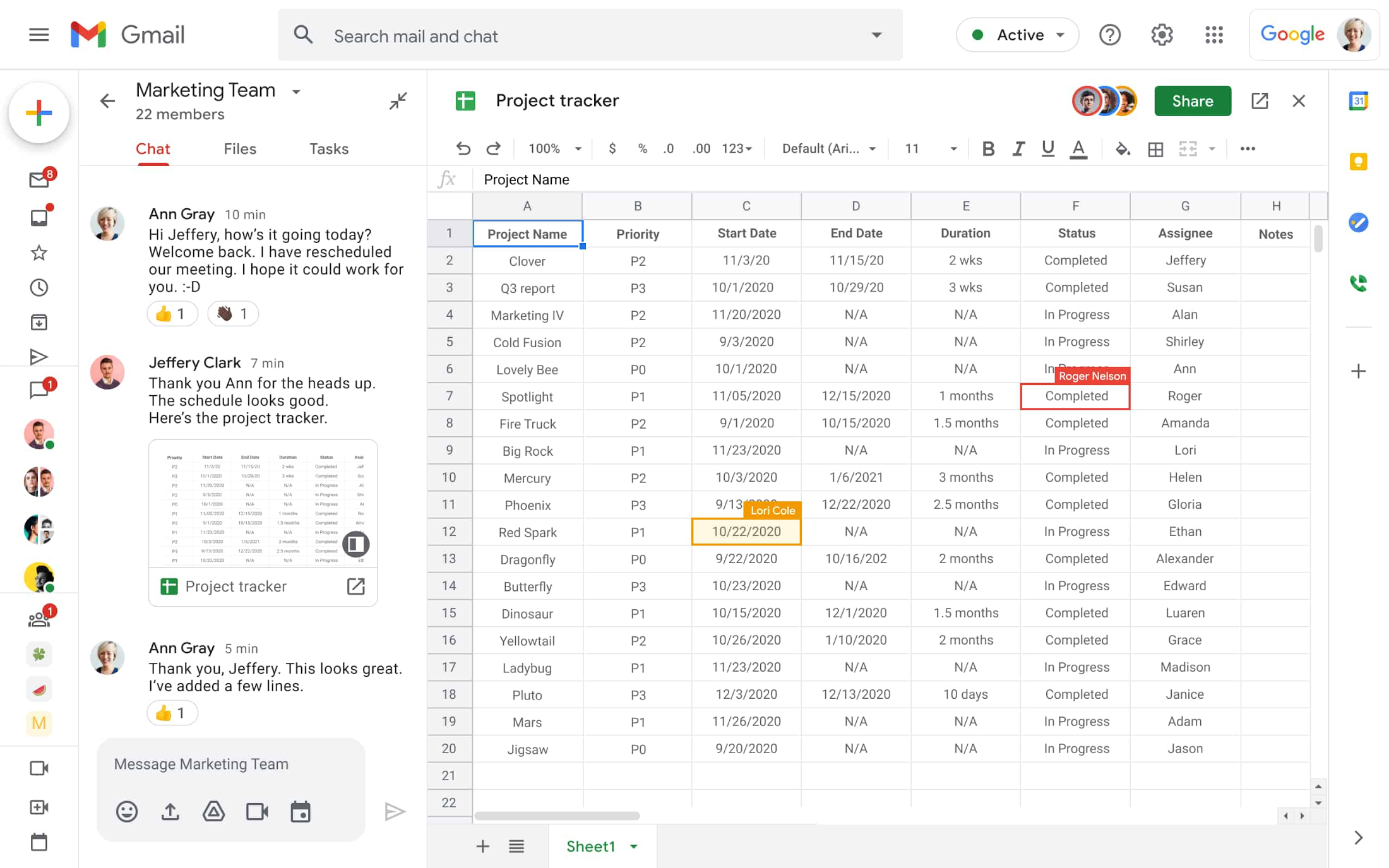
For example, we’re taking something that people already use every day—@-mentions—to open up new, powerful collaboration capabilities. New interactive building blocks—smart chips, templates, and checklists—will connect people, content, and events into one seamless experience.
Already available, when you @ mention a person in a document, a smart chip shows you additional information like the person’s location, job title, and contact information. And starting today, we’re introducing new smart chips in Docs for recommended files and meetings. To insert smart chips into your work, simply type “@” to see a list of recommended people, files, and meetings. From web or mobile, your collaborators can then quickly skim associated meetings and people or preview linked documents, all without changing tabs or contexts. Smart chips will come to Sheets in the coming months.
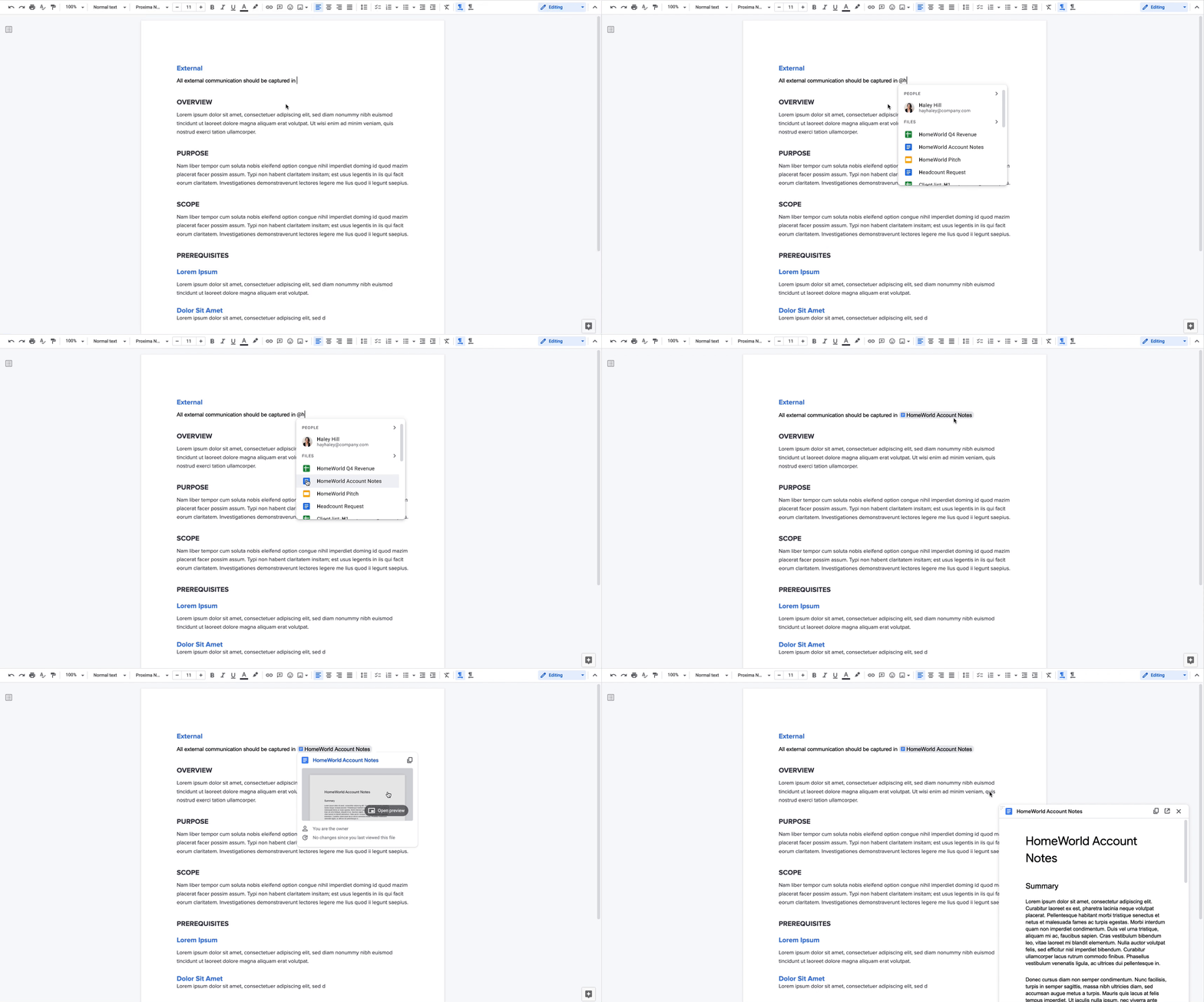
Additionally, we’re making it easier to drive projects forward by streamlining common team workflows. Starting today in Docs, checklists are available on web and mobile, and you’ll soon be able to assign checklist action items to other people. These action items will show up in Google Tasks, making it easier for everyone to manage a project’s To Do list.
We’re also introducing table templates in Docs. Topic-voting tables will allow you to easily gather team feedback while project-tracker tables will help you capture milestones and statuses on the fly. And a new document template for capturing meeting notes will automatically import any relevant information from a Calendar meeting invite, including smart chips for attendees and attached files.
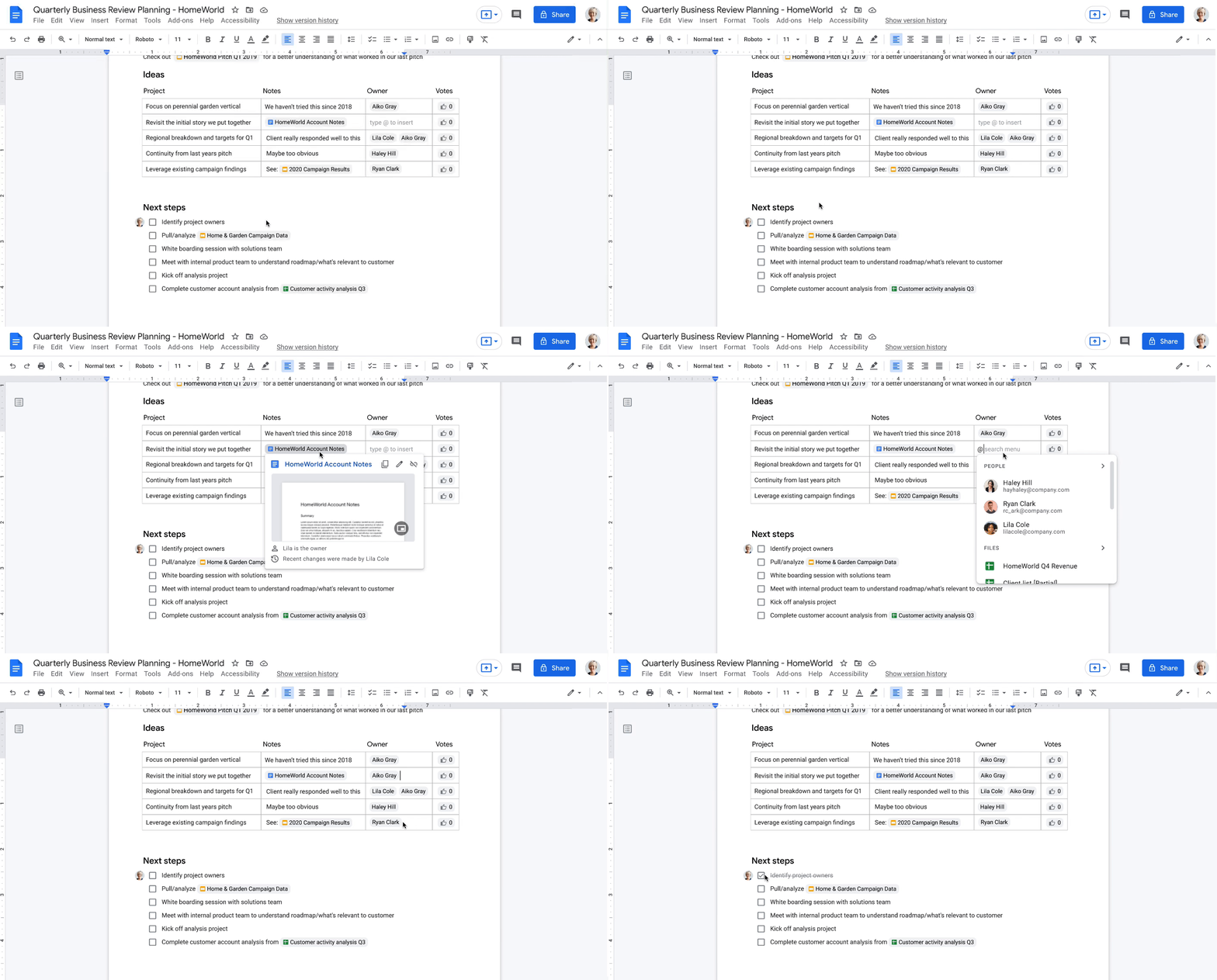
With our new pageless format in Docs, you’ll be able to remove the boundaries of a page to create a surface that expands to whatever device or screen you’re using, making it easier to work with wide tables, large images, or detailed feedback in comments. And if you want to print or convert to PDF, you’ll be able to easily switch back to a paginated view.
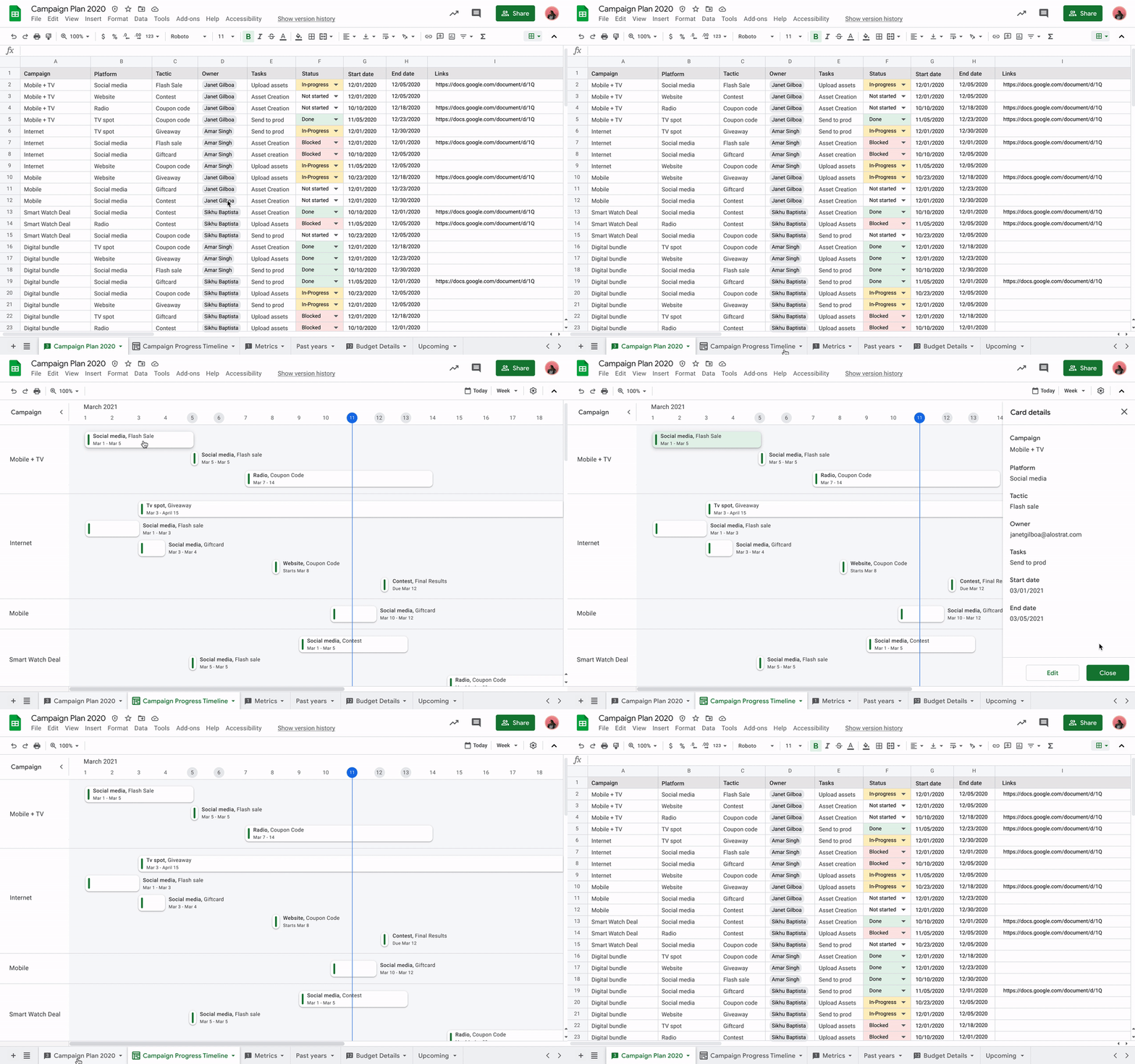
Meanwhile, you’ll be able to toggle between new views in Sheets to better manage and interact with your data. Our first launch will be a timeline view that makes tracking tasks easier and faster. This flexible view allows you to organize your data by owner, category, campaign, or whichever attribute fits best. Using a dynamic, interactive timeline strengthens your ability to manage things like marketing campaigns, project milestones, schedules, and cross-team collaborations.
Fostering human connection—wherever people work
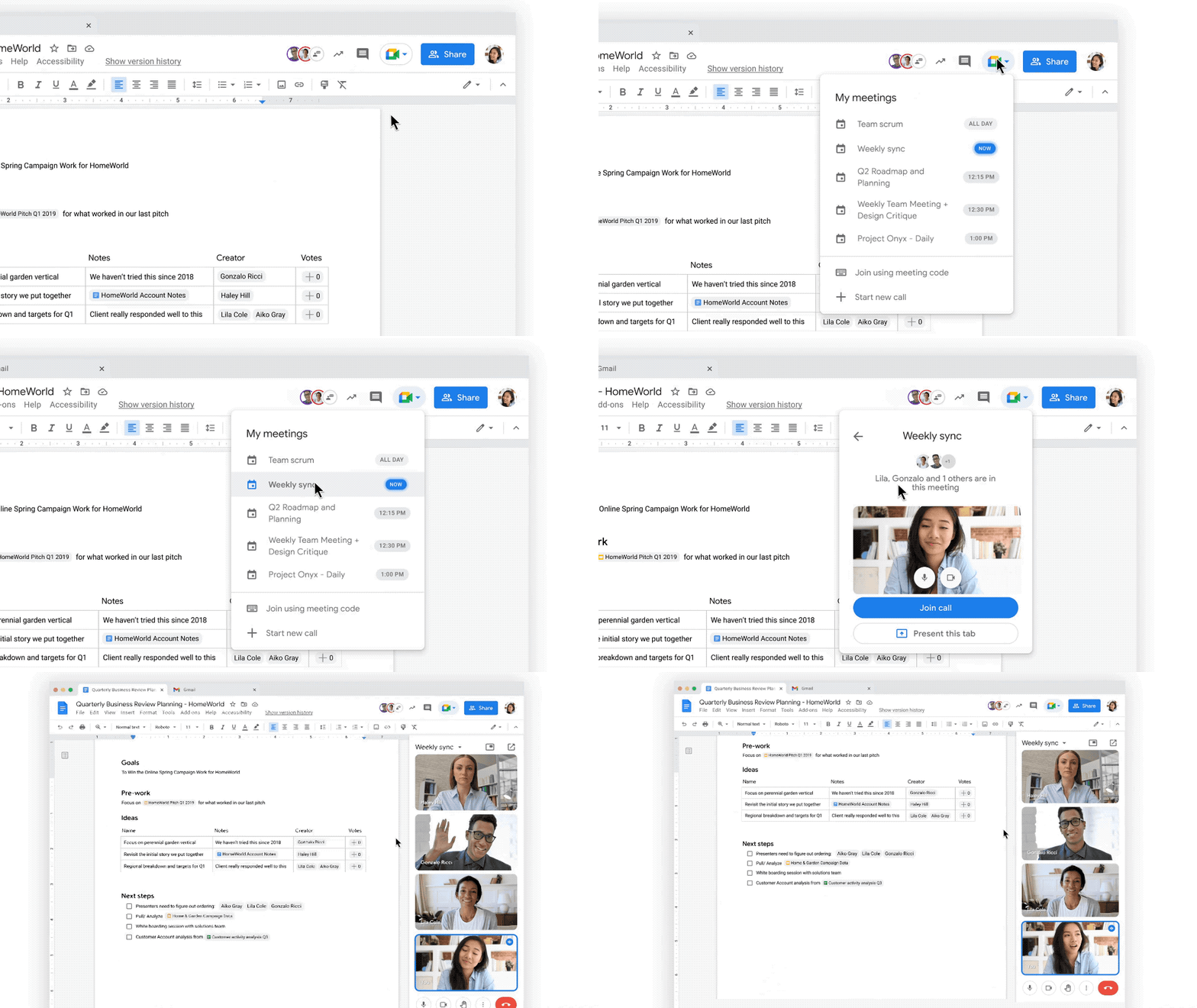
With smart canvas and innovations in Google Meet, we’re making it easy to bring the voices and faces of your team directly into the collaboration experience, to help people share ideas and solve problems together from anywhere. As part of that, we’re building tighter integrations between our communication and collaboration tools so you can pull content into conversations and conversations into content.
Starting today, we’re rolling out the ability to present your content to a Google Meet call on the web directly from the Doc, Sheet, or Slide where you’re already working with your team. Jumping between collaborating in a document and a live conversation without skipping a beat helps the project—and the team—stay focused. And in the fall, we’re bringing Meet directly to Docs, Sheets, and Slides on the web, so people can actually see and hear each other while they’re collaborating.
Live captions and translations in Google Meet will also play a crucial role in keeping people connected as they work together in distributed teams. We currently offer live captions in five languages, with more on the way. And we’re introducing live translations of captions later this year, starting with English-language live captions translated into Spanish, Portuguese, French, or German, with many more languages to follow.
With recent enhancements to Google Meet, we’re also giving people more control and flexibility over the meeting experience, including more space to see people and content, plus the ability to pin and unpin content and video feeds. And to help with meeting fatigue, you can now turn off your self-feed entirely.
Because we know that collaboration is fluid and fast-moving, we’re making it easier for teams to give feedback on the fly and to move seamlessly between conversations and building content together. Teams can now jump from a discussion in Google Chat directly to building content together. Creating and editing Sheets and Docs from Google Chat rooms is already live in our web experience, and we’ll enable it for Slides in the coming weeks. And to gauge the team’s reactions along the way, we’re introducing emoji reactions in Docs in the next few months.
Working smarter and safer
Google Workspace is already infused with powerful intelligence that enables people to make the best use of their time and attention. Whether it’s with the two billion grammar suggestions we surface in Docs every month, or the intelligent file suggestions in Drive’s Priority and Quick Access features that cut file finding time by 50%.
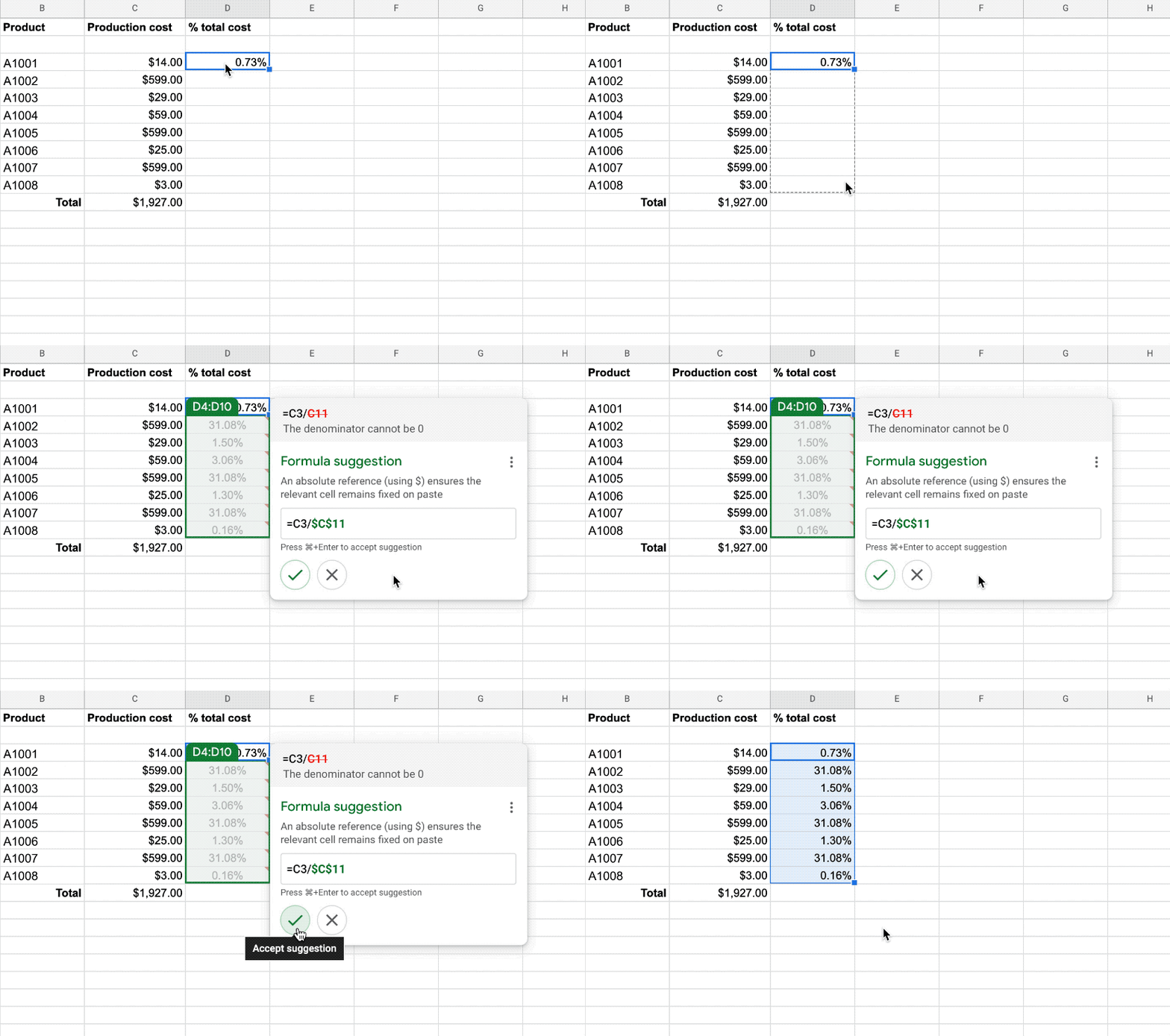
To help everyone work smarter, in the next few months we’re introducing additional assisted writing features in Docs on the web. This includes warnings about offensive words and language, as well as other stylistic suggestions that can speed up editing and help make your writing more impactful. We’re also adding more assisted analysis functionality in our Sheets web experience, with formula suggestions that make it easier for everyone, not just analysts, to derive insights from data. Sheets intelligence helps you build and troubleshoot formulas, making data analysis faster and reducing errors.
As smart canvas evolves, we’re making it easy for businesses to connect the apps and tools they rely on to Google Workspace. This builds on our history of supporting a variety of add-on features that take the friction out of collaboration—from adding e-signatures directly in Google Workspace with DocuSign to the Salesforce connector that integrates with Sheets. To help people work even smarter, we recently announced that AppSheet Automation is generally available, so that you can automate time-consuming tasks—like approving invoices and onboarding new hires—without having to write a single line of code.
Looking ahead, we’re planning to build additional APIs so you can bring the information and actions you need from third-party tools directly into smart canvas elements like smart chips, checklists, and table templates.
And because trust is at the center of all collaboration within Google Workspace, today we’re also launching advanced capabilities that help protect users against security threats and abuse as they work together.
Transforming how people work to deliver real-world innovation
While there’s no one way to collaborate, we know from our customers that transforming how people work results in real-world innovation.
Google Workspace fuels a new way of working together. It lets our teams around the world—whether they’re in the office, at home, or in the grocery store aisle—work more flexibly and translate their ideas into new ways of delighting customers.
—Thibaud Cainne, Global Head of Tech Infra and Digital Workplace, Carrefour
Transformation happens at all levels, and often in every tool. We were able to get 17,000 of our people to make the shift from Excel to Google Sheets in just six months by demonstrating how we could optimize, automate, and connect spreadsheets and their data. That kind of collaboration leads to real-world innovation for our clients.
—Monica Andrea Diaz Pinzon, Chief of Digital Transformation (Special Projects), Banco Davivienda
We built a digital hub on Google Workspace to transform the way we connect with employees and partners across multiple locations and organizations. It allowed us to spin up major research projects in days instead of months, including delivery of major COVID-19 vaccine studies.
—Justin Riordan-Jones, Head of System and Information (Research), Department of Health & Social Care, National Institute for Health Research (UK)
As smart canvas drives the next era of collaboration in Google Workspace, we remain committed to providing a solution that’s flexible, helpful, and that fuels innovation for organizations in every industry. On the frontlines, in corporate offices, and across the countless workspaces in between, Google Workspace will continue to transform how work gets done.
TELUS and Google Cloud Partner to Move Towards a More Sustainable Future

4488
Of your peers have already read this article.
2:30 Minutes
The most insightful time you'll spend today!
Environmental sustainability is a key priority for TELUS, a world-leading communications technology company. It continues to rank in the top 100 most sustainably managed companies in the world, and seeks to make a healthier planet for all by leveraging its global-leading technology, compassion to drive social change and reduce our collective carbon footprint through innovative technologies and sustainable business practices.
TELUS surpassed its sustainability objectives in 2019 and is now on a journey to procure all of its electricity from renewable or low-emitting sources by 2025. Next, it aims to achieve net carbon neutrality for its operations by 2030. TELUS has also been named to the Dow Jones Sustainability Index for 21 consecutive years, a feat unmatched by any other North American telecom or cable company. In 2021, it became the first company in Canada to release a Sustainability-linked bond (SLB) framework and complete an SLB offering, formally linking TELUS financing to its environmental performance.
“We’ve spent the last decade becoming a global leader in sustainability, helping make the planet healthier by ensuring that our operations are as environmentally responsible as possible,” said Geoff Pegg, Head of Sustainability and Environment at TELUS.
In part, TELUS’ strategy is focused on three key areas:
- Seek the best renewable energy options available
- Focus on migrating workloads to the cloud
- Embrace a multiplier effect through the use of sustainable partners
Renewable energy impact
Part of this environmental responsibility involves investing heavily in renewable energy sources through power purchase agreements (PPAs) that help renewable energy providers like wind farms and solar companies develop their infrastructure. TELUS executed PPAs with four Alberta-based solar and wind facilities to provide 100 per cent of its electricity load demand in a province where one-third of the grid is powered by coal.
As a technology company, electricity represents a large portion of TELUS’ energy needs: 80 percent of the operational carbon footprint comes from the power requirements for TELUS’ network and administrative buildings, Pegg explains. While TELUS is using renewable energy sources and low-emitting energy grids to power its buildings and network, there’s also the often-forgotten part of the carbon emissions equation: the energy it takes to power data centers. As the International Energy Agency recently reported, data centers represent 1 percent of the global electricity demand and that figure is expected to keep rising as the world increases usage of data-heavy technologies.
“It’s probably no surprise that everyone, whether you’re a business or a consumer, is concerned about reducing carbon emissions,” said Chris Talbott, the Google Cloud Sustainability Lead. “A lot of us think about the carbon emissions associated with our cars or with the electricity that powers our homes, but oftentimes we forget about the carbon emissions that come from the digital services that we use or the networks required to deliver that data.”
As a leader in sustainability, how can TELUS meet the energy demands of its customers while also protecting the environment? One way is through the company’s previously announced collaboration with Google Cloud. The two companies are working together to build a more sustainable world through technology and reduce TELUS’ carbon footprint, create value along the entire supply chain, and optimize industry solutions for social impact through data analytics and machine learning.
Taking a cloud first approach — reducing carbon emissions with green cloud computing
Google became carbon neutral in 2007 and has achieved 100 per cent renewable energy matching every year since 2017. Google has invested in renewable energy to match the electricity we use across our entire operations, including Google Cloud, meaning every workload that TELUS runs on Google Cloud has been matched with renewable energy purchases.
“The operational carbon footprint of running anything on Google Cloud is zero,” Talbott said. Also, by working with Google, TELUS gets the benefit of economies of scale using less electricity. Not only is TELUS leveraging Google data centers, it’s also relying on the digital collaboration made possible by Google Workspace to reduce the amount of travel required by employees attending meetings in different offices. Collaboration tools like Google Meet can reduce the carbon footprint of in-person conferences by 94 percent.
Google compensates for the environmental footprint of any electricity used in the data center and out to the edge network. “You can feel pretty good about using Google Meet because it’s carbon-neutral,” Talbott said.
Multiplier through sustainable partnerships — green cloud computing radiates out
By supporting TELUS in its environmental sustainability efforts, Google Cloud is also enabling TELUS to do the same for its various partnerships. For example, powered by Google Cloud’s infrastructure and data analytics capabilities, TELUS is partnering with Picacity (formerly NXN Digital) and Google Cloud to deliver an ecosystem of integrated smart technologies that enable cities to improve the lives of their residents.
From dynamic traffic signaling that reduces congestion and emissions, to data analytics that create smarter, more efficient city planning, the partnership is transforming the way municipalities operate in our increasingly digital world.The partnership is built on four foundational pillars of infrastructure and environmental sustainability, intelligent transportation, public safety and security, and health. In the case of intelligent transportation, this means sensors, cameras, and other devices are built into or near roads, sidewalks, and bike paths to provide data for innovative software to improve traffic flow in real time. The data can then foster informed decisions about infrastructure, city planning, fleet optimization, and public safety.
All of these environmental measures may seem small when compared with the enormity of the problem that is climate change, but as Talbott said, “Change begins with the small decisions we make every day such as paying attention to the practices of companies that we’ve come to rely on daily in the modern world. They may seem small and in the margins, but at scale, this is how we can make a real impact.”
More Relevant Stories for Your Company

How MobileOne Expanded its Stores by 340% in Just Three Years
The mobile industry is extremely fast-paced. New smartphones arrive at rapid speed. Smartphone OS updates regularly add new features and capabilities. And by the end of 2018, 5G wireless, the game-changing successor to 4G, will begin to be available in some markets. With more than 125 T-Mobile premium retail stores



What IT Managers Really Need to Know About G Suite and Google Cloud Platform
Today, some of the world’s largest organizations are using Google technology to innovate. They are leveraging Google APIs and platform services to find new ways to transform their organizations. They are also leveraging Google Cloud to empower their G Suite users. But what does the Google Cloud Platform (GCP) really

Chrome OS Helped Ocwen Achieve Remote Workplace in Just 2 Weeks during the 2020 Pandemic
Editor’s note: Today’s post is by Parveen Chander Aery, CIO, and Rishi Gupta, Head of Global IT Infrastructure, of Ocwen, a provider of residential and commercial mortgage loan services. The U.S.-based company adopted Chrome OS devices to help global contact center teams work productively together. We’re used to deployments of new

Lending DocAI Shortens Borrowers’ Journey on Roostify
The home lending journey entails processing an immense number of documents daily from hundreds of thousands of borrowers. Currently, home lending document processing relies on some outdated digital models and a high dependency on manual labor, resulting in slow processing times and higher origination costs. Scaling a business that sorts
