





Lending DocAI Shortens Borrowers’ Journey on Roostify

11788
Of your peers have already read this article.
3:00 Minutes
The most insightful time you'll spend today!
The home lending journey entails processing an immense number of documents daily from hundreds of thousands of borrowers. Currently, home lending document processing relies on some outdated digital models and a high dependency on manual labor, resulting in slow processing times and higher origination costs. Scaling a business that sorts through millions of documents daily, while increasing efficacy and accuracy, is no small feat. When it comes to applying for a mortgage loan, consumers expect a digital experience that’s as good as the in-person one. Roostify simplifies the home lending journey for lenders and their customers.
No time to spare: Overcoming document processing challenges with AI
Roostify provides enterprise cloud applications for mortgage and home lenders. In order to empower its customers to deliver a better, more personalized lending experience, they needed to automate and scale their in-house document parsing functionality.
As a key component of its document intelligence service, Roostify is leveraging Google Cloud’s Lending DocAI machine learning platform to automate processing documents required during a home loan application process, such as tax returns or bank statements with multi-language support. This partnership delivers data capture at scale, enabling Roostify customers to automatically identify document types from the uploaded file and to extract relevant entities such as wages, tax liabilities, names, and ID numbers for further processing, and make things move faster in the cumbersome lending process.
Roostify’s solutions leverage Google Cloud’s Lending DocAI, which is built on the recently announced Document AI platform, a unified console for document processing. Customers can easily create and customize all the specialized parsers (e.g., mortgage lending documents and tax returns parsers) on the platform without the need to perform additional data mapping or training. All Google Cloud’s specialized parsers are fine-tuned to achieve industry-leading accuracy, helping customers and partners confidently unlock insights from documents with machine learning. Learn more about the solution from the GA launch blog and the overview video.
Integrating Lending DocAI’s intelligent document processing capabilities into the Roostify platform means more innovation for their customers and tangible results: faster loan processing times, fewer document intake errors, and lower origination costs. Additional support in Google Lending DAI for other languages and more documents like global Know Your Customer (KYC) documents or payroll reports is in the near future.
Full integration of AI solutions
Working together with Roostify’s platform team, we were able to help them solve their document processing challenge through integration of various GCP products such as Lending DocAI (LDAI), Data Loss Prevention (DLP) for redacting sensitive data, BigQuery for data warehousing and analytics, and Firestore for API status. To make it very safe and secure, all data was encrypted end-to-end at Rest and in Transit. LDAI won’t require any training data to process. It is an easy plug and play API.
Here is a sneak peek in the high level deployment architecture for LDAI in Roostify environment:

Here are the steps for processing data:
- Receives document processing request from the client.
- API Function directs requests to the pre-processing service. For Async requests a processing ID is generated and returned to the caller.
- Pre-processing service sends the request for further processing (Long/short PDF conversion), calling other microservices and receives back the responses. Any error in the response received is then sent to the response processing service.
- If the response is synchronous, the pre-processing service directs it to the LDAI Invoker service.
- If the response is asynchronous, the pre-processing service feeds it into the Cloud Pub/Sub service.
- Cloud Pub/Sub service feeds the response back to the LDAI Invoker service.
- LDAI Invoker service routes the request to the Google LDAI API for classification if there are multiple pages in the document.
- Document will be split based on LDAI response and then saved in a GCS bucket for temporary storage.
- LDAI entity interface for single page processing and then LDAI Invoker sends LDAI results to LDAI Response Processing
- If a request is a synchronous request the LDAI Response Processor sends results to the API Function so that it can complete the synchronous call and respond to the rConnect caller.
- If the request is an asynchronous request the LDAI Response Processor will respond to the caller’s webhook and complete the transaction.
- Finally, Data stored in the GCP bucket will be deleted.
All the responses that come from the LDAI API can optionally feed into BigQuery via the Response Processor, after parsing it through Data Loss Prevention (DLP) API to redact the PII/sensitive information. Throughout the processing of both asynchronous and synchronous requests all transactions are logged using Cloud Logging. For asynchronous transactions, the state is maintained throughout the process using Cloud Firestore.
Roostify currently uses this technology to power two different solutions: Roostify Document Intelligence and Roostify Beyond™. Roostify Document Intelligence is a real-time document capture, classification, and data extraction solution built for home lenders. It ingests documents uploaded by borrowers and loan officers, identifies the relevant documents, and extracts and classifies key information. Roostify Document Intelligence is available as a standalone API service to any home lender with any digital lending infrastructure already in place.
Roostify Beyond™ is a robust suite of AI-powered solutions that enables home lenders to create intelligent experiences from start to close. It combines powerful data, insightful analytics, and meaningful visualization to streamline the underwriting process. Roostify Beyond™ is currently available only to Roostify customers as part of an Early Adopter program and will be rolled out to the market later this year.


Through this partnership, Roostify has enabled its customers to adopt a data-first approach to their home lending processes, which will lead to improved user experiences and significantly reduced loan processing times.
Fast track end-to-end deployment with Google Cloud AI Services (AIS)
Google AIS (Professional Services Organization), in collaboration with our partner Quantiphi, helped Roostify deploy this system into production and fast-tracked the development multifold to generate the final business value.
The partnership between Google Cloud and Roostify is just one of the latest examples of how we’re providing AI-powered solutions to solve business problems.
Google Workspace and Miro Together Bring Immersive Team Collaboration Experience

3935
Of your peers have already read this article.
3:00 Minutes
The most insightful time you'll spend today!
While many of us are navigating the shift to hybrid work, every team’s experience is unique. Distributed work is taking many different forms—from the fully remote to a specific mix of in-person and in-office—but there are potential gaps across all the places that people work. Google Workspace helps teams bridge these gaps by providing tools for them to connect, create and collaborate securely wherever they are. Today, we’re taking this one step further by announcing new ways to bring Miro’s intuitive whiteboard experience to Google Workspace so that teams can ideate and innovate more immersively.
With a shared commitment to extending inclusive, flexible collaboration experiences for all, we’re partnering with Miro to bring whiteboarding capabilities into Google Meet. We’re also deepening the existing experience within Google Docs, Sheets and Slides, making it easier for teams to ideate and co-create asynchronously and in real time.
Deepening collaboration in meetings
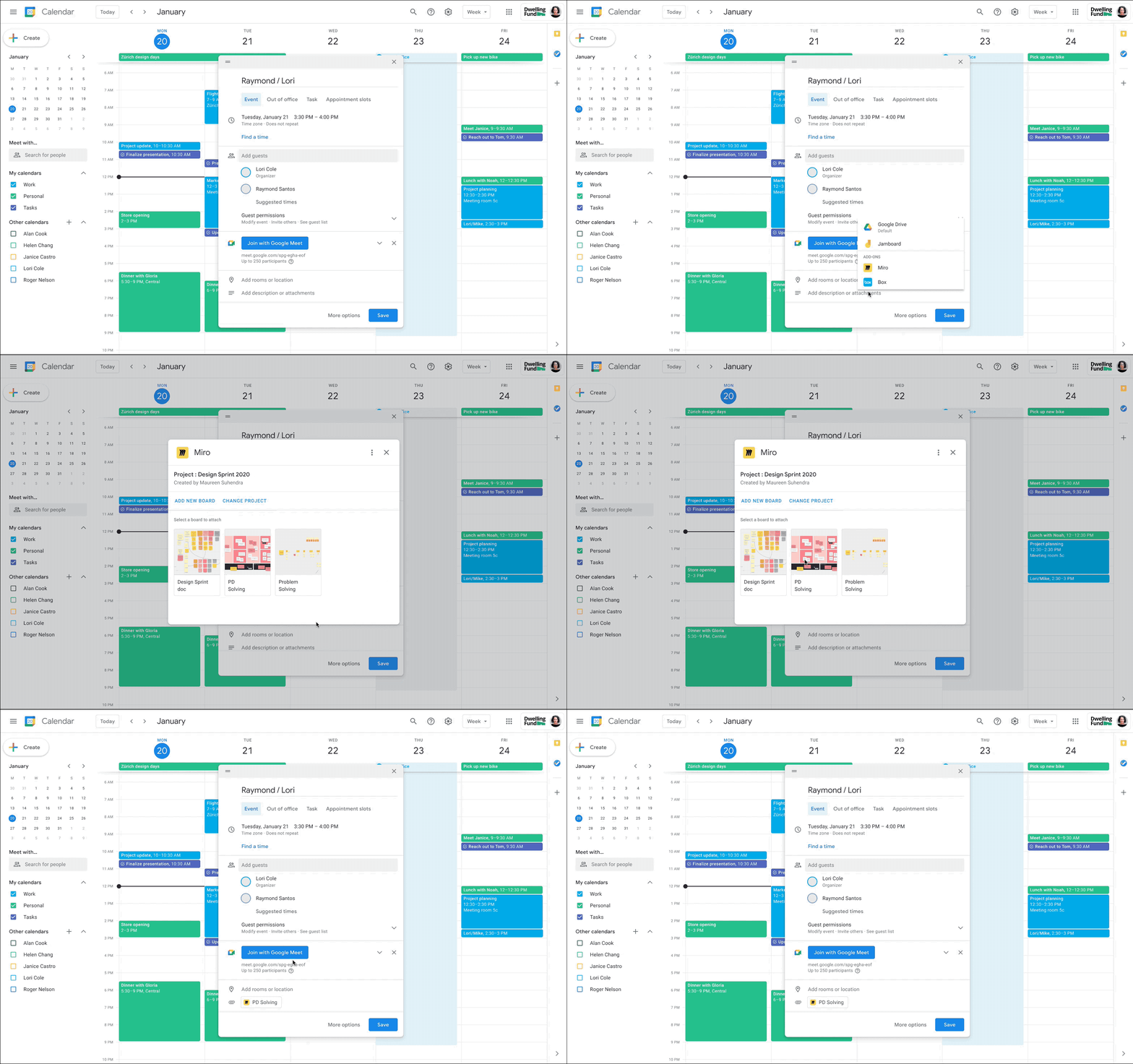
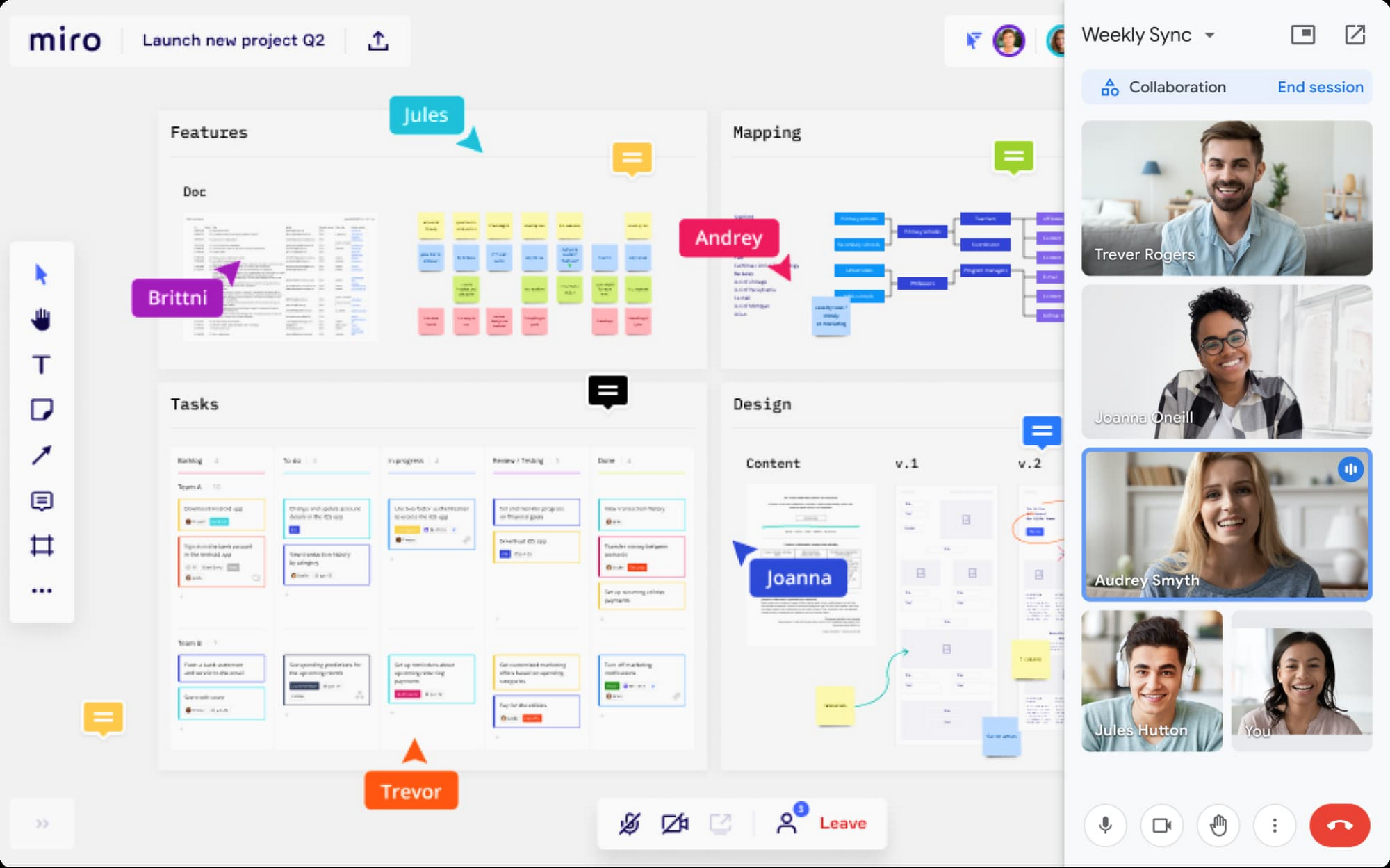
With the new Miro experience in Meet, you’ll get an immersive side-by-side video and whiteboard experience that’s ideal for brainstorming, sketching, and iteration during meetings. This approach fosters idea generation and participation from all team members, even if they’re in different locations. And using a Miro whiteboard in Meet is seamless: simply attach the Miro whiteboard to the meeting in Google Calendar or select a board during a meeting to share and collaborate in real-time. These new experiences will be available in early 2022.
Seamlessly integrate content from Google Docs, Sheets, and Slides
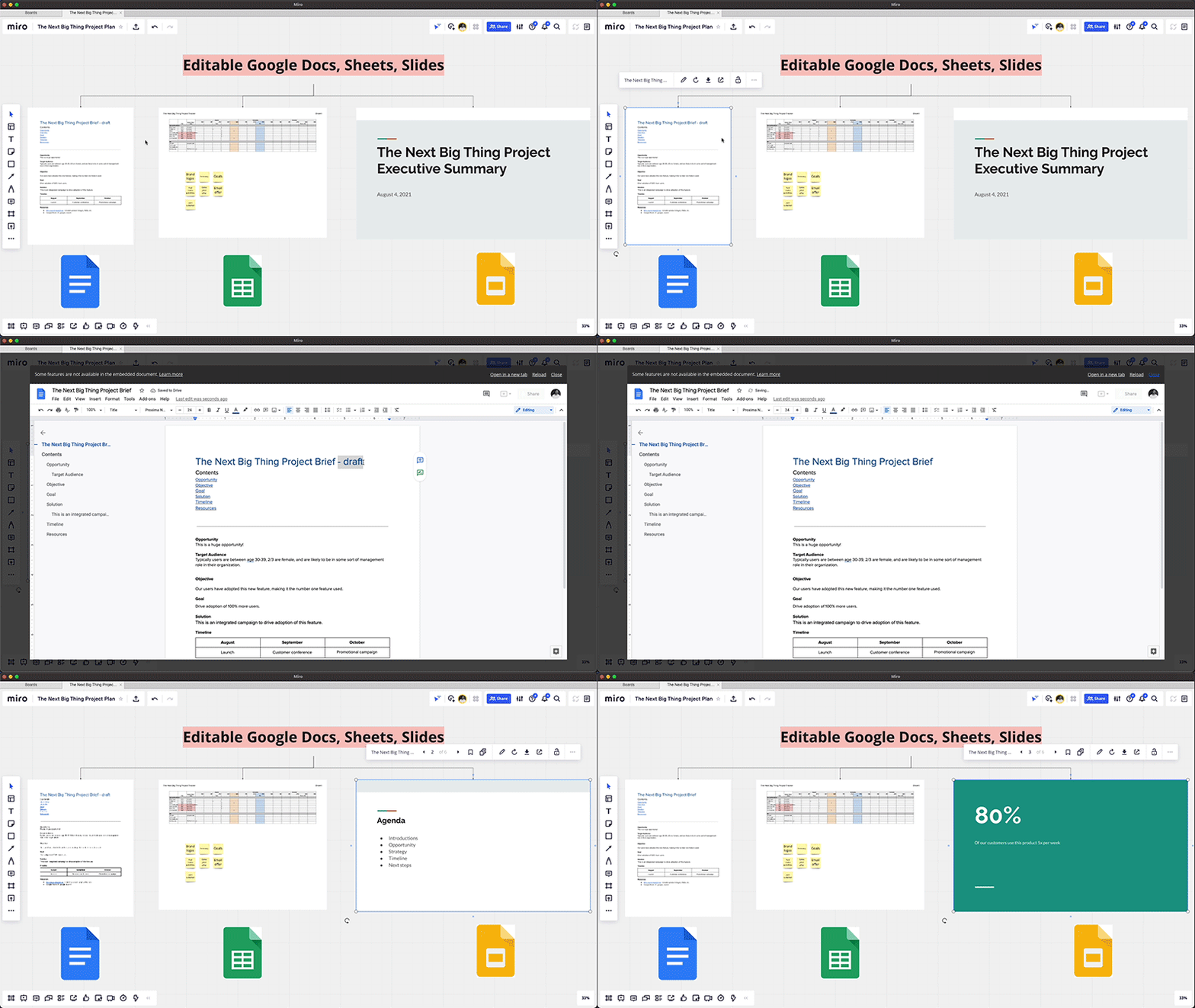
Real-time collaboration across a distributed team often spans multiple files—from brainstorming in documents, to project management in spreadsheets, to presenting your ideas in slides. Miro integrates with Google Drive, so teams can easily access and embed their Google Docs, Sheets, and Slides into Miro’s infinite canvas, making it easier to visualize and manage all the pieces of a project from one shared space. You can also save your Miro boards to Drive, and Docs, Sheets, and Slides automatically sync across both applications, so you’re always working with the latest content.
Start using Miro in Google Workspace today
The Miro app for Workspace is one of the growing number of 3rd-party applications you can use to bring the apps and services you use every day to your Google Workspace experience. Try the Miro app in Workspace with your existing credentials, or sign up for Workspace and Miro to start using the free versions together. And stay tuned for future innovation as we partner with Miro on delivering visual collaboration capabilities that are mission critical for the hybrid workplace.
Google Maps Platform Helps BungkusIT Fulfil its Promise of Deliveries in One Hour!

5513
Of your peers have already read this article.
2:00 Minutes
The most insightful time you'll spend today!
Editor’s note: Today’s post is written by Hatim M, Chief Commercial Officer at BungkusIT. The on-demand delivery service delivers packages within the hour for one million customers across Malaysia and uses Google Maps Platform to create a seamless end-to-end delivery experience for its customers.
Imagine it’s the end of a long day at work, and you’re heading home for dinner as you look forward to a restful evening. Then just as you arrive at the doorstep, your phone buzzes with a message from a family member, asking if you could grab a carton of milk from the supermarket.
With moments like these in mind, we founded BungkusIT to alleviate the stress of everyday chores and give people a break from having to run seemingly mundane errands that can often be time-consuming. With so much to do and so few hours in a day, we want to make life simpler by providing our customers with an on-demand delivery service.

As a social enterprise, our mission is to create jobs and increase earning potential for BungkusIT roadies (those who run deliveries), while also increasing online visibility for local small and medium enterprises through an e-commerce platform. As such, we don’t charge merchants a fee for being featured on our app.
Our roadies help connect users with products and services that they need. Whether it’s picking up the keys you forgot, or buying a birthday cake for a loved one, our on-demand roadies can help accomplish your task quickly and efficiently. In fact, we’ve helped many seniors—a large and often underserved population—to run errands and provide last mile support.
Providing reliable service, 24/7
From the day we launched, our promise has always been to complete every task given to us within one hour. Google Maps Platform empowers us to fulfil this promise. We understand the importance of selecting a reliable mapping service from the get-go. After exploring different map products, we made the decision to go with Google Maps Platform due to its detailed and accurate location mapping system. With the support of our partner Searce, we’ve been able to quickly integrate all the relevant products on our platform and optimize our API calls.
On a day-to-day basis, our roadies rely on the Places API to navigate their journeys. It pinpoints the exact location set by customers so that our roadies can be sure they arrive at the correct destination. With so many small roads and alleys in Malaysia, it can be challenging to find the exact place based on an address. Dropping a pin on a specific location removes any confusion.
Because we price our services based on distance, it’s business critical to determine the exact distance of a location and the most efficient route to reach it. By automating that process with the Distance Matrix API, we can guarantee that customers don’t get overcharged, while making sure that we’re adequately compensated for our services.
Improving the user experience
At the end of the day, we want to make people’s lives easier. That’s why having an app that is intuitive is key. More than that, we want customers to be able to create a request as quickly as possible. By automatically completing the location a customer is typing after they’ve keyed in the first few characters, Place Autocomplete does that job for us.

As a fairly young company, we’ve got a long way to go. I believe that we’ll continue evolving alongside Google Maps Platform and exploring the new features it has to offer. We’re already talking to global brands to expand our services and I’m confident that with Google Maps Platform as our maps partner, we will go a long way.
For more information on Google Maps Platform, visit our website.
Stay on Top of Your Cloud Monitoring with Google’s Mobile App

1532
Of your peers have already read this article.
3:30 Minutes
The most insightful time you'll spend today!
We are pleased to announce the availability of Google Cloud Monitoring uptime checks in the Google Cloud mobile app.
The uptime check capability offered by Cloud Monitoring is a simple yet powerful observability tool to monitor an application’s availability and performance on URLs provided by customers. The primary purpose of an uptime check is to track resource availability on an on-going basis. It’s essentially a pulse check for a system and is often the first to detect impending issues. Using uptime checks can proactively detect availability and latency issues with an application and reduce the time and severity your users are impacted by an outage. Uptime check can validate if the response code from your application is as expected, and also the latency of your service from different regions. Uptime checks can further inform your SLAs and SLOs, and track your service’s health over time. SREs at Google use uptime checks as an important part of their daily routine.
Given the critical role served by uptime checks, we heard your feedback on having the ability to track these checks in the Google Cloud mobile app. With this launch SRE’s, operators or administrators can do exactly that, in addition to easily accessing their cloud resources (App Engine, Compute, Databases, Storage), managing permissions using IAM, viewing logs, incidents, errors, and billing.
To access uptime checks, simply tap the “Operations” tab in the Google Cloud mobile app on your iOS or Android device.
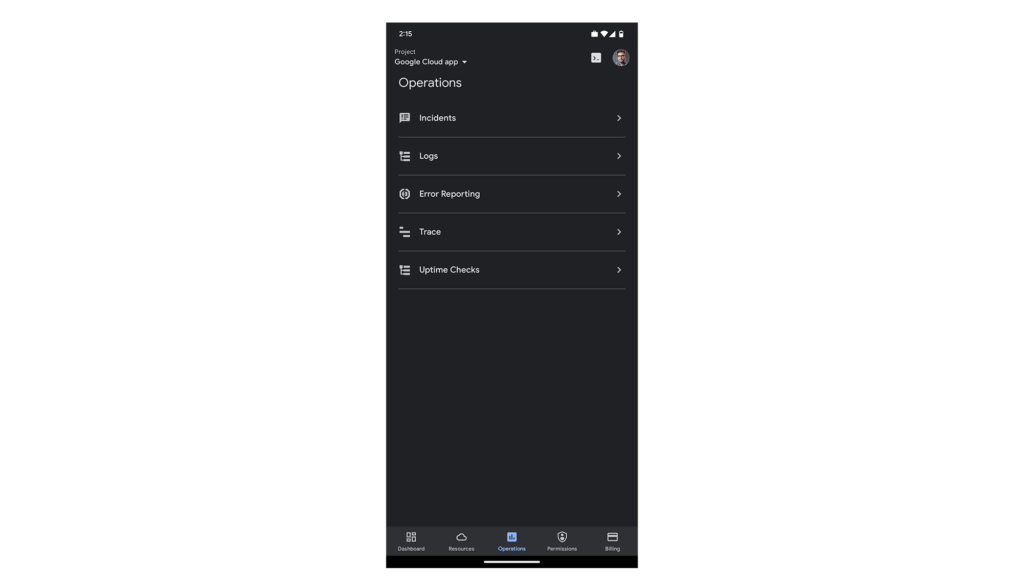
After navigating to “Uptime Checks”, you will see a list of all the services you have previously added using the Create public uptime check documentation.
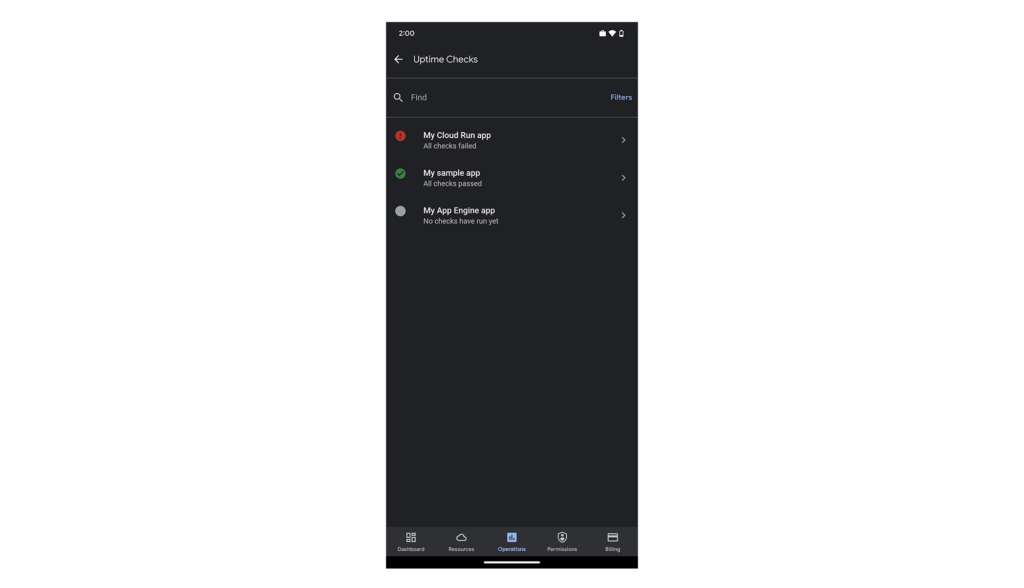
The list is sorted by status, so all failing checks are at the top. You can easily filter by status using the “Filters” option in the top-right corner of the screen.
Tapping any of the uptime checks will take you to the “details”-screen.
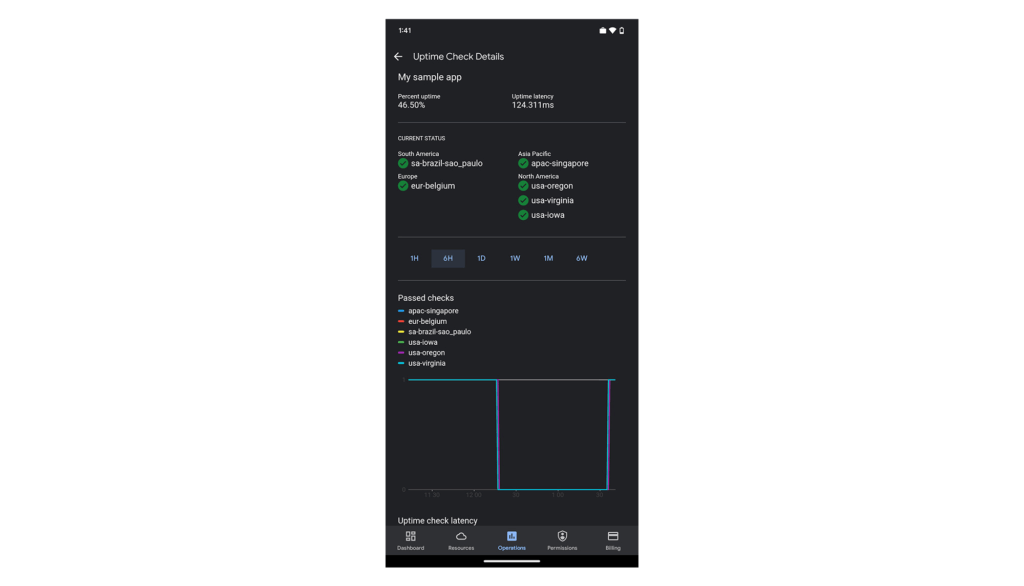
Here you’ll see your application’s uptime, latency, status per region (if you’re monitoring your application from more than one cloud region) and graphs to give you a sneak preview. The “passed check”-graph is showing how many checks passed in the last hour up to 6 weeks. You can easily change the interval using the scale above the graphs.
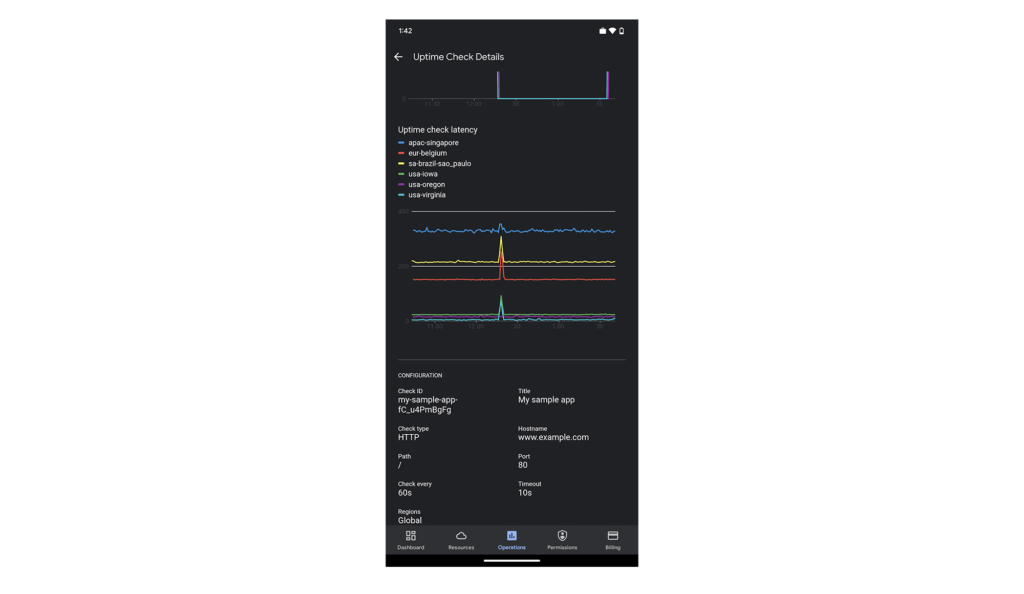
Scroll down the page to see more data. At the bottom of the screen, we’ve included some configuration details for this uptime check, so you can check the above data against this specific setting.
We hope you find this new uptime check feature useful in your daily work. To create new uptime checks, start here: Create public uptime check.
We’re working hard to make the Google Cloud app your companion for monitoring and managing your Google Cloud resources on the go.
For pricing information on uptime checks, please see the Cloud Monitoring pricing summary.
This new feature is available for you to use today. If you have any feedback, we would love to hear from you — just click the “Send feedback” button in the app. And if you don’t have the app – go ahead and download the app today from Google Play or the Apple App Store.
Transitioning to Hybrid Environment with Chrome Browser
4076
Of your peers have already read this article.
3:00 Minutes
The most insightful time you'll spend today!
It’s been quite a year. In general, and for work. Just the other day, I read a new study from Pew Research that shows 71% of people are currently working from home, and 50% of employees say they want to continue working from home at least three days a week. That’s more than half of people wanting to be remote over half the time!
As we’ve been navigating our own return to the office here at Google, one thing has become more clear than ever: the browser is no longer just a portal to the internet—it’s one of the most critical components of our tech stack. And we know we’re not alone in this. As our organization, and other organizations of all sizes, transition to a more hybrid way of working, it’s absolutely key to have a modern browser that’s built to support both admins and end users.
The good news is, Chrome is made for this! Literally. It’s purpose-built for flexible work—and as the future unfolds and businesses’ needs continue to evolve, we’re committed to making sure our browser is even easier to manage, even more secure, and even more helpful, so all of us can be more productive.
What’s next for Chrome
As we design and build Chrome to be a stronger asset for the enterprise, we are focused on these key areas:
- Simple management
- Modernized security
- Productivity enhancements
- Helpful integrations
We’ve already made great strides in all four areas, with more exciting releases to come soon. Let’s take a closer look at what’s new and available right now, what to look forward to, and how each feature is equipping Chrome browser-based businesses (and their users) for what’s next.
When it comes to simple management there have been a lot of exciting developments—Chrome Browser Cloud Management is built for this new hybrid reality, giving IT teams the advantage of powerful and flexible management capabilities both in the cloud and on premises, so they always have the visibility and insights they need to make more informed decisions, quickly.
With recent new releases admins can:
- Track all versions of Chrome from one place. Our new daily version report allows IT teams to see all versions, including minor versions, in a single report to support compliance and make it easier to see and manage their entire deployment.
- Report on apps and extensions across the organization. A new Apps & Usage report provides helpful visibility into all installed extensions, Progressive Web Apps (PWAs), Chrome apps, and Android apps. You can see versions and permissions for each individual app and even force install or block, right from the report.
- Remotely troubleshoot and clear browser data. This is one of my favorites because not only is it incredibly helpful, it was created from customer requests! Admins (and a lot of service desk employees) told us how useful it would be if they could clear an end user’s browsing data, cookies, and cache remotely – and our team made it happen.
- Extension management improvements. Coming this summer: extension request workflow will empower admins to change the behavior of Chrome Web Store so that end users request extensions and admins then approve or deny the installations from a centralized list in Admin Console. Another new release is extension details, where admins can now find out exactly what extensions are installed where, who makes them, what resources they’re using, and all other extension-related details – also right from the Admin console.
Of all of our priorities, modernized security often feels most urgent. In a recent security report, 65% of US and UK employees said they received a phishing email during the remote working period initiated by COVID-19. Further, a study by the Ponemon Institute found that 41% of responding organizations had dealt with an attack involving the compromise of employees’ passwords, costing an average of $267,408 per organization. Between the regular emergence of new threats and the increase in targeted mobile attacks, our new ways of working definitely demand a fresh approach to security.
- BeyondCorp Enterprise, our new modern zero trust solution, enables secure access to critical apps and services with integrated threat and data protection, all delivered through Chrome browser, was introduced in January 2021. Its agentless approach simplifies the admin and end-user experience. We also just launched BeyondCorp Enterprise protected profiles to help organizations protect their extended workforce, including contractors, frontline workers, and anyone working from home who needs to securely access corporate resources from shared or unmanaged devices.
To learn more about Google’s approach to modernizing security, tune into the Wall Street Journal’s Advancing Security in the New Business Environment event tomorrow from 10:35 am – 10:55 am EST, with very own Parisa Tabriz (Head of Chrome Engineering, Product Management and UX) and Phil Venables (CISO of Google Cloud).
When it comes to productivity enhancements, I’m proud to share that we’re consistently releasing features that support users no matter where they’re working. Now that the browser is where so much of our day-to-day work happens, it’s more important than ever before to build in new ways to save time and work together while apart.
Recently released productivity-boosting features include:
- A faster way to take action right from the address bar. Chrome Actions is a feature we launched last year, where you can simply type in commands such as “clear browsing data ” or “open incognito window”and get down to business in just a few clicks. We’re excited to announce new Chrome Actions are now available through our beta channel! Try one of these actions to check it out: “ Run Chrome safety check,” “Create doc,” and “Manage Google Account.”
- Link directly to highlighted text. If you like to share snippets and quotes from articles or websites with your colleagues, you’re in luck. Now, instead of sharing the URL link from the address bar, you can take advantage of the new “link to highlight” feature in Chrome to point to the specific content. Simply choose the content you want to share, right click, select “Copy link to highlight,” and then send the link – to the exact part of the page you want people to see. It’s available for desktop and Android now, and coming soon for iOS.
- Decreased Chrome CPU usage. This means more battery life, less heat coming off of your device, and less fan noise. 🎉 🙌🏻
- And there’s more! To explore additional productivity features, check out this blog post.
Our final area of focus is all about giving Chrome customers more choice with helpful integrations. We’re actively partnering with best-of-breed organizations to bring integrations —and your favorite tools— into Chrome, to create a more seamless and productive experience across the board. Stay tuned on this as we’ll have more to share later this year. In the meantime, hear from our Modern Computing Alliance partners, such as Box, HP, RingCentral, Okta and VMware, as they explore many of the most important questions about returning to the office.
We’re constantly thinking about how we can help people and organizations adapt and thrive as they begin to return to the office. See below for three events from the team that cover how to make the transition to hybrid easier for your team, be sure to check them out.
Modernizing Your Approach to Security session at the Wall Street Journal’s Advancing Security in the New Business Environment event
- Tomorrow June 2, 2021
- 10:35 – 10:55 AM EST
- Register here
Chrome Insider: Browser tips & tricks for IT admins
- June 10, 2021
- 10:00 AM – 11:15 PT
- Register here
4679
Of your peers have already watched this video.
2:04 Minutes
The most insightful time you'll spend today!
Video: How Google App Maker Helps Businesses Build Mobile Apps in No Time
Analysts estimate that the right custom mobile app can save each employee 7.5 hours per week (that’s a week’s worth of lunch breaks!). Yet, too few businesses have the means, let alone the resources, to invest time and effort in building customized mobile apps. Why?
That’s because their budgets center on big enterprise apps like CRM, ERP, and SCM and beyond those priorities.
App Maker was created to enable your line-of-business teams to build apps for the jobs these bigger apps don’t tackle. With App Maker, you can revamp company processes like requesting purchase orders or filing and resolving help desk tickets, create quick marketing assets, and generate sales enablement apps, for example, as if you designed and built the processes yourself.
This low-code, simple, easy-to-use, drag and drop mobile app creator doesn’t need extensive coding knowledge and can build apps in a jiffy. Anyone can make it: As simple as that.
More Relevant Stories for Your Company

TELUS and Google Cloud Partner to Move Towards a More Sustainable Future
Environmental sustainability is a key priority for TELUS, a world-leading communications technology company. It continues to rank in the top 100 most sustainably managed companies in the world, and seeks to make a healthier planet for all by leveraging its global-leading technology, compassion to drive social change and reduce our

No-code Development Platforms Help Employees Reclaim their Time and Talent
As offices reopen, businesses aren’t keeping to a single formula. Many are embracing hybrid models, with employees splitting time between home and the office. Some are staying 100% remote. Others are returning the full workforce to offices with a greater focus on digitization. Regardless of their model, one thing is

How Japan’s Vaccine Locator Platform Became A One-stop Shop for COVID-19 and Vaccination-related Information
Editor’s Note: David Moore, Founder and CEO of Navagis, shares his story of teaming up with the Google Maps Platform team to help people across Japan get vaccinated amid COVID-19 pandemic. The roots of Navagis go back to Hurricane Katrina, when I led an Army Corps of Engineers team that

Chrome OS’s Hybrid Work Model Powers Google’s Return to Work Strategy
The pandemic continues to deeply affect our lives around the globe. In some places, new cases are surging and returning to work is the last thing on people’s minds. In other areas, conditions are improving and companies are starting to think about transitioning their workforce back to the office. Exactly
