





Streamlining Workflow Executions: Using Cloud Tasks in Google Cloud

894
Of your peers have already read this article.
3:30 Minutes
The most insightful time you'll spend today!
Introduction
In my previous post, I talked about how you can use a parent workflow to execute child workflows in parallel for faster overall processing time and easier detection of errors. Another useful pattern is to use a Cloud Tasks queue to create Workflows executions and that’s the topic of this post.
When your application experiences a sudden surge of traffic, it’s natural to want to handle the increased load by creating a high number of concurrent workflow executions. However, Google Cloud’s Workflows enforces quotas to prevent abuse and ensure fair resource allocation. These quotas limit the maximum number of concurrent workflow executions per region, per project, for example, Workflows currently enforces a maximum of 2000 concurrent executions by default. Once this limit is reached, any new executions beyond the quota will fail with an HTTP 429 error.
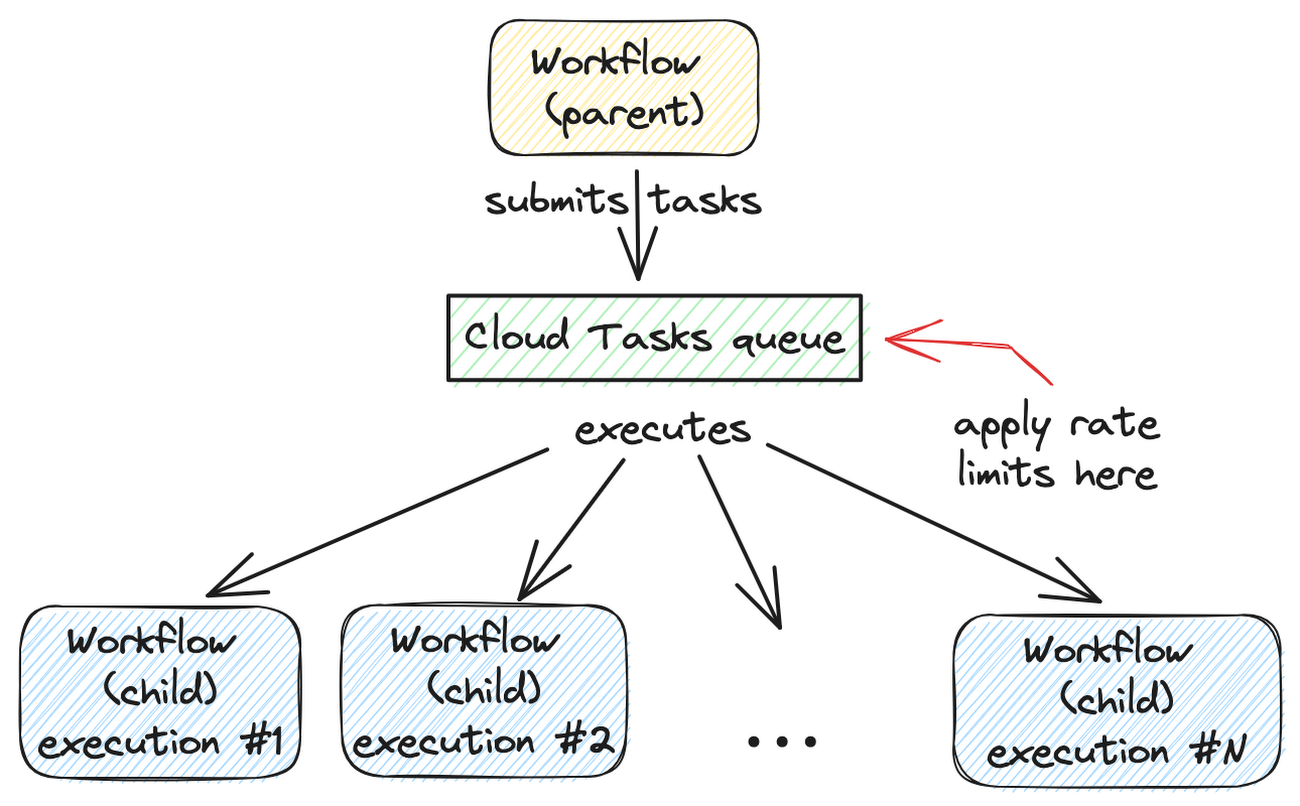
A Cloud Tasks queue can help. Rather than creating Workflow executions directly, you can add Workflows execution tasks to the Cloud Tasks queue and let Cloud Tasks drain the queue at a rate that you define. This allows for better utilization of your workflow quota and ensures the smooth execution of workflows.
Let’s dive into how to set this up.
Create a Cloud Tasks queue
We’ll start by creating a Cloud Tasks queue. The Cloud Tasks queue acts as a buffer between the parent workflow and the child workflows, allowing us to regulate the rate of executions.
Create the Cloud Tasks queue (initially with no dispatch rate limits) with the desired name and location:
QUEUE=queue-workflow-child
LOCATION=us-central1

gcloud tasks queues create $QUEUE --location=$LOCATION
Now that we have our queue in place, let’s proceed to set up the child workflow.
Create and deploy a child workflow
The child workflow performs a specific task and returns a result to the parent workflow.
Create workflow-child.yaml to define the child workflow:
main:

  params: [args]

  steps:

    - init:

        assign:

          - iteration: ${args.iteration}

    - wait:

        call: sys.sleep

        args:

            seconds: 10

    - return_message:

        return: ${"Hello world" + iteration}
In this example, the child workflow receives an iteration argument from the parent workflow, simulates work by waiting for 10 seconds, and returns a string as the result.
Deploy the child workflow:
gcloud workflows deploy workflow-child --source=workflow-child.yaml --location=$LOCATION
Create and deploy a parent workflow
Next, create a parent workflow in workflow-parent.yaml.
The workflow assigns some constants first. Note that it’s referring to the child workflow and the queue name between the parent and child workflows:
main:
  steps:
    - init:
        assign:
          - project_id: ${sys.get_env("GOOGLE_CLOUD_PROJECT_ID")}
          - project_number: ${sys.get_env("GOOGLE_CLOUD_PROJECT_NUMBER")}
          - location: ${sys.get_env("GOOGLE_CLOUD_LOCATION")}
          - workflow_child_name: "workflow-child"
          - queue_name: "queue-workflow-child"
In the next step, Workflows creates and adds a high number of tasks (whose body is an HTTP request to execute the child workflow) to the Cloud Tasks queue:
- enqueue_tasks_to_execute_child_workflow:
        for:
          value: iteration
          range: [1, 100]
          steps:
              - iterate:
                  assign:
                    - data:
                        iteration: ${iteration}
                    - exec:
                        # Need to wrap into argument for Workflows args.
                        argument: ${json.encode_to_string(data)}
              - create_task_to_execute_child_workflow:
                  call: googleapis.cloudtasks.v2.projects.locations.queues.tasks.create
                  args:
                      parent: ${"projects/" + project_id + "/locations/" + location + "/queues/" + queue_name}
                      body:
                        task:
                          httpRequest:
                            body: ${base64.encode(json.encode(exec))}
                            url: ${"https://workflowexecutions.googleapis.com/v1/projects/" + project_id + "/locations/" + location + "/workflows/" + workflow_child_name + "/executions"}
                            oauthToken:
                              serviceAccountEmail: ${project_number + "-compute@developer.gserviceaccount.com"}
Note that task creation is a non-blocking call in Workflows. Cloud Tasks takes care of running those tasks to execute child workflows asynchronously.
Deploy the parent workflow:
gcloud workflows deploy workflow-parent --source=workflow-parent.yaml --location=$LOCATION
Execute the parent workflow with no dispatch rate limits
Time to execute the parent workflow:
gcloud workflows run workflow-parent --location=$LOCATION
As the parent workflow is running, you can see parallel executions of the child workflow, all executed roughly around the same:
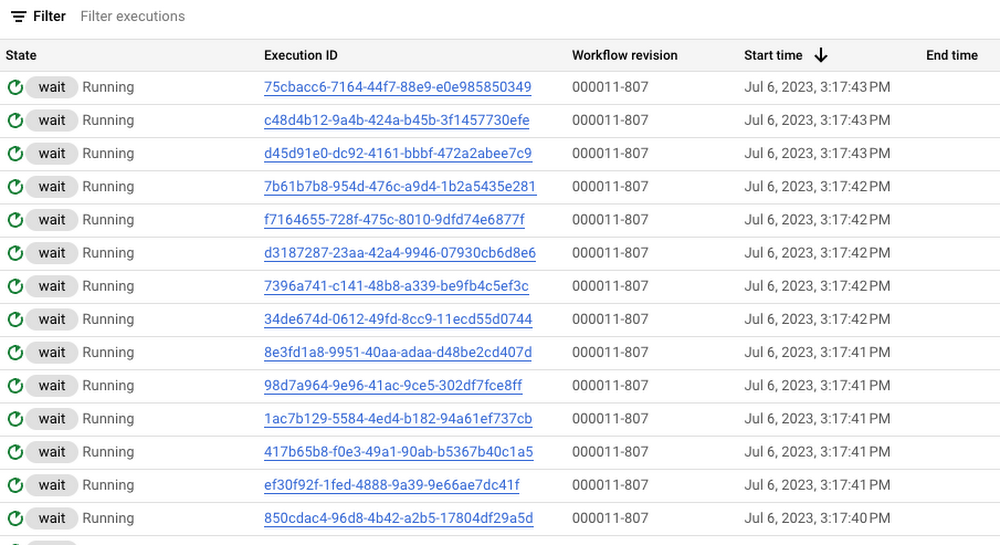
In this case, 100 executions is a well under the concurrency limit for Workflows. Quota issues may arise if you submit 1000s of executions all at once. This is when Cloud Tasks queue and its rate limits become useful.
Execute the parent workflow with dispatch rate limits
Let’s now apply a rate limit to the Cloud Tasks queue. In this case, 1 dispatch per second:
gcloud tasks queues update $QUEUE --max-dispatches-per-second=1 --location=$LOCATION
Execute the parent workflow again:
gcloud workflows run workflow-parent --location=$LOCATION
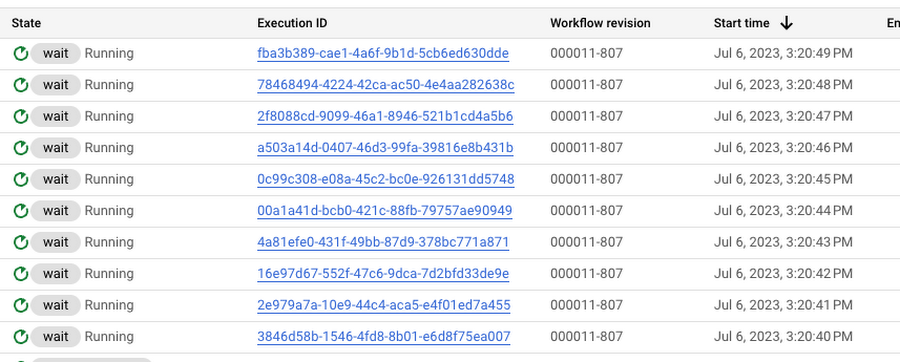
This time, you see a more smooth execution rate (1 execution request per second):
Summary
By introducing a Cloud Tasks queue before executing a workflow and playing with different dispatch rates and concurrency settings, you can better utilize your Workflows quota and stay below the limits without triggering unnecessary quota related failures.
Check out the Buffer HTTP requests with Cloud Tasks codelab, if you want to get more hands-on experience with Cloud Tasks. As always, feel free to contact me on Twitter @meteatamel for any questions or feedback.
Streamlining Workflow Executions: Using Cloud Tasks in Google Cloud
895
Of your peers have already read this article.
3:30 Minutes
The most insightful time you'll spend today!
Introduction
In my previous post, I talked about how you can use a parent workflow to execute child workflows in parallel for faster overall processing time and easier detection of errors. Another useful pattern is to use a Cloud Tasks queue to create Workflows executions and that’s the topic of this post.
When your application experiences a sudden surge of traffic, it’s natural to want to handle the increased load by creating a high number of concurrent workflow executions. However, Google Cloud’s Workflows enforces quotas to prevent abuse and ensure fair resource allocation. These quotas limit the maximum number of concurrent workflow executions per region, per project, for example, Workflows currently enforces a maximum of 2000 concurrent executions by default. Once this limit is reached, any new executions beyond the quota will fail with an HTTP 429 error.
A Cloud Tasks queue can help. Rather than creating Workflow executions directly, you can add Workflows execution tasks to the Cloud Tasks queue and let Cloud Tasks drain the queue at a rate that you define. This allows for better utilization of your workflow quota and ensures the smooth execution of workflows.
Let’s dive into how to set this up.
Create a Cloud Tasks queue
We’ll start by creating a Cloud Tasks queue. The Cloud Tasks queue acts as a buffer between the parent workflow and the child workflows, allowing us to regulate the rate of executions.
Create the Cloud Tasks queue (initially with no dispatch rate limits) with the desired name and location:
QUEUE=queue-workflow-child
LOCATION=us-central1

gcloud tasks queues create $QUEUE --location=$LOCATION
Now that we have our queue in place, let’s proceed to set up the child workflow.
Create and deploy a child workflow
The child workflow performs a specific task and returns a result to the parent workflow.
Create workflow-child.yaml to define the child workflow:
main:

  params: [args]

  steps:

    - init:

        assign:

          - iteration: ${args.iteration}

    - wait:

        call: sys.sleep

        args:

            seconds: 10

    - return_message:

        return: ${"Hello world" + iteration}
In this example, the child workflow receives an iteration argument from the parent workflow, simulates work by waiting for 10 seconds, and returns a string as the result.
Deploy the child workflow:
gcloud workflows deploy workflow-child --source=workflow-child.yaml --location=$LOCATION
Create and deploy a parent workflow
Next, create a parent workflow in workflow-parent.yaml.
The workflow assigns some constants first. Note that it’s referring to the child workflow and the queue name between the parent and child workflows:
main:
  steps:
    - init:
        assign:
          - project_id: ${sys.get_env("GOOGLE_CLOUD_PROJECT_ID")}
          - project_number: ${sys.get_env("GOOGLE_CLOUD_PROJECT_NUMBER")}
          - location: ${sys.get_env("GOOGLE_CLOUD_LOCATION")}
          - workflow_child_name: "workflow-child"
          - queue_name: "queue-workflow-child"
In the next step, Workflows creates and adds a high number of tasks (whose body is an HTTP request to execute the child workflow) to the Cloud Tasks queue:
- enqueue_tasks_to_execute_child_workflow:
        for:
          value: iteration
          range: [1, 100]
          steps:
              - iterate:
                  assign:
                    - data:
                        iteration: ${iteration}
                    - exec:
                        # Need to wrap into argument for Workflows args.
                        argument: ${json.encode_to_string(data)}
              - create_task_to_execute_child_workflow:
                  call: googleapis.cloudtasks.v2.projects.locations.queues.tasks.create
                  args:
                      parent: ${"projects/" + project_id + "/locations/" + location + "/queues/" + queue_name}
                      body:
                        task:
                          httpRequest:
                            body: ${base64.encode(json.encode(exec))}
                            url: ${"https://workflowexecutions.googleapis.com/v1/projects/" + project_id + "/locations/" + location + "/workflows/" + workflow_child_name + "/executions"}
                            oauthToken:
                              serviceAccountEmail: ${project_number + "-compute@developer.gserviceaccount.com"}
Note that task creation is a non-blocking call in Workflows. Cloud Tasks takes care of running those tasks to execute child workflows asynchronously.
Deploy the parent workflow:
gcloud workflows deploy workflow-parent --source=workflow-parent.yaml --location=$LOCATION
Execute the parent workflow with no dispatch rate limits
Time to execute the parent workflow:
gcloud workflows run workflow-parent --location=$LOCATION
As the parent workflow is running, you can see parallel executions of the child workflow, all executed roughly around the same:
In this case, 100 executions is a well under the concurrency limit for Workflows. Quota issues may arise if you submit 1000s of executions all at once. This is when Cloud Tasks queue and its rate limits become useful.
Execute the parent workflow with dispatch rate limits
Let’s now apply a rate limit to the Cloud Tasks queue. In this case, 1 dispatch per second:
gcloud tasks queues update $QUEUE --max-dispatches-per-second=1 --location=$LOCATION
Execute the parent workflow again:
gcloud workflows run workflow-parent --location=$LOCATION
This time, you see a more smooth execution rate (1 execution request per second):
Summary
By introducing a Cloud Tasks queue before executing a workflow and playing with different dispatch rates and concurrency settings, you can better utilize your Workflows quota and stay below the limits without triggering unnecessary quota related failures.
Check out the Buffer HTTP requests with Cloud Tasks codelab, if you want to get more hands-on experience with Cloud Tasks. As always, feel free to contact me on Twitter @meteatamel for any questions or feedback.

5811
Of your peers have already downloaded this article
1:40 Minutes
The most insightful time you'll spend today!
APIs are the foundation for digital commerce, enabling retailers to evolve from web to mobile.
APIs allow retailers to create services such as price check, compare and review products, get instant product availability, purchase, schedule pickup, and delivery, and improve customer engagement and loyalty–all from users’ mobile devices.
Evolving from traditional retail and web commerce to mobile and omnichannel business models requires APIs that can bridge traditional business processes and modern services for richer user engagement.
The most common API patterns found among the world’s leading digital commerce programs can be mapped to specific use cases that are tied to critical business initiatives for retailers.
While many retail companies have deployed more than 30 different APIs, almost two-thirds of retailers are still in the early stages of digital commerce maturity.
Digital commerce programs typically begin by implementing a core set of API patterns. Growing competition and requirements to increase margins from digital channels to drive the need for advanced API patterns that enable more sophisticated digital solutions.
Download the full report to get crucial insights on how APIs are changing the way digital commerce is being done.
Chrome OS’s Hybrid Work Model Powers Google’s Return to Work Strategy

7477
Of your peers have already read this article.
1:30 Minutes
The most insightful time you'll spend today!
The pandemic continues to deeply affect our lives around the globe. In some places, new cases are surging and returning to work is the last thing on people’s minds. In other areas, conditions are improving and companies are starting to think about transitioning their workforce back to the office.
Exactly when and how to do this remains complex and varies by country, industry, and company. What’s certain is that hybrid work will become an essential part of the business world moving forward. And finding solutions that bridge the gap between “in-person” and “somewhere else” are crucial.
At Google, we’ve been focused on what the hybrid transformation means for us. To prepare for hybrid work, using modern solutions is a key enabler.
Chrome OS: Supporting Google’s return to office strategy
At Google, we’ll move to a hybrid work week where most Googlers spend approximately three days in the office and two days wherever they work best. It’s no surprise that as the modern, secure, cloud-first platform, Chrome OS is playing a key role in our transition to a hybrid work model. Because Chrome OS devices can easily be shared, more flexible working models and spaces are now possible. And with user profiles stored in the cloud and collaboration solutions like Google Workspace, employees can log in to any Chrome OS device, access what they need and pick up where they left off.
Here are just a few ways we are using Chrome OS and its tools to support the return to the office:
- In select office locations, Googlers can reserve desks through an internal booking tool set up with a high-performance Chromebox, keyboard, mouse, and monitor. Employees can log in to the Chromebox which syncs their cloud profile, and start working with the same environment they have on all their Chrome OS devices.
- We’re announcing new docking stations that are designed for Chrome OS devices and allow employees to bring in their Chromebook from home, connect to the dock with one USB-C cable, and use a monitor, keyboard, and mouse for a full desktop experience.
- Every Chrome OS device enables a zero-trust security working model with BeyondCorp Enterprise providing our workforce with simple and secure access to applications while providing additional security controls for IT.
- We’ve deployed the new Chrome OS Readiness Tool to our extended workforce to identify employees that are able to switch to Chrome OS. This allows us to expand the latest security, deployment, and manageability benefits to more of the workforce.
Additional ways Chrome OS is helping organizations with return to office
We aren’t the only ones supporting our return to office and hybrid work strategy with Chrome OS. We’ve heard more ways our customers are using Chrome OS to make the transition as smooth as possible. These include:
- Streamlining deployment and management of Chrome OS devices using zero-touch enrollment which allows devices to automatically enroll into a corporate domain without IT configuration.
Grab & Go Chromebooks being used for frontline and hybrid information workers, allowing employees to grab a Chromebook from a cart and get to work right away. - Parallels Desktop for Chrome OS being deployed to allow employees to access Windows or legacy apps locally on their Chrome OS devices.
- Existing Windows and Mac devices being modernized and repurposed to run a Chrome OS experience using CloudReady. (Google is currently offering a CloudReady promotion. Learn more here.)
While the Chrome OS team has been working towards making remote working as seamless as possible for IT, we’ve also made advancements in supporting traditional technology that’s required in the office.
- In October, we announced Chrome Enterprise Recommended: a collection of identity, printing, productivity, communications, and virtualization solutions that are verified to run great on Chrome OS.
- With the increased usage of video conferencing on Chrome OS devices, we’ve made improvements to Google Meet and Zoom performance including camera and video improvements to reduce any unnecessary processing and features that intelligently adapt to your device, your network, and what you are working on.
- For improved access to Windows and legacy apps, VMware Horizon introduced multi-monitor support and USB redirection and Citrix Workspace released a tech preview with webcam enhancements and Microsoft Teams optimizations.
- We integrated with the Okta Workflows platform, so IT administrators can include Chrome OS in it’s access logic and deploy quickly without code. Recently, we’ve added the ability to require users to reauthenticate on their Chrome OS device once Okta has detected that the user has changed their password. Try out this new capability by signing up for our Trusted Tester program.
- We’ve increased our support for direct IP printing with additional printer models since the beginning of 2020. In addition, we have made improvements to management features, including support for multiple print servers and launched policy APIs to provide a better IT admin experience.
Join us for a digital event with Modern Computing Alliance and its newest member HP
Last year we announced the launch of the Modern Computing Alliance—a collaboration of industry leaders including Box, Chrome Enterprise, Citrix, Dell, Google Workspace, Imprivata, Intel, Okta, RingCentral, Slack, VMware, and Zoom aim to create the pioneering solutions that businesses need. We are thrilled to introduce HP, who brings their innovative hardware and enterprise hardware expertise to the Modern Computing Alliance and has been working closely with the alliance to ensure true silicon-to-cloud innovation.
As an alliance, we’ve been deeply engaged in the hybrid work shift. We invite you to join us for a digital event where we discuss questions about returning to work. Like how product design can encourage participation and collaboration regardless of where employees are, important security issues to keep in mind, and what factors businesses should consider to support a safe, working environment.
Home. Heading back. Hybrid.
Hear from the experts on hybrid work and return to office.
Date: May 20th, 2021
Register here.
If you are ready to try Chrome OS today, it’s easy to get started. You can contact us to get connected to a partner, sign up for a free 30-day trial of Chrome Enterprise Upgrade to start managing Chrome OS devices, or deploy the Chrome OS Readiness Tool to identify employees that are ready to switch to Chrome OS.POSTED IN:
3381
Of your peers have already watched this video.
19:00 Minutes
The most insightful time you'll spend today!
Booking.com’s Apigee Hybrid on Anthos is the Largest Hybrid Deployment Ever
Apigee API Management Platform helps unlock the value of data in legacy systems and applications to accelerate end-user/customer experience by modernizing apps and building multi-cloud environments. With Apigee Hybrid on Anthos, a service mesh technology, Booking.com was able to achieve its goal of providing customers a connected trip experience. Watch the video to understand how Booking.com, a biggest brand in Booking Holdings portfolio with over 1.5 million room bookings in 24 hours moved to hybrid cloud and unified APIs to one platform offering a end-to-end customer journey for a connected trip!
Enhancing Developer Productivity with Skaffold v2 GA

2844
Of your peers have already read this article.
2:30 Minutes
The most insightful time you'll spend today!
For years, Google has been committed to maximizing developer productivity. In 2019, we announced the general availability of Skaffold, a command-line tool that facilitates continuous development and delivery for containerized applications. Today, we’re excited to announce that Skaffold V2 is now generally available.
Skaffold V2 expands Skaffold’s supported platforms and architectures with the introduction of Cloud Run as a supported deployer, and now supports building from and deploying to both ARM and x86 architectures. Skaffold V2 also offers enhanced support for CI/CD and GitOps workflows, with the introduction of the skaffold render phase, verify phase, and kpt integration. Best of all, all existing Skaffold configurations are fully compatible with Skaffold V2, and upgrading from V1 is as easy as running skaffold fix.
Expanded platform support
Since its inception, Skaffold has supported deploying applications to Kubernetes, using either kubectl or Helm deployers. Deploying to Kubernetes with Skaffold unlocks the benefits of improved velocity from source to prod, with reusable building blocks for iterative development and CI/CD.
We’re excited to expand these benefits to Cloud Run, Google’s serverless container runtime. Cloud Run provides a fully managed platform for any containerized application, and includes features such as automatic resource scaling and integrated storage, security, and monitoring solutions.
It’s easy to get started with Skaffold and Cloud Run; all you need is a Cloud Run service config and a few small updates to your skaffold.yaml. Skaffold also powers Cloud Deploy’s support of Cloud Run. Check out our documentation to learn more.
In addition to the new deployment target, the expanded set of compatible image-architecture configurations with Skaffold V2 helps developers ensure that the architecture of the machine on which an image is built is compatible with the architecture of the machine on which the image is intended to be run. Skaffold now intelligently checks the architecture of your local machine as well as the target Kubernetes cluster before building your images, allowing you to deploy to ARM, x86 or multi-arch clusters from a x86 or ARM machine without any manual configuration.
Check out our documentation to learn more about deploying to Cloud Run and managing ARM workloads.
CI/CD and DevOps, simplified
Skaffold helps developers implement CI/CD and DevOps workflows by providing a set of reusable building blocks for repeatable build, tag, and deploy steps. With Skaffold, the same config can be shared in development and production, leveraging Skaffold profiles to implement environment-specific configuration.
With Skaffold V2, the Skaffold render phase is now distinct from the deploy phase. The output of the Skaffold render phase is a manifest, hydrated with tagged image names and templated values, which can then be persisted in source control before deployment as part of a GitOps workflow.
In addition to the render phase, Skaffold V2’s new verify phase helps to configure post-deployment tests. This phase can be used to configure a series of test containers that are then monitored to ensure that the deployment was successful. This allows developers to integrate this verification step into reusable deployment pipelines rather than running these tests manually.
Finally, the introduction of kpt as a supported renderer in Skaffold V2 provides a sophisticated syntax for serially transforming and validating your manifests, unlocking additional customizability and verification in your GitOps workflows. Using Skaffold makes it easy to adopt kpt because you can take advantage of kpt’s transformation and validation functionality without needing to write any separate kpt configuration. It’s as easy as adding a few stanzas to your existing skaffold.yaml. Kpt can also be used alongside Skaffold’s pre-existing integrations with renderers Helm and Kustomize.
Check out our documentation to learn more about the Skaffold render phase, verify phase, and kpt integration.
Upgrading to Skaffold V2
Getting started with Skaffold V2 is easy. If you’re new to Skaffold, check out the V2 installation guide for platform-specific installation instructions.
If you’re an existing Skaffold user, upgrading to Skaffold V2 is simple and requires no manual configuration changes. All of your existing Skaffold configurations will continue to work as-is with Skaffold V2. Simply download the Skaffold V2 binary and run skaffold fix to update your config. Check out the V2 upgrade guide for more details.
Finally, check out our documentation for more detailed instructions on taking advantage of all of the new features introduced in Skaffold V2.
What’s next?
If you’re interested in harnessing the power of Skaffold for serverless workloads, check out our documentation for using Skaffold V2 with Cloud Run.
Also, be sure to check out Cloud Deploy, Google’s fully managed continuous delivery offering, which leverages Skaffold to construct reusable deployment pipelines.
We’re excited to hear from you. As always, you can reach out to us on GitHub and Slack.
More Relevant Stories for Your Company

GCP Launches Datastream, A Serverless Change Data Capture and Replication Service
Today, we’re announcing Datastream, a serverless change data capture (CDC) and replication service, available now in preview. Datastream allows enterprises to synchronize data across heterogeneous databases, storage systems, and applications reliably and with minimal latency to support real-time analytics, database replication, and event-driven architectures. You can now easily and seamlessly deliver

What’s New in Retail: Bits from Google Cloud’s Retail & Consumer Goods Summit
Today we’re hosting our Retail & Consumer Goods Summit, a digital event dedicated to helping leading retailers and brands digitally transform their business. For me, this is a personally exciting moment, as I see tremendous opportunities for those companies that choose to focus on their customers and leverage technology to elevate

6 Common Errors to Sidestep in RESTful API Design
Imagine ordering a “ready-to-assemble” table online, only to find that the delivery package did not include the assembly instructions. You know what the end product looks like, but have little to no clue how to start assembling the individual pieces to get there. A poorly designed API tends to create

Serverless for Startups, the Best Way to Succeed: Expert Says
As Google Cloud has become a choice for more startups, I’ve experienced an increase in founders asking how they should think about cloud services. Though each startup is different and requirements may vary across industries and regions, I’ve seen a few core best practices that help startups to succeed—as well as several
