





GCP Launches Datastream, A Serverless Change Data Capture and Replication Service

5609
Of your peers have already read this article.
1:30 Minutes
The most insightful time you'll spend today!
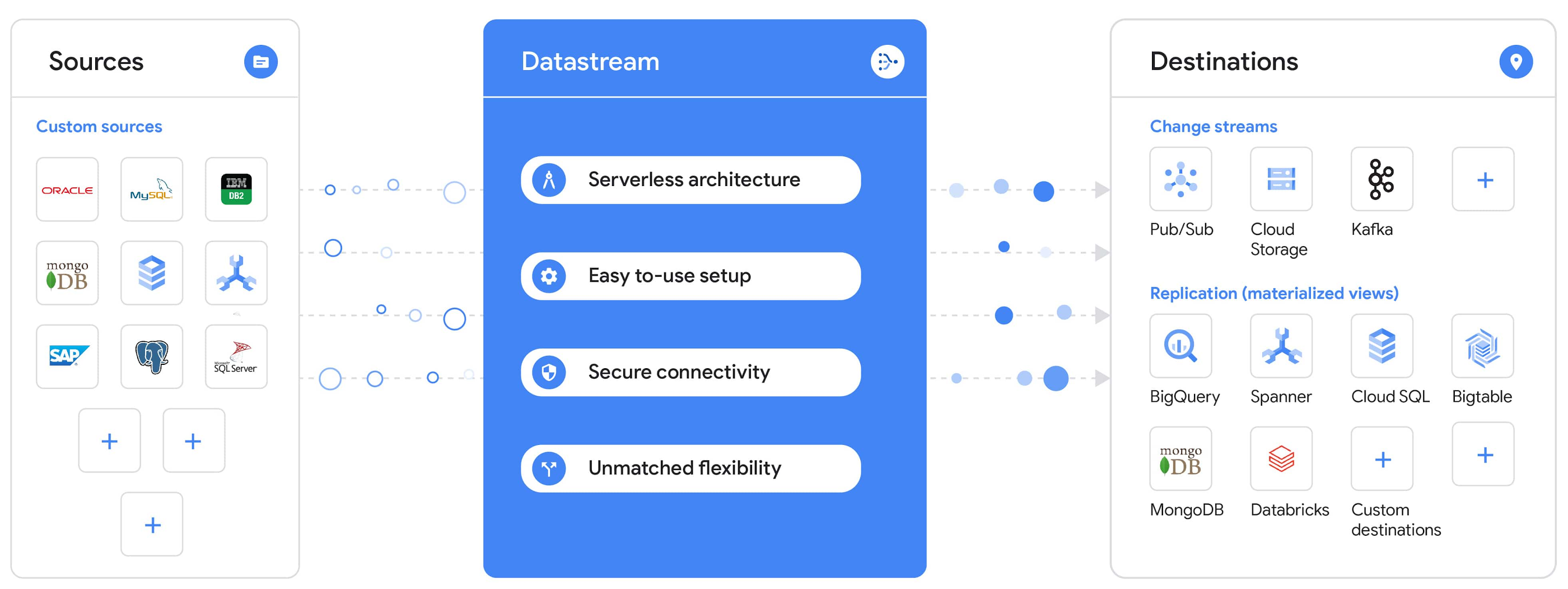
Today, we’re announcing Datastream, a serverless change data capture (CDC) and replication service, available now in preview. Datastream allows enterprises to synchronize data across heterogeneous databases, storage systems, and applications reliably and with minimal latency to support real-time analytics, database replication, and event-driven architectures. You can now easily and seamlessly deliver change streams from Oracle and MySQL databases into Google Cloud services such as BigQuery, Cloud SQL, Google Cloud Storage, and Cloud Spanner, saving time and resources and ensuring your data is accurate and up-to-date.
“Global companies are demanding change data capture to provide replication capabilities across disparate data sources, and provide a real-time source of streaming data for real-time analytics and business operations,” says Stewart Bond, Director, Data Integration and Intelligence Software Research at IDC.
However, companies are finding it difficult to realize these capabilities because commonly used data replication offerings are costly, cumbersome to set up, and require significant management and monitoring overhead to run flexibly or at scale. This leaves customers with a difficult-to-maintain and fragmented architecture.
Datastream’s differentiated approach
Datastream is taking on these challenges with a differentiated approach. Its serverless architecture seamlessly and transparently scales up or down as data volumes shift in real time, freeing teams to focus on delivering up-to-date insights instead of managing infrastructure. It also provides the streamlined customer experience, ease of use, and security that our customers have come to expect from Google Cloud, with private connectivity options built into the guided setup experience.
Datastream integrates with purpose-built and extensible Dataflow templates to pull the change streams written to Cloud Storage, and create up-to-date replicated tables in BigQuery for analytics. It also leverages Dataflow templates to replicate and synchronize databases into Cloud SQL or Cloud Spanner for database migrations and hybrid cloud configurations.
Datastream also powers a Google-native Oracle connector in Cloud Data Fusion’s new replication feature for easy ETL/ELT pipelining. And by delivering change streams directly into Cloud Storage, customers can leverage Datastream to implement modern, event-driven architectures.
Customers tell us about the benefits they’ve found using Datastream. That includes Schnuck Markets, Inc., “Leveraging Datastream, we’ve been able to replicate data from our on-premises databases to BigQuery reliably and with little impact to our production workloads. This new method replaced our batch processing and allowed for insights to be leveraged from BigQuery quicker,” says Caleb Carr, principal technologist from Schnuck Markets. “Furthermore, implementing Datastream removed the need for our analytics group to reference on-premises databases to do their work and support our business users.”
Cogeco Communications, Inc. used Datastream to also realize the value of low-latency data access. “Datastream unlocked new customer interaction opportunities not previously possible by enabling low-latency access in BigQuery to our operational Oracle data.” says Jean-Lou Dupont, Senior Director, Enterprise Architecture, Cogeco Communications, Inc. “This streamlined integration process brings data from hundreds of disparate Oracle tables into a unified data hub. Datastream enabled us to achieve this with 10X time and effort efficiency.”
In addition, Major League Baseball (MLB) used Datastream’s replication capabilities to migrate their data from Oracle to Cloud SQL for PostgreSQL. “As we’re modernizing our applications, replicating the database data reliably out of Oracle and into Cloud SQL for PostgreSQL is a critical component of that process,” says Shawn O’Rourke, manager of technology at MLB. “Using Datastream’s CDC capabilities, we were able to replicate our database securely and with low latency, resulting in minimal downtime to our application. We can now standardize on this process and repeat it for our next databases, regardless of scale.”
Our partner HCL has worked with many organizations looking to get more out of their data and plan for the future. “HCL customers across every industry are looking for ways to extract more value out of their vast amounts of data,” says Siva G. Subramanian, Global Head for Data & Analytics at HCL Google Business Unit. “CDC plays a big part in the solutions we offer to our customers using Google Cloud. Datastream enables us to deliver a secure and reliable solution to our customers that’s easy to set up and maintain. CDC is a key and integrated part of Google Cloud Data Solutions.”
“Google Cloud’s new CDC offering, Datastream, is a differentiator for Google among hyperscale cloud service providers, by supporting replication of data from Oracle and MySQL databases into the Google Cloud environment using a serverless cloud-native architecture, which removes the burden of infrastructure management for organizations, and provides elastic scalability to handle real-time workloads,” says Stewart Bond, Director, Data Integration and Intelligence Software Research at IDC.
Datastream under the hood
Datastream reads CDC events (inserts, updates, and deletes) from source databases, and writes those events with minimal latency to a data destination. It leverages the fact that each database source has its own CDC log—for MySQL it’s the binlog, for Oracle it’s LogMiner—which it uses for its own internal replication and consistency purposes. Using Google-native, agentless, high-scale log reader technology, Datastream can quickly and efficiently generate change streams populated by events based on the database’s CDC log while minimizing performance impact on the source database.
Each generated event includes the entire row of data from the database, with the data type and value of each column. The original source data types, whether it’s, for example, an Oracle NUMBER type or a MySQL NUMERIC type, are normalized into Datastream unified types. The unified types represent a lossless superset of all possible source types, and the normalization means data from different sources can easily be processed and queried downstream in a source-agnostic way. Should a downstream system need to know the original source data type, it can perform a quick API call to Datastream’s Schema Registry, which stores up-to-date, versioned schemas for every data source. This also allows for in-flight downstream schema drift resolution as source database schemas change.
The generated streams of events, referred to as “change streams,” are then written as files, either in JSON or Avro format during preview or in other formats like Parquet in the future, into a Cloud Storage bucket organized by source table and event times. Files are rotated as table schemas change, so events in a single file always have the same schema, as well as on a configurable file size or rotation frequency setting. This way customers can find the best balance between the speed of data availability and the file size that makes the most sense for their business use case.
Through its integration with Dataflow, Datastream powers up-to-date, replicated tables for analytics over BigQuery, and for data replication and synchronization to Cloud SQL and Spanner. Datastream refers to these constantly updated tables as “materialized views.” They are kept up-to-date via Dataflow template-based upserts into Cloud SQL or Spanner, or through consolidations into BigQuery. The consolidations, performed as part of the Dataflow template, take the change streams that are written into a log table in BigQuery, and push those changes into a final table, which mirrors the table from the source.

Datastream offers a variety of secure connectivity methods to sources, so your data is always safe in transit. And with its serverless architecture, Datastream can scale up and down readers and processing power to seamlessly keep up with the speed of data and ensure minimal latency end to end. As data volumes decrease, Datastream automatically scales back down—the result is a “pay for what you use” pricing model, where you never have to pay for idle machines or worry about bottlenecks and delays during data peaks.
Get started with Datastream
Datastream, now available in preview, supports streaming change data from Oracle and MySQL sources, hosted either on-premises or in the cloud, into Cloud Storage. You can start streaming your data today for $2 per GB of data processed by Datastream.
To get started, head over to the Datastream area of your Google Cloud console, under Big Data, and click Create Stream. There you can:
- Initiate stream creation, and see what actions you need to take to set up your source and destination for successful streaming.
- Define your source and destination, whose connectivity information is saved as connection profiles you can re-use for other streams. Sources support multiple connectivity options, with both private and public connectivity options to suit your business needs.
- Select the source data you’d like to stream, and which you’d like to exclude.
- Test your stream to ensure it will be successful when you’re ready to go.
Start your stream and your database’s CDC data will start to flow to your Cloud Storage bucket! From there you can integrate with Dataflow templates to load data into BigQuery, Spanner, or Cloud SQL. Datastream’s preview is supported in us-central1, europe-west1, and asia-east1, with additional regions coming soon.https://www.youtube.com/embed/FZG4w4Vbj38?enablejsapi=1&
Datastream will become generally available later this year, and will soon expand its support to also include PostgreSQL and SQL Server as sources, as well as out-of-the-box integration with BigQuery for easy delivery of up-to-date replicated tables for analytics, and message queues like Pub/Sub for real-time change stream access.
For more resources to help get you started with change streaming, check out the Datastream documentation.
Don’t Just Move to the Cloud, Modernize With Google Cloud

3495
Of your peers have already read this article.
2:00 Minutes
The most insightful time you'll spend today!
Our customers tell us they don’t just want to migrate their applications from point A to point B, they want to modernize their applications with cloud-native technologies and techniques, wherever those applications may be.
Today, we’re excited to tell you about a variety of new customers that are using Anthos to transform their application portfolio, as well as new cloud migration, API management, and application development offerings:
- New customers leveraging Anthos for a variety of on-prem, cloud and edge use cases
- The general availability of Migrate for Anthos
- Apigee hybrid in general availability
- The general availability of Cloud Code
Accelerating app modernization with Anthos
Anthos was the first open app modernization platform to offer a unified control plane and service delivery across diverse cloud environments—managed cloud, on-premises and edge. Since it became generally available in the spring, organizations across a variety of industries and geographies have turned to Anthos to bring the benefits of cloud, containers and microservices to their applications.
According to the findings from Forrester’s Total Economic Impact study, customers adopting Anthos have seen up to 5x return on investment based on the savings from ongoing license and support costs, and the incremental savings from operations and developer productivity. For one customer in the financial services industry, rolling out new features and updates to their core banking application used to take at least a quarter. Now with Anthos, they were able to eliminate months long development and release cycles, and roll out on a weekly basis. That’s a 13x improvement on time to market.
This week, several new European Anthos customers will take the stage at Next UK to talk about how they’re using Anthos to transform their IT operations.
Kaeser Kompressoren SE of Coburg, Germany, is a provider of compressed air products and services. The company needed a consistent platform to deploy and manage existing on-prem SAP workloads, like SAP Data Hub, and also wanted to be able to tap into other services running in Google Cloud to get more value from those environments.
“Application modernization is enabling business innovation for Kaeser,” said Falko Lameter, CIO. “To gain better insights from data, we knew we needed to incorporate advanced machine learning and data analytics in all our applications. We chose Google Cloud’s Anthos because it offered the flexibility to incrementally modernize our legacy application on-premises without business disruption, while allowing us to run other applications on Anthos in Google Cloud and take advantage of its managed data analytics and ML/AI services.”
Then there’s Denizbank. Based in Turkey, Denizbank provides a variety of commercial banking services, and established the first Digital Banking Department in Turkey in 2012. Denizbank turned to Anthos for an open application modernization platform to help it develop its next-generation mobile banking applications.
“We operate in 11 different countries and have to comply with various regulatory requirements like data locality and sovereignty, which mandates some or all applications to reside on premises in certain countries, while the rest of the apps can move to the cloud in other countries,” said Dilek Duman, COO of DenizBank. “We chose Google Cloud’s Anthos for its flexibility to modernize our existing application investments with ease, and to deliver AI/ML powered software faster while improving operational security and governance. Anthos gives us the ability to have a unified management view of our hybrid deployments, giving us a consistent platform to run our banking workloads across environments.”
Anthos is even starting to be deployed to edge locations, where, thanks to its 100% software-based design, it can run on any number of hardware form factors. We’re in advanced discussions with customers in telecommunications, retail, manufacturing and entertainment about using Anthos for edge use cases, as well as with global hardware OEMs.
Move and modernize with Migrate for Anthos
In addition to leveraging cloud technology for their on-premises environments with Anthos, customers also want to simultaneously migrate to the cloud and modernize with containers. That’s why we’re happy to announce the general availability of Migrate for Anthos, which provides a fast, low-friction path to convert physical servers or virtual machines from a variety of sources (on-prem, Amazon AWS, Microsoft Azure, or Google Compute Engine) directly into containers in Anthos GKE.
Migrate for Anthos makes it easy to modernize your applications without a lot of manual effort or specialized training. After upgrading your on-prem systems to containers with Migrate for Anthos, you’ll benefit from a reduction in OS-level management and maintenance, more efficient resource utilization, and easy integration with Google Cloud services for data analytics, AI and ML, and more.
DevFactory aims to offload repetitive tasks in software development so that dev teams can focus on coding and productivity. As advocates for optimization through containers, they found Migrate for Anthos a key way to help deliver on their goals:
“We usually see less than 1% resource utilization in data centers. Migrate for Anthos is a remarkable tool that allows us to migrate data center workloads to the cloud in a few simple steps,” said Rahul Subramaniam, CEO, Devfactory. “By automatically converting servers and virtual machines into containers with Migrate for Anthos, we get better resource utilization and dramatically reduced costs along with managed infrastructure in the end state, which makes this a very exciting and much-needed solution.”
Migrate for Anthos is available at no additional cost, and can be used with or without an Anthos subscription.
API-first, everywhere, with Apigee hybrid
To drive modernization and innovation, enterprises are increasingly adopting API-first approaches to connecting services across hybrid and multi-cloud environments. To address the need for hybrid API management, we’re announcing the general availability of Apigee hybrid, giving you the flexibility to deploy your API runtimes in a hybrid environment, while using cloud-based Apigee capabilities such as developer portals, API monitoring, and analytics. Apigee hybrid can be deployed as a workload on Anthos, giving you the benefits of an integrated Google Cloud stack, with Anthos’ automation and security benefits.
Gap Inc. uses Apigee to publish, secure, and analyze APIs and easily onboard the development teams working with those APIs. Apigee hybrid will help Gap Inc. overcome the traditional tradeoffs between on-premises and cloud, providing the best of both worlds.
“With Apigee hybrid, we can have an easy to manage, localized runtime for scenarios where latency or data sensitivity require it. At the same time, we can continue to enjoy all the benefits of Apigee such as Apigee’s developer portal and its rich API-lifecycle management capabilities,” said Patrick McMichael, Enterprise Architect at Gap Inc.
Simplifying the developer experience
Google Cloud application development tools are designed to help you simplify creating apps for containers and Kubernetes, incorporate security and compliance into your pipelines, and scale up or down depending on demand, so you only pay for what you use.
With these goals in mind, last week, we announced the general availability of Cloud Run and Cloud Run for Anthos. Cloud Run is a managed compute platform on Google Cloud that lets you run serverless containers on on a fully managed environment or on Anthos. With Cloud Run fully managed, you can easily deploy and run stateless containers written in any language, and enjoy serverless benefits such as automatic scale up and scale down and pay-for-use—without having to manage the underlying infrastructure.
Cloud Run for Anthos, meanwhile, brings those same serverless developer experience to Anthos managed clusters, giving developers access to a modern, serverless compute platform while their organization modernizes its on-prem environment with Kubernetes.
Easier Kubernetes development with Cloud Code
Today, we’re excited to announce the general availability of another important member of the Google Cloud application development stack: Cloud Code, which lets developers write, debug and deploy code to Google Cloud or any Kubernetes cluster through extensions to popular Integrated Developer Environments (IDEs) such as Visual Studio Code and IntelliJ.
Developers are most productive while working in their favorite IDE. By embracing developers’ existing workflow and tools, Cloud Code makes working with Kubernetes feel like you are working with a local application, while preserving the investment you’ve made to configure your tools to your own specific needs. Cloud Code dramatically simplifies the creation and maintenance of Kubernetes applications.
In addition, Cloud Code speeds up development against Kubernetes by extending the edit-debug-review “inner loop” to the cloud. You get rapid feedback on your changes, ensuring that they’re of high quality. And when it comes to moving code to the production environment, Cloud Code supports popular continuous integration and delivery (CI/CD) tools like Cloud Build.
Finally, with Cloud Code, diagnosing issues does not require a deep understanding of Kubernetes, thanks to connected debuggers and cluster-wide logging that help you address issues all from the context of your favorite tool.
Toward modern, efficient applications
Application modernization means a lot of things to a lot of people. Depending on your environment, it can mean updating VMs to containers and Kubernetes, it can mean moving them to the cloud, or it can mean distributing them to edge locations and unifying workloads with consistent API and service management. For others, application modernization means using cloud-native tools and concepts like serverless and CI/CD. Whatever your definition, we can help you realize your business and modernization goals, achieving greater agility while improving overall governance.
3149
Of your peers have already watched this video.
18:45 Minutes
The most insightful time you'll spend today!
Reduce Costs, Increase Profits by Modernizing Your Mainframe Applications with Google Cloud
Mainframe powers much of global commerce and for decades—with its proprietary platform and legendary lock-in—was resistant to effective competition. Even years after most organizations began adopting public cloud, migrating off the mainframe remains too complex for many organizations to undertake.
Google Cloud brings a unique, automated approach to modernization enabling customers to go from mainframe to containers.
Gain operational efficiency
Escape capital-intensive mainframe refresh cycle with Google cloud. Move to a modern cloud-based model to reduce operational cost and improve maintainability.
Deliver agile services
You can also evolve software capabilities for faster and frequent updates. Use cloud-native technologies such as GKE alongside your on-premises workloads and accelerate time to market.
Mitigate risk and get access to talent
Also, eliminate the dependency on scarce skills. Gain access to top engineering talent and avoid vendor lock-in by modernizing to open software languages.
Watch this video where Travis Webb, Cloud Solutions Architect for Enterprise at Google Cloud, takes you through the challenges of modernizing mainframe and the key technical aspects of this solution that make it possible.
Maximizing API Potential: A Look at 7 Prominent API Management Use Cases

2708
Of your peers have already read this article.
4:30 Minutes
The most insightful time you'll spend today!
Paper currency — which started gaining prominence in the 1600s — changed the face of global economics and ushered in a new era of international monetary regulation. The primary reason currency created such disruption was its ability to standardize the “medium of exchange”. APIs created a similar effect in the world of technology and digitalization by creating a standardized, reusable, and secure way to exchange information.
Modern web APIs took shape in the early 2000s and played a key role in “.com”mercializing every business. APIs started as a connective tissue primarily relegated to a technical context and quickly evolved into a gateway to new business models, revenue streams, and ecosystems. In 2017, McKinsey estimated a total of $1 Trillion in profit could be up for grabs in the API economy. And in 2022, GGV Capital created an index of API-first startups — a generation of stylistically divergent SaaS companies with leaner operating cost structures and organic usage growth. Just as currency is going through an evolution from banknotes to digital wallets, the world of API management is also on the brink of change.
With more than 15 years of experience managing APIs at Google-scale, we’ve got a unique vantage point from which to observe that change. In today’s post, we will spotlight seven API management use cases that we see growing in prominence — and how you can take advantage of these trends to future-proof your architecture.
1 “Shift left” in API security
As a gateway to a wealth of information, APIs have also quickly become the primary attack vector in security incidents. When we surveyed 500 technology leaders, we learned that more than 50% of organizations experienced an API security incident in the last 12 months. Adding to the increasing magnitude of attacks, there are an increasing number of vectors for potential API security incidents like misconfigurations, outdated APIs/data/components, and bots/spam/abuse.
These security issues aren’t just in production APIs, but at every stage in the API lifecycle. Notably, we found that 67% of the issues are discovered during testing as part of the release management process. This trend ushers in the need for forward-thinking organizations to “shift left with security” — moving controls earlier into the production workflow — by bringing security teams and API teams closer. To stay ahead of security threats, many organizations are actively looking for solutions that allow them to be proactive while minimizing the burden on their security teams. According to our research, integrating capabilities that proactively identify security threats (60%) is top of mind for most IT leaders for the next year.
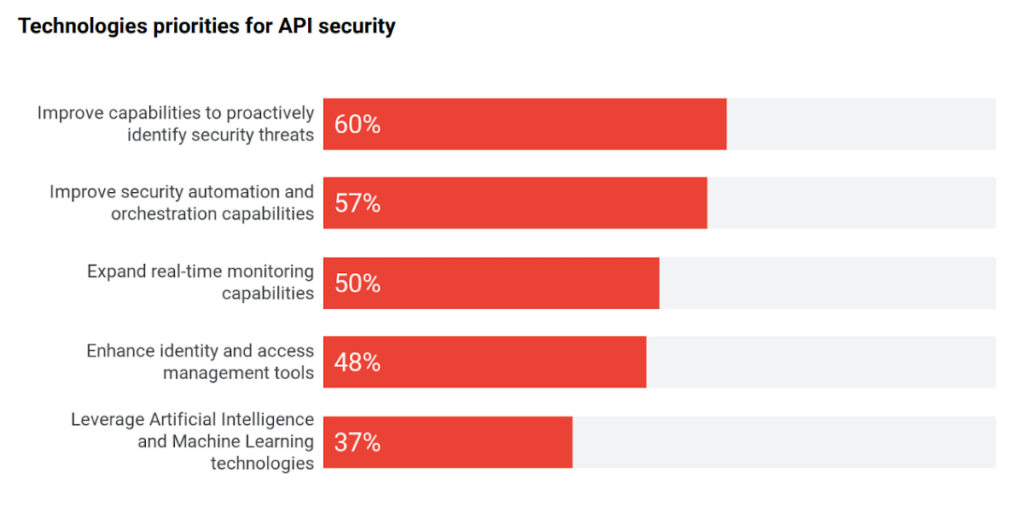
Source: 2022 API Security Research Report
2 “Knowledge graph” for your enterprise APIs
It comes as no surprise that every organization is relying on APIs to expand and even ground their digital ecosystem — a network of partners, developers, and customers facilitated by modern, cloud-first technologies. There is a growing magnitude and variety of middleware assets, contributing to the growth of IT complexity.
As the number of APIs continues to increase, there is a need to simplify consumption for internal and external developers. Even the most objectively useful APIs remain unseen by most of the organization. In turn this results in redundant code, reduced developer productivity, or worse — turned into a potential security attack vector. This complexity is shifting focus towards consolidation of all middleware assets, growing adoption, and improving education (see below) to improve developer efficiency and de-mystify the IT complexity.
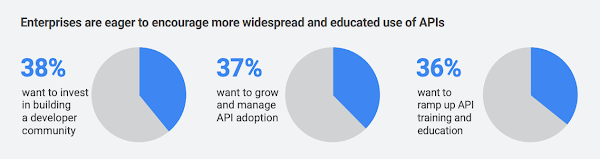
This sprawl is a growing problem in the world of APIs, but it has a lot in common with an age-old phenomenon in the world of web pages and content—search. Google was born out of this problem to help organize the world’s information. Similar to Google’s knowledge graph for web pages, there is a need to index, organize, and instantly present API information for developers that need it. Although it is an emerging practice, we see an increasing number of digital leaders and security teams in larger organizations with mature API programs invest in solutions that help consolidate all APIs, organize their information, and manage their lifecycle.
3 The imminent need for “omni” control planes
APIs have taken on such a vital role in the modern application stack that they have slowly become the neural links across the entire enterprise architecture — bridging legacy and modern applications, shifting architectures towards microservices, and enabling operations across heterogeneous environments. To support all these technological decisions without sacrificing speed, organizations adopted multiple API gateways and fragmented API management solutions. However, this led to a lack of universal visibility, consistent governance, comprehensive security, and meaningful analytics across ALL the enterprise APIs (not just the ones within the confines of a given API management solution). And it increases the maintenance costs — fundamentally undercutting the value of APIs. With this evolution there is a growing need for an omni control plane — analogous to the brain in a human body — across all enterprise APIs.
4 API governance rising through the priority ranks
Despite the clear need for governance, there is still no unified understanding on a good (or right) approach to API governance. With the rapid adoption of APIs without appropriate standardization or quality standards, API governance is top of mind for IT leaders, again.
According to our research, 45% of IT leaders identified API governance as a critical component of their API program. The top three components of API security, performance analytics, and governance demonstrate the critical need for visibility, quality, and security across all APIs.
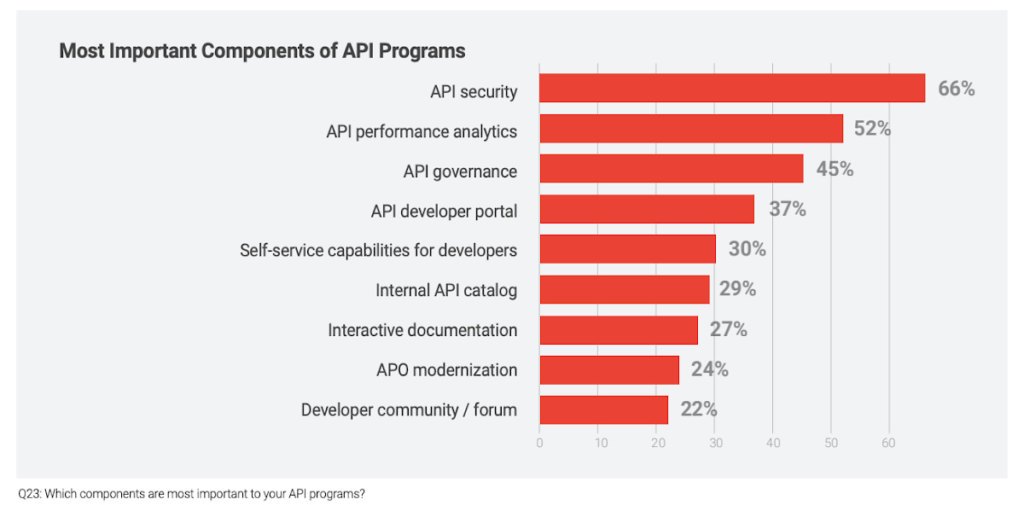
As digital consumers, we have seen this phenomenon across many industries and digital products. For example AirBnB disrupted the short-term rental market by providing standardized listings, detailed information, and high-resolution photos. In fact, the same governance phenomenon is ubiquitous in the world of e-commerce where there is a clear correlation between a high-quality website or product listing and increasing sales.
The same analogy holds true in the world of APIs, as ~90% of developers use APIs in their work there is a direct correlation between the use of APIs and developer productivity. Digital officers and CIOs need to add appropriate governance controls to standardize API design and improve reuse without adding friction to development timelines.
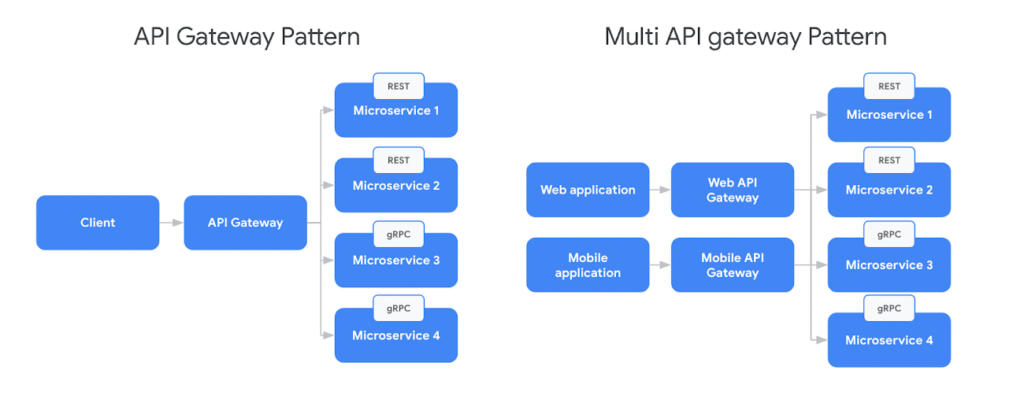
5 Evolution of design patterns with multiple API gateways
Adoption of new API architectural styles and microservices increased the complexity of the modern application stack. Our research found that 54% of organizations use a service mesh and API management in conjunction today to support the API gateway design pattern. In parallel, there is broad adoption of new protocols like GraphQL or AsyncAPI, outpacing the innovation in API gateways. For example, in a recent survey from DZone found that GraphQL accounted for 22.7% of application integrations.
In response to this challenge IT teams are adopting multiple API gateways — by design — which is creating the need for complex communication patterns for future scalability. But the existing design patterns were mostly sufficient when client applications used homogeneous API protocols (Ex: REST). Although patterns like Backend For FrontEnd (BFF) intended to provide specific API interactions that are relevant on a per-client basis, they still did not account for complexities from multiple gateways and protocols. In response to the adoption of new protocols, there is a need to evolve the existing BFF pattern to account for multiple API gateways and protocols.
6 Driving green value chains with digital twins
A digital twin is an effectively indistinguishable virtual representation of a physical object, system, or a process. For example the digital twin of a wind turbine (the object being studied) might be used to capture data like performance, rpm (revolutions per minute), or output captured by various sensors outfitted on the turbine. Digital twin adoption is growing and McKinsey estimates investments in digital twins will reach $58 billion by 2026 with a 58% CAGR. Every digital twin uses APIs to monitor, engage, and possibly control the physical asset. For example, Google created the Digital Buildings project — an open source, Apache-licensed effort to manage applications and analyses between a large heterogeneous portfolio of buildings.
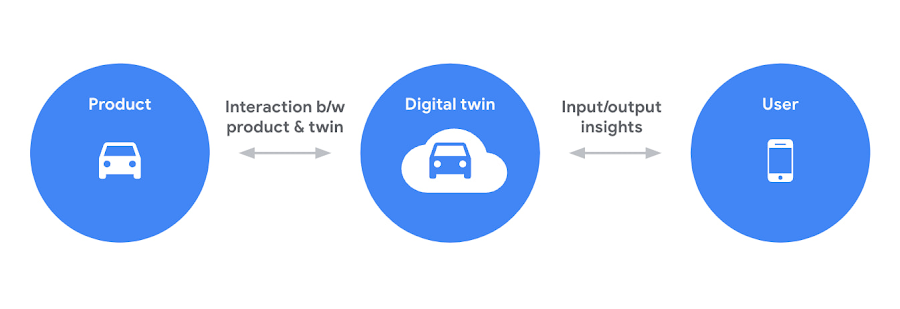
Sustainability is one of the driving forces behind the increased use of digital twins. As the need to reach net zero emissions accelerates, many organizations are tying performance (and in some cases even executive pay) to environmental, social, and governance goals. APIs help connect the dots between digital twins and sustainability. For example, an organization operating a manufacturing process could build a digital twin with APIs to collect behavioral data from sensors, monitoring systems, or other sources — which can eventually be integrated into the organization’s digital platform or applications. These digital twins could be used to analyze and optimize the use of materials and energy, to minimize waste and emissions. Additionally, digital twins could be used to monitor and analyze the performance of systems over time, to identify opportunities for continuous improvement.
Overall, APIs play a valuable role in supporting sustainability efforts by enabling digital twins, effectively driving more efficient operation of systems, and providing insights to improve environmental impact. For further examples, check out this video about driving a green value chain with APIs.
7 Commercializing access to data products
The growing use of data-rich services (like IoT, ML models, remote access services, and web scraping, etc.) coupled with massive ingestion of data everyday is creating massive growth in data delivery paradigms like data lakehouses, data marketplaces, and data streaming systems (global data marketplaces alone are poised to reach $3.5 billion by 2028). Unfortunately, most of these systems are fragmented with almost no relationship or interoperability.
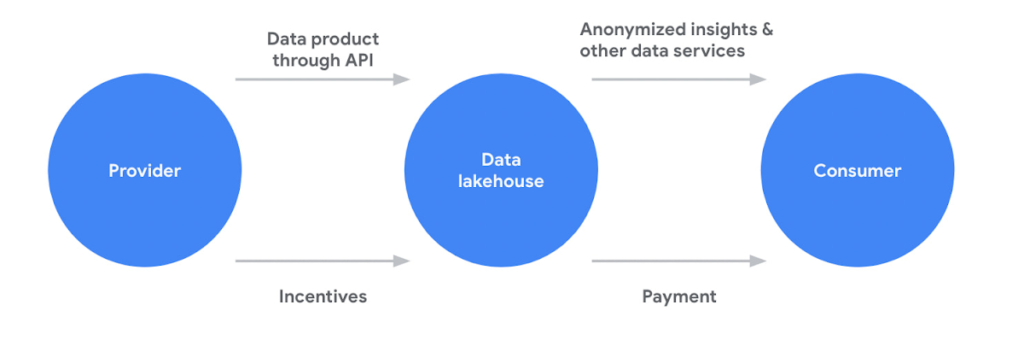
APIs are filling this critical gap for organizations in two critical ways. First, APIs are providing standard and easy access to systems like data lakehouses or analytics hubs. Second, APIs are a key enabler of data products (digital products or services built using data as a core value proposition), a core component of any data sharing system. APIs provide a standardized way for different applications to interact with the data product. For example, an API could be used to allow a mobile app to access data from a weather forecast or a recommendation engine data product. Beyond data products, APIs also provide easy and standardized access various data management platform
APIs continue to play a critical role in every application, experience, and ecosystem. Robust API strategies help organizations adapt to any architecture, business model, or environment in the face of changing technology landscape. Learn more about how Apigee is driving innovation and helping companies future proof their architectures to stay ahead of the top API trends.
Reference Guide to Get You Started with Development on GKE

5571
Of your peers have already read this article.
1:30 Minutes
The most insightful time you'll spend today!
Getting started with Kubernetes is often harder than it needs to be. While working with a cluster “from scratch” can be a great learning exercise or a good solution for some highly specialized workloads, often the details of cluster management can be made easier by utilizing a managed service offering. Google Kubernetes Engine (GKE) allows for an easier end-to-end developer experience with convenient tooling and built-in integrations along with the convenience of offering Kubernetes clusters as a managed service.
GKE is the most mature container orchestration service available today, delivering a fully-managed service and hands-off experience with the GKE Autopilot mode of operation. GKE provides industry-first capabilities such as release channels, multi-cluster support, unique four-way auto scaling, node auto repair, and can support up to 15K nodes in a single cluster.
Our modern, end-to-end platform is built on cloud-native principles you are already familiar with and prioritizes speed, security, and flexibility, in ways that are highly differentiated from other cloud platforms.
We have put together a new reference guide for you as you begin your journey developing on GKE. It covers every step of your journey from writing, running, operating, to managing code. Even if it isn’t your first time using GKE, this e-book will be a valuable resource highlighting important considerations and best practices. By implementing the technical recommendations, following the steps, and utilizing the tools described, you can reach the following goals:
- Write, deploy, and debug code faster with Cloud Code and Cloud Shell
- Continuously integrate and deliver updates with Cloud Build
- Run easily, securly, cost effectively at scale with GKE
- Monitor and troubleshoot with Google Cloud’s operations suite
Kick-start your journey by downloading the e-book and join us live June 22 at 9am PDT for our half-day Cloud OnBoard event: Getting Started with Google Kubernetes Engine.
How to Build A Basic Image Search Utility for Natural Language Queries

4695
Of your peers have already read this article.
6:00 Minutes
The most insightful time you'll spend today!
This post shows how to build an image search utility using natural language queries. Our aim is to use different GCP services to demonstrate this. At the core of our project is OpenAI’s CLIP model. It makes use of two encoders – one for images and one for texts. Each encoder is trained to learn representations such that similar images and text embeddings are projected as close as possible.
We will first create a Flask-based REST API capable of handling natural language queries and matching them against relevant images. We will then demonstrate the use of the API through a Flutter-based web and mobile application. Figure 1 shows how our final application would look like:
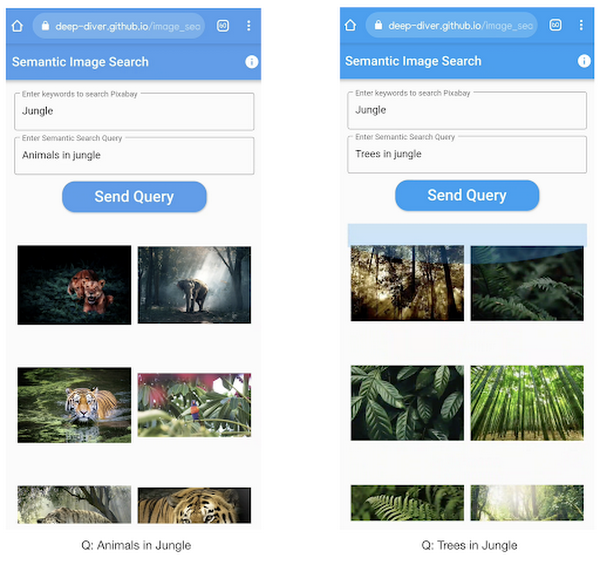
All the code shown in this post is available as a GitHub repository. Let’s dive in.
Application at a high-level
Our application will take two queries from the user:
- Tag or keyword query. This is needed in order to pull a set of images of interest from Pixabay. You can use any other image repositories for this purpose. But we found Pixabay’s API to be easier to work with. We will cache these images to optimize the user experience. Suppose we wanted to find images that are similar to this query: “horses amidst flowers”. For this, we’d first pull in a few “horse” images and then run another utility to find out the images that best match our query.
- Longer or semantic query that we will use to retrieve the images from the pool created in the step above. These images should be semantically similar to this query.
Note: Instead of two queries, we could have only taken a single long query and run named-entity extraction to determine the most likely important keywords to run the initial search with. For this post, we won’t be using this approach.
Figure 2 below depicts the architecture design of our application and the technical stack used for each of the components.
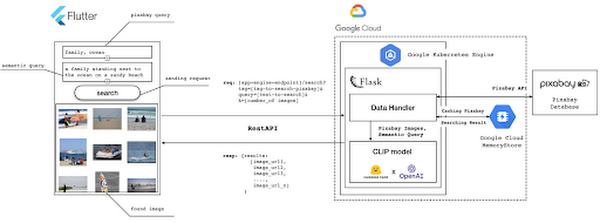
Figure 2 also presents the core logic of the API we will develop in bits and pieces in this post. We will deploy this API on a Kubernetes cluster using the Google Kubernetes Engine (GKE). The following presents a brief directory structure of our application code-base:
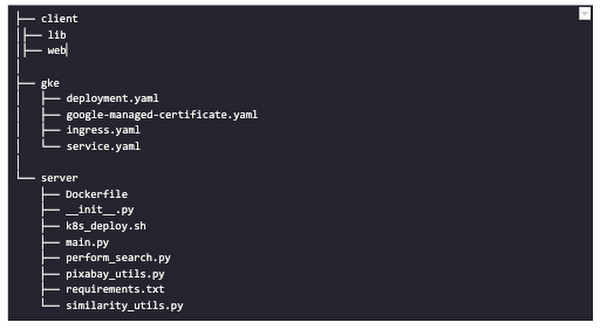
Next, we will walk through the code and other related components for building our image search API. For various machine learning-related utilities, we will be using PyTorch.
Building the backend API with Flask
First, we’d need to fetch a set of images with respect to user-provided tags/keywords before performing the natural language image search. The utility below from the pixabay_utils.py script can do this for us:
def fetch_images_tag(pixabay_search_keyword, num_images):"""Fetches images from Pixabay w.r.t a keyword.:param pixabay_search_keyword: Keyword to perform the search on Pixabay.:param num_images: Number of images to retrieve.:return: List of PIL images.:return: List of image URLs."""query = (PIXABAY_API+ "&q="+ pixabay_search_keyword.lower()+ "&image_type=photo&safesearch=true&per_page="+ str(num_images))response = requests.get(query)output = response.json()all_images = []all_image_urls = []for each in output["hits"]:imageurl = each["webformatURL"]response = requests.get(imageurl)image = Image.open(BytesIO(response.content)).convert("RGB")all_images.append(image)all_image_urls.append(imageurl)return (all_images, all_image_urls)
Note that all the API utilities are logging relevant information. But for brevity, we have omitted the lines of code responsible for that. Next, we will see how to invoke the CLIP model and select the images that would best match a given query semantically. For this, we’ll be using Hugging Face, an easy-to-use Python library offering state-of-the-art NLP capabilities. We’ll collate all the logic related to this search inside a SimilarityUtil class:
class SimilarityUtil:def __init__(self):self.model = CLIPModel.from_pretrained(CLIP_MODEL)self.processor = CLIPProcessor.from_pretrained(CLIP_PREPROCESSOR)self.device = "cuda" if torch.cuda.is_available() else "cpu"def perform_sim_search(self, images, query_phrase, top_k=3):"""Performs similarity search between the images and query.:param images: A list of PIL images initially retrieved withrespect to some entity e.g. Tiger.:param query_phrase: A list containing a single text query,e.g. "Tiger drinking water".:param top_k: Number of top images to return from `images`.:return: Top-k indices matching the query semantically andtheir similarity scores."""model = self.model.to(self.device)# Obtain the text-image similarity scoreswith torch.no_grad():inputs = self.processor(text=[query_phrase], images=images, return_tensors="pt", padding=True)inputs = inputs.to(self.device)outputs = model(**inputs)# Image-text similarity scoreslogits_per_image = outputs.logits_per_image.cpu()(top_indices, top_scores) = self.sort_scores(logits_per_image, top_k)return (top_indices, top_scores)def sort_scores(self, scores, top_k):"""Sorts the scores in a descending manner.:param scores: Scores to sort through.:param top_k: Number of top scores to return.:return: Top-k scores and their indices."""values, indices = scores.squeeze().topk(top_k)top_indices, top_scores = [], []for score, index in zip(values, indices):top_indices.append(int(index.numpy()))score = score.numpy().tolist()top_scores.append(round(score, 3))return (top_indices, top_scores)
CLIP_MODEL uses a ViT-base model to encode the images for generating meaningful embeddings with respect to the provided query. The text-based query is also encoded using A Transformers-based model for generating the embeddings. These two embeddings are matched with one another during inference. To know more about the particular methods we are using for the CLIP model please refer to this documentation from Hugging Face.
In the code above, we are first invoking the CLIP model with images and the natural language query. This gives us a vector (logits_per_image) that contains the similarity scores between each of the images and the query. We then sort the vector in a descending manner. Note that we are initializing the CLIP model while instantiating the SimilarityUtil to save us the model loading time. This is the meat of our application and we have tackled it already. If you want to interact with this utility in a live manner you can check out this Colab Notebook.
Now, we need to collate our utilities for fetching images from Pixabay and for performing the natural language image search inside a single script – perform_search.py. Following is the main class of that script:
class Searcher:def __init__(self):self.similarity_model = SimilarityUtil()def get_similar_images(self, keyword, semantic_query, pixabay_max, top_k):"""Finds semantically similar images.:param keyword: Keyword to search with on Pixabay.:param semantic_query: Query to find semantically similar images retrieved from Pixabay.:param pixabay_max: Number of maximum images to retrieve from Pixabay.:param top_k: Top-k images to return.:return: Tuple of top_k URLs and the similarity scores of the images present inside the URLs."""images_redis_key = keyword + "_images"urls_redis_key = keyword + "_urls"if redis_client.exists(images_redis_key) and redis_client.exists(urls_redis_key):keyword_images = redis_client.get(images_redis_key)keyword_image_urls = redis_client.get(urls_redis_key)else:(keyword_images, keyword_image_urls) = fetch_images_tag(keyword, pixabay_max)redis_client.set(images_redis_key, keyword_images)redis_client.set(urls_redis_key, keyword_image_urls)(top_indices, top_scores) = self.similarity_model.perform_sim_search(keyword_images, semantic_query, top_k)top_urls = [keyword_image_urls[index] for index in top_indices]return (top_urls, top_scores)
Here, we are just calling the utilities we had previously developed to return the URLs of the most similar images and their scores. What is even more important here is the caching capability. For that, we combined GCP’s MemoryStore and a Python library called direct-redis. More on setting up MemoryStore later.
MemoryStore provides a fully managed and low-cost platform for hosting Redis instances. Redis databases are in memory and light-weight making them an ideal candidate for caching. In the code above, we are caching the images fetched from Pixabay and their URLs. So, in the event of a cache hit, we won’t need to call the CLIP model and this will tremendously improve the response time of our API.
Other options for caching
We can cache other elements of our application. For example, the natural language query. When searching through the cached entries to determine if it’s a cache hit, we can compare two queries for semantic similarity and return results accordingly.
Consider that a user had entered the following natural language query: “mountains with dark skies”. After performing the search, we’d cache the embeddings of this query. Now, consider that another user entered another query: “mountains with gloomy ambiance”. We’d compute its embeddings and run a similarity search with the cached embeddings. We’d then compare the similarity scores with respect to a threshold and parse the most similar queries and their corresponding results. In case of a cache miss, we’d just call the image search utilities we developed above.
When working on real-time applications we often need to consider these different aspects and decide what enhances the user experience and maximizes business at the same time.
All that’s left now for the backend is our Flask application – main.py:
@app.route("/search", methods=["GET"])def get_images():tag = request.args.get("t").lower()query = request.args.get("s_query").lower()top_k = request.args.get("k")(top_urls, top_scores) = searcher.get_similar_images(tag, query, MAX_PIXABAY_SEARCH, int(top_k))return jsonify({"top_urls": top_urls, "top_scores": top_scores})
Here we are first parsing the query parameters from the request payload of our search API. We are then just calling the appropriate function from perform_search.py to handle the request. This Flask application is also capable of handling CORS. We do this via the flask_cors library:
cors = CORS(app,resources={r"/search/*": {"origin": "*"},r"/test/*": {"origin": "*"},},)
And this is it! Our API is now ready for deployment.
Deployment with Compute Engine and GKE
The reason why we wanted to deploy our API on Kubernetes is because of the flexibility Kubernetes offers for managing deployments. When operating at scale, auto scalability and load balancing are very important. With the comes the requirement of security — we’d not want to expose the utilities for interacting with any internal services such as databases. With Kubernetes, we can achieve all these easily and efficiently.
GKE provides secured and fully managed functionalities for operationalizing Kubernetes clusters. Here are the steps to deploy the API on GKE at a glance:
- We first build a Docker image for our API and then push it to the Google Container Registry (GCR).
- We then create a Kubernetes cluster on GKE and initialize a deployment.
- We then add scalability options.
- If any public exposure is needed for the API, we then tackle it.
We can assimilate all the above into a shell script – k8s_deploy.sh:
## Docker build and push ### We are inside the `server` directorydocker build -t gcr.io/${PROJECT_ID}/search_service .docker push gcr.io/${PROJECT_ID}/search_service## Deploy on a GKE cluster ### Configure the Docker command-line tool to authenticate to Container Registrygcloud auth configure-docker# Create a Kubernetes clustergcloud container clusters create image-search-nlp# Create a deploymentkubectl create deployment clip-search --image=gcr.io/${PROJECT_ID}/search_service# Number of worker replicaskubectl scale deployment clip-search --replicas=3# HorizontalPodAutoscaler resourcekubectl autoscale deployment clip-search --cpu-percent=80 --min=1 --max=5# Expose deploymentkubectl expose deployment clip-search --name=clip-search-service --type=LoadBalancer --port 80 --target-port 8080
These steps are well explained in this tutorial that you might want to refer to for more details. We can configure all the dependencies on our local machine and execute the shell script above. We can also use the GCP Console to execute it since a terminal on the GCP Console is pre-configured with the system-level dependencies we’d need. In reality, the Kubernetes cluster should only be created once and different deployment versions should be created under it.
After the above shell script is run successfully, we can run kubectl get service to know the external IP address of the service we just deployed:
NAME CLUSTER-IP EXTERNAL-IP PORT(S) AGEclip-search-service 10.3.251.122 203.0.113.0 80:30877/TCP 10s
We can now consume this API with the following base URI: http://203.0.113.0/. If we wanted to deal with only http-based API requests, then we are done here. But secured communication is often a requirement in order for applications to operate reliably. In the following section, we are to discuss how to configure the additional items to allow our Kubernetes cluster to allow https requests.
Configurations for handling https requests with GKE
A secure connection is almost often a must-have requirement in modern client/server applications. The front-end Flutter application would be hosted on GitHub Pages for this project, and it requires https-based connection as well. Even if configuring https connection particularly for a GKE-based cluster can be considered a chore, its setup might seem daunting at first.
There are six steps to configure https connection in the GKE environment:
- You need to have a domain name, and there are a lot of inexpensive options that you can buy. For instance, mlgde.com domain for this project is acquired via Gabia which is a Korean service provider.
- A reserved (static) external IP address has to be acquired via gcloud command or GCP console.
- You need to bind the domain name with the acquired external IP address. This is a platform-specific configuration that issued the domain name to you.
- There is a special ManagedCertificate resource which is specific to the GKE environment. ManagedCertificate resource specifies the domain that the SSL certificate will be created for, so you need this.
- An Ingress resource should be created by listing the static external IP address, ManagedCertificate resource, and the service name and port which the incoming traffic will be routed to. The Service resource could remain the same as in the above section with only changes from LoadBalancer to ClusterIP.
- Last but not least, you need to modify the existing Flask application and Deployment resource to support liveness and readiness probes which are used to check the health status of the Deployment. The Flask application side can be simply modified with the flask-healthz Python package, and you only need to add
livenessProbeandreadinessProbesections in the Deployment resource. In the code example below, thelivenessProbeandreadinessProbeare checked via/aliveand/readyendpoints respectively.
from flask_healthz import healthzfrom flask_healthz import HealthErrorapp = Flask(__name__)app.register_blueprint(healthz, url_prefix="/")def printok():print("Everything is fine")def liveness():try:printok()except Exception:raise HealthError("Can't connect to the file")def readiness():try:printok()except Exception:raise HealthError("Can't connect to the file")app.config.update(HEALTHZ = {"alive": "main.liveness","ready": "main.readiness",})
One thing to be careful of is the initialDelaySeconds attribute of the probes. It is uncommon to configure this attribute with a big number, but it could be bigger than 90 – 120 seconds depending on the size of the model to be used. For this project, it is configured in 90 seconds in order to wait until the CLIP model is fully loaded into memory (full YAML script here).
livenessProbe:httpGet:path: /aliveport: 8080initialDelaySeconds: 90periodSeconds: 10readinessProbe:httpGet:path: /readyport: 8080initialDelaySeconds: 90periodSeconds: 10
Again, these steps may seem daunting at first, but it will become clear when you have done it once. Here is the official document for Using Google-managed SSL certificates You can find all the GKE-related resources used in this project here.
Once every step is completed you should be able to see your server application running on the GKE environment. Please make sure to run kubectl apply command whenever you create Kubernetes resources such as Deployment, Service, Ingress, and ManagedCertificate, and it is important to wait for more than 10 minutes until the ManagedCertifcate provisioning is done.
You can run gcloud compute addresses list command to find out the static external IP address that you have configured.
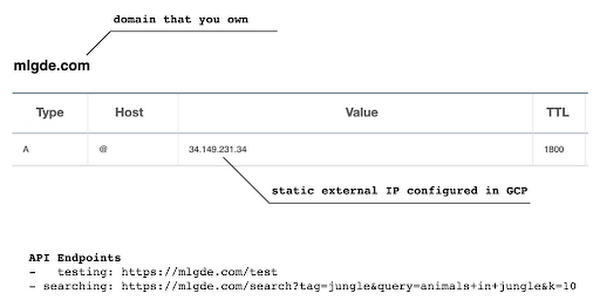
NAME ADDRESS/RANGE TYPE PURPOSE NETWORK REGION SUBNET STATUSgde 34.149.231.34 EXTERNAL IN_USE
Then, the IP address has to be mapped to the domain. Figure 3 is a screenshot of a dashboard from where we got the mlgde.com domain. It clearly shows mlgde.com is mapped to the static external IP address configured in GCP.
In case you’re wondering why we didn’t deploy this application on App Engine, well that is because of the compute needed to execute the CLIP model. App Engine instance won’t fit in that regime. We could have also incorporated compute-heavy capabilities via a VPC Connector. That is a design choice that you and your team would need to consider. In our experiments, we found the GKE deployment to be easier and suitable for our needs.
Infrastructure for the CLIP model
As mentioned earlier, at the core of our application is the CLIP model. It is computationally a bit more expensive than the regular deep learning models. This is why it makes sense to have the hardware infrastructure set up accordingly to execute it. We ran a small benchmark in order to see how a GPU-based environment could be beneficial here.
We ran the CLIP on a Tesla P100-based machine and also on a standard CPU-only machine 1000 times. The code snippet below is the meat of what we executed:
DEVICE = "cuda" if torch.cuda.is_available() else "cpu"start_time = time.time()for _ in range(1000):with torch.no_grad():model = model.to(DEVICE)inputs = processor(text=[semantic_search_phrase],images=all_images, return_tensors="pt", padding=True)inputs = inputs.to(DEVICE)outputs = model(**inputs)end_time = time.time() - start_timeprint(f"Total time: {end_time:.3f} seconds.")
As somewhat expected, with the GPU, the code took 13 minutes to complete execution. With no GPU, it took about 157 minutes.
It is uncommon to leverage GPUs for model prediction because of cost restrictions, but sometimes we have to access GPUs for deploying a big model like CLIP. We configured a GPU-based cluster on GKE and compared the performance differences with and without it. It took about 1 second to handle a request with GPU and MemoryStore cache while it took more than 4 seconds with MemoryStore only (without the GPUs).
For the purposes of this post, we used a CPU-based cluster on Kubernetes. But It is easy to configure GPU usage in a GKE cluster. This document shows you how to do so. For a short summary, there are two steps. First, a node should be configured with GPUs when creating a GKE cluster. Second, GPU drivers should be installed in GKE nodes. You don’t need to visit and manually install GPU drivers for each node by yourself. Rather you can simply apply the DaemonSet resource to GKE as described here.
Setting up MemoryStore
In this project, we first query the general concept of images to Pixabay, then we filter the images with a semantic query using CLIP. It means we can cache the initially retrieved images from Pixabay for the next specific semantic query. For instance, you may want to search with “gentleman wearing tie” at first, then you may want to retry searching for “gentleman wearing glass”. In this case, the base images remain all the same, so they could be stored in a cache server like Redis.
MemoryStore is a GCP service wrapping the Redis which is an in-memory data store, so you can simply use a standard Redis Python package for accessing it. The only thing to be careful about when provisioning a MemoryStore Redis instance is to make sure it is in the same region where your GKE cluster or Compute Engine instance is.
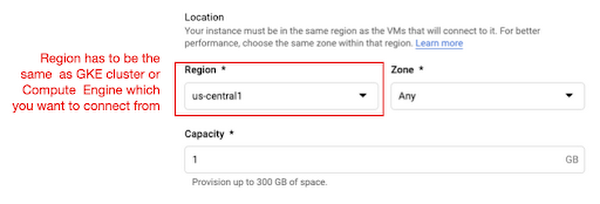
The code snippet below shows how to make a connection to the Redis instance in Python. Nothing specific to GCP, but you only need to be aware of the usage of the standard redis-py package.
# REDISHOST is the IP address to the MemoryStore instanceredis_host = os.environ.get("REDISHOST", "localhost")redis_port = int(os.environ.get("REDISPORT", 6379))redis_client = redis.StrictRedis(host=redis_host, port=redis_port)
After creating a connection, you can store and retrieve data from MemoryStore. There are more advanced use cases of Redis, but we only used exists, get, and set methods for the demonstration purpose. These methods should be very familiar if you know maps, dictionaries, or other similar data structures. For the code portion that uses Redis-related utilities, please refer to the Searcher Python class we discussed in an earlier section.
In the URLs below, you can find side-by-side comparisons of using MemoryStore:
- Without MemoryStore: https://youtu.be/7B88Eyrd-4s
- With MemoryStore (1st try): https://youtu.be/LE6xeEIRuMM
- With MemoryStore (2nd try): https://youtu.be/rRfK17sdk84
Putting everything together
All that’s left now is to collate the different components we developed in the sections above and deploy our application with a frontend. All the frontend-related code is present here.
- The front-end application is written in the Flutter development kit. The main screen contains two text fields for queries to Pixabay and CLIP model respectively. When you click the “Send Query” button, it will send out a RestAPI request to the server. After receiving the result back from the server, the retrieved images from the semantic query will be displayed at the bottom section of the screen.
- Please note that a Flutter application can be deployed to various environments including desktop, web, iOS, and Android. In order to keep as simple as possible, we chose to deploy the application to the GitHub Pages. Whenever there is any change to a client-side source directory, the GitHub Action will be triggered to build a web page and deploy the latest version to the GitHub Pages.
Our final application is deployed here and it looks like so:
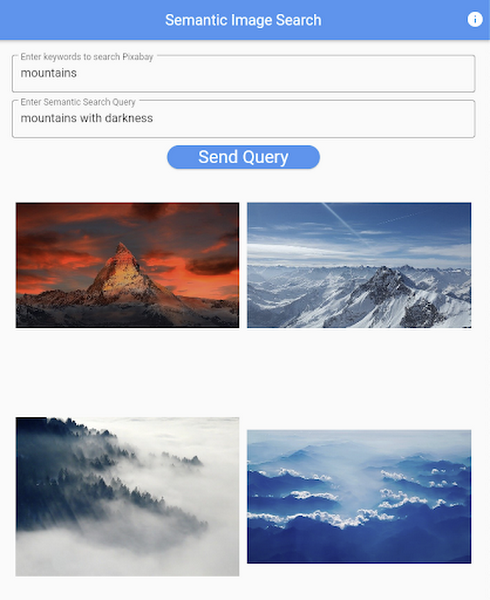
Note that due to constraints, the above-mentioned URL will only be live for one or two months.
It is also possible to redeploy the back-end application with a GitHub Action.
- The very first step is to craft a Dockerfile like below. Since Python is a scripting language, and there are lots of heavy packages that the application is dependent on, it is important to cache the steps. For instance, installing the dependencies should be separated from other commands.
FROM pytorch/pytorch:latestWORKDIR /app# install the dependenciesCOPY requirements.txt requirements.txtRUN pip install -r requirements.txtCOPY . .# set up environment variablesENV PIXABAY_API_KEY="..."ENV REDIS_IN_USE="true"ENV REDISHOST="..."# expose port that Flask app is listening onEXPOSE 8080# run the Flask appCMD [ "python3", "main.py" ]
- With the Dockerfile defined, we can use a GitHub Action like this for automatic deployment.
Edge cases
Since the CLIP model is pre-trained on a large corpus of image and text pairs it’s likely that it may not generalize well to every natural language query we throw at it. Also, because we are limiting the number of images on which the CLIP model can operate, this somehow restricts the expressivity of the model.
We may be able to improve the performance for the second situation by increasing the number of images to be pre-fetched and by indexing them into a low-cost and high-performance database like Datastore.
Costs
In this section, we wanted to provide the readers a breakdown of the costs they might incur in order to consume the various services used throughout the application.
- Frontend hosting
- The front-end application is hosted on GitHub Pages, so there is no expenditure for this.
- Compute Engine
- With an e2-standard-2 instance type without GPUs, the cost is around $48.92 per month. In case you want to add a GPU (NVIDIA K80), the cost goes up to $229.95 per month.
- MemoryStore
- The cost for MemoryStore depends on the size. With 1GB of space, the cost is around $35.77 per month, and whenever you add more GBs the cost will be doubled.
- Google Kubernetes Engine
- The monthly cost for a 3 node GKE cluster with n2-standard-2 (vCPUs: 2, RAM: 8GB without GPUs) is about $170.19. If you add one GPU (NVIDIA K80) to the cluster, the cost goes up to $835.48.
While you may think that is a lot cost-wise, it is good to know that Google gives away free $300 credits when you create a new GCP account. It is still not enough for leveraging GPUs, but it is enough to learn and experiment with GKE and MemoryStore usage.
Conclusion
In this post, we walked through the components needed to build a basic image search utility for natural language queries. We discussed how these different components are connected to each other. Our image search API is able to utilize caching and was deployed on a Kubernetes cluster using GKE. These elements are essential when building a similar service to cater to a much bigger workload. We hope this post will serve as a good starting point for that purpose. Below are some references on similar areas of work that you can explore:
- Building a real-time embeddings similarity matching system
- Detecting image similarity using Spark, LSH and TensorFlow
Acknowledgments: We are grateful to the Google Developers Experts program for supporting us with GCP credits. Thanks to Karl Weinmeister and Soonson Kwon of Google for reviewing the initial draft of this post.
More Relevant Stories for Your Company

How TapClicks’ Google Cloud Migration Makes Life Easy for Marketers
Editor’s note: In this blog post we learn how TapClicks migrated to Google Cloud to offer their marketing customers a unified platform for data management, operations, insights, and analysis. TapClicks is a smart marketing cloud, powered by data, that unifies our customer’s marketing. By choosing to migrate our core applications last

Target Leverages Google Cloud to Create Market-defining Online Experience
In the hyper-competitive world of online retail sales, ease-of-use and transaction speed can make or break business outcomes. However, a few years ago US Retail giant Target was going through a period of uncertainty. While the company had over 1800 stores across the US with an estimated 85% of US

Apigee and Vision API: ICICI Prudential Life Insurance’s Journey of Speeding Document Processing
Google Cloud results Helps enable instant document approval with optical character recognition by Vision APIProcesses 100,000 documents in 20 minutes with automated document processing product Recognic, powered by Vision API and ApigeeHelps increase the number of applications processed by 30% within the same timeframe The insurance landscape in India has seen


Introduction to Cloud Shell Editor
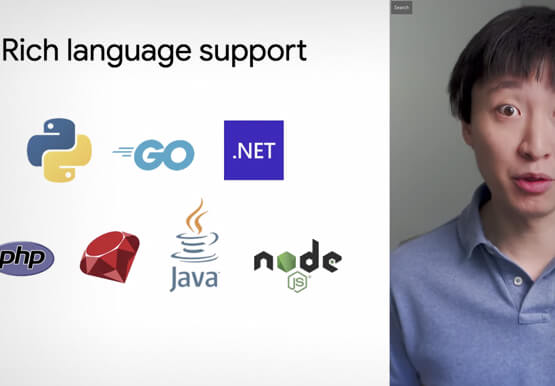
Watch the video to understand how Google's Cloud Shell Editor and its powerful features-packed environment can streamline your development workflows.
