





Serverless for Startups, the Best Way to Succeed: Expert Says

7028
Of your peers have already read this article.
1:30 Minutes
The most insightful time you'll spend today!
As Google Cloud has become a choice for more startups, I’ve experienced an increase in founders asking how they should think about cloud services. Though each startup is different and requirements may vary across industries and regions, I’ve seen a few core best practices that help startups to succeed—as well as several traps to avoid.
For example, If you go with a public cloud provider, you’re ideally not starting from ground zero like you would running your own data center, but it’s important not to introduce similar complexity in a virtualized environment. Just because you’re using public cloud infrastructure doesn’t mean you want to manage it.
Instead, you want to leverage platforms that abstract away complexity so your team can focus on delivering value to customers. That’s where serverless comes in. Serverless platforms are fully managed by the provider, offering automatic scaling for workloads, as well as provisioning, configuring, patching, and management of servers and clusters. Freed from these resource-intensive tasks, your technical talent can focus on the things that differentiate your business, not on IT curation.
This applies to not only running stateless applications, but also managing and analyzing data. You should be collecting data points about which features are most popular on your platform, what people are buying, the types of activities that help your customers get their jobs done, and so on. This information is essential to building and executing on a product roadmap that will serve your customers. However, it’s not enough to collect this data, you need to make your data accessible, secure, and easy for your team to analyze—so where do you run and host it?
On Google Cloud, this is where options like Spanner and Cloud SQL can play a large role, as can BigQuery for analysis. You won’t have to worry about standing up infrastructure or patching servers—you can just stream your data to our data management platforms, where it’s available whenever someone needs to run a query. By leveraging a serverless architecture, your startup can be data-driven without having to invest in the traditional complexity of database administration and management—and that can significantly change your playing field.
Serverless is just one of the factors you should consider as you build out your tech stack. To hear my thoughts on a range of other topics relevant to startups — such as security, cloud credits, and the differences among managed services — check out the below video or visit our Build and Grow page.
New to Cloud Functions? Here’s What You Need to Learn

3272
Of your peers have already read this article.
1:00 Minutes
The most insightful time you'll spend today!
Cloud Functions is a fully managed event-driven serverless function-as-a-service (FaaS). It is a small piece of code that runs in response to an event. Because it is fully managed, developers can just write the code and deploy it without worrying about managing the servers or scaling up/down with traffic spikes. It is also fully integrated with Cloud Operations for observability and diagnosis. Cloud Functions is based on an open source FaaS framework which makes it easy to migrate and debug locally.
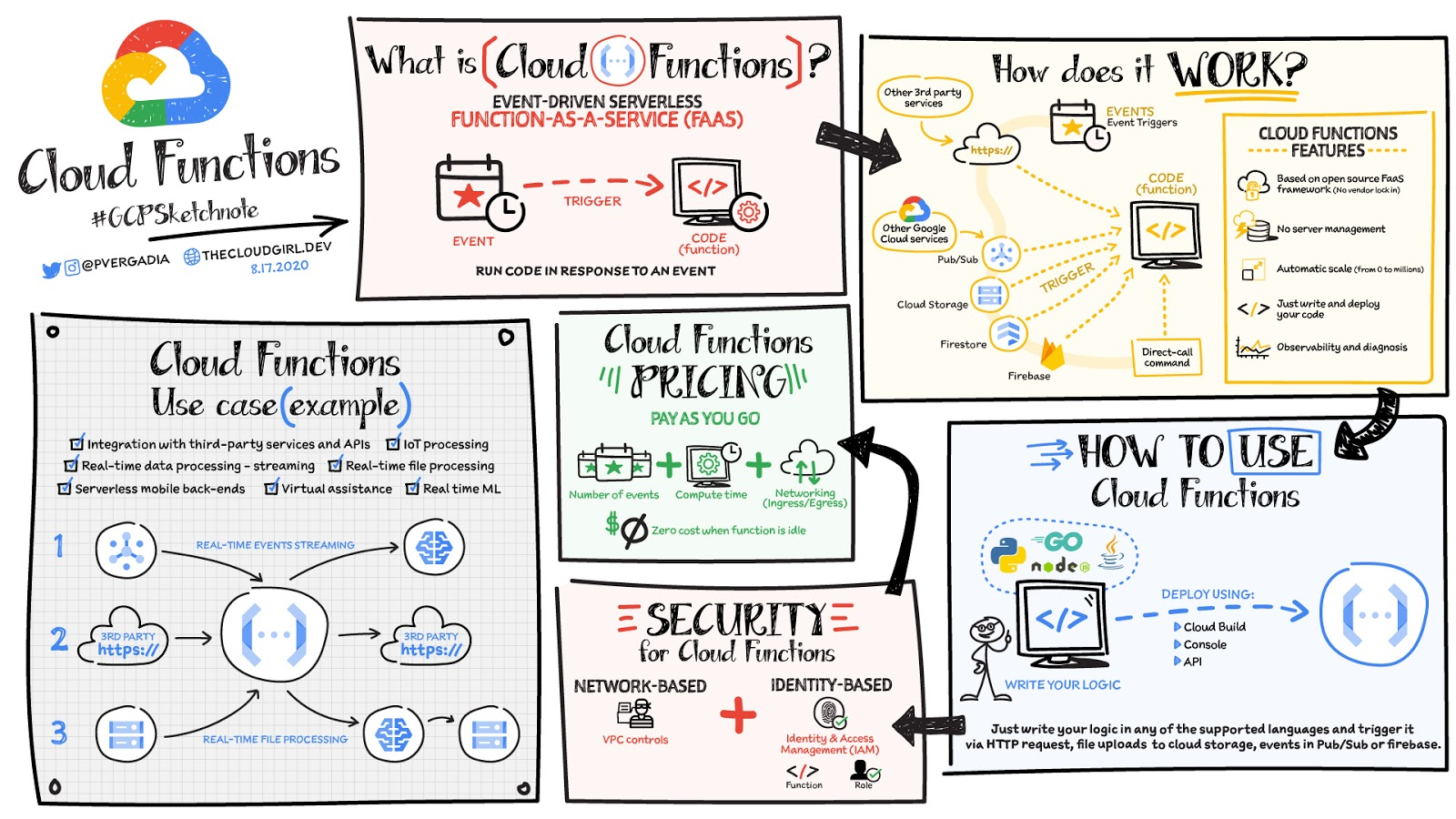
To use Cloud Functions, just write the logic in any of the supported languages (Go, Python, Java, Node.js, PHP, Ruby, .NET), deploy it using the console, API or Cloud SDK and then trigger it via HTTP(s) request from any service, for example: file uploads to Cloud Storage, events in Pub/Sub or Firebase, or even direct call via Command Line Interface CLI.
There is a generous free tier and the pricing is based on number of events, compute time, memory and ingress/egress requests and costs nothing if the function is idle. For security, using Identity and Access Management IAM you can define which services or personnel can access the function and using the VPC controls you can define network based access.
Cloud Functions use cases
Some Cloud Functions use cases include:
- Integration with third-party services and APIs
- Asynchronous workloads like lightweight ETL
- Lightweight APIs and webhooks
- IoT processing and update of the sensors/devices in the field
- Real-time file processing for use cases such as media transcoding or resizing as soon as the file is uploaded in Google Cloud Storage.
- Real-time ML solutions for use cases such as media translation or image recognition for files uploaded in GCS.
- Backend for chat applications and mobile apps.
Firebase Functions and Cloud Functions, are they different?
If you are a Firebase developer, you’d probably use Firebase Functions. Those are created from the Firebase dashboard / website. Both Cloud Functions and Firebase Functions can do the same things, they just have slightly different signatures and slightly different ways of deploying. Firebase Functions have a local emulator, which Cloud Functions uses the Functions Framework.
For a more in-depth look into Cloud Functions check out the documentation. Once you’ve got your Function up and running, check out some tips and tricks.https://www.youtube.com/embed/LTMChfWBHb0?enablejsapi=1&
For more #GCPSketchnote, follow the GitHub repo. For similar cloud content follow me on Twitter @pvergadia and keep an eye out on thecloudgirl.dev

3701
Of your peers have already downloaded this article
5:23 Minutes
The most insightful time you'll spend today!
APIs power all digital marketing channels and the apps we use today. APIs are a window on your company’s digital assets, exposing them so developers and partners can build mobile apps and become part of your innovation engine.
Thanks to the open API economy, you can build mobile apps that use a mix of APIs; you can combine location APIs with targeted promotions, or map your morning run with a calorie counter. Wrapping an API around your digital assets gets you into the game and builds value that wins customer loyalty and revenue. Marketing is about highlighting value, and promoting that value to customers.
This eBook highlights how APIs are evolving as the business technology that brings the CIO and CMO together. They bridge the gap between what the CMO needs to create value for customers and what the CIO needs to deliver a platform for a digital business. With alignment in place and technology that’s purpose-built for the requirements of the digital world, the potential to grow and succeed is limitless.
GCP Launches Datastream, A Serverless Change Data Capture and Replication Service

5600
Of your peers have already read this article.
1:30 Minutes
The most insightful time you'll spend today!
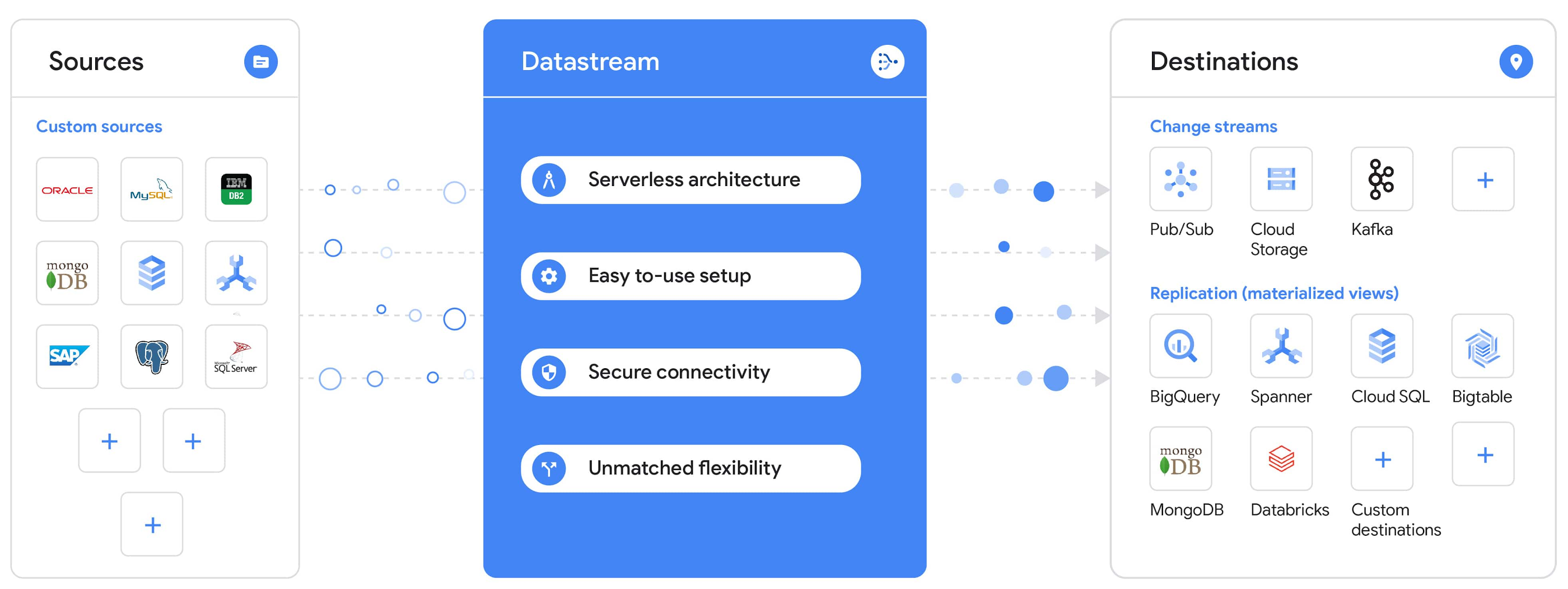
Today, we’re announcing Datastream, a serverless change data capture (CDC) and replication service, available now in preview. Datastream allows enterprises to synchronize data across heterogeneous databases, storage systems, and applications reliably and with minimal latency to support real-time analytics, database replication, and event-driven architectures. You can now easily and seamlessly deliver change streams from Oracle and MySQL databases into Google Cloud services such as BigQuery, Cloud SQL, Google Cloud Storage, and Cloud Spanner, saving time and resources and ensuring your data is accurate and up-to-date.
“Global companies are demanding change data capture to provide replication capabilities across disparate data sources, and provide a real-time source of streaming data for real-time analytics and business operations,” says Stewart Bond, Director, Data Integration and Intelligence Software Research at IDC.
However, companies are finding it difficult to realize these capabilities because commonly used data replication offerings are costly, cumbersome to set up, and require significant management and monitoring overhead to run flexibly or at scale. This leaves customers with a difficult-to-maintain and fragmented architecture.
Datastream’s differentiated approach
Datastream is taking on these challenges with a differentiated approach. Its serverless architecture seamlessly and transparently scales up or down as data volumes shift in real time, freeing teams to focus on delivering up-to-date insights instead of managing infrastructure. It also provides the streamlined customer experience, ease of use, and security that our customers have come to expect from Google Cloud, with private connectivity options built into the guided setup experience.
Datastream integrates with purpose-built and extensible Dataflow templates to pull the change streams written to Cloud Storage, and create up-to-date replicated tables in BigQuery for analytics. It also leverages Dataflow templates to replicate and synchronize databases into Cloud SQL or Cloud Spanner for database migrations and hybrid cloud configurations.
Datastream also powers a Google-native Oracle connector in Cloud Data Fusion’s new replication feature for easy ETL/ELT pipelining. And by delivering change streams directly into Cloud Storage, customers can leverage Datastream to implement modern, event-driven architectures.
Customers tell us about the benefits they’ve found using Datastream. That includes Schnuck Markets, Inc., “Leveraging Datastream, we’ve been able to replicate data from our on-premises databases to BigQuery reliably and with little impact to our production workloads. This new method replaced our batch processing and allowed for insights to be leveraged from BigQuery quicker,” says Caleb Carr, principal technologist from Schnuck Markets. “Furthermore, implementing Datastream removed the need for our analytics group to reference on-premises databases to do their work and support our business users.”
Cogeco Communications, Inc. used Datastream to also realize the value of low-latency data access. “Datastream unlocked new customer interaction opportunities not previously possible by enabling low-latency access in BigQuery to our operational Oracle data.” says Jean-Lou Dupont, Senior Director, Enterprise Architecture, Cogeco Communications, Inc. “This streamlined integration process brings data from hundreds of disparate Oracle tables into a unified data hub. Datastream enabled us to achieve this with 10X time and effort efficiency.”
In addition, Major League Baseball (MLB) used Datastream’s replication capabilities to migrate their data from Oracle to Cloud SQL for PostgreSQL. “As we’re modernizing our applications, replicating the database data reliably out of Oracle and into Cloud SQL for PostgreSQL is a critical component of that process,” says Shawn O’Rourke, manager of technology at MLB. “Using Datastream’s CDC capabilities, we were able to replicate our database securely and with low latency, resulting in minimal downtime to our application. We can now standardize on this process and repeat it for our next databases, regardless of scale.”
Our partner HCL has worked with many organizations looking to get more out of their data and plan for the future. “HCL customers across every industry are looking for ways to extract more value out of their vast amounts of data,” says Siva G. Subramanian, Global Head for Data & Analytics at HCL Google Business Unit. “CDC plays a big part in the solutions we offer to our customers using Google Cloud. Datastream enables us to deliver a secure and reliable solution to our customers that’s easy to set up and maintain. CDC is a key and integrated part of Google Cloud Data Solutions.”
“Google Cloud’s new CDC offering, Datastream, is a differentiator for Google among hyperscale cloud service providers, by supporting replication of data from Oracle and MySQL databases into the Google Cloud environment using a serverless cloud-native architecture, which removes the burden of infrastructure management for organizations, and provides elastic scalability to handle real-time workloads,” says Stewart Bond, Director, Data Integration and Intelligence Software Research at IDC.
Datastream under the hood
Datastream reads CDC events (inserts, updates, and deletes) from source databases, and writes those events with minimal latency to a data destination. It leverages the fact that each database source has its own CDC log—for MySQL it’s the binlog, for Oracle it’s LogMiner—which it uses for its own internal replication and consistency purposes. Using Google-native, agentless, high-scale log reader technology, Datastream can quickly and efficiently generate change streams populated by events based on the database’s CDC log while minimizing performance impact on the source database.
Each generated event includes the entire row of data from the database, with the data type and value of each column. The original source data types, whether it’s, for example, an Oracle NUMBER type or a MySQL NUMERIC type, are normalized into Datastream unified types. The unified types represent a lossless superset of all possible source types, and the normalization means data from different sources can easily be processed and queried downstream in a source-agnostic way. Should a downstream system need to know the original source data type, it can perform a quick API call to Datastream’s Schema Registry, which stores up-to-date, versioned schemas for every data source. This also allows for in-flight downstream schema drift resolution as source database schemas change.
The generated streams of events, referred to as “change streams,” are then written as files, either in JSON or Avro format during preview or in other formats like Parquet in the future, into a Cloud Storage bucket organized by source table and event times. Files are rotated as table schemas change, so events in a single file always have the same schema, as well as on a configurable file size or rotation frequency setting. This way customers can find the best balance between the speed of data availability and the file size that makes the most sense for their business use case.
Through its integration with Dataflow, Datastream powers up-to-date, replicated tables for analytics over BigQuery, and for data replication and synchronization to Cloud SQL and Spanner. Datastream refers to these constantly updated tables as “materialized views.” They are kept up-to-date via Dataflow template-based upserts into Cloud SQL or Spanner, or through consolidations into BigQuery. The consolidations, performed as part of the Dataflow template, take the change streams that are written into a log table in BigQuery, and push those changes into a final table, which mirrors the table from the source.

Datastream offers a variety of secure connectivity methods to sources, so your data is always safe in transit. And with its serverless architecture, Datastream can scale up and down readers and processing power to seamlessly keep up with the speed of data and ensure minimal latency end to end. As data volumes decrease, Datastream automatically scales back down—the result is a “pay for what you use” pricing model, where you never have to pay for idle machines or worry about bottlenecks and delays during data peaks.
Get started with Datastream
Datastream, now available in preview, supports streaming change data from Oracle and MySQL sources, hosted either on-premises or in the cloud, into Cloud Storage. You can start streaming your data today for $2 per GB of data processed by Datastream.
To get started, head over to the Datastream area of your Google Cloud console, under Big Data, and click Create Stream. There you can:
- Initiate stream creation, and see what actions you need to take to set up your source and destination for successful streaming.
- Define your source and destination, whose connectivity information is saved as connection profiles you can re-use for other streams. Sources support multiple connectivity options, with both private and public connectivity options to suit your business needs.
- Select the source data you’d like to stream, and which you’d like to exclude.
- Test your stream to ensure it will be successful when you’re ready to go.
Start your stream and your database’s CDC data will start to flow to your Cloud Storage bucket! From there you can integrate with Dataflow templates to load data into BigQuery, Spanner, or Cloud SQL. Datastream’s preview is supported in us-central1, europe-west1, and asia-east1, with additional regions coming soon.https://www.youtube.com/embed/FZG4w4Vbj38?enablejsapi=1&
Datastream will become generally available later this year, and will soon expand its support to also include PostgreSQL and SQL Server as sources, as well as out-of-the-box integration with BigQuery for easy delivery of up-to-date replicated tables for analytics, and message queues like Pub/Sub for real-time change stream access.
For more resources to help get you started with change streaming, check out the Datastream documentation.
Ensuring Reliability in a DevOps World: Insights from the 2022 State of DevOps Report

2673
Of your peers have already read this article.
3:30 Minutes
The most insightful time you'll spend today!
When a software change is deployed — after being designed, coded, tested, packaged, and tested some more — a journey comes to an end. At the same time, a new journey begins: your customer’s relationship with your service. It’s here, in the domain of operations, that abstract risks like launch schedule slippage give way to tangible risks like lost revenue, degraded trust, and tarnished reputation. Only when it’s available to users can software contribute to (or threaten!) the success of your organization. And so, throughout the past several years, the DevOps Research and Assessment (DORA) project has incrementally deepened our research into the reliability of services, through and beyond deployment, into ongoing operation.
Reliability is a broadly defined term, which refers to a team’s ability to meet their users’ expectations — for software services, it may encompass aspects of availability, latency, correctness, or other characteristics that influence the consistency and quality of user experience. Google’s practice of Site Reliability Engineering (SRE), which has been embraced and extended by a global community of reliability engineering practitioners, is an approach to operations that prioritizes user-oriented measurement, shared responsibility, and collaborative, blameless learning. Starting with the 2021 Accelerate State of DevOps Report, we began asking survey respondents detailed questions about reliability engineering in their organizations. We continued and expanded our investigation in 2022, and found further evidence that modern reliability engineering is widespread: a majority of respondents report that they employ SRE-style practices. With this extensive body of data to draw from, this year we pushed further into analyses of the impact of reliability and its interaction with other dynamics present in our model of technology’s influence on organizational success.
Reliability matters
When reliability is poor, improvements to software delivery have no effect — or even a negative effect — on organizational outcomes
Reliability is more than beneficial: it’s essential. As in prior studies, we find that software delivery performance (as measured by the “four key metrics” of change lead time, deploy frequency, change failure rate, and failure recovery time) is predictive of organizational performance. However, this year’s analysis revealed a previously unseen nuance: the influence of software delivery on organizational performance is predicated on reliability. When reliability is high, high-performance software delivery predicts better outcomes for the organization. But when reliability is poor, improvements to software delivery have no effect — or even a negative effect — on organizational outcomes. This affirms a long-held belief among reliability engineers: “reliability is the most important feature of any system.” If a service or product doesn’t meet its users’ reliability expectations, it’s counter-productive to rapidly ship flashy new features, because users can’t properly experience them. Software delivery relies on a foundation of reliability to create value.
https://storage.googleapis.com/gweb-cloudblog-publish/images/dora.max-900×900.jpg
Reliability is a journey
Any experienced leader will tell you that progress is rarely linear: even with a discipline like SRE, widely practiced and with demonstrable benefits, the path to success is unlikely to follow a straight line. DORA describes the “J-Curve” of organizational transformation, a phenomenon in which durable success comes only after setbacks and lessons learned. This year, we compared the depth of teams’ reliability engineering practices to their impact on the services they provide: will an investment in SRE produce greater reliability? The answer is yes, but with a significant caveat: not at first. Comparing reliability outcomes across a range of levels of SRE adoption, the J-Curve is plainly visible. A team which practices SRE only lightly — at the beginning of their SRE journey, perhaps — is likely not only to not benefit, but to regress in terms of the reliability experienced by their users. However, after these practices have more deeply permeated, an inflection point is reached and we see strong reliability benefits from continuing to grow the reliability engineering capability.
Knowing that it will likely take time to realize the benefits of adopting SRE, it may be tempting to start the process as soon, and as broadly, as possible. But we offer a note of caution here: organization-wide cultural transformation initiatives typically fail from overreach. We studied this and reported findings in a previous report. And even if you manage to beat the odds and fully adopt SRE across multiple teams simultaneously, the cost may be unacceptable: the setbacks in reliability that you are likely to experience early on, amplified across an entire organization all at once, could have catastrophic consequences. Therefore the SRE principle of gradual change should also be applied to the adoption of SRE itself.
Reliability is about people
Reflecting back on over a decade of SRE practice and theory, the Enterprise Roadmap to SRE underlines the importance of culture, suggesting that Site Reliability Engineering is in fact emergent from culture. Tools and frameworks are important; language is essential. But only a trustful, psychologically safe culture can support the environment of continuous learning which enables SRE to manage today’s complex, dynamic technology environments. DORA’s research in 2022 demonstrates the interplay between culture and reliability: we found that “generative” culture, as defined by the Westrum model, is predictive of higher reliability outcomes. And reliability has benefits not only for a system’s users, but for its makers as well: teams whose services are highly reliable are 1.6 times less likely to suffer from burnout.
Got a story to share about your DevOps journey? Submit it to Google Cloud’s 2022 DevOps Awards by January 31, 2023!
Develop for Compute Engine in your IDE with Cloud Code

2813
Of your peers have already read this article.
2:30 Minutes
The most insightful time you'll spend today!
When developing services with Compute Engine, our customizable compute service that lets you create and run virtual machines on Google’s infrastructure, you’ll likely find yourself frequently switching between your code editor, terminal, and the Google Cloud Console.
Cloud Code is a set of IDE plugins for popular IDEs like VS Code and IntelliJ that make it easier to develop applications that use Google Cloud services. And now, Cloud Code makes it easy to develop with Compute Engine by incorporating common workflows with your favorite IDE’s user interface.
Specifically, this new integration between Compute Engine and Cloud Code makes it easier to manage your commonly used virtual machines in the IDE, view details about them, connect to them over SSH, upload your application files to them, and view their logs.
Before you begin
Let’s demonstrate how the new integration works in Cloud Code for VS Code. Install Cloud Code for VS Code, and once installed, open its icon on the activity bar on the left and find “Compute Engine”:
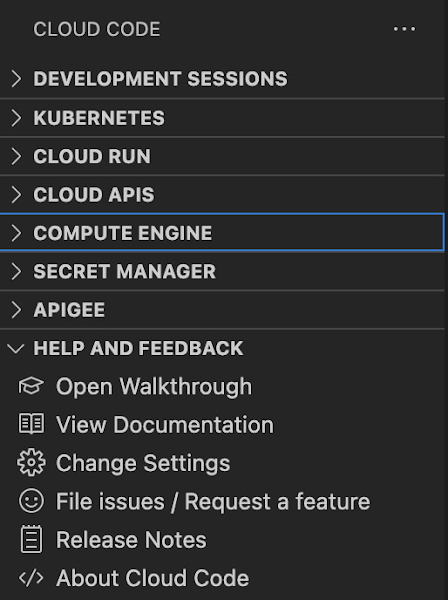
Cloud Code for Jetbrains IDEs (such as IntelliJ) could be installed similarly, and you will find Compute Engine in the list of your IDE tool windows.
View your VMs
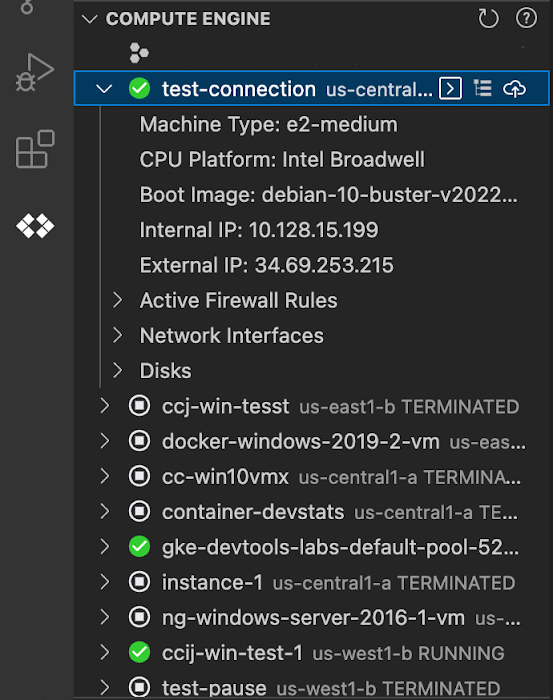
Cloud Code makes it easy to see all relevant VMs in your GCP project and view details needed to effectively work with the VM from the IDE. To start working with a Compute Engine VM in the IDE, navigate to Cloud Code’s new Compute Engine explorer. From there, you can see all the VMs in your current Cloud project. Clicking on a VM will display details such as machine type, boot image, IP address and more. You can also right click on a VM for a quick link to the Google Cloud Console where you can take additional action.
Connect to your VMs over SSH
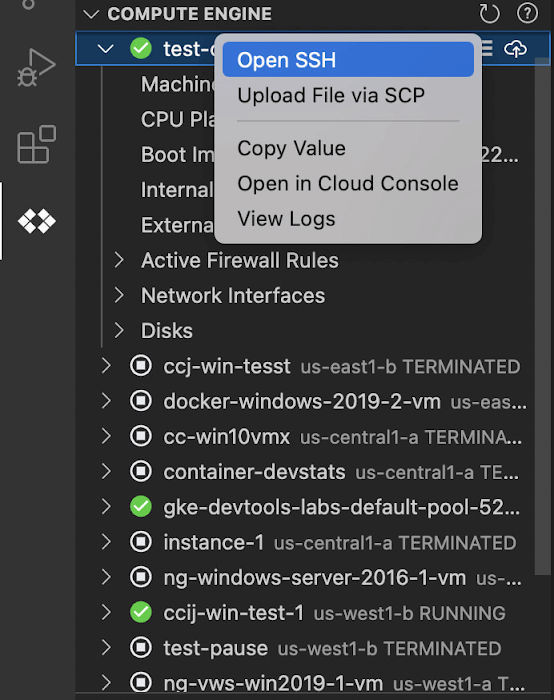
Once you’ve found the VM you want to work with, Cloud Code makes it easy to connect to that VM over SSH. Again, find the VM you want to connect to in Cloud Code’s Compute Engine explorer, right click it, and select “Open SSH”. Cloud Code will then establish an SSH connection from your IDEs terminal into the VM. If there’s any difficulty establishing a connection, Cloud Code can run a troubleshooting diagnostic to help resolve the issue.
Many organizations maintain VMs that don’t have a public IP address, making it difficult to establish an SSH connection to them. For those VMs that use Identity-Aware Proxy, Cloud Code can still securely connect to them over SSH, even without a public IP address.
Upload files to your VMs
You might want to try a debug version of your application, run a script, or try a new code in an environment identical to production, in this case on a development VM instance which might not have access to full source code or is not a part of your CI/CD pipeline. Cloud Code provides an easy way to upload your code files into a VM instance.
Find the VM you want to connect to in Cloud Code’s Compute Engine explorer, right click it, and select “Upload File via SCP”. Choose a file from your local system and Cloud Code will upload it to a VM instance using SCP. Once upload completes, Cloud Code offers to open a new SSH connection to access the files and work with them on a remote VM instance. Again, if there’s any difficulty establishing a connection, Cloud Code can run a troubleshooting diagnostic to help resolve the issue.
View your VM logs
As you’re working with your VM, you can right click it and select to view the VM instance logs. From Visual Studio Code this will open a logs viewer in the IDE. From IntelliJ, the logs viewer in the Cloud Console will be opened. If you’ve configured application logs to be collected with Cloud Logging, you can also view those in these logs viewers as well.
Get Started
We invite you to try out Compute Engine with Cloud Code to better streamline your development workflow. To learn more, check out the Compute Engine documentation for Visual Studio Code and JetBrains IDEs. If you’re new to development with IDEs, you can take the first step by installing Visual Studio Code or IntelliJ.
More Relevant Stories for Your Company

Learn to Easily Administer Multi-cluster Kubernetes Environs: Part 4 KRM Series
This is part 4 in a multi-part series about the Kubernetes Resource Model. See parts 1, 2, and 3 to learn more. Kubernetes clusters can scale. Open-source Kubernetes supports up to 5,000 Nodes, and GKE supports up to 15,000 Nodes. But scaling out a single cluster can only get you so far: if your cluster’s control plane

The Evolving Landscape of Multicloud: A Journey, Not a Destination
Editor's note: This post is part of an ongoing series on IT predictions from Google Cloud experts. Check out the full list of our predictions on how IT will change in the coming years. Prediction: Over half of all organizations using public cloud will freely switch their primary cloud provider

Partnering for a Healthier Tomorrow: Device Connect for Fitbit
Healthcare is at the beginning of a fundamental transformation to become more patient-centered and data-driven than ever before. We now have better access to healthcare, thanks to improved virtual care, while wearables and other tools have dramatically increased our ability to take control of our own health and wellness. Healthcare

BigQuery Omni: Your Solution for Multi-Cloud Geospatial Analytics
As we become increasingly reliant on technology to make decisions, geospatial data is becoming more critical than ever. It is a powerful resource that can be used to solve a variety of problems, from tracking the movement of goods, identifying interest areas and potential areas of disaster. Geospatial data incorporates
