





Transforming the Bank of Anthos App with Spring Cloud GCP 4.0
1554
Of your peers have already read this article.
3:30 Minutes
The most insightful time you'll spend today!
We’re excited to announce that Spring Cloud GCP version 4.0 is now generally available! In this post, we’ll be describing what the new major version has to offer, and demonstrating the process of using the migration guide on one of our reference architectures, Bank of Anthos.
What’s new?
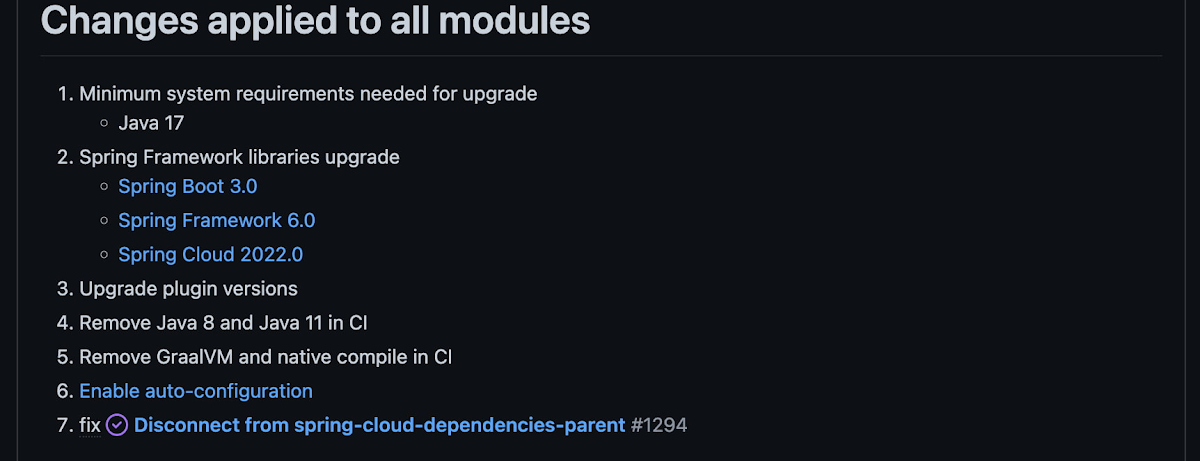
With this release, Spring Cloud GCP officially supports Spring Boot 3.x. However, this migration involves a number of breaking changes as outlined in the migration guide. The full list of changes made is available on Github, but the one of the most significant differences is that Java 17 is now a minimum requirement.
Another notable feature of this release is the addition of starter artifacts – Spring Boot starters for Google Cloud – that provide dependencies and auto-configurations for 80+ Google Client libraries. Just as the name suggests, these starters can serve as helpful starting points when working with a new client library. For now, they’re in preview.
These starters are not included in the BOM by default and need to be added as a dependency to your project before they can be used. For example, if you wanted to get started with Cloud Text-to-Speech, you would include the following:
<dependency>

    <groupId>com.google.cloud</groupId>

    <artifactId>google-cloud-texttospeech-spring-starter</artifactId>

    <version>4.0.0-preview</version>

  </dependency>
The upgrade process
We prepared a migration guide to help answer any questions involved with moving from 3.x to 4.x. Let’s follow those instructions to migrate Bank of Anthos.
We’ll start by cloning and building the application before the upgrade, according to the quickstart and development guide:
PROJECT_ID=<YOUR-PROJECT-ID>
gcloud services enable container --project ${PROJECT_ID}

git clone https://github.com/GoogleCloudPlatform/bank-of-anthos.git
cd bank-of-anthos/

gcloud services enable container.googleapis.com monitoring.googleapis.com \
  --project ${PROJECT_ID}

REGION=us-central1
gcloud container clusters create-auto bank-of-anthos \
  --project=${PROJECT_ID} --region=${REGION}

gcloud container clusters get-credentials bank-of-anthos \
  --project=${PROJECT_ID} --region=${REGION}

skaffold run --default-repo=gcr.io/${PROJECT_ID}/bank-of-anthos
With the environment set up for development, we’re ready to move on to the actual migration. The migration is already complete at time of writing, but here’s the full list of changes made:
- We began by checking the current Java, Spring Boot and Spring Cloud GCP versions.
- Our Java version is okay, but the other two are out of date, and will need to be updated.
We can also add the Spring Cloud GCP BOM to manage our versions going forward while we’re here.
- Our Java version is okay, but the other two are out of date, and will need to be updated.
- Then, in no particular order, we can make the following code changes:
- Remove the explicit type declarations from our ResponseEntity instantiations.
- Replace all javax.* imports with Jakarta.* counterparts, since Spring 3.0 makes use of Jakarta EE 9.0
With those changes in place, the app is upgraded and ready to re-deploy!
Live example
For a finished example of this migration, check out the Bank of Anthos repository on Github. It’s an excellent sample application that showcases a polyglot Java & Python app, served on Kubernetes and Google Cloud. All CI/CD and configurations are open source, so it may be instructive as you approach this migration.
Thanks for reading, and feel free to provide comments or feedback on Twitter, or in the issues section of the repository.
Conquering Hybrid API Management: Building The Perfect Team and Platform

2004
Of your peers have already read this article.
5:00 Minutes
The most insightful time you'll spend today!
Introduction
In our discussions with technology leaders from around the world for – The Digital Crunch Time: 2022 State of APIs and Applications – two themes emerged
#1 Cloud — and hybrid cloud specifically — is becoming a driving factor of success with 59% of respondents saying they were looking to increase their hybrid cloud adoption within the next 12 months.
#2 82% of organizations with a mature API strategy and higher API adoption reported increased efficiency, collaboration, and agility.
It’s clear that hybrid cloud – usually a combination of on-premise infrastructure (or private cloud) and a public cloud computing environment (like Google Cloud) – and APIs are becoming popular keys to success. The challenge now becomes – how to structure your teams and architect your platform to manage APIs at scale in hybrid environments?
In this two-part series, we’ll look at how successful organizations are managing APIs on a large scale across hybrid environments using Apigee. In this post we’ll look at how to structure the right team and set up the platform to help you thrive. In part 2 of this series, we will explore how to operate the platform with optimum clusters, scaling, and automation.
Why is it difficult to manage APIs at scale in hybrid environments?
As your business grows, it makes sense that you will need to scale and build more APIs to keep pace. This can mean thousands of APIs with tens of thousands of transactions per second. And these APIs are often operated across completely different business units with many development teams. Like with any large scale operation, building a central governance across these hundreds of APIs is extremely challenging.
Operating APIs in a hybrid environment offers a number of benefits — less latency, compliance with regulations etc., — but to get the most out of them, you need a clinical and pragmatic approach to solving the two challenges outlined below.
#1 How to structure your API teams?
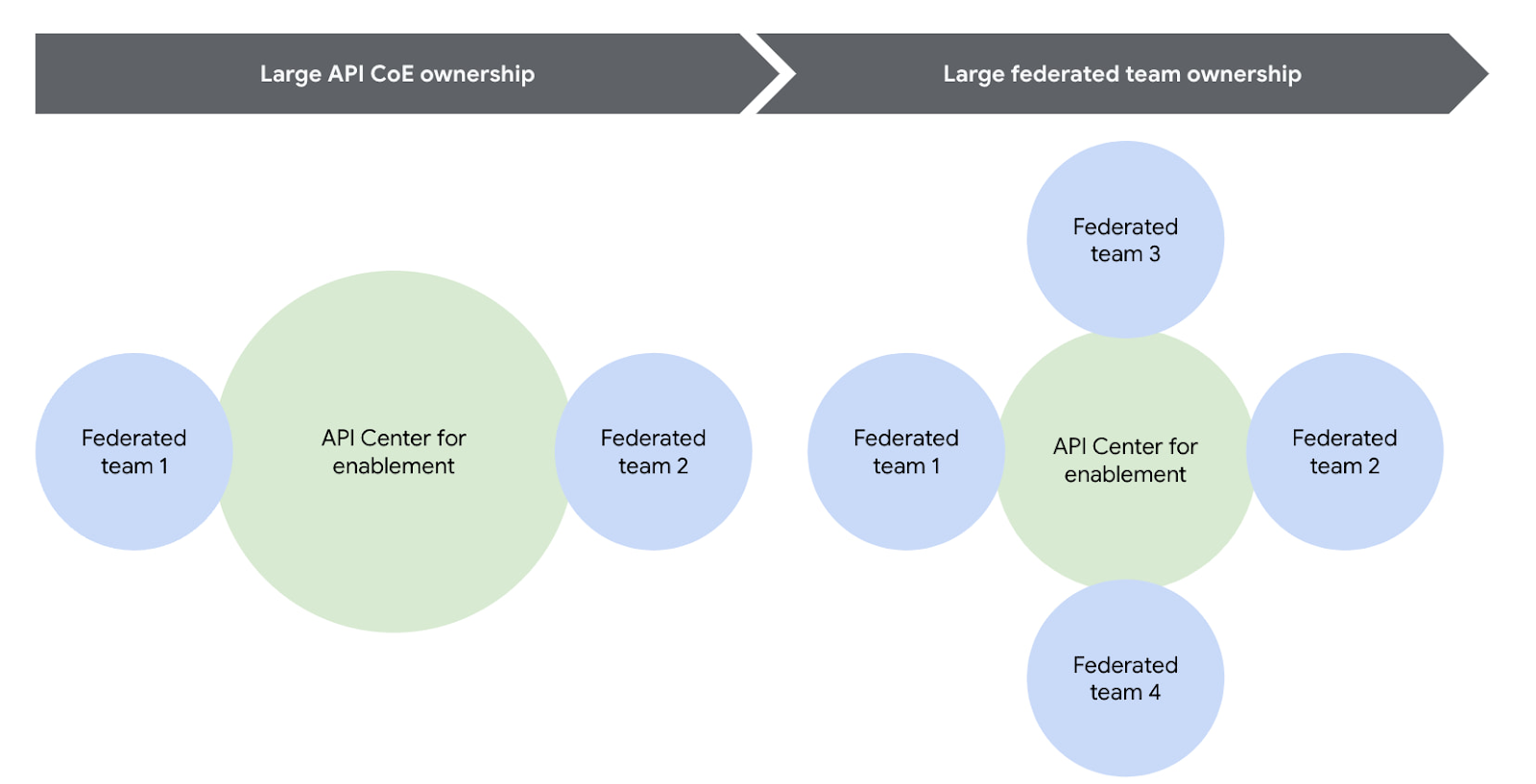
One of the most successful patterns when structuring your API teams is a Center for Enablement team. This team is made up of many federated API producer teams throughout the enterprise with one central team of deep subject matter experts. This central team builds out the guardrails for the API program, develops reusable content, helps automate things like the CI/CD pipeline, and delivers best practices.
Note that the level of implementation handled by the centralized team may vary. For example, they may have a full CI/CD pipeline to maintain, or they may simply provide templates for the federated dev teams to build their own pipeline. However implementation is coordinated, having this structure ensures a consistent API model with appropriate governance and security in place across the enterprise.
Another successful strategy is to reduce the size or redefine the role of the central teams over time. For example, one of our customers recently adopted a model where their largest business units are fully responsible for operating their own infrastructure using a GitOps model. In this case, the centralized team created the automation for installing and upgrading Apigee hybrid, but the business units themselves operated their own copy of the platform, allowing them complete autonomy. In this way, gradually increasing the autonomy for the federated teams will help avoid delivery bottlenecks while ensuring consistent governance.
You can visualize this change over time pretty easily using the following diagram.
#2 How to architect your platform?
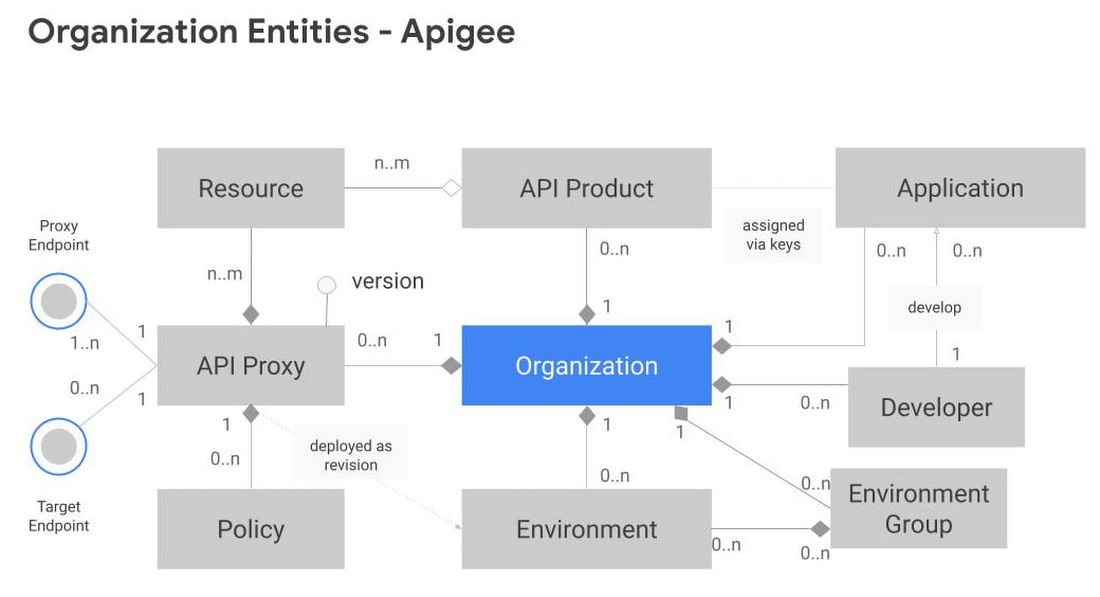
Another challenge is designing your Apigee organizations (top-level container that contains all your API proxies and related resources) and environments (software environment for creating and deploying API proxies). To tackle this, you first need to understand the relationship between different entities within an Apigee organization. Apigee organization is the top level entity – nothing shared between Apigee organizations. Using an organization in Apigee, customers can segregate resources and manage access to these resources based on their own requirements. In practice, this means that each Apigee organization has its own apps, API keys, developers, proxies, and so on. The diagram below provides a visual representation of how different entities in an Apigee organization interact with each other.
Another key factor to consider is the technical limits of the platform – designing around these limits leads to higher platform performance and stability.
In the design phase, it is vital to articulate fundamental requirements of your architecture and agree on these baseline principles with all the stakeholders involved. Some of these fundamental questions include:
- How many regions need to host runtimes?
- Host runtime instances for organizations that handle production traffic in at least 2 regions to meet aggressive uptime SLAs. During upgrades, ensure only one of these regions upgrades at a time.
- What are the steps in your Software Development Lifecycle (SDLC) and how does Apigee fit into it?
- Use Apigee organizations as the SDLC perimeter — such as a dev organization and a test organization — to give yourself the capacity for a large number of proxies. It is also common that the dev organization in this model has relatively permissive access for developers, allowing them to work more efficiently.
- What level of access or separation do you need between business units or development teams?
- Create separation between different teams by leveraging environments with conditional identity and access management to restrict access as necessary
- If your team is very large and you plan to have multiple organizations, you may want to divide the operational ownership for these different Apigee organizations among different teams in your enterprise while keeping them operating under the centralized team.
- In such a shared responsibility model, the largest consumers of the system stand up and operate their own instances. Teams with many APIs or distinct operational needs can use the automation from the central team to stand up and operate their own Apigee hybrid clusters. This reduces the burden on the centralized team while allowing business units to be self-sufficient and ensuring that the clusters are optimized to meet that team’s needs.
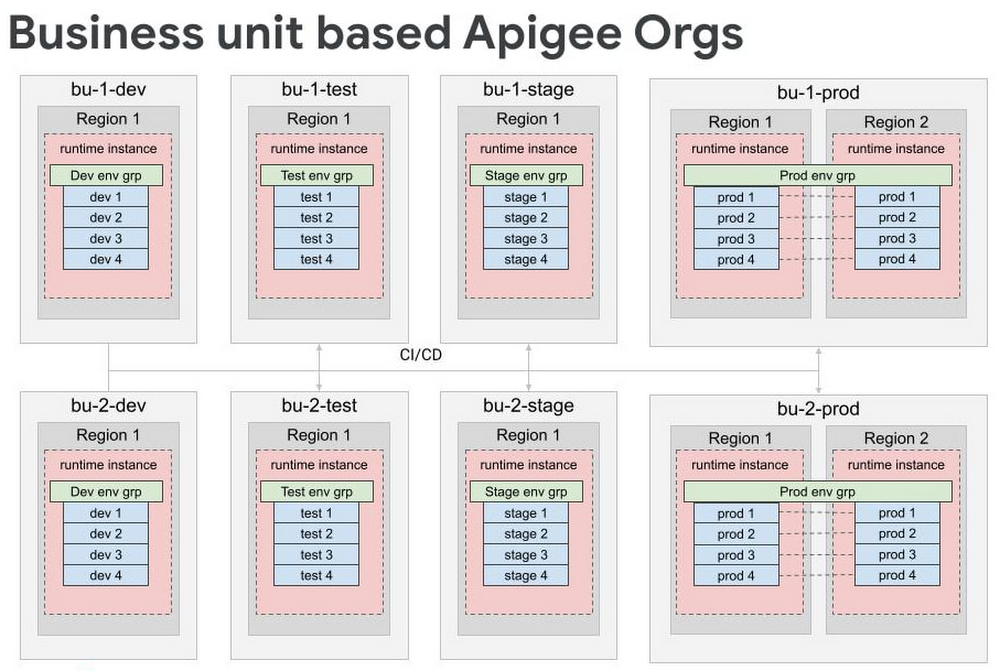
- For very large scale programs where additional separation is necessary, consider creating separate organizations for each business unit, each of which has the full complement of SDLC orgs. Some customers have this level of scale, and often it makes logical sense to divide up into different Apigee orgs because it’s rare that 5000 APIs are all related and used together.
By working off these baseline recommendations, you will come up with your own logical design of Apigee organizations and environments. Using Apigee organizations to represent your SDLC with business units — or functional areas or some other dividing mechanism — is a good way to design different environments.
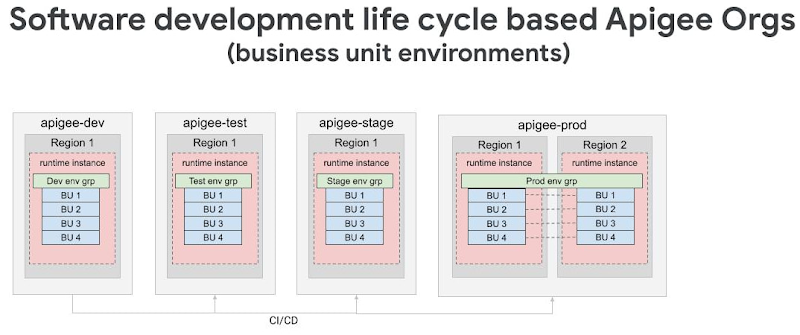
For large scale deployments — involving thousands of proxies — we recommend dividing organizations into different logical business units while still following the SDLC model. In many cases, only the largest business units will need their own organizations, and it is possible to have a shared organization that contains multiple business units.
Conclusion
Like with any large scale IT project, there isn’t one“correct” way to operate APIs in a hybrid cloud environment. Finding the right approach for your enterprise starts with knowing the organizational requirements and tailoring Apigee for your use case. In the next installment of this series, we will explore how to operate Apigee with the optimal resources (clusters, automation, and monitoring etc.) for a large scale hybrid API program.
Check out our documentation to learn more or start using Apigee hybrid.
Bigbasket: Delivering Groceries Across 25 Cities in India

7302
Of your peers have already read this article.
1:30 Minutes
The most insightful time you'll spend today!
When Bigbasket was founded in December 2011, it guaranteed to deliver goods within a one-hour delivery slot of its customers’ choosing or it would refund them 10 percent of their orders. The company also introduced an express service, delivering groceries within 90 minutes of an order being placed.
Bigbasket needed a mapping platform that could help it meet its delivery times, and offer a familiar interface to customers. MediaAgility, a digital consulting company, recommended Google Maps Platform to Bigbasket.
When customers use the Bigbasket mobile app to place orders, they select their locations on a Google Map. The prices and availability of groceries varies according to location, so a customer’s location determines the cost of the order and what can be ordered.
Google Maps Platform Results
- Bigbasket handles more than one million orders per month, and delivers in more than two dozen cities in India
- Bigbasket now has more than four million customers
- Orders are delivered on time, increasing customer loyalty
It is also used to determine driver routes. Bigbasket used the Maps Javascript API to build a web-based app for the company’s backend that tracks all orders and delivery progress. Dispatchers use the Directions API to match drivers with orders and customers, and the Distance Matrix API to get estimate the time of arrival for deliveries. As dispatchers track the progress of deliveries on the map, they can tweak routes as necessary.
“We’ve built Bigbasket from the ground up using Google Maps Platform. It makes sure we have the right customer locations and deliver to them on time. We couldn’t have started Bigbasket without Google Maps. It helps us to be fast and efficient, and make sure our customers get what they’ve ordered quickly,” said Pramod Jajoo, Chief Technology Officer, Bigbasket
How PLAID’S Multi-cloud Approach with Anthos Clusters on AWS Drives Higher Business Growth

5436
Of your peers have already read this article.
3:00 Minutes
The most insightful time you'll spend today!
Editor’s note: Today’s post comes from Naohiko Takemura, Head of Engineering, and Kosukex Oya, Engineer, both from Japanese customer experience platform PLAID. The company runs its platform in a multicloud environment through Anthos clusters on AWS and shares more on its experiences and best practices.
At PLAID, our mission is to maximize the value of people through data, and we are developing a range of products that focus on improving customer experience. Our core product is a customer experience platform, KARTE, that can analyze the behavior and emotions of website visitors and application users, enabling businesses to deliver relevant communications in real time. We make KARTE available as a service to functions such as human resources and industries such as real estate and finance, and run the platform in a multicloud environment to achieve high-speed response and meet availability requirements. This is where Anthos comes in.
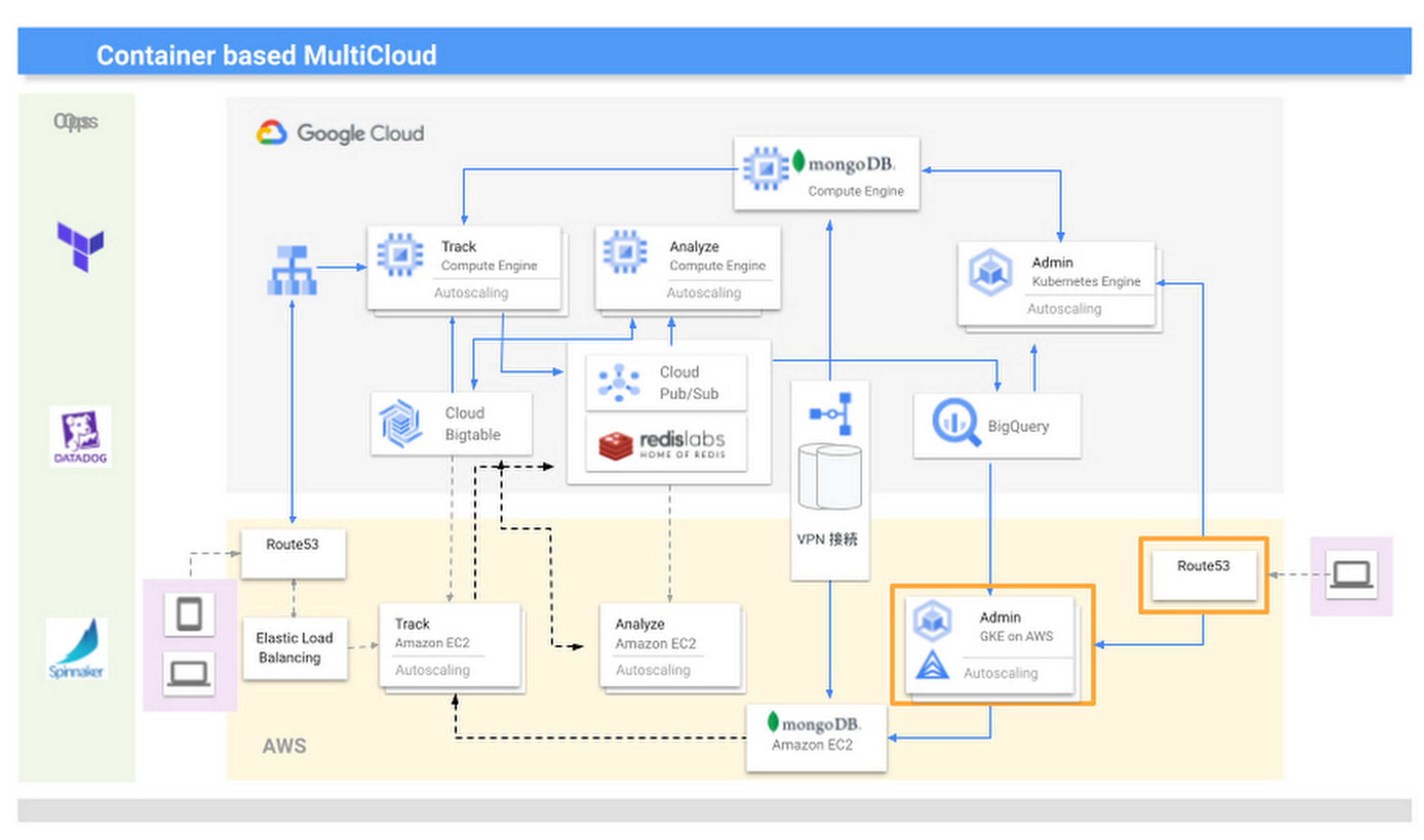
We introduced KARTE in 2015 and updated the system configuration in line with the addition of new functions and the need to increase scale. Our multicloud configuration is optimized through Anthos clusters on AWS, which give us access to the capabilities of Google Kubernetes Engine (GKE).
KARTE runs in two groups of server instances in each cloud; one group runs the management screens used by clients, and the other provides content for visitors to our website. In Google Cloud, the management system runs in GKE and content is delivered through Compute Engine.
We initially developed and operated the core of our services on another provider and from 2016 began to transition to Google Cloud due to its strong data processing capabilities. The products that handled big data, such as Cloud Bigtable and BigQuery, were attractive because they could handle data in real time and were compatible with KARTE. Now most functions, including peripheral aspects, run in Google Cloud, because we thought if we built a system centered on these products, it would become efficient to build other parts on Google Cloud.
While we considered migrating everything to Google Cloud, we decided to leverage its strengths alongside those of our existing provider, AWS. We felt a multicloud approach could create more opportunities and deliver higher growth than a mono-cloud environment.
We completed our move to a multicloud environment in 2017 and found that by building systems with almost the same content on two cloud services to leverage the strengths of each, we could reduce costs and improve performance and availability.
However, as KARTE grew, and the content of the service increased in complexity, we began to experience new problems. The increased load on the system due to an influx of in-house engineers from 2018 onwards impacted the scalability and development speeds of our conventional monolithic architecture running in virtual machines. We opted for an approach based on microservices and containerization, excluding the components that enabled real-time analysis as these had been modernized since initially being deployed in 2016, and the management screens, as the infrastructure running these did not require crisp tuning. Our key priority was to improve the ability of our engineers to deliver quickly.
From 2019, we turned to promoting microservices that make full use of container technology. When deciding to move from a target built on virtual machines to containerization, we evaluated the ease of use of GKE and decided to build in Google Cloud. At the same time, the number of systems with strict service level obligations was increasing, so to ensure higher availability, we considered running these in a multi cloud environment. The announcement of Anthos clusters on AWS at Google Cloud Next ‘19 in San Francisco provided an answer.
We had been wondering how to achieve the equivalent smooth operation of GKE in our AWS environment, and welcomed the Anthos clusters on AWS announcement. We consulted with a Google Cloud customer engineer through an early access program and quickly gained an opportunity to work with this version of Anthos. This allowed us to provide feedback and requests for improvement, and this paved the way for us to implement the product to take advantage of its functionality and future enhancements. With Google Cloud, we have been able to continue to interact closely with the development team to understand and provide input into the product roadmap.
We are now realizing the benefits of multicloud, including faster development speeds and higher availability. For businesses in general, we recommend they take a thoughtful approach to multicloud—while for us, multicloud is a useful mechanism that enables us to provide large-scale data analysis in real time, other businesses should consider whether multicloud is right for them and if so, the role of a technology like Anthos. They should also start small before ramping up. Moving forward, we are keen to see what other products Google Cloud is creating that can help drive our business to a higher level.
All About Cloud Run, its Scalability and Management Features

7380
Of your peers have already read this article.
3:00 Minutes
The most insightful time you'll spend today!
Mindful Containers is a fictitious company that is creating containerized microservice applications. They need a fully managed compute environment for deploying and scaling serverless containerized microservices. So, they are considering Cloud Run.
They are excited about Cloud Run because it abstracts away the cluster configuration, monitoring, and management so they can focus on building the features for their apps. Cloud Run is a fully-managed compute environment for deploying and scaling serverless containerized microservices.

What is Cloud Run?
Cloud Run is a fully-managed compute environment for deploying and scaling serverless HTTP containers without worrying about provisioning machines, configuring clusters, or autoscaling.
- No vendor lock-in – Because Cloud Run takes standard OCI containers and implements the standard Knative Serving API, you can easily port over your applications to on-premises or any other cloud environment.
- Fast autoscaling – Microservices deployed in Cloud Run scale automatically based on the number of incoming requests, without you having to configure or manage a full-fledged Kubernetes cluster. Cloud Run scales to zero— that is, uses no resources—if there are no requests.
- Split traffic – Cloud Run enables you to split traffic between multiple revisions, so you can perform gradual rollouts such as canary deployments or blue/green deployments.
- Custom domains – You can set up custom domain mapping in Cloud Run and it will provision a TLS certificate for your domain.
- Automatic redundancy – Cloud Run offers automatic redundancy so you don’t have to worry about creating multiple instances for high availability
How to use Cloud Run
With Cloud Run, you write your code in your favorite language and/or use a binary library of your choice. Then push it to Cloud Build to create a container build. With a single command—“gcloud run deploy”—you go from a container image to a fully managed web application that runs on a domain with a TLS certificate and auto-scales with requests.
How does Cloud Run work?
Cloud Run service can be invoked in the following ways:
HTTPS: You can send HTTPS requests to trigger a Cloud Run-hosted service. Note that all Cloud Run services have a stable HTTPS URL. Some use cases include:
- Custom RESTful web API
- Private microservice
- HTTP middleware or reverse proxy for your web applications
- Prepackaged web application
gRPC: You can use gRPC to connect Cloud Run services with other services—for example, to provide simple, high-performance communication between internal microservices. gRPC is a good option when you:
- Want to communicate between internal microservices
- Support high data loads (gRPC uses protocol buffers, which are up to seven times faster than REST calls)
- Need only a simple service definition you don’t want to write a full client library
- Use streaming gRPCs in your gRPC server to build more responsive applications and APIs
WebSockets: WebSockets applications are supported on Cloud Run with no additional configuration required. Potential use cases include any application that requires a streaming service, such as a chat application.
Trigger from Pub/Sub: You can use Pub/Sub to push messages to the endpoint of your Cloud Run service, where the messages are subsequently delivered to containers as HTTP requests. Possible use cases include:
- Transforming data after receiving an event upon a file upload to a Cloud Storage bucket
- Processing your Google Cloud operations suite logs with Cloud Run by exporting them to Pub/Sub
- Publishing and processing your own custom events from your Cloud Run services
Running services on a schedule: You can use Cloud Scheduler to securely trigger a Cloud Run service on a schedule. This is similar to using cron jobs. Possible use cases include:
- Performing backups on a regular basis
- Performing recurrent administration tasks, such as regenerating a sitemap or deleting old data, content, configurations, synchronizations, or revisions
- Generating bills or other documents
Executing asynchronous tasks: You can use Cloud Tasks to securely enqueue a task to be asynchronously processed by a Cloud Run service. Typical use cases include:
- Handling requests through unexpected production incidents
- Smoothing traffic spikes by delaying work that is not user-facing
- Reducing user response time by delegating slow background operations, such as database updates or batch processing, to be handled by another service,
- Limiting the call rate to backend services like databases and third-party APIs
Events from Eventrac: You can trigger Cloud Run with events from more than 60 Google Cloud sources. For example:
- Use a Cloud Storage event (via Cloud Audit Logs) to trigger a data processing pipeline
- Use a BigQuery event (via Cloud Audit Logs) to initiate downstream processing in Cloud Run each time a job is completed
How is Cloud Run different from Cloud Functions?
Cloud Run and Cloud Functions are both fully managed services that run on Google Cloud’s serverless infrastructure, auto-scale, and handle HTTP requests or events. They do, however, have some important differences:
- Cloud Functions lets you deploy snippets of code (functions) written in a limited set of programming languages, while Cloud Run lets you deploy container images using the programming language of your choice.
- Cloud Run also supports the use of any tool or system library from your application; Cloud Functions does not let you use custom executables.
- Cloud Run offers a longer request timeout duration of up to 60 minutes, while with Cloud Functions the requests timeout can be set as high as 9 mins.
- Cloud Functions only sends one request at a time to each function instance, while by default Cloud Run is configured to send multiple concurrent requests on each container instance. This is helpful to improve latency and reduce costs if you’re expecting large volumes.
Pricing
Cloud Run comes with a generous free tier and is pay per use, which means you only pay while a request is being handled on your container instance. If it is idle with no traffic, then you don’t pay anything.
Conclusion
After learning about the ease of set up, scalability, and management capabilities of Cloud Run the Mindful Containers team is using it to deploy stateless microservices. If you are interested in learning more, check out the documentation.https://www.youtube.com/embed/oR4btKLRdn4?enablejsapi=1&
For more #GCPSketchnote, follow the GitHub repo. For similar cloud content follow me on Twitter @pvergadia and keep an eye out on thecloudgirl.dev
Google Cloud Partnership Helps Lowe’s SRE Team Achieve 20X More Releases Per Month
5528
Of your peers have already read this article.
2:00 Minutes
The most insightful time you'll spend today!
Editor’s note: Today we hear from the Lowe’s SRE team. They share about how they have been able to increase the number of releases they can support by adopting Google’s Site Reliability Engineering (SRE) framework and leveraging their partnership with Google Cloud.
At Lowe’s, we’ve made significant progress in our multiyear technology transformation. To modernize our systems and build new capabilities for our customers and associates, we leverage Google’s SRE framework and Google Cloud, which helps us meet their needs faster and more effectively. With these efforts, we’ve been able to go from one release every two weeks to 20+ releases daily—about 20X more releases per month.
Our SRE transformation didn’t happen overnight, though. Every step along the way brought some challenges. But looking back, we are excited to see how much we have accomplished for our customers as a result.
Back in 2018, before adopting SRE practices, we were more reactive than proactive, following an “eyes on glass” approach. On-call structures and incident management efficiency were not at optimal levels with too many repetitive and manual tasks, resulting in operational toil. Production concerns were not surfaced into the product roadmap, which resulted in delays in making fixes.
Bootstrapping SRE at Lowe’s
As we moved from on-prem to Google Cloud, we decided to move from a monolithic- to microservices-based architecture. And to better manage this new architecture, we embarked on an SRE journey.
Then as COVID-19 hit, we really had to accelerate this journey as customers increasingly moved to online ordering and delivery to meet their Total Home Improvement needs. To do so, we followed four key principles that allowed us to meet changing customer needs quickly and release fast and reliably.
- Automate away toil
As we moved from traditional Ops to an SRE ecosystem, our biggest opportunity was reducing toil, so that engineers can spend time on activities that drive business impact and customer outcomes. We think of toil as work that is manual, repetitive, tactical, devoid of enduring value—but automatable. So, to tackle toil, we focused on automating away the need for manual intervention. As an example, we made sure engineers were not the first point of contact for any alert. Any triage or resolution that an engineer can perform, a machine can be trained to do the same. We used supervised and unsupervised learning techniques to automate our toil. With a long-term goal of “no toil,” our SREs work on identifying and reducing toil to a manageable level across the organization. - Engineer alignment through roadmaps
Our goal is to maximize the engineering velocity of developer teams while keeping products reliable. We want an engagement model where product, SRE and development teams are closely aligned. A key way we’ve been able to create this alignment is by having our SREs embedded into domain and product teams. Each domain has an SRE, who is involved at the beginning stages of product development to ensure that the domain stakeholders are in alignment with the SRE initiatives. As such, SREs are able to improve the reliability, performance, scalability and launch velocity of the services throughout all phases of the service lifecycle. - Adopt one-touch releases
Our path to production used to contain many manual steps and validations, slowing the rate at which we released features. Additionally, we used to bulk all our releases together to deploy at once, which increased the risk of failure and created a longer feedback loop from production. To tackle this with an SRE mindset, we created a one-touch release process in which SREs review the product team’s pull requests. When approved, this triggers a DevSecOps pipeline that deploys the approved changes to production securely. This process created a safe, reliable and sustainable continuous delivery pipeline with quick feedback loops. Striking the right balance between speed, innovation and stability, we were able to increase our releases exponentially for the year, taking less than 30 minutes per release to deliver quality code, including various automated quality checks and processes, all in just one click. - Embrace capacity planning
To ensure our services have enough spare capacity to handle any surge in traffic patterns, our SREs emphasize capacity planning, making recommended capacity changes in the continuous delivery (CD) pipeline. They constantly monitor performance to make sure the service is robust, stable and available. And when there’s a sudden surge beyond the forecasted volume, SREs change the capacity on demand and document changes for the performance and domain teams.
Capacity planning is especially important for us during peak holiday times such as Black Friday and Cyber Monday (BFCM). We lay out our SRE stability plan three months in advance and surface into the domain team’s product roadmap. This way development teams are able to allocate sufficient engineering time to reliability. We do performance testing to ensure the environment is able to sustain increased load over long periods of time and also handle sudden surges in traffic. We also do region failover testing at a global scale to validate the automatic failover duration of service level agreements (SLAs), SRE and domain readiness. Additionally, we conduct Black Friday and Cyber Monday-specific destructive testing to validate customer experience, reliability and more.
Google Cloud’s Black Friday and Cyber Monday white-glove service played a key role in ensuring our success in both BFCM 2019 and BFCM 2020. This service included on-site visits from Google’s Customer Reliability Engineering (CRE) team who reviewed Lowe’s web architecture, capacity planning, operations practices for event risks, and presented workshops on topics such as incident response best practices.
Looking ahead
There is always room for improvement, and at Lowe’s we aim to continuously improve our SRE practices. One thing that has worked well for us, which we plan to continue, has been our road shows, where senior SRE leads present to other SREs and application domain teams on the latest SRE principles and best practices, and to get input in real-time from them.
Google’s tools and methodology have played an instrumental role in helping reshape our SRE practices and better serve our customers. We look forward to building on the momentum and partnership as we continue our SRE journey at Lowe’s.
If you want to learn more about how to adopt SRE best practices on Google Cloud, check out our documentation. If you want to learn more about Google SRE, visit our website. Stay tuned for the next blogs with Lowe’s discussing how they trained their engineering talent to adopt SRE practices and tooling, and how they improved MTTR using SRE principles.
More Relevant Stories for Your Company

Reactive Programming on Google Maps Platform: Watch Video to Learn
The Google Maps Platform Android SDK supports extensions for reactive programming, which helps you write code to handle asynchronous operations. Write reactive and responsive mapping applications with Google Maps Platform In mobile apps, asynchronous events can happen at any point in time: user touch events, waiting for network calls to complete, or

How Barilla Created a Social Media Style App to Improve Efficiency
Google Cloud Results Replaced conflicting, time-consuming paper logs with a near real-time, transparent appScaled rapidly and easily to accommodate new teams thanks to Google App EngineEnables photographic and video communication to replace confusing textNew factory solution rolled out in just 15 days In 1877, Pietro Barilla set up a small

Transforming Businesses with Google Distributed Cloud Edge Appliance: A Look at Real-World Use Cases
While many organizations are driving digital transformation by migrating to the cloud, there are some industries, geographies, and use cases that require a different approach to cloud modernization. Regulated industries such as healthcare, insurance, pharmaceutical, energy, telecommunication, and banking have stringent data residency and sovereignty requirements. Other industries need to




Accelerate App Development and Delivery: The Modern Way
Cloud-native, Kubernetes, Serverless have been the hottest and most widely discussed topics given the velocity and agility benefits. Learn more about how you can leverage these modern app development practices to ship software faster, while reducing costs and improving security and compliance. Learn how Google Cloud lets you modernize existing
