





3228
Of your peers have already watched this video.
21:30 Minutes
The most insightful time you'll spend today!
Accelerate App Development and Delivery: The Modern Way
Cloud-native, Kubernetes, Serverless have been the hottest and most widely discussed topics given the velocity and agility benefits. Learn more about how you can leverage these modern app development practices to ship software faster, while reducing costs and improving security and compliance.
Learn how Google Cloud lets you modernize existing applications at your own pace using these technologies. Regardless of where you are in your app modernization journey, learn how to improve the developer experience and deliver software faster.
How to Modernize Your Apps with Migrate to Anthos

3385
Of your peers have already read this article.
3:10 Minutes
The most insightful time you'll spend today!
In a perfect cloud world, you would host all your applications in containers running on Kubernetes and Istio, benefitting from the portability and improved resource utilization of containers, plus a robust orchestration platform with advanced application management, networking, and security functionality. This is easy to do if you’re developing a new application, but it can be hard for existing applications to take advantage of those capabilities.
Many of the applications that you may want to move to the cloud have been around a long time, and you may not have the application-specific knowledge that would be required to rewrite them to be more cloud-native—or it would be incredibly time-consuming to do so.
Another option is to lift-and-shift to a virtual machine (VM) hosting platform like Compute Engine, but that means you still need to maintain the VMs. Even if you’re not able to fully modernize an existing app, it would still be great to get some of the benefits of containers and Kubernetes.
What is Migrate for Anthos?
Enter Migrate for Anthos, a fast and easy way to modernize your existing applications with a service that encapsulates them in a container. Moving your physical servers or existing VMs into Kubernetes containers gives you crucial portability and resource utilization benefits without having to rewrite the underlying application.
Since Migrate for Anthos is built for Google Kubernetes Engine (GKE), you also automatically capture the scaling and flexibility benefits of a managed Kubernetes environment in the cloud. Migrate for Anthos recently became generally available.
Converting an application with Migrate for Anthos happens in two phases. First, it creates a generic container wrapper around your application that makes it seem like it is still running in a full VM environment. Then, you launch Migrate for Anthos software on your Kubernetes cluster that runs the containerized application.
You can find more details about this in the documentation and in our blog post: Migrating from Compute Engine to Kubernetes Engine with Migrate for Anthos.
As the name suggests, Migrate for Anthos works with Anthos GKE. However, you can also use Migrate for Anthos with only GKE—all it requires is your application and a GKE cluster running the Migrate for Anthos software.
Getting started with Migrate for Anthos
Migrate for Anthos works with a variety of workloads, but not all. It’s particularly adept at migrating legacy applications, stand-alone applications, and monolithic applications. As you start the modernization process, here are some questions to ask to determine whether to use Migrate for Anthos with your applications:
1. Should this app be in the cloud?
By its nature, the cloud may not be able to support some characteristics of your on-prem environment, such as geography and legal compliance. The best way to find out whether the cloud will work for each of your applications is to plan out a full migration. That will allow you to identify groups of applications that can benefit from cloud offerings such as a global network and ease of resizing resources. After that, try out a proof of concept by testing the apps in the cloud to see if it fits your business needs.
2. Should this app be in Kubernetes?
Containerizing an application simplifies workload administration, improves scalability (both up and down), and increases host utilization. Kubernetes orchestrates the containers and GKE handles node upgrades, while add-ons like Istio let you manage network and security policies independently of your application.
With those advantages, it’s easy to think that containers are always the right way to go, but there are some cases where it may make sense to stick with VMs. Strict hardware requirements, specialized kernel modules, and license constraints may be harder to run with containers, negating their advantages.
3. Should this app migration use Migrate for Anthos?
Migrating your apps or workloads to the cloud isn’t just about shifting where the compute resources run; it’s also an opportunity to modernize them with containers. Using Migrate for Anthos (or Migrate for Compute Engine) gives you the ability to get your workloads in the cloud quickly, with minimal upfront downtime that’s easy to plan for.
However, even if you use the Migrate for Anthos wrapper, your application is still the same application. The benefits of the modern platform may not outweigh a legacy application and a rewrite may be the only way to meet your business needs. There are also some specific services from your VM that may not work with Migrate for Anthos, for example licensing requirements.
Migrate for Anthos can also be the first step in a larger migration effort. Once you’ve migrated the application to GKE, you can gradually break up a monolithic app into microservices by manually rewriting parts. Spreading out the migration effort gets you in the cloud sooner, giving you more time to modernize.
Next steps
A successful modernization starts with creating a full migration plan, testing the workloads, and monitoring them. You can experience the benefits of modernization with Migrate for Anthos by picking a small workload and trying it out for yourself!
3431
Of your peers have already watched this video.
1:30 Minutes
The most insightful time you'll spend today!
Lowe’s: Building a Centralized Price Management Solution
Watch how American retail company specializing in home improvement Lowe’s used Google Cloud to build a centralized price management solution. The company’s application development team leveraged Google Cloud to enable the improvement of their software development life cycle – from code development to CI/CD and monitoring.

5813
Of your peers have already downloaded this article
1:40 Minutes
The most insightful time you'll spend today!
APIs are the foundation for digital commerce, enabling retailers to evolve from web to mobile.
APIs allow retailers to create services such as price check, compare and review products, get instant product availability, purchase, schedule pickup, and delivery, and improve customer engagement and loyalty–all from users’ mobile devices.
Evolving from traditional retail and web commerce to mobile and omnichannel business models requires APIs that can bridge traditional business processes and modern services for richer user engagement.
The most common API patterns found among the world’s leading digital commerce programs can be mapped to specific use cases that are tied to critical business initiatives for retailers.
While many retail companies have deployed more than 30 different APIs, almost two-thirds of retailers are still in the early stages of digital commerce maturity.
Digital commerce programs typically begin by implementing a core set of API patterns. Growing competition and requirements to increase margins from digital channels to drive the need for advanced API patterns that enable more sophisticated digital solutions.
Download the full report to get crucial insights on how APIs are changing the way digital commerce is being done.
The Latest in Spring Cloud GCP: Upgrading the Sample Bank of Anthos App

1395
Of your peers have already read this article.
3:30 Minutes
The most insightful time you'll spend today!
We’re excited to announce that Spring Cloud GCP version 4.0 is now generally available! In this post, we’ll be describing what the new major version has to offer, and demonstrating the process of using the migration guide on one of our reference architectures, Bank of Anthos.
What’s new?
With this release, Spring Cloud GCP officially supports Spring Boot 3.x. However, this migration involves a number of breaking changes as outlined in the migration guide. The full list of changes made is available on Github, but the one of the most significant differences is that Java 17 is now a minimum requirement.
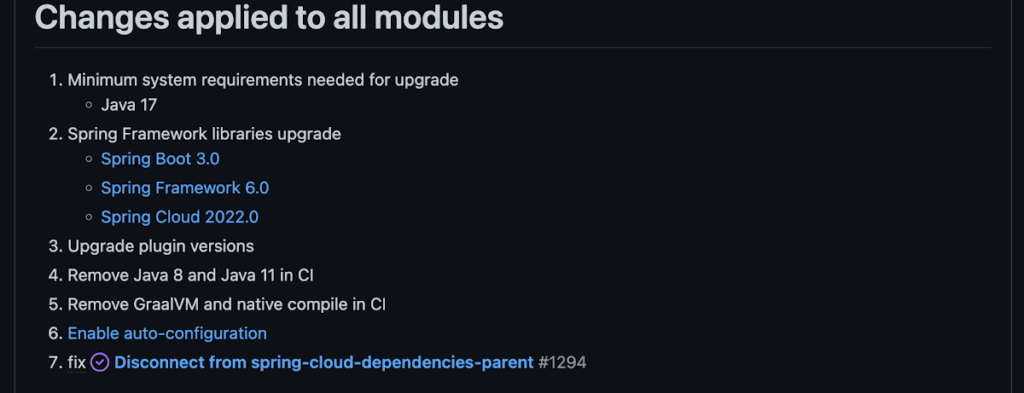
Another notable feature of this release is the addition of starter artifacts – Spring Boot starters for Google Cloud – that provide dependencies and auto-configurations for 80+ Google Client libraries. Just as the name suggests, these starters can serve as helpful starting points when working with a new client library. For now, they’re in preview.
These starters are not included in the BOM by default and need to be added as a dependency to your project before they can be used. For example, if you wanted to get started with Cloud Text-to-Speech, you would include the following:
<dependency>
    <groupId>com.google.cloud</groupId>
    <artifactId>google-cloud-texttospeech-spring-starter</artifactId>
    <version>4.0.0-preview</version>
  </dependency>
The upgrade process
We prepared a migration guide to help answer any questions involved with moving from 3.x to 4.x. Let’s follow those instructions to migrate Bank of Anthos.
We’ll start by cloning and building the application before the upgrade, according to the quickstart and development guide:
PROJECT_ID=<YOUR-PROJECT-ID>
gcloud services enable container --project ${PROJECT_ID}

git clone https://github.com/GoogleCloudPlatform/bank-of-anthos.git
cd bank-of-anthos/

gcloud services enable container.googleapis.com monitoring.googleapis.com \
  --project ${PROJECT_ID}

REGION=us-central1
gcloud container clusters create-auto bank-of-anthos \
  --project=${PROJECT_ID} --region=${REGION}

gcloud container clusters get-credentials bank-of-anthos \
  --project=${PROJECT_ID} --region=${REGION}

skaffold run --default-repo=gcr.io/${PROJECT_ID}/bank-of-anthos
At the end of this, you should see a “deployment stabilized” message:
Deployments stabilized in 9.657 secondsWith the environment set up for development, we’re ready to move on to the actual migration. The migration is already complete at time of writing, but here’s the full list of changes made:
- We began by checking the current Java, Spring Boot and Spring Cloud GCP versions.
- Our Java version is okay, but the other two are out of date, and will need to be updated.
We can also add the Spring Cloud GCP BOM to manage our versions going forward while we’re here.
- Our Java version is okay, but the other two are out of date, and will need to be updated.
- Then, in no particular order, we can make the following code changes:
- Remove the explicit type declarations from our ResponseEntity instantiations.
- Replace all javax.* imports with Jakarta.* counterparts, since Spring 3.0 makes use of Jakarta EE 9.0
With those changes in place, the app is upgraded and ready to re-deploy!
Live example
For a finished example of this migration, check out the Bank of Anthos repository on Github. It’s an excellent sample application that showcases a polyglot Java & Python app, served on Kubernetes and Google Cloud. All CI/CD and configurations are open source, so it may be instructive as you approach this migration.
Thanks for reading, and feel free to provide comments or feedback on Twitter, or in the issues section of the repository.
Report on API-led Digital Transformations in 2020 and the Future
6800
Of your peers have already read this article.
1:30 Minutes
The most insightful time you'll spend today!
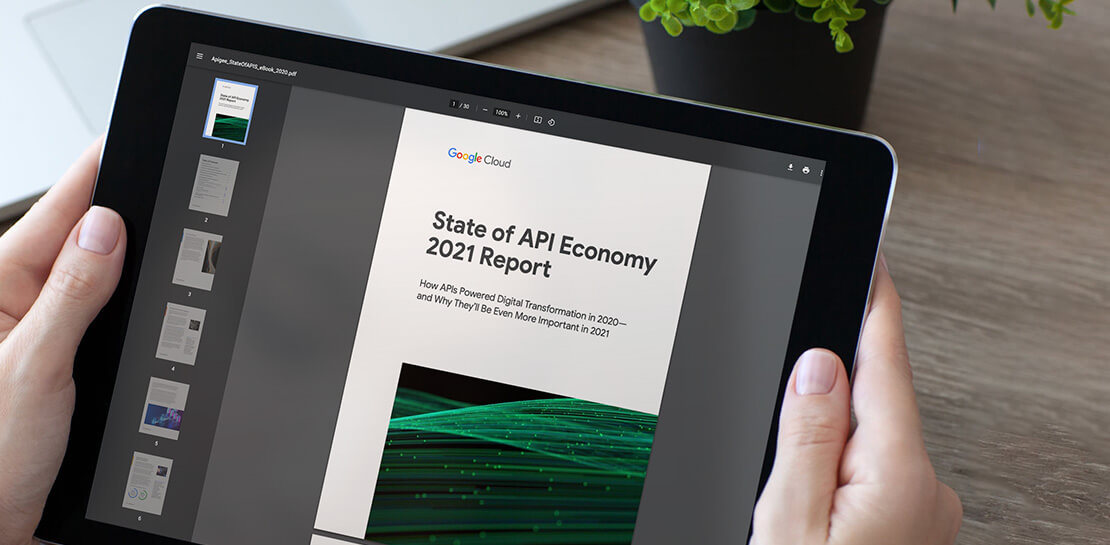
In 2020, many businesses across industries turned their focus and investments towards digital strategies. APIs being an integral part of every organization’s digital disruption, will grow in relevance throughout 2021. Read the report to gain more insights on driving API-led digital transformations and in-depth analysis of Google Cloud’s Apigee API Management Platform usage data, case studies and third-party surveys conducted with tech leaders.
More Relevant Stories for Your Company

Unlocking Efficient API Management with Apigee and CI/CD Pipelines
In modern software development, automating delivery using Continuous Integration and Continuous Deployment (CI/CD) pipelines draws parallels to automotive assembly lines that doubled the production while cutting down costs by 65%. According to a recent report from Postman, over 51% of respondents indicated that their organizations devote more than half of their development

New to Cloud Functions? Here’s What You Need to Learn
Cloud Functions is a fully managed event-driven serverless function-as-a-service (FaaS). It is a small piece of code that runs in response to an event. Because it is fully managed, developers can just write the code and deploy it without worrying about managing the servers or scaling up/down with traffic spikes.

5 ways Google can help you succeed in a hybrid and multicloud world
Learn about the benefits of a Google Cloud multicloud solution and how Google will partner with you to succeed, regardless of where your data resides or where your applications run.

Speeding Up Digital Transformation with Industry Solutions
Most large enterprises started with their own data centers and developed in-house solutions to meet their specific business needs, regulations, and industry specifications. These solutions were based on traditional applications from legacy vendors like Oracle and Microsoft — or even mainframes — and from key technology providers like SAP and
