





Transforming Businesses with Google Distributed Cloud Edge Appliance: A Look at Real-World Use Cases

2528
Of your peers have already read this article.
4:30 Minutes
The most insightful time you'll spend today!
While many organizations are driving digital transformation by migrating to the cloud, there are some industries, geographies, and use cases that require a different approach to cloud modernization. Regulated industries such as healthcare, insurance, pharmaceutical, energy, telecommunication, and banking have stringent data residency and sovereignty requirements. Other industries need to meet local data processing requirements, while others require real-time data processing with sub-millisecond latencies, for example to detect defects on manufacturing lines. These use cases demand a combination of edge, on-premises and cloud services for their infrastructure.
With these requirements in mind, Google Cloud launched Google Distributed Cloud powered by Anthos to extend the power of Google Cloud infrastructure and services to the edge (or closer). The underlying infrastructure for this service comes in two variants: a 42U rack filled with compute, storage, and networking devices called Google Distributed Cloud Edge Rack and a 1U appliance called Google Distributed Cloud Edge Appliance.
In this blog post, we discuss the Google Distributed Cloud Edge Appliance and how manufacturing, retail, and automotive industry verticals can use it to address common use cases.
How the appliance works
But first, let’s talk about the Google Distributed Cloud Edge Appliance itself.
Google Distributed Cloud Edge Appliances comprises two components: (1) Distributed Cloud Edge infrastructure and (2) the Distributed Cloud Edge service.
The Google Distributed Cloud Edge service runs on Google Cloud and serves as a control plane for the nodes and clusters running on your appliance. In order to perform remote management of the appliance and to collect metrics, the Distributed Cloud Edge service must be connected to Google Cloud at all times, allowing you to manage your workloads on the edge hardware through the Google Cloud Console. For customers who can’t be connected at all times for data residency or sovereignty reasons, we highly recommend that the appliance be connected to the cloud at least once a month to allow for needed security patches and updates.
Google Distributed Cloud Edge Appliances come with built-in network ports that provide connectivity to the control plane via the internet, Cloud VPN, or Dedicated Interconnect, and to your on-prem network. Each Google Distributed Cloud Edge Appliance is homed to a specific Google Cloud region but it is designed to also use any public Google Cloud endpoint to communicate with the control plane in Google Cloud, allowing you to move these appliances between different geographic locations.
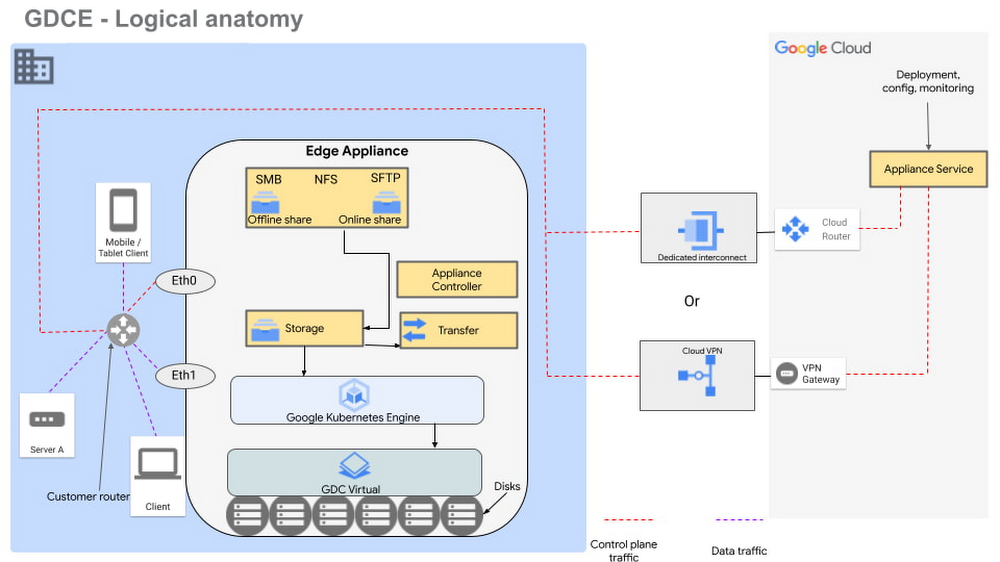
Figure 1 – Logical design of Google Distributed Cloud Edge Appliance
There are two NFS shares on each appliance; one is offline, meaning it does not transfer data to Google Cloud, and the other is online, meaning data saved to that share is synced to Cloud Storage on Google Cloud for further processing. The appliance supports Server Message Block (SMB) and Secure File Transfer Protocols (SFTP) for communication.
Each Google Distributed Cloud Edge Appliance runs Google Distributed Cloud Virtual, enabling you to build a single-node Kubernetes cluster with access to the underlying file system of the appliance. This allows you to build containerized applications on the underlying appliance hardware to address use cases in the following verticals.
Vertical use cases
Now that you understand how Google Cloud Edge Appliance is configured, let’s consider some of the industry use cases where it can provide unique value.
Manufacturing
In the manufacturing industry, quality control and safety is a crucial factor. Businesses need to ensure products are manufactured to the highest standards to remain competitive in their markets, to retain customers, and to keep factory workers safe. To do this, manufacturers need real-time data about the products being manufactured on the production lines, ensuring quality control and gaining a real-time view of where people are on the factory floor.
In manufacturing environments, Google Distributed Cloud Edge Appliance can be used to detect hazards or manufacturing defects in real-time. Figure 1 is a reference architecture for a hazard detection solution running off a Google Distributed Cloud Edge Appliance on a factory floor.
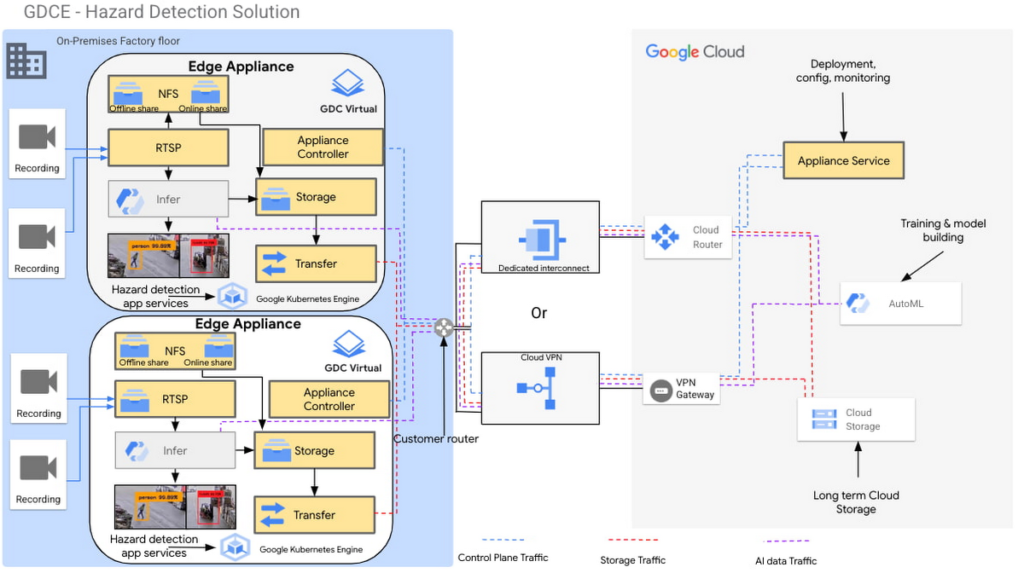
Figure 2 – Hazard detection architecture using Google Distributed Cloud Edge Appliance
In this architecture, cameras on the factory floor stream live video into the Google Distributed Cloud Edge Appliance. Depending on the number of cameras and appliances, cameras could be split or mapped to different appliances. This architecture makes it possible to initially transfer video data to Google Cloud using an online NFS share. Once in Google Cloud, you can use AutoML to train and build models that can be used as part of the hazard detection solution.
With these trained models, the cameras can stream video data into the appliance using the real-time streaming protocol (RTSP). You can then use AutoML inference to analyze the real-time video streaming data.
For example, in this reference architecture, if an individual comes too close to the fork lift, a function is triggered by the microservices running on the edge appliance that pushes a notification either to a messaging service, or to an enterprise resource planning tool. This alerts factory managers to factory floor hazards in real time so they can take corrective action.
You can also review messages and videos later on for preventive planning purposes, or push streamed videos to Cloud Storage for archive, to use the appliance’s storage space more efficiently.
Data transfers to Google Cloud can be done over Google Cloud Dedicated Interconnect, or VPN between the region and your site. This connectivity also allows you to send the appliance’s control-plane network traffic to the region.
You could also use the reference architecture in figure 2 for a product anomaly detection solution running off a Google Distributed Cloud Edge Appliance on a factory floor or manufacturing line. In this instance, machine learning models are trained to detect anomalies on finished products before final packaging.
Retail
In the retail industry, the Google Distributed Cloud Edge Appliance reference architecture in Figure 2 enables a number of transformative capabilities for retail operations, including:
- contactless checkout
- product scans
- mobile-scan-bag
- cashierless checkout
- unattended retail shops
- visual check-out monitoring
It does all this within a retailer’s facilities with the low latency and high throughput you need to process data locally, so you can obtain actionable insights from your data.
Or, you could use Google Distributed Cloud Edge Appliance at the edge to overhaul store management operations, for example, monitoring store occupancy, queue depth and wait times, detecting slips and falls and out-of-stock items, or monitoring inventory compliance.
Automotive
Advanced Driver Assistance Systems (ADAS) are becoming standard in modern automobiles. To successfully build and roll out continued improvements around ADAS, the automotive industry continues to run extensive tests on ADAS systems that are built into the vehicles they manufacture. Automotive companies can use Google Distributed Cloud Edge Appliance to modernize and transform how they collect data for the ADAS systems they’re developing. For example, test vehicles contain several different sensors that generate data, which can be quickly offloaded to an in-vehicle edge appliance.
Then, within the appliance, you can deploy containerized workloads to transform sensor data, infer videos and images and detect events. This alleviates the need for operators to label all events and allows development teams to quickly gather insights from the tests.
If you want to focus on a subset of information, you can transfer specific data or the entire data payload into Transfer Appliances when vehicles return to the development center. All these systems, i.e., transfer appliances and edge appliances, work in tandem to reduce local system administration and operational costs through a cloud-based control plane.
This approach allows you to deploy, track, monitor and configure services that are running in data centers or at edge locations from the cloud. From the factories, the data can be moved offline or online into Google Cloud where you can use different storage classes and processing capabilities to further process or store the data. You can also deploy newly trained models and business rules back to the edge appliances. In all this, data transfers between the cloud and the appliance are performed using end-to-end encryption, to give you control over your data.
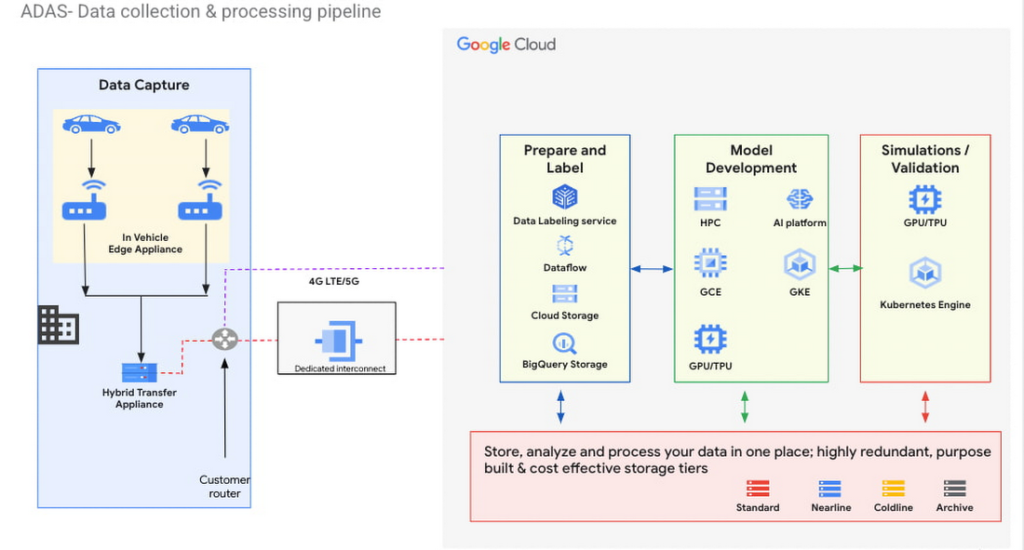
Figure 3 – ADAS implementation with a Google Distributed Cloud Edge Appliance
The reference architecture in Figure 3 shows an ADAS implementation where Google Distributed Cloud Edge Appliance is being used to gather, process and transform data at the edge in the automotive industry. It could also be applied to data capture and processing use cases in manned and unmanned vehicles. Notice how the Distributed Edge Appliance extends to the cloud by sending data there, or using other cloud-based services.
We’re just getting started
These are just a few of the use cases where organizations in the manufacturing, retail and automotive industries are using Google Distributed Cloud Edge Appliance with modern and containerized applications that are powered by Google Cloud. If you’re interested in bringing the power of Google Cloud to the edge using Google Distributed Cloud Edge Appliances to transform your business, reach out to us or any of our accredited partners.
How APIs Help National Bank of Pakistan Modernize the Banking Experience

3480
Of your peers have already read this article.
4:20 Minutes
The most insightful time you'll spend today!
NBP, Pakistan’s largest government-owned bank, serves private and commercial customers and also acts as the government treasury bank. This means that it handles all government transactions—including disbursements and cash collection. In the past, every government transaction had to be handled physically through the NBP branch network. But in a populous country like Pakistan, managing the huge volume of financial transactions is a big task, especially if a single bank is the only conduit. While we’re still in the early stages, here are a few ways that we’re actively working to find solutions that overcome these challenges.
Using APIs to increase access
Our digital banking implementation team, which includes product developers and a small in-house think tank, is responsible for developing new technology and out-of-the-box solutions tailored to the requirements of different areas of the bank. Our implementation partner Abacus played a key role in evaluating and implementing Apigee for NBP.
Recently, we developed a plan to open up the NBP government mandate to other banks and third-party fintech partners. Under this new model, instead of relying solely on our own channels, customers can now transact through fintech apps and other approved Pakistani banks. To be able to roll out a solution that would be reliable, scalable, and secure enough to meet our needs, we adopted Google Cloud’s Apigee API management platform. This platform allows us to accelerate our product development, so that we can compete in the fintech space. It also gives our customers access to a wide range of banking services through our own and partner channels.
As a government bank, NBP has to deal with a lot of procedural hurdles, which have slowed down our entry into the fintech market. Additionally, legacy systems required us to develop solutions for each particular channel and use case. APIs and API management increase the reusability of our services, while also bringing ease and speed of getting our services to market. In fact, we’ve seen the time it takes to offer a new solution reduced by 20%. Apigee not only helps us to achieve our go-to-market goals—it enhances our capacity to capture new and unique use cases across multiple channels. We appreciate the speed, agility, and security that Apigee brings us, along with its many out-of-the-box features.
Reducing barriers to consumer services
One example of how we’re using Apigee is our passport collection use case. In Pakistan, to obtain a passport, citizens have to visit an NBP branch. This can involve waiting in long lines to deposit the government-required passport insurance fee. The sheer volume of these transactions was overwhelming our local branch teams, and costs for this type of manual transaction were high. Furthermore, the government had problems reconciling the fee collection with the passport transactions.
To address these concerns, we developed an API that allows not only NBP branches, but also third-party banks and fintechs, to accept passport issuance fees.Customers can now visit the bank or fintech provider of their choice, reducing the load on NBP, while the government passport department inspectors can now easily reconcile these transactions.
We also developed a bill payment solution with Apigee that gives customers the possibility of paying utility bills online. Previously, the NBP process was inefficient. We had an in-person bill payment mechanism operating in our 1,500+ bank branches. Now, we’ve integrated the payment API with the branch channel so that bill payment is automated, whether it takes place in a branch or online.
Increasing the API footprint inside and outside the bank
Now that we’ve implemented the Apigee platform, our partner ecosystem is benefiting from it and growing, too. We’ve enrolled a wide range of fintechs that are developing products in the corporate payment space. We’re also planning to partner with several incubation centers to provide our APIs via sandbox environments, once our Apigee developer portal goes live. Other fintechs will be enrolled through the incubation centers as well. Finally, alternative third-party partners, such as fintechs and banks, will consume our APIs and/or partner with us for product development.
We’ve currently published 10 APIs and by the end of this year, we expect to have 25 to 30 live. We’re looking forward to implementing monetization, but not necessarily with revenue as the primary focus. As NBP is a government-owned bank, we have a responsibility to act as a catalyst for smaller players, and we see monetization expertise as an opportunity for fulfilling our mandate to help fintech startups grow and mature. In the long run, API revenues will certainly become more important, but the short-term goal is seeding innovation in the marketplace and providing the best possible retail banking experience for our customers, nationwide.
3565
Of your peers have already watched this video.
1:30 Minutes
The most insightful time you'll spend today!
Building a Powerful Digital Payments Solution
See how the Payeezy business platform, which enables merchants to establish and grow their eCommerce business, was set up and how it works.
The platform enables the exposure of First Data services, processes, and data to partners. The Payeezy API provides all the tools partners need to set up payments in their apps, set up merchant accounts on behalf of clients, and get paid.
First Data partners with Apigee to offer a powerful and easy to use developer portal.The Apigee Edge API management platform enabled First Data to accelerate development of the Payeezy APIs.
How to Decide Whether to Run a Database on Kubernetes

5604
Of your peers have already read this article.
3:30 Minutes
The most insightful time you'll spend today!
Today, more and more applications are being deployed in containers on Kubernetes—so much so that we’ve heard Kubernetes called the Linux of the cloud.
Despite all that growth on the application layer, the data layer hasn’t gotten as much traction with containerization. That’s not surprising, since containerized workloads inherently have to be resilient to restarts, scale-out, virtualization, and other constraints. So handling things like state (the database), availability to other layers of the application, and redundancy for a database can have very specific requirements. That makes it challenging to run a database in a distributed environment.
However, the data layer is getting more attention, since many developers want to treat data infrastructure the same as application stacks.
Operators want to use the same tools for databases and applications, and get the same benefits as the application layer in the data layer: rapid spin-up and repeatability across environments. In this blog, we’ll explore when and what types of databases can be effectively run on Kubernetes.
Before we dive into the considerations for running a database on Kubernetes, let’s briefly review our options for running databases on Google Cloud Platform (GCP) and what they’re best used for.
- Fully managed databases. This includes Cloud Spanner, Cloud Bigtable and Cloud SQL, among others. This is the low-ops choice, since Google Cloud handles many of the maintenance tasks, like backups, patching and scaling. As a developer or operator, you don’t need to mess with them. You just create a database, build your app, and let Google Cloud scale it for you. This also means you might not have access to the exact version of a database, extension, or the exact flavor of database that you want.
- Do-it-yourself on a VM. This might best be described as the full-ops option, where you take full responsibility for building your database, scaling it, managing reliability, setting up backups, and more. All of that can be a lot of work, but you have all the features and database flavors at your disposal.
- Run it on Kubernetes. Running a database on Kubernetes is closer to the full-ops option, but you do get some benefits in terms of the automation Kubernetes provides to keep the database application running. That said, it is important to remember that pods (the database application containers) are transient, so the likelihood of database application restarts or failovers is higher. Also, some of the more database-specific administrative tasks—backups, scaling, tuning, etc.—are different due to the added abstractions that come with containerization.
Tips for running your database on Kubernetes
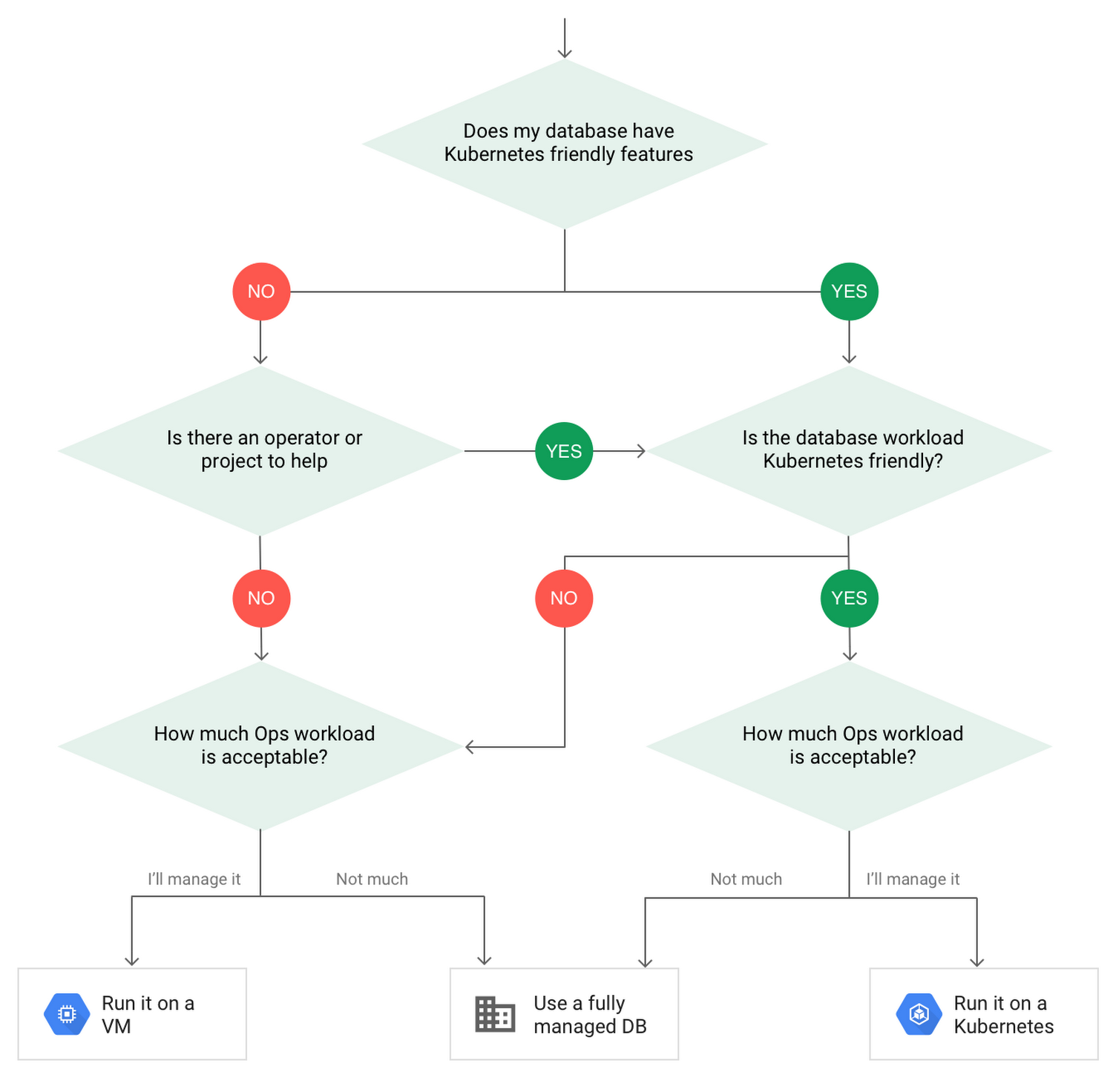
When choosing to go down the Kubernetes route, think about what database you will be running, and how well it will work given the trade-offs previously discussed.
Since pods are mortal, the likelihood of failover events is higher than a traditionally hosted or fully managed database. It will be easier to run a database on Kubernetes if it includes concepts like sharding, failover elections and replication built into its DNA (for example, ElasticSearch, Cassandra, or MongoDB). Some open source projects provide custom resources and operators to help with managing the database.
Next, consider the function that database is performing in the context of your application and business. Databases that are storing more transient and caching layers are better fits for Kubernetes. Data layers of that type typically have more resilience built into the applications, making for a better overall experience.
Finally, be sure you understand the replication modes available in the database. Asynchronous modes of replication leave room for data loss, because transactions might be committed to the primary database but not to the secondary database(s). So, be sure to understand whether you might incur data loss, and how much of that is acceptable in the context of your application.
After evaluating all of those considerations, you’ll end up with a decision tree looking something like this:
How to deploy a database on Kubernetes
Now, let’s dive into more details on how to deploy a database on Kubernetes using StatefulSets.
With a StatefulSet, your data can be stored on persistent volumes, decoupling the database application from the persistent storage, so when a pod (such as the database application) is recreated, all the data is still there.
Additionally, when a pod is recreated in a StatefulSet, it keeps the same name, so you have a consistent endpoint to connect to. Persistent data and consistent naming are two of the largest benefits of StatefulSets. You can check out the Kubernetes documentation for more details.
If you need to run a database that doesn’t perfectly fit the model of a Kubernetes-friendly database (such as MySQL or PostgreSQL), consider using Kubernetes Operators or projects that wrap those database with additional features. Operators will help you spin up those databases and perform database maintenance tasks like backups and replication. For MySQL in particular, take a look at the Oracle MySQL Operator and Crunchy Data for PostgreSQL.
Operators use custom resources and controllers to expose application-specific operations through the Kubernetes API. For example, to perform a backup using Crunchy Data, simply execute pgo backup [cluster_name]. To add a Postgres replica, use pgo scale cluster [cluster_name].
There are some other projects out there that you might explore, such as Patroni for PostgreSQL. These projects use Operators, but go one step further. They’ve built many tools around their respective databases to aid their operation inside of Kubernetes. They may include additional features like sharding, leader election, and failover functionality needed to successfully deploy MySQL or PostgreSQL in Kubernetes.
While running a database in Kubernetes is gaining traction, it is still far from an exact science. There is a lot of work being done in this area, so keep an eye out as technologies and tools evolve toward making running databases in Kubernetes much more the norm.
When you’re ready to get started, check out GCP Marketplace for easy-to-deploy SaaS, VM, and containerized database solutions and operators that can be deployed to GCP or Kubernetes clusters anywhere.
APIs to Power the Future of Retail: Study Confirms

3548
Of your peers have already read this article.
1:30 Minutes
The most insightful time you'll spend today!
Today, retail customers have more digital-first, convenient ways of shopping than ever before. And APIs are one of the critical pieces of technology that have made this possible by giving retailers the ability to transform their systems and processes in an efficient and quick way.
APIs have allowed retailers to be more accessible to their remote customers with services such as order online and pick up in-store, curbside pickup, fulfilment of orders through delivery partners, and personalized recommendations while shopping online etc. These capabilities have been especially important over the last year, as the world has changed at a rapid pace. With many changes to customer interactions yet to come, APIs will continue to play a pivotal role in helping retailers to further personalize digital experiences and streamline their operations.
In Google Cloud’s State of API Economy 2021 report, 32% of organizations reported increasing their digital transformation investments, while 16% stated they would completely change their strategies to become digital-first companies. Moreover, by early 2021, online sales had already reached levels previously predicted for 2022, and APIs will become the foundation for business resilience and growth in retail over the next five years.
APIs are at the forefront of retail innovation
Retailers leverage APIs to experiment and connect teams for faster collaboration, helping them to use data for revolutionary experiences that increase customer engagement.
They allow retailers to innovate in new ways internally, externally, and across market borders. Modern digital experiences are built from a variety of data and functionality, throughout the entire supply chain, across multiple systems, and often belonging to a variety of services across distribution channels. APIs are the digital nervous system connecting everything together. They help retailers enhance internal efficiency, partner at scale, and leverage cutting-edge services such as machine learning—all because they make various kinds of technological value interoperable and easy for developers to access and reuse. In our research, 52% of retailers said APIs accelerate innovation by enabling partners to leverage digital assets at scale while 36% say they see APIs as strategic assets for creating business value.
Let’s take a look at some retail use cases and real world examples that are powered by APIs.
Deliver personalized customer experiences
Retailers are using APIs to create interactive and predictive personalized experiences.These range from “magic” mirrors that reflect personalized clothing, accessory, and even makeup suggestions; to smartphone alerts that encourage shoppers to check out special items while they’re browsing in the store; offers of coupons; and more. Behind the scenes APIs interconnect between the store and consumer data, business intelligence, and application security to bring these innovative experiences to life.
Streamline retail operations
APIs can help any retail business to operate more efficiently, from human resources, customer service, and distribution, to invoicing, marketing, and compliance. For example, APIs make it super easy and simple to onboard, manage and train employees and contractors. They can help connect various internal and external third-party systems for use cases like tracking real-time package status and gathering consumer shopping insights.
Conrad Electronic, German retailer of electronic products, demonstrates how API management can lead to enhanced efficiency. They used Apigee to build a tool that provides store employees and visitors with product, service, and warranty information on their mobile devices. The company was able to not only use data to enhance offers and services to their customers, but also streamline operations because more than 60% of their customers were using the API-enabled tool.
Power the future of retail with APIs
APIs are key to driving innovation across all areas of retail. They are enabling retailers to not only implement continuous digital transformation but also develop tools that navigate disruptions as they occur.
Retailers are already harnessing the power of APIs to prepare for:
- Borderless channels across markets that allow for the free flow of products and shopping experiences in the way consumers want them.
- Interactive and intelligent merchandising that evolves in realtime to predict consumer needs and bolsters buying decisions.
- Autonomous and virtual shopping experiences that develop deeper consumer interactions and product insights.
To learn more about how APIs can help drive innovation, download our latest eBook. In this eBook, you’ll find more retail-specific API use cases, detailed real world examples and insights into how APIs are shaping the future of retail.
Manage APIs effectively
As you grow your API program, and start powering business-critical applications and front-end experiences with APIs, you need an effective way to manage and scale them. This is where Google Cloud’s Apigee API management platform can help. Top retailers across the globe use Apigee to gain control over and insights into their APIs and enables them to manage end-to-end API lifecycle. Click here to learn more about Apigee.
Google Products Helps HMH’s Healthcare Staff Work from Anywhere Efficiently and Securely!

10182
Of your peers have already read this article.
3:00 Minutes
The most insightful time you'll spend today!
Hackensack Meridian Health (HMH) executive Mark Eimer explains how an ambitiously-timed rollout of a comprehensive suite of Google products helped the entire organization—from doctors to IT staff—achieve better security, cultivate a more equitable work environment, and ultimately, improve patient outcomes.
How does a recently merged, 17-hospital healthcare system fast-track a platform migration and hardware rollout securely and in a way that improves work for everyone, regardless of location or role? These are the questions that kept me up at night in early 2020, when the pandemic demanded a “big bang”—something our legacy laptops and operating systems couldn’t handle.
We began our work with Google in 2020 with the adoption of Chrome as our default browser. As we migrated platforms, keeping patient data safe was of the utmost importance to us, along with providing every staff member with the tools they needed to work virtually. Our staff often experienced issues accessing our web-based applications using Internet Explorer or Edge Browser, a problem that went away when we switched to Chrome. Chrome’s versatile compatibility also made it easier for my team to migrate all of our web-based operations, and Chrome’s security and manageability were key components to making this switch a huge win for the organization.
The success of this migration led us to extend our Google partnership to patient care applications—where Google’s expertise in AI and ML helps scale the use of diagnostics tools and improve other aspects of the patient journey.

Achieving security at every step
Like so many other healthcare organizations, we’ve been concerned about ransomware attacks. This is part of why we moved to Google Workspace and distributed over 3,000 Chrome OS devices in kiosk mode in March of 2020, when many of us went remote due to the pandemic. We were very concerned about team members accessing corporate applications through home devices that were running EOL operating systems (WIN7), as well as a general lack of antivirus and encryption measures.
We were protected by the fact that Google’s software and hardware both had built-in security features that we needed to stave off sophisticated attackers. For example, Chrome OS automatically updates to the latest security update and encrypts data living outside the cloud on the hardware. These features protected us from security-related disruptions, letting us securely move a huge library of file shares and emails across thousands of accounts to Google Chrome OS in just four months.
A year later, in March 2021, we migrated the enterprise over to Google Workspace and saw an immediate reduction in spam by 30% from the inherent built-in AI/ML. This meant staff were less likely to receive (and click through) phishing attempts. My team could connect, create, and collaborate easily and securely—even as more of us were working from home and needed to access sensitive data remotely.
Leveling the playing field
As an organization, we were surprised by how many team members didn’t have personal computers at home. We quickly decided that if we needed team members to work from home, the health network would have to supply hardware. Chromebooks’ lower price tag compared to PCs—on top of their built-in security controls—allowed us to purchase, deploy, and support that initial distribution of 3,000 Chromebooks to team members in less than three weeks, providing devices to every eligible remote employee instead of just a select few. This was vital to reaching our equitable technology goal as part of our diversity and inclusion initiative: everybody has the same tools to do good work.
When all employees have what they need to do their jobs well, we get better patient outcomes. Before we began this cloud adoption journey, patient and staff experiences were different within the hospitals and outside of them.
Now it’s the same wherever our staff is, and we’ve seen efficiency and accessibility benefits extend to the patient side. For example, we built a web-based contact center that supports 80 locations that use Workspace and Chrome OS devices. Since customer service, admin, and providers are all on the same system, it has become a one-stop shop for patients.
Furthermore, through the Grow with Google program, we were able to provide another benefit to employees that drove our equity goals. Google trained 50 non-IT staff members—from environmental services, food and nutrition, and other non-tech areas who were interested in making a career change to IT—on the Google products we were using. They may not have thought about switching to a career in IT before the Grow with Google program came to our organization, but through this partnership, they now have that opportunity.
A strategic, long-term partner
With any large-scale rollout, the work doesn’t end once laptops are in employee hands. Google has shown their commitment to long-term collaboration as they continuously optimize their products for the unique needs of healthcare providers and go the extra mile in tailoring tools to our staff’s workflows.
For example, on the Chrome OS side, the Google team has helped our registration desks and document centers with device integration for hardware like credit card readers and e-signature pads. They’ve also helped us meet security and privacy requirements mandated by state and federal governments around HIPAA, Medicaid, and Medicare reimbursements. Over this next year, we’ll look at a feature roadmap with Google Cloud to deliver further enhancements, iterating on the product itself to meet our needs for the present and the future.

Delivering the future of healthcare
The benefits we’ve seen around security and usability—and the ability to provide all staff with equal access to Google’s technology—are why we’re expanding our partnership with Google to both the administrative and clinical sides of HMH. In addition to further Google rollouts with corporate, next year we’re distributing Chromebooks to all 350 of our ambulatory clinics.
We’re also working with the Google professional services team to create a custom AI model that analyzes 3D mammogram images. This AI model will enable two providers to read mammograms—which adheres to international best practices but is currently rare in the US—without requiring additional time. Conducting double readings of mammograms will yield better health outcomes for our patients, such as a lower patient recall rate and an increased accuracy in detecting breast cancer.
We’re currently building the model using a variety of Google Cloud products, including Cloud Healthcare API. Once complete, this model is expected to be trained, deployed, and maintained in Google’s Vertex AI, allowing our providers to be more productive as they make clinical decisions with AI support. As the model is proven over time, we plan to make the predictive services accessible to other healthcare organizations.
With Google, we’re able to achieve a unified architecture for storing data as well as training and deploying AI models, which enable our staff to work more efficiently and securely from anywhere. While I may not be able to predict the future as accurately as AI can, I foresee our continued partnership with Google as a key part of HMH’s improved provider and patient outcomes.
More Relevant Stories for Your Company

Rubin Observatory Leverages Google Cloud to Power Astronomical Research
This week, the Vera C. Rubin Observatory is launching the first preview of its new Rubin Science Platform (RSP) for an initial cohort of astronomers. The observatory, which is located in Chile but managed by the U.S. National Science Foundation’s NOIRLab in Tucson, AZ and SLAC in California, is jointly funded by the NSF and the U.S. Department

Transport Platform’s Richly-detailed Geospatial Data Allows Commuters to Track Buses in Real-time!
Vinayak Bhavnani, Co-Founder and CTO of India-based bus transport technology company Chalo, shares how Google Maps Platform is used to improve visibility for commuters and bus operators across India by visualizing geospatial data. Effective public transport networks contribute to the local economy and help make cities safe, pleasant, and sustainable.




Why Apigee: Customers Explain How this API Platform Boosts their Business
Apigee customers Expedia, Equinix, Morningstar, Swisscom, Vantiv, Telstra, Fox Broadcasting company, Laterooms.com and partners, SAP and Accenture share why they joined forces with the intelligent API management platform company. Apigee is helping customers execute businesses commerce with other partners, securely expose assets to external developer communities, secure APIs throughout the

Google Cloud Offering a Natural Migration Path for Developers Accustomed to Heroku
Modern developers worldwide have grown accustomed to the comfort of writing code, pushing to a remote Git repository and having that code be deployed at an accessible URL without having to worry about how it is deployed. This was a workflow popularized by Heroku years ago which brought joy and
