





Siemens: What Smarter New Age Recruiting Looks Like

3174
Of your peers have already read this article.
4:30 Minutes
The most insightful time you'll spend today!
Siemens aims to shape the future—and has the scale, culture, and know-how to realize its ambitions. The Germany-headquartered industrial manufacturing business operates in more than 120 countries and focuses on electrification, automation, and digitalization. Siemens’ extensive portfolio includes industrial production digitalization and automation technologies, diagnostic and therapeutic imaging for healthcare, and building automation and management technologies.
“All our solutions are united by the fact they impact the way people live their lives,” says Stephanie Morton, Siemens’ Global Talent Acquisition Manager: Strategy, Technology & Talent Relationship Management.
“‘Engineered for life’ is one of our brand claims.”
Hiring “future makers”
Hiring thinkers, dreamers, and doers hungry to transform businesses, industries, and lives is key to Siemens’ success. The business calls its people “future makers” and employs more than 370,000 of them worldwide.
Recruiting for a workforce this size is no easy task. Siemens’ global jobs and careers website has about 5,000 open positions at any one time, and the organization receives 2 million applications to fill 35,000 positions per year.
However, by 2017, the website was experiencing problems that hampered the talent acquisition team’s efforts to fill roles promptly with the right candidates. Its standard keyword matching technology could not optimize the results provided to job seekers, frustrating potential candidates and increasing the workload for recruiters.
“With Cloud Talent Solution, we saw a 30 percent uplift in candidate conversions from search to application.”
—Stephanie Morton, Global Talent Acquisition Manager: Strategy, Technology & Talent Relationship Management, Siemens
“We found the language we used about our jobs internally was often not the same language job seekers used,” explains Morton. “For example, we may have an engineering position open for our MindSphere cloud-based IoT operating system. We would post this on our jobs and careers website as ‘MindSphere engineer.’ Unfortunately, a job seeker using more general terms such as ‘IoT engineer’ may miss this advertisement.”
In addition, without intelligence and context, the keyword matching technology could not determine job seeker search intentions from misspelled terms. This became more of a problem as job seekers increasingly used mobile devices to conduct searches.
With keyword searches also generating pages and pages of results, job seekers often succumbed to the temptation to apply for every position returned. This left the talent acquisition team drowning in messages and applications.
“We experienced issues around seniority as well—for example, people looking for senior legal roles were receiving irrelevant results for internships or junior roles,” says Morton.
Change needed
These problems could not persist for a team charged with continuously improving candidate experiences. The team opened discussions with Jibe, a recruitment platform provider that operated Siemens’ external career websites. Jibe had collaborated with Google to integrate Cloud Talent Solution—a solution that uses machine learning to better understand job content and job seeker intent—into its platform.” Jibe offered the integrated solution to Siemens as one of its most forward-thinking customers,” says Morton.
Morton’s team reviewed Cloud Talent Solution and was immediately excited by its potential to quickly make a profound difference in its recruitment activities—without requiring recruiters and other team members to invest considerable time and effort. Cloud Talent Solution could enable the website to understand the broad intent of a job seeker—including synonymous positions—and deliver considerably more relevant results.
“We can authoritatively say Cloud Talent Solution is improving the experience for job seekers; they are conducting more searches, those searches are more effective, and more of them are converting to job applications.”
—Stephanie Morton, Global Talent Acquisition Manager: Strategy, Technology & Talent Relationship Management, Siemens
After Cloud Talent Solution expanded to encompass more than 100 languages—enabling Siemens to offer a consistent experience to candidates from a range of countries and backgrounds—Morton’s team gave Jibe and Google the green light to proceed.
“We had two key issues to address during the implementation,” says Morton. “The first was to make sure Google Cloud was aware of any Siemens-specific recruitment terms. For example, we have German-language posts that include terms commonly used internally regarding internships and junior positions. We worked closely with our partners to make sure these terms were represented in the algorithm to complement the vast constellation of already-mapped job titles in Cloud Talent Solution.”
Siemens also needed to quantify Cloud Talent Solution benefits to sell the service internally within the business and win support to proceed beyond a pilot. “Because Cloud Talent Solution was effectively an invisible layer behind our website, we had to test its impact,” says Morton.
A 30 percent uplift
Working with Jibe, Siemens conducted A/B testing. Five percent of candidates in the test group used the keyword-based search experience and 95 percent of candidates the search experience powered by Cloud Talent Solution. The testing accommodated changes in candidate queries over time and context.
“With Cloud Talent Solution, we saw a 30 percent uplift in conversions from search to application,” says Morton.
“We can authoritatively say Cloud Talent Solution is improving the experience for job seekers; they are conducting more searches, those searches are more effective, and more of them are converting to job applications,” she adds. “Anecdotally, recruiters are seeing fewer applications from job seekers who have applied to long lists of positions returned from search queries.”
“Partnering with market-leading providers like Google Cloud can help us stay one step ahead of the competition over the journey.”
—Stephanie Morton, Global Talent Acquisition Manager: Strategy, Technology & Talent Relationship Management, Siemens
In the longer term, Siemens plans to monitor the impact of Cloud Talent Solution on metrics such as candidate retention rates and manager satisfaction.
With Cloud Talent Solution well established within the business, Siemens is now working with Google Cloud to add new features—including voice assistants—to enhance the candidate experience. “Helping candidates laser in on the right positions and make successful connections is something we’re doing everything we can to make happen,” says Morton.
More broadly, Cloud Talent Solution and Jibe are helping Siemens’ talent acquisition and the rest of its human resources function build its reputation and execute its strategy. “We are becoming a function driven by delivering amazing technology-based solutions to our employees and our candidates,” says Morton. “People within Siemens are very impressed to see human resources leading the way in working with Google Cloud to deliver a solution like this at a global scale.”
“The more light-touch exercises like this we can do, the fewer big, expensive, time-consuming initiatives we need to take,” she says. “Furthermore, partnering with market-leading providers like Google Cloud can help us stay one step ahead of the competition over the journey.”
5589
Of your peers have already watched this video.
1:20 Minutes
The most insightful time you'll spend today!
Nippon India Mutual Fund Re-Invents How Indians Buy with AI
Nippon India Mutual Fund, formerly Reliance Mutual Funds is changing the way Indians purchase funds making it easier and faster, with the help of Google Cloud.
In India, only 3-4 percent of the population has invested in mutual funds. There’s a sizeable market to tap into for mutual fund houses–if they can find ways to make it easier for first-time investors to take the plunge.
As the leading retail asset management company in the country, Reliance Mutual Funds, decided to use voice to facilitate transactions.
“That would create a delightful experience for the investor,” says Arpan Saha, Head of Digital Business, Nippon India Mutual Fund.
That’s exactly what the company did using the Google Cloud Platform.
Today, the company has over 10,000 interactions using the Google AI Platform.
“Today we see more consumer coming and doing more transactions with us, and we only see this going up as we make this experience razor-sharp,” says Saha.
Vector Search: The Tech Powering Billions of Search Results for Google Users

4554
Of your peers have already read this article.
1:30 Minutes
The most insightful time you'll spend today!
Recently, Google Cloud partner Groovenauts, Inc. published a live demo of MatchIt Fast. As the demo shows, you can find images and text similar to a selected sample from a collection of millions in a matter of milliseconds:

Give it a try — and either select a preset image or upload one of your own. Once you make your choice, you will get the top 25 similar images from two million images on Wikimedia images in an instant, as you can see in the video above. No caching involved.
The demo also lets you perform the similarity search with news articles. Just copy and paste some paragraphs from any news article, and get similar articles from 2.7 million articles on the GDELT project within a second.

Vector Search: the technology behind Google Search, YouTube, Play, and more
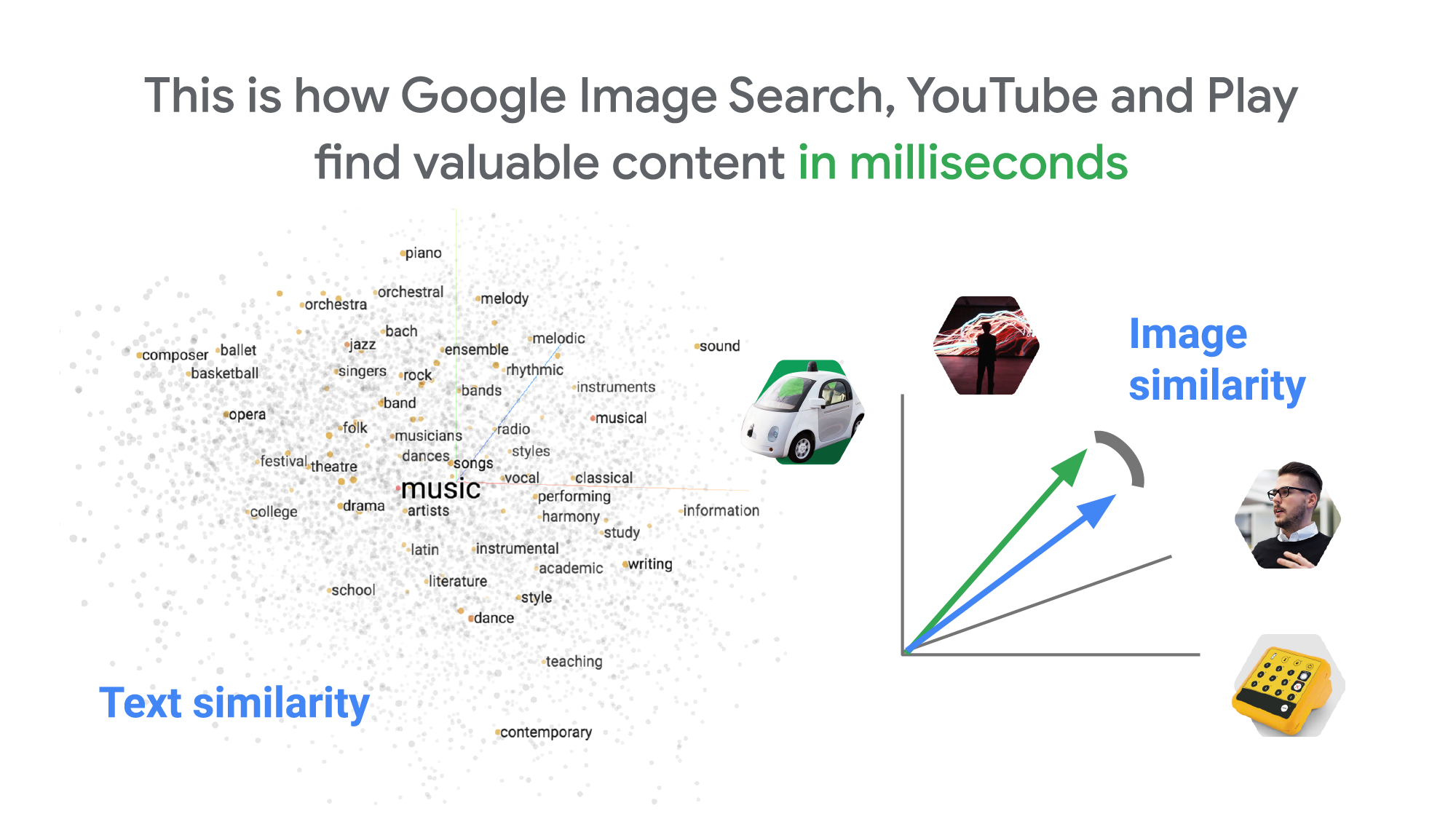
How can it find matches that fast? The trick is that the MatchIt Fast demo uses the vector similarity search (or nearest neighbor search or simply vector search) capabilities of the Vertex AI Matching Engine, which shares the same backend as Google Image Search, YouTube, Google Play, and more, for billions of recommendations and information retrievals for Google users worldwide. The technology is one of the most important components of Google’s core services, and not just for Google: it is becoming a vital component of many popular web services that rely on content search and information retrieval accelerated by the power of deep neural networks.
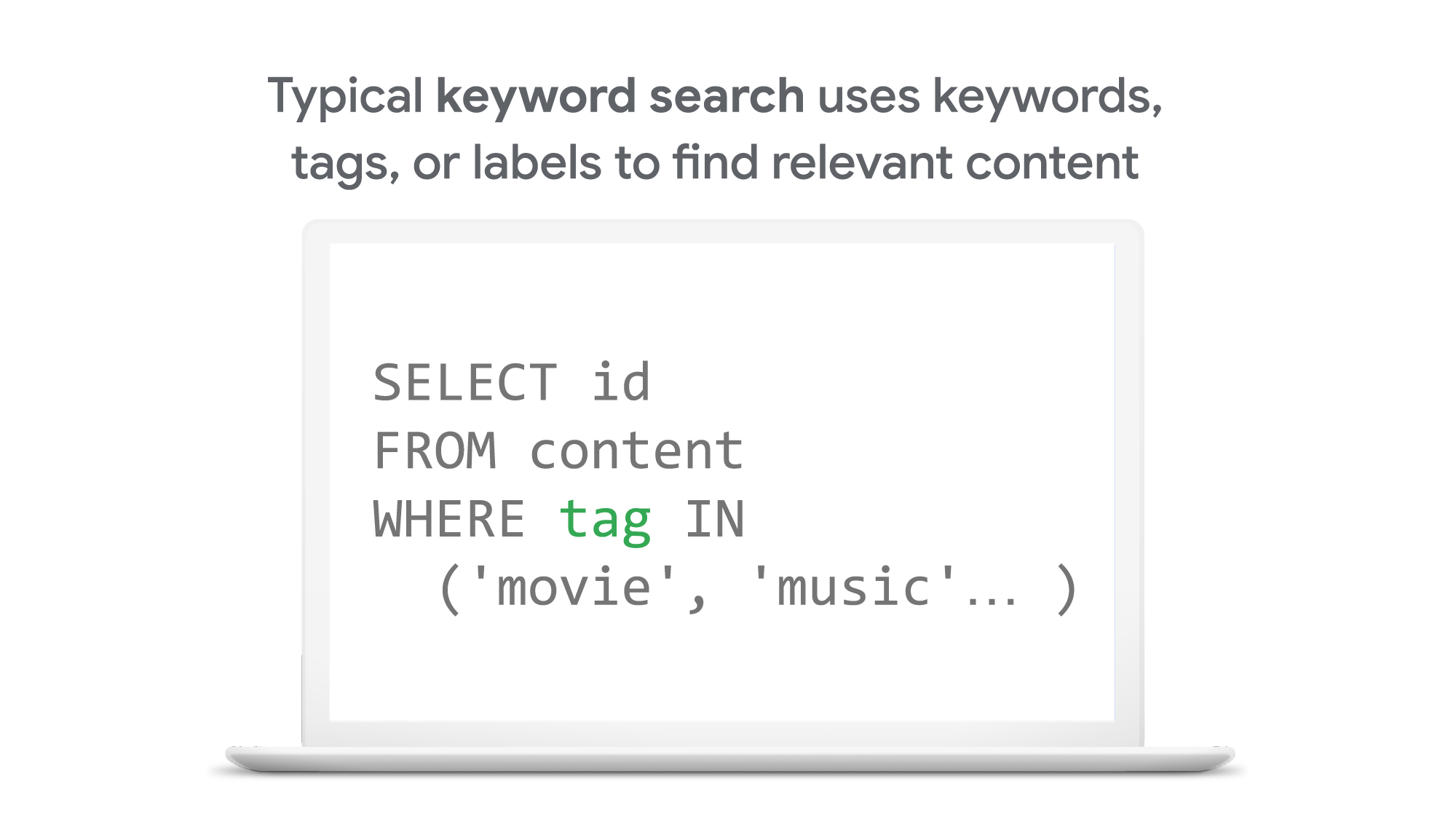
So what’s the difference between traditional keyword-based search and vector similarity search? For many years, relational databases and full-text search engines have been the foundation of information retrieval in modern IT systems. For example, you would add tags or category keywords such as “movie”, “music”, or “actor” to each piece of content (image or text) or each entity (a product, user, IoT device, or anything really). You’d then add those records to a database, so you could perform searches with those tags or keywords.
In contrast, vector search uses vectors (where each vector is a list of numbers) for representing and searching content. The combination of the numbers defines similarity to specific topics. For example, if an image (or any content) includes 10% of “movie”, 2% of “music”, and 30% of “actor”-related content, then you could define a vector [0.1, 0.02, 0.3] to represent it. (Note: this is an overly simplified explanation of the concept; the actual vectors have much more complex vector spaces). You can find similar content by comparing the distances and similarities between vectors. This is how Google services find valuable content for a wide variety of users worldwide in milliseconds.
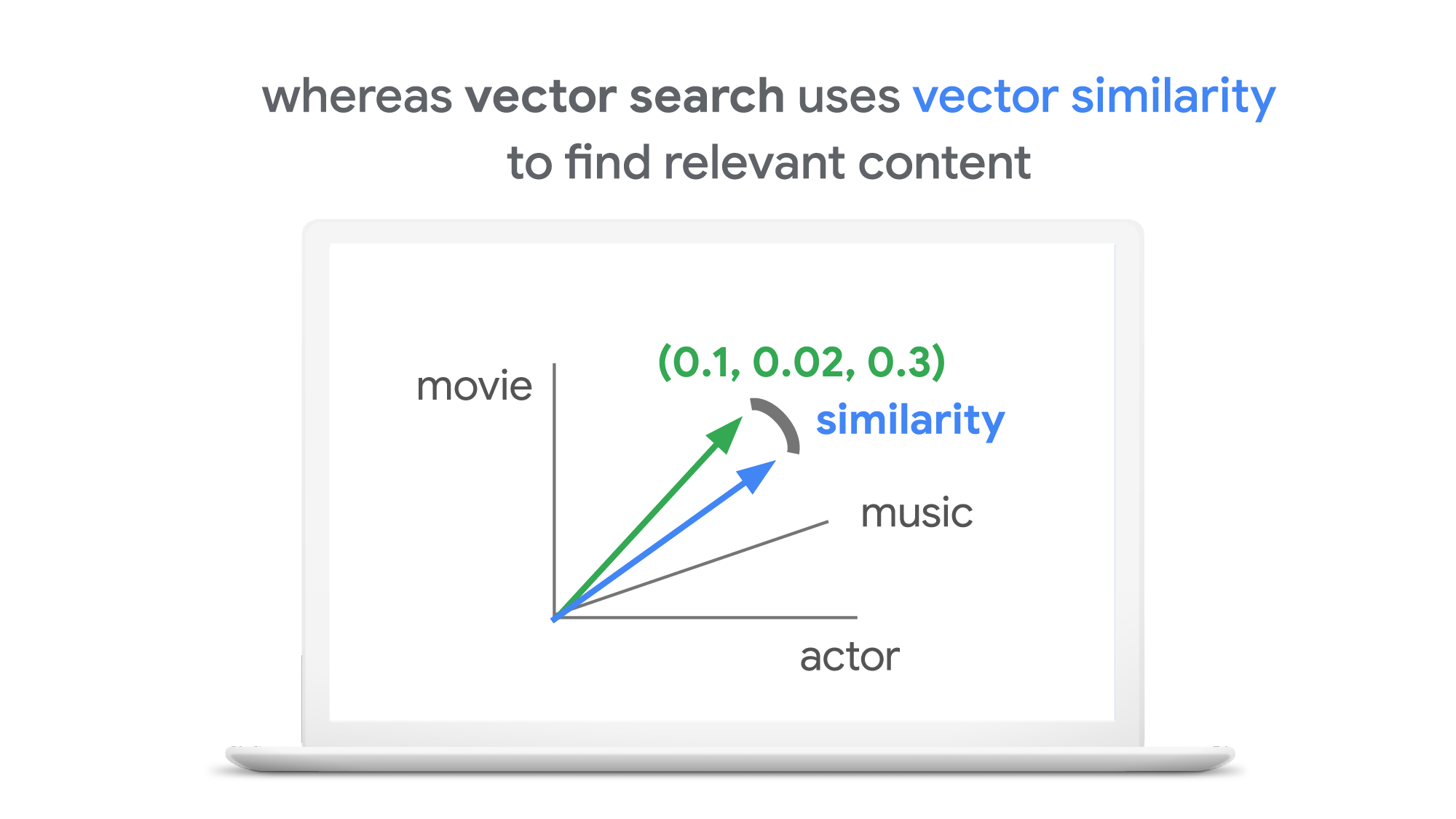
With keyword search, you can only specify a binary choice as an attribute of each piece of content; it’s either about a movie or not, either music or not, and so on. Also, you cannot express the actual “meaning” of the content to search. If you specify a keyword “films”, for example, you would not see any content related to “movies” unless there was a synonyms dictionary that explicitly linked these two terms in the database or search engine.
Vector search provides a much more refined way to find content, with subtle nuances and meanings. Vectors can represent a subset of content that contains “much about actors, some about movies, and a little about music”. Vectors can represent the meaning of content where “films”, “movies”, and “cinema” are all collected together. Also, vectors have the flexibility to represent categories previously unknown to or undefined by service providers. For example, emerging categories of content primarily attractive to kids, such as ASMR or slime, are really hard for adults or marketing professionals to predict beforehand, and going back through vast databases to manually update content with these new labels would be all but impossible to do quickly. But vectors can capture and represent never-before-seen categories instantly.
Vector search changes business
Vector search is not only applicable to image and text content. It can also be used for information retrieval for anything you have in your business when you can define a vector to represent each thing. Here are a few examples:
- Finding similar users: If you define a vector to represent each user in your business by combining the user’s activities, past purchase history, and other user attributes, then you can find all users similar to a specified user. You can then see, for example, users who are purchasing similar products, users that are likely bots, or users who are potential premium customers and who should be targeted with digital marketing.
- Finding similar products or items: With a vector generated from product features such as description, price, sales location, and so on, you can find similar products to answer any number of questions; for example, “What other products do we have that are similar to this one and may work for the same use case?” or “What products sold in the last 24 hours in this area?” (based on time and proximity)
- Finding defective IoT devices: With a vector that captures the features of defective devices from their signals, vector search enables you to instantly find potentially defective devices for proactive maintenance.
- Finding ads: Well-defined vectors let you find the most relevant or appropriate ads for viewers in milliseconds at high throughput.
- Finding security threats: You can identify security threats by vectorizing the signatures of computer virus binaries or malicious attack behaviors against web services or network equipment.
- …and many more: Thousands of different applications of vector search in all industries will likely emerge in the next few years, making the technology as important as relational databases.
OK, vector search sounds cool. But what are the major challenges to applying the technology to real business use cases? Actually there are two:
- Creating vectors that are meaningful for business use cases
- Building a fast and scalable vector search service
Embeddings: meaningful vectors for business use cases
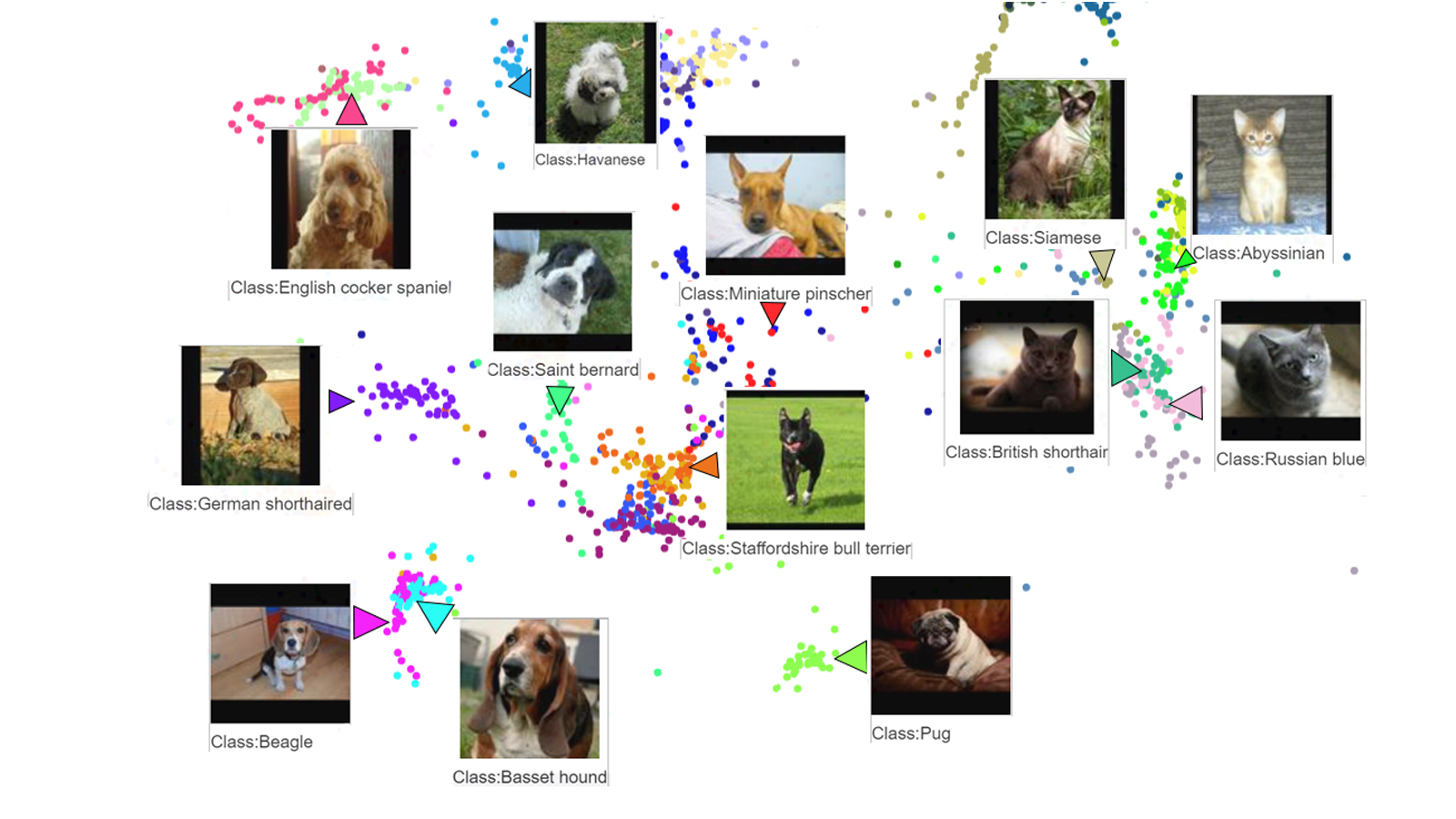
The first challenge is creating vectors for representing various entities that are meaningful and useful for business use cases. This is where deep learning technology can really shine. In the case of the MatchIt Fast demo, the application simply uses a pre-trained MobileNet v2 model for extracting vectors from images, and the Universal Sentence Encoder (USE) for text. By applying such models to raw data, you can extract “embeddings” – vectors that map each row of data in a space of their “meanings”. MobileNet puts images that have similar patterns and textures closer to one another in the embedding space, and USE puts texts that have similar topics closer.
For example, a carefully designed and trained machine learning model could map movies into an embedding space like the following:
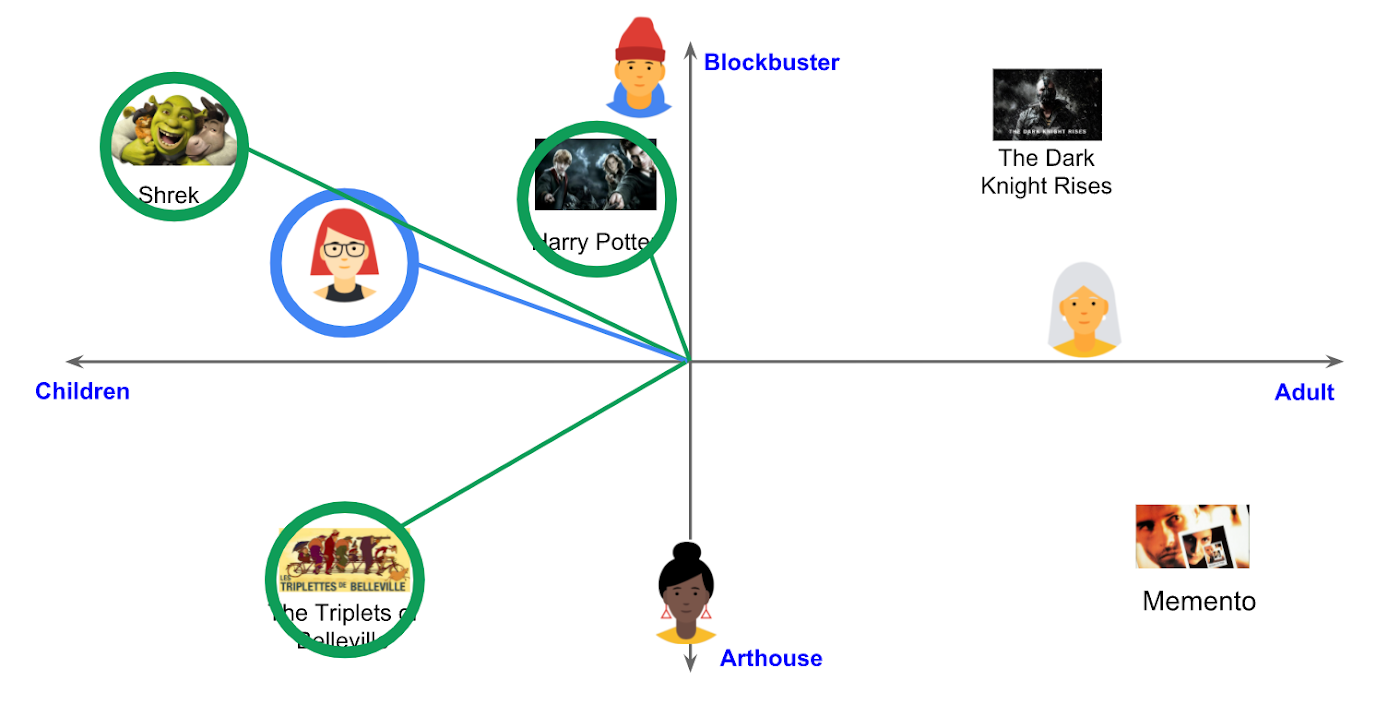
With the embedding space shown here, users could find recommended movies based on the two dimensions: is the movie for children or adults, and is it a blockbuster or arthouse movie? This is a very simple example, of course, but with an embedding space like this that fits your business requirements, you can deliver a better user experience on recommendation and information retrieval services with insights extracted from the model.
For more about creating embeddings, the Machine Learning Crash Course on Recommendation Systems is a great way to get started. We will also discuss how to extract better embeddings from business data later in this post.
Building a fast and scalable vector search service
Suppose that you have successfully extracted useful vectors (embeddings) from your business data. Now the only thing you have to do is search for similar vectors. That sounds simple, but in practice it is not. Let’s see how the vector search works when you implement it with BigQuery in a naive way:https://www.youtube.com/embed/wHNJspvxj2w?enablejsapi=1&
It takes about 20 seconds to find similar items (fish images in this case) from a pool of one million items. That level of performance is not so impressive, especially when compared to the MatchIt Fast demo. BigQuery is one of the fastest data warehouse services in the industry, so why does the vector search take so long?
This illustrates the second challenge: building a fast and scalable vector search engine isn’t an easy task. The most widely used metrics for calculating the similarity between vectors are L2 distance (Euclidean distance), cosine similarity, and inner product (dot product).
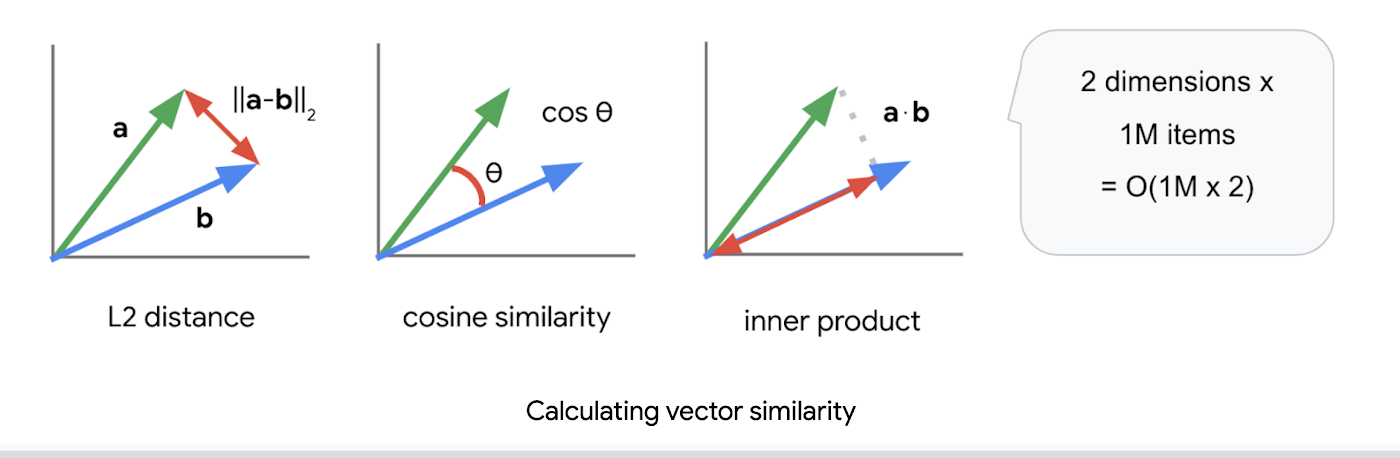
But all require calculations proportional to the number of vectors multiplied by the number of dimensions if you implement them in a naive way. For example, if you compare a vector with 1024 elements to 1M vectors, the number of calculations will be proportional to 1024 x 1M = 1.02B. This is the computation required to look through all the entities for a single search, and the reason why the BigQuery demo above takes so long.
Instead of comparing vectors one by one, you could use the approximate nearest neighbor (ANN) approach to improve search times. Many ANN algorithms use vector quantization (VQ), in which you split the vector space into multiple groups, define “codewords” to represent each group, and search only for those codewords. This VQ technique dramatically enhances query speeds and is the essential part of many ANN algorithms, just like indexing is the essential part of relational databases and full-text search engines.
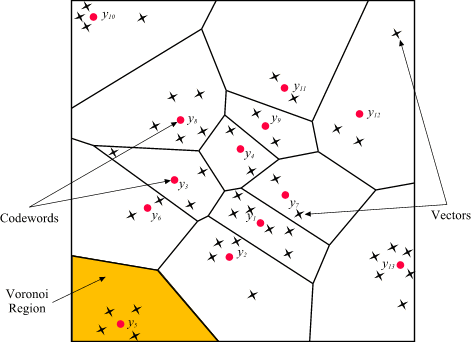
As you may be able to conclude from the diagram above, as the number of groups in the space increases the speed of the search decreases and the accuracy increases. Managing this trade-off — getting higher accuracy at shorter latency — has been a key challenge with ANN algorithms.
Last year, Google Research announced ScaNN, a new solution that provides state-of-the-art results for this challenge. With ScaNN, they introduced a new VQ algorithm called anisotropic vector quantization:
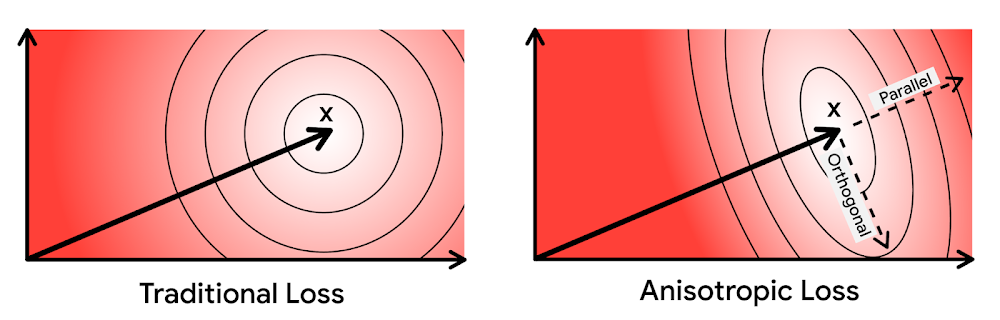
Anisotropic vector quantization uses a new loss function to train a model for VQ for an optimal grouping to capture farther data points (i.e. higher inner product) in a single group. With this idea, the new algorithm gives you higher accuracy at lower latency, as you can see in the benchmark result below (the violet line):
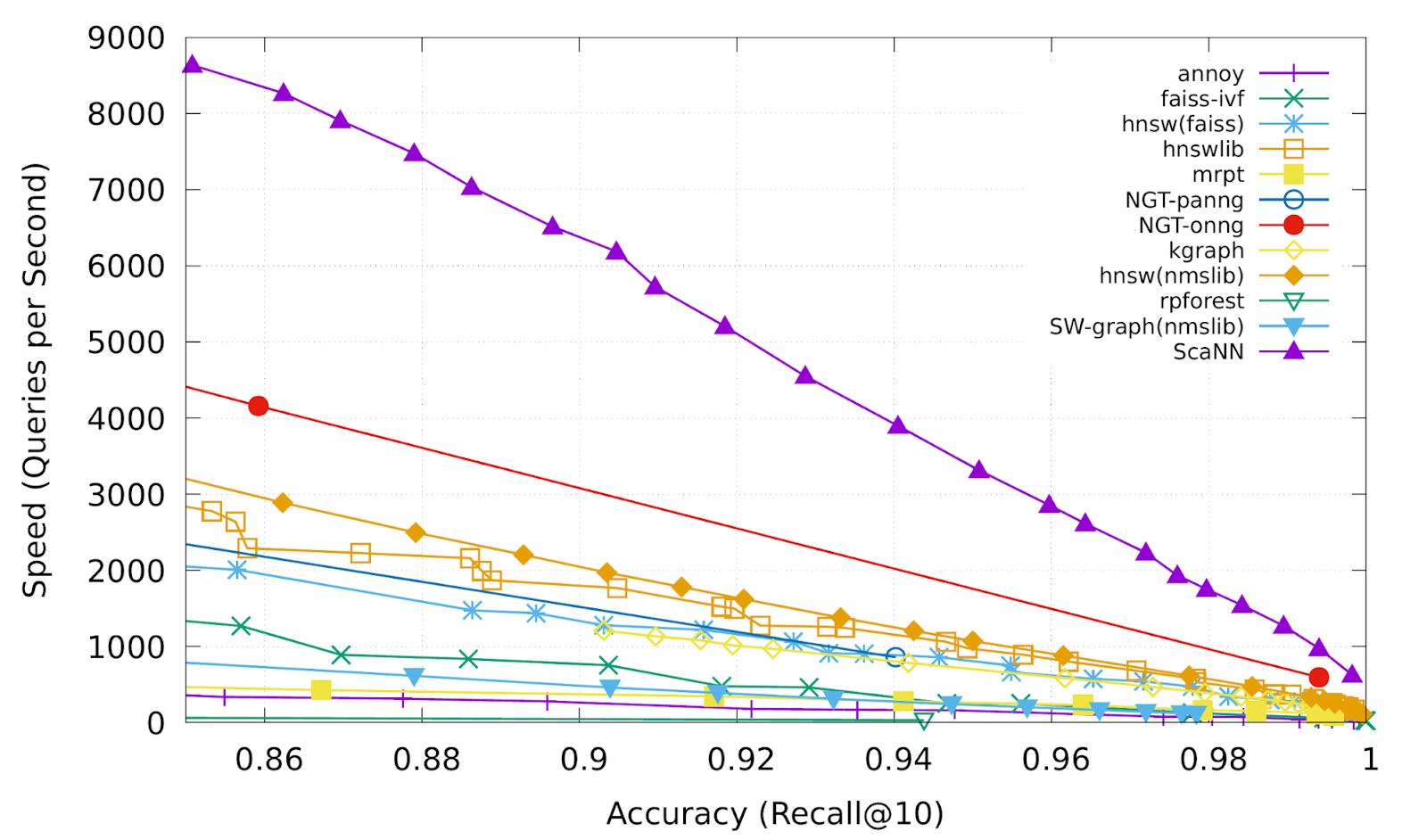
This is the magic ingredient in the user experience you feel when you are using Google Image Search, YouTube, Google Play, and many other services that rely on recommendations and search. In short, Google’s ANN technology enables users to find valuable information in milliseconds, in the vast sea of web content.
How to use Vertex AI Matching Engine
Now you can use the same search technology that powers Google services with your own business data. Vertex AI Matching Engine is the product that shares the same ScaNN based backend with Google services for fast and scalable vector search, and recently it became GA and ready for production use. In addition to ScaNN, Matching Engine gives you additional features as a commercial product, including:
- Scalability and availability: The open source version of ScaNN is a good choice for evaluation purposes, but as with most new and advanced technologies, you can expect challenges when putting it into production on your own. For example, how do you operate it on multiple nodes with high scalability, availability, and maintainability? Matching Engine uses Google’s production backend for ScaNN, which provides auto-scaling and auto-failover with a large worker pool. It is capable of handling tens of thousands of requests per second, and returns search results in less than 10 ms for the 90th percentile with a recall rate of 95 – 98%.
- Fully managed: You don’t have to worry about building and maintaining the search service. Just create or update an index with your vectors, and you will have a production-ready ANN service deployed. No need to think about rebuilding and optimizing indexes, or other maintenance tasks.
- Filtering: Matching Engine provides filtering functionality that enables you to filter search results based on tags you specify on each vector. For example, you can assign “country” and “stocked” tags to each fashion item vector, and specify filters like “(US OR Canada) AND stocked” or “not Japan AND stocked” on your searches.
Let’s see how to use Matching Engine with code examples from the MatchIt Fast demo.
Generating embeddings
Before starting the search, you need to generate embeddings for each item like this one:
{"Id":"b5c65fea9b0b8a57bfa574ea","Embedding": [0.16329009830951691,0.92436742782592773,0.00095699273515492678,0.011479727923870087,0.0089491046965122223,0.019959751516580582,0.031516745686531067,0.0066015380434691906,0.46404418349266052,...
This is an embedding with 1280 dimensions for a single image, generated with a MobileNet v2 model. The MatchIt Fast demo generates embeddings for two million images with the following code:
class Vectorizer:def __init__(self):self._model = tf.keras.Sequential([hub.KerasLayer("https://tfhub.dev/google/imagenet/mobilenet_v2_100_224/feature_vector/5", trainable=False)])self._model.build([None, 224, 224, 3]) # Batch input shape.def vectorize(self, jpeg_file):...snip...embedding = self._model.predict({"inputs": input_tensor})[0].tolist()return embedding
After you generate the embeddings, you store them in a Google Cloud Storage bucket.
Configuring an index
Then, define a JSON file for the index configuration:
{"contentsDeltaUri": "gs://match-it-fast-us-central1/wikimedia_images/index-1","config": {"dimensions": 1280,"approximateNeighborsCount": 150,"distanceMeasureType": "SQUARED_L2_DISTANCE","algorithm_config": {"treeAhConfig": {"leafNodeEmbeddingCount": 1000,"leafNodesToSearchPercent": 5}}}}
You can find a detailed description for each field in the documentation, but here are some important fields:
contentsDeltaUri: the place where you have stored the embeddingsdimensions: how many dimensions in the embeddingsapproximateNeighborsCount: the default number of neighbors to find via approximate searchdistanceMeasureType: how the similarity between embeddings should be measured, either L1, L2, cosine or dot product (this page explains which one to choose for different embeddings)
To create an index on the Matching Engine, run the following gcloud command where the metadata-file option takes the JSON file name defined above.
gcloud --project=gn-match-it-fast beta ai indexes create \--display-name=wikimedia-images \--description="Wikimedia Image Demo" \--metadata-file=metadata/wikimedia_images_index_metadata.json \--region=us-central1
Run the search
Now the Matching Engine is ready to run. The demo processes each search request in the following order:
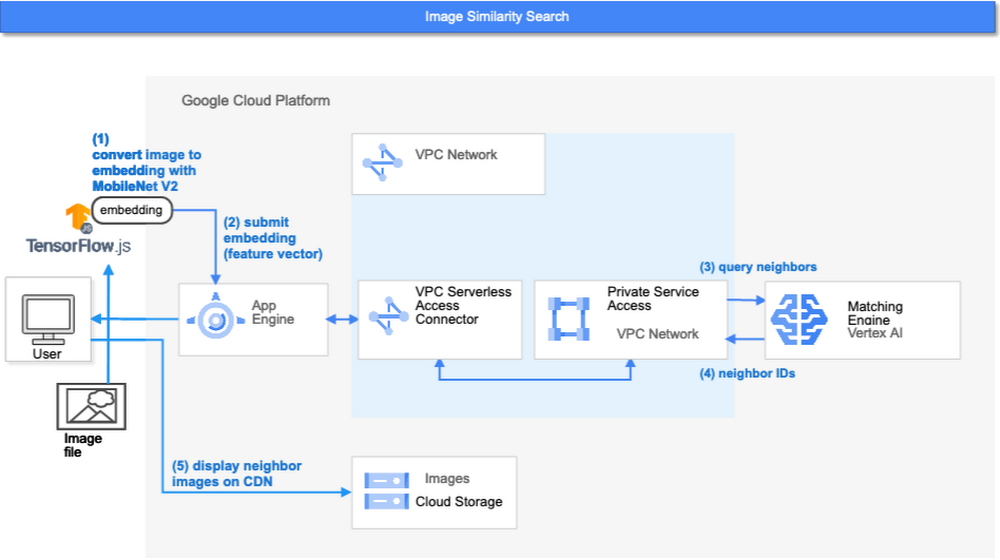
- First, the web UI takes an image (the one chosen or uploaded by the user) and encodes it into an embedding using the TensorFlow.js MobileNet v2 model running inside the browser. Note: this “client-side encoding” is an interesting option for reducing network traffic when you can run the encoding at the client. In many other cases, you would encode contents to embeddings with a server-side prediction service such as Vertex AI Prediction, or just retrieve pre-generated embeddings from a repository like Vertex AI Feature Store.
- The App Engine frontend receives the embedding and submits a query to the Matching Engine. Note that you can also use any other compute services in Google Cloud for submitting queries to Matching Engine, such as Cloud Run, Compute Engine, or Kubernetes Engine, or whatever is most suitable for your applications.
- Matching Engine executes its search. The connection between App Engine and Matching Engine is provided via a VPC private network for optimal latency.
- Matching Engine returns the IDs of similar vectors in its index.
Step 3 is implemented with the following code:
class MatchingQueryClient:...snip...def query_embedding(self, embedding, num_neighbors=30):request = match_service_pb2.MatchRequest()request.deployed_index_id = self._deployed_index_idfor v in embedding:request.float_val.append(v)request.num_neighbors = num_neighborsresponse = self._stub.Match(request)return response
The request to the Matching Engine is sent via gRPC as you can see in the code above. After it gets the request object, it specifies the index id, appends elements of the embedding, specifies the number of neighbors (similar embeddings) to retrieve, and calls the Match function to send the request. The response is received within milliseconds.
Next steps: Making changes for various use cases and better search quality
As we noted earlier, the major challenges in applying vector search on production use cases are:
- Creating vectors that are meaningful for business use cases
- Building a fast and scalable vector search service
From the example above, you can see that Vertex AI Matching Engine solves the second challenge. What about the first one? Matching Engine is a vector search service; it doesn’t include the creating vectors part.
The MatchIt Fast demo uses a simple way of extracting embeddings from images and contents; specifically it uses an existing pre-trained model (either MobileNet v2 or Universal Sentence Encoder). While those are easy to get started with, you may want to explore other options to generate embeddings for other use cases and better search quality, based on your business and user experience requirements.
For example, how do you generate embeddings for product recommendations? The Recommendation Systems section of the Machine Learning Crash Course is a great resource for learning how to use collaborative filtering and DNN models (the two-tower model) to generate embeddings for recommendation. Also, TensorFlow Recommenders provides useful guides and tutorials for the topic, especially on the two-tower model and advanced topics. For integration with Matching Engine, you may also want to check out the Train embeddings by using the two-tower built-in algorithm page.
Another interesting solution is the Swivel model. Swivel is a method for generating item embeddings from an item co-occurrence matrix. For structured data, such as purchase orders, the co-occurrence matrix of items can be computed by counting the number of purchase orders that contain both product A and product B, for all products you want to generate embeddings for. To learn more, take a look at this tutorial on how to use the model with Matching Engine.
If you are looking for more ways to achieve better search quality, consider metric learning, which enables you to train a model for discrimination between entities in the embedding space, not only classification:
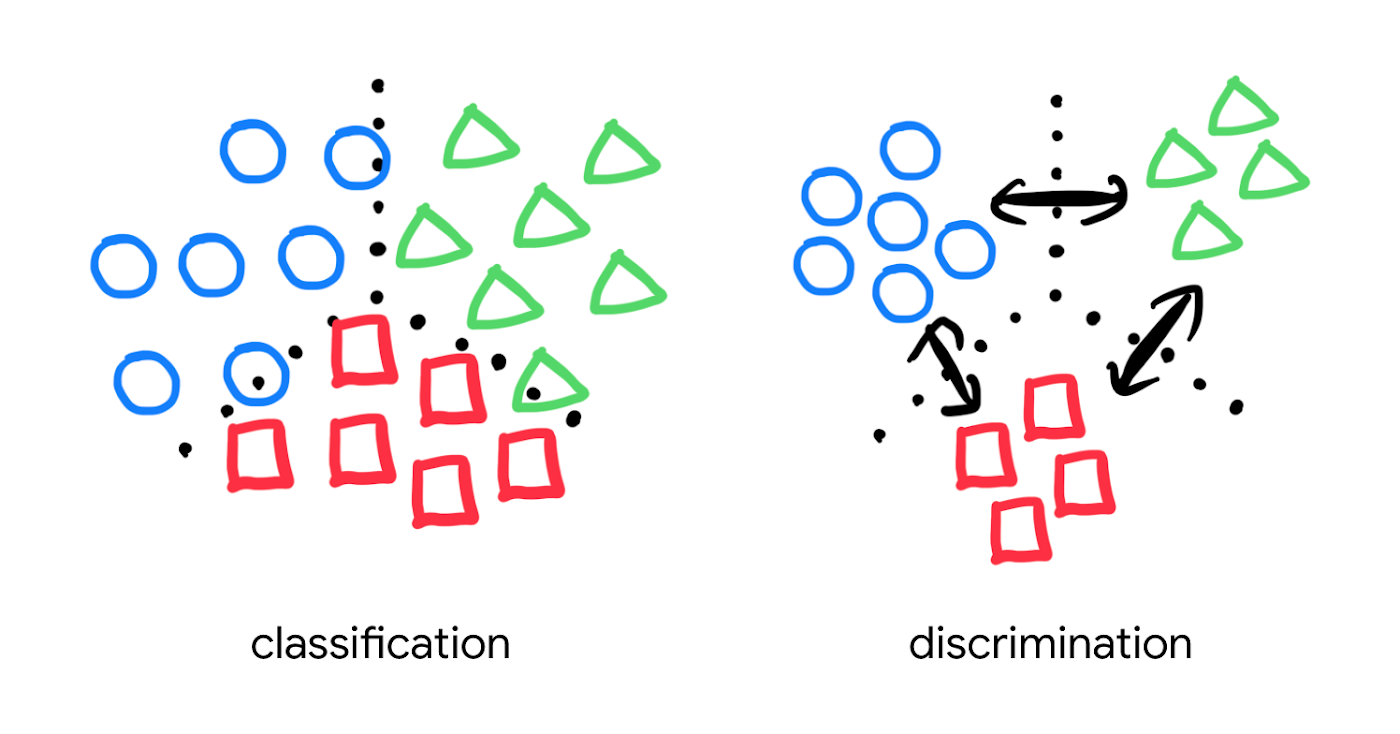
Popular pre-trained models such as the MobileNet v2 can classify each object in an image, but they are not explicitly trained to discriminate the objects from each other with a defined distance metric. With metric learning, you can expect better search quality by designing the embedding space optimized for various business use cases. TensorFlow Similarity could be an option for integrating metric learning with Matching Engine.
Interested? Today, we’re just beginning the migration from traditional search technology to new vector search. Over the next 5 to 10 years, many more best practices and tools will be developed in the industry and community. These tools and best practices will help answer many questions, like… How do you design your own embedding space for a specific business use case? How do you measure search quality? How do you debug and troubleshoot the vector search? How do you build a hybrid setup with existing search engines for meeting sophisticated requirements? There are many new challenges and opportunities ahead for introducing the technology to production. Now’s the time to get started delivering better user experiences and seizing new business opportunities with Matching Engine powered by vector search.
Acknowledgements
We would like to thank Anand Iyer, Phillip Sun, and Jeremy Wortz for their invaluable feedback to this post.
SEED: The 4 Areas of a Well-functioning and Responsible AI

4337
Of your peers have already read this article.
2:00 Minutes
The most insightful time you'll spend today!
The future of AI is better AI—designed with ethics and responsibility built in from the start. This means putting the brakes on AI-driven transformation until you have a well-functioning strategy and process in place to ensure your models deliver fair outcomes. Failing to recognize this imperative is a threat to your bottom line. The following post provides a simple framework to follow to keep your business on the right track as you place more trust in algorithms.
AI is inherently sociotechnical. AI systems represent the interconnectedness of humans and technology. They are designed to be used by and to inform humans within specific contexts, and the speed and scale of AI means that any lack of responsibility—such as bias, safety, privacy, scientific excellence etc—will also replicate at that same speed and scale. Without ethics and responsibility built in by design, AI systems lack the critical “inputs” or societal context that enable long term success.
Lawsuits stemming from AI systems that are biased towards certain groups are stacking up. In August 2020, IBM was forced to settle a lawsuit with the city of Los Angeles for misappropriating data it collected for its weather channel app. Health services company, Optum, is being investigated by regulators for creating an algorithm that allegedly recommended that doctors and nurses pay more attention to white patients than to sicker black patients. And Facebook, which granted Cambridge Analytica, a political firm, access to the personal data of more than 50 million people, is buried in legal work. Google has also run into its share of issues with algorithms making egregious mistakes.
While lawsuits are real, the foundational reason ethical AI is critical to your bottom line is trust. Without it, increasingly, consumers will ignore you and choose a brand they do trust. Research from Kantar, which runs one of the largest global brand equity studies (4 million consumers, 18,000 brands, across 50 markets), revealed that almost 9% of a brand’s equity is driven by corporate reputation, of which responsibility is a key attribute. Over the last decade, the importance of responsibility to consumers in relation to making brand choices has tripled.
The study stated brands perceived to be among the world’s most trusted and responsible shared three crucial factors that proved particularly important for building consumer trust and confidence, even when a brand might be new to a market. These are:
- Honesty and openness
- Respect and inclusion
- Identifying with and caring for customers
Brands that develop these associations more strongly tend to outperform their competitors in defending and growing their brand value.
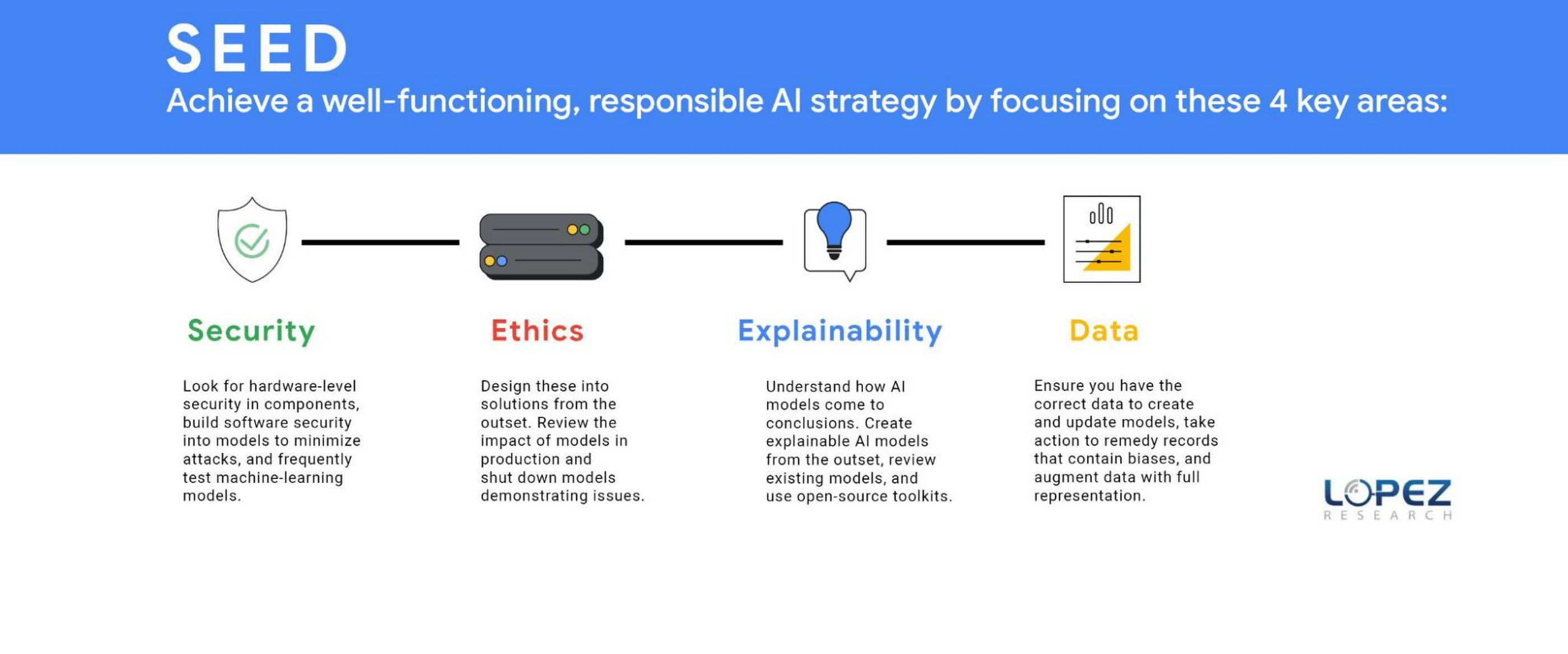
Technology and business leaders need to focus on four areas to accomplish a well-functioning ethical AI strategy. Lopez Research refers to this group of tasks as SEED, which stands for security, ethics, explainability, and data (SEED). Each of these topics could be an article in itself, but this post will define several essential components.
SECURITY (S)
It might not seem obvious, but a robust AI strategy requires an embedded security strategy. Companies should look for hardware-level security in components such as GPUs and CPUs. IT leaders should build software security into models to minimize attacks such as poisoning, evasion, deepfakes, backdoors, and model extraction. The threat of adversarial data poisoning attacks machine learning models by maliciously introducing inaccurate data designed to corrupt the model’s ability to be accurate. Another security threat is model extraction, also known as model cloning, where a hacker finds a way to either reconstruct a black-box machine learning model or extract the training data. The first line of defense against all security attacks is to design security at the outset, but the next best step is to frequently test models to ensure they are operating as planned. Business leaders, data science experts, and IT leaders must work together to regularly review the outcomes of AI models.
ETHICS (E)
Today, organizations must understand that ethics should be designed into the solution at its outset. The ethics process starts with defining the potential positive and negative outcomes of the model that your business is creating. Once the team has evaluated potential harmful effects, which means unpacking the systems, beliefs, power hierarchies and dynamics that interconnect with the technology, it’s your responsibility to eliminate or minimize the impact of these outcomes. It’s also critically important to review the impact of models in production and shut down models demonstrating issues. An example of this was the public beta release of the Tay chatbot that Microsoft deployed and rapidly shut down because it propagated negative biases.
Yet, many organizations aren’t taking this action. The FICO study revealed that 93% of companies said responsible AI was critical for success but only 33% of these companies were measuring AI model outputs to ensure these models were operating as expected (measuring for model drift). Another survey by Pew Research revealed that 68% believe that ethical principles focused primarily on the public good will not be employed in most AI systems by 2030.
Regulations may turn this tide, regardless of whether organizations plan to adopt an ethical AI framework. Laws governing the ethical use of data in AI are expected to be finalized as soon as 2022, such as the European Commission’s proposed legal framework for AI. Organizations that start with ethical use of AI in mind will be better positioned to deal with customer privacy concerns and regulatory compliance.
EXPLAINABILITY(E)
As models have become more sophisticated, it’s also become increasingly difficult to explain why a model created a specific outcome. In the FICO Responsible AI report, 65% of respondents could not explain how specific AI model decisions or predictions are made, and only 35% said their organization made an effort to use AI in a way that was transparent and accountable. However, it’s never been more important to clarify how AI models came to conclusions such as why a loan was denied, why a particular strategy should be implemented, and how AI selected a set of resumes to review for a position. The goal is to create an explainable AI model from the outset but many of today’s models lack this capability. Every business should review its existing models and use open-source toolkits that can be found on Github.com that support the interpretability and explainability of machine learning models.
Keep in mind that explainability isn’t one-size-fits-all. Different stakeholders need different types of information. Much of explainability to date has focused on “opening the black box” which gets equated to information that is only useful for other data scientists. That’s important, but it doesn’t help the line of business users whose workflows AI is integrated into, or end users who deserve information about how decisions are made; or policymakers who don’t have data science backgrounds, and so on.
DATA (D)
An equally important item in ethics is data. Ethics starts with ensuring you have the correct data to create and update models. Three main issues include representative data, inherent biases within existing data, and inaccurate data. A critical issue that most companies miss in creating models is that current data sets frequently lack full market representation. A recent Capgemini Research Institute report revealed that 65% of executives “were aware of the issue of discriminatory bias” with these systems.
Awareness is the first step, but organizations must take action to remedy this issue. Historical data may no longer serve a company’s current needs for model creation. Historical records may contain biases against certain groups. For example, historical criminal data records show an imbalance in ethnic groups’ incarceration, which would lead to model biases. Additionally, laws and societal norms also change. Certain groups were prosecuted for sexual preference in the past, but today this information would create an inaccurate model.
Companies have also discovered that using demographic data, a common practice in marketing, can also lead to model bias. For example, individuals that primarily used cash for transactions and others that lived in specific zip codes were at a disadvantage in banking models to determine creditworthiness. To minimize these issues, a company needs to augment its data with full representation in areas such as ethnicity, gender, age, behavioral and economic profiles.

Design AI models with a continuous feedback loop
Another, more prominent, yet tricky issue is data accuracy. As the adage says, garbage in, equals garbage out. The least appreciated but arguably the most essential component of the AI model lifecycle is ensuring the model has accurate data at all times. Inaccurate data from either poor data hygiene or data that was tampered with for security purposes can cause model failures. Organizations need to invest the time and resources to ensure they have the correct data. Data privacy is another key element that businesses must address, but the concepts of data privacy, sovereignty, and security are significant enough that we will come back to this in a separate article.
Overall, it’s clear that while we may have an abundance of data, it most likely doesn’t represent what we want to model for the future. A successful AI strategy is an ethical AI strategy that requires the organization to be thoughtful in its model creation by ensuring it has a broad representation of accurate data and testing the outcomes to ensure the models are secure and operating as expected.
Organizations that define an AI model lifecycle with a continuous feedback loop will reap the benefits of better intelligence. This will increasingly mean stronger, longer lasting trust with customers and staying on the right side of new laws and regulations.
5169
Of your peers have already watched this video.
24:00 Minutes
The most insightful time you'll spend today!
BK Medical’s Lift and Shift of SAP Environs on Google Cloud Results in Real-time Success
BK Medical is known for designing active imaging systems to help care providers visualize anatomy and provide real-time guidance to aid surgical interventions. After becoming an entity independent of the parent company, Analogic corporation, BK Medical decided to separate its SAP environs from the latter, and move into cloud. After assessing cloud vendors with Managecore, BK Medical chose Google Cloud as its managed service provider that could serve as a single source of truth and also help walk through the lift and shift of SAP ECC systems to the cloud. Watch the video to learn how the migration impacted BK Medical’s goals.
Streamline Your Business Processes with Google Cloud’s Custom Document Splitter

932
Of your peers have already read this article.
3:30 Minutes
The most insightful time you'll spend today!
Businesses rely on processing an inflow of documents to drive processes and make decisions. Many such documents are combined into a single file. For example, a loan application may have a driver’s license, paystub, W2, bank statement, and other document types within a single file. The complexity of handling many document types within a single file makes it difficult for businesses to manage at scale.
At Google Cloud, we’re committed to solving these challenges with continued investment in our Document AI solutions suite which offers machine learning products for document processing and insights. Document AI Workbench helps users quickly build ML models with world-class accuracy, trained for their specific use cases. In February 2023, we launched the Custom Document Extractor (CDE) in General Availability (GA) to help users extract structured data from documents in production use cases. In March 2023, we launched the Custom Document Classifier (CDC) in GA to help automatically classify document types. Today, we announce the newest feature of Document AI Workbench, Custom Document Splitter (CDS) in GA to help users automatically split and classify multiple documents within a single file.
CDS provides tangible business value to customers by helping them sort and classify documents. For example, businesses can validate if they have all the needed documents from an applicant. Furthermore, individually classified documents enable businesses to better automate downstream processes, including selecting the proper storage, analysis, or processing steps based on the document type. The efficiencies enabled by CDS helps businesses lower their document processing time and cost.
Benefits of splitting and classification models in Document AI Workbench
Document AI Workbench can save time and money by simplifying model training, from dataset management, to testing, to deployment. CDS helps businesses achieve higher automation rates to scale processes while lowering costs.
Sean Earley, VP of Delivery Services at Zencore said, “We completed a project for a large bank using Document AI Workbench to split, classify, and extract data from documents to automate Home Mortgage Disclosure Act reporting. Given the accuracy of the models we built, our client estimated increasing loan reporting coverage from 20% to 100% while eliminating thousands of errors per year, drastically reducing the operational cost of the bank’s compliance reporting procedures.”
Fabian Beckmann, Manager Artificial Intelligence & Data at Deloitte Consulting GmbH said, “By leveraging Document AI’s Custom Document Splitter, our client, Commerzbank, a large european bank, can effortlessly segment customer submissions tailored to their back-office requirements, significantly diminishing the need for extra manual sorting or routing. This integration paves the way towards seamless automation within the Document AI pipeline, delivering substantial business benefits.“
According to Kaïs Albichari – ML Tribe Tech Lead, G Cloud at IT services firm Devoteam, “Custom Document Splitter (CDS) has helped one of our clients in the financial services industry save significant time and improve data accuracy. By identifying which parts of documents they can discard and which they retain for entity extraction, CDS has helped the company automate its document processing tasks. The implementation resulted in a more efficient and streamlined workflow, freeing employees to focus on other tasks. Devoteam’s G Cloud team helped the company implement CDS and achieve these benefits.”
Frank Neugebauer, a Google Cloud Insurance Solutions Consultant, worked with a Fortune 100 insurance company and used CDS to create a model to split and classify millions of insurance documents with up to 98% accuracy. With this information, the insurer can better understand the nature of their unstructured data to inform business strategy, including volume for specific document types to inform extraction work. The customer considers this level of insight unprecedented in their 200+ year history.
How to use Custom Document Splitter
You can leverage a simple interface in the Google Cloud Console and a set of public APIs to prepare training data, create and evaluate models, deploy a model into production, and call an API endpoint to split and classify document types. You can follow the documentation for instructions to create, train, evaluate, deploy, and run predictions with models.
Import and prepare training data
To get started, import and label documents to train and evaluate an ML model.
To quickly build a training dataset, import single documents, one document per file, and bulk label them with the relevant document type. You can import one folder or multiple folders at once and choose the correct document type per folder. As shown in the next image, one import could have a folder with 200 bank statements, another folder with 200 W2s, another folder with 200 paystubs, etc., all of which are labeled at once while imported. Up to 30,000 documents and 100,000 pages can be inputted for training. This way, you can build a training dataset with hundreds of labeled documents per class in minutes. As always, if documents are already labeled using other tools, simply import labels with JSON in the Document format.
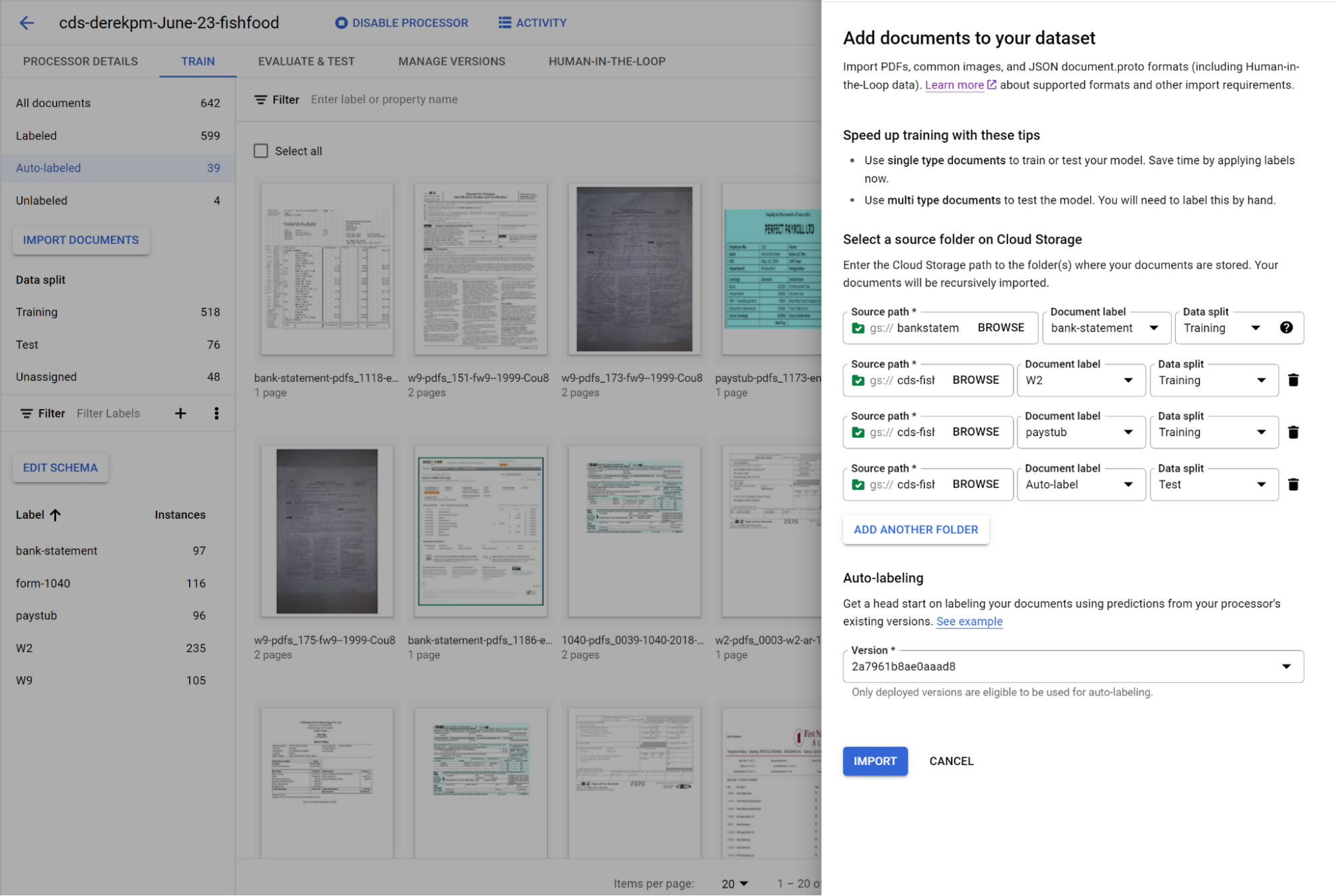
You can initiate training with a click of a button. Once you have trained a model, you can use it to automatically label documents added to your dataset, letting you quickly build robust test and training datasets to evaluate and improve model performance.
To accurately evaluate a CDS model, import files which contain multiple document types within the same file and assign them to the test dataset. Then, use a simple interface to define document boundaries and types.
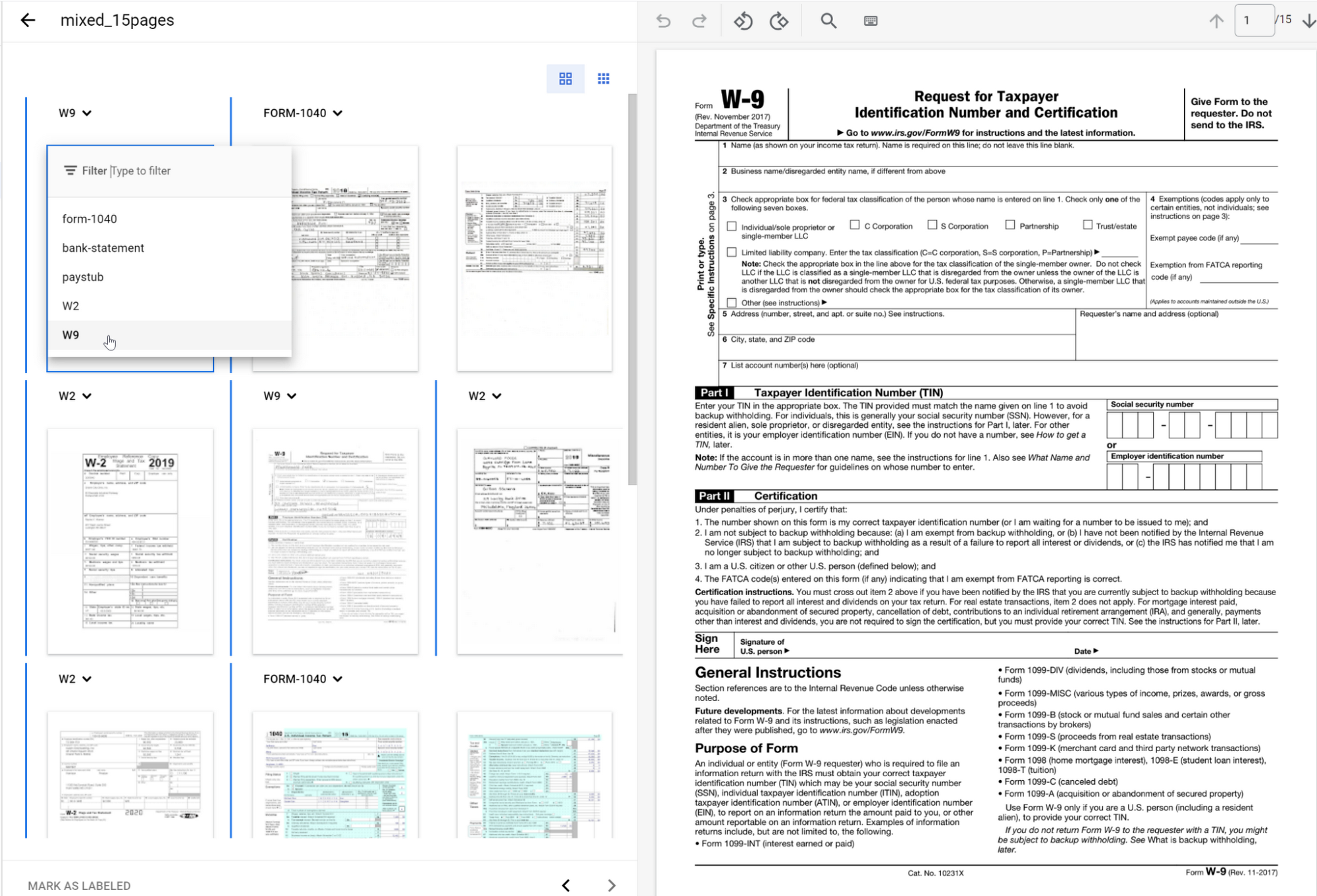
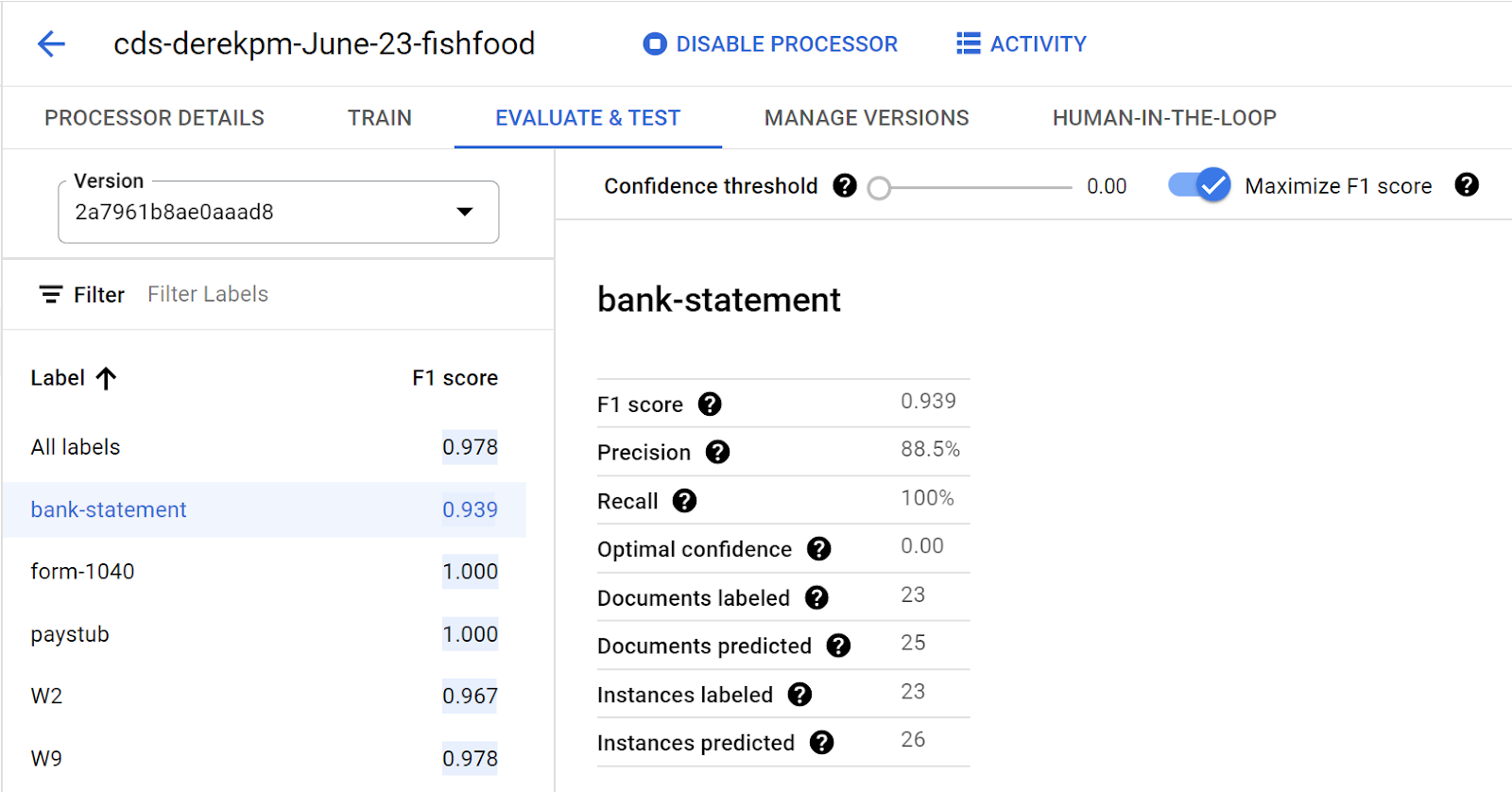
The ground truth you label in the test dataset is used to evaluate splitting and classification predictions from the CDS model.
Going into production
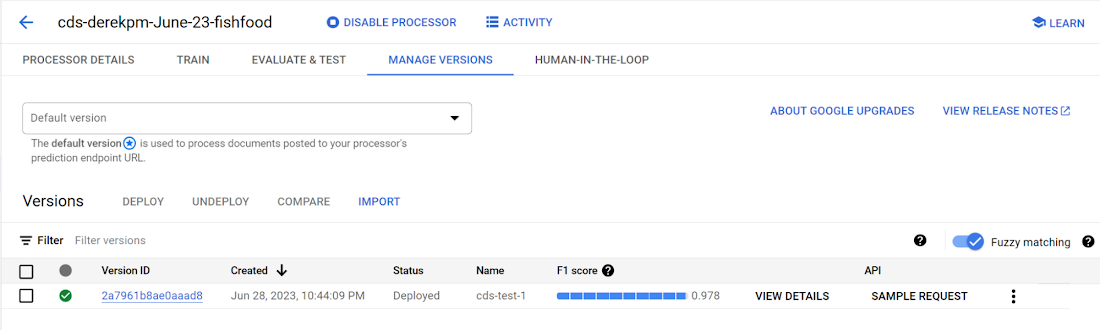
Once a model meets accuracy targets, it’s time to deploy into production and call the API endpoint to split and classify document types.
Getting started with Document AI Workbench
Custom Document Splitter is publicly available in GA and ready to help customers automate document splitting and classification. Learn more via our Document AI Workbench web page, Document AI Workbench documentation or try it out in the Google Cloud Console.
More Relevant Stories for Your Company

Revolutionizing Cloud Computing: Introducing G2 VMs with NVIDIA L4 GPUs
Organizations across industries are looking to AI to turn troves of data into intelligence, powered by the latest advances in generative AI. Yet for many organizations, there is a barrier to adopting the latest models because they can be costly to train or serve. A new class of cloud GPUs

Leading Verve Group’s CX Innovation with Google Cloud Vertex AI
Verve Group is an ecosystem of demand and supply technologies fusing data, media, and technology to deliver results and growth to both advertisers and publishers – no matter the screen or location, no matter who, what, or where a customer is. Classifying massive amounts of this unstructured data at scale is




Explore the Innovations and Architecture Powering Spanner and BigQuery
Previously, databases had architectures with tightly coupled storage and compute. This resulted in higher latency, and with faster networks these constraints no longer surface. With Google Cloud's BigQuery and CloudSpanner, the storage and compute architecture have been separated, allowing for better scalability and availability to address businesses' high throughput data
VCP Peering and Private Endpoints on Vertex AI to Better Security and Predictions in Near Real-time
One of the biggest challenges when serving machine learning models is delivering predictions in near real-time. Whether you’re a retailer generating recommendations for users shopping on your site, or a food service company estimating delivery time, being able to serve results with low latency is crucial. That’s why we’re excited
