





Redefining Network Security with Google Cloud’s Secure Web Proxy

1196
Of your peers have already read this article.
3:30 Minutes
The most insightful time you'll spend today!
Google Cloud provides multiple layers of security to help customers stay ahead of evolving threats and keep their cloud workloads safe. Today at our annual Security Summit, we are excited to announce the general availability of Secure Web Proxy, a new cloud-first network security offering that provides web egress traffic inspection, protection, and control. Secure Web Proxy (Cloud SWP) can help networking and security teams implement Zero Trust networking principles, discover malicious activity, and support forensic investigations
How Secure Web Proxy works
You configure workloads to use Secure Web Proxy as a gateway. Web requests can originate from virtual machine (VM) instances, containers, serverless environments, and workloads outside of Google Cloud connected by Cloud VPN or Cloud Interconnect. Policies and rules in Cloud SWP will be applied to traffic sent from these workloads to the internet.
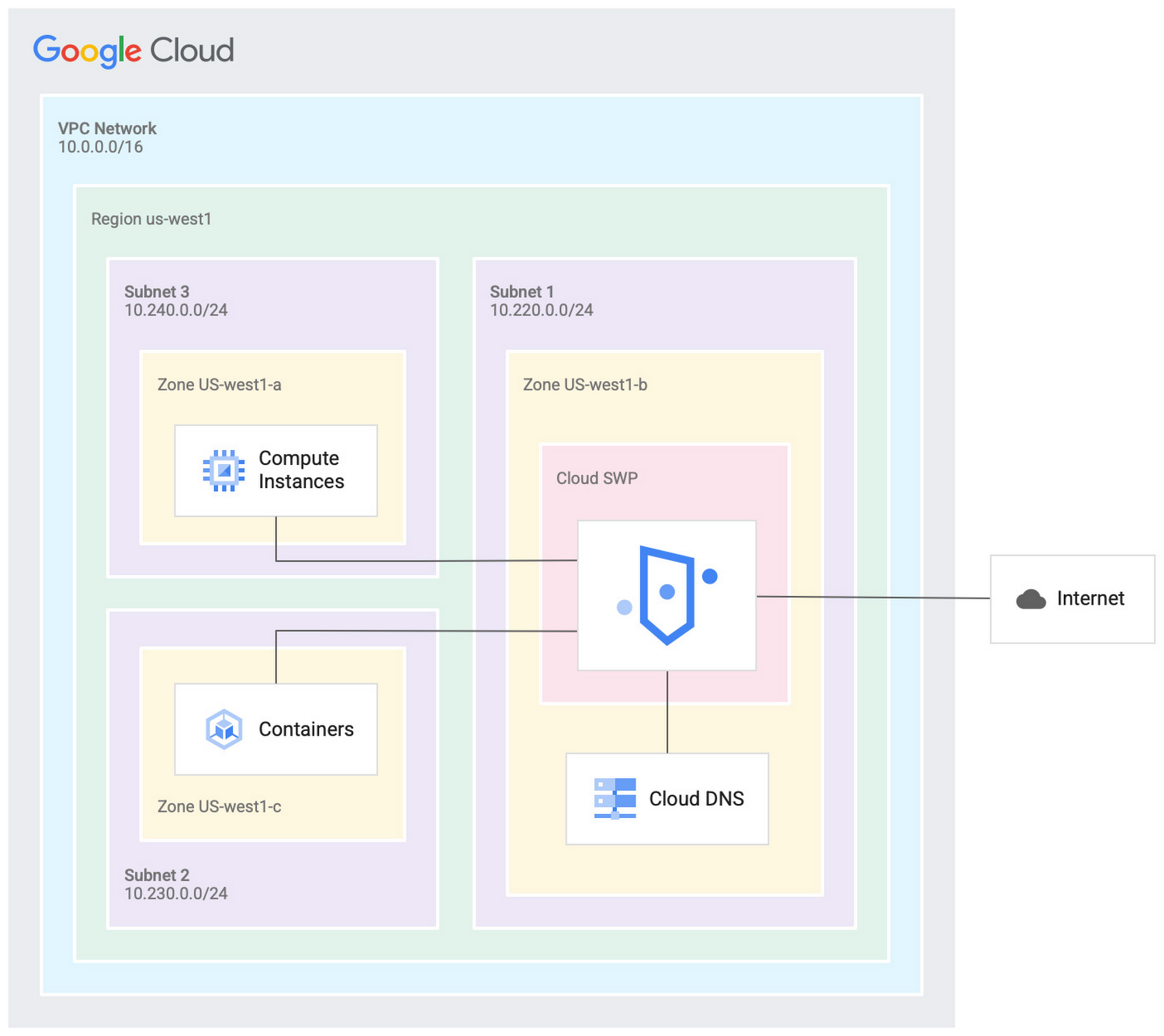
Cloud SWP helps enable organizations to enforce granular access policies, limiting egress web traffic based on source, identities, destination, or request types. With Cloud SWP you can create policies with Google Cloud Identity Access Management (IAM) context using service accounts and secure tags to block egress. For example, you can set a policy to limit a service account to sending traffic to a specific outbound destination.
Secure Web Proxy offers a scalable TLS inspection service that lets you intercept TLS traffic, inspect the encrypted request, and enforce your policies. Cloud SWP integrates with Cloud Logging to record metrics and transaction logs for requests handled by the proxy.
Common use cases for Secure Web Proxy
Many organizations employ a proxy like Cloud SWP to programmatically restrict workload access to only trusted external web services.
You can also use Cloud SWP to monitor outbound access. The proxy identifies traffic that doesn’t conform to policy and logs it to Cloud Logging. This allows you to monitor internet usage, discover and disrupt threats on your network by spotting command and control traffic or anomalous data transfers. Logs can be also used in forensics to investigate security events and incidents involving egress web traffic.
Operational benefits
Secure Web Proxy is another example of how Google Cloud continues to deliver built-in, cloud-first security capabilities that offer operational efficiencies for our customers.
Cloud SWP is easy to deploy and manage because it is a managed service. Unlike frequently deployed proxy solutions, it does not require users to configure virtual machines (VMs) to run and scale the proxy. Security patching is handled automatically. As your business and outbound traffic grows, Cloud SWP takes care of growing your proxy infrastructure for you.
Secure Web Proxy can also help make cloud migrations more seamless. If you are using an on-premises proxy, you can easily port the existing proxy’s policies to Cloud SWP when you migrate the app, maintaining the same egress protection in the cloud as you had on-premises.
Customer testimonials
Preview customers validated the operational and security value of implementing Cloud SWP:
“Google’s Secure Web Proxy is a powerful tool that can help businesses of all sizes protect their cloud workloads from online threats. By using the granular policy controls and TLS inspection, we are ensuring that our cloud applications only access approved external destinations. Additionally we are able to comply with data security regulations,” said David Saleh, director, Cloud Architecture and Application Security, ATB Financial.
“Secure Web Proxy has helped us to improve our security in Google Cloud. We are now able to filter outbound HTTP and HTTPS traffic from our applications. In addition, having a native solution will allow us to replace the VM-based solution we currently have, providing us with cost savings and continuing to deliver on our strategy of replacing products with cloud native services,” said Roberto Vega, cloud analyst, Carrefour.
Getting started with Secure Web Proxy
You can get started with Cloud SWP by visiting our documentation page to learn more about Cloud SWP prerequisite requirements and configuration options. If you want to quickly evaluate Cloud SWP for your cloud environment, use the SWP evaluation guide for step-by-step instructions. Be sure to check out all our sessions at this year’s Google Cloud Security Summit.
4877
Of your peers have already watched this video.
1:30 Minutes
The most insightful time you'll spend today!
Accelerate Your Digital Transformation Through a Modern Infrastructure
Learn about the latest advancements to Google Cloud Platform’s unique infrastructure to accelerate enterprise workloads and build planet scalable solutions. Hear how Google Cloud’s infrastructure enables you to solve problems faster, more securely, and at greater scale.
See how Google Cloud is accelerating the support for enterprise workloads like SAP, VMware, and Windows and augmenting new capabilities to better protect and secure your workloads. Discover how Google Cloud enables businesses to build high-scale applications with global scale and reach.
Utilizing Google Cloud’s PII Security Features

2609
Of your peers have already read this article.
2:30 Minutes
The most insightful time you'll spend today!
BigQuery is a leading data warehouse solution in the market today, and is valued by customers who need to gather insights and advanced analytics on their data. Many common BigQuery use cases involve the storage and processing of Personal Identifiable Information (PII)—data that needs to be protected within Google Cloud from unauthorized and malicious access.
Too often, the process of finding and identifying PII in BigQuery data relies on manual PII discovery and duplication of that data. One common way to do this is by taking an extract of columns used for PII and copying them into a separate table with restricted access. However, creating unnecessary copies of this data and processing it manually to identify PII increases the risks of failure and subsequent security events.
In addition, the security of PII data is often mandated by multiple regulations and failure to apply appropriate safeguards may result in heavy penalties. To address this issue, customers need solutions that 1) identify PII in BigQuery and 2) automatically implement access control on that data to prevent unauthorized access and misuse, all without having to duplicate it.
This blog will discuss a solution developed by Google Professional Services for leveraging Google Cloud DLP to inspect and classify sensitive data and suggest a solution for using these insights to automatically tag and protect data in BigQuery tables.
BigQuery Auto Tagging solution overview
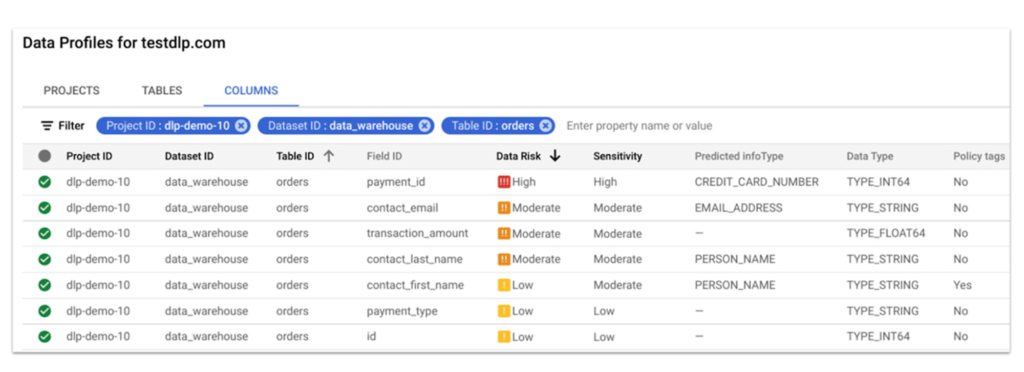
Automatic DLP can help to identify sensitive data, such as PII, in BigQuery. Organizations can leverage Automatic DLP to automatically search across their entire BigQuery data warehouse for tables that contain sensitive data fields and report detailed findings in the console (see Figure 1 below,) in Data Studio, and in a structured format (such as a BigQuery results table.) Newly created and updated tables can be discovered, scanned, and classified automatically in the background without a user needing to invoke or schedule it. This way you have an ongoing view into your sensitive data.
In this blog, we show how a new open source solution called BigQuery Auto Tagging Solution solves our second goal—automating access control on data. This solution sits as a layer on top of Automatic DLP and automatically enforces column-level access controls to restrict access to specific sensitive data types based on user-defined data classification taxonomies (such as high confidentiality or low confidentiality) and domains (such as Marketing, Finance, or ERP System.) This solution minimizes the risk of unrestricted access to PII and ensures that there is only one copy of data maintained with appropriate access control applied down to the column level.
The code for this solution is available on Github at GoogleCloudPlatform/bq-pii-classifier. Please note that while Google does not maintain this code, you can reach out to your Sales Representative to get in contact with our Professional Services team for guidance on how to implement it.
BigQuery and Data Catalog Policy Tags (now Dataplex) have some limitations that you should be aware of before implementing this solution to ensure that it will work for your organization:
- Taxonomies and Policy Tags are not shared across regions: If you have data in multiple regions you will need to create or replicate your taxonomy in each region that you want to apply policy tags.
- Maximum number of 40 taxonomies per project: If you require different taxonomies for different business domains or have replications to support multiple Cloud regions those will count against this quota.
- Maximum number of 100 policy tags per taxonomy: Cloud DLP supports up to 150 infoTypes for classification, however, a single policy taxonomy can only support up to 100 including any nested categories. If you need to support more than 100 data types, you may need to split these across more than one taxonomy.
High-level overview of the solution
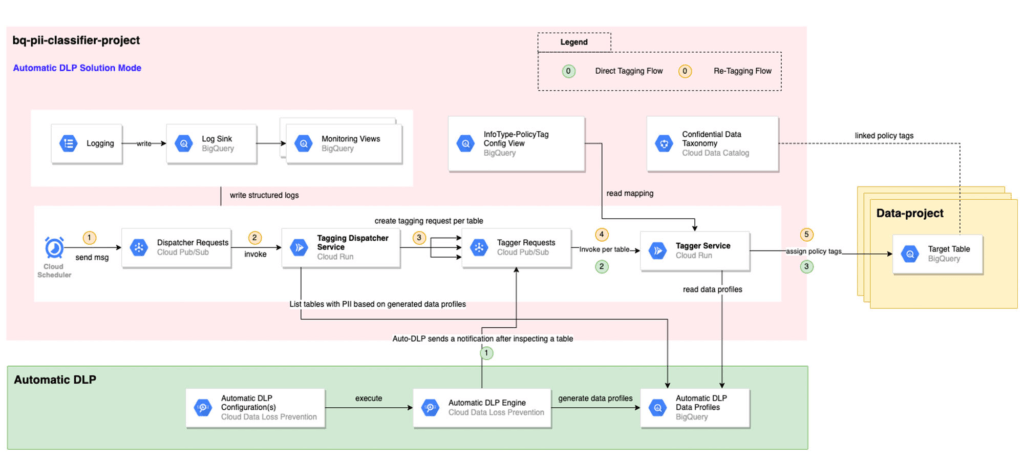
The solution is composed mainly of the following components: Dispatcher Requests topic, Dispatcher service, BigQuery Policy Tagger Requests topic, and BigQuery Policy Tagger service and logging components.
The Dispatcher Service is a Cloud Run service that expects a BigQuery scope to be expressed as inclusion and exclusion lists of projects, datasets, and tables. This Dispatcher service will query Automatic DLP Data Profiles to check if the tables in-scope have data profiles generated. For these tables, it will publish one request per table to the “BigQuery Policy Tagger Requests” PubSub topic. This topic enables rate limiting of BigQuery column tagging operations and apply auto-retries with backoffs.
The “BigQuery Policy Tagger” Service is also a Cloud Run service that receives the information of the DLP scan results of a BigQuery table. This service will determine the final InfoType of each column and apply the appropriate Policy Tags as defined in the InfoType – Policy Tags mapping. Only-one INFO_TYPE is selected and the function assigns the associated policy tag.
Lastly, all Cloud Run services maintain structured logs that are exported by a log sink to BigQuery. There are multiple BigQuery views that help with monitoring and debugging Cloud Run call chains and tagging actions on columns.
Deployment options
After deploying the solution, it can be used in two different ways:
[Option 1] Automatic DLP-triggered immediate tagging:
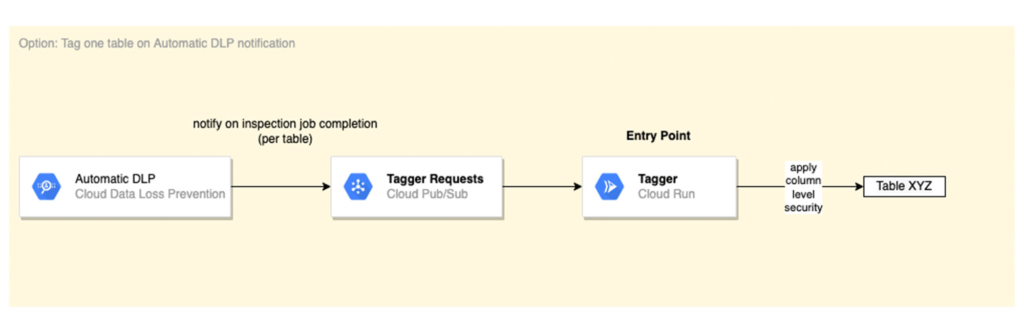
Automatic DLP is configured to send a Pub/Sub notification on each inspection job completion. The Pub/Sub notification includes the resource name and it triggers the Tagger service directly
[Option 2] Scheduled tagging:
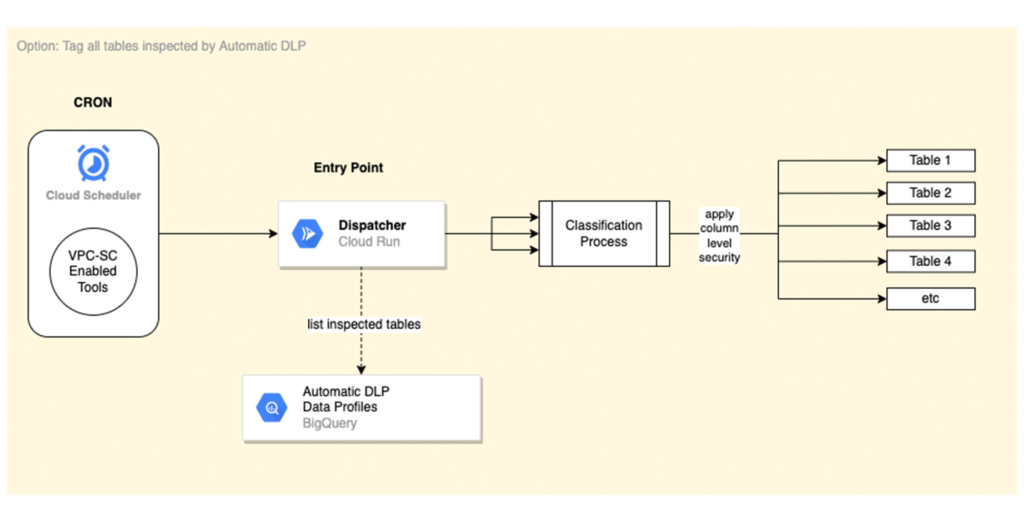
In this scenario, the Dispatcher service is invoked on a schedule with a payload representing a BigQuery scope to list inspected tables by Automatic DLP and create a tagging request per table. You could use Cloud Scheduler (or any Orchestration tool) to invoke the Dispatcher service. If the solution is deployed within a VPC-SC perimeter, other schedulers that support VPC-SC should be used (such as Composer or Custom App.)
In addition, more than one Cloud Scheduler/Trigger could be defined to group projects/datasets/tables that have the same tagging schedule (such as daily or monthly.)
To learn more about Automatic DLP, see our webpage. To learn more about the BQ classifier, see the open source project on Github: GoogleCloudPlatform/bq-pii-classifier and get started today!
New Capabilities in Cloud Asset Inventory Allow Better Visibility into Google Cloud Environments

4702
Of your peers have already read this article.
2:00 Minutes
The most insightful time you'll spend today!
Businesses that operate in complex cloud environments, large fleets, or sophisticated security operations all require visibility into their cloud assets in order to keep their teams nimble and their data secure. Cloud Asset Inventory (CAI) helps these teams understand their Google Cloud and Anthos environments by providing complete visibility, real-time monitoring, and powerful asset analysis capabilities. Today, Cloud Asset Inventory gets four new capabilities that help you understand your environment more clearly and easily than ever before.
New user interface eases asset and insight discovery
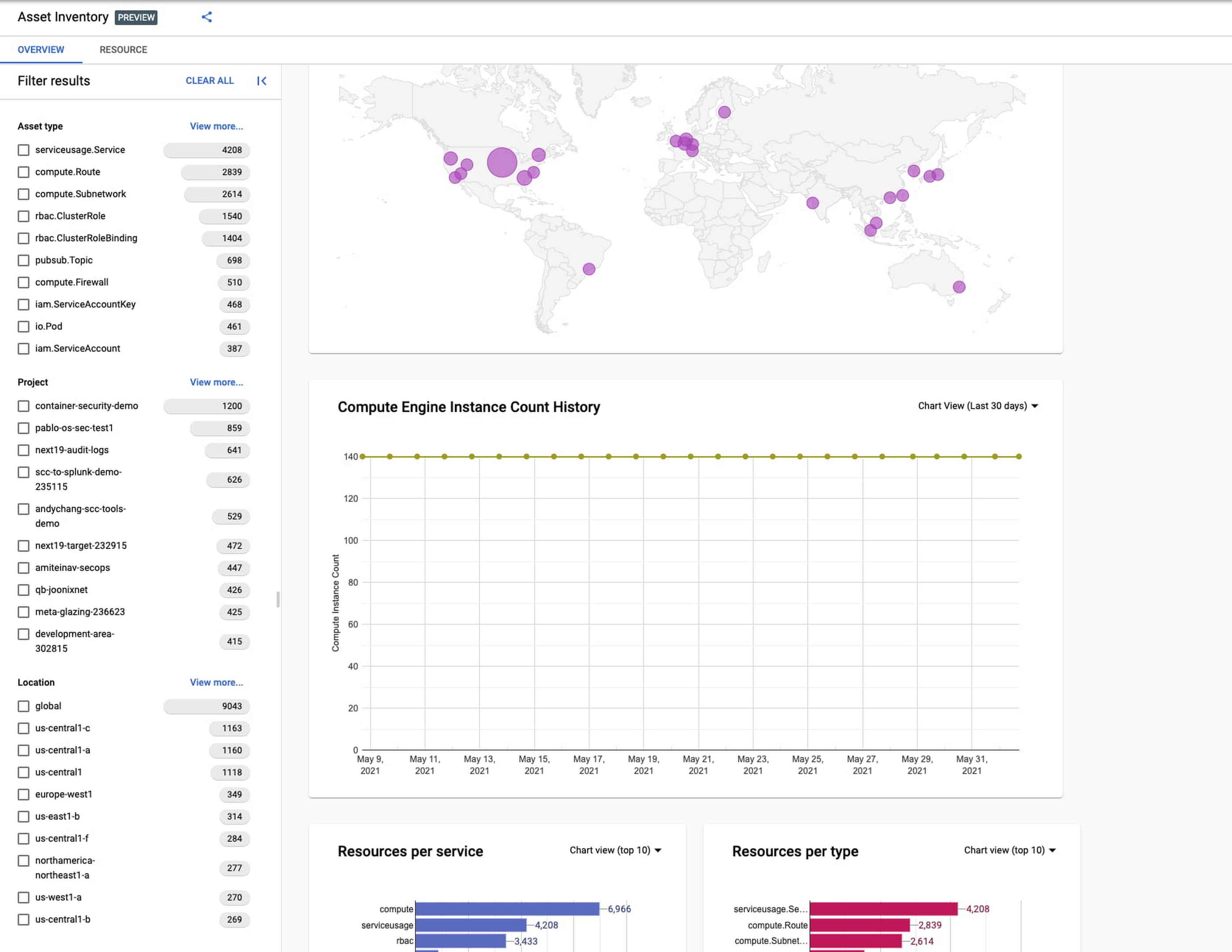
Cloud Asset Inventory console preview is now publicly available for GCP and Anthos customers. This preview provides insights into your cloud footprint, history and details of resource usage with powerful filtering and search capabilities. For example, you can view your global distribution of resources and policies, how your GCE VM footprint has been changing over time, as well as full metadata and change history for all your assets. The CAI console can be filtered at the organization, folder, or project-level, so each user can view the resources they have permissions for down to project level granularity.
Asset discovery and Datadog integration
A new asset list service in CAI provides quick and comprehensive asset discovery, including asset history, without needing to export the data to a storage destination. Datadog, a leading multi-cloud monitoring and security service provider, relies on deep integration with CAI for service and asset discovery. Datadog has been piloting and taking full advantage of the newly released asset list service. Datadog Product Manager, Steve Harrington, commented:
“Google’s new Cloud Asset Inventory API provides us with an immensely valuable, single source of truth for determining the resources present in a given GCP environment. Along with its rich metadata, this enables us to enhance multiple aspects of our integration with GCP, including streamlined metric collection and ingestion of custom labels. We plan to continue building around Cloud Asset Inventory in the future to improve existing features, and are envisioning ways it could help us provide entirely new insights to our customers.”
Answer “who can access what resources?”
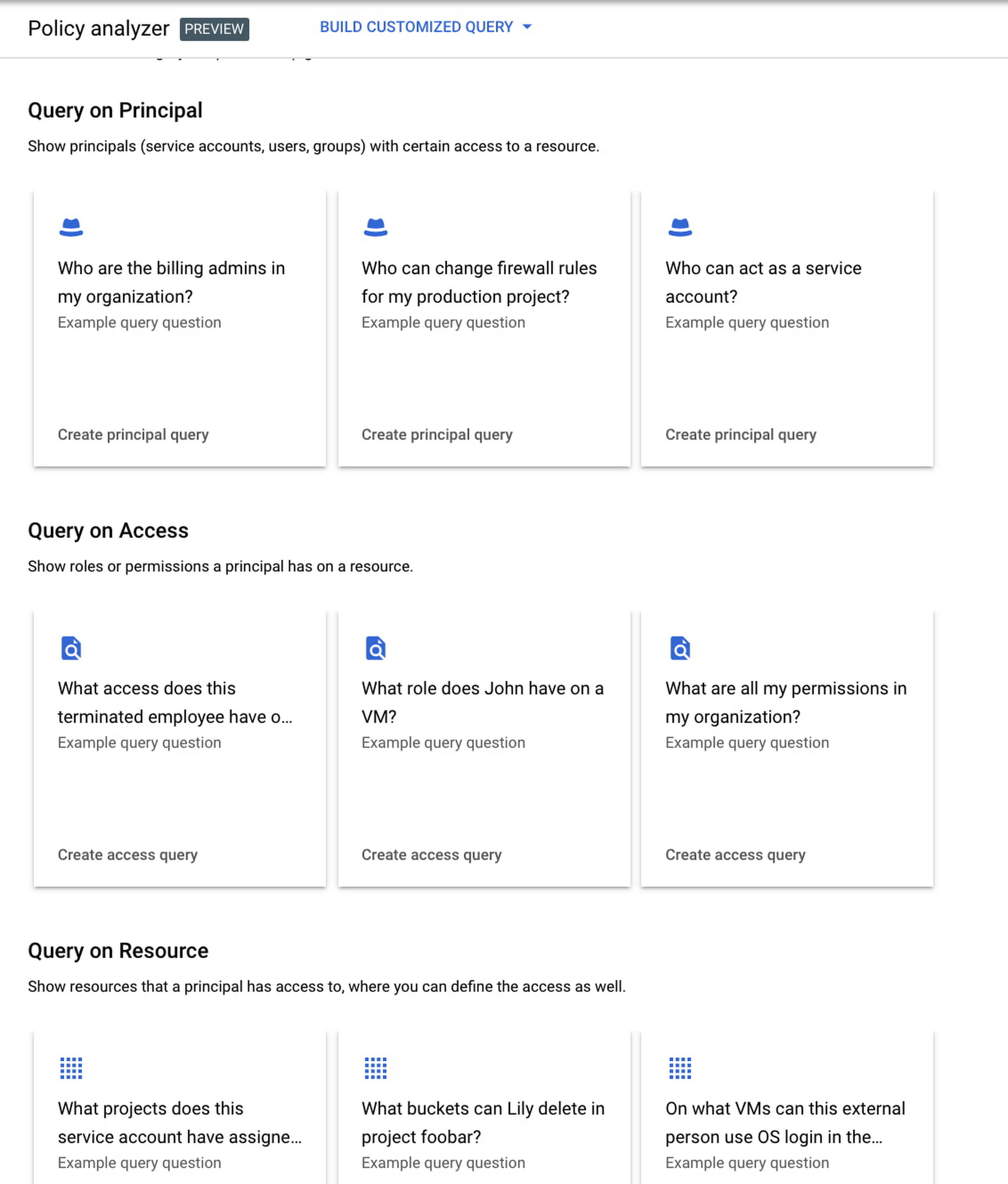
Determining authoritative answers to security-related questions like “Who can read data from my storage bucket that contains PII?” or “Does a terminated employee still have any remaining access to my system?” can be difficult and time consuming. This is why access management and identity certification is one of the top security priorities for enterprises running workloads in the cloud. To help alleviate this challenge, the new Policy Analyzer capability in CAI thoroughly analyzes the relationship between IAM policies and resources. The analysis includes powerful and efficient group expansion, service account impersonation, conditional access analysis, resource expansion, and more. You can even export the results to a BigQuery table or Cloud Storage bucket for further analysis and record keeping. CAI’s enhanced UI makes it even easier for you to build your own flexible queries and quickly get to a comprehensive answer.
Create asset posture visibility
Cloud Asset Inventory now provides seven types of Asset Insights through the Active Assist platform. These new asset insights help proactively detect anomalies within your organization’s IAM policies, which may be opportunities to improve your security posture. The insights can be aggregated at the Organization, Folder or Project level.
The seven new Asset Insights include:
- External members in IAM policies.
- External users that impersonate your service accounts.
- External members as policy editors.
- External users who can view cloud storage buckets.
- Terminated users/groups that are still in IAM policies
- IAM policies containing all users or all authenticated users.
- Projects with only terminated users as owners.
As a Google Cloud customer you can get started and use all the recently released capabilities and features immediately; check out our documentation to see how. We’d love to hear your feedback; email us with any questions or concerns!
Secrets Management Risk Analysis: Mitigating Threats with Secret Manager

912
Of your peers have already read this article.
2:30 Minutes
The most insightful time you'll spend today!
Can you keep a secret? Many people struggle to keep secrets. So do organizations. An organization’s digital credentials — its passwords, API keys, tokens, and encryption keys baked into its software code — are its vital secrets, used to authenticate access to protected resources and services.
The security of these secrets represent one of the biggest risks that enterprises must manage when securing application infrastructure and environments. Fortunately, we have an important tool to help our customers better manage their secrets: Google Cloud Secret Manager.
Secret Manager is a secure and efficient tool to centrally store, access, manage, and audit your organization’s secrets. As we noted in our April 2023 Threat Horizons Report, insufficient management of credentials and keys is now one of the top security issues facing cloud customers today. In particular, we have observed service account keys being used for everything from insider threats to cross-cloud breaches to intellectual property espionage.
Along with the increasing popularity of DevOps, secrets are used throughout development. In some cases, secrets are coded as plaintext into configuration files or directly into functions, where they can end up exposed in code repositories. If compromised, secrets can be used to gain unauthorized privileged access to enterprise data, infiltrate critical systems, and launch attacks.
Secret Manager can help organizations better manage their secrets even as concerns over potential security breaches grow. Organizations must consider the following four points during their secrets management risk analysis:
- Secrets sprawl: As organizations move more workloads to the cloud, the number of secrets they need to manage increases exponentially. This can lead to secrets sprawl, where secrets are stored in a variety of different locations, making it difficult to track and manage them.
- Human error: Humans are fallible, and this is especially true when it comes to managing secrets. Mistakes, such as accidentally sharing a secret with the wrong person or the misconfiguration of a secret management tool, can have serious consequences.
- Compliance violations: Organizations that handle sensitive data are subject to a variety of compliance regulations, including PCI-DSS, SOC 2, HIPAA, and GDPR. Without proper management, secrets could lead to potential compliance violations.
- Downtime: If secrets are not properly managed or rotated, it could lead to downtime for applications and services that rely on them.
Secret Manager can enable IT teams to keep track of secrets by providing a centralized place to store and manage them. You can access secrets directly from the Secret Manager console, or use the Secret Manager API or SDKs. Secret Manager is also designed to scale with your application. You can store as many secrets as you need without performance issues, and its API-first design lets you extend and integrate into other existing systems.
Secret Manager integrations in Google Cloud
In many cases, developers save secret configuration details as plaintext in code for ease of use. There are two main risks associated with this approach:
- Anyone with access to secrets can see and copy them. There is no way to enforce any auditing or access controls practices here.
- It becomes difficult to move code between dev, test, and production environments.
Cloud-centered integrations supported by Secret Manager with other Google Cloud services in the software supply chain make it easier and safer to store and access sensitive information.
The tool is about the secret information being made securely available in build or runtime.
Secret Manager integrations also can play a role in securing sensitive information in the software supply chain:
1. Integration with CI/CD systems used to build and deploy your software
Cloud Code integration can help developers build more secure applications by preventing hard-coding of sensitive configuration data such as passwords, credentials, and tokens in the codebase. It replaces them with secrets which can be programmatically fetched as required. You can create, access, and modify secrets directly from within your favorite IDE without having to navigate away from it. Integration is available for VS Code, IntelliJ, and Cloud Shell Editor.
Cloud Functions integration lets you access and expose secrets as environment variables or as a volume via the filesystem.
Cloud Build: To handle sensitive data in builds, you can store them in Secret Manager and then configure the build steps to access the information directly. In the build steps, you can associate the value of a secret to an environment and you can access this value via an environment variable from scripts or processes. Two common uses for fetching sensitive dependencies during build time are:
- Storing Docker authentication credentials for pull/push of images to Docker hub.
- Creating GitHub pull requests in response to builds.
2. Integration with runtime engines
Cloud Run: Native integration makes it easy to mount secrets in cloud run services. Using this integration, secrets can be made available to containers either as volume mounts or as env variables. Sensitive dependencies can be stored in environment variables, by referencing a secret name stored in Secret Manager instead of storing it as a plain text environment variable. This secret access operation can be done directly from the Cloud Run console without changing a single line of source code.
If code reads secrets from a file instead of an env variable, the “mounted as volume” option can be used to make secrets look like files to the env vars. During service deployment, the service account used to run the containers are checked to see if they have the required permissions or not, preventing any unwanted access.
Kubernetes and GKE: The CSI driver–provider solution is an open-source work that provides integration with K8s. The driver lets customers centrally store their secrets in Google Secret Manager and consume them in a kubernetes native manner, as files mounted in K8s pods. The solution also comes with additional syncing capabilities. This method of consuming secrets also allows users to take advantage of SM’s capabilities like versioning, managed rotation, default/CMEK encryption and cloud-focused integrations with other Google Cloud services. Work is currently ongoing to provide official support to the driver solution as a GKE component.
Is Secret Manager right for my organization?
Developers carry a big responsibility to protect the sensitive data they are entrusted to work with, and keep secrets out of their code. However, organizations also have a responsibility to provide the tools and solutions needed to help their teams deliver on these expectations. Secret Manager makes it straightforward for developers to store and manage secrets while improving security.
To learn more about Secret Manager, please review these resources:
Read the previous Best Kept Security Secrets blogs here:
Find the Best Kept Security Secrets to Harness the Power of Organization Policy Service

2686
Of your peers have already read this article.
2:30 Minutes
The most insightful time you'll spend today!
The canvas of cloud resources is vast, ready for an ambitious organization to craft their digital masterpiece (or perhaps just their business.) Yet before the first brush of paint is applied, a painter in the cloud needs to think about their frame: What shape should it take, what material is it made of, how will it look as a border against the canvas of their cloud service. Google Cloud’s Organization Policy Service is just such a frame, a broad set of tools for our customer’s security teams to set broad yet unbendable limits for engineers before they start working.
Google Cloud’s Organization (org) Policy Service is one of our most dramatic features but is often under-appreciated by security teams. It provides for a separation of duties by focusing on what users can do, and lets the administrator set restrictions on specific resources to determine how they can be configured. This drives defense in depth from configuration errors as well as defense in depth from attacks. An org policy lets the administrator enforce compliance and conformance at a higher level than Identity and Access Management, which focuses on which users can access specific resources.
Org policies can reduce toil and can improve security at the scale needed by today’s cloud users. Financial services provider HSBC is one of Google Cloud’s largest customers and has been using org policies for years to help it manage cloud resources across its highly-regulated enterprise environment. As the company explains in this video, HSBC’s creative use of org policies manages more than 15,000 service accounts and 40,000 IT professionals. They control 6.5 million virtual machines per year. That’s 22,500 virtual machines per day, and only 2,500 of those VMs exist for more than 24 hours
HSBC prefers org policies instead of other preventative controls because they are native to Google Cloud and can be enforced independently of how the request originated (such as from Infrastructure-as-Code, Google Cloud services interacting with each other, or a user in the UI.) Detecting resource violations is expensive for many customers, and often comes too late to prevent harm. Org Policies can be deployed to prevent violations from occurring and eliminate detection and remediation costs.
Importantly, HSBC’s custom installation is designed so that org policy violations are immediately discoverable, which can help HSBC personnel quickly understand how to quickly and accurately correct an error condition. When an action violates org policy, an error code is returned telling the resource requester which policy was violated. Corresponding logs are generated for administrators to monitor and provide further troubleshooting.
Here are two additional use cases that further illustrate the power of organization policies.
- Organizations that operate in a region with rigorous data residency requirements can configure and enable the Location org policy to help ensure that all resources created (such as VMs, clusters, and buckets) are deployed in a particular cloud region.
- Admins who want to ensure that only trusted workloads are deployed for Google Kubernetes Engine (GKE) or Cloud Run may want to restrict developers to only use verified images in their deployment processes. They can create a custom org policy that targets GKE cluster resource type and create and update methods to block the creation or update of any clusters that do not have binary authorization enforced.
How it works
Google Cloud offers more than 80 org policies that can be used to restrict and govern interactions with Google Cloud services and resources across important domains such as security, reliability, and compliance. Org policies can help:
- Restrict resource and service access to the organization domain only, secure public access to resources, or stop service account key abuse.
- Enforce use of global or regional DNS, and global or regional load balancing, to Improve service reliability and availability.
- Specify which services can access resources, in which regions, and at what times in support of compliance objectives.
- Secure Virtual Private Cloud (VPC) networks and reduce data exfiltration risk by preventing data from leaving a specific perimeter.
See the Organization Policy Service list of constraints for more about org policies and constraints.
You can also use the recently introduced Custom Organization Policies to tailor guardrails so they meet your specific compliance and security requirements. With Custom Organization Policies, security administrators can create their own constraints using Common Expression Language (CEL) to define which resource configurations are allowed or denied. Administrators can develop and deploy new policies and constraints in minutes.
With great power comes great responsibility, so with that in mind we will soon be introducing Dry Run for Custom Org Policies. It will let users put a policy in an audit-only mode to observe behavior during real operations without putting production workloads at risk.
Getting started
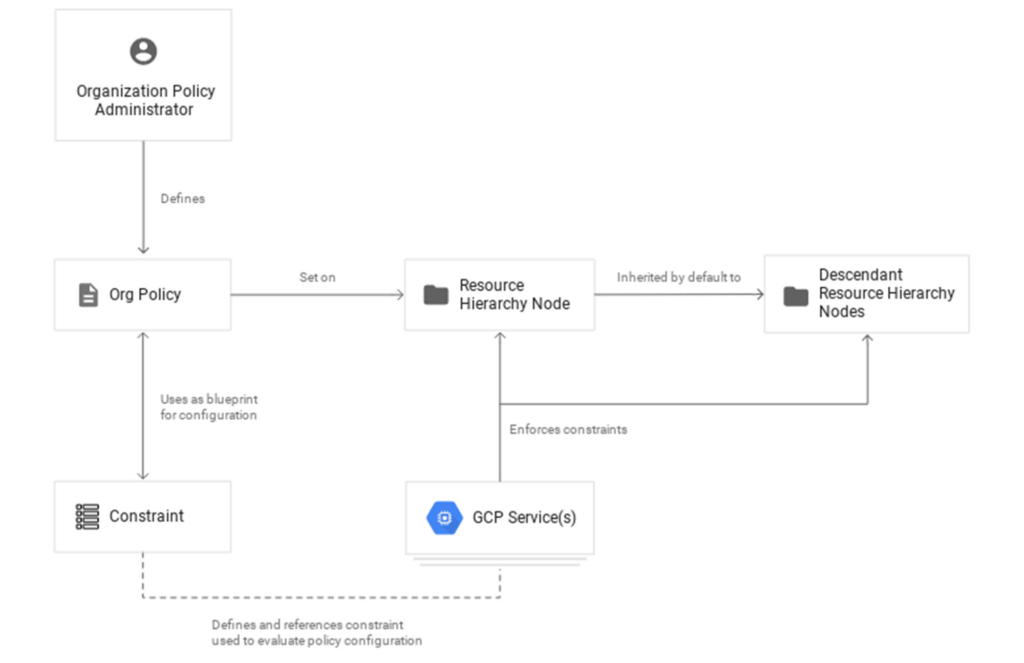
1. Setting up your first org policy is straightforward. An organization policy administrator enables a new organization policy on a Google Cloud organization, folder, or project in scope. Once set, the administrator then determines and applies the constraints. Here’s how it works:Design your constraint, which is a particular type of restriction against either a single Google Cloud service or a group of Google Cloud services. You can choose from the list of available built-in constraints by configuring desired restrictions and exceptions (based on tags) or create custom org policies.
It’s important to remember that descendants of the targeted resource hierarchy node inherit the org policy. By applying an organization policy to the root organization node, you can drive enforcement of that organization policy and configuration of restrictions across your organization.
2. Deploy the org policy to evaluate and allow or deny resource Create, Update, and Delete operations. This can be done through the Google Cloud console, gCloud, or via API.
3. Monitor audit logs and your Security Command Center Premium findings to detect and respond to policy violations.
Do I need an org policy?
Org policies can help maintain security and compliance at scale while also allowing development teams to work rapidly. Because they give you the ability to set broad guardrails, they can help ensure compliance without adding operational overhead and monitor policy violations.
To learn more about org policy, please review these resources:
- Read the Creating and Managing Organizations page to learn how to acquire an organization resource.
- Read about how to create and manage organization policies with the Google Cloud console.
- Learn how to define organization policies using constraints.
- Explore the solutions you can accomplish with organization policy constraints.
- Listen to the podcast where Vandy Ramadurai, Google Cloud’s Org Policy product manager, explains it all.
More Relevant Stories for Your Company

Announcing New, Faster Search and Investigative Experience in Chronicle Security Operations
In cybersecurity, speed matters. Whether a security analyst is trying to understand the details of an alert that was triggered by an indicator of compromise (IoC), or find additional context for a suspicious asset, speed is often the critical factor that will help thwart a cyberattack before threat actors are

Securing Sensitive Data in the Cloud: Google Cloud’s CDMC-Certified Solution
As enterprises accelerate adoption of cloud-based services and products, they face a common challenge: How can they effectively secure and govern rapidly expanding volumes of their most sensitive data in new environments? Today, Google Cloud released an architectural whitepaper and accompanying source code for a solution which successfully completed an assessment facilitated by KPMG

Google Cloud & Health-ISAC’s EMEA Collaborate to Boost Healthcare Security
Last July, Google Cloud launched our ambassador partnership with the Health Information Sharing and Analysis Center (Health-ISAC) and committed to working with industry leaders to better protect our healthcare ecosystem. Securing healthcare technology and data is a global challenge, and to meet it security professionals need to have better channels for sharing information and

Strengthening Your Network: The Benefits of Network Firewall Policies Over VPC Firewall Rules
In the fall of 2022, we announced new policy constructs for Google Cloud Firewall, a scalable, cloud-first firewall service that helps secure traffic flow to and from workloads in Google Cloud, and whose distributed architecture enables simplified, granular control including micro-segmentation. Whereas legacy VPC firewall rules included network tags that were not governed
