





Securing Sensitive Data in the Cloud: Google Cloud’s CDMC-Certified Solution

1118
Of your peers have already read this article.
3:30 Minutes
The most insightful time you'll spend today!
As enterprises accelerate adoption of cloud-based services and products, they face a common challenge: How can they effectively secure and govern rapidly expanding volumes of their most sensitive data in new environments?
Today, Google Cloud released an architectural whitepaper and accompanying source code for a solution which successfully completed an assessment facilitated by KPMG LLP and has been accredited by the Enterprise Data Management Council (EDM Council) as a Cloud Data Management Capabilities (CDMC) Certified Cloud Solution. The architecture, which includes Google Cloud’s BigQuery and Dataplex Data Catalog, has been validated against CDMC’s control framework and can be used by new or existing Google Cloud clients wanting to migrate their sensitive data to the cloud with greater confidence.
“This is an exciting milestone for Google Cloud and the CDMC framework,” said John Bottega, president of EDM Council. “Google is advancing cloud adoption across all industries. Now as a CDMC Certified Cloud Solution, their clients can have the added certainty that Google’s architecture has the key controls and accepted best practices in place to protect their data in the cloud.”
Introducing CDMC
The CDMC framework, developed and published by EDM Council, provides a set of data management capabilities, standards, and best practices for securing their cloud implementations. Contributors to the framework include large global enterprises across regulated industries, major cloud service providers, technology service organizations, and advisory firms.
The EDM Council also provides a data management assessment framework which includes a framework composed of 14 key controls and corresponding assessment procedures, which are used to validate that sensitive data is being managed effectively. To become a CDMC Certified Cloud Solution, the Google Cloud team designed, implemented, and documented a reference architecture which met the control requirements and was then assessed by KPMG LLP.
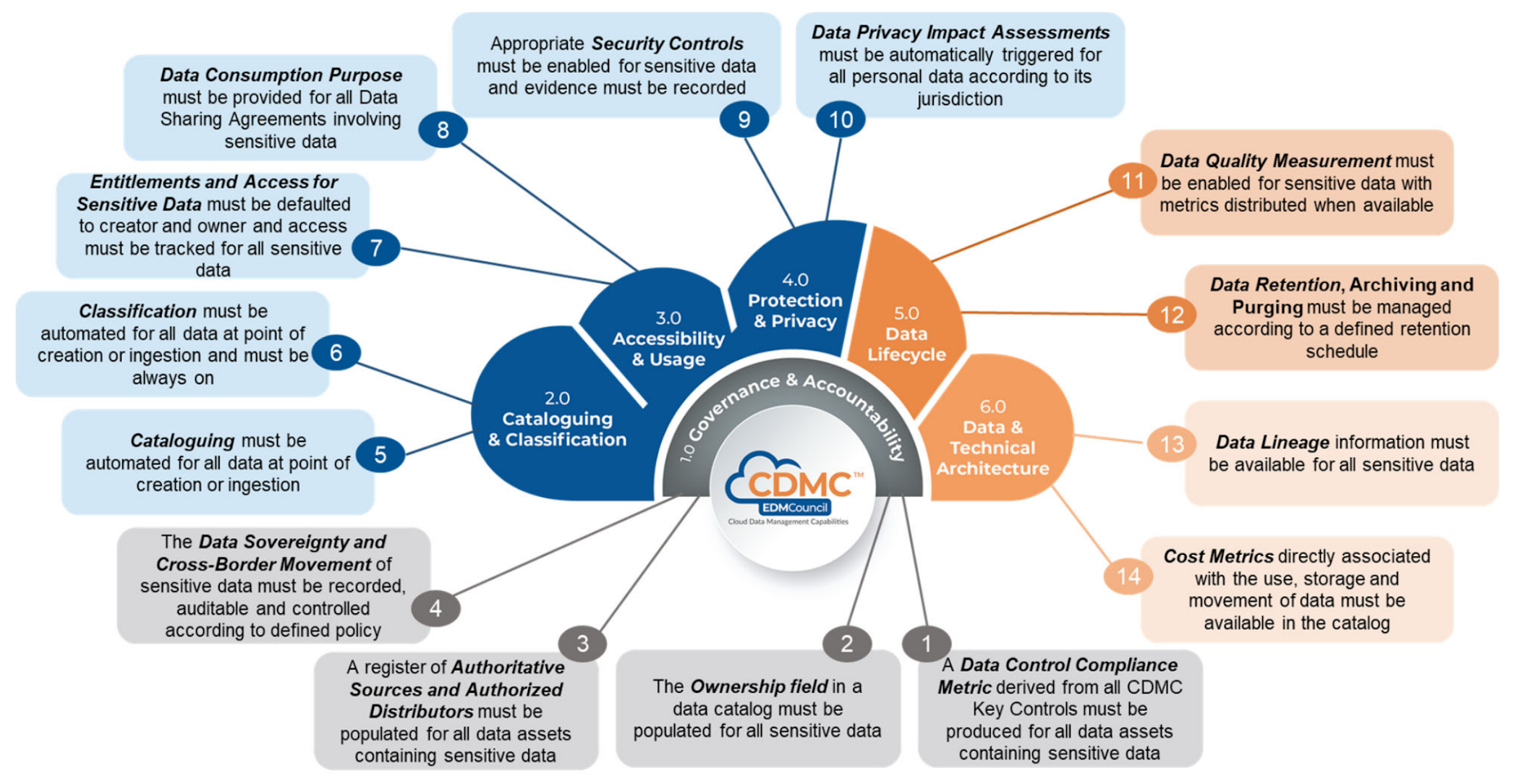
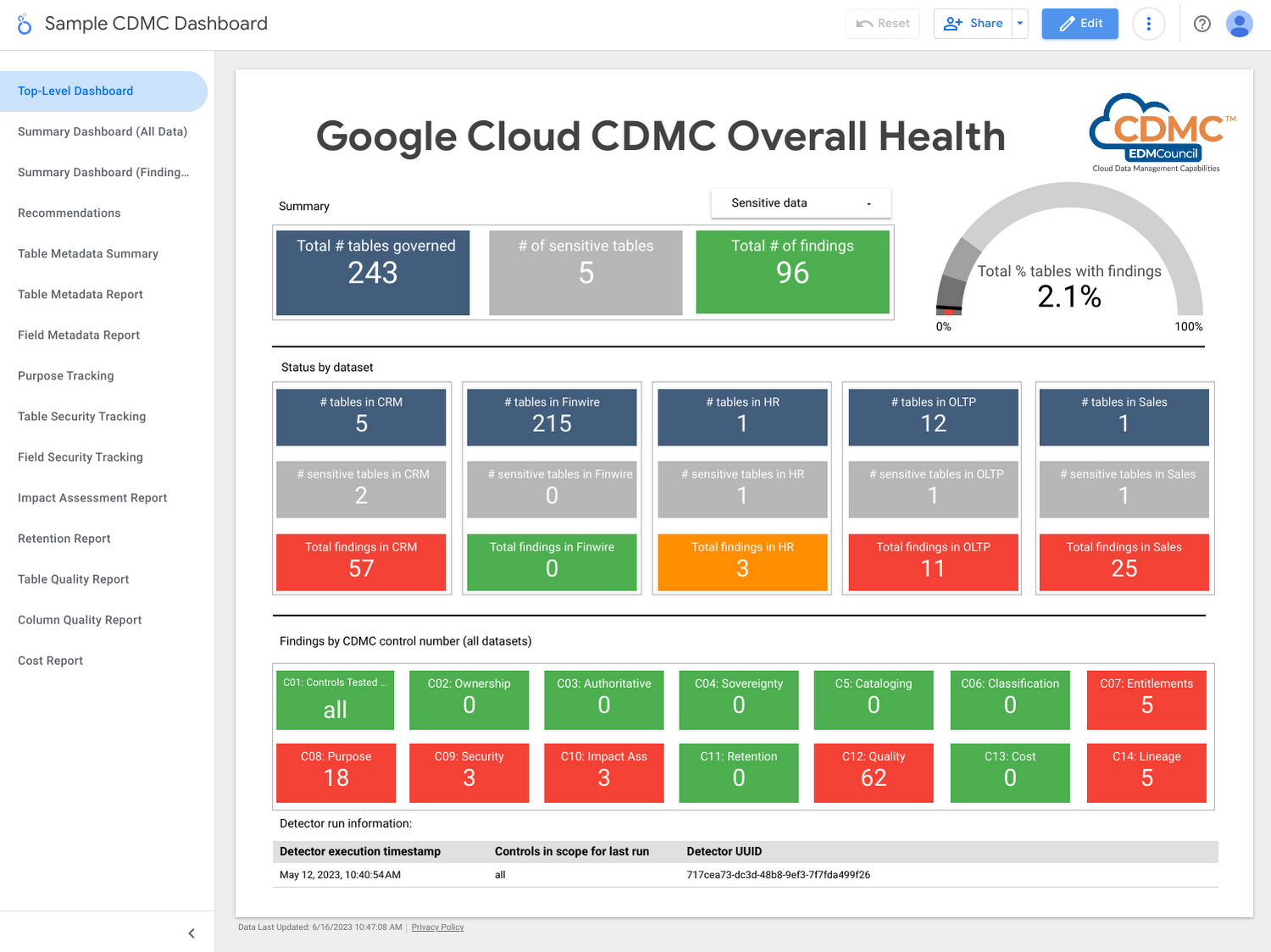
Using the solution, customer data assets are automatically classified and tagged with business metadata, their lifecycle is managed, and a reporting engine that proactively scans and publishes findings provides security administrators information about misconfigurations and security issues via a single dashboard.
Who should use this framework?
- CDOs and CISOs: The CDMC framework provides a systematic approach to handling sensitive data in the cloud and is a good starting point for chief digital officer-level discussions around what governance and security controls should be applied to different types of sensitive data. The Google Cloud CDMC assets can help with determining practical scope and efforts needed to implement the CDMC controls within your organization.
- Data platform architects and engineers: The Google Cloud reference architecture provides reusable patterns that can be adopted and customized to suit the particular needs of your organization, as well as your existing architecture and technology stack.
- Data owners and data stewards: Once implemented, the resulting classification, automation, findings, and reports should reduce the manual burden of effectively governing sensitive data at scale.
Architecture
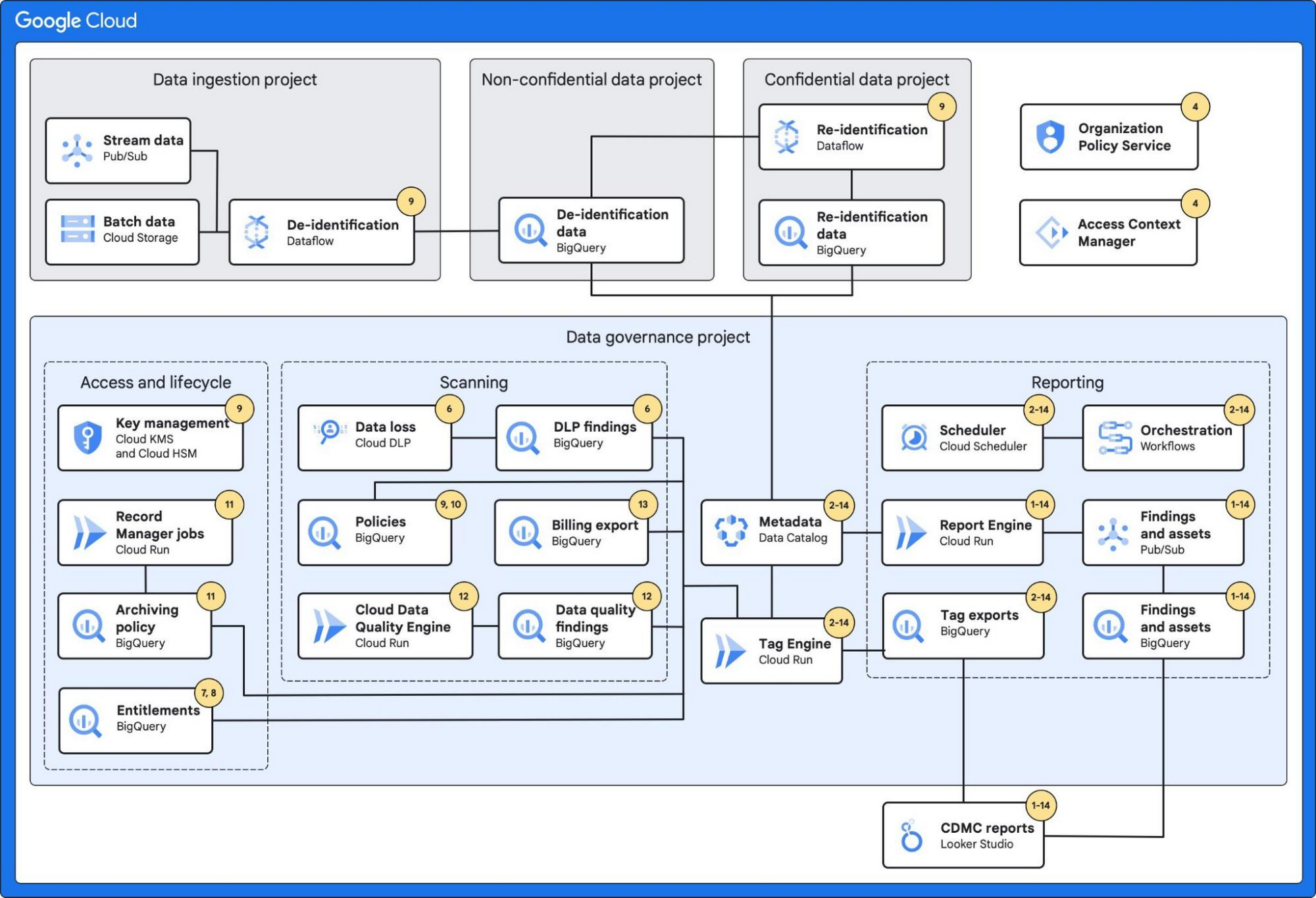
The architecture combines a number of Google Cloud’s services with built-in platform capabilities and data-protection services to protect data at scale.
These services include:
- BigQuery, which can fully manage a serverless data warehouse that enables scalable analysis for petabytes of data.
- Dataplex’s Data Catalog, which can fully manage highly scalable data discovery and metadata management with built-in data lineage features.
- Cloud Data Loss Prevention, which provides tools to classify and mask sensitive data.
- VPC Service Controls, which defines a security perimeter around Google Cloud resources to mitigate data exfiltration risks.
- Looker Studio, which provides a sample dashboard to visualize the overall health of the environment.
Additionally, the architecture leverages:
- Secure Data Warehouse Blueprint, which adheres to practices for data governance when creating, deploying, and operating a data warehouse in Google Cloud.
- Tag Engine, which automates the process of creating and populating metadata tags in Data Catalog.
The diagram below highlights the Google Cloud services used and how they mapped to the 14 CDMC key controls:
Further information
To get started, Google Cloud customers can:
Predicting Cyber Attacks: Security Command Center Introduces Attack Path Simulation

1163
Of your peers have already read this article.
3:30 Minutes
The most insightful time you'll spend today!
To help secure increasingly complex and dynamic cloud environments, many security teams are turning to attack path analysis tools. These tools can enable them to better prioritize security findings and discover pathways that adversaries can exploit to access and compromise cloud assets such as virtual machines, databases, and storage buckets.
Other attack path tools rely on static, point-in-time snapshots of an organization’s cloud footprint, which often contain sensitive data about their environment, how it is configured, and where the most sensitive data resides.
At Google Cloud, we are taking a different approach. We are excited to announce today at the Google Cloud Security Summit that we are adding attack path simulation to Security Command Center, our built-in security and risk management solution for Google Cloud. This new risk management capability automatically analyzes a customer’s Google Cloud environment to pinpoint where and, importantly, how vulnerable resources may be attacked, so security teams can stay one step ahead of adversaries.
We expect attack path simulation capabilities to be available in Security Command Center Premium later this summer.
Unlike some third-party security products, Security Command Center continuously scans an organization’s cloud environment gathering near real-time data about cloud resources and security vulnerabilities. Our attack path simulation engine uses this information to automatically generate and render high-risk attack paths, without the hands-on toil of having to repeatedly run manual queries.
A different approach to attack path analysis
Other attack path analysis tools involve significant operational toil. The static, point-in-time snapshots that these tools generate have to be sent to an external provider, which can add risk. Then security teams have to follow up with complex queries before they can identify likely attack paths.
Google Cloud’s advanced attack simulation engine leverages our first-party, agentless visibility of Google Cloud assets, the relationships between assets, and the current state of defenses. Attack path simulation is fully automated with no need to manually run queries. Simulations run in the Google Cloud environment, and do not send snapshots outside your environment, avoiding exposure of sensitive information.
See what attackers can see
Effective attack path analysis should mimic how a real-world attacker can reach and compromise high value resources. This is why Security Command Center simulates how attackers try many different ways to infiltrate a cloud environment. SCC then generates attack path graphs to give defenders insight into how adversaries could exploit a single security weakness or various combinations of security vulnerabilities to access valuable assets. SCC also provides detailed information on how to remediate issues and shore up defenses based on its findings
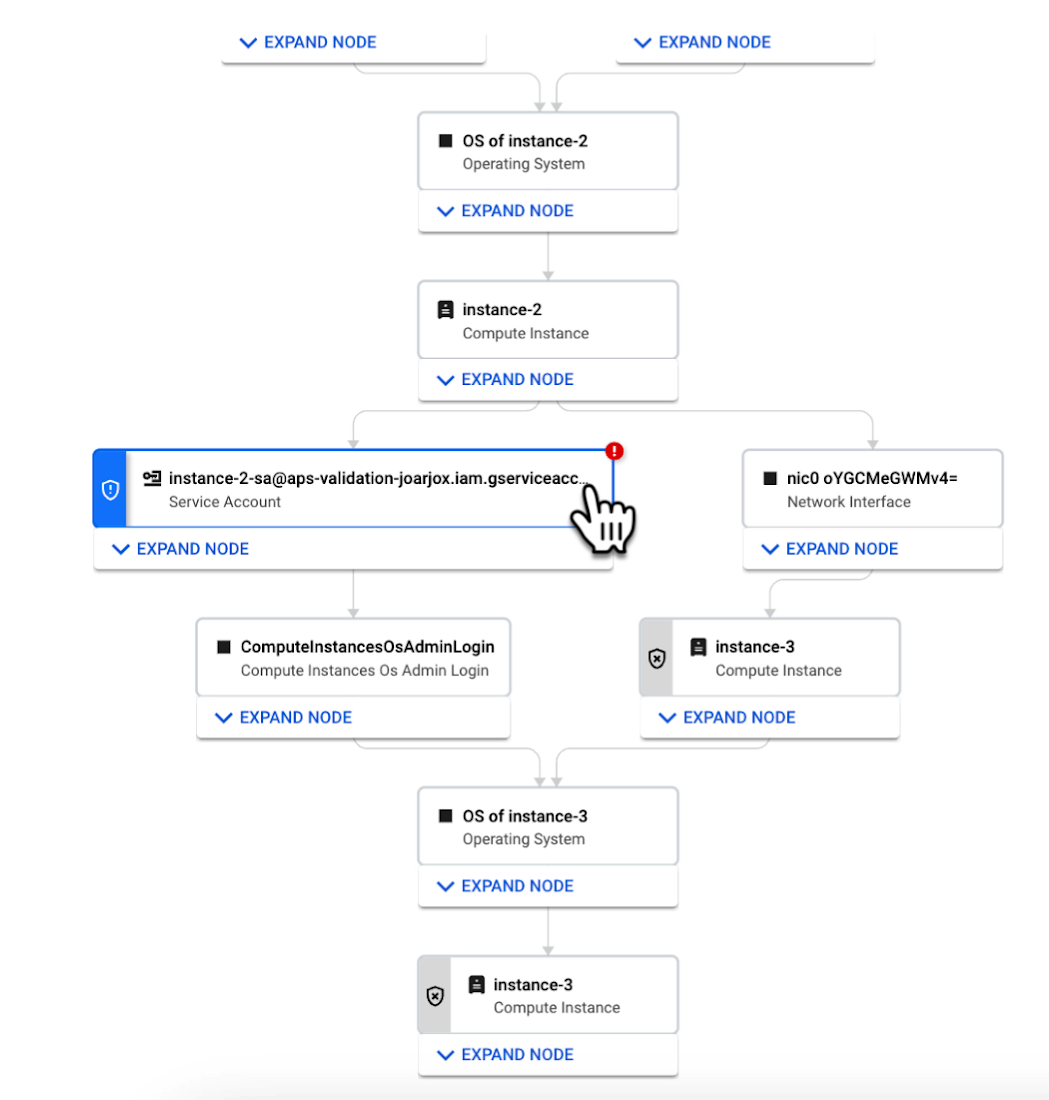
We are delivering combined attack path simulation and analysis as a managed service. There are no agents to install or manage. Results automatically reflect changes in your organization’s Google Cloud environment. Because our attack path simulations are conducted on models of an organization’s cloud resources, there is no performance or operational impact to the live production environment.
Better security prioritization
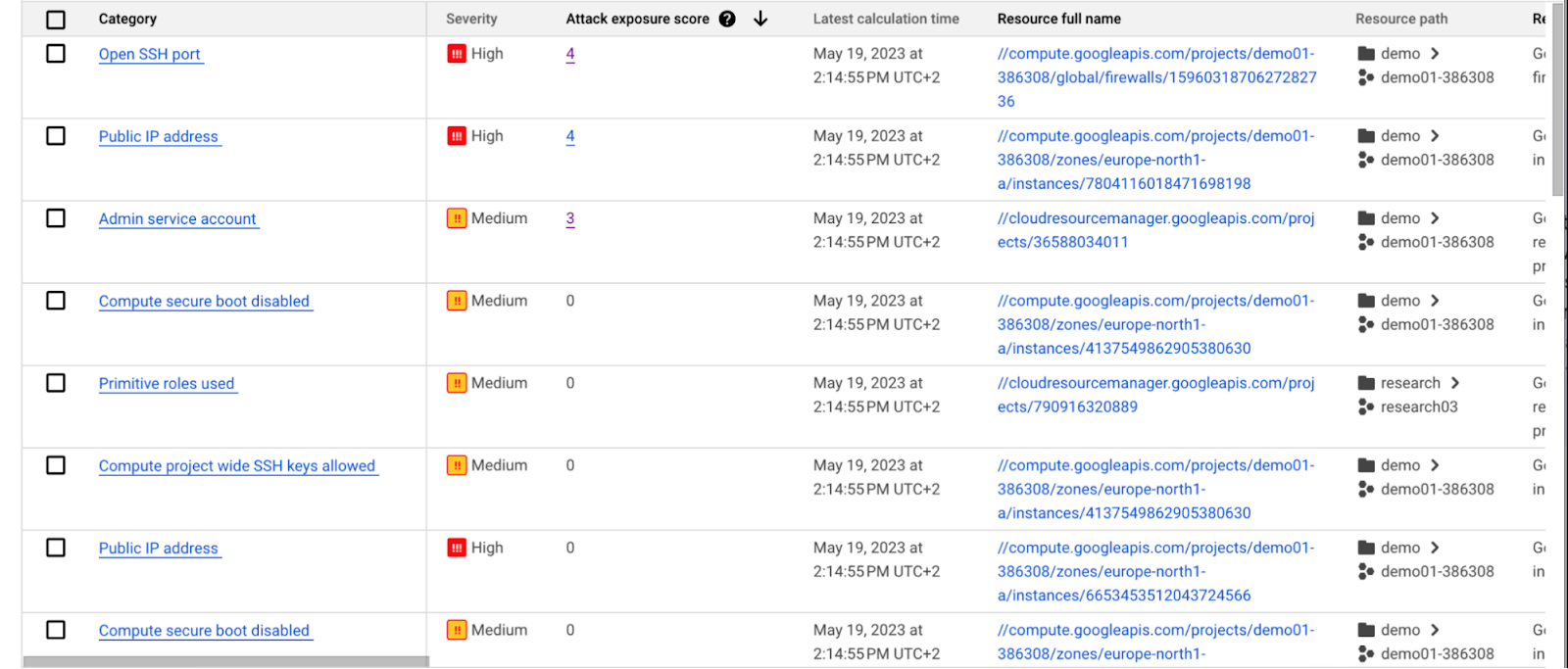
Security Command Center automatically computes an attack exposure score for misconfigurations and vulnerabilities that expose valuable resources to attackers. The score is a measure of cyber risk. It takes into account how exposed valued resources are, and the paths of least resistance for attackers to reach those resources.
Security teams can use these scores to prioritize remediation efforts and improve their overall risk posture.
How attack path analysis has already reduced risk for customers
Dozens of customers have already used our attack path capabilities in private Preview to improve their security posture and reduce their operational risk.
Security Command Center alerted one customer to a finding with a high attack exposure score. The finding was related to a service account whose keys were not being rotated. After reviewing the attack paths related to this finding, the cloud security manager discovered that even though the service account was named “test,” it provided access to storage buckets outside of the test environment.
If an attacker had been able to steal the credentials for this test account, they could have easily accessed production data. The security manager removed administrator privileges on the account. The attack path simulation enhanced their understanding of the severity of the finding, and helped convince them to make it a high-priority fix.
Another customer using attack path simulation needed to assess which security findings created the greatest risk. Two findings related to the same service account with high exposure scores rose to the top of the list. The attack paths revealed that the service account had access to more than 500 storage buckets. If an attacker were to gain access to this account they would be able to read, write, or delete data across any of those buckets, many of which contained sensitive business data and confidential customer information.
Using Security Command Center’s attack path results, the security team remediated the risk by limiting permissions to the storage buckets needed for that specific role.
Next steps
Attack path simulation capabilities are planned for availability later this summer. We expect forthcoming enhancements to use Security AI Workbench to translate complex attack graphs to human-readable explanations of attack exposure, including impacted assets and recommended mitigations.
You can learn more about Nordnet Bank’s experience using attack path simulation at our Security Summit session. To get started with Security Command Center today, please go to the Google Cloud console.
Introducing IAM Deny: Harden Your Security Posture at Scale the Easy Way

2640
Of your peers have already read this article.
1:30 Minutes
The most insightful time you'll spend today!
At Google Cloud, we’re focused on making it easy for organizations to build solutions quickly and securely. Identity and Access Management (IAM) is the core security control for establishing who has access to which cloud resources and making sure access permissions are aligned to your company’s business and security policies.
We are excited to announce the general availability of IAM Deny policies. This new capability helps you easily create access guardrails for Google Cloud resources. With IAM Deny policies, you can create rules that broadly restrict resource access. It provides a powerful, coarse-grained access control to help implement security policies at scale.
Control with IAM Policy – Allow and Deny
IAM Deny policies complement IAM Allow policies as you define access to your resources. Google Cloud’s IAM Allow policy lets you grant granular access to Google Cloud resources. The more coarse-grained Deny policies let you explicitly prohibit access to certain resources regardless of existing Allow rules. IAM Deny policies always supersede IAM Allow policies and override conflicting IAM Allow rules.
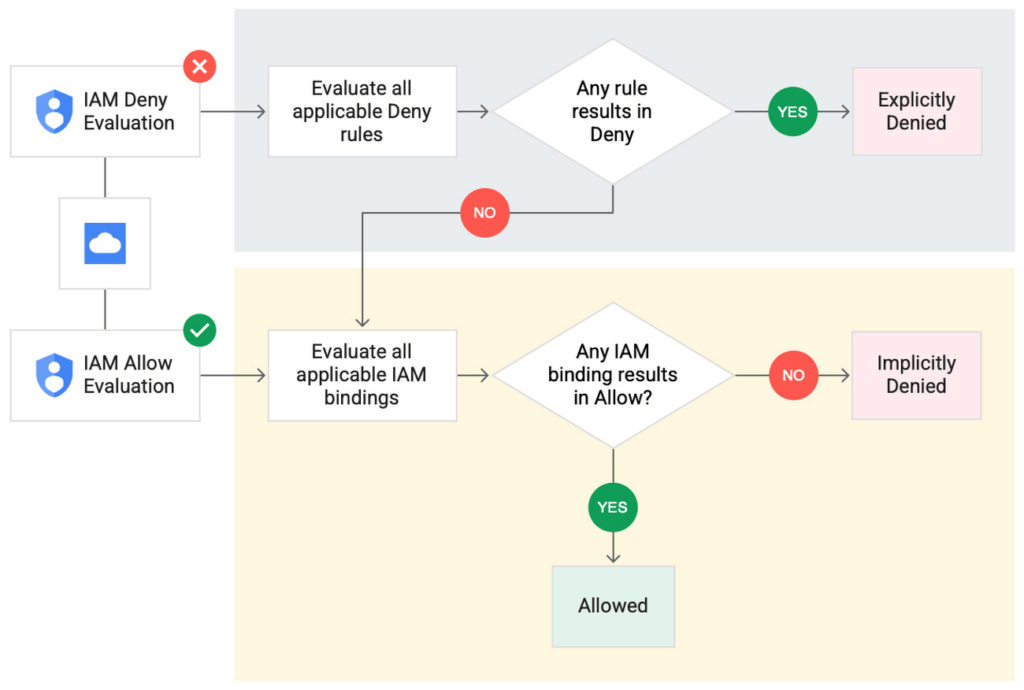
IAM Deny policies can be applied across many Google Cloud resources, such as Compute Engine, Cloud Storage, and Google Cloud Kubernetes Engine. These policies can help reduce toil on administrators as they can set up deny rules that will be enforced at scale without requiring reviews and changes of existing access rules. This makes resource governance simpler.
How to strengthen your security posture with IAM Deny
There are multiple use cases where IAM Deny policies can be used to help strengthen posture. Some of these are:
- Establish a default security baseline: IAM Deny can be used to set base policies at the organization level, folder level, and project level to deny access to resources. For example, you can attach a deny policy at the organization level to deny all users access to sensitive data storage buckets, making an exception for a specific user group.
- Prevent backdoors: IAM Deny rules override any IAM Allow rules. This can help you ensure that no “backdoor” access can be granted. For example, an organization that wants to ensure only central-admin can create projects in a folder can add an IAM Deny policy that restricts all users from creating projects except central-admin. This can help ensure no backdoor users will be added using allow policy rules.
- Prevent data exfiltration: Controlling access to data is a key measure to prevent exfiltration. For example, an organization that wants to restrict access to their personally identifiable information (PII) can set an IAM Deny policy on resources containing PII that denies access to all users except those in a group called PII-admin.
- Demonstrate compliance: Many industry regulations and compliance frameworks require organizations to demonstrate least-privilege access to sensitive resources. IAM Deny policies can create a baseline access restriction that always takes precedence when applied to resources.
Simplify IAM administration
IAM Deny can also help simplify common administrative tasks. It provides a list of permissions for Google Cloud services that you can readily use in your deny policies. Here are a few common situations where you can use IAM Deny to help streamline your access management.
- Centralize administrative privileges: You can use deny policies to restrict certain types of administrative activities to specific users or user groups. For example, if you want to limit custom role management to a single central team, you can create a deny rule that denies the permissions required for custom role management to all users, except users in the central-admin group. This will only let members of the central-admin group manage custom roles, even if other users have the required permissions.
- Create exceptions to access grants: You can use deny policies to deny inherited permissions. For example, you can grant a role at a high level in the resource hierarchy, and then deny the role’s permissions on individual lower-level resources if necessary.
- Block access based on tags: Google Cloud supports key-value based tags and you can use deny policies to deny permissions based on tags without adding an IAM Condition to every role grant. For example, you can create a rule to deny delete permissions for resources tagged as “production” for everyone except project-admins.
IAM Deny in action
The following example illustrates how a deny policy can be used to block all users from deleting projects unless the user is a member of a project-admins group or the project being deleted is tagged as a “test” project. Without a deny policy, you would have to manually track all members who have the permission to delete projects, and ensure that no undesired user has access to this permission. The deny policy makes it easy for the administrator to build this guardrail.
The below deny rule denies permission to everyone except project-admins@example.com for projects not tagged as test. Add this deny rule to a deny policy and attach the policy at the org level. That’s it!
(Note that project-admins@example.com is a security group. Using security groups is a best practice that should be followed to help keep your resources secure.)
{
"name": "policies/cloudresourcemanager.googleapis.com%2Fprojects%2F253519172624/denypolicies/limit-project-deletion",
"uid": "06ccd2eb-d2a5-5dd1-a746-eaf4c6g3f816",
"kind": "DenyPolicy",
"displayName": "Only project admins can delete projects.",
"etag": "MTc1MTkzMjY0MjUyMTExODMxMDQ=",
"createTime": "2021-09-07T23:15:35.258319Z",
"updateTime": "2021-09-07T23:15:35.258319Z",
"rules": [
{
"denyRule": {
"deniedPrincipals": [
"principalSet://goog/public:all"
],
"exceptionPrincipals": [
"principalSet://goog/group/project-admins@example.com"
],
"deniedPermissions": [
"cloudresourcemanager.googleapis.com/projects.delete"
],
"denialCondition": {
"title": "Only for non-test projects",
"expression": "!resource.matchTag('12345678/env', 'test')"
}
}
}
]
}
Getting started with IAM Deny Policies
With IAM Deny, you now have a powerful new capability to build security guardrails and more effectively control access to your Google Cloud resources. IAM Deny is now generally available for all customers through gCloud and APIs. We offer IAM Deny to Google Cloud customers at no additional cost. You can learn more about IAM Deny by visiting our documentation page.
Announcing easier de-identification of Google Cloud Storage data

2878
Of your peers have already read this article.
2:30 Minutes
The most insightful time you'll spend today!
Many organizations require effective processes and techniques for removing or obfuscating certain sensitive information in the data they store. An important tool to achieve this goal is de-identification. Defined by NIST as a technique that “removes identifying information from a dataset so that individual data cannot be linked with specific individuals. De-identification can reduce the privacy risk associated with collecting, processing, archiving, distributing or publishing information.
Always striving to make data security easier, today we are happy to announce the availability of a de-identification action for our Cloud Storage inspection jobs. Now, you can de-identify Cloud Storage objects, folders, and buckets without needing to run your own pipeline or custom code. Additionally, we have enhanced our transforms by adding a new dictionary replacement method that can help you achieve stronger privacy protection – especially with unstructured data you might store like customer support chat logs.
The “De-identify findings” Action
The “de-identify findings” action for Cloud DLP inspection jobs is a fully managed feature that creates a de-identified copy of the data objects that are inspected. This means that you can inspect a Cloud Storage bucket for sensitive data like Personal Identifiable Information (PII) and then create a redacted copy of these objects all with a few clicks in the Console UI. No need to write custom code or manage complex pipelines and since it’s fully managed, it will auto-scale for you without you needing to manage quota.
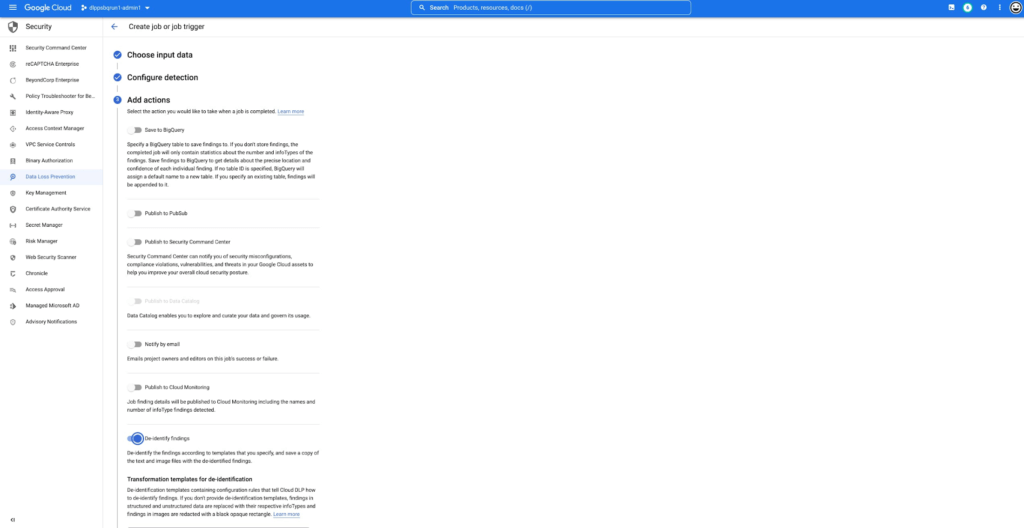
This new action supports the following data types:
- Text files
- Comma- or tab-separated values
- Images (see regional limitations)
Once enabled, the DLP job will perform an inspection of the data and produce a de-identified copy of all supported files into the output bucket or folder.
You can also use the new de-identify action on Job Triggers to automatically de-identify new content as it appears on a recurring schedule. This is useful for creating a workflow with a safe drop zone for incoming files that need to be de-identified before being made accessible.
What can automatic De-identification do?
Cloud DLP provides a set of transformation techniques to de-identify sensitive data while attempting to make the data still useful for your business. These techniques include:
- Redaction: Deletes all or part of a detected sensitive value.
- Replacement: Replaces a detected sensitive value with a specified surrogate value.
- Masking: Replaces a number of characters of a sensitive value with a specified surrogate character, such as a hash (#) or asterisk (*).
- Crypto-based tokenization: Encrypts the original sensitive data value using a cryptographic key. Cloud DLP supports several types of tokenization, including transformations that can be reversed, or “re-identified.”
- Bucketing: “Generalizes” a sensitive value by replacing it with a range of values. (For example, replacing a specific age with an age range, or temperatures with ranges corresponding to “Hot,” “Medium,” and “Cold.”)
- Date shifting: Shifts sensitive date values by a random amount of time.
- Time extraction: Extracts or preserves specified portions of date and time values.
New Dictionary Replace method
When a sensitive data element is found, dictionary replacement replaces it with a randomly selected value from a list of words that you provide. This transformation method is especially useful if you want the redacted output to have more realistic surrogate values.
Consider the following example: You collect customer support chat logs as part of providing service to your customers. These support chat logs contain various types of Personal Identifiable Information (PII) including people’s names and email addresses. Cloud DLP can find and de-identify the sensitive elements with static replacements such as “[REDACTED]” to help prevent someone from seeing this sensitive data.
With the new dictionary replacement method you can instead replace these findings with a randomly selected value from a dictionary. This dictionary replacement provides two key benefits over static replacement:
- The resulting output can look more realistic
- Because the output looks more realistic, it can help conceal any residual names (a privacy de-identification technique sometimes referred to as “hiding in plain sight”)
An example of this:
Input:
[Agent] Hi, my name is Jason, can I have your name?
[Customer] My name is Valeria
[Agent] In case we need to contact you, what is your email address?
[Customer] My email is v.racer@example.org
[Agent] Thank you. How can I help you?
De-identified Output:
[Agent] Hi, my name is Gavaia, can I have your name?
[Customer] My name is Bijal
[Agent] In case we need to contact you, what is your email address?
[Customer] My email is happy.elephant44@example.org
[Agent] Thank you. How can I help you?
As you can see in the output, the names and email addresses have been replaced with a random value that both protects the original sensitive information but also makes the output look more realistic. This can make the data more useful and help “hide” any residual PII.
Next Steps:
To learn more about De-Identification check out our Technical Docs, try De-identification of Storage in the Cloud Console and Watch a recent Google I/O talk on De-identification of data.
Google Products Helps HMH’s Healthcare Staff Work from Anywhere Efficiently and Securely!

10223
Of your peers have already read this article.
3:00 Minutes
The most insightful time you'll spend today!
Hackensack Meridian Health (HMH) executive Mark Eimer explains how an ambitiously-timed rollout of a comprehensive suite of Google products helped the entire organization—from doctors to IT staff—achieve better security, cultivate a more equitable work environment, and ultimately, improve patient outcomes.
How does a recently merged, 17-hospital healthcare system fast-track a platform migration and hardware rollout securely and in a way that improves work for everyone, regardless of location or role? These are the questions that kept me up at night in early 2020, when the pandemic demanded a “big bang”—something our legacy laptops and operating systems couldn’t handle.
We began our work with Google in 2020 with the adoption of Chrome as our default browser. As we migrated platforms, keeping patient data safe was of the utmost importance to us, along with providing every staff member with the tools they needed to work virtually. Our staff often experienced issues accessing our web-based applications using Internet Explorer or Edge Browser, a problem that went away when we switched to Chrome. Chrome’s versatile compatibility also made it easier for my team to migrate all of our web-based operations, and Chrome’s security and manageability were key components to making this switch a huge win for the organization.
The success of this migration led us to extend our Google partnership to patient care applications—where Google’s expertise in AI and ML helps scale the use of diagnostics tools and improve other aspects of the patient journey.

Achieving security at every step
Like so many other healthcare organizations, we’ve been concerned about ransomware attacks. This is part of why we moved to Google Workspace and distributed over 3,000 Chrome OS devices in kiosk mode in March of 2020, when many of us went remote due to the pandemic. We were very concerned about team members accessing corporate applications through home devices that were running EOL operating systems (WIN7), as well as a general lack of antivirus and encryption measures.
We were protected by the fact that Google’s software and hardware both had built-in security features that we needed to stave off sophisticated attackers. For example, Chrome OS automatically updates to the latest security update and encrypts data living outside the cloud on the hardware. These features protected us from security-related disruptions, letting us securely move a huge library of file shares and emails across thousands of accounts to Google Chrome OS in just four months.
A year later, in March 2021, we migrated the enterprise over to Google Workspace and saw an immediate reduction in spam by 30% from the inherent built-in AI/ML. This meant staff were less likely to receive (and click through) phishing attempts. My team could connect, create, and collaborate easily and securely—even as more of us were working from home and needed to access sensitive data remotely.
Leveling the playing field
As an organization, we were surprised by how many team members didn’t have personal computers at home. We quickly decided that if we needed team members to work from home, the health network would have to supply hardware. Chromebooks’ lower price tag compared to PCs—on top of their built-in security controls—allowed us to purchase, deploy, and support that initial distribution of 3,000 Chromebooks to team members in less than three weeks, providing devices to every eligible remote employee instead of just a select few. This was vital to reaching our equitable technology goal as part of our diversity and inclusion initiative: everybody has the same tools to do good work.
When all employees have what they need to do their jobs well, we get better patient outcomes. Before we began this cloud adoption journey, patient and staff experiences were different within the hospitals and outside of them.
Now it’s the same wherever our staff is, and we’ve seen efficiency and accessibility benefits extend to the patient side. For example, we built a web-based contact center that supports 80 locations that use Workspace and Chrome OS devices. Since customer service, admin, and providers are all on the same system, it has become a one-stop shop for patients.
Furthermore, through the Grow with Google program, we were able to provide another benefit to employees that drove our equity goals. Google trained 50 non-IT staff members—from environmental services, food and nutrition, and other non-tech areas who were interested in making a career change to IT—on the Google products we were using. They may not have thought about switching to a career in IT before the Grow with Google program came to our organization, but through this partnership, they now have that opportunity.
A strategic, long-term partner
With any large-scale rollout, the work doesn’t end once laptops are in employee hands. Google has shown their commitment to long-term collaboration as they continuously optimize their products for the unique needs of healthcare providers and go the extra mile in tailoring tools to our staff’s workflows.
For example, on the Chrome OS side, the Google team has helped our registration desks and document centers with device integration for hardware like credit card readers and e-signature pads. They’ve also helped us meet security and privacy requirements mandated by state and federal governments around HIPAA, Medicaid, and Medicare reimbursements. Over this next year, we’ll look at a feature roadmap with Google Cloud to deliver further enhancements, iterating on the product itself to meet our needs for the present and the future.

Delivering the future of healthcare
The benefits we’ve seen around security and usability—and the ability to provide all staff with equal access to Google’s technology—are why we’re expanding our partnership with Google to both the administrative and clinical sides of HMH. In addition to further Google rollouts with corporate, next year we’re distributing Chromebooks to all 350 of our ambulatory clinics.
We’re also working with the Google professional services team to create a custom AI model that analyzes 3D mammogram images. This AI model will enable two providers to read mammograms—which adheres to international best practices but is currently rare in the US—without requiring additional time. Conducting double readings of mammograms will yield better health outcomes for our patients, such as a lower patient recall rate and an increased accuracy in detecting breast cancer.
We’re currently building the model using a variety of Google Cloud products, including Cloud Healthcare API. Once complete, this model is expected to be trained, deployed, and maintained in Google’s Vertex AI, allowing our providers to be more productive as they make clinical decisions with AI support. As the model is proven over time, we plan to make the predictive services accessible to other healthcare organizations.
With Google, we’re able to achieve a unified architecture for storing data as well as training and deploying AI models, which enable our staff to work more efficiently and securely from anywhere. While I may not be able to predict the future as accurately as AI can, I foresee our continued partnership with Google as a key part of HMH’s improved provider and patient outcomes.
3104
Of your peers have already watched this video.
23:30 Minutes
The most insightful time you'll spend today!
Three Lesser-Known Ways to Protect Your Customers and Business From Phishing and Fraud
Your users are critical to your business, and you need security controls to keep them — and your business — safe. Built from years of Google Cloud technology and experience, these security features focus on keeping users safe on the web.
You can reduce online fraud (chargebacks, hijackings, and abuse) with reCAPTCHA Enterprise, help protect your customers from phishing sites with Phishing Protection, and detect malicious links with the Web Risk API.
Fight Fraud: Fraudulent web activities cost enterprises billions of dollars each year. Security teams need to keep the bad actors out of their websites and ensure that their customers can always get in. reCAPTCHA has been defending millions of sites for almost a decade, and the reCAPTCHA Enterprise service builds on this technology with capabilities designed specifically for enterprise security concerns.
Combat Phishing: The majority of cyber attacks begin with phishing emails and websites. Attackers use many tricks, including by leveraging enterprise brand assets, such as company names and logos, to develop phishing websites that appear authentic and lure internet users to enter valuable information such as user names and passwords. Phishing Protection helps prevent users from accessing phishing sites by identifying various signals associated with malicious content.
Watch the video to find out how the third method and what impact it can create on your organization.
More Relevant Stories for Your Company

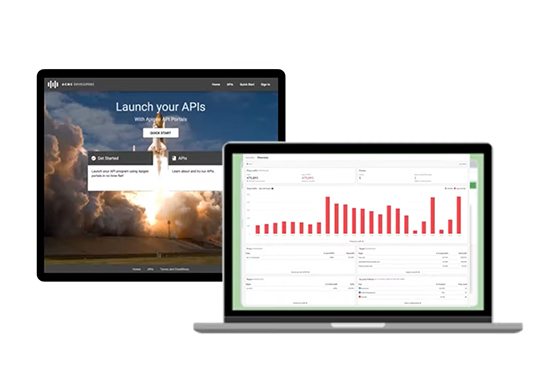

Best Practices to Protect APIs against 6 Common Threats
APIs are exposed to a set of vulnerabilities that are both, unique and similar to that of software and web apps. Watch the video to learn six common API threats and best practices to protect from unwanted attacks.


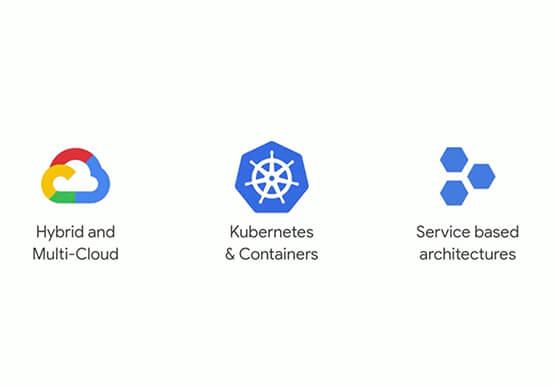
Modernize Your Security Posture for Cloud-Native Applications with Anthos
Modern security approaches have moved beyond a traditional perimeter-based security model. As many organizations seek to adopt cloud-native architectures and are deploying applications in hybrid and multi-cloud environments they demand a more flexible and extensible approach towards security. Learn how to address security issues as early in the development and

Google Cloud is Every Retailer’s Most Trusted Cloud
Whether they were ready for it or not, the COVID-19 pandemic transformed many retailers into digital businesses. Retailers made huge investments into commerce technologies, customer experience tools, sales and fulfillment technology, and improving digital experiences to continue providing their goods and services to their customers. Now, more than a year

Ensuring Ironclad Security: Our Validation Process for the Confidential Space
We’re pleased to announce that Confidential Space, our new solution that allows you to control access to your sensitive data and securely collaborate in ways not previously possible, is now available in public Preview. First announced at Google Cloud Next, Confidential Space can offer many benefits to securely manage data
