





reCAPTCHA & Cloud Armor: Helping Organizations Adopt Bot Management Strategies

3035
Of your peers have already read this article.
2:00 Minutes
The most insightful time you'll spend today!
Unwelcome web traffic from bots has proliferated, becoming a significant contributor to business and operational risk. The motivations of bot controllers range from disruption of business through DDoS attacks to fraud such as credential stuffing, denial of inventory, scraping, and fraudulent card use. Google is well positioned to help detect and mitigate these risks by leveraging both our AI/ML strengths for combatting bot traffic as well as the global scale of our network to absorb even the largest threats.
Today we are announcing the public preview of Cloud Armor bot management with reCAPTCHA Enterprise.This new set of capabilities is centered around a new deep integration between reCAPTCHA Enterprise and Cloud Armor as part of our overall Web-App and API Protection (WAAP) solution, which also includes Apigee. You can now leverage the power of reCAPATCHA’s intelligence gained from protecting 5+ million sites directly in Cloud Armor to comprehensively manage risk from bots and other application layer threats. You can enable this protection using an easy-to-configure policy in Cloud Armor without any server-side changes to your applications. Because detection and enforcement happens in-line, at the edge of Google’s network, you can mitigate threats before they have a chance to impact your applications, whether they run on GCP, on premise, or in a hybrid or multi-cloud deployment.
Google Cloud Armor
Cloud Armor is the DDoS mitigation service and web-application firewall (WAF) that brings to bear the global scale of Google’s network – blocking unwelcome traffic upstream from your infrastructure. Cloud Armor helps protect your websites and applications from volumetric and protocol based (Layer 3/4) DDoS attacks, application level DDoS attacks, and mitigates the rest of the OWASP Top 10. With Cloud Armor, you can enforce custom Layer 7 filtering and rate-limiting policies at the edge to ensure availability of your workloads and meet security and compliance requirements.
reCAPTCHA Enterprise
reCAPTCHA Enterprise is Google’s fraud detection service that leverages over a decade of experience defending the internet and data from Google’s network of over 5 million sites. reCAPTCHA Enterprise can be used to prevent fraud and attacks perpetrated by scripts, bot software, or humans. When installed on a web page at the point of action, such as login, purchase, or account creation, reCAPTCHA Enterprise provides a frictionless user experience that allows legitimate users to proceed using a web page while fake users and bots are blocked.
The Cloud Armor and reCAPTCHA Enterprise integration
Users can now configure their Cloud Armor security policies to block requests that reCAPTCHA determines to be coming from a bot. There are several ways to do this:
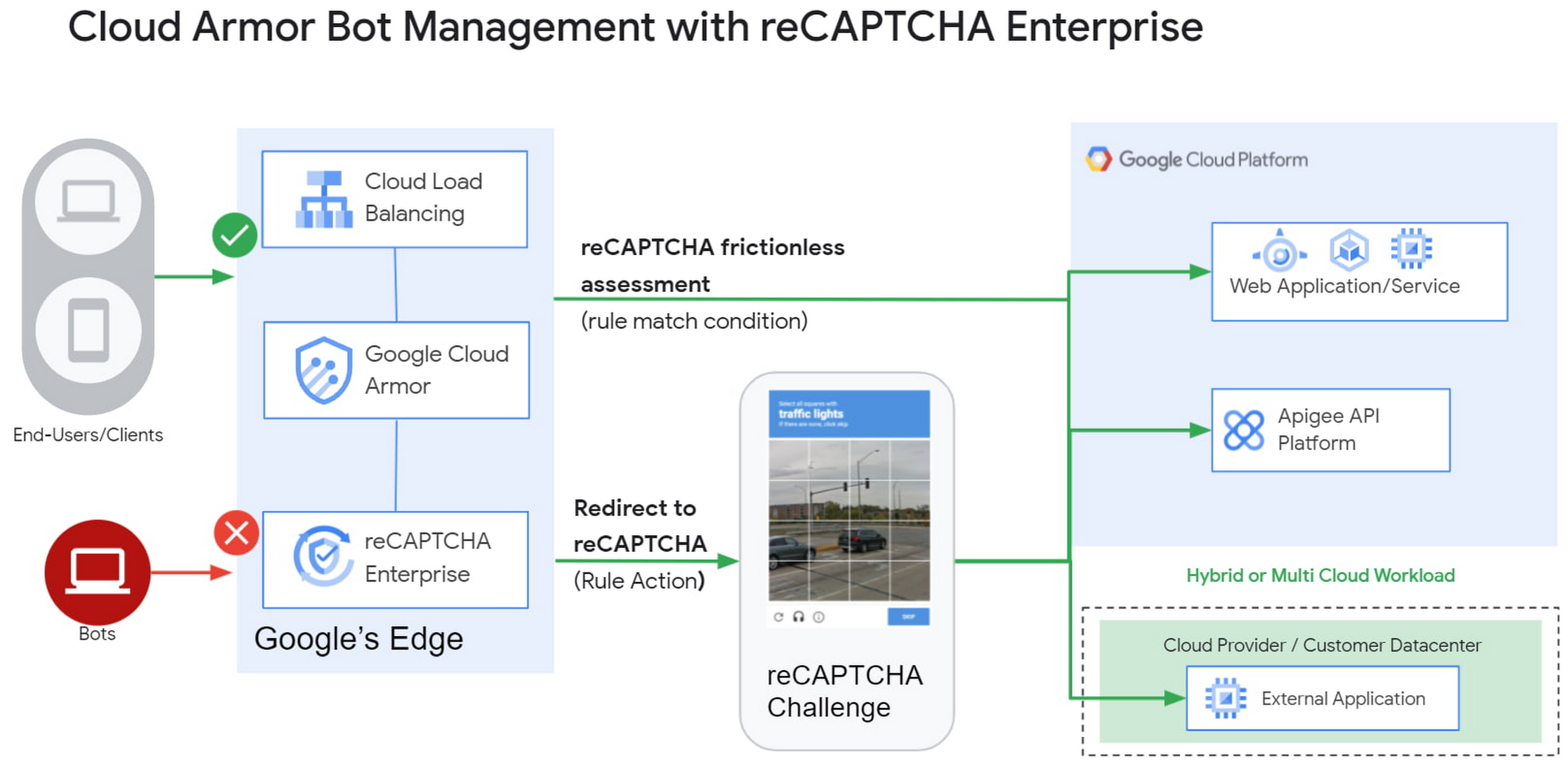
1) Enforce reCAPTCHA Enterprise frictionless assessment
reCAPTCHA Enterprise assigns risk scores to interactions on your website (e.g., logins, signups, gift card redemption, checking out, etc.) Based on these interactions, it returns a score between 0.0 and 1.0, with 0.0 being a likely fraudulent interaction and 1.0 being a likely legitimate interaction. To reduce fraud, you might choose to take action on returned scores for logins below 0.5, but allow users with higher scores to continue their login with zero friction.
With this new integration, you can also have Cloud Armor take action based on the score, including blocking or redirecting the request based on reCAPTCHA’s assessment from the client-side instrumentation. The client-side instrumentation can be enabled by installing reCAPATCHA’s javascript library into browser applications or using the reCAPTCHA SDK with mobile applications. By the time the user’s request leaves the client, it will have a reCAPTCHA assessment and bot score attached to it. This scoring is accomplished in-line, as the user’s request is being evaluated through your Cloud Armor security policy. Crucially, this occurs without incurring the latency of an additional request/response back to the reCAPTCHA service.
2) Serve reCAPTCHA Challenge in Cloud Armor
In this scenario, suspicious users are blocked by Cloud Armor until they solve the reCAPTCHA Enterprise challenge.You can configureCloud Armor to serve a reCAPTCHA challenge for any requests that match on a Cloud Armor security policy rule. To do so, you can configure a rule in through the Google Cloud CLI with an action to redirect to reCAPTCHA Enterprise in order to serve a CAPTCHA:
gcloud beta compute security-policies rules create 1000--security-policy my-policy--expression "request.path.matches("/login.html")"--action redirect--redirect-type google-recaptcha
In the above example, we are choosing to have reCAPTCHA Enterprise deployed to assess every request attempting to access the login page to prevent bots from logging into our service. With Cloud Armor first requiring reCAPTCHA Enterprise to assess the bot risk of reach request, unwelcome traffic from bots would be blocked at the edge.
3) Redemption Flow
While we aim to make the initial reCAPTCHA assessment as accurate as possible, some organizations prefer to give the end-user another chance by solving a challenge in the event that the reCAPTCHA score is lower than their defined threshold. As part of this release, you can combine both the frictionless assessment and manual challenge into what we call the “redemption flow”. To do so, you can configure the match condition of a Cloud Armor rule to detect a low reCAPTCHA token score and configure the action of the same rule to redirect to a reCAPTCHA challenge.
gcloud beta compute security-policies rules create 1000--security-policy my-policy--expression "request.path.matches(\"/login.html\") && token.recaptcha.score <= 0.3"--action redirect--redirect-type google-recaptcha
By combining both of these scenarios into the redemption flow, you can give suspicious clients the opportunity to redeem themselves by proving they are not a bot.
These bot detection and mitigation use cases, taken together or separately, allow your bot management strategy to scale up without impacting your protected workloads, as all decisions are made at the edge of Google’s network.
Additional bot management capabilities
In addition to the integration with reCAPTCHA Enterprise, Cloud Armor has added more capabilities to help you implement an effective bot management strategy:
- Redirect actions – Cloud Armor rules now support a redirect action to redirect end-clients to a user-configured URL. Requests that match on such rules would respond with an HTTP 302 to the end-client in order to send them to an alternative destination.
- Insert Header – With the ability to conditionally insert a custom header and value into an incoming request, users can now tag requests based on the criteria in the match condition of any Cloud Armor rule. This allows you to treat tagged requests differently downstream in your applications. For example, you can choose to route suspicious requests to a honeypot or silently not process their transaction so as not to tip off the bot that it has been detected.
Learn more
Cloud customers can get started right now by configuring a rule to redirect to reCAPTCHA in their Cloud Amor security policies through the command line interface. Learn more in these documentation links:
Strengthening Your Network: The Benefits of Network Firewall Policies Over VPC Firewall Rules

1259
Of your peers have already read this article.
3:30 Minutes
The most insightful time you'll spend today!
In the fall of 2022, we announced new policy constructs for Google Cloud Firewall, a scalable, cloud-first firewall service that helps secure traffic flow to and from workloads in Google Cloud, and whose distributed architecture enables simplified, granular control including micro-segmentation. Whereas legacy VPC firewall rules included network tags that were not governed by our IAM infrastructure, Cloud Firewall’s new network firewall policies with IAM-governed tags conform to our hierarchical control model and can help improve security operations.
We recommend that customers migrate from VPC firewall rules to the newly introduced network firewall policies. To assist with the migration, we developed a migration tool that creates a global network firewall policy and converts existing VPC firewall rules into the new policy.
With Google Cloud’s network firewall policies, we offer rules defined on a per-VPC network basis, either for all regions of the network (global network firewall policies) or a single region (regional network firewall policies). Granular controls enforced at the virtual machine (VM) level using IAM-governed Tags deliver intra-subnet micro-segmentation with pervasive policy coverage that automatically applies to workloads wherever they are deployed, independent of network architecture.
Network firewall policies allow for:
- Batch editing of multiple rules within a single policy, which saves time, simplifies rule management, and eliminates race conditions created by single rule update patterns
- A single resource to contain all the firewall rule sets applied to a VPC network, making it easy to modify and update the firewall configurations with unified APIs on the single resource
- Granular IAM controls based on your needs and requirements, such as separate IAM permissions for firewall policy creation, update, and association
- Sharing and attaching of firewall configurations across VPC networks in the same project, which simplifies configuration and management
With these increased capabilities, the combination of the new policy structures and the IAM-governed tags can help simplify operations, while achieving more reliable granular control and the implementation of least-privilege policies.
Going forward, all new enhancements and features for Cloud Firewall will only be supported through firewall policies. Network firewall policies and Tags integration are part of the Cloud Firewall Essentials tier, which is offered to customers at no additional charge. We encourage customers to migrate to network firewall policies to take advantage of future Cloud Firewall product enhancements, such as the Threat Intelligence, FQDN, and geo-location filtering features introduced in the Cloud Firewall Standard tier. For more details, please see our Cloud Firewall Standard announcement blog.
Network firewall policy migration tool overview
The new migration tool helps you convert existing VPC firewall rules into the new policy. This tool does not delete or affect existing VPC firewall rules. Once the new global network firewall policy is created, you can attach the network firewall policy to a VPC. You also have the option to swap the evaluation order of network firewall policies and VPC firewall rules.
Existing VPC firewall rules can be removed after you confirm the newly created network firewall policy works as intended. The best way to verify this is to enable firewall logging on both the existing VPC firewall rules and the new network firewall policy. After the evaluation order has been swapped to evaluate the new global policy first, you can review the firewall logs to confirm that the new network firewall policy rules are evaluated and hit as intended, and the hit count for the equivalent VPC firewall rules are shadowed and no longer getting hits. Support for the hit count and shadowed rule analysis will also be available in the upcoming release of Firewall Insights. More details can be found in the migration tool guide.
You can access the migration tool as a gcloud command. There are two mandatory arguments in this command: (1) the source VPC Network (SOURCE_VPC_NETWORK) and (2) the target network firewall policy (TARGET_NETWORK_FIREWALL_POLICY).
gcloud compute firewall-rules migrate --source-network=SOURCE_VPC_NETWORK –target-firewall-policy=TARGET_NETWORK_FIREWALL_POLICY [OTHER_FLAGS]
Please note, a network firewall policy with the same name cannot exist before running this command, since the migration tool will create it.
Additionally, logging will remain unchanged for any migration, meaning that if a VPC firewall rule has logging turned on, the migration tool will leave it on and if logging is turned off, the migration tool will keep it off.
For a more detailed guide, including information on how to change the rule evaluation order, and how to migrate from VPC firewall rules that contain network tags and/or service accounts, please refer to the migration guide.
Migrate today
We encourage you to migrate your firewall configuration from VPC firewall rules to the newly introduced network firewall policies to enhance your security posture with a fully distributed, cloud-first stateful inspection firewall service. In addition, migrating to network firewall policies ensures you will have access to the latest firewall features, such as Cloud Firewall Standard. The migration tool is here to help you with this transition. Check out the guide to learn more.
5572
Of your peers have already downloaded this article
1:30 Minutes
The most insightful time you'll spend today!
Protecting a global network against persistent and constantly evolving cyber threats is one of the most important challenges faced by Google Cloud. So, how does Google’s global network protects seven different global businesses, each with over 1 billion customers, including popular Google services such as Google Search, YouTube, Maps, and Gmail?
The answer is a multi-step process, which is constantly changing and evolving to stay one step ahead of the malicious hackers and attackers. For instance, it’s network communications protocols—the rules that enable communications between systems—change multiple times per second to make malicious intrusions much harder.
Data in Google Cloud is encrypted both in transit and at rest. Google’s network capacity far exceeds any traffic load it hosts to thwart and DDoS attack. In addition, it has numerous other products, tools, and processes at work to provide defense in depth.
Download this e-book to get a detailed overview of Google Cloud’s approach to security and privacy.
How Google Meet Keeps Your Video Conferences Secure

6814
Of your peers have already read this article.
4:30 Minutes
The most insightful time you'll spend today!
All over the world, businesses, schools and users depend on G Suite to help them stay connected and get work done. Google designs, builds, and operates our products on a secure foundation, aimed at thwarting attacks and providing the protections needed to keep you safe. G Suite and Google Meet are no exception.
Google Meet’s security controls are turned on by default, so that in most cases, organizations and users won’t have to do a thing to ensure the right protections are in place. Here, we’ll summarize the key capabilities of Google Meet that help protect you.
Proactive protections to combat abuse and block hijacking attempts
Google Meet employs an array of counter-abuse protections to keep your meetings safe. These include anti-hijacking measures for both web meetings and dial-ins.
Google Meet makes it difficult to programatically brute force meeting IDs (this is when a malicious individual attempts to guess the ID of a meeting and make an unauthorized attempt to join it) by using codes that are 10 characters long, with 25 characters in the set. We limit the ability of external participants to join a meeting more than 15 minutes in advance, reducing the window in which a brute force attack can even be attempted. External participants cannot join meetings unless they’re on the calendar invite or have been invited by in-domain participants. Otherwise, they must request to join the meeting, and their request must be accepted by a member of the host organization.
In addition, we’re rolling out several features to help schools keep meetings safe and improve the remote learning experiences for teachers and students, including:
- Only meeting creators and calendar owners can mute or remove other participants. This ensures that instructors can’t be removed or muted by student participants.
- Only meeting creators and calendar owners can approve requests to join made by external participants. This means that students can’t allow external participants to join via video, and that external participants can’t join before the instructor.
- Meeting participants can’t rejoin nicknamed meetings once the final participant has left. This means if the instructor is the last person to leave a nicknamed meeting, students can’t join later without the instructor present.

Secure deployment and access controls for admins and end-users
To limit the attack surface and eliminate the need to push out frequent security patches, Google Meet works entirely in your browser. This means we do not require or ask for any plugins or software to be installed if you use Chrome, Firefox, Safari, or Microsoft Edge. On mobile, we recommend that you install the Google Meet app.
To help ensure that only authorized users administer and access Meet services, we support multiple 2-Step Verification options for accounts that are secure and convenient. These include hardware and phone-based security keys and Google prompt. Additionally, Google Meet users can enroll their account in our Advanced Protection Program (APP), which provides our strongest protections available against phishing and account hijacking and is specifically designed for the highest-risk accounts.
For G Suite Enterprise and G Suite for Education customers, we offer Access Transparency, which logs any Google access to Google Meet recordings stored in Drive, along with the reason for the access (support team actions that you might have requested, for example). Customers can also use data regions functionality to store select/covered data of Google Meet recordings in specific regions (i.e. US or Europe).
Secure, compliant, and reliable meeting infrastructure
In Google Meet, all data is encrypted in transit by default between the client and Google for video meetings on a web browser, on the Android and iOS apps, and in meeting rooms with Google meeting room hardware. Meet adheres to IETF security standards for Datagram Transport Layer Security (DTLS) and Secure Real-time Transport Protocol (SRTP). For every person and for every meeting, Meet generates a unique encryption key, which only lives as long as the meeting, is never stored to disk, and is transmitted in an encrypted and secured RPC (remote procedure call) during the meeting setup.
Security is an integral part of all our operations at Google. Our team of full-time security and privacy professionals supports our software engineering and operations to ensure that security is always a part of how we build and run our services. All of our Google Cloud and G Suite customers benefit from these capabilities, including:
- Secure-by-design infrastructure: Google Meet benefits from Google Cloud’s defense-in-depth approach to security, which utilizes the built-in protections and global-private network that Google uses to secure your information and safeguard your privacy.
- Compliance certifications: Our Google Cloud products, including Google Meet, regularly undergo independent verification of their security, privacy, and compliance controls, including validation against standards such as SOC, ISO/IEC 27001/17/18, HITRUST, and FedRAMP. We support your compliance requirements around regulations such as GDPR and HIPAA, as well as COPPA and FERPA for education.
- Incident management: We have a rigorous process for managing data and security incidents that specifies actions, escalations, mitigation, resolution, and notification of any potential incidents impacting customer data.
- Reliability: Google’s network is engineered to accommodate peak demand and handle future growth. Our network is resilient and engineered to accommodate the increased activity we’ve seen on Google Meet.
- Transparency: At Google Cloud, we’re clear about our commitments regarding customer data: we process customer data according to your instructions; we never use customer data for advertising purposes; and we publish the locations of our Google data centers, which are highly available, resilient, and secure.
During COVID-19 and beyond, we will continue to protect Google Meet users and their data, and keep innovating with new features to make our tools helpful, secure, and safe.
4900
Of your peers have already watched this video.
4:00 Minutes
The most insightful time you'll spend today!
Application Development with Kpt
Learn how to create and customize configuration packages with Kpt to build applications and adhere to configuration-as-data philosophy.
3438
Of your peers have already watched this video.
2:30 Minutes
The most insightful time you'll spend today!
Learn to Use reCAPTCHA Enterprise to Protect Your Website from Fraud
One of the top questions enterprises have is: How can I use reCAPTCHA Enterprise to protect my website from online fraudulent activity?
Fraudulent web activities cost enterprises billions of dollars each year. Security teams need to keep the bad actors out of their websites and ensure that their customers can always get in.
Google reCAPTCHA has been defending millions of sites for almost a decade, and the reCAPTCHA Enterprise service built on this technology with capabilities designed specifically for enterprise security concerns.
In this demo, you can see how reCAPTCHA Enterprise identifies the difference between a real user and a bad actor and how you can view this within the Admin Analytics dashboard to see what is happening with your website.
More Relevant Stories for Your Company

Protect Users in Apps with Multi-Factor Authentication
These days, using a password alone to secure user accounts containing sensitive, identifiable, or private information just isn’t sufficient. Passwords are often subject to reuse and can easily be phished and stolen. With this in mind, we recently teamed up with researchers from New York University and the University of
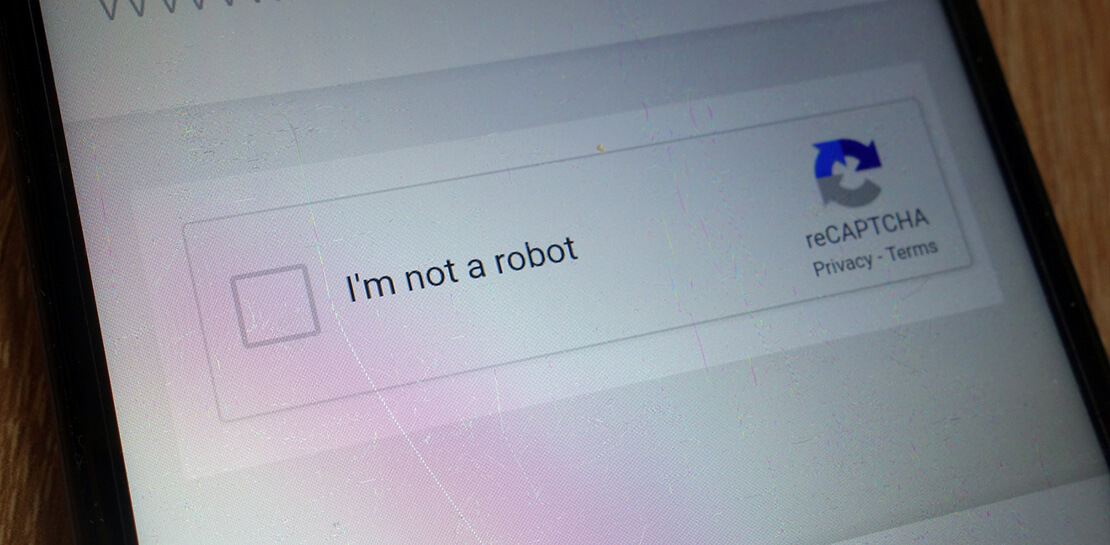
Boost Security with Google’s reCAPTCHA Enterprise Fraud Prevention
Today, we are putting the power of Google’s insights and intelligence in the hands of risk, fraud, and security teams everywhere. We are pleased to announce the general availability of reCAPTCHA Enterprise Fraud Prevention, a new product that uses Google's own fraud models, machine learning, and intelligence from protecting more



Accelerate Your Digital Transformation Through a Modern Infrastructure
Learn about the latest advancements to Google Cloud Platform’s unique infrastructure to accelerate enterprise workloads and build planet scalable solutions. Hear how Google Cloud’s infrastructure enables you to solve problems faster, more securely, and at greater scale. See how Google Cloud is accelerating the support for enterprise workloads like SAP,

IT Leaders are Prioritizing Organizations’ Sustainability Goals: Study Finds
The global-wide interruptions of the coronavirus pandemic provided the opportunity for businesses to take a closer look at how we work, learn, live, and consume. With work stoppages and quarantine orders in place, carbon emissions and pollution levels saw significant reductions, highlighting how business and environmental sustainability are linked. As
