





Boost Security with Google’s reCAPTCHA Enterprise Fraud Prevention
1167
Of your peers have already read this article.
2:30 Minutes
The most insightful time you'll spend today!
Today, we are putting the power of Google’s insights and intelligence in the hands of risk, fraud, and security teams everywhere. We are pleased to announce the general availability of reCAPTCHA Enterprise Fraud Prevention, a new product that uses Google’s own fraud models, machine learning, and intelligence from protecting more than 6 million websites to help stop payment fraud.
reCAPTCHA Enterprise Fraud Prevention can help protect payment transactions by identifying targeted manual attacks and large-scale fraud attempts. It automatically trains fraud models based on behavior and transaction data to identify events that are likely fraudulent and could cause a dispute or chargeback if accepted.
When threat actors are identified and blocked on any site in the reCAPTCHA network, the intelligence is made available to help protect other organizations from those same attackers. Organizations can then use the scores to send the transaction for manual review or directly block suspicious transactions, drive increased trust in their legitimate transactions, reduce the amount of friction for good users, and reduce erroneous rejection rates.
“Being a safe and trusted place to give and receive help is our top priority. We are constantly innovating, refining and enhancing our fraud defenses and Google’s reCAPTCHA Enterprise Fraud Prevention adds another layer of industry-leading protection for our users. Combining Google’s rich security expertise with GoFundMe’s focus on fraud prevention is already showing promising results as we strive to keep our platform the safest place to give online,” said Matthew Murray, director of risk, GoFundMe.
According to data obtained from our customers using reCAPTCHA Enterprise Fraud Prevention in private Preview, the new solution can help drive comprehensive value for organizations by:
- Reducing fraud losses: Get behavior modeling (not just mouse movements), stop financial damage created by account takeovers (ATOs), and connect fraud and abuse intelligence across your site and application.
- Increasing legitimate sales: Fraud Prevention can help businesses increase their revenue by providing insights to understand who good users are, who may otherwise be caught in an overly aggressive, customer restrictive fraud model.*
These benefits are enabled for organizations by:
- Preventing advanced attacks: Stopping sophisticated attacks in an environment where attackers use cloud fraud infrastructure, and data leaks, virtual cards and VPN usage are on the rise
- Increasing trust in good transactions: Focus on good approval rates through a unique combination of supervised and unsupervised models
- Improving customer experience: By preventing fraudulent transactions with zero user friction, Fraud Prevention can help businesses protect legitimate users and increase customer retention
Our customers have used these new capabilities in preview in customer experiences that include online checkouts and payment transactions. Fraud Prevention has been used by merchants and payment processors to block millions of dollars in fraudulent transactions in a frictionless way.
reCAPTCHA Enterprise provides a comprehensive online fraud detection platform that helps prevent fraudulent, spammy, and abusive digital client activity across your web and application footprint. This platform includes Account Defender, which protects users from account takeovers (ATO), frictionless bot management capabilities, and password leak detection to identify compromised accounts. With an additional API call for Fraud Prevention, organizations can leverage a comprehensive solution to secure financial transactions along with core reCAPTCHA Enterprise capabilities.
To get started, organizations can install a score-based site key on each part of the payment user flow front end and send transaction data when a purchase occurs. This site key helps train site-specific fraud models and start returning fraud scores for each transaction.
Ready to put reCAPTCHA Enterprise Fraud Prevention to work? Contact our fraud specialists or your customer success CSM team and sign up with the free tier. You learn more about these new capabilities in reCAPTCHA Enterprise in our product documentation. You can also register for our webinar where our experts will be discussing this capability in great detail on June 1, 2023.
Coming up at our Security Summit on June 13-14, you can hear how reCAPTCHA Enterprise helped GoFundMe secure their donors from fraud. Sign up here for free Security Summit registration.
Collaboration with Google Cloud: Introducing Cloud Analytics by MITRE Engenuity Center
3020
Of your peers have already read this article.
3:30 Minutes
The most insightful time you'll spend today!
The cybersecurity industry is faced with the tremendous challenge of analyzing growing volumes of security data in a dynamic threat landscape with evolving adversary behaviors. Today’s security data is heterogeneous, including logs and alerts, and often comes from more than one cloud platform. In order to better analyze that data, we’re excited to announce the release of the Cloud Analytics project by the MITRE Engenuity Center for Threat-Informed Defense, and sponsored by Google Cloud and several other industry collaborators.
Since 2021, Google Cloud has partnered with the Center to help level the playing field for everyone in the cybersecurity community by developing open-source security analytics. Earlier this year, we introduced Community Security Analytics (CSA) in collaboration with the Center to provide pre-built and customizable queries to help detect threats to your workloads and to audit your cloud usage. The Cloud Analytics project is designed to complement CSA.
The Cloud Analytics project includes a foundational set of detection analytics for key tactics, techniques and procedures (TTPs) implemented as vendor-agnostic Sigma rules, along with their adversary emulation plans implemented with CALDERA framework. Here’s a overview of Cloud Analytics project, how it complements Google Cloud’s CSA to benefit threat hunters, and how they both embrace Autonomic Security Operations principles like automation and toil reduction (adopted from SRE) in order to advance the state of threat detection development and continuous detection and response (CD/CR).
Both CSA and the Cloud Analytics project are community-driven security analytics resources. You can customize and extend the provided queries, but they take a more do-it-yourself approach—you’re expected to regularly evaluate and tune them to fit your own requirements in terms of threat detection sensitivity and accuracy. For managed threat detection and prevention, check out Security Command Center Premium’s realtime and continuously updated threat detection services including Event Threat Detection, Container Threat Detection, and Virtual Machine Threat Detection. Security Command Center Premium also provides managed misconfiguration and vulnerability detection with Security Health Analytics and Web Security Scanner.
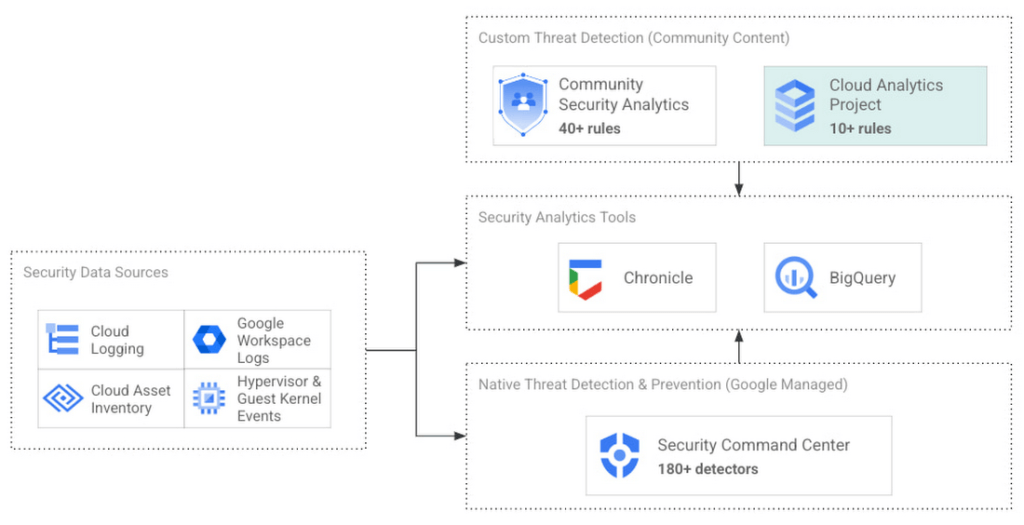
Cloud Analytics vs Community Security Analytics
Similar to CSA, Cloud Analytics can help lower the barrier for threat hunters and detection engineers to create cloud-specific security analytics. Security analytics is complex because it requires:
- Deep knowledge of diverse security signals (logs, alerts) from different cloud providers along with their specific schemas;
- Familiarity with adversary behaviors in cloud environments;
- Ability to emulate such adversarial activity on cloud platforms;
- Achieving high accuracy in threat detection with low false positives, to avoid alert fatigue and overwhelming your SOC team.
The following table summarizes the key differences between Cloud Analytics and CSA:
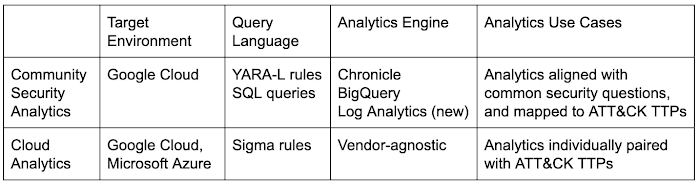
Together, CSA and Cloud Analytics can help you maximize your coverage of the MITRE ATT&CK® framework, while giving you the choice of detection language and analytics engine to use. Given the mapping to TTPs, some of these rules by CSA and Cloud Analytics overlap. However, Cloud Analytics queries are implemented as Sigma rules which can be translated to vendor-specific queries such as Chronicle, Elasticsearch, or Splunk using Sigma CLI or third party-supported uncoder.io, which offers a user interface for query conversion. On the other hand, CSA queries are implemented as YARA-L rules (for Chronicle) and SQL queries (for BigQuery and now Log Analytics). The latter could be manually adapted to specific analytics engines due to the universal nature of SQL
Getting started with Cloud Analytics
To get started with the Cloud Analytics project, head over to the GitHub repo to view the latest set of Sigma rules, the associated adversary emulation plan to automatically trigger these rules, and a development blueprint on how to create new Sigma rules based on lessons learned from this project.
The following is a list of Google Cloud-specific Sigma rules (and their associated TTPs) provided in this initial release; use these as examples to author new ones covering more TTPs.
Sigma rule example
Using the canonical use case of detecting when a storage bucket is modified to be publicly accessible, here’s an example Sigma rule (copied below and redacted for brevity):
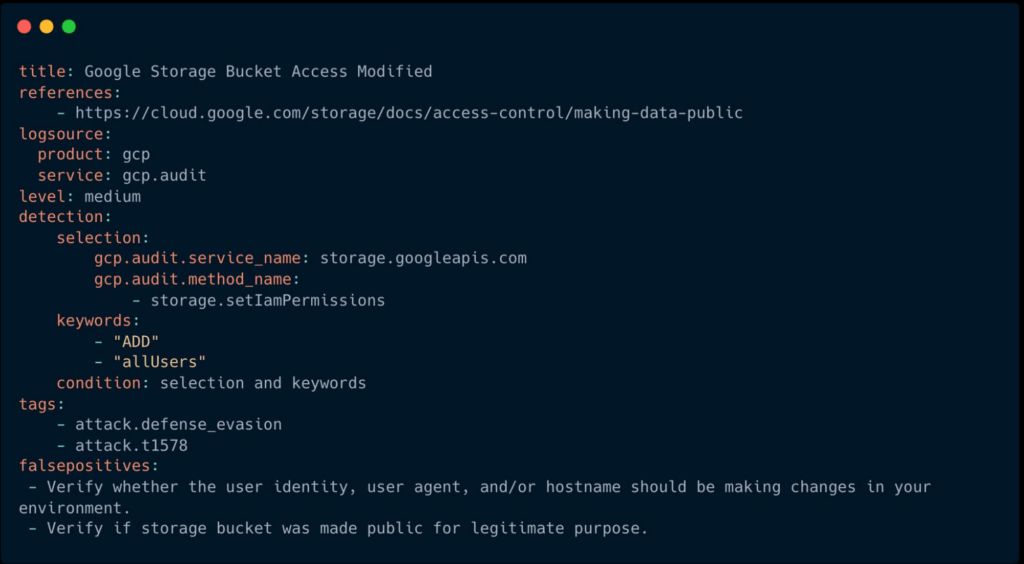
The rule specifies the log source (gcp.audit), the log criteria ( storage.googleapis.com service and storage.setIamPermissions method) and the keywords to look for (allUsers, ADD) signaling that a role was granted to all users over a given bucket. To learn more about Sigma syntax, refer to public Sigma docs.
However, there could still be false positives such as a Cloud Storage bucket made public for a legitimate reason like publishing static assets for a public website. To avoid alert fatigue and reduce toil on your SOC team, you could build more sophisticated detections based on multiple individual Sigma rules using Sigma Correlations.
Using our example, let’s refine the accuracy of this detection by correlating it with another pre-built Sigma rule which detects when a new user identity is added to a privileged group. Such privilege escalation likely occurred before the adversary gained permission to modify access of the Cloud Storage bucket. Cloud Analytics provides an example of such correlation Sigma rule chaining these two separate events.
What’s next
The Cloud Analytics project aims to make cloud-based threat detection development easier while also consolidating collective findings from real-world deployments. In order to scale the development of high-quality threat detections with minimum false positives, CSA and Cloud Analytics promote an agile development approach for building these analytics, where rules are expected to be continuously tuned and evaluated.
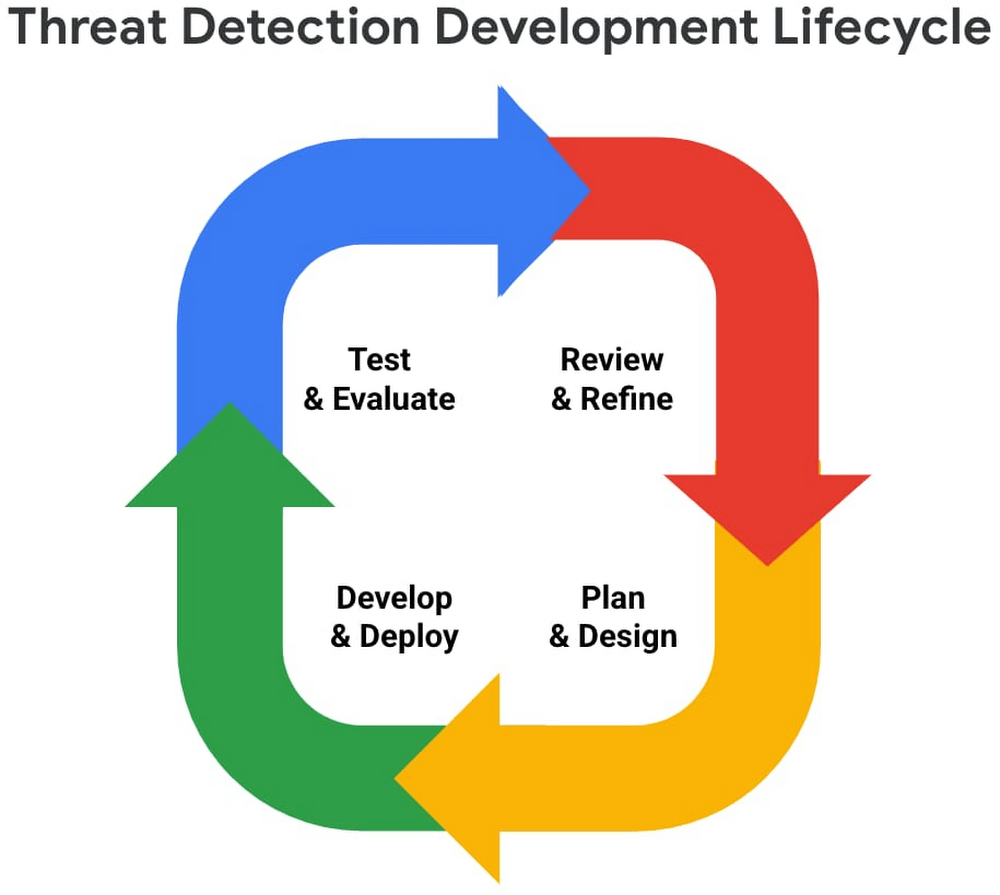
We look forward to wider industry collaboration and community contributions (from rules consumers, designers, builders, and testers) to refine existing rules and develop new ones, along with associated adversary emulations in order to raise the bar for minimum self-service security visibility and analytics for everyone.
Acknowledgements
We’d like to thank our industry partners and acknowledge several individuals across both Google Cloud and the Center for Threat-Informed Defense for making this research project possible:
Desiree Beck, Principal Cyber Operations Engineer, MITRE
Michael Butt, Lead Offensive Security Engineer, MITRE
Iman Ghanizada, Head of Autonomic Security Operations, Google Cloud
Anton Chuvakin, Senior Staff, Office of the CISO, Google Cloud
How Firewall Insights can Simplify Corporate Firewall Rules

3113
Of your peers have already read this article.
3:30 Minutes
The most insightful time you'll spend today!
Corporate firewalls typically include a massive number of rules, which accumulate over time as new workloads are added. When rules stack up piecemeal like this, misconfigurations occur that, at best, create headaches for security administrators, and at worst, create vulnerabilities that lead to security breaches.
To address this, we have introduced the Firewall Insights module in our Network Intelligence Center, which provides a single console for managing Google Cloud network visibility, monitoring and troubleshooting.
What are Firewall insights?
Historically, there hasn’t been an easy way to deal with the accumulation of complicated firewall rules. That was until we created Firewall Insights, which provides metrics reports and insight reports. These two reports contain information about firewall usage and the impact of various firewall rules on your VPC network. Even better, these insights and metrics are integrated into your Google Cloud Console for the VPC firewall and are also available via APIs.
You can use metrics reports to verify that firewall rules are being used appropriately and as intended. This report can uncover leftover rules from the past that are not actively used, review that the firewall rules allow or deny what is intended, perform live debugging of connections dropped, and leverage Cloud Monitoring to discover malicious attempts to access your network.
You can use insight reports to identify firewall misconfigurations, detect security attacks, and optimize and tighten your security rules.
Let’s take a look at how these reports work.
Metrics Report, a deeper dive
Metrics insights analyzes your VPC firewalls usage by tracking metrics such as firewall hit counts and last used. Let’s check this out with an example:
When you navigate to your VPC network and click on Firewall, ensure that you have selected Logs, Hit count and also Last hit in the column display options:
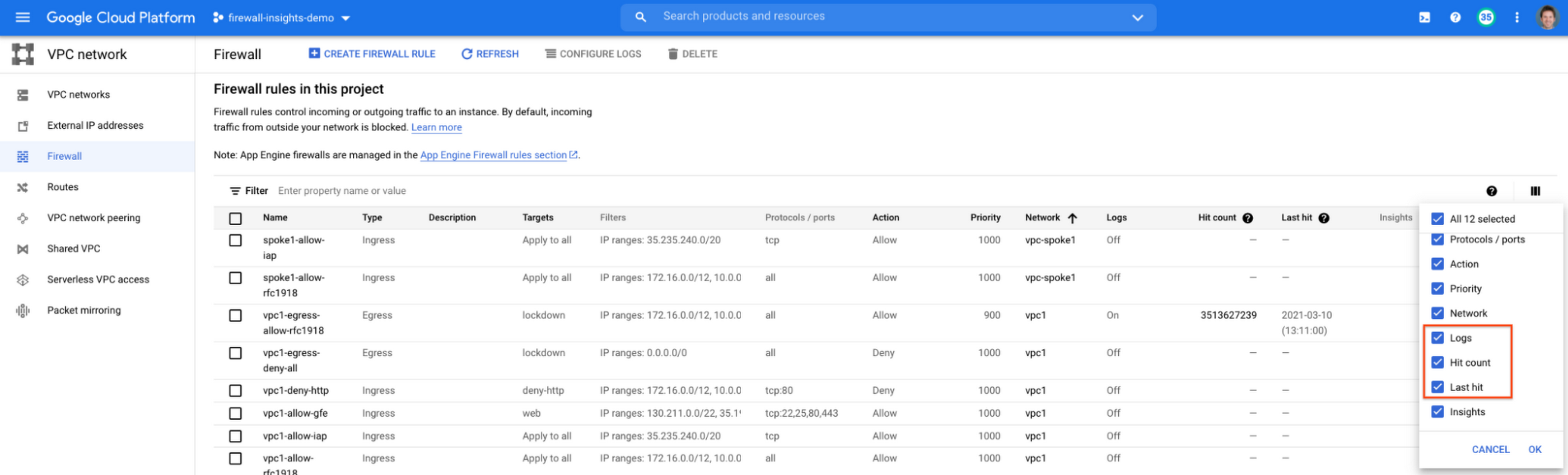
After this is enabled, now you should be able to see your VPC firewall rules with the hit count and last hit metrics. In the image below you can see that if logs are not enabled for rules, hit count and last hit metrics will not be collected. If logs are enabled, these details are collected, and shown in the VPC firewalls console.
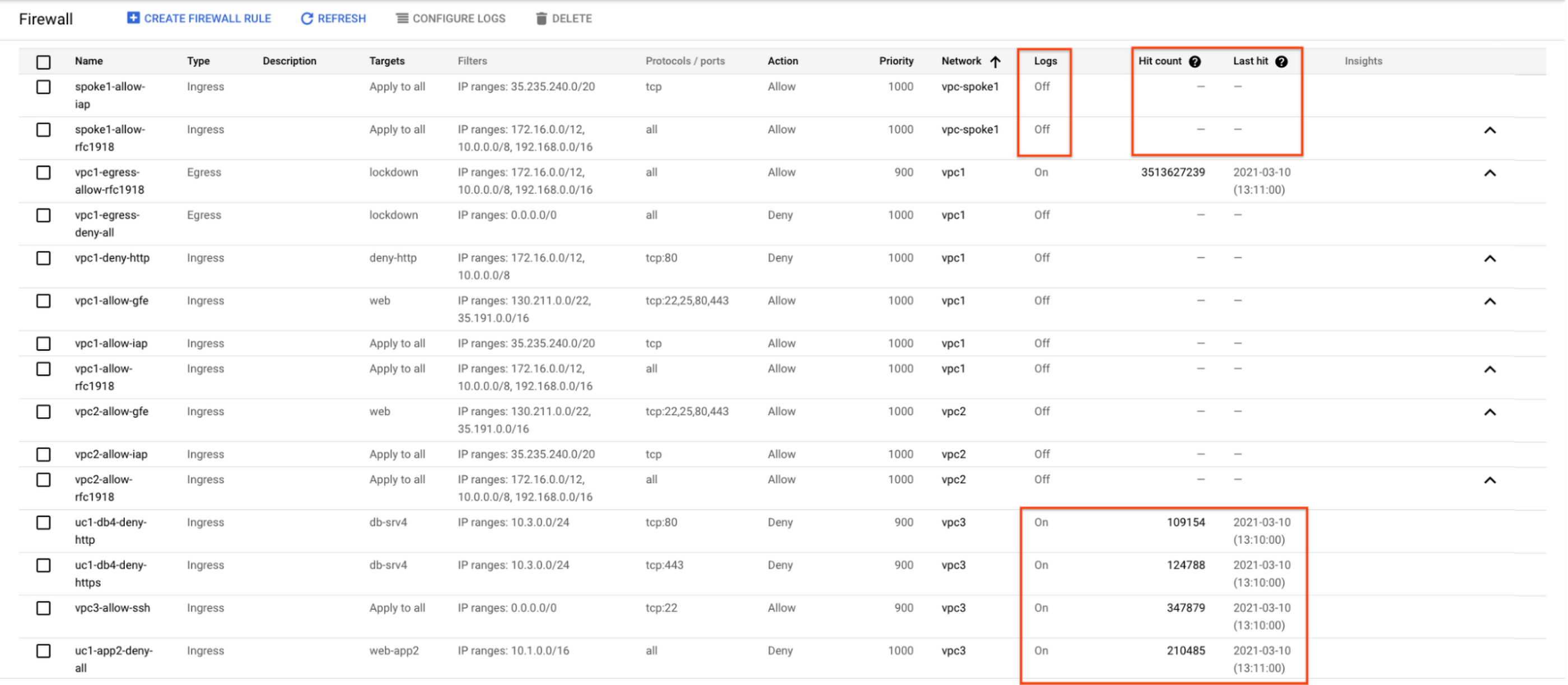
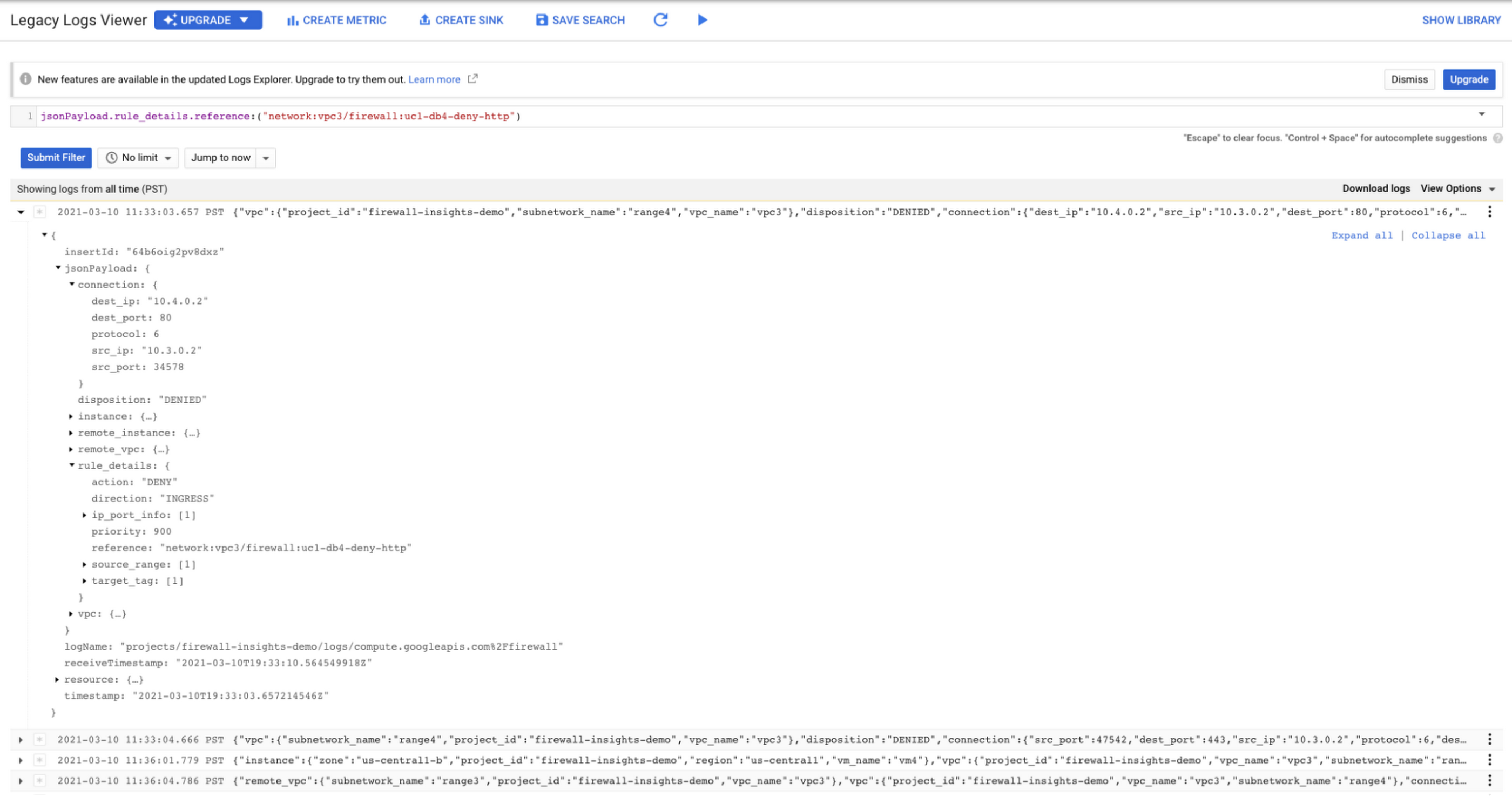
As you can see in Figure 1.2, each firewall rule which has logging enabled will show hit counts, so based on the example above, the rule “uc1-db4-deny-http” has been hit 109,154 times, the last time being 2021-03-10 (13:10:00). If you want to dive even deeper, you can click on the hit count and this will bring you to the logs viewer page where you can expand these logs and analyze all the details:
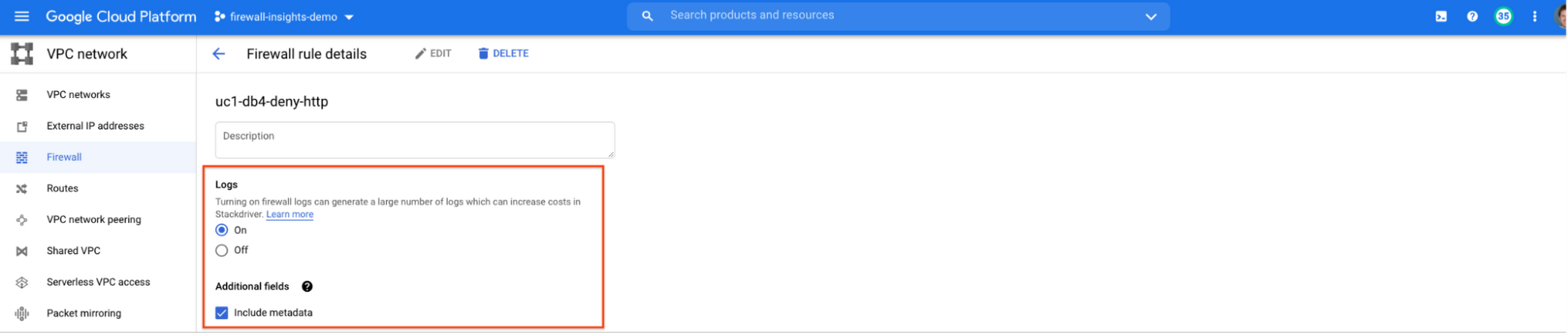
In order to enable logs for a particular firewall rule, you can edit it and turn logs on. By default, metadata is added in firewall logs. If you want to reduce the log size, you can do so by excluding these additional fields. Excluding these metadata fields will not impact the functionality of Firewall Insights.
From the “Firewall” page, you can also multi-select a group of firewall rules and turn on all logs at once.
Firewall rule usage metrics are accurate only for the period of time during which Firewall Rules Logging is enabled.
Insights Report, a deeper dive
Insights Report provides an intelligent analysis of the configuration of your firewalls. A report can contain one or more insights.
We will see examples now about the different insight reports which include:
- Shadowed firewall rules
- Allow rules with no hit in the last six weeks
- Deny rules with hits in the last 24 hours
By definition, a shadowed rule is a VPC firewall rule that is completely overshadowed by one or more firewall rules with higher or equal priority. We call that shadowing rules. Let’s see an example on how to find shadowed rules:Let’s say that you try to use ping between two VMs but it fails. Let’s take a look at the firewall rules applied to the VM:
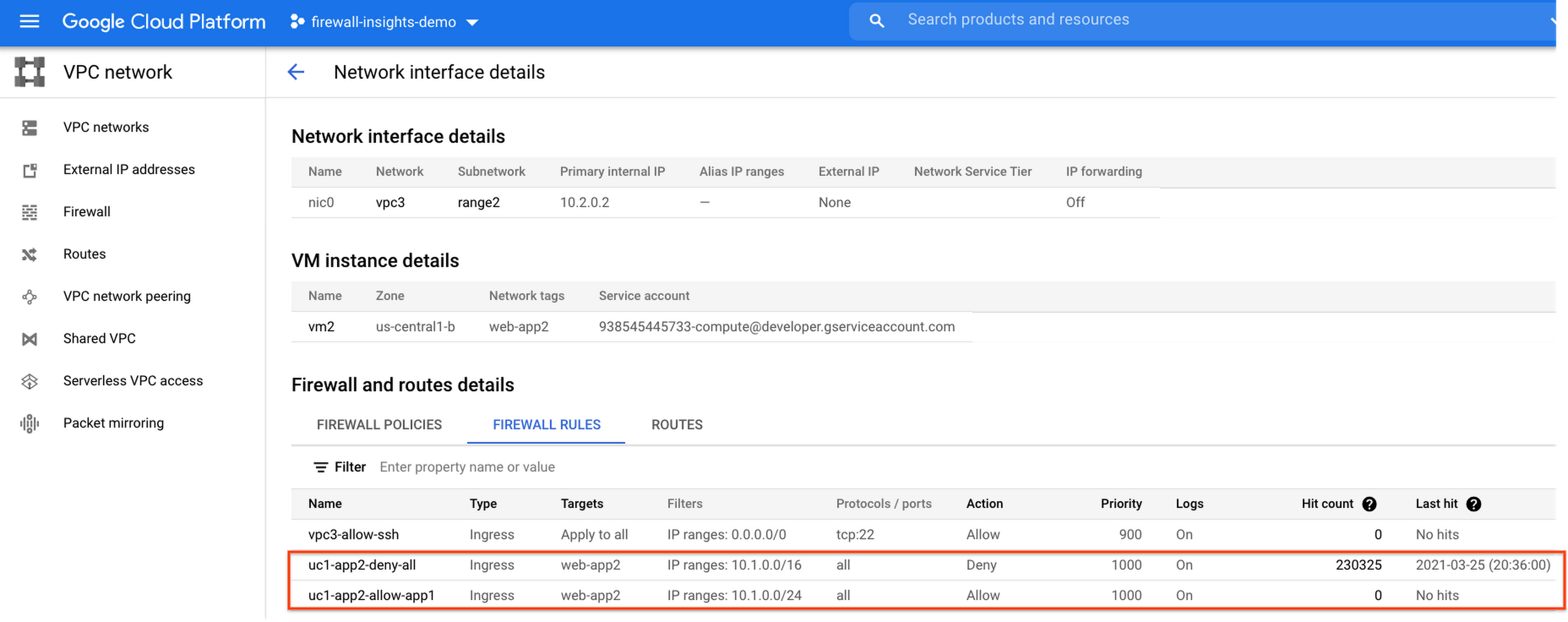
If we look closely, we can see that there are two rules with the same target tag, and those are almost identical except their source IP range. The IP range of the deny rule “uc1-app2-deny-all” includes the IP range of the rule allow “uc1-app2-allow-app1”. Therefore, we can see that “uc1-app2-allow-app1” is shadowed by “uc1-app2-deny-all”, and the ping between these VMs failed due to that.
To avoid such incidents in the future, Firewall Insights provides you with a convenient list of rules overshadowed by other firewall rules.
To see shadowed rules, you can click on the column selector, and add “Insights” to the firewall and route details:

Once this is applied, you will be able to see shadowed rules here:

Alternatively, you can navigate to Network Intelligence > Firewall Insights, where we will see the shadowed rule report:
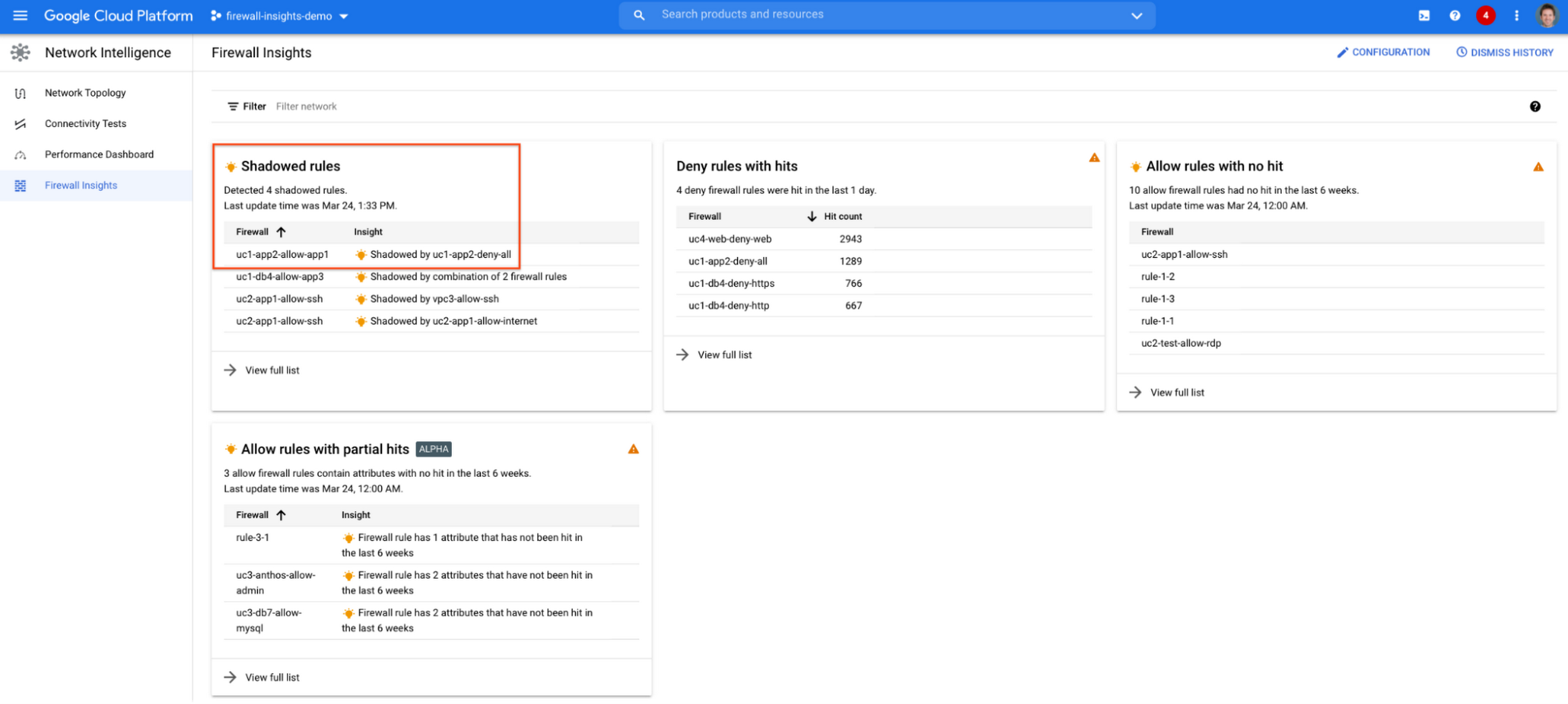
If we click on the insight we will get more details:

Going back to the firewall insights card (Figure 1.8), we can also identify that “uc1-db4-allow-app3” is shadowed by a combination of two rules and if we clicked on the insight this would provide all the details.
From the Firewall Insights dashboard, let’s move on to “allow rules with no hit”, where we can see firewall rules that have not logged any hits in the past six weeks. Such rules could be as a result of a misconfiguration, or leftover rules from past deployments. Tighten your security boundaries by identifying and removing such rules. If we go back to Network Intelligence > Firewall Insights, we can see allow rules with no hit:

We can drill down to view the full list of rules with no hit. We can see, for instance, one of the rules, the bottom one “uc2-app1-allow-internet”, might be a leftover rule to allow internet access from a past deployment, which means it has little likelihood of being hit in the future. So you may want to consider removing it from the rule set:

Click on the firewall rule to review all the details, and take a look at the prediction, which is made based on the hit pattern that we saw for similar rules in the same organization:

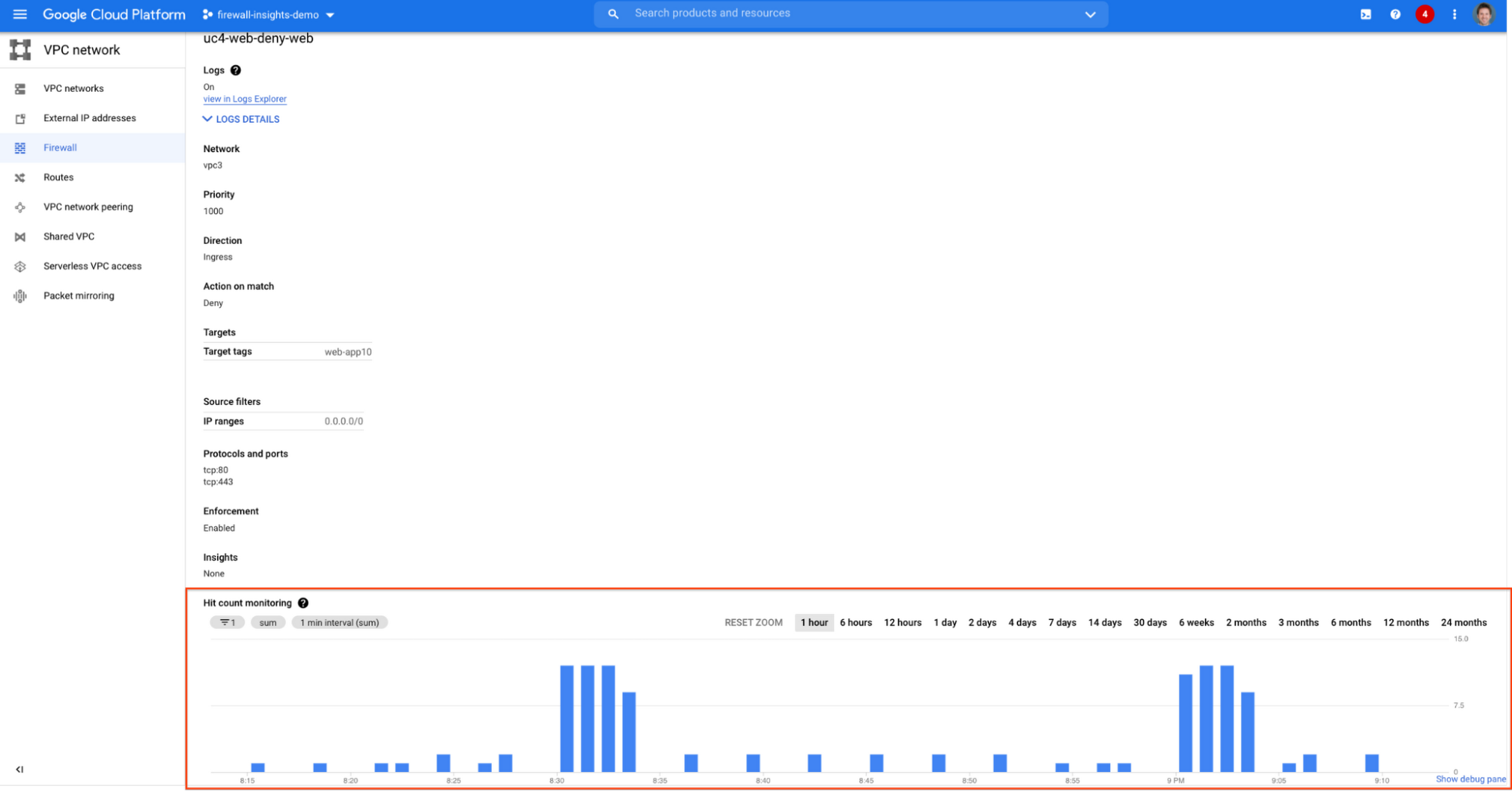
Let’s go back to the Firewall Insights dashboard and move on to the last category, “deny rules with hits in the last 24 hours”, which help you capture the traffic blocked by deny rules. These traffic types could indicate external attacks into your VPC network, or compromised VM instances attempting to send traffic out of your network. Let’s examine future hit prediction on a firewall rule. Navigate to Network Intelligence > Firewall Insights and take a look at the deny rules with hits card:

If your click on the “uc4-web-deny-web” rule, you can see the hit count monitoring, and if you click on the hit number we can dive deeper in the logs:

These tips should help you effectively leverage Firewall Insights to gain better control over a massive firewall rule set. Automate shadowed rule detection, quickly troubleshoot misconfigured rules, effortlessly pinpoint the overgranting rules hidden in the rule set, and identify the failed attempts to break into your network that were rejected by your firewall rules.
To learn more about Firewall Insights, please refer to our documentation. Additionally, to see how we’re advancing intelligent automation in network security, check our recent blog post.
Latest Update: Keep Your Accounts Secure with Sensitive Actions

2733
Of your peers have already read this article.
2:00 Minutes
The most insightful time you'll spend today!
At Google Cloud, we operate in a shared fate model, working in concert with our customers to help achieve stronger security outcomes. One of the ways we do this is to identify potentially risky behavior to help customers determine if action is appropriate. To this end, we now provide insights on what we are calling Sensitive Actions.
Sensitive Actions, now available in Preview, are focused on understanding IAM account, or user account, behavior. They are changes made in a Google Cloud environment that are security relevant — and therefore important to be aware of and evaluate — because they may be precursors to an attack, an effort to make other attacks possible, or part of an effort to monetize a compromised account. They can quickly highlight potentially malicious activities that are facilitated by authentication cookie theft, and are another defense-in-depth mechanism that Google Cloud offers to help address this attack vector.
The Sensitive Actions that are detected today will appear in two places. They are available in Security Command Center Premium, the primary source for security and risk alerts in Google Cloud, as Observations from the Sensitive Actions Service. They are also available in Cloud Logging, where we recommend that customers integrate them into their monitoring workflows.
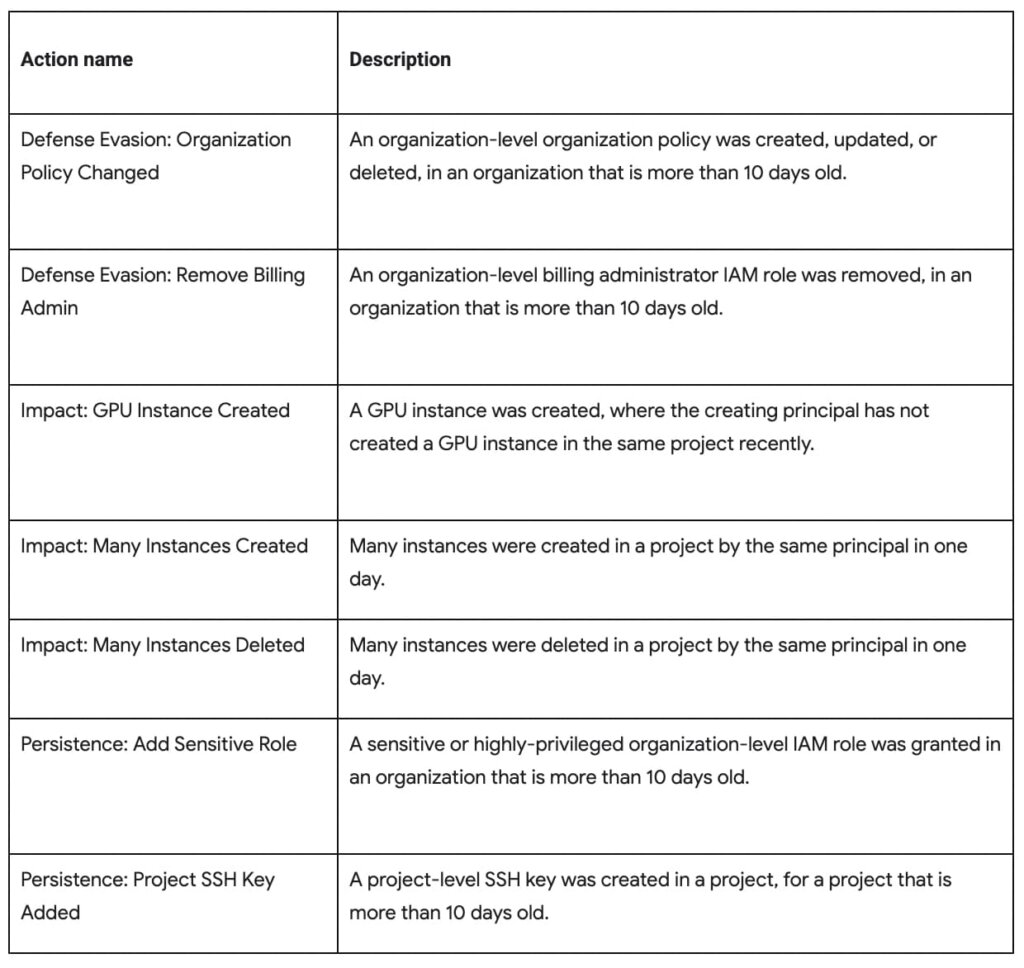
Sensitive Actions include the following list of action names (mapped to the MITRE ATT&CK tactics that these actions may correspond to) and descriptions:
To ensure that adversaries do not have mechanisms to disable this protection or hide logs from users, Sensitive Actions is an on-by-default service now enabled for Cloud customers. In cases where customers have certain privacy controls or policy restrictions applied to their logging pipeline, their logs will not be analyzed by this service.
You can learn more about Sensitive Actions and our overall recommendations for keeping your account secure by visiting our documentation here.
Your Cloud Defense Enhanced: Google Introduces End-to-End TDIR in Chronicle Security Operations

1161
Of your peers have already read this article.
4:30 Minutes
The most insightful time you'll spend today!
As cloud adoption continues to grow, so too does the number of cloud-born security threats. However, cloud environments can present significant opportunities to improve security with the right tools and processes in place.
When it comes to effective threat detection, investigation and response (TDIR) in the cloud, modern solutions must ensure that the entire security operations workflow — from data analysis through detection to response — are working in tandem to deliver the insights, context, and processes needed for cyber defenders to respond to threats with speed and precision.
At Google Cloud, we believe that modern security operations should rely less on customer engineering and more on packaged outcomes delivered by solution providers. With this in mind, we are excited to announce today at our annual Security Summit that Chronicle Security Operations now provides turnkey TDIR for Google Cloud. By integrating with our cloud-focused Security Command Center Premium (SCC) and Google Cloud telemetry, Chronicle can collect and analyze data from Google Cloud, detect and investigate threats, and automate responses to mitigate risks.
In our recent State of Cloud Threat Detection and Response Survey, 71% of respondents said that “entire classes of threats are eliminated by migrating to the cloud,” and 82% stated that “the cloud affords the ability to process more data, including on-prem data, which can improve detection across the board.”
To take advantage of all that the cloud can do for security, organizations should to do more than “lift and shift” their existing security tools and processes to the cloud. The cloud presents a different attack surface, often across several cloud services and data repositories, and each can have different attack tactics, potential misconfigurations, and context.
This update to Chronicle helps enable teams to:
- Detect with confidence. Out-of-the-box detection rule sets developed by Google threat researchers surface cloud attack vectors and provide high fidelity, contextualized alerts that quickly give insight into potential threats in your Google Cloud environment.
- Investigate with full context. Visualize threat storylines, complete with cloud-specific context that is correlated with additional data and context from across your environment for fast and efficient investigations.
- Respond with speed and precision. Streamline workflows and automate response actions with prebuilt playbooks and best practices designed specifically for Google Cloud. Chronicle SOAR’s case management and team collaboration help ensure fast and timely response.
- Simplify data ingestion. Chronicle automatically ingests, normalizes and contextualizes cloud telemetry from a variety of Google Cloud services (such as Cloud Asset Inventory, Google Kubernetes Engine, Google Compute Engine, cloud audit logs, and Cloud DLP), reducing the need for complex and time-consuming engineering.
Putting Google Cloud TDIR to work
Let’s take a closer look at how our end-to-end cloud TDIR workflow manages a potential Google Cloud attack.
Setting up cloud TDIR in Chronicle only takes a few clicks. Security Command Center’s built-in threat detection identifies attacks against Google Cloud resources. These findings, as well as audit, NAT, DNS, and firewall logs, are ingested into Chronicle to provide additional insight and context into Google Cloud threats.
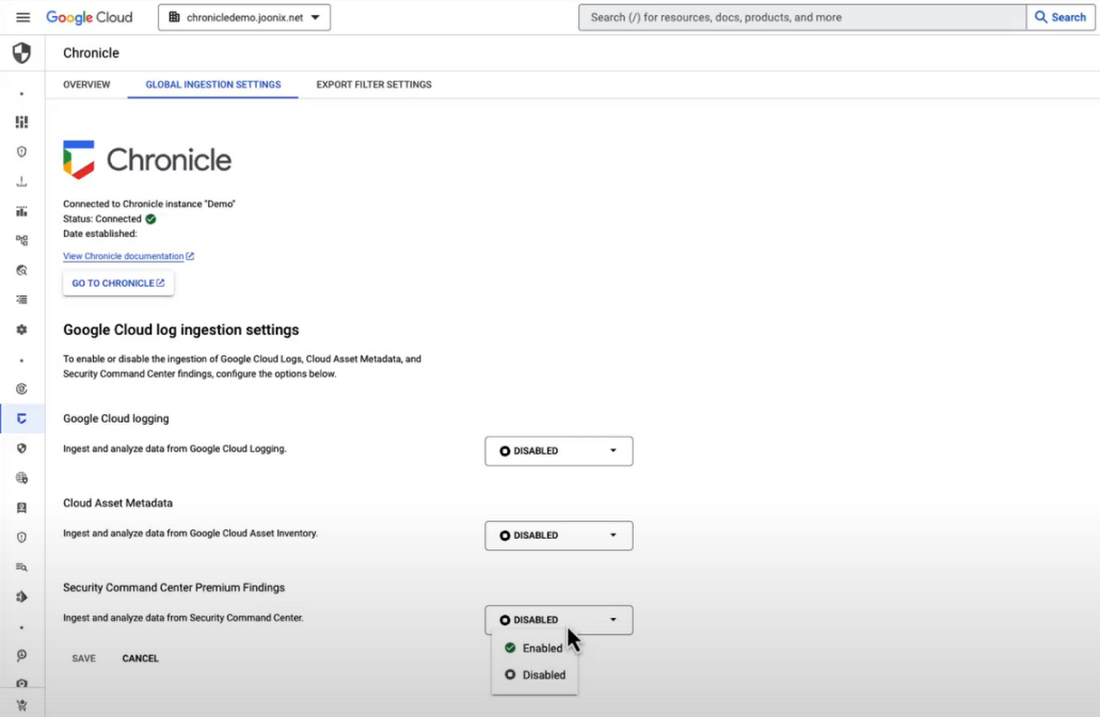
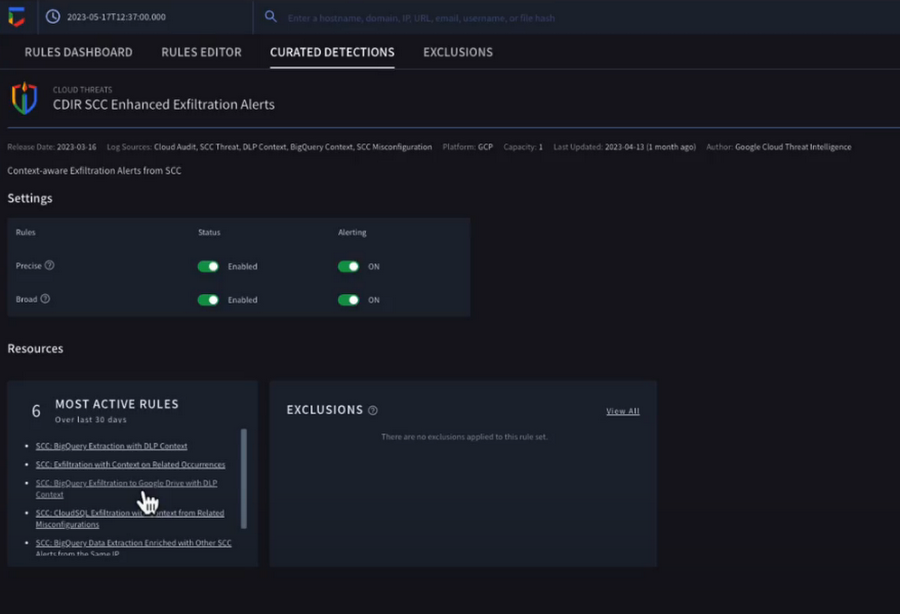
Chronicle now provides detection rules for Google Cloud threats. These rules correlate SCC findings with Chronicle’s advanced detection engine to reveal the broad scope of malicious activity, giving you visibility and more contextual information into what’s going on in your environment. In our example, Chronicle alerts on suspicious activity that can indicate an attempt to exfiltrate data from BigQuery.
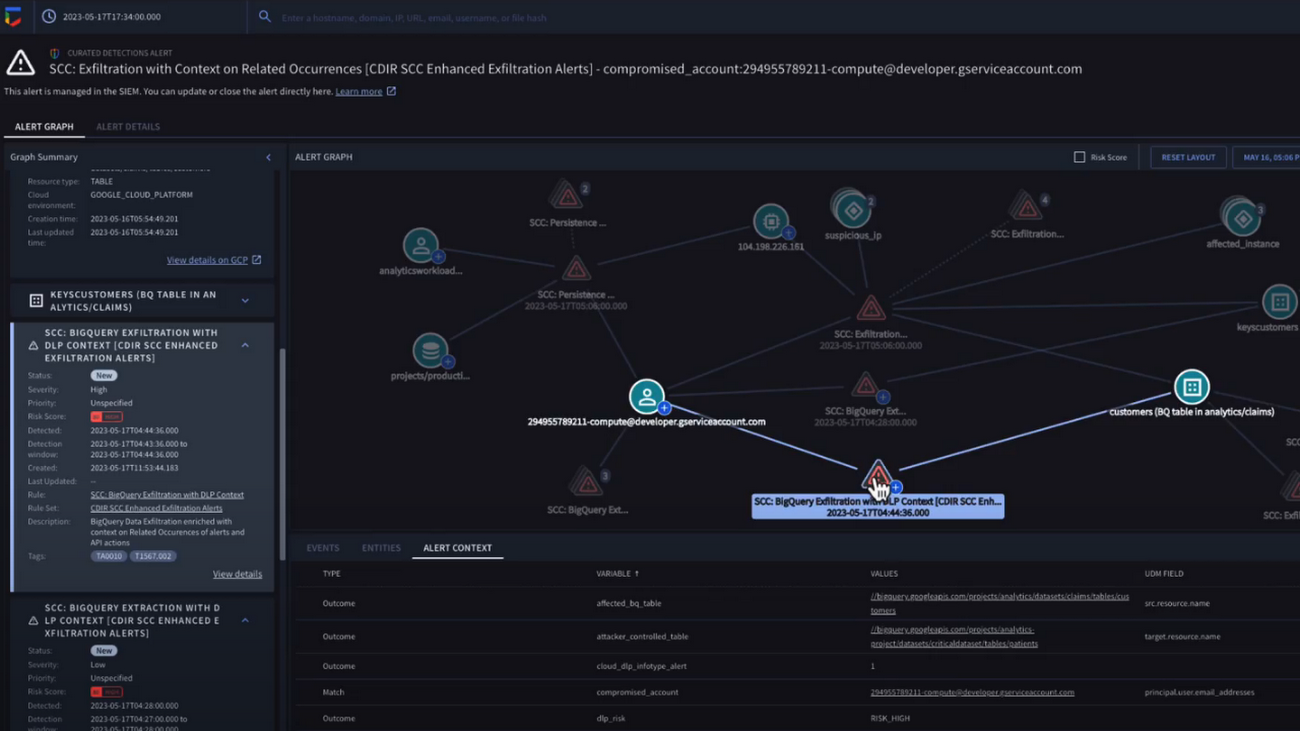
The new Chronicle Alert Graph surfaces key details of primary alerts you’re investigating in seconds. Combining cloud alerts and telemetry and correlating that with vital context from other sources (such as user data, endpoint data, and threat intelligence,) you can explore the visual representation of an alert’s relationship to other alerts and entities, dig into the potential attack paths, get quick summaries of implicated security artifacts, and pivot into your Google Cloud Console to do a deeper dive into potentially-impacted resources.
In our example, we can see a BigQuery exfiltration event associated with a customer and that it’s associated with a particular service account tied to a Google Cloud org. Alert context below tells us more about what’s been impacted. It shows us that cloud credentials in the form of encryption keys and email addresses were associated with the event.
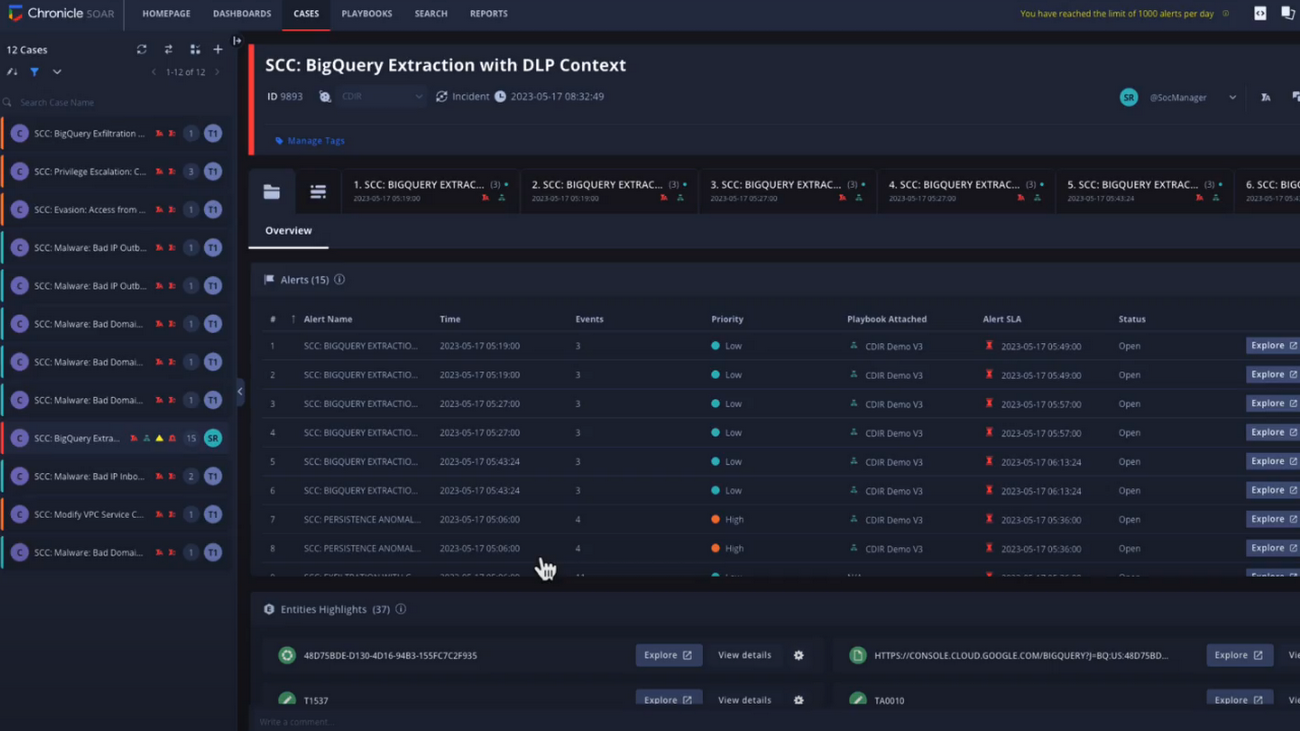
Chronicle case management automatically groups any related alerts into threat-centric cases, uniting the information that matters and making it simple for you to see and understand the scope of the event.
In our example, Chronicle groups these alerts together based on common source address and username, and the case wall provides the summary of the alerts and actions that are taking place across the entire case.
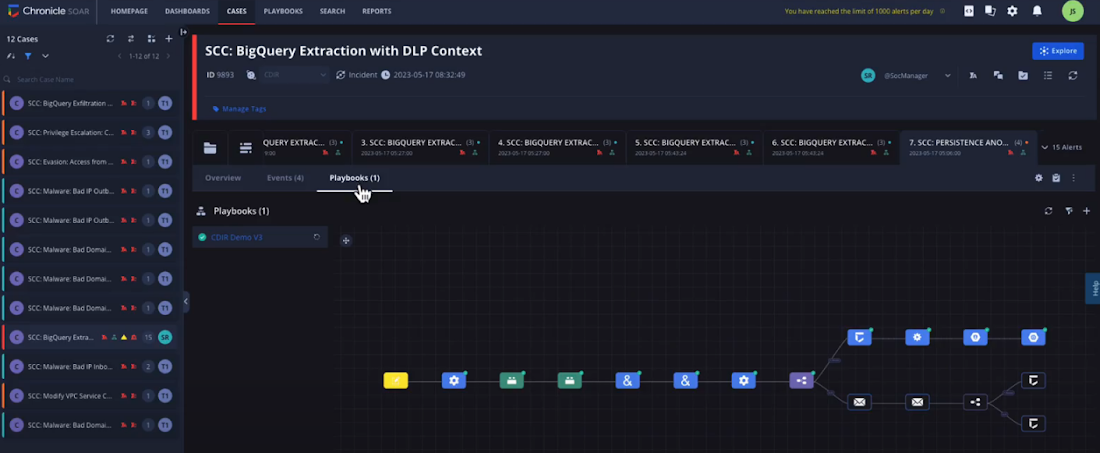
Chronicle playbooks, designed specifically for Google Cloud, automate your desired response processes. In our example, when an alert was generated a playbook automatically ran through predefined steps that gathered data, enrichment, and took automated remediation steps to prevent this service account and instance from continuing.
Ready to detect with confidence, investigate with broad context, respond with speed and precision, and simplify data ingestion? Chronicle Security Operations is your go-to for turnkey, end-to-end threat detection, investigation, and response on Google Cloud.
Tune in to our Security Summit session to learn more and see a demo of the new Google Cloud TDIR capabilities.
Enable high quality curated detections in Chronicle SecOps Suite

2829
Of your peers have already read this article.
2:30 Minutes
The most insightful time you'll spend today!
A critical component of any security operations team’s job is to deliver high-fidelity detections of potential threats across the breadth of adversary tactics. But increasingly sophisticated threat actors, an expanding attack surface, and an ever-present cybersecurity talent shortage make this task more challenging than ever.
Google keeps more people safe online than anyone else. Individuals, businesses and governments globally depend on our products that are secure-by-design and secure-by-default. Part of the “magic” behind Google’s security is the sheer scale of threat intelligence we are able to derive from our billions of users, browsers, and devices.
Today, we are putting the power of Google’s intelligence in the hands of security operations teams. We are thrilled to announce the general availability of curated detections as part of our Chronicle SecOps Suite. These detections are built by our Google Cloud Threat Intelligence (GCTI) team, and are actively maintained to reduce manual toil in your team.
Our detections provide security teams with high quality, actionable, out-of-the-box threat detection content curated, built and maintained by Google Cloud Threat Intelligence (GCTI) researchers. Our scale, and depth of intelligence, gained by securing billions of users everyday, gives us a unique vantage point to craft effective and targeted detections. These native detection sets cover a wide variety of threats for cloud and beyond, including Windows-based attacks like ransomware, remote-access tools (RAT), infostealers, data exfiltration, suspicious activity, and weakened configurations.
With this launch, security teams can smoothly leverage Google’s expertise and unique visibility into the threat landscape. This release helps understaffed and overstressed security teams keep up with an ever evolving threat landscape, quickly identify threats, and drive effective investigation and response. With this new release, security teams can:
- Enable high quality curated detections with a single click from within the Chronicle console.
- Operationalize data with high-fidelity threat detections, stitched with context available from authoritative sources (such as IAM and CMDB).
- Accelerate investigation and response by finding anomalistic assets and domains with prevalence visualization for the detections triggered.
- Map detection coverage to the MITRE ATT&CK framework to better understand adversary tactics and techniques and uncover potential gaps in defenses.
Detections are constantly updated and refined by GCTI researchers based on the evolving threat landscape. The first release of curated detections includes two categories that cover a broad range of threats, including:
- Windows-based threats: Coverage for several classes of threats including infostealers, ransomware, RATs, misused software, and crypto activity.
- Cloud attacks and cloud misconfigurations: Secure cloud workloads with additional coverage around exfiltration of data, suspicious behavior, and additional vectors.
Let’s look at an example of how you can put curated detections to work within the Chronicle dashboard, monitor coverage, and map to MITRE ATT&CK®.
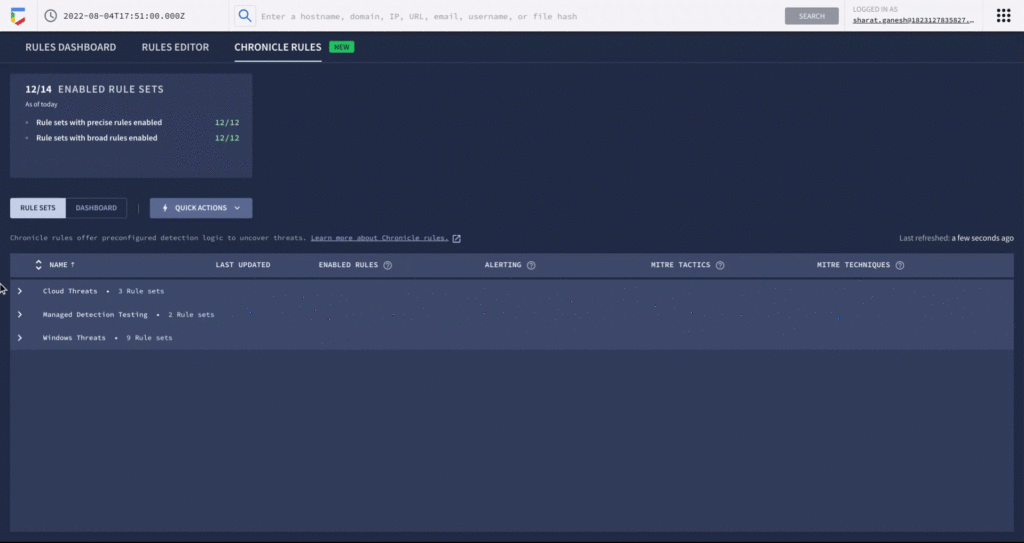
An analyst can learn more details around specific detections and understand how they map to the MITRE ATT&CK framework. There are customized settings to configure deployment and alerting, and specify exceptions via reference lists.
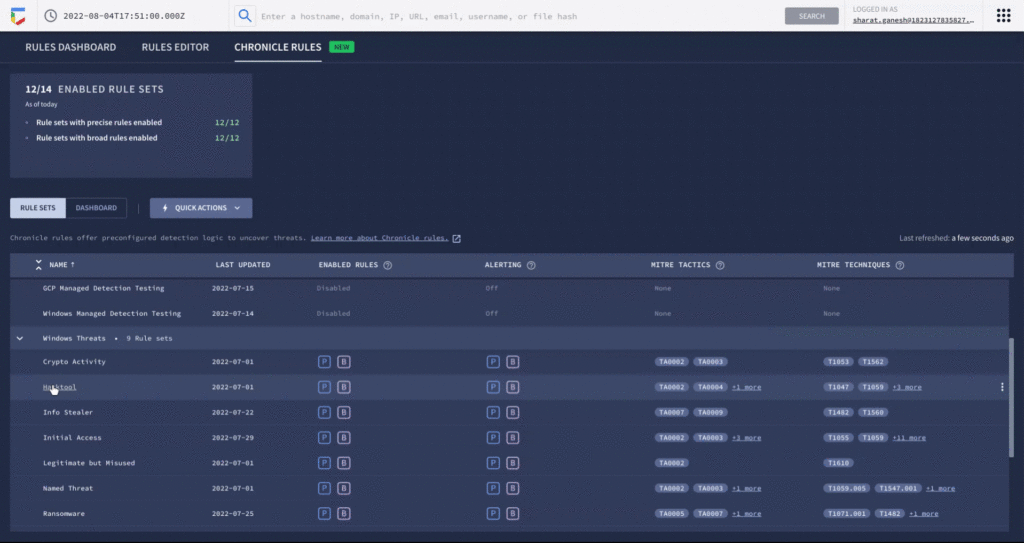
You can see each rule which has generated a detection against your log data in the Chronicle rules dashboard. You can observe detections associated with the rule and pivot to investigative views. For example, here is the detection view from the timeline of an Empire Powershell Stager launch triggered by the Windows RAT rule set. You can also easily pivot to associated information and investigate the asset on which it was triggered.
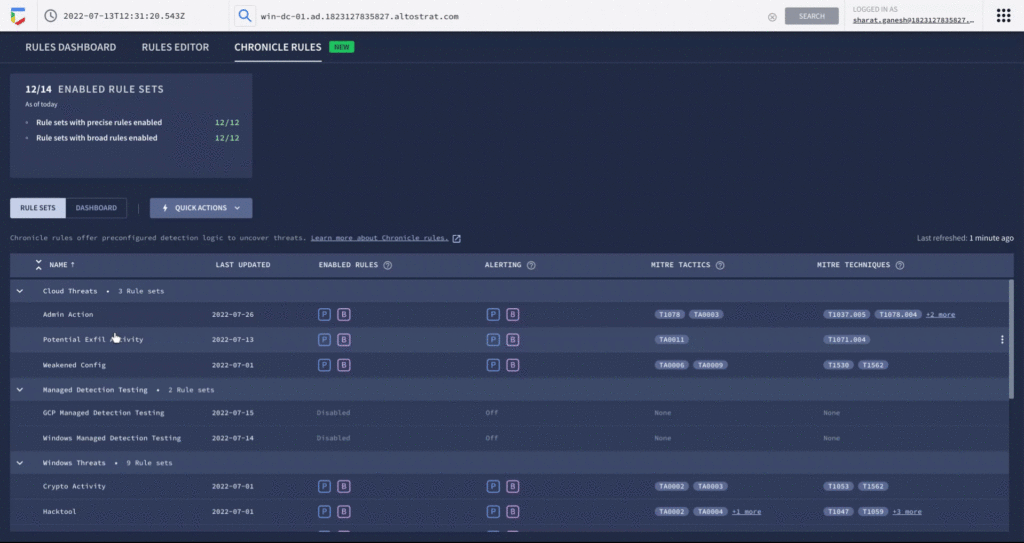
By surfacing impactful, high-efficacy detections, Chronicle can enable analysts to spend time responding to actual threats and reduce alert fatigue. Our customers who used curated detections during our public preview were able to detect malicious activity and take actions to prevent threats earlier in their lifecycle. And there’s more to come. We will be delivering a steady release of new detection categories covering a wide variety of threats, community-driven content, and other out-of-the-box analytics.
Ready to put Google’s intelligence to work in your Security Operations Center? Contact Google Cloud sales or your customer success CSM team. You can also learn more about all these new capabilities in Google Chronicle in our product documentation.
More Relevant Stories for Your Company

Chrome OS’s Hybrid Work Model Powers Google’s Return to Work Strategy
The pandemic continues to deeply affect our lives around the globe. In some places, new cases are surging and returning to work is the last thing on people’s minds. In other areas, conditions are improving and companies are starting to think about transitioning their workforce back to the office. Exactly
Google Cloud’s Invisible Security Vision: Key Highlights
Yesterday we held our final Google Cloud Security Talks event of 2021. Our event focused on zero trust and covered everything from Google’s history with BeyondCorp to our strategic thinking when it comes to applying zero trust principles to production environments. We shared product updates across the portfolio and talked about how
Google Cloud to Implement European Commission’s New Privacy Clauses to Safeguard Cross-border Data Transfer
The European Commission (EC) has recently published new Standard Contractual Clauses (SCCs, also known as Model Contractual Clauses) to help safeguard European personal data. Following the applicable transition period, these new SCCs will replace the SCCs previously adopted by the EC. Google Cloud plans to incorporate the new SCCs into our contracts

Confidential Computing: Google Cloud Security, Project Zero and AMD Come Together to Secure Sensitive Workloads
At Google Cloud, we believe that the protection of our customers’ sensitive data is paramount, and encryption is a powerful mechanism to help achieve this goal. For years, we have supported encryption in transit when our customers ingest their data to bring it to the cloud. We’ve also long supported
