





Predict Protein Structures with AlphaFold on Vertex AI

2828
Of your peers have already read this article.
3:30 Minutes
The most insightful time you'll spend today!
Today, to accelerate research in the bio-pharma space, from the creation of treatments for diseases to the production of new synthetic biomaterials, we are announcing a new Vertex AI solution that demonstrates how to use Vertex AI Pipelines to run DeepMind’s AlphaFold protein structure predictions at scale.
Once a protein’s structure is determined and its role within the cell is understood, scientists can develop drugs that can modulate the protein function based on its role in the cell. DeepMind, an AI research organization within Alphabet, created the AlphaFold system to advance this area of research by helping data scientists and other researchers to accurately predict protein geometries at scale.
In 2020, in the Critical Assessment of Techniques for Protein Structure Prediction (CASP14) experiment, DeepMind presented a version of AlphaFold that predicted protein structures so accurately, experts declared the “protein-folding problem” solved. The next year, DeepMind open sourced the AlphaFold 2.0 system. Soon after, Google Cloud released a solution that integrated AlphaFold with Vertex AI Workbench to facilitate interactive experimentation. This made it easier for many data scientists to efficiently work with AlphaFold, and today’s announcement builds on that foundation.
Last week, AlphaFold took another significant step forward when DeepMind, in partnership with the European Bioinformatics Institute (EMBL-EBI), released predicted structures for nearly all cataloged proteins known to science. This release expands the AlphaFold database from nearly 1 million structures to over 200 million structures—and potentially increases our understanding of biology to a profound degree. Between this continued growth in the AlphaFold database and the efficiency of Vertex AI, we look forward to the discoveries researchers around the world will make.
In this article, we’ll explain how you can start experimenting with this solution, and we’ll also survey its benefits, which include offering lower costs through optimized selection of hardware, reproducibility through experiment tracking, lineage and metadata management, and faster run time through parallelization.
Background for running AlphaFold on Vertex AI
Generating a protein structure prediction is a computationally intensive task. It requires significant CPU and ML accelerator resources and can take hours or even days to compute. Running inference workflows at scale can be challenging—these challenges include optimizing inference elapsed time, optimizing hardware resource utilization, and managing experiments.Our new Vertex AI solution is meant to address these challenges.
To better understand how the solution addresses these challenges, let’s review the AlphaFold inference workflow:
- Feature preprocessing. You use the input protein sequence (in the FASTA format) to search through genetic sequences across organisms and protein template databases using common open source tools. These tools include JackHMMER with MGnify and UniRef90, HHBlits with Uniclust30 and BFD, and HHSearch with PDB70. The outputs of the search (which consist of multiple sequence alignments (MSAs) and structural templates) and the input sequences are processed as inputs to an inference model. You can run the feature preprocessing steps only on a CPU platform. If you’re using full-size databases, the process can take a few hours to complete.
- Model inference. The AlphaFold structure prediction system includes a set of pretrained models, including models for predicting monomer structures, models for predicting multimer structures, and models that have been fine-tuned for CASP. At inference time, you independently run the five models of a given type (such as monomer models) on the same set of inputs. By default, one prediction is generated per model when folding monomer models, and five predictions are generated per model when folding multimers. This step of the inference workflow is computationally very intensive and requires GPU or TPU acceleration.
- (Optional) Structure relaxation. In order to resolve any structural violations and clashes that are in the structure returned by the inference models, you can perform a structure relaxation step. In the AlphaFold system, you use the OpenMM molecular mechanics simulation package to perform a restrained energy minimization procedure. Relaxation is also very computationally intensive, and although you can run the step on a CPU-only platform, you can also accelerate the process by using GPUs.
The Vertex AI solution
The AlphaFold batch inference with the Vertex AI solution lets you efficiently run AlphaFold inference at scale by focusing on the following optimizations:
- Optimizing inference workflow by parallelizing independent steps.
- Optimizing hardware utilization (and as a result, costs) by running each step on the optimal hardware platform. As part of this optimization, the solution automatically provisions and deprovisions the compute resources required for a step.
- Describing a robust and flexible experiment tracking approach that simplifies the process of running and analyzing hundreds of concurrent inference workflows.
The following diagram shows the architecture of the solution.
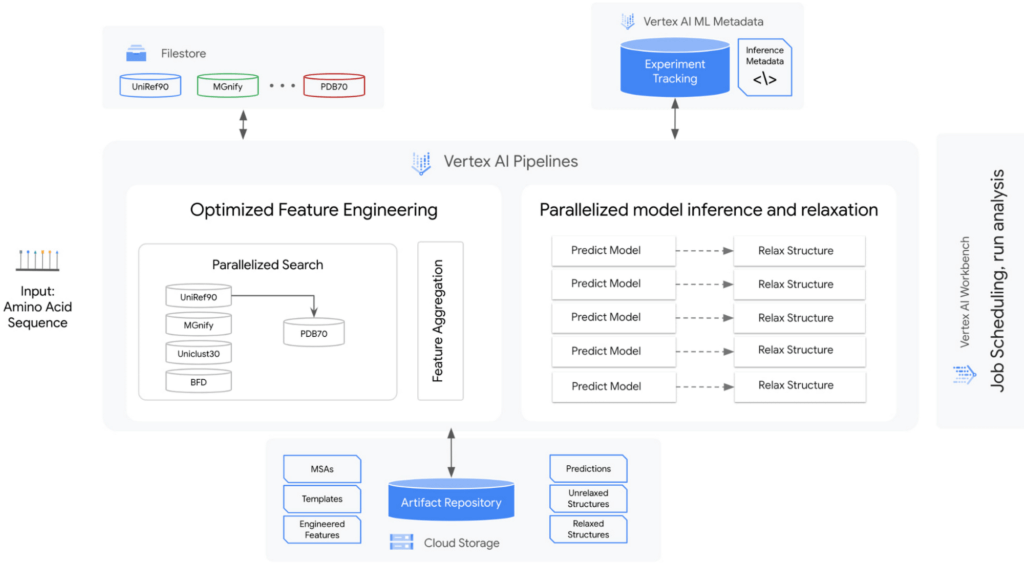
The solution encompasses the following:
A strategy for managing genetic databases. The solution includes high-performance, fully managed file storage. In this solution, Cloud Filestore is used to manage multiple versions of the databases and to provide high throughput and low-latency access.
An orchestrator to parallelize, orchestrate, and efficiently run steps in the workflow. Predictions, relaxations, and some feature engineering can be parallelized. In this solution, Vertex AI Pipelines is used as the orchestrator and runtime execution engine for the workflow steps.
Optimized hardware platform selection for each step. The prediction and relaxation steps run on GPUs, and feature engineering runs on CPUs. The prediction and relaxation steps can use multi-GPU node configurations. This is especially important for the prediction step because the memory usage is approximately quadratic with the number of residues. Therefore, predicting a large protein structure can exceed the memory of a single GPU device.
Metadata and artifact management. The solution includes management for running and analyzing experiments at scale. In this solution, Vertex AI Metadata is used to manage metadata and artifacts.
The basis of the solution is a set of reusable Vertex AI Pipelines components that encapsulate core steps in the AlphaFold inference workflow: feature preprocessing, prediction, and relaxation. In addition to those components, there are auxiliary components that break down the feature engineering step into tools, and helper components that aid in the organization and orchestration of the workflow.
The solution includes two sample pipelines: the universal pipeline and a monomer pipeline. The universal pipeline mirrors the settings and functionality of the inference script in the AlphaFold Github repository. It tracks elapsed time and optimizes compute resources utilization. The monomer pipeline further optimizes the workflow by making feature engineering more efficient. You can customize the pipeline by plugging in your own databases.
Next steps
To learn more and to try out this solution, check our GitHub repository, which contains the components and universal and monomer pipelines. The artifacts in the repository are designed so that you can customize them. In addition, you can integrate this solution into your upstream and downstream workflows for further analysis. To learn more about Vertex AI, visit our product page.
Acknowledgements
We would like to thank the following people for their collaboration: Shweta Maniar, Sampath Koppole, Mikhail Chrestkha, Jasper Wang, Alex Burdenko, Meera Lakhavani, Joan Kallogjeri, Dong Meng (NVIDIA), Mike Thomas (NVIDIA), and Jill Milton (NVIDIA).
Finally and most importantly, we would like to thank our Solution Manager Donna Schut for managing this solution from start to finish. This would not have been possible without Donna.
6817
Of your peers have already watched this video.
2:30 Minutes
The most insightful time you'll spend today!
What is BigQuery?
BigQuery is Google Cloud’s enterprise data warehouse designed to help you ingest, store, analyze, and visualize big data with ease.
Organizations rely on data warehouses to aggregate data from disparate sources, process it, and make it readily available for data analysis that supports their strategic decision-making.
You can ingest data into BigQuery either through batch uploading or streaming data directly to deliver real-time insights.
As a fully-managed data warehouse, Google takes care of the infrastructure so you can focus on analyzing your data up to petabyte scale.
BigQuery supports the same Structured Query Language, or SQL, for analyzing your data, which you may be familiar with if you’ve worked with ANSI-compliant relational databases in the past.
If you’re looking to create machine learning models using your enterprise data, you can do so with BigQuery ML.
With only a few lines of SQL, you can train and execute models on your BigQuery data without needing to move it around.
When it comes time to visualize your data, BigQuery integrates with Looker, as well as several other business intelligence tools across our partner ecosystem.
Now, how do you use BigQuery?
Luckily, it’s straightforward to get up and running with BigQuery.
After creating a GCP project, you can immediately start querying public data sets, which Google Cloud hosts and makes available to all BigQuery users, or you can load your own data into BigQuery to analyze.
Interacting with BigQuery to load data, run queries, or even create ML models can be done in three different ways.
First is by using the UI and the Cloud Console. Second is by using the BigQuery command line tool. And third is by making calls to the BigQuery API, using client libraries available in several languages.
BigQuery is integrated with Google Cloud’s Identity and Access Management Service so you can securely share your data and analytical insights across the organization.
What does it cost to use BigQuery?
With BigQuery, you pay for storing and querying data and streaming inserts.
Loading and exporting data are free of charge.
Storage costs are based on the amount of data stored and have two rates based on how often the data is changing.
Query costs can be either on demand, meaning you are charged per query by the amount of data processed, or flat rate for customers who want to purchase dedicated resources.
Google Introduces ML-based Predictive Autoscaling to Forecast Capacity and Match Scaling Demands
5000
Of your peers have already read this article.
3:00 Minutes
The most insightful time you'll spend today!
At Google Cloud, we believe you get most benefits from the cloud when you scale infrastructure based on changing demand. Compute Engine allows you to configure autoscaling to save costs during periods of low demand, and add capacity to support peak loads.
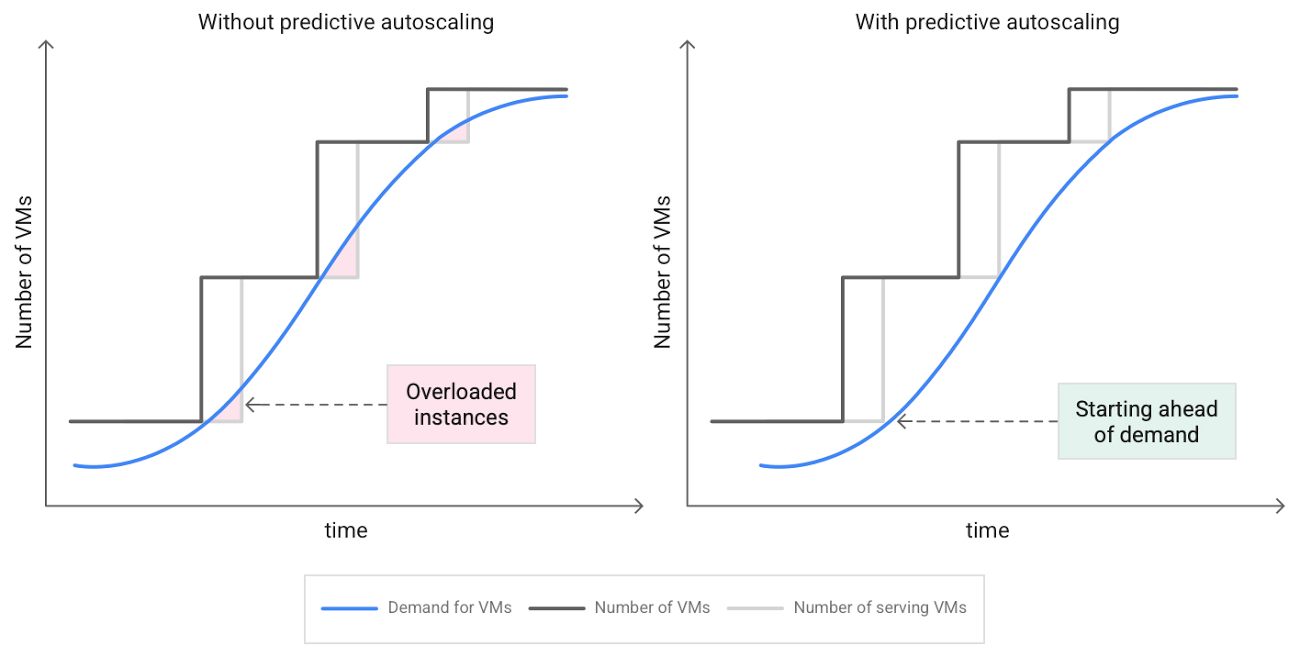
When you use a managed instance group (MIG), you can have an autoscaler automatically create or delete virtual machine (VM) instances based on increases or decreases in load. However, if your application takes several minutes to initialize, creating VMs in response to growing load might not increase your application’s capacity quickly enough. For example, if there’s a large increase in load (like when users first wake up in the morning), some users might experience delays while your application is initializing on new instances.
A good way to solve this problem would be to create VMs ahead of demand so that your application has enough time to initialize beforehand. This requires knowing upcoming demand. If only we could predict the future… Well, now we can!
Introducing predictive autoscaling
Predictive autoscaling uses Google Cloud’s machine learning capabilities to forecast capacity needs. It creates VMs ahead of growing demand allowing enough time for your application to initialize.
How does it work?
Predictive autoscaling uses your instance group’s CPU history to forecast future load and calculate how many VMs are needed to meet your target CPU utilization. Our machine learning adjusts the forecast based on recurring load patterns for each MIG.
You can specify how far in advance you want autoscaler to create new VMs by configuring the application initialization period. For example, if your app takes 5 minutes to initialize, autoscaler will create new instances 5 minutes ahead of the anticipated load increase. This allows you to keep your CPU utilization within the target and keep your application responsive even when there’s high growth in demand.
Many of our customers have different capacity needs during different times of the day or different days of the week. Our forecasting model understands weekly and daily patterns to cover for these differences. For example, if your app usually needs less capacity on the weekend our forecast will capture that. Or, if you have higher capacity needs during working hours, we also have you covered.
Why should you try it?
Predictive autoscaling continuously adapts forecasted capacity to best match upcoming demand. Autoscaler checks the forecast several times per minute and creates or deletes VMs to match its prediction. The forecast itself is updated every few minutes to match recent load trends so if your growth rate is higher or lower than usual we will adjust the forecast accordingly. This gives you capacity needed to cover peak load while saving on cost when demand goes down.
You can start using predictive autoscaling without worry as it’s fully compatible with the current autoscaler. Autoscaler will calculate enough VMs to cover both forecasted as well as real-time CPU load—whichever is higher. This works with other autoscaling features as well: you can scale based on schedule, your Load Balancer request target or Cloud Monitoring metrics. Autoscaler provides enough capacity to all of your configurations by taking the highest number of VMs needed to meet all your targets.
Getting started
You can enable predictive autoscaling in the Google Cloud Console. Select an autoscaled MIG from the instance groups page and click Edit group. Change predictive autoscaling configuration from Off to Optimize for availability.
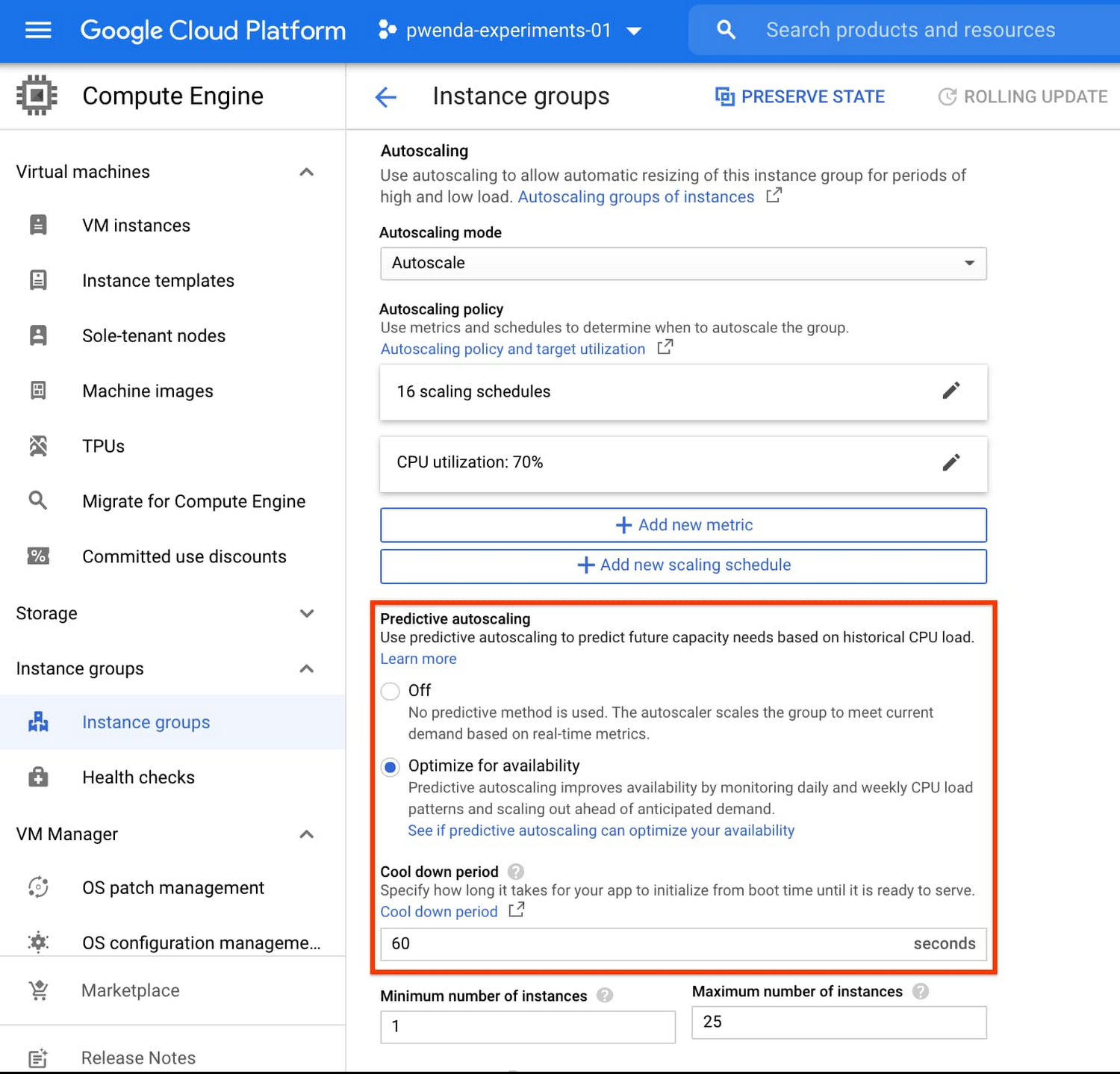
To better understand whether predictive autoscaling is good for your application, click the link See if predictive autoscaling can optimize your availability. This will show you a comparison of the last seven days with your current autoscaling configuration vs. with predictive autoscaling enabled.
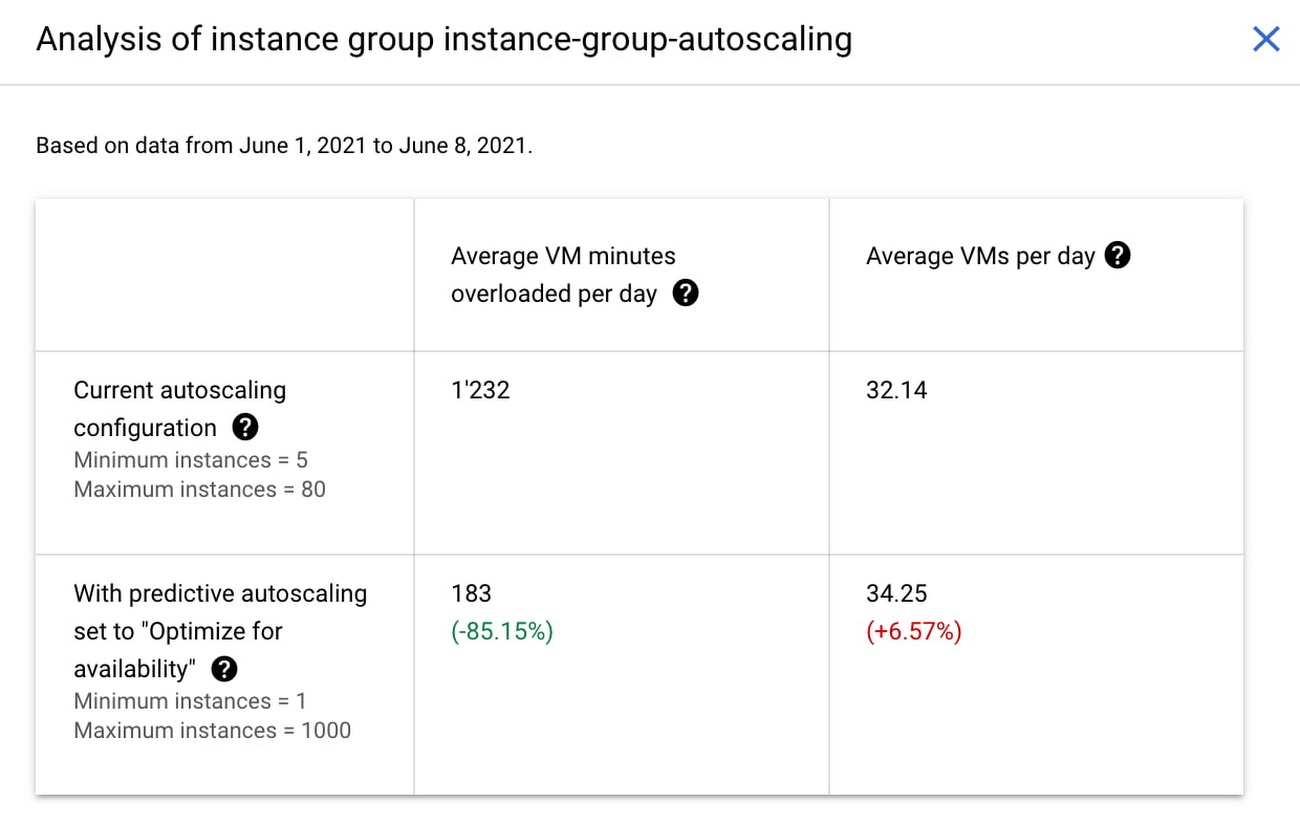
In the above chart,
- Average VM minutes overloaded per day shows how often your VMs exceed your CPU utilization target. This happens when demand is higher than available capacity. Predictive autoscaling can reduce this by starting VMs ahead of anticipated load.
- Average VMs per day is a proxy for cost. This shows how much additional VM capacity you need to keep your CPU utilization within the target you have set. You can optimize your cost by adjusting Minimum instances andCPU utilization as explained below.
Optimizing your configuration
Make sure your Cool down period reflects how long it takes for your application to initialize from VM boot time until it’s ready to serve the load. Predictive autoscaling will use this value to start VMs ahead of forecasted load. If you set it to 10 minutes (600 seconds) your VMs will start 10 minutes before the load is expected to increase.
Review your autoscaling CPU utilization target and Minimum number of instances. With predictive autoscaling you no longer need a buffer to compensate for the time it takes for a VM to start. If your application works best at 70% CPU utilization you don’t need to set target to a much lower value as predictive autoscaling will start VMs ahead of usual load. A higher CPU utilization and lower Minimum number of instances allows you to reduce the cost as you don’t need to pay for additional capacity to prepare for growing demand.
Try predictive autoscaling today
Predictive autoscaling is generally available across all Google Cloud regions. For more information on how to configure, simulate and monitor predictive autoscaling, consult the documentation.
Make Your Data Useful with Google Cloud Products and Services

3239
Of your peers have already read this article.
1:30 Minutes
The most insightful time you'll spend today!
While you likely know that data science is the practice of making data useful, you may not have a clear landscape around the tools that can aid each stage of the data science workflow as you use machine learning to tackle your challenges.
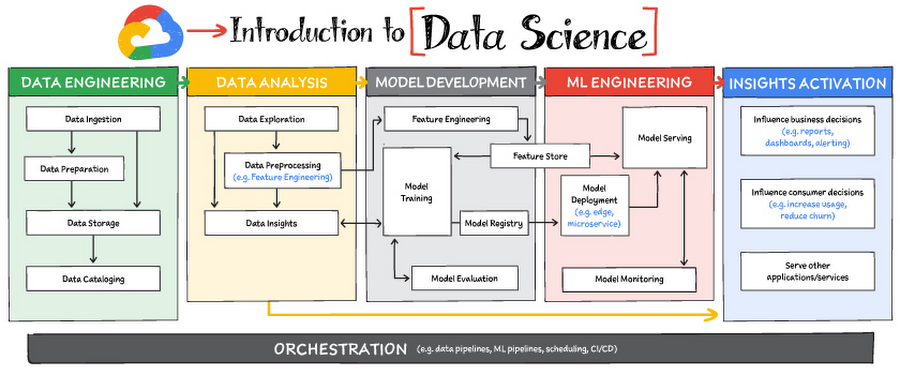
Read on to discover the six broad areas that are critical to the process of making data useful, and some corresponding Google Cloud products and services for those areas.
https://youtube.com/watch?v=EQvLUMjz-g4%3Fenablejsapi%3D1%26
Data engineering
Perhaps the greatest missed opportunities in data science stem from data that exists somewhere, but hasn’t been made accessible for use in further analysis. Laying the critical foundation for downstream systems, data engineering involves the transporting, shaping, and enriching of data for the purposes of making it available and accessible.
Data ingestion and data preprocessing on Google Cloud
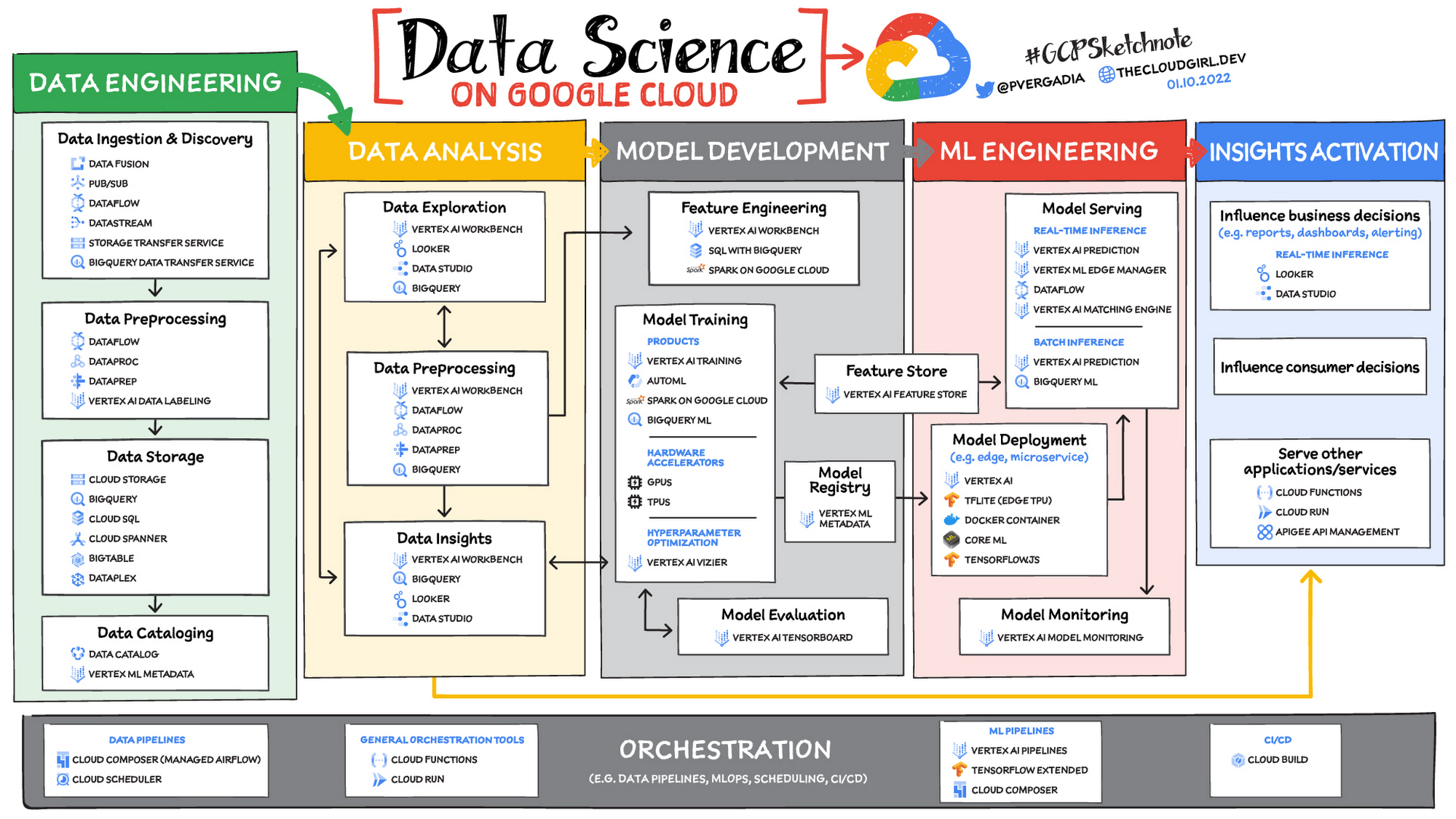
Here we consider data ingestion as moving data from one place to another, and data preparation the process of transformation, augmentation, or enrichment prior to consumption. Global scalability, high throughput, real-time access, and robustness are common challenges in this stage. For scalable, real-time, and batch data processing, look into building data ingestion and preprocessing pipelines with Dataflow, a managed Apache Beam service. There’s a reason why Dataflow is called the backbone of analytics on Google Cloud.
If you’re looking for a scalable messaging system to help you ingest data, consider Cloud Pub/Sub, a global, horizontally scalable messaging infrastructure. Cloud Pub/Sub was built using the same infrastructure component that enabled Google products, including Ads, Search, and Gmail, to handle hundreds of millions of events per second.
If you want an easy way to automate data movement to BigQuery, a serverless data warehouse on Google Cloud, look into the BigQuery Data Transfer Service. For transferring data to Cloud Storage, take a look at the Storage Transfer Service. Or, for a no-code data ingestion and transformation tool, check out Data Fusion, which has over 150 preconfigured connectors and transformations. In addition to Dataflow and Data Fusion for data preparation, Spark users may want to look at related products and features for Spark on Google Cloud.
Data storage and data cataloging on Google Cloud
For structured data, consider a data warehouse like BigQuery, or any of the Cloud Databases (relational ones like Cloud SQL and NoSQL ones like Cloud BigTable and Cloud Firestore). For unstructured data, you can always use Cloud Storage. You may also want to consider a data lake. For data discovery, cataloging, and metadata management, consider Data Catalog. For a unified solution, take a look at Dataplex, which integrates a unified data management solution with an integrated analytics experience.
Learn more about data engineering on Google Cloud
- Explore the data engineering learning path
- Discover reference patterns
- Get certified by Google Cloud as a Professional Data Engineer
Data Analysis
From descriptive statistics to visualizations, data analysis is where the value of data starts to appear.
Data exploration, data preprocessing, and data insights
Data exploration, a highly iterative process, involves slicing and dicing data via data preprocessing before data insights can start to manifest through visualizations or simply via simple group-by, order-by operations. One hallmark of this phase is that the data scientist may not yet know which questions to ask about the data. In this somewhat ephemeral phase, a data analyst or scientist has likely uncovered some aha-moments, but hasn’t shared them yet. Once insights are shared, the flow enters the Insights Activation stage, where those insights become used to guide business decisions, influence consumer choices, or become embedded in other applications or services.
On Google Cloud, there are many ways to explore, preprocess, and uncover insights in your data. If you are looking for a notebook-based end-to-end data science environment, check out Vertex AI Workbench, which enables you to access, analyze, and visualize your entire data estate: from structured data at the petabyte-scale in SQL with BigQuery, to processing data with Spark on Google Cloud and its serverless, auto-scaling, and GPU acceleration capabilities. As a unified data science environment, Vertex AI Workbench also makes it easy to do machine learning with TensorFlow, PyTorch, and Spark, with built-in MLOps capabilities.
Finally, if your focus is on analyzing structured data from data warehouses and insight activation for business intelligence, you may want to also consider using Looker, with its rich interactive analytics, visualizations, dashboarding tools, and Looker Blocks to help you accelerate your time-to-insight.
Learn more about data analysis on Google Cloud
- Learn about Vertex AI Workbench for a Jupyter-based fully managed notebook environment
- Learn about how you can use BigQuery for petabyte-scale data analysis
- Learn about Spark on Google Cloud
- Discover the data analyst learning path
- Explore reference patterns for common analytics use cases
Model development
From linear regression to XGBoost, from TensorFlow to PyTorch, the model development stage is where machine learning starts to provide new ways of unlocking value from your data. Experimentation is a strong theme here, with data scientists looking to accelerate iteration speed between models without worrying about infrastructure overhead or context-switching between tools for data analysis and tools for productionizing models with MLOps.
To solve these challenges, once again, as a Jupyter-based fully managed, scalable, and enterprise-ready environment, Vertex AI Workbench makes it easy as the one-stop-shop for data science, combining analytics and machine learning, including Vertex AI services. Apache Spark, XGBoost, TensorFlow, and PyTorch are just some of the frameworks supported on Vertex AI Workbench. Vertex AI Workbench makes managing the underlying compute infrastructure needed for model training easy with the ability to scale vertically and horizontally, and with idle timeouts and auto shutdown capabilities to reduce unnecessary costs. Notebooks themselves can be used for distributed training and hyperparameter optimization, and they include Git integration for version control. Due to the significant reduction in context switching required, data scientists can build and train models 5x faster using Vertex AI Workbench than when using traditional notebooks.
With Vertex AI, custom models can be trained and deployed using containers. You can take advantage of pre-built containers or custom containers to train and deploy your models.
For low-code model development, data analysts and data scientists can use SQL with BigQuery ML to train and deploy models (including XGBoost, deep neural networks, and PCA), directly using BigQuery’s built-in serverless, autoscaling capabilities. Behind-the-scenes, BigQuery ML leverages Vertex AI to enable automated hyperparameter tuning, and explainable AI. For no-code model development, Vertex AI Training provides a point-and-click interface to train powerful models using AutoML, which comes in multiple flavors: AutoML Tables, AutoML Image, AutoML Text, AutoML Video, and AutoML Translation.
Learn more about model development on Google Cloud
- Learn about Vertex AI Workbench for a Jupyter-based fully managed notebook environment
- Learn more about Vertex AI
ML engineering
Once a satisfactory model is developed, the next step is to incorporate all the activities of a well-engineered application lifecycle, including testing, deployment, and monitoring. And all of those activities should be as automated and robust as possible.
Managed datasets and Feature Store on Vertex AI provide shared repositories for datasets and engineered features, respectively, which provide a single source of truth for data and promote reuse and collaboration within and across teams. Vertex AI’s model serving capability enables deployment of models with multiple versions, automatic capacity scaling, and user-specified load balancing. Finally, Vertex AI Model Monitoring provides the ability to monitor prediction requests flowing into a deployed model and automatically alert model owners whenever the production traffic deviates beyond user-defined thresholds and previous historical prediction requests.
MLOps is the industry term for modern, well engineered ML services, with scalability, monitoring, reliability, automated CI/CD, and many other characteristics and functions that are now taken for granted in the application domain. The ML engineering features provided by Vertex AI are informed by Google’s extensive experience deploying and operating internal ML services. Our goal with Vertex AI is to provide everyone with easy access to essential MLOps services and best practices.
Learn more about ML engineering and MLOps on Google Cloud
- Follow the guides, tutorials and documentation for Vertex AI
- Watch this video to learn more about Vertex AI
- Discover the data scientist/machine learning engineer learning path
- Get certified as a Professional ML Engineer
Insights activation
The insights activation stage is where your data has now become useful to other teams and processes. You can use Looker and Data Studio to enable use cases in which data is used to influence business decisions with charts, reports, and alerts.
Data can also influence customer decisions and as a result increase usage or decrease churn, for example. Finally, the data can also be used by other services to drive insights; these services can run outside Google Cloud, inside Google Cloud on Cloud Run or Cloud Functions, and/or using Apigee API Management as an interface.
Learn more about insights activation on Google Cloud
- Watch this video to learn about building interactive ML apps using Looker and Vertex AI
- Learn about Looker, and Looker solutions for eCommerce, Digital Media and more
- Discover a gallery of interactive dashboards created with Data Studio
- Watch this video to understand the difference between Cloud Run and Cloud Functions
Orchestration
All of the capabilities discussed above provide the key building blocks to a modern data science solution, but a practical application of those capabilities requires orchestration to automatically manage the flow of data from one service to another. This is where a combination of data pipelines, ML pipelines, and MLOps comes into play. Effective orchestration reduces the amount of time that it takes to reliably go from data ingestion to deploying your model in production, in a way that lets you monitor and understand your ML system.
For data pipeline orchestration, Cloud Composer and Cloud Scheduler are both used to kick off and maintain the pipeline.
For ML pipeline orchestration, Vertex AI Pipelines is a managed machine learning service that enables you to increase the pace at which you experiment with and develop machine learning models and the pace at which you transition those models to production. Vertex Pipelines is serverless, which means that you don’t need to deal with managing an underlying GKE cluster or infrastructure. It scales up when you need it to, and you pay only for what you use. In short, it lets you just focus on building your data science pipelines.
Learn more about orchestration on Google Cloud
- Read more about Cloud Composer for Airflow-based pipelines
- Try some example notebooks on Github with Vertex AI Pipelines
- Learn different ways to trigger Vertex AI Pipeline runs
- Read the whitepaper on Practitioners Guide to MLOps: A framework for continuous delivery and automation of machine learning
Summary
Google Cloud offers a complete suite of data management, analytics, and machine learning tools to generate insights from data. Want to learn more? Check out the following resources:
Special thanks to the following contributors to this blogpost: Alok Pattani, Brad Miro, Saeed Aghabozorgi, Diptiman Raichaudhuri, Reza Rokni.
3001
Of your peers have already watched this video.
26:30 Minutes
The most insightful time you'll spend today!
What’s Next for Personalization on Google Cloud
Customer shopping behavior has changed for good. With fewer in-store shopping visits retailers have had to shore up their digital storefronts and explore new ways to meaningfully engage with their customers.
Delivering a superior customer experience has become even more of a differentiator for the early movers and personalized recommendations have emerged as one of the strongest potential drivers of revenue lift.
But as many retailers have discovered delivering recommendations at scale can actually be quite complex and time consuming.
Learn how to deliver highly-personalized product recommendations with Google Cloud Recommendations AI.
Recommendations AI is now fully open access and self-serve, with more built-in integrations with Google Shopping Merchant Center and Google Analytics, as well as more controls over how you create recommendation pipelines and manage your costs.
You will also hear how Google Cloud partners like Qubit and BigCommerce have successfully deployed Recommendations AI for their customers and made us an integral part of their solution offerings.
Google Products Helps HMH’s Healthcare Staff Work from Anywhere Efficiently and Securely!

10253
Of your peers have already read this article.
3:00 Minutes
The most insightful time you'll spend today!
Hackensack Meridian Health (HMH) executive Mark Eimer explains how an ambitiously-timed rollout of a comprehensive suite of Google products helped the entire organization—from doctors to IT staff—achieve better security, cultivate a more equitable work environment, and ultimately, improve patient outcomes.
How does a recently merged, 17-hospital healthcare system fast-track a platform migration and hardware rollout securely and in a way that improves work for everyone, regardless of location or role? These are the questions that kept me up at night in early 2020, when the pandemic demanded a “big bang”—something our legacy laptops and operating systems couldn’t handle.
We began our work with Google in 2020 with the adoption of Chrome as our default browser. As we migrated platforms, keeping patient data safe was of the utmost importance to us, along with providing every staff member with the tools they needed to work virtually. Our staff often experienced issues accessing our web-based applications using Internet Explorer or Edge Browser, a problem that went away when we switched to Chrome. Chrome’s versatile compatibility also made it easier for my team to migrate all of our web-based operations, and Chrome’s security and manageability were key components to making this switch a huge win for the organization.
The success of this migration led us to extend our Google partnership to patient care applications—where Google’s expertise in AI and ML helps scale the use of diagnostics tools and improve other aspects of the patient journey.

Achieving security at every step
Like so many other healthcare organizations, we’ve been concerned about ransomware attacks. This is part of why we moved to Google Workspace and distributed over 3,000 Chrome OS devices in kiosk mode in March of 2020, when many of us went remote due to the pandemic. We were very concerned about team members accessing corporate applications through home devices that were running EOL operating systems (WIN7), as well as a general lack of antivirus and encryption measures.
We were protected by the fact that Google’s software and hardware both had built-in security features that we needed to stave off sophisticated attackers. For example, Chrome OS automatically updates to the latest security update and encrypts data living outside the cloud on the hardware. These features protected us from security-related disruptions, letting us securely move a huge library of file shares and emails across thousands of accounts to Google Chrome OS in just four months.
A year later, in March 2021, we migrated the enterprise over to Google Workspace and saw an immediate reduction in spam by 30% from the inherent built-in AI/ML. This meant staff were less likely to receive (and click through) phishing attempts. My team could connect, create, and collaborate easily and securely—even as more of us were working from home and needed to access sensitive data remotely.
Leveling the playing field
As an organization, we were surprised by how many team members didn’t have personal computers at home. We quickly decided that if we needed team members to work from home, the health network would have to supply hardware. Chromebooks’ lower price tag compared to PCs—on top of their built-in security controls—allowed us to purchase, deploy, and support that initial distribution of 3,000 Chromebooks to team members in less than three weeks, providing devices to every eligible remote employee instead of just a select few. This was vital to reaching our equitable technology goal as part of our diversity and inclusion initiative: everybody has the same tools to do good work.
When all employees have what they need to do their jobs well, we get better patient outcomes. Before we began this cloud adoption journey, patient and staff experiences were different within the hospitals and outside of them.
Now it’s the same wherever our staff is, and we’ve seen efficiency and accessibility benefits extend to the patient side. For example, we built a web-based contact center that supports 80 locations that use Workspace and Chrome OS devices. Since customer service, admin, and providers are all on the same system, it has become a one-stop shop for patients.
Furthermore, through the Grow with Google program, we were able to provide another benefit to employees that drove our equity goals. Google trained 50 non-IT staff members—from environmental services, food and nutrition, and other non-tech areas who were interested in making a career change to IT—on the Google products we were using. They may not have thought about switching to a career in IT before the Grow with Google program came to our organization, but through this partnership, they now have that opportunity.
A strategic, long-term partner
With any large-scale rollout, the work doesn’t end once laptops are in employee hands. Google has shown their commitment to long-term collaboration as they continuously optimize their products for the unique needs of healthcare providers and go the extra mile in tailoring tools to our staff’s workflows.
For example, on the Chrome OS side, the Google team has helped our registration desks and document centers with device integration for hardware like credit card readers and e-signature pads. They’ve also helped us meet security and privacy requirements mandated by state and federal governments around HIPAA, Medicaid, and Medicare reimbursements. Over this next year, we’ll look at a feature roadmap with Google Cloud to deliver further enhancements, iterating on the product itself to meet our needs for the present and the future.

Delivering the future of healthcare
The benefits we’ve seen around security and usability—and the ability to provide all staff with equal access to Google’s technology—are why we’re expanding our partnership with Google to both the administrative and clinical sides of HMH. In addition to further Google rollouts with corporate, next year we’re distributing Chromebooks to all 350 of our ambulatory clinics.
We’re also working with the Google professional services team to create a custom AI model that analyzes 3D mammogram images. This AI model will enable two providers to read mammograms—which adheres to international best practices but is currently rare in the US—without requiring additional time. Conducting double readings of mammograms will yield better health outcomes for our patients, such as a lower patient recall rate and an increased accuracy in detecting breast cancer.
We’re currently building the model using a variety of Google Cloud products, including Cloud Healthcare API. Once complete, this model is expected to be trained, deployed, and maintained in Google’s Vertex AI, allowing our providers to be more productive as they make clinical decisions with AI support. As the model is proven over time, we plan to make the predictive services accessible to other healthcare organizations.
With Google, we’re able to achieve a unified architecture for storing data as well as training and deploying AI models, which enable our staff to work more efficiently and securely from anywhere. While I may not be able to predict the future as accurately as AI can, I foresee our continued partnership with Google as a key part of HMH’s improved provider and patient outcomes.
More Relevant Stories for Your Company
Everything a Marketer Needs to Know About Machine Learning
As consumer expectations grow for more personalized, relevant, and assistive experiences, machine learning is becoming an invaluable tool to help meet those demands. It’s helping marketers create smarter customer segmentations, deliver more relevant creative campaigns, and measure performance more effectively. In fact, 85% of executives believe AI will allow their

Google Cloud Featured at TechCrunch Disrupt 2021
Startups need to move quickly and focus their limited resources on areas where they can differentiate. If infrastructure isn’t your differentiator, don’t put a lot of energy into your infrastructure when someone else can do it for you. What’s more, time-to-market matters to startups more now than ever. Successful early

Speak Now to Book a Flight: easyJet’s Uses AI to Improve Customer Experience
With a growing fleet of 325 aircraft that cover more than 1,000 routes across 158 airports, easyJet is one of Europe’s most popular airlines. And easyJet serves an average of 90 million passengers each year, so a helpful mobile experience for its customers is a top priority. Travellers today are


How Marketers Can Turn Information into Action with Machine Learning
The biggest challenge marketers face with machine learning is, "how to get starter"? Instead of getting overwhelmed, they should focus on the applied machine learning by using the algorithms that are already built. Cassie Kozyrkov, the chief decision scientist with Google Cloud, says that marketers who are overwhelmed by everything
